Maintaining an effective state of application
readiness is becoming more difficult all the time
as IT organizations embrace transformational
technologies such as Windows 7 and 8,
virtualization, cloud, new application deployment
models and multiple access devices.
Flexera Software AdminStudio helps you accelerate
this transformation. But is your IT staff ready to
tap the full potential of the robust AdminStudio
feature set?
In-depth knowledge and finely honed skills speed
implementation so you can achieve faster time to
value and maximize your investment in AdminStudio.
Many IT organizations, however, don’t already have
this expertise in house. Or the experts they have
are committed to other critical projects and aren’t
available to implement and manage AdminStudio.
If this is the challenge you face, Flexera Software
training solutions can help. Our Application
Packaging using AdminStudio course brings your
packagers, desktop managers and other users up to
speed not only on AdminStudio functionality but also
on best practices for application readiness.
Build Staff Skills/Expertise through Training
Application Packaging using AdminStudio
provides a high-quality educational environment in
which participants become proficient in creating
transforms for existing third-party MSI packages and
identifying and resolving conflicts between packages
before deploying their applications.
Real-world examples and hands-on experience
throughout the training prepare participants to
apply the sophisticated capabilities of AdminStudio.
Course Highlights
Application Packaging using AdminStudio is a
five-day, instructor-led course. All classes are
conducted by highly skilled Flexera Software
instructors who average more than 10 years of
industry and training experience.
Customers can attend public courses at Flexera
Software training centers around the world. Onsite
training is also available for customers who want
more personalized training. Onsite training can
incorporate the installation and configuration of the
customer’s AdminStudio solution.
DATASHEET
Application Packaging using AdminStudio Training
Acquire In-house Skills and Expertise with Instructor-led Training
Application Packaging
Using AdminStudio Training
Provides:
• Faster, more effective
AdminStudio
deployment for faster
ROI
• Insight into prevailing
best practices for
a highly effective
application readiness
process
• Ability to repackage
traditional setups for
Windows Installer and
customize packages
for enterprise needs
• Skills acquisition,
enabling the staff to
prepare development
systems, perform
testing and document
application migration
• Knowledge transfer
to ensure ongoing
success with
application packaging
activities
Introduction and Overview
• AdminStudio Tools
• Overview of the Application Migration
Process
• Windows Installer Background
• Features and Benefits of Windows Installer
• Format of a Windows Installer Installation
• Windows Installer Concepts and
Terminology
• Process Assistant
Preparing for Application Migration
• Defining Your Standard Images
• Project Documentation
• Copying Repackager to a Network Drive
• Global Exclusion Lists
Creating Workflow Templates and Projects
Repackaging
• Repackager Best Practices
• Using the Repackager IDE
• Repackager IDE Tools Menu
• Using Installation Monitoring to Repackage
an Application
• Repackager Output
• Reviewing the Repackaged Data
• Running Repackager in Snapshot Mode
• Repackaging InstallScript MSI Installations
• Working with Repackaging Projects
Testing Repackaged Installation
• Running MSI Installations
• Testing Guidelines
• Commonly Performed Tests
• QualityMonitor
• Predeployment Test
InstallShield Editor
• Setting Editor Options
• Working with Application Data
• Path Variables
• Shortcuts
• Registry Data
• INI Files
• Environment Variables
• Per-application Paths
• Conditions
• Building Releases
• Validating the MSI Package
• Creating Templates
Advanced Editor Topics
• Searching for Files
• Direct Editor
• Handling Locked-down
Environments
• COM Registration
Custom Actions
• Windows Installer Sequences
• Custom Action Scheduling Options
• Custom Actions and Sequences
View
• Common Custom Action Types
Creating a Windows Installer
Transform
• Introduction to Tuner
• Creating a Response Transform
• Editing the Transform Using Tuner
• Applying a Transform
Application Management
• Application Catalog
• Importing Merge Modules
• Working with Groups
• Creating and Importing OS
Snapshots
• Importing Windows Installer and
Virtual Packages
• Scanning Dependencies
• Validating Imported Packages
• Sharing Application Catalog Data
• Command-line Options
Software Repository
• Enabling the Software Repository
• Importing Packages
• Using the Software Repository
Conflict Solving
• Steps in Conflict Solving
• Application Consistency
Evaluator (ACE) Rules
• Identifying Conflicts Using the
Conflict Wizard
• Resolving Conflicts
Testing and Best Practices
Application Isolation
• Application Isolation Techniques
• Using the Application Isolation
Wizard
• Building an Isolated Version of
a Windows Installer Package
Using Repackager
Distribution Packages
• Distribution Types
• License Management
Upgrading Products
Automated Application Converter
• Benefits
• Opening/Creating a Project
• Performing Automated
Conversion
• Launching for Testing
• Publishing Converted Packages
Prerequisites
• Knowledge of basic Windows terminology
• Experience in using Windows Explorer and the command prompt to create and manage files and run executables
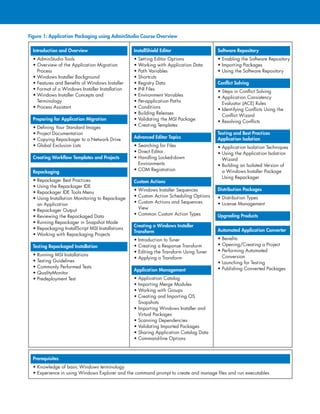
Figure 1: Application Packaging using AdminStudio Course Overview
Copyright © 2012 Flexera Software LLC. All other brand and product names mentioned herein may be the trademarks and registered trademarks of their respective owners.
FX_SD_AS_Training_Aug12
Flexera Software LLC
1000 East Woodfield Road,
Suite 400
Schaumburg, IL 60173 USA
Schaumburg
(Global Headquarters):
+1 800-809-5659
United Kingdom (Europe,
Middle East Headquarters):
+44 870-871-1111
+44 870-873-6300
Australia (Asia,
Pacific Headquarters):
+61 3-9895-2000
For more office locations visit:
www.flexerasoftware.com
Flexera Software Training Services
Flexera Software offers flexible, comprehensive training
services that allow participants to gain the knowledge
and experience needed for superior results. In addition to
broadening their technical skill sets, participants head back to
the office with increased productivity and efficiency. Armed
with industry best practices, they quickly streamline processes
and realize the full potential of software investments.
Flexera Software Consulting
Flexera Software Global Consulting Services helps you
accelerate and increase the value you receive from your
investments in Flexera Software solutions. Our consultants have
deep subject matter expertise and use proven methodologies
to speed deployment and bring your staff up to speed so they
can manage your Flexera solutions effectively.
About Flexera Software
Flexera Software is the leading provider of strategic solutions
for Application Usage Management; solutions delivering
continuous compliance, optimized usage and maximized
value to application producers and their customers. Flexera
Software is trusted by more than 80,000 customers that
depend on our comprehensive solutions- from installation
and licensing, entitlement and compliance management to
application readiness and software license optimization
- to strategically manage application usage and achieve
breakthrough results realized only through the systems-level
approach we provide. For more information, please go to:
www.flexerasoftware.com
To Register:
For more information, or to register for one of Flexera Software’s public
courses, visit http://www.flexerasoftware.com/adminstudio-training.
To arrange onsite training, contact a Flexera Software representative.

Application Packaging using AdminStudio Training

  • 1.
    Maintaining an effectivestate of application readiness is becoming more difficult all the time as IT organizations embrace transformational technologies such as Windows 7 and 8, virtualization, cloud, new application deployment models and multiple access devices. Flexera Software AdminStudio helps you accelerate this transformation. But is your IT staff ready to tap the full potential of the robust AdminStudio feature set? In-depth knowledge and finely honed skills speed implementation so you can achieve faster time to value and maximize your investment in AdminStudio. Many IT organizations, however, don’t already have this expertise in house. Or the experts they have are committed to other critical projects and aren’t available to implement and manage AdminStudio. If this is the challenge you face, Flexera Software training solutions can help. Our Application Packaging using AdminStudio course brings your packagers, desktop managers and other users up to speed not only on AdminStudio functionality but also on best practices for application readiness. Build Staff Skills/Expertise through Training Application Packaging using AdminStudio provides a high-quality educational environment in which participants become proficient in creating transforms for existing third-party MSI packages and identifying and resolving conflicts between packages before deploying their applications. Real-world examples and hands-on experience throughout the training prepare participants to apply the sophisticated capabilities of AdminStudio. Course Highlights Application Packaging using AdminStudio is a five-day, instructor-led course. All classes are conducted by highly skilled Flexera Software instructors who average more than 10 years of industry and training experience. Customers can attend public courses at Flexera Software training centers around the world. Onsite training is also available for customers who want more personalized training. Onsite training can incorporate the installation and configuration of the customer’s AdminStudio solution. DATASHEET Application Packaging using AdminStudio Training Acquire In-house Skills and Expertise with Instructor-led Training Application Packaging Using AdminStudio Training Provides: • Faster, more effective AdminStudio deployment for faster ROI • Insight into prevailing best practices for a highly effective application readiness process • Ability to repackage traditional setups for Windows Installer and customize packages for enterprise needs • Skills acquisition, enabling the staff to prepare development systems, perform testing and document application migration • Knowledge transfer to ensure ongoing success with application packaging activities
  • 2.
    Introduction and Overview •AdminStudio Tools • Overview of the Application Migration Process • Windows Installer Background • Features and Benefits of Windows Installer • Format of a Windows Installer Installation • Windows Installer Concepts and Terminology • Process Assistant Preparing for Application Migration • Defining Your Standard Images • Project Documentation • Copying Repackager to a Network Drive • Global Exclusion Lists Creating Workflow Templates and Projects Repackaging • Repackager Best Practices • Using the Repackager IDE • Repackager IDE Tools Menu • Using Installation Monitoring to Repackage an Application • Repackager Output • Reviewing the Repackaged Data • Running Repackager in Snapshot Mode • Repackaging InstallScript MSI Installations • Working with Repackaging Projects Testing Repackaged Installation • Running MSI Installations • Testing Guidelines • Commonly Performed Tests • QualityMonitor • Predeployment Test InstallShield Editor • Setting Editor Options • Working with Application Data • Path Variables • Shortcuts • Registry Data • INI Files • Environment Variables • Per-application Paths • Conditions • Building Releases • Validating the MSI Package • Creating Templates Advanced Editor Topics • Searching for Files • Direct Editor • Handling Locked-down Environments • COM Registration Custom Actions • Windows Installer Sequences • Custom Action Scheduling Options • Custom Actions and Sequences View • Common Custom Action Types Creating a Windows Installer Transform • Introduction to Tuner • Creating a Response Transform • Editing the Transform Using Tuner • Applying a Transform Application Management • Application Catalog • Importing Merge Modules • Working with Groups • Creating and Importing OS Snapshots • Importing Windows Installer and Virtual Packages • Scanning Dependencies • Validating Imported Packages • Sharing Application Catalog Data • Command-line Options Software Repository • Enabling the Software Repository • Importing Packages • Using the Software Repository Conflict Solving • Steps in Conflict Solving • Application Consistency Evaluator (ACE) Rules • Identifying Conflicts Using the Conflict Wizard • Resolving Conflicts Testing and Best Practices Application Isolation • Application Isolation Techniques • Using the Application Isolation Wizard • Building an Isolated Version of a Windows Installer Package Using Repackager Distribution Packages • Distribution Types • License Management Upgrading Products Automated Application Converter • Benefits • Opening/Creating a Project • Performing Automated Conversion • Launching for Testing • Publishing Converted Packages Prerequisites • Knowledge of basic Windows terminology • Experience in using Windows Explorer and the command prompt to create and manage files and run executables Figure 1: Application Packaging using AdminStudio Course Overview
  • 3.
    Copyright © 2012Flexera Software LLC. All other brand and product names mentioned herein may be the trademarks and registered trademarks of their respective owners. FX_SD_AS_Training_Aug12 Flexera Software LLC 1000 East Woodfield Road, Suite 400 Schaumburg, IL 60173 USA Schaumburg (Global Headquarters): +1 800-809-5659 United Kingdom (Europe, Middle East Headquarters): +44 870-871-1111 +44 870-873-6300 Australia (Asia, Pacific Headquarters): +61 3-9895-2000 For more office locations visit: www.flexerasoftware.com Flexera Software Training Services Flexera Software offers flexible, comprehensive training services that allow participants to gain the knowledge and experience needed for superior results. In addition to broadening their technical skill sets, participants head back to the office with increased productivity and efficiency. Armed with industry best practices, they quickly streamline processes and realize the full potential of software investments. Flexera Software Consulting Flexera Software Global Consulting Services helps you accelerate and increase the value you receive from your investments in Flexera Software solutions. Our consultants have deep subject matter expertise and use proven methodologies to speed deployment and bring your staff up to speed so they can manage your Flexera solutions effectively. About Flexera Software Flexera Software is the leading provider of strategic solutions for Application Usage Management; solutions delivering continuous compliance, optimized usage and maximized value to application producers and their customers. Flexera Software is trusted by more than 80,000 customers that depend on our comprehensive solutions- from installation and licensing, entitlement and compliance management to application readiness and software license optimization - to strategically manage application usage and achieve breakthrough results realized only through the systems-level approach we provide. For more information, please go to: www.flexerasoftware.com To Register: For more information, or to register for one of Flexera Software’s public courses, visit http://www.flexerasoftware.com/adminstudio-training. To arrange onsite training, contact a Flexera Software representative.