FUSE
Developing filesystems in userspace
                  Mads D. Kristensen
                   mads@oejlug.dk


       OEJLUG - Oestjyllands Linux-brugergruppe


                                           FUSE - Developing filesystems in userspace – p. 1/2
Contents of this
   presentation
What is a filesystem?
How does FUSE work?
Installing FUSE.
The FUSE library.
A simple example filesystem.
FUSE options, concurrency and other stuff.
Questions?


                              FUSE - Developing filesystems in userspace – p. 2/2
What is a filesystem?
“... a method for storing and organizing computer
files and the data they contain to make it easy to
find and access them.” [wikipedia].

From this description we can deduce two
important things about a filesystem:
1. It must provide a method for storing the data;
   be it on disk, CD or something other, and
2. it must provide an interface for the user to
   make it possible to navigate through the
   stored data.
                                    FUSE - Developing filesystems in userspace – p. 3/2
Storing file data.
Well known regular filesystems are ext2, ext3,
reiserfs, xfs etc. These filesystems specify the
layout of data on disk.

Filesystems does not have to be this low-level.
For example a typical network filesystem does
not specify such things but just depends on the
local filesystem on the server for storing the data.
Examples are NFS, Samba and AFS.


                                    FUSE - Developing filesystems in userspace – p. 4/2
Filesystem meta
      data.
Apart from defining how file data is stored some
meta data must be stored as well. This meta
data represents things like:
   Filename in human-readable form.
   Directory structure.
   Access rights.
   Ownership.
   Timestamps.


                                 FUSE - Developing filesystems in userspace – p. 5/2
The Virtual File
      Switch (VFS).
In Linux the meta data of the filesystem must be
fed to VFS so that it may present the user with a
common interface for all filesystems. This means
that, if your meta data matches with VFS’s
demands, you can use standard commands like
chmod, chown and cp.

Furthermore, when using VFS, you can use all
the standard commands to read/manipulate the
file data as well (eg. cat, sed, grep).


                                   FUSE - Developing filesystems in userspace – p. 6/2
VFS continued.
All this works because VFS defines the basic
system calls for opening and closing files (open,
close), reading from/writing to files (read,
write), getting/setting rights and ownership
(stat, chown, chmod, umask), creating and
deleting directories (mkdir, rmdir), reading
directory contents and more (utime, truncate,
...).

This means that all applications will work with
your filesystem, for example:
emacs /mnt/myfs/foo.txt.
                                    FUSE - Developing filesystems in userspace – p. 7/2
How does FUSE
         work?
                              example/hello /tmp/fuse


            ls −l /tmp/fuse            libfuse


                 glibc                  glibc

userspace

kernel
                                        FUSE


                                      ...
                 VFS
                                      NFS


                                      Ext3


                                                        FUSE - Developing filesystems in userspace – p. 8/2
How does FUSE
         work? (continued)
As the figure showed FUSE is separated into two
parts:
1. A kernel module that hooks up to the VFS
   inside the kernel.
2. A userspace library that communicates with
   the kernel module.
A related system call is then first passed to the kernel by the calling
application, VFS passes the request on to the FUSE kernel module
which in turn passes the request on to the FUSE library in userspace.
The FUSE library then calls the associated function for that specific
system call.

                                                  FUSE - Developing filesystems in userspace – p. 9/2
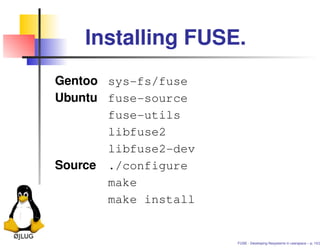
Installing FUSE.
Gentoo sys-fs/fuse
Ubuntu fuse-source
       fuse-utils
       libfuse2
       libfuse2-dev
Source ./configure
       make
       make install


                      FUSE - Developing filesystems in userspace – p. 10/2
Getting started.
This is all well and good, but how do we get
started implementing a filesystem?

As mentioned FUSE works by passing system
calls from the kernel and back into userspace so
we need to implement some functions to take
care of the different system calls.


                                   FUSE - Developing filesystems in userspace – p. 11/2
System calls in
        FUSE.
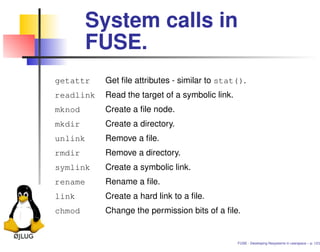
getattr    Get file attributes - similar to stat().
readlink   Read the target of a symbolic link.
mknod      Create a file node.
mkdir      Create a directory.
unlink     Remove a file.
rmdir      Remove a directory.
symlink    Create a symbolic link.
rename     Rename a file.
link       Create a hard link to a file.
chmod      Change the permission bits of a file.


                                                 FUSE - Developing filesystems in userspace – p. 12/2
System calls in
        FUSE. (continued)
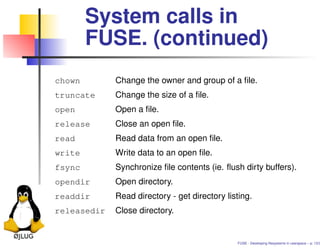
chown        Change the owner and group of a file.
truncate     Change the size of a file.
open         Open a file.
release      Close an open file.
read         Read data from an open file.
write        Write data to an open file.
fsync        Synchronize file contents (ie. flush dirty buffers).
opendir      Open directory.
readdir      Read directory - get directory listing.
releasedir   Close directory.


                                               FUSE - Developing filesystems in userspace – p. 13/2
System calls in
        FUSE. (continued)
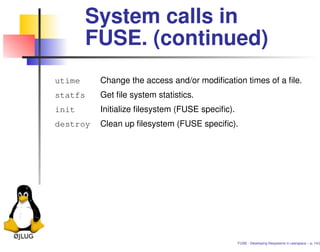
utime     Change the access and/or modification times of a file.
statfs    Get file system statistics.
init      Initialize filesystem (FUSE specific).
destroy   Clean up filesystem (FUSE specific).


                                                 FUSE - Developing filesystems in userspace – p. 14/2
A first example.
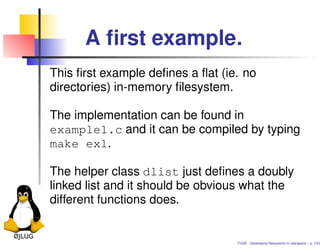
This first example defines a flat (ie. no
directories) in-memory filesystem.

The implementation can be found in
example1.c and it can be compiled by typing
make ex1.

The helper class dlist just defines a doubly
linked list and it should be obvious what the
different functions does.


                                  FUSE - Developing filesystems in userspace – p. 15/2
What is missing?
This simple example are missing a lot of features
that a regular filesystem needs, but it might be
enough for your specific filesystem needs.

We will continue with the example by adding
functionality to properly initialize the access bits,
timestamps and ownership of files and by adding
functions to change these settings.

These additions can be found in example2.c.


                                     FUSE - Developing filesystems in userspace – p. 16/2
How about delete and
       rename?
It would be nice if it was also possible to rename
and delete files stored in or filesystem; so that
functionality is added in the third iteration of our
example.

These additions can be seen in example3.c.


                                     FUSE - Developing filesystems in userspace – p. 17/2
Adding hierarchy
       (directories).
Now is the time to remove the flatness from our
example filesystem by adding some hierarchy.

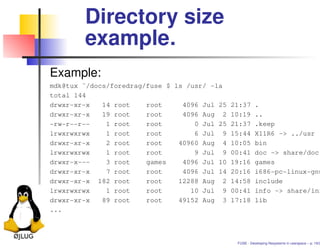
Directories are represented in a lot of different
ways in different filesystems. In most regular
filesystems a directory is just an ordinary file that
contains information about the files and
directories that reside in it; this is why a directory
has a size in a Linux system, because a directory
with at lot of files in it needs more than one page
(4096 bytes) for its list.

                                      FUSE - Developing filesystems in userspace – p. 18/2
Directory size
        example.
Example:
mdk@tux ˜/docs/foredrag/fuse $ ls /usr/ -la
total 144
drwxr-xr-x   14 root    root     4096 Jul 25 21:37 .
drwxr-xr-x   19 root    root     4096 Aug 2 10:19 ..
-rw-r--r--    1 root    root        0 Jul 25 21:37 .keep
lrwxrwxrwx    1 root    root        6 Jul 9 15:44 X11R6 -> ../usr
drwxr-xr-x    2 root    root    40960 Aug 4 10:05 bin
lrwxrwxrwx    1 root    root        9 Jul 9 00:41 doc -> share/doc
drwxr-x---    3 root    games    4096 Jul 10 19:16 games
drwxr-xr-x    7 root    root     4096 Jul 14 20:16 i686-pc-linux-gnu
drwxr-xr-x 182 root     root    12288 Aug 2 14:58 include
lrwxrwxrwx    1 root    root       10 Jul 9 00:41 info -> share/inf
drwxr-xr-x   89 root    root    49152 Aug 3 17:18 lib
...


                                              FUSE - Developing filesystems in userspace – p. 19/2
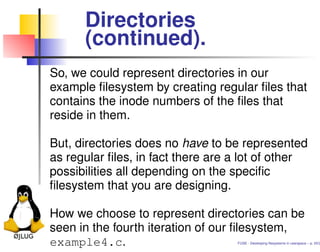
Directories
      (continued).
So, we could represent directories in our
example filesystem by creating regular files that
contains the inode numbers of the files that
reside in them.

But, directories does no have to be represented
as regular files, in fact there are a lot of other
possibilities all depending on the specific
filesystem that you are designing.

How we choose to represent directories can be
seen in the fourth iteration of our filesystem,
example4.c.                        FUSE - Developing filesystems in userspace – p. 20/2
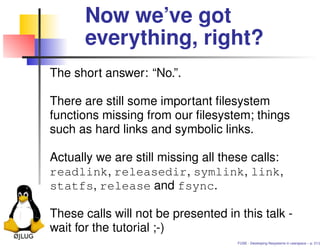
Now we’ve got
      everything, right?
The short answer: “No.”.

There are still some important filesystem
functions missing from our filesystem; things
such as hard links and symbolic links.

Actually we are still missing all these calls:
readlink, releasedir, symlink, link,
statfs, release and fsync.

These calls will not be presented in this talk -
wait for the tutorial ;-)
                                     FUSE - Developing filesystems in userspace – p. 21/2
FUSE options.
usage: ./example4 mountpoint [FUSE options]

FUSE options:
    -d                     enable debug output (implies -f)
    -f                     foreground operation
    -s                     disable multithreaded operation
    -r                     mount read only (equivalent to ’-o ro’)
    -o opt,[opt...]        mount options
    -h                     print help

Mount options:
    default_permissions    enable permission checking
    allow_other            allow access to other users
    allow_root             allow access to root
    kernel_cache           cache files in kernel
    large_read             issue large read requests (2.4 only)


                                              FUSE - Developing filesystems in userspace – p. 22/2
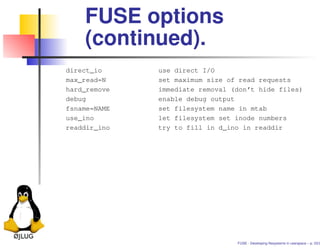
FUSE options
    (continued).
direct_io     use direct I/O
max_read=N    set maximum size of read requests
hard_remove   immediate removal (don’t hide files)
debug         enable debug output
fsname=NAME   set filesystem name in mtab
use_ino       let filesystem set inode numbers
readdir_ino   try to fill in d_ino in readdir


                                 FUSE - Developing filesystems in userspace – p. 23/2
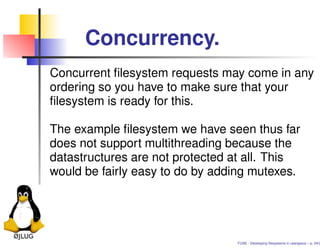
Concurrency.
Concurrent filesystem requests may come in any
ordering so you have to make sure that your
filesystem is ready for this.

The example filesystem we have seen thus far
does not support multithreading because the
datastructures are not protected at all. This
would be fairly easy to do by adding mutexes.


                                 FUSE - Developing filesystems in userspace – p. 24/2
Other FUSE based
   filesystems.
SSHFS
EncFS
GmailFS
Wayback Filesystem
... and others.


                     FUSE - Developing filesystems in userspace – p. 25/2
Questions?


             FUSE - Developing filesystems in userspace – p. 26/2

FUSE Developing Fillesystems in userspace

  • 1.
    FUSE Developing filesystems inuserspace Mads D. Kristensen mads@oejlug.dk OEJLUG - Oestjyllands Linux-brugergruppe FUSE - Developing filesystems in userspace – p. 1/2
  • 2.
    Contents of this presentation What is a filesystem? How does FUSE work? Installing FUSE. The FUSE library. A simple example filesystem. FUSE options, concurrency and other stuff. Questions? FUSE - Developing filesystems in userspace – p. 2/2
  • 3.
    What is afilesystem? “... a method for storing and organizing computer files and the data they contain to make it easy to find and access them.” [wikipedia]. From this description we can deduce two important things about a filesystem: 1. It must provide a method for storing the data; be it on disk, CD or something other, and 2. it must provide an interface for the user to make it possible to navigate through the stored data. FUSE - Developing filesystems in userspace – p. 3/2
  • 4.
    Storing file data. Wellknown regular filesystems are ext2, ext3, reiserfs, xfs etc. These filesystems specify the layout of data on disk. Filesystems does not have to be this low-level. For example a typical network filesystem does not specify such things but just depends on the local filesystem on the server for storing the data. Examples are NFS, Samba and AFS. FUSE - Developing filesystems in userspace – p. 4/2
  • 5.
    Filesystem meta data. Apart from defining how file data is stored some meta data must be stored as well. This meta data represents things like: Filename in human-readable form. Directory structure. Access rights. Ownership. Timestamps. FUSE - Developing filesystems in userspace – p. 5/2
  • 6.
    The Virtual File Switch (VFS). In Linux the meta data of the filesystem must be fed to VFS so that it may present the user with a common interface for all filesystems. This means that, if your meta data matches with VFS’s demands, you can use standard commands like chmod, chown and cp. Furthermore, when using VFS, you can use all the standard commands to read/manipulate the file data as well (eg. cat, sed, grep). FUSE - Developing filesystems in userspace – p. 6/2
  • 7.
    VFS continued. All thisworks because VFS defines the basic system calls for opening and closing files (open, close), reading from/writing to files (read, write), getting/setting rights and ownership (stat, chown, chmod, umask), creating and deleting directories (mkdir, rmdir), reading directory contents and more (utime, truncate, ...). This means that all applications will work with your filesystem, for example: emacs /mnt/myfs/foo.txt. FUSE - Developing filesystems in userspace – p. 7/2
  • 8.
    How does FUSE work? example/hello /tmp/fuse ls −l /tmp/fuse libfuse glibc glibc userspace kernel FUSE ... VFS NFS Ext3 FUSE - Developing filesystems in userspace – p. 8/2
  • 9.
    How does FUSE work? (continued) As the figure showed FUSE is separated into two parts: 1. A kernel module that hooks up to the VFS inside the kernel. 2. A userspace library that communicates with the kernel module. A related system call is then first passed to the kernel by the calling application, VFS passes the request on to the FUSE kernel module which in turn passes the request on to the FUSE library in userspace. The FUSE library then calls the associated function for that specific system call. FUSE - Developing filesystems in userspace – p. 9/2
  • 10.
    Installing FUSE. Gentoo sys-fs/fuse Ubuntufuse-source fuse-utils libfuse2 libfuse2-dev Source ./configure make make install FUSE - Developing filesystems in userspace – p. 10/2
  • 11.
    Getting started. This isall well and good, but how do we get started implementing a filesystem? As mentioned FUSE works by passing system calls from the kernel and back into userspace so we need to implement some functions to take care of the different system calls. FUSE - Developing filesystems in userspace – p. 11/2
  • 12.
    System calls in FUSE. getattr Get file attributes - similar to stat(). readlink Read the target of a symbolic link. mknod Create a file node. mkdir Create a directory. unlink Remove a file. rmdir Remove a directory. symlink Create a symbolic link. rename Rename a file. link Create a hard link to a file. chmod Change the permission bits of a file. FUSE - Developing filesystems in userspace – p. 12/2
  • 13.
    System calls in FUSE. (continued) chown Change the owner and group of a file. truncate Change the size of a file. open Open a file. release Close an open file. read Read data from an open file. write Write data to an open file. fsync Synchronize file contents (ie. flush dirty buffers). opendir Open directory. readdir Read directory - get directory listing. releasedir Close directory. FUSE - Developing filesystems in userspace – p. 13/2
  • 14.
    System calls in FUSE. (continued) utime Change the access and/or modification times of a file. statfs Get file system statistics. init Initialize filesystem (FUSE specific). destroy Clean up filesystem (FUSE specific). FUSE - Developing filesystems in userspace – p. 14/2
  • 15.
    A first example. Thisfirst example defines a flat (ie. no directories) in-memory filesystem. The implementation can be found in example1.c and it can be compiled by typing make ex1. The helper class dlist just defines a doubly linked list and it should be obvious what the different functions does. FUSE - Developing filesystems in userspace – p. 15/2
  • 16.
    What is missing? Thissimple example are missing a lot of features that a regular filesystem needs, but it might be enough for your specific filesystem needs. We will continue with the example by adding functionality to properly initialize the access bits, timestamps and ownership of files and by adding functions to change these settings. These additions can be found in example2.c. FUSE - Developing filesystems in userspace – p. 16/2
  • 17.
    How about deleteand rename? It would be nice if it was also possible to rename and delete files stored in or filesystem; so that functionality is added in the third iteration of our example. These additions can be seen in example3.c. FUSE - Developing filesystems in userspace – p. 17/2
  • 18.
    Adding hierarchy (directories). Now is the time to remove the flatness from our example filesystem by adding some hierarchy. Directories are represented in a lot of different ways in different filesystems. In most regular filesystems a directory is just an ordinary file that contains information about the files and directories that reside in it; this is why a directory has a size in a Linux system, because a directory with at lot of files in it needs more than one page (4096 bytes) for its list. FUSE - Developing filesystems in userspace – p. 18/2
  • 19.
    Directory size example. Example: mdk@tux ˜/docs/foredrag/fuse $ ls /usr/ -la total 144 drwxr-xr-x 14 root root 4096 Jul 25 21:37 . drwxr-xr-x 19 root root 4096 Aug 2 10:19 .. -rw-r--r-- 1 root root 0 Jul 25 21:37 .keep lrwxrwxrwx 1 root root 6 Jul 9 15:44 X11R6 -> ../usr drwxr-xr-x 2 root root 40960 Aug 4 10:05 bin lrwxrwxrwx 1 root root 9 Jul 9 00:41 doc -> share/doc drwxr-x--- 3 root games 4096 Jul 10 19:16 games drwxr-xr-x 7 root root 4096 Jul 14 20:16 i686-pc-linux-gnu drwxr-xr-x 182 root root 12288 Aug 2 14:58 include lrwxrwxrwx 1 root root 10 Jul 9 00:41 info -> share/inf drwxr-xr-x 89 root root 49152 Aug 3 17:18 lib ... FUSE - Developing filesystems in userspace – p. 19/2
  • 20.
    Directories (continued). So, we could represent directories in our example filesystem by creating regular files that contains the inode numbers of the files that reside in them. But, directories does no have to be represented as regular files, in fact there are a lot of other possibilities all depending on the specific filesystem that you are designing. How we choose to represent directories can be seen in the fourth iteration of our filesystem, example4.c. FUSE - Developing filesystems in userspace – p. 20/2
  • 21.
    Now we’ve got everything, right? The short answer: “No.”. There are still some important filesystem functions missing from our filesystem; things such as hard links and symbolic links. Actually we are still missing all these calls: readlink, releasedir, symlink, link, statfs, release and fsync. These calls will not be presented in this talk - wait for the tutorial ;-) FUSE - Developing filesystems in userspace – p. 21/2
  • 22.
    FUSE options. usage: ./example4mountpoint [FUSE options] FUSE options: -d enable debug output (implies -f) -f foreground operation -s disable multithreaded operation -r mount read only (equivalent to ’-o ro’) -o opt,[opt...] mount options -h print help Mount options: default_permissions enable permission checking allow_other allow access to other users allow_root allow access to root kernel_cache cache files in kernel large_read issue large read requests (2.4 only) FUSE - Developing filesystems in userspace – p. 22/2
  • 23.
    FUSE options (continued). direct_io use direct I/O max_read=N set maximum size of read requests hard_remove immediate removal (don’t hide files) debug enable debug output fsname=NAME set filesystem name in mtab use_ino let filesystem set inode numbers readdir_ino try to fill in d_ino in readdir FUSE - Developing filesystems in userspace – p. 23/2
  • 24.
    Concurrency. Concurrent filesystem requestsmay come in any ordering so you have to make sure that your filesystem is ready for this. The example filesystem we have seen thus far does not support multithreading because the datastructures are not protected at all. This would be fairly easy to do by adding mutexes. FUSE - Developing filesystems in userspace – p. 24/2
  • 25.
    Other FUSE based filesystems. SSHFS EncFS GmailFS Wayback Filesystem ... and others. FUSE - Developing filesystems in userspace – p. 25/2
  • 26.
    Questions? FUSE - Developing filesystems in userspace – p. 26/2