OverlayFS as a
Docker Storage Driver
Tomoya Akase
Index
• OverlayFS

• Docker Storage Driver

• OverlayFS, as a Docker Storage Driver

• Conclusion
OverlayFS
What is OverlayFS?
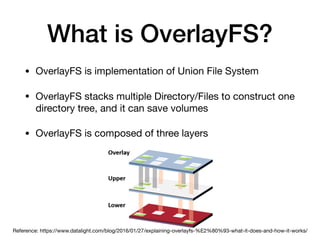
• OverlayFS is implementation of Union File System

• OverlayFS stacks multiple Directory/Files to construct one
directory tree, and it can save volumes
• OverlayFS is composed of three layers
Reference: https://www.datalight.com/blog/2016/01/27/explaining-overlayfs-%E2%80%93-what-it-does-and-how-it-works/
Three Layers of OverlayFS
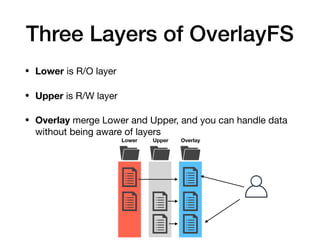
• Lower is R/O layer

• Upper is R/W layer

• Overlay merge Lower and Upper, and you can handle data
without being aware of layers
Lower Upper Overlay
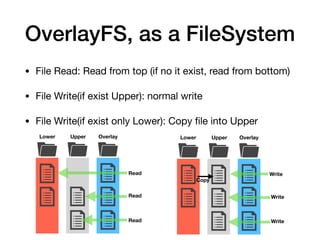
OverlayFS, as a FileSystem
• File Read: Read from top (if no it exist, read from bottom)

• File Write(if exist Upper): normal write

• File Write(if exist only Lower): Copy file into Upper
Lower Upper Overlay
Read
Read
Lower Upper Overlay
Write
Copy
Read Write
Write
OverlayFS, as a FileSystem
• File Remove: if it exist on Lower, overlay will create
whiteout file
• If you just delete file exist on Upper, you can read the file
from Lower
Lower Upper Overlay
Remove
Remove
Lower Upper Overlay
Can not ReadRemove
whiteout file
Create
Can not Read
Demo
gist: https://gist.github.com/esakat/78d57ca31b34a3d39b176b655f575a30
Docker Storage Driver
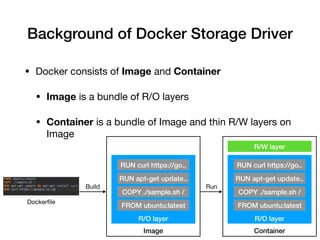
Background of Docker Storage Driver
• Docker consists of Image and Container

• Image is a bundle of R/O layers

• Container is a bundle of Image and thin R/W layers on
Image
Dockerfile
Image
R/O layer
FROM ubuntu:latest
COPY ./sample.sh /
RUN apt-get update..
RUN curl https://go..
Container
R/O layer
FROM ubuntu:latest
COPY ./sample.sh /
RUN apt-get update..
RUN curl https://go..
R/W layer
Build Run
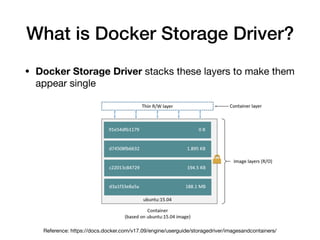
What is Docker Storage Driver?
• Docker Storage Driver stacks these layers to make them
appear single
Reference: https://docs.docker.com/v17.09/engine/userguide/storagedriver/imagesandcontainers/
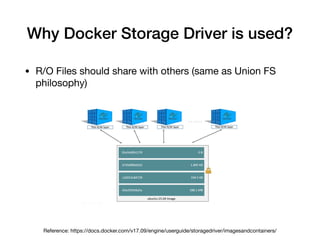
Why Docker Storage Driver is used?
• R/O Files should share with others (same as Union FS
philosophy)
Reference: https://docs.docker.com/v17.09/engine/userguide/storagedriver/imagesandcontainers/
OverlayFS, as a Docker Storage Driver
• Docker Storage Driver itself is like Union FS

• It has many implementation (overlay2, aufs,
devicemapper, btrfs, and etc...), overlay is one of them

• Docker official site recommend overlay2 driver

• overlay2 can use multiple lower (overlay can only use
one lower)
Reference: https://docs.docker.com/storage/storagedriver/select-storage-driver/
Conclusion
Conclusion
• OverlayFS is an File System consisting of R/O
layer(Lower), R/W layer(Upper), and an Overlay layer
merge Lower and Upper, which can save volumes

• Docker uses Image as R/O layer(Lower) and Container
as stack(Overlay) of Image and R/W layer(Upper), which
can save volumes
References
• shttps://www.slideshare.net/akachochin/overlayfsa-brief-report-of-overlayfs-
source-code-reading

• https://docs.docker.com/storage/storagedriver/overlayfs-driver/

• https://blog.tiqwab.com/2017/02/18/docker-technology.html

• https://qiita.com/fireowl11/items/d1cf03aff691f9c0eff9

• https://qiita.com/awakia/items/af9b46c322905cdce1d7

• http://gihyo.jp/admin/serial/01/linux_containers/0018?page=3

• https://docs.docker.com/storage/storagedriver/

• http://docs.docker.jp/engine/userguide/storagedriver/imagesandcontainers.html

OverlayFS as a Docker Storage Driver

  • 1.
    OverlayFS as a DockerStorage Driver Tomoya Akase
  • 2.
    Index • OverlayFS • DockerStorage Driver • OverlayFS, as a Docker Storage Driver • Conclusion
  • 3.
  • 4.
    What is OverlayFS? •OverlayFS is implementation of Union File System • OverlayFS stacks multiple Directory/Files to construct one directory tree, and it can save volumes • OverlayFS is composed of three layers Reference: https://www.datalight.com/blog/2016/01/27/explaining-overlayfs-%E2%80%93-what-it-does-and-how-it-works/
  • 5.
    Three Layers ofOverlayFS • Lower is R/O layer • Upper is R/W layer • Overlay merge Lower and Upper, and you can handle data without being aware of layers Lower Upper Overlay
  • 6.
    OverlayFS, as aFileSystem • File Read: Read from top (if no it exist, read from bottom) • File Write(if exist Upper): normal write • File Write(if exist only Lower): Copy file into Upper Lower Upper Overlay Read Read Lower Upper Overlay Write Copy Read Write Write
  • 7.
    OverlayFS, as aFileSystem • File Remove: if it exist on Lower, overlay will create whiteout file • If you just delete file exist on Upper, you can read the file from Lower Lower Upper Overlay Remove Remove Lower Upper Overlay Can not ReadRemove whiteout file Create Can not Read
  • 8.
  • 9.
  • 10.
    Background of DockerStorage Driver • Docker consists of Image and Container • Image is a bundle of R/O layers • Container is a bundle of Image and thin R/W layers on Image Dockerfile Image R/O layer FROM ubuntu:latest COPY ./sample.sh / RUN apt-get update.. RUN curl https://go.. Container R/O layer FROM ubuntu:latest COPY ./sample.sh / RUN apt-get update.. RUN curl https://go.. R/W layer Build Run
  • 11.
    What is DockerStorage Driver? • Docker Storage Driver stacks these layers to make them appear single Reference: https://docs.docker.com/v17.09/engine/userguide/storagedriver/imagesandcontainers/
  • 12.
    Why Docker StorageDriver is used? • R/O Files should share with others (same as Union FS philosophy) Reference: https://docs.docker.com/v17.09/engine/userguide/storagedriver/imagesandcontainers/
  • 13.
    OverlayFS, as aDocker Storage Driver
  • 14.
    OverlayFS, as aDocker Storage Driver • Docker Storage Driver itself is like Union FS • It has many implementation (overlay2, aufs, devicemapper, btrfs, and etc...), overlay is one of them • Docker official site recommend overlay2 driver • overlay2 can use multiple lower (overlay can only use one lower) Reference: https://docs.docker.com/storage/storagedriver/select-storage-driver/
  • 15.
  • 16.
    Conclusion • OverlayFS isan File System consisting of R/O layer(Lower), R/W layer(Upper), and an Overlay layer merge Lower and Upper, which can save volumes • Docker uses Image as R/O layer(Lower) and Container as stack(Overlay) of Image and R/W layer(Upper), which can save volumes
  • 17.
    References • shttps://www.slideshare.net/akachochin/overlayfsa-brief-report-of-overlayfs- source-code-reading • https://docs.docker.com/storage/storagedriver/overlayfs-driver/ •https://blog.tiqwab.com/2017/02/18/docker-technology.html • https://qiita.com/fireowl11/items/d1cf03aff691f9c0eff9 • https://qiita.com/awakia/items/af9b46c322905cdce1d7 • http://gihyo.jp/admin/serial/01/linux_containers/0018?page=3 • https://docs.docker.com/storage/storagedriver/ • http://docs.docker.jp/engine/userguide/storagedriver/imagesandcontainers.html