Fun-In-Flow
A learning aide to flowcharts


 GUIDE

Prof. Keyur Sorathia, DOD, IIT Guwahati, India
Prof Rocco Servidio, University of Calabria, Italy
A   ABSTRACT


        Designing flowcharts is a key ability for learning any computer
        programming language. Fun-In-Flow is a novel approach of
        teaching flowcharts to 12-14 years aged children. Interactive
        learning session introduces students to basic symbols, while
        predefined programs help them to practice by manipulating
        symbols blocks. Fun-In-Flow is inspired by Lego Duplo, where
        algorithms are learnt, practiced and visualized through appro-
        priate placing of symbol blocks.

        Fun-In-Flow focuses on imparting education to the students
        in the form of edutainment and tangible interaction. Students
        can individually interact with the flowchart symbols hence
        allowing them to both learn and practice the concept.
B    SECONDARY
     RESEARCH

    Literature research has portrayed sufficient amount of work published, especially
    software development environment, flowchart editors etc.

    RAPTOR, the Rapid Algorithmic Prototyping Tool for Ordered Reasoning , was designed to address the
    shortcomings of syntactic difficulties and non-visual environments.It allowed students to create algorithms
    by combining basic flowchart symbols.

    Structured Flow Chart (SFC), a structured flowchart editor is a graphical algorithm development tool for
    both beginning and advanced programmers developed by Tia Watts, where user develops a flowchart, and
    displays a textual representation of the same in either a C or Pascal-like syntax.

    The Flowchart Interpreter (FLINT) supports problem-solving activities while utilizing minimal-syntax flow-
    charts as visual representations of problem solving algorithms. It provides immediate feedback of an inter-
    preted language as well as tools for simulation designed for use by novice programmers.

    BACCII is an “iconic programming language” that provides an environment allowing the user to create a
    design model using icons representing all the major programming constructs, such as loops, conditional
    branching, within a syntax-directed environment. The user can then generate syntactically correct code for
    any one of several text-based languages. Later BACII was developed into BACII++.
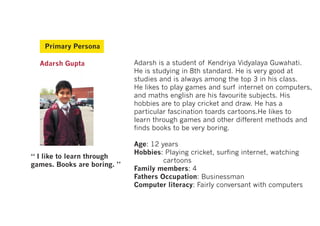
Primary Persona

  Adarsh Gupta               Adarsh is a student of Kendriya Vidyalaya Guwahati.
                             He is studying in 8th standard. He is very good at
                             studies and is always among the top 3 in his class.
                             He likes to play games and surf internet on computers,
                             and maths english are his favourite subjects. His
                             hobbies are to play cricket and draw. He has a
                             particular fascination toards cartoons.He likes to
                             learn through games and other different methods and
                             finds books to be very boring.

                             Age: 12 years
                             Hobbies: Playing cricket, surfing internet, watching
“ I like to learn through
                                      cartoons
games. Books are boring. ”
                             Family members: 4
                             Fathers Occupation: Businessman
                             Computer literacy: Fairly conversant with computers
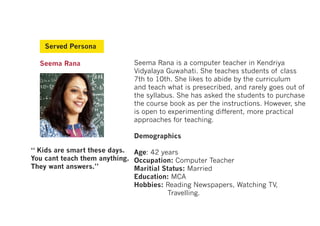
Served Persona

  Seema Rana                 Seema Rana is a computer teacher in Kendriya
                             Vidyalaya Guwahati. She teaches students of class
                             7th to 10th. She likes to abide by the curriculum
                             and teach what is presecribed, and rarely goes out of
                             the syllabus. She has asked the students to purchase
                             the course book as per the instructions. However, she
                             is open to experimenting different, more practical
                             approaches for teaching.

                             Demographics

“ Kids are smart these days. Age: 42 years
You cant teach them anything. Occupation: Computer Teacher
They want answers.”           Maritial Status: Married
                              Education: MCA
                              Hobbies: Reading Newspapers, Watching TV,
                                         Travelling.
C    SOLUTION


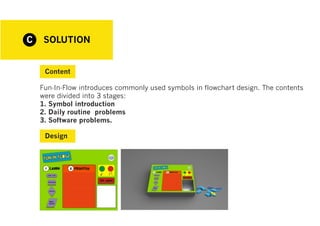
     Content

    Fun-In-Flow introduces commonly used symbols in flowchart design. The contents
    were divided into 3 stages:
    1. Symbol introduction
    2. Daily routine problems
    3. Software problems.

     Design
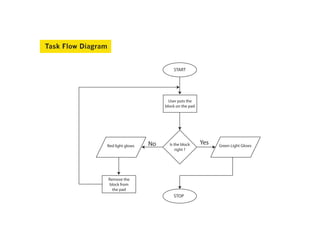
Task Flow Diagram


                                           START


                                         User puts the
                                       block on the pad


                Red light glows   No     Is the block     Yes   Green Light Glows
                                             right ?


                    Remove the
                    block from
                      the pad
                                           STOP
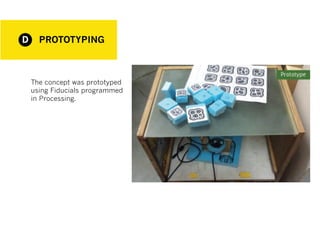
D     PROTOTYPING


    The concept was prototyped
    using Fiducials programmed
    in Processing.
USABILITY
E
        TESTING

    Active Intervention method

       Tasks
    The task design stimulated participants to work with the educational system. We were interested to evaluate the
    user interaction by giving to the participants some educational tasks. Course content of flowcharts and math-
    ematics for grade 8th was reviewed and 5 tasks (in the order of increasing difficulty) were designed. Each task
    depicted a gradual increase in the problem difficulty in terms of understanding of the concepts of flowcharts.
    Starting from a simple hands-on breaking solution of a problem in an algorithm to solving a complex math-
    ematics problem, the tasks project to provide the students with a novel way to learn and practice flowcharting.
    For each task, the time of completion and accuracy were recorded.

      Procedure
    A procedure was defined, according to which the students would be briefed about the excercise.
    In order to collect more information on the user interaction, we have designed a report skeleton where each
    participant annotates personal impressions to use the system. The template includes the following main sec-
    tions:
    1. General aspects of the system
    2. Readability
    3. Complexity
    4. Coherence
    After completing the 5 tasks, participants’ will survey with a standardized questionnaire aimed at evaluating
    the system usability.
USABILITY
E
       TESTING

      Questionnaire
    Questionnaire for User Interface Satisfaction
    Based on: Lund, A.M. (2001) Measuring Usability with the USE Questionnaire. STC Us-
    ability SIG Newsletter, 8:2.
    The questionaire also included a consent form and few questions required to deter-
    mine the user profile and demographics

     Final Report

    For each task, the time of completion and accuracy were recorded. The report also in-
    cluded a few subjective questions for interviewing the user aimed at discussing the the
    painpoints and the success of the system through the user’s experience.

Fun-In-Flow

  • 1.
    Fun-In-Flow A learning aideto flowcharts GUIDE Prof. Keyur Sorathia, DOD, IIT Guwahati, India Prof Rocco Servidio, University of Calabria, Italy
  • 2.
    A ABSTRACT Designing flowcharts is a key ability for learning any computer programming language. Fun-In-Flow is a novel approach of teaching flowcharts to 12-14 years aged children. Interactive learning session introduces students to basic symbols, while predefined programs help them to practice by manipulating symbols blocks. Fun-In-Flow is inspired by Lego Duplo, where algorithms are learnt, practiced and visualized through appro- priate placing of symbol blocks. Fun-In-Flow focuses on imparting education to the students in the form of edutainment and tangible interaction. Students can individually interact with the flowchart symbols hence allowing them to both learn and practice the concept.
  • 3.
    B SECONDARY RESEARCH Literature research has portrayed sufficient amount of work published, especially software development environment, flowchart editors etc. RAPTOR, the Rapid Algorithmic Prototyping Tool for Ordered Reasoning , was designed to address the shortcomings of syntactic difficulties and non-visual environments.It allowed students to create algorithms by combining basic flowchart symbols. Structured Flow Chart (SFC), a structured flowchart editor is a graphical algorithm development tool for both beginning and advanced programmers developed by Tia Watts, where user develops a flowchart, and displays a textual representation of the same in either a C or Pascal-like syntax. The Flowchart Interpreter (FLINT) supports problem-solving activities while utilizing minimal-syntax flow- charts as visual representations of problem solving algorithms. It provides immediate feedback of an inter- preted language as well as tools for simulation designed for use by novice programmers. BACCII is an “iconic programming language” that provides an environment allowing the user to create a design model using icons representing all the major programming constructs, such as loops, conditional branching, within a syntax-directed environment. The user can then generate syntactically correct code for any one of several text-based languages. Later BACII was developed into BACII++.
  • 4.
    Primary Persona Adarsh Gupta Adarsh is a student of Kendriya Vidyalaya Guwahati. He is studying in 8th standard. He is very good at studies and is always among the top 3 in his class. He likes to play games and surf internet on computers, and maths english are his favourite subjects. His hobbies are to play cricket and draw. He has a particular fascination toards cartoons.He likes to learn through games and other different methods and finds books to be very boring. Age: 12 years Hobbies: Playing cricket, surfing internet, watching “ I like to learn through cartoons games. Books are boring. ” Family members: 4 Fathers Occupation: Businessman Computer literacy: Fairly conversant with computers
  • 5.
    Served Persona Seema Rana Seema Rana is a computer teacher in Kendriya Vidyalaya Guwahati. She teaches students of class 7th to 10th. She likes to abide by the curriculum and teach what is presecribed, and rarely goes out of the syllabus. She has asked the students to purchase the course book as per the instructions. However, she is open to experimenting different, more practical approaches for teaching. Demographics “ Kids are smart these days. Age: 42 years You cant teach them anything. Occupation: Computer Teacher They want answers.” Maritial Status: Married Education: MCA Hobbies: Reading Newspapers, Watching TV, Travelling.
  • 6.
    C SOLUTION Content Fun-In-Flow introduces commonly used symbols in flowchart design. The contents were divided into 3 stages: 1. Symbol introduction 2. Daily routine problems 3. Software problems. Design
  • 7.
    Task Flow Diagram START User puts the block on the pad Red light glows No Is the block Yes Green Light Glows right ? Remove the block from the pad STOP
  • 8.
    D PROTOTYPING The concept was prototyped using Fiducials programmed in Processing.
  • 9.
    USABILITY E TESTING Active Intervention method Tasks The task design stimulated participants to work with the educational system. We were interested to evaluate the user interaction by giving to the participants some educational tasks. Course content of flowcharts and math- ematics for grade 8th was reviewed and 5 tasks (in the order of increasing difficulty) were designed. Each task depicted a gradual increase in the problem difficulty in terms of understanding of the concepts of flowcharts. Starting from a simple hands-on breaking solution of a problem in an algorithm to solving a complex math- ematics problem, the tasks project to provide the students with a novel way to learn and practice flowcharting. For each task, the time of completion and accuracy were recorded. Procedure A procedure was defined, according to which the students would be briefed about the excercise. In order to collect more information on the user interaction, we have designed a report skeleton where each participant annotates personal impressions to use the system. The template includes the following main sec- tions: 1. General aspects of the system 2. Readability 3. Complexity 4. Coherence After completing the 5 tasks, participants’ will survey with a standardized questionnaire aimed at evaluating the system usability.
  • 10.
    USABILITY E TESTING Questionnaire Questionnaire for User Interface Satisfaction Based on: Lund, A.M. (2001) Measuring Usability with the USE Questionnaire. STC Us- ability SIG Newsletter, 8:2. The questionaire also included a consent form and few questions required to deter- mine the user profile and demographics Final Report For each task, the time of completion and accuracy were recorded. The report also in- cluded a few subjective questions for interviewing the user aimed at discussing the the painpoints and the success of the system through the user’s experience.