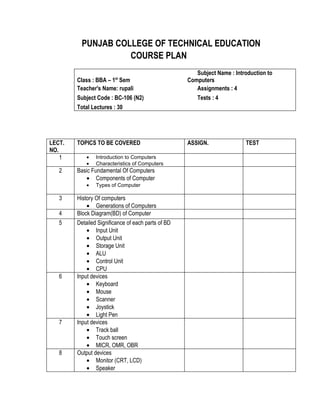
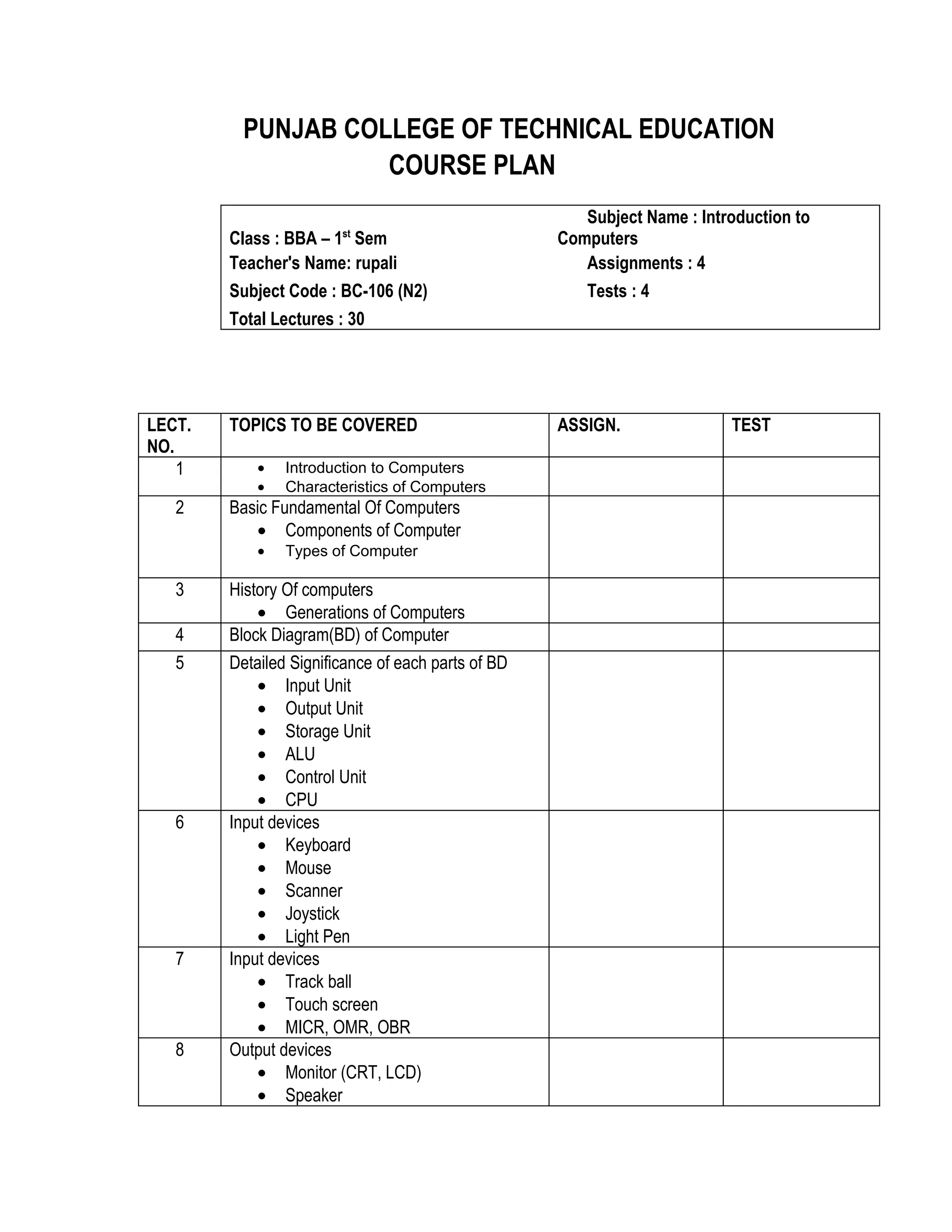
PUNJAB COLLEGE OF TECHNICAL EDUCATION
                    COURSE PLAN
                                                       Subject Name : Introduction to
                        st
        Class : BBA – 1 Sem                         Computers
        Teacher's Name: rupali                         Assignments : 4
        Subject Code : BC-106 (N2)                     Tests : 4
        Total Lectures : 30


LECT.   TOPICS TO BE COVERED                        ASSIGN.               TEST
NO.
    1       •   Introduction to Computers
            •   Characteristics of Computers
   2    Basic Fundamental Of Computers
           • Components of Computer
            •   Types of Computer

   3    History Of computers
            • Generations of Computers
   4    Block Diagram(BD) of Computer
   5    Detailed Significance of each parts of BD
            • Input Unit
            • Output Unit
            • Storage Unit
            • ALU
            • Control Unit
            • CPU
   6    Input devices
            • Keyboard
            • Mouse
            • Scanner
            • Joystick
            • Light Pen
   7    Input devices
            • Track ball
            • Touch screen
            • MICR, OMR, OBR
   8    Output devices
            • Monitor (CRT, LCD)
            • Speaker
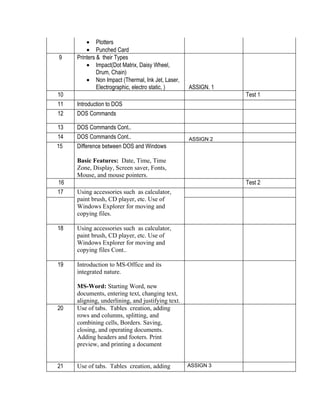
• Plotters
         • Punched Card
9    Printers & their Types
         • Impact(Dot Matrix, Daisy Wheel,
              Drum, Chain)
         • Non Impact (Thermal, Ink Jet, Laser,
              Electrographic, electro static, )    ASSIGN. 1
10                                                             Test 1
11   Introduction to DOS
12   DOS Commands

13   DOS Commands Cont..
14   DOS Commands Cont..                           ASSIGN 2
15   Difference between DOS and Windows

     Basic Features: Date, Time, Time
     Zone, Display, Screen saver, Fonts,
     Mouse, and mouse pointers.
16                                                             Test 2
17   Using accessories such as calculator,
     paint brush, CD player, etc. Use of
     Windows Explorer for moving and
     copying files.

18   Using accessories such as calculator,
     paint brush, CD player, etc. Use of
     Windows Explorer for moving and
     copying files Cont..

19   Introduction to MS-Office and its
     integrated nature.

     MS-Word: Starting Word, new
     documents, entering text, changing text,
     aligning, underlining, and justifying text.
20   Use of tabs. Tables creation, adding
     rows and columns, splitting, and
     combining cells, Borders. Saving,
     closing, and operating documents.
     Adding headers and footers. Print
     preview, and printing a document


21   Use of tabs. Tables creation, adding          ASSIGN 3
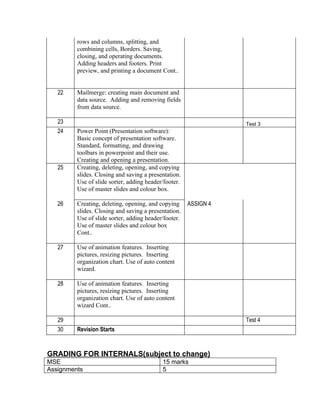
rows and columns, splitting, and
         combining cells, Borders. Saving,
         closing, and operating documents.
         Adding headers and footers. Print
         preview, and printing a document Cont..


   22    Mailmerge: creating main document and
         data source. Adding and removing fields
         from data source.

   23                                                            Test 3
   24    Power Point (Presentation software):
         Basic concept of presentation software.
         Standard, formatting, and drawing
         toolbars in powerpoint and their use.
         Creating and opening a presentation.
   25    Creating, deleting, opening, and copying
         slides. Closing and saving a presentation.
         Use of slide sorter, adding header/footer.
         Use of master slides and colour box.

   26    Creating, deleting, opening, and copying     ASSIGN 4
         slides. Closing and saving a presentation.
         Use of slide sorter, adding header/footer.
         Use of master slides and colour box
         Cont..

   27    Use of animation features. Inserting
         pictures, resizing pictures. Inserting
         organization chart. Use of auto content
         wizard.

   28    Use of animation features. Inserting
         pictures, resizing pictures. Inserting
         organization chart. Use of auto content
         wizard Cont..

   29                                                            Test 4
   30    Revision Starts


GRADING FOR INTERNALS(subject to change)
MSE                                        15 marks
Assignments                                5
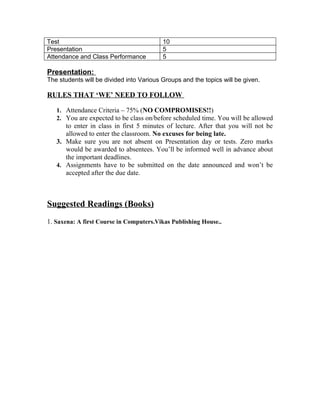
Test                                      10
Presentation                              5
Attendance and Class Performance          5

Presentation:
The students will be divided into Various Groups and the topics will be given.

RULES THAT ‘WE’ NEED TO FOLLOW

   1. Attendance Criteria – 75% (NO COMPROMISES!!)
   2. You are expected to be class on/before scheduled time. You will be allowed
      to enter in class in first 5 minutes of lecture. After that you will not be
      allowed to enter the classroom. No excuses for being late.
   3. Make sure you are not absent on Presentation day or tests. Zero marks
      would be awarded to absentees. You’ll be informed well in advance about
      the important deadlines.
   4. Assignments have to be submitted on the date announced and won’t be
      accepted after the due date.


Suggested Readings (Books)
1. Saxena: A first Course in Computers.Vikas Publishing House..

Course module bba1

  • 1.
    PUNJAB COLLEGE OFTECHNICAL EDUCATION COURSE PLAN Subject Name : Introduction to st Class : BBA – 1 Sem Computers Teacher's Name: rupali Assignments : 4 Subject Code : BC-106 (N2) Tests : 4 Total Lectures : 30 LECT. TOPICS TO BE COVERED ASSIGN. TEST NO. 1 • Introduction to Computers • Characteristics of Computers 2 Basic Fundamental Of Computers • Components of Computer • Types of Computer 3 History Of computers • Generations of Computers 4 Block Diagram(BD) of Computer 5 Detailed Significance of each parts of BD • Input Unit • Output Unit • Storage Unit • ALU • Control Unit • CPU 6 Input devices • Keyboard • Mouse • Scanner • Joystick • Light Pen 7 Input devices • Track ball • Touch screen • MICR, OMR, OBR 8 Output devices • Monitor (CRT, LCD) • Speaker
  • 2.
    • Plotters • Punched Card 9 Printers & their Types • Impact(Dot Matrix, Daisy Wheel, Drum, Chain) • Non Impact (Thermal, Ink Jet, Laser, Electrographic, electro static, ) ASSIGN. 1 10 Test 1 11 Introduction to DOS 12 DOS Commands 13 DOS Commands Cont.. 14 DOS Commands Cont.. ASSIGN 2 15 Difference between DOS and Windows Basic Features: Date, Time, Time Zone, Display, Screen saver, Fonts, Mouse, and mouse pointers. 16 Test 2 17 Using accessories such as calculator, paint brush, CD player, etc. Use of Windows Explorer for moving and copying files. 18 Using accessories such as calculator, paint brush, CD player, etc. Use of Windows Explorer for moving and copying files Cont.. 19 Introduction to MS-Office and its integrated nature. MS-Word: Starting Word, new documents, entering text, changing text, aligning, underlining, and justifying text. 20 Use of tabs. Tables creation, adding rows and columns, splitting, and combining cells, Borders. Saving, closing, and operating documents. Adding headers and footers. Print preview, and printing a document 21 Use of tabs. Tables creation, adding ASSIGN 3
  • 3.
    rows and columns,splitting, and combining cells, Borders. Saving, closing, and operating documents. Adding headers and footers. Print preview, and printing a document Cont.. 22 Mailmerge: creating main document and data source. Adding and removing fields from data source. 23 Test 3 24 Power Point (Presentation software): Basic concept of presentation software. Standard, formatting, and drawing toolbars in powerpoint and their use. Creating and opening a presentation. 25 Creating, deleting, opening, and copying slides. Closing and saving a presentation. Use of slide sorter, adding header/footer. Use of master slides and colour box. 26 Creating, deleting, opening, and copying ASSIGN 4 slides. Closing and saving a presentation. Use of slide sorter, adding header/footer. Use of master slides and colour box Cont.. 27 Use of animation features. Inserting pictures, resizing pictures. Inserting organization chart. Use of auto content wizard. 28 Use of animation features. Inserting pictures, resizing pictures. Inserting organization chart. Use of auto content wizard Cont.. 29 Test 4 30 Revision Starts GRADING FOR INTERNALS(subject to change) MSE 15 marks Assignments 5
  • 4.
    Test 10 Presentation 5 Attendance and Class Performance 5 Presentation: The students will be divided into Various Groups and the topics will be given. RULES THAT ‘WE’ NEED TO FOLLOW 1. Attendance Criteria – 75% (NO COMPROMISES!!) 2. You are expected to be class on/before scheduled time. You will be allowed to enter in class in first 5 minutes of lecture. After that you will not be allowed to enter the classroom. No excuses for being late. 3. Make sure you are not absent on Presentation day or tests. Zero marks would be awarded to absentees. You’ll be informed well in advance about the important deadlines. 4. Assignments have to be submitted on the date announced and won’t be accepted after the due date. Suggested Readings (Books) 1. Saxena: A first Course in Computers.Vikas Publishing House..