W H I T E PA P E R


                     Customizing Your Uninstaller
                     by Robert Dickau
                     Principal Technical Training Writer, Flexera Software
Customizing Your Uninstaller
    Introduction                                                         If your installer supports console mode, you should add
    As important as properly designing your installer is                 console equivalents to the graphical panels displayed
    designing your uninstaller. Most simple projects will not            during uninstallation.
    require much uninstaller customization. However, if you
    are installing multiple projects, using merge modules,               You can customize the appearance, location, and some of
    or installing server applications, you may wish to add               the behavior of the uninstaller using its customizer in the
    additional functionalityto your uninstaller.                         Install task.

    This white paper describes how to build customized
    uninstallers to control the removal of products and features.


       Learn More about InstallAnywhere
       If you wish to learn more about the capabilities
       of InstallAnywhere and download a free evaluation,
       please visit the Flexera Software Web site at
       www.flexerasoftware.com/installanywhere


    Uninstallation
    In InstallAnywhere, you can customize the uninstaller in the
    same way you can customize the installer. In particular, you
    use the Pre-Uninstall and Post-Uninstall tasks to modify the         By default, the uninstaller executable is called Uninstall_
    panels and actions performed during uninstallation.                  ProductName, and is located in an Uninstall_ProductName
                                                                         subdirectory of the installation location $USER_INSTALL_
                                                                         DIR$.

                                                                         Feature-Level Uninstallation
                                                                         Each installer project has one uninstaller. All features are
                                                                         registered with the uninstaller through a local registry. If the
                                                                         Choose Feature panel is included in the uninstaller, the user
                                                                         will be offered the option to uninstall only certain features.

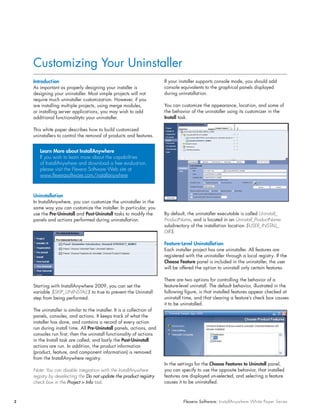
                                                                         There are two options for controlling the behavior of a
    Starting with InstallAnywhere 2009, you can set the                  feature-level uninstall. The default behavior, illustrated in the
    variable $SKIP_UNINSTALL$ to true to prevent the Uninstall           following figure, is that installed features appear checked at
    step from being performed.                                           uninstall time, and that clearing a feature’s check box causes
                                                                         it to be uninstalled.
    The uninstaller is similar to the installer. It is a collection of
    panels, consoles, and actions. It keeps track of what the
    installer has done, and contains a record of every action
    run during install time. All Pre-Uninstall panels, actions, and
    consoles run first; then the uninstall functionality of actions
    in the Install task are called; and lastly the Post-Uninstall
    actions are run. In addition, the product information
    (product, feature, and component information) is removed
    from the InstallAnywhere registry.
                                                                         In the settings for the Choose Features to Uninstall panel,
    Note: You can disable integration with the InstallAnywhere           you can specify to use the opposite behavior, that installed
    registry by deselecting the Do not update the product registry       features are displayed un-selected, and selecting a feature
    check box in the Project > Info task.                                causes it to be uninstalled.


2                                                                                  Flexera Software: InstallAnywhere White Paper Series
Customizing Your Uninstaller


A feature-level uninstallation enables end users to choose         Similarly, you can optionally specify to integrate your
specific features to uninstall. If an end user opts to uninstall   product information with the RPM database on a Linux
one feature that has a shared component with a feature they        user’s system. You can specify the integration in the Project
were not planning to uninstall, the uninstaller recognizes this    > Platforms > UNIX task.
conflict and does not uninstall the shared component.
                                                                   If you select to enable RPM registration, the Configure
Uninstaller Integration with the Target System                     button enables you to specify the information to store in the
InstallAnywhere automatically creates an uninstaller               RPM database.
for the project, which can be launched manually. The
InstallAnywhere uninstaller removes all files and actions
that occur during the Install task of the installation. Actions
added in other phases
of the installation cannot be removed using the uninstaller,
and should be accounted for in the install phase.

On Windows platforms, InstallAnywhere automatically
creates an Add or Remove Programs entry.


If the user clicks the “Click here for support information” link
in the Add or Remove Programs entry, the following
Support Info panel is displayed.


                                                                   Likewise, InstallAnywhere 2008 Value Pack 1 introduced
                                                                   support for integration with the SWVPD registry on AIX
                                                                   target systems, and RAIR support on System i (i5/OS)
                                                                   systems.

                                                                   Summary
                                                                   This white paper discussed how to build customized
                                                                   uninstallers to control the removal of products and features.
                                                                   It also highlighted how InstallAnywhere makes it easy for
                                                                   developers to design the right uninstaller.

The details are populated based on the settings you specify
                                                                     Begin a Free Evaluation of InstallAnywhere
in the Project > Description task.
                                                                     You can download a free trial version of InstallAnywhere
                                                                     from the Flexera Software Web site at:
                                                                     www.flexerasoftware.com/installanywhere/eval.


                                                                     Learn More Best Practices for Building Quality Installations
                                                                     Join an InstallAnywhere training class – visit
                                                                     www.flexerasoftware.com/training for available classes.

                                                                     Also, if you have a critical installation project but are
                                                                     short on developer bandwidth or expertise, Flexera
                                                                     Software’s Professional Services team can help. Learn
                                                                     more at: www.flexerasoftware.com/services/consulting/
                                                                     software-installations.htm


Flexera Software: InstallAnywhere White Paper Series                                                                                     3
Flexera Software LLC                      Schaumburg                                United Kingdom (Europe,                   Japan (Asia,                              For more office locations visit:
1000 East Woodfield Road,                 (Global Headquarters):                    Middle East Headquarters):                Pacific Headquarters):                    www.flexerasoftware.com
Suite 400                                 +1 800-809-5659                           +44 870-871-1111                          +81 3-4360-8291
Schaumburg, IL 60173 USA                                                            +44 870-873-6300

Copyright © 2011 Flexera Software LLC. All other brand and product names mentioned herein may be the trademarks and registered trademarks of their respective owners.
                                                                                                                                                                                    IA_WP_Uninstall_Oct11

Customizing Your Uninstaller

  • 1.
    W H IT E PA P E R Customizing Your Uninstaller by Robert Dickau Principal Technical Training Writer, Flexera Software
  • 2.
    Customizing Your Uninstaller Introduction If your installer supports console mode, you should add As important as properly designing your installer is console equivalents to the graphical panels displayed designing your uninstaller. Most simple projects will not during uninstallation. require much uninstaller customization. However, if you are installing multiple projects, using merge modules, You can customize the appearance, location, and some of or installing server applications, you may wish to add the behavior of the uninstaller using its customizer in the additional functionalityto your uninstaller. Install task. This white paper describes how to build customized uninstallers to control the removal of products and features. Learn More about InstallAnywhere If you wish to learn more about the capabilities of InstallAnywhere and download a free evaluation, please visit the Flexera Software Web site at www.flexerasoftware.com/installanywhere Uninstallation In InstallAnywhere, you can customize the uninstaller in the same way you can customize the installer. In particular, you use the Pre-Uninstall and Post-Uninstall tasks to modify the By default, the uninstaller executable is called Uninstall_ panels and actions performed during uninstallation. ProductName, and is located in an Uninstall_ProductName subdirectory of the installation location $USER_INSTALL_ DIR$. Feature-Level Uninstallation Each installer project has one uninstaller. All features are registered with the uninstaller through a local registry. If the Choose Feature panel is included in the uninstaller, the user will be offered the option to uninstall only certain features. There are two options for controlling the behavior of a Starting with InstallAnywhere 2009, you can set the feature-level uninstall. The default behavior, illustrated in the variable $SKIP_UNINSTALL$ to true to prevent the Uninstall following figure, is that installed features appear checked at step from being performed. uninstall time, and that clearing a feature’s check box causes it to be uninstalled. The uninstaller is similar to the installer. It is a collection of panels, consoles, and actions. It keeps track of what the installer has done, and contains a record of every action run during install time. All Pre-Uninstall panels, actions, and consoles run first; then the uninstall functionality of actions in the Install task are called; and lastly the Post-Uninstall actions are run. In addition, the product information (product, feature, and component information) is removed from the InstallAnywhere registry. In the settings for the Choose Features to Uninstall panel, Note: You can disable integration with the InstallAnywhere you can specify to use the opposite behavior, that installed registry by deselecting the Do not update the product registry features are displayed un-selected, and selecting a feature check box in the Project > Info task. causes it to be uninstalled. 2 Flexera Software: InstallAnywhere White Paper Series
  • 3.
    Customizing Your Uninstaller Afeature-level uninstallation enables end users to choose Similarly, you can optionally specify to integrate your specific features to uninstall. If an end user opts to uninstall product information with the RPM database on a Linux one feature that has a shared component with a feature they user’s system. You can specify the integration in the Project were not planning to uninstall, the uninstaller recognizes this > Platforms > UNIX task. conflict and does not uninstall the shared component. If you select to enable RPM registration, the Configure Uninstaller Integration with the Target System button enables you to specify the information to store in the InstallAnywhere automatically creates an uninstaller RPM database. for the project, which can be launched manually. The InstallAnywhere uninstaller removes all files and actions that occur during the Install task of the installation. Actions added in other phases of the installation cannot be removed using the uninstaller, and should be accounted for in the install phase. On Windows platforms, InstallAnywhere automatically creates an Add or Remove Programs entry. If the user clicks the “Click here for support information” link in the Add or Remove Programs entry, the following Support Info panel is displayed. Likewise, InstallAnywhere 2008 Value Pack 1 introduced support for integration with the SWVPD registry on AIX target systems, and RAIR support on System i (i5/OS) systems. Summary This white paper discussed how to build customized uninstallers to control the removal of products and features. It also highlighted how InstallAnywhere makes it easy for developers to design the right uninstaller. The details are populated based on the settings you specify Begin a Free Evaluation of InstallAnywhere in the Project > Description task. You can download a free trial version of InstallAnywhere from the Flexera Software Web site at: www.flexerasoftware.com/installanywhere/eval. Learn More Best Practices for Building Quality Installations Join an InstallAnywhere training class – visit www.flexerasoftware.com/training for available classes. Also, if you have a critical installation project but are short on developer bandwidth or expertise, Flexera Software’s Professional Services team can help. Learn more at: www.flexerasoftware.com/services/consulting/ software-installations.htm Flexera Software: InstallAnywhere White Paper Series 3
  • 4.
    Flexera Software LLC Schaumburg United Kingdom (Europe, Japan (Asia, For more office locations visit: 1000 East Woodfield Road, (Global Headquarters): Middle East Headquarters): Pacific Headquarters): www.flexerasoftware.com Suite 400 +1 800-809-5659 +44 870-871-1111 +81 3-4360-8291 Schaumburg, IL 60173 USA +44 870-873-6300 Copyright © 2011 Flexera Software LLC. All other brand and product names mentioned herein may be the trademarks and registered trademarks of their respective owners. IA_WP_Uninstall_Oct11