Android Mobile application development - Event Handling (1).pptx
1.
Android - EventHandling
Events are a useful way to collect data about
a user's interaction with interactive
components of Applications. Like button
presses or screen touch etc. The Android
framework maintains an event queue as first-in,
first-out (FIFO) basis. You can capture these events
in your program and take appropriate action as
per requirements.
2.
There arefollowing three concepts related to
Android Event Management −
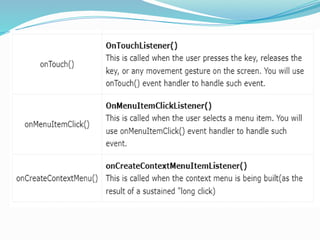
Event Listeners An event listener is an interface
−
in the View class that contains a single callback
method.
Event Listeners Registration Event Registration
−
is the process by which an Event Handler gets
registered with an Event Listener so that the handler
is called when the Event Listener fires the event.
Event Handlers When an event happens and we
−
have registered an event listener for the event, the
event listener calls the Event Handlers.
5.
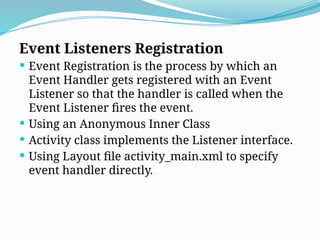
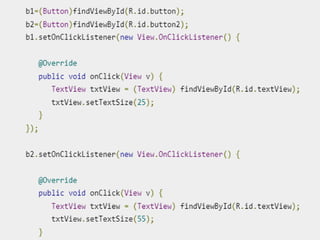
Event Listeners Registration
Event Registration is the process by which an
Event Handler gets registered with an Event
Listener so that the handler is called when the
Event Listener fires the event.
Using an Anonymous Inner Class
Activity class implements the Listener interface.
Using Layout file activity_main.xml to specify
event handler directly.
6.
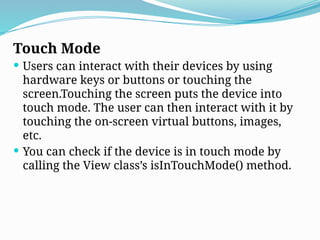
Touch Mode
Userscan interact with their devices by using
hardware keys or buttons or touching the
screen.Touching the screen puts the device into
touch mode. The user can then interact with it by
touching the on-screen virtual buttons, images,
etc.
You can check if the device is in touch mode by
calling the View class’s isInTouchMode() method.
7.
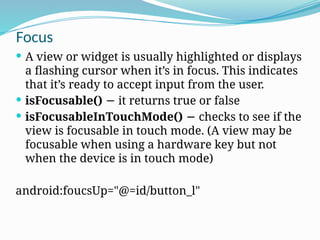
Focus
A viewor widget is usually highlighted or displays
a flashing cursor when it’s in focus. This indicates
that it’s ready to accept input from the user.
isFocusable() it returns true or false
−
isFocusableInTouchMode() checks to see if the
−
view is focusable in touch mode. (A view may be
focusable when using a hardware key but not
when the device is in touch mode)
android:foucsUp="@=id/button_l"
9.
Fragments
A Fragmentrepresents a reusable portion of
your app's UI.
A fragment defines and manages its own layout,
has its own lifecycle, and can handle its own
input events.
Fragments can't live on their own. They must
be hosted by an activity or another fragment.
10.
Modularity
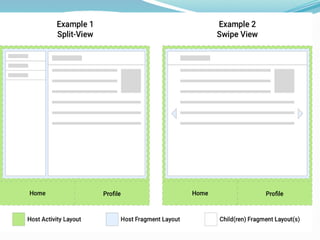
Fragments introducemodularity and reusability
into your activity’s UI by letting you divide the UI
into discrete chunks. fragments are better suited
to define and manage the UI of a single screen or
portion of a screen.
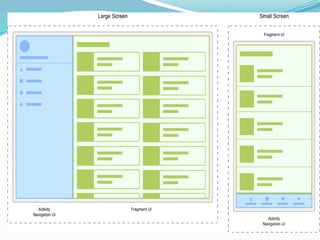
Consider an app that responds to various screen
sizes. On larger screens, you might want the app
to display a static navigation drawer and a list in
a grid layout. On smaller screens, you might
want the app to display a bottom navigation bar
and a list in a linear layout.
12.
Fragment manager
FragmentManager isthe class responsible
for performing actions on your app's
fragments, such as adding, removing, or
replacing them and adding them to the
back stack.
14.
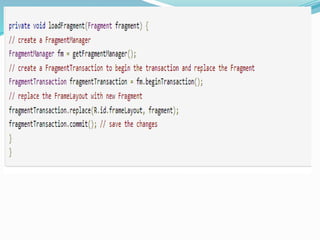
Use the FragmentManager
The FragmentManager manages the fragment
back stack. At runtime,
the FragmentManager can perform back stack
operations like adding or removing fragments in
response to user interactions. Each set of changes
is committed together as a single unit called a
FragmentTransaction.
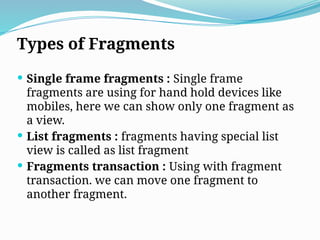
Types of Fragments
Single frame fragments : Single frame
fragments are using for hand hold devices like
mobiles, here we can show only one fragment as
a view.
List fragments : fragments having special list
view is called as list fragment
Fragments transaction : Using with fragment
transaction. we can move one fragment to
another fragment.
20.
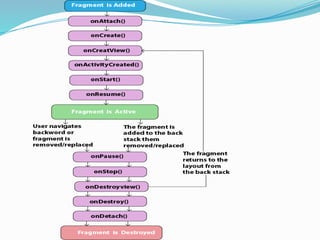
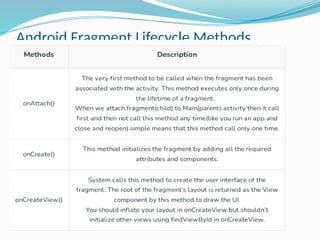
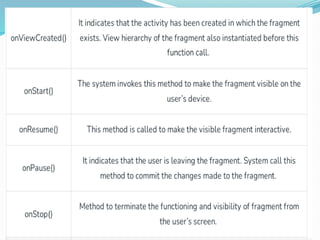
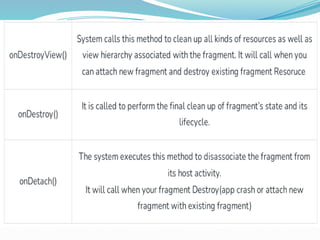
Handling the FragmentLifecycle
A Fragment exist in three states:
Resumed : The fragment is visible in the running activity.
Paused : Another activity is in the foreground and has
focus, but the activity in which this fragment lives is still
visible (the foreground activity is partially transparent or
doesn’t cover the entire screen).
Stopped : The fragment is not visible. Either the host
activity has been stopped or the fragment has been
removed from the activity but added to the back stack. A
stopped fragment is still alive (all state and member
information is retained by the system). However, it is no
longer visible to the user and will be killed if the activity
is killed.