Welcome to
Food Delivery System
ONLINE FOOD DELIVERY
Submitted by: Ruksana Akter
Jannatul Mansura
Radif Ahmed
Ibrahim Khalil
Abstract
ď‚— ONLINE FOOD DELIVERY SYSTEM is a website designed primarily for
use in the food delivery industry. This system will allow hotels and
restaurants to increase scope of business by reducing the labor cost involved.
The system also allows to quickly and easily manage an online menu which
customers can browse and use to place orders with just few clicks.
Restaurant employees then use these orders through an easy to navigate
graphical interface for efficient processing.
Introduction
ď‚— Online ordering system that I am proposing here, greatly simplifies the
ordering process for both the customer and the restaurant. System presents an
interactive and up-to-date menu with all available options in an easy to use
manner. Customer can choose one or more items to place an order which will
land in the Cart. Customer can view all the order details in the cart before
checking out. At the end, customer gets order confirmation details. Once the
order is placed it is entered in the database and retrieved in pretty much real
time. This allows Restaurant Employees to quickly go through the orders as
they are received and process all orders efficiently and effectively with
minimal delays and confusion
Objective
ď‚— Develop a system that will allow customers to place their food order online
and provide them with feedback as to the calorie and fat count of the meal, a
generic image of the meal, a list of side dishes, main course
ingredients, and cost information.
What To Do
ď‚— provide a display that will allow the customer to choose menu items and
make corrections.
ď‚— update this display with changes to the order.
ď‚— provide a running total cost and calorie/fat count.
ď‚— At order finalization, we will request identification information from the
customer.
ď‚— offer a static map of our surrounding area so that customers unfamiliar
with our location can find us.
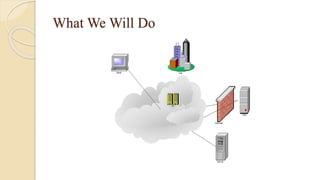
What We Will Do
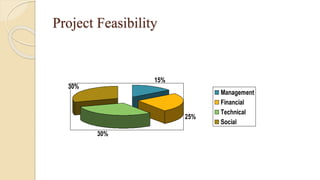
Project Feasibility
15%
25%
30%
30%
Management
Financial
Technical
Social
Implementation
Hardware Interface:
• Pentium Processor
• 60 MB of free hard-drive space
• 128 MB of RAM
Software Interface:
• Operating System: Windows (Vista/7 or above)
• Web Browser: IE 10 or above, Mozilla FF 31 and above
or Google Chrome
ď‚— Xampp platform
MODULES
ď‚— Admin
ď‚— User Module
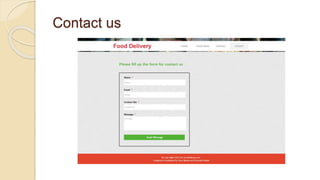
ď‚— Contact Us Module
ď‚— Search Module
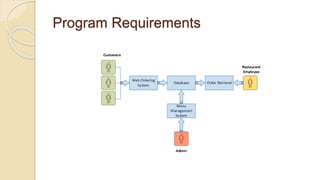
Program Requirements
Web Ordering System Module
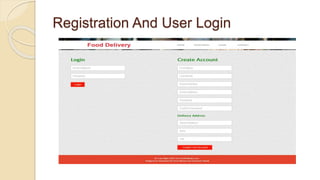
ď‚— Create an account.
• Manage their account.
• Log in to the system.
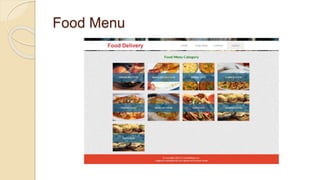
• Select an item from the menu.
• Add an item to their current order.
• Review their current order.
• Remove an item/remove all items from
their current order.
• Provide payment details.
• Place an order.
• Receive confirmation in the form of an
order number.
• View order placed.
ď‚—
Menu Management System Module
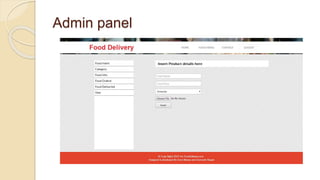
ď‚— Add/update/delete food category to/from the menu.
• Add /update/delete food item to/from the menu.
• Update price for a given food item.
• Update additional information (description, photo, etc.)
for a given food item.
Order Retrieval System Module
This is the most simplest module out of all 3 modules.
It is designed to be used only by restaurant
employees, and provides the following functions:
ď‚— Retrieve new orders from the database.
• Display the orders in an easily readable, graphical
way.
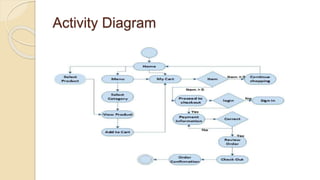
Activity Diagram
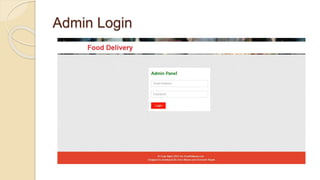
Admin Login
Admin panel
Registration And User Login
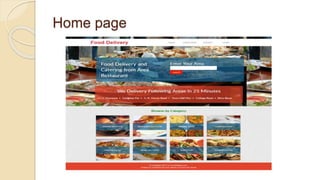
Home page
Food Menu
Contact us
Testing
ď‚— Once source code has been generated, software must be tested to
uncover as many errors as possible before delivery to the client.
Which is a very important to work the system successfully and
achieve high quality of software. Testing includes designing a series of
test cases that have a high likelihood of finding errors by applying
software-testing techniques.
ď‚— Software testing is a critical component of the software engineering
process. It is an element of software quality assurance (SQA).
ď‚— System testing makes logical assumptions that if all the parts of the
system are correct, the goal will be successfully achieved. The system
should be checked logically. Validations and cross checks should be
there. Avoid duplications of records that cause redundancy of data.
Unit Testing
ď‚— In the web based application smallest testable unit is
Web page itself. So the web pages of the site are to be
unit tested.
ď‚— Each web page contains content, navigational links,
and processing elements (scripts, event handlers, etc.)
.The testing will be driven by the content processing,
and links contained in the site.
White Box Testing
White box testing is testing case design method that uses
the control structure of the procedural design test cases.
Integration Testing
In integration testing, the different units of the system are
integrated together to form the complete system and this
type of testing checks the system as whole to ensure that it
is doing what is supposed to do.
System Testing
ď‚— The uncovered weaknesses that were not found in
earlier tests are removed in system testing.
ď‚— The system is corrected such away that it does not
affect the forced system failure.
ď‚— This testing is done with low volume of transaction
based on live data. Finally the total system is also
tested to ensure that no data are lost.
Future Work
The following section describes the work that will be implemented with future
releases of the software.
• Customize orders: Allow customers to customize food orders
• Enhance User Interface by adding more user interactive features. Provide
Deals and promotional Offer details to home page. Provide Recipes of the
Week/Day to Home Page
• Payment Options: Add different payment options such as PayPal, Cash, Gift
Cards etc. Allow to save payment details for future use.
• Delivery Options: Add delivery option
• Order Process Estimate: Provide customer a visual graphical order status bar
• Order Status: Show only Active orders to Restaurant Employees.
• Order Ready notification: Send an Order Ready notification to the customer
Food order

Food order

  • 1.
  • 2.
    ONLINE FOOD DELIVERY Submittedby: Ruksana Akter Jannatul Mansura Radif Ahmed Ibrahim Khalil
  • 3.
    Abstract ď‚— ONLINE FOODDELIVERY SYSTEM is a website designed primarily for use in the food delivery industry. This system will allow hotels and restaurants to increase scope of business by reducing the labor cost involved. The system also allows to quickly and easily manage an online menu which customers can browse and use to place orders with just few clicks. Restaurant employees then use these orders through an easy to navigate graphical interface for efficient processing.
  • 4.
    Introduction ď‚— Online orderingsystem that I am proposing here, greatly simplifies the ordering process for both the customer and the restaurant. System presents an interactive and up-to-date menu with all available options in an easy to use manner. Customer can choose one or more items to place an order which will land in the Cart. Customer can view all the order details in the cart before checking out. At the end, customer gets order confirmation details. Once the order is placed it is entered in the database and retrieved in pretty much real time. This allows Restaurant Employees to quickly go through the orders as they are received and process all orders efficiently and effectively with minimal delays and confusion
  • 5.
    Objective ď‚— Develop asystem that will allow customers to place their food order online and provide them with feedback as to the calorie and fat count of the meal, a generic image of the meal, a list of side dishes, main course ingredients, and cost information.
  • 6.
    What To Do ď‚—provide a display that will allow the customer to choose menu items and make corrections. ď‚— update this display with changes to the order. ď‚— provide a running total cost and calorie/fat count. ď‚— At order finalization, we will request identification information from the customer. ď‚— offer a static map of our surrounding area so that customers unfamiliar with our location can find us.
  • 7.
  • 8.
  • 9.
    Implementation Hardware Interface: • PentiumProcessor • 60 MB of free hard-drive space • 128 MB of RAM Software Interface: • Operating System: Windows (Vista/7 or above) • Web Browser: IE 10 or above, Mozilla FF 31 and above or Google Chrome  Xampp platform
  • 10.
    MODULES ď‚— Admin ď‚— UserModule ď‚— Contact Us Module ď‚— Search Module
  • 11.
  • 12.
    Web Ordering SystemModule  Create an account. • Manage their account. • Log in to the system. • Select an item from the menu. • Add an item to their current order. • Review their current order. • Remove an item/remove all items from their current order. • Provide payment details. • Place an order. • Receive confirmation in the form of an order number. • View order placed. 
  • 13.
    Menu Management SystemModule  Add/update/delete food category to/from the menu. • Add /update/delete food item to/from the menu. • Update price for a given food item. • Update additional information (description, photo, etc.) for a given food item.
  • 14.
    Order Retrieval SystemModule This is the most simplest module out of all 3 modules. It is designed to be used only by restaurant employees, and provides the following functions:  Retrieve new orders from the database. • Display the orders in an easily readable, graphical way.
  • 15.
  • 16.
  • 17.
  • 18.
  • 19.
  • 20.
  • 21.
  • 22.
    Testing ď‚— Once sourcecode has been generated, software must be tested to uncover as many errors as possible before delivery to the client. Which is a very important to work the system successfully and achieve high quality of software. Testing includes designing a series of test cases that have a high likelihood of finding errors by applying software-testing techniques. ď‚— Software testing is a critical component of the software engineering process. It is an element of software quality assurance (SQA). ď‚— System testing makes logical assumptions that if all the parts of the system are correct, the goal will be successfully achieved. The system should be checked logically. Validations and cross checks should be there. Avoid duplications of records that cause redundancy of data.
  • 23.
    Unit Testing ď‚— Inthe web based application smallest testable unit is Web page itself. So the web pages of the site are to be unit tested. ď‚— Each web page contains content, navigational links, and processing elements (scripts, event handlers, etc.) .The testing will be driven by the content processing, and links contained in the site.
  • 24.
    White Box Testing Whitebox testing is testing case design method that uses the control structure of the procedural design test cases. Integration Testing In integration testing, the different units of the system are integrated together to form the complete system and this type of testing checks the system as whole to ensure that it is doing what is supposed to do.
  • 25.
    System Testing ď‚— Theuncovered weaknesses that were not found in earlier tests are removed in system testing. ď‚— The system is corrected such away that it does not affect the forced system failure. ď‚— This testing is done with low volume of transaction based on live data. Finally the total system is also tested to ensure that no data are lost.
  • 26.
    Future Work The followingsection describes the work that will be implemented with future releases of the software. • Customize orders: Allow customers to customize food orders • Enhance User Interface by adding more user interactive features. Provide Deals and promotional Offer details to home page. Provide Recipes of the Week/Day to Home Page • Payment Options: Add different payment options such as PayPal, Cash, Gift Cards etc. Allow to save payment details for future use. • Delivery Options: Add delivery option • Order Process Estimate: Provide customer a visual graphical order status bar • Order Status: Show only Active orders to Restaurant Employees. • Order Ready notification: Send an Order Ready notification to the customer