1
AN
INTERNSHIP REPORT
ON
ONLINE FOOD ORDER SYSTEM
In partial fulfillment of the requirements for the degree of
M.sc
In
COMPUTER SCIENCE AND INFORATION TECHNOLOGY
Submitted To :
DEPARTMENT OF COMPUTER SCIENCE AND INFORMATION
TECHNOLOGY
TRIBHUVAN UNIVERSITY
Kirtipur, Kathmandu (Nepal)
Submitted By:
Kamal Acharya
August,2023
2
Table of Contents
Abstract.........................................................................................................................4
Introduction..................................................................................................................4
Background and Related Work .................................................................................5
Program Requirements...............................................................................................5
Implementation ............................................................................................................8
Results, Evaluation, and Reflection .........................................................................11
Conclusions and Future Work .................................................................................11
Bibliography...............................................................................................................12
Appendices..................................................................................................................13
3
Abstract
ONLINE FOOD ORDER SYSTEM is a website designed primarily for
use in the food delivery industry. This system will allow hotels and restaurants
to increase scope of business by reducing the labor cost involved. The system
also allows to quickly and easily manage an online menu which customers can
browse and use to place orders with just few clicks. Restaurant employees then
use these orders through aneasy to navigate graphical interface for efficient
processing.
Introduction
It is known globally that, in today’s market, it is extremely difficult to
start a new small-scale business and live-through the competition from the
well-established and settled owners. In fast paced time of today, when everyone
is squeezed for time, the majority of people are finicky when it comes to
placing afood order. The customers of today are not only attracted because
placing an order online is very convenient but also because they have visibility
into the items offered, price and extremely simplified navigation for the order.
Online ordering system that I am proposing here, greatly simplifies the
ordering process for both the customer and the restaurant. System presents an
interactive and up-to-date menu with all available options in an easy to use
manner. Customer can choose one or more items to place an order which will
landin the Cart. Customer can view all the order details in the cart before
checking out. At the end, customer gets order confirmation details. Once the
order is placed it is entered in the database and retrieved in pretty much real
time. This allows Restaurant Employees to quickly go through the orders as
they are received and process all orders efficiently and effectively with minimal
delays and confusion.
Motivation
The motivation for designing this application came because my family
is involved in the fast foodbusiness and I personally do not like waiting for
long in the store or to have to call store to place an order especially during the
peak lunch or dinner hours. Moreover, I value recent learning about the Java
and JSP Programming languages as well as seeing how powerful and dynamic
they are when it comes to web designing and applications. The languages used
to build this application are JavaScript, JSP, HTML and Java at client facing
whereas Oracle database at the back-end because I found them to be extremely
4
useful while working on the technologies.
Aim of the Software
This software is developed to help computer science students to learn about the
Web application designing using JSP and HTML from their basic capabilities to build a
complete working application from
5
scratch. Further, it gives insight about how GUI interacts with server-side language, Java,
and finally withthe Oracle database.
Background and Related Work
This Case study looks at the problem of setting up a fast food restaurant. In existing system
there are fewproblems:
 For placing any orders customers have to visit hotels or restaurants to know about
food items andthen place order and pay. In this method time and manual work is
required.
 While placing an order over the phone, customer lacks the physical copy of the
menu item, lack ofvisual confirmation that the order was placed correctly.
 Every restaurant needs certain employees to take the order over phone or in-
person, to offer a richdining experience and process the payment. In today’s
market, labor rates are increasing day by day making it difficult to find employees
when needed.
Hence, to solve this issue, what I propose is an “Online Food Order System,
originally designed for small scale business like College Cafeterias, Fast Food restaurant or
Take-Out, but this system is just asapplicable in any food delivery industry.
The main advantage of my system is that it greatly simplifies the ordering process
for both the customer and the restaurant and also greatly lightens the load on the
restaurant’s end, as the entire processof taking orders is automated.
Anticipated Benefits are:
1. This will minimize the number of employees at the back of the counter.
2. The system will help to reduce labor cost involved.
3. The system will be less probable to make mistake, since it’s a machine.
4. This will avoid long queues at the counter due to the speed of execution
and number ofoptimum screens to accommodate the maximum
throughput.
Program Requirements
Outline your solution. Describe the "whats" of your project -- what does it do?
Product Perspective:
The Online Food Order System application is a web-based system. It can be accessed
using IE 10.0and above, Fire Fox 31 and above and Google Chrome.
System Model:
6
Figure 1
The structure of the system can be divided into 3 main logical components:
 Web Ordering System- provides the functionality for customers to place their
order and supplynecessary details.
 Menu Management-allows the restaurant to control what can be ordered by the customers
 Order Retrieval System-This is a final logical component. Allows restaurant to
keep track of allorders placed. This component takes care of order retrieving and
displaying order information.
Product Function:
The Online Food Order System application would have the following basic functions:
Web Ordering System Module
This module provides the functionality for customers to place their order and
supply necessary details. Users of the system, namely restaurant customers, must be
provided the following functionality:
 Create an account.
 Manage their account.
 Log in to the system.
 Navigate the restaurant’s menu.
7
 Select an item from the menu.
 Add an item to their current order.
 Review their current order.
 Remove an item/remove all items from their current order.
 Provide payment details.
 Place an order.
 Receive confirmation in the form of an order number.
 View order placed.
Additional Feature:
 eClub- Allows user to subscribe to eClub to get promotional deals and discounts offers.
Out of all the functions outlined above, Account Creation and Management
only will be usedevery time a customer places an order. This will allow to simplify the
overall user experience.
Menu Management System Module
This module provides functionality for the power user-Administrator only. It will
not be availableto any other users of the system like Restaurant Employees or Customers.
Using a graphical interface, it will allow an Admin to manage the menu that is displayed
to users of theweb ordering system:
 Add/update/delete food category to/from the menu.
 Add /update/delete food item to/from the menu.
 Update price for a given food item.
 Update additional information (description, photo, etc.) for a given food item.
Before customers can actually use this system, functionality provided by this
component will have tobe configured first. Once the initial configuration is done, this will
be the least likely used component as menu updates are mostly seasonal and do not occur
frequently.
Order Retrieval System Module
This is the most simplest module out of all 3 modules. It is designed to be used
only by restaurantemployees, and provides the following functions:
 Retrieve new orders from the database.
 Display the orders in an easily readable, graphical way.
8
Implementation
Hardware/Software Interface:
This section lists the minimum hardware and software requirements needed to run the system efficiently.
Hardware Interface:
 Pentium Processor
 60 MB of free hard-drive space
 128 MB of RAM
Software Interface:
 Operating System: Windows (Vista/7 or above)
 Web Browser: IE 10 or above, Mozilla FF 31 and above or Google Chrome
 Drivers: Java Runtime Environment
 Integrated Development Environment: Eclipse J2EE or Apache Tomcat
Functional Requirement Specifications:
Activity Diagram:
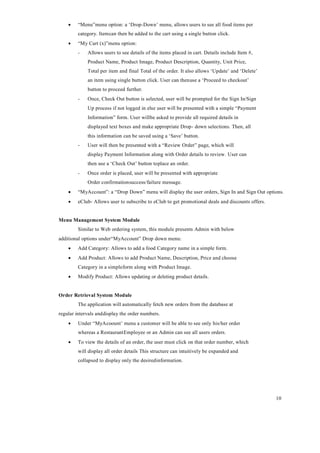
This section lists the activity diagram and describes the flow of the activities in the
system. A detailed description is then given after the figure for each activity. Figure # 3
provides the overview of theactivity of the Online Food Order System application.
9
Figure 2
All users of the system, are provided with below menu options:
Home, Menu, My Cart, UserAccount, eClub, AboutUs and Contact
Web Ordering System Module
Customers of the Web Ordering system will interact with the application through an
easy to use topnavigation menu.
 “Home” menu option: allows the users to see all food items offered with nice
images as well asselect an item to place an order.
10
 “Menu”menu option: a ‘Drop-Down’ menu, allows users to see all food items per
category. Itemcan then be added to the cart using a single button click.
 “My Cart (x)”menu option:
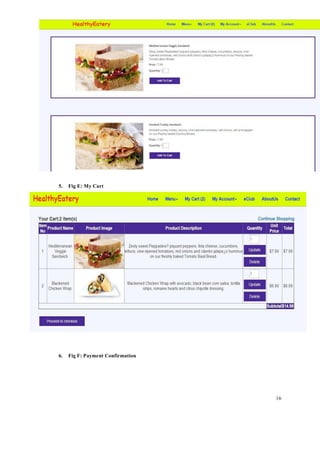
- Allows users to see details of the items placed in cart. Details include Item #,
Product Name, Product Image, Product Description, Quantity, Unit Price,
Total per item and final Total of the order. It also allows ‘Update’ and ‘Delete’
an item using single button click. User can thenuse a ‘Proceed to checkout’
button to proceed further.
- Once, Check Out button is selected, user will be prompted for the Sign In/Sign
Up process if not logged in else user will be presented with a simple “Payment
Information” form. User willbe asked to provide all required details in
displayed text boxes and make appropriate Drop- down selections. Then, all
this information can be saved using a ‘Save’ button.
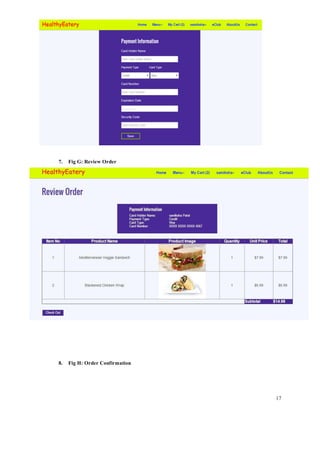
- User will then be presented with a “Review Order” page, which will
display Payment Information along with Order details to review. User can
then use a ‘Check Out’ button toplace an order.
- Once order is placed, user will be presented with appropriate
Order confirmationsuccess/failure message.
 “MyAccount”: a “Drop Down” menu will display the user orders, Sign In and Sign Out options.
 eClub- Allows user to subscribe to eClub to get promotional deals and discounts offers.
Menu Management System Module
Similar to Web ordering system, this module presents Admin with below
additional options under“MyAccount” Drop down menu:
 Add Category: Allows to add a food Category name in a simple form.
 Add Product: Allows to add Product Name, Description, Price and choose
Category in a simpleform along with Product Image.
 Modify Product: Allows updating or deleting product details.
Order Retrieval System Module
The application will automatically fetch new orders from the database at
regular intervals anddisplay the order numbers.
 Under “MyAcoount’ menu a customer will be able to see only his/her order
whereas a RestaurantEmployee or an Admin can see all users orders.
 To view the details of an order, the user must click on that order number, which
will display all order details This structure can intuitively be expanded and
collapsed to display only the desiredinformation.
11
Non-functional Requirements
All of the application data is stored in a Oracle database, and therefore a Oracle
Database mustalso be installed on the host computer. As with Apache2, this software is
freely available and can be installed and run under most operating systems.
The server hardware can be any computer capable of running both the web and
database servers and handling the expected traffic. For a small scale restaurant that is not
expecting to see much web traffic,an average personal computer may be appropriate. Once
the site starts generating more hits, though, it will likely be necessary to upgrade to a
dedicated host to ensure proper performance. The exact cutoffs will need to be determined
through a more thorough stress testing of the system.
Constraints
1. Hardware Limitations: The minimum hardware requirement for the system is
128 MB of Ramand a 60MB hard-disc drive.
2. Others: The application should be built using Java and JavaScript inscribed
in HTML, and itshould, initially, be accessible through the eclipse IDE and
later published on a server
System Evolution
The heart of the entire ordering system is the Database. Currently the system is
only available for small scale restaurants. For Large restaurants, performance considerations
should be taken into account in terms of Hardware/Software capacity/Page load time etc.
Also, security vulnerabilities should be evaluatedfor large scale systems.
In future this can also be available as a Mobile application and can be integrated
with in storeTouch Screen Order devices.
I am also certain that if this system goes into actual use, many requests will arise
for additionalfeatures which I had not previously considered, but would be useful to have.
For this reason, I feel as though the application can be constantly evolving, which I consider
a very good thing.
Conclusions and Future Work
Conclusion:
The main objective of the application is to help Computer Science students understands the
basics of Java,JavaScript and HTML. The following results have been achieved after
completing the system and relate back to the system’s objective.
 Should allow Computer Science students to browse through the code and application:
This can be achieved when students are able to run and install the application.
When they run theapplication, they can browse through the implementation of
different objects.
12
 Should allow users to browse through different product categories: This is
achieved throughan easy to use graphical interface menu options.
 Should allow users to save items to the cart and view detailed information
about the order:The users can add any number of items to the cart from any of
the available food categories by simply clicking the Add to Cart button for each
item. Once item is added to the cart, user is presented with detailed order to
review or continue shopping.
 Should allow the user to CheckOut the item(s): This is achieved using the
“Proceed to checkoutbutton” in the cart initially and then “CheckOut” button at last
step after “review Order” step.. Button is disabled when there are no items in the
cart.
 Should allow the user to process the payment: This is achieved when user
selects “Processed toCheckout” button and fill up the Payment information details.
 Should allow the user to see Success message after placing an order: This is
achieved whenuser successfully places an order. The user is given the order
conformation number along with success message.
Future Work:
The following section describes the work that will be implemented with future releases of the software.
 Customize orders: Allow customers to customize food orders
 Enhance User Interface by adding more user interactive features. Provide Deals
and promotionalOffer details to home page. Provide Recipes of the Week/Day to
Home Page
 Payment Options: Add different payment options such as PayPal, Cash, Gift
Cards etc. Allow tosave payment details for future use.
 Allow to process an order as a Guest
 Delivery Options: Add delivery option
 Order Process Estimate: Provide customer a visual graphical order status bar
 Order Status: Show only Active orders to Restaurant Employees.
 Order Ready notification: Send an Order Ready notification to the customer
 Restaurant Locator: Allow to find and choose a nearby restaurant
 Integrate with In store touch screen devices like iPad
Bibliography
1. http://getbootstrap.com/
2. https://www.youtube.com/watch?v=oepmLGQP1m4&list=P
LUoqTnNH- 2Xz_BUrjcahKWDhPcUj-FTOt
3. http://www.javazoom.net/jzservlets/uploadbean/uploadbean.html
4. https://javabrains.io/
5. http://www.java2s.com/Tutorial/Java/0360 JSP/JSPDummyShoppingCart.htm
13
6. https://docs.oracle.com/cd/E24628_01/server.121/e41484.pdf
7. https://www.dcc.fc.up.pt/~zp/aulas/0405/es/geral/bibliografia/O'Reilly%20-
%20JavaServer%20Pages_2nd%20Edition.pdf
Reference
1. Acharya, Kamal. "STUDENT INFORMATION MANAGEMENT SYSTEM." Authorea
Preprints (2023).
2. Acharya, Kamal. "Library Management System." Available at SSRN 4807104 (2019).
3. ACHARYA, KAMAL, et al. "LIBRARY MANAGEMENT SYSTEM." (2019).
4. Acharya, Kamal. "Online bus reservation system project report." Authorea Preprints (2024).
5. Acharya, Kamal. "Online bus reservation system project report." (2024).
6. Acharya, Kamal. “Online Bus Reservation System.” SSRN ElectroNIC ASIA Journal (2024):
n. pag.
7. Acharya, Kamal. “Student Information Management System Project.” SSRN ElectroNIC
ASIA Journal (2024): n. pag.
8. Acharya, Kamal. “ATTENDANCE MANAGEMENT SYSTEM.” International Research
Journal of Modernization in Engineering Technology and Science (2023): n. pag.
9. Acharya, Kamal. “College Information Management System.” SSRN ElectroNIC ASIA
Journal (2024): n. pag.
10. Acharya, Kamal, Online examination management system. (May 1, 2024). Available at
SSRN: https://ssrn.com/abstract=4813648 or http://dx.doi.org/10.2139/ssrn.4813648
11. Acharya, Kamal, Online shopping management system. (May 1, 2024). Available at
SSRN: https://ssrn.com/abstract=4813594 or http://dx.doi.org/10.2139/ssrn.4813594
12. Acharya, Kamal, University management system project. (May 1, 2024). Available at
SSRN: https://ssrn.com/abstract=4814103 or http://dx.doi.org/10.2139/ssrn.4814103
Appendices
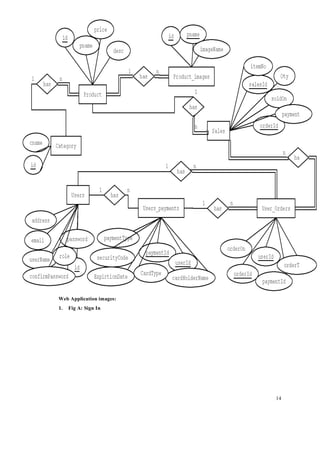
This section includes figures for ER Diagram and various Web application images.
ER Diagram:
14
Web Application images:
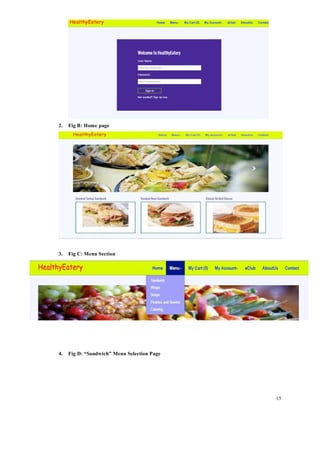
1. Fig A: Sign In
15
2. Fig B: Home page
3. Fig C: Menu Section
4. Fig D: “Sandwich” Menu Selection Page
16
5. Fig E: My Cart
6. Fig F: Payment Confirmation
17
7. Fig G: Review Order
8. Fig H: Order Confirmation
18
9. Fig I: My Account menu as an “Administrator”

ONLINE FOOD ORDER SYSTEM PROJECT REPORT.pdf

  • 1.
    1 AN INTERNSHIP REPORT ON ONLINE FOODORDER SYSTEM In partial fulfillment of the requirements for the degree of M.sc In COMPUTER SCIENCE AND INFORATION TECHNOLOGY Submitted To : DEPARTMENT OF COMPUTER SCIENCE AND INFORMATION TECHNOLOGY TRIBHUVAN UNIVERSITY Kirtipur, Kathmandu (Nepal) Submitted By: Kamal Acharya August,2023
  • 2.
    2 Table of Contents Abstract.........................................................................................................................4 Introduction..................................................................................................................4 Backgroundand Related Work .................................................................................5 Program Requirements...............................................................................................5 Implementation ............................................................................................................8 Results, Evaluation, and Reflection .........................................................................11 Conclusions and Future Work .................................................................................11 Bibliography...............................................................................................................12 Appendices..................................................................................................................13
  • 3.
    3 Abstract ONLINE FOOD ORDERSYSTEM is a website designed primarily for use in the food delivery industry. This system will allow hotels and restaurants to increase scope of business by reducing the labor cost involved. The system also allows to quickly and easily manage an online menu which customers can browse and use to place orders with just few clicks. Restaurant employees then use these orders through aneasy to navigate graphical interface for efficient processing. Introduction It is known globally that, in today’s market, it is extremely difficult to start a new small-scale business and live-through the competition from the well-established and settled owners. In fast paced time of today, when everyone is squeezed for time, the majority of people are finicky when it comes to placing afood order. The customers of today are not only attracted because placing an order online is very convenient but also because they have visibility into the items offered, price and extremely simplified navigation for the order. Online ordering system that I am proposing here, greatly simplifies the ordering process for both the customer and the restaurant. System presents an interactive and up-to-date menu with all available options in an easy to use manner. Customer can choose one or more items to place an order which will landin the Cart. Customer can view all the order details in the cart before checking out. At the end, customer gets order confirmation details. Once the order is placed it is entered in the database and retrieved in pretty much real time. This allows Restaurant Employees to quickly go through the orders as they are received and process all orders efficiently and effectively with minimal delays and confusion. Motivation The motivation for designing this application came because my family is involved in the fast foodbusiness and I personally do not like waiting for long in the store or to have to call store to place an order especially during the peak lunch or dinner hours. Moreover, I value recent learning about the Java and JSP Programming languages as well as seeing how powerful and dynamic they are when it comes to web designing and applications. The languages used to build this application are JavaScript, JSP, HTML and Java at client facing whereas Oracle database at the back-end because I found them to be extremely
  • 4.
    4 useful while workingon the technologies. Aim of the Software This software is developed to help computer science students to learn about the Web application designing using JSP and HTML from their basic capabilities to build a complete working application from
  • 5.
    5 scratch. Further, itgives insight about how GUI interacts with server-side language, Java, and finally withthe Oracle database. Background and Related Work This Case study looks at the problem of setting up a fast food restaurant. In existing system there are fewproblems:  For placing any orders customers have to visit hotels or restaurants to know about food items andthen place order and pay. In this method time and manual work is required.  While placing an order over the phone, customer lacks the physical copy of the menu item, lack ofvisual confirmation that the order was placed correctly.  Every restaurant needs certain employees to take the order over phone or in- person, to offer a richdining experience and process the payment. In today’s market, labor rates are increasing day by day making it difficult to find employees when needed. Hence, to solve this issue, what I propose is an “Online Food Order System, originally designed for small scale business like College Cafeterias, Fast Food restaurant or Take-Out, but this system is just asapplicable in any food delivery industry. The main advantage of my system is that it greatly simplifies the ordering process for both the customer and the restaurant and also greatly lightens the load on the restaurant’s end, as the entire processof taking orders is automated. Anticipated Benefits are: 1. This will minimize the number of employees at the back of the counter. 2. The system will help to reduce labor cost involved. 3. The system will be less probable to make mistake, since it’s a machine. 4. This will avoid long queues at the counter due to the speed of execution and number ofoptimum screens to accommodate the maximum throughput. Program Requirements Outline your solution. Describe the "whats" of your project -- what does it do? Product Perspective: The Online Food Order System application is a web-based system. It can be accessed using IE 10.0and above, Fire Fox 31 and above and Google Chrome. System Model:
  • 6.
    6 Figure 1 The structureof the system can be divided into 3 main logical components:  Web Ordering System- provides the functionality for customers to place their order and supplynecessary details.  Menu Management-allows the restaurant to control what can be ordered by the customers  Order Retrieval System-This is a final logical component. Allows restaurant to keep track of allorders placed. This component takes care of order retrieving and displaying order information. Product Function: The Online Food Order System application would have the following basic functions: Web Ordering System Module This module provides the functionality for customers to place their order and supply necessary details. Users of the system, namely restaurant customers, must be provided the following functionality:  Create an account.  Manage their account.  Log in to the system.  Navigate the restaurant’s menu.
  • 7.
    7  Select anitem from the menu.  Add an item to their current order.  Review their current order.  Remove an item/remove all items from their current order.  Provide payment details.  Place an order.  Receive confirmation in the form of an order number.  View order placed. Additional Feature:  eClub- Allows user to subscribe to eClub to get promotional deals and discounts offers. Out of all the functions outlined above, Account Creation and Management only will be usedevery time a customer places an order. This will allow to simplify the overall user experience. Menu Management System Module This module provides functionality for the power user-Administrator only. It will not be availableto any other users of the system like Restaurant Employees or Customers. Using a graphical interface, it will allow an Admin to manage the menu that is displayed to users of theweb ordering system:  Add/update/delete food category to/from the menu.  Add /update/delete food item to/from the menu.  Update price for a given food item.  Update additional information (description, photo, etc.) for a given food item. Before customers can actually use this system, functionality provided by this component will have tobe configured first. Once the initial configuration is done, this will be the least likely used component as menu updates are mostly seasonal and do not occur frequently. Order Retrieval System Module This is the most simplest module out of all 3 modules. It is designed to be used only by restaurantemployees, and provides the following functions:  Retrieve new orders from the database.  Display the orders in an easily readable, graphical way.
  • 8.
    8 Implementation Hardware/Software Interface: This sectionlists the minimum hardware and software requirements needed to run the system efficiently. Hardware Interface:  Pentium Processor  60 MB of free hard-drive space  128 MB of RAM Software Interface:  Operating System: Windows (Vista/7 or above)  Web Browser: IE 10 or above, Mozilla FF 31 and above or Google Chrome  Drivers: Java Runtime Environment  Integrated Development Environment: Eclipse J2EE or Apache Tomcat Functional Requirement Specifications: Activity Diagram: This section lists the activity diagram and describes the flow of the activities in the system. A detailed description is then given after the figure for each activity. Figure # 3 provides the overview of theactivity of the Online Food Order System application.
  • 9.
    9 Figure 2 All usersof the system, are provided with below menu options: Home, Menu, My Cart, UserAccount, eClub, AboutUs and Contact Web Ordering System Module Customers of the Web Ordering system will interact with the application through an easy to use topnavigation menu.  “Home” menu option: allows the users to see all food items offered with nice images as well asselect an item to place an order.
  • 10.
    10  “Menu”menu option:a ‘Drop-Down’ menu, allows users to see all food items per category. Itemcan then be added to the cart using a single button click.  “My Cart (x)”menu option: - Allows users to see details of the items placed in cart. Details include Item #, Product Name, Product Image, Product Description, Quantity, Unit Price, Total per item and final Total of the order. It also allows ‘Update’ and ‘Delete’ an item using single button click. User can thenuse a ‘Proceed to checkout’ button to proceed further. - Once, Check Out button is selected, user will be prompted for the Sign In/Sign Up process if not logged in else user will be presented with a simple “Payment Information” form. User willbe asked to provide all required details in displayed text boxes and make appropriate Drop- down selections. Then, all this information can be saved using a ‘Save’ button. - User will then be presented with a “Review Order” page, which will display Payment Information along with Order details to review. User can then use a ‘Check Out’ button toplace an order. - Once order is placed, user will be presented with appropriate Order confirmationsuccess/failure message.  “MyAccount”: a “Drop Down” menu will display the user orders, Sign In and Sign Out options.  eClub- Allows user to subscribe to eClub to get promotional deals and discounts offers. Menu Management System Module Similar to Web ordering system, this module presents Admin with below additional options under“MyAccount” Drop down menu:  Add Category: Allows to add a food Category name in a simple form.  Add Product: Allows to add Product Name, Description, Price and choose Category in a simpleform along with Product Image.  Modify Product: Allows updating or deleting product details. Order Retrieval System Module The application will automatically fetch new orders from the database at regular intervals anddisplay the order numbers.  Under “MyAcoount’ menu a customer will be able to see only his/her order whereas a RestaurantEmployee or an Admin can see all users orders.  To view the details of an order, the user must click on that order number, which will display all order details This structure can intuitively be expanded and collapsed to display only the desiredinformation.
  • 11.
    11 Non-functional Requirements All ofthe application data is stored in a Oracle database, and therefore a Oracle Database mustalso be installed on the host computer. As with Apache2, this software is freely available and can be installed and run under most operating systems. The server hardware can be any computer capable of running both the web and database servers and handling the expected traffic. For a small scale restaurant that is not expecting to see much web traffic,an average personal computer may be appropriate. Once the site starts generating more hits, though, it will likely be necessary to upgrade to a dedicated host to ensure proper performance. The exact cutoffs will need to be determined through a more thorough stress testing of the system. Constraints 1. Hardware Limitations: The minimum hardware requirement for the system is 128 MB of Ramand a 60MB hard-disc drive. 2. Others: The application should be built using Java and JavaScript inscribed in HTML, and itshould, initially, be accessible through the eclipse IDE and later published on a server System Evolution The heart of the entire ordering system is the Database. Currently the system is only available for small scale restaurants. For Large restaurants, performance considerations should be taken into account in terms of Hardware/Software capacity/Page load time etc. Also, security vulnerabilities should be evaluatedfor large scale systems. In future this can also be available as a Mobile application and can be integrated with in storeTouch Screen Order devices. I am also certain that if this system goes into actual use, many requests will arise for additionalfeatures which I had not previously considered, but would be useful to have. For this reason, I feel as though the application can be constantly evolving, which I consider a very good thing. Conclusions and Future Work Conclusion: The main objective of the application is to help Computer Science students understands the basics of Java,JavaScript and HTML. The following results have been achieved after completing the system and relate back to the system’s objective.  Should allow Computer Science students to browse through the code and application: This can be achieved when students are able to run and install the application. When they run theapplication, they can browse through the implementation of different objects.
  • 12.
    12  Should allowusers to browse through different product categories: This is achieved throughan easy to use graphical interface menu options.  Should allow users to save items to the cart and view detailed information about the order:The users can add any number of items to the cart from any of the available food categories by simply clicking the Add to Cart button for each item. Once item is added to the cart, user is presented with detailed order to review or continue shopping.  Should allow the user to CheckOut the item(s): This is achieved using the “Proceed to checkoutbutton” in the cart initially and then “CheckOut” button at last step after “review Order” step.. Button is disabled when there are no items in the cart.  Should allow the user to process the payment: This is achieved when user selects “Processed toCheckout” button and fill up the Payment information details.  Should allow the user to see Success message after placing an order: This is achieved whenuser successfully places an order. The user is given the order conformation number along with success message. Future Work: The following section describes the work that will be implemented with future releases of the software.  Customize orders: Allow customers to customize food orders  Enhance User Interface by adding more user interactive features. Provide Deals and promotionalOffer details to home page. Provide Recipes of the Week/Day to Home Page  Payment Options: Add different payment options such as PayPal, Cash, Gift Cards etc. Allow tosave payment details for future use.  Allow to process an order as a Guest  Delivery Options: Add delivery option  Order Process Estimate: Provide customer a visual graphical order status bar  Order Status: Show only Active orders to Restaurant Employees.  Order Ready notification: Send an Order Ready notification to the customer  Restaurant Locator: Allow to find and choose a nearby restaurant  Integrate with In store touch screen devices like iPad Bibliography 1. http://getbootstrap.com/ 2. https://www.youtube.com/watch?v=oepmLGQP1m4&list=P LUoqTnNH- 2Xz_BUrjcahKWDhPcUj-FTOt 3. http://www.javazoom.net/jzservlets/uploadbean/uploadbean.html 4. https://javabrains.io/ 5. http://www.java2s.com/Tutorial/Java/0360 JSP/JSPDummyShoppingCart.htm
  • 13.
    13 6. https://docs.oracle.com/cd/E24628_01/server.121/e41484.pdf 7. https://www.dcc.fc.up.pt/~zp/aulas/0405/es/geral/bibliografia/O'Reilly%20- %20JavaServer%20Pages_2nd%20Edition.pdf Reference 1.Acharya, Kamal. "STUDENT INFORMATION MANAGEMENT SYSTEM." Authorea Preprints (2023). 2. Acharya, Kamal. "Library Management System." Available at SSRN 4807104 (2019). 3. ACHARYA, KAMAL, et al. "LIBRARY MANAGEMENT SYSTEM." (2019). 4. Acharya, Kamal. "Online bus reservation system project report." Authorea Preprints (2024). 5. Acharya, Kamal. "Online bus reservation system project report." (2024). 6. Acharya, Kamal. “Online Bus Reservation System.” SSRN ElectroNIC ASIA Journal (2024): n. pag. 7. Acharya, Kamal. “Student Information Management System Project.” SSRN ElectroNIC ASIA Journal (2024): n. pag. 8. Acharya, Kamal. “ATTENDANCE MANAGEMENT SYSTEM.” International Research Journal of Modernization in Engineering Technology and Science (2023): n. pag. 9. Acharya, Kamal. “College Information Management System.” SSRN ElectroNIC ASIA Journal (2024): n. pag. 10. Acharya, Kamal, Online examination management system. (May 1, 2024). Available at SSRN: https://ssrn.com/abstract=4813648 or http://dx.doi.org/10.2139/ssrn.4813648 11. Acharya, Kamal, Online shopping management system. (May 1, 2024). Available at SSRN: https://ssrn.com/abstract=4813594 or http://dx.doi.org/10.2139/ssrn.4813594 12. Acharya, Kamal, University management system project. (May 1, 2024). Available at SSRN: https://ssrn.com/abstract=4814103 or http://dx.doi.org/10.2139/ssrn.4814103 Appendices This section includes figures for ER Diagram and various Web application images. ER Diagram:
  • 14.
  • 15.
    15 2. Fig B:Home page 3. Fig C: Menu Section 4. Fig D: “Sandwich” Menu Selection Page
  • 16.
    16 5. Fig E:My Cart 6. Fig F: Payment Confirmation
  • 17.
    17 7. Fig G:Review Order 8. Fig H: Order Confirmation
  • 18.
    18 9. Fig I:My Account menu as an “Administrator”