ONLINE FOOD ORDERING SYSTEM
CONTENTS
Project Specification
Introduction
System Flow Diagram
Data Flow Diagram
E-R Diagram
Data Dictionary
Screen Layout
Advantages
Conclusion
Limitations
Future Scope
PROJECT SPECIFICATION
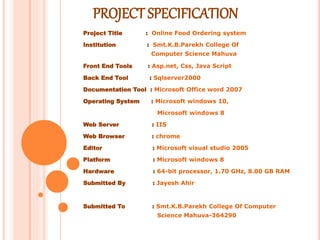
Project Title : Online Food Ordering system
Institution : Smt.K.B.Parekh College Of
Computer Science Mahuva
Front End Tools : Asp.net, Css, Java Script
Back End Tool : Sqlserver2000
Documentation Tool : Microsoft Office word 2007
Operating System : Microsoft windows 10,
Microsoft windows 8
Web Server : IIS
Web Browser : chrome
Editor : Microsoft visual studio 2005
Platform : Microsoft windows 8
Hardware : 64-bit processor, 1.70 GHz, 8.00 GB RAM
Submitted By : Jayesh Ahir
Submitted To : Smt.K.B.Parekh College Of Computer
Science Mahuva-364290
INTRODUCTION
An online food ordering system is a website that
stimulates the foodies (customers) to put food orders through
internet by locating their favorite restaurant or nearest one.
This website is based on the ASP.NET.
In today’s age of fast food and take-out, many restaurants
have chosen to focus on quick preparation and speedy delivery
of orders rather than offering a rich dining experience.
What I propose is an online ordering system, which
is a technique of ordering foods online applicable in any food
delivery industry. The main advantage of my system is that it
greatly simplifies the ordering process for both the customer and
the restaurant. After making a selection, the item is then added
to their order, which the customer can review the details of at
any time before checking out.
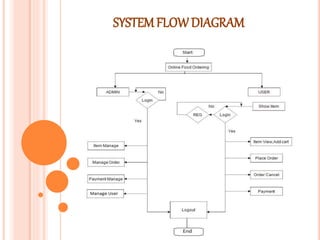
SYSTEMFLOW DIAGRAM
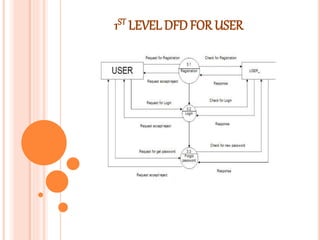
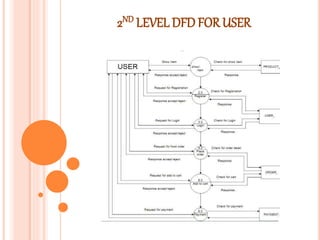
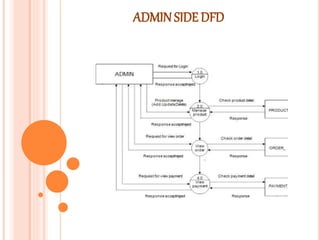
DATA FLOWDIAGRAM
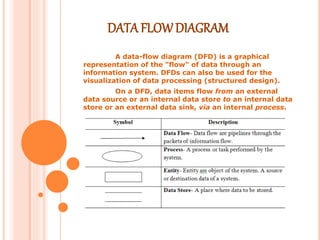
A data-flow diagram (DFD) is a graphical
representation of the "flow" of data through an
information system. DFDs can also be used for the
visualization of data processing (structured design).
On a DFD, data items flow from an external
data source or an internal data store to an internal data
store or an external data sink, via an internal process.
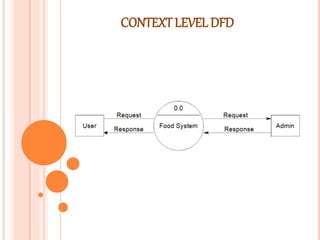
CONTEXTLEVELDFD
1ST LEVEL DFDFOR USER
2ND LEVEL DFD FOR USER
ADMIN SIDE DFD
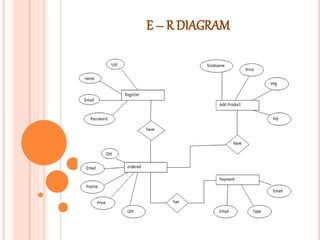
E – R DIAGRAM
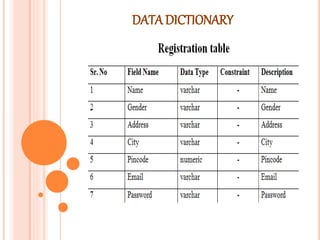
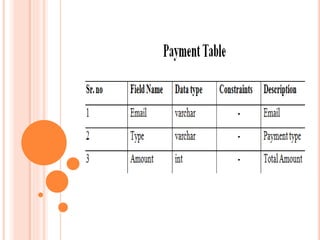
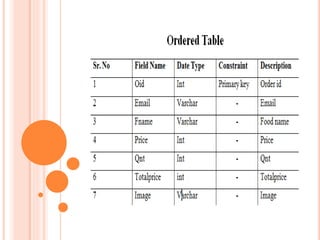
DATA DICTIONARY
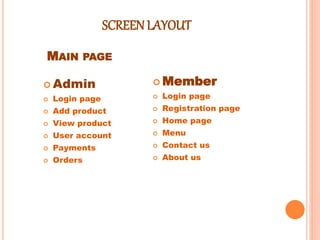
SCREEN LAYOUT
 Admin
 Login page
 Add product
 View product
 User account
 Payments
 Orders
 Member
 Login page
 Registration page
 Home page
 Menu
 Contact us
 About us
MAIN PAGE
MAIN PAGE
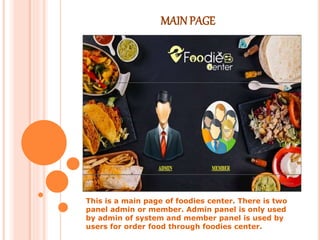
This is a main page of foodies center. There is two
panel admin or member. Admin panel is only used
by admin of system and member panel is used by
users for order food through foodies center.
ADMIN - LOGIN PAGE
This is a admin login page. Using this admin can
login into the foodies center for further process.
ADMIN – ADDPRODUCT
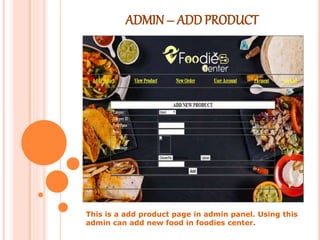
This is a add product page in admin panel. Using this
admin can add new food in foodies center.
ADMIN– VIEWPRODUCT
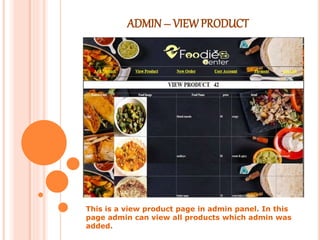
This is a view product page in admin panel. In this
page admin can view all products which admin was
added.
ADMIN – USER ACCOUNT
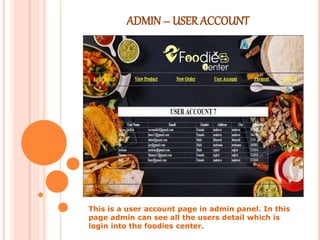
This is a user account page in admin panel. In this
page admin can see all the users detail which is
login into the foodies center.
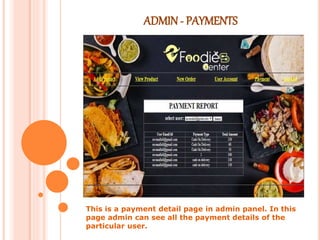
ADMIN - PAYMENTS
This is a payment detail page in admin panel. In this
page admin can see all the payment details of the
particular user.
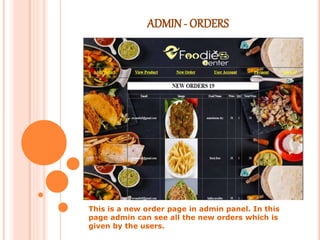
ADMIN - ORDERS
This is a new order page in admin panel. In this
page admin can see all the new orders which is
given by the users.
MEMBER- REGISTRATION PAGE
This is a member registration page in member panel.
If user want to order food then user must be register
in foodies center.
MEMBER – LOGINPAGE
This is a member login page in member panel. After
register, member login into website for order food
from foodies center.
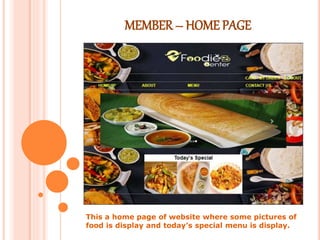
MEMBER – HOME PAGE
This a home page of website where some pictures of
food is display and today’s special menu is display.
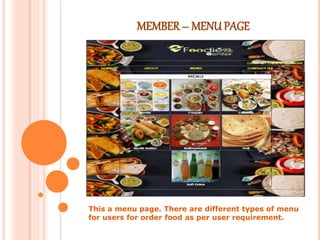
MEMBER – MENU PAGE
This a menu page. There are different types of menu
for users for order food as per user requirement.
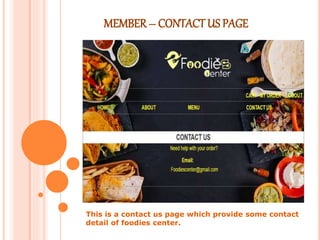
MEMBER – CONTACT US PAGE
This is a contact us page which provide some contact
detail of foodies center.
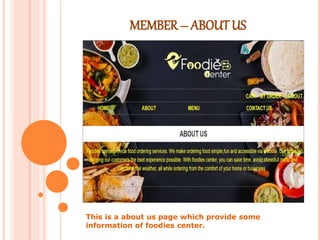
MEMBER – ABOUTUS
This is a about us page which provide some
information of foodies center.
ADVANTAGES
1. It’s just one click away
Today, more than ever, people can easily
order online thanks to the smart phones and tablets.
Whether on a break, stuck in traffic, or
riding the bus, virtually anyone will place an order
quickly.
In fact, this is a better, and highly desirable
alternative to waiting until getting home and placing
the order over the phone.
2. It’s fast, easy and comfortable
Your customers choose to order food online
because it’s literally at their fingertips.
Virtually anyone with a smart phone can
order food online from your restaurant
3. No misunderstandings and no frustrations
One of the biggest issues with phone
conversations is that misunderstandings can happen
quite easily.
With online ordering, all preferences are
specified directly by the customer, so there is no
room for confusions or misunderstandings.
4. Online food ordering is opened 24/7
Your restaurant might not be opened 24/7,
but your online ordering system surely is. And it can
help you make money even while you sleep.
5. An online menu is simpler to manage
It is much easier and considerably cheaper
(or even free) to create and maintain a great looking
menu that will impel your customers to order from
you every time they see it.
CONCLUSION
The online food ordering system will be
helpful for the restaurant to increase the scope of
the business by helping users to give order
through online.
LIMITATIONS
Not supported online
Customer not track their order food
Online payment system is not supported
Not supported any social media
It is only used for one restaurant
FUTURE SCOPES
This project aimed at developing an
online food ordering system which can be
used in small places, and medium cities
firstly and then on a large scale.
It is developed to help restaurants to
simplify their daily operational and
managerial task as well as improve the
dining experience of customers. And also
helps restaurant develop healthy customer
relationships by providing good services.
The system enables staff to let update
and make changes to their food and beverage
list information based on the orders placed
and the orders completed.
THANK YOU

Online food ordering System projectppt.pptx

  • 1.
  • 2.
    CONTENTS Project Specification Introduction System FlowDiagram Data Flow Diagram E-R Diagram Data Dictionary Screen Layout Advantages Conclusion Limitations Future Scope
  • 3.
    PROJECT SPECIFICATION Project Title: Online Food Ordering system Institution : Smt.K.B.Parekh College Of Computer Science Mahuva Front End Tools : Asp.net, Css, Java Script Back End Tool : Sqlserver2000 Documentation Tool : Microsoft Office word 2007 Operating System : Microsoft windows 10, Microsoft windows 8 Web Server : IIS Web Browser : chrome Editor : Microsoft visual studio 2005 Platform : Microsoft windows 8 Hardware : 64-bit processor, 1.70 GHz, 8.00 GB RAM Submitted By : Jayesh Ahir Submitted To : Smt.K.B.Parekh College Of Computer Science Mahuva-364290
  • 4.
    INTRODUCTION An online foodordering system is a website that stimulates the foodies (customers) to put food orders through internet by locating their favorite restaurant or nearest one. This website is based on the ASP.NET. In today’s age of fast food and take-out, many restaurants have chosen to focus on quick preparation and speedy delivery of orders rather than offering a rich dining experience. What I propose is an online ordering system, which is a technique of ordering foods online applicable in any food delivery industry. The main advantage of my system is that it greatly simplifies the ordering process for both the customer and the restaurant. After making a selection, the item is then added to their order, which the customer can review the details of at any time before checking out.
  • 5.
  • 6.
    DATA FLOWDIAGRAM A data-flowdiagram (DFD) is a graphical representation of the "flow" of data through an information system. DFDs can also be used for the visualization of data processing (structured design). On a DFD, data items flow from an external data source or an internal data store to an internal data store or an external data sink, via an internal process.
  • 7.
  • 8.
  • 9.
    2ND LEVEL DFDFOR USER
  • 10.
  • 11.
    E – RDIAGRAM
  • 12.
  • 16.
    SCREEN LAYOUT  Admin Login page  Add product  View product  User account  Payments  Orders  Member  Login page  Registration page  Home page  Menu  Contact us  About us MAIN PAGE
  • 17.
    MAIN PAGE This isa main page of foodies center. There is two panel admin or member. Admin panel is only used by admin of system and member panel is used by users for order food through foodies center.
  • 18.
    ADMIN - LOGINPAGE This is a admin login page. Using this admin can login into the foodies center for further process.
  • 19.
    ADMIN – ADDPRODUCT Thisis a add product page in admin panel. Using this admin can add new food in foodies center.
  • 20.
    ADMIN– VIEWPRODUCT This isa view product page in admin panel. In this page admin can view all products which admin was added.
  • 21.
    ADMIN – USERACCOUNT This is a user account page in admin panel. In this page admin can see all the users detail which is login into the foodies center.
  • 22.
    ADMIN - PAYMENTS Thisis a payment detail page in admin panel. In this page admin can see all the payment details of the particular user.
  • 23.
    ADMIN - ORDERS Thisis a new order page in admin panel. In this page admin can see all the new orders which is given by the users.
  • 24.
    MEMBER- REGISTRATION PAGE Thisis a member registration page in member panel. If user want to order food then user must be register in foodies center.
  • 25.
    MEMBER – LOGINPAGE Thisis a member login page in member panel. After register, member login into website for order food from foodies center.
  • 26.
    MEMBER – HOMEPAGE This a home page of website where some pictures of food is display and today’s special menu is display.
  • 27.
    MEMBER – MENUPAGE This a menu page. There are different types of menu for users for order food as per user requirement.
  • 28.
    MEMBER – CONTACTUS PAGE This is a contact us page which provide some contact detail of foodies center.
  • 29.
    MEMBER – ABOUTUS Thisis a about us page which provide some information of foodies center.
  • 30.
    ADVANTAGES 1. It’s justone click away Today, more than ever, people can easily order online thanks to the smart phones and tablets. Whether on a break, stuck in traffic, or riding the bus, virtually anyone will place an order quickly. In fact, this is a better, and highly desirable alternative to waiting until getting home and placing the order over the phone. 2. It’s fast, easy and comfortable Your customers choose to order food online because it’s literally at their fingertips. Virtually anyone with a smart phone can order food online from your restaurant
  • 31.
    3. No misunderstandingsand no frustrations One of the biggest issues with phone conversations is that misunderstandings can happen quite easily. With online ordering, all preferences are specified directly by the customer, so there is no room for confusions or misunderstandings. 4. Online food ordering is opened 24/7 Your restaurant might not be opened 24/7, but your online ordering system surely is. And it can help you make money even while you sleep. 5. An online menu is simpler to manage It is much easier and considerably cheaper (or even free) to create and maintain a great looking menu that will impel your customers to order from you every time they see it.
  • 32.
    CONCLUSION The online foodordering system will be helpful for the restaurant to increase the scope of the business by helping users to give order through online.
  • 33.
    LIMITATIONS Not supported online Customernot track their order food Online payment system is not supported Not supported any social media It is only used for one restaurant
  • 34.
    FUTURE SCOPES This projectaimed at developing an online food ordering system which can be used in small places, and medium cities firstly and then on a large scale. It is developed to help restaurants to simplify their daily operational and managerial task as well as improve the dining experience of customers. And also helps restaurant develop healthy customer relationships by providing good services. The system enables staff to let update and make changes to their food and beverage list information based on the orders placed and the orders completed.
  • 35.