CHAPTER TWO
Algorithms and Flowcharts
Introduction
A program is a set of instruction gave to the computer to execute
successive operations leads to solve specific problem. In general to
solve any problem in computer we must follow these steps:
1. Analyze the problem.
2. Write an Algorithm.
3. Draw flowchart.
4. Convert the flowchart to program.
5. Run the program and test the solution.
1-1: Algorithms
It is a combination of phrases and events that can be arranged as steps
to solve a specific problem. That can be done by understanding this
problem whether it mathematic or logic before convert it to flow chart.
As example when we borrow some books from the library, the remaining
books number (NR) is the subtraction of the borrowed books number (NB)
from the original number (NO). To write the algorithm for this simple
problem we will follow these steps:
Input the number of books in the library (NO).
Input the number of borrowed books (NB).
Find the remaining books number (NR), NR = NO-NB
Print NR
1-2: Flowcharts
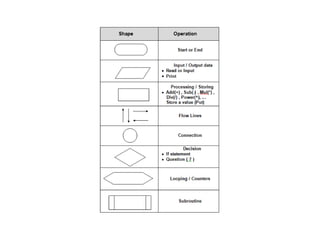
Flowcharts are graphs that represent the
formal view used to solve any problem.
Flowcharts help the programmer to write his
program. Flowcharts consist of a shapes
connected by a straight lines. The following
table shows these shapes and their operations.
We can summarize the use of algorithms and flowcharts as
follow:
1. To show the mathematical logic used to solve problems.
2. To show how the data processing is done.
3. Helps the programmer to write his program.
4. Divides the big problem to smaller parts.
5. To avoid the errors that occurred during writing the
program.
6. It is a middle step between problem difficulty and its
conversion to suitable program.
7. Easy to convert it to any programming language.
In general, we can divide flowcharts to a four
shapes (charts):
1. Simple sequence charts
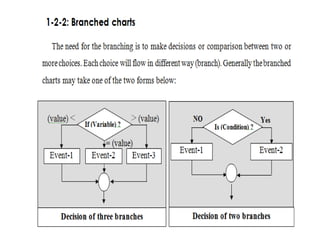
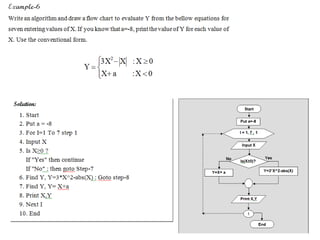
2. Branched charts.
3. Single loop charts.
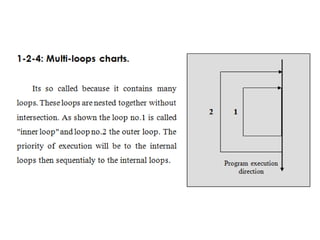
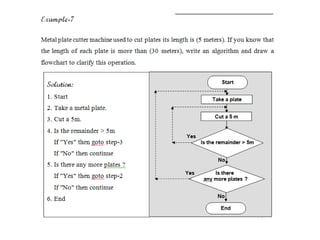
4. Multi-loop charts.
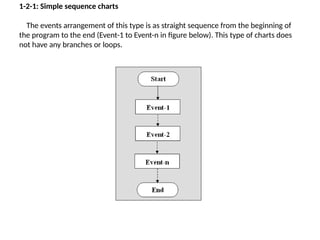
1-2-1: Simple sequence charts
The events arrangement of this type is as straight sequence from the beginning of
the program to the end (Event-1 to Event-n in figure below). This type of charts does
not have any branches or loops.
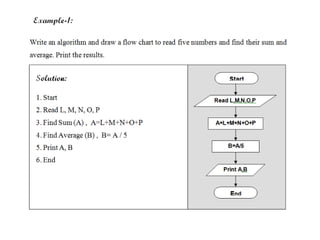
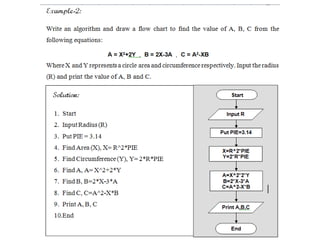
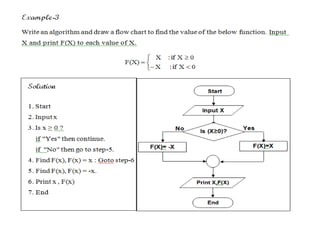
Flow chart and algorithm working progress

Flow chart and algorithm working progress

  • 1.
    CHAPTER TWO Algorithms andFlowcharts Introduction A program is a set of instruction gave to the computer to execute successive operations leads to solve specific problem. In general to solve any problem in computer we must follow these steps: 1. Analyze the problem. 2. Write an Algorithm. 3. Draw flowchart. 4. Convert the flowchart to program. 5. Run the program and test the solution.
  • 2.
    1-1: Algorithms It isa combination of phrases and events that can be arranged as steps to solve a specific problem. That can be done by understanding this problem whether it mathematic or logic before convert it to flow chart. As example when we borrow some books from the library, the remaining books number (NR) is the subtraction of the borrowed books number (NB) from the original number (NO). To write the algorithm for this simple problem we will follow these steps: Input the number of books in the library (NO). Input the number of borrowed books (NB). Find the remaining books number (NR), NR = NO-NB Print NR
  • 3.
    1-2: Flowcharts Flowcharts aregraphs that represent the formal view used to solve any problem. Flowcharts help the programmer to write his program. Flowcharts consist of a shapes connected by a straight lines. The following table shows these shapes and their operations.
  • 5.
    We can summarizethe use of algorithms and flowcharts as follow: 1. To show the mathematical logic used to solve problems. 2. To show how the data processing is done. 3. Helps the programmer to write his program. 4. Divides the big problem to smaller parts. 5. To avoid the errors that occurred during writing the program. 6. It is a middle step between problem difficulty and its conversion to suitable program. 7. Easy to convert it to any programming language.
  • 6.
    In general, wecan divide flowcharts to a four shapes (charts): 1. Simple sequence charts 2. Branched charts. 3. Single loop charts. 4. Multi-loop charts.
  • 7.
    1-2-1: Simple sequencecharts The events arrangement of this type is as straight sequence from the beginning of the program to the end (Event-1 to Event-n in figure below). This type of charts does not have any branches or loops.