Salesforce Admin Group, Trichy
Flow Builder with Aura
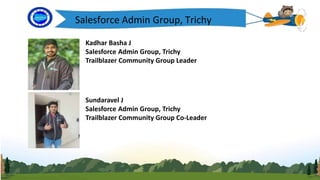
Kadhar Basha J
Salesforce Admin Group, Trichy
Trailblazer Community Group Leader
Sundaravel J
Salesforce Admin Group, Trichy
Trailblazer Community Group Co-Leader
Salesforce Admin Group, Trichy
Speaker
Kadhar Basha J
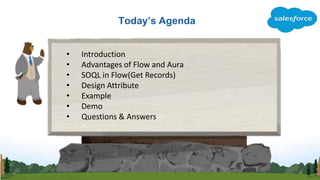
Today’s Agenda
• Introduction
• Advantages of Flow and Aura
• SOQL in Flow(Get Records)
• Design Attribute
• Example
• Demo
• Questions & Answers
Flow with Aura Component
Logo
• To customize the look and feel of your flow
screen, build a custom Aura component.
• Configure the component and its design
resource so that they’re compatible with flow
screens.
• Then in Flow Builder, add a screen component to
the screen.
Features
Logo
• Configure Components for Flow Screens
• Control Flow Navigation from an Aura Component
• Customize the Flow Header with an Aura Component
• Dynamically Update a Flow Screen with an Aura Component
Get Records
Logo
• Identify the object whose records you want to find,
and specify conditions to narrow down the list of
returned records. How many records you choose to
store and where to store the field values determines
what to enter in the rest of the Get Records
element.
Design Attribute
Logo
To expose an attribute in Flow Builder
Ex:
<design:component>
<design:attribute name="List_Account_Contact"
label="List_Account_Contact" />
</design:component>
How to Add component to Flow?
Logo
Add the lightning:availableForFlowScreens interface to a Lightning
component to make it available for flow screens. This interface is
supported only in Lightning runtime.
Ex:
<aura:component implements="lightning:availableForFlowScreens">
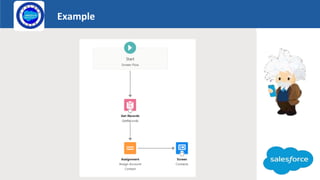
Example
Logo
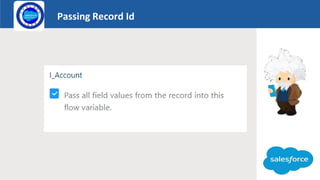
Passing Record Id
Logo
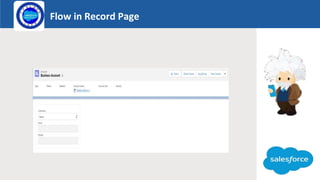
Flow in Record Page
Logo
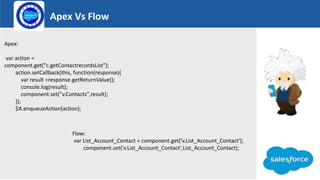
Apex Vs Flow
Logo
Apex:
var action =
component.get("c.getContactrecordsList");
action.setCallback(this, function(response){
var result =response.getReturnValue();
console.log(result);
component.set("v.Contacts",result);
});
$A.enqueueAction(action);
Flow:
var List_Account_Contact = component.get('v.List_Account_Contact');
component.set('v.List_Account_Contact',List_Account_Contact);
Component
Logo
<aura:component implements="lightning:availableForFlowScreens" access="global" >
<aura:attribute name="List_Account_Contact" type="Contact[]" default="[]" access="global"/>
<aura:attribute name="Email" type="String" />
<aura:attribute name="MobilePhone" type="String" />
<aura:handler name="init" value="{!this}" action="{!c.doinit}" />
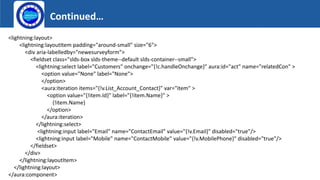
Continued…
Logo
<lightning:layout>
<lightning:layoutItem padding="around-small" size="6">
<div aria-labelledby="newesurveyform">
<fieldset class="slds-box slds-theme--default slds-container--small">
<lightning:select label="Customers" onchange="{!c.handleOnchange}" aura:id="act" name="relatedCon" >
<option value="None" label="None">
</option>
<aura:iteration items="{!v.List_Account_Contact}" var="item" >
<option value="{!item.Id}" label="{!item.Name}" >
{!item.Name}
</option>
</aura:iteration>
</lightning:select>
<lightning:input label="Email" name="ContactEmail" value="{!v.Email}" disabled="true"/>
<lightning:input label="Mobile" name="ContactMobile" value="{!v.MobilePhone}" disabled="true"/>
</fieldset>
</div>
</lightning:layoutItem>
</lightning:layout>
</aura:component>
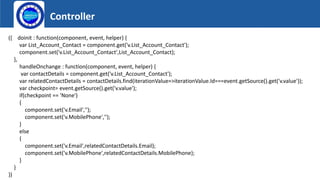
Controller
Logo
({ doinit : function(component, event, helper) {
var List_Account_Contact = component.get('v.List_Account_Contact');
component.set('v.List_Account_Contact',List_Account_Contact);
},
handleOnchange : function(component, event, helper) {
var contactDetails = component.get('v.List_Account_Contact');
var relatedContactDetails = contactDetails.find(iterationValue=>iterationValue.Id===event.getSource().get('v.value'));
var checkpoint= event.getSource().get('v.value');
if(checkpoint == 'None')
{
component.set('v.Email','');
component.set('v.MobilePhone','');
}
else
{
component.set('v.Email',relatedContactDetails.Email);
component.set('v.MobilePhone',relatedContactDetails.MobilePhone);
}
}
})
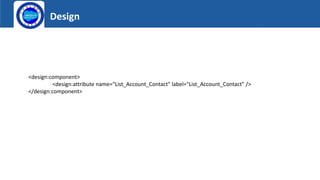
Design
Logo
<design:component>
<design:attribute name="List_Account_Contact" label="List_Account_Contact" />
</design:component>
Launch
DEMO
Flow With Aura.pptx
Flow With Aura.pptx

Flow With Aura.pptx

  • 1.
    Salesforce Admin Group,Trichy Flow Builder with Aura
  • 2.
    Kadhar Basha J SalesforceAdmin Group, Trichy Trailblazer Community Group Leader Sundaravel J Salesforce Admin Group, Trichy Trailblazer Community Group Co-Leader Salesforce Admin Group, Trichy
  • 3.
    Salesforce Admin Group,Trichy Speaker Kadhar Basha J
  • 4.
    Today’s Agenda • Introduction •Advantages of Flow and Aura • SOQL in Flow(Get Records) • Design Attribute • Example • Demo • Questions & Answers
  • 5.
    Flow with AuraComponent Logo • To customize the look and feel of your flow screen, build a custom Aura component. • Configure the component and its design resource so that they’re compatible with flow screens. • Then in Flow Builder, add a screen component to the screen.
  • 6.
    Features Logo • Configure Componentsfor Flow Screens • Control Flow Navigation from an Aura Component • Customize the Flow Header with an Aura Component • Dynamically Update a Flow Screen with an Aura Component
  • 7.
    Get Records Logo • Identifythe object whose records you want to find, and specify conditions to narrow down the list of returned records. How many records you choose to store and where to store the field values determines what to enter in the rest of the Get Records element.
  • 8.
    Design Attribute Logo To exposean attribute in Flow Builder Ex: <design:component> <design:attribute name="List_Account_Contact" label="List_Account_Contact" /> </design:component>
  • 9.
    How to Addcomponent to Flow? Logo Add the lightning:availableForFlowScreens interface to a Lightning component to make it available for flow screens. This interface is supported only in Lightning runtime. Ex: <aura:component implements="lightning:availableForFlowScreens">
  • 10.
  • 11.
  • 12.
    Flow in RecordPage Logo
  • 13.
    Apex Vs Flow Logo Apex: varaction = component.get("c.getContactrecordsList"); action.setCallback(this, function(response){ var result =response.getReturnValue(); console.log(result); component.set("v.Contacts",result); }); $A.enqueueAction(action); Flow: var List_Account_Contact = component.get('v.List_Account_Contact'); component.set('v.List_Account_Contact',List_Account_Contact);
  • 14.
    Component Logo <aura:component implements="lightning:availableForFlowScreens" access="global"> <aura:attribute name="List_Account_Contact" type="Contact[]" default="[]" access="global"/> <aura:attribute name="Email" type="String" /> <aura:attribute name="MobilePhone" type="String" /> <aura:handler name="init" value="{!this}" action="{!c.doinit}" />
  • 15.
    Continued… Logo <lightning:layout> <lightning:layoutItem padding="around-small" size="6"> <divaria-labelledby="newesurveyform"> <fieldset class="slds-box slds-theme--default slds-container--small"> <lightning:select label="Customers" onchange="{!c.handleOnchange}" aura:id="act" name="relatedCon" > <option value="None" label="None"> </option> <aura:iteration items="{!v.List_Account_Contact}" var="item" > <option value="{!item.Id}" label="{!item.Name}" > {!item.Name} </option> </aura:iteration> </lightning:select> <lightning:input label="Email" name="ContactEmail" value="{!v.Email}" disabled="true"/> <lightning:input label="Mobile" name="ContactMobile" value="{!v.MobilePhone}" disabled="true"/> </fieldset> </div> </lightning:layoutItem> </lightning:layout> </aura:component>
  • 16.
    Controller Logo ({ doinit :function(component, event, helper) { var List_Account_Contact = component.get('v.List_Account_Contact'); component.set('v.List_Account_Contact',List_Account_Contact); }, handleOnchange : function(component, event, helper) { var contactDetails = component.get('v.List_Account_Contact'); var relatedContactDetails = contactDetails.find(iterationValue=>iterationValue.Id===event.getSource().get('v.value')); var checkpoint= event.getSource().get('v.value'); if(checkpoint == 'None') { component.set('v.Email',''); component.set('v.MobilePhone',''); } else { component.set('v.Email',relatedContactDetails.Email); component.set('v.MobilePhone',relatedContactDetails.MobilePhone); } } })
  • 17.
  • 18.