Salesforce Admin Group, Trichy
Winter’23 Release Update
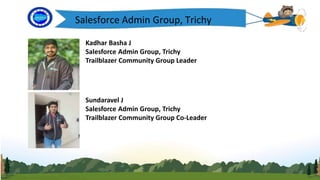
Kadhar Basha J
Salesforce Admin Group, Trichy
Trailblazer Community Group Leader
Sundaravel J
Salesforce Admin Group, Trichy
Trailblazer Community Group Co-Leader
Salesforce Admin Group, Trichy
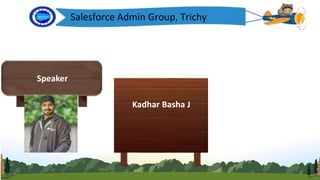
Speaker
Kadhar Basha J
Today’s Agenda
• FLS
• Permission set
• Flow
• Demo
• Questions & Answers
Data Security
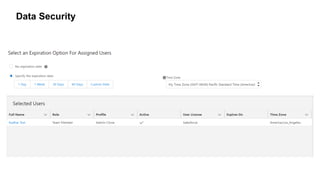
Permission set:
Winter’23 provides enhanced security for objects and fields
through permission set
Data Security
Data Security
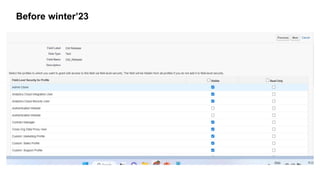
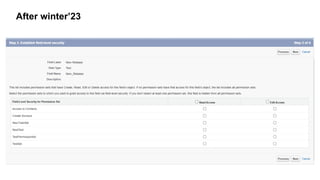
FLS:
Winter’23 provides enhanced security for fields through Field
Level Security based on permission sets.
Before winter’23
After winter’23
Automation: Flow Builder
• You may have heard the phrase “Flow is the future” in Salesforce
messaging over the past couple of years.
• This is because Salesforce is consistently releasing new Flow
features to prepare for the retirement of Process Builder and
Workflow Rules in the upcoming years.
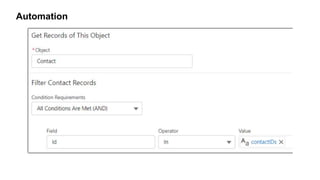
In and Not In
• With the new In and Not In operators, a flow accesses a collection
of values to get related records without using the control element (Loop
Element).
• The new operators used to access the Text, Number, Date, Date/Time,
Currency, and Boolean collections of type .
• These In and Not In operators are available in the Get Records, Update
Records, and Delete Records elements of the flow builder.
SOQL in Apex:
IN:
Set<Id> accIds = new Set<Id>()
for(Account acc : Trigger.New){
accIds.add(acc.Id);
}
List<Contact> conList = [SELECT Id,Name,AccountId FROM Contact WHERE AccountId IN : accIds];
Not IN:
Set<Id> accIds = new Set<Id>()
for(Account acc : Trigger.New){
accIds.add(acc.Id);
}
List<Contact> conList = [SELECT Id,Name,AccountId FROM Contact WHERE AccountId NOT IN : accIds];
Automation
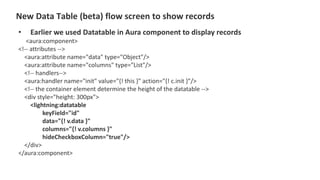
New Data Table (beta) flow screen to show records
• Earlier we used Datatable in Aura component to display records
<aura:component>
<!-- attributes -->
<aura:attribute name="data" type="Object"/>
<aura:attribute name="columns" type="List"/>
<!-- handlers-->
<aura:handler name="init" value="{! this }" action="{! c.init }"/>
<!-- the container element determine the height of the datatable -->
<div style="height: 300px">
<lightning:datatable
keyField="id"
data="{! v.data }"
columns="{! v.columns }"
hideCheckboxColumn="true"/>
</div>
</aura:component>
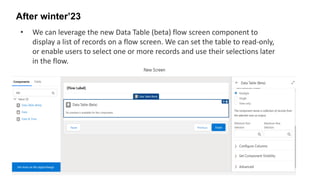
After winter’23
• We can leverage the new Data Table (beta) flow screen component to
display a list of records on a flow screen. We can set the table to read-only,
or enable users to select one or more records and use their selections later
in the flow.
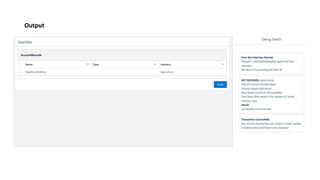
Output
Launch
DEMO
Winter'23 Release Updates.pptx

Winter'23 Release Updates.pptx

  • 1.
    Salesforce Admin Group,Trichy Winter’23 Release Update
  • 2.
    Kadhar Basha J SalesforceAdmin Group, Trichy Trailblazer Community Group Leader Sundaravel J Salesforce Admin Group, Trichy Trailblazer Community Group Co-Leader Salesforce Admin Group, Trichy
  • 3.
    Salesforce Admin Group,Trichy Speaker Kadhar Basha J
  • 4.
    Today’s Agenda • FLS •Permission set • Flow • Demo • Questions & Answers
  • 5.
    Data Security Permission set: Winter’23provides enhanced security for objects and fields through permission set
  • 6.
  • 7.
    Data Security FLS: Winter’23 providesenhanced security for fields through Field Level Security based on permission sets.
  • 8.
  • 9.
  • 10.
    Automation: Flow Builder •You may have heard the phrase “Flow is the future” in Salesforce messaging over the past couple of years. • This is because Salesforce is consistently releasing new Flow features to prepare for the retirement of Process Builder and Workflow Rules in the upcoming years.
  • 11.
    In and NotIn • With the new In and Not In operators, a flow accesses a collection of values to get related records without using the control element (Loop Element). • The new operators used to access the Text, Number, Date, Date/Time, Currency, and Boolean collections of type . • These In and Not In operators are available in the Get Records, Update Records, and Delete Records elements of the flow builder.
  • 12.
    SOQL in Apex: IN: Set<Id>accIds = new Set<Id>() for(Account acc : Trigger.New){ accIds.add(acc.Id); } List<Contact> conList = [SELECT Id,Name,AccountId FROM Contact WHERE AccountId IN : accIds]; Not IN: Set<Id> accIds = new Set<Id>() for(Account acc : Trigger.New){ accIds.add(acc.Id); } List<Contact> conList = [SELECT Id,Name,AccountId FROM Contact WHERE AccountId NOT IN : accIds];
  • 13.
  • 14.
    New Data Table(beta) flow screen to show records • Earlier we used Datatable in Aura component to display records <aura:component> <!-- attributes --> <aura:attribute name="data" type="Object"/> <aura:attribute name="columns" type="List"/> <!-- handlers--> <aura:handler name="init" value="{! this }" action="{! c.init }"/> <!-- the container element determine the height of the datatable --> <div style="height: 300px"> <lightning:datatable keyField="id" data="{! v.data }" columns="{! v.columns }" hideCheckboxColumn="true"/> </div> </aura:component>
  • 15.
    After winter’23 • Wecan leverage the new Data Table (beta) flow screen component to display a list of records on a flow screen. We can set the table to read-only, or enable users to select one or more records and use their selections later in the flow.
  • 16.
  • 17.