Flag Control
Objective:
• Identify the different flag control instruction
• Apply the different flag control instructions
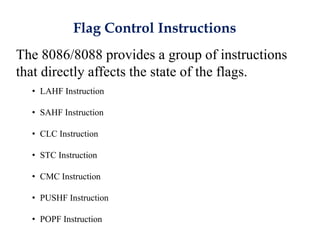
Flag Control Instructions
The 8086/8088 provides a group of instructions
that directly affects the state of the flags.
• LAHF Instruction
• SAHF Instruction
• CLC Instruction
• STC Instruction
• CMC Instruction
• PUSHF Instruction
• POPF Instruction
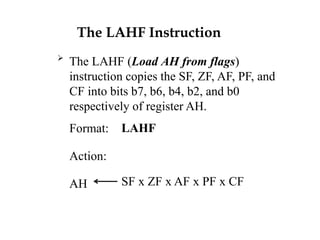
The LAHF Instruction

The LAHF (Load AH from flags)
instruction copies the SF, ZF, AF, PF, and
CF into bits b7, b6, b4, b2, and b0
respectively of register AH.
Format:
Action:
AH
LAHF
SF x ZF x AF x PF x CF
The SAHF Instruction
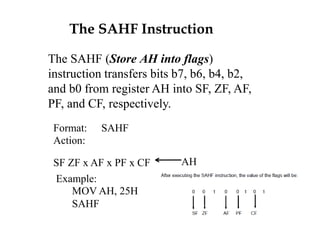
The SAHF (Store AH into flags)
instruction transfers bits b7, b6, b4, b2,
and b0 from register AH into SF, ZF, AF,
PF, and CF, respectively.
SAHFFormat:
Action:
SF ZF x AF x PF x CF AH
Example:
MOV AH, 25H
SAHF
The CLC Instruction
 The CLC (Clear Carry Flag) instruction
clears the carry flag.
 Format: CLC
 Action: CF 0
The STC Instruction
The STC (Set Carry Flag) instruction sets
the carry flag to 1.
Format: STC
Action: CF 1
The CMC Instruction
 The CMC (Complement Carry Flag)
instruction complements the carry flag.
 Format: CMC
 Action: CF CF’
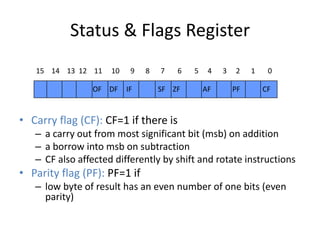
Status & Flags Register
• Carry flag (CF): CF=1 if there is
– a carry out from most significant bit (msb) on addition
– a borrow into msb on subtraction
– CF also affected differently by shift and rotate instructions
• Parity flag (PF): PF=1 if
– low byte of result has an even number of one bits (even
parity)
15 14 13 12 11 10 9 8 7 6 5 4 3 2 1 0
CFPFAFZFSFOF IFDF
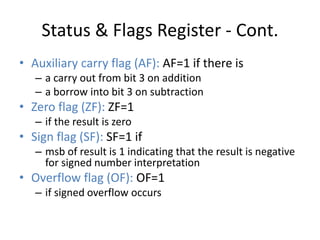
Status & Flags Register - Cont.
• Auxiliary carry flag (AF): AF=1 if there is
– a carry out from bit 3 on addition
– a borrow into bit 3 on subtraction
• Zero flag (ZF): ZF=1
– if the result is zero
• Sign flag (SF): SF=1 if
– msb of result is 1 indicating that the result is negative
for signed number interpretation
• Overflow flag (OF): OF=1
– if signed overflow occurs
The PUSHF Instruction
 The PUSHF (Push Status Register onto Stack)
instruction pushes the flag register onto the stack.
PUSHF decrements SP by 2 and then moves the
flag register to the top of the stack.
 Format: PUSHF
 Action: SP SP - 2
SP [flag register]
The POPF Instruction
 The POPF (Pop Flags off the Stack)
instruction transfers the word pointed to by
SP to the status register, thereby altering
the value of the flags.
POPF

Format:
Action:
status register
SP
[SP]
SP + 2
Stack Instructions
• SP points at the the top of the stack
• .STACK 100H
– SP is initialized to 100H
• PUSH operand
– SP  SP - 2
– [SP+1:SP]  operand
• POP operand
– Operand  [SP+1:SP]
– SP  SP + 2
• PUSHF
– SP  SP - 2
– [SP+1:SP]  flags register
• POPF
– Flags register  [SP+1:SP]
– SP  SP + 2
The CLI Instruction
 The CLI (Clear Interrupt Flag) instruction
clears the interrupt flag, thereby disabling
interrupt request. The 8086/8088 will
therefore not recognize any external
interrupt request with the exception of the
non-maskable interrupt.
 Format: CLI
 Action: IF 0
The STI Instruction
 The STI (Set Interrupt Flag) instruction
sets the interrupt flag to 1, thereby enabling
the 8086/8088 to recognize any interrupt
request.
 Format: STI
 Action: IF 1
The CLD Instruction
 The CLD (Clear Direction Flag) instruction
clears the direction flag, thereby causing
the string instruction to auto-increment the
index registers (SI or DI).
 Format: CLD
 Action: DF 0
The STD Instruction
 The STD (Set Direction Flag) instruction
sets the direction flag to 1, thereby causing
the string instruction to auto-decrement the
index registers (SI or DI).
 Format: STD
 Action: DF 1
Flow Control Instruction
Flow Control Instructions
• Unconditional jump
– JMP label ; IP  label
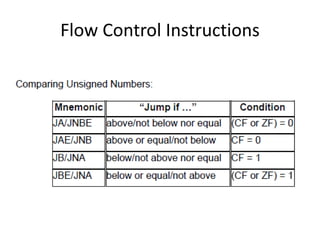
• Conditional jump
– Signed jumps
– Unsigned jumps
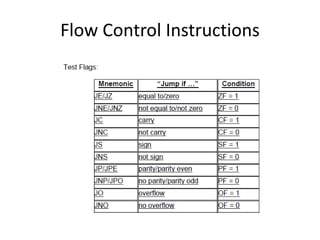
– Common jumps
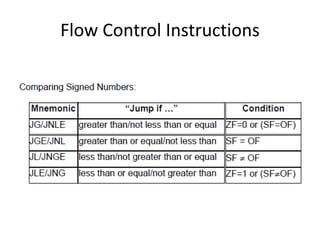
• Signed jumps
– JG/JNLE jump if greater than, or jump if not less than or equal
– JGE/JNL jump if greater than or equal, or jump if not less than
– JL/JNGE jump if less than, or jump if not greater than or equal
– JLE/JNG jump if less than or equal, or jump if not greater than
Flow Control Instructions
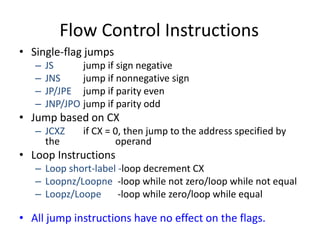
• Single-flag jumps
– JS jump if sign negative
– JNS jump if nonnegative sign
– JP/JPE jump if parity even
– JNP/JPO jump if parity odd
• Jump based on CX
– JCXZ if CX = 0, then jump to the address specified by
the operand
• Loop Instructions
– Loop short-label -loop decrement CX
– Loopnz/Loopne -loop while not zero/loop while not equal
– Loopz/Loope -loop while zero/loop while equal
• All jump instructions have no effect on the flags.
Flow Control Instructions
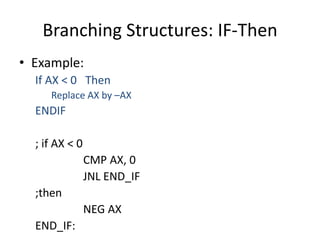
Branching Structures: IF-Then
• Example:
If AX < 0 Then
Replace AX by –AX
ENDIF
; if AX < 0
CMP AX, 0
JNL END_IF
;then
NEG AX
END_IF:
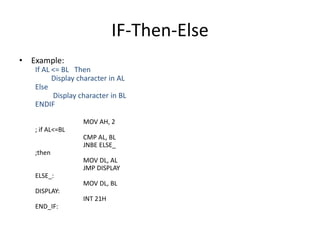
IF-Then-Else
• Example:
If AL <= BL Then
Display character in AL
Else
Display character in BL
ENDIF
MOV AH, 2
; if AL<=BL
CMP AL, BL
JNBE ELSE_
;then
MOV DL, AL
JMP DISPLAY
ELSE_:
MOV DL, BL
DISPLAY:
INT 21H
END_IF:
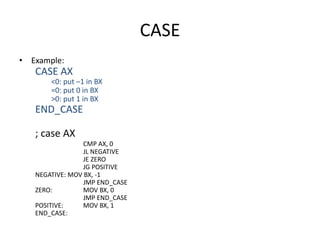
CASE
• Example:
CASE AX
<0: put –1 in BX
=0: put 0 in BX
>0: put 1 in BX
END_CASE
; case AX
CMP AX, 0
JL NEGATIVE
JE ZERO
JG POSITIVE
NEGATIVE: MOV BX, -1
JMP END_CASE
ZERO: MOV BX, 0
JMP END_CASE
POSITIVE: MOV BX, 1
END_CASE:
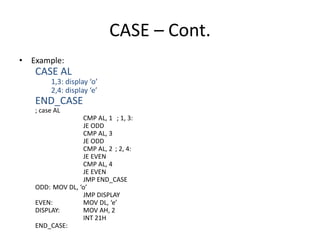
CASE – Cont.
• Example:
CASE AL
1,3: display ‘o’
2,4: display ‘e’
END_CASE
; case AL
CMP AL, 1 ; 1, 3:
JE ODD
CMP AL, 3
JE ODD
CMP AL, 2 ; 2, 4:
JE EVEN
CMP AL, 4
JE EVEN
JMP END_CASE
ODD: MOV DL, ‘o’
JMP DISPLAY
EVEN: MOV DL, ‘e’
DISPLAY: MOV AH, 2
INT 21H
END_CASE:
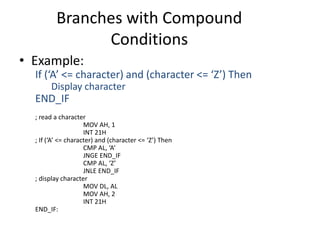
Branches with Compound
Conditions
• Example:
If (‘A’ <= character) and (character <= ‘Z’) Then
Display character
END_IF
; read a character
MOV AH, 1
INT 21H
; If (‘A’ <= character) and (character <= ‘Z’) Then
CMP AL, ‘A’
JNGE END_IF
CMP AL, ‘Z’
JNLE END_IF
; display character
MOV DL, AL
MOV AH, 2
INT 21H
END_IF:
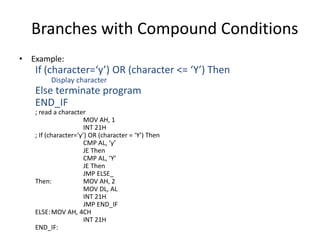
Branches with Compound Conditions
• Example:
If (character=‘y’) OR (character <= ‘Y’) Then
Display character
Else terminate program
END_IF
; read a character
MOV AH, 1
INT 21H
; If (character=‘y’) OR (character = ‘Y’) Then
CMP AL, ‘y’
JE Then
CMP AL, ‘Y’
JE Then
JMP ELSE_
Then: MOV AH, 2
MOV DL, AL
INT 21H
JMP END_IF
ELSE:MOV AH, 4CH
INT 21H
END_IF:
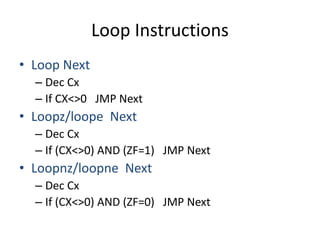
Loop Instructions
• Loop Next
– Dec Cx
– If CX<>0 JMP Next
• Loopz/loope Next
– Dec Cx
– If (CX<>0) AND (ZF=1) JMP Next
• Loopnz/loopne Next
– Dec Cx
– If (CX<>0) AND (ZF=0) JMP Next
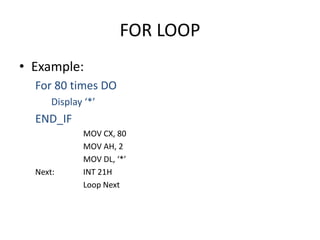
FOR LOOP
• Example:
For 80 times DO
Display ‘*’
END_IF
MOV CX, 80
MOV AH, 2
MOV DL, ‘*’
Next: INT 21H
Loop Next
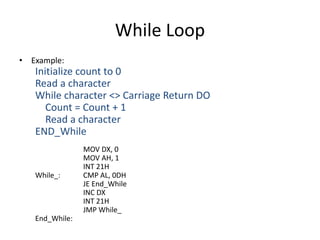
While Loop
• Example:
Initialize count to 0
Read a character
While character <> Carriage Return DO
Count = Count + 1
Read a character
END_While
MOV DX, 0
MOV AH, 1
INT 21H
While_: CMP AL, 0DH
JE End_While
INC DX
INT 21H
JMP While_
End_While:
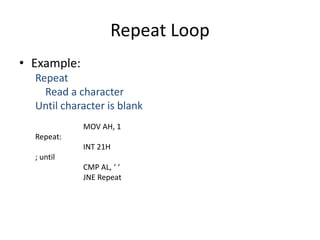
Repeat Loop
• Example:
Repeat
Read a character
Until character is blank
MOV AH, 1
Repeat:
INT 21H
; until
CMP AL, ‘ ‘
JNE Repeat
Application of Loope
• Example: Search for a number in a Table
Table DB 1,2,3,4,5,6,7,8,9
XOR SI, SI
MOV CX, 9
Next: INC SI
CMP Table[SI-1], 7
Loopne Next

Flag control

  • 1.
    Flag Control Objective: • Identifythe different flag control instruction • Apply the different flag control instructions
  • 2.
    Flag Control Instructions The8086/8088 provides a group of instructions that directly affects the state of the flags. • LAHF Instruction • SAHF Instruction • CLC Instruction • STC Instruction • CMC Instruction • PUSHF Instruction • POPF Instruction
  • 3.
    The LAHF Instruction  TheLAHF (Load AH from flags) instruction copies the SF, ZF, AF, PF, and CF into bits b7, b6, b4, b2, and b0 respectively of register AH. Format: Action: AH LAHF SF x ZF x AF x PF x CF
  • 4.
    The SAHF Instruction TheSAHF (Store AH into flags) instruction transfers bits b7, b6, b4, b2, and b0 from register AH into SF, ZF, AF, PF, and CF, respectively. SAHFFormat: Action: SF ZF x AF x PF x CF AH Example: MOV AH, 25H SAHF
  • 5.
    The CLC Instruction The CLC (Clear Carry Flag) instruction clears the carry flag.  Format: CLC  Action: CF 0
  • 6.
    The STC Instruction TheSTC (Set Carry Flag) instruction sets the carry flag to 1. Format: STC Action: CF 1
  • 7.
    The CMC Instruction The CMC (Complement Carry Flag) instruction complements the carry flag.  Format: CMC  Action: CF CF’
  • 8.
    Status & FlagsRegister • Carry flag (CF): CF=1 if there is – a carry out from most significant bit (msb) on addition – a borrow into msb on subtraction – CF also affected differently by shift and rotate instructions • Parity flag (PF): PF=1 if – low byte of result has an even number of one bits (even parity) 15 14 13 12 11 10 9 8 7 6 5 4 3 2 1 0 CFPFAFZFSFOF IFDF
  • 9.
    Status & FlagsRegister - Cont. • Auxiliary carry flag (AF): AF=1 if there is – a carry out from bit 3 on addition – a borrow into bit 3 on subtraction • Zero flag (ZF): ZF=1 – if the result is zero • Sign flag (SF): SF=1 if – msb of result is 1 indicating that the result is negative for signed number interpretation • Overflow flag (OF): OF=1 – if signed overflow occurs
  • 10.
    The PUSHF Instruction The PUSHF (Push Status Register onto Stack) instruction pushes the flag register onto the stack. PUSHF decrements SP by 2 and then moves the flag register to the top of the stack.  Format: PUSHF  Action: SP SP - 2 SP [flag register]
  • 11.
    The POPF Instruction The POPF (Pop Flags off the Stack) instruction transfers the word pointed to by SP to the status register, thereby altering the value of the flags. POPF  Format: Action: status register SP [SP] SP + 2
  • 12.
    Stack Instructions • SPpoints at the the top of the stack • .STACK 100H – SP is initialized to 100H • PUSH operand – SP  SP - 2 – [SP+1:SP]  operand • POP operand – Operand  [SP+1:SP] – SP  SP + 2 • PUSHF – SP  SP - 2 – [SP+1:SP]  flags register • POPF – Flags register  [SP+1:SP] – SP  SP + 2
  • 13.
    The CLI Instruction The CLI (Clear Interrupt Flag) instruction clears the interrupt flag, thereby disabling interrupt request. The 8086/8088 will therefore not recognize any external interrupt request with the exception of the non-maskable interrupt.  Format: CLI  Action: IF 0
  • 14.
    The STI Instruction The STI (Set Interrupt Flag) instruction sets the interrupt flag to 1, thereby enabling the 8086/8088 to recognize any interrupt request.  Format: STI  Action: IF 1
  • 15.
    The CLD Instruction The CLD (Clear Direction Flag) instruction clears the direction flag, thereby causing the string instruction to auto-increment the index registers (SI or DI).  Format: CLD  Action: DF 0
  • 16.
    The STD Instruction The STD (Set Direction Flag) instruction sets the direction flag to 1, thereby causing the string instruction to auto-decrement the index registers (SI or DI).  Format: STD  Action: DF 1
  • 17.
  • 18.
    Flow Control Instructions •Unconditional jump – JMP label ; IP  label • Conditional jump – Signed jumps – Unsigned jumps – Common jumps • Signed jumps – JG/JNLE jump if greater than, or jump if not less than or equal – JGE/JNL jump if greater than or equal, or jump if not less than – JL/JNGE jump if less than, or jump if not greater than or equal – JLE/JNG jump if less than or equal, or jump if not greater than
  • 19.
  • 20.
  • 21.
    Flow Control Instructions •Single-flag jumps – JS jump if sign negative – JNS jump if nonnegative sign – JP/JPE jump if parity even – JNP/JPO jump if parity odd • Jump based on CX – JCXZ if CX = 0, then jump to the address specified by the operand • Loop Instructions – Loop short-label -loop decrement CX – Loopnz/Loopne -loop while not zero/loop while not equal – Loopz/Loope -loop while zero/loop while equal • All jump instructions have no effect on the flags.
  • 22.
  • 23.
    Branching Structures: IF-Then •Example: If AX < 0 Then Replace AX by –AX ENDIF ; if AX < 0 CMP AX, 0 JNL END_IF ;then NEG AX END_IF:
  • 24.
    IF-Then-Else • Example: If AL<= BL Then Display character in AL Else Display character in BL ENDIF MOV AH, 2 ; if AL<=BL CMP AL, BL JNBE ELSE_ ;then MOV DL, AL JMP DISPLAY ELSE_: MOV DL, BL DISPLAY: INT 21H END_IF:
  • 25.
    CASE • Example: CASE AX <0:put –1 in BX =0: put 0 in BX >0: put 1 in BX END_CASE ; case AX CMP AX, 0 JL NEGATIVE JE ZERO JG POSITIVE NEGATIVE: MOV BX, -1 JMP END_CASE ZERO: MOV BX, 0 JMP END_CASE POSITIVE: MOV BX, 1 END_CASE:
  • 26.
    CASE – Cont. •Example: CASE AL 1,3: display ‘o’ 2,4: display ‘e’ END_CASE ; case AL CMP AL, 1 ; 1, 3: JE ODD CMP AL, 3 JE ODD CMP AL, 2 ; 2, 4: JE EVEN CMP AL, 4 JE EVEN JMP END_CASE ODD: MOV DL, ‘o’ JMP DISPLAY EVEN: MOV DL, ‘e’ DISPLAY: MOV AH, 2 INT 21H END_CASE:
  • 27.
    Branches with Compound Conditions •Example: If (‘A’ <= character) and (character <= ‘Z’) Then Display character END_IF ; read a character MOV AH, 1 INT 21H ; If (‘A’ <= character) and (character <= ‘Z’) Then CMP AL, ‘A’ JNGE END_IF CMP AL, ‘Z’ JNLE END_IF ; display character MOV DL, AL MOV AH, 2 INT 21H END_IF:
  • 28.
    Branches with CompoundConditions • Example: If (character=‘y’) OR (character <= ‘Y’) Then Display character Else terminate program END_IF ; read a character MOV AH, 1 INT 21H ; If (character=‘y’) OR (character = ‘Y’) Then CMP AL, ‘y’ JE Then CMP AL, ‘Y’ JE Then JMP ELSE_ Then: MOV AH, 2 MOV DL, AL INT 21H JMP END_IF ELSE:MOV AH, 4CH INT 21H END_IF:
  • 29.
    Loop Instructions • LoopNext – Dec Cx – If CX<>0 JMP Next • Loopz/loope Next – Dec Cx – If (CX<>0) AND (ZF=1) JMP Next • Loopnz/loopne Next – Dec Cx – If (CX<>0) AND (ZF=0) JMP Next
  • 30.
    FOR LOOP • Example: For80 times DO Display ‘*’ END_IF MOV CX, 80 MOV AH, 2 MOV DL, ‘*’ Next: INT 21H Loop Next
  • 31.
    While Loop • Example: Initializecount to 0 Read a character While character <> Carriage Return DO Count = Count + 1 Read a character END_While MOV DX, 0 MOV AH, 1 INT 21H While_: CMP AL, 0DH JE End_While INC DX INT 21H JMP While_ End_While:
  • 32.
    Repeat Loop • Example: Repeat Reada character Until character is blank MOV AH, 1 Repeat: INT 21H ; until CMP AL, ‘ ‘ JNE Repeat
  • 33.
    Application of Loope •Example: Search for a number in a Table Table DB 1,2,3,4,5,6,7,8,9 XOR SI, SI MOV CX, 9 Next: INC SI CMP Table[SI-1], 7 Loopne Next