Makers of World’s 1st SaaS GRC
Copyright © 2020 FixNix Inc. Confidential. All rights reserved.
Are you ready for Covid19 way of Cyber Security ?
Virtual Chief Information Security Officer(V-CISO) Alliance Webinar
Occupational Safety | Business Resiliency | Network Security
vCISO.FixNix.co
IT SECURITY IN COVID-19
Presented by,
Nagesh Lad, CISSP, CISA
Speaker’s Profile
• Bachelor of Engineering (B.E.) in Electronics from Mumbai
University
• CISA, CISSP, CPISI, ACSA, DCL, ITIL, CEH, CCNA Certified
• 18+ years of industry experience
• Worked for BFSI (Stock Exchange, Banks, Clearing
Corporation, Insurance) and IT Service Industry
• Working as CISO for Private Indian Insurance Company for
more than 7 years
Agenda
• Assumptions
• Different Phases handling current Pandemic Situation
• Enabling WFH Facilities
• IT Security Practices in COVID-19
Assumptions
Organizations are following Information and Cyber Security Practices
which may include but not limit to:
• Secure Network Architecture
• Secure SDLC Practices
• Multi-layered Security Controls / Protections
• Secure Configuration Practices
• Patch Management
• Vulnerability Management
• Data backup & restoration practices
• Role based & least privilege access rights and revalidation practices
• Continuous Monitoring & Responding to Security Alerts
• & others …
Different Phases
Every organization would have gone through below phases
while handling current COVID-19 Pandemic Situation
• Invocation of BCP Plan
• Enabling WFH Facilities
• Educating Users on Do’s and Don’ts
• Re-aligning Security Controls / Practices
• Fine-tuning Monitoring Practices
Invocation of BCP
• Many organization were having documented & tested
BCP Plan
• But very few were ready for such a long lock down period
• WFH has became new way of delivering business
activities
• Many would have revised their BCP Plan to include such
pandemic scenario
ENABLING WFH
FACILITIES
Challenges Faced
• Organizations were having remote access facilities like
VPN and VDI over Internet – but for limited users
• Limited Licenses
• Limited Device Capacity
• Laptops were assigned to limited users based on their
role
• Limited Internet bandwidth
Few Approaches Taken
• Enabled VPN accesses on organization’s securely
configured laptops
• Enabled VDI over internet access for users to connect
from their personal systems
• Allowed users to take organization’s desktops at their
home – risky option if not controlled properly
Steps taken to enable WFH
• Purchased or rented Laptops in bulk quantity
• Increased licenses and capacity of VPN and VDI Solutions
• Increased internet connection bandwidth
• Enabled VPN & VDI accesses to large set of users
• Performed Risk Assessment on Service Provider’s WFH
facilities
• On-boarded new vendors who were ready to deliver services in
WFH scenario – e.g. call center agent solution for WFH
Communications from Regulator
• Regulators were sending frequent security advisories /
notifications to guide organizations
• Number of advisories received from IRDAI on WFH
Security Guidelines, BCP / DR Guidelines for COVID-19
• RBI sent notifications related to DDoS & Phishing
Campaigns from China
• Organization should monitor such communications & take
necessary actions
IT SECURITY PRACTICES
IN COVID-19
User Awareness
• Educating Users on Do’s and Don’ts for Information and
Cyber Security point of view
• Creating situation based awareness e.g.
• Conducting video conference calls,
• Accessing organization’s systems from home
• Wi-Fi Connection Security
• Handling COVID-19 phishing emails etc.
End Point Security
All organization’s end points (laptops) should be securely configured
• Normal access rights to End Users
• Installation of agents like
• Device Control Management
• Internet Proxy Client
• Host based DLP
• Antivirus
• EDR Solution
• Installation of Regular updates & patches
• Weekly complete scanning of End Point to identify / clean any
infection
Network / System Security
• Enable DDoS Protection
• External Penetration Testing to identify & mitigate vulnerability
present (if any)
• Secure Configuration Review and Vulnerability Assessment of
WFH Solutions – VPN, VDI etc.
• Vulnerability Assessments of Internet Facing Systems & Critical
Systems
• Blocking of traffic coming from out of India specially for WFH
Solutions (basis of nature of business & spread of end users)
Security Controls for VPN
• Allow access to only limited secure ports over internet
• Admin interface should be blocked over internet
• Enable 2FA Authentications mechanism
• Allow users to connect to VPN only from organization’s
securely configured laptops
• Enable secure posture validation for End Points
• Configure devices securely and test them periodically
Security Controls for VDI over Internet
• Allow access to only limited secure ports over internet
• Admin interface should be blocked over internet
• Enable 2FA Authentications mechanism
• Ensure restriction of copy-paste rights
Security of Collaboration Solutions
• Organization enabled accesses to collaboration solutions like video
conferencing e.g. webex, google meet, MS team, Zoom
• Earlier, such accesses were restricted to limited set of users
considering data security & other risks
• Organization should set security guidelines for users while using such
solutions. For e.g.:
• Secure distribution of meeting invite to limited required participants
• Enabling waiting room, allow known participants in the meeting
• Restricting presentation access to host
• Disabling remote accesses etc.
• Educate users on these security guidelines
• Keep software updated with latest version & patches
Firewall Rulebase
• Enable accesses basis of User roles and requirements
from VPN & VDI Systems
• Do not enable complete access to Production Network
• Block black listed IP addresses on perimeter devices
• Block IOCs available in active attacks in the news
• Periodically revalidate accesses enabled from VPN & VDI
Systems
Security Monitoring Practices
• Integrate security and audit logs from all security & perimeter
devices and from critical systems
• Fine-tune use cases basis of current situation and active attack
patterns
• Continuously Monitor & respond to DLP and EDR Alerts
• Monitor of traffic coming from VPN Users
• Perform trend analysis to identify deviation from normal
patterns
• Fine-tune Cyber Crisis Management Plan (CCMP) to include
WFH Situation
Third Party Risk
• Many organizations outsource number of activities to third party
e.g. callings, data entry
• Many of these Third Parties are connected using leased lines,
IPSec Tunnel to organization network to access applications /
systems
• Assess risk introduced by WFH facilities at third party end
• Keep eye on security news to monitor any news related
associated third parties
• Services available which monitor risks from third parties to the
organization and provides reports / alerts for the same –
organization can avail such services
Privilege Access Management
• Ensure no admin module directly available over internet
• Enable Privilege access rights using PAM Solutions
• Enable 2FA Authentication Mechanism
• Enable access rights based on role and least privilege
principles
• Periodically revalidate need for Privilege Access Rights
User Access Revalidations
• Enable user access rights “need to know” and “least
privilege” basis
• Follow entry – exit process to grant & remove access
rights
• Periodically revalidate existence of user and need of
access rights basis of user’s role
• Frequently check inactive users (e.g. inactive for 10 days)
• Remove dormant & orphan User IDs
Back to office
• Slowly governments are allowing companies to call their
employees back to office
• User may bring infected system to office
• User may also bring their personal system to office
• NAC control should be effective to keep infected system
out of network or in an isolated segment
Governance Practices
Set governance practices
• To ensure execution of all critical activities which were
getting delivered from normal work scenario
• To monitor effectiveness of security practices built &
security posture of the organization
• To identify, review & track severe risks
• To take decision on mitigation of severe risks
2
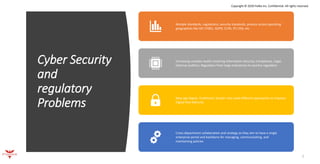
Cyber Security
and
regulatory
Problems
Mutiple standards, regulations, security standards, process across operating
geographies like ISO 27001, GDPR, CCPA, PCI DSS, etc
Increasing complex Audits involving Information Security, Compliance, Legal,
External auditors, Regulators from large enterprises to country regulators
New age Digital, Traditional, Vendor risks need different approaches to improve
Digital Risk Maturity
Cross-department collaboration and strategy as they aim to have a single
enterprise portal and backbone for managing, communicating, and
maintaining policies
Copyright © 2020 FixNix Inc. Confidential. All rights reserved.
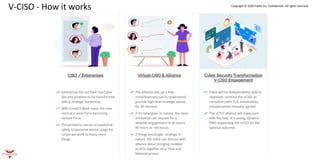
V-CISO - How it works Copyright © 2020 FixNix Inc. Confidential. All rights reserved.
Copyright © 2020 FixNix Inc. Confidential. All rights reserved.
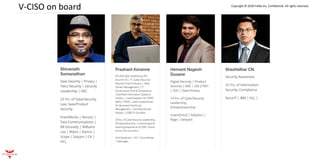
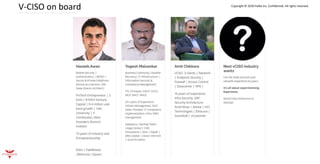
V-CISO on board
V-CISO on board Copyright © 2020 FixNix Inc. Confidential. All rights reserved.
Copyright © 2020 FixNix Inc. Confidential. All rights reserved.
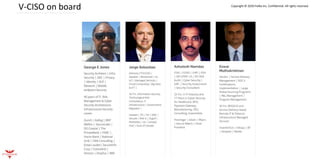
V-CISO on board
Copyright © 2020 FixNix Inc. Confidential. All rights reserved.
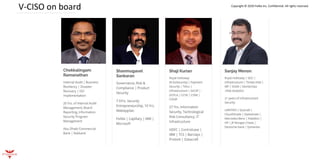
V-CISO on board
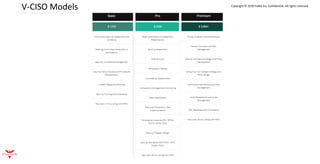
V-CISO Models Copyright © 2020 FixNix Inc. Confidential. All rights reserved.
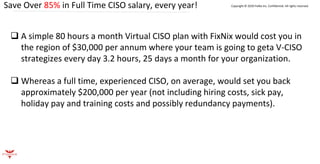
Save Over 85% in Full Time CISO salary, every year! Copyright © 2020 FixNix Inc. Confidential. All rights reserved.
❑ A simple 80 hours a month Virtual CISO plan with FixNix would cost you in
the region of $30,000 per annum where your team is going to geta V-CISO
strategizes every day 3.2 hours, 25 days a month for your organization.
❑ Whereas a full time, experienced CISO, on average, would set you back
approximately $200,000 per year (not including hiring costs, sick pay,
holiday pay and training costs and possibly redundancy payments).
Shanmugavel Sankaran
Founder, FixNix
Shan@FixNix.co
+1 925 395 3684
+91 87 90 878 222
RegTech21| Red Herring Asia 100
TieCon50| Most User Friendly GRC
Copyright © 2020 FixNix Inc. Confidential. All rights reserved.
From FixNix with for

FixNix vCISO CyberSecurity Network Security for Covid91

  • 1.
    Makers of World’s1st SaaS GRC Copyright © 2020 FixNix Inc. Confidential. All rights reserved. Are you ready for Covid19 way of Cyber Security ? Virtual Chief Information Security Officer(V-CISO) Alliance Webinar Occupational Safety | Business Resiliency | Network Security vCISO.FixNix.co
  • 2.
    IT SECURITY INCOVID-19 Presented by, Nagesh Lad, CISSP, CISA
  • 3.
    Speaker’s Profile • Bachelorof Engineering (B.E.) in Electronics from Mumbai University • CISA, CISSP, CPISI, ACSA, DCL, ITIL, CEH, CCNA Certified • 18+ years of industry experience • Worked for BFSI (Stock Exchange, Banks, Clearing Corporation, Insurance) and IT Service Industry • Working as CISO for Private Indian Insurance Company for more than 7 years
  • 4.
    Agenda • Assumptions • DifferentPhases handling current Pandemic Situation • Enabling WFH Facilities • IT Security Practices in COVID-19
  • 5.
    Assumptions Organizations are followingInformation and Cyber Security Practices which may include but not limit to: • Secure Network Architecture • Secure SDLC Practices • Multi-layered Security Controls / Protections • Secure Configuration Practices • Patch Management • Vulnerability Management • Data backup & restoration practices • Role based & least privilege access rights and revalidation practices • Continuous Monitoring & Responding to Security Alerts • & others …
  • 6.
    Different Phases Every organizationwould have gone through below phases while handling current COVID-19 Pandemic Situation • Invocation of BCP Plan • Enabling WFH Facilities • Educating Users on Do’s and Don’ts • Re-aligning Security Controls / Practices • Fine-tuning Monitoring Practices
  • 7.
    Invocation of BCP •Many organization were having documented & tested BCP Plan • But very few were ready for such a long lock down period • WFH has became new way of delivering business activities • Many would have revised their BCP Plan to include such pandemic scenario
  • 8.
  • 9.
    Challenges Faced • Organizationswere having remote access facilities like VPN and VDI over Internet – but for limited users • Limited Licenses • Limited Device Capacity • Laptops were assigned to limited users based on their role • Limited Internet bandwidth
  • 10.
    Few Approaches Taken •Enabled VPN accesses on organization’s securely configured laptops • Enabled VDI over internet access for users to connect from their personal systems • Allowed users to take organization’s desktops at their home – risky option if not controlled properly
  • 11.
    Steps taken toenable WFH • Purchased or rented Laptops in bulk quantity • Increased licenses and capacity of VPN and VDI Solutions • Increased internet connection bandwidth • Enabled VPN & VDI accesses to large set of users • Performed Risk Assessment on Service Provider’s WFH facilities • On-boarded new vendors who were ready to deliver services in WFH scenario – e.g. call center agent solution for WFH
  • 12.
    Communications from Regulator •Regulators were sending frequent security advisories / notifications to guide organizations • Number of advisories received from IRDAI on WFH Security Guidelines, BCP / DR Guidelines for COVID-19 • RBI sent notifications related to DDoS & Phishing Campaigns from China • Organization should monitor such communications & take necessary actions
  • 13.
  • 14.
    User Awareness • EducatingUsers on Do’s and Don’ts for Information and Cyber Security point of view • Creating situation based awareness e.g. • Conducting video conference calls, • Accessing organization’s systems from home • Wi-Fi Connection Security • Handling COVID-19 phishing emails etc.
  • 15.
    End Point Security Allorganization’s end points (laptops) should be securely configured • Normal access rights to End Users • Installation of agents like • Device Control Management • Internet Proxy Client • Host based DLP • Antivirus • EDR Solution • Installation of Regular updates & patches • Weekly complete scanning of End Point to identify / clean any infection
  • 16.
    Network / SystemSecurity • Enable DDoS Protection • External Penetration Testing to identify & mitigate vulnerability present (if any) • Secure Configuration Review and Vulnerability Assessment of WFH Solutions – VPN, VDI etc. • Vulnerability Assessments of Internet Facing Systems & Critical Systems • Blocking of traffic coming from out of India specially for WFH Solutions (basis of nature of business & spread of end users)
  • 17.
    Security Controls forVPN • Allow access to only limited secure ports over internet • Admin interface should be blocked over internet • Enable 2FA Authentications mechanism • Allow users to connect to VPN only from organization’s securely configured laptops • Enable secure posture validation for End Points • Configure devices securely and test them periodically
  • 18.
    Security Controls forVDI over Internet • Allow access to only limited secure ports over internet • Admin interface should be blocked over internet • Enable 2FA Authentications mechanism • Ensure restriction of copy-paste rights
  • 19.
    Security of CollaborationSolutions • Organization enabled accesses to collaboration solutions like video conferencing e.g. webex, google meet, MS team, Zoom • Earlier, such accesses were restricted to limited set of users considering data security & other risks • Organization should set security guidelines for users while using such solutions. For e.g.: • Secure distribution of meeting invite to limited required participants • Enabling waiting room, allow known participants in the meeting • Restricting presentation access to host • Disabling remote accesses etc. • Educate users on these security guidelines • Keep software updated with latest version & patches
  • 20.
    Firewall Rulebase • Enableaccesses basis of User roles and requirements from VPN & VDI Systems • Do not enable complete access to Production Network • Block black listed IP addresses on perimeter devices • Block IOCs available in active attacks in the news • Periodically revalidate accesses enabled from VPN & VDI Systems
  • 21.
    Security Monitoring Practices •Integrate security and audit logs from all security & perimeter devices and from critical systems • Fine-tune use cases basis of current situation and active attack patterns • Continuously Monitor & respond to DLP and EDR Alerts • Monitor of traffic coming from VPN Users • Perform trend analysis to identify deviation from normal patterns • Fine-tune Cyber Crisis Management Plan (CCMP) to include WFH Situation
  • 22.
    Third Party Risk •Many organizations outsource number of activities to third party e.g. callings, data entry • Many of these Third Parties are connected using leased lines, IPSec Tunnel to organization network to access applications / systems • Assess risk introduced by WFH facilities at third party end • Keep eye on security news to monitor any news related associated third parties • Services available which monitor risks from third parties to the organization and provides reports / alerts for the same – organization can avail such services
  • 23.
    Privilege Access Management •Ensure no admin module directly available over internet • Enable Privilege access rights using PAM Solutions • Enable 2FA Authentication Mechanism • Enable access rights based on role and least privilege principles • Periodically revalidate need for Privilege Access Rights
  • 24.
    User Access Revalidations •Enable user access rights “need to know” and “least privilege” basis • Follow entry – exit process to grant & remove access rights • Periodically revalidate existence of user and need of access rights basis of user’s role • Frequently check inactive users (e.g. inactive for 10 days) • Remove dormant & orphan User IDs
  • 25.
    Back to office •Slowly governments are allowing companies to call their employees back to office • User may bring infected system to office • User may also bring their personal system to office • NAC control should be effective to keep infected system out of network or in an isolated segment
  • 26.
    Governance Practices Set governancepractices • To ensure execution of all critical activities which were getting delivered from normal work scenario • To monitor effectiveness of security practices built & security posture of the organization • To identify, review & track severe risks • To take decision on mitigation of severe risks
  • 27.
    2 Cyber Security and regulatory Problems Mutiple standards,regulations, security standards, process across operating geographies like ISO 27001, GDPR, CCPA, PCI DSS, etc Increasing complex Audits involving Information Security, Compliance, Legal, External auditors, Regulators from large enterprises to country regulators New age Digital, Traditional, Vendor risks need different approaches to improve Digital Risk Maturity Cross-department collaboration and strategy as they aim to have a single enterprise portal and backbone for managing, communicating, and maintaining policies Copyright © 2020 FixNix Inc. Confidential. All rights reserved.
  • 28.
    V-CISO - Howit works Copyright © 2020 FixNix Inc. Confidential. All rights reserved.
  • 29.
    Copyright © 2020FixNix Inc. Confidential. All rights reserved. V-CISO on board
  • 30.
    V-CISO on boardCopyright © 2020 FixNix Inc. Confidential. All rights reserved.
  • 31.
    Copyright © 2020FixNix Inc. Confidential. All rights reserved. V-CISO on board
  • 32.
    Copyright © 2020FixNix Inc. Confidential. All rights reserved. V-CISO on board
  • 33.
    V-CISO Models Copyright© 2020 FixNix Inc. Confidential. All rights reserved.
  • 34.
    Save Over 85%in Full Time CISO salary, every year! Copyright © 2020 FixNix Inc. Confidential. All rights reserved. ❑ A simple 80 hours a month Virtual CISO plan with FixNix would cost you in the region of $30,000 per annum where your team is going to geta V-CISO strategizes every day 3.2 hours, 25 days a month for your organization. ❑ Whereas a full time, experienced CISO, on average, would set you back approximately $200,000 per year (not including hiring costs, sick pay, holiday pay and training costs and possibly redundancy payments).
  • 35.
    Shanmugavel Sankaran Founder, FixNix Shan@FixNix.co +1925 395 3684 +91 87 90 878 222 RegTech21| Red Herring Asia 100 TieCon50| Most User Friendly GRC Copyright © 2020 FixNix Inc. Confidential. All rights reserved. From FixNix with for