IoT Agents with Thinking Things And
OMA Lightweight M2M
Contact twitter
@LeandroJGuillen
Contact email
daniel.moranjimenez@telefonica.com
(Reference Orion Context Broker version: 0.16.0)
• Thinking things and preprovisioning
• First Exercices: Working with real devices
• Lightweight M2M and different kinds of
attributes
• LWM2M Exercises: Mixing protocols
Workshop outline
• Ready to use modular sensors
– Battery
– Sensors
– Connection (2G)
• Provided sensors:
– Temperature
– Humidity
– Luminance
Thinking Things: presentation
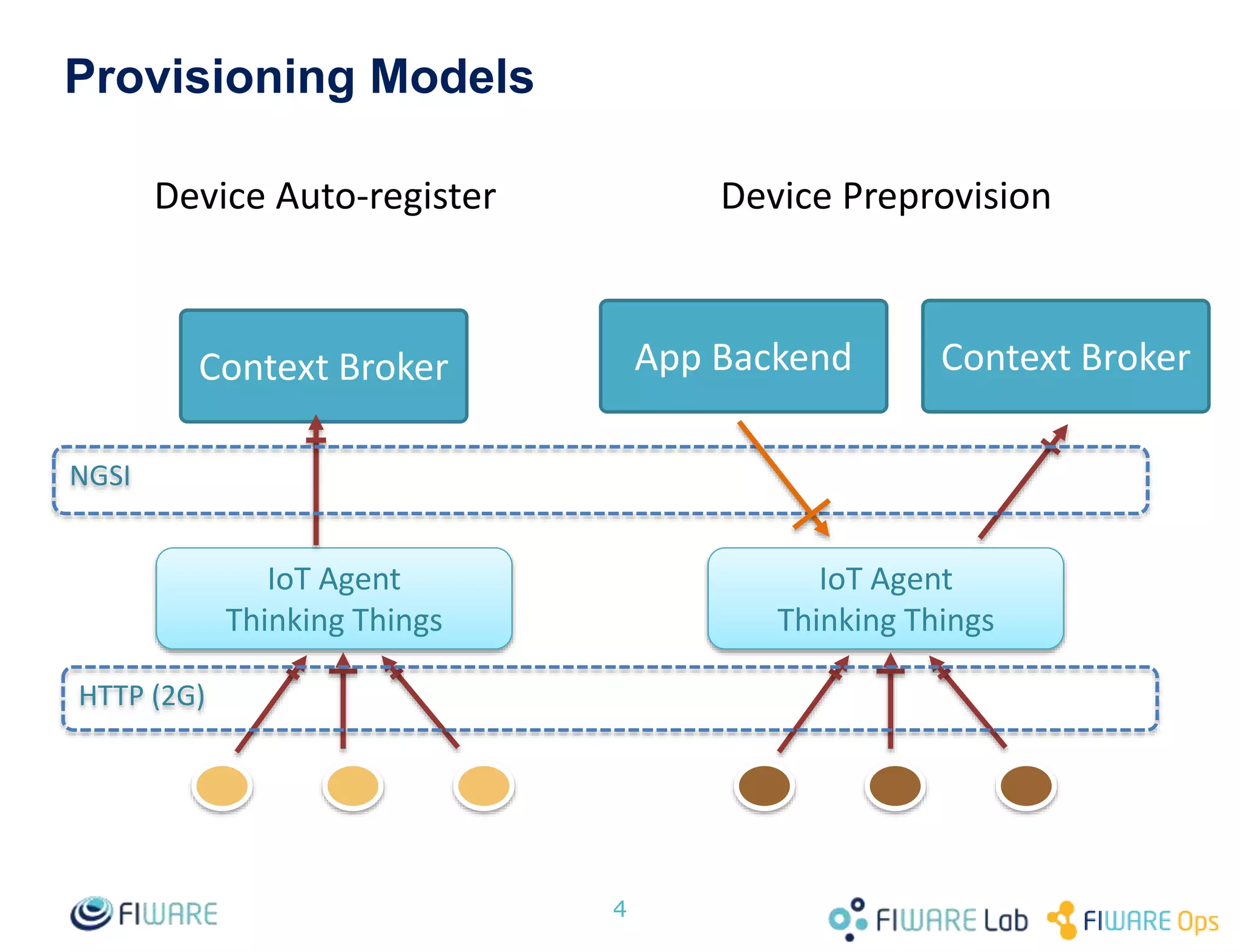
Provisioning Models
4
Context Broker
IoT Agent
Thinking Things
IoT Agent
Thinking Things
NGSI
HTTP (2G)
Context BrokerApp Backend
Device Auto-register Device Preprovision
• Orion Context Broker instance:
– URL: lwm2m.testbed.fi-ware.org
– Port: 1026
• Thinking Things
– Web: http://www.thinkingthings.telefonica.com/
– Github: https://github.com/dmoranj/iotagent-thinking-things
• Requirements:
– REST Client of any kind
• Workshop queries and other data:
– https://docs.google.com/document/d/1PGyuIw9ZIVaX4XHkejHms-
mNp_oDrjwbBbJghDHBTGk/edit#
Thinking Things: resources
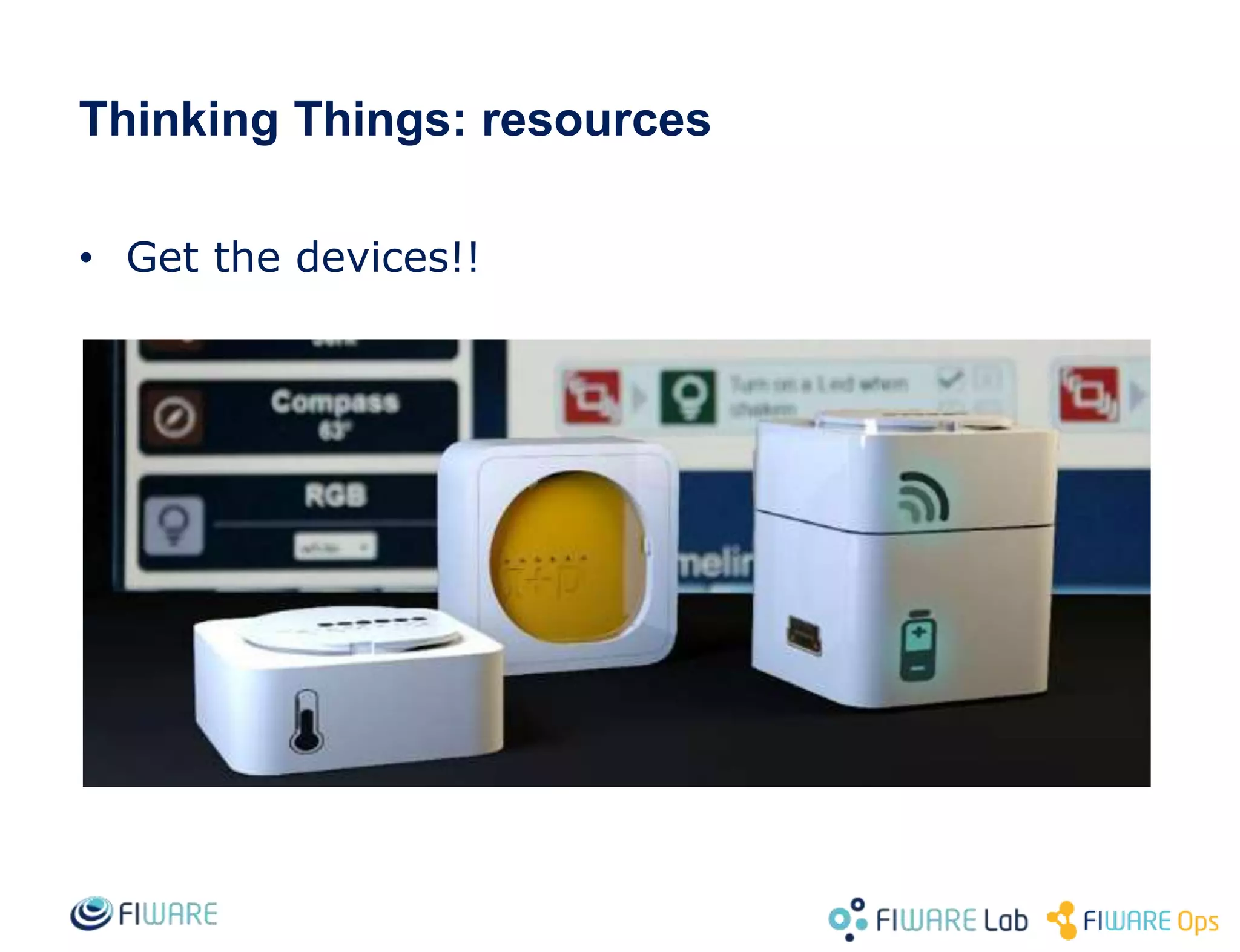
• Get the devices!!
• Connect your Thinking Thing
• Get all the information about your device using NGSI
Queries to the Context Broker
• Get information about particular attributes using NGSI
queries.
• Get information about multiple devices using NGSI Queries
Exercise 1: connecting Thinking Things
• Service isolation using preprovisioning.
– Based on Device Id
– Per device configuration of service and subservice
– Per device configuration of entity properties
• Use headers to access the isolated information:
– Fiware-service for the service header
– Fiware-service-path for the subservice
Thinking Things: preprovisioning
• Disconnect your devices
• Create preprovisioning requests to the IoT Agent for each
device. Create devices in different services
• Connect your device
• Access one specific device
• Access all the devices for a single service
Exercise 2: preprovisioning a device
• Requirements:
– Node.js VM
• Download the TT Client from:
– https://github.com/dmoranj/iotagent-thinking-things
• Simulate different measures with your own virtual Stack
ID.
Exercise 4: simulate new devices
OMA Lightweight M2M
• Light protocol based on COAP to manage M2M
communications
• Less constrained than Ultralite or Thinking Things
• Proposed industry standard
• Based on Object and Resource URIs (e.g.: /1/12/3)
– OMA Registry containing standard resource URIs for several devices
and sensors
OMA Lightweight M2M
• Idea:
– Simulate the interaction between Lightweight M2M Server and Client
– Show heterogeneus devices connected to the same Context Broker
• Requirements:
– Node.js VirtualMachine
• Resources
– Client page:
• https://github.com/telefonicaid/iotagent-lwm2m-lib
– Server: lwm2m.testbed.fi-ware.org
– UDP Port: 9500
– Provisioning Port: 4041
OMA Lightweight Device Provisioning
{
"name": "EndpointId",
"service" : "campusPart",
"service_path": "/workshop",
"entity_name": "AnotherDevice",
"entity_type": "AnotherType",
"attributes": [ {
"name": "luminance",
"type": "Lumens"
}],
"lazy": [ {
"name": "temperature",
"type": "degrees"
}],
"commands": [],
"internal_attributes": {
"lwm2mResourceMapping": {
"luminance" : {
"objectType": 17,
"objectInstance": 0,
"objectResource": 1
},
"temperature" : {
"objectType": 5,
"objectInstance": 0,
"objectResource": 2
}}}}
• Lazy vs active attributes
• Service information
• URI Mapping
• Open the LWM2M client
• Create internal objects
• Preprovision your device
• Connect with the LWM2M Server
• Get information about your device in the Context Broker
Exercise 5: connect with the LWM2M Server
 FIWARE Developers Week_IoT Agents with Thinking Things and OMA lightweight M2M_conference

FIWARE Developers Week_IoT Agents with Thinking Things and OMA lightweight M2M_conference

  • 1.
    IoT Agents withThinking Things And OMA Lightweight M2M Contact twitter @LeandroJGuillen Contact email daniel.moranjimenez@telefonica.com (Reference Orion Context Broker version: 0.16.0)
  • 2.
    • Thinking thingsand preprovisioning • First Exercices: Working with real devices • Lightweight M2M and different kinds of attributes • LWM2M Exercises: Mixing protocols Workshop outline
  • 3.
    • Ready touse modular sensors – Battery – Sensors – Connection (2G) • Provided sensors: – Temperature – Humidity – Luminance Thinking Things: presentation
  • 4.
    Provisioning Models 4 Context Broker IoTAgent Thinking Things IoT Agent Thinking Things NGSI HTTP (2G) Context BrokerApp Backend Device Auto-register Device Preprovision
  • 5.
    • Orion ContextBroker instance: – URL: lwm2m.testbed.fi-ware.org – Port: 1026 • Thinking Things – Web: http://www.thinkingthings.telefonica.com/ – Github: https://github.com/dmoranj/iotagent-thinking-things • Requirements: – REST Client of any kind • Workshop queries and other data: – https://docs.google.com/document/d/1PGyuIw9ZIVaX4XHkejHms- mNp_oDrjwbBbJghDHBTGk/edit# Thinking Things: resources
  • 6.
  • 7.
    • Connect yourThinking Thing • Get all the information about your device using NGSI Queries to the Context Broker • Get information about particular attributes using NGSI queries. • Get information about multiple devices using NGSI Queries Exercise 1: connecting Thinking Things
  • 8.
    • Service isolationusing preprovisioning. – Based on Device Id – Per device configuration of service and subservice – Per device configuration of entity properties • Use headers to access the isolated information: – Fiware-service for the service header – Fiware-service-path for the subservice Thinking Things: preprovisioning
  • 9.
    • Disconnect yourdevices • Create preprovisioning requests to the IoT Agent for each device. Create devices in different services • Connect your device • Access one specific device • Access all the devices for a single service Exercise 2: preprovisioning a device
  • 10.
    • Requirements: – Node.jsVM • Download the TT Client from: – https://github.com/dmoranj/iotagent-thinking-things • Simulate different measures with your own virtual Stack ID. Exercise 4: simulate new devices
  • 11.
    OMA Lightweight M2M •Light protocol based on COAP to manage M2M communications • Less constrained than Ultralite or Thinking Things • Proposed industry standard • Based on Object and Resource URIs (e.g.: /1/12/3) – OMA Registry containing standard resource URIs for several devices and sensors
  • 12.
    OMA Lightweight M2M •Idea: – Simulate the interaction between Lightweight M2M Server and Client – Show heterogeneus devices connected to the same Context Broker • Requirements: – Node.js VirtualMachine • Resources – Client page: • https://github.com/telefonicaid/iotagent-lwm2m-lib – Server: lwm2m.testbed.fi-ware.org – UDP Port: 9500 – Provisioning Port: 4041
  • 13.
    OMA Lightweight DeviceProvisioning { "name": "EndpointId", "service" : "campusPart", "service_path": "/workshop", "entity_name": "AnotherDevice", "entity_type": "AnotherType", "attributes": [ { "name": "luminance", "type": "Lumens" }], "lazy": [ { "name": "temperature", "type": "degrees" }], "commands": [], "internal_attributes": { "lwm2mResourceMapping": { "luminance" : { "objectType": 17, "objectInstance": 0, "objectResource": 1 }, "temperature" : { "objectType": 5, "objectInstance": 0, "objectResource": 2 }}}} • Lazy vs active attributes • Service information • URI Mapping
  • 14.
    • Open theLWM2M client • Create internal objects • Preprovision your device • Connect with the LWM2M Server • Get information about your device in the Context Broker Exercise 5: connect with the LWM2M Server