P E R L
made by B Chari K working in semiconductors domain
What is PERL
 PERL stands for Practical Extraction and Report
Language.
 PERL is a programming language specially
designed for text processing
 Can be used for system administration, web
development, network programming, GUI
development, and more.
B Chari K
PERL Features
 Perl takes the best features from other languages,
such as C, sh, and BASIC, among others.
 Perl supports both procedural and object-oriented
programming.
 Perl is an interpreted language.
 Perl program, first compiled into byte code, which
then compiled to machine instructions
B Chari K
PERL Basics
 Can make perl files self executable by making
first line as #! /bin/perl.
 Perl files must be saved with .pl or .PL
 All commands have to end with “;”
 Pound sign ‘#’ is the symbol for comment entry
 There is no multi line comment entry in perl
B Chari K
PERL Basics
 Whitespaces
 Perl doesn’t care about
whitespaces
 Single and Double
quotes
 Only double quotes
interpolate variables and
special characters
 But single single quotes
does not interpolate
B Chari K
PERL Basics
 Print command used
to print any thing in
between double quotes
or single quotes
 Perl uses Backslash
character to escape
any meta character to
print
B Chari K
HERE Documents
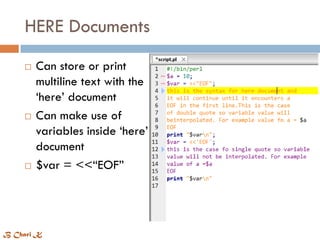
 Can store or print
multiline text with the
‘here’ document
 Can make use of
variables inside ‘here’
document
 $var = <<“EOF”
B Chari K
Variables
 To store the values there are three types of
variables
 Scalar variable preceded by sign “ $ “
 Array variable preceded by “ @ “
 Hash variable preceded by “ % “
 Can store integers, decimals, or strings in these
variables.
 Can use the same name for scalar, array, hash.
 $foo and @foo are different variables
B Chari K
Scalar ($)
 Scalar is a single unit
of data.
 $str = “string”;
 Can do scalar
arithmatic operations
B Chari K
Scalar Operations
Array (@)
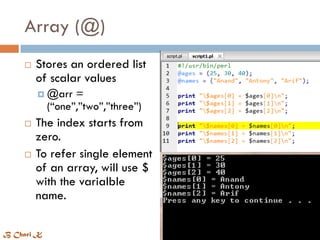
 Stores an ordered list
of scalar values
 @arr =
(“one”,”two”,”three”)
 The index starts from
zero.
 To refer single element
of an array, will use $
with the varialble
name.
B Chari K
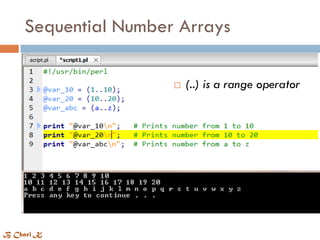
Sequential Number Arrays
 (..) is a range operator
B Chari K
Add/Remove elements in array
Slice and Replace array elements
 Can extract an
elements from an array
 Splice() function removes
the elements, replace them
with list
 splice [@array, offset [ ,
length [ , list ] ]
Split() and Join functions
 split [ pattern [ , expr [ ,
limit ] ] ]
 Join expr, list
Hash ( % )
 Hashes are like arrays
 Hash preceded by “%”
 To refer to a single element
of a hash, hash variable
name preceded by a "$"
followed by the "key"
associated with the value in
curly brackets
 A hash is a set
of key/value pairs
B Chari K
Extracting Keys and Values
 Can get a list of keys
using ‘keys’ function
 Keys = %HASH
 Can get a values using
‘values’ function
 Values = %HASH
B Chari K
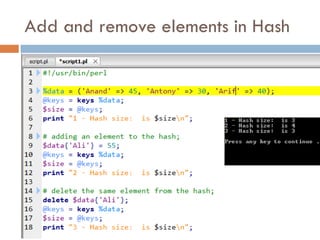
Add and remove elements in Hash
Getting User input
 Ex:
 $input = <STDIN>
 Print “you entered :
$input”
 STDIN accepts the
input from keyboard
B Chari K
 If
 If..else
 If..elseif..else
 Unless
 Unless..else
 Unless..elsif..else
 switch
Conditional Statements
B Chari K
Conditional Statements
 If (boolean_expression) {
# statement(s) will execute if the given condition is true
} else {
# statement(s) will execute if the given condition is false
}
 Unless (boolean_expression) {
# statement(s) will execute if the given condition is false
} else {
# statement(s) will execute if the given condition is true
}
B Chari K
Example : Conditional
 If..else
 $a = 100;
if ( $a < 20 ) {
printf "a is less than 20n";
else {
printf "a is greater than
20n";
}
print "value of a is : $an";
 Unless..else
 $a = 100;
unless ($a == 20 ) {
printf "given condition is
falsen";
} else {
printf "given condition is
truen";
}
print "value of a is : $an";
B Chari K
Loops
 While
 Until
 For
 Foreach
 do..while
B Chari K
Example : loops
 While
 Syntax
 while(condition) {
statement(s); }
 Example
 $a = 10;
while( $a < 20 ){
printf "Value of a: $an";
$a = $a + 1; }
 Until
 Syntax
 until(condition) {
statement(s); }
 Example
 $a = 5;
until( $a > 10 ) {
printf "Value of a: $an";
$a = $a + 1; }
B Chari K
Example : loops
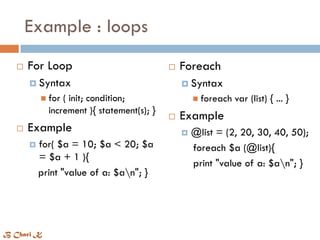
 For Loop
 Syntax
 for ( init; condition;
increment ){ statement(s); }
 Example
 for( $a = 10; $a < 20; $a
= $a + 1 ){
print "value of a: $an"; }
 Foreach
 Syntax
 foreach var (list) { ... }
 Example
 @list = (2, 20, 30, 40, 50);
foreach $a (@list){
print "value of a: $an"; }
B Chari K
define and call a Subroutine
 To define a subroutine
 sub subroutine_name{
body of the subroutine }
 To call a subroutine
 subroutine_name( list of
arguments );
 Example
 # Function definition
sub Hello{
print "Hello, World!n"; }
# Function call
Hello();
B Chari K
Passing Arguments to subroutine
 #!/usr/bin/perl
# Function definition
sub Average{
# get total number of arguments passed.
$n = scalar(@_);
$sum = 0;
foreach $item (@_){
$sum += $item; }
$average = $sum / $n;
return $average;
print "Average for the given numbers :
$averagen"; }
# Function call
Average(10, 20, 30);
 The arguments accessed
inside the function using
“@_”
B Chari K
Passing lists to subroutines
 #!/usr/bin/perl
# Function definition
sub PrintList{
my @list = @_;
print "Given list is @listn";
}
$a = 10;
@b = (1, 2, 3, 4);
# Function call with list parameter
Print list($a, @b);
 The my operator confines
a variable to a particular
region of code
B Chari K
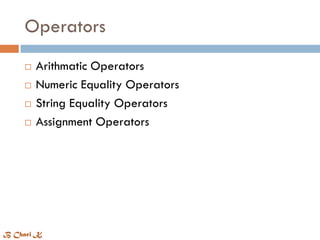
Operators
 Arithmatic Operators
 Numeric Equality Operators
 String Equality Operators
 Assignment Operators
B Chari K
Arithmatic Operators
 $c = $a + $b
 $c = $a - $b
 $c = $a * $b
 $c = $a / $b
 $c = $a % $b
 $c = $a ** $b
B Chari K
Numeric Equality Operators
 If ( $a == $b ) { … }
 If ( $a != $b ) { … }
 $c = $a <=> $b
 If ( $a > $b ) { … }
 If ( $a >= $b ) { … }
 If ( $a < $b ) { … }
 If ( $a <= $b ) { … }
 == Equal
 =! Not equal
 <=> returns -1 0 1 if
less than, equal, greater
than
 > Greater than
 < Less than
 >= greater than or
equal
 <= less than or equal
B Chari K
String Equality Operators
 if( $a lt $b ) { … }
 if( $a gt $b) { … }
 if( $a le $b ) { … }
 if( $a ge $b ) { … }
 if( $a ne $b ) { … }
 Lt less than
 Gt greater than
 Le less than or equal
 Ge greater than or
equal
 Ne not equal
B Chari K
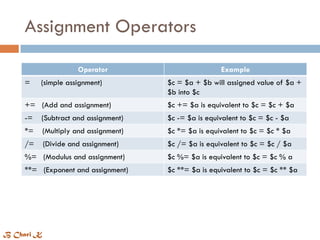
Assignment Operators
Operator Example
= (simple assignment) $c = $a + $b will assigned value of $a +
$b into $c
+= (Add and assignment) $c += $a is equivalent to $c = $c + $a
-= (Subtract and assignment) $c -= $a is equivalent to $c = $c - $a
*= (Multiply and assignment) $c *= $a is equivalent to $c = $c * $a
/= (Divide and assignment) $c /= $a is equivalent to $c = $c / $a
%= (Modulus and assignment) $c %= $a is equivalent to $c = $c % a
**= (Exponent and assignment) $c **= $a is equivalent to $c = $c ** $a
B Chari K
File Handle
 An internal Perl structure that associates a physical
file with a name.
 Basic File handles are
 STDIN
 STDOUT
 STDERR
 File handles are capable for read/write access
B Chari K
Opening and Closing Files
 Open Function
 open FILEHANDLE, EXPR
 Ex:
 open(DATA, "<file.txt");
 open(DATA, "+<file.txt");
 open DATA, "+>file.txt“
 open(DATA,">>file.txt")
 open(DATA,"+>>file.txt“
 Close Function
 close FILEHANDLE
Entity Definition
< or r Read
> or w Create, write, truncate
>> or a Writes, appends, creates
+< or r+ Reads and writes
+> or
w+
Reads, writes and truncates
+>> or
a+
Reads, writes appends and
creates
B Chari K
Reading and Writing Files
 $name = <DATA>
 Returns a single line from the file.
 @lines = <DATA>
 Returns a list of lines from handle.
 getc <STDIN>
 Returns a single characters
B Chari K
Copying Files
 open(DATA1, "<file1.txt");
open(DATA2, ">file2.txt");
while(<DATA1>) {
print DATA2 $_;
}
close( DATA1 );
close( DATA2 );
B Chari K
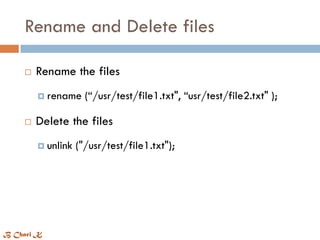
Rename and Delete files
 Rename the files
 rename (“/usr/test/file1.txt", “usr/test/file2.txt" );
 Delete the files
 unlink ("/usr/test/file1.txt");
B Chari K
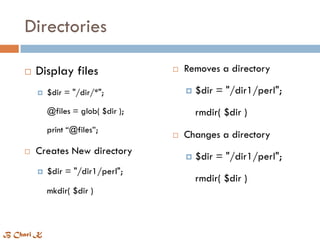
Directories
 Display files
 $dir = "/dir/*";
@files = glob( $dir );
print “@files”;
 Creates New directory
 $dir = "/dir1/perl";
mkdir( $dir )
 Removes a directory
 $dir = "/dir1/perl";
rmdir( $dir )
 Changes a directory
 $dir = "/dir1/perl";
rmdir( $dir )
B Chari K
Special Variables
Variable Description
$_ Reading single line from a file
$0 Name of the file currently being used.
$[ Index of the first element in the array.
$] Version of perl being used.
@_ All the parameters passed from subroutine.
@ARGV Command line arguments passed to the program
$< User id of the process
B Chari K
Regular Expressions
 Binding Operators ( ~= )
 Match Regular Expressions ( m// )
 Substitute Regular Expressions ( s ///)
 Translation Regular Expressions ( tr /// )
B Chari K
Match Operator, ( m// )
 m/pattern/igxo
 Ex:
 $bar = "This is you and again
you";
if ($bar =~ /you/i ) {
print "matchingn";
} else {
print "not matchingn"; }
Modifier Description
i Match case insensitive
g Globally finds all matches
x Allows whitespace in
expression
o Evaluates expression only
once
 used to match a string or statement to a regular
expression.
B Chari K
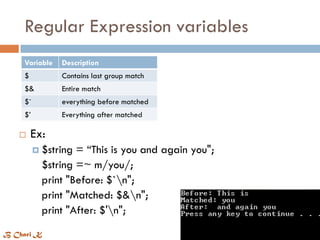
Regular Expression variables
Variable Description
$ Contains last group match
$& Entire match
$` everything before matched
$’ Everything after matched
 Ex:
 $string = “This is you and again you";
$string =~ m/you/;
print "Before: $`n";
print "Matched: $&n";
print "After: $'n";
B Chari K
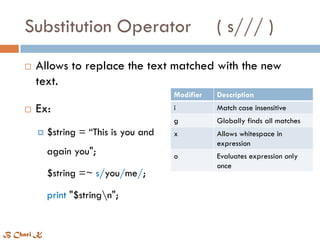
Substitution Operator ( s/// )
 Allows to replace the text matched with the new
text.
 Ex:
 $string = “This is you and
again you";
$string =~ s/you/me/;
print "$stringn";
Modifier Description
i Match case insensitive
g Globally finds all matches
x Allows whitespace in
expression
o Evaluates expression only
once
B Chari K
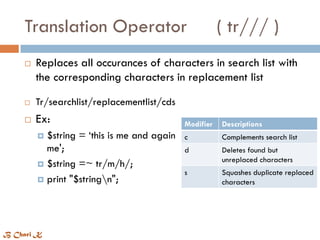
Translation Operator ( tr/// )
 Tr/searchlist/replacementlist/cds
 Ex:
 $string = ‘this is me and again
me';
 $string =~ tr/m/h/;
 print "$stringn";
Modifier Descriptions
c Complements search list
d Deletes found but
unreplaced characters
s Squashes duplicate replaced
characters
 Replaces all occurances of characters in search list with
the corresponding characters in replacement list
B Chari K
made by B Chari K

First steps in PERL

  • 1.
    P E RL made by B Chari K working in semiconductors domain
  • 2.
    What is PERL PERL stands for Practical Extraction and Report Language.  PERL is a programming language specially designed for text processing  Can be used for system administration, web development, network programming, GUI development, and more. B Chari K
  • 3.
    PERL Features  Perltakes the best features from other languages, such as C, sh, and BASIC, among others.  Perl supports both procedural and object-oriented programming.  Perl is an interpreted language.  Perl program, first compiled into byte code, which then compiled to machine instructions B Chari K
  • 4.
    PERL Basics  Canmake perl files self executable by making first line as #! /bin/perl.  Perl files must be saved with .pl or .PL  All commands have to end with “;”  Pound sign ‘#’ is the symbol for comment entry  There is no multi line comment entry in perl B Chari K
  • 5.
    PERL Basics  Whitespaces Perl doesn’t care about whitespaces  Single and Double quotes  Only double quotes interpolate variables and special characters  But single single quotes does not interpolate B Chari K
  • 6.
    PERL Basics  Printcommand used to print any thing in between double quotes or single quotes  Perl uses Backslash character to escape any meta character to print B Chari K
  • 7.
    HERE Documents  Canstore or print multiline text with the ‘here’ document  Can make use of variables inside ‘here’ document  $var = <<“EOF” B Chari K
  • 8.
    Variables  To storethe values there are three types of variables  Scalar variable preceded by sign “ $ “  Array variable preceded by “ @ “  Hash variable preceded by “ % “  Can store integers, decimals, or strings in these variables.  Can use the same name for scalar, array, hash.  $foo and @foo are different variables B Chari K
  • 9.
    Scalar ($)  Scalaris a single unit of data.  $str = “string”;  Can do scalar arithmatic operations B Chari K
  • 10.
  • 11.
    Array (@)  Storesan ordered list of scalar values  @arr = (“one”,”two”,”three”)  The index starts from zero.  To refer single element of an array, will use $ with the varialble name. B Chari K
  • 12.
    Sequential Number Arrays (..) is a range operator B Chari K
  • 13.
  • 14.
    Slice and Replacearray elements  Can extract an elements from an array  Splice() function removes the elements, replace them with list  splice [@array, offset [ , length [ , list ] ]
  • 15.
    Split() and Joinfunctions  split [ pattern [ , expr [ , limit ] ] ]  Join expr, list
  • 16.
    Hash ( %)  Hashes are like arrays  Hash preceded by “%”  To refer to a single element of a hash, hash variable name preceded by a "$" followed by the "key" associated with the value in curly brackets  A hash is a set of key/value pairs B Chari K
  • 17.
    Extracting Keys andValues  Can get a list of keys using ‘keys’ function  Keys = %HASH  Can get a values using ‘values’ function  Values = %HASH B Chari K
  • 18.
    Add and removeelements in Hash
  • 19.
    Getting User input Ex:  $input = <STDIN>  Print “you entered : $input”  STDIN accepts the input from keyboard B Chari K
  • 20.
     If  If..else If..elseif..else  Unless  Unless..else  Unless..elsif..else  switch Conditional Statements B Chari K
  • 21.
    Conditional Statements  If(boolean_expression) { # statement(s) will execute if the given condition is true } else { # statement(s) will execute if the given condition is false }  Unless (boolean_expression) { # statement(s) will execute if the given condition is false } else { # statement(s) will execute if the given condition is true } B Chari K
  • 22.
    Example : Conditional If..else  $a = 100; if ( $a < 20 ) { printf "a is less than 20n"; else { printf "a is greater than 20n"; } print "value of a is : $an";  Unless..else  $a = 100; unless ($a == 20 ) { printf "given condition is falsen"; } else { printf "given condition is truen"; } print "value of a is : $an"; B Chari K
  • 23.
    Loops  While  Until For  Foreach  do..while B Chari K
  • 24.
    Example : loops While  Syntax  while(condition) { statement(s); }  Example  $a = 10; while( $a < 20 ){ printf "Value of a: $an"; $a = $a + 1; }  Until  Syntax  until(condition) { statement(s); }  Example  $a = 5; until( $a > 10 ) { printf "Value of a: $an"; $a = $a + 1; } B Chari K
  • 25.
    Example : loops For Loop  Syntax  for ( init; condition; increment ){ statement(s); }  Example  for( $a = 10; $a < 20; $a = $a + 1 ){ print "value of a: $an"; }  Foreach  Syntax  foreach var (list) { ... }  Example  @list = (2, 20, 30, 40, 50); foreach $a (@list){ print "value of a: $an"; } B Chari K
  • 26.
    define and calla Subroutine  To define a subroutine  sub subroutine_name{ body of the subroutine }  To call a subroutine  subroutine_name( list of arguments );  Example  # Function definition sub Hello{ print "Hello, World!n"; } # Function call Hello(); B Chari K
  • 27.
    Passing Arguments tosubroutine  #!/usr/bin/perl # Function definition sub Average{ # get total number of arguments passed. $n = scalar(@_); $sum = 0; foreach $item (@_){ $sum += $item; } $average = $sum / $n; return $average; print "Average for the given numbers : $averagen"; } # Function call Average(10, 20, 30);  The arguments accessed inside the function using “@_” B Chari K
  • 28.
    Passing lists tosubroutines  #!/usr/bin/perl # Function definition sub PrintList{ my @list = @_; print "Given list is @listn"; } $a = 10; @b = (1, 2, 3, 4); # Function call with list parameter Print list($a, @b);  The my operator confines a variable to a particular region of code B Chari K
  • 29.
    Operators  Arithmatic Operators Numeric Equality Operators  String Equality Operators  Assignment Operators B Chari K
  • 30.
    Arithmatic Operators  $c= $a + $b  $c = $a - $b  $c = $a * $b  $c = $a / $b  $c = $a % $b  $c = $a ** $b B Chari K
  • 31.
    Numeric Equality Operators If ( $a == $b ) { … }  If ( $a != $b ) { … }  $c = $a <=> $b  If ( $a > $b ) { … }  If ( $a >= $b ) { … }  If ( $a < $b ) { … }  If ( $a <= $b ) { … }  == Equal  =! Not equal  <=> returns -1 0 1 if less than, equal, greater than  > Greater than  < Less than  >= greater than or equal  <= less than or equal B Chari K
  • 32.
    String Equality Operators if( $a lt $b ) { … }  if( $a gt $b) { … }  if( $a le $b ) { … }  if( $a ge $b ) { … }  if( $a ne $b ) { … }  Lt less than  Gt greater than  Le less than or equal  Ge greater than or equal  Ne not equal B Chari K
  • 33.
    Assignment Operators Operator Example =(simple assignment) $c = $a + $b will assigned value of $a + $b into $c += (Add and assignment) $c += $a is equivalent to $c = $c + $a -= (Subtract and assignment) $c -= $a is equivalent to $c = $c - $a *= (Multiply and assignment) $c *= $a is equivalent to $c = $c * $a /= (Divide and assignment) $c /= $a is equivalent to $c = $c / $a %= (Modulus and assignment) $c %= $a is equivalent to $c = $c % a **= (Exponent and assignment) $c **= $a is equivalent to $c = $c ** $a B Chari K
  • 34.
    File Handle  Aninternal Perl structure that associates a physical file with a name.  Basic File handles are  STDIN  STDOUT  STDERR  File handles are capable for read/write access B Chari K
  • 35.
    Opening and ClosingFiles  Open Function  open FILEHANDLE, EXPR  Ex:  open(DATA, "<file.txt");  open(DATA, "+<file.txt");  open DATA, "+>file.txt“  open(DATA,">>file.txt")  open(DATA,"+>>file.txt“  Close Function  close FILEHANDLE Entity Definition < or r Read > or w Create, write, truncate >> or a Writes, appends, creates +< or r+ Reads and writes +> or w+ Reads, writes and truncates +>> or a+ Reads, writes appends and creates B Chari K
  • 36.
    Reading and WritingFiles  $name = <DATA>  Returns a single line from the file.  @lines = <DATA>  Returns a list of lines from handle.  getc <STDIN>  Returns a single characters B Chari K
  • 37.
    Copying Files  open(DATA1,"<file1.txt"); open(DATA2, ">file2.txt"); while(<DATA1>) { print DATA2 $_; } close( DATA1 ); close( DATA2 ); B Chari K
  • 38.
    Rename and Deletefiles  Rename the files  rename (“/usr/test/file1.txt", “usr/test/file2.txt" );  Delete the files  unlink ("/usr/test/file1.txt"); B Chari K
  • 39.
    Directories  Display files $dir = "/dir/*"; @files = glob( $dir ); print “@files”;  Creates New directory  $dir = "/dir1/perl"; mkdir( $dir )  Removes a directory  $dir = "/dir1/perl"; rmdir( $dir )  Changes a directory  $dir = "/dir1/perl"; rmdir( $dir ) B Chari K
  • 40.
    Special Variables Variable Description $_Reading single line from a file $0 Name of the file currently being used. $[ Index of the first element in the array. $] Version of perl being used. @_ All the parameters passed from subroutine. @ARGV Command line arguments passed to the program $< User id of the process B Chari K
  • 41.
    Regular Expressions  BindingOperators ( ~= )  Match Regular Expressions ( m// )  Substitute Regular Expressions ( s ///)  Translation Regular Expressions ( tr /// ) B Chari K
  • 42.
    Match Operator, (m// )  m/pattern/igxo  Ex:  $bar = "This is you and again you"; if ($bar =~ /you/i ) { print "matchingn"; } else { print "not matchingn"; } Modifier Description i Match case insensitive g Globally finds all matches x Allows whitespace in expression o Evaluates expression only once  used to match a string or statement to a regular expression. B Chari K
  • 43.
    Regular Expression variables VariableDescription $ Contains last group match $& Entire match $` everything before matched $’ Everything after matched  Ex:  $string = “This is you and again you"; $string =~ m/you/; print "Before: $`n"; print "Matched: $&n"; print "After: $'n"; B Chari K
  • 44.
    Substitution Operator (s/// )  Allows to replace the text matched with the new text.  Ex:  $string = “This is you and again you"; $string =~ s/you/me/; print "$stringn"; Modifier Description i Match case insensitive g Globally finds all matches x Allows whitespace in expression o Evaluates expression only once B Chari K
  • 45.
    Translation Operator (tr/// )  Tr/searchlist/replacementlist/cds  Ex:  $string = ‘this is me and again me';  $string =~ tr/m/h/;  print "$stringn"; Modifier Descriptions c Complements search list d Deletes found but unreplaced characters s Squashes duplicate replaced characters  Replaces all occurances of characters in search list with the corresponding characters in replacement list B Chari K
  • 46.
    made by BChari K