Project Management

     Ejvin Berry

     FIRSTFare – October 30th, 2010
What is a Project?
   One goal + some parameters:
       Scope – A verb and a noun

         Small Scope: Blinking lights
         Moderate Scope: Innovative design
         High-Risk / High Value Scope:
          Streamlining future work
       Time

       Cost

       Quality

       Risk
Project Success
Requirements to survive the season:
 Happy customers

 On time deliverables

 On budget projects

 Optimistic investors

 Team cohesion


Congratulations… but if you have problems
  “surviving”, you’ll have problems “thriving”
  as an engineering organization…
Profitable Project Successes
   New work
   Under budget
   Innovative design
   Paid investors (with PR)
   Intensified talent pool
   Leftover energy
     Time and capital
Project Manager
   Primary Roles:
     Build a team (organize existing
       resources)
     Maintain/ Analyze data

     Organize capital (money and manpower)

     Manage conflict (interference)

     Review work – Initiate Design Reviews

     Schedule resources
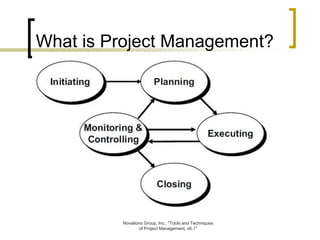
What is Project Management?


         Novations Group, Inc., "Tools and Techniques
                of Project Management, v6.1"
Initiation
   By definition, only ever happens once
   Contains clear project goals and parameters
   Often involves the customer
   Your big chance to control scope

Initiation will take place between 5am and
    midnight on Kickoff Day.
Planning
   This is the opportunity to modify:
     Team structure

     Tactics – Define “envelopes”

     Schedule

       Chronological schedules

       Cost schedules – when to buy?

     Acceptable risks – Weigh your skills and
      your needs with your “wants”
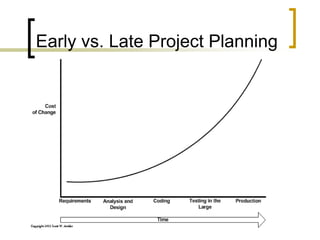
Early vs. Late Project Planning
Executing
   Do what you planned.
   Do only what you planned.
   Feedback and repeat.

WARNING: Execution without documentation
 is wasteful and often times illegal.
Monitoring and Controlling
   Gather feedback via Design Review
   Sort feedback
   Make decisions regarding remaining
    resources
Closing
   A formal process in which you sell your
    product to the customer.
   Requires a Design Review
       Who is your customer?
   Which projects need to close?
       Minor components
       Entire robot
Now it’s time to manage…

   If you were looking for someone to
    spell it out for you; here’s your
    chance…
First: Team Structures

   Match people with their strengths
     It may be helpful, particularly for rookie
       teams, to develop a skills matrix.
     This will help identify training needs, or
       where you need to get more outside help
       (a trainer, or a hired gun?)
   Develop an organization chart, matching
    team members to their responsibilities.
Second: Plan the work…
   Work Breakdown Structure (or WBS) =
    Everything you want to do on the project
     Determine the form and function of every
      part, and what they all do for you
      (Functional Efficiency Technique)
     Also any related work – fundraising,
      major events, support equipment
     This ultimately becomes your project
      plan, as detailed as you choose to plan
      and schedule it.
   Match with your team structure.
Plan the work (cont.). . .
    Estimate each item or system using a
     Resource Loading Diagram along with a
     Network Diagram:
      How much time (work hours) do you think
       it will take?
      How many people do you have? How
       much time do they have?
      How many days/ hours will each item
       take?
      Where are you short handed? Make sure
       you aren’t double booking people.
Third: Execute - do some work
Fourth: Design Reviews
   Plan and schedule design reviews –
    possibly every day, until you enter
    production
   Document (as specifically as possible) how
    subsystems will work together and connect
    as they are designed, built and integrated
   Check your interfaces in the reviews – if
    there is change, it must be fully
    investigated, understood and agreed to
Fifth: Risk Management

   Also known as “what-ifs”
   Leave a little time for disasters and
    unforeseen details, but do NOT plan them
   Testing is essential to reduce risk
   Set goals for features or functions that
    would be “nice to have”
     If there is insufficient time, the project will
       still be successful without them
Risk Management (cont.)

   FMEA (Failure Modes and Effects Analysis)
     Consider system components

     Identify symptoms of failure

     Identify root cause

     Predict consequences to other sub-
      systems
     Rank failure modes by severity (1,2,3)

     Rank failure modes by probability (1,2,3)

   Example FMEA.
Work the Plan . . .
Make it happen
   Make a simple project schedule, easy to read and
    status.
   Stick to your plan
   Monitor progress
   Adjust on the fly – you may have to give up some
    goals, or shift more people to key tasks that are
    falling behind. Enlist more experts?
   Keep everyone productive, but don’t forget this is all
    fun!
   Communicate!
References

   MBA.com
   PMI PMBOK Guide

   Contact:
       Ejvin Berry, ejvin.m.berry@boeing.com
Questions ????

First fare 2010 project-management

  • 2.
    Project Management Ejvin Berry FIRSTFare – October 30th, 2010
  • 3.
    What is aProject?  One goal + some parameters:  Scope – A verb and a noun  Small Scope: Blinking lights  Moderate Scope: Innovative design  High-Risk / High Value Scope: Streamlining future work  Time  Cost  Quality  Risk
  • 4.
    Project Success Requirements tosurvive the season:  Happy customers  On time deliverables  On budget projects  Optimistic investors  Team cohesion Congratulations… but if you have problems “surviving”, you’ll have problems “thriving” as an engineering organization…
  • 5.
    Profitable Project Successes  New work  Under budget  Innovative design  Paid investors (with PR)  Intensified talent pool  Leftover energy  Time and capital
  • 6.
    Project Manager  Primary Roles:  Build a team (organize existing resources)  Maintain/ Analyze data  Organize capital (money and manpower)  Manage conflict (interference)  Review work – Initiate Design Reviews  Schedule resources
  • 7.
    What is ProjectManagement? Novations Group, Inc., "Tools and Techniques of Project Management, v6.1"
  • 8.
    Initiation  By definition, only ever happens once  Contains clear project goals and parameters  Often involves the customer  Your big chance to control scope Initiation will take place between 5am and midnight on Kickoff Day.
  • 9.
    Planning  This is the opportunity to modify:  Team structure  Tactics – Define “envelopes”  Schedule  Chronological schedules  Cost schedules – when to buy?  Acceptable risks – Weigh your skills and your needs with your “wants”
  • 10.
    Early vs. LateProject Planning
  • 11.
    Executing  Do what you planned.  Do only what you planned.  Feedback and repeat. WARNING: Execution without documentation is wasteful and often times illegal.
  • 12.
    Monitoring and Controlling  Gather feedback via Design Review  Sort feedback  Make decisions regarding remaining resources
  • 13.
    Closing  A formal process in which you sell your product to the customer.  Requires a Design Review  Who is your customer?  Which projects need to close?  Minor components  Entire robot
  • 14.
    Now it’s timeto manage…  If you were looking for someone to spell it out for you; here’s your chance…
  • 15.
    First: Team Structures  Match people with their strengths  It may be helpful, particularly for rookie teams, to develop a skills matrix.  This will help identify training needs, or where you need to get more outside help (a trainer, or a hired gun?)  Develop an organization chart, matching team members to their responsibilities.
  • 16.
    Second: Plan thework…  Work Breakdown Structure (or WBS) = Everything you want to do on the project  Determine the form and function of every part, and what they all do for you (Functional Efficiency Technique)  Also any related work – fundraising, major events, support equipment  This ultimately becomes your project plan, as detailed as you choose to plan and schedule it.  Match with your team structure.
  • 17.
    Plan the work(cont.). . .  Estimate each item or system using a Resource Loading Diagram along with a Network Diagram:  How much time (work hours) do you think it will take?  How many people do you have? How much time do they have?  How many days/ hours will each item take?  Where are you short handed? Make sure you aren’t double booking people.
  • 18.
    Third: Execute -do some work
  • 19.
    Fourth: Design Reviews  Plan and schedule design reviews – possibly every day, until you enter production  Document (as specifically as possible) how subsystems will work together and connect as they are designed, built and integrated  Check your interfaces in the reviews – if there is change, it must be fully investigated, understood and agreed to
  • 20.
    Fifth: Risk Management  Also known as “what-ifs”  Leave a little time for disasters and unforeseen details, but do NOT plan them  Testing is essential to reduce risk  Set goals for features or functions that would be “nice to have”  If there is insufficient time, the project will still be successful without them
  • 21.
    Risk Management (cont.)  FMEA (Failure Modes and Effects Analysis)  Consider system components  Identify symptoms of failure  Identify root cause  Predict consequences to other sub- systems  Rank failure modes by severity (1,2,3)  Rank failure modes by probability (1,2,3)  Example FMEA.
  • 22.
    Work the Plan. . . Make it happen  Make a simple project schedule, easy to read and status.  Stick to your plan  Monitor progress  Adjust on the fly – you may have to give up some goals, or shift more people to key tasks that are falling behind. Enlist more experts?  Keep everyone productive, but don’t forget this is all fun!  Communicate!
  • 23.
    References  MBA.com  PMI PMBOK Guide  Contact:  Ejvin Berry, ejvin.m.berry@boeing.com
  • 24.