“Introduction of Cloud
Computing”
Prepared By
Prof. Anand N. Gharu
(Assistant Professor)
Computer Engineering Departement
02 May 2022
.
CLASS : TE COMPUTER 2019
SUBJECT : CC (SEM-II)
UNIT : I
1
Syllabus
Importance of Cloud Computing, Characteristics, Pros and
Cons of Cloud Computing, Migrating into the Cloud,
Seven-step model of migration into a Cloud, Trends in
Computing. Cloud Service Models: SaaS, PaaS, IaaS,
Storage. Cloud Architecture: Cloud Computing Logical
Architecture, Developing Holistic Cloud Computing
Reference Model, Cloud System Architecture,
• Before emerging the cloud computing, there was Client/Server computing
which is basically a centralized storage in which all the software applications,
all the data and all the controls are resided on the server side.
• If a single user wants to access specific data or run a program, he/she need to
connect to the server and then gain appropriate access, and then he/she can
do his/her business.
• Then after, distributed computing came into picture, where all the computers
are networked together and share their resources when needed.
• On the basis of above computing, there was emerged of cloud computing
concepts that later implemented.
History of Cloud Computing
• At around in 1961, John MacCharty suggested in a speech at MIT that
computing can be sold like a utility, just like a water or electricity. It was a
brilliant idea, but like all brilliant ideas, it was ahead if its time, as for the
next few decades, despite interest in the model, the technology simply was
not ready for it.
• But of course time has passed and the technology caught that idea and after
few years we mentioned that:
• In 1999, Salesforce.com started delivering of applications to users using a
simple website. The applications were delivered to enterprises over the
Internet, and this way the dream of computing sold as utility were true
History of Cloud Computing
• In 2002, Amazon started Amazon Web Services, providing services like
storage, computation and even human intelligence. However, only starting
with the launch of the Elastic Compute Cloud in 2006 a truly commercial
service open to everybody existed.
• In 2009, Google Apps also started to provide cloud computing enterprise
applications.
• Of course, all the big players are present in the cloud computing evolution,
some were earlier, some were later. In 2009, Microsoft launched Windows
Azure, and companies like Oracle and HP have all joined the game. This
proves that today, cloud computing has become mainstream.
History of Cloud Computing
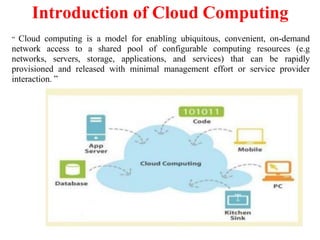
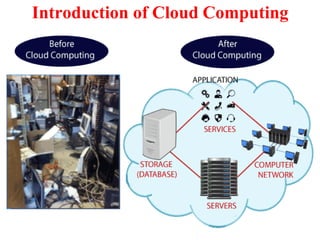
“ Cloud computing is a model for enabling ubiquitous, convenient, on-demand
network access to a shared pool of configurable computing resources (e.g
networks, servers, storage, applications, and services) that can be rapidly
provisioned and released with minimal management effort or service provider
interaction. ”
Introduction of Cloud Computing
Importance of Cloud Computing
• Reduction in Total Cost Ownership [TCO]
• Implementation of IT with increased flexibility
• Increased Collaboration
• Flexibility in time like work from anywhere at anytime
• Increased competitiveness
• Go-to-Market in a lesser time
Significance of Cloud Computing
• The applications are made available to everyone through the cloud as and when
they are available.
• The IT costs have been reduced due to the reduction in the number of servers,
software cost, and the staff.
• The investment costs have become more flexible as compared to traditional
methods.
• Increased reliability as anyone could get connected anytime.
• The data and the applications are mobile and easily made available to the
employees across the globe.
Significance of Cloud Computing
• The increased collaboration has reduced the time to market and product
enhancement.
• The facility could be turned up, down or off as per the demand and the
circumstances.
• The cloud computing delivers an appreciable integration with Mergers and
Acquisitions [M&A] activity.
• The cloud computing has increased the ‘green’ credentials as the solutions have
the lesser environmental impact.
Importance of Cloud Computing
• Cloud computing is so important because it offers flexibility, data recovery,
little to no maintenance, easy access and a higher level of security.
1. Flexibility :
Does your business experience fluctuating bandwidth requirements? Some months
are busier, while others are not as intense. With cloud computing, managing
resources is easier than ever. Simply pay for the resources you are using each
month, and nothing more. Cloud storage and cloud VPS providers offer flexible
packages, where you can easily add or decrease the amount of storage and
bandwidth you are paying to use.
2. Data Recovery :
Recovering data from damaged physical servers and hard drives can be fairly
problematic. If the physical device is badly damaged, recovery may not be
possible. These issues can result in businesses losing vital data, especially when it
is not adequately backed up. With cloud computing, these issues are not as
relevant.
Importance of Cloud Computing
3. No Maintenance :
• When running a traditional server setup, companies must worry about the
maintenance of the entire system. Not only are regular checks mandatory, but
parts constantly need replacing as they stop working or become outdated.
• A cloud computing solution eliminates the need for any maintenance. There is
no cost or effort required by companies that use cloud solutions, as everything
is handled by the provider. That removes a massive headache off your
shoulders, and ensures the monthly expenditure is limited to what is paid for the
cloud services being used.
4. Easy Access :
• Access to documents, backend files, software and the company website is much
easier with cloud computing. It is effortless for employees to work remotely,
while the entire company is connected through its cloud interface. All your
employees will require is a device to access the network, and the correct
security protocols.
Importance of Cloud Computing
5. Increased Security :
With cloud computing, everything you are accessing and saving is on the cloud.
Even if a laptop is lost or damaged, the company interface is accessible through
another device. And since all your documents save on the cloud, there is no
concern about losing important documents because they were saved on a now lost
or damaged laptop hard drive.
Since information is no longer contained on your physical hard drives or servers, it
also becomes a lot harder for anyone to steal. With a comprehensive encryption
and login security system, company data is much safer with cloud computing.
The cloud is here, and it is already transforming how many companies operate.
Businesses may be reluctant to change up existing operations, but the benefits of
the cloud means the transition is worth it.
Charactristics of Cloud Computing
• On-demand self-service
A consumer can unilaterally provision computing capabilities, such as server
time and network storage, as needed automatically without requiring human
interaction with each service provider.
• Broad network access
Capabilities are available over the network and accessed through standard
mechanisms that promote use by heterogeneous thin or thick client platforms (e.g.,
mobile phones, tablets, laptops, and workstations).
• Resource pooling
The provider’s computing resources are pooled to serve multiple
consumers using a multi-tenant model,with different physical and virtual resources
dynamically assigned and reassigned according to consumer demand
• Measured Service:
Cloud systems automatically control and optimize resources used by
leveraging a metering capability at some level of abstraction appropriate to the type
of service.
• It will provide analyzable and predictable computing platform.
Cloud Components
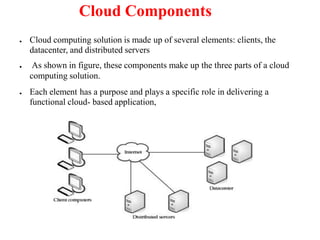
● Cloud computing solution is made up of several elements: clients, the
datacenter, and distributed servers
● As shown in figure, these components make up the three parts of a cloud
computing solution.
● Each element has a purpose and plays a specific role in delivering a
functional cloud- based application,
Clients
● Clients are, in a cloud computing architecture, the exact same things that
they are in a plain, old, everyday local area network (LAN).
● They are, typically, the computers that just sit on your desk. But they might
also be laptops, tablet computers, mobile phones, or PDAs—
● Clients are the devices that the end users interact with to manage their
information on the cloud. Clients generally fall into three categories:
Mobile Mobile devices include PDAs or smartphones, like a Blackberry,
Windows Mobile Smartphone, or an iPhone.
● Thin Clients are computers that do not have internal hard drives, but rather
let the server do all the work, but then display the information.
Thick This type of client is a regular computer, using a web browser like
Firefox or Internet Explorer to connect to the cloud.
● Datacenter:-The datacenter is the collection of servers where the application
to which you subscribe is housed. It could be a large room in the basement
of your building or a room full of servers on the other side of the world that
you access via the Internet.
● Distributed Servers-But the servers don’t all have to be housed in the same
Basic Conceps and Terminologies:-
● IT Resource:- An IT resource is nothing but an IT related artefact which may
be either physical or virtual.For eg.Physical server,virtual server,software
program,service,storage device,network device
● On premise:-when IT resources is hosted is an IT enterprise within its
organizational boundary,it is considered to be located at the premises of that
enterprise.It is known as on-pemise.
● Scaling-Scaling is the ability of IT resource to handle continues incresing or
decreasing demands of usage.
Horizontal Scaling- scaling out and scaling down
Vertical Scaling- scaling up and scaling down
● Cloud Service:- A cloud service can be considered as any IT resource which
can be accessed remotely via a cloud.It is totally different and broad concept
than the other IT fields.
A cloud service can be a simple web based softeware application which is
invoked with the help of messaging protocol or virtual server.
● Cloud service consumer:-cloud based web service is accessed by the
consumers which are outside the range of cloud.
●Veers to adding more resources (CPU/RAM/DISK) to your server (database or
application server is still remains one) as on demand.
●Vertical Scaling is most commonly used in applications and products of middle-
range as well as small and middle-sized companies. One of the most common
examples of Virtual Scaling is to buy an expensive hardware and use it as a
Virtual Machine hypervisor (VMWare ESX).
●Vertical Scaling usually means upgrade of server hardware. Some of the
reasons to scale vertically includes increasing IOPS (Input / Ouput Operations),
amplifying CPU/RAM capacity, as well as disk capacity.
●However, even after using virtualization, whenever an improved performance is
targeted, the risk for downtimes with it is much higher than using horizontal
scaling.
Vertical scaling
Horizontal Scaling
● Horizontal Scaling is a must use technology – whenever a high availability
of (server) services are required
● Scaling horizontally involves adding more processing units or phyiscal
machines to your server or database. It involves growing the number of
nodes in the cluster, reducing the responsibilities of each member node by
spreading the key space wider and providing additional end-points for client
connections. Horizontal Scaling has been historically much more used for
high level of computing and for application and services.
● Although this does not alter the capacity of each individual node, the load is
decreased due to the distribution between separate server nodes.
● Some of the reasons why organizations should choose to scale horizontally
include increasing I/O concurrency, reducing the load on existing nodes, and
increasing disk capacity.
● The Internet and particular web services have boosted the use of Horizontal
Scaling. Most giant companies that provide well known web services like
Google (Gmail, YouTube), Yahoo, Facebook, EBay, Amazon etc. are using
heavily horizontal scaling.
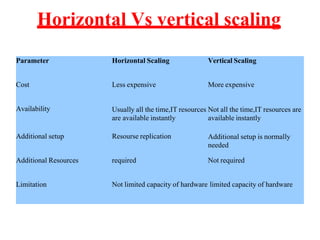
Horizontal Vs vertical scaling
Parameter Horizontal Scaling Vertical Scaling
Cost Less expensive More expensive
Availability Usually all the time,IT resources
are available instantly
Not all the time,IT resources are
available instantly
Additional setup Resourse replication Additional setup is normally
needed
Additional Resources required Not required
Limitation Not limited capacity of hardware limited capacity of hardware
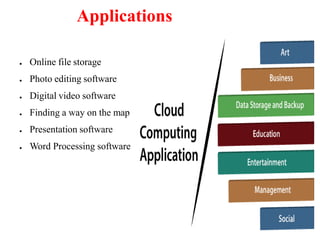
Applications
● Online file storage
● Photo editing software
● Digital video software
● Finding a way on the map
● Presentation software
● Word Processing software
Intranets and the Cloud
● While your operation is not big as amazon s3 cloud computing,you can use
the same sorts of principles within your organization to develop your IT
infrastucture.
● By setting up thin clients to run applictaions and services on a local
server,rather than on their desktops,you ease the costs of deployment and
maintenance,as well as reducing power costs.
● Components:-There are two main components in client/server computing:
servers and thin or light clients.The servers house the applications your
organization needs to run, and the thin clients—which do not have hard
drives—display the results.
● Hypervisor Applications:-
● Applications like VMware or Microsoft’s Hyper-V allow you to virtualize
your servers so that multiple virtual servers can run on one physical server.
● These sorts of solutions provide the tools to supply a virtualized set of
hardware to the guest operating system.They also make it possible to install
different operating systems on the same machine.
● For example, you may need Windows Vista to run one application, while
another application requires Linux. It’s easy to set up the server to run both
Cloud Services Provided by number of Vendors:-
Cloud services are provided by number of vendors.
●Amazon:- one of the prior company offer cloud services services
offered by Amazon:
1. Elastic compute cloud(EC2)
2. Simple Storage service(S3)
3. Simple queue service(SQS)
4. SimpleDB
1.EC2:- This service provides virtual machines as well as extra CPU cycles
2. S3:- This service provides facility to store items up to size five GB in virtual storage
3. SQS:- This service lets the machines of an organization to talk to each other
with the help of message passing API.
4. SimpleDB:- This service works in combination with Amazon S3 as well as Amazon
EC2.
● Google
Google's app engine is considered as contrast to amazon offerings.
App engine does not give facility to users to write a file in their own directory.
Online documents and spredsheets are provided by google to encourage
developers to build features for online software with the help of app engine
● Microsoft:-
Windows Azure is a cloud computing solution provided by microsoft.It is an
OS which helps organizations to execute windows application and save files
as well as data using Microsoft's datacenters.
Azure services platform is also provided by microsoft.
1. Windows Azure:- provides scalable storage,computation and networking
2. Microsoft SQL services:- offers database services as well as reporting
3. Microsoft .NET services:- offers service based implementation
4. Live services:- These services help to share,store,and synchonize several
types of elements such as documents,photos and files across Pcs,phone etc
Your Organization and Cloud Computing
● Cloud computing is not a one-size-fits-all affair. Just as the hardware and
software configuration you use in your organization is different from the
enterprise's regular affair; the needs of cloud computing needs will be
different.
● When you can use cloud computing consider following no of factors
● Cost/benefit ratio
• Speed of delivery
• How much capacity you will use
• Whether your data is regulated
• Your organization’s corporate and IT structure
● There may be times when the need you have is a perfect match for cloud
computing. But there may also be times when cloud computing is simply not
a good match for your needs.
● Scenarios:-There are three different major implementations of cloud computing.
How organizations are using cloud computing is quite different at a granular
level, but the uses generally fall into one of these three solutions.
1. Compute Clouds:- An access is given to highly scalable,inexpensive,on demand
computing resources by the compute cloud which execute the code given to
them.eg. Amazon's EC2,Google App Engine
2. Cloud Storage:-cloud storage was one of the initial offerings by cloud and it still
remaibs a popular solution.cloud storage is considered as a big world.
3. Cloud Applications:-There is difference between cloud applications and compute
clouds in that cloud applications uses software applications which are basically
rely on cloud infrastructure.
Some cloud applications include:
Peer to peer computing such as BitTorrent,Skype etc.
Web applications such as Myspace,YouTube,etc
SaaS such as Google Apps
Software plus services such as microsoft online services
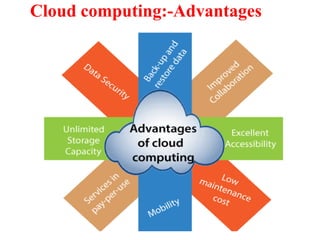
Cloud computing:-Advantages
Cloud computing:-Benefits
● Increased Scalability:-
If you are anticipating a huge upswing in computing need (or even if you are
surprised by a sudden demand), cloud computing can help you manage.
Rather than having to buy, install, and configure new equipment, you can
buy additional CPU cycles or storage from a third party.
Since your costs are based on consumption, you likely wouldn’t have to pay out
as much as if you had to buy the equipment.
Once you have fulfilled your need for additional equipment, you just stop using
the cloud provider’s services, and you don’t have to deal with unneeded
equipment. You simply add or subtract based on your organization’s need.
● Simplicity/Reduced investments and proportional costs:-
Again, not having to buy and configure new equipment allows you and your IT
staff to get right to your business.
The cloud solution makes it possible to get your application started
immediately, and it costs a fraction of what it would cost to implement an
on-site solution.
● Knowledgeable Vendors:-
Typically, when new technology becomes popular, there are plenty of vendors
who pop up to offer their version of that technology. This isn’t always
good, because a lot of those vendors tend to offer less than useful technology.
By contrast, the first comers to the cloud computing party are actually very
reputable companies. Companies like Amazon, Google, Microsoft, IBM, and
Yahoo! have been good vendors because they have offered reliable service,
plenty of capacity, and you get some brand familiarity with these well-known
names.
● Security :-
There are plenty of security risks when using a cloud vendor, but reputable
companies strive to keep you safe and secure.
● Incresed availability and reliability:-
For improving its realiability so as to decresase the effect of various runtime
failure conditions.
A cloud based IT resource can be accessible for longer periods of time.for
eg.ne3ar about 22 hours in a day.
Cloud computing:-Limitations
There are other cases when cloud computing is not the best solution for your
computing needs.
● Your Sensitive Information
We’ve talked about the concern of storing sensitive information on the cloud, but it can’t
be understated. Once data leaves your hands and lands in the lap of a service provider,
you’ve lost a layer of control.
● Protect Your Data
That doesn’t mean you can’t maintain your data on a cloud; you just need to be safe.
The best way is to encrypt your data before you send it to a third party.
Programs like PGP (www.pgp.com) or open-source TrueCrypt (www.truecrypt.org)
can encrypt the file so that only those with a password can access it
Encrypting your data before sending it out protects it. If someone does get your
data, they need the proper credentials or all they get is gibberish.
● Applications Not Ready
In some cases the applications themselves are not ready to be used on the cloud.
They may have little quirks that prevent them from being used to their fullest
abilities, or they may not work whatsoever.
First, the application might require a lot of bandwidth to communicate with
users.
The application might also take a lot of effort to integrate with your other
applications. If you try to relocate it to a cloud, you may find that the savings
are erased by the additional effort required to maintain the integration. In this
case it may end up being more cost- effective to continue to host it locally.
This helps you avoid the service cost of having to transfer to and from the
cloud. It’s also more efficient, because the application can talk to the
database without having to reach out across the network to do so.
Some applications may not be able to communicate securely across the Internet.
If they cannot communicate securely or through a tunnel, then your data is at
risk.
Security Concerns:-
● Privacy Concerns with a Third Party
The first and most obvious concern is for privacy considerations. That is, if
another party is housing all your data, how do you know that it’s safe and
secure? You really don’t. As a starting point, assume that anything you put on
the cloud can be accessed by anyone.
There are also concerns because law enforcement has been better able to get at
data maintained on a cloud, more so than they are from an organization’s
servers.
● Hackers
Hackers Hackers aren’t the nice people that Hollywood has made them
out to be. Most aren’t just sitting around, drinking Mountain Dew and
trying to break into a secure network just because they can. They want
something.
Either way, hackers are a real concern for your data managed on a cloud.
Because your data is held on someone else’s equipment, you may be at
the mercy of whatever security measures they support.
● Are They Doing Enough to Secure It?
Before signing on with a reputable vendor, keep in mind, also, that they
are doing all they can to protect your data. Now, there is a school of
thought that says, in fact, that vendors will be going above and beyond
to ensure that your data is secure. This is a simple matter of doing
business. If word gets out that they don’t protect the data they house,
then no one will want to do business with them.
There’s also an issue of performance and efficiency. Since you pay as
you go, if you spend an inordinate amount of time on CPU cycles
using their security tools, you’ll go looking to the competition.
Ultimately, while we like to think that they’re doing their best, their best
simply might not be good enough. There are a lot of ways that their
cloud and your data can be compromised.
● Bot Attackers
In a commonly recognized worst-case scenario, attackers use botnets to
perform distributed denial of service (DDOS) attacks. In order to get
the hackers to stop attacking your network, you face blackmail.
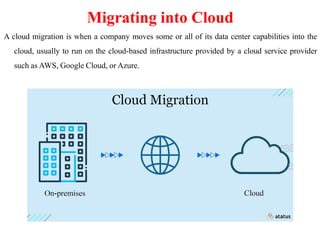
Migrating into Cloud
A cloud migration is when a company moves some or all of its data center capabilities into the
cloud, usually to run on the cloud-based infrastructure provided by a cloud service provider
such as AWS, Google Cloud, or Azure.
Migrating into Cloud
Cloud migration is the process of moving digital business operations into
the cloud. Cloud migration is sort of like a physical move, except it involves
moving data, applications, and IT processes from some data centers to other data
centers, instead of packing up and moving physical goods. Much like a move
from a smaller office to a larger one, cloud migration requires quite a lot of
preparation and advance work, but usually it ends up being worth the effort,
resulting in cost savings and greater flexibility.
Most often, "cloud migration" describes the move from on-premises or legacy
infrastructure to the cloud. However, the term can also apply to a migration from
one cloud to another cloud
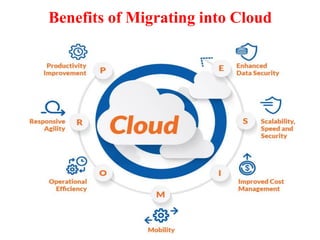
Benefits of Migrating into Cloud
1. Scalability: Cloud computing can scale up to support larger workloads and
greater numbers of users far more easily than on-premises infrastructure, which
requires companies to purchase and set up additional physical servers,
networking equipment, or software licenses.
2. Cost: Companies that move to the cloud often vastly reduce the amount they
spend on IT operations, since the cloud providers handle maintenance and
upgrades. Instead of keeping things up and running, companies can focus more
resources on their biggest business needs – developing new products or
improving existing ones.
Benefits of Migrating into Cloud
3. Performance: For some businesses, moving to the cloud can enable them to
improve performance and the overall user experience for their customers. If their
application or website is hosted in cloud data centers instead of in various on-
premises servers, then data will not have to travel as far to reach the users,
reducing latency.
4. Flexibility: Users, whether they're employees or customers, can access the
cloud services and data they need from anywhere. This makes it easier for a
business to expand into new territories, offer their services to international
audiences, and let their employees work flexibly.
Challenges of Migrating into Cloud
1. Migrating large databases: Often, databases will need to move to a different
platform altogether in order to function in the cloud. Moving a database is
difficult, especially if there are large amounts of data involved. Some cloud
providers actually offer physical data transfer methods, such as loading data onto
a hardware appliance and then shipping the appliance to the cloud provider, for
massive databases that would take too long to transfer via the Internet. Data can
also be transferred over the Internet. Regardless of the method, data migration
often takes significant time.
2. Data integrity: After data is transferred, the next step is making sure data is
intact and secure, and is not leaked during the process.
Challenges of Migrating into Cloud
3. Continued operation: A business needs to ensure that its current systems
remain operational and available throughout the migration. They will need to
have some overlap between on-premises and cloud to ensure continuous service;
for instance, it's necessary to make a copy of all data in the cloud before shutting
down an existing database. Businesses typically need to move a little bit at a
time instead of all at once.
Strategies of Migrating into Cloud
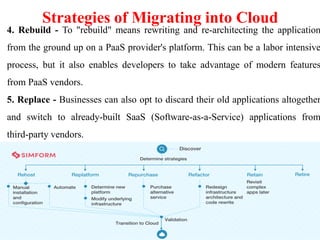
1. Rehost - Rehosting can be thought of as "the same thing, but on cloud
servers". Companies that choose this strategy will select an IaaS (Infrastructure-
as-a-Service) provider and recreate their application architecture on that
infrastructure.
2. Refactor - Companies that choose to refactor will reuse already existing code
and frameworks, but run their applications on a PaaS (Platform-as-a-Service)
provider's platform – instead of on IaaS, as in rehosting.
3. Revise - This strategy involves partially rewriting or expanding the code base,
then deploying it by either rehosting or refactoring
Strategies of Migrating into Cloud
4. Rebuild - To "rebuild" means rewriting and re-architecting the application
from the ground up on a PaaS provider's platform. This can be a labor intensive
process, but it also enables developers to take advantage of modern features
from PaaS vendors.
5. Replace - Businesses can also opt to discard their old applications altogether
and switch to already-built SaaS (Software-as-a-Service) applications from
third-party vendors.
7 Step of Migrating model in Cloud
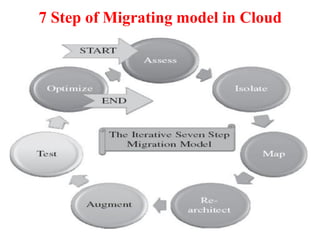
1. Assessment:-
The first step of the iterative process of the seven-step model of
migration is basically at the assessment level. These assessments are
about the cost of migration as well as about the ROI that can be
achieved in the case of production version.
2. Isolating:-
The next process step is in isolating all systemic and environmental
dependencies of the enterprise application components within the
captive data center. This, in turn, yields a picture of the level of
complexity of the migration.
7 Step of Migrating model in Cloud
3. Mapping:-
After isolation is complete, one then goes about generating the
mapping constructs between what shall possibly remain in the local
captive data center and what goes onto the cloud.
4. Re-Architect:-
Perhaps a substantial part of the enterprise application needs to be re-
architected, redesigned, and re-implemented on the cloud. This gets
in just about the functionality of the original enterprise application.
Due to this migration, it is possible perhaps that some functionality is
lost.
7 Step of Migrating model in Cloud
5. Augment:-
In the next process step we leverage the internal features of the cloud
computing service to augment our enterprise application in its own
small ways.
6. Validate:-
Having done the augmentation, we validate and test the new form of
the enterprise application with an extensive test suite that comprises
testing the components of the enterprise application on the cloud as
well. These test results could be positive or mixed.
7 Step of Migrating model in Cloud
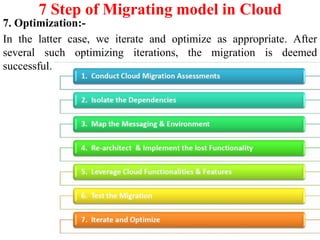
7. Optimization:-
In the latter case, we iterate and optimize as appropriate. After
several such optimizing iterations, the migration is deemed
successful.
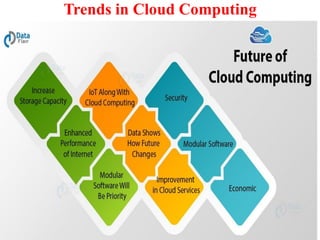
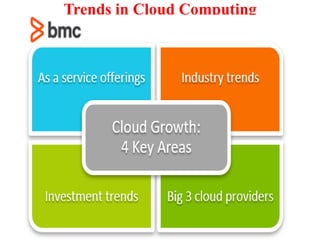
Trends in Cloud Computing
Cloud Computing Service Provider
A few of the most popular cloud computing service providers include:
1. Microsoft Azure
2. Amazon Web Services (AWS)
3. Google Cloud
4. Alibaba Cloud
5. IBM Cloud
6. Oracle
7. Salesforce
8. SAP
9. Rackspace Cloud
10. VMWare
Cloud Delivery Models
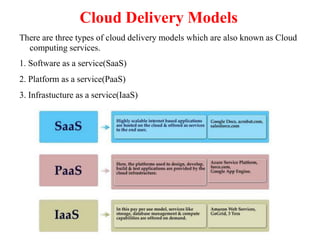
There are three types of cloud delivery models which are also known as Cloud
computing services.
1. Software as a service(SaaS)
2. Platform as a service(PaaS)
3. Infrastucture as a service(IaaS)
Software as a Service(SaaS)
SaaS is also known as "On-Demand Software". It is a software distribution model in
which services are hosted by a cloud service provider. These services are available to
end-users over the internet so, the end-users do not need to install any software on their
devices to access these services.
There are the following services provided by SaaS providers -
Business Services - SaaS Provider provides various business services to start-up the
business. The SaaS business services include ERP (Enterprise Resource Planning), CRM
(Customer Relationship Management), billing, and sales.
Document Management - SaaS document management is a software application offered
by a third party (SaaS providers) to create, manage, and track electronic documents
Example: Slack, Samepage, Box, and Zoho Forms.
Social Networks - As we all know, social networking sites are used by the general
public, so social networking service providers use SaaS for their convenience and handle
the general public's information.
Mail Services - To handle the unpredictable number of users and load on e-mail
services, many e-mail providers offering their services using SaaS.
Software as a Service(SaaS)
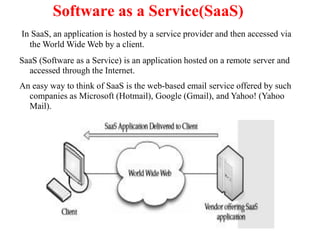
In SaaS, an application is hosted by a service provider and then accessed via
the World Wide Web by a client.
SaaS (Software as a Service) is an application hosted on a remote server and
accessed through the Internet.
An easy way to think of SaaS is the web-based email service offered by such
companies as Microsoft (Hotmail), Google (Gmail), and Yahoo! (Yahoo
Mail).
This is a simple explanation of SaaS, but the same architecture can be applied
to a broad variety of applications, used either by businesses or individual end
users. SaaS can be divided into two major categories:
1. Line of business services These are business solutions offered to
companies and enterprises. They are sold via a subscription service.
Applications covered under this category include business processes, like
supply-chain management applications, customer relations applications,
and similar business-oriented tools.
2.Customer-oriented services These services are offered to the general
public on a subscription basis. More often than not, however, they are
offered for free and supported by advertising. Examples web mail
services, online gaming, and consumer banking, among others.
● Characteristics of SaaS:-
SaaS makes available various types of software over the internet.
Vendor has the responsibility to maintain the software.
They Can scale up or down on demand.
They are anytime anywhere available on demand.
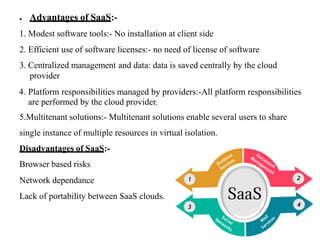
● Advantages of SaaS:-
1. Modest software tools:- No installation at client side
2. Efficient use of software licenses:- no need of license of software
3. Centralized management and data: data is saved centrally by the cloud
provider
4. Platform responsibilities managed by providers:-All platform responsibilities
are performed by the cloud provider.
5.Multitenant solutions:- Multitenant solutions enable several users to share
single instance of multiple resources in virtual isolation.
Disadvantages of SaaS:-
Browser based risks
Network dependance
Lack of portability between SaaS clouds.
Understanding Multitenant nature of SaaS Solutions
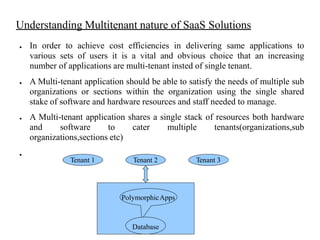
● In order to achieve cost efficiencies in delivering same applications to
various sets of users it is a vital and obvious choice that an increasing
number of applications are multi-tenant insted of single tenant.
● A Multi-tenant application should be able to satisfy the needs of multiple sub
organizations or sections within the organization using the single shared
stake of software and hardware resources and staff needed to manage.
● A Multi-tenant application shares a single stack of resources both hardware
and software to cater multiple tenants(organizations,sub
organizations,sections etc)
●
Tenant 1 Tenant 2 Tenant 3
PolymorphicApps
Database
● Meta-Data-Driven Reference Architecture
A Traditional static application is not capable of addressing unique challenges
of multi-tenancy.
A Multi tenant application shoud be dynamic in nature or polymorphic to fulfil
the specific expectations of various tenants and their users.
Application components need to be generated at runtime from meta-
data.i.e.data about the application itself.
It should be a well defined meta data driven architecture with a seperate
component for:
Runtime application data
Meta data that describes the base functionality of an application
Meta data that corresponds to each tenant specific data and customization
Understanding SOA
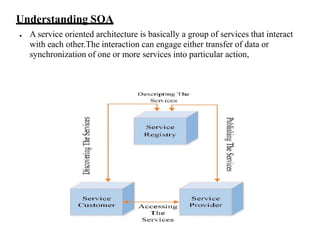
● A service oriented architecture is basically a group of services that interact
with each other.The interaction can engage either transfer of data or
synchronization of one or more services into particular action,
● Service: A service is defined as a function which is definite and independent
of framework or condition of other services.
● Architecture: SOA is defined as architecture useful for constructing
business application as a set of freely joined black box units arranged to
convey a well defined level of service by connecting different business
processes together.
● A service is a task which is precise,self-sufficient and does not require any
context or state of other services.
● Each SOA consists of three building blocks are as follows:
• Service provider:- Owner of the service
Platform that hosts access to the service
• Service requestor:- Business that requires certain functions to be satisfied
Application looking for and invoking an interaction with a service
• Service registry:- Searchable registry of service descriptions where service
providers publish their servicedescriptions
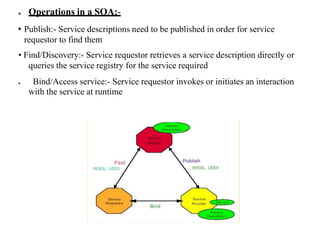
● Operations in a SOA:-
• Publish:- Service descriptions need to be published in order for service
requestor to find them
• Find/Discovery:- Service requestor retrieves a service description directly or
queries the service registry for the service required
● Bind/Access service:- Service requestor invokes or initiates an interaction
with the service at runtime
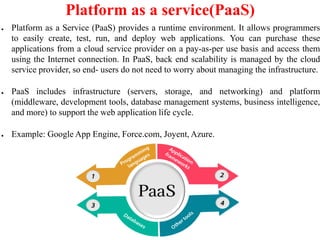
Platform as a service(PaaS)
● Platform as a Service (PaaS) provides a runtime environment. It allows programmers
to easily create, test, run, and deploy web applications. You can purchase these
applications from a cloud service provider on a pay-as-per use basis and access them
using the Internet connection. In PaaS, back end scalability is managed by the cloud
service provider, so end- users do not need to worry about managing the infrastructure.
● PaaS includes infrastructure (servers, storage, and networking) and platform
(middleware, development tools, database management systems, business intelligence,
and more) to support the web application life cycle.
● Example: Google App Engine, Force.com, Joyent, Azure.
Platform as a service(PaaS):-IT Evolution Leading to the cloud
● Platform as a service provides a readymade runtime environment for
different types of applications.
● It also offers various tolls regarding development and deployment which are
necessary to develop applications.
● PaaS provides a very important feature of point and click tools which is very
useful for the non-developers to create various types of wweb applications as
per their requirements.
● Example as PaaS offering vendors:
App Engine of Google
App Engine of Force.com
● Developer can log on these websites to take help of built in API for the
creation of web based applications.
●
●
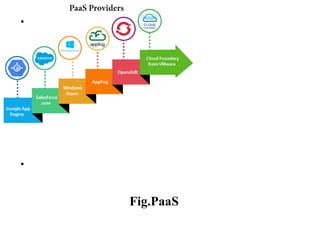
Fig.PaaS
● Benefits of PaaS Solutions:-
1. Low Overhead of Administration:- As administration is the responsibility
of cloud provider,it is not headache of customer.
2. Less Ownership Cost:- For the customer there is no need to purchase
expensive hardware,servers,data storage and power.
3. Scalable Solutions:- It is very simple and flexible to scale the available
resourses up or down automatically,depending on their requirement.
4. Latest System Software:- It is the responsibility of the cloud provider to
maintain and keep advanced and latest software versions.
● Disadvantages of PaaS solutions:-
1.lack of Portability:- lack of portability between PaaS clouds.
2.Resouces constraints:- Event based processor scheduling which constitutes
resource constraints on the aplication i.e.time limitation to answer a request.
3.Dependency on Network:-PaaS applications are completely reliant on
network,hence they have to explicitly use cryptography and manage the
upcoming security exposures.
Infrastructure as a service(IaaS
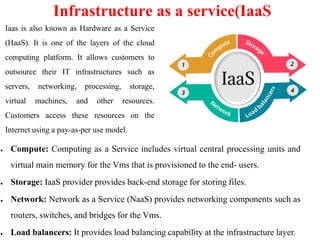
● Compute: Computing as a Service includes virtual central processing units and
virtual main memory for the Vms that is provisioned to the end- users.
● Storage: IaaS provider provides back-end storage for storing files.
● Network: Network as a Service (NaaS) provides networking components such as
routers, switches, and bridges for the Vms.
● Load balancers: It provides load balancing capability at the infrastructure layer.
Iaas is also known as Hardware as a Service
(HaaS). It is one of the layers of the cloud
computing platform. It allows customers to
outsource their IT infrastructures such as
servers, networking, processing, storage,
virtual machines, and other resources.
Customers access these resources on the
Internet using a pay-as-per use model.
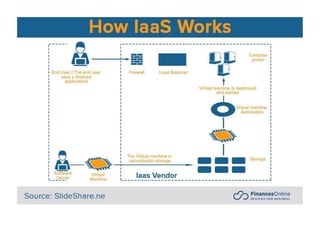
Infrastructure as a service(IaaS)-Understanding IaaS
● Infrastructure as a service is a model which provides access to primary
resources like physical machines virtual storage etc.
● In addition to these resources,the IaaS also provides following facilities:
Virtual machine disk storage
Software bundles
Virtual local are network(VLANs)
IP addresses
Load balancers
● The concept of server virtulization is used to make available these resources
to the user.The extent of access rights gives feeling of owner of these
resources to the end user.
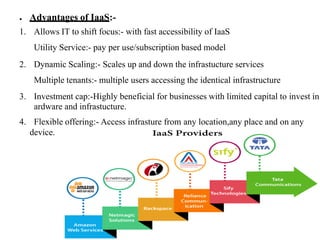
● Advantages of IaaS:-
1. Allows IT to shift focus:- with fast accessibility of IaaS
Utility Service:- pay per use/subscription based model
2. Dynamic Scaling:- Scales up and down the infrastucture services
Multiple tenants:- multiple users accessing the identical infrastructure
3. Investment cap:-Highly beneficial for businesses with limited capital to invest in
ardware and infrastucture.
4. Flexible offering:- Access infrasture from any location,any place and on any
device.
● Disadvantages of IaaS:-
1. Security :
Secirity is one of the biggest issues in IaaS. Most of the IaaS
providers are not able to provide 100% security.
2. Maintenance & Upgrade :
Although IaaS service providers maintain the software, but
they do not upgrade the software for some organizations
3. Interoperability issues :
It is difficult to migrate VM from one IaaS provider to the
other, so the customers might face problem related to vendor
lock-in.
Infrastructure as a service(IaaS
Improving Performance through load Balancing
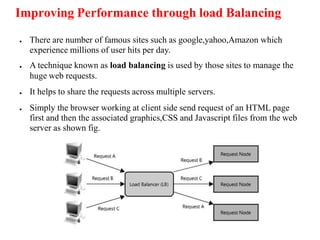
● There are number of famous sites such as google,yahoo,Amazon which
experience millions of user hits per day.
● A technique known as load balancing is used by those sites to manage the
huge web requests.
● It helps to share the requests across multiple servers.
● Simply the browser working at client side send request of an HTML page
first and then the associated graphics,CSS and Javascript files from the web
server as shown fig.
● When the demand regarding the server increases in huge manner,the
organization has choice of placing a load balancing server with two or more
servers to which the web requests are distributed by the load balancer.
● For simple applications the load balancing is considered as quite
straightforword since either server may be handle all requests.
● When there is complexity in server based applications regarding various
aspects such as accessing data within a database then the developers has to
provide shared access to the database.
● To avoid any single point of failure,companies make replicas of the database
on more than one server.
● The database software further should do the process of synchronization of
data updates across the systems,all the datbase,will send data updates to
other for maintaining data synchronization among the servers.
● The organization may select to simplify the solution with the help of cloud-
based database or a cloud based network attached storage device.
● There is no need to the applications to worry about the data synchronization
and replication since this work is handled within the cloud.
System and Storage Redundancy
● Cloud based computing does not have any problem regarding the location of the
physical computing resources as well as data storage devices.
● Hence companies often use the process of collocation through which duplicate
off-site servers or disk storage devices are employed.
● The process of employing duplicate resources, systems can transfer control from one
location to another or they can easily utilize the duplicate systems for the purpose of
load balancing.
●In this manner, the collocated resources perform the following tasks:
Makes the organization less susceptible to fire, natural disasters or terrorism
Increase the performance by distributing workload
Makes the organization less susceptible to downtime because of power loss from a
blackout or brownout.
● Since last some years the cheap options provided by IaaS providers have made
hardware redundancy a compulsory element for organization which depends upon
the availability of key applications and data.
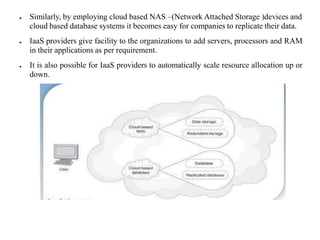
● Similarly, by employing cloud based NAS –(Network Attached Storage )devices and
cloud based database systems it becomes easy for companies to replicate their data.
● IaaS providers give facility to the organizations to add servers, processors and RAM
in their applications as per requirement.
● It is also possible for IaaS providers to automatically scale resource allocation up or
down.
Utilizing Cloud Based NAS Devices
● A NAS unit is a computer connected to a network that provides only file
based data storage to other devices on the network.
● Although it may technically be possible to run other software on a NAS
unit,it is usually not designed to be a general purpose server.
● For eg.NAS units usually do not have a keyboard or display,and are
controlled and configured over the network often using a browser.
● A full featured OS is not needed on a NAS device,so often a stripped down
OS is used.
● NAS systems contain one or more hard disk drives,often arranged into
logical,redundant storage containers or RAID.
● There are number of ways for companies to shift their data storage solution
is to use cloud based NAS devices which present devices as well as
applicaions as mountable drives and file system.
● Usually users are able to scale their cloud based storage on demand and pay
just regarding the storage space which they consume.
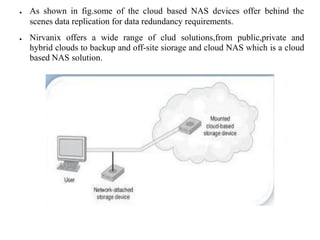
● As shown in fig.some of the cloud based NAS devices offer behind the
scenes data replication for data redundancy requirements.
● Nirvanix offers a wide range of clud solutions,from public,private and
hybrid clouds to backup and off-site siorage and cloud NAS which is a cloud
based NAS solution.
● Advantages of IaaS Solutions:-
Simply IaaS is considered as a mechanism to provide the hardware
necessary for execution of an application.
The use of IaaS solutions helps companies to eliminate the necessity to data
warehouse as well as maintain expensive data centers.
No need of an expensive as well as staff intensive data center.
✔ Hardware scalability is easy and flexible.
✔ Reduced hardware cost.
✔ On demand pay as go scalability.
✔ Need of less IT staff.
✔ Ad hoc test environment suitability.
✔ Absolute system administration and management.
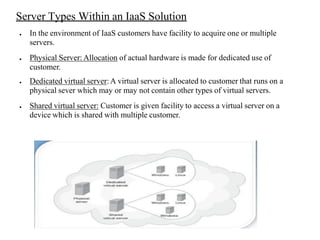
Server Types Within an IaaS Solution
● In the environment of IaaS customers have facility to acquire one or multiple
servers.
● Physical Server: Allocation of actual hardware is made for dedicated use of
customer.
● Dedicated virtual server: A virtual server is allocated to customer that runs on a
physical sever which may or may not contain other types of virtual servers.
● Shared virtual server: Customer is given facility to access a virtual server on a
device which is shared with multiple customer.
Identity as a Service(IDaaS)
● Identity as a service(IDaaS) is a cloud based service that provides a set of
identity and access management functions to target a systems on customers
premises and/or in the cloud.
● Identity as a Service refers to the identity and access management service
which serve through the cloud by subscribing into it. It can be purchased as a
subscription-based managed service.
● IDentity as a Service (IDaaS), is a cloud-oriented third-party authentication
service.
● It offers services that allow users to securely access their sensitive data.
● Employees are facing several login problems such as remembering the
username and password to access the data.
● If the employee resigns, the data stored on the computer must be completely
erased. This can be done with the help of IdaaS, which also used for
electronic transactions.
● ID management is considered as tedious,time consuming,and
expensive.since last decade,organizations have started to emerge to provide
identity as a service or cloud based ID management.
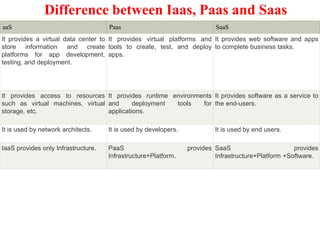
Difference between Iaas, Paas and Saas
aaS Paas SaaS
It provides a virtual data center to
store information and create
platforms for app development,
testing, and deployment.
It provides virtual platforms and
tools to create, test, and deploy
apps.
It provides web software and apps
to complete business tasks.
It provides access to resources
such as virtual machines, virtual
storage, etc.
It provides runtime environments
and deployment tools for
applications.
It provides software as a service to
the end-users.
It is used by network architects. It is used by developers. It is used by end users.
IaaS provides only Infrastructure. PaaS provides
Infrastructure+Platform.
SaaS provides
Infrastructure+Platform +Software.
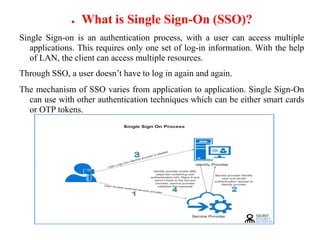
● What is Single Sign-On (SSO)?
Single Sign-on is an authentication process, with a user can access multiple
applications. This requires only one set of log-in information. With the help
of LAN, the client can access multiple resources.
Through SSO, a user doesn’t have to log in again and again.
The mechanism of SSO varies from application to application. Single Sign-On
can use with other authentication techniques which can be either smart cards
or OTP tokens.
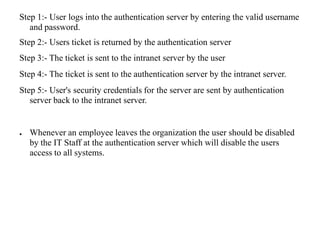
Step 1:- User logs into the authentication server by entering the valid username
and password.
Step 2:- Users ticket is returned by the authentication server
Step 3:- The ticket is sent to the intranet server by the user
Step 4:- The ticket is sent to the authentication server by the intranet server.
Step 5:- User's security credentials for the server are sent by authentication
server back to the intranet server.
● Whenever an employee leaves the organization the user should be disabled
by the IT Staff at the authentication server which will disable the users
access to all systems.
● Advantages of SSO
● It’s time to list down all the benefits of SSO in Identity as a Service:
● Manages local and remote applications along with the desktop flow.
● Removes re-authentication and improves productivity.
● The database is user-friendly and flexible which benefits in many ways.
● Serves detailed user access reporting
Cloud Computing Architecture
● As we know, cloud computing technology is used by both small and large
organizations to store the information in cloud and access it from anywhere at
anytime using the internet connection.
● Cloud computing architecture is a combination of service-oriented architecture and
event-driven architecture.
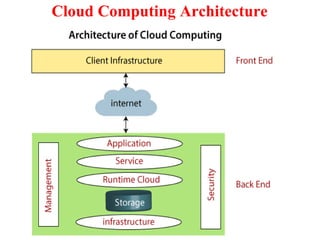
● Cloud computing architecture is divided into the following two parts -
● Front End
● Back End
● The below diagram shows the architecture of cloud computing -
Cloud Computing Architecture
● Front End
● The front end is used by the client. It contains client-side interfaces and
applications that are required to access the cloud computing platforms. The
front end includes web servers (including Chrome, Firefox, internet
explorer, etc.), thin & fat clients, tablets, and mobile devices.
● Back End
● The back end is used by the service provider. It manages all the resources
that are required to provide cloud computing services. It includes a huge
amount of data storage, security mechanism, virtual machines, deploying
models, servers, traffic control mechanisms, etc.-
Cloud Computing Architecture
● Application –
Application in backend refers to a software or platform to which client
accesses. Means it provides the service in backend as per the client
requirement.
● Service –
Service in backend refers to the major three types of cloud based services like
SaaS, PaaS and IaaS. Also manages which type of service the user accesses.
● Cloud Runtime –
Runtime cloud in backend refers to provide of execution and runtime
platform/environment to the virtual machine
Cloud Computing Architecture
● Storage –
Storage in backend refers to provide flexible and scalable storage service and
management of stored data.
● Infrastructure –
Cloud Infrastructure in backend refers to hardware and software components of
cloud like it includes servers, storage, network devices, virtualization software
etc.
● Management –
Management in backend refers to management of backend components like
application, service, runtime cloud, storage, infrastructure, and other security
mechanisms etc.
Cloud Computing Architecture
● Security –
Security in backend refers to implementation of different security mechanisms
in the backend for secure cloud resources, systems, files, and infrastructure to
end-users.
● Internet –
Internet connection acts as the medium or a bridge between frontend and
backend and establishes the interaction and communication between frontend
and backend.
Benefits of Cloud Computing Architecture
1. Makes overall cloud computing system simpler.
2. Improves data processing requirements.
3. Helps in providing high security.
4. Makes it more modularized.
5. Results better disaster recovery.
6. Gives good user accessibility.
7. Reduces IT operating costs.
Components of Cloud Computing Architecture
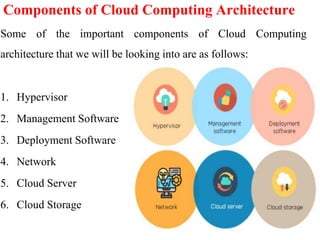
Some of the important components of Cloud Computing
architecture that we will be looking into are as follows:
1. Hypervisor
2. Management Software
3. Deployment Software
4. Network
5. Cloud Server
6. Cloud Storage
Components of Cloud Computing Architecture
1. Hypervisor :
• It is a virtual machine monitor which provides Virtual Operating Platforms
to every user
• It also manages guest operating systems in the cloud
• It runs a separate virtual machine on the back end which consists of
software and hardware
• Its main objective is to divide and allocate resources
2. Management Software :
Its responsibility is to manage and monitor cloud operations with various
strategies to increase the performance of the cloud.
Some of the operations performed by the management software are:
1. compliance auditing
2. management of overseeing disaster
3. contingency plans
Components of Cloud Computing Architecture
3. Deployment Software :
• It consists of all the mandatory installations and configurations required to
run a cloud service
• Every deployment of cloud services are performed using a deployment
software
• The three different models which can be deployed are the following:
SaaS - Software as a service hosts and manages applications of the end-user.
Example: Gmail
PaaS - Platform as a service helps developers to build, create, and manage
applications.
Example: Microsoft Azure
IaaS - Infrastructure as a service provides services on a pay-as-you-go pricing
model.
Components of Cloud Computing Architecture
4. Network :
• It connects the front-end and back-end. Also, allows every user to access
cloud resources
• It helps users to connect and customize the route and protocol
• It is a virtual server which is hosted on the cloud computing platform
• It is highly flexible, secure, and cost-effective.
5. Cloud Storage :
Here, every bit of data is stored and accessed by a user from anywhere over the
internet
It is scalable at run-time and is automatically accessed
Data can be modified and retrieved from cloud storage over the web
Virtualization and Cloud Computing
The main enabling technology for Cloud Computing is Virtualization.
Virtualization is the partitioning of a single physical server into multiple logical
servers. Once the physical server is divided, each logical server behaves like a
physical server and can run an operating system and applications
independently. Many popular companies like VMware and Microsoft provide
virtualization services. Instead of using your PC for storage and computation,
you can use their virtual servers. They are fast, cost-effective, and less time-
consuming.
For software developers and testers, virtualization comes in very handy. It
allows developers to write code that runs in many different environments for
testing
Virtualization and Cloud Computing
Virtualization is mainly used for three main purposes: 1) Network
Virtualization, 2) Server Virtualization, and 3) Storage Virtualization
Network Virtualization: It is a method of combining the available resources
in a network by splitting up the available bandwidth into channels. Each
channel is independent of others and can be assigned to a specific server or
device in real time.
Storage Virtualization: It is the pooling of physical storage from multiple
network storage devices into what appears to be a single storage device that is
managed from a central console. Storage virtualization is commonly used in
storage area networks (SANs)
Virtualization and Cloud Computing
Server Virtualization: Server virtualization is the masking of server resources
like processors, RAM, operating system, etc., from server users. Server
virtualization intends to increase resource sharing and reduce the burden and
complexity of computation from users.
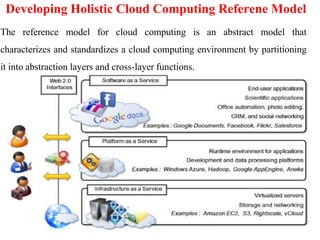
Developing Holistic Cloud Computing Referene Model
The reference model for cloud computing is an abstract model that
characterizes and standardizes a cloud computing environment by partitioning
it into abstraction layers and cross-layer functions.
Developing Holistic Cloud Computing Referene Model
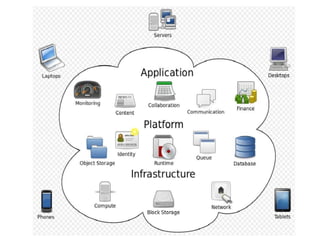
If we look in to the reference model as seen in above image we will find
classification of Cloud Computing services:
1. Infrastructure-as-a-Service (IaaS),
2. Platform-as-a-Service (PaaS), and
3. Software-as-a-Service (SaaS).
4. Web 2.0
1. Infrastructure as a service (IaaS) :
Infrastructure as a service (IaaS) is a cloud computing offering in which a
vendor provides users access to computing resources such as servers, storage
and networking. To read more about IaaS click here.
Developing Holistic Cloud Computing Referene Model
2. Platform as a service (PaaS) :
Platform as a service (PaaS) is a cloud computing offering that provides users
with a cloud environment in which they can develop, manage and deliver
applications. To read more about PaaS click here.
3. Software as a service (SaaS) :
Software as a service (SaaS) is a cloud computing offering that provides users
with access to a vendor’s cloud-based software. Users do not install
applications on their local devices. Instead, the applications reside on a remote
cloud network accessed through the web or an API. Through the application,
users can store and analyze data and collaborate on projects.
Developing Holistic Cloud Computing Referene Model
4. Web 2.0 :
Web 2.0 is the term used to describe a variety of web sites and applications that
allow anyone to create and share online information or material they have
created. A key element of the technology is that it allows people to create,
share, collaborate & communicate.
Cloud Deployment Model
It works as your virtual computing environment with a choice of deployment
model depending on how much data you want to store and who has access to
the Infrastructure.
Different Types of Cloud Computing Model :
Most cloud hubs have tens of thousands of servers and storage devices to
enable fast loading. It is often possible to choose a geographic area to put the
data "closer" to users. Thus, deployment models for cloud computing are
categorized based on their location. To know which model would best fit the
requirements of your organization, let us first learn about the various types.
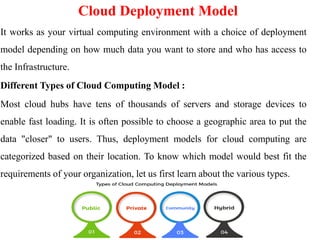
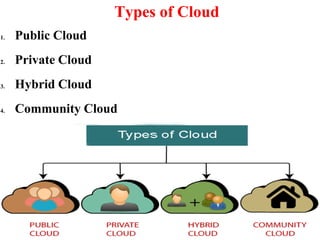
Types of Cloud
1. Public Cloud
2. Private Cloud
3. Hybrid Cloud
4. Community Cloud
Public Cloud
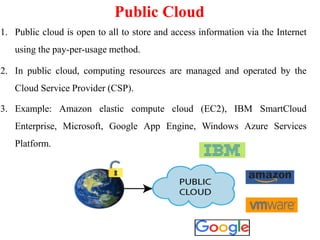
1. Public cloud is open to all to store and access information via the Internet
using the pay-per-usage method.
2. In public cloud, computing resources are managed and operated by the
Cloud Service Provider (CSP).
3. Example: Amazon elastic compute cloud (EC2), IBM SmartCloud
Enterprise, Microsoft, Google App Engine, Windows Azure Services
Platform.
Public Cloud
Advantages of Public Cloud
1. Public cloud is owned at a lower cost than the private and hybrid cloud.
2. Public cloud is maintained by the cloud service provider, so do not need to
worry about the maintenance.
3. Public cloud is easier to integrate. Hence it offers a better flexibility
approach to consumers.
4. Public cloud is location independent because its services are delivered
through the internet.
5. Public cloud is highly scalable as per the requirement of computing
resources.
6. It is accessible by the general public, so there is no limit to the number of
users.
Public Cloud
Disadvantages of Public Cloud
1. Public Cloud is less secure because resources are shared publicly.
2. Performance depends upon the high-speed internet network link to the
cloud provider.
3. The Client has no control of data.
Private Cloud
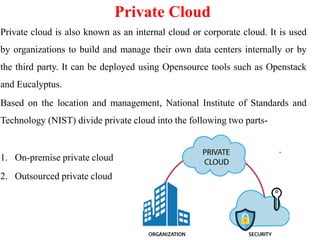
Private cloud is also known as an internal cloud or corporate cloud. It is used
by organizations to build and manage their own data centers internally or by
the third party. It can be deployed using Opensource tools such as Openstack
and Eucalyptus.
Based on the location and management, National Institute of Standards and
Technology (NIST) divide private cloud into the following two parts-
1. On-premise private cloud
2. Outsourced private cloud
Private Cloud
Advantages of Private Cloud
1. Private cloud provides a high level of security and privacy to the users.
2. Private cloud offers better performance with improved speed and space
capacity.
3. It allows the IT team to quickly allocate and deliver on-demand IT
resources.
4. The organization has full control over the cloud because it is managed by
the organization itself. So, there is no need for the organization to depends
on anybody.
5. It is suitable for organizations that require a separate cloud for their
personal use and data security is the first priority.
Private Cloud
Disadvantages of Private Cloud
1. Skilled people are required to manage and operate cloud services.
2. Private cloud is accessible within the organization, so the area of operations
is limited.
3. Private cloud is not suitable for organizations that have a high user base,
and organizations that do not have the prebuilt infrastructure, sufficient
manpower to maintain and manage the cloud
Hybrid Cloud
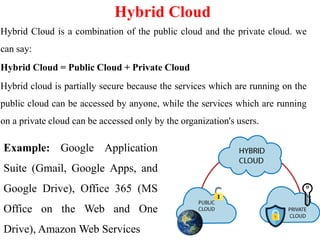
Hybrid Cloud is a combination of the public cloud and the private cloud. we
can say:
Hybrid Cloud = Public Cloud + Private Cloud
Hybrid cloud is partially secure because the services which are running on the
public cloud can be accessed by anyone, while the services which are running
on a private cloud can be accessed only by the organization's users.
Example: Google Application
Suite (Gmail, Google Apps, and
Google Drive), Office 365 (MS
Office on the Web and One
Drive), Amazon Web Services
Hybrid Cloud
Advantages of Hybrid Cloud
There are the following advantages of Hybrid Cloud -
1. Hybrid cloud is suitable for organizations that require more security than
the public cloud.
2. Hybrid cloud helps you to deliver new products and services more quickly.
3. Hybrid cloud provides an excellent way to reduce the risk.
4. Hybrid cloud offers flexible resources because of the public cloud and
secure resources because of the private cloud.
Hybrid Cloud
Disadvantages of Hybrid Cloud
1. In Hybrid Cloud, security feature is not as good as the private cloud.
2. Managing a hybrid cloud is complex because it is difficult to manage more
than one type of deployment model.
3. In the hybrid cloud, the reliability of the services depends on cloud service
providers.
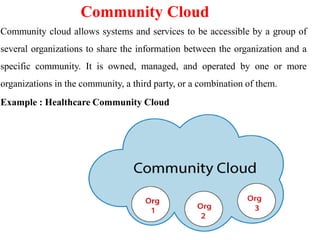
Community Cloud
Community cloud allows systems and services to be accessible by a group of
several organizations to share the information between the organization and a
specific community. It is owned, managed, and operated by one or more
organizations in the community, a third party, or a combination of them.
Example : Healthcare Community Cloud
Community Cloud
Advantages of Community Cloud
There are the following advantages of Community Cloud -
1. Community cloud is cost-effective because the whole cloud is being shared
by several organizations or communities.
2. Community cloud is suitable for organizations that want to have a
collaborative cloud with more security features than the public cloud.
3. It provides better security than the public cloud.
4. It provdes collaborative and distributive environment.
5. Community cloud allows us to share cloud resources, infrastructure, and
other capabilities among various organizations.
Community Cloud
Disadvantages of Community Cloud
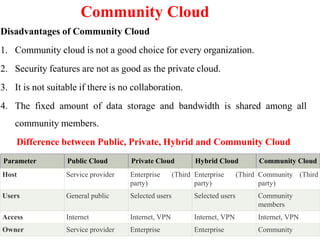
1. Community cloud is not a good choice for every organization.
2. Security features are not as good as the private cloud.
3. It is not suitable if there is no collaboration.
4. The fixed amount of data storage and bandwidth is shared among all
community members.
Difference between Public, Private, Hybrid and Community Cloud
Parameter Public Cloud Private Cloud Hybrid Cloud Community Cloud
Host Service provider Enterprise (Third
party)
Enterprise (Third
party)
Community (Third
party)
Users General public Selected users Selected users Community
members
Access Internet Internet, VPN Internet, VPN Internet, VPN
Owner Service provider Enterprise Enterprise Community
REFERENCES
1. https://www.javatpoint.com/history-of-cloud-computing
2. https://www.simform.com/blog/cloud-migration-strategy/
3. https://www.cloudflare.com/en-in/learning/cloud/what-is-cloud-migration/
4. https://hexaware.com/blogs/benefits-of-cloud-migration/
5. https://www.simplilearn.com/tutorials/cloud-computing-tutorial/cloud-
computing-architecture
6. https://easyexamnotes.com/p/cloud-computing-reference-model_31.html
7. https://www.javatpoint.com/cloud-deployment-model
THANK YOU!!!
My Blog : https://anandgharu.wordpress.com/
Email : gharu.anand@gmail.com
11

final-unit-i-cc cloud computing-2022.pdf

  • 1.
    “Introduction of Cloud Computing” PreparedBy Prof. Anand N. Gharu (Assistant Professor) Computer Engineering Departement 02 May 2022 . CLASS : TE COMPUTER 2019 SUBJECT : CC (SEM-II) UNIT : I 1
  • 2.
    Syllabus Importance of CloudComputing, Characteristics, Pros and Cons of Cloud Computing, Migrating into the Cloud, Seven-step model of migration into a Cloud, Trends in Computing. Cloud Service Models: SaaS, PaaS, IaaS, Storage. Cloud Architecture: Cloud Computing Logical Architecture, Developing Holistic Cloud Computing Reference Model, Cloud System Architecture,
  • 3.
    • Before emergingthe cloud computing, there was Client/Server computing which is basically a centralized storage in which all the software applications, all the data and all the controls are resided on the server side. • If a single user wants to access specific data or run a program, he/she need to connect to the server and then gain appropriate access, and then he/she can do his/her business. • Then after, distributed computing came into picture, where all the computers are networked together and share their resources when needed. • On the basis of above computing, there was emerged of cloud computing concepts that later implemented. History of Cloud Computing
  • 4.
    • At aroundin 1961, John MacCharty suggested in a speech at MIT that computing can be sold like a utility, just like a water or electricity. It was a brilliant idea, but like all brilliant ideas, it was ahead if its time, as for the next few decades, despite interest in the model, the technology simply was not ready for it. • But of course time has passed and the technology caught that idea and after few years we mentioned that: • In 1999, Salesforce.com started delivering of applications to users using a simple website. The applications were delivered to enterprises over the Internet, and this way the dream of computing sold as utility were true History of Cloud Computing
  • 5.
    • In 2002,Amazon started Amazon Web Services, providing services like storage, computation and even human intelligence. However, only starting with the launch of the Elastic Compute Cloud in 2006 a truly commercial service open to everybody existed. • In 2009, Google Apps also started to provide cloud computing enterprise applications. • Of course, all the big players are present in the cloud computing evolution, some were earlier, some were later. In 2009, Microsoft launched Windows Azure, and companies like Oracle and HP have all joined the game. This proves that today, cloud computing has become mainstream. History of Cloud Computing
  • 6.
    “ Cloud computingis a model for enabling ubiquitous, convenient, on-demand network access to a shared pool of configurable computing resources (e.g networks, servers, storage, applications, and services) that can be rapidly provisioned and released with minimal management effort or service provider interaction. ” Introduction of Cloud Computing
  • 7.
  • 9.
    Importance of CloudComputing • Reduction in Total Cost Ownership [TCO] • Implementation of IT with increased flexibility • Increased Collaboration • Flexibility in time like work from anywhere at anytime • Increased competitiveness • Go-to-Market in a lesser time
  • 10.
    Significance of CloudComputing • The applications are made available to everyone through the cloud as and when they are available. • The IT costs have been reduced due to the reduction in the number of servers, software cost, and the staff. • The investment costs have become more flexible as compared to traditional methods. • Increased reliability as anyone could get connected anytime. • The data and the applications are mobile and easily made available to the employees across the globe.
  • 11.
    Significance of CloudComputing • The increased collaboration has reduced the time to market and product enhancement. • The facility could be turned up, down or off as per the demand and the circumstances. • The cloud computing delivers an appreciable integration with Mergers and Acquisitions [M&A] activity. • The cloud computing has increased the ‘green’ credentials as the solutions have the lesser environmental impact.
  • 12.
    Importance of CloudComputing • Cloud computing is so important because it offers flexibility, data recovery, little to no maintenance, easy access and a higher level of security. 1. Flexibility : Does your business experience fluctuating bandwidth requirements? Some months are busier, while others are not as intense. With cloud computing, managing resources is easier than ever. Simply pay for the resources you are using each month, and nothing more. Cloud storage and cloud VPS providers offer flexible packages, where you can easily add or decrease the amount of storage and bandwidth you are paying to use. 2. Data Recovery : Recovering data from damaged physical servers and hard drives can be fairly problematic. If the physical device is badly damaged, recovery may not be possible. These issues can result in businesses losing vital data, especially when it is not adequately backed up. With cloud computing, these issues are not as relevant.
  • 13.
    Importance of CloudComputing 3. No Maintenance : • When running a traditional server setup, companies must worry about the maintenance of the entire system. Not only are regular checks mandatory, but parts constantly need replacing as they stop working or become outdated. • A cloud computing solution eliminates the need for any maintenance. There is no cost or effort required by companies that use cloud solutions, as everything is handled by the provider. That removes a massive headache off your shoulders, and ensures the monthly expenditure is limited to what is paid for the cloud services being used. 4. Easy Access : • Access to documents, backend files, software and the company website is much easier with cloud computing. It is effortless for employees to work remotely, while the entire company is connected through its cloud interface. All your employees will require is a device to access the network, and the correct security protocols.
  • 14.
    Importance of CloudComputing 5. Increased Security : With cloud computing, everything you are accessing and saving is on the cloud. Even if a laptop is lost or damaged, the company interface is accessible through another device. And since all your documents save on the cloud, there is no concern about losing important documents because they were saved on a now lost or damaged laptop hard drive. Since information is no longer contained on your physical hard drives or servers, it also becomes a lot harder for anyone to steal. With a comprehensive encryption and login security system, company data is much safer with cloud computing. The cloud is here, and it is already transforming how many companies operate. Businesses may be reluctant to change up existing operations, but the benefits of the cloud means the transition is worth it.
  • 15.
    Charactristics of CloudComputing • On-demand self-service A consumer can unilaterally provision computing capabilities, such as server time and network storage, as needed automatically without requiring human interaction with each service provider. • Broad network access Capabilities are available over the network and accessed through standard mechanisms that promote use by heterogeneous thin or thick client platforms (e.g., mobile phones, tablets, laptops, and workstations). • Resource pooling The provider’s computing resources are pooled to serve multiple consumers using a multi-tenant model,with different physical and virtual resources dynamically assigned and reassigned according to consumer demand • Measured Service: Cloud systems automatically control and optimize resources used by leveraging a metering capability at some level of abstraction appropriate to the type of service. • It will provide analyzable and predictable computing platform.
  • 16.
    Cloud Components ● Cloudcomputing solution is made up of several elements: clients, the datacenter, and distributed servers ● As shown in figure, these components make up the three parts of a cloud computing solution. ● Each element has a purpose and plays a specific role in delivering a functional cloud- based application,
  • 17.
    Clients ● Clients are,in a cloud computing architecture, the exact same things that they are in a plain, old, everyday local area network (LAN). ● They are, typically, the computers that just sit on your desk. But they might also be laptops, tablet computers, mobile phones, or PDAs— ● Clients are the devices that the end users interact with to manage their information on the cloud. Clients generally fall into three categories: Mobile Mobile devices include PDAs or smartphones, like a Blackberry, Windows Mobile Smartphone, or an iPhone. ● Thin Clients are computers that do not have internal hard drives, but rather let the server do all the work, but then display the information. Thick This type of client is a regular computer, using a web browser like Firefox or Internet Explorer to connect to the cloud. ● Datacenter:-The datacenter is the collection of servers where the application to which you subscribe is housed. It could be a large room in the basement of your building or a room full of servers on the other side of the world that you access via the Internet. ● Distributed Servers-But the servers don’t all have to be housed in the same
  • 18.
    Basic Conceps andTerminologies:- ● IT Resource:- An IT resource is nothing but an IT related artefact which may be either physical or virtual.For eg.Physical server,virtual server,software program,service,storage device,network device ● On premise:-when IT resources is hosted is an IT enterprise within its organizational boundary,it is considered to be located at the premises of that enterprise.It is known as on-pemise. ● Scaling-Scaling is the ability of IT resource to handle continues incresing or decreasing demands of usage. Horizontal Scaling- scaling out and scaling down Vertical Scaling- scaling up and scaling down ● Cloud Service:- A cloud service can be considered as any IT resource which can be accessed remotely via a cloud.It is totally different and broad concept than the other IT fields. A cloud service can be a simple web based softeware application which is invoked with the help of messaging protocol or virtual server. ● Cloud service consumer:-cloud based web service is accessed by the consumers which are outside the range of cloud.
  • 19.
    ●Veers to addingmore resources (CPU/RAM/DISK) to your server (database or application server is still remains one) as on demand. ●Vertical Scaling is most commonly used in applications and products of middle- range as well as small and middle-sized companies. One of the most common examples of Virtual Scaling is to buy an expensive hardware and use it as a Virtual Machine hypervisor (VMWare ESX). ●Vertical Scaling usually means upgrade of server hardware. Some of the reasons to scale vertically includes increasing IOPS (Input / Ouput Operations), amplifying CPU/RAM capacity, as well as disk capacity. ●However, even after using virtualization, whenever an improved performance is targeted, the risk for downtimes with it is much higher than using horizontal scaling. Vertical scaling
  • 20.
    Horizontal Scaling ● HorizontalScaling is a must use technology – whenever a high availability of (server) services are required ● Scaling horizontally involves adding more processing units or phyiscal machines to your server or database. It involves growing the number of nodes in the cluster, reducing the responsibilities of each member node by spreading the key space wider and providing additional end-points for client connections. Horizontal Scaling has been historically much more used for high level of computing and for application and services. ● Although this does not alter the capacity of each individual node, the load is decreased due to the distribution between separate server nodes. ● Some of the reasons why organizations should choose to scale horizontally include increasing I/O concurrency, reducing the load on existing nodes, and increasing disk capacity. ● The Internet and particular web services have boosted the use of Horizontal Scaling. Most giant companies that provide well known web services like Google (Gmail, YouTube), Yahoo, Facebook, EBay, Amazon etc. are using heavily horizontal scaling.
  • 21.
    Horizontal Vs verticalscaling Parameter Horizontal Scaling Vertical Scaling Cost Less expensive More expensive Availability Usually all the time,IT resources are available instantly Not all the time,IT resources are available instantly Additional setup Resourse replication Additional setup is normally needed Additional Resources required Not required Limitation Not limited capacity of hardware limited capacity of hardware
  • 22.
    Applications ● Online filestorage ● Photo editing software ● Digital video software ● Finding a way on the map ● Presentation software ● Word Processing software
  • 23.
    Intranets and theCloud ● While your operation is not big as amazon s3 cloud computing,you can use the same sorts of principles within your organization to develop your IT infrastucture. ● By setting up thin clients to run applictaions and services on a local server,rather than on their desktops,you ease the costs of deployment and maintenance,as well as reducing power costs. ● Components:-There are two main components in client/server computing: servers and thin or light clients.The servers house the applications your organization needs to run, and the thin clients—which do not have hard drives—display the results. ● Hypervisor Applications:- ● Applications like VMware or Microsoft’s Hyper-V allow you to virtualize your servers so that multiple virtual servers can run on one physical server. ● These sorts of solutions provide the tools to supply a virtualized set of hardware to the guest operating system.They also make it possible to install different operating systems on the same machine. ● For example, you may need Windows Vista to run one application, while another application requires Linux. It’s easy to set up the server to run both
  • 24.
    Cloud Services Providedby number of Vendors:- Cloud services are provided by number of vendors. ●Amazon:- one of the prior company offer cloud services services offered by Amazon: 1. Elastic compute cloud(EC2) 2. Simple Storage service(S3) 3. Simple queue service(SQS) 4. SimpleDB 1.EC2:- This service provides virtual machines as well as extra CPU cycles 2. S3:- This service provides facility to store items up to size five GB in virtual storage 3. SQS:- This service lets the machines of an organization to talk to each other with the help of message passing API. 4. SimpleDB:- This service works in combination with Amazon S3 as well as Amazon EC2.
  • 25.
    ● Google Google's appengine is considered as contrast to amazon offerings. App engine does not give facility to users to write a file in their own directory. Online documents and spredsheets are provided by google to encourage developers to build features for online software with the help of app engine ● Microsoft:- Windows Azure is a cloud computing solution provided by microsoft.It is an OS which helps organizations to execute windows application and save files as well as data using Microsoft's datacenters. Azure services platform is also provided by microsoft. 1. Windows Azure:- provides scalable storage,computation and networking 2. Microsoft SQL services:- offers database services as well as reporting 3. Microsoft .NET services:- offers service based implementation 4. Live services:- These services help to share,store,and synchonize several types of elements such as documents,photos and files across Pcs,phone etc
  • 26.
    Your Organization andCloud Computing ● Cloud computing is not a one-size-fits-all affair. Just as the hardware and software configuration you use in your organization is different from the enterprise's regular affair; the needs of cloud computing needs will be different. ● When you can use cloud computing consider following no of factors ● Cost/benefit ratio • Speed of delivery • How much capacity you will use • Whether your data is regulated • Your organization’s corporate and IT structure ● There may be times when the need you have is a perfect match for cloud computing. But there may also be times when cloud computing is simply not a good match for your needs.
  • 27.
    ● Scenarios:-There arethree different major implementations of cloud computing. How organizations are using cloud computing is quite different at a granular level, but the uses generally fall into one of these three solutions. 1. Compute Clouds:- An access is given to highly scalable,inexpensive,on demand computing resources by the compute cloud which execute the code given to them.eg. Amazon's EC2,Google App Engine 2. Cloud Storage:-cloud storage was one of the initial offerings by cloud and it still remaibs a popular solution.cloud storage is considered as a big world. 3. Cloud Applications:-There is difference between cloud applications and compute clouds in that cloud applications uses software applications which are basically rely on cloud infrastructure. Some cloud applications include: Peer to peer computing such as BitTorrent,Skype etc. Web applications such as Myspace,YouTube,etc SaaS such as Google Apps Software plus services such as microsoft online services
  • 28.
  • 29.
    Cloud computing:-Benefits ● IncreasedScalability:- If you are anticipating a huge upswing in computing need (or even if you are surprised by a sudden demand), cloud computing can help you manage. Rather than having to buy, install, and configure new equipment, you can buy additional CPU cycles or storage from a third party. Since your costs are based on consumption, you likely wouldn’t have to pay out as much as if you had to buy the equipment. Once you have fulfilled your need for additional equipment, you just stop using the cloud provider’s services, and you don’t have to deal with unneeded equipment. You simply add or subtract based on your organization’s need. ● Simplicity/Reduced investments and proportional costs:- Again, not having to buy and configure new equipment allows you and your IT staff to get right to your business. The cloud solution makes it possible to get your application started immediately, and it costs a fraction of what it would cost to implement an on-site solution.
  • 30.
    ● Knowledgeable Vendors:- Typically,when new technology becomes popular, there are plenty of vendors who pop up to offer their version of that technology. This isn’t always good, because a lot of those vendors tend to offer less than useful technology. By contrast, the first comers to the cloud computing party are actually very reputable companies. Companies like Amazon, Google, Microsoft, IBM, and Yahoo! have been good vendors because they have offered reliable service, plenty of capacity, and you get some brand familiarity with these well-known names. ● Security :- There are plenty of security risks when using a cloud vendor, but reputable companies strive to keep you safe and secure. ● Incresed availability and reliability:- For improving its realiability so as to decresase the effect of various runtime failure conditions. A cloud based IT resource can be accessible for longer periods of time.for eg.ne3ar about 22 hours in a day.
  • 31.
    Cloud computing:-Limitations There areother cases when cloud computing is not the best solution for your computing needs. ● Your Sensitive Information We’ve talked about the concern of storing sensitive information on the cloud, but it can’t be understated. Once data leaves your hands and lands in the lap of a service provider, you’ve lost a layer of control. ● Protect Your Data That doesn’t mean you can’t maintain your data on a cloud; you just need to be safe. The best way is to encrypt your data before you send it to a third party. Programs like PGP (www.pgp.com) or open-source TrueCrypt (www.truecrypt.org) can encrypt the file so that only those with a password can access it Encrypting your data before sending it out protects it. If someone does get your data, they need the proper credentials or all they get is gibberish.
  • 32.
    ● Applications NotReady In some cases the applications themselves are not ready to be used on the cloud. They may have little quirks that prevent them from being used to their fullest abilities, or they may not work whatsoever. First, the application might require a lot of bandwidth to communicate with users. The application might also take a lot of effort to integrate with your other applications. If you try to relocate it to a cloud, you may find that the savings are erased by the additional effort required to maintain the integration. In this case it may end up being more cost- effective to continue to host it locally. This helps you avoid the service cost of having to transfer to and from the cloud. It’s also more efficient, because the application can talk to the database without having to reach out across the network to do so. Some applications may not be able to communicate securely across the Internet. If they cannot communicate securely or through a tunnel, then your data is at risk.
  • 33.
    Security Concerns:- ● PrivacyConcerns with a Third Party The first and most obvious concern is for privacy considerations. That is, if another party is housing all your data, how do you know that it’s safe and secure? You really don’t. As a starting point, assume that anything you put on the cloud can be accessed by anyone. There are also concerns because law enforcement has been better able to get at data maintained on a cloud, more so than they are from an organization’s servers. ● Hackers Hackers Hackers aren’t the nice people that Hollywood has made them out to be. Most aren’t just sitting around, drinking Mountain Dew and trying to break into a secure network just because they can. They want something. Either way, hackers are a real concern for your data managed on a cloud. Because your data is held on someone else’s equipment, you may be at the mercy of whatever security measures they support.
  • 34.
    ● Are TheyDoing Enough to Secure It? Before signing on with a reputable vendor, keep in mind, also, that they are doing all they can to protect your data. Now, there is a school of thought that says, in fact, that vendors will be going above and beyond to ensure that your data is secure. This is a simple matter of doing business. If word gets out that they don’t protect the data they house, then no one will want to do business with them. There’s also an issue of performance and efficiency. Since you pay as you go, if you spend an inordinate amount of time on CPU cycles using their security tools, you’ll go looking to the competition. Ultimately, while we like to think that they’re doing their best, their best simply might not be good enough. There are a lot of ways that their cloud and your data can be compromised. ● Bot Attackers In a commonly recognized worst-case scenario, attackers use botnets to perform distributed denial of service (DDOS) attacks. In order to get the hackers to stop attacking your network, you face blackmail.
  • 35.
    Migrating into Cloud Acloud migration is when a company moves some or all of its data center capabilities into the cloud, usually to run on the cloud-based infrastructure provided by a cloud service provider such as AWS, Google Cloud, or Azure.
  • 36.
    Migrating into Cloud Cloudmigration is the process of moving digital business operations into the cloud. Cloud migration is sort of like a physical move, except it involves moving data, applications, and IT processes from some data centers to other data centers, instead of packing up and moving physical goods. Much like a move from a smaller office to a larger one, cloud migration requires quite a lot of preparation and advance work, but usually it ends up being worth the effort, resulting in cost savings and greater flexibility. Most often, "cloud migration" describes the move from on-premises or legacy infrastructure to the cloud. However, the term can also apply to a migration from one cloud to another cloud
  • 37.
  • 38.
    Benefits of Migratinginto Cloud 1. Scalability: Cloud computing can scale up to support larger workloads and greater numbers of users far more easily than on-premises infrastructure, which requires companies to purchase and set up additional physical servers, networking equipment, or software licenses. 2. Cost: Companies that move to the cloud often vastly reduce the amount they spend on IT operations, since the cloud providers handle maintenance and upgrades. Instead of keeping things up and running, companies can focus more resources on their biggest business needs – developing new products or improving existing ones.
  • 39.
    Benefits of Migratinginto Cloud 3. Performance: For some businesses, moving to the cloud can enable them to improve performance and the overall user experience for their customers. If their application or website is hosted in cloud data centers instead of in various on- premises servers, then data will not have to travel as far to reach the users, reducing latency. 4. Flexibility: Users, whether they're employees or customers, can access the cloud services and data they need from anywhere. This makes it easier for a business to expand into new territories, offer their services to international audiences, and let their employees work flexibly.
  • 40.
    Challenges of Migratinginto Cloud 1. Migrating large databases: Often, databases will need to move to a different platform altogether in order to function in the cloud. Moving a database is difficult, especially if there are large amounts of data involved. Some cloud providers actually offer physical data transfer methods, such as loading data onto a hardware appliance and then shipping the appliance to the cloud provider, for massive databases that would take too long to transfer via the Internet. Data can also be transferred over the Internet. Regardless of the method, data migration often takes significant time. 2. Data integrity: After data is transferred, the next step is making sure data is intact and secure, and is not leaked during the process.
  • 41.
    Challenges of Migratinginto Cloud 3. Continued operation: A business needs to ensure that its current systems remain operational and available throughout the migration. They will need to have some overlap between on-premises and cloud to ensure continuous service; for instance, it's necessary to make a copy of all data in the cloud before shutting down an existing database. Businesses typically need to move a little bit at a time instead of all at once.
  • 42.
    Strategies of Migratinginto Cloud 1. Rehost - Rehosting can be thought of as "the same thing, but on cloud servers". Companies that choose this strategy will select an IaaS (Infrastructure- as-a-Service) provider and recreate their application architecture on that infrastructure. 2. Refactor - Companies that choose to refactor will reuse already existing code and frameworks, but run their applications on a PaaS (Platform-as-a-Service) provider's platform – instead of on IaaS, as in rehosting. 3. Revise - This strategy involves partially rewriting or expanding the code base, then deploying it by either rehosting or refactoring
  • 43.
    Strategies of Migratinginto Cloud 4. Rebuild - To "rebuild" means rewriting and re-architecting the application from the ground up on a PaaS provider's platform. This can be a labor intensive process, but it also enables developers to take advantage of modern features from PaaS vendors. 5. Replace - Businesses can also opt to discard their old applications altogether and switch to already-built SaaS (Software-as-a-Service) applications from third-party vendors.
  • 44.
    7 Step ofMigrating model in Cloud
  • 45.
    7 Step ofMigrating model in Cloud 1. Assessment:- The first step of the iterative process of the seven-step model of migration is basically at the assessment level. These assessments are about the cost of migration as well as about the ROI that can be achieved in the case of production version. 2. Isolating:- The next process step is in isolating all systemic and environmental dependencies of the enterprise application components within the captive data center. This, in turn, yields a picture of the level of complexity of the migration.
  • 46.
    7 Step ofMigrating model in Cloud 3. Mapping:- After isolation is complete, one then goes about generating the mapping constructs between what shall possibly remain in the local captive data center and what goes onto the cloud. 4. Re-Architect:- Perhaps a substantial part of the enterprise application needs to be re- architected, redesigned, and re-implemented on the cloud. This gets in just about the functionality of the original enterprise application. Due to this migration, it is possible perhaps that some functionality is lost.
  • 47.
    7 Step ofMigrating model in Cloud 5. Augment:- In the next process step we leverage the internal features of the cloud computing service to augment our enterprise application in its own small ways. 6. Validate:- Having done the augmentation, we validate and test the new form of the enterprise application with an extensive test suite that comprises testing the components of the enterprise application on the cloud as well. These test results could be positive or mixed.
  • 48.
    7 Step ofMigrating model in Cloud 7. Optimization:- In the latter case, we iterate and optimize as appropriate. After several such optimizing iterations, the migration is deemed successful.
  • 49.
    Trends in CloudComputing
  • 50.
    Trends in CloudComputing
  • 51.
    Cloud Computing ServiceProvider A few of the most popular cloud computing service providers include: 1. Microsoft Azure 2. Amazon Web Services (AWS) 3. Google Cloud 4. Alibaba Cloud 5. IBM Cloud 6. Oracle 7. Salesforce 8. SAP 9. Rackspace Cloud 10. VMWare
  • 52.
    Cloud Delivery Models Thereare three types of cloud delivery models which are also known as Cloud computing services. 1. Software as a service(SaaS) 2. Platform as a service(PaaS) 3. Infrastucture as a service(IaaS)
  • 53.
    Software as aService(SaaS) SaaS is also known as "On-Demand Software". It is a software distribution model in which services are hosted by a cloud service provider. These services are available to end-users over the internet so, the end-users do not need to install any software on their devices to access these services. There are the following services provided by SaaS providers - Business Services - SaaS Provider provides various business services to start-up the business. The SaaS business services include ERP (Enterprise Resource Planning), CRM (Customer Relationship Management), billing, and sales. Document Management - SaaS document management is a software application offered by a third party (SaaS providers) to create, manage, and track electronic documents Example: Slack, Samepage, Box, and Zoho Forms. Social Networks - As we all know, social networking sites are used by the general public, so social networking service providers use SaaS for their convenience and handle the general public's information. Mail Services - To handle the unpredictable number of users and load on e-mail services, many e-mail providers offering their services using SaaS.
  • 54.
    Software as aService(SaaS) In SaaS, an application is hosted by a service provider and then accessed via the World Wide Web by a client. SaaS (Software as a Service) is an application hosted on a remote server and accessed through the Internet. An easy way to think of SaaS is the web-based email service offered by such companies as Microsoft (Hotmail), Google (Gmail), and Yahoo! (Yahoo Mail).
  • 55.
    This is asimple explanation of SaaS, but the same architecture can be applied to a broad variety of applications, used either by businesses or individual end users. SaaS can be divided into two major categories: 1. Line of business services These are business solutions offered to companies and enterprises. They are sold via a subscription service. Applications covered under this category include business processes, like supply-chain management applications, customer relations applications, and similar business-oriented tools. 2.Customer-oriented services These services are offered to the general public on a subscription basis. More often than not, however, they are offered for free and supported by advertising. Examples web mail services, online gaming, and consumer banking, among others. ● Characteristics of SaaS:- SaaS makes available various types of software over the internet. Vendor has the responsibility to maintain the software. They Can scale up or down on demand. They are anytime anywhere available on demand.
  • 56.
    ● Advantages ofSaaS:- 1. Modest software tools:- No installation at client side 2. Efficient use of software licenses:- no need of license of software 3. Centralized management and data: data is saved centrally by the cloud provider 4. Platform responsibilities managed by providers:-All platform responsibilities are performed by the cloud provider. 5.Multitenant solutions:- Multitenant solutions enable several users to share single instance of multiple resources in virtual isolation. Disadvantages of SaaS:- Browser based risks Network dependance Lack of portability between SaaS clouds.
  • 57.
    Understanding Multitenant natureof SaaS Solutions ● In order to achieve cost efficiencies in delivering same applications to various sets of users it is a vital and obvious choice that an increasing number of applications are multi-tenant insted of single tenant. ● A Multi-tenant application should be able to satisfy the needs of multiple sub organizations or sections within the organization using the single shared stake of software and hardware resources and staff needed to manage. ● A Multi-tenant application shares a single stack of resources both hardware and software to cater multiple tenants(organizations,sub organizations,sections etc) ● Tenant 1 Tenant 2 Tenant 3 PolymorphicApps Database
  • 58.
    ● Meta-Data-Driven ReferenceArchitecture A Traditional static application is not capable of addressing unique challenges of multi-tenancy. A Multi tenant application shoud be dynamic in nature or polymorphic to fulfil the specific expectations of various tenants and their users. Application components need to be generated at runtime from meta- data.i.e.data about the application itself. It should be a well defined meta data driven architecture with a seperate component for: Runtime application data Meta data that describes the base functionality of an application Meta data that corresponds to each tenant specific data and customization
  • 59.
    Understanding SOA ● Aservice oriented architecture is basically a group of services that interact with each other.The interaction can engage either transfer of data or synchronization of one or more services into particular action,
  • 60.
    ● Service: Aservice is defined as a function which is definite and independent of framework or condition of other services. ● Architecture: SOA is defined as architecture useful for constructing business application as a set of freely joined black box units arranged to convey a well defined level of service by connecting different business processes together. ● A service is a task which is precise,self-sufficient and does not require any context or state of other services. ● Each SOA consists of three building blocks are as follows: • Service provider:- Owner of the service Platform that hosts access to the service • Service requestor:- Business that requires certain functions to be satisfied Application looking for and invoking an interaction with a service • Service registry:- Searchable registry of service descriptions where service providers publish their servicedescriptions
  • 61.
    ● Operations ina SOA:- • Publish:- Service descriptions need to be published in order for service requestor to find them • Find/Discovery:- Service requestor retrieves a service description directly or queries the service registry for the service required ● Bind/Access service:- Service requestor invokes or initiates an interaction with the service at runtime
  • 62.
    Platform as aservice(PaaS) ● Platform as a Service (PaaS) provides a runtime environment. It allows programmers to easily create, test, run, and deploy web applications. You can purchase these applications from a cloud service provider on a pay-as-per use basis and access them using the Internet connection. In PaaS, back end scalability is managed by the cloud service provider, so end- users do not need to worry about managing the infrastructure. ● PaaS includes infrastructure (servers, storage, and networking) and platform (middleware, development tools, database management systems, business intelligence, and more) to support the web application life cycle. ● Example: Google App Engine, Force.com, Joyent, Azure.
  • 63.
    Platform as aservice(PaaS):-IT Evolution Leading to the cloud ● Platform as a service provides a readymade runtime environment for different types of applications. ● It also offers various tolls regarding development and deployment which are necessary to develop applications. ● PaaS provides a very important feature of point and click tools which is very useful for the non-developers to create various types of wweb applications as per their requirements. ● Example as PaaS offering vendors: App Engine of Google App Engine of Force.com ● Developer can log on these websites to take help of built in API for the creation of web based applications.
  • 64.
  • 65.
    ● Benefits ofPaaS Solutions:- 1. Low Overhead of Administration:- As administration is the responsibility of cloud provider,it is not headache of customer. 2. Less Ownership Cost:- For the customer there is no need to purchase expensive hardware,servers,data storage and power. 3. Scalable Solutions:- It is very simple and flexible to scale the available resourses up or down automatically,depending on their requirement. 4. Latest System Software:- It is the responsibility of the cloud provider to maintain and keep advanced and latest software versions. ● Disadvantages of PaaS solutions:- 1.lack of Portability:- lack of portability between PaaS clouds. 2.Resouces constraints:- Event based processor scheduling which constitutes resource constraints on the aplication i.e.time limitation to answer a request. 3.Dependency on Network:-PaaS applications are completely reliant on network,hence they have to explicitly use cryptography and manage the upcoming security exposures.
  • 66.
    Infrastructure as aservice(IaaS ● Compute: Computing as a Service includes virtual central processing units and virtual main memory for the Vms that is provisioned to the end- users. ● Storage: IaaS provider provides back-end storage for storing files. ● Network: Network as a Service (NaaS) provides networking components such as routers, switches, and bridges for the Vms. ● Load balancers: It provides load balancing capability at the infrastructure layer. Iaas is also known as Hardware as a Service (HaaS). It is one of the layers of the cloud computing platform. It allows customers to outsource their IT infrastructures such as servers, networking, processing, storage, virtual machines, and other resources. Customers access these resources on the Internet using a pay-as-per use model.
  • 67.
    Infrastructure as aservice(IaaS)-Understanding IaaS ● Infrastructure as a service is a model which provides access to primary resources like physical machines virtual storage etc. ● In addition to these resources,the IaaS also provides following facilities: Virtual machine disk storage Software bundles Virtual local are network(VLANs) IP addresses Load balancers ● The concept of server virtulization is used to make available these resources to the user.The extent of access rights gives feeling of owner of these resources to the end user.
  • 69.
    ● Advantages ofIaaS:- 1. Allows IT to shift focus:- with fast accessibility of IaaS Utility Service:- pay per use/subscription based model 2. Dynamic Scaling:- Scales up and down the infrastucture services Multiple tenants:- multiple users accessing the identical infrastructure 3. Investment cap:-Highly beneficial for businesses with limited capital to invest in ardware and infrastucture. 4. Flexible offering:- Access infrasture from any location,any place and on any device.
  • 70.
    ● Disadvantages ofIaaS:- 1. Security : Secirity is one of the biggest issues in IaaS. Most of the IaaS providers are not able to provide 100% security. 2. Maintenance & Upgrade : Although IaaS service providers maintain the software, but they do not upgrade the software for some organizations 3. Interoperability issues : It is difficult to migrate VM from one IaaS provider to the other, so the customers might face problem related to vendor lock-in. Infrastructure as a service(IaaS
  • 71.
    Improving Performance throughload Balancing ● There are number of famous sites such as google,yahoo,Amazon which experience millions of user hits per day. ● A technique known as load balancing is used by those sites to manage the huge web requests. ● It helps to share the requests across multiple servers. ● Simply the browser working at client side send request of an HTML page first and then the associated graphics,CSS and Javascript files from the web server as shown fig.
  • 72.
    ● When thedemand regarding the server increases in huge manner,the organization has choice of placing a load balancing server with two or more servers to which the web requests are distributed by the load balancer. ● For simple applications the load balancing is considered as quite straightforword since either server may be handle all requests. ● When there is complexity in server based applications regarding various aspects such as accessing data within a database then the developers has to provide shared access to the database. ● To avoid any single point of failure,companies make replicas of the database on more than one server. ● The database software further should do the process of synchronization of data updates across the systems,all the datbase,will send data updates to other for maintaining data synchronization among the servers. ● The organization may select to simplify the solution with the help of cloud- based database or a cloud based network attached storage device. ● There is no need to the applications to worry about the data synchronization and replication since this work is handled within the cloud.
  • 73.
    System and StorageRedundancy ● Cloud based computing does not have any problem regarding the location of the physical computing resources as well as data storage devices. ● Hence companies often use the process of collocation through which duplicate off-site servers or disk storage devices are employed. ● The process of employing duplicate resources, systems can transfer control from one location to another or they can easily utilize the duplicate systems for the purpose of load balancing. ●In this manner, the collocated resources perform the following tasks: Makes the organization less susceptible to fire, natural disasters or terrorism Increase the performance by distributing workload Makes the organization less susceptible to downtime because of power loss from a blackout or brownout. ● Since last some years the cheap options provided by IaaS providers have made hardware redundancy a compulsory element for organization which depends upon the availability of key applications and data.
  • 74.
    ● Similarly, byemploying cloud based NAS –(Network Attached Storage )devices and cloud based database systems it becomes easy for companies to replicate their data. ● IaaS providers give facility to the organizations to add servers, processors and RAM in their applications as per requirement. ● It is also possible for IaaS providers to automatically scale resource allocation up or down.
  • 75.
    Utilizing Cloud BasedNAS Devices ● A NAS unit is a computer connected to a network that provides only file based data storage to other devices on the network. ● Although it may technically be possible to run other software on a NAS unit,it is usually not designed to be a general purpose server. ● For eg.NAS units usually do not have a keyboard or display,and are controlled and configured over the network often using a browser. ● A full featured OS is not needed on a NAS device,so often a stripped down OS is used. ● NAS systems contain one or more hard disk drives,often arranged into logical,redundant storage containers or RAID. ● There are number of ways for companies to shift their data storage solution is to use cloud based NAS devices which present devices as well as applicaions as mountable drives and file system. ● Usually users are able to scale their cloud based storage on demand and pay just regarding the storage space which they consume.
  • 76.
    ● As shownin fig.some of the cloud based NAS devices offer behind the scenes data replication for data redundancy requirements. ● Nirvanix offers a wide range of clud solutions,from public,private and hybrid clouds to backup and off-site siorage and cloud NAS which is a cloud based NAS solution.
  • 77.
    ● Advantages ofIaaS Solutions:- Simply IaaS is considered as a mechanism to provide the hardware necessary for execution of an application. The use of IaaS solutions helps companies to eliminate the necessity to data warehouse as well as maintain expensive data centers. No need of an expensive as well as staff intensive data center. ✔ Hardware scalability is easy and flexible. ✔ Reduced hardware cost. ✔ On demand pay as go scalability. ✔ Need of less IT staff. ✔ Ad hoc test environment suitability. ✔ Absolute system administration and management.
  • 78.
    Server Types Withinan IaaS Solution ● In the environment of IaaS customers have facility to acquire one or multiple servers. ● Physical Server: Allocation of actual hardware is made for dedicated use of customer. ● Dedicated virtual server: A virtual server is allocated to customer that runs on a physical sever which may or may not contain other types of virtual servers. ● Shared virtual server: Customer is given facility to access a virtual server on a device which is shared with multiple customer.
  • 79.
    Identity as aService(IDaaS) ● Identity as a service(IDaaS) is a cloud based service that provides a set of identity and access management functions to target a systems on customers premises and/or in the cloud. ● Identity as a Service refers to the identity and access management service which serve through the cloud by subscribing into it. It can be purchased as a subscription-based managed service. ● IDentity as a Service (IDaaS), is a cloud-oriented third-party authentication service. ● It offers services that allow users to securely access their sensitive data. ● Employees are facing several login problems such as remembering the username and password to access the data. ● If the employee resigns, the data stored on the computer must be completely erased. This can be done with the help of IdaaS, which also used for electronic transactions. ● ID management is considered as tedious,time consuming,and expensive.since last decade,organizations have started to emerge to provide identity as a service or cloud based ID management.
  • 80.
    Difference between Iaas,Paas and Saas aaS Paas SaaS It provides a virtual data center to store information and create platforms for app development, testing, and deployment. It provides virtual platforms and tools to create, test, and deploy apps. It provides web software and apps to complete business tasks. It provides access to resources such as virtual machines, virtual storage, etc. It provides runtime environments and deployment tools for applications. It provides software as a service to the end-users. It is used by network architects. It is used by developers. It is used by end users. IaaS provides only Infrastructure. PaaS provides Infrastructure+Platform. SaaS provides Infrastructure+Platform +Software.
  • 81.
    ● What isSingle Sign-On (SSO)? Single Sign-on is an authentication process, with a user can access multiple applications. This requires only one set of log-in information. With the help of LAN, the client can access multiple resources. Through SSO, a user doesn’t have to log in again and again. The mechanism of SSO varies from application to application. Single Sign-On can use with other authentication techniques which can be either smart cards or OTP tokens.
  • 82.
    Step 1:- Userlogs into the authentication server by entering the valid username and password. Step 2:- Users ticket is returned by the authentication server Step 3:- The ticket is sent to the intranet server by the user Step 4:- The ticket is sent to the authentication server by the intranet server. Step 5:- User's security credentials for the server are sent by authentication server back to the intranet server. ● Whenever an employee leaves the organization the user should be disabled by the IT Staff at the authentication server which will disable the users access to all systems.
  • 83.
    ● Advantages ofSSO ● It’s time to list down all the benefits of SSO in Identity as a Service: ● Manages local and remote applications along with the desktop flow. ● Removes re-authentication and improves productivity. ● The database is user-friendly and flexible which benefits in many ways. ● Serves detailed user access reporting
  • 84.
    Cloud Computing Architecture ●As we know, cloud computing technology is used by both small and large organizations to store the information in cloud and access it from anywhere at anytime using the internet connection. ● Cloud computing architecture is a combination of service-oriented architecture and event-driven architecture. ● Cloud computing architecture is divided into the following two parts - ● Front End ● Back End ● The below diagram shows the architecture of cloud computing -
  • 85.
  • 86.
    Cloud Computing Architecture ●Front End ● The front end is used by the client. It contains client-side interfaces and applications that are required to access the cloud computing platforms. The front end includes web servers (including Chrome, Firefox, internet explorer, etc.), thin & fat clients, tablets, and mobile devices. ● Back End ● The back end is used by the service provider. It manages all the resources that are required to provide cloud computing services. It includes a huge amount of data storage, security mechanism, virtual machines, deploying models, servers, traffic control mechanisms, etc.-
  • 87.
    Cloud Computing Architecture ●Application – Application in backend refers to a software or platform to which client accesses. Means it provides the service in backend as per the client requirement. ● Service – Service in backend refers to the major three types of cloud based services like SaaS, PaaS and IaaS. Also manages which type of service the user accesses. ● Cloud Runtime – Runtime cloud in backend refers to provide of execution and runtime platform/environment to the virtual machine
  • 88.
    Cloud Computing Architecture ●Storage – Storage in backend refers to provide flexible and scalable storage service and management of stored data. ● Infrastructure – Cloud Infrastructure in backend refers to hardware and software components of cloud like it includes servers, storage, network devices, virtualization software etc. ● Management – Management in backend refers to management of backend components like application, service, runtime cloud, storage, infrastructure, and other security mechanisms etc.
  • 89.
    Cloud Computing Architecture ●Security – Security in backend refers to implementation of different security mechanisms in the backend for secure cloud resources, systems, files, and infrastructure to end-users. ● Internet – Internet connection acts as the medium or a bridge between frontend and backend and establishes the interaction and communication between frontend and backend.
  • 90.
    Benefits of CloudComputing Architecture 1. Makes overall cloud computing system simpler. 2. Improves data processing requirements. 3. Helps in providing high security. 4. Makes it more modularized. 5. Results better disaster recovery. 6. Gives good user accessibility. 7. Reduces IT operating costs.
  • 91.
    Components of CloudComputing Architecture Some of the important components of Cloud Computing architecture that we will be looking into are as follows: 1. Hypervisor 2. Management Software 3. Deployment Software 4. Network 5. Cloud Server 6. Cloud Storage
  • 92.
    Components of CloudComputing Architecture 1. Hypervisor : • It is a virtual machine monitor which provides Virtual Operating Platforms to every user • It also manages guest operating systems in the cloud • It runs a separate virtual machine on the back end which consists of software and hardware • Its main objective is to divide and allocate resources 2. Management Software : Its responsibility is to manage and monitor cloud operations with various strategies to increase the performance of the cloud. Some of the operations performed by the management software are: 1. compliance auditing 2. management of overseeing disaster 3. contingency plans
  • 93.
    Components of CloudComputing Architecture 3. Deployment Software : • It consists of all the mandatory installations and configurations required to run a cloud service • Every deployment of cloud services are performed using a deployment software • The three different models which can be deployed are the following: SaaS - Software as a service hosts and manages applications of the end-user. Example: Gmail PaaS - Platform as a service helps developers to build, create, and manage applications. Example: Microsoft Azure IaaS - Infrastructure as a service provides services on a pay-as-you-go pricing model.
  • 94.
    Components of CloudComputing Architecture 4. Network : • It connects the front-end and back-end. Also, allows every user to access cloud resources • It helps users to connect and customize the route and protocol • It is a virtual server which is hosted on the cloud computing platform • It is highly flexible, secure, and cost-effective. 5. Cloud Storage : Here, every bit of data is stored and accessed by a user from anywhere over the internet It is scalable at run-time and is automatically accessed Data can be modified and retrieved from cloud storage over the web
  • 95.
    Virtualization and CloudComputing The main enabling technology for Cloud Computing is Virtualization. Virtualization is the partitioning of a single physical server into multiple logical servers. Once the physical server is divided, each logical server behaves like a physical server and can run an operating system and applications independently. Many popular companies like VMware and Microsoft provide virtualization services. Instead of using your PC for storage and computation, you can use their virtual servers. They are fast, cost-effective, and less time- consuming. For software developers and testers, virtualization comes in very handy. It allows developers to write code that runs in many different environments for testing
  • 96.
    Virtualization and CloudComputing Virtualization is mainly used for three main purposes: 1) Network Virtualization, 2) Server Virtualization, and 3) Storage Virtualization Network Virtualization: It is a method of combining the available resources in a network by splitting up the available bandwidth into channels. Each channel is independent of others and can be assigned to a specific server or device in real time. Storage Virtualization: It is the pooling of physical storage from multiple network storage devices into what appears to be a single storage device that is managed from a central console. Storage virtualization is commonly used in storage area networks (SANs)
  • 97.
    Virtualization and CloudComputing Server Virtualization: Server virtualization is the masking of server resources like processors, RAM, operating system, etc., from server users. Server virtualization intends to increase resource sharing and reduce the burden and complexity of computation from users.
  • 98.
    Developing Holistic CloudComputing Referene Model The reference model for cloud computing is an abstract model that characterizes and standardizes a cloud computing environment by partitioning it into abstraction layers and cross-layer functions.
  • 99.
    Developing Holistic CloudComputing Referene Model If we look in to the reference model as seen in above image we will find classification of Cloud Computing services: 1. Infrastructure-as-a-Service (IaaS), 2. Platform-as-a-Service (PaaS), and 3. Software-as-a-Service (SaaS). 4. Web 2.0 1. Infrastructure as a service (IaaS) : Infrastructure as a service (IaaS) is a cloud computing offering in which a vendor provides users access to computing resources such as servers, storage and networking. To read more about IaaS click here.
  • 100.
    Developing Holistic CloudComputing Referene Model 2. Platform as a service (PaaS) : Platform as a service (PaaS) is a cloud computing offering that provides users with a cloud environment in which they can develop, manage and deliver applications. To read more about PaaS click here. 3. Software as a service (SaaS) : Software as a service (SaaS) is a cloud computing offering that provides users with access to a vendor’s cloud-based software. Users do not install applications on their local devices. Instead, the applications reside on a remote cloud network accessed through the web or an API. Through the application, users can store and analyze data and collaborate on projects.
  • 101.
    Developing Holistic CloudComputing Referene Model 4. Web 2.0 : Web 2.0 is the term used to describe a variety of web sites and applications that allow anyone to create and share online information or material they have created. A key element of the technology is that it allows people to create, share, collaborate & communicate.
  • 102.
    Cloud Deployment Model Itworks as your virtual computing environment with a choice of deployment model depending on how much data you want to store and who has access to the Infrastructure. Different Types of Cloud Computing Model : Most cloud hubs have tens of thousands of servers and storage devices to enable fast loading. It is often possible to choose a geographic area to put the data "closer" to users. Thus, deployment models for cloud computing are categorized based on their location. To know which model would best fit the requirements of your organization, let us first learn about the various types.
  • 103.
    Types of Cloud 1.Public Cloud 2. Private Cloud 3. Hybrid Cloud 4. Community Cloud
  • 104.
    Public Cloud 1. Publiccloud is open to all to store and access information via the Internet using the pay-per-usage method. 2. In public cloud, computing resources are managed and operated by the Cloud Service Provider (CSP). 3. Example: Amazon elastic compute cloud (EC2), IBM SmartCloud Enterprise, Microsoft, Google App Engine, Windows Azure Services Platform.
  • 105.
    Public Cloud Advantages ofPublic Cloud 1. Public cloud is owned at a lower cost than the private and hybrid cloud. 2. Public cloud is maintained by the cloud service provider, so do not need to worry about the maintenance. 3. Public cloud is easier to integrate. Hence it offers a better flexibility approach to consumers. 4. Public cloud is location independent because its services are delivered through the internet. 5. Public cloud is highly scalable as per the requirement of computing resources. 6. It is accessible by the general public, so there is no limit to the number of users.
  • 106.
    Public Cloud Disadvantages ofPublic Cloud 1. Public Cloud is less secure because resources are shared publicly. 2. Performance depends upon the high-speed internet network link to the cloud provider. 3. The Client has no control of data.
  • 107.
    Private Cloud Private cloudis also known as an internal cloud or corporate cloud. It is used by organizations to build and manage their own data centers internally or by the third party. It can be deployed using Opensource tools such as Openstack and Eucalyptus. Based on the location and management, National Institute of Standards and Technology (NIST) divide private cloud into the following two parts- 1. On-premise private cloud 2. Outsourced private cloud
  • 108.
    Private Cloud Advantages ofPrivate Cloud 1. Private cloud provides a high level of security and privacy to the users. 2. Private cloud offers better performance with improved speed and space capacity. 3. It allows the IT team to quickly allocate and deliver on-demand IT resources. 4. The organization has full control over the cloud because it is managed by the organization itself. So, there is no need for the organization to depends on anybody. 5. It is suitable for organizations that require a separate cloud for their personal use and data security is the first priority.
  • 109.
    Private Cloud Disadvantages ofPrivate Cloud 1. Skilled people are required to manage and operate cloud services. 2. Private cloud is accessible within the organization, so the area of operations is limited. 3. Private cloud is not suitable for organizations that have a high user base, and organizations that do not have the prebuilt infrastructure, sufficient manpower to maintain and manage the cloud
  • 110.
    Hybrid Cloud Hybrid Cloudis a combination of the public cloud and the private cloud. we can say: Hybrid Cloud = Public Cloud + Private Cloud Hybrid cloud is partially secure because the services which are running on the public cloud can be accessed by anyone, while the services which are running on a private cloud can be accessed only by the organization's users. Example: Google Application Suite (Gmail, Google Apps, and Google Drive), Office 365 (MS Office on the Web and One Drive), Amazon Web Services
  • 111.
    Hybrid Cloud Advantages ofHybrid Cloud There are the following advantages of Hybrid Cloud - 1. Hybrid cloud is suitable for organizations that require more security than the public cloud. 2. Hybrid cloud helps you to deliver new products and services more quickly. 3. Hybrid cloud provides an excellent way to reduce the risk. 4. Hybrid cloud offers flexible resources because of the public cloud and secure resources because of the private cloud.
  • 112.
    Hybrid Cloud Disadvantages ofHybrid Cloud 1. In Hybrid Cloud, security feature is not as good as the private cloud. 2. Managing a hybrid cloud is complex because it is difficult to manage more than one type of deployment model. 3. In the hybrid cloud, the reliability of the services depends on cloud service providers.
  • 113.
    Community Cloud Community cloudallows systems and services to be accessible by a group of several organizations to share the information between the organization and a specific community. It is owned, managed, and operated by one or more organizations in the community, a third party, or a combination of them. Example : Healthcare Community Cloud
  • 114.
    Community Cloud Advantages ofCommunity Cloud There are the following advantages of Community Cloud - 1. Community cloud is cost-effective because the whole cloud is being shared by several organizations or communities. 2. Community cloud is suitable for organizations that want to have a collaborative cloud with more security features than the public cloud. 3. It provides better security than the public cloud. 4. It provdes collaborative and distributive environment. 5. Community cloud allows us to share cloud resources, infrastructure, and other capabilities among various organizations.
  • 115.
    Community Cloud Disadvantages ofCommunity Cloud 1. Community cloud is not a good choice for every organization. 2. Security features are not as good as the private cloud. 3. It is not suitable if there is no collaboration. 4. The fixed amount of data storage and bandwidth is shared among all community members. Difference between Public, Private, Hybrid and Community Cloud Parameter Public Cloud Private Cloud Hybrid Cloud Community Cloud Host Service provider Enterprise (Third party) Enterprise (Third party) Community (Third party) Users General public Selected users Selected users Community members Access Internet Internet, VPN Internet, VPN Internet, VPN Owner Service provider Enterprise Enterprise Community
  • 116.
    REFERENCES 1. https://www.javatpoint.com/history-of-cloud-computing 2. https://www.simform.com/blog/cloud-migration-strategy/ 3.https://www.cloudflare.com/en-in/learning/cloud/what-is-cloud-migration/ 4. https://hexaware.com/blogs/benefits-of-cloud-migration/ 5. https://www.simplilearn.com/tutorials/cloud-computing-tutorial/cloud- computing-architecture 6. https://easyexamnotes.com/p/cloud-computing-reference-model_31.html 7. https://www.javatpoint.com/cloud-deployment-model
  • 117.
    THANK YOU!!! My Blog: https://anandgharu.wordpress.com/ Email : gharu.anand@gmail.com 11