Rashida Torres
Portfolio
CONTACT
Name
Phone
Email
Twitter
Website
Rashida Torres
818.454.4752
torres.rashida@yahoo.com
@rashidaanika	
www.torresrashida.com
CONTENT
5
7
9
11
13
15
17
19
21
Magazine Cover
Prezi
PhotoDesign
Infographic
Montage
Business Identity
Web Page Mockup
Brochure
Coding
MAGAZINE COVER
A Blacktivism magazine cover for people wanting to pursue
becoming an activist for black culture.
September 29, 2016
Comm 130: Visual Media - Section 19
Sara Tranberg	
InDesign
Design a magazine cover that showcases a self-portrait as well
as articles about yourself.
As I was looking at all the different magazine covers out
there, I realized that I didn’t feel I fit with many of them. So I
decided to create my own magazine titled, “Blacktivism”. It’s a
magazine for all the black activist or people aspiring to become
an activist. The topics I chose for the articles are things that I
gave become most passionate about during my recognition of
becoming an activist. For example, the quote from Martin Luther
King Jr. is one of my favorite quotes that I always go by and
will remember forever. I then decided to create a few sketches
of what I hoped my magazine cover would look like. Next I
opened up an 8.5 x 11 inch InDesign page and created a shape
map of my favorite sketch and found an image of myself that
I wanted to use as the background image. From the shape map
I started filling in the areas that I wanted to be filled to create
my cover. I decided I would create my title to be “Blacktivism”
and changed the color to the pan-African colors(red, black,
and green) for symbolism. The result is a one-page Blacktivism
magazine cover.
DESCRIPTION
DATE
COURSE
INSTRUCTOR
PROGRAMS USED
OBJECTIVE
PROCESS
PREZI
DESCRIPTION
DATE
COURSE
INSTRUCTOR
PROGRAMS USED
OBJECTIVE
PROCESS
A Prezi presentation for Black Children that are underrepresented
within the media.
October 8, 2016
Comm 130: Visual Media - Section 19
Sara Tranberg
Prezi
Create an instructional presentation using the Prezi software to
demonstrate it’s features and capabilities.
At the time I wasn’t as familiar with Prezi, so I looked up some
examples of excellent slides. After I researched, I chose an idea
and then started sketching. I sketched out an idea that I had in
my head regarding ways to be more creative. I chose to go with
an image of children looking at each other as my graphic and then
work around that. I searched on the Internet for an image like
the one I had an idea of, and found this image that I really liked
and felt would fulfill the overall purpose of my Prezi slide. Next I
went into the heart of Prezi, added my background, my title, and
started editing. I added more of my content on the sides and
then worked on the transitions. I added a background color after I
completed the Prezi Presentation.
PHOTODESIGN
DESCRIPTION
DATE
COURSE
INSTRUCTOR
PROGRAMS USED
OBJECTIVE
PROCESS
An uplifting photodesign message containing an accurate color
scheme to portray excellence.
October 13, 2016
Comm 130: Visual Media - Section 19
Sara Tranberg
Photoshop
By using photography and design skills, create a project that
encompasses a consistent color scheme from the image.
First, I made sure that I had decided on what color scheme I wanted
to use for the project, so that I knew what kind of pictures to take
to match that color scheme. As I was searching places to take my
picture, I walked passed the Taylor building on campus and found a
beautiful spot where they had wheat fields. I knew this was going
to be a great space that was both calm and soothing to the eye.
When editing my photo, I increased the levels and the vibrance.
I drew in a box over the original image and colored the box to a
yellow tint. I then went into the blending options and lowered the
opacity to about 40 and added a Darker Color blend to create a
nice autumn feel to the image. I then created a new 8.5 x 11 inch
document in Photoshop. I pulled my photo on top of it and started
designing. Towards the end of my project, I added the bars on the
left and then the text. I tried to keep a good flow throughout the
design. The result is a one page landscape photodesign.
INFOGRAPHIC
DESCRIPTION
DATE
COURSE
INSTRUCTOR
PROGRAMS USED
OBJECTIVE
PROCESS
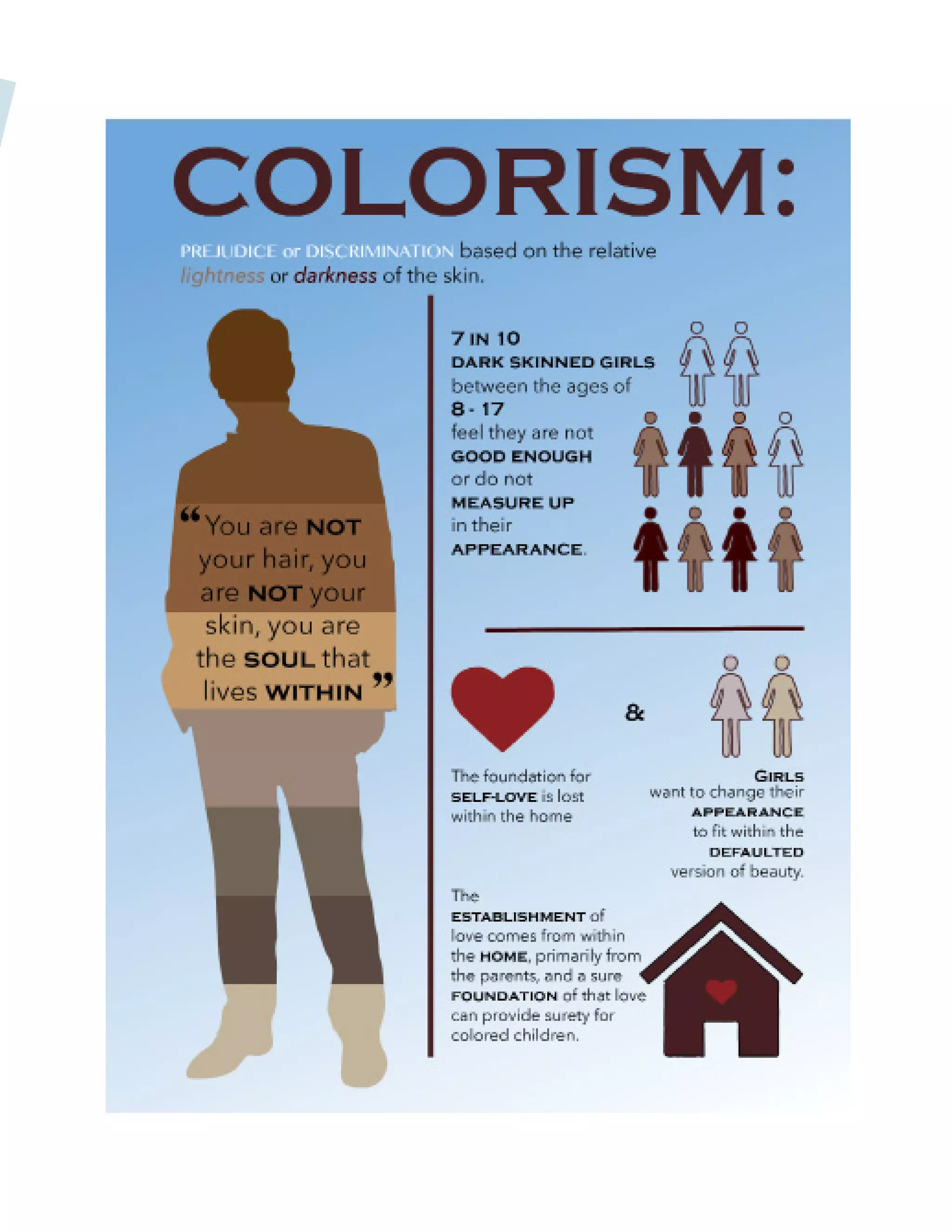
An educational Infographic for the issues behind Colorism, which
was also a speech that I gave in my Public Speaking Class- Comm
102.
November 3, 2016
Comm 130: Visual Media - Section 19
Sara Tranberg
InDesign and Illustrator
Create an Infographic that organizes data in a visually pleasing way.
I started brainstorming some topics and ended up deciding to make
an Infographic off a very prevalent but not well known issue in our
society: Colorism. I did some research to find some data about
Colorism and referred back to my speech that I gave in Comm
102, my public speaking class. I also watched a documentary about
Colorism called Dark Girls, which also gave me more statistics about
Colorism. I then sketched out some graphics that I knew I wanted
to include in the Infographic. Next I opened up Illustrator and start-
ed on my Infographic. I created the images using the pen tool and
outlined what I needed and other graphics to organize the data.
The result is a one page racial issue Infographic.
MONTAGE
DESCRIPTION
DATE
COURSE
INSTRUCTOR
PROGRAMS USED
OBJECTIVE
PROCESS
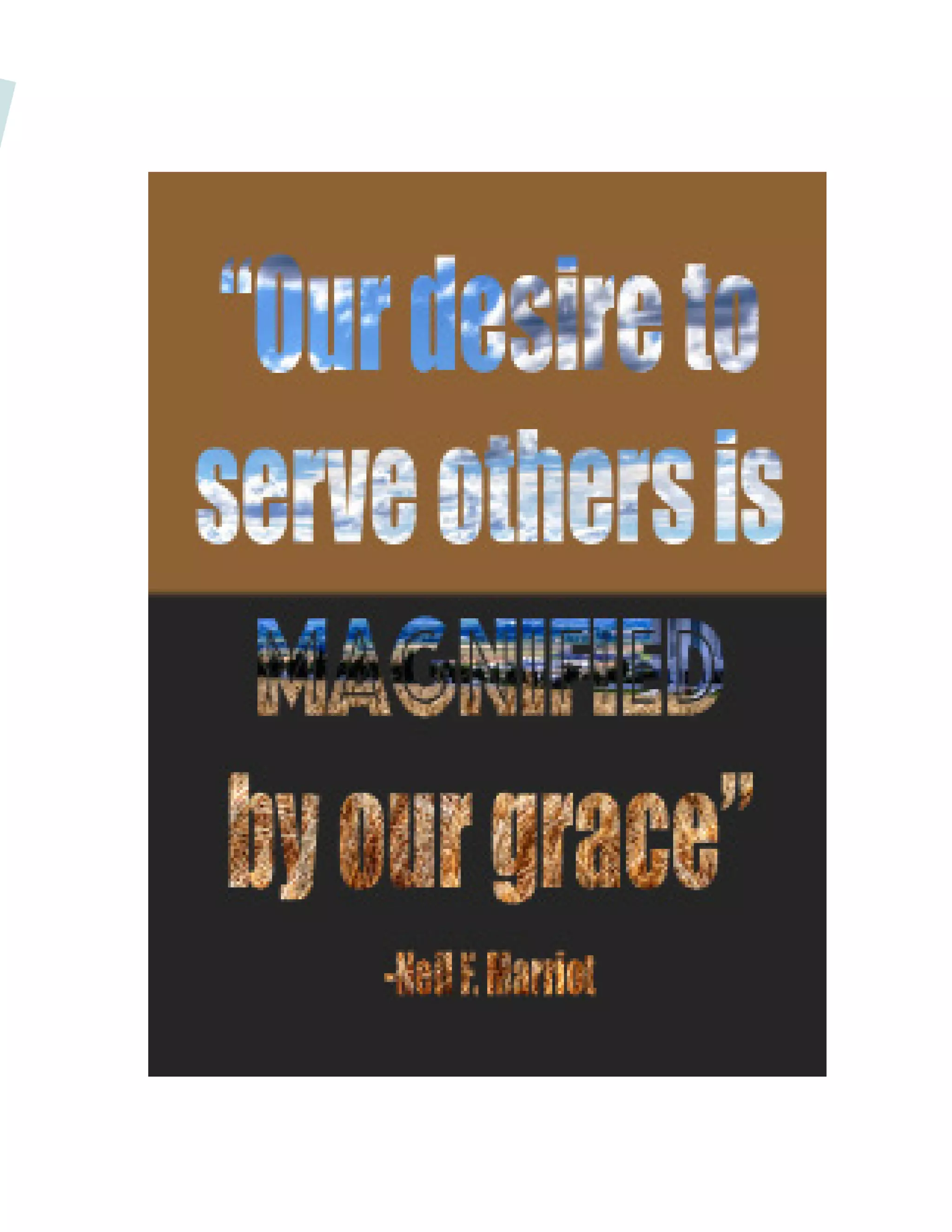
A spiritual montage design for Sister Neil F. Marriot’s talk from
the March 2016 Women’s Conference.
October 20, 2016
Comm 130: Visual Design 130 - Section 19
Sara Tranberg
Photoshop
Design a spiritual poster montage using the blend of images and
type.
I had an idea of the montage I wanted to create to start out
with. I wanted to create a montage that had the images within
the quote . In Photoshop I combined all the various pictures I
used to create the montage effect. I used a variety of layer
masks and the brush tool to create the gradual blended effect.
I then found a quote I liked and added the text on the image.
I then created a mask over the image and selected the images
that I montaged and put them within the text. I made sure to
abide by the design principles such as alignment, repetition, and
flow. The result is a spiritual one page montage.
BUSINESS IDENTITY
DESCRIPTION
DATE
COURSE
INSTRUCTOR
PROGRAMS USED
OBJECTIVE
PROCESS
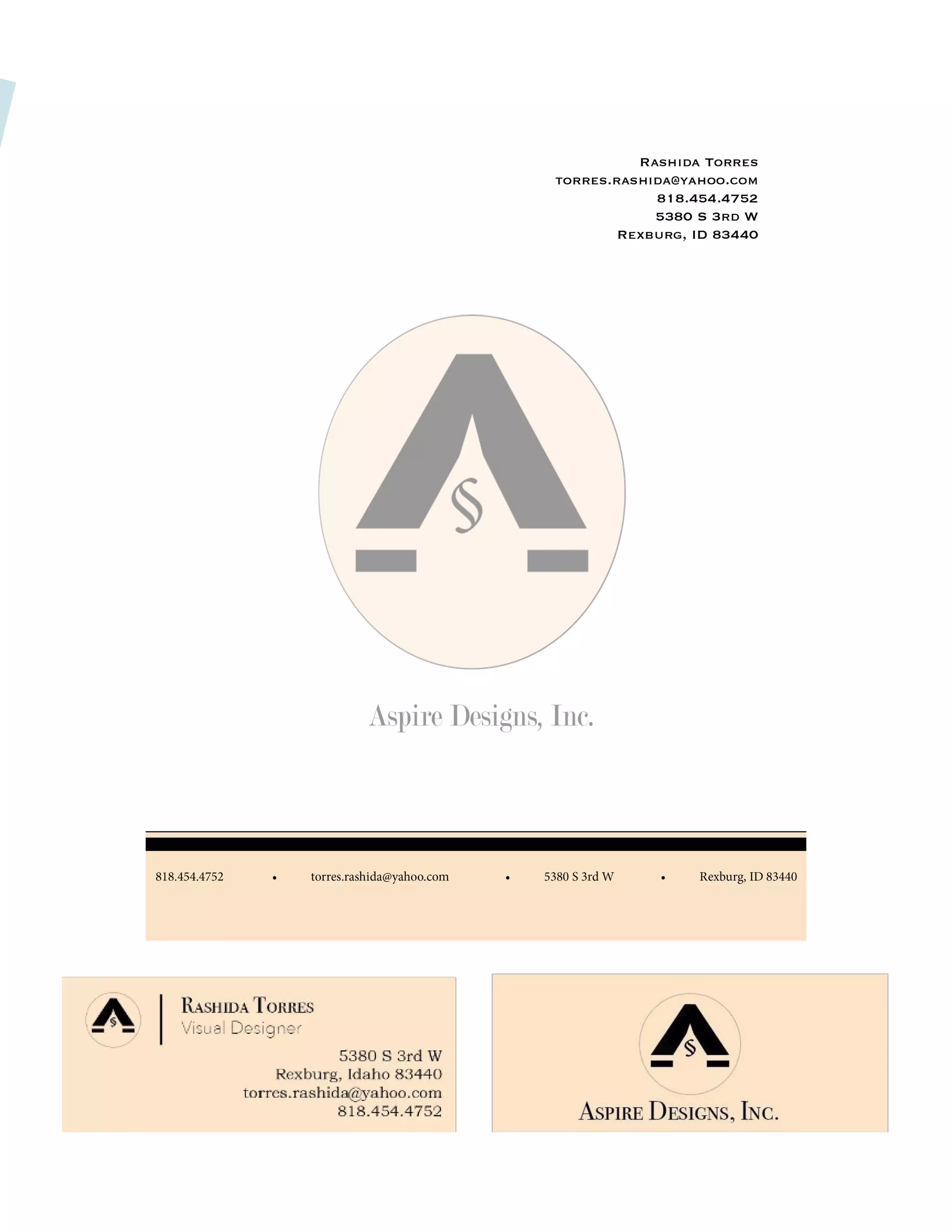
A Business card and Letterhead page for my Aspire Designs
Company.
October 27, 2016
Comm 130: Visual Media - Section 19
Sara Tranberg
InDesign and Illustrator
Create a logo for a company/service/company organization and
establish a visual identity across documents
First I created a logo design in Illustrator for a company that I
wanted to title Aspire Designs. I then took the logo that I designed
in Illustrator and created the front and back of my Business Card
in InDesign. I then proceed to come up with a creative but simple
design for my letterhead. The result is the front and back of my
Business Card and a one page Letterhead.
WEB PAGE MOCKUP
DESCRIPTION
DATE
COURSE
INSTRUCTOR
PROGRAMS USED
OBJECTIVE
PROCESS
A Dancer’s Webpage Mockup for the company Phenomenal Black
Dancers Company that I created.
November 17, 2016
Comm 130: Visual Media - Section 19
Sara Tranberg
Photoshop and Illustrator.
Design a website homepage using a grid.
I first picked an idea of what I was going to use for the basis
of my website. I choose to create a new logo because I’ve
been wanting to create something in regards to dance. I then
started sketching an idea of how I wanted to lay it out. I knew I
wanted an image of a dancer in the background to grab viewers’
attention and be easy to navigate. I also knew that I wanted to
include instructors and images of them to make my webpage
more intriguing. After I sketched it on paper, I then jumped into
Photoshop and opened the 16-column grid. I started to create
my wire-frame to get me started. I then used Illustrator to create
a simple logo that I could use for this project. After doing so, I
started to add the actual content from into the wire-frame. My
final design ended up being a little different from my original
sketch and wire-frame as I realized the pictures I had originally
wanted to include, were out of proportion and I had to figure out
how to change them around so that they were more appealing to
my viewers. The result is a one page landscape webpage mockup.
BROCHURE
DESCRIPTION
DATE
COURSE
INSTRUCTOR
PROGRAMS USED
OBJECTIVE
PROCESS
A informational photography brochure for a company that I
created with my neighbor Elisse Maynez.
December 3, 2016
Comm 130: Visual Media - Section 19
Sara Tranberg
Photoshop, InDesign, and Illustrator.
Design a brochure for a company.
I first created the logo in Illustrator. Then I went into InDesign
and started to design my brochure. I wrote my body copy and
added the body copy so I knew how I want it to fit. I saved
the possible images I wanted to use in my brochure into a
separate folder labeled “Brochure Pictures”. I then went into
Photoshop and edited the images I wanted to use for my
brochure and saved them as JPEGs. I then opened them in
InDesign where I was creating my brochure. I could edit the
coloring, etc and it would automatically update the link in In-
Design. I then exported the brochure document as JPEGs. Even
though it wasn’t required, I placed the brochure in a mockup
so it would be easy to see how it would look.
CODING
DESCRIPTION
DATE
COURSE
INSTRUCTOR
PROGRAMS USED
OBJECTIVE
PROCESS
A custom made webpage for my visual designs company:
Aspire.
November 10, 2016
Comm 130: Visual Media - Section 19
Sara Tranberg
Textwrangler and Illustrator
Code a custom webpage with HTML and CSS.
First I created my logo in Illustrator. I wanted to focus more
on something that relates to my desire and passion for
creating projects, so I decided to go with Aspire Designs. I
resized my logo to be no longer than 500 px on the long
side. I created my HTML file and started adding my content
and tags. Then I created my CSS file and made sure to link
it in the HTML code. I made customizations in my CSS to
match the colors in my logo and changed the fonts to what
I preferred. I created the background by creating an image
with the light tan texture and then used that image as my
background in my HTML code. I then made sure to validate
my HTML and CSS. The result is a custom webpage.
Final Portfolio
Final Portfolio

Final Portfolio

  • 1.
  • 2.
  • 3.
  • 4.
    MAGAZINE COVER A Blacktivismmagazine cover for people wanting to pursue becoming an activist for black culture. September 29, 2016 Comm 130: Visual Media - Section 19 Sara Tranberg InDesign Design a magazine cover that showcases a self-portrait as well as articles about yourself. As I was looking at all the different magazine covers out there, I realized that I didn’t feel I fit with many of them. So I decided to create my own magazine titled, “Blacktivism”. It’s a magazine for all the black activist or people aspiring to become an activist. The topics I chose for the articles are things that I gave become most passionate about during my recognition of becoming an activist. For example, the quote from Martin Luther King Jr. is one of my favorite quotes that I always go by and will remember forever. I then decided to create a few sketches of what I hoped my magazine cover would look like. Next I opened up an 8.5 x 11 inch InDesign page and created a shape map of my favorite sketch and found an image of myself that I wanted to use as the background image. From the shape map I started filling in the areas that I wanted to be filled to create my cover. I decided I would create my title to be “Blacktivism” and changed the color to the pan-African colors(red, black, and green) for symbolism. The result is a one-page Blacktivism magazine cover. DESCRIPTION DATE COURSE INSTRUCTOR PROGRAMS USED OBJECTIVE PROCESS
  • 6.
    PREZI DESCRIPTION DATE COURSE INSTRUCTOR PROGRAMS USED OBJECTIVE PROCESS A Prezipresentation for Black Children that are underrepresented within the media. October 8, 2016 Comm 130: Visual Media - Section 19 Sara Tranberg Prezi Create an instructional presentation using the Prezi software to demonstrate it’s features and capabilities. At the time I wasn’t as familiar with Prezi, so I looked up some examples of excellent slides. After I researched, I chose an idea and then started sketching. I sketched out an idea that I had in my head regarding ways to be more creative. I chose to go with an image of children looking at each other as my graphic and then work around that. I searched on the Internet for an image like the one I had an idea of, and found this image that I really liked and felt would fulfill the overall purpose of my Prezi slide. Next I went into the heart of Prezi, added my background, my title, and started editing. I added more of my content on the sides and then worked on the transitions. I added a background color after I completed the Prezi Presentation.
  • 8.
    PHOTODESIGN DESCRIPTION DATE COURSE INSTRUCTOR PROGRAMS USED OBJECTIVE PROCESS An upliftingphotodesign message containing an accurate color scheme to portray excellence. October 13, 2016 Comm 130: Visual Media - Section 19 Sara Tranberg Photoshop By using photography and design skills, create a project that encompasses a consistent color scheme from the image. First, I made sure that I had decided on what color scheme I wanted to use for the project, so that I knew what kind of pictures to take to match that color scheme. As I was searching places to take my picture, I walked passed the Taylor building on campus and found a beautiful spot where they had wheat fields. I knew this was going to be a great space that was both calm and soothing to the eye. When editing my photo, I increased the levels and the vibrance. I drew in a box over the original image and colored the box to a yellow tint. I then went into the blending options and lowered the opacity to about 40 and added a Darker Color blend to create a nice autumn feel to the image. I then created a new 8.5 x 11 inch document in Photoshop. I pulled my photo on top of it and started designing. Towards the end of my project, I added the bars on the left and then the text. I tried to keep a good flow throughout the design. The result is a one page landscape photodesign.
  • 10.
    INFOGRAPHIC DESCRIPTION DATE COURSE INSTRUCTOR PROGRAMS USED OBJECTIVE PROCESS An educationalInfographic for the issues behind Colorism, which was also a speech that I gave in my Public Speaking Class- Comm 102. November 3, 2016 Comm 130: Visual Media - Section 19 Sara Tranberg InDesign and Illustrator Create an Infographic that organizes data in a visually pleasing way. I started brainstorming some topics and ended up deciding to make an Infographic off a very prevalent but not well known issue in our society: Colorism. I did some research to find some data about Colorism and referred back to my speech that I gave in Comm 102, my public speaking class. I also watched a documentary about Colorism called Dark Girls, which also gave me more statistics about Colorism. I then sketched out some graphics that I knew I wanted to include in the Infographic. Next I opened up Illustrator and start- ed on my Infographic. I created the images using the pen tool and outlined what I needed and other graphics to organize the data. The result is a one page racial issue Infographic.
  • 12.
    MONTAGE DESCRIPTION DATE COURSE INSTRUCTOR PROGRAMS USED OBJECTIVE PROCESS A spiritualmontage design for Sister Neil F. Marriot’s talk from the March 2016 Women’s Conference. October 20, 2016 Comm 130: Visual Design 130 - Section 19 Sara Tranberg Photoshop Design a spiritual poster montage using the blend of images and type. I had an idea of the montage I wanted to create to start out with. I wanted to create a montage that had the images within the quote . In Photoshop I combined all the various pictures I used to create the montage effect. I used a variety of layer masks and the brush tool to create the gradual blended effect. I then found a quote I liked and added the text on the image. I then created a mask over the image and selected the images that I montaged and put them within the text. I made sure to abide by the design principles such as alignment, repetition, and flow. The result is a spiritual one page montage.
  • 14.
    BUSINESS IDENTITY DESCRIPTION DATE COURSE INSTRUCTOR PROGRAMS USED OBJECTIVE PROCESS ABusiness card and Letterhead page for my Aspire Designs Company. October 27, 2016 Comm 130: Visual Media - Section 19 Sara Tranberg InDesign and Illustrator Create a logo for a company/service/company organization and establish a visual identity across documents First I created a logo design in Illustrator for a company that I wanted to title Aspire Designs. I then took the logo that I designed in Illustrator and created the front and back of my Business Card in InDesign. I then proceed to come up with a creative but simple design for my letterhead. The result is the front and back of my Business Card and a one page Letterhead.
  • 16.
    WEB PAGE MOCKUP DESCRIPTION DATE COURSE INSTRUCTOR PROGRAMSUSED OBJECTIVE PROCESS A Dancer’s Webpage Mockup for the company Phenomenal Black Dancers Company that I created. November 17, 2016 Comm 130: Visual Media - Section 19 Sara Tranberg Photoshop and Illustrator. Design a website homepage using a grid. I first picked an idea of what I was going to use for the basis of my website. I choose to create a new logo because I’ve been wanting to create something in regards to dance. I then started sketching an idea of how I wanted to lay it out. I knew I wanted an image of a dancer in the background to grab viewers’ attention and be easy to navigate. I also knew that I wanted to include instructors and images of them to make my webpage more intriguing. After I sketched it on paper, I then jumped into Photoshop and opened the 16-column grid. I started to create my wire-frame to get me started. I then used Illustrator to create a simple logo that I could use for this project. After doing so, I started to add the actual content from into the wire-frame. My final design ended up being a little different from my original sketch and wire-frame as I realized the pictures I had originally wanted to include, were out of proportion and I had to figure out how to change them around so that they were more appealing to my viewers. The result is a one page landscape webpage mockup.
  • 18.
    BROCHURE DESCRIPTION DATE COURSE INSTRUCTOR PROGRAMS USED OBJECTIVE PROCESS A informationalphotography brochure for a company that I created with my neighbor Elisse Maynez. December 3, 2016 Comm 130: Visual Media - Section 19 Sara Tranberg Photoshop, InDesign, and Illustrator. Design a brochure for a company. I first created the logo in Illustrator. Then I went into InDesign and started to design my brochure. I wrote my body copy and added the body copy so I knew how I want it to fit. I saved the possible images I wanted to use in my brochure into a separate folder labeled “Brochure Pictures”. I then went into Photoshop and edited the images I wanted to use for my brochure and saved them as JPEGs. I then opened them in InDesign where I was creating my brochure. I could edit the coloring, etc and it would automatically update the link in In- Design. I then exported the brochure document as JPEGs. Even though it wasn’t required, I placed the brochure in a mockup so it would be easy to see how it would look.
  • 20.
    CODING DESCRIPTION DATE COURSE INSTRUCTOR PROGRAMS USED OBJECTIVE PROCESS A custommade webpage for my visual designs company: Aspire. November 10, 2016 Comm 130: Visual Media - Section 19 Sara Tranberg Textwrangler and Illustrator Code a custom webpage with HTML and CSS. First I created my logo in Illustrator. I wanted to focus more on something that relates to my desire and passion for creating projects, so I decided to go with Aspire Designs. I resized my logo to be no longer than 500 px on the long side. I created my HTML file and started adding my content and tags. Then I created my CSS file and made sure to link it in the HTML code. I made customizations in my CSS to match the colors in my logo and changed the fonts to what I preferred. I created the background by creating an image with the light tan texture and then used that image as my background in my HTML code. I then made sure to validate my HTML and CSS. The result is a custom webpage.