Digital Graphics
File Formats
Robert Smith
Raster Graphics
Raster graphics are digital images that are made up of tiny
pixels. They are arranged in a certain way so that they form an
image. The file size of a raster image depends on the size of
the image. This is determined by the amount of pixels in the
image. So the higher the amount of pixels the larger the file
size. There are advantages and disadvantages to raster
graphics. One disadvantage is that it is dependent on
resolution. It can be scaled down without the quality
changing, however if it were to be up scaled then the quality
would become poorer. An advantage is that Raster graphics
are perfect for creating rich and detailed images, every pixel in
the image can be a different colour therefore you can create a
complex image with any kind of colour changed and
variations.
Vector Graphics
Vector graphics are created by an illustration
software such as: Adobe Illustrator. Vector graphics
are more flexible than raster graphics because they
can be stretched and resized. In addition, images
stored as vectors look better on monitors due to
their higher resolution, whereas Raster images
always appear the same regardless of a monitor’s
resolution. However a disadvantage would be that
Vector files cannot easily be used to store extremely
complex images, such as some photographs, where
colour is very important.
Raster Graphics
JPEG
Stands For Joint Photographic Experts Group
Used For/Example JPEG is mostly used as a method to
compress images particularly those made
by digital photography.
Advantage They have a high controlled degree of
compression. The user can independently
alter the settings for the file size and ratio
quality.
Disadvantage JPEG is not good for working with text or
monochrome graphics with clear
boundaries;
TIFF
Stands For Tagged Image file format
Used For/Example TIFF is a file format used for storing raster
graphics images. Popular with graphic
artists.
Advantage TIFF can be compressed to reduce file sizes
using algorithms such as ZIP or TAR
without loss of image date
Disadvantage Large files, around 20mb for a 10
megapixel image, so larger storage devices
are needed for long term use.
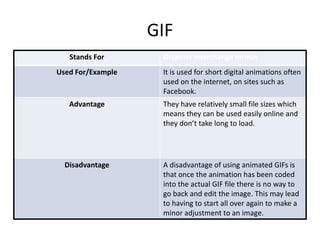
GIF
Stands For Graphics interchange format
Used For/Example It is used for short digital animations often
used on the internet, on sites such as
Facebook.
Advantage They have relatively small file sizes which
means they can be used easily online and
they don’t take long to load.
Disadvantage A disadvantage of using animated GIFs is
that once the animation has been coded
into the actual GIF file there is no way to
go back and edit the image. This may lead
to having to start all over again to make a
minor adjustment to an image.
BMP
Stands For Bitmap image
Used For/Example The BMP format stores color data for each pixel in the
image without any compression. For example, a 10x10
pixel BMP image will include color data for 100 pixels.
This method of storing image information allows for
crisp, high-quality graphics, but also produces large file
sizes.
Advantage Bitmap files may be easily created from existing pixel
data stored in an array in memory.
Retrieving pixel data stored in a bitmap file may often
be accomplished by using a set of coordinates that
allows the data to be conceptualized as a grid.
Disadvantage They can be very large, particularly if the image
contains a large number of colors. Data compression
can shrink the size of pixel data, but the data must be
expanded before it can be used, and this can slow
down the reading and rendering process considerably.
Also, the more complex a bitmap image (large number
of colors and minute detail), the less efficient the
compression process will be.
Vector Graphics
PSD
Stands For Photoshop document
Used For/Example It is the default format that adobe
Photoshop uses for saving data
Advantage The compression algorithm is “lossy”,
which means data is discarded when the
file is compressed. For the most part,
however, you won’t notice any loss of data
unless you start to edit the file.
Disadvantage PSD files tend to be extremely large, since
these lossless images use no compression.
This preserves all image information, but
can make the file itself unwieldy and
difficult to email or transfer
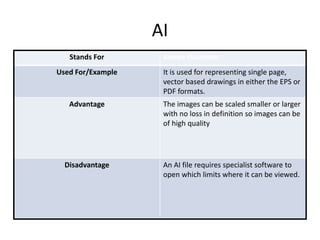
AI
Stands For Adobe illustrator
Used For/Example It is used for representing single page,
vector based drawings in either the EPS or
PDF formats.
Advantage The images can be scaled smaller or larger
with no loss in definition so images can be
of high quality
Disadvantage An AI file requires specialist software to
open which limits where it can be viewed.
FLA
Stands For Flash file
Used For/Example Flash files are used to make animations
and video games.
Advantage FLA files are high quality but they have a
small file size which makes them good on
the internet as long as they don’t take long
to load.
Disadvantage A limited amount of software can open a
FLA file as it is a specialist file.
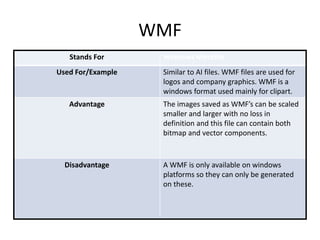
WMF
Stands For Windows Metafile
Used For/Example Similar to AI files. WMF files are used for
logos and company graphics. WMF is a
windows format used mainly for clipart.
Advantage The images saved as WMF’s can be scaled
smaller and larger with no loss in
definition and this file can contain both
bitmap and vector components.
Disadvantage A WMF is only available on windows
platforms so they can only be generated
on these.
File Format Capture
and Optimising
Compression
Definition Loss compression is reduction in the file
size which is caused by reducing the
amount of information which is saved
Advantage The main advantage to compression is that
it reduces the file size and the amount of
memory in which the file requires.
Disadvantage When compressed, images lose quality
and appear more pixelated because less
pixels are saved each time.
Image Capture
Method Scanner
How is it used for image capture of
graphics
A scanner is used to digitalise physical
images. The point of a scanner is to
analyse an image and process it in some
way.
Method Camera
How is it used for image capture of
graphics
Light enters the lens of a camera and it is
recorded by a sensor, the sensor records
information for all the pixels which then
produces an image.
Method Graphics Tablet
How is it used for image capture of
graphics
Some tablets have technology which
allows you to control a mouse like a pen
for illustration and other purposes.
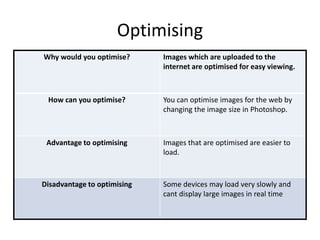
Optimising
Why would you optimise? Images which are uploaded to the
internet are optimised for easy viewing.
How can you optimise? You can optimise images for the web by
changing the image size in Photoshop.
Advantage to optimising Images that are optimised are easier to
load.
Disadvantage to optimising Some devices may load very slowly and
cant display large images in real time
Storage
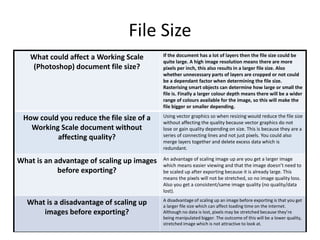
File Size
What could affect a Working Scale
(Photoshop) document file size?
If the document has a lot of layers then the file size could be
quite large. A high image resolution means there are more
pixels per inch, this also results in a larger file size. Also
whether unnecessary parts of layers are cropped or not could
be a dependant factor when determining the file size.
Rasterising smart objects can determine how large or small the
file is. Finally a larger colour depth means there will be a wider
range of colours available for the image, so this will make the
file bigger or smaller depending.
How could you reduce the file size of a
Working Scale document without
affecting quality?
Using vector graphics so when resizing would reduce the file size
without affecting the quality because vector graphics do not
lose or gain quality depending on size. This is because they are a
series of connecting lines and not just pixels. You could also
merge layers together and delete excess data which is
redundant.
What is an advantage of scaling up images
before exporting?
An advantage of scaling image up are you get a larger image
which means easier viewing and that the image doesn’t need to
be scaled up after exporting because it is already large. This
means the pixels will not be stretched, so no image quality loss.
Also you get a consistent/same image quality (no quality/data
lost).
What is a disadvantage of scaling up
images before exporting?
A disadvantage of scaling up an image before exporting is that you get
a larger file size which can affect loading time on the internet.
Although no data is lost, pixels may be stretched because they’re
being manipulated bigger. The outcome of this will be a lower quality,
stretched image which is not attractive to look at.
File Naming Conventions
What naming conventions could you use
when creating your video game assets?
A naming convention you could use when
naming these assets is to not use
overcomplicated file names and possibly
abbreviate words. You could use dates when
the file was created or last edited.
Use hyphens to separate each detail of the file
(date, content) and don’t use spaces. If there is
numerous file version, number which version it
is and the date is was created/modified. Also
store each different asset of you video game in
named folders, for example you could store all
the different positions for one character in a
folder called “Character [name]”.
Why is it a good idea to accurately name
your assets?
It is a good idea to name your assets so
you can find certain files easily and
efficiently. You can do this by searching for
the file name/what your need and, if
named correctly, you should find the asset.
Also this means you will know exactly
what is in your file if it is named correctly
and you will know what you’re looking for.
Asset Management
Why would you use folders when storing
your assets?
Using folders, when sorting assets, increases
efficiency when finding particular files and means
your files will be organised and easier to navigate.
This is because you can save files in folders and
subfolders which are named appropriately. For
example in your pictures folder you could have a
subfolder called ‘Photoshop’ so you can easily
access/find all your Photoshop files. Within that
folder you could have subfolders for you individual
projects. Finally, it also means you can directly search
for specific files in these folders.
What folders would you create and what
would you save within them
• In documents I would have a folder named ‘Media
Coursework’ and within that folder I’d have folders
named after each project. Within that folder I’d
have each different coursework I’d been given and
it would be named after that piece of coursework.
For example, I’d have a folder called “Print Based
Media”. Within this folder there will be subfolders
containing each different part of the project
(research, design, product). These files will all be
named appropriately and be named after the
folder they’re in e.g. RESEARCH – Logo.

File types pro forma

  • 1.
  • 2.
    Raster Graphics Raster graphicsare digital images that are made up of tiny pixels. They are arranged in a certain way so that they form an image. The file size of a raster image depends on the size of the image. This is determined by the amount of pixels in the image. So the higher the amount of pixels the larger the file size. There are advantages and disadvantages to raster graphics. One disadvantage is that it is dependent on resolution. It can be scaled down without the quality changing, however if it were to be up scaled then the quality would become poorer. An advantage is that Raster graphics are perfect for creating rich and detailed images, every pixel in the image can be a different colour therefore you can create a complex image with any kind of colour changed and variations.
  • 3.
    Vector Graphics Vector graphicsare created by an illustration software such as: Adobe Illustrator. Vector graphics are more flexible than raster graphics because they can be stretched and resized. In addition, images stored as vectors look better on monitors due to their higher resolution, whereas Raster images always appear the same regardless of a monitor’s resolution. However a disadvantage would be that Vector files cannot easily be used to store extremely complex images, such as some photographs, where colour is very important.
  • 4.
  • 5.
    JPEG Stands For JointPhotographic Experts Group Used For/Example JPEG is mostly used as a method to compress images particularly those made by digital photography. Advantage They have a high controlled degree of compression. The user can independently alter the settings for the file size and ratio quality. Disadvantage JPEG is not good for working with text or monochrome graphics with clear boundaries;
  • 6.
    TIFF Stands For TaggedImage file format Used For/Example TIFF is a file format used for storing raster graphics images. Popular with graphic artists. Advantage TIFF can be compressed to reduce file sizes using algorithms such as ZIP or TAR without loss of image date Disadvantage Large files, around 20mb for a 10 megapixel image, so larger storage devices are needed for long term use.
  • 7.
    GIF Stands For Graphicsinterchange format Used For/Example It is used for short digital animations often used on the internet, on sites such as Facebook. Advantage They have relatively small file sizes which means they can be used easily online and they don’t take long to load. Disadvantage A disadvantage of using animated GIFs is that once the animation has been coded into the actual GIF file there is no way to go back and edit the image. This may lead to having to start all over again to make a minor adjustment to an image.
  • 8.
    BMP Stands For Bitmapimage Used For/Example The BMP format stores color data for each pixel in the image without any compression. For example, a 10x10 pixel BMP image will include color data for 100 pixels. This method of storing image information allows for crisp, high-quality graphics, but also produces large file sizes. Advantage Bitmap files may be easily created from existing pixel data stored in an array in memory. Retrieving pixel data stored in a bitmap file may often be accomplished by using a set of coordinates that allows the data to be conceptualized as a grid. Disadvantage They can be very large, particularly if the image contains a large number of colors. Data compression can shrink the size of pixel data, but the data must be expanded before it can be used, and this can slow down the reading and rendering process considerably. Also, the more complex a bitmap image (large number of colors and minute detail), the less efficient the compression process will be.
  • 9.
  • 10.
    PSD Stands For Photoshopdocument Used For/Example It is the default format that adobe Photoshop uses for saving data Advantage The compression algorithm is “lossy”, which means data is discarded when the file is compressed. For the most part, however, you won’t notice any loss of data unless you start to edit the file. Disadvantage PSD files tend to be extremely large, since these lossless images use no compression. This preserves all image information, but can make the file itself unwieldy and difficult to email or transfer
  • 11.
    AI Stands For Adobeillustrator Used For/Example It is used for representing single page, vector based drawings in either the EPS or PDF formats. Advantage The images can be scaled smaller or larger with no loss in definition so images can be of high quality Disadvantage An AI file requires specialist software to open which limits where it can be viewed.
  • 12.
    FLA Stands For Flashfile Used For/Example Flash files are used to make animations and video games. Advantage FLA files are high quality but they have a small file size which makes them good on the internet as long as they don’t take long to load. Disadvantage A limited amount of software can open a FLA file as it is a specialist file.
  • 13.
    WMF Stands For WindowsMetafile Used For/Example Similar to AI files. WMF files are used for logos and company graphics. WMF is a windows format used mainly for clipart. Advantage The images saved as WMF’s can be scaled smaller and larger with no loss in definition and this file can contain both bitmap and vector components. Disadvantage A WMF is only available on windows platforms so they can only be generated on these.
  • 14.
  • 15.
    Compression Definition Loss compressionis reduction in the file size which is caused by reducing the amount of information which is saved Advantage The main advantage to compression is that it reduces the file size and the amount of memory in which the file requires. Disadvantage When compressed, images lose quality and appear more pixelated because less pixels are saved each time.
  • 16.
    Image Capture Method Scanner Howis it used for image capture of graphics A scanner is used to digitalise physical images. The point of a scanner is to analyse an image and process it in some way. Method Camera How is it used for image capture of graphics Light enters the lens of a camera and it is recorded by a sensor, the sensor records information for all the pixels which then produces an image. Method Graphics Tablet How is it used for image capture of graphics Some tablets have technology which allows you to control a mouse like a pen for illustration and other purposes.
  • 17.
    Optimising Why would youoptimise? Images which are uploaded to the internet are optimised for easy viewing. How can you optimise? You can optimise images for the web by changing the image size in Photoshop. Advantage to optimising Images that are optimised are easier to load. Disadvantage to optimising Some devices may load very slowly and cant display large images in real time
  • 18.
  • 19.
    File Size What couldaffect a Working Scale (Photoshop) document file size? If the document has a lot of layers then the file size could be quite large. A high image resolution means there are more pixels per inch, this also results in a larger file size. Also whether unnecessary parts of layers are cropped or not could be a dependant factor when determining the file size. Rasterising smart objects can determine how large or small the file is. Finally a larger colour depth means there will be a wider range of colours available for the image, so this will make the file bigger or smaller depending. How could you reduce the file size of a Working Scale document without affecting quality? Using vector graphics so when resizing would reduce the file size without affecting the quality because vector graphics do not lose or gain quality depending on size. This is because they are a series of connecting lines and not just pixels. You could also merge layers together and delete excess data which is redundant. What is an advantage of scaling up images before exporting? An advantage of scaling image up are you get a larger image which means easier viewing and that the image doesn’t need to be scaled up after exporting because it is already large. This means the pixels will not be stretched, so no image quality loss. Also you get a consistent/same image quality (no quality/data lost). What is a disadvantage of scaling up images before exporting? A disadvantage of scaling up an image before exporting is that you get a larger file size which can affect loading time on the internet. Although no data is lost, pixels may be stretched because they’re being manipulated bigger. The outcome of this will be a lower quality, stretched image which is not attractive to look at.
  • 20.
    File Naming Conventions Whatnaming conventions could you use when creating your video game assets? A naming convention you could use when naming these assets is to not use overcomplicated file names and possibly abbreviate words. You could use dates when the file was created or last edited. Use hyphens to separate each detail of the file (date, content) and don’t use spaces. If there is numerous file version, number which version it is and the date is was created/modified. Also store each different asset of you video game in named folders, for example you could store all the different positions for one character in a folder called “Character [name]”. Why is it a good idea to accurately name your assets? It is a good idea to name your assets so you can find certain files easily and efficiently. You can do this by searching for the file name/what your need and, if named correctly, you should find the asset. Also this means you will know exactly what is in your file if it is named correctly and you will know what you’re looking for.
  • 21.
    Asset Management Why wouldyou use folders when storing your assets? Using folders, when sorting assets, increases efficiency when finding particular files and means your files will be organised and easier to navigate. This is because you can save files in folders and subfolders which are named appropriately. For example in your pictures folder you could have a subfolder called ‘Photoshop’ so you can easily access/find all your Photoshop files. Within that folder you could have subfolders for you individual projects. Finally, it also means you can directly search for specific files in these folders. What folders would you create and what would you save within them • In documents I would have a folder named ‘Media Coursework’ and within that folder I’d have folders named after each project. Within that folder I’d have each different coursework I’d been given and it would be named after that piece of coursework. For example, I’d have a folder called “Print Based Media”. Within this folder there will be subfolders containing each different part of the project (research, design, product). These files will all be named appropriately and be named after the folder they’re in e.g. RESEARCH – Logo.