Digital Graphics
File Formats
BY HARRISON COX
Raster Graphics
• Give a definition of Raster Graphics
Raster graphics are made up of bitmaps which are made up of pixels and the pixels/bits
record the colour information for each section of the image and each pixel has it’s own
colour assigned to it. Due to this the images produced have a fixed resolution causing
scaling to cause the image to become blurred.
• Bitmaps
Megapixels are a million pixels so for a 14 megapixel camera it has 14,000,000 pixels. When
you get an internet image and then use it, it may loose quality due to not having the
document it has been put on does not have that many pixels.
Vector Graphics
• Give a definition of Vector Graphics
Vector graphics are made up of vectors (clues in the name) and they are also known as
paths and strokes. Vectors are defined by a start and a end point and angles between them.
From this information the path can become a line, square, triangle or a curvy shape.
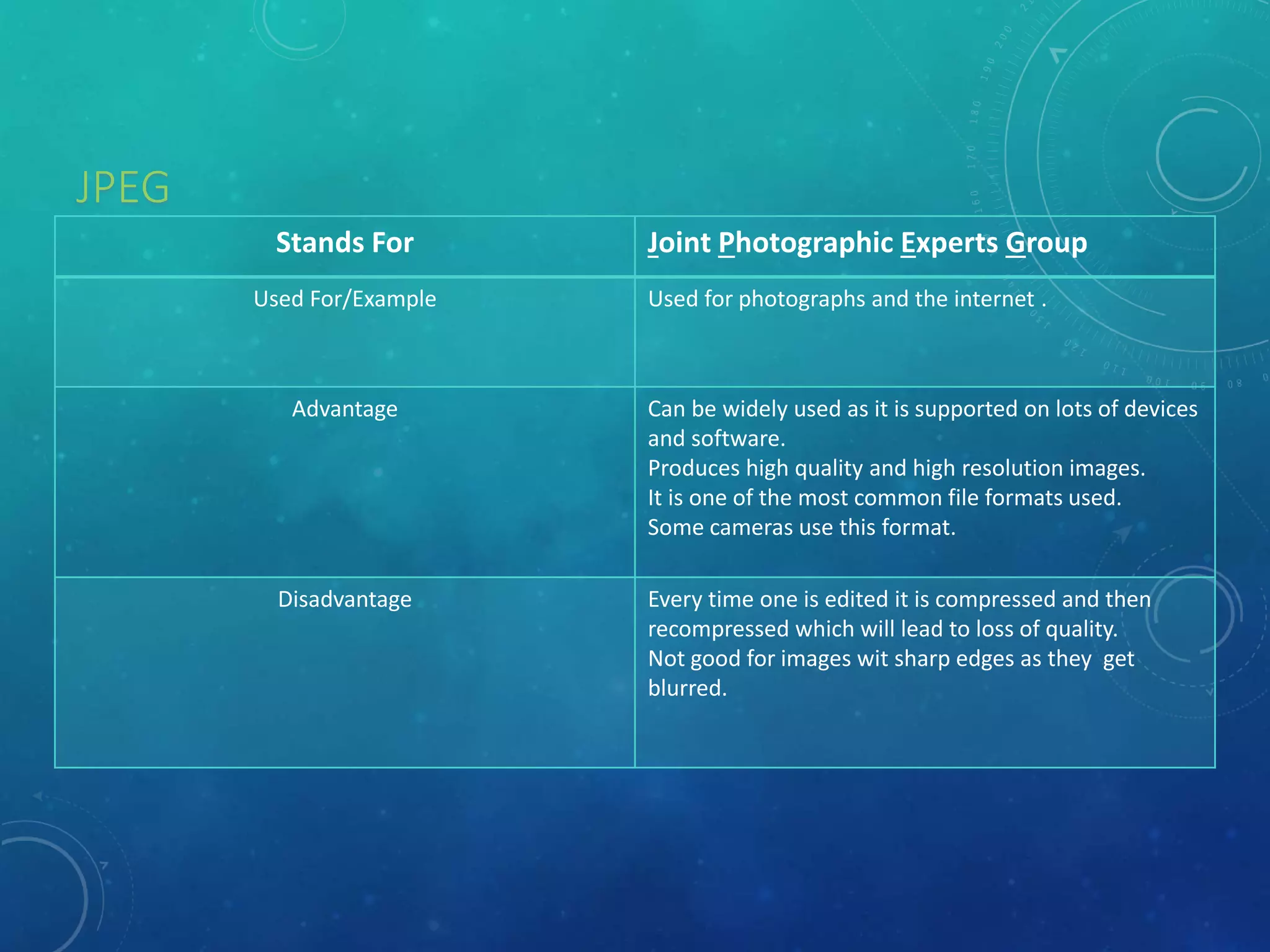
JPEG
Stands For Joint Photographic Experts Group
Used For/Example Used for photographs and the internet .
Advantage Can be widely used as it is supported on lots of devices
and software.
Produces high quality and high resolution images.
It is one of the most common file formats used.
Some cameras use this format.
Disadvantage Every time one is edited it is compressed and then
recompressed which will lead to loss of quality.
Not good for images wit sharp edges as they get
blurred.
Raster Graphics
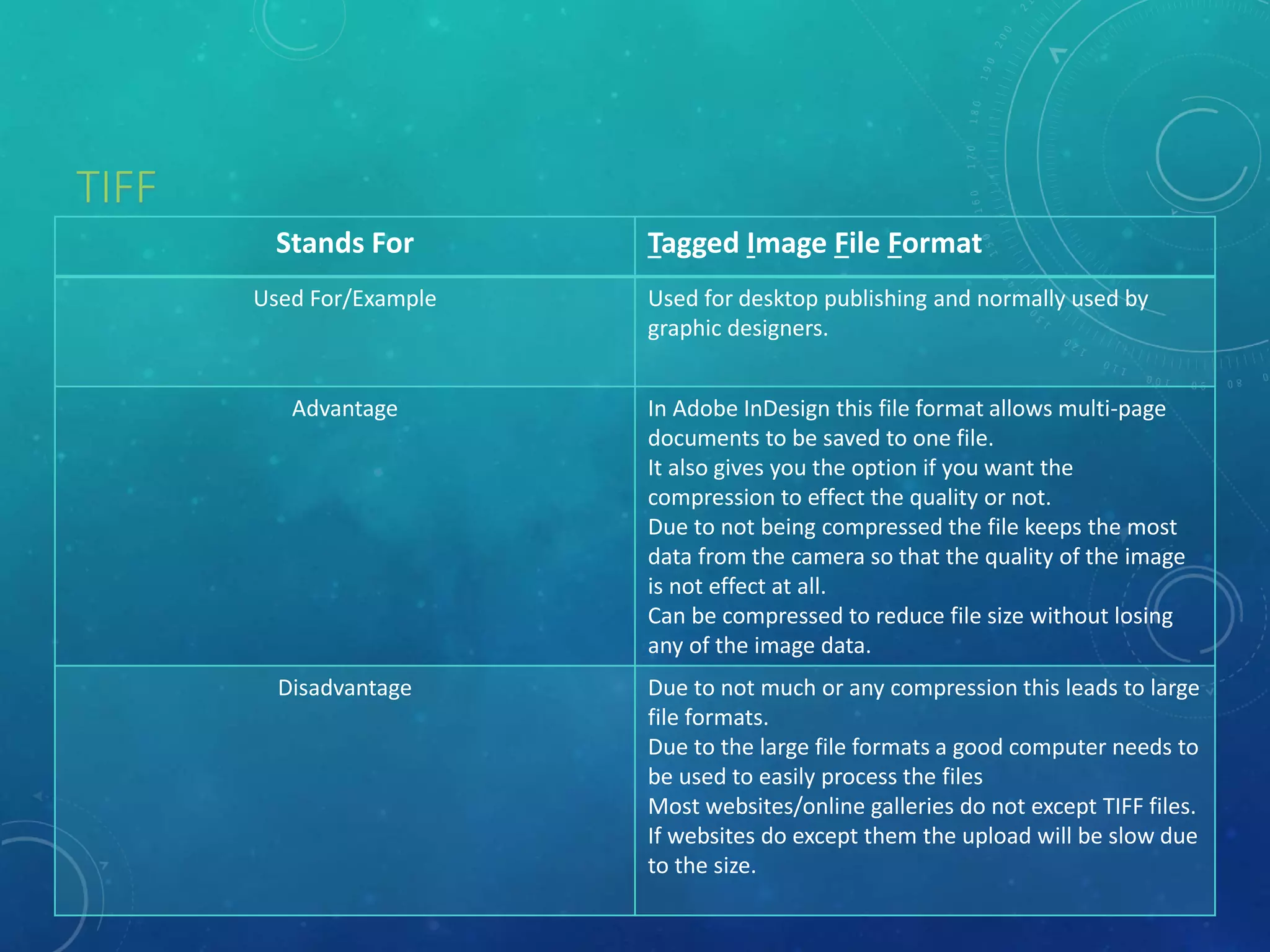
TIFF
Stands For Tagged Image File Format
Used For/Example Used for desktop publishing and normally used by
graphic designers.
Advantage In Adobe InDesign this file format allows multi-page
documents to be saved to one file.
It also gives you the option if you want the
compression to effect the quality or not.
Due to not being compressed the file keeps the most
data from the camera so that the quality of the image
is not effect at all.
Can be compressed to reduce file size without losing
any of the image data.
Disadvantage Due to not much or any compression this leads to large
file formats.
Due to the large file formats a good computer needs to
be used to easily process the files
Most websites/online galleries do not except TIFF files.
If websites do except them the upload will be slow due
to the size.
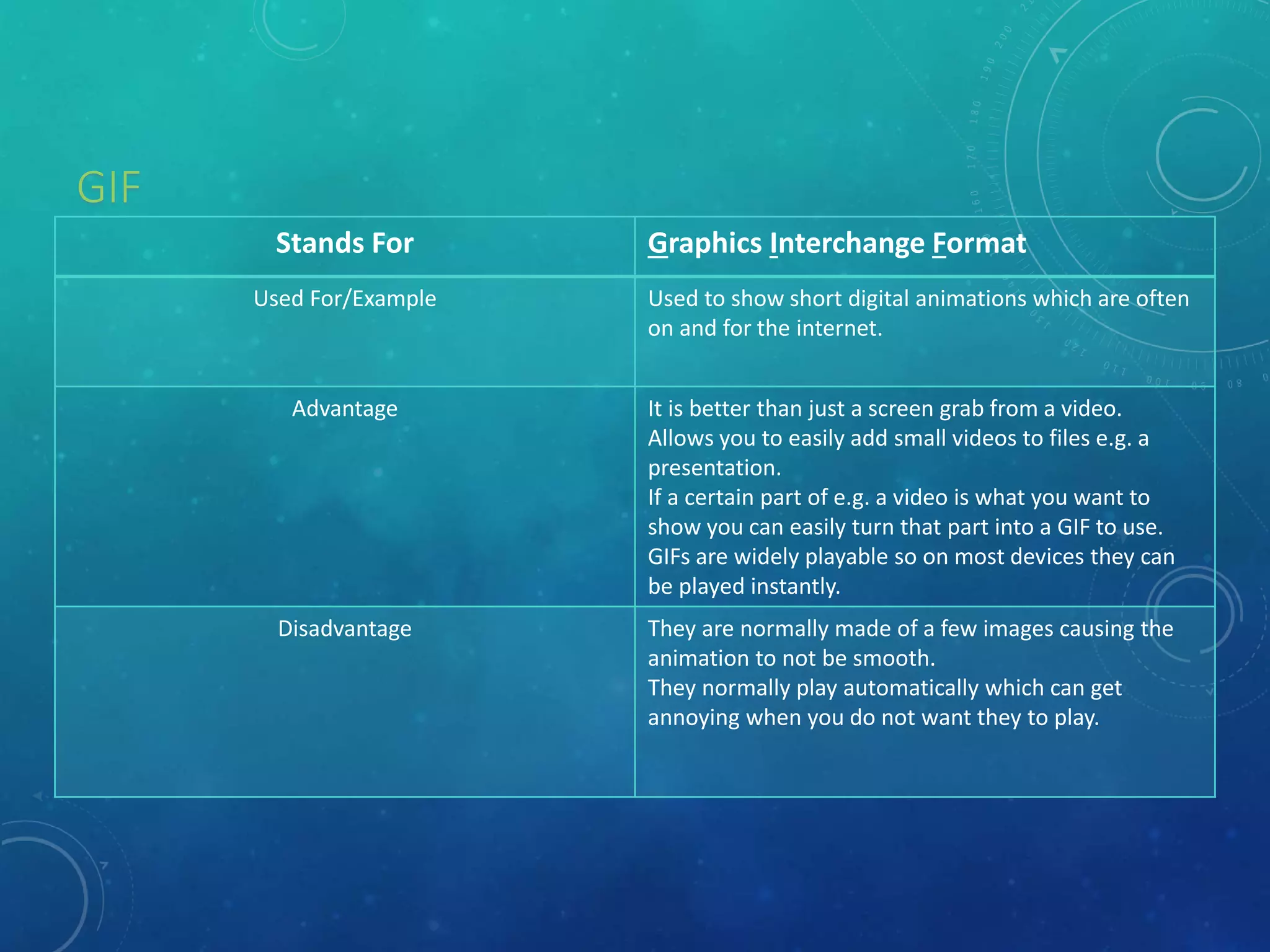
GIF
Stands For Graphics Interchange Format
Used For/Example Used to show short digital animations which are often
on and for the internet.
Advantage It is better than just a screen grab from a video.
Allows you to easily add small videos to files e.g. a
presentation.
If a certain part of e.g. a video is what you want to
show you can easily turn that part into a GIF to use.
GIFs are widely playable so on most devices they can
be played instantly.
Disadvantage They are normally made of a few images causing the
animation to not be smooth.
They normally play automatically which can get
annoying when you do not want they to play.
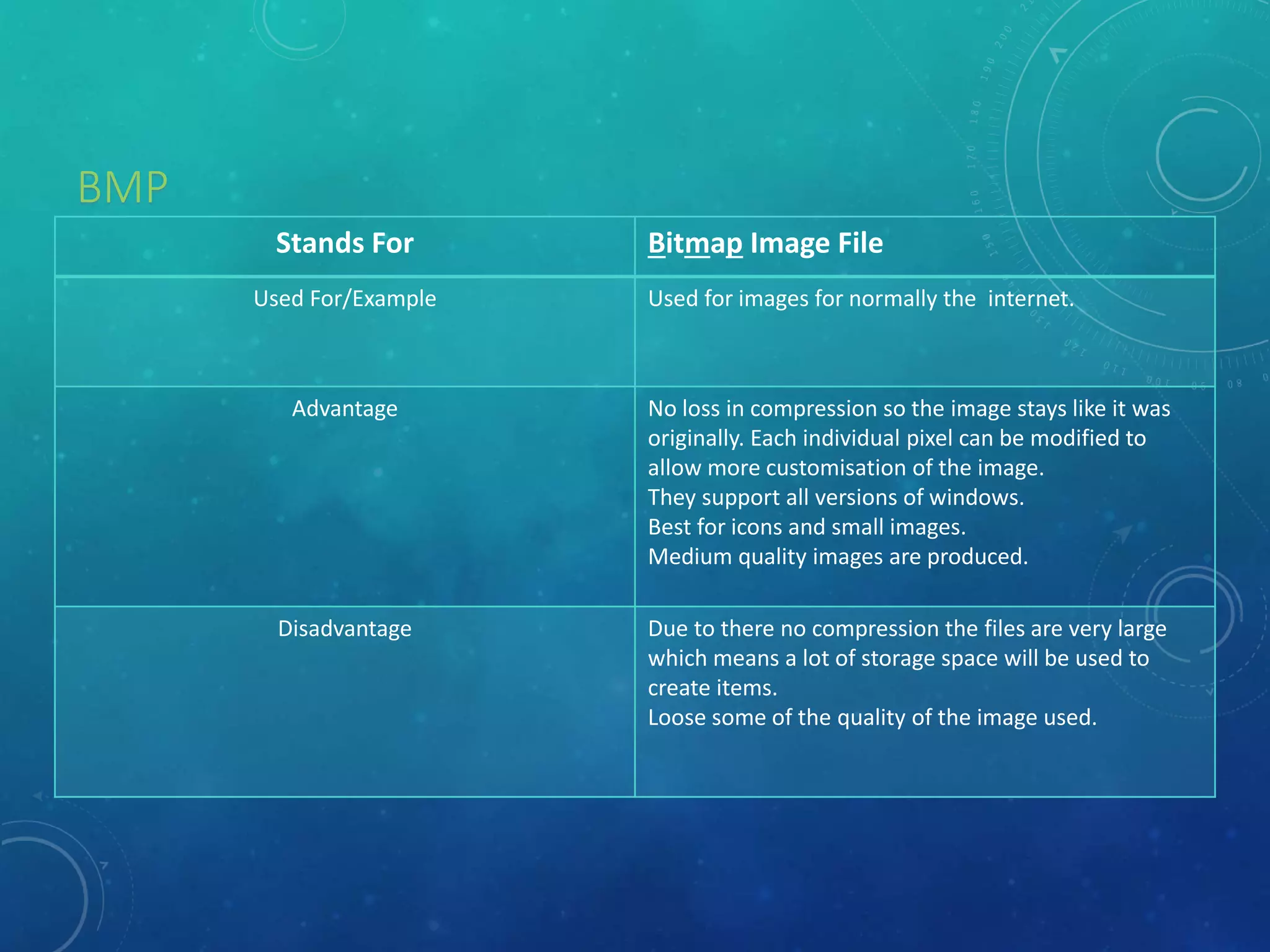
BMP
Stands For Bitmap Image File
Used For/Example Used for images for normally the internet.
Advantage No loss in compression so the image stays like it was
originally. Each individual pixel can be modified to
allow more customisation of the image.
They support all versions of windows.
Best for icons and small images.
Medium quality images are produced.
Disadvantage Due to there no compression the files are very large
which means a lot of storage space will be used to
create items.
Loose some of the quality of the image used.
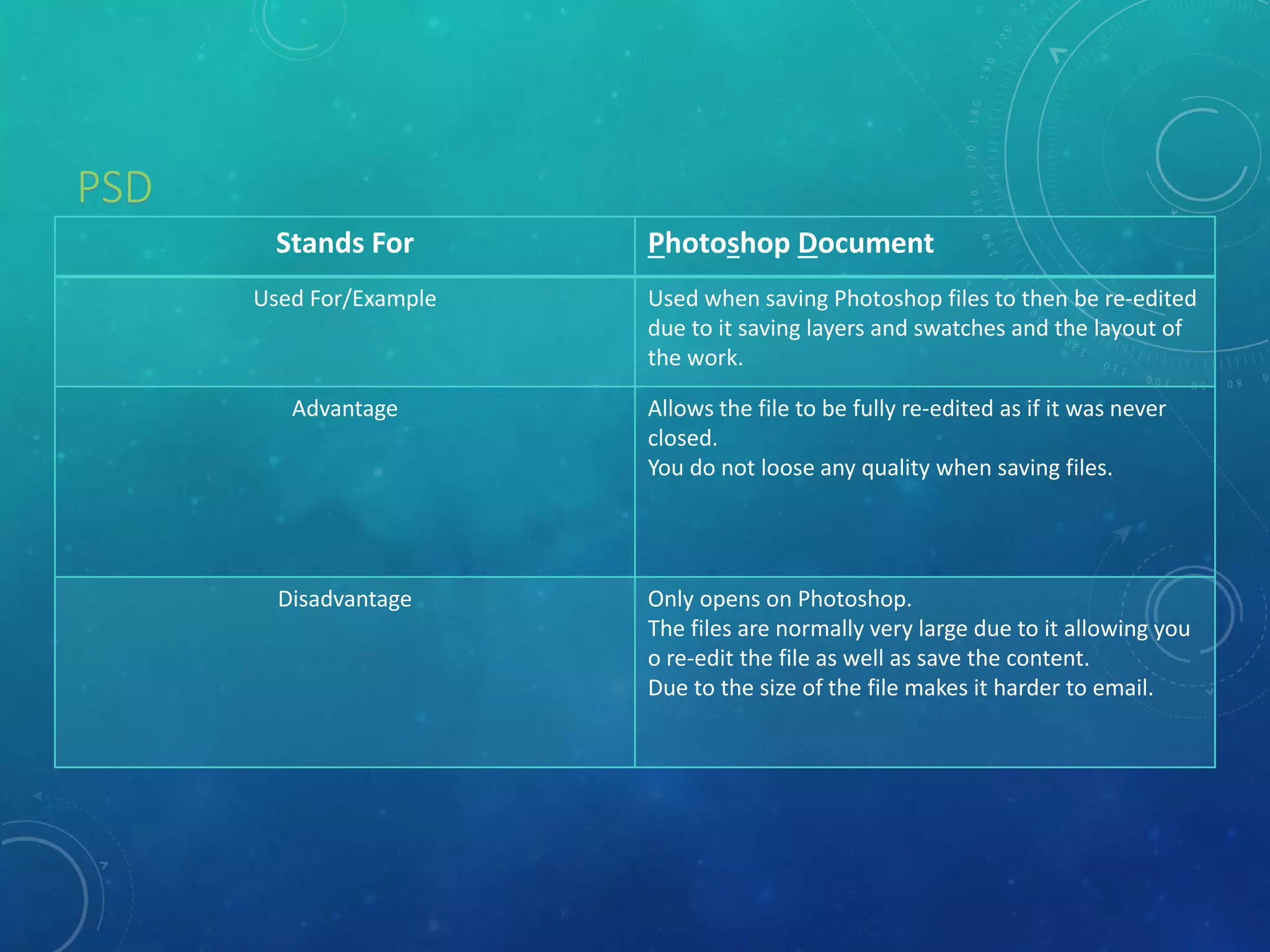
PSD
Stands For Photoshop Document
Used For/Example Used when saving Photoshop files to then be re-edited
due to it saving layers and swatches and the layout of
the work.
Advantage Allows the file to be fully re-edited as if it was never
closed.
You do not loose any quality when saving files.
Disadvantage Only opens on Photoshop.
The files are normally very large due to it allowing you
o re-edit the file as well as save the content.
Due to the size of the file makes it harder to email.
Vector Graphics
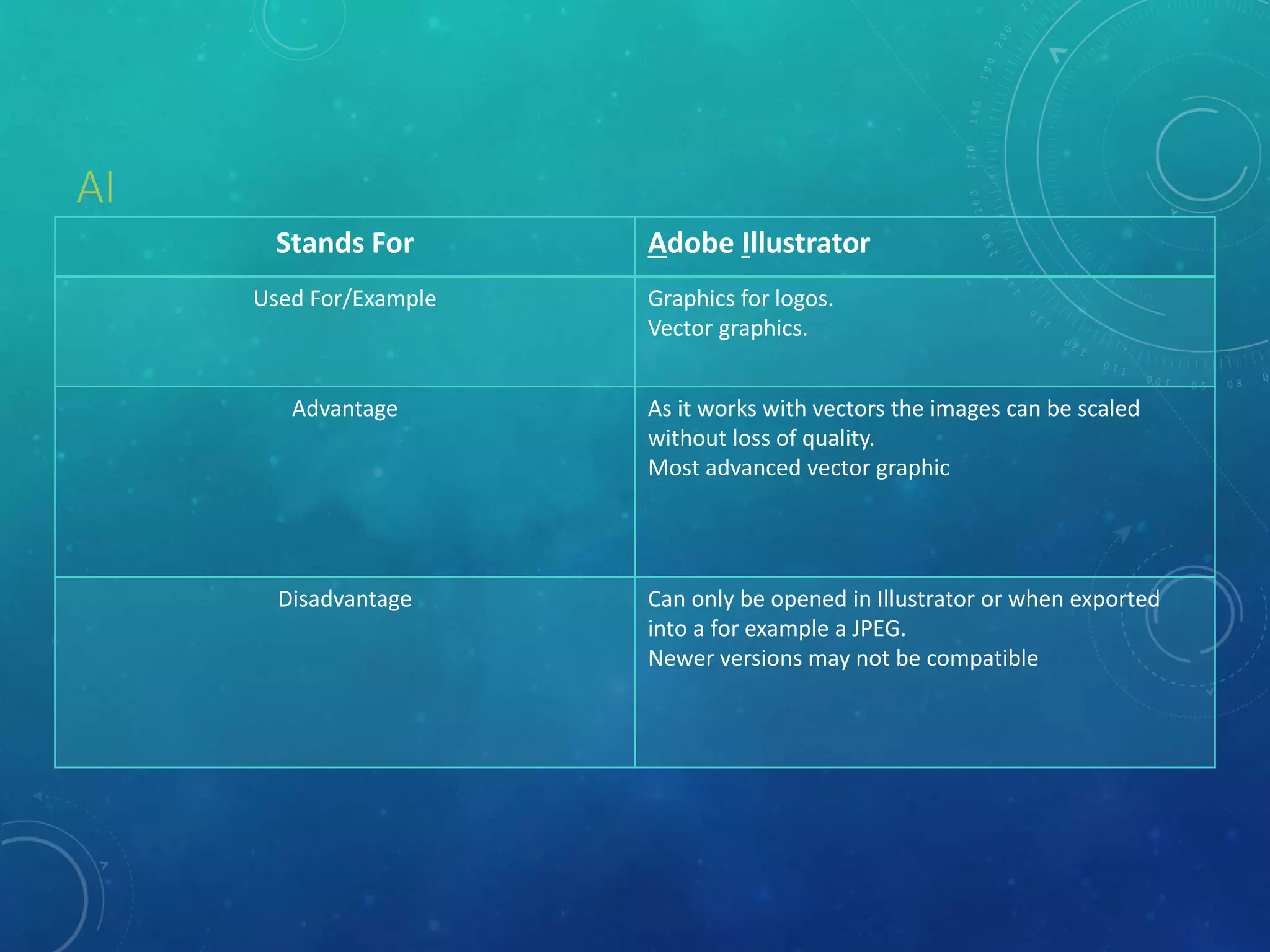
AI
Stands For Adobe Illustrator
Used For/Example Graphics for logos.
Vector graphics.
Advantage As it works with vectors the images can be scaled
without loss of quality.
Most advanced vector graphic
Disadvantage Can only be opened in Illustrator or when exported
into a for example a JPEG.
Newer versions may not be compatible
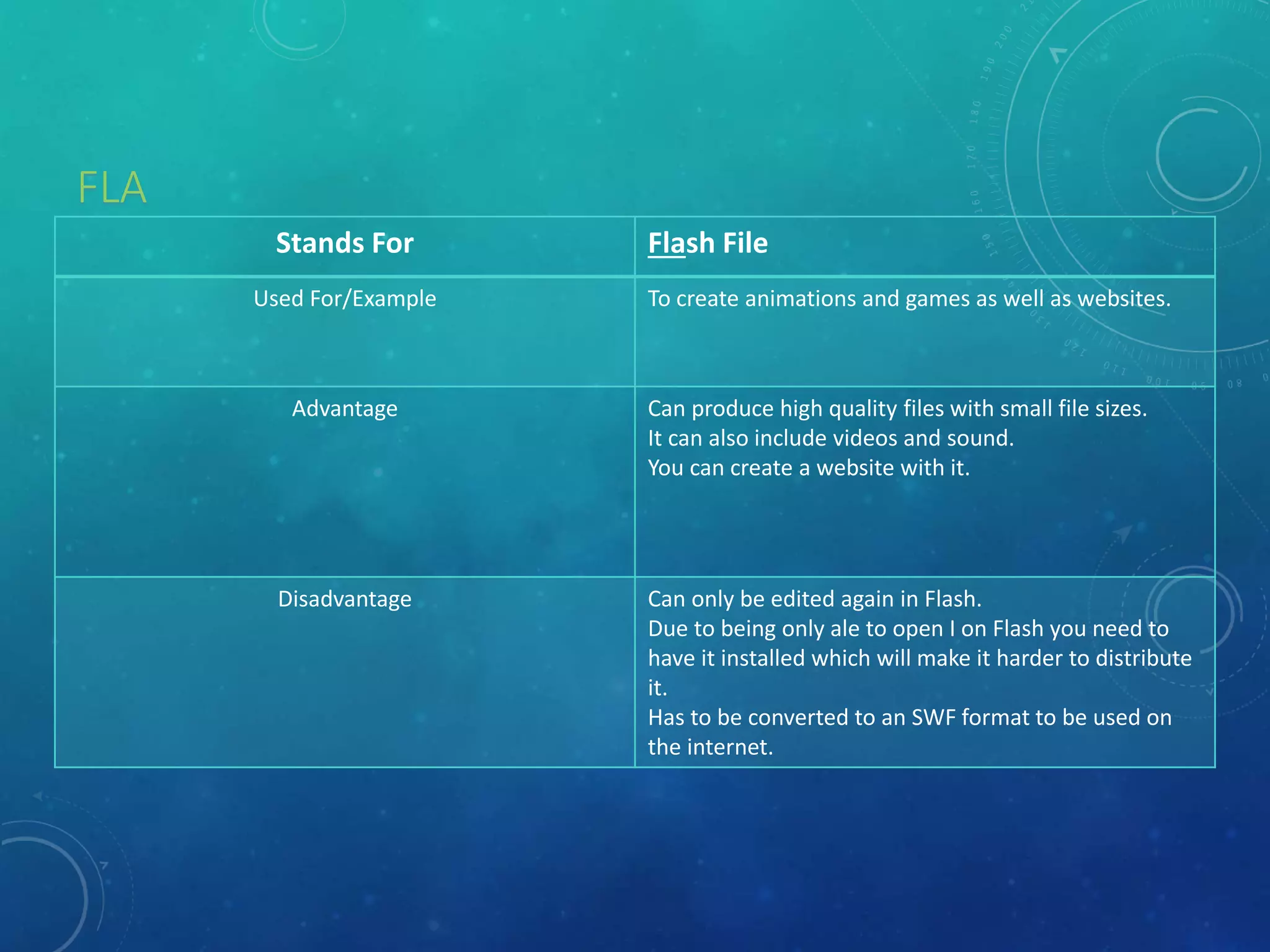
FLA
Stands For Flash File
Used For/Example To create animations and games as well as websites.
Advantage Can produce high quality files with small file sizes.
It can also include videos and sound.
You can create a website with it.
Disadvantage Can only be edited again in Flash.
Due to being only ale to open I on Flash you need to
have it installed which will make it harder to distribute
it.
Has to be converted to an SWF format to be used on
the internet.
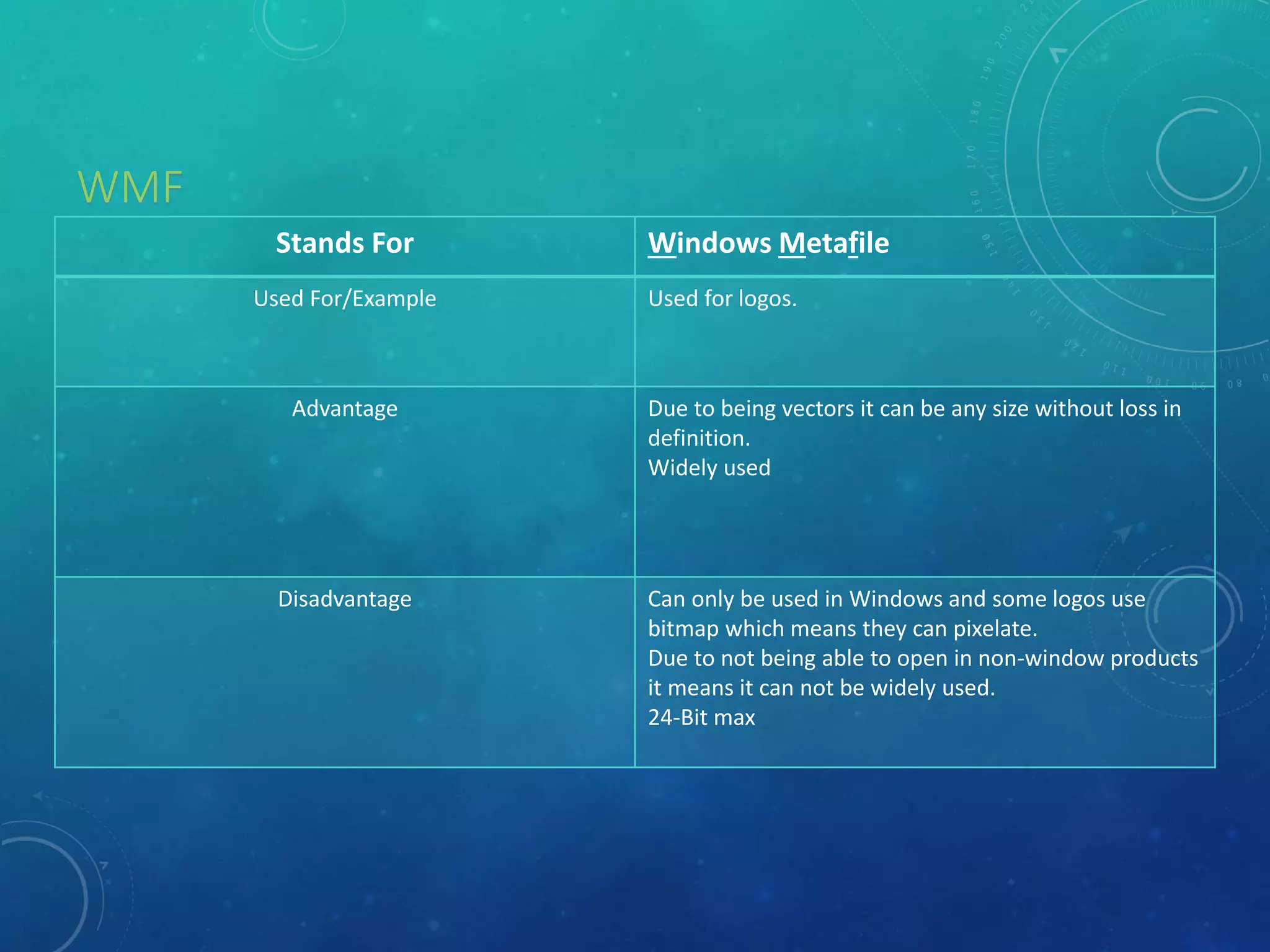
WMF
Stands For Windows Metafile
Used For/Example Used for logos.
Advantage Due to being vectors it can be any size without loss in
definition.
Widely used
Disadvantage Can only be used in Windows and some logos use
bitmap which means they can pixelate.
Due to not being able to open in non-window products
it means it can not be widely used.
24-Bit max
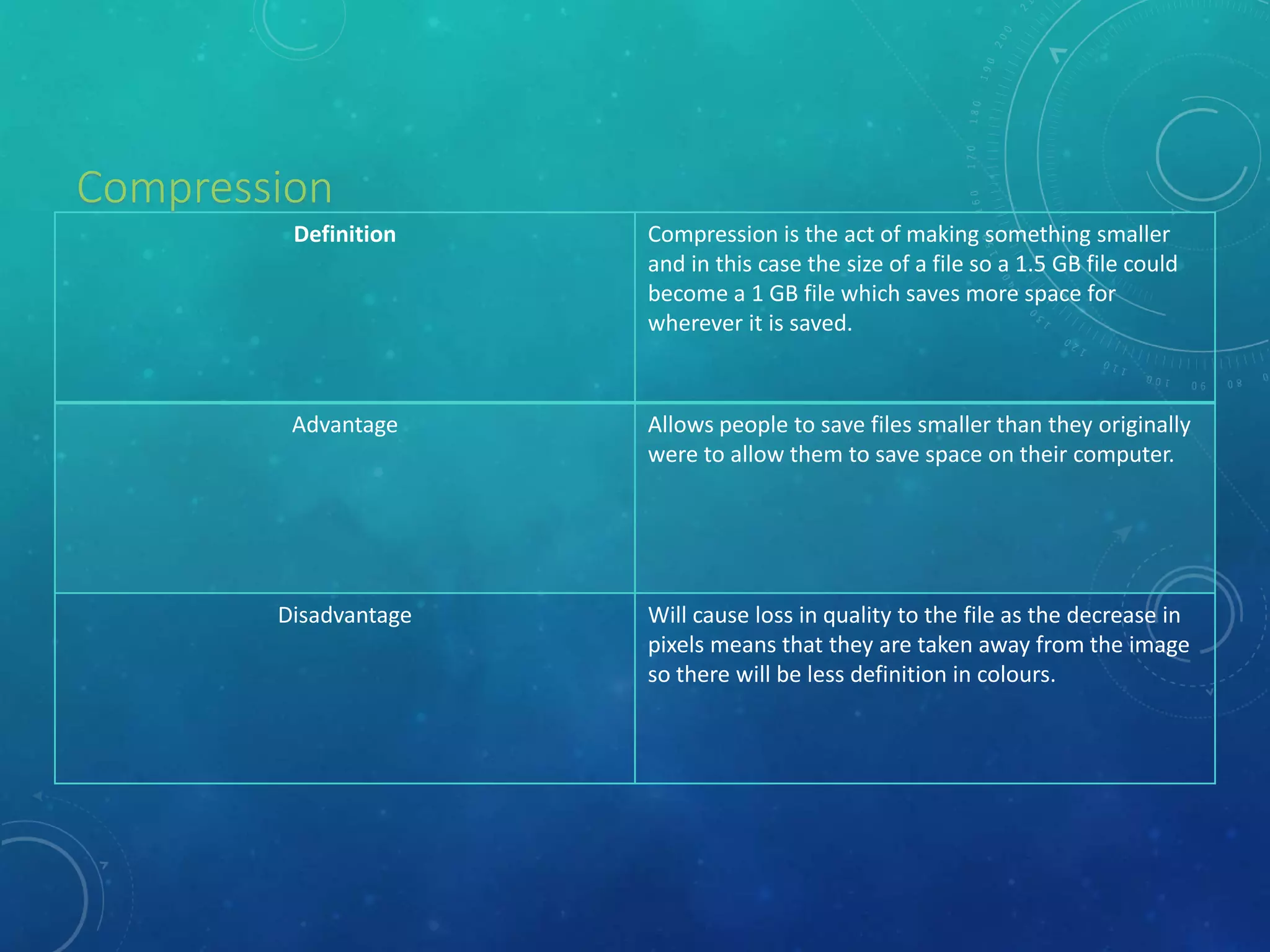
Definition Compression is the act of making something smaller
and in this case the size of a file so a 1.5 GB file could
become a 1 GB file which saves more space for
wherever it is saved.
Advantage Allows people to save files smaller than they originally
were to allow them to save space on their computer.
Disadvantage Will cause loss in quality to the file as the decrease in
pixels means that they are taken away from the image
so there will be less definition in colours.
Compression
File Format Capture and Optimising
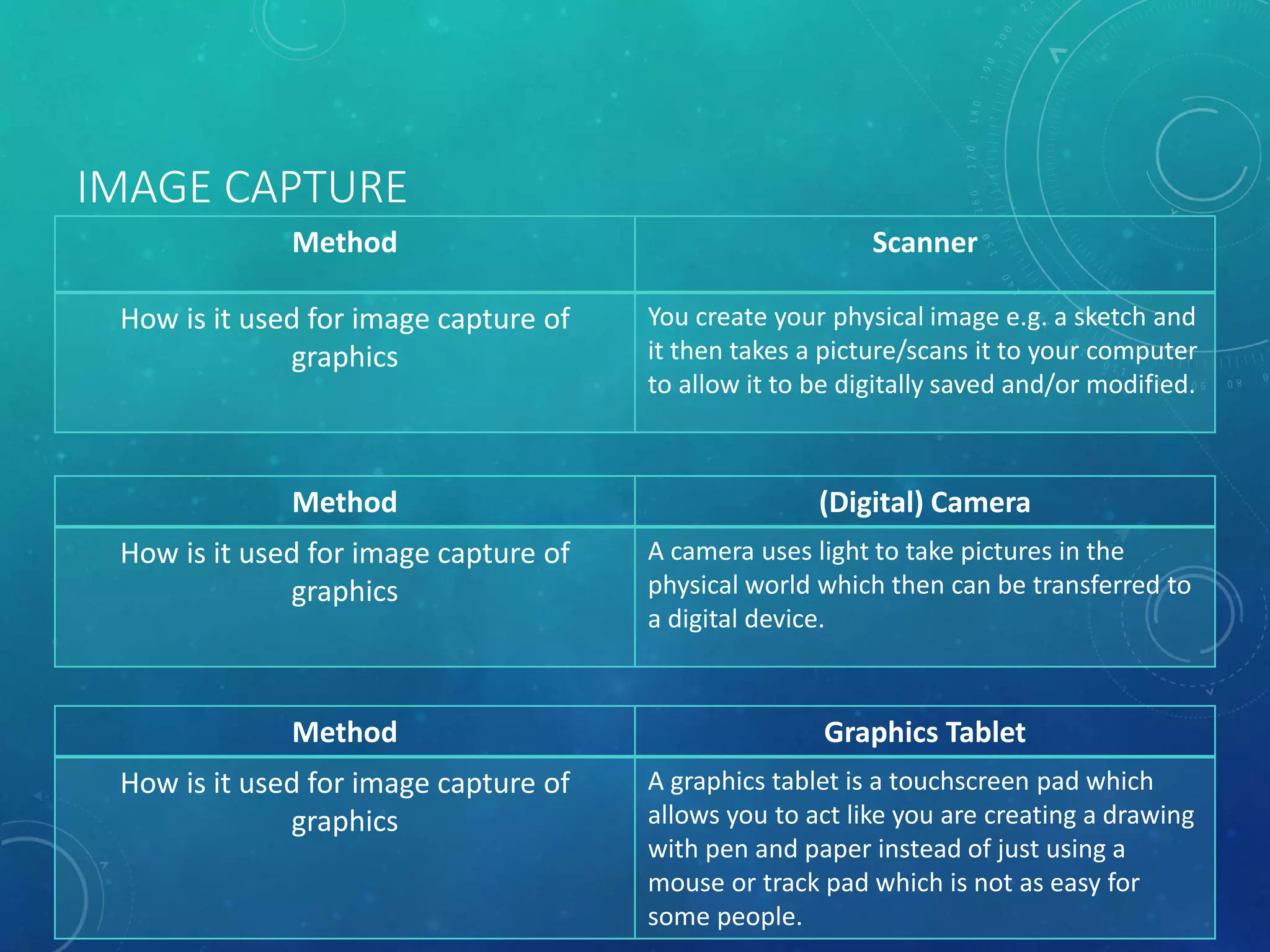
IMAGE CAPTURE
Method Scanner
How is it used for image capture of
graphics
You create your physical image e.g. a sketch and
it then takes a picture/scans it to your computer
to allow it to be digitally saved and/or modified.
Method (Digital) Camera
How is it used for image capture of
graphics
A camera uses light to take pictures in the
physical world which then can be transferred to
a digital device.
Method Graphics Tablet
How is it used for image capture of
graphics
A graphics tablet is a touchscreen pad which
allows you to act like you are creating a drawing
with pen and paper instead of just using a
mouse or track pad which is not as easy for
some people.
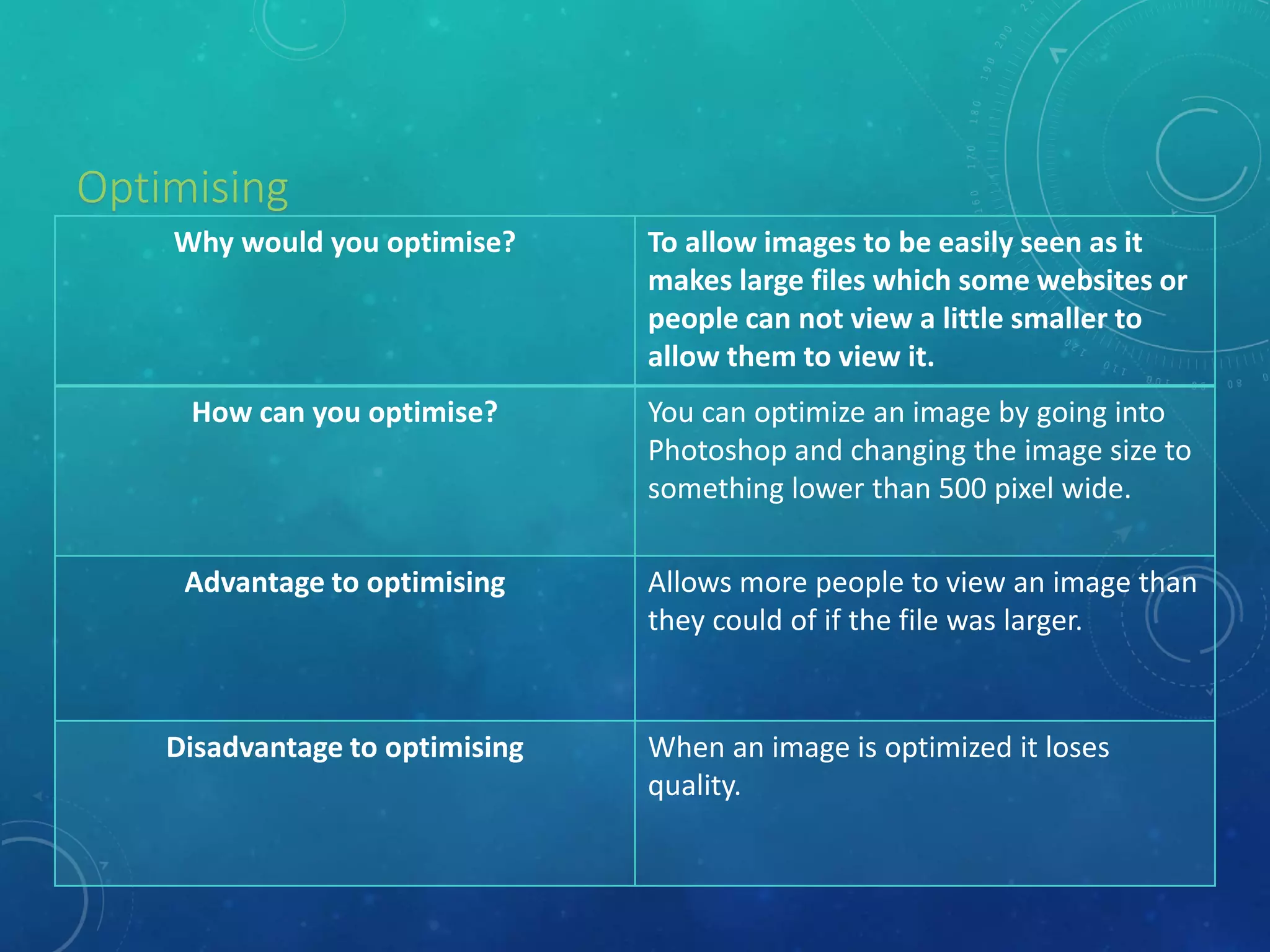
Why would you optimise? To allow images to be easily seen as it
makes large files which some websites or
people can not view a little smaller to
allow them to view it.
How can you optimise? You can optimize an image by going into
Photoshop and changing the image size to
something lower than 500 pixel wide.
Advantage to optimising Allows more people to view an image than
they could of if the file was larger.
Disadvantage to optimising When an image is optimized it loses
quality.
Optimising
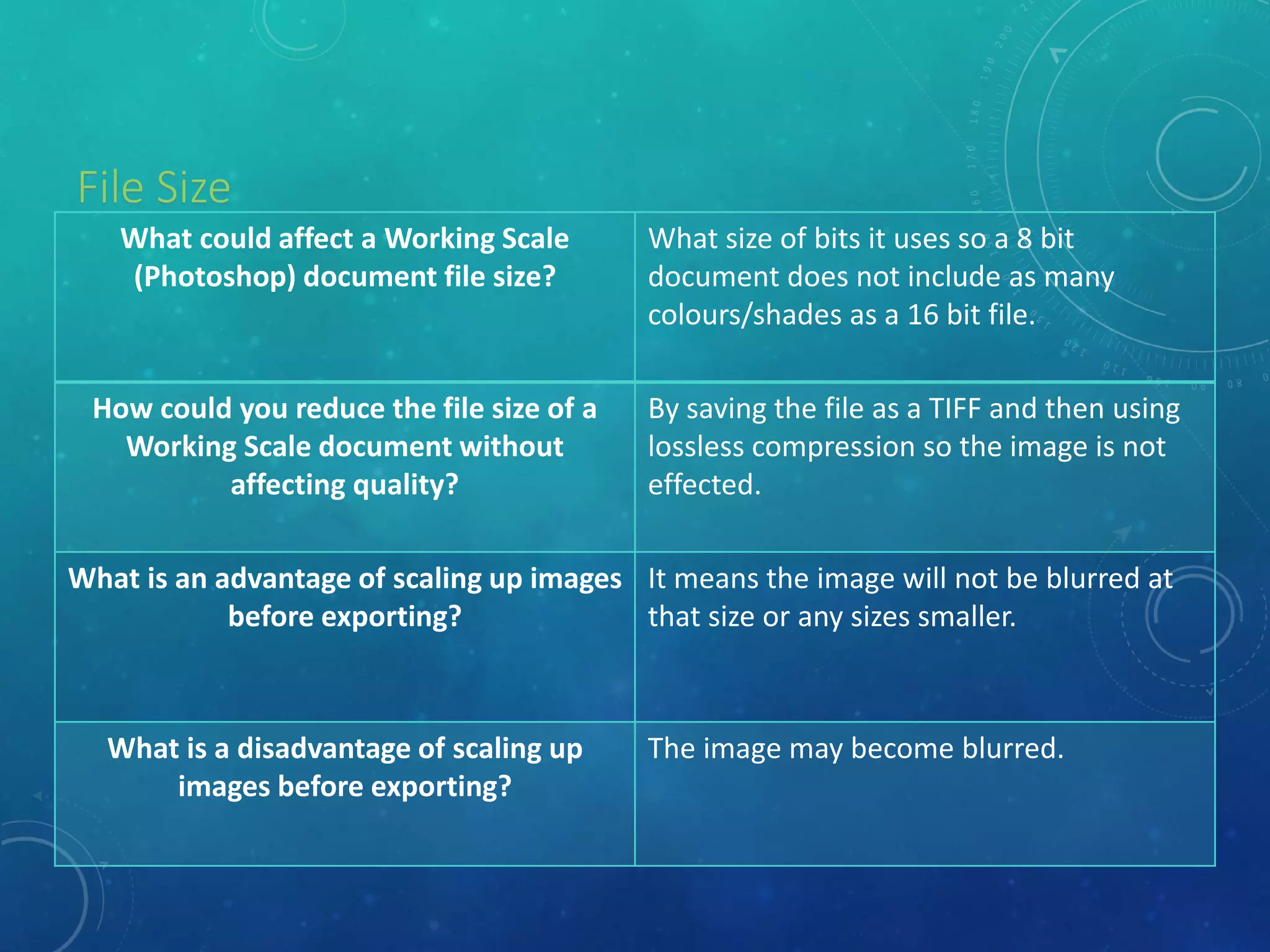
File Size
What could affect a Working Scale
(Photoshop) document file size?
What size of bits it uses so a 8 bit
document does not include as many
colours/shades as a 16 bit file.
How could you reduce the file size of a
Working Scale document without
affecting quality?
By saving the file as a TIFF and then using
lossless compression so the image is not
effected.
What is an advantage of scaling up images
before exporting?
It means the image will not be blurred at
that size or any sizes smaller.
What is a disadvantage of scaling up
images before exporting?
The image may become blurred.
Storage
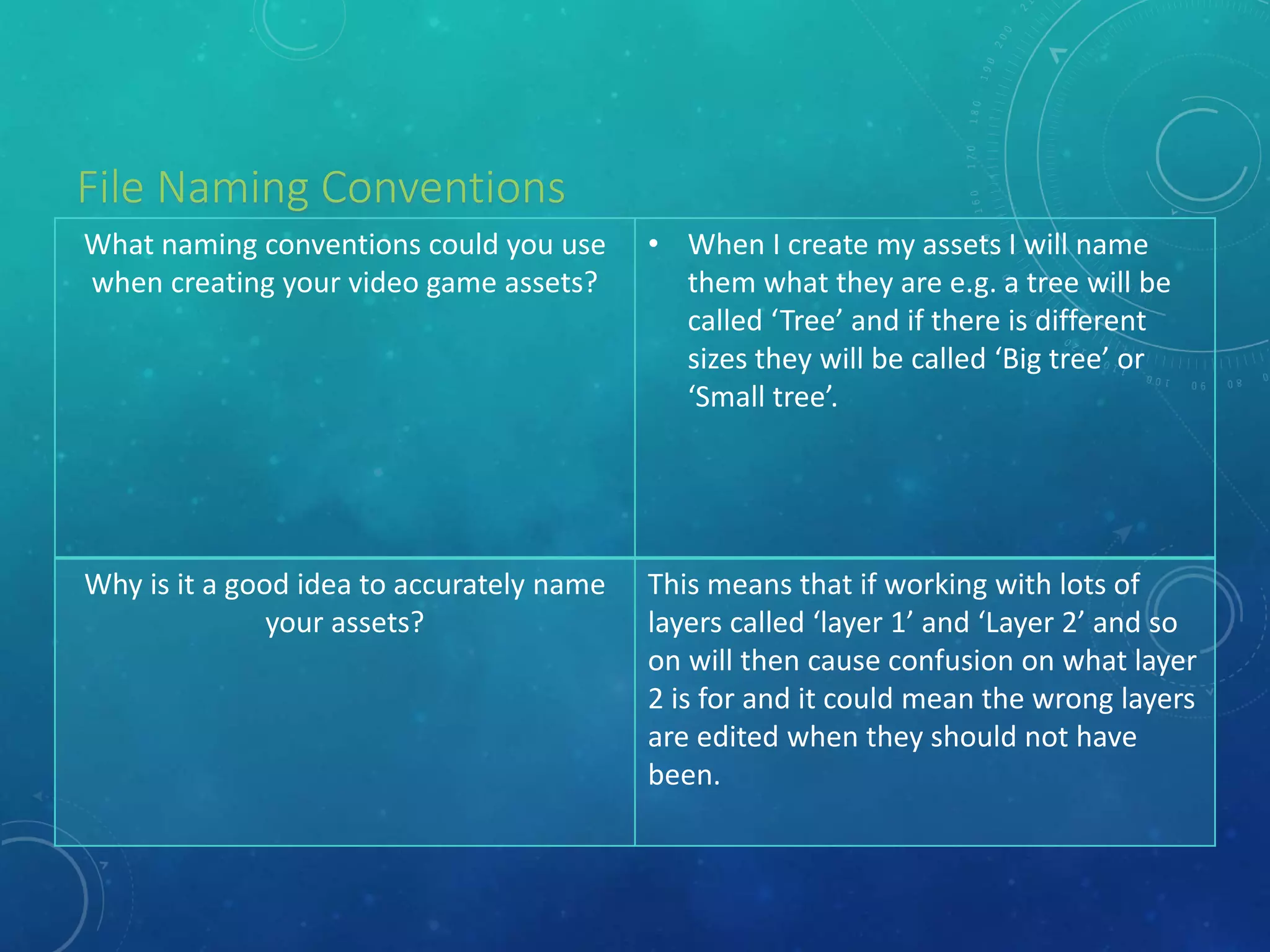
File Naming Conventions
What naming conventions could you use
when creating your video game assets?
• When I create my assets I will name
them what they are e.g. a tree will be
called ‘Tree’ and if there is different
sizes they will be called ‘Big tree’ or
‘Small tree’.
Why is it a good idea to accurately name
your assets?
This means that if working with lots of
layers called ‘layer 1’ and ‘Layer 2’ and so
on will then cause confusion on what layer
2 is for and it could mean the wrong layers
are edited when they should not have
been.
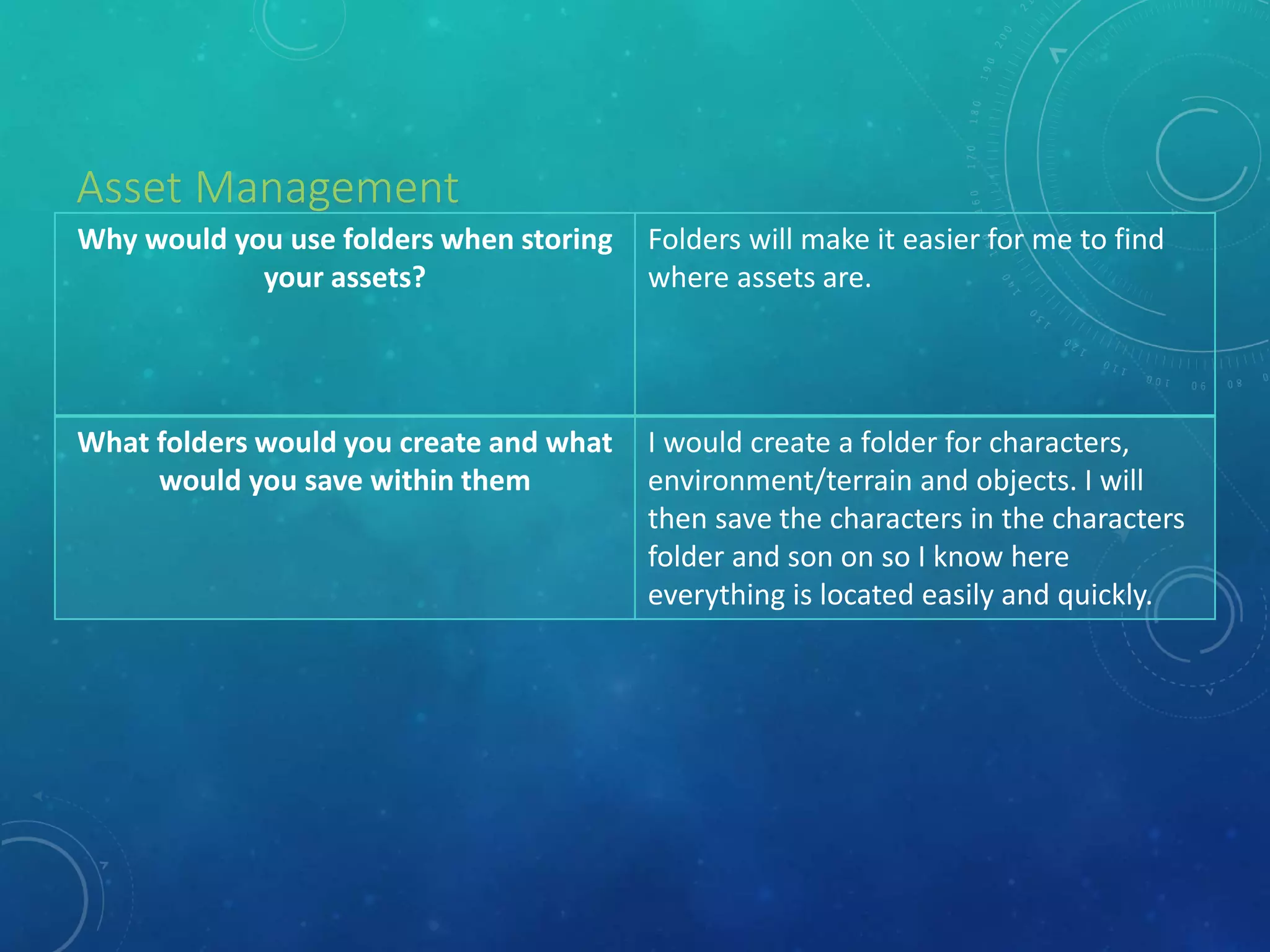
Asset Management
Why would you use folders when storing
your assets?
Folders will make it easier for me to find
where assets are.
What folders would you create and what
would you save within them
I would create a folder for characters,
environment/terrain and objects. I will
then save the characters in the characters
folder and son on so I know here
everything is located easily and quickly.

Digital graphics pro forma1

  • 1.
  • 2.
    Raster Graphics • Givea definition of Raster Graphics Raster graphics are made up of bitmaps which are made up of pixels and the pixels/bits record the colour information for each section of the image and each pixel has it’s own colour assigned to it. Due to this the images produced have a fixed resolution causing scaling to cause the image to become blurred. • Bitmaps Megapixels are a million pixels so for a 14 megapixel camera it has 14,000,000 pixels. When you get an internet image and then use it, it may loose quality due to not having the document it has been put on does not have that many pixels.
  • 3.
    Vector Graphics • Givea definition of Vector Graphics Vector graphics are made up of vectors (clues in the name) and they are also known as paths and strokes. Vectors are defined by a start and a end point and angles between them. From this information the path can become a line, square, triangle or a curvy shape.
  • 4.
    JPEG Stands For JointPhotographic Experts Group Used For/Example Used for photographs and the internet . Advantage Can be widely used as it is supported on lots of devices and software. Produces high quality and high resolution images. It is one of the most common file formats used. Some cameras use this format. Disadvantage Every time one is edited it is compressed and then recompressed which will lead to loss of quality. Not good for images wit sharp edges as they get blurred.
  • 5.
  • 6.
    TIFF Stands For TaggedImage File Format Used For/Example Used for desktop publishing and normally used by graphic designers. Advantage In Adobe InDesign this file format allows multi-page documents to be saved to one file. It also gives you the option if you want the compression to effect the quality or not. Due to not being compressed the file keeps the most data from the camera so that the quality of the image is not effect at all. Can be compressed to reduce file size without losing any of the image data. Disadvantage Due to not much or any compression this leads to large file formats. Due to the large file formats a good computer needs to be used to easily process the files Most websites/online galleries do not except TIFF files. If websites do except them the upload will be slow due to the size.
  • 7.
    GIF Stands For GraphicsInterchange Format Used For/Example Used to show short digital animations which are often on and for the internet. Advantage It is better than just a screen grab from a video. Allows you to easily add small videos to files e.g. a presentation. If a certain part of e.g. a video is what you want to show you can easily turn that part into a GIF to use. GIFs are widely playable so on most devices they can be played instantly. Disadvantage They are normally made of a few images causing the animation to not be smooth. They normally play automatically which can get annoying when you do not want they to play.
  • 8.
    BMP Stands For BitmapImage File Used For/Example Used for images for normally the internet. Advantage No loss in compression so the image stays like it was originally. Each individual pixel can be modified to allow more customisation of the image. They support all versions of windows. Best for icons and small images. Medium quality images are produced. Disadvantage Due to there no compression the files are very large which means a lot of storage space will be used to create items. Loose some of the quality of the image used.
  • 9.
    PSD Stands For PhotoshopDocument Used For/Example Used when saving Photoshop files to then be re-edited due to it saving layers and swatches and the layout of the work. Advantage Allows the file to be fully re-edited as if it was never closed. You do not loose any quality when saving files. Disadvantage Only opens on Photoshop. The files are normally very large due to it allowing you o re-edit the file as well as save the content. Due to the size of the file makes it harder to email.
  • 10.
  • 11.
    AI Stands For AdobeIllustrator Used For/Example Graphics for logos. Vector graphics. Advantage As it works with vectors the images can be scaled without loss of quality. Most advanced vector graphic Disadvantage Can only be opened in Illustrator or when exported into a for example a JPEG. Newer versions may not be compatible
  • 12.
    FLA Stands For FlashFile Used For/Example To create animations and games as well as websites. Advantage Can produce high quality files with small file sizes. It can also include videos and sound. You can create a website with it. Disadvantage Can only be edited again in Flash. Due to being only ale to open I on Flash you need to have it installed which will make it harder to distribute it. Has to be converted to an SWF format to be used on the internet.
  • 13.
    WMF Stands For WindowsMetafile Used For/Example Used for logos. Advantage Due to being vectors it can be any size without loss in definition. Widely used Disadvantage Can only be used in Windows and some logos use bitmap which means they can pixelate. Due to not being able to open in non-window products it means it can not be widely used. 24-Bit max
  • 14.
    Definition Compression isthe act of making something smaller and in this case the size of a file so a 1.5 GB file could become a 1 GB file which saves more space for wherever it is saved. Advantage Allows people to save files smaller than they originally were to allow them to save space on their computer. Disadvantage Will cause loss in quality to the file as the decrease in pixels means that they are taken away from the image so there will be less definition in colours. Compression
  • 15.
    File Format Captureand Optimising
  • 16.
    IMAGE CAPTURE Method Scanner Howis it used for image capture of graphics You create your physical image e.g. a sketch and it then takes a picture/scans it to your computer to allow it to be digitally saved and/or modified. Method (Digital) Camera How is it used for image capture of graphics A camera uses light to take pictures in the physical world which then can be transferred to a digital device. Method Graphics Tablet How is it used for image capture of graphics A graphics tablet is a touchscreen pad which allows you to act like you are creating a drawing with pen and paper instead of just using a mouse or track pad which is not as easy for some people.
  • 17.
    Why would youoptimise? To allow images to be easily seen as it makes large files which some websites or people can not view a little smaller to allow them to view it. How can you optimise? You can optimize an image by going into Photoshop and changing the image size to something lower than 500 pixel wide. Advantage to optimising Allows more people to view an image than they could of if the file was larger. Disadvantage to optimising When an image is optimized it loses quality. Optimising
  • 18.
    File Size What couldaffect a Working Scale (Photoshop) document file size? What size of bits it uses so a 8 bit document does not include as many colours/shades as a 16 bit file. How could you reduce the file size of a Working Scale document without affecting quality? By saving the file as a TIFF and then using lossless compression so the image is not effected. What is an advantage of scaling up images before exporting? It means the image will not be blurred at that size or any sizes smaller. What is a disadvantage of scaling up images before exporting? The image may become blurred.
  • 19.
  • 20.
    File Naming Conventions Whatnaming conventions could you use when creating your video game assets? • When I create my assets I will name them what they are e.g. a tree will be called ‘Tree’ and if there is different sizes they will be called ‘Big tree’ or ‘Small tree’. Why is it a good idea to accurately name your assets? This means that if working with lots of layers called ‘layer 1’ and ‘Layer 2’ and so on will then cause confusion on what layer 2 is for and it could mean the wrong layers are edited when they should not have been.
  • 21.
    Asset Management Why wouldyou use folders when storing your assets? Folders will make it easier for me to find where assets are. What folders would you create and what would you save within them I would create a folder for characters, environment/terrain and objects. I will then save the characters in the characters folder and son on so I know here everything is located easily and quickly.