Digital Graphics
File Formats
James Horbury
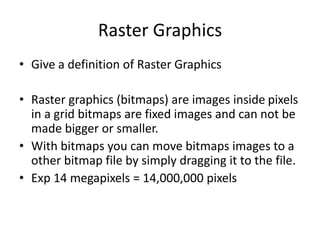
Raster Graphics
• Give a definition of Raster Graphics
• Raster graphics (bitmaps) are images inside pixels
in a grid bitmaps are fixed images and can not be
made bigger or smaller.
• With bitmaps you can move bitmaps images to a
other bitmap file by simply dragging it to the file.
• Exp 14 megapixels = 14,000,000 pixels
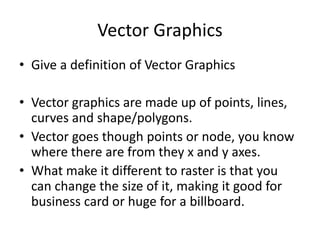
Vector Graphics
• Give a definition of Vector Graphics
• Vector graphics are made up of points, lines,
curves and shape/polygons.
• Vector goes though points or node, you know
where there are from they x and y axes.
• What make it different to raster is that you
can change the size of it, making it good for
business card or huge for a billboard.
Raster Graphics
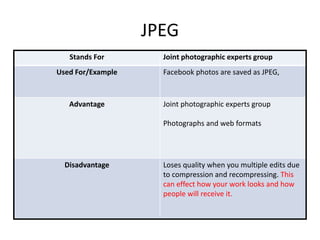
JPEG
Stands For Joint photographic experts group
Used For/Example Facebook photos are saved as JPEG,
Advantage Joint photographic experts group
Photographs and web formats
Disadvantage Loses quality when you multiple edits due
to compression and recompressing. This
can effect how your work looks and how
people will receive it.
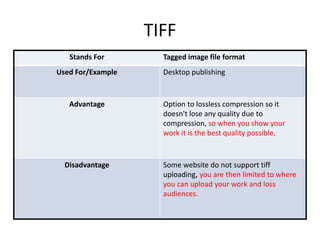
TIFF
Stands For Tagged image file format
Used For/Example Desktop publishing
Advantage Option to lossless compression so it
doesn't lose any quality due to
compression, so when you show your
work it is the best quality possible.
Disadvantage Some website do not support tiff
uploading, you are then limited to where
you can upload your work and loss
audiences.
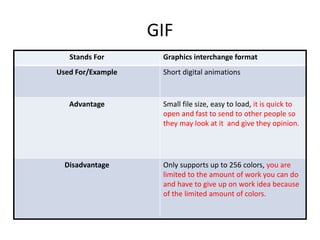
GIF
Stands For Graphics interchange format
Used For/Example Short digital animations
Advantage Small file size, easy to load, it is quick to
open and fast to send to other people so
they may look at it and give they opinion.
Disadvantage Only supports up to 256 colors, you are
limited to the amount of work you can do
and have to give up on work idea because
of the limited amount of colors.
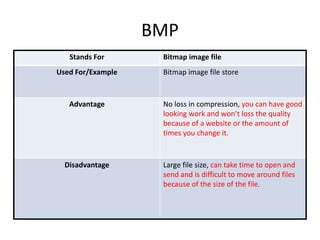
BMP
Stands For Bitmap image file
Used For/Example Bitmap image file store
Advantage No loss in compression, you can have good
looking work and won’t loss the quality
because of a website or the amount of
times you change it.
Disadvantage Large file size, can take time to open and
send and is difficult to move around files
because of the size of the file.
Vector Graphics
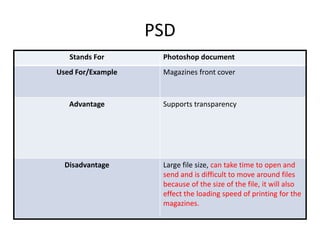
PSD
Stands For Photoshop document
Used For/Example Magazines front cover
Advantage Supports transparency
Disadvantage Large file size, can take time to open and
send and is difficult to move around files
because of the size of the file, it will also
effect the loading speed of printing for the
magazines.
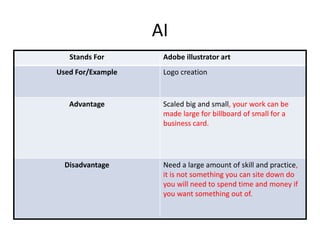
AI
Stands For Adobe illustrator art
Used For/Example Logo creation
Advantage Scaled big and small, your work can be
made large for billboard of small for a
business card.
Disadvantage Need a large amount of skill and practice,
it is not something you can site down do
you will need to spend time and money if
you want something out of.
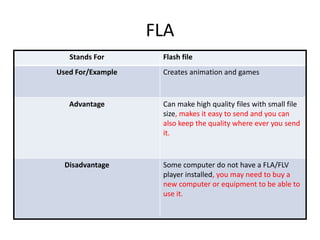
FLA
Stands For Flash file
Used For/Example Creates animation and games
Advantage Can make high quality files with small file
size, makes it easy to send and you can
also keep the quality where ever you send
it.
Disadvantage Some computer do not have a FLA/FLV
player installed, you may need to buy a
new computer or equipment to be able to
use it.
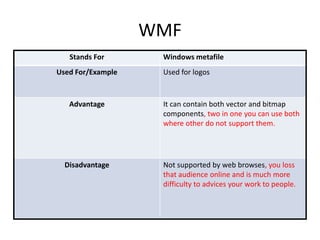
WMF
Stands For Windows metafile
Used For/Example Used for logos
Advantage It can contain both vector and bitmap
components, two in one you can use both
where other do not support them.
Disadvantage Not supported by web browses, you loss
that audience online and is much more
difficulty to advices your work to people.
File Format Capture
and Optimising
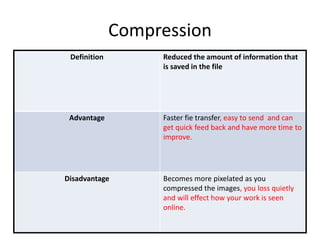
Compression
Definition Reduced the amount of information that
is saved in the file
Advantage Faster fie transfer, easy to send and can
get quick feed back and have more time to
improve.
Disadvantage Becomes more pixelated as you
compressed the images, you loss quietly
and will effect how your work is seen
online.
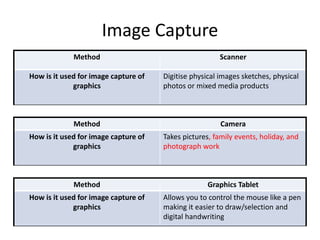
Image Capture
Method Scanner
How is it used for image capture of
graphics
Digitise physical images sketches, physical
photos or mixed media products
Method Camera
How is it used for image capture of
graphics
Takes pictures, family events, holiday, and
photograph work
Method Graphics Tablet
How is it used for image capture of
graphics
Allows you to control the mouse like a pen
making it easier to draw/selection and
digital handwriting
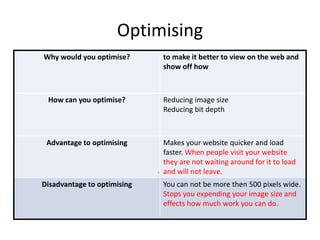
Optimising
Why would you optimise? to make it better to view on the web and
show off how
How can you optimise? Reducing image size
Reducing bit depth
Advantage to optimising Makes your website quicker and load
faster. When people visit your website
they are not waiting around for it to load
and will not leave.
Disadvantage to optimising You can not be more then 500 pixels wide.
Stops you expending your image size and
effects how much work you can do.
.
Storage
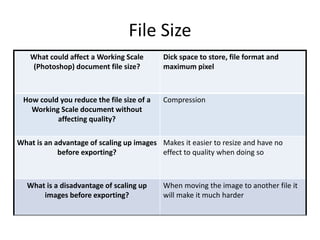
File Size
What could affect a Working Scale
(Photoshop) document file size?
Dick space to store, file format and
maximum pixel
How could you reduce the file size of a
Working Scale document without
affecting quality?
Compression
What is an advantage of scaling up images
before exporting?
Makes it easier to resize and have no
effect to quality when doing so
What is a disadvantage of scaling up
images before exporting?
When moving the image to another file it
will make it much harder
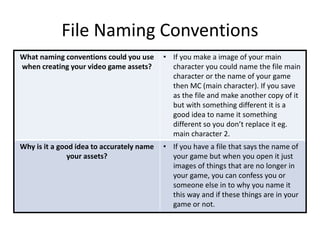
File Naming Conventions
What naming conventions could you use
when creating your video game assets?
• If you make a image of your main
character you could name the file main
character or the name of your game
then MC (main character). If you save
as the file and make another copy of it
but with something different it is a
good idea to name it something
different so you don’t replace it eg.
main character 2.
Why is it a good idea to accurately name
your assets?
• If you have a file that says the name of
your game but when you open it just
images of things that are no longer in
your game, you can confess you or
someone else in to why you name it
this way and if these things are in your
game or not.
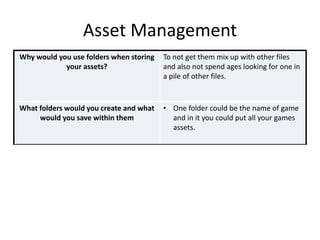
Asset Management
Why would you use folders when storing
your assets?
To not get them mix up with other files
and also not spend ages looking for one in
a pile of other files.
What folders would you create and what
would you save within them
• One folder could be the name of game
and in it you could put all your games
assets.

Digital graphics pro forma by james horbury

  • 1.
  • 2.
    Raster Graphics • Givea definition of Raster Graphics • Raster graphics (bitmaps) are images inside pixels in a grid bitmaps are fixed images and can not be made bigger or smaller. • With bitmaps you can move bitmaps images to a other bitmap file by simply dragging it to the file. • Exp 14 megapixels = 14,000,000 pixels
  • 3.
    Vector Graphics • Givea definition of Vector Graphics • Vector graphics are made up of points, lines, curves and shape/polygons. • Vector goes though points or node, you know where there are from they x and y axes. • What make it different to raster is that you can change the size of it, making it good for business card or huge for a billboard.
  • 4.
  • 5.
    JPEG Stands For Jointphotographic experts group Used For/Example Facebook photos are saved as JPEG, Advantage Joint photographic experts group Photographs and web formats Disadvantage Loses quality when you multiple edits due to compression and recompressing. This can effect how your work looks and how people will receive it.
  • 6.
    TIFF Stands For Taggedimage file format Used For/Example Desktop publishing Advantage Option to lossless compression so it doesn't lose any quality due to compression, so when you show your work it is the best quality possible. Disadvantage Some website do not support tiff uploading, you are then limited to where you can upload your work and loss audiences.
  • 7.
    GIF Stands For Graphicsinterchange format Used For/Example Short digital animations Advantage Small file size, easy to load, it is quick to open and fast to send to other people so they may look at it and give they opinion. Disadvantage Only supports up to 256 colors, you are limited to the amount of work you can do and have to give up on work idea because of the limited amount of colors.
  • 8.
    BMP Stands For Bitmapimage file Used For/Example Bitmap image file store Advantage No loss in compression, you can have good looking work and won’t loss the quality because of a website or the amount of times you change it. Disadvantage Large file size, can take time to open and send and is difficult to move around files because of the size of the file.
  • 9.
  • 10.
    PSD Stands For Photoshopdocument Used For/Example Magazines front cover Advantage Supports transparency Disadvantage Large file size, can take time to open and send and is difficult to move around files because of the size of the file, it will also effect the loading speed of printing for the magazines.
  • 11.
    AI Stands For Adobeillustrator art Used For/Example Logo creation Advantage Scaled big and small, your work can be made large for billboard of small for a business card. Disadvantage Need a large amount of skill and practice, it is not something you can site down do you will need to spend time and money if you want something out of.
  • 12.
    FLA Stands For Flashfile Used For/Example Creates animation and games Advantage Can make high quality files with small file size, makes it easy to send and you can also keep the quality where ever you send it. Disadvantage Some computer do not have a FLA/FLV player installed, you may need to buy a new computer or equipment to be able to use it.
  • 13.
    WMF Stands For Windowsmetafile Used For/Example Used for logos Advantage It can contain both vector and bitmap components, two in one you can use both where other do not support them. Disadvantage Not supported by web browses, you loss that audience online and is much more difficulty to advices your work to people.
  • 14.
  • 15.
    Compression Definition Reduced theamount of information that is saved in the file Advantage Faster fie transfer, easy to send and can get quick feed back and have more time to improve. Disadvantage Becomes more pixelated as you compressed the images, you loss quietly and will effect how your work is seen online.
  • 16.
    Image Capture Method Scanner Howis it used for image capture of graphics Digitise physical images sketches, physical photos or mixed media products Method Camera How is it used for image capture of graphics Takes pictures, family events, holiday, and photograph work Method Graphics Tablet How is it used for image capture of graphics Allows you to control the mouse like a pen making it easier to draw/selection and digital handwriting
  • 17.
    Optimising Why would youoptimise? to make it better to view on the web and show off how How can you optimise? Reducing image size Reducing bit depth Advantage to optimising Makes your website quicker and load faster. When people visit your website they are not waiting around for it to load and will not leave. Disadvantage to optimising You can not be more then 500 pixels wide. Stops you expending your image size and effects how much work you can do. .
  • 18.
  • 19.
    File Size What couldaffect a Working Scale (Photoshop) document file size? Dick space to store, file format and maximum pixel How could you reduce the file size of a Working Scale document without affecting quality? Compression What is an advantage of scaling up images before exporting? Makes it easier to resize and have no effect to quality when doing so What is a disadvantage of scaling up images before exporting? When moving the image to another file it will make it much harder
  • 20.
    File Naming Conventions Whatnaming conventions could you use when creating your video game assets? • If you make a image of your main character you could name the file main character or the name of your game then MC (main character). If you save as the file and make another copy of it but with something different it is a good idea to name it something different so you don’t replace it eg. main character 2. Why is it a good idea to accurately name your assets? • If you have a file that says the name of your game but when you open it just images of things that are no longer in your game, you can confess you or someone else in to why you name it this way and if these things are in your game or not.
  • 21.
    Asset Management Why wouldyou use folders when storing your assets? To not get them mix up with other files and also not spend ages looking for one in a pile of other files. What folders would you create and what would you save within them • One folder could be the name of game and in it you could put all your games assets.