Digital Graphics
File Formats
Your name here
Raster Graphics
• Raster Graphics are a type of digital graphic that
are made up of pixels. Each pixel records a colour
for that particular part of the image. The more
pixels that an image contains the higher the
quality that the image tends to be. If a camera
has ten megapixels that refers to how may million
pixels it is made up of. For example 10 megapixels
would be 10 million pixels making up the image.
They have a fixed resolution and will lose quality
if they are scaled.
Vector Graphics
• Vector graphics are a type of digital graphic
that is made up of paths and curves between
two points. This could either be: a line, curve,
triangle or curvy shape. When a vector is
scaled it does not lose quality which makes it
perfect for a company logo for example as it
can be placed on different sized documents
without losing any quality.
Raster Graphics
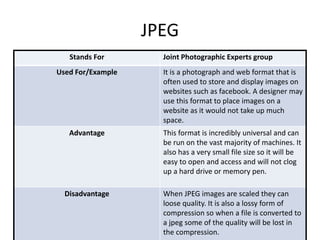
JPEG
Stands For Joint Photographic Experts group
Used For/Example It is a photograph and web format that is
often used to store and display images on
websites such as facebook. A designer may
use this format to place images on a
website as it would not take up much
space.
Advantage This format is incredibly universal and can
be run on the vast majority of machines. It
also has a very small file size so it will be
easy to open and access and will not clog
up a hard drive or memory pen.
Disadvantage When JPEG images are scaled they can
loose quality. It is also a lossy form of
compression so when a file is converted to
a jpeg some of the quality will be lost in
the compression.
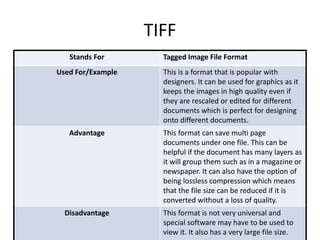
TIFF
Stands For Tagged Image File Format
Used For/Example This is a format that is popular with
designers. It can be used for graphics as it
keeps the images in high quality even if
they are rescaled or edited for different
documents which is perfect for designing
onto different documents.
Advantage This format can save multi page
documents under one file. This can be
helpful if the document has many layers as
it will group them such as in a magazine or
newspaper. It can also have the option of
being lossless compression which means
that the file size can be reduced if it is
converted without a loss of quality.
Disadvantage This format is not very universal and
special software may have to be used to
view it. It also has a very large file size.
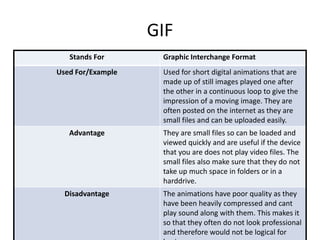
GIF
Stands For Graphic Interchange Format
Used For/Example Used for short digital animations that are
made up of still images played one after
the other in a continuous loop to give the
impression of a moving image. They are
often posted on the internet as they are
small files and can be uploaded easily.
Advantage They are small files so can be loaded and
viewed quickly and are useful if the device
that you are does not play video files. The
small files also make sure that they do not
take up much space in folders or in a
harddrive.
Disadvantage The animations have poor quality as they
have been heavily compressed and cant
play sound along with them. This makes it
so that they often do not look professional
and therefore would not be logical for
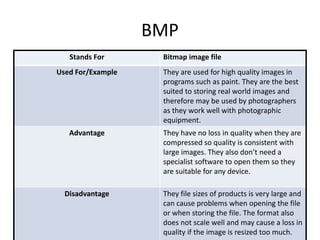
BMP
Stands For Bitmap image file
Used For/Example They are used for high quality images in
programs such as paint. They are the best
suited to storing real world images and
therefore may be used by photographers
as they work well with photographic
equipment.
Advantage They have no loss in quality when they are
compressed so quality is consistent with
large images. They also don’t need a
specialist software to open them so they
are suitable for any device.
Disadvantage They file sizes of products is very large and
can cause problems when opening the file
or when storing the file. The format also
does not scale well and may cause a loss in
quality if the image is resized too much.
Vector Graphics
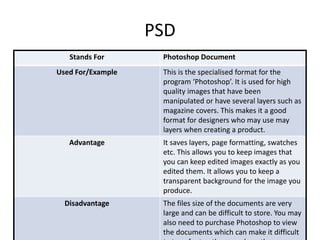
PSD
Stands For Photoshop Document
Used For/Example This is the specialised format for the
program ‘Photoshop’. It is used for high
quality images that have been
manipulated or have several layers such as
magazine covers. This makes it a good
format for designers who may use may
layers when creating a product.
Advantage It saves layers, page formatting, swatches
etc. This allows you to keep images that
you can keep edited images exactly as you
edited them. It allows you to keep a
transparent background for the image you
produce.
Disadvantage The files size of the documents are very
large and can be difficult to store. You may
also need to purchase Photoshop to view
the documents which can make it difficult
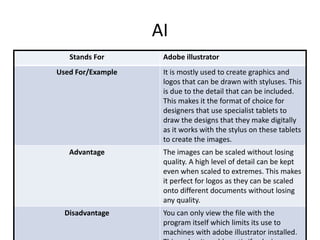
AI
Stands For Adobe illustrator
Used For/Example It is mostly used to create graphics and
logos that can be drawn with styluses. This
is due to the detail that can be included.
This makes it the format of choice for
designers that use specialist tablets to
draw the designs that they make digitally
as it works with the stylus on these tablets
to create the images.
Advantage The images can be scaled without losing
quality. A high level of detail can be kept
even when scaled to extremes. This makes
it perfect for logos as they can be scaled
onto different documents without losing
any quality.
Disadvantage You can only view the file with the
program itself which limits its use to
machines with adobe illustrator installed.
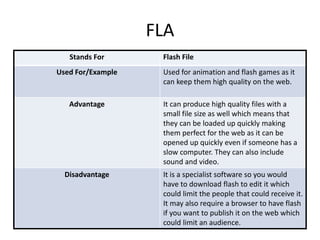
FLA
Stands For Flash File
Used For/Example Used for animation and flash games as it
can keep them high quality on the web.
Advantage It can produce high quality files with a
small file size as well which means that
they can be loaded up quickly making
them perfect for the web as it can be
opened up quickly even if someone has a
slow computer. They can also include
sound and video.
Disadvantage It is a specialist software so you would
have to download flash to edit it which
could limit the people that could receive it.
It may also require a browser to have flash
if you want to publish it on the web which
could limit an audience.
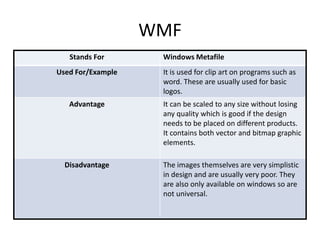
WMF
Stands For Windows Metafile
Used For/Example It is used for clip art on programs such as
word. These are usually used for basic
logos.
Advantage It can be scaled to any size without losing
any quality which is good if the design
needs to be placed on different products.
It contains both vector and bitmap graphic
elements.
Disadvantage The images themselves are very simplistic
in design and are usually very poor. They
are also only available on windows so are
not universal.
File Format Capture
and Optimising
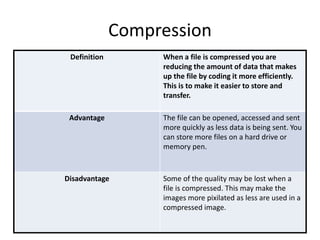
Compression
Definition When a file is compressed you are
reducing the amount of data that makes
up the file by coding it more efficiently.
This is to make it easier to store and
transfer.
Advantage The file can be opened, accessed and sent
more quickly as less data is being sent. You
can store more files on a hard drive or
memory pen.
Disadvantage Some of the quality may be lost when a
file is compressed. This may make the
images more pixilated as less are used in a
compressed image.
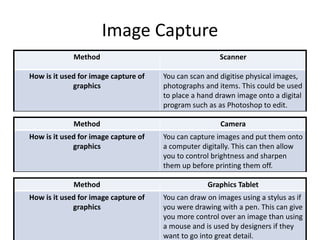
Image Capture
Method Scanner
How is it used for image capture of
graphics
You can scan and digitise physical images,
photographs and items. This could be used
to place a hand drawn image onto a digital
program such as as Photoshop to edit.
Method Camera
How is it used for image capture of
graphics
You can capture images and put them onto
a computer digitally. This can then allow
you to control brightness and sharpen
them up before printing them off.
Method Graphics Tablet
How is it used for image capture of
graphics
You can draw on images using a stylus as if
you were drawing with a pen. This can give
you more control over an image than using
a mouse and is used by designers if they
want to go into great detail.
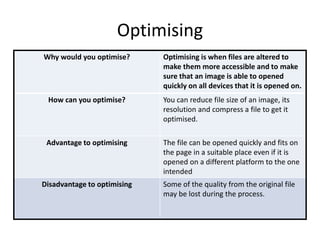
Optimising
Why would you optimise? Optimising is when files are altered to
make them more accessible and to make
sure that an image is able to opened
quickly on all devices that it is opened on.
How can you optimise? You can reduce file size of an image, its
resolution and compress a file to get it
optimised.
Advantage to optimising The file can be opened quickly and fits on
the page in a suitable place even if it is
opened on a different platform to the one
intended
Disadvantage to optimising Some of the quality from the original file
may be lost during the process.
Storage
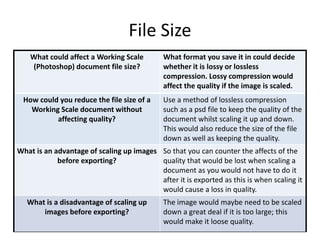
File Size
What could affect a Working Scale
(Photoshop) document file size?
What format you save it in could decide
whether it is lossy or lossless
compression. Lossy compression would
affect the quality if the image is scaled.
How could you reduce the file size of a
Working Scale document without
affecting quality?
Use a method of lossless compression
such as a psd file to keep the quality of the
document whilst scaling it up and down.
This would also reduce the size of the file
down as well as keeping the quality.
What is an advantage of scaling up images
before exporting?
So that you can counter the affects of the
quality that would be lost when scaling a
document as you would not have to do it
after it is exported as this is when scaling it
would cause a loss in quality.
What is a disadvantage of scaling up
images before exporting?
The image would maybe need to be scaled
down a great deal if it is too large; this
would make it loose quality.
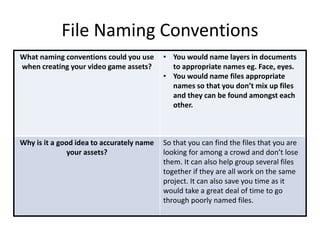
File Naming Conventions
What naming conventions could you use
when creating your video game assets?
• You would name layers in documents
to appropriate names eg. Face, eyes.
• You would name files appropriate
names so that you don’t mix up files
and they can be found amongst each
other.
Why is it a good idea to accurately name
your assets?
So that you can find the files that you are
looking for among a crowd and don’t lose
them. It can also help group several files
together if they are all work on the same
project. It can also save you time as it
would take a great deal of time to go
through poorly named files.
Asset Management
Why would you use folders when storing
your assets?
So that you can group together files that
are based around the same project and
can access them all together if needs be.
For example if you have many pages from
a digital book they can all be placed in
one folder and accessed together.
What folders would you create and what
would you save within them
• Folders for different tasks such as for
each project and each sub task within
them. In terms of video game assets
you could make folders for different
characters and settings within the game
so that they are easy to navigate and be
accessed as different media within the
project.

Digital graphics file formats

  • 1.
  • 2.
    Raster Graphics • RasterGraphics are a type of digital graphic that are made up of pixels. Each pixel records a colour for that particular part of the image. The more pixels that an image contains the higher the quality that the image tends to be. If a camera has ten megapixels that refers to how may million pixels it is made up of. For example 10 megapixels would be 10 million pixels making up the image. They have a fixed resolution and will lose quality if they are scaled.
  • 3.
    Vector Graphics • Vectorgraphics are a type of digital graphic that is made up of paths and curves between two points. This could either be: a line, curve, triangle or curvy shape. When a vector is scaled it does not lose quality which makes it perfect for a company logo for example as it can be placed on different sized documents without losing any quality.
  • 4.
  • 5.
    JPEG Stands For JointPhotographic Experts group Used For/Example It is a photograph and web format that is often used to store and display images on websites such as facebook. A designer may use this format to place images on a website as it would not take up much space. Advantage This format is incredibly universal and can be run on the vast majority of machines. It also has a very small file size so it will be easy to open and access and will not clog up a hard drive or memory pen. Disadvantage When JPEG images are scaled they can loose quality. It is also a lossy form of compression so when a file is converted to a jpeg some of the quality will be lost in the compression.
  • 6.
    TIFF Stands For TaggedImage File Format Used For/Example This is a format that is popular with designers. It can be used for graphics as it keeps the images in high quality even if they are rescaled or edited for different documents which is perfect for designing onto different documents. Advantage This format can save multi page documents under one file. This can be helpful if the document has many layers as it will group them such as in a magazine or newspaper. It can also have the option of being lossless compression which means that the file size can be reduced if it is converted without a loss of quality. Disadvantage This format is not very universal and special software may have to be used to view it. It also has a very large file size.
  • 7.
    GIF Stands For GraphicInterchange Format Used For/Example Used for short digital animations that are made up of still images played one after the other in a continuous loop to give the impression of a moving image. They are often posted on the internet as they are small files and can be uploaded easily. Advantage They are small files so can be loaded and viewed quickly and are useful if the device that you are does not play video files. The small files also make sure that they do not take up much space in folders or in a harddrive. Disadvantage The animations have poor quality as they have been heavily compressed and cant play sound along with them. This makes it so that they often do not look professional and therefore would not be logical for
  • 8.
    BMP Stands For Bitmapimage file Used For/Example They are used for high quality images in programs such as paint. They are the best suited to storing real world images and therefore may be used by photographers as they work well with photographic equipment. Advantage They have no loss in quality when they are compressed so quality is consistent with large images. They also don’t need a specialist software to open them so they are suitable for any device. Disadvantage They file sizes of products is very large and can cause problems when opening the file or when storing the file. The format also does not scale well and may cause a loss in quality if the image is resized too much.
  • 9.
  • 10.
    PSD Stands For PhotoshopDocument Used For/Example This is the specialised format for the program ‘Photoshop’. It is used for high quality images that have been manipulated or have several layers such as magazine covers. This makes it a good format for designers who may use may layers when creating a product. Advantage It saves layers, page formatting, swatches etc. This allows you to keep images that you can keep edited images exactly as you edited them. It allows you to keep a transparent background for the image you produce. Disadvantage The files size of the documents are very large and can be difficult to store. You may also need to purchase Photoshop to view the documents which can make it difficult
  • 11.
    AI Stands For Adobeillustrator Used For/Example It is mostly used to create graphics and logos that can be drawn with styluses. This is due to the detail that can be included. This makes it the format of choice for designers that use specialist tablets to draw the designs that they make digitally as it works with the stylus on these tablets to create the images. Advantage The images can be scaled without losing quality. A high level of detail can be kept even when scaled to extremes. This makes it perfect for logos as they can be scaled onto different documents without losing any quality. Disadvantage You can only view the file with the program itself which limits its use to machines with adobe illustrator installed.
  • 12.
    FLA Stands For FlashFile Used For/Example Used for animation and flash games as it can keep them high quality on the web. Advantage It can produce high quality files with a small file size as well which means that they can be loaded up quickly making them perfect for the web as it can be opened up quickly even if someone has a slow computer. They can also include sound and video. Disadvantage It is a specialist software so you would have to download flash to edit it which could limit the people that could receive it. It may also require a browser to have flash if you want to publish it on the web which could limit an audience.
  • 13.
    WMF Stands For WindowsMetafile Used For/Example It is used for clip art on programs such as word. These are usually used for basic logos. Advantage It can be scaled to any size without losing any quality which is good if the design needs to be placed on different products. It contains both vector and bitmap graphic elements. Disadvantage The images themselves are very simplistic in design and are usually very poor. They are also only available on windows so are not universal.
  • 14.
  • 15.
    Compression Definition When afile is compressed you are reducing the amount of data that makes up the file by coding it more efficiently. This is to make it easier to store and transfer. Advantage The file can be opened, accessed and sent more quickly as less data is being sent. You can store more files on a hard drive or memory pen. Disadvantage Some of the quality may be lost when a file is compressed. This may make the images more pixilated as less are used in a compressed image.
  • 16.
    Image Capture Method Scanner Howis it used for image capture of graphics You can scan and digitise physical images, photographs and items. This could be used to place a hand drawn image onto a digital program such as as Photoshop to edit. Method Camera How is it used for image capture of graphics You can capture images and put them onto a computer digitally. This can then allow you to control brightness and sharpen them up before printing them off. Method Graphics Tablet How is it used for image capture of graphics You can draw on images using a stylus as if you were drawing with a pen. This can give you more control over an image than using a mouse and is used by designers if they want to go into great detail.
  • 17.
    Optimising Why would youoptimise? Optimising is when files are altered to make them more accessible and to make sure that an image is able to opened quickly on all devices that it is opened on. How can you optimise? You can reduce file size of an image, its resolution and compress a file to get it optimised. Advantage to optimising The file can be opened quickly and fits on the page in a suitable place even if it is opened on a different platform to the one intended Disadvantage to optimising Some of the quality from the original file may be lost during the process.
  • 18.
  • 19.
    File Size What couldaffect a Working Scale (Photoshop) document file size? What format you save it in could decide whether it is lossy or lossless compression. Lossy compression would affect the quality if the image is scaled. How could you reduce the file size of a Working Scale document without affecting quality? Use a method of lossless compression such as a psd file to keep the quality of the document whilst scaling it up and down. This would also reduce the size of the file down as well as keeping the quality. What is an advantage of scaling up images before exporting? So that you can counter the affects of the quality that would be lost when scaling a document as you would not have to do it after it is exported as this is when scaling it would cause a loss in quality. What is a disadvantage of scaling up images before exporting? The image would maybe need to be scaled down a great deal if it is too large; this would make it loose quality.
  • 20.
    File Naming Conventions Whatnaming conventions could you use when creating your video game assets? • You would name layers in documents to appropriate names eg. Face, eyes. • You would name files appropriate names so that you don’t mix up files and they can be found amongst each other. Why is it a good idea to accurately name your assets? So that you can find the files that you are looking for among a crowd and don’t lose them. It can also help group several files together if they are all work on the same project. It can also save you time as it would take a great deal of time to go through poorly named files.
  • 21.
    Asset Management Why wouldyou use folders when storing your assets? So that you can group together files that are based around the same project and can access them all together if needs be. For example if you have many pages from a digital book they can all be placed in one folder and accessed together. What folders would you create and what would you save within them • Folders for different tasks such as for each project and each sub task within them. In terms of video game assets you could make folders for different characters and settings within the game so that they are easy to navigate and be accessed as different media within the project.