
Company Proprietary and Confidential  Copyright Info Goes Here Just Like This Find fans  on facebook
About facebook More than 800 million users Originally started as college network Open for everyone 2006 Fastest growing age group >35
Why facebook works for business? Variety of tools Pages, groups, events, applications, ads Large user base    Find community of interest ” Social ads” Your customers are on facebook – so you need to be
Get up to speed with facebook Create your profile Create a page or group to build a community around your business Create an event to promote your business Set up a social ad to target your niche
Create your profile Enter as much or as little personal information as you want Ad profile picture Important to enter info about yourself in the small box beneath your profile image Search for topics in your area and join groups and become a fan Get familiar with the privacy settings!
Page or Group? Feature Page Group Membership Fans Members Funtionality Moore powerful Basic set of functions Discussion ” broadcast” Discussions between members Status Updated by multiple people Personal Messaging Do not show in message inbox Show in message inbox Measurement Advances level of information Simple number of members
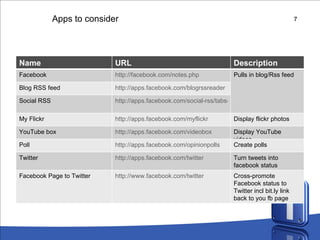
Apps to consider Name URL Description Facebook http://facebook.com/notes.php Pulls in blog/Rss feed Blog RSS feed http://apps.facebook.com/blogrssreader Social RSS http://apps.facebook.com/social-rss/tabsetting.php My Flickr http://apps.facebook.com/myflickr Display flickr photos YouTube box http://apps.facebook.com/videobox Display YouTube videos Poll http://apps.facebook.com/opinionpolls Create polls Twitter http://apps.facebook.com/twitter Turn tweets into facebook status Facebook Page to Twitter http://www.facebook.com/twitter Cross-promote Facebook status to Twitter incl bit.ly link back to you fb page
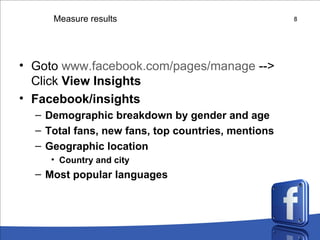
Measure results Goto  www.facebook.com/pages/manage  --> Click  View Insights Facebook/insights Demographic breakdown by gender and age Total fans, new fans, top countries, mentions Geographic location Country and city Most popular languages
Take action Sign-up  for an account at facebook You can use a fake-one, if you do not wish to use your personal account Set-up a profile Create a page for your group’s project Install applications Aggregate your other social media Blog, Podcast, Flickr, YouTube Create a call-for-action Measure your results

Facebook

  • 1.
    Company Proprietary andConfidential Copyright Info Goes Here Just Like This Find fans on facebook
  • 2.
    About facebook Morethan 800 million users Originally started as college network Open for everyone 2006 Fastest growing age group >35
  • 3.
    Why facebook worksfor business? Variety of tools Pages, groups, events, applications, ads Large user base  Find community of interest ” Social ads” Your customers are on facebook – so you need to be
  • 4.
    Get up tospeed with facebook Create your profile Create a page or group to build a community around your business Create an event to promote your business Set up a social ad to target your niche
  • 5.
    Create your profileEnter as much or as little personal information as you want Ad profile picture Important to enter info about yourself in the small box beneath your profile image Search for topics in your area and join groups and become a fan Get familiar with the privacy settings!
  • 6.
    Page or Group?Feature Page Group Membership Fans Members Funtionality Moore powerful Basic set of functions Discussion ” broadcast” Discussions between members Status Updated by multiple people Personal Messaging Do not show in message inbox Show in message inbox Measurement Advances level of information Simple number of members
  • 7.
    Apps to considerName URL Description Facebook http://facebook.com/notes.php Pulls in blog/Rss feed Blog RSS feed http://apps.facebook.com/blogrssreader Social RSS http://apps.facebook.com/social-rss/tabsetting.php My Flickr http://apps.facebook.com/myflickr Display flickr photos YouTube box http://apps.facebook.com/videobox Display YouTube videos Poll http://apps.facebook.com/opinionpolls Create polls Twitter http://apps.facebook.com/twitter Turn tweets into facebook status Facebook Page to Twitter http://www.facebook.com/twitter Cross-promote Facebook status to Twitter incl bit.ly link back to you fb page
  • 8.
    Measure results Goto www.facebook.com/pages/manage --> Click View Insights Facebook/insights Demographic breakdown by gender and age Total fans, new fans, top countries, mentions Geographic location Country and city Most popular languages
  • 9.
    Take action Sign-up for an account at facebook You can use a fake-one, if you do not wish to use your personal account Set-up a profile Create a page for your group’s project Install applications Aggregate your other social media Blog, Podcast, Flickr, YouTube Create a call-for-action Measure your results