Hands On!  - Week 4 Build Your Business Facebook Page Guide to Creating Your Social Media World Gregory Drejza [email_address] (623) 556-3616 Training Class CONNECT MINGLE LEARN
Agenda – Personal Facebook Using FaceBook for your buinsess Create your separate Business page Pick the appropriate profile Complete your business profile Add pictures, events, videos, links, etc to business page Create an Event Become a “Fan of “ relevant groups (your educational growth) Invite everyone to be “a fan” of your business  Business page – other useful applications – YouTube Box, SlideShare Review Fan page “Insights” Introduction to FaceBook Ads
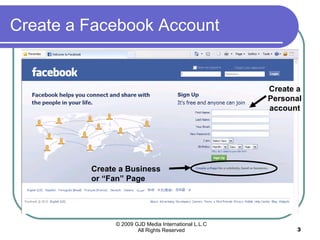
Create a Facebook Account Create a Personal account Create a Business or “Fan” Page
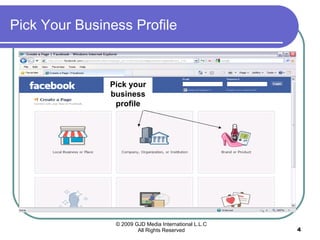
Pick Your Business Profile Pick your business profile
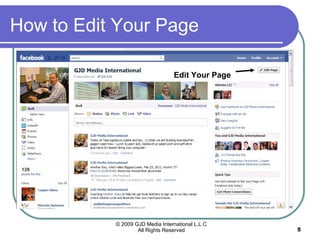
How to Edit Your Page Edit Your Page
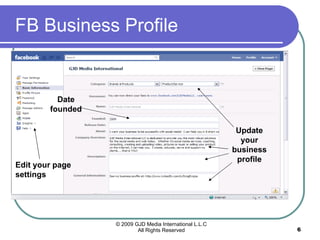
FB Business Profile  Update your business profile Date founded Edit your page settings
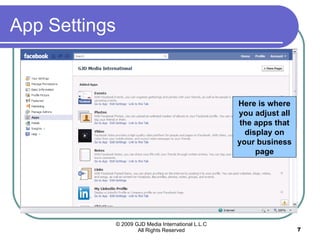
App Settings Here is where you adjust all the apps that display on your business page
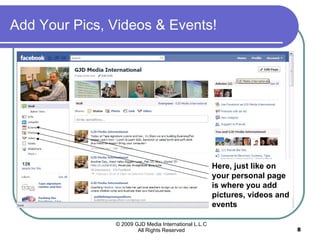
Add Your Pics, Videos & Events! Here, just like on your personal page is where you add pictures, videos and events
Using Facebook  (Personal Page) FIRST, Create your Business page and Business profile CONNECT: Invite your personal page” friends” to become “fans” of your business page MINGLE:  Post to your Business page wall, add events, pictures, video Connect to Biz page to Twitter and My LinkedIn LEARN: Become “a Fan” of businesses, organizations, Etc. that you like Read information on what they offer: classes, webinars, books etc.”
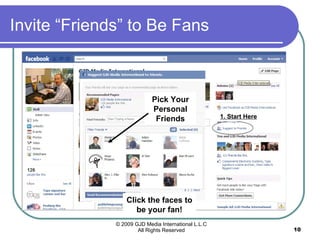
Invite “Friends” to Be Fans 1. Start Here Click the faces to be your fan! Pick Your Personal Friends
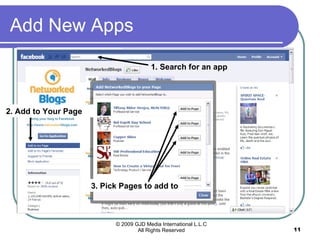
Add New Apps 1. Search for an app 2. Add to Your Page 3. Pick Pages to add to
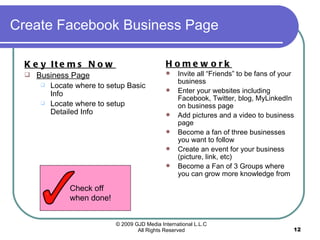
Create Facebook Business Page Key Items Now   Business Page Locate where to setup Basic Info Locate where to setup Detailed Info Homework Invite all “Friends” to be fans of your business Enter your websites including Facebook, Twitter, blog, MyLinkedIn on business page Add pictures and a video to business page Become a fan of three businesses you want to follow Create an event for your business (picture, link, etc) Become a Fan of 3 Groups where you can grow more knowledge from  Check off when done!
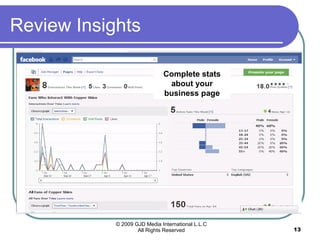
Review Insights Complete stats about your business page
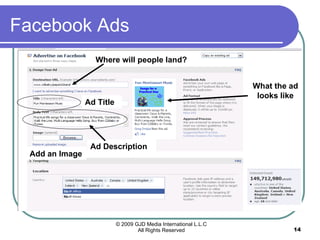
Facebook Ads Where will people land? Ad Title Ad Description Add an Image What the ad looks like
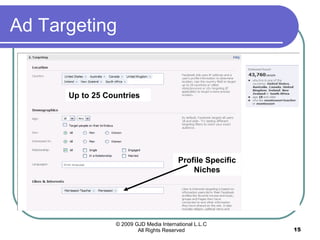
Ad Targeting Up to 25 Countries Profile Specific Niches
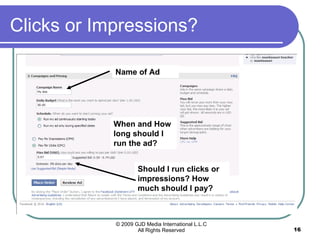
Clicks or Impressions? Name of Ad When and How long should I run the ad? Should I run clicks or impressions? How much should I pay?
Next Week – Twitter Using Twitter for Business Explain Twitter, Create your Twitter profile Connecting Your phone to Twitter Followers and Following Sending Messages Twitter Lists Connect LinkedIn and Twitter Connect Facebook and Twitter Post at least once a week!

Social Media Experience - Week 4

  • 1.
    Hands On! - Week 4 Build Your Business Facebook Page Guide to Creating Your Social Media World Gregory Drejza [email_address] (623) 556-3616 Training Class CONNECT MINGLE LEARN
  • 2.
    Agenda – PersonalFacebook Using FaceBook for your buinsess Create your separate Business page Pick the appropriate profile Complete your business profile Add pictures, events, videos, links, etc to business page Create an Event Become a “Fan of “ relevant groups (your educational growth) Invite everyone to be “a fan” of your business Business page – other useful applications – YouTube Box, SlideShare Review Fan page “Insights” Introduction to FaceBook Ads
  • 3.
    Create a FacebookAccount Create a Personal account Create a Business or “Fan” Page
  • 4.
    Pick Your BusinessProfile Pick your business profile
  • 5.
    How to EditYour Page Edit Your Page
  • 6.
    FB Business Profile Update your business profile Date founded Edit your page settings
  • 7.
    App Settings Hereis where you adjust all the apps that display on your business page
  • 8.
    Add Your Pics,Videos & Events! Here, just like on your personal page is where you add pictures, videos and events
  • 9.
    Using Facebook (Personal Page) FIRST, Create your Business page and Business profile CONNECT: Invite your personal page” friends” to become “fans” of your business page MINGLE: Post to your Business page wall, add events, pictures, video Connect to Biz page to Twitter and My LinkedIn LEARN: Become “a Fan” of businesses, organizations, Etc. that you like Read information on what they offer: classes, webinars, books etc.”
  • 10.
    Invite “Friends” toBe Fans 1. Start Here Click the faces to be your fan! Pick Your Personal Friends
  • 11.
    Add New Apps1. Search for an app 2. Add to Your Page 3. Pick Pages to add to
  • 12.
    Create Facebook BusinessPage Key Items Now Business Page Locate where to setup Basic Info Locate where to setup Detailed Info Homework Invite all “Friends” to be fans of your business Enter your websites including Facebook, Twitter, blog, MyLinkedIn on business page Add pictures and a video to business page Become a fan of three businesses you want to follow Create an event for your business (picture, link, etc) Become a Fan of 3 Groups where you can grow more knowledge from Check off when done!
  • 13.
    Review Insights Completestats about your business page
  • 14.
    Facebook Ads Wherewill people land? Ad Title Ad Description Add an Image What the ad looks like
  • 15.
    Ad Targeting Upto 25 Countries Profile Specific Niches
  • 16.
    Clicks or Impressions?Name of Ad When and How long should I run the ad? Should I run clicks or impressions? How much should I pay?
  • 17.
    Next Week –Twitter Using Twitter for Business Explain Twitter, Create your Twitter profile Connecting Your phone to Twitter Followers and Following Sending Messages Twitter Lists Connect LinkedIn and Twitter Connect Facebook and Twitter Post at least once a week!

Editor's Notes