Experiential Project Design
User Experience and Why it Matters
What is covered
1. What is User Experience (UX) Design
2. Understanding Our Users
User Persona and Empathy Map
3. Strategy: Determining Goals for your Product
4. Planning Your Users’ Journey
User Flow
1. What is User Experience (UX)
The cornerstone of UX is actively building an experience around your users
and their needs instead of hoping your users can understand and use what
you've already built.
Who are users?
People who interact with products in order to reach a goal.
Customers, donors, visitors, or anyone that uses your product or service
What did you interacted with today?
Often grouped by demographics or psychographics
Why do users’ experiences matter?
Think back to a time you couldn’t find something on the internet
How a user feels about experience directly reflects on the view of company
Since you made it, everything is obvious—to you (curse of knowledge)
You want people to enjoy your product and to keep using it
If you don’t have users, you don’t have a product.
UX vs UI
UX in Context: Timeline
1. Research before you begin your project
2. Don’t be afraid to change your decisions as you learn more about your users
3. Build personas to help think about different types of user of our app
4. Make empathy maps for your users to better see where they’re coming from
5. Look at your users’ goals: figuring out what each user wants out of our app
6. Create a user flow: help guide product’s development toward easy navigation
7. Documents help with: wireframing, design, and development choices
8. Iterate!
2. Understanding Our Users
Group users into representative profiles
You are not targeting EVERYONE
Assess your most realistic users
WHY people are using our product?
Limitations of different personas and groups
*These are stereotypes and individual users will act differently than the representative
persona you choose*
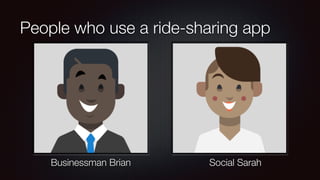
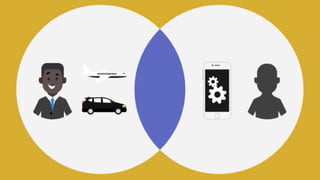
People who use a ride-sharing app
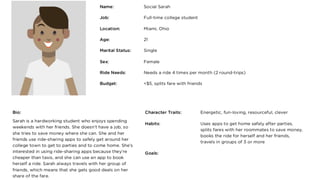
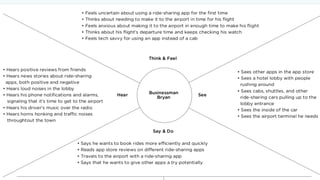
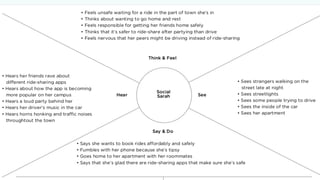
Businessman Brian Social Sarah
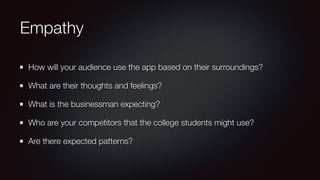
Empathy
How will your audience use the app based on their surroundings?
What are their thoughts and feelings?
What is the businessman expecting?
Who are your competitors that the college students might use?
Are there expected patterns?
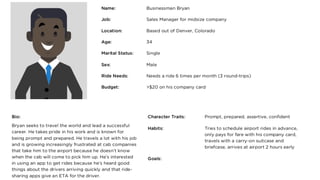
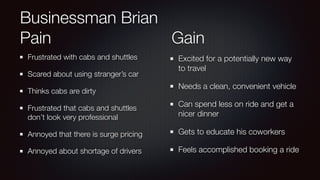
Businessman Brian
Pain Gain
Frustrated with cabs and shuttles
Scared about using stranger’s car
Thinks cabs are dirty
Frustrated that cabs and shuttles
don’t look very professional
Annoyed that there is surge pricing
Annoyed about shortage of drivers
Excited for a potentially new way
to travel
Needs a clean, convenient vehicle
Can spend less on ride and get a
nicer dinner
Gets to educate his coworkers
Feels accomplished booking a ride
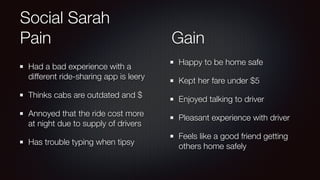
Social Sarah
Pain Gain
Had a bad experience with a
different ride-sharing app is leery
Thinks cabs are outdated and $
Annoyed that the ride cost more
at night due to supply of drivers
Has trouble typing when tipsy
Happy to be home safe
Kept her fare under $5
Enjoyed talking to driver
Pleasant experience with driver
Feels like a good friend getting
others home safely
Strategy: Determining Goals
Understanding your Users’ Goals
Thinking of Our Goals
Combining Your Goals with Your Users’ Goals
Structuring Your Users’ Experiences Around Completing Specific Goals
Understanding your Users’ Goals
It’s best to talk to current users if possible, or potential users
Listen to potential users, early and often
Make sure that you understand WHY they would want your product.
Your product needs to meet your users’ goals, or they won’t use it.
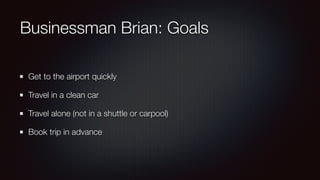
Businessman Brian: Goals
Get to the airport quickly
Travel in a clean car
Travel alone (not in a shuttle or carpool)
Book trip in advance
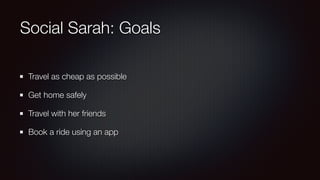
Social Sarah: Goals
Travel as cheap as possible
Get home safely
Travel with her friends
Book a ride using an app
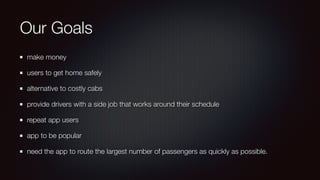
Our Goals
make money
users to get home safely
alternative to costly cabs
provide drivers with a side job that works around their schedule
repeat app users
app to be popular
need the app to route the largest number of passengers as quickly as possible.
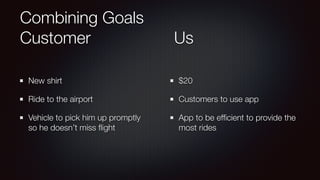
Combining Goals
Customer Us
New shirt
Ride to the airport
Vehicle to pick him up promptly
so he doesn’t miss flight
$20
Customers to use app
App to be efficient to provide the
most rides
4. Planning Users’ Journey
Users Expect a Process: Understanding User Flows
Getting Our Steps in Order
Contrasting User Goals
Making User Flows
Users Expect a Process:
Understanding User Flows
User flows are the route we want users to take from one end of the product to another.
NOT the only path users can take
Provide a plan to get users where they want to go as efficiently as possible.
“in as few clicks as possible”
The process should be intuitive
Specific steps they should take to reach their goal
Determine steps and order logically
Guide with buttons and feedback
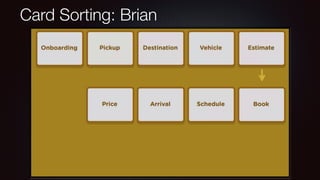
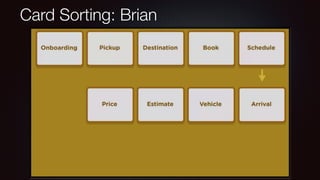
Card Sorting: Brian
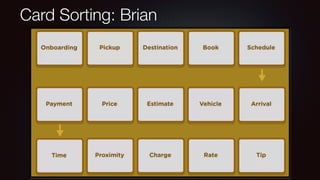
Card Sorting: Brian
Card Sorting: Brian
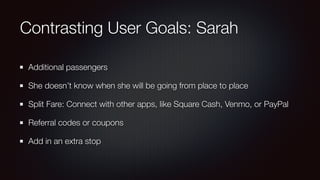
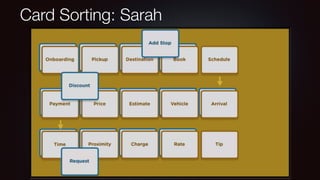
Contrasting User Goals: Sarah
Additional passengers
She doesn’t know when she will be going from place to place
Split Fare: Connect with other apps, like Square Cash, Venmo, or PayPal
Referral codes or coupons
Add in an extra stop
Card Sorting: Sarah
Making User Flows
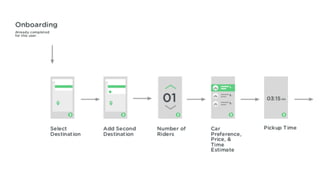
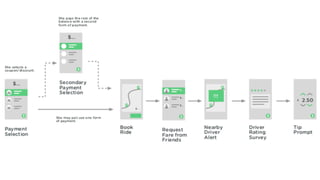
Easiest path for our users to take
The more different the user goals are the more different their paths
Through design and development, keep in mind each user group’s concerns
Share this with clients, other stakeholders, or for future reference
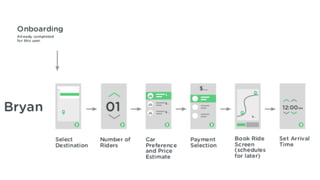
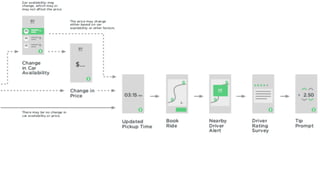
Diagrams with simple shapes and arrows
Share diagrams with settings
User Flow: Businessman Brian
User Flow: Social Sarah
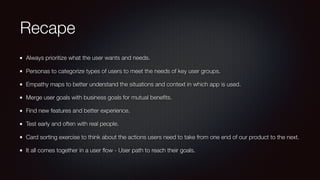
Recape
Always prioritize what the user wants and needs.
Personas to categorize types of users to meet the needs of key user groups.
Empathy maps to better understand the situations and context in which app is used.
Merge user goals with business goals for mutual benefits.
Find new features and better experience.
Test early and often with real people.
Card sorting exercise to think about the actions users need to take from one end of our product to the next.
It all comes together in a user flow - User path to reach their goals.
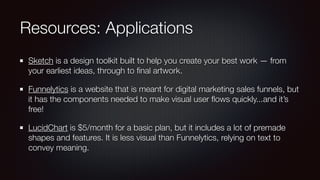
Resources: Applications
Sketch is a design toolkit built to help you create your best work — from
your earliest ideas, through to final artwork.
Funnelytics is a website that is meant for digital marketing sales funnels, but
it has the components needed to make visual user flows quickly...and it’s
free!
LucidChart is $5/month for a basic plan, but it includes a lot of premade
shapes and features. It is less visual than Funnelytics, relying on text to
convey meaning.
Resources: Further Reading
Aligning UX Strategy with Business Goals, by Sarah Bloomer, Lori Landesman, and
Susan J. Wolfe.
Designing for Goals, by Brian McKenna, addresses the importance of identifying User
Goals
UX Strategy v UX Design: The Ideal UX PRocess, by Justinmind and Jaime Levy.
User Goals and Corporate Goals, by Tyner Blain
UX Glossary: Task Flows, User Flows, Flowcharts… by Naema Baskanderi
Optimization Glossary from Optimizely: User Flow
Alena Holligan
• Wife, and Mother of 3 young children
• PHP Teacher at Treehouse
• Portland PHP User Group Leader
• Cascadia PHP Conference (cascadiaphp.com)
@alenaholligan alena@holligan.us https://joind.in/talk/c619f

Experiential Project Design

  • 1.
    Experiential Project Design UserExperience and Why it Matters
  • 2.
    What is covered 1.What is User Experience (UX) Design 2. Understanding Our Users User Persona and Empathy Map 3. Strategy: Determining Goals for your Product 4. Planning Your Users’ Journey User Flow
  • 3.
    1. What isUser Experience (UX) The cornerstone of UX is actively building an experience around your users and their needs instead of hoping your users can understand and use what you've already built.
  • 4.
    Who are users? Peoplewho interact with products in order to reach a goal. Customers, donors, visitors, or anyone that uses your product or service What did you interacted with today? Often grouped by demographics or psychographics
  • 5.
    Why do users’experiences matter? Think back to a time you couldn’t find something on the internet How a user feels about experience directly reflects on the view of company Since you made it, everything is obvious—to you (curse of knowledge) You want people to enjoy your product and to keep using it If you don’t have users, you don’t have a product.
  • 6.
  • 10.
    UX in Context:Timeline 1. Research before you begin your project 2. Don’t be afraid to change your decisions as you learn more about your users 3. Build personas to help think about different types of user of our app 4. Make empathy maps for your users to better see where they’re coming from 5. Look at your users’ goals: figuring out what each user wants out of our app 6. Create a user flow: help guide product’s development toward easy navigation 7. Documents help with: wireframing, design, and development choices 8. Iterate!
  • 11.
    2. Understanding OurUsers Group users into representative profiles You are not targeting EVERYONE Assess your most realistic users WHY people are using our product? Limitations of different personas and groups *These are stereotypes and individual users will act differently than the representative persona you choose*
  • 12.
    People who usea ride-sharing app Businessman Brian Social Sarah
  • 15.
    Empathy How will youraudience use the app based on their surroundings? What are their thoughts and feelings? What is the businessman expecting? Who are your competitors that the college students might use? Are there expected patterns?
  • 17.
    Businessman Brian Pain Gain Frustratedwith cabs and shuttles Scared about using stranger’s car Thinks cabs are dirty Frustrated that cabs and shuttles don’t look very professional Annoyed that there is surge pricing Annoyed about shortage of drivers Excited for a potentially new way to travel Needs a clean, convenient vehicle Can spend less on ride and get a nicer dinner Gets to educate his coworkers Feels accomplished booking a ride
  • 19.
    Social Sarah Pain Gain Hada bad experience with a different ride-sharing app is leery Thinks cabs are outdated and $ Annoyed that the ride cost more at night due to supply of drivers Has trouble typing when tipsy Happy to be home safe Kept her fare under $5 Enjoyed talking to driver Pleasant experience with driver Feels like a good friend getting others home safely
  • 20.
    Strategy: Determining Goals Understandingyour Users’ Goals Thinking of Our Goals Combining Your Goals with Your Users’ Goals Structuring Your Users’ Experiences Around Completing Specific Goals
  • 21.
    Understanding your Users’Goals It’s best to talk to current users if possible, or potential users Listen to potential users, early and often Make sure that you understand WHY they would want your product. Your product needs to meet your users’ goals, or they won’t use it.
  • 22.
    Businessman Brian: Goals Getto the airport quickly Travel in a clean car Travel alone (not in a shuttle or carpool) Book trip in advance
  • 23.
    Social Sarah: Goals Travelas cheap as possible Get home safely Travel with her friends Book a ride using an app
  • 24.
    Our Goals make money usersto get home safely alternative to costly cabs provide drivers with a side job that works around their schedule repeat app users app to be popular need the app to route the largest number of passengers as quickly as possible.
  • 25.
    Combining Goals Customer Us Newshirt Ride to the airport Vehicle to pick him up promptly so he doesn’t miss flight $20 Customers to use app App to be efficient to provide the most rides
  • 27.
    4. Planning Users’Journey Users Expect a Process: Understanding User Flows Getting Our Steps in Order Contrasting User Goals Making User Flows
  • 28.
    Users Expect aProcess: Understanding User Flows User flows are the route we want users to take from one end of the product to another. NOT the only path users can take Provide a plan to get users where they want to go as efficiently as possible. “in as few clicks as possible” The process should be intuitive Specific steps they should take to reach their goal Determine steps and order logically Guide with buttons and feedback
  • 29.
  • 30.
  • 31.
  • 32.
    Contrasting User Goals:Sarah Additional passengers She doesn’t know when she will be going from place to place Split Fare: Connect with other apps, like Square Cash, Venmo, or PayPal Referral codes or coupons Add in an extra stop
  • 33.
  • 34.
    Making User Flows Easiestpath for our users to take The more different the user goals are the more different their paths Through design and development, keep in mind each user group’s concerns Share this with clients, other stakeholders, or for future reference Diagrams with simple shapes and arrows Share diagrams with settings
  • 35.
  • 38.
  • 41.
    Recape Always prioritize whatthe user wants and needs. Personas to categorize types of users to meet the needs of key user groups. Empathy maps to better understand the situations and context in which app is used. Merge user goals with business goals for mutual benefits. Find new features and better experience. Test early and often with real people. Card sorting exercise to think about the actions users need to take from one end of our product to the next. It all comes together in a user flow - User path to reach their goals.
  • 42.
    Resources: Applications Sketch isa design toolkit built to help you create your best work — from your earliest ideas, through to final artwork. Funnelytics is a website that is meant for digital marketing sales funnels, but it has the components needed to make visual user flows quickly...and it’s free! LucidChart is $5/month for a basic plan, but it includes a lot of premade shapes and features. It is less visual than Funnelytics, relying on text to convey meaning.
  • 43.
    Resources: Further Reading AligningUX Strategy with Business Goals, by Sarah Bloomer, Lori Landesman, and Susan J. Wolfe. Designing for Goals, by Brian McKenna, addresses the importance of identifying User Goals UX Strategy v UX Design: The Ideal UX PRocess, by Justinmind and Jaime Levy. User Goals and Corporate Goals, by Tyner Blain UX Glossary: Task Flows, User Flows, Flowcharts… by Naema Baskanderi Optimization Glossary from Optimizely: User Flow
  • 44.
    Alena Holligan • Wife,and Mother of 3 young children • PHP Teacher at Treehouse • Portland PHP User Group Leader • Cascadia PHP Conference (cascadiaphp.com) @alenaholligan alena@holligan.us https://joind.in/talk/c619f