Becoming 

A User Advocate
Kirsten Burgard @uniongal
Karl Kaufmann @karolus
User experience encompasses all aspects of
the end user’s interaction with the company,
its services, and its products.
-DON NORMAN & JAKOB NIELSEN, NN/G
Introduction
ABOUT KIRSTEN
• Gov Geek
• Drupal Developer at U.S. Department of State
• Founder, Drupal 4 Gov
ABOUT KARL
• Visual Designer-Print/Branding
• Web Design/IA/Content Strategy
• Drupal Site Building/Architecture
Why UX?
User experience encompasses everything your organization
does. After all, if we’re not effectively meeting the needs
of our users, we’re missing our (and our client’s) principal
mission.
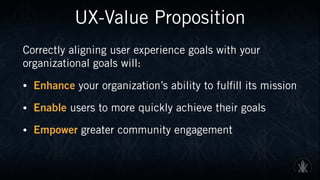
UX-Value Proposition
Correctly aligning user experience goals with your
organizational goals will:
• Enhance your organization’s ability to fulfill its mission
• Enable users to more quickly achieve their goals
• Empower greater community engagement
UX≠UI
CONTENT UI UX
UX≠UI
What does UX actually mean? The various UX roles that a person can
fulfill are plentiful. Some are whole jobs, some whole careers; others are
tactical roles that we all move in and out of.
UX is where developers can impact design by advocating for users.
SOURCE: Erik Flowers http:uxisnotui.com
Principles of UX
Principles of UX
Considering how broad the field UX encompasses, it’s wise to break it down into segments:
• Useful
• Usable
• Desirable
• Findable
• Accessible
• Credible
• Valuable
SOURCE: Peter Morville, Semantic Studios, http://semanticstudios.com/user_experience_design/
VALUABLE
USEFUL
FINDABLE
USABLE
ACCESSIBLE
DESIRABLE
CREDIBLE
Principles of UX-Expanded
USEFUL
As practitioners, we can’t be content to paint
within the lines drawn by managers. We must
have the courage and creativity to ask whether our
products and systems are useful, and to apply our
knowledge of craft + medium to define innovative
solutions that are more useful.
SOURCE: Peter Morville, Semantic Studios, http://semanticstudios.com/user_experience_design/
VALUABLE
USEFUL
FINDABLE
USABLE
ACCESSIBLE
DESIRABLE
CREDIBLE
VALUABLE
USEFUL
FINDABLE
USABLE
ACCESSIBLE
DESIRABLE
CREDIBLE
Principles of UX-Expanded
USABLE
Ease of use remains vital, and yet the interface-
centered methods and perspectives of human-
computer interaction do not address all
dimensions of Web design. In short, usability 

is necessary but not sufficient.
SOURCE: Peter Morville, Semantic Studios, http://semanticstudios.com/user_experience_design/
VALUABLE
USEFUL
FINDABLE
USABLE
ACCESSIBLE
DESIRABLE
CREDIBLE
Principles of UX-Expanded
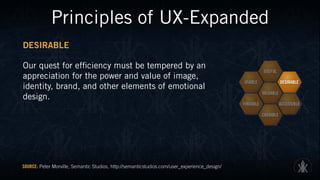
DESIRABLE
Our quest for efficiency must be tempered by an
appreciation for the power and value of image,
identity, brand, and other elements of emotional
design.
SOURCE: Peter Morville, Semantic Studios, http://semanticstudios.com/user_experience_design/
VALUABLE
USEFUL
FINDABLE
USABLE
ACCESSIBLE
DESIRABLE
CREDIBLE
Principles of UX-Expanded
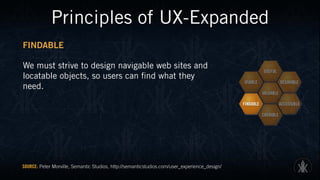
FINDABLE
We must strive to design navigable web sites and
locatable objects, so users can find what they
need.
SOURCE: Peter Morville, Semantic Studios, http://semanticstudios.com/user_experience_design/
VALUABLE
USEFUL
FINDABLE
USABLE
ACCESSIBLE
DESIRABLE
CREDIBLE
Principles of UX-Expanded
ACCESSIBLE
Just as our buildings have elevators and ramps,
our web sites should be accessible to people with
disabilities (more than 10% of the population).
Today, it’s good business and the ethical thing to
do. Eventually, it will become the law.
SOURCE: Peter Morville, Semantic Studios, http://semanticstudios.com/user_experience_design/
VALUABLE
USEFUL
FINDABLE
USABLE
ACCESSIBLE
DESIRABLE
CREDIBLE
Principles of UX-Expanded
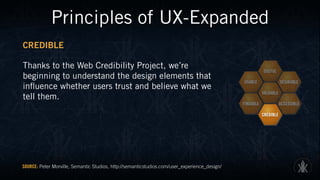
CREDIBLE
Thanks to the Web Credibility Project, we’re
beginning to understand the design elements that
influence whether users trust and believe what we
tell them.
SOURCE: Peter Morville, Semantic Studios, http://semanticstudios.com/user_experience_design/
VALUABLE
USEFUL
FINDABLE
USABLE
ACCESSIBLE
DESIRABLE
CREDIBLE
Principles of UX-Expanded
VALUABLE
Our sites must deliver value to our sponsors. For
non-profits, the user experience must advance the
mission. With for-profits, it must contribute to the
bottom line and improve customer satisfaction.
SOURCE: Peter Morville, Semantic Studios, http://semanticstudios.com/user_experience_design/
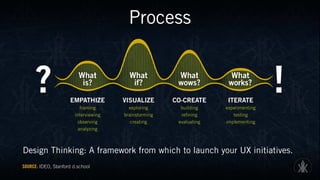
Process
Process
Design Thinking: A framework from which to launch your UX initiatives.
SOURCE: IDEO, Stanford d.school
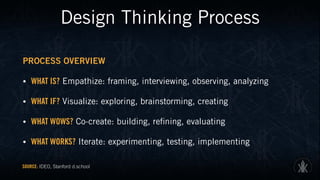
Design Thinking Process
PROCESS OVERVIEW
• WHAT IS? Empathize: framing, interviewing, observing, analyzing
• WHAT IF? Visualize: exploring, brainstorming, creating
• WHAT WOWS? Co-create: building, refining, evaluating
• WHAT WORKS? Iterate: experimenting, testing, implementing
SOURCE: IDEO, Stanford d.school
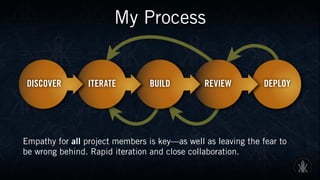
My Process
Empathy for all project members is key—as well as leaving the fear to
be wrong behind. Rapid iteration and close collaboration.
Discover
• User and stakeholder interviews—find the actual goal, not a vague
desired result
• Requirements gathering
• Securing buy-in from key stakeholders
• Personas—don’t have to be elaborate, but offer an effective method to
gauge the effectiveness of your product in real-world situations
Discover-Tool Set
• Whiteboard
• Post-Its
• Paper
• Interviewing aids-recorders
Iterate
• Incorporate research and requirements into prototype
• Use (low fidelity) tools that allow you to rapidly test ideas
• Sprints are excellent methods to generate ideas
• When possible, involve stakeholders here as well.
Iterate-Tool Set
SUGGESTED TOOLS
• Paper Templates
• Whiteboard
• Post-Its
• Low-fidelity digital comping tools
N.B. Focus on this stage is rapid generation. Avoid being sucked into
drawn-out processes. If need be, devise sprints or short time limits.
Build
• Incorporate your best prototype(s) into your product
• Test repeatedly, and as often as feasible
• Guerilla UX—random testing can uncover valuable insights
• Modularity—use systems that allow for easy modifications
• If major issues are discovered—iterate again!
Build-Tool Set
SUGGESTED TOOLS
• Code/Image editors of choice
• Spirit of collaboration—do what you can to break down barriers
between team members (and clients)
• Array of devices the product will be used on
N.B. Allow your builds to be revised, if at all possible. Developing
tunnel vision on a given path can have disastrous consequences.
Review
• Functional testing—will the product perform as advertised?
• User testing—getting the project into the hands of actual users is one
of the fastest ways to gauge overall effectiveness
• Security—thorough reviews in real-world cases is essential.
• If major issues are discovered—rebuild and/or iterate!
Review-Tool Set
SUGGESTED TOOLS
• Array of devices and browsers to reflect user base
• Account for low bandwidth and other technical challenges
• User testing—make sure the product performs as required, and make
necessary adjustments, if needed.
Deploy
• Once major requirements are successfully fulfilled, launch
• Continual attention to users is essential, whether by the client, or 

by you. In a constantly changing user landscape, what may have 

been clear during discovery may now be cloudy.
• If major issues are discovered—review the project, and adapt 

as needed!
Deploy-Tool Set
SUGGESTED TOOLS
• Software/hardware of choice
• Analytics observations
• Stakeholder feedback
N.B. The UX process doesn’t stop here—the path is for continual
improvement over the life of the product.
Project Example
UXPA International 2016
• Conference site, built from ground-up in Drupal
• Required custom coding to interact with main site
• Demanding UX-centric user base
• Due to prior experience, no printed program would be used
• Careful balance of performance and features
UXPA International 2016
User Flow
Creating visual
flows helps
stakeholders
see the steps
involved, and
anticipate and
resolve issues
before launch.
EVENT
Events with limited
capacity-will confirm if
space available
⋆ Event ID
Slots Available
PRODUCT SELECTION
User selects items for
purchase, membership
discounts applied.
Also able to make group
purchases, if doing for
organization.
Verify if member
(if needed)
⋆ Event ID
Slots Available
BILLING INFORMATION
User enters address,
payment method, other
billing info.
Integration with
payment processor
REVIEW PURCHASE
User presented with
purchase total, ability
to modify at this time.
If OK, user confirms
transaction.
CONFIRMATION
User is presented with
purchase receipt, as well
as e-mail of activity sent
to account.
SIGN-IN/CREATE
ACCOUNT
New users to create
account, existing users to
sign in.
Data to be synched with
UXPA.org
Create ID (new)
Retrieve ID (existing)
USER PURCHASE FLOW
Mulitiple pages or form blocks
USER
User profile on UXPA.org
User identifier (TBD)
PAYMENT
Secure processing on
Authorize.net
User identifier (TBD)
EXTERNAL
Outside of UXPA2016
LEGEND
Content Nodes
View Displays
External Sources
Internal Links
External Links
External Areas
Data Origin ⋆ Track
Data Pull ⋆ Track
ORGANIZATION
Master profile of
organization, allows
group registration and
management of the
organization’s attendees
by one of their managers.
Organization
Organization Category
USER
Main source of data on
particular user
Role
Registered
User identifier (TBD)
Data Flow
Visualizing data flows on
complex sites also helps
immensely with coding
and site building.
USER
Main source of data on
particular user
Role
Registered
User identifier (TBD)
EVENT
Node for particular event
⋆ Track
⋆ Time Slot
Speaker
SCHEDULE
Sortable list of events
(date/time default)
⋆ Event
ORGANIZATION
Master profile of
organization, allows
group registration and
management of the
organization’s attendees
by one of their managers.
Organization
Organization Category
SPONSORS
Listing of Sponsors
Organization
SPEAKERS
Sortable list of speakers
(default TBD)
Speaker
CONTENT NODES
Source for Data
USER
User profile on UXPA.org
User identifier (TBD)
VIEW DISPLAYS
Aggregate Reports
EXTERNAL
Outside of UXPA2016
LEGEND
Content Nodes
View Displays
External Sources
Internal Links
External Links
External Areas
Data Origin ⋆ Track
Data Pull ⋆ Track
Site Architecture
Necessary, 

but often
neglected.
Excellent way
to improve UX
and find
possible
issues, of all
sorts.
HOME
Site Index Page
LEGEND
Level 1 Pages
Level 2 Pages
Sub Pages
Third Party Content
Primary Links
Secondary Links
External Links
Secure Areas
REGISTER
Process landing
page, including
member check.
STAY
Venue, location,
as well as
interactive map
and attractions
SPONSORS
Dynamic
listings of all
levels.
WHY ATTEND
Value
proposition,
general
information
CONTACT
HTML form,
main method to
reach staff
PROGRAM
Dynamically
updated,
sortable by
users
LEVEL 1
Also serve as
navbar links
(global)
Event (N)
Main node for a
particular event.
PointofInterest(N)
Main node for a
particular event.
USER ACCCOUNT
Membership
credentials on
UXPA.org
PAYMENTS
Third-party
processor
WESTIN
Official hotel
Website. Booking
done here.
SOCIAL MEDIA
Links to official
accounts for
UXPA 2016
SUBSETS
Linked from
Level 1 areas
LEVEL 2
Linked from
secondary areas
(footer nav)
LEVEL 3
Incl. third-
Party Areas-off
UXPA2016.org
Registration
Main signup, and
purchase portal.
Pricing
Detailed specifics on
available offerings.
Portfolio Reviews
Information, signup
portal
Team Member (N)
Bio node-info for
presenters and staff.
Speakers
Dynamic listing of all
conference speakers
PRIVACY POLICY
Codified rules
for UXPA 2016
SUBMISSION
RELEASES
Policies for
presenting.
CODE OF
CONDUCT
Rules of event
IMPORTANT
DATES
Static calendar
of events
SUBMIT SESSION
Information and
signup. Removed
when full.
VOLUNTEER
Information and
signup. Removed
when full.
Sponsor (N)
Main node for a
sponsor.
Exhibit
Layout, and dynamic
listing of exhibitors
Temporary Items-
Displayed/hidden
as needed.
UXPA 2016-Comping
Rapid paper iteration to start.
Wireframes
Keeping assets low fidelity until content and functionality has been set
allows for modification without fear of “sunk cost”
Style Tiles & Static Mocks
Design, theme, and visual elements can be
explored and revised well before any coding.
Privacy Policy | Contact | Submission Releases and Permissions
Copyright © 2015 UXPA All Rights Reserved
Home | Stay | Why Attend | Important Dates
+
Join Hundreds of UX Professionals
UXPA International is proud to be combining forces with the UXPA Seattle Chap-
ter to bring the 2016 UXPA International Conference to the Emerald City! The
UXPA Seattle chapter has been active in the Puget Sound area for several years and
has grown to be an integral part of the user experience scene.
Seattle is home to many companies, some of which you might know: Microsoft,
Amazon, Facebook, Adobe, Big Fish Games, Allrecipies, Cheezburger, Tableau Soft-
ware, Zillow.com - just to name a few!
Meet Your Conference Team
Lorie Whitaker
Chair
Ona Anicello
Co-Chair
Register Now!
Stay
Located in the heart of downtown
Seattle, the Westin hotel will be home
to UXPA 2016. More >
Why Attend
Whether you’re running an in-house
UX department or managing a team at
an agency that services many clients,
you know how hard it can be to keep
on top of emerging trends. More >
Important Dates
Plan now to maximize your experience
at UXPA 2016 and to lock in the best
rates. More >
HOME STAY WHY ATTEND IMPORTANT DATES
SEATTLE 2016
MAY 31 - JUNE 2
X Days X Hours X Minutes X Seconds
UXPA 25th
Anniversary
Why You Should AttendSubmit Your Proposal
Thanks to Our Sponsors
Secondary Action
What You’ll See
I·STYLETILE
1765-UXPA 2016 IDENTITY BRIEF AND INTERACTIVE DESIGN GUIDE
HEADER SAMPLE
TEXT SAMPLE COLOR SAMPLES
IMAGE SAMPLES
DESCRIPTIVE ADJECTIVESBUTTON SAMPLE
Heading 1
Heading 2
Ecus re sit quam in natibero endiore exeri dolor
siminctibus. Facea eatem fuga. Nament volessit
quodist, velitas ut omni quibea volupta turitem
dolupta tenimol uptatem hillaccus apelit que
verit libearit etusa iusamen descidendae ped quo
dolleceati berum dolor as velibusdae rem nihit
ipienem a con comnihi ciendae prorat.
Am dolestius mi, quaturi quo volupis non cum
excernam, sin eiunditat es arum que latiis etur,
InclusiveDesigner Developer
Inviting User Experience Interaction
Networking Informal
HOME STAY WHY ATTEND IMPORTANT DATES
Seattle 2016May 31 - June 2
Normal State Hover State
Interactive Mocks
Tools such as InVision allow functional prototypes without coding, allowing 

faster iteration for UX-critical testing.
User-Centered Table Design
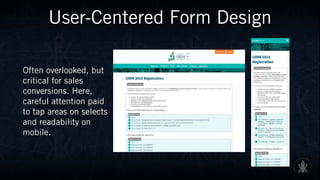
User-Centered Form Design
Often overlooked, but
critical for sales
conversions. Here,
careful attention paid
to tap areas on selects
and readability on
mobile.
Improved Program UX
Staff Administration UX
UXPA 2016 Takeaways
• Registration is up, helped by an improved user experience
• Mobile experience is enhanced, especially for on-site schedule needs
• Improved integration with surveys and presentations
• Enhanced staff functionality—for registration reports and editing
My Process
Empathy for all project members is key—as well as leaving the fear to
be wrong behind. Rapid iteration and close collaboration.
Project Example
Department of Commerce
TAKING FEEDBACK
• The Department of Commerce embarked on a major redesign 

that would present a completely different look and feel.
• Enabled a preview of the new content and kept the two sites up 

for about a year while input was gathered.
• Use of walk throughs to provide information to users about the new
site–using a process that took user feedback and incorporated it 

into the design.
Previous Commerce Site
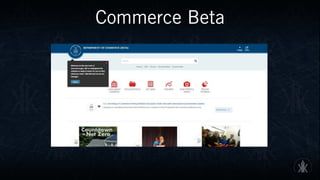
Commerce Beta
Commerce Beta
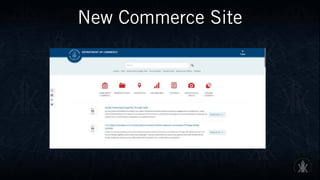
New Commerce Site
Commerce Project Takeaways
USING THE FEEDBACK AND DATA FROM THE BETA TEST, THE DEVELOPERS
REFINED HOW THEY DISPLAYED ITEMS LIKE:
• Line graphing image changed to a bar graph
• Social icons for sharing were added to the left for ease of use
• New icon was added in the interim to remove overlays and better walk users
through the change
• Images were moved to below the fold and additional information was included
• A new feature is greater use of media (videos and images) but again, 

below the fold.
Building Support
• Think BENEFITS not features
• Beta test where possible
• Use a MVP when you can
• Understand the user flow
• Develop personas (needn’t be overly detailed)
• And rinse and repeat as needed, since users 

& uses change over time (analytics)
Becoming a User Advocate
Building Support
• Involving key stakeholders from the start of the process helps 

to ensure buy-in.
• In-house success stories help strengthen your case. Supplement 

with noted external stories when starting out.
• Making others aware of the process (and what’s involved) raises 

your standing within the organization.
• Government initiatives such as the USDS (U.S. Digital Service).
• Empathize that what helps the user ultimately helps you.
Most business models have focused on self
interest instead of user experience
TIM COOK, CEO, APPLE
Organizations
• UXPA International
• AIGA
• DC Design Thinking
• Local Web and design-related Meetups
• Online communities (Stack Exchange, LinkedIn, for starters)
Additional Reading
Suggested Resources
• The User Experience Team of One: A Research and Design Survival Guide (Rosenfeld) Leah
Buley, July 2013
• Don’t Make Me Think, Revisited: A Common Sense Approach to Web Usability (3rd Edition)
(Voices That Matter) Steve Krug, January 2013
• The Design of Everyday Things: Revised and Expanded Edition (Basic Books) Don Norman
Nov 5, 2013
• A Project Guide to UX Design: For user experience designers in the field or in the making
(2nd Edition) (Voices That Matter) 2nd Edition Russ Unger and Carolyn Chandler,
March 2012
Thank You
@karolus
kkaufmann@karlkaufmann.com
karlkaufmann.com
@uniongal
bendygirl@gmail.com

Becoming A User Advocate

  • 1.
    Becoming 
 A UserAdvocate Kirsten Burgard @uniongal Karl Kaufmann @karolus
  • 2.
    User experience encompassesall aspects of the end user’s interaction with the company, its services, and its products. -DON NORMAN & JAKOB NIELSEN, NN/G
  • 3.
    Introduction ABOUT KIRSTEN • GovGeek • Drupal Developer at U.S. Department of State • Founder, Drupal 4 Gov ABOUT KARL • Visual Designer-Print/Branding • Web Design/IA/Content Strategy • Drupal Site Building/Architecture
  • 4.
    Why UX? User experienceencompasses everything your organization does. After all, if we’re not effectively meeting the needs of our users, we’re missing our (and our client’s) principal mission.
  • 5.
    UX-Value Proposition Correctly aligninguser experience goals with your organizational goals will: • Enhance your organization’s ability to fulfill its mission • Enable users to more quickly achieve their goals • Empower greater community engagement
  • 6.
  • 7.
  • 8.
    UX≠UI What does UXactually mean? The various UX roles that a person can fulfill are plentiful. Some are whole jobs, some whole careers; others are tactical roles that we all move in and out of. UX is where developers can impact design by advocating for users. SOURCE: Erik Flowers http:uxisnotui.com
  • 9.
  • 10.
    Principles of UX Consideringhow broad the field UX encompasses, it’s wise to break it down into segments: • Useful • Usable • Desirable • Findable • Accessible • Credible • Valuable SOURCE: Peter Morville, Semantic Studios, http://semanticstudios.com/user_experience_design/ VALUABLE USEFUL FINDABLE USABLE ACCESSIBLE DESIRABLE CREDIBLE
  • 11.
    Principles of UX-Expanded USEFUL Aspractitioners, we can’t be content to paint within the lines drawn by managers. We must have the courage and creativity to ask whether our products and systems are useful, and to apply our knowledge of craft + medium to define innovative solutions that are more useful. SOURCE: Peter Morville, Semantic Studios, http://semanticstudios.com/user_experience_design/ VALUABLE USEFUL FINDABLE USABLE ACCESSIBLE DESIRABLE CREDIBLE
  • 12.
    VALUABLE USEFUL FINDABLE USABLE ACCESSIBLE DESIRABLE CREDIBLE Principles of UX-Expanded USABLE Easeof use remains vital, and yet the interface- centered methods and perspectives of human- computer interaction do not address all dimensions of Web design. In short, usability 
 is necessary but not sufficient. SOURCE: Peter Morville, Semantic Studios, http://semanticstudios.com/user_experience_design/
  • 13.
    VALUABLE USEFUL FINDABLE USABLE ACCESSIBLE DESIRABLE CREDIBLE Principles of UX-Expanded DESIRABLE Ourquest for efficiency must be tempered by an appreciation for the power and value of image, identity, brand, and other elements of emotional design. SOURCE: Peter Morville, Semantic Studios, http://semanticstudios.com/user_experience_design/
  • 14.
    VALUABLE USEFUL FINDABLE USABLE ACCESSIBLE DESIRABLE CREDIBLE Principles of UX-Expanded FINDABLE Wemust strive to design navigable web sites and locatable objects, so users can find what they need. SOURCE: Peter Morville, Semantic Studios, http://semanticstudios.com/user_experience_design/
  • 15.
    VALUABLE USEFUL FINDABLE USABLE ACCESSIBLE DESIRABLE CREDIBLE Principles of UX-Expanded ACCESSIBLE Justas our buildings have elevators and ramps, our web sites should be accessible to people with disabilities (more than 10% of the population). Today, it’s good business and the ethical thing to do. Eventually, it will become the law. SOURCE: Peter Morville, Semantic Studios, http://semanticstudios.com/user_experience_design/
  • 16.
    VALUABLE USEFUL FINDABLE USABLE ACCESSIBLE DESIRABLE CREDIBLE Principles of UX-Expanded CREDIBLE Thanksto the Web Credibility Project, we’re beginning to understand the design elements that influence whether users trust and believe what we tell them. SOURCE: Peter Morville, Semantic Studios, http://semanticstudios.com/user_experience_design/
  • 17.
    VALUABLE USEFUL FINDABLE USABLE ACCESSIBLE DESIRABLE CREDIBLE Principles of UX-Expanded VALUABLE Oursites must deliver value to our sponsors. For non-profits, the user experience must advance the mission. With for-profits, it must contribute to the bottom line and improve customer satisfaction. SOURCE: Peter Morville, Semantic Studios, http://semanticstudios.com/user_experience_design/
  • 18.
  • 19.
    Process Design Thinking: Aframework from which to launch your UX initiatives. SOURCE: IDEO, Stanford d.school
  • 20.
    Design Thinking Process PROCESSOVERVIEW • WHAT IS? Empathize: framing, interviewing, observing, analyzing • WHAT IF? Visualize: exploring, brainstorming, creating • WHAT WOWS? Co-create: building, refining, evaluating • WHAT WORKS? Iterate: experimenting, testing, implementing SOURCE: IDEO, Stanford d.school
  • 21.
    My Process Empathy forall project members is key—as well as leaving the fear to be wrong behind. Rapid iteration and close collaboration.
  • 22.
    Discover • User andstakeholder interviews—find the actual goal, not a vague desired result • Requirements gathering • Securing buy-in from key stakeholders • Personas—don’t have to be elaborate, but offer an effective method to gauge the effectiveness of your product in real-world situations
  • 23.
    Discover-Tool Set • Whiteboard •Post-Its • Paper • Interviewing aids-recorders
  • 24.
    Iterate • Incorporate researchand requirements into prototype • Use (low fidelity) tools that allow you to rapidly test ideas • Sprints are excellent methods to generate ideas • When possible, involve stakeholders here as well.
  • 25.
    Iterate-Tool Set SUGGESTED TOOLS •Paper Templates • Whiteboard • Post-Its • Low-fidelity digital comping tools N.B. Focus on this stage is rapid generation. Avoid being sucked into drawn-out processes. If need be, devise sprints or short time limits.
  • 26.
    Build • Incorporate yourbest prototype(s) into your product • Test repeatedly, and as often as feasible • Guerilla UX—random testing can uncover valuable insights • Modularity—use systems that allow for easy modifications • If major issues are discovered—iterate again!
  • 27.
    Build-Tool Set SUGGESTED TOOLS •Code/Image editors of choice • Spirit of collaboration—do what you can to break down barriers between team members (and clients) • Array of devices the product will be used on N.B. Allow your builds to be revised, if at all possible. Developing tunnel vision on a given path can have disastrous consequences.
  • 28.
    Review • Functional testing—willthe product perform as advertised? • User testing—getting the project into the hands of actual users is one of the fastest ways to gauge overall effectiveness • Security—thorough reviews in real-world cases is essential. • If major issues are discovered—rebuild and/or iterate!
  • 29.
    Review-Tool Set SUGGESTED TOOLS •Array of devices and browsers to reflect user base • Account for low bandwidth and other technical challenges • User testing—make sure the product performs as required, and make necessary adjustments, if needed.
  • 30.
    Deploy • Once majorrequirements are successfully fulfilled, launch • Continual attention to users is essential, whether by the client, or 
 by you. In a constantly changing user landscape, what may have 
 been clear during discovery may now be cloudy. • If major issues are discovered—review the project, and adapt 
 as needed!
  • 31.
    Deploy-Tool Set SUGGESTED TOOLS •Software/hardware of choice • Analytics observations • Stakeholder feedback N.B. The UX process doesn’t stop here—the path is for continual improvement over the life of the product.
  • 32.
  • 33.
    UXPA International 2016 •Conference site, built from ground-up in Drupal • Required custom coding to interact with main site • Demanding UX-centric user base • Due to prior experience, no printed program would be used • Careful balance of performance and features
  • 34.
  • 35.
    User Flow Creating visual flowshelps stakeholders see the steps involved, and anticipate and resolve issues before launch. EVENT Events with limited capacity-will confirm if space available ⋆ Event ID Slots Available PRODUCT SELECTION User selects items for purchase, membership discounts applied. Also able to make group purchases, if doing for organization. Verify if member (if needed) ⋆ Event ID Slots Available BILLING INFORMATION User enters address, payment method, other billing info. Integration with payment processor REVIEW PURCHASE User presented with purchase total, ability to modify at this time. If OK, user confirms transaction. CONFIRMATION User is presented with purchase receipt, as well as e-mail of activity sent to account. SIGN-IN/CREATE ACCOUNT New users to create account, existing users to sign in. Data to be synched with UXPA.org Create ID (new) Retrieve ID (existing) USER PURCHASE FLOW Mulitiple pages or form blocks USER User profile on UXPA.org User identifier (TBD) PAYMENT Secure processing on Authorize.net User identifier (TBD) EXTERNAL Outside of UXPA2016 LEGEND Content Nodes View Displays External Sources Internal Links External Links External Areas Data Origin ⋆ Track Data Pull ⋆ Track ORGANIZATION Master profile of organization, allows group registration and management of the organization’s attendees by one of their managers. Organization Organization Category USER Main source of data on particular user Role Registered User identifier (TBD)
  • 36.
    Data Flow Visualizing dataflows on complex sites also helps immensely with coding and site building. USER Main source of data on particular user Role Registered User identifier (TBD) EVENT Node for particular event ⋆ Track ⋆ Time Slot Speaker SCHEDULE Sortable list of events (date/time default) ⋆ Event ORGANIZATION Master profile of organization, allows group registration and management of the organization’s attendees by one of their managers. Organization Organization Category SPONSORS Listing of Sponsors Organization SPEAKERS Sortable list of speakers (default TBD) Speaker CONTENT NODES Source for Data USER User profile on UXPA.org User identifier (TBD) VIEW DISPLAYS Aggregate Reports EXTERNAL Outside of UXPA2016 LEGEND Content Nodes View Displays External Sources Internal Links External Links External Areas Data Origin ⋆ Track Data Pull ⋆ Track
  • 37.
    Site Architecture Necessary, 
 butoften neglected. Excellent way to improve UX and find possible issues, of all sorts. HOME Site Index Page LEGEND Level 1 Pages Level 2 Pages Sub Pages Third Party Content Primary Links Secondary Links External Links Secure Areas REGISTER Process landing page, including member check. STAY Venue, location, as well as interactive map and attractions SPONSORS Dynamic listings of all levels. WHY ATTEND Value proposition, general information CONTACT HTML form, main method to reach staff PROGRAM Dynamically updated, sortable by users LEVEL 1 Also serve as navbar links (global) Event (N) Main node for a particular event. PointofInterest(N) Main node for a particular event. USER ACCCOUNT Membership credentials on UXPA.org PAYMENTS Third-party processor WESTIN Official hotel Website. Booking done here. SOCIAL MEDIA Links to official accounts for UXPA 2016 SUBSETS Linked from Level 1 areas LEVEL 2 Linked from secondary areas (footer nav) LEVEL 3 Incl. third- Party Areas-off UXPA2016.org Registration Main signup, and purchase portal. Pricing Detailed specifics on available offerings. Portfolio Reviews Information, signup portal Team Member (N) Bio node-info for presenters and staff. Speakers Dynamic listing of all conference speakers PRIVACY POLICY Codified rules for UXPA 2016 SUBMISSION RELEASES Policies for presenting. CODE OF CONDUCT Rules of event IMPORTANT DATES Static calendar of events SUBMIT SESSION Information and signup. Removed when full. VOLUNTEER Information and signup. Removed when full. Sponsor (N) Main node for a sponsor. Exhibit Layout, and dynamic listing of exhibitors Temporary Items- Displayed/hidden as needed.
  • 38.
    UXPA 2016-Comping Rapid paperiteration to start.
  • 39.
    Wireframes Keeping assets lowfidelity until content and functionality has been set allows for modification without fear of “sunk cost”
  • 40.
    Style Tiles &Static Mocks Design, theme, and visual elements can be explored and revised well before any coding. Privacy Policy | Contact | Submission Releases and Permissions Copyright © 2015 UXPA All Rights Reserved Home | Stay | Why Attend | Important Dates + Join Hundreds of UX Professionals UXPA International is proud to be combining forces with the UXPA Seattle Chap- ter to bring the 2016 UXPA International Conference to the Emerald City! The UXPA Seattle chapter has been active in the Puget Sound area for several years and has grown to be an integral part of the user experience scene. Seattle is home to many companies, some of which you might know: Microsoft, Amazon, Facebook, Adobe, Big Fish Games, Allrecipies, Cheezburger, Tableau Soft- ware, Zillow.com - just to name a few! Meet Your Conference Team Lorie Whitaker Chair Ona Anicello Co-Chair Register Now! Stay Located in the heart of downtown Seattle, the Westin hotel will be home to UXPA 2016. More > Why Attend Whether you’re running an in-house UX department or managing a team at an agency that services many clients, you know how hard it can be to keep on top of emerging trends. More > Important Dates Plan now to maximize your experience at UXPA 2016 and to lock in the best rates. More > HOME STAY WHY ATTEND IMPORTANT DATES SEATTLE 2016 MAY 31 - JUNE 2 X Days X Hours X Minutes X Seconds UXPA 25th Anniversary Why You Should AttendSubmit Your Proposal Thanks to Our Sponsors Secondary Action What You’ll See I·STYLETILE 1765-UXPA 2016 IDENTITY BRIEF AND INTERACTIVE DESIGN GUIDE HEADER SAMPLE TEXT SAMPLE COLOR SAMPLES IMAGE SAMPLES DESCRIPTIVE ADJECTIVESBUTTON SAMPLE Heading 1 Heading 2 Ecus re sit quam in natibero endiore exeri dolor siminctibus. Facea eatem fuga. Nament volessit quodist, velitas ut omni quibea volupta turitem dolupta tenimol uptatem hillaccus apelit que verit libearit etusa iusamen descidendae ped quo dolleceati berum dolor as velibusdae rem nihit ipienem a con comnihi ciendae prorat. Am dolestius mi, quaturi quo volupis non cum excernam, sin eiunditat es arum que latiis etur, InclusiveDesigner Developer Inviting User Experience Interaction Networking Informal HOME STAY WHY ATTEND IMPORTANT DATES Seattle 2016May 31 - June 2 Normal State Hover State
  • 41.
    Interactive Mocks Tools suchas InVision allow functional prototypes without coding, allowing 
 faster iteration for UX-critical testing.
  • 42.
  • 43.
    User-Centered Form Design Oftenoverlooked, but critical for sales conversions. Here, careful attention paid to tap areas on selects and readability on mobile.
  • 44.
  • 45.
  • 46.
    UXPA 2016 Takeaways •Registration is up, helped by an improved user experience • Mobile experience is enhanced, especially for on-site schedule needs • Improved integration with surveys and presentations • Enhanced staff functionality—for registration reports and editing
  • 47.
    My Process Empathy forall project members is key—as well as leaving the fear to be wrong behind. Rapid iteration and close collaboration.
  • 48.
  • 49.
    Department of Commerce TAKINGFEEDBACK • The Department of Commerce embarked on a major redesign 
 that would present a completely different look and feel. • Enabled a preview of the new content and kept the two sites up 
 for about a year while input was gathered. • Use of walk throughs to provide information to users about the new site–using a process that took user feedback and incorporated it 
 into the design.
  • 50.
  • 51.
  • 52.
  • 53.
  • 54.
    Commerce Project Takeaways USINGTHE FEEDBACK AND DATA FROM THE BETA TEST, THE DEVELOPERS REFINED HOW THEY DISPLAYED ITEMS LIKE: • Line graphing image changed to a bar graph • Social icons for sharing were added to the left for ease of use • New icon was added in the interim to remove overlays and better walk users through the change • Images were moved to below the fold and additional information was included • A new feature is greater use of media (videos and images) but again, 
 below the fold.
  • 55.
  • 56.
    • Think BENEFITSnot features • Beta test where possible • Use a MVP when you can • Understand the user flow • Develop personas (needn’t be overly detailed) • And rinse and repeat as needed, since users 
 & uses change over time (analytics) Becoming a User Advocate
  • 57.
    Building Support • Involvingkey stakeholders from the start of the process helps 
 to ensure buy-in. • In-house success stories help strengthen your case. Supplement 
 with noted external stories when starting out. • Making others aware of the process (and what’s involved) raises 
 your standing within the organization. • Government initiatives such as the USDS (U.S. Digital Service). • Empathize that what helps the user ultimately helps you.
  • 58.
    Most business modelshave focused on self interest instead of user experience TIM COOK, CEO, APPLE
  • 59.
    Organizations • UXPA International •AIGA • DC Design Thinking • Local Web and design-related Meetups • Online communities (Stack Exchange, LinkedIn, for starters)
  • 60.
    Additional Reading Suggested Resources •The User Experience Team of One: A Research and Design Survival Guide (Rosenfeld) Leah Buley, July 2013 • Don’t Make Me Think, Revisited: A Common Sense Approach to Web Usability (3rd Edition) (Voices That Matter) Steve Krug, January 2013 • The Design of Everyday Things: Revised and Expanded Edition (Basic Books) Don Norman Nov 5, 2013 • A Project Guide to UX Design: For user experience designers in the field or in the making (2nd Edition) (Voices That Matter) 2nd Edition Russ Unger and Carolyn Chandler, March 2012
  • 61.