Downloaded 65 times
![Excel / R
- Example of running an R script from Excel -
Open an Excel file, create following table and insert two buttons using figures from Shapes tab:
Write an R script, named it example.R and save it on C drive:
library(gWidgets)
options(guiToolkit="tcltk")
Args <- commandArgs(TRUE)
n1 <- Args[1]
n2 <- Args[2]
pdf("C:plots.pdf")
par(mfrow=c(2,1))
plot(rnorm(n1), type="l", main=paste("Scatterplot of rnorm(", n1,
")",sep=""))
hist(rnorm(n2), col="red", main=paste("Histogram of rnorm(", n2, ")",sep=""))
dev.off()
gmessage("Plots are created.")
Assign macro (called run_r_script) to the button Create plots running an R script:
Sub run_r_script()
Dim cmdLine As String
cmdLine = "C:Program FilesRR-2.15.2binRscript C:example.R"
cmdLine = cmdLine & " " & Range("B2").Value & " " & Range("B3").Value
Shell cmdLine
End Sub
*adjust path to R.exe and R script (example.R) as needed](https://image.slidesharecdn.com/excelrandrijadjurovic-130114104027-phpapp01/85/Excel-R-1-320.jpg)
![Excel / R
- Example of running an R script from Excel -
Open an Excel file, create following table and insert two buttons using figures from Shapes tab:
Write an R script, named it example.R and save it on C drive:
library(gWidgets)
options(guiToolkit="tcltk")
Args <- commandArgs(TRUE)
n1 <- Args[1]
n2 <- Args[2]
pdf("C:plots.pdf")
par(mfrow=c(2,1))
plot(rnorm(n1), type="l", main=paste("Scatterplot of rnorm(", n1,
")",sep=""))
hist(rnorm(n2), col="red", main=paste("Histogram of rnorm(", n2, ")",sep=""))
dev.off()
gmessage("Plots are created.")
Assign macro (called run_r_script) to the button Create plots running an R script:
Sub run_r_script()
Dim cmdLine As String
cmdLine = "C:Program FilesRR-2.15.2binRscript C:example.R"
cmdLine = cmdLine & " " & Range("B2").Value & " " & Range("B3").Value
Shell cmdLine
End Sub
*adjust path to R.exe and R script (example.R) as needed](https://image.slidesharecdn.com/excelrandrijadjurovic-130114104027-phpapp01/75/Excel-R-1-2048.jpg)
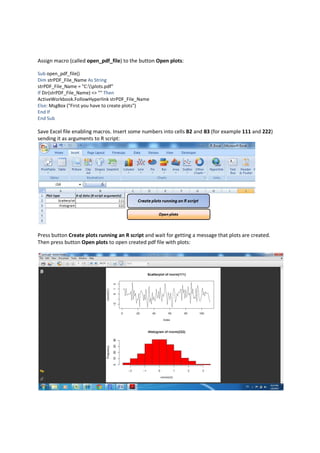

This document provides an example of running an R script from Excel to create plots. It describes setting up an Excel file with buttons to run an R script and open the resulting PDF. The R script generates random data, plots it, and saves the plots to a PDF. Clicking the first button runs the R script, passing cell values as arguments. Clicking the second button opens the PDF if it was created.


