Prepared by Volkan OBAN
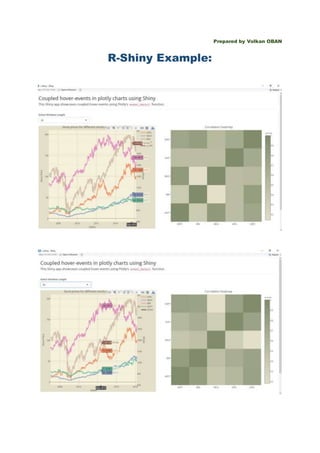
R-Shiny Example:
server <- function(input, output){
# Read data
stockdata <- read.csv("https://cdn.rawgit.com/plotly/datasets/master/stockdata.csv")
# Create dates
stockdata$Date <- as.Date(stockdata$Date)
# Reshape
ds <- reshape2::melt(stockdata, id = "Date")
# Set some colors
plotcolor <- "#F5F1DA"
papercolor <- "#E3DFC8"
# Plot time series chart
output$timeseries <- renderPlotly({
p <- ds %>%
filter(variable != "GSPC") %>%
plot_ly(x = Date, y = value, color = variable, mode = "lines", line = list(width = 3), hovermode =
"closest", source = "source")
# Add SP500
p <- add_trace(p, data = stockdata, x = Date, y = GSPC, mode = "lines", yaxis = "y2", name =
"SP500", opacity = 0.3,
line = list(width = 5)) %>%
layout(title = "Stock prices for different stocks overlaid with SP500",
xaxis = list(title = "Dates", gridcolor = "#bfbfbf", domain = c(0, 0.98)),
yaxis = list(title = "Stock Price", gridcolor = "#bfbfbf"),
plot_bgcolor = plotcolor,
paper_bgcolor = papercolor,
yaxis2 = list(title = "SP500", side = "right", overlaying = "y"))
p
})
# Coupled hover event
output$correlation <- renderPlotly({
# Read in hover data
eventdata <- event_data("plotly_hover", source = "source")
validate(need(!is.null(eventdata), "Hover over the time series chart to populate this heatmap"))
# Get point number
datapoint <- as.numeric(eventdata$pointNumber)[1]
# Get window length
window <- as.numeric(input$window)
# Show correlation heatmap
rng <- (datapoint - window):(datapoint + window)
cormat <- round(cor(stockdata[rng, 1:5]),2)
plot_ly(x = rownames(cormat), y = colnames(cormat), z = cormat, type = "heatmap",
colorscale=list(c(0, 'rgb(227, 223, 200)'), c(1, 'rgb(128, 140, 108)')))%>%
layout(title = "Correlation heatmap",
xaxis = list(title = ""),
yaxis = list(title = ""))
})
}
library(shiny)
library(plotly)
library(shinythemes)
library(dplyr)
ui <- fluidPage(
# Set theme
theme = shinytheme("spacelab"),
# Some help text
h2("Coupled hover-events in plotly charts using Shiny"),
h4("This Shiny app showcases coupled hover-events using Plotly's ", tags$code("event_data()"), "
function."),
# Vertical space
tags$hr(),
# Window length selector
selectInput("window", label = "Select Window Length", choices = c(10, 20, 30, 60, 90), selected =
10),
# Plotly Chart Area
fluidRow(
column(6, plotlyOutput(outputId = "timeseries", height = "600px")),
column(6, plotlyOutput(outputId = "correlation", height = "600px"))),
tags$hr(),
tags$blockquote("Hover over time series chart to fix a specific date. Correlation chart will update with
historical
correlations (time span will be hover date +/- selected window length)")
)
Source: https://plot.ly/r/shiny-coupled-hover-events/

A Shiny Example-- R

  • 1.
    Prepared by VolkanOBAN R-Shiny Example:
  • 2.
    server <- function(input,output){ # Read data stockdata <- read.csv("https://cdn.rawgit.com/plotly/datasets/master/stockdata.csv") # Create dates stockdata$Date <- as.Date(stockdata$Date) # Reshape ds <- reshape2::melt(stockdata, id = "Date") # Set some colors plotcolor <- "#F5F1DA" papercolor <- "#E3DFC8" # Plot time series chart output$timeseries <- renderPlotly({ p <- ds %>% filter(variable != "GSPC") %>% plot_ly(x = Date, y = value, color = variable, mode = "lines", line = list(width = 3), hovermode = "closest", source = "source") # Add SP500 p <- add_trace(p, data = stockdata, x = Date, y = GSPC, mode = "lines", yaxis = "y2", name = "SP500", opacity = 0.3, line = list(width = 5)) %>% layout(title = "Stock prices for different stocks overlaid with SP500", xaxis = list(title = "Dates", gridcolor = "#bfbfbf", domain = c(0, 0.98)), yaxis = list(title = "Stock Price", gridcolor = "#bfbfbf"), plot_bgcolor = plotcolor,
  • 3.
    paper_bgcolor = papercolor, yaxis2= list(title = "SP500", side = "right", overlaying = "y")) p }) # Coupled hover event output$correlation <- renderPlotly({ # Read in hover data eventdata <- event_data("plotly_hover", source = "source") validate(need(!is.null(eventdata), "Hover over the time series chart to populate this heatmap")) # Get point number datapoint <- as.numeric(eventdata$pointNumber)[1] # Get window length window <- as.numeric(input$window) # Show correlation heatmap rng <- (datapoint - window):(datapoint + window) cormat <- round(cor(stockdata[rng, 1:5]),2) plot_ly(x = rownames(cormat), y = colnames(cormat), z = cormat, type = "heatmap", colorscale=list(c(0, 'rgb(227, 223, 200)'), c(1, 'rgb(128, 140, 108)')))%>% layout(title = "Correlation heatmap", xaxis = list(title = ""), yaxis = list(title = "")) }) }
  • 4.
    library(shiny) library(plotly) library(shinythemes) library(dplyr) ui <- fluidPage( #Set theme theme = shinytheme("spacelab"), # Some help text h2("Coupled hover-events in plotly charts using Shiny"), h4("This Shiny app showcases coupled hover-events using Plotly's ", tags$code("event_data()"), " function."), # Vertical space tags$hr(), # Window length selector selectInput("window", label = "Select Window Length", choices = c(10, 20, 30, 60, 90), selected = 10), # Plotly Chart Area fluidRow( column(6, plotlyOutput(outputId = "timeseries", height = "600px")), column(6, plotlyOutput(outputId = "correlation", height = "600px"))), tags$hr(), tags$blockquote("Hover over time series chart to fix a specific date. Correlation chart will update with historical correlations (time span will be hover date +/- selected window length)") )
  • 5.