Introduction to R
• Statistics is a collection of tools used for converting raw data into
information to help decision makers in their work.
• Types of Statistics:
Descriptive statistics is devoted to the summarization and description
of data.
Inferential statistics uses sample data to make an inference about a
population.
Statistical Analysis of Data using R
• Statistical Software Packages
1) SAS
2) SPSS
3) STATA
4) Microsoft Excel
5) R
Introduction to R
• R Language:
In 1991, R was created by Ross Ihaka and Robert Gentleman in the
Department of Statistics at the University of Auckland. In 1993 the first
announcement of R was made to the public.
• In 2000 R version 1.0.0 was released to the public.
• Philosophy – ‘How to Make Data Analysis Easier’
• The primary R system is available from the Comprehensive R Archive
Network, also known as CRAN.
• The main source code archives are maintained by a dedicated group
known as the R Core Team
http://cran.r-project.org
Introduction to R
• Installation – R GUI
Search “download R”. Go to
https://cran.r-project.org/bin/windows/base/
Click on Download R 4.1.1 for Windows (84 megabytes, 32/64 bit)
Save the file and run as administrator. Accept all default setting for
installation and complete installation process.
• There is also an integrated development environment (IDE) available for R
that is built by RStudio.
Introduction to R
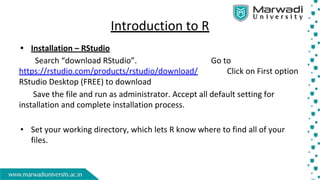
• Installation – RStudio
Search “download RStudio”. Go to
https://rstudio.com/products/rstudio/download/ Click on First option
RStudio Desktop (FREE) to download
Save the file and run as administrator. Accept all default setting for
installation and complete installation process.
• Set your working directory, which lets R know where to find all of your
files.
Introduction to R
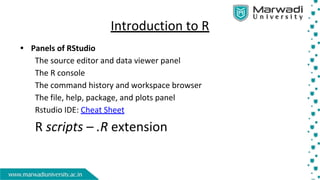
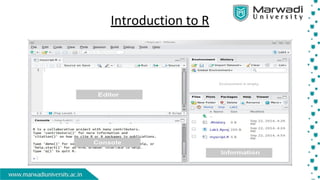
• Panels of RStudio
The source editor and data viewer panel
The R console
The command history and workspace browser
The file, help, package, and plots panel
Rstudio IDE: Cheat Sheet
R scripts – .R extension
Introduction to R
•
Statistical Analysis of Data using R
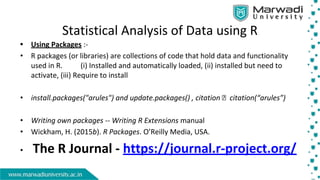
• Using Packages :-
• R packages (or libraries) are collections of code that hold data and functionality
used in R. (i) Installed and automatically loaded, (ii) installed but need to
activate, (iii) Require to install
• install.packages("arules") and update.packages() , citation citation(“arules”)
• Writing own packages -- Writing R Extensions manual
• Wickham, H. (2015b). R Packages. O’Reilly Media, USA.
• The R Journal - https://journal.r-project.org/
Introduction to R
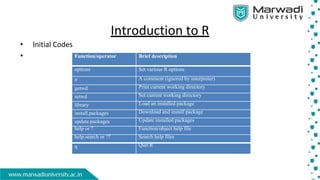
• Initial Codes
• Function/operator Brief description
options Set various R options
# A comment (ignored by interpreter)
getwd Print current working directory
setwd Set current working directory
library Load an installed package
install.packages Download and install package
update.packages Update installed packages
help or ? Function/object help file
help.search or ?? Search help files
q Quit R
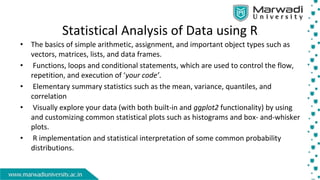
Statistical Analysis of Data using R
• The basics of simple arithmetic, assignment, and important object types such as
vectors, matrices, lists, and data frames.
• Functions, loops and conditional statements, which are used to control the flow,
repetition, and execution of ‘your code’.
• Elementary summary statistics such as the mean, variance, quantiles, and
correlation
• Visually explore your data (with both built-in and ggplot2 functionality) by using
and customizing common statistical plots such as histograms and box- and-whisker
plots.
• R implementation and statistical interpretation of some common probability
distributions.
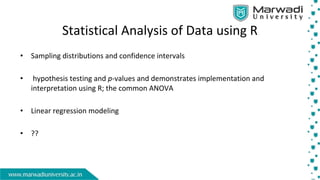
Statistical Analysis of Data using R
• Sampling distributions and confidence intervals
• hypothesis testing and p-values and demonstrates implementation and
interpretation using R; the common ANOVA
• Linear regression modeling
• ??
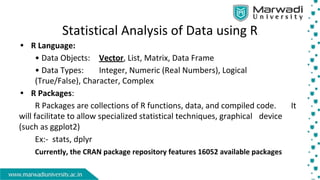
Statistical Analysis of Data using R
• R Language:
• Data Objects: Vector, List, Matrix, Data Frame
• Data Types: Integer, Numeric (Real Numbers), Logical
(True/False), Character, Complex
• R Packages:
R Packages are collections of R functions, data, and compiled code. It
will facilitate to allow specialized statistical techniques, graphical device
(such as ggplot2)
Ex:- stats, dplyr
Currently, the CRAN package repository features 16052 available packages
Statistical Analysis of Data using R
• Importing Data in R:
The most common way is using read.table() function (.txt).
Quite often we have comma (,) separated data values. Such a data
file can be imported into R using read.csv().
read.csv(file, header = TRUE, sep = ",", quote = """, dec = ".", ...)
Use read.table() or read.csv() function to import the file into R
• Importing an Excel File:
Download readxl package from CRAN. Load it in the workspace and
use read_excel() function to import excel file into R.
• data()
Statistical Analysis of Data using R
• Objectives
Entering the Input and Evaluation
Creating Vectors – The c() function can be used to create vectors of
objects by concatenating things together.
Finding descriptive measures like range, averages, variation (CV),
five-number and summary, dotplot and boxplot diagram
Perform t-test
Discrete Frequency Distribution and graphs
Creating Matrix – The matrix() function is used (AP)
•
Statistical Analysis of Data using R
• Objectives
Compute Binomial distribution, Poisson distribution and Normal
distribution Probability
Read data from external source using read.csv
Perform Cluster Analysis
Obtain Summary , Tables and Graphs
Manage dataframe using dplyr package
•

PPT - Introduction to R.pdf

  • 1.
    Introduction to R •Statistics is a collection of tools used for converting raw data into information to help decision makers in their work. • Types of Statistics: Descriptive statistics is devoted to the summarization and description of data. Inferential statistics uses sample data to make an inference about a population.
  • 2.
    Statistical Analysis ofData using R • Statistical Software Packages 1) SAS 2) SPSS 3) STATA 4) Microsoft Excel 5) R
  • 3.
    Introduction to R •R Language: In 1991, R was created by Ross Ihaka and Robert Gentleman in the Department of Statistics at the University of Auckland. In 1993 the first announcement of R was made to the public. • In 2000 R version 1.0.0 was released to the public. • Philosophy – ‘How to Make Data Analysis Easier’ • The primary R system is available from the Comprehensive R Archive Network, also known as CRAN. • The main source code archives are maintained by a dedicated group known as the R Core Team http://cran.r-project.org
  • 4.
    Introduction to R •Installation – R GUI Search “download R”. Go to https://cran.r-project.org/bin/windows/base/ Click on Download R 4.1.1 for Windows (84 megabytes, 32/64 bit) Save the file and run as administrator. Accept all default setting for installation and complete installation process. • There is also an integrated development environment (IDE) available for R that is built by RStudio.
  • 5.
    Introduction to R •Installation – RStudio Search “download RStudio”. Go to https://rstudio.com/products/rstudio/download/ Click on First option RStudio Desktop (FREE) to download Save the file and run as administrator. Accept all default setting for installation and complete installation process. • Set your working directory, which lets R know where to find all of your files.
  • 6.
    Introduction to R •Panels of RStudio The source editor and data viewer panel The R console The command history and workspace browser The file, help, package, and plots panel Rstudio IDE: Cheat Sheet R scripts – .R extension
  • 7.
  • 8.
    Statistical Analysis ofData using R • Using Packages :- • R packages (or libraries) are collections of code that hold data and functionality used in R. (i) Installed and automatically loaded, (ii) installed but need to activate, (iii) Require to install • install.packages("arules") and update.packages() , citation citation(“arules”) • Writing own packages -- Writing R Extensions manual • Wickham, H. (2015b). R Packages. O’Reilly Media, USA. • The R Journal - https://journal.r-project.org/
  • 9.
    Introduction to R •Initial Codes • Function/operator Brief description options Set various R options # A comment (ignored by interpreter) getwd Print current working directory setwd Set current working directory library Load an installed package install.packages Download and install package update.packages Update installed packages help or ? Function/object help file help.search or ?? Search help files q Quit R
  • 10.
    Statistical Analysis ofData using R • The basics of simple arithmetic, assignment, and important object types such as vectors, matrices, lists, and data frames. • Functions, loops and conditional statements, which are used to control the flow, repetition, and execution of ‘your code’. • Elementary summary statistics such as the mean, variance, quantiles, and correlation • Visually explore your data (with both built-in and ggplot2 functionality) by using and customizing common statistical plots such as histograms and box- and-whisker plots. • R implementation and statistical interpretation of some common probability distributions.
  • 11.
    Statistical Analysis ofData using R • Sampling distributions and confidence intervals • hypothesis testing and p-values and demonstrates implementation and interpretation using R; the common ANOVA • Linear regression modeling • ??
  • 12.
    Statistical Analysis ofData using R • R Language: • Data Objects: Vector, List, Matrix, Data Frame • Data Types: Integer, Numeric (Real Numbers), Logical (True/False), Character, Complex • R Packages: R Packages are collections of R functions, data, and compiled code. It will facilitate to allow specialized statistical techniques, graphical device (such as ggplot2) Ex:- stats, dplyr Currently, the CRAN package repository features 16052 available packages
  • 13.
    Statistical Analysis ofData using R • Importing Data in R: The most common way is using read.table() function (.txt). Quite often we have comma (,) separated data values. Such a data file can be imported into R using read.csv(). read.csv(file, header = TRUE, sep = ",", quote = """, dec = ".", ...) Use read.table() or read.csv() function to import the file into R • Importing an Excel File: Download readxl package from CRAN. Load it in the workspace and use read_excel() function to import excel file into R. • data()
  • 14.
    Statistical Analysis ofData using R • Objectives Entering the Input and Evaluation Creating Vectors – The c() function can be used to create vectors of objects by concatenating things together. Finding descriptive measures like range, averages, variation (CV), five-number and summary, dotplot and boxplot diagram Perform t-test Discrete Frequency Distribution and graphs Creating Matrix – The matrix() function is used (AP) •
  • 15.
    Statistical Analysis ofData using R • Objectives Compute Binomial distribution, Poisson distribution and Normal distribution Probability Read data from external source using read.csv Perform Cluster Analysis Obtain Summary , Tables and Graphs Manage dataframe using dplyr package •