Quick Development and Deployment of Industrial Applications using
Excel/VBA, IMPL and CPLEX
J.D. Kelly
(jdkelly@industrialgorithms.ca)
Industrial Algorithms LLC. (IAL)
www.industrialgorithms.com
July 2014
Introduction
Presented in this document is a description of how to develop and deploy industrial
applications in a timely fashion using Excel/VBA as the user-interface (UI) and systems-
integration (SI) system, IMPL as the industrial modeller and CPLEX as the commercial
solver. A small jobshop scheduling example is overviewed to help describe to some extent,
the details of this advanced decision-making application where this type of problem can be
found in both the manufacturing and process industries.
The purpose of developing and deploying quickly is to acquire feedback from the end-
users, to assess the difficulty and tractability of the problem, to ascertain the expected
costs and benefits of the application and to address any other issues and requirements
regarding the project as a whole as soon as possible. For some projects, proof-of-concepts,
prototypes and/or pilots are also useful and these should also be performed ASAP as well
using the same approach highlighted here. Ultimately, once a business problem solution
has been achieved and full or partial benefits have been captured, then a more robust and
sophisticated end-user experience and system architecture can be implemented in the
operating system and computer programming environment of choice which will hopefully
enhance and maintain the solution over its expected life-cycle.
Problem
Although not a large problem, we have decided to highlight a small 3 x 3 jobshop
scheduling optimization application using a discrete-time formulation with a future time-
horizon of 24-hours and 1-hour time-periods. There are three (3) jobs and three (3)
machines to be scheduled in the shortest amount of time also known as minimizing the
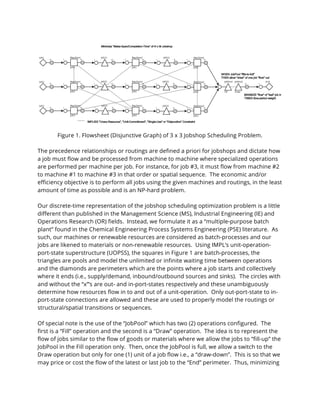
makespan or completion-time. Figure 1 shows the flowsheet or “disjunctive graph” where
a machine can only perform one task, activity or operation in any given time-period and
this is known as a “small-bucket” formulation consistent with the requirement of
scheduling i.e., unit-commitment or disjunctive constraints (see dotted lines). In contrast,
planning uses a “big-bucket” time digitization where a time-period can have one or more
operations being performed simultaneously.
Figure 1. Flowsheet (Disjunctive Graph) of 3 x 3 Jobshop Scheduling Problem.
The precedence relationships or routings are defined a priori for jobshops and dictate how
a job must flow and be processed from machine to machine where specialized operations
are performed per machine per job. For instance, for job #3, it must flow from machine #2
to machine #1 to machine #3 in that order or spatial sequence. The economic and/or
efficiency objective is to perform all jobs using the given machines and routings, in the least
amount of time as possible and is an NP-hard problem.
Our discrete-time representation of the jobshop scheduling optimization problem is a little
different than published in the Management Science (MS), Industrial Engineering (IE) and
Operations Research (OR) fields. Instead, we formulate it as a “multiple-purpose batch
plant” found in the Chemical Engineering Process Systems Engineering (PSE) literature. As
such, our machines or renewable resources are considered as batch-processes and our
jobs are likened to materials or non-renewable resources. Using IMPL’s unit-operation-
port-state superstructure (UOPSS), the squares in Figure 1 are batch-processes, the
triangles are pools and model the unlimited or infinite waiting time between operations
and the diamonds are perimeters which are the points where a job starts and collectively
where it ends (i.e., supply/demand, inbound/outbound sources and sinks). The circles with
and without the “x”’s are out- and in-port-states respectively and these unambiguously
determine how resources flow in to and out of a unit-operation. Only out-port-state to in-
port-state connections are allowed and these are used to properly model the routings or
structural/spatial transitions or sequences.
Of special note is the use of the “JobPool” which has two (2) operations configured. The
first is a “Fill” operation and the second is a “Draw” operation. The idea is to represent the
flow of jobs similar to the flow of goods or materials where we allow the jobs to “fill-up” the
JobPool in the Fill operation only. Then, once the JobPool is full, we allow a switch to the
Draw operation but only for one (1) unit of a job flow i.e., a “draw-down”. This is so that we
may price or cost the flow of the latest or last job to the “End” perimeter. Thus, minimizing
the cost of the flow of the tardiest job will adequately determine the shortest completion-
time.
The notion that jobs flow from machine to machine allows us to use IMPL’s unique
generalized network-flow capability with setup logic in a creative manner to model and
solve many types of industrial optimization problems of practical significance with discrete
(and nonlinear) variables in a declarative framework.
Application
To configure both the static and dynamic (time-varying) model data, we use an Excel
workbook with several sheets or tabs which represent different types of data found in our
Industrial Modeling Language (IML). A module containing the VBA code to iterate through
all sheets in the workbook and to write out or export our IMPL model data files is provided
in Appendix A. This code is useful to generate the IMPL model data files automatically after
changes to the data have been made by the end-user in a familiar environment that can be
quickly modified and maintained. It can also easily facilitate the loose data integration
between multiple and diverse data sources.
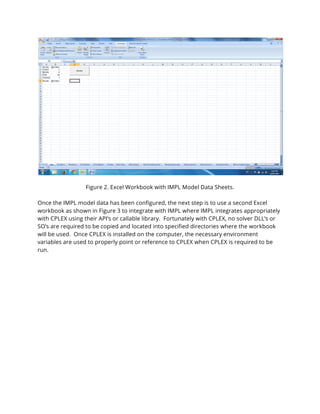
Figure 2 shows a screen capture of the Excel workbook. Inside the workbook we have
fourteen (14) sheets used for this problem labeled as follows: “Calcs” (useful symbols or
identifiers), “Durations” (past, future horizons and time-period), “MHoldups” (batch-sizes),
“IJTeeRates”, “IJTotalRates” (external and internal stream flow lower and upper bounds),
“IJYields” (recipes or bill-of-resources), “MUpTimes” (batch-times), “IJFlowDelays” (internal
stream time-delays for in and out flows on batch-processes), “MSwitchesEmptyFull (for
JobPool-Fill only)”, “MHoldupOpenings”(initial inventories) , “MSetupOrders”,
“JISetupOrders” (time-varying setup binary/logic lower and upper bounds),
“IJHoldupOrders” (time-varying inventory of jobs on perimeters) and “IJFlowWeightOrders”
(time-varying objective function weights for last or latest job flow).
Appendix B contains the UPS file that is generated by GNOME DIA and Python 2.3 which
configures the UOPSS objects or shapes graphically (see Figure 1) and the 14 model data
files are provided in Appendix C for completeness. Please see the IML reference manuals
for further details on the semantics and syntax used in this example application.
Figure 2. Excel Workbook with IMPL Model Data Sheets.
Once the IMPL model data has been configured, the next step is to use a second Excel
workbook as shown in Figure 3 to integrate with IMPL where IMPL integrates appropriately
with CPLEX using their API’s or callable library. Fortunately with CPLEX, no solver DLL’s or
SO’s are required to be copied and located into specified directories where the workbook
will be used. Once CPLEX is installed on the computer, the necessary environment
variables are used to properly point or reference to CPLEX when CPLEX is required to be
run.
Figure 3. Excel Workbook with IMPL Modeling and CPLEX Solving.
As a matter of completeness, we have also included in Appendix D and E the IMPL module
code to integrate IMPL to Excel/VBA and the VBA application code to run IMPL with the
CPLEX MILP solver to optimize our small jobshop scheduling problem example. We do not
describe in any detail the attached VBA code where the IMPL installation, console and IPL
reference manuals can aid in the explanation/understanding of the code.
Summary
As shown in Figure 3 in cells A9 to Z19, we show a simple Gantt chart of the solution data.
The data shown are the “setup” variable results for the 3 machines in each of the 3 jobs
over the 24-hour time-horizon discretized into 1-hour equal time-periods. From the active
setups (i.e., have a value of 1 (one)), it is easy to see the batch or processing-time of the
machine-job pairs.
The makespan has an optimized value of 16 where machine #3 processing job #3 is the last
or latest job executed and finishes in time-period 16. (Note the -16 in the figure which is
the direct result that IMPL only maximizes the objective function.) It is also apparent that
the machines respect the single-use constraint in that only one job is run on a machine at a
time. There are non-zero wait- times between the jobs executed on the machines and this
is accomplished using the pools between the machines as previously mentioned.
Finally, we have shown how to quickly develop and deploy (albeit for a small application)
using Excel/VBA, IMPL and CPLEX, providing the ability to model and solve a somewhat
complicated type of pure scheduling problem found in the Operations Research domain.
Scaling to larger more involved problems is also possible using Excel/VBA, and of course
IMPL and CPLEX, where we point to the well-known observation that the majority of
decision-support software implementations in all industries and in all countries houses
some (if not all) of the business logic and know-how in spreadsheet or workbook types of
application solutions and this is also true for advanced planning.
Appendix A – XLS2IML VBA Code
Public Sub XLS2IML()
' Program Description:
'
' This routine outputs or exports multiple table or matrix data (row,column) found in multiple
' sheets to multiple corresponding ASCII flat-files suitable for input or import into IAL's IMPL
' i.e., an IML file.
'
' A sheet is what IMPL calls a "frame" and a frame has one or more "features" or rows of which
' there are 3 types: "leader", "feeder" and "trailer". The leader and trailer must be identical
' and must correspond to a frame known by IMPL else it will be ignored. The columns of a feeder
' feature are called "fields" where each field is formatted separated simply by commas i.e., a
' comma-separated value (CSV) file.
'
' Notes:
'
' 1.0 This routine only outputs/exports one frame per sheet. All other frames within the same
' sheet will be ignored/skipped.
'
' 2.0 Use the character "!" to provide comments into the IML file anywhere in the row or feature.
'
' 3.0 Blank columns or fields in a row or feeder feature will terminate the output/export for that
' row or feature i.e., all columns/fields after a blank column/field are ignored/skipped.
'
' 4.0 Microsoft Excel has no limit on the number of sheets in a spreadsheet or workbook.
'
' 5.0 If the cell formula or expression is required to be outputted/exported then use "ActiveCell.Formula"
' to obtain the cell string including the prefixed "=" equals sign character.
Dim Pathname As String
Dim Typename As String
Dim NFrames As Integer
Dim Frame As String
Dim Feature, Field As String
Dim Leader, Trailer As String
Dim NFields As Integer
Dim i, j, k As Integer
' Specify the path name where the output/export IML files will be placed.
Pathname = "c:IMPL"
' Specify the type/extension name of the file.
Typename = ".iml"
' Get the number of sheets or frames in the spreadsheet or file.
NFrames = ActiveWorkbook.Worksheets.Count
' Loop through all sheets or frames one at a time.
For i = 1 To NFrames
' Use the name of the sheet as the file name.
Frame = ActiveWorkbook.Worksheets(i).Name
' Open the sheet or frame as a separate IML file for output/export.
Open Pathname + Frame + Typename For Output Shared As #1
' Read from the sheet or frame the table/matrix data starting/beginning with the "leader"
' and finishing/ending with the "trailer".
Sheets(Frame).Select
' Start from the first row and column cell A1 which contains the "leader" feature.
Range("A1").Select
Feature = ActiveCell.Value
' If comments exist ("!") before the "leader" then ignore but still output/export.
Do While InStr(Feature, "!") > 0
Print #1, Trim$(Feature)
ActiveCell.Offset(1, 0).Select
Feature = ActiveCell.Value
Loop
' Get the "leader" feature by concatenating the fields.
' Increment to the next column or field where we assume there is always at least one field.
ActiveCell.Offset(0, 1).Select
Field = ActiveCell.Value
If Len(Field) > 0 Then
Feature = Feature + "," + Field
End If
j = 1
' Increment to the next immediate column or field.
ActiveCell.Offset(0, 1).Select
Field = ActiveCell.Value
j = j + 1
' Do while the rest of the columns or fields are not empty, blank, void, etc.
Do While Len(Field) > 0
Feature = Feature + "," + Field
ActiveCell.Offset(0, 1).Select
Field = ActiveCell.Value
j = j + 1
Loop
' Keep the number fields in the frame.
NFields = j
' Return or decrement back to the first column or field.
ActiveCell.Offset(0, -j).Select
' Set the "leader" equal to the concatenated "feeder".
Leader = Feature
' Print the "leader" and set the "trailer" equal to the "leader".
Print #1, Trim$(Leader)
Trailer = Leader
Feature = ""
Do While Trim$(Feature) <> Trim$(Trailer)
' Increment to the next row or "feeder" feature.
ActiveCell.Offset(1, 0).Select
Feature = ActiveCell.Value
ActiveCell.Offset(0, 1).Select
Field = ActiveCell.Value
Feature = Feature + "," + Field
j = 1
ActiveCell.Offset(0, 1).Select
Field = ActiveCell.Value
j = j + 1
For k = 3 To NFields
Feature = Feature + "," + Field
ActiveCell.Offset(0, 1).Select
Field = ActiveCell.Value
j = j + 1
Next k
ActiveCell.Offset(0, -j).Select
' If this is the "trailer" feature then exit.
If Trim$(Feature) = Trim$(Trailer) Then
Exit Do
End If
' Output/export the comma-delimited feature.
Print #1, Trim$(Feature)
Loop
Print #1, Trim$(Trailer)
Close #1
Next i
' Return back to the first frame or sheet.
Sheets(1).Select
Range("A1").Select
End Sub
Appendix B – UPS File
!!!!!!!!!!!!!!!!!!!!!!!!!!!!!!!!!!!!!!!!!!!!!!!!!!!!!!!!!!!!!!
! Unit-Operation-Port-State-Superstructure (UOPSS) *.UPS File.
! (This file is automatically generated from the Python program IALConstructer.py)
!!!!!!!!!!!!!!!!!!!!!!!!!!!!!!!!!!!!!!!!!!!!!!!!!!!!!!!!!!!!!!
&sUnit,&sOperation,@sType,@sSubtype,@sUse
End,,perimeter,,noncontiguous
Job1,,perimeter,,noncontiguous
Job11,,pool,,
Job12,,pool,,
Job2,,perimeter,,noncontiguous
Job21,,pool,,
Job22,,pool,,
Job3,,perimeter,,noncontiguous
Job31,,pool,,
Job32,,pool,,
JobPool,Draw,pool,,
JobPool,Fill,pool,,
Machine1,Job1,processb,,
Machine1,Job2,processb,,
Machine1,Job3,processb,,
Machine2,Job1,processb,,
Machine2,Job2,processb,,
Machine2,Job3,processb,,
Machine3,Job1,processb,,
Machine3,Job2,processb,,
Machine3,Job3,processb,,
&sUnit,&sOperation,@sType,@sSubtype,@sUse
! Number of UO shapes = 21
&sAlias,&sUnit,&sOperation
ALLPARTS,End,
ALLPARTS,Job1,
ALLPARTS,Job11,
ALLPARTS,Job12,
ALLPARTS,Job2,
ALLPARTS,Job21,
ALLPARTS,Job22,
ALLPARTS,Job3,
ALLPARTS,Job31,
ALLPARTS,Job32,
ALLPARTS,JobPool,Draw
ALLPARTS,JobPool,Fill
ALLPARTS,Machine1,Job1
ALLPARTS,Machine1,Job2
ALLPARTS,Machine1,Job3
ALLPARTS,Machine2,Job1
ALLPARTS,Machine2,Job2
ALLPARTS,Machine2,Job3
ALLPARTS,Machine3,Job1
ALLPARTS,Machine3,Job2
ALLPARTS,Machine3,Job3
&sAlias,&sUnit,&sOperation
&sUnit,&sOperation,&sPort,&sState,@sType,@sSubtype
End,,i,,in,
Job1,,o,,out,
Job11,,i,,in,
Job11,,o,,out,
Job12,,i,,in,
Job12,,o,,out,
Job2,,o,,out,
Job21,,i,,in,
Job21,,o,,out,
Job22,,i,,in,
Job22,,o,,out,
Job3,,o,,out,
Job31,,i,,in,
Job31,,o,,out,
Job32,,i,,in,
Job32,,o,,out,
JobPool,Draw,o,,out,
JobPool,Fill,i,,in,
Machine1,Job1,i,,in,
Machine1,Job1,o,,out,
Machine1,Job2,i,,in,
Machine1,Job2,o,,out,
Machine1,Job3,i,,in,
Machine1,Job3,o,,out,
Machine2,Job1,i,,in,
Machine2,Job1,o,,out,
Machine2,Job2,i,,in,
Machine2,Job2,o,,out,
Machine2,Job3,i,,in,
Machine2,Job3,o,,out,
Machine3,Job1,i,,in,
Machine3,Job1,o,,out,
Machine3,Job2,i,,in,
Machine3,Job2,o,,out,
Machine3,Job3,i,,in,
Machine3,Job3,o,,out,
&sUnit,&sOperation,&sPort,&sState,@sType,@sSubtype
! Number of UOPS shapes = 36
&sAlias,&sUnit,&sOperation,&sPort,&sState
ALLINPORTS,End,,i,
ALLINPORTS,Job11,,i,
ALLINPORTS,Job12,,i,
ALLINPORTS,Job21,,i,
ALLINPORTS,Job22,,i,
ALLINPORTS,Job31,,i,
ALLINPORTS,Job32,,i,
ALLINPORTS,JobPool,Fill,i,
ALLINPORTS,Machine1,Job1,i,
ALLINPORTS,Machine1,Job2,i,
ALLINPORTS,Machine1,Job3,i,
ALLINPORTS,Machine2,Job1,i,
ALLINPORTS,Machine2,Job2,i,
ALLINPORTS,Machine2,Job3,i,
ALLINPORTS,Machine3,Job1,i,
ALLINPORTS,Machine3,Job2,i,
ALLINPORTS,Machine3,Job3,i,
ALLOUTPORTS,Job1,,o,
ALLOUTPORTS,Job11,,o,
ALLOUTPORTS,Job12,,o,
ALLOUTPORTS,Job2,,o,
ALLOUTPORTS,Job21,,o,
ALLOUTPORTS,Job22,,o,
ALLOUTPORTS,Job3,,o,
ALLOUTPORTS,Job31,,o,
ALLOUTPORTS,Job32,,o,
ALLOUTPORTS,JobPool,Draw,o,
ALLOUTPORTS,Machine1,Job1,o,
ALLOUTPORTS,Machine1,Job2,o,
ALLOUTPORTS,Machine1,Job3,o,
ALLOUTPORTS,Machine2,Job1,o,
ALLOUTPORTS,Machine2,Job2,o,
ALLOUTPORTS,Machine2,Job3,o,
ALLOUTPORTS,Machine3,Job1,o,
ALLOUTPORTS,Machine3,Job2,o,
ALLOUTPORTS,Machine3,Job3,o,
&sAlias,&sUnit,&sOperation,&sPort,&sState
&sUnit,&sOperation,&sPort,&sState,&sUnit,&sOperation,&sPort,&sState
Job1,,o,,Machine1,Job1,i,
Job11,,o,,Machine2,Job1,i,
Job12,,o,,Machine3,Job1,i,
Job2,,o,,Machine1,Job2,i,
Job21,,o,,Machine3,Job2,i,
Job22,,o,,Machine2,Job2,i,
Job3,,o,,Machine2,Job3,i,
Job31,,o,,Machine1,Job3,i,
Job32,,o,,Machine3,Job3,i,
JobPool,Draw,o,,End,,i,
Machine1,Job1,o,,Job11,,i,
Machine1,Job2,o,,Job21,,i,
Machine1,Job3,o,,Job32,,i,
Machine2,Job1,o,,Job12,,i,
Machine2,Job2,o,,JobPool,Fill,i,
Machine2,Job3,o,,Job31,,i,
Machine3,Job1,o,,JobPool,Fill,i,
Machine3,Job2,o,,Job22,,i,
Machine3,Job3,o,,JobPool,Fill,i,
&sUnit,&sOperation,&sPort,&sState,&sUnit,&sOperation,&sPort,&sState
! Number of UOPSPSUO shapes = 19
&sAlias,&sUnit,&sOperation,&sPort,&sState,&sUnit,&sOperation,&sPort,&sState
ALLPATHS,JobPool,Draw,o,,End,,i,
ALLPATHS,Machine1,Job1,o,,Job11,,i,
ALLPATHS,Machine2,Job1,o,,Job12,,i,
ALLPATHS,Machine1,Job2,o,,Job21,,i,
ALLPATHS,Machine3,Job2,o,,Job22,,i,
ALLPATHS,Machine2,Job3,o,,Job31,,i,
ALLPATHS,Machine1,Job3,o,,Job32,,i,
ALLPATHS,Machine2,Job2,o,,JobPool,Fill,i,
ALLPATHS,Machine3,Job1,o,,JobPool,Fill,i,
ALLPATHS,Machine3,Job3,o,,JobPool,Fill,i,
ALLPATHS,Job1,,o,,Machine1,Job1,i,
ALLPATHS,Job2,,o,,Machine1,Job2,i,
ALLPATHS,Job31,,o,,Machine1,Job3,i,
ALLPATHS,Job11,,o,,Machine2,Job1,i,
ALLPATHS,Job22,,o,,Machine2,Job2,i,
ALLPATHS,Job3,,o,,Machine2,Job3,i,
ALLPATHS,Job12,,o,,Machine3,Job1,i,
ALLPATHS,Job21,,o,,Machine3,Job2,i,
ALLPATHS,Job32,,o,,Machine3,Job3,i,
&sAlias,&sUnit,&sOperation,&sPort,&sState,&sUnit,&sOperation,&sPort,&sState
Appendix C – IMPL Model Data Files
&sCalc,@sValue
START,-1
BEGIN,0
END,24
PERIOD,1
&sCalc,@sValue
@rPastTHD,@rFutureTHD,@rTPD
START,END,PERIOD
@rPastTHD,@rFutureTHD,@rTPD
&sUnit,&sOperation,@rHoldup_Lower,@rHoldup_Upper
ALLPARTS,1,1,
JobPool,Fill,0,3
JobPool,Draw,0,3
Job11,,0,1
Job12,,0,1
Job21,,0,1
Job22,,0,1
Job31,,0,1
Job32,,0,1
&sUnit,&sOperation,@rHoldup_Lower,@rHoldup_Upper
&sUnit,&sOperation,&sPort,&sState,@rTeeRate_Lower,@rTeeRate_Upper
ALLINPORTS,0,1,,,
ALLOUTPORTS,0,1,,,
&sUnit,&sOperation,&sPort,&sState,@rTeeRate_Lower,@rTeeRate_Upper
&sUnit,&sOperation,&sPort,&sState,@rTotalRate_Lower,@rTotalRate_Upper
ALLINPORTS,0,1,,,
ALLOUTPORTS,0,1,,,
&sUnit,&sOperation,&sPort,&sState,@rTotalRate_Lower,@rTotalRate_Upper
&sUnit,&sOperation,&sPort,&sState,@rYield_Lower,@rYield_Upper,@rYield_Fixed
Machine1,Job1,i,,1,1,
Machine1,Job2,i,,1,1,
Machine1,Job3,i,,1,1,
Machine2,Job1,i,,1,1,
Machine2,Job2,i,,1,1,
Machine2,Job3,i,,1,1,
Machine3,Job1,i,,1,1,
Machine3,Job2,i,,1,1,
Machine3,Job3,i,,1,1,
Machine1,Job1,o,,1,1,
Machine1,Job2,o,,1,1,
Machine1,Job3,o,,1,1,
Machine2,Job1,o,,1,1,
Machine2,Job2,o,,1,1,
Machine2,Job3,o,,1,1,
Machine3,Job1,o,,1,1,
Machine3,Job2,o,,1,1,
Machine3,Job3,o,,1,1,
&sUnit,&sOperation,&sPort,&sState,@rYield_Lower,@rYield_Upper,@rYield_Fixed
&sUnit,&sOperation,@rUpTiming_Lower,@rUpTiming_Upper
Machine1,Job1,4,4
Machine1,Job2,3,3
Machine1,Job3,3,3
Machine2,Job1,4,4
Machine2,Job2,5,5
Machine2,Job3,4,4
Machine3,Job1,4,4
Machine3,Job2,4,4
Machine3,Job3,2,2
&sUnit,&sOperation,@rUpTiming_Lower,@rUpTiming_Upper
&sUnit,&sOperation,&sPort,&sState,@rFlowDelaying_Lower,@rFlowDelaying_Upper
Machine1,Job1,i,,0,0
Machine1,Job2,i,,0,0
Machine1,Job3,i,,0,0
Machine2,Job1,i,,0,0
Machine2,Job2,i,,0,0
Machine2,Job3,i,,0,0
Machine3,Job1,i,,0,0
Machine3,Job2,i,,0,0
Machine3,Job3,i,,0,0
Machine1,Job1,o,,3,3
Machine1,Job2,o,,2,2
Machine1,Job3,o,,2,2
Machine2,Job1,o,,3,3
Machine2,Job2,o,,4,4
Machine2,Job3,o,,3,3
Machine3,Job1,o,,3,3
Machine3,Job2,o,,3,3
Machine3,Job3,o,,1,1
&sUnit,&sOperation,&sPort,&sState,@rFlowDelaying_Lower,@rFlowDelaying_Upper
&sUnit,&sOperation,@rSwitchingWhen_Empty,@rSwitchingWhen_Full
JobPool,Fill,,3
&sUnit,&sOperation,@rSwitchingWhen_Empty,@rSwitchingWhen_Full
&sUnit,&sOperation,@rHoldup_Value,@rStart_Time
JobPool,Fill,0,START
Job11,,0,START
Job12,,0,START
Job21,,0,START
Job22,,0,START
Job31,,0,START
Job32,,0,START
&sUnit,&sOperation,@rHoldup_Value,@rStart_Time
&sUnit,&sOperation,@rSetup_Lower,@rSetup_Upper,@rBegin_Time,@rEnd_Time
ALLPARTS,0,1,BEGIN,END,
Job1,,1,0,BEGIN,END
Job2,,1,0,BEGIN,END
Job3,,1,0,BEGIN,END
End,,1,0,BEGIN,END
Job11,,1,0,BEGIN,END
Job12,,1,0,BEGIN,END
Job21,,1,0,BEGIN,END
Job22,,1,0,BEGIN,END
Job31,,1,0,BEGIN,END
Job32,,1,0,BEGIN,END
&sUnit,&sOperation,@rSetup_Lower,@rSetup_Upper,@rBegin_Time,@rEnd_Time
&sUnit,&sOperation,&sPort,&sState,&sUnit,&sOperation,&sPort,&sState,@rSetup_Lower,@rSetup_Upper,@rBegin_Time,@rEnd_Time
ALLPATHS,0,1,BEGIN,END,,,,,,,
&sUnit,&sOperation,&sPort,&sState,&sUnit,&sOperation,&sPort,&sState,@rSetup_Lower,@rSetup_Upper,@rBegin_Time,@rEnd_Time
&sUnit,&sOperation,&sPort,&sState,@rHoldup_Lower,@rHoldup_Upper,@rHoldup_Target,@rBegin_Time,@rEnd_Time
Job1,,o,,1,1,,BEGIN,END
Job2,,o,,1,1,,BEGIN,END
Job3,,o,,1,1,,BEGIN,END
End,,i,,1,1,,BEGIN,END
&sUnit,&sOperation,&sPort,&sState,@rHoldup_Lower,@rHoldup_Upper,@rHoldup_Target,@rBegin_Time,@rEnd_Time
&sUnit,&sOperation,&sPort,&sState,@rFlowPro_Weight,@rFlowPer1_Weight,@rFlowPer2_Weight,@rFlowPen_Weight,@rBegin_Time,@rEnd_Time
End,,i,,0,,,,0,1
End,,i,,-1,,,,1,2
End,,i,,-2,,,,2,3
End,,i,,-3,,,,3,4
End,,i,,-4,,,,4,5
End,,i,,-5,,,,5,6
End,,i,,-6,,,,6,7
End,,i,,-7,,,,7,8
End,,i,,-8,,,,8,9
End,,i,,-9,,,,9,10
End,,i,,-10,,,,10,11
End,,i,,-11,,,,11,12
End,,i,,-12,,,,12,13
End,,i,,-13,,,,13,14
End,,i,,-14,,,,14,15
End,,i,,-15,,,,15,16
End,,i,,-16,,,,16,17
End,,i,,-17,,,,17,18
End,,i,,-18,,,,18,19
End,,i,,-19,,,,19,20
End,,i,,-20,,,,20,21
End,,i,,-21,,,,21,22
End,,i,,-22,,,,22,23
End,,i,,-23,,,,23,24
&sUnit,&sOperation,&sPort,&sState,@rFlowPro_Weight,@rFlowPer1_Weight,@rFlowPer2_Weight,@rFlowPen_Weight,@rBegin_Time,@rEnd_Time
Appendix D – IMPL Module VBA Code File
Option Explicit
Option Compare Text
' i M P l (c)
'
' Copyright and Property of i n d u s t r I A L g o r i t h m s LLC.
'
' ! IMPL Resource Types.
Global Const IMPLconstant = 0
Global Const IMPLseriesset = 1
Global Const IMPLsimpleset = 2
Global Const IMPLsymbolset = 3
Global Const IMPLcatalog = 4
Global Const IMPLlist = 5
Global Const IMPLparameter = 6
Global Const IMPLvariable = 7
Global Const IMPLconstraint = 8
Global Const IMPLderivative = 9
Global Const IMPLexpression = 10
Global Const IMPLformula = 11
Global Const IMPLworki = 12
Global Const IMPLworkr = 13
Global Const IMPLworkz = 14
Global Const IMPLworks = 15
Global Const IMPLall = 16
Global Const IMPLnumkeys = 8
' ! IMPL Resource Items.
Global Const IMPLvalue = 0
Global Const IMPLlower = 1
Global Const IMPLupper = 2
Global Const IMPLweight = 3
Global Const IMPLtype = 4
Global Const IMPLvalidation = 11
Global Const IMPLvariance = 12
Global Const IMPLvetistic = 13
Global Const IMPLvaluation1 = 14
Global Const IMPLvaluation2 = 15
Global Const IMPLviolation = 16
' ! IMPL Reference or Record Statuses.
Global Const IMPLkeep = 1
Global Const IMPLhide = 2
Global Const IMPLerase = -1
Global Const IMPLexpel = -2
' ! IMPL String Sizes.
Global Const IMPLbasestringlen = 64
Global Const IMPLnamestringlenmult = 1
Global Const IMPLkeystringlenmult = 8
Global Const IMPLlinestringlenmult = 8
Global Const IMPLpagestringlenmult = 64
Global Const IMPLkeysstringlen = IMPLbasestringlen * IMPLkeystringlenmult
Global Const IMPLlinestringlen = IMPLbasestringlen * IMPLlinestringlenmult
Global Const IMPLpagestringlen = IMPLbasestringlen * IMPLpagestringlenmult
' ! IMPL Yes/No, On/Off, Open/Close, etc. Signs.
Global Const IMPLyes = 1
Global Const IMPLno = 0
Global Const IMPLon = 1
Global Const IMPLoff = 0
Global Const IMPLopen = 1
Global Const IMPLclose = 0
' ! IMPL Settings or Options (IMPL.set)
Global Const IMPLuselogfile = -1
Global Const IMPLrnnon = -99999#
Global Const IMPLepsil = 0.0000000000001
Global Const IMPLinfin = 1E+20
Global Const IMPLcontol = 0.000001
Global Const IMPLcomptol = 0#
Global Const IMPLrandseed = 1
Global Const IMPLperturbplus = 0.000000000001
Global Const IMPLperturbtimes = 0.5
Global Const IMPLabslogfuneps = 0.00001
Global Const IMPLrellogfuneps = 0.00001
Global Const IMPLmaxpasses = 50
Global Const IMPLremovefloaters = 0
Global Const IMPLpreemptpresolve = 0
Global Const IMPLstatusoffset = 1000
Global Const IMPLlowerrocl = 0#
Global Const IMPLupperrocl = 1#
Global Const IMPLlowerstcl = 2#
Global Const IMPLupperstcl = 3#
Global Const IMPLwritesolvernames = 0
Global Const IMPLwritesolverlogfile = 0
Global Const IMPLwritesolverlpfile = 0
Global Const IMPLsymbology = 0
Global Const IMPLsensitivity = 0
Global Const IMPLstringnames = 0
' ! IMPL Feed and Fact Flags.
Global Const IMPLsourceless = ""
Global Const IMPLsubjectless = ""
' ! IMPL Form Flag.
Global Const IMPLstructureless = 0
Global Const IMPLsparsic = 1
Global Const IMPLsymbolic = 2
' ! IMPL Fit Flag.
Global Const IMPLslotless = 0
Global Const IMPLdiscrete = 1
Global Const IMPLdistribute = 2
Global Const IMPLdifference = 3
Global Const IMPLdifferential = 4
' ! IMPL Filter Flag.
Global Const IMPLselectless = 0
Global Const IMPLquantity = 1
Global Const IMPLlogistics = 2
Global Const IMPLquality = 3
Global Const IMPLqualogistics = 4
' ! IMPL Focus Flag.
Global Const IMPLsyllabusless = 0
Global Const IMPLsimulation = 1
Global Const IMPLestimation = 2
Global Const IMPLoptimization = 3
' ! IMPL Face Flag.
Global Const IMPLstreamless = 0
Global Const IMPLimport = 1
Global Const IMPLexport = 2
Global Const IMPLoutput = 3
Global Const IMPLinput = 4
Global Const IMPLinout = 6
Global Const IMPLoutin = 5
Global Const IMPLinoutdata = 7
' ! IMPL Factor Flag.
Global Const IMPLscale = 1#
' ! IMPL Fob Flag.
Global Const IMPLsipherless = 0
' ! IMPL Frames Flag.
Global Const IMPLsheetsless = ""
' ! IMPL Filler Flag.
Global Const IMPLsupplementalless = 0
' ! IMPL Foreign Flag.
Global Const IMPLsupplementaryless = ""
' ! IMPL Force Flag.
Global Const IMPLstressless = 0
' ! IMPL Feedback Flag.
Global Const IMPLsummonsless = 0
' ! IMPL Factorizer Flag.
Global Const IMPLsemisolverless = 0
Global Const IMPLy12m = 1
Global Const IMPLysmp = 2
Global Const IMPLnspiv = 3
Global Const IMPLma28 = 4
Global Const IMPLpardiso = 5
' ! IMPL Fork Flag.
Global Const IMPLsolverless = 0
Global Const IMPLcoinmp = 1
Global Const IMPLglpk = 2
Global Const IMPLlpsolve = 3
Global Const IMPLscip = 4
Global Const IMPLcplex = 5
Global Const IMPLgurobi = 6
Global Const IMPLlindo = 7
Global Const IMPLoptonomy = 8
Global Const IMPLxpress = 9
Global Const IMPLconopt = 51
Global Const IMPLipopt = 52
Global Const IMPLknitro = 53
Global Const IMPLnova = 54
Global Const IMPLworhp = 55
Global Const IMPLslpqpecoinmp = 101
Global Const IMPLslpqpeglpk = 102
Global Const IMPLslpqpelpsolve = 103
Global Const IMPLslpqpescip = 104
Global Const IMPLslpqpecplex = 105
Global Const IMPLslpqpegurobi = 106
Global Const IMPLslpqpelindo = 107
Global Const IMPLslpqpeoptonomy = 108
Global Const IMPLslpqpexpress = 109
Global Const IMPLslpqpeipopt = 152
Global Const IMPLsecqpey12m = 201
Global Const IMPLsecqpeymsp = 202
Global Const IMPLsecqpenspiv = 203
Global Const IMPLsecqpema28 = 204
Global Const IMPLsecqpepardiso = 205
Global Const IMPLsecqpesorve = 300
Global Const IMPLsecqpey12msorve = 301
Global Const IMPLsecqpeysmpsorve = 302
Global Const IMPLsecqpenspivsorve = 303
Global Const IMPLsecqpema28sorve = 304
Global Const IMPLsecqpepardisosorve = 305
Global Const IMPLseosey12mmsorve = 401
Global Const IMPLseoseysmpsorve = 402
Global Const IMPLseosenspivsorve = 403
Global Const IMPLseosema28sorve = 404
Global Const IMPLseosepardisosorve = 405
Global Const IMPLspcrey12m = 501
Global Const IMPLspcreysmp = 502
Global Const IMPLspcrenspiv = 503
Global Const IMPLspcrema28 = 504
Global Const IMPLspcrepardiso = 505
Global Const IMPLsvve = 601
Global Const IMPLssde = 602
Global Const IMPLsfcme = 603
Global Const IMPLsbtecoinmp = 701
Global Const IMPLsbteglpk = 702
Global Const IMPLsbtelpsolve = 703
' ! IMPL Fresh Flag.
Global Const IMPLfirstsession = 0
' ! IMPL Flashback Flag.
Global Const IMPLbinaryfile = 0
Global Const IMPLbinaryram = 1
Global Const IMPLflatfile = 2
' ! IMPL Fuse Flag.
Global Const IMPLcoldstart = 0
Global Const IMPLwarmstart = 1
Global Const IMPLhotstart = 2
' ! IMPL Fanfare Flag.
Global Const IMPLshowseriesset = 0
Global Const IMPLshowsimpleset = 1
Global Const IMPLsymbolsetset = 2
Global Const IMPLshowcatalog = 3
Global Const IMPLshowlist = 4
Global Const IMPLshowparameter = 5
Global Const IMPLshowvariable = 6
Global Const IMPLshowconstraint = 7
Global Const IMPLshowformula = 8
Global Const IMPLshowderivative = 9
Global Const IMPLshowexpression = 10
Global Const IMPLshowformulary = 11
Global Const IMPLshowreport = 12
Global Const IMPLshowsummary = 13
Global Const IMPLshowstatics = 14
Global Const IMPLshowslackness = 15
Global Const IMPLshowscalings = 16
Global Const IMPLshowall = 1073741823
' ! IMPL Server Prototypes.
' IMPLroot(subject:string*linestringlen): integer
Declare Function IMPLroot Lib "IMPLserver.dll" (ByVal IMLPsubject As String) As Long
' IMPLreserve(subject:string*linestringlen,
' type:integer): integer
Declare Function IMPLreserve Lib "IMPLserver.dll" (ByVal IMPLsubject As String, ByVal IMPLtype As Long) As Long
' IMPLrelease(type:integer): integer
Declare Function IMPLrelease Lib "IMPLserver.dll" (ByVal IMPLtype As Long) As Long
' IMPLreceiveSETTING(setting:string*basestringlen,
' value:real): integer
' IMPLretrieveSETTING(setting:string*basestringlen): real
Declare Function IMPLreceiveSETTING Lib "IMPLserver.dll" (ByVal IMPLsetting As String, ByVal IMPLvalue As Double) As Long
Declare Function IMPLretrieveSETTING Lib "IMPLserver.dll" (ByVal IMPLsetting As String) As Double
' IMPLrefresh(type:integer): integer
Declare Function IMPLrefresh Lib "IMPLserver.dll" (ByVal IMPLtype As Long) As Long
' IMPLresize(type:integer,
' num:integer,
' rank:integer,
' range:integer,
' len:integer,
' lenprime:integer,
' lenprime2:integer,
' lenkey:integer,
' lenval:integer): integer
Declare Function IMPLresize Lib "IMPLserver.dll" (ByVal IMPLtype As Long, ByVal IMPLnum As Long, ByVal IMPLrank As Long,
ByVal IMPLrange As Long, ByVal IMPLlen As Long, ByVal IMPLlenprime As Long,
ByVal IMPLlenprime2 As Long, ByVal IMPLlenkey As Long,
ByVal IMPLlenval As Long) As Long
' IMPLrender(subject:string*basestringlen,
' type:integer): integer
Declare Function IMPLrender Lib "IMPLserver.dll" (ByVal IMPLsubject As String, ByVal IMPLtype As Long) As Long
' IMPLrestore(subject:string*basestringlen,
' type:integer): integer
Declare Function IMPLrestore Lib "IMPLserver.dll" (ByVal IMPLsubject As String, ByVal IMPLtype As Long) As Long
' IMPLwritelog(message:string*linestringlen): integer
Declare Function IMPLwritelog Lib "IMPLserver.dll" (ByVal IMPLmessage As String) As Long
' IMPLwriteall(subject:string*linestringlen,
' type:integer,
' typebegin:integer,
' typeend:integer): integer
Declare Function IMPLwriteall Lib "IMPLserver.dll" (ByVal IMPLsubject As String, ByVal IMPLtype As Long, ByVal IMPLtypebegin As
Long, ByVal IMPLtypeend As Long) As Long
' IMPLreport(subject:string*linestringlen): integer
Declare Function IMPLreport Lib "IMPLserver.dll" (ByVal IMPLsubject As String) As Long
' IMPLrow(name:string*basestringlen,
' keys:integer*numkeys): integer
Declare Function IMPLrow Lib "IMPLserver.dll" (ByVal IMPLname As String, ByRef IMPLkeys As Long) As Long
' IMPLreview1(type:integer,
' row:integer,
' item:integer): real
Declare Function IMPLreview1 Lib "IMPLserver.dll" (ByVal IMPLtype As Long, ByVal IMPLrow As Long, ByVal IMPLitem As Long) As
Double
' IMPLreview2(type:integer,
' nrow:integer,
' row:integer,
' item:integer,
' value:real*nrow)
Declare Sub IMPLreview2 Lib "IMPLserver.dll" (ByVal IMPLtype As Long, ByVal IMPLnrow As Long, ByVal IMPLrow As Long,
ByVal IMPLitem As Long, ByRef IMPLvalue As Double)
' IMPLrevise1(type:integer,
' row:integer,
' item:integer,
' value:real): integer
Declare Function IMPLrevise1 Lib "IMPLserver.dll" (ByVal IMPLtype As Long, ByVal IMPLrow As Long, ByVal IMPLitem As Long,
ByVal IMPLvalue As Double) As Long
' IMPLrevise2(type:integer,
' nrow:integer,
' row:integer,
' item:integer,
' value:real*nrow): integer
Declare Function IMPLrevise2 Lib "IMPLserver.dll" (ByVal IMPLtype As Long, ByVal IMPLnrow As Long, ByVal IMPLrow As Long,
ByVal IMPLitem As Long, ByRef IMPLvalue As Double) As Long
' IMPLsummary(subject:string*linestringlen): integer
Declare Function IMPLsummary Lib "IMPLserver.dll" (ByVal IMPLsubject As String) As Long
' IMPLwritesymbology(subject:string*linestringlen,
' modelpointer:integer,
' flag:integer): integer
Declare Function IMPLwritesymbology Lib "IMPLserver.dll" (ByVal IMPLsubject As String, ByRef IMPLmodelpointer As Long,
ByVal IMPLflag As Long) As Long
' IMPLwritesensitivity(subject:string*linestringlen,
' modelpointer:integer,
' flag:integer): integer
Declare Function IMPLwritesensitivity Lib "IMPLserver.dll" (ByVal IMPLsubject As String, ByRef IMPLmodelpointer As Long,
ByVal IMPLflag As Long) As Long
' Windows routines required to get IMPLmodelpointer.
Public Declare Function LoadLibrary Lib "kernel32" Alias "LoadLibraryA" (ByVal lpLibFileName As String) As Long
Public Declare Function GetProcAddress Lib "kernel32" (ByVal hModule As Long, ByVal lpProcName As String) As Long
' IMPL SIIMPLE prototypes.
Declare Function IMPLinterfaceri Lib "IMPLinterfaceri.dll" (ByVal IMPLfact As String, ByVal IMPLform As Long,
ByVal IMPLfit As Long, ByVal IMPLfilter As Long,
ByVal IMPLfocus As Long, ByVal IMPLface As Long,
ByVal IMPLfactor As Double, ByVal IMPLfob As Currency,
ByVal IMPLframes As String) As Long
Declare Function IMPLinterfacere Lib "IMPLinterfacere.dll" (ByVal IMPLfact As String, ByVal IMPLform As Long,
ByVal IMPLfit As Long, ByVal IMPLfilter As Long,
ByVal IMPLfocus As Long, ByVal IMPLface As Long,
ByVal IMPLfactor As Double, ByVal IMPLfob As Currency,
ByVal IMPLframes As String) As Long
Declare Function IMPLmodelerv Lib "IMPLmodelerv.dll" (ByVal IMPLfact As String, ByVal IMPLform As Long,
ByVal IMPLfit As Long, ByVal IMPLfilter As Long,
ByVal IMPLfocus As Long, ByRef IMPLfiller As Long,
ByVal IMPLforeign As String, ByRef IMPLforce As Long) As Long
Declare Function IMPLmodelerc Lib "IMPLmodelerc.dll" (ByVal IMPLfact As String, ByVal IMPLform As Long, ByVal IMPLfit As Long,
ByVal IMPLfilter As Long, ByVal IMPLfocus As Long,
ByRef IMPLfiller As Long, ByVal IMPLforeign As String,
ByRef IMPLforce As Long) As Long
Declare Function IMPLpresolver Lib "IMPLpresolver.dll" (ByVal IMPLfact As String, ByVal IMPLform As Long, ByVal IMPLfit As Long,
ByVal IMPLfilter As Long, ByVal IMPLfocus As Long,
ByVal IMPLfactorizer As Long, ByVal IMPLfork As Long,
ByVal IMPLfresh As Long, ByVal IMPLflashback As Long,
ByRef IMPLfeedback As Long) As Long
' IMPL Interacter Prototypes.
Declare Function IMPLretrieveOBJterms1 Lib "IMPLinteracter.dll" (ByVal index As Long) As Double
Declare Sub IMPLretrieveOBJterms2 Lib "IMPLinteracter.dll" (ByRef IMPLprofit As Double, ByRef IMPLperformance1 As Double,
ByRef IMPLperformance2 As Double, ByRef IMPLpenalty As Double,
ByRef IMPLtotal As Double)
Declare Sub IMPLretrieveT Lib "IMPLinteracter.dll" (ByRef IMPLtpn As Long, ByRef IMPLtfn As Long)
Declare Function IMPLUOm Lib "IMPLinteracter.dll" (ByVal IMPLuname As String, ByVal IMPLoname As String) As Long
Declare Function IMPLUOPSij Lib "IMPLinteracter.dll" (ByVal IMPLuname As String, ByVal IMPLoname As String,
ByVal IMPLpname As String, ByVal IMPLsname As String) As Long
Appendix E – Application VBA Code File
Option Explicit
' i M P l (c)
'
' Copyright and Property of i n d u s t r I A L g o r i t h m s LLC.
Sub ExcelVBA_IMPL_CPLEX()
Dim path As String * IMPLlinestringlen
Dim fact As String * IMPLlinestringlen
Dim form As Long
Dim fit As Long
Dim filter As Long
Dim focus As Long
Dim face As Long
Dim factor As Double
Dim fob As Currency
Dim frames As String * IMPLpagestringlen
Dim filler As Long
Dim foreign As String * IMPLlinestringlen
Dim force As Long
Dim factorizer As Long
Dim fork As Long
Dim fresh As Long
Dim flashback As Long
Dim feedback As Long
Dim flag As Long
Dim message As String * IMPLlinestringlen
Dim setting As Double
Dim solver As String
Dim profit, performance1, performance2, penalty, total As Double
Dim tpn, tfn As Long
Dim uname As String * IMPLbasestringlen
Dim oname As String * IMPLbasestringlen
Dim m As Long
Dim vname As String * IMPLbasestringlen
Dim keys(1 To IMPLnumkeys) As Long
Dim row As Long
Dim value(1 To 1000) As Double
Dim rtn As Long
Dim i As Long
' Get the problem path where the IMPL DLL files are located.
range("B1").Select
path = Selection.value
' Change the directory to a location where the IMPL DLL's are available.
ChDir Trim(path)
' Get the problem name with its path included.
range("B2").Select
fact = Selection.value
range("I5").Select
Selection.value = ""
' Set the "use log file" setting (USELOGFILE).
name = "USELOGFILE"
rtn = IMPLreceiveSETTING(name, IMPLyes)
' Set the "non-naturally occurring number" setting (RNNON).
name = "RNNON"
rtn = IMPLreceiveSETTING(name, IMPLrnnon)
' "Initialize" the problem environment.
rtn = IMPLroot(fact)
If rtn = Int(IMPLrnnon) Then
Selection.value = "%ERROR% - Invalid or missing license file."
End
ElseIf rtn > 0 Then
Selection.value = "%ERROR% - Missing settings file."
End
ElseIf rtn < 0 Then
Selection.value = "%WARNING% - Number of missing settings = " + Str(-rtn)
End
End If
name = "USELOGFILE"
setting = IMPLretrieveSETTING(name)
message = Trim(name) + " = " + Str(Int(setting))
rtn = IMPLwritelog(message)
name = "RNNON"
setting = IMPLretrieveSETTING(name)
message = Trim(name) + " = " + Str(setting)
rtn = IMPLwritelog(message)
' "Initialize" the problem memory.
rtn = IMPLreserve(fact, IMPLall)
If rtn = Int(IMPLrnnon) Then
Selection.value = "%ERROR% - Invalid or missing license file."
End
ElseIf rtn > 0 Then
Selection.value = "%ERROR% - Missing memory file."
End
ElseIf rtn < 0 Then
Selection.value = "%WARNING% - Missing missing setting."
End
End If
' "Interface" the problem data.
form = IMPLsparsic
fit = IMPLdiscrete
filter = IMPLlogistics
focus = IMPLoptimization
face = IMPLimport
factor = 1#
fob = 0
frames = Chr$(0)
rtn = IMPLinterfaceri(fact, form, fit, filter, focus, face, factor, fob, frames)
If rtn = Int(IMPLrnnon) Then
Selection.value = "%ERROR% - Invalid arguments."
End
ElseIf rtn > 0 Then
Selection.value = "%ERROR% - Issue parsing import-file on line = " + Str(rtn)
End
ElseIf rtn < 0 Then
Selection.value = "%WARNING% - Issue parsing import-file on line = " + Str(Abs(rtn))
End
End If
' "Serialize" the problem data.
rtn = IMPLrender(fact, IMPLall)
' "Model" the problem.
filler = 0
foreign = Chr$(0)
force = IMPLparameter
rtn = IMPLmodelerv(fact, form, fit, filter, focus, filler, foreign, force)
force = IMPLvariable
rtn = IMPLmodelerv(fact, form, fit, filter, focus, filler, foreign, force)
force = IMPLconstraint
rtn = IMPLmodelerc(fact, form, fit, filter, focus, filler, foreign, force)
' "Presolve" and "solve" the problem.
factorizer = IMPLsemisolverless
fork = IMPLcplex
fresh = IMPLfirstsession
flashback = IMPLbinaryfile
feedback = 0
rtn = IMPLpresolver(fact, form, fit, filter, focus, factorizer, fork, fresh, flashback, feedback)
' Writeall of the problem data.
rtn = IMPLsummary(fact)
rtn = IMPLwriteall(fact, IMPLseriesset, 0, 0)
rtn = IMPLwriteall(fact, IMPLsimpleset, 0, 0)
rtn = IMPLwriteall(fact, IMPLsymbolset, 0, 0)
rtn = IMPLwriteall(fact, IMPLcatalog, 0, 0)
rtn = IMPLwriteall(fact, IMPLlist, 0, 0)
rtn = IMPLwriteall(fact, IMPLparameter, 0, 0)
rtn = IMPLwriteall(fact, IMPLvariable, 0, 0)
rtn = IMPLwriteall(fact, IMPLconstraint, 0, 0)
rtn = IMPLwriteall(fact, IMPLformula, 0, 0)
rtn = IMPLreport(fact)
' Display the completed timestamp.
range("B6").Select
Selection.value = TimeValue(Now)
' Get and display the objective function term values.
Call IMPLretrieveOBJterms2(profit, performance1, performance2, penalty, total)
range("B4").Select
Selection.value = profit
' Get the number of time-periods in the "past/present" and "future" respectively.
Call IMPLretrieveT(tpn, tfn)
' Arbitrarily get and display the solution-data in the cells.
' Set the place/position/part (UOPSS).
uname = "Machine1"
oname = "Job1"
' Get the unit-operation index (m).
m = IMPLUOm(uname, oname)
' Set the variable name.
' * Note that this is the "setup" variable for the machine.
vname = "v2r_ymsu"
' Set the keys or indices for the variable.
keys(1) = m
keys(2) = 1 + tpn
' Get the row index for the variable value.
row = IMPLrow(vname, keys(1))
' Get the variable values.
Call IMPLreview2(IMPLvariable, tfn, row, IMPLvalue, value(1))
range("C9").Select
For i = 1 To tfn
Selection.value = value(i)
ActiveCell.Offset(0, 1).Select
Next i
uname = "Machine1"
oname = "Job2"
keys(1) = IMPLUOm(uname, oname)
row = IMPLrow(vname, keys(1))
Call IMPLreview2(IMPLvariable, tfn, row, IMPLvalue, value(1))
range("C10").Select
For i = 1 To tfn
Selection.value = value(i)
ActiveCell.Offset(0, 1).Select
Next i
uname = "Machine1"
oname = "Job3"
keys(1) = IMPLUOm(uname, oname)
row = IMPLrow(vname, keys(1))
Call IMPLreview2(IMPLvariable, tfn, row, IMPLvalue, value(1))
range("C11").Select
For i = 1 To tfn
Selection.value = value(i)
ActiveCell.Offset(0, 1).Select
Next i
uname = "Machine2"
oname = "Job1"
keys(1) = IMPLUOm(uname, oname)
row = IMPLrow(vname, keys(1))
Call IMPLreview2(IMPLvariable, tfn, row, IMPLvalue, value(1))
range("C13").Select
For i = 1 To tfn
Selection.value = value(i)
ActiveCell.Offset(0, 1).Select
Next i
uname = "Machine2"
oname = "Job2"
keys(1) = IMPLUOm(uname, oname)
row = IMPLrow(vname, keys(1))
Call IMPLreview2(IMPLvariable, tfn, row, IMPLvalue, value(1))
range("C14").Select
For i = 1 To tfn
Selection.value = value(i)
ActiveCell.Offset(0, 1).Select
Next i
uname = "Machine2"
oname = "Job3"
keys(1) = IMPLUOm(uname, oname)
row = IMPLrow(vname, keys(1))
Call IMPLreview2(IMPLvariable, tfn, row, IMPLvalue, value(1))
range("C15").Select
For i = 1 To tfn
Selection.value = value(i)
ActiveCell.Offset(0, 1).Select
Next i
uname = "Machine3"
oname = "Job1"
keys(1) = IMPLUOm(uname, oname)
row = IMPLrow(vname, keys(1))
Call IMPLreview2(IMPLvariable, tfn, row, IMPLvalue, value(1))
range("C17").Select
For i = 1 To tfn
Selection.value = value(i)
ActiveCell.Offset(0, 1).Select
Next i
uname = "Machine3"
oname = "Job2"
keys(1) = IMPLUOm(uname, oname)
row = IMPLrow(vname, keys(1))
Call IMPLreview2(IMPLvariable, tfn, row, IMPLvalue, value(1))
range("C18").Select
For i = 1 To tfn
Selection.value = value(i)
ActiveCell.Offset(0, 1).Select
Next i
uname = "Machine3"
oname = "Job3"
keys(1) = IMPLUOm(uname, oname)
row = IMPLrow(vname, keys(1))
Call IMPLreview2(IMPLvariable, tfn, row, IMPLvalue, value(1))
range("C19").Select
For i = 1 To tfn
Selection.value = value(i)
ActiveCell.Offset(0, 1).Select
Next i
' Return back to the first cell.
Sheets(1).Select
range("A1").Select
' "De-initialize" the problem memory.
rtn = IMPLrelease(IMPLall)
End Sub

Quick Development and Deployment of Industrial Applications using Excel/VBA, IMPL and CPLEX

  • 1.
    Quick Development andDeployment of Industrial Applications using Excel/VBA, IMPL and CPLEX J.D. Kelly (jdkelly@industrialgorithms.ca) Industrial Algorithms LLC. (IAL) www.industrialgorithms.com July 2014 Introduction Presented in this document is a description of how to develop and deploy industrial applications in a timely fashion using Excel/VBA as the user-interface (UI) and systems- integration (SI) system, IMPL as the industrial modeller and CPLEX as the commercial solver. A small jobshop scheduling example is overviewed to help describe to some extent, the details of this advanced decision-making application where this type of problem can be found in both the manufacturing and process industries. The purpose of developing and deploying quickly is to acquire feedback from the end- users, to assess the difficulty and tractability of the problem, to ascertain the expected costs and benefits of the application and to address any other issues and requirements regarding the project as a whole as soon as possible. For some projects, proof-of-concepts, prototypes and/or pilots are also useful and these should also be performed ASAP as well using the same approach highlighted here. Ultimately, once a business problem solution has been achieved and full or partial benefits have been captured, then a more robust and sophisticated end-user experience and system architecture can be implemented in the operating system and computer programming environment of choice which will hopefully enhance and maintain the solution over its expected life-cycle. Problem Although not a large problem, we have decided to highlight a small 3 x 3 jobshop scheduling optimization application using a discrete-time formulation with a future time- horizon of 24-hours and 1-hour time-periods. There are three (3) jobs and three (3) machines to be scheduled in the shortest amount of time also known as minimizing the makespan or completion-time. Figure 1 shows the flowsheet or “disjunctive graph” where a machine can only perform one task, activity or operation in any given time-period and this is known as a “small-bucket” formulation consistent with the requirement of scheduling i.e., unit-commitment or disjunctive constraints (see dotted lines). In contrast, planning uses a “big-bucket” time digitization where a time-period can have one or more operations being performed simultaneously.
  • 2.
    Figure 1. Flowsheet(Disjunctive Graph) of 3 x 3 Jobshop Scheduling Problem. The precedence relationships or routings are defined a priori for jobshops and dictate how a job must flow and be processed from machine to machine where specialized operations are performed per machine per job. For instance, for job #3, it must flow from machine #2 to machine #1 to machine #3 in that order or spatial sequence. The economic and/or efficiency objective is to perform all jobs using the given machines and routings, in the least amount of time as possible and is an NP-hard problem. Our discrete-time representation of the jobshop scheduling optimization problem is a little different than published in the Management Science (MS), Industrial Engineering (IE) and Operations Research (OR) fields. Instead, we formulate it as a “multiple-purpose batch plant” found in the Chemical Engineering Process Systems Engineering (PSE) literature. As such, our machines or renewable resources are considered as batch-processes and our jobs are likened to materials or non-renewable resources. Using IMPL’s unit-operation- port-state superstructure (UOPSS), the squares in Figure 1 are batch-processes, the triangles are pools and model the unlimited or infinite waiting time between operations and the diamonds are perimeters which are the points where a job starts and collectively where it ends (i.e., supply/demand, inbound/outbound sources and sinks). The circles with and without the “x”’s are out- and in-port-states respectively and these unambiguously determine how resources flow in to and out of a unit-operation. Only out-port-state to in- port-state connections are allowed and these are used to properly model the routings or structural/spatial transitions or sequences. Of special note is the use of the “JobPool” which has two (2) operations configured. The first is a “Fill” operation and the second is a “Draw” operation. The idea is to represent the flow of jobs similar to the flow of goods or materials where we allow the jobs to “fill-up” the JobPool in the Fill operation only. Then, once the JobPool is full, we allow a switch to the Draw operation but only for one (1) unit of a job flow i.e., a “draw-down”. This is so that we may price or cost the flow of the latest or last job to the “End” perimeter. Thus, minimizing
  • 3.
    the cost ofthe flow of the tardiest job will adequately determine the shortest completion- time. The notion that jobs flow from machine to machine allows us to use IMPL’s unique generalized network-flow capability with setup logic in a creative manner to model and solve many types of industrial optimization problems of practical significance with discrete (and nonlinear) variables in a declarative framework. Application To configure both the static and dynamic (time-varying) model data, we use an Excel workbook with several sheets or tabs which represent different types of data found in our Industrial Modeling Language (IML). A module containing the VBA code to iterate through all sheets in the workbook and to write out or export our IMPL model data files is provided in Appendix A. This code is useful to generate the IMPL model data files automatically after changes to the data have been made by the end-user in a familiar environment that can be quickly modified and maintained. It can also easily facilitate the loose data integration between multiple and diverse data sources. Figure 2 shows a screen capture of the Excel workbook. Inside the workbook we have fourteen (14) sheets used for this problem labeled as follows: “Calcs” (useful symbols or identifiers), “Durations” (past, future horizons and time-period), “MHoldups” (batch-sizes), “IJTeeRates”, “IJTotalRates” (external and internal stream flow lower and upper bounds), “IJYields” (recipes or bill-of-resources), “MUpTimes” (batch-times), “IJFlowDelays” (internal stream time-delays for in and out flows on batch-processes), “MSwitchesEmptyFull (for JobPool-Fill only)”, “MHoldupOpenings”(initial inventories) , “MSetupOrders”, “JISetupOrders” (time-varying setup binary/logic lower and upper bounds), “IJHoldupOrders” (time-varying inventory of jobs on perimeters) and “IJFlowWeightOrders” (time-varying objective function weights for last or latest job flow). Appendix B contains the UPS file that is generated by GNOME DIA and Python 2.3 which configures the UOPSS objects or shapes graphically (see Figure 1) and the 14 model data files are provided in Appendix C for completeness. Please see the IML reference manuals for further details on the semantics and syntax used in this example application.
  • 4.
    Figure 2. ExcelWorkbook with IMPL Model Data Sheets. Once the IMPL model data has been configured, the next step is to use a second Excel workbook as shown in Figure 3 to integrate with IMPL where IMPL integrates appropriately with CPLEX using their API’s or callable library. Fortunately with CPLEX, no solver DLL’s or SO’s are required to be copied and located into specified directories where the workbook will be used. Once CPLEX is installed on the computer, the necessary environment variables are used to properly point or reference to CPLEX when CPLEX is required to be run.
  • 5.
    Figure 3. ExcelWorkbook with IMPL Modeling and CPLEX Solving. As a matter of completeness, we have also included in Appendix D and E the IMPL module code to integrate IMPL to Excel/VBA and the VBA application code to run IMPL with the CPLEX MILP solver to optimize our small jobshop scheduling problem example. We do not describe in any detail the attached VBA code where the IMPL installation, console and IPL reference manuals can aid in the explanation/understanding of the code. Summary As shown in Figure 3 in cells A9 to Z19, we show a simple Gantt chart of the solution data. The data shown are the “setup” variable results for the 3 machines in each of the 3 jobs over the 24-hour time-horizon discretized into 1-hour equal time-periods. From the active setups (i.e., have a value of 1 (one)), it is easy to see the batch or processing-time of the machine-job pairs. The makespan has an optimized value of 16 where machine #3 processing job #3 is the last or latest job executed and finishes in time-period 16. (Note the -16 in the figure which is the direct result that IMPL only maximizes the objective function.) It is also apparent that the machines respect the single-use constraint in that only one job is run on a machine at a time. There are non-zero wait- times between the jobs executed on the machines and this is accomplished using the pools between the machines as previously mentioned.
  • 6.
    Finally, we haveshown how to quickly develop and deploy (albeit for a small application) using Excel/VBA, IMPL and CPLEX, providing the ability to model and solve a somewhat complicated type of pure scheduling problem found in the Operations Research domain. Scaling to larger more involved problems is also possible using Excel/VBA, and of course IMPL and CPLEX, where we point to the well-known observation that the majority of decision-support software implementations in all industries and in all countries houses some (if not all) of the business logic and know-how in spreadsheet or workbook types of application solutions and this is also true for advanced planning. Appendix A – XLS2IML VBA Code Public Sub XLS2IML() ' Program Description: ' ' This routine outputs or exports multiple table or matrix data (row,column) found in multiple ' sheets to multiple corresponding ASCII flat-files suitable for input or import into IAL's IMPL ' i.e., an IML file. ' ' A sheet is what IMPL calls a "frame" and a frame has one or more "features" or rows of which ' there are 3 types: "leader", "feeder" and "trailer". The leader and trailer must be identical ' and must correspond to a frame known by IMPL else it will be ignored. The columns of a feeder ' feature are called "fields" where each field is formatted separated simply by commas i.e., a ' comma-separated value (CSV) file. ' ' Notes: ' ' 1.0 This routine only outputs/exports one frame per sheet. All other frames within the same ' sheet will be ignored/skipped. ' ' 2.0 Use the character "!" to provide comments into the IML file anywhere in the row or feature. ' ' 3.0 Blank columns or fields in a row or feeder feature will terminate the output/export for that ' row or feature i.e., all columns/fields after a blank column/field are ignored/skipped. ' ' 4.0 Microsoft Excel has no limit on the number of sheets in a spreadsheet or workbook. ' ' 5.0 If the cell formula or expression is required to be outputted/exported then use "ActiveCell.Formula" ' to obtain the cell string including the prefixed "=" equals sign character. Dim Pathname As String Dim Typename As String Dim NFrames As Integer Dim Frame As String Dim Feature, Field As String Dim Leader, Trailer As String Dim NFields As Integer Dim i, j, k As Integer ' Specify the path name where the output/export IML files will be placed. Pathname = "c:IMPL" ' Specify the type/extension name of the file. Typename = ".iml" ' Get the number of sheets or frames in the spreadsheet or file. NFrames = ActiveWorkbook.Worksheets.Count ' Loop through all sheets or frames one at a time. For i = 1 To NFrames ' Use the name of the sheet as the file name. Frame = ActiveWorkbook.Worksheets(i).Name ' Open the sheet or frame as a separate IML file for output/export. Open Pathname + Frame + Typename For Output Shared As #1 ' Read from the sheet or frame the table/matrix data starting/beginning with the "leader" ' and finishing/ending with the "trailer". Sheets(Frame).Select ' Start from the first row and column cell A1 which contains the "leader" feature.
  • 7.
    Range("A1").Select Feature = ActiveCell.Value 'If comments exist ("!") before the "leader" then ignore but still output/export. Do While InStr(Feature, "!") > 0 Print #1, Trim$(Feature) ActiveCell.Offset(1, 0).Select Feature = ActiveCell.Value Loop ' Get the "leader" feature by concatenating the fields. ' Increment to the next column or field where we assume there is always at least one field. ActiveCell.Offset(0, 1).Select Field = ActiveCell.Value If Len(Field) > 0 Then Feature = Feature + "," + Field End If j = 1 ' Increment to the next immediate column or field. ActiveCell.Offset(0, 1).Select Field = ActiveCell.Value j = j + 1 ' Do while the rest of the columns or fields are not empty, blank, void, etc. Do While Len(Field) > 0 Feature = Feature + "," + Field ActiveCell.Offset(0, 1).Select Field = ActiveCell.Value j = j + 1 Loop ' Keep the number fields in the frame. NFields = j ' Return or decrement back to the first column or field. ActiveCell.Offset(0, -j).Select ' Set the "leader" equal to the concatenated "feeder". Leader = Feature ' Print the "leader" and set the "trailer" equal to the "leader". Print #1, Trim$(Leader) Trailer = Leader Feature = "" Do While Trim$(Feature) <> Trim$(Trailer) ' Increment to the next row or "feeder" feature. ActiveCell.Offset(1, 0).Select Feature = ActiveCell.Value ActiveCell.Offset(0, 1).Select Field = ActiveCell.Value Feature = Feature + "," + Field j = 1 ActiveCell.Offset(0, 1).Select Field = ActiveCell.Value j = j + 1 For k = 3 To NFields Feature = Feature + "," + Field ActiveCell.Offset(0, 1).Select Field = ActiveCell.Value j = j + 1 Next k ActiveCell.Offset(0, -j).Select ' If this is the "trailer" feature then exit. If Trim$(Feature) = Trim$(Trailer) Then Exit Do End If ' Output/export the comma-delimited feature. Print #1, Trim$(Feature) Loop Print #1, Trim$(Trailer)
  • 8.
    Close #1 Next i 'Return back to the first frame or sheet. Sheets(1).Select Range("A1").Select End Sub Appendix B – UPS File !!!!!!!!!!!!!!!!!!!!!!!!!!!!!!!!!!!!!!!!!!!!!!!!!!!!!!!!!!!!!! ! Unit-Operation-Port-State-Superstructure (UOPSS) *.UPS File. ! (This file is automatically generated from the Python program IALConstructer.py) !!!!!!!!!!!!!!!!!!!!!!!!!!!!!!!!!!!!!!!!!!!!!!!!!!!!!!!!!!!!!! &sUnit,&sOperation,@sType,@sSubtype,@sUse End,,perimeter,,noncontiguous Job1,,perimeter,,noncontiguous Job11,,pool,, Job12,,pool,, Job2,,perimeter,,noncontiguous Job21,,pool,, Job22,,pool,, Job3,,perimeter,,noncontiguous Job31,,pool,, Job32,,pool,, JobPool,Draw,pool,, JobPool,Fill,pool,, Machine1,Job1,processb,, Machine1,Job2,processb,, Machine1,Job3,processb,, Machine2,Job1,processb,, Machine2,Job2,processb,, Machine2,Job3,processb,, Machine3,Job1,processb,, Machine3,Job2,processb,, Machine3,Job3,processb,, &sUnit,&sOperation,@sType,@sSubtype,@sUse ! Number of UO shapes = 21 &sAlias,&sUnit,&sOperation ALLPARTS,End, ALLPARTS,Job1, ALLPARTS,Job11, ALLPARTS,Job12, ALLPARTS,Job2, ALLPARTS,Job21, ALLPARTS,Job22, ALLPARTS,Job3, ALLPARTS,Job31, ALLPARTS,Job32, ALLPARTS,JobPool,Draw ALLPARTS,JobPool,Fill ALLPARTS,Machine1,Job1 ALLPARTS,Machine1,Job2 ALLPARTS,Machine1,Job3 ALLPARTS,Machine2,Job1 ALLPARTS,Machine2,Job2 ALLPARTS,Machine2,Job3 ALLPARTS,Machine3,Job1 ALLPARTS,Machine3,Job2 ALLPARTS,Machine3,Job3 &sAlias,&sUnit,&sOperation &sUnit,&sOperation,&sPort,&sState,@sType,@sSubtype End,,i,,in, Job1,,o,,out, Job11,,i,,in, Job11,,o,,out, Job12,,i,,in, Job12,,o,,out, Job2,,o,,out, Job21,,i,,in, Job21,,o,,out, Job22,,i,,in, Job22,,o,,out, Job3,,o,,out, Job31,,i,,in, Job31,,o,,out, Job32,,i,,in, Job32,,o,,out, JobPool,Draw,o,,out, JobPool,Fill,i,,in, Machine1,Job1,i,,in, Machine1,Job1,o,,out, Machine1,Job2,i,,in, Machine1,Job2,o,,out, Machine1,Job3,i,,in,
  • 9.
    Machine1,Job3,o,,out, Machine2,Job1,i,,in, Machine2,Job1,o,,out, Machine2,Job2,i,,in, Machine2,Job2,o,,out, Machine2,Job3,i,,in, Machine2,Job3,o,,out, Machine3,Job1,i,,in, Machine3,Job1,o,,out, Machine3,Job2,i,,in, Machine3,Job2,o,,out, Machine3,Job3,i,,in, Machine3,Job3,o,,out, &sUnit,&sOperation,&sPort,&sState,@sType,@sSubtype ! Number ofUOPS shapes = 36 &sAlias,&sUnit,&sOperation,&sPort,&sState ALLINPORTS,End,,i, ALLINPORTS,Job11,,i, ALLINPORTS,Job12,,i, ALLINPORTS,Job21,,i, ALLINPORTS,Job22,,i, ALLINPORTS,Job31,,i, ALLINPORTS,Job32,,i, ALLINPORTS,JobPool,Fill,i, ALLINPORTS,Machine1,Job1,i, ALLINPORTS,Machine1,Job2,i, ALLINPORTS,Machine1,Job3,i, ALLINPORTS,Machine2,Job1,i, ALLINPORTS,Machine2,Job2,i, ALLINPORTS,Machine2,Job3,i, ALLINPORTS,Machine3,Job1,i, ALLINPORTS,Machine3,Job2,i, ALLINPORTS,Machine3,Job3,i, ALLOUTPORTS,Job1,,o, ALLOUTPORTS,Job11,,o, ALLOUTPORTS,Job12,,o, ALLOUTPORTS,Job2,,o, ALLOUTPORTS,Job21,,o, ALLOUTPORTS,Job22,,o, ALLOUTPORTS,Job3,,o, ALLOUTPORTS,Job31,,o, ALLOUTPORTS,Job32,,o, ALLOUTPORTS,JobPool,Draw,o, ALLOUTPORTS,Machine1,Job1,o, ALLOUTPORTS,Machine1,Job2,o, ALLOUTPORTS,Machine1,Job3,o, ALLOUTPORTS,Machine2,Job1,o, ALLOUTPORTS,Machine2,Job2,o, ALLOUTPORTS,Machine2,Job3,o, ALLOUTPORTS,Machine3,Job1,o, ALLOUTPORTS,Machine3,Job2,o, ALLOUTPORTS,Machine3,Job3,o, &sAlias,&sUnit,&sOperation,&sPort,&sState &sUnit,&sOperation,&sPort,&sState,&sUnit,&sOperation,&sPort,&sState Job1,,o,,Machine1,Job1,i, Job11,,o,,Machine2,Job1,i, Job12,,o,,Machine3,Job1,i, Job2,,o,,Machine1,Job2,i, Job21,,o,,Machine3,Job2,i, Job22,,o,,Machine2,Job2,i, Job3,,o,,Machine2,Job3,i, Job31,,o,,Machine1,Job3,i, Job32,,o,,Machine3,Job3,i, JobPool,Draw,o,,End,,i, Machine1,Job1,o,,Job11,,i, Machine1,Job2,o,,Job21,,i, Machine1,Job3,o,,Job32,,i, Machine2,Job1,o,,Job12,,i, Machine2,Job2,o,,JobPool,Fill,i, Machine2,Job3,o,,Job31,,i, Machine3,Job1,o,,JobPool,Fill,i, Machine3,Job2,o,,Job22,,i, Machine3,Job3,o,,JobPool,Fill,i, &sUnit,&sOperation,&sPort,&sState,&sUnit,&sOperation,&sPort,&sState ! Number of UOPSPSUO shapes = 19 &sAlias,&sUnit,&sOperation,&sPort,&sState,&sUnit,&sOperation,&sPort,&sState ALLPATHS,JobPool,Draw,o,,End,,i, ALLPATHS,Machine1,Job1,o,,Job11,,i, ALLPATHS,Machine2,Job1,o,,Job12,,i, ALLPATHS,Machine1,Job2,o,,Job21,,i, ALLPATHS,Machine3,Job2,o,,Job22,,i, ALLPATHS,Machine2,Job3,o,,Job31,,i, ALLPATHS,Machine1,Job3,o,,Job32,,i, ALLPATHS,Machine2,Job2,o,,JobPool,Fill,i, ALLPATHS,Machine3,Job1,o,,JobPool,Fill,i, ALLPATHS,Machine3,Job3,o,,JobPool,Fill,i, ALLPATHS,Job1,,o,,Machine1,Job1,i, ALLPATHS,Job2,,o,,Machine1,Job2,i, ALLPATHS,Job31,,o,,Machine1,Job3,i, ALLPATHS,Job11,,o,,Machine2,Job1,i,
  • 10.
    ALLPATHS,Job22,,o,,Machine2,Job2,i, ALLPATHS,Job3,,o,,Machine2,Job3,i, ALLPATHS,Job12,,o,,Machine3,Job1,i, ALLPATHS,Job21,,o,,Machine3,Job2,i, ALLPATHS,Job32,,o,,Machine3,Job3,i, &sAlias,&sUnit,&sOperation,&sPort,&sState,&sUnit,&sOperation,&sPort,&sState Appendix C –IMPL Model Data Files &sCalc,@sValue START,-1 BEGIN,0 END,24 PERIOD,1 &sCalc,@sValue @rPastTHD,@rFutureTHD,@rTPD START,END,PERIOD @rPastTHD,@rFutureTHD,@rTPD &sUnit,&sOperation,@rHoldup_Lower,@rHoldup_Upper ALLPARTS,1,1, JobPool,Fill,0,3 JobPool,Draw,0,3 Job11,,0,1 Job12,,0,1 Job21,,0,1 Job22,,0,1 Job31,,0,1 Job32,,0,1 &sUnit,&sOperation,@rHoldup_Lower,@rHoldup_Upper &sUnit,&sOperation,&sPort,&sState,@rTeeRate_Lower,@rTeeRate_Upper ALLINPORTS,0,1,,, ALLOUTPORTS,0,1,,, &sUnit,&sOperation,&sPort,&sState,@rTeeRate_Lower,@rTeeRate_Upper &sUnit,&sOperation,&sPort,&sState,@rTotalRate_Lower,@rTotalRate_Upper ALLINPORTS,0,1,,, ALLOUTPORTS,0,1,,, &sUnit,&sOperation,&sPort,&sState,@rTotalRate_Lower,@rTotalRate_Upper &sUnit,&sOperation,&sPort,&sState,@rYield_Lower,@rYield_Upper,@rYield_Fixed Machine1,Job1,i,,1,1, Machine1,Job2,i,,1,1, Machine1,Job3,i,,1,1, Machine2,Job1,i,,1,1, Machine2,Job2,i,,1,1, Machine2,Job3,i,,1,1, Machine3,Job1,i,,1,1, Machine3,Job2,i,,1,1, Machine3,Job3,i,,1,1, Machine1,Job1,o,,1,1, Machine1,Job2,o,,1,1, Machine1,Job3,o,,1,1, Machine2,Job1,o,,1,1, Machine2,Job2,o,,1,1, Machine2,Job3,o,,1,1, Machine3,Job1,o,,1,1, Machine3,Job2,o,,1,1, Machine3,Job3,o,,1,1, &sUnit,&sOperation,&sPort,&sState,@rYield_Lower,@rYield_Upper,@rYield_Fixed &sUnit,&sOperation,@rUpTiming_Lower,@rUpTiming_Upper Machine1,Job1,4,4 Machine1,Job2,3,3 Machine1,Job3,3,3 Machine2,Job1,4,4 Machine2,Job2,5,5 Machine2,Job3,4,4 Machine3,Job1,4,4 Machine3,Job2,4,4 Machine3,Job3,2,2 &sUnit,&sOperation,@rUpTiming_Lower,@rUpTiming_Upper &sUnit,&sOperation,&sPort,&sState,@rFlowDelaying_Lower,@rFlowDelaying_Upper Machine1,Job1,i,,0,0 Machine1,Job2,i,,0,0 Machine1,Job3,i,,0,0 Machine2,Job1,i,,0,0 Machine2,Job2,i,,0,0 Machine2,Job3,i,,0,0 Machine3,Job1,i,,0,0 Machine3,Job2,i,,0,0 Machine3,Job3,i,,0,0 Machine1,Job1,o,,3,3 Machine1,Job2,o,,2,2 Machine1,Job3,o,,2,2 Machine2,Job1,o,,3,3 Machine2,Job2,o,,4,4 Machine2,Job3,o,,3,3
  • 11.
    Machine3,Job1,o,,3,3 Machine3,Job2,o,,3,3 Machine3,Job3,o,,1,1 &sUnit,&sOperation,&sPort,&sState,@rFlowDelaying_Lower,@rFlowDelaying_Upper &sUnit,&sOperation,@rSwitchingWhen_Empty,@rSwitchingWhen_Full JobPool,Fill,,3 &sUnit,&sOperation,@rSwitchingWhen_Empty,@rSwitchingWhen_Full &sUnit,&sOperation,@rHoldup_Value,@rStart_Time JobPool,Fill,0,START Job11,,0,START Job12,,0,START Job21,,0,START Job22,,0,START Job31,,0,START Job32,,0,START &sUnit,&sOperation,@rHoldup_Value,@rStart_Time &sUnit,&sOperation,@rSetup_Lower,@rSetup_Upper,@rBegin_Time,@rEnd_Time ALLPARTS,0,1,BEGIN,END, Job1,,1,0,BEGIN,END Job2,,1,0,BEGIN,END Job3,,1,0,BEGIN,END End,,1,0,BEGIN,END Job11,,1,0,BEGIN,END Job12,,1,0,BEGIN,END Job21,,1,0,BEGIN,END Job22,,1,0,BEGIN,END Job31,,1,0,BEGIN,END Job32,,1,0,BEGIN,END &sUnit,&sOperation,@rSetup_Lower,@rSetup_Upper,@rBegin_Time,@rEnd_Time &sUnit,&sOperation,&sPort,&sState,&sUnit,&sOperation,&sPort,&sState,@rSetup_Lower,@rSetup_Upper,@rBegin_Time,@rEnd_Time ALLPATHS,0,1,BEGIN,END,,,,,,, &sUnit,&sOperation,&sPort,&sState,&sUnit,&sOperation,&sPort,&sState,@rSetup_Lower,@rSetup_Upper,@rBegin_Time,@rEnd_Time &sUnit,&sOperation,&sPort,&sState,@rHoldup_Lower,@rHoldup_Upper,@rHoldup_Target,@rBegin_Time,@rEnd_Time Job1,,o,,1,1,,BEGIN,END Job2,,o,,1,1,,BEGIN,END Job3,,o,,1,1,,BEGIN,END End,,i,,1,1,,BEGIN,END &sUnit,&sOperation,&sPort,&sState,@rHoldup_Lower,@rHoldup_Upper,@rHoldup_Target,@rBegin_Time,@rEnd_Time &sUnit,&sOperation,&sPort,&sState,@rFlowPro_Weight,@rFlowPer1_Weight,@rFlowPer2_Weight,@rFlowPen_Weight,@rBegin_Time,@rEnd_Time End,,i,,0,,,,0,1 End,,i,,-1,,,,1,2 End,,i,,-2,,,,2,3 End,,i,,-3,,,,3,4 End,,i,,-4,,,,4,5 End,,i,,-5,,,,5,6 End,,i,,-6,,,,6,7 End,,i,,-7,,,,7,8 End,,i,,-8,,,,8,9 End,,i,,-9,,,,9,10 End,,i,,-10,,,,10,11 End,,i,,-11,,,,11,12 End,,i,,-12,,,,12,13 End,,i,,-13,,,,13,14 End,,i,,-14,,,,14,15 End,,i,,-15,,,,15,16 End,,i,,-16,,,,16,17 End,,i,,-17,,,,17,18 End,,i,,-18,,,,18,19 End,,i,,-19,,,,19,20 End,,i,,-20,,,,20,21 End,,i,,-21,,,,21,22 End,,i,,-22,,,,22,23 End,,i,,-23,,,,23,24 &sUnit,&sOperation,&sPort,&sState,@rFlowPro_Weight,@rFlowPer1_Weight,@rFlowPer2_Weight,@rFlowPen_Weight,@rBegin_Time,@rEnd_Time Appendix D –IMPL Module VBA Code File Option Explicit Option Compare Text ' i M P l (c) ' ' Copyright and Property of i n d u s t r I A L g o r i t h m s LLC. ' ' ! IMPL Resource Types. Global Const IMPLconstant = 0 Global Const IMPLseriesset = 1 Global Const IMPLsimpleset = 2 Global Const IMPLsymbolset = 3 Global Const IMPLcatalog = 4 Global Const IMPLlist = 5 Global Const IMPLparameter = 6 Global Const IMPLvariable = 7 Global Const IMPLconstraint = 8 Global Const IMPLderivative = 9 Global Const IMPLexpression = 10
  • 12.
    Global Const IMPLformula= 11 Global Const IMPLworki = 12 Global Const IMPLworkr = 13 Global Const IMPLworkz = 14 Global Const IMPLworks = 15 Global Const IMPLall = 16 Global Const IMPLnumkeys = 8 ' ! IMPL Resource Items. Global Const IMPLvalue = 0 Global Const IMPLlower = 1 Global Const IMPLupper = 2 Global Const IMPLweight = 3 Global Const IMPLtype = 4 Global Const IMPLvalidation = 11 Global Const IMPLvariance = 12 Global Const IMPLvetistic = 13 Global Const IMPLvaluation1 = 14 Global Const IMPLvaluation2 = 15 Global Const IMPLviolation = 16 ' ! IMPL Reference or Record Statuses. Global Const IMPLkeep = 1 Global Const IMPLhide = 2 Global Const IMPLerase = -1 Global Const IMPLexpel = -2 ' ! IMPL String Sizes. Global Const IMPLbasestringlen = 64 Global Const IMPLnamestringlenmult = 1 Global Const IMPLkeystringlenmult = 8 Global Const IMPLlinestringlenmult = 8 Global Const IMPLpagestringlenmult = 64 Global Const IMPLkeysstringlen = IMPLbasestringlen * IMPLkeystringlenmult Global Const IMPLlinestringlen = IMPLbasestringlen * IMPLlinestringlenmult Global Const IMPLpagestringlen = IMPLbasestringlen * IMPLpagestringlenmult ' ! IMPL Yes/No, On/Off, Open/Close, etc. Signs. Global Const IMPLyes = 1 Global Const IMPLno = 0 Global Const IMPLon = 1 Global Const IMPLoff = 0 Global Const IMPLopen = 1 Global Const IMPLclose = 0 ' ! IMPL Settings or Options (IMPL.set) Global Const IMPLuselogfile = -1 Global Const IMPLrnnon = -99999# Global Const IMPLepsil = 0.0000000000001 Global Const IMPLinfin = 1E+20 Global Const IMPLcontol = 0.000001 Global Const IMPLcomptol = 0# Global Const IMPLrandseed = 1 Global Const IMPLperturbplus = 0.000000000001 Global Const IMPLperturbtimes = 0.5 Global Const IMPLabslogfuneps = 0.00001 Global Const IMPLrellogfuneps = 0.00001 Global Const IMPLmaxpasses = 50 Global Const IMPLremovefloaters = 0 Global Const IMPLpreemptpresolve = 0 Global Const IMPLstatusoffset = 1000 Global Const IMPLlowerrocl = 0# Global Const IMPLupperrocl = 1# Global Const IMPLlowerstcl = 2# Global Const IMPLupperstcl = 3# Global Const IMPLwritesolvernames = 0 Global Const IMPLwritesolverlogfile = 0 Global Const IMPLwritesolverlpfile = 0 Global Const IMPLsymbology = 0 Global Const IMPLsensitivity = 0 Global Const IMPLstringnames = 0 ' ! IMPL Feed and Fact Flags. Global Const IMPLsourceless = "" Global Const IMPLsubjectless = "" ' ! IMPL Form Flag. Global Const IMPLstructureless = 0 Global Const IMPLsparsic = 1 Global Const IMPLsymbolic = 2 ' ! IMPL Fit Flag. Global Const IMPLslotless = 0 Global Const IMPLdiscrete = 1 Global Const IMPLdistribute = 2
  • 13.
    Global Const IMPLdifference= 3 Global Const IMPLdifferential = 4 ' ! IMPL Filter Flag. Global Const IMPLselectless = 0 Global Const IMPLquantity = 1 Global Const IMPLlogistics = 2 Global Const IMPLquality = 3 Global Const IMPLqualogistics = 4 ' ! IMPL Focus Flag. Global Const IMPLsyllabusless = 0 Global Const IMPLsimulation = 1 Global Const IMPLestimation = 2 Global Const IMPLoptimization = 3 ' ! IMPL Face Flag. Global Const IMPLstreamless = 0 Global Const IMPLimport = 1 Global Const IMPLexport = 2 Global Const IMPLoutput = 3 Global Const IMPLinput = 4 Global Const IMPLinout = 6 Global Const IMPLoutin = 5 Global Const IMPLinoutdata = 7 ' ! IMPL Factor Flag. Global Const IMPLscale = 1# ' ! IMPL Fob Flag. Global Const IMPLsipherless = 0 ' ! IMPL Frames Flag. Global Const IMPLsheetsless = "" ' ! IMPL Filler Flag. Global Const IMPLsupplementalless = 0 ' ! IMPL Foreign Flag. Global Const IMPLsupplementaryless = "" ' ! IMPL Force Flag. Global Const IMPLstressless = 0 ' ! IMPL Feedback Flag. Global Const IMPLsummonsless = 0 ' ! IMPL Factorizer Flag. Global Const IMPLsemisolverless = 0 Global Const IMPLy12m = 1 Global Const IMPLysmp = 2 Global Const IMPLnspiv = 3 Global Const IMPLma28 = 4 Global Const IMPLpardiso = 5 ' ! IMPL Fork Flag. Global Const IMPLsolverless = 0 Global Const IMPLcoinmp = 1 Global Const IMPLglpk = 2 Global Const IMPLlpsolve = 3 Global Const IMPLscip = 4 Global Const IMPLcplex = 5 Global Const IMPLgurobi = 6 Global Const IMPLlindo = 7 Global Const IMPLoptonomy = 8 Global Const IMPLxpress = 9 Global Const IMPLconopt = 51 Global Const IMPLipopt = 52 Global Const IMPLknitro = 53 Global Const IMPLnova = 54 Global Const IMPLworhp = 55 Global Const IMPLslpqpecoinmp = 101 Global Const IMPLslpqpeglpk = 102 Global Const IMPLslpqpelpsolve = 103 Global Const IMPLslpqpescip = 104 Global Const IMPLslpqpecplex = 105 Global Const IMPLslpqpegurobi = 106 Global Const IMPLslpqpelindo = 107 Global Const IMPLslpqpeoptonomy = 108 Global Const IMPLslpqpexpress = 109 Global Const IMPLslpqpeipopt = 152
  • 14.
    Global Const IMPLsecqpey12m= 201 Global Const IMPLsecqpeymsp = 202 Global Const IMPLsecqpenspiv = 203 Global Const IMPLsecqpema28 = 204 Global Const IMPLsecqpepardiso = 205 Global Const IMPLsecqpesorve = 300 Global Const IMPLsecqpey12msorve = 301 Global Const IMPLsecqpeysmpsorve = 302 Global Const IMPLsecqpenspivsorve = 303 Global Const IMPLsecqpema28sorve = 304 Global Const IMPLsecqpepardisosorve = 305 Global Const IMPLseosey12mmsorve = 401 Global Const IMPLseoseysmpsorve = 402 Global Const IMPLseosenspivsorve = 403 Global Const IMPLseosema28sorve = 404 Global Const IMPLseosepardisosorve = 405 Global Const IMPLspcrey12m = 501 Global Const IMPLspcreysmp = 502 Global Const IMPLspcrenspiv = 503 Global Const IMPLspcrema28 = 504 Global Const IMPLspcrepardiso = 505 Global Const IMPLsvve = 601 Global Const IMPLssde = 602 Global Const IMPLsfcme = 603 Global Const IMPLsbtecoinmp = 701 Global Const IMPLsbteglpk = 702 Global Const IMPLsbtelpsolve = 703 ' ! IMPL Fresh Flag. Global Const IMPLfirstsession = 0 ' ! IMPL Flashback Flag. Global Const IMPLbinaryfile = 0 Global Const IMPLbinaryram = 1 Global Const IMPLflatfile = 2 ' ! IMPL Fuse Flag. Global Const IMPLcoldstart = 0 Global Const IMPLwarmstart = 1 Global Const IMPLhotstart = 2 ' ! IMPL Fanfare Flag. Global Const IMPLshowseriesset = 0 Global Const IMPLshowsimpleset = 1 Global Const IMPLsymbolsetset = 2 Global Const IMPLshowcatalog = 3 Global Const IMPLshowlist = 4 Global Const IMPLshowparameter = 5 Global Const IMPLshowvariable = 6 Global Const IMPLshowconstraint = 7 Global Const IMPLshowformula = 8 Global Const IMPLshowderivative = 9 Global Const IMPLshowexpression = 10 Global Const IMPLshowformulary = 11 Global Const IMPLshowreport = 12 Global Const IMPLshowsummary = 13 Global Const IMPLshowstatics = 14 Global Const IMPLshowslackness = 15 Global Const IMPLshowscalings = 16 Global Const IMPLshowall = 1073741823 ' ! IMPL Server Prototypes. ' IMPLroot(subject:string*linestringlen): integer Declare Function IMPLroot Lib "IMPLserver.dll" (ByVal IMLPsubject As String) As Long ' IMPLreserve(subject:string*linestringlen, ' type:integer): integer Declare Function IMPLreserve Lib "IMPLserver.dll" (ByVal IMPLsubject As String, ByVal IMPLtype As Long) As Long ' IMPLrelease(type:integer): integer Declare Function IMPLrelease Lib "IMPLserver.dll" (ByVal IMPLtype As Long) As Long ' IMPLreceiveSETTING(setting:string*basestringlen, ' value:real): integer ' IMPLretrieveSETTING(setting:string*basestringlen): real Declare Function IMPLreceiveSETTING Lib "IMPLserver.dll" (ByVal IMPLsetting As String, ByVal IMPLvalue As Double) As Long Declare Function IMPLretrieveSETTING Lib "IMPLserver.dll" (ByVal IMPLsetting As String) As Double ' IMPLrefresh(type:integer): integer Declare Function IMPLrefresh Lib "IMPLserver.dll" (ByVal IMPLtype As Long) As Long ' IMPLresize(type:integer, ' num:integer, ' rank:integer, ' range:integer,
  • 15.
    ' len:integer, ' lenprime:integer, 'lenprime2:integer, ' lenkey:integer, ' lenval:integer): integer Declare Function IMPLresize Lib "IMPLserver.dll" (ByVal IMPLtype As Long, ByVal IMPLnum As Long, ByVal IMPLrank As Long, ByVal IMPLrange As Long, ByVal IMPLlen As Long, ByVal IMPLlenprime As Long, ByVal IMPLlenprime2 As Long, ByVal IMPLlenkey As Long, ByVal IMPLlenval As Long) As Long ' IMPLrender(subject:string*basestringlen, ' type:integer): integer Declare Function IMPLrender Lib "IMPLserver.dll" (ByVal IMPLsubject As String, ByVal IMPLtype As Long) As Long ' IMPLrestore(subject:string*basestringlen, ' type:integer): integer Declare Function IMPLrestore Lib "IMPLserver.dll" (ByVal IMPLsubject As String, ByVal IMPLtype As Long) As Long ' IMPLwritelog(message:string*linestringlen): integer Declare Function IMPLwritelog Lib "IMPLserver.dll" (ByVal IMPLmessage As String) As Long ' IMPLwriteall(subject:string*linestringlen, ' type:integer, ' typebegin:integer, ' typeend:integer): integer Declare Function IMPLwriteall Lib "IMPLserver.dll" (ByVal IMPLsubject As String, ByVal IMPLtype As Long, ByVal IMPLtypebegin As Long, ByVal IMPLtypeend As Long) As Long ' IMPLreport(subject:string*linestringlen): integer Declare Function IMPLreport Lib "IMPLserver.dll" (ByVal IMPLsubject As String) As Long ' IMPLrow(name:string*basestringlen, ' keys:integer*numkeys): integer Declare Function IMPLrow Lib "IMPLserver.dll" (ByVal IMPLname As String, ByRef IMPLkeys As Long) As Long ' IMPLreview1(type:integer, ' row:integer, ' item:integer): real Declare Function IMPLreview1 Lib "IMPLserver.dll" (ByVal IMPLtype As Long, ByVal IMPLrow As Long, ByVal IMPLitem As Long) As Double ' IMPLreview2(type:integer, ' nrow:integer, ' row:integer, ' item:integer, ' value:real*nrow) Declare Sub IMPLreview2 Lib "IMPLserver.dll" (ByVal IMPLtype As Long, ByVal IMPLnrow As Long, ByVal IMPLrow As Long, ByVal IMPLitem As Long, ByRef IMPLvalue As Double) ' IMPLrevise1(type:integer, ' row:integer, ' item:integer, ' value:real): integer Declare Function IMPLrevise1 Lib "IMPLserver.dll" (ByVal IMPLtype As Long, ByVal IMPLrow As Long, ByVal IMPLitem As Long, ByVal IMPLvalue As Double) As Long ' IMPLrevise2(type:integer, ' nrow:integer, ' row:integer, ' item:integer, ' value:real*nrow): integer Declare Function IMPLrevise2 Lib "IMPLserver.dll" (ByVal IMPLtype As Long, ByVal IMPLnrow As Long, ByVal IMPLrow As Long, ByVal IMPLitem As Long, ByRef IMPLvalue As Double) As Long ' IMPLsummary(subject:string*linestringlen): integer Declare Function IMPLsummary Lib "IMPLserver.dll" (ByVal IMPLsubject As String) As Long ' IMPLwritesymbology(subject:string*linestringlen, ' modelpointer:integer, ' flag:integer): integer Declare Function IMPLwritesymbology Lib "IMPLserver.dll" (ByVal IMPLsubject As String, ByRef IMPLmodelpointer As Long, ByVal IMPLflag As Long) As Long ' IMPLwritesensitivity(subject:string*linestringlen, ' modelpointer:integer, ' flag:integer): integer Declare Function IMPLwritesensitivity Lib "IMPLserver.dll" (ByVal IMPLsubject As String, ByRef IMPLmodelpointer As Long, ByVal IMPLflag As Long) As Long ' Windows routines required to get IMPLmodelpointer. Public Declare Function LoadLibrary Lib "kernel32" Alias "LoadLibraryA" (ByVal lpLibFileName As String) As Long Public Declare Function GetProcAddress Lib "kernel32" (ByVal hModule As Long, ByVal lpProcName As String) As Long ' IMPL SIIMPLE prototypes. Declare Function IMPLinterfaceri Lib "IMPLinterfaceri.dll" (ByVal IMPLfact As String, ByVal IMPLform As Long, ByVal IMPLfit As Long, ByVal IMPLfilter As Long, ByVal IMPLfocus As Long, ByVal IMPLface As Long, ByVal IMPLfactor As Double, ByVal IMPLfob As Currency, ByVal IMPLframes As String) As Long Declare Function IMPLinterfacere Lib "IMPLinterfacere.dll" (ByVal IMPLfact As String, ByVal IMPLform As Long, ByVal IMPLfit As Long, ByVal IMPLfilter As Long, ByVal IMPLfocus As Long, ByVal IMPLface As Long, ByVal IMPLfactor As Double, ByVal IMPLfob As Currency,
  • 16.
    ByVal IMPLframes AsString) As Long Declare Function IMPLmodelerv Lib "IMPLmodelerv.dll" (ByVal IMPLfact As String, ByVal IMPLform As Long, ByVal IMPLfit As Long, ByVal IMPLfilter As Long, ByVal IMPLfocus As Long, ByRef IMPLfiller As Long, ByVal IMPLforeign As String, ByRef IMPLforce As Long) As Long Declare Function IMPLmodelerc Lib "IMPLmodelerc.dll" (ByVal IMPLfact As String, ByVal IMPLform As Long, ByVal IMPLfit As Long, ByVal IMPLfilter As Long, ByVal IMPLfocus As Long, ByRef IMPLfiller As Long, ByVal IMPLforeign As String, ByRef IMPLforce As Long) As Long Declare Function IMPLpresolver Lib "IMPLpresolver.dll" (ByVal IMPLfact As String, ByVal IMPLform As Long, ByVal IMPLfit As Long, ByVal IMPLfilter As Long, ByVal IMPLfocus As Long, ByVal IMPLfactorizer As Long, ByVal IMPLfork As Long, ByVal IMPLfresh As Long, ByVal IMPLflashback As Long, ByRef IMPLfeedback As Long) As Long ' IMPL Interacter Prototypes. Declare Function IMPLretrieveOBJterms1 Lib "IMPLinteracter.dll" (ByVal index As Long) As Double Declare Sub IMPLretrieveOBJterms2 Lib "IMPLinteracter.dll" (ByRef IMPLprofit As Double, ByRef IMPLperformance1 As Double, ByRef IMPLperformance2 As Double, ByRef IMPLpenalty As Double, ByRef IMPLtotal As Double) Declare Sub IMPLretrieveT Lib "IMPLinteracter.dll" (ByRef IMPLtpn As Long, ByRef IMPLtfn As Long) Declare Function IMPLUOm Lib "IMPLinteracter.dll" (ByVal IMPLuname As String, ByVal IMPLoname As String) As Long Declare Function IMPLUOPSij Lib "IMPLinteracter.dll" (ByVal IMPLuname As String, ByVal IMPLoname As String, ByVal IMPLpname As String, ByVal IMPLsname As String) As Long Appendix E – Application VBA Code File Option Explicit ' i M P l (c) ' ' Copyright and Property of i n d u s t r I A L g o r i t h m s LLC. Sub ExcelVBA_IMPL_CPLEX() Dim path As String * IMPLlinestringlen Dim fact As String * IMPLlinestringlen Dim form As Long Dim fit As Long Dim filter As Long Dim focus As Long Dim face As Long Dim factor As Double Dim fob As Currency Dim frames As String * IMPLpagestringlen Dim filler As Long Dim foreign As String * IMPLlinestringlen Dim force As Long Dim factorizer As Long Dim fork As Long Dim fresh As Long Dim flashback As Long Dim feedback As Long Dim flag As Long Dim message As String * IMPLlinestringlen Dim setting As Double Dim solver As String Dim profit, performance1, performance2, penalty, total As Double Dim tpn, tfn As Long Dim uname As String * IMPLbasestringlen Dim oname As String * IMPLbasestringlen Dim m As Long Dim vname As String * IMPLbasestringlen Dim keys(1 To IMPLnumkeys) As Long Dim row As Long Dim value(1 To 1000) As Double Dim rtn As Long Dim i As Long ' Get the problem path where the IMPL DLL files are located. range("B1").Select path = Selection.value ' Change the directory to a location where the IMPL DLL's are available. ChDir Trim(path) ' Get the problem name with its path included. range("B2").Select fact = Selection.value range("I5").Select
  • 17.
    Selection.value = "" 'Set the "use log file" setting (USELOGFILE). name = "USELOGFILE" rtn = IMPLreceiveSETTING(name, IMPLyes) ' Set the "non-naturally occurring number" setting (RNNON). name = "RNNON" rtn = IMPLreceiveSETTING(name, IMPLrnnon) ' "Initialize" the problem environment. rtn = IMPLroot(fact) If rtn = Int(IMPLrnnon) Then Selection.value = "%ERROR% - Invalid or missing license file." End ElseIf rtn > 0 Then Selection.value = "%ERROR% - Missing settings file." End ElseIf rtn < 0 Then Selection.value = "%WARNING% - Number of missing settings = " + Str(-rtn) End End If name = "USELOGFILE" setting = IMPLretrieveSETTING(name) message = Trim(name) + " = " + Str(Int(setting)) rtn = IMPLwritelog(message) name = "RNNON" setting = IMPLretrieveSETTING(name) message = Trim(name) + " = " + Str(setting) rtn = IMPLwritelog(message) ' "Initialize" the problem memory. rtn = IMPLreserve(fact, IMPLall) If rtn = Int(IMPLrnnon) Then Selection.value = "%ERROR% - Invalid or missing license file." End ElseIf rtn > 0 Then Selection.value = "%ERROR% - Missing memory file." End ElseIf rtn < 0 Then Selection.value = "%WARNING% - Missing missing setting." End End If ' "Interface" the problem data. form = IMPLsparsic fit = IMPLdiscrete filter = IMPLlogistics focus = IMPLoptimization face = IMPLimport factor = 1# fob = 0 frames = Chr$(0) rtn = IMPLinterfaceri(fact, form, fit, filter, focus, face, factor, fob, frames) If rtn = Int(IMPLrnnon) Then Selection.value = "%ERROR% - Invalid arguments." End ElseIf rtn > 0 Then Selection.value = "%ERROR% - Issue parsing import-file on line = " + Str(rtn) End ElseIf rtn < 0 Then Selection.value = "%WARNING% - Issue parsing import-file on line = " + Str(Abs(rtn)) End End If ' "Serialize" the problem data. rtn = IMPLrender(fact, IMPLall) ' "Model" the problem. filler = 0 foreign = Chr$(0) force = IMPLparameter rtn = IMPLmodelerv(fact, form, fit, filter, focus, filler, foreign, force) force = IMPLvariable rtn = IMPLmodelerv(fact, form, fit, filter, focus, filler, foreign, force) force = IMPLconstraint rtn = IMPLmodelerc(fact, form, fit, filter, focus, filler, foreign, force) ' "Presolve" and "solve" the problem. factorizer = IMPLsemisolverless fork = IMPLcplex
  • 18.
    fresh = IMPLfirstsession flashback= IMPLbinaryfile feedback = 0 rtn = IMPLpresolver(fact, form, fit, filter, focus, factorizer, fork, fresh, flashback, feedback) ' Writeall of the problem data. rtn = IMPLsummary(fact) rtn = IMPLwriteall(fact, IMPLseriesset, 0, 0) rtn = IMPLwriteall(fact, IMPLsimpleset, 0, 0) rtn = IMPLwriteall(fact, IMPLsymbolset, 0, 0) rtn = IMPLwriteall(fact, IMPLcatalog, 0, 0) rtn = IMPLwriteall(fact, IMPLlist, 0, 0) rtn = IMPLwriteall(fact, IMPLparameter, 0, 0) rtn = IMPLwriteall(fact, IMPLvariable, 0, 0) rtn = IMPLwriteall(fact, IMPLconstraint, 0, 0) rtn = IMPLwriteall(fact, IMPLformula, 0, 0) rtn = IMPLreport(fact) ' Display the completed timestamp. range("B6").Select Selection.value = TimeValue(Now) ' Get and display the objective function term values. Call IMPLretrieveOBJterms2(profit, performance1, performance2, penalty, total) range("B4").Select Selection.value = profit ' Get the number of time-periods in the "past/present" and "future" respectively. Call IMPLretrieveT(tpn, tfn) ' Arbitrarily get and display the solution-data in the cells. ' Set the place/position/part (UOPSS). uname = "Machine1" oname = "Job1" ' Get the unit-operation index (m). m = IMPLUOm(uname, oname) ' Set the variable name. ' * Note that this is the "setup" variable for the machine. vname = "v2r_ymsu" ' Set the keys or indices for the variable. keys(1) = m keys(2) = 1 + tpn ' Get the row index for the variable value. row = IMPLrow(vname, keys(1)) ' Get the variable values. Call IMPLreview2(IMPLvariable, tfn, row, IMPLvalue, value(1)) range("C9").Select For i = 1 To tfn Selection.value = value(i) ActiveCell.Offset(0, 1).Select Next i uname = "Machine1" oname = "Job2" keys(1) = IMPLUOm(uname, oname) row = IMPLrow(vname, keys(1)) Call IMPLreview2(IMPLvariable, tfn, row, IMPLvalue, value(1)) range("C10").Select For i = 1 To tfn Selection.value = value(i) ActiveCell.Offset(0, 1).Select Next i uname = "Machine1" oname = "Job3" keys(1) = IMPLUOm(uname, oname) row = IMPLrow(vname, keys(1)) Call IMPLreview2(IMPLvariable, tfn, row, IMPLvalue, value(1)) range("C11").Select For i = 1 To tfn Selection.value = value(i) ActiveCell.Offset(0, 1).Select Next i uname = "Machine2" oname = "Job1"
  • 19.
    keys(1) = IMPLUOm(uname,oname) row = IMPLrow(vname, keys(1)) Call IMPLreview2(IMPLvariable, tfn, row, IMPLvalue, value(1)) range("C13").Select For i = 1 To tfn Selection.value = value(i) ActiveCell.Offset(0, 1).Select Next i uname = "Machine2" oname = "Job2" keys(1) = IMPLUOm(uname, oname) row = IMPLrow(vname, keys(1)) Call IMPLreview2(IMPLvariable, tfn, row, IMPLvalue, value(1)) range("C14").Select For i = 1 To tfn Selection.value = value(i) ActiveCell.Offset(0, 1).Select Next i uname = "Machine2" oname = "Job3" keys(1) = IMPLUOm(uname, oname) row = IMPLrow(vname, keys(1)) Call IMPLreview2(IMPLvariable, tfn, row, IMPLvalue, value(1)) range("C15").Select For i = 1 To tfn Selection.value = value(i) ActiveCell.Offset(0, 1).Select Next i uname = "Machine3" oname = "Job1" keys(1) = IMPLUOm(uname, oname) row = IMPLrow(vname, keys(1)) Call IMPLreview2(IMPLvariable, tfn, row, IMPLvalue, value(1)) range("C17").Select For i = 1 To tfn Selection.value = value(i) ActiveCell.Offset(0, 1).Select Next i uname = "Machine3" oname = "Job2" keys(1) = IMPLUOm(uname, oname) row = IMPLrow(vname, keys(1)) Call IMPLreview2(IMPLvariable, tfn, row, IMPLvalue, value(1)) range("C18").Select For i = 1 To tfn Selection.value = value(i) ActiveCell.Offset(0, 1).Select Next i uname = "Machine3" oname = "Job3" keys(1) = IMPLUOm(uname, oname) row = IMPLrow(vname, keys(1)) Call IMPLreview2(IMPLvariable, tfn, row, IMPLvalue, value(1)) range("C19").Select For i = 1 To tfn Selection.value = value(i) ActiveCell.Offset(0, 1).Select Next i ' Return back to the first cell. Sheets(1).Select range("A1").Select ' "De-initialize" the problem memory. rtn = IMPLrelease(IMPLall) End Sub