Using simple formulae in Excel
David Playfoot
Swansea University
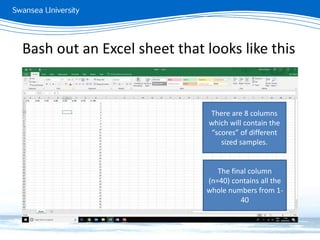
Bash out an Excel sheet that looks like this
There are 8 columns
which will contain the
“scores” of different
sized samples.
The final column
(n=40) contains all the
whole numbers from 1-
40
Averaging
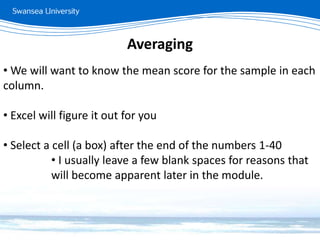
• We will want to know the mean score for the sample in each
column.
• Excel will figure it out for you
• Select a cell (a box) after the end of the numbers 1-40
• I usually leave a few blank spaces for reasons that
will become apparent later in the module.
Averaging
• In your selected cell write
=average(
But do not hit Enter yet
• The = sign tells Excel that this is a formula it needs to work
on and not just information it needs to store.
Averaging
• In your selected cell write
=average(
But do not hit Enter yet
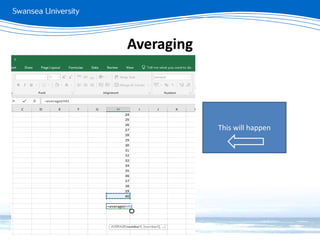
• Click on the last number in the column
Averaging
This will happen
• At this point, you have a few options, but all will do the
same thing:
1. Press the shift key, scroll up to the top, click on the first
number in the column, then let go of the shift key.
2. Move the mouse over the top right corner of blue box
thing, click it (when the cursor is a double-headed
arrow) and drag up to the top.
3. Press the : key, then head up and click on the first
number in the column.
• Finish the formula by closing your brackets and hit Enter
Averaging
Averaging
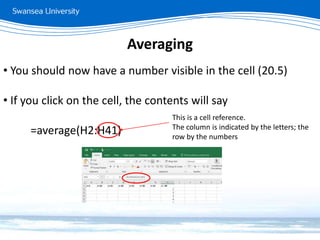
• You should now have a number visible in the cell (20.5)
• If you click on the cell, the contents will say
=average(H2:H41)
This is a cell reference.
The column is indicated by the letters; the
row by the numbers
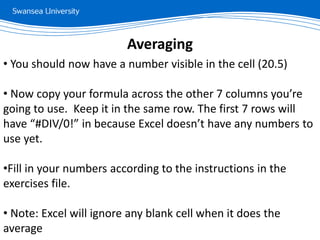
• You should now have a number visible in the cell (20.5)
• Now copy your formula across the other 7 columns you’re
going to use. Keep it in the same row. The first 7 rows will
have “#DIV/0!” in because Excel doesn’t have any numbers to
use yet.
•Fill in your numbers according to the instructions in the
exercises file.
• Note: Excel will ignore any blank cell when it does the
average
Averaging
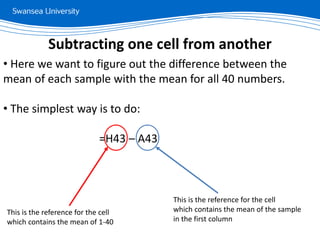
• Here we want to figure out the difference between the
mean of each sample with the mean for all 40 numbers.
• The simplest way is to do:
=H43 – A43
Subtracting one cell from another
This is the reference for the cell
which contains the mean of 1-40
This is the reference for the cell
which contains the mean of the sample
in the first column
• You should be able to use these skills to answer the
questions on your exercise sheet for section 1
• IT IS IMPORTANT THAT YOU SAVE THE EXCEL FILE ALONG –
WE WILL BE USING IT AGAIN IN A FEW WEEKS.
Simple formulae in Excel

Excel formulae

  • 1.
    Using simple formulaein Excel David Playfoot Swansea University
  • 2.
    Bash out anExcel sheet that looks like this There are 8 columns which will contain the “scores” of different sized samples. The final column (n=40) contains all the whole numbers from 1- 40
  • 3.
    Averaging • We willwant to know the mean score for the sample in each column. • Excel will figure it out for you • Select a cell (a box) after the end of the numbers 1-40 • I usually leave a few blank spaces for reasons that will become apparent later in the module.
  • 4.
    Averaging • In yourselected cell write =average( But do not hit Enter yet • The = sign tells Excel that this is a formula it needs to work on and not just information it needs to store.
  • 5.
    Averaging • In yourselected cell write =average( But do not hit Enter yet • Click on the last number in the column
  • 6.
  • 7.
    • At thispoint, you have a few options, but all will do the same thing: 1. Press the shift key, scroll up to the top, click on the first number in the column, then let go of the shift key. 2. Move the mouse over the top right corner of blue box thing, click it (when the cursor is a double-headed arrow) and drag up to the top. 3. Press the : key, then head up and click on the first number in the column. • Finish the formula by closing your brackets and hit Enter Averaging
  • 8.
    Averaging • You shouldnow have a number visible in the cell (20.5) • If you click on the cell, the contents will say =average(H2:H41) This is a cell reference. The column is indicated by the letters; the row by the numbers
  • 9.
    • You shouldnow have a number visible in the cell (20.5) • Now copy your formula across the other 7 columns you’re going to use. Keep it in the same row. The first 7 rows will have “#DIV/0!” in because Excel doesn’t have any numbers to use yet. •Fill in your numbers according to the instructions in the exercises file. • Note: Excel will ignore any blank cell when it does the average Averaging
  • 10.
    • Here wewant to figure out the difference between the mean of each sample with the mean for all 40 numbers. • The simplest way is to do: =H43 – A43 Subtracting one cell from another This is the reference for the cell which contains the mean of 1-40 This is the reference for the cell which contains the mean of the sample in the first column
  • 11.
    • You shouldbe able to use these skills to answer the questions on your exercise sheet for section 1 • IT IS IMPORTANT THAT YOU SAVE THE EXCEL FILE ALONG – WE WILL BE USING IT AGAIN IN A FEW WEEKS. Simple formulae in Excel