DESCRIPTIVE STATISTICS USING R PROGRAMMING ALONG
WITH THE DEMONSTRATION
Frequency tables
A frequency table (or contingency table) is used to describe categorical variables. It
contains the counts at each combination of factor levels.
R function to generate tables: table()
Create some data
Distribution of hair and eye color by sex of 592 students:
# Hair/eye color data
df <- as.data.frame(HairEyeColor)
hair_eye_col <- df[rep(row.names(df), df$Freq), 1:3]
rownames(hair_eye_col) <- 1:nrow(hair_eye_col)
head(hair_eye_col)
Hair Eye Sex
1 Black Brown Male
2 Black Brown Male
3 Black Brown Male
4 Black Brown Male
5 Black Brown Male
6 Black Brown Male
# hair/eye variables
Hair <- hair_eye_col$Hair
Eye <- hair_eye_col$Eye
Simple frequency distribution: one categorical
variable
● Table of counts
# Frequency distribution of hair color
table(Hair)
Hair
Black Brown Red Blond
108 286 71 127
# Frequency distribution of eye color
table(Eye)
Eye
Brown Blue Hazel Green
220 215 93 64
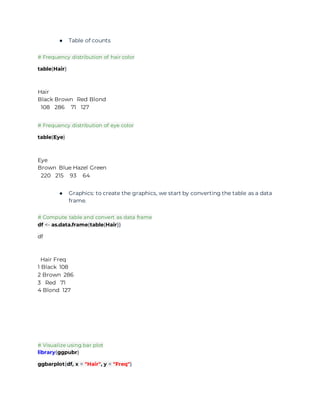
● Graphics: to create the graphics, we start by converting the table as a data
frame.
# Compute table and convert as data frame
df <- as.data.frame(table(Hair))
df
Hair Freq
1 Black 108
2 Brown 286
3 Red 71
4 Blond 127
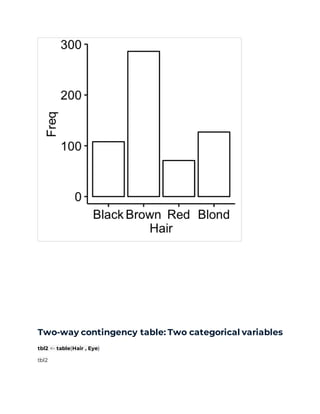
# Visualize using bar plot
library(ggpubr)
ggbarplot(df, x = "Hair", y = "Freq")
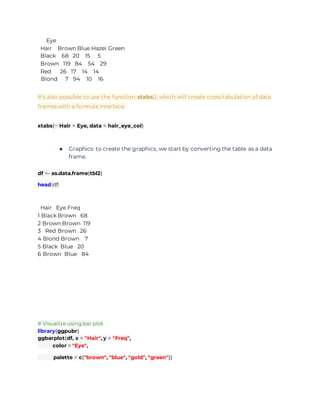
Two-way contingency table: Two categorical variables
tbl2 <- table(Hair , Eye)
tbl2
Eye
Hair Brown Blue Hazel Green
Black 68 20 15 5
Brown 119 84 54 29
Red 26 17 14 14
Blond 7 94 10 16
It’s also possible to use the function xtabs(), which will create cross tabulation of data
frames with a formula interface.
xtabs(~ Hair + Eye, data = hair_eye_col)
● Graphics: to create the graphics, we start by converting the table as a data
frame.
df <- as.data.frame(tbl2)
head(df)
Hair Eye Freq
1 Black Brown 68
2 Brown Brown 119
3 Red Brown 26
4 Blond Brown 7
5 Black Blue 20
6 Brown Blue 84
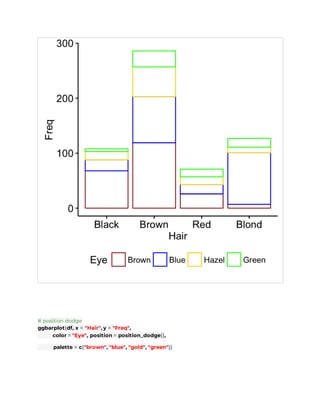
# Visualize using bar plot
library(ggpubr)
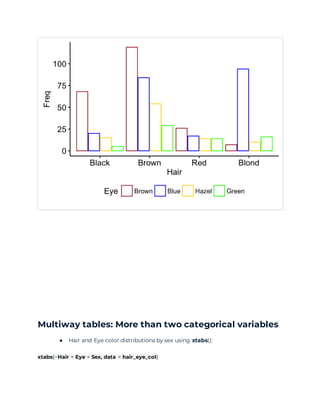
ggbarplot(df, x = "Hair", y = "Freq",
color = "Eye",
palette = c("brown", "blue", "gold", "green"))
# position dodge
ggbarplot(df, x = "Hair", y = "Freq",
color = "Eye", position = position_dodge(),
palette = c("brown", "blue", "gold", "green"))
Multiway tables: More than two categorical variables
● Hair and Eye color distributions by sex using xtabs():
xtabs(~Hair + Eye + Sex, data = hair_eye_col)
, , Sex = Male
Eye
Hair Brown Blue Hazel Green
Black 32 11 10 3
Brown 53 50 25 15
Red 10 10 7 7
Blond 3 30 5 8
, , Sex = Female
Eye
Hair Brown Blue Hazel Green
Black 36 9 5 2
Brown 66 34 29 14
Red 16 7 7 7
Blond 4 64 5 8
● You can also use the function ftable() [for flat contingency tables]. It returns a
nice output compared to xtabs() when you have more than two variables:
ftable(Sex + Hair ~ Eye, data = hair_eye_col)
Sex Male Female
Hair Black Brown Red Blond Black Brown Red Blond
Eye
Brown 32 53 10 3 36 66 16 4
Blue 11 50 10 30 9 34 7 64
Hazel 10 25 7 5 5 29 7 5
Green 3 15 7 8 2 14 7 8
Compute table margins and relative frequency
Table margins correspond to the sums of counts along rows or columns of the table.
Relative frequencies express table entries as proportions of table margins (i.e., row or
column totals).
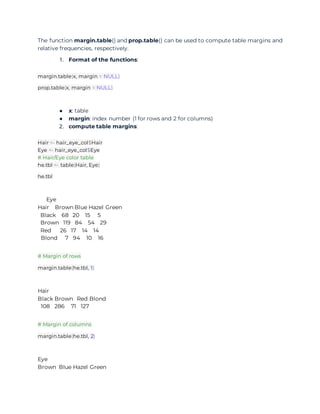
The function margin.table() and prop.table() can be used to compute table margins and
relative frequencies, respectively.
1. Format of the functions:
margin.table(x, margin = NULL)
prop.table(x, margin = NULL)
● x: table
● margin: index number (1 for rows and 2 for columns)
2. compute table margins:
Hair <- hair_eye_col$Hair
Eye <- hair_eye_col$Eye
# Hair/Eye color table
he.tbl <- table(Hair, Eye)
he.tbl
Eye
Hair Brown Blue Hazel Green
Black 68 20 15 5
Brown 119 84 54 29
Red 26 17 14 14
Blond 7 94 10 16
# Margin of rows
margin.table(he.tbl, 1)
Hair
Black Brown Red Blond
108 286 71 127
# Margin of columns
margin.table(he.tbl, 2)
Eye
Brown Blue Hazel Green
220 215 93 64
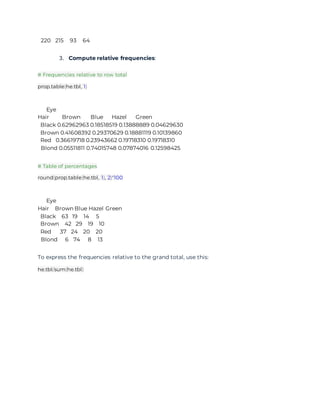
3. Compute relative frequencies:
# Frequencies relative to row total
prop.table(he.tbl, 1)
Eye
Hair Brown Blue Hazel Green
Black 0.62962963 0.18518519 0.13888889 0.04629630
Brown 0.41608392 0.29370629 0.18881119 0.10139860
Red 0.36619718 0.23943662 0.19718310 0.19718310
Blond 0.05511811 0.74015748 0.07874016 0.12598425
# Table of percentages
round(prop.table(he.tbl, 1), 2)*100
Eye
Hair Brown Blue Hazel Green
Black 63 19 14 5
Brown 42 29 19 10
Red 37 24 20 20
Blond 6 74 8 13
To express the frequencies relative to the grand total, use this:
he.tbl/sum(he.tbl)

Example 2 summerization notes for descriptive statistics using r

  • 1.
    DESCRIPTIVE STATISTICS USINGR PROGRAMMING ALONG WITH THE DEMONSTRATION Frequency tables A frequency table (or contingency table) is used to describe categorical variables. It contains the counts at each combination of factor levels. R function to generate tables: table() Create some data Distribution of hair and eye color by sex of 592 students: # Hair/eye color data df <- as.data.frame(HairEyeColor) hair_eye_col <- df[rep(row.names(df), df$Freq), 1:3] rownames(hair_eye_col) <- 1:nrow(hair_eye_col) head(hair_eye_col) Hair Eye Sex 1 Black Brown Male 2 Black Brown Male 3 Black Brown Male 4 Black Brown Male 5 Black Brown Male 6 Black Brown Male # hair/eye variables Hair <- hair_eye_col$Hair Eye <- hair_eye_col$Eye Simple frequency distribution: one categorical variable
  • 2.
    ● Table ofcounts # Frequency distribution of hair color table(Hair) Hair Black Brown Red Blond 108 286 71 127 # Frequency distribution of eye color table(Eye) Eye Brown Blue Hazel Green 220 215 93 64 ● Graphics: to create the graphics, we start by converting the table as a data frame. # Compute table and convert as data frame df <- as.data.frame(table(Hair)) df Hair Freq 1 Black 108 2 Brown 286 3 Red 71 4 Blond 127 # Visualize using bar plot library(ggpubr) ggbarplot(df, x = "Hair", y = "Freq")
  • 3.
    Two-way contingency table:Two categorical variables tbl2 <- table(Hair , Eye) tbl2
  • 4.
    Eye Hair Brown BlueHazel Green Black 68 20 15 5 Brown 119 84 54 29 Red 26 17 14 14 Blond 7 94 10 16 It’s also possible to use the function xtabs(), which will create cross tabulation of data frames with a formula interface. xtabs(~ Hair + Eye, data = hair_eye_col) ● Graphics: to create the graphics, we start by converting the table as a data frame. df <- as.data.frame(tbl2) head(df) Hair Eye Freq 1 Black Brown 68 2 Brown Brown 119 3 Red Brown 26 4 Blond Brown 7 5 Black Blue 20 6 Brown Blue 84 # Visualize using bar plot library(ggpubr) ggbarplot(df, x = "Hair", y = "Freq", color = "Eye", palette = c("brown", "blue", "gold", "green"))
  • 5.
    # position dodge ggbarplot(df,x = "Hair", y = "Freq", color = "Eye", position = position_dodge(), palette = c("brown", "blue", "gold", "green"))
  • 6.
    Multiway tables: Morethan two categorical variables ● Hair and Eye color distributions by sex using xtabs(): xtabs(~Hair + Eye + Sex, data = hair_eye_col)
  • 7.
    , , Sex= Male Eye Hair Brown Blue Hazel Green Black 32 11 10 3 Brown 53 50 25 15 Red 10 10 7 7 Blond 3 30 5 8 , , Sex = Female Eye Hair Brown Blue Hazel Green Black 36 9 5 2 Brown 66 34 29 14 Red 16 7 7 7 Blond 4 64 5 8 ● You can also use the function ftable() [for flat contingency tables]. It returns a nice output compared to xtabs() when you have more than two variables: ftable(Sex + Hair ~ Eye, data = hair_eye_col) Sex Male Female Hair Black Brown Red Blond Black Brown Red Blond Eye Brown 32 53 10 3 36 66 16 4 Blue 11 50 10 30 9 34 7 64 Hazel 10 25 7 5 5 29 7 5 Green 3 15 7 8 2 14 7 8 Compute table margins and relative frequency Table margins correspond to the sums of counts along rows or columns of the table. Relative frequencies express table entries as proportions of table margins (i.e., row or column totals).
  • 8.
    The function margin.table()and prop.table() can be used to compute table margins and relative frequencies, respectively. 1. Format of the functions: margin.table(x, margin = NULL) prop.table(x, margin = NULL) ● x: table ● margin: index number (1 for rows and 2 for columns) 2. compute table margins: Hair <- hair_eye_col$Hair Eye <- hair_eye_col$Eye # Hair/Eye color table he.tbl <- table(Hair, Eye) he.tbl Eye Hair Brown Blue Hazel Green Black 68 20 15 5 Brown 119 84 54 29 Red 26 17 14 14 Blond 7 94 10 16 # Margin of rows margin.table(he.tbl, 1) Hair Black Brown Red Blond 108 286 71 127 # Margin of columns margin.table(he.tbl, 2) Eye Brown Blue Hazel Green
  • 9.
    220 215 9364 3. Compute relative frequencies: # Frequencies relative to row total prop.table(he.tbl, 1) Eye Hair Brown Blue Hazel Green Black 0.62962963 0.18518519 0.13888889 0.04629630 Brown 0.41608392 0.29370629 0.18881119 0.10139860 Red 0.36619718 0.23943662 0.19718310 0.19718310 Blond 0.05511811 0.74015748 0.07874016 0.12598425 # Table of percentages round(prop.table(he.tbl, 1), 2)*100 Eye Hair Brown Blue Hazel Green Black 63 19 14 5 Brown 42 29 19 10 Red 37 24 20 20 Blond 6 74 8 13 To express the frequencies relative to the grand total, use this: he.tbl/sum(he.tbl)