Event Hub & Azure Stream Analytics
Davide Mauri
Join the conversation on Twitter: @DevWeek // #DW2016 // #DevWeek
About Me
Microsoft SQL Server MVP
Works with SQL Server from 6.5, on BI from 2003
Specialized in Data Solution Architecture, Database Design, Performance
Tuning, High-Performance Data Warehousing, BI, Big Data
President of UGISS (Italian SQL Server UG)
Regular Speaker @ SQL Server events
Consulting & Training, Mentor @ SolidQ
E-mail: dmauri@solidq.com
Twitter: @mauridb
Blog: http://sqlblog.com/blogs/davide_mauri/default.aspx
Join the conversation on Twitter: @DevWeek // #DW2016 // #DevWeek
Agenda
• Complex Event Processing
• The Lambda Architecture
• Azure Stream Analytics
• Data Ingestion
• Azure Stream Analytics Query Language
• Advanced Features
• Additional Resources
• Conclusions
Join the conversation on Twitter: @DevWeek // #DW2016 // #DevWeek
Complex Event Processing
• Event processing is a method of tracking and analyzing (processing)
streams of information (data) about things that happen (events)
• Complex event processing, or CEP, is event processing that combines
data from multiple sources to infer events or patterns that suggest
more complicated circumstances.
• Start to appear in 1990
• Goal: identify meaningful events (such as opportunities or threats) and
respond to them as quickly as possible
Join the conversation on Twitter: @DevWeek // #DW2016 // #DevWeek
Complex Event Processing Use Cases
• Network monitoring
• Intelligence and surveillance
• Risk management
• E-commerce
• Fraud detection
• Smart order routing
• Transaction cost analysis
• Pricing and analytics
• Market data management
• Algorithmic trading
• Data warehouse augmentation
Ref: http://www.infoq.com/articles/stream-processing-hadoop
Join the conversation on Twitter: @DevWeek // #DW2016 // #DevWeek
The Lambda Architecture
Generic, scalable and fault-tolerant data processing architecture […]
in which low-latency reads and updates are required.
Ref: http://lambda-architecture.net/
Join the conversation on Twitter: @DevWeek // #DW2016 // #DevWeek
Hadoop but not only that!
• Apache Hadoop Ecosystem is the typical solution nowadays
• “Mature” Option
• Flume (optional collector and streaming data movement system)
• Kafka (distributed messaging system)
• Storm (distributed real-time computation system)
• “Innovative” Option
• Spark + Spark Streaming
• Very powerful, but very complex
Join the conversation on Twitter: @DevWeek // #DW2016 // #DevWeek
Why the Cloud? And why Azure?
• Due to the high scalability and computing power that a streaming
solution may require, the cloud is a perfect environment for it
• Very cheap and Very Simple to start a project
• Very well integrated with all other Azure offerings
• From Monitoring to Power BI
Join the conversation on Twitter: @DevWeek // #DW2016 // #DevWeek
Stream analytics
• Real-Time (somehow) complex event processing engine
• Enables real-time event processing in a very simple and cheap way
• SQL-Like language
• Temporal Semantic Support
• Different from SQL Server 2016
• Specific for streaming data
• Azure Only at present time
Join the conversation on Twitter: @DevWeek // #DW2016 // #DevWeek
Stream analytics
• Platform-as-a-Service
• Can handle millions of events per second
• Based on the REEF project (now Apache incubated)
• Main objects: Job, Query, Functions, Input & Outputs
• Totally manageable from a REST interface
• “Streaming Units” is the base concept to manage performance,
scalability and costs
• Roughly 1 Streaming Units = 1 MB/Sec of throughput
Join the conversation on Twitter: @DevWeek // #DW2016 // #DevWeek
Stream analytics - Data ingestion
• Inputs for Stream Analytics
• Streaming Sources (“Data in motion”)
• JSON, CSV or AVRO
• Reference Data (“Data at rest”)
• JSON or CSV
• Blob Store (max 50MB)
• Streaming Sources
• Event Hubs
• IoT Hub
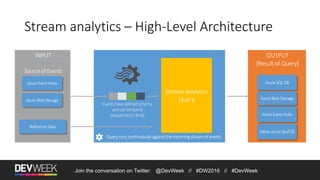
Stream analytics – High-Level Architecture
Azure SQL DB
Azure Event Hubs
Azure Blob StorageAzure BlobStorage
Azure EventHubs
Reference Data
Queryrunscontinuouslyagainsttheincomingstreamofevents
Events have defined schema
and are temporal
(sequenced in time)
Join the conversation on Twitter: @DevWeek // #DW2016 // #DevWeek
Other Azure Stuff 
Join the conversation on Twitter: @DevWeek // #DW2016 // #DevWeek
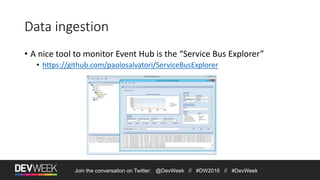
Data ingestion
• A nice tool to monitor Event Hub is the “Service Bus Explorer”
• https://github.com/paolosalvatori/ServiceBusExplorer
Join the conversation on Twitter: @DevWeek // #DW2016 // #DevWeek
DEMO
Simple Setup of Event Hubs, Source and Destination
Join the conversation on Twitter: @DevWeek // #DW2016 // #DevWeek
Stream Analytics Query Engine
• Take date from one or more input
• Send resulting data to one or more output
• Support most common data types:
• bigint, float, unicode strings, datetime
• key-value pairs
• arrays
Join the conversation on Twitter: @DevWeek // #DW2016 // #DevWeek
Stream Analytics Query Language
• Stream Analytics Query Language Reference
• https://msdn.microsoft.com/library/azure/dn834998.aspx
• Subset of T-SQL
• With specific temporal extension
• Time values to be used can be set using TIMESTAMP BY directive
Join the conversation on Twitter: @DevWeek // #DW2016 // #DevWeek
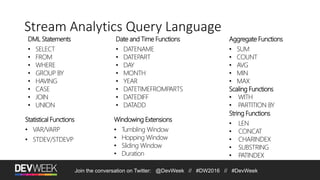
Stream Analytics Query Language
DML Statements
• SELECT
• FROM
• WHERE
• GROUP BY
• HAVING
• CASE
• JOIN
• UNION
Windowing Extensions
• Tumbling Window
• Hopping Window
• Sliding Window
• Duration
Aggregate Functions
• SUM
• COUNT
• AVG
• MIN
• MAX
Scaling Functions
• WITH
• PARTITION BY
Date and Time Functions
• DATENAME
• DATEPART
• DAY
• MONTH
• YEAR
• DATETIMEFROMPARTS
• DATEDIFF
• DATADD
String Functions
• LEN
• CONCAT
• CHARINDEX
• SUBSTRING
• PATINDEX
Statistical Functions
• VAR/VARP
• STDEV/STDEVP
Join the conversation on Twitter: @DevWeek // #DW2016 // #DevWeek
DEMO
Stream Analytics Query in action
Join the conversation on Twitter: @DevWeek // #DW2016 // #DevWeek
Advanced features
• Partitioning Support
• Specially useful for high scalability
• CTE-Like constructs that also helps scaling out
• Temporal aggregations
• Tumbling, Hopping and Sliding Windows
• (Temporal) Join between input streams
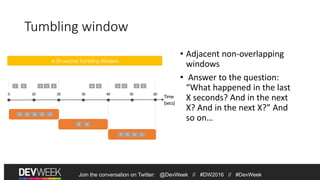
Tumbling window
• Adjacent non-overlapping
windows
• Answer to the question:
“What happened in the last
X seconds? And in the next
X? And in the next X?” And
so on…
1 5 4 26 8 6 5
Time
(secs)
1 5 4 26
8 6
A 20-second Tumbling Window
3 6 1
5 3 6 1
Join the conversation on Twitter: @DevWeek // #DW2016 // #DevWeek
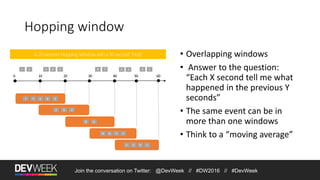
Hopping window
1 5 4 26 8 7
A 20-second Hopping Window with a 10-second “Hop”
4 26
8 6
5 3 6 1
1 5 4 26
8 6 5 3
6 15 3
Join the conversation on Twitter: @DevWeek // #DW2016 // #DevWeek
• Overlapping windows
• Answer to the question:
“Each X second tell me what
happened in the previous Y
seconds”
• The same event can be in
more than one windows
• Think to a “moving average”
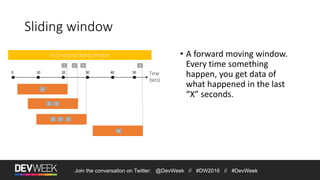
Sliding window
1 5
A 20-second Sliding Window
1
8
8
5 1
9
5 1 9
Join the conversation on Twitter: @DevWeek // #DW2016 // #DevWeek
• A forward moving window.
Every time something
happen, you get data of
what happened in the last
“X” seconds.
Join the conversation on Twitter: @DevWeek // #DW2016 // #DevWeek
DEMO
Stream Analytics Full Power!
Join the conversation on Twitter: @DevWeek // #DW2016 // #DevWeek
Stream analytics and machine learning
• Apply AzureML model to streaming data
• Sample use-cases
• Fraud Detection
• Product Recommendation
• Customer Sentiment Analysis
• Maintenance Prediction
• Right now in preview and available only through the “old” portal
• https://manage.windowsazure.com/
Join the conversation on Twitter: @DevWeek // #DW2016 // #DevWeek
DEMO
Stream Analytics & Machine Learning
Stream analytics alternative (on azure)
• Apache Storm
• IaaS or PaaS (With HDInsight)
• Much more complex to manage and develop…but much more
powerful
• https://azure.microsoft.com/en-us/documentation/articles/stream-analytics-
comparison-storm/
Join the conversation on Twitter: @DevWeek // #DW2016 // #DevWeek
Stream analytics on-premises?
• Apache Hadoop Ecosystem
• Flume / Kafka / Storm
• StreamInsight
• CEP solution part of the SQL Server Platform
• EventStore
• Javascript OpenSource CEP
• None of them (except EventStore) has native temporal extension
Join the conversation on Twitter: @DevWeek // #DW2016 // #DevWeek
Additional resources
• Online Documentation
• Stream Analytics Reference Architecture
• Lambda Architecture
• GitHub Repository
Join the conversation on Twitter: @DevWeek // #DW2016 // #DevWeek
Thanks!
Questions?
Join the conversation on Twitter: @DevWeek // #DW2016 // #DevWeek
Demos available on GitHub
https://github.com/yorek/devweek2016

Event Hub & Azure Stream Analytics

  • 1.
    Event Hub &Azure Stream Analytics Davide Mauri Join the conversation on Twitter: @DevWeek // #DW2016 // #DevWeek
  • 2.
    Join the conversationon Twitter: @DevWeek // #DW2016 // #DevWeek About Me Microsoft SQL Server MVP Works with SQL Server from 6.5, on BI from 2003 Specialized in Data Solution Architecture, Database Design, Performance Tuning, High-Performance Data Warehousing, BI, Big Data President of UGISS (Italian SQL Server UG) Regular Speaker @ SQL Server events Consulting & Training, Mentor @ SolidQ E-mail: dmauri@solidq.com Twitter: @mauridb Blog: http://sqlblog.com/blogs/davide_mauri/default.aspx
  • 3.
    Join the conversationon Twitter: @DevWeek // #DW2016 // #DevWeek Agenda • Complex Event Processing • The Lambda Architecture • Azure Stream Analytics • Data Ingestion • Azure Stream Analytics Query Language • Advanced Features • Additional Resources • Conclusions
  • 4.
    Join the conversationon Twitter: @DevWeek // #DW2016 // #DevWeek Complex Event Processing • Event processing is a method of tracking and analyzing (processing) streams of information (data) about things that happen (events) • Complex event processing, or CEP, is event processing that combines data from multiple sources to infer events or patterns that suggest more complicated circumstances. • Start to appear in 1990 • Goal: identify meaningful events (such as opportunities or threats) and respond to them as quickly as possible
  • 5.
    Join the conversationon Twitter: @DevWeek // #DW2016 // #DevWeek Complex Event Processing Use Cases • Network monitoring • Intelligence and surveillance • Risk management • E-commerce • Fraud detection • Smart order routing • Transaction cost analysis • Pricing and analytics • Market data management • Algorithmic trading • Data warehouse augmentation Ref: http://www.infoq.com/articles/stream-processing-hadoop
  • 6.
    Join the conversationon Twitter: @DevWeek // #DW2016 // #DevWeek The Lambda Architecture Generic, scalable and fault-tolerant data processing architecture […] in which low-latency reads and updates are required. Ref: http://lambda-architecture.net/
  • 7.
    Join the conversationon Twitter: @DevWeek // #DW2016 // #DevWeek Hadoop but not only that! • Apache Hadoop Ecosystem is the typical solution nowadays • “Mature” Option • Flume (optional collector and streaming data movement system) • Kafka (distributed messaging system) • Storm (distributed real-time computation system) • “Innovative” Option • Spark + Spark Streaming • Very powerful, but very complex
  • 8.
    Join the conversationon Twitter: @DevWeek // #DW2016 // #DevWeek Why the Cloud? And why Azure? • Due to the high scalability and computing power that a streaming solution may require, the cloud is a perfect environment for it • Very cheap and Very Simple to start a project • Very well integrated with all other Azure offerings • From Monitoring to Power BI
  • 9.
    Join the conversationon Twitter: @DevWeek // #DW2016 // #DevWeek Stream analytics • Real-Time (somehow) complex event processing engine • Enables real-time event processing in a very simple and cheap way • SQL-Like language • Temporal Semantic Support • Different from SQL Server 2016 • Specific for streaming data • Azure Only at present time
  • 10.
    Join the conversationon Twitter: @DevWeek // #DW2016 // #DevWeek Stream analytics • Platform-as-a-Service • Can handle millions of events per second • Based on the REEF project (now Apache incubated) • Main objects: Job, Query, Functions, Input & Outputs • Totally manageable from a REST interface • “Streaming Units” is the base concept to manage performance, scalability and costs • Roughly 1 Streaming Units = 1 MB/Sec of throughput
  • 11.
    Join the conversationon Twitter: @DevWeek // #DW2016 // #DevWeek Stream analytics - Data ingestion • Inputs for Stream Analytics • Streaming Sources (“Data in motion”) • JSON, CSV or AVRO • Reference Data (“Data at rest”) • JSON or CSV • Blob Store (max 50MB) • Streaming Sources • Event Hubs • IoT Hub
  • 12.
    Stream analytics –High-Level Architecture Azure SQL DB Azure Event Hubs Azure Blob StorageAzure BlobStorage Azure EventHubs Reference Data Queryrunscontinuouslyagainsttheincomingstreamofevents Events have defined schema and are temporal (sequenced in time) Join the conversation on Twitter: @DevWeek // #DW2016 // #DevWeek Other Azure Stuff 
  • 13.
    Join the conversationon Twitter: @DevWeek // #DW2016 // #DevWeek Data ingestion • A nice tool to monitor Event Hub is the “Service Bus Explorer” • https://github.com/paolosalvatori/ServiceBusExplorer
  • 14.
    Join the conversationon Twitter: @DevWeek // #DW2016 // #DevWeek DEMO Simple Setup of Event Hubs, Source and Destination
  • 15.
    Join the conversationon Twitter: @DevWeek // #DW2016 // #DevWeek Stream Analytics Query Engine • Take date from one or more input • Send resulting data to one or more output • Support most common data types: • bigint, float, unicode strings, datetime • key-value pairs • arrays
  • 16.
    Join the conversationon Twitter: @DevWeek // #DW2016 // #DevWeek Stream Analytics Query Language • Stream Analytics Query Language Reference • https://msdn.microsoft.com/library/azure/dn834998.aspx • Subset of T-SQL • With specific temporal extension • Time values to be used can be set using TIMESTAMP BY directive
  • 17.
    Join the conversationon Twitter: @DevWeek // #DW2016 // #DevWeek Stream Analytics Query Language DML Statements • SELECT • FROM • WHERE • GROUP BY • HAVING • CASE • JOIN • UNION Windowing Extensions • Tumbling Window • Hopping Window • Sliding Window • Duration Aggregate Functions • SUM • COUNT • AVG • MIN • MAX Scaling Functions • WITH • PARTITION BY Date and Time Functions • DATENAME • DATEPART • DAY • MONTH • YEAR • DATETIMEFROMPARTS • DATEDIFF • DATADD String Functions • LEN • CONCAT • CHARINDEX • SUBSTRING • PATINDEX Statistical Functions • VAR/VARP • STDEV/STDEVP
  • 18.
    Join the conversationon Twitter: @DevWeek // #DW2016 // #DevWeek DEMO Stream Analytics Query in action
  • 19.
    Join the conversationon Twitter: @DevWeek // #DW2016 // #DevWeek Advanced features • Partitioning Support • Specially useful for high scalability • CTE-Like constructs that also helps scaling out • Temporal aggregations • Tumbling, Hopping and Sliding Windows • (Temporal) Join between input streams
  • 20.
    Tumbling window • Adjacentnon-overlapping windows • Answer to the question: “What happened in the last X seconds? And in the next X? And in the next X?” And so on… 1 5 4 26 8 6 5 Time (secs) 1 5 4 26 8 6 A 20-second Tumbling Window 3 6 1 5 3 6 1 Join the conversation on Twitter: @DevWeek // #DW2016 // #DevWeek Join the conversation on Twitter: @DevWeek // #DW2016 // #DevWeek
  • 21.
    Hopping window 1 54 26 8 7 A 20-second Hopping Window with a 10-second “Hop” 4 26 8 6 5 3 6 1 1 5 4 26 8 6 5 3 6 15 3 Join the conversation on Twitter: @DevWeek // #DW2016 // #DevWeek • Overlapping windows • Answer to the question: “Each X second tell me what happened in the previous Y seconds” • The same event can be in more than one windows • Think to a “moving average”
  • 22.
    Sliding window 1 5 A20-second Sliding Window 1 8 8 5 1 9 5 1 9 Join the conversation on Twitter: @DevWeek // #DW2016 // #DevWeek • A forward moving window. Every time something happen, you get data of what happened in the last “X” seconds.
  • 23.
    Join the conversationon Twitter: @DevWeek // #DW2016 // #DevWeek DEMO Stream Analytics Full Power!
  • 24.
    Join the conversationon Twitter: @DevWeek // #DW2016 // #DevWeek Stream analytics and machine learning • Apply AzureML model to streaming data • Sample use-cases • Fraud Detection • Product Recommendation • Customer Sentiment Analysis • Maintenance Prediction • Right now in preview and available only through the “old” portal • https://manage.windowsazure.com/
  • 25.
    Join the conversationon Twitter: @DevWeek // #DW2016 // #DevWeek DEMO Stream Analytics & Machine Learning
  • 26.
    Stream analytics alternative(on azure) • Apache Storm • IaaS or PaaS (With HDInsight) • Much more complex to manage and develop…but much more powerful • https://azure.microsoft.com/en-us/documentation/articles/stream-analytics- comparison-storm/ Join the conversation on Twitter: @DevWeek // #DW2016 // #DevWeek
  • 27.
    Stream analytics on-premises? •Apache Hadoop Ecosystem • Flume / Kafka / Storm • StreamInsight • CEP solution part of the SQL Server Platform • EventStore • Javascript OpenSource CEP • None of them (except EventStore) has native temporal extension Join the conversation on Twitter: @DevWeek // #DW2016 // #DevWeek
  • 28.
    Additional resources • OnlineDocumentation • Stream Analytics Reference Architecture • Lambda Architecture • GitHub Repository Join the conversation on Twitter: @DevWeek // #DW2016 // #DevWeek
  • 29.
    Join the conversationon Twitter: @DevWeek // #DW2016 // #DevWeek Thanks! Questions?
  • 30.
    Join the conversationon Twitter: @DevWeek // #DW2016 // #DevWeek Demos available on GitHub https://github.com/yorek/devweek2016

Editor's Notes

  • #19 Stream + Reference Data
  • #22 To get a finer granularity of time, we can use a generalized version of tumbling window, called Hopping Window. Hopping windows are windows that "hop" forward in time by a fixed period. The window is defined by two time spans: the hop size H and the window size S. For every H time unit, a new window of size S is created. The tumbling window is a special case of a hopping window where the hop size is equal to the window size. Syntax HOPPINGWINDOW ( timeunit , windowsize , hopsize )   HOPPINGWINDOW ( Duration( timeunit , windowsize ) , Hop (timeunit , windowsize )  Note: The Hopping Window can be used in the above two ways. If the windowsize and the hopsize has the same timeunit, you can use it without the Duration and Hop functions. The Duration function can also be used with other types of windows to specify the window size
  • #23 A Sliding window is a fixed length window which moves forward by an (€) epsilon and produces an output only during the occurrence of an event. An epsilon is one hundredth of a nanosecond. Syntax SLIDINGWINDOW ( timeunit , windowsize ) SLIDINGWINDOW(DURATION(timeunit, windowsize), Hop(timeunit, windowsize))
  • #24 Windows Functions Tumbling Hopping Sliding