HOW DID YOU USE MEDIA TECHNOLOGIES
IN THE CONSTRUCTION AND RESEARCH,
PLANNING AND EVALUATION STAGES?
RESEARCH
To present my initial audience feedback, I used
Prezi as I felt that using a separate circle for
each set of question results was the best way to
lay the presentation out. This way, the audience
were able to see individual questions by
switching to the next part of the Prezi as it
looked more aesthetically pleasing to the
audience
Similar to Prezi, Sildeshare was very important in allowing
me to present my ideas and my findings on the forms and
conventions as well as the representations seen in
magazine advertisements and digipaks. I felt like it varied
from the more animated style of Prezi and allows me to
separate my form of presenting my audience feedback with
my presentation of findings from real media products.
RESEARCH
Web 2.0 services such as Facebook and Youtube allowed me to research real media products that
could be shared to their audience. These are incredibly helpful for media owners as they allow their
product to reach a mass audience through viral marketing. I found all of my music videos to analyse on
YouTube as well as the song ‘Smoke’ which is the song I chose for my music video. Alternatively, I
used Facebook to research the popularity of the band on social media sites such as these to gain
knowledge of their number of followers, likes and comments to know what their fans like. I feel like
analysing this data allowed me to gain a better insight into the band’s audience and what they expect
from the music video to the song.
PLANNING
This is the logo for Genius which is a website that shows lyrics
to any song you wish to hear. I used this in the planning
process to gain knowledge of the song by analysing the lyrics.
By analysing the lyrics, I was able to understand the meaning
of the song and what the writer is encoding into the lyrics. My
aim with this task was to help myself gain a visual
representation of the story that these lyrics tell. They tell the
story of a heartbroken boy who is sick of arguing and getting
nowhere with his girlfriend who the song is about. Without
Genius I would not have been able to look at the lyrics in fine
detail and therefore build a mental image of the story that the
writer tells. In addition to this, Genius is a website that is very
easy to use and was vital in the planning of my music video
I used Microsoft Word to create the shot list for my music
video. I created a table of 30 shots with 7 different categories
of features such as shot type, shot length and location to give
detail of each shot planned in the video. Microsoft Word is an
extremely efficient and easy-to-use piece of software and
allowed me to plan my video very effectively.
CONSTRUCTION - MUSIC
VIDEO
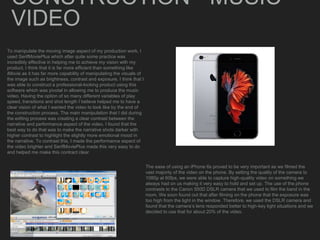
To manipulate the moving image aspect of my production work, I
used SerifMoviePlus which after quite some practice was
incredibly effective in helping me to achieve my vision with my
product. I think that it is far more efficient than something like
iMovie as it has far more capability of manipulating the visuals of
the image such as brightness, contrast and exposure. I think that I
was able to construct a professional-looking product using this
software which was pivotal in allowing me to produce the music
video. Having the option of so many different variables of play
speed, transitions and shot length I believe helped me to have a
clear vision of what I wanted the video to look like by the end of
the construction process. The main manipulation that I did during
the editing process was creating a clear contrast between the
narrative and performance aspect of the video. I found that the
best way to do that was to make the narrative shots darker with
higher contrast to highlight the slightly more emotional mood in
the narrative. To contrast this, I made the performance aspect of
the video brighter and SerifMoviePlus made this very easy to do
and helped me make this contract clear
The ease of using an iPhone 6s proved to be very important as we filmed the
vast majority of the video on the phone. By setting the quality of the camera to
1080p at 60fps, we were able to capture high-quality video on something we
always had on us making it very easy to hold and set up. The use of the phone
contrasts to the Canon 550D DSLR camera that we used to film the band in the
room. We soon found out that after filming on the phone that the exposure was
too high from the light in the window. Therefore, we used the DSLR camera and
found that the camera’s lens responded better to high-key light situations and we
decided to use that for about 20% of the video.
CONSTRUCTION -
DIGIPAK/MAGAZINE
ADVERTISEMENT
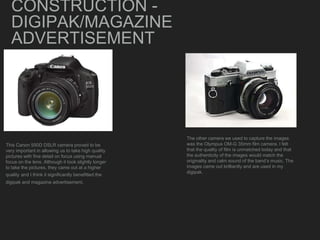
This Canon 550D DSLR camera proved to be
very important in allowing us to take high quality
pictures with fine detail on focus using manual
focus on the lens. Although it took slightly longer
to take the pictures, they came out at a higher
quality and I think it significantly benefitted the
digipak and magazine advertisement.
The other camera we used to capture the images
was the Olympus OM-G 35mm film camera. I felt
that the quality of film is unmatched today and that
the authenticity of the images would match the
originality and calm sound of the band’s music. The
images came out brilliantly and are used in my
digipak.
CONSTRUCTION -
DIGIPAK/MAGAZINE
ADVERTISEMENT
Camera raw was incredibly important in ensuring that the
raw images that I took could be manipulated to suit the
mood and style of the magazine advert and digipak. For
example, the raw image of the magazine advertisement
was very over-exposed and far too bright for what I was
wanting the magazine advertisement to represent the band
as. Therefore, I chose to use a black and white theme
throughout my digipak and magazine advertisement to
show the band as quite deep and emotional which the vast
majority of their songs are.
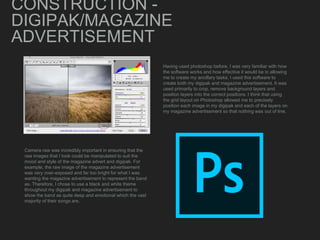
Having used photoshop before, I was very familiar with how
the software works and how effective it would be in allowing
me to create my ancillary tasks. I used this software to
create both my digipak and magazine advertisement. It was
used primarily to crop, remove background layers and
position layers into the correct positions. I think that using
the grid layout on Photoshop allowed me to precisely
position each image in my digipak and each of the layers on
my magazine advertisement so that nothing was out of line.
EVALUATION
I will use the MacBook software Keynote to create each
presentation on the questions of the evaluation. From there they
will be exported onto Sildeshare. What this allows me to do is
embed the presentation from Slideshare onto Blogger which is the
website I use to showcase the entire process to my audience.
Slideshare allows me to show the presentation to my audience in
a way that is visually pleasing but not overly animated much like
something like Prezi.
Throughout the entire process, Blogger has been
brilliant in its ability to be able to embed Prezi and
Slideshare presentations onto as well as type directly
into the website. As well as being incredibly efficient,
Blogger is also very pleasing as the layout I have
chosen allows people to easily navigate through my
blog and see my creative process as it has developed
into my final product.

Evaluation Question 4

  • 1.
    HOW DID YOUUSE MEDIA TECHNOLOGIES IN THE CONSTRUCTION AND RESEARCH, PLANNING AND EVALUATION STAGES?
  • 2.
    RESEARCH To present myinitial audience feedback, I used Prezi as I felt that using a separate circle for each set of question results was the best way to lay the presentation out. This way, the audience were able to see individual questions by switching to the next part of the Prezi as it looked more aesthetically pleasing to the audience Similar to Prezi, Sildeshare was very important in allowing me to present my ideas and my findings on the forms and conventions as well as the representations seen in magazine advertisements and digipaks. I felt like it varied from the more animated style of Prezi and allows me to separate my form of presenting my audience feedback with my presentation of findings from real media products.
  • 3.
    RESEARCH Web 2.0 servicessuch as Facebook and Youtube allowed me to research real media products that could be shared to their audience. These are incredibly helpful for media owners as they allow their product to reach a mass audience through viral marketing. I found all of my music videos to analyse on YouTube as well as the song ‘Smoke’ which is the song I chose for my music video. Alternatively, I used Facebook to research the popularity of the band on social media sites such as these to gain knowledge of their number of followers, likes and comments to know what their fans like. I feel like analysing this data allowed me to gain a better insight into the band’s audience and what they expect from the music video to the song.
  • 4.
    PLANNING This is thelogo for Genius which is a website that shows lyrics to any song you wish to hear. I used this in the planning process to gain knowledge of the song by analysing the lyrics. By analysing the lyrics, I was able to understand the meaning of the song and what the writer is encoding into the lyrics. My aim with this task was to help myself gain a visual representation of the story that these lyrics tell. They tell the story of a heartbroken boy who is sick of arguing and getting nowhere with his girlfriend who the song is about. Without Genius I would not have been able to look at the lyrics in fine detail and therefore build a mental image of the story that the writer tells. In addition to this, Genius is a website that is very easy to use and was vital in the planning of my music video I used Microsoft Word to create the shot list for my music video. I created a table of 30 shots with 7 different categories of features such as shot type, shot length and location to give detail of each shot planned in the video. Microsoft Word is an extremely efficient and easy-to-use piece of software and allowed me to plan my video very effectively.
  • 5.
    CONSTRUCTION - MUSIC VIDEO Tomanipulate the moving image aspect of my production work, I used SerifMoviePlus which after quite some practice was incredibly effective in helping me to achieve my vision with my product. I think that it is far more efficient than something like iMovie as it has far more capability of manipulating the visuals of the image such as brightness, contrast and exposure. I think that I was able to construct a professional-looking product using this software which was pivotal in allowing me to produce the music video. Having the option of so many different variables of play speed, transitions and shot length I believe helped me to have a clear vision of what I wanted the video to look like by the end of the construction process. The main manipulation that I did during the editing process was creating a clear contrast between the narrative and performance aspect of the video. I found that the best way to do that was to make the narrative shots darker with higher contrast to highlight the slightly more emotional mood in the narrative. To contrast this, I made the performance aspect of the video brighter and SerifMoviePlus made this very easy to do and helped me make this contract clear The ease of using an iPhone 6s proved to be very important as we filmed the vast majority of the video on the phone. By setting the quality of the camera to 1080p at 60fps, we were able to capture high-quality video on something we always had on us making it very easy to hold and set up. The use of the phone contrasts to the Canon 550D DSLR camera that we used to film the band in the room. We soon found out that after filming on the phone that the exposure was too high from the light in the window. Therefore, we used the DSLR camera and found that the camera’s lens responded better to high-key light situations and we decided to use that for about 20% of the video.
  • 6.
    CONSTRUCTION - DIGIPAK/MAGAZINE ADVERTISEMENT This Canon550D DSLR camera proved to be very important in allowing us to take high quality pictures with fine detail on focus using manual focus on the lens. Although it took slightly longer to take the pictures, they came out at a higher quality and I think it significantly benefitted the digipak and magazine advertisement. The other camera we used to capture the images was the Olympus OM-G 35mm film camera. I felt that the quality of film is unmatched today and that the authenticity of the images would match the originality and calm sound of the band’s music. The images came out brilliantly and are used in my digipak.
  • 7.
    CONSTRUCTION - DIGIPAK/MAGAZINE ADVERTISEMENT Camera rawwas incredibly important in ensuring that the raw images that I took could be manipulated to suit the mood and style of the magazine advert and digipak. For example, the raw image of the magazine advertisement was very over-exposed and far too bright for what I was wanting the magazine advertisement to represent the band as. Therefore, I chose to use a black and white theme throughout my digipak and magazine advertisement to show the band as quite deep and emotional which the vast majority of their songs are. Having used photoshop before, I was very familiar with how the software works and how effective it would be in allowing me to create my ancillary tasks. I used this software to create both my digipak and magazine advertisement. It was used primarily to crop, remove background layers and position layers into the correct positions. I think that using the grid layout on Photoshop allowed me to precisely position each image in my digipak and each of the layers on my magazine advertisement so that nothing was out of line.
  • 8.
    EVALUATION I will usethe MacBook software Keynote to create each presentation on the questions of the evaluation. From there they will be exported onto Sildeshare. What this allows me to do is embed the presentation from Slideshare onto Blogger which is the website I use to showcase the entire process to my audience. Slideshare allows me to show the presentation to my audience in a way that is visually pleasing but not overly animated much like something like Prezi. Throughout the entire process, Blogger has been brilliant in its ability to be able to embed Prezi and Slideshare presentations onto as well as type directly into the website. As well as being incredibly efficient, Blogger is also very pleasing as the layout I have chosen allows people to easily navigate through my blog and see my creative process as it has developed into my final product.