HOW DID YOU USE NEW
MEDIA TECHNOLOGIES IN THE
RESEARCH, CONSTRUCTION,
PLANNING, AND EVALUATION
STAGES?


     Adam Mirza
Introduction

The course for media this year was something I was dreading at the
start, as I honestly felt as if I had no clue about the music industry and
music videos, but the one thing I did know is that I would hopefully be
able to use my skills on a computer to my advantage. Having also done
media studies last year also helped, except this time the software used
would be slightly different.
In the end I managed to learn a lot about music, however I still feel there
might be a few things to learn as all my group did was focus on one
genre (for the main task). But in terms of software and even hardware
(cameras) I believe I learnt a great deal, and even remembered some of
the things I had forgotten after not using some of these things for quite
some time. I am most happy with Photoshop, as although I felt confident
with it before I experimented a lot with the ancillary texts, and I believe I
am now a lot more experienced in that sense.
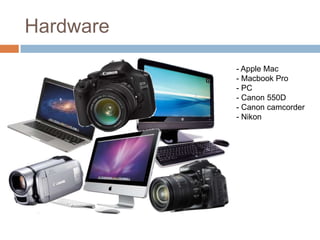
Hardware
           - Apple Mac
           - Macbook Pro
           - PC
           - Canon 550D
           - Canon camcorder
           - Nikon
Software
           - iMovie
           - YouTube
           - Adobe Photoshop
           - Blogger
           - Prezi
           - PowerPoint Presentation
           - Slideshare
           - Safari
Construction
For the filming we used three separate cameras, and we realised
that the camcorder was the hardest one to take all of the files off, as
SD cards aren’t compatible with iMacs, and even on a MacBook the
file type was wrong. This slowed us down for quite some time and
eventually we just got a fire wire to upload the footage, with some
turning out blurry as well.
The Canon was also a slight problem, as it kept stopping the
recording very early while we were shooting the fight scenes, which
is actually why we used the camcorder in the end. In the final
version of our music video there is a variety of clips we recorded
from either camera, which is why the quality switches from time to
time.
For filming our performance part of the video we used a Nikon,
which was actually very good, especially because of it’s depth of
field. Along with the Canon it had its files saved on an SD card,
however the files didn’t need to be converted here, otherwise the
whole importing process would have been very time consuming.
Planning
For most of my individual work I chose to use a software
called Prezi, and I really enjoyed what it had the potential to
do. I also used this software last year, but since then they
have upgraded it quite a lot.
I was at first planning on using PowerPoint, but in the end I
only used it once, and this is because while it would be easy
and quick to do everything on PowerPoint, a presentation
made on Prezi could be made to be much more interesting
and interactive, especially due to its zoom feature. Another
thing that was also helpful was the way that videos from
YouTube could be embedded straight onto Prezi, and this
helped a lot as for my planning stages I went through many
YouTube videos and included them in my presentation too.
Editing
For the editing part we could have used either one of the
following three: Windows Movie Maker, iMovie, or Final
Cut Express. The fact that we were almost always using
iMacs in class made us reconsider using Windows
Movie Maker, which I personally think is the simplest of
all the three. Instead we used iMovie, which is also what
we used for last years project, although I think the
editing was much simpler for that.
The reason Final Cut Express wasn’t used is because
although it is arguably the best editing software out of all
of the three, it would most probably take some time
getting used to the layout and the whole concept of it
all, although in the end the result could have been a
much better video. However as we weren’t planning on
using any special effects or CGI we thought we should
stick to iMovie and its user-friendly layout.
Blogger
Blogger is a place for people to make an online
blog, and this is the way we were told we would
be presenting our work. This was actually a good
thing, as it is much easier to have everything
saved online than it is to actually have it lying
about somewhere. Also, the way the layout is
really does make it easy to understand, and I feel
very comfortable using it now. An
especially useful feature on it was
drafts, as that allowed me to save
my work but not upload it until I
was fully satisfied that it was up to
standard. Overall it is a simple
website that helped the process of
planning by a lot.

Evaluation (Question 4)

  • 1.
    HOW DID YOUUSE NEW MEDIA TECHNOLOGIES IN THE RESEARCH, CONSTRUCTION, PLANNING, AND EVALUATION STAGES? Adam Mirza
  • 2.
    Introduction The course formedia this year was something I was dreading at the start, as I honestly felt as if I had no clue about the music industry and music videos, but the one thing I did know is that I would hopefully be able to use my skills on a computer to my advantage. Having also done media studies last year also helped, except this time the software used would be slightly different. In the end I managed to learn a lot about music, however I still feel there might be a few things to learn as all my group did was focus on one genre (for the main task). But in terms of software and even hardware (cameras) I believe I learnt a great deal, and even remembered some of the things I had forgotten after not using some of these things for quite some time. I am most happy with Photoshop, as although I felt confident with it before I experimented a lot with the ancillary texts, and I believe I am now a lot more experienced in that sense.
  • 3.
    Hardware - Apple Mac - Macbook Pro - PC - Canon 550D - Canon camcorder - Nikon
  • 4.
    Software - iMovie - YouTube - Adobe Photoshop - Blogger - Prezi - PowerPoint Presentation - Slideshare - Safari
  • 5.
    Construction For the filmingwe used three separate cameras, and we realised that the camcorder was the hardest one to take all of the files off, as SD cards aren’t compatible with iMacs, and even on a MacBook the file type was wrong. This slowed us down for quite some time and eventually we just got a fire wire to upload the footage, with some turning out blurry as well. The Canon was also a slight problem, as it kept stopping the recording very early while we were shooting the fight scenes, which is actually why we used the camcorder in the end. In the final version of our music video there is a variety of clips we recorded from either camera, which is why the quality switches from time to time. For filming our performance part of the video we used a Nikon, which was actually very good, especially because of it’s depth of field. Along with the Canon it had its files saved on an SD card, however the files didn’t need to be converted here, otherwise the whole importing process would have been very time consuming.
  • 6.
    Planning For most ofmy individual work I chose to use a software called Prezi, and I really enjoyed what it had the potential to do. I also used this software last year, but since then they have upgraded it quite a lot. I was at first planning on using PowerPoint, but in the end I only used it once, and this is because while it would be easy and quick to do everything on PowerPoint, a presentation made on Prezi could be made to be much more interesting and interactive, especially due to its zoom feature. Another thing that was also helpful was the way that videos from YouTube could be embedded straight onto Prezi, and this helped a lot as for my planning stages I went through many YouTube videos and included them in my presentation too.
  • 7.
    Editing For the editingpart we could have used either one of the following three: Windows Movie Maker, iMovie, or Final Cut Express. The fact that we were almost always using iMacs in class made us reconsider using Windows Movie Maker, which I personally think is the simplest of all the three. Instead we used iMovie, which is also what we used for last years project, although I think the editing was much simpler for that. The reason Final Cut Express wasn’t used is because although it is arguably the best editing software out of all of the three, it would most probably take some time getting used to the layout and the whole concept of it all, although in the end the result could have been a much better video. However as we weren’t planning on using any special effects or CGI we thought we should stick to iMovie and its user-friendly layout.
  • 8.
    Blogger Blogger is aplace for people to make an online blog, and this is the way we were told we would be presenting our work. This was actually a good thing, as it is much easier to have everything saved online than it is to actually have it lying about somewhere. Also, the way the layout is really does make it easy to understand, and I feel very comfortable using it now. An especially useful feature on it was drafts, as that allowed me to save my work but not upload it until I was fully satisfied that it was up to standard. Overall it is a simple website that helped the process of planning by a lot.