Done by: Aaisha Al Badi (68701/06) Evaluating of a self-based learning “Format the Microsoft Word documents”
Overview of the Project: “ Format the Microsoft Word documents” is an E-unit which will  help students of grade 6 in the basic education in Oman to learn how edit page setup. This unit is one of their units in their Information technology book. (some parts are skipped and others are added).
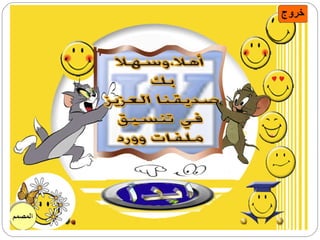
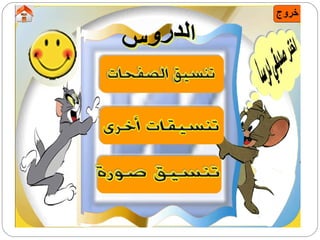
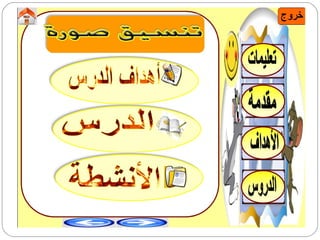
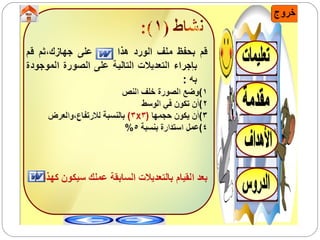
Screen shoots for the program


Overview of the Project: The program will be on CD. CD was chosen as a delivery media because student will not need Internet to access. In addition, by the CD the student can practice step by step easily.
Main goal of project The main goal is: To help student  modifying  their MS Word documents to look beautiful and as they wish.
Objectives By the end of this unit the student will be able to: Edit pages, change page setup  Edit documents, and format the borders and shading  Use columns in writing Do format to pictures in different ways, and to Format their size
Motivational and instructional strategies Many motivational and instructional strategies are included in this program such as: Pictures of cartoons Other pictures Colors  Sounds  Links  Buttons  Talking with the learner These strategies were used to capture student's attention and make them interested when they learn as they are self learners.
Evaluating this program This program will be evaluated by using ACTIONS model. Why this model have been choose? Because  its more clear and specified levels.
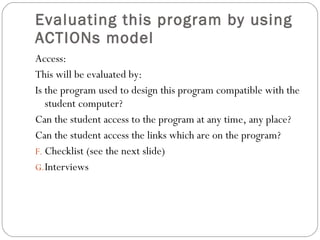
Evaluating this program by using ACTIONs model  Access: This will be evaluated by: Is the program used to design this program compatible with the student computer? Can the student access to the program at any time, any place? Can the student access the links which are on the program?  Checklist (see the next slide) Interviews
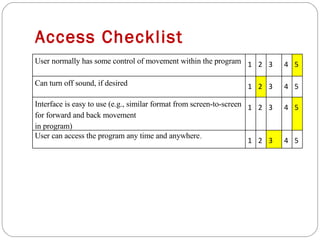
Access Checklist User normally has some control of movement within the program 1 2 3 4 5 Can turn off sound, if desired 1 2 3 4 5 Interface is easy to use (e.g., similar format from screen-to-screen for forward and back movement in program) 1 2 3 4 5 User can access the program any time and anywhere . 1 2 3 4 5
Evaluating this program by using ACTIONs model  Interactivity: Is this program support teacher-student interaction? Is this program support student-student interaction? Is this program support content-student interaction? This level of evaluation will be evaluated: Checklist (Seethe next slide)
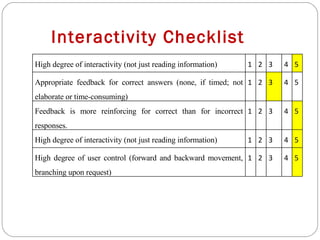
Interactivity Checklist High degree of interactivity (not just reading information) 1 2 3 4 5 Appropriate feedback for correct answers (none, if timed; not elaborate or time-consuming) 1 2 3 4 5 Feedback is more reinforcing for correct than for incorrect responses. 1 2 3 4 5 High degree of interactivity (not just reading information) 1 2 3 4 5 High degree of user control (forward and backward movement, branching upon request) 1 2 3 4 5
Evaluating this program by using ACTIONs model  Teaching and learning: This level will be evaluated by: Checklist. (See the next slide)
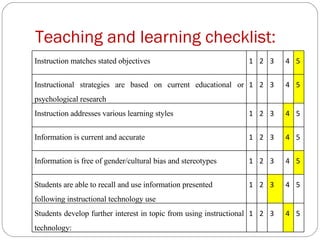
Teaching and learning checklist: Instruction matches stated objectives 1 2 3 4 5 Instructional strategies are based on current educational or psychological research 1 2 3 4 5 Instruction addresses various learning styles 1 2 3 4 5 Information is current and accurate 1 2 3 4 5 Information is free of gender/cultural bias and stereotypes 1 2 3 4 5 Students are able to recall and use information presented following instructional technology use 1 2 3 4 5 Students develop further interest in topic from using instructional technology: 1 2 3 4 5
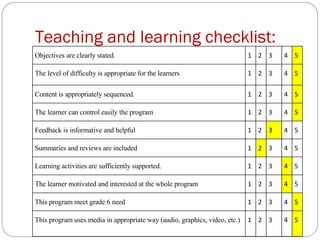
Teaching and learning checklist: Objectives are clearly stated. 1 2 3 4 5 The level of difficulty is appropriate for the learners 1 2 3 4 5 Content is appropriately sequenced. 1 2 3 4 5 The learner can control easily the program 1 2 3 4 5 Feedback is informative and helpful 1 2 3 4 5 Summaries and reviews are included  1 2 3 4 5 Learning activities are sufficiently supported. 1 2 3 4 5 The learner motivated and interested at the whole program 1 2 3 4 5 This program meet grade 6 need 1 2 3 4 5 This program uses media in appropriate way (audio, graphics, video, etc.) 1 2 3 4 5
Evaluating this program by using ACTIONs model  Novelty : This level will be evaluated by: Checklist.(See the next slide).
Novelty checklist: Program matches interest level of indicated audience 1 2 3 4 5 Expected input is new and appeal for the grade 6 1 2 3 4 5 Expected input is appropriate for indicated audience. 1 2 3 4 5 Examples and illustrations are suitable for indicated audience 1 2 3 4 5 Required time is compatible with student attention. 1 2 3 4 5
 

Evaluating The A Self Based Learning Format The Microsoft Word Documents

  • 1.
    Done by: AaishaAl Badi (68701/06) Evaluating of a self-based learning “Format the Microsoft Word documents”
  • 2.
    Overview of theProject: “ Format the Microsoft Word documents” is an E-unit which will help students of grade 6 in the basic education in Oman to learn how edit page setup. This unit is one of their units in their Information technology book. (some parts are skipped and others are added).
  • 3.
    Screen shoots forthe program
  • 4.
  • 5.
  • 6.
  • 7.
  • 8.
  • 9.
    Overview of theProject: The program will be on CD. CD was chosen as a delivery media because student will not need Internet to access. In addition, by the CD the student can practice step by step easily.
  • 10.
    Main goal ofproject The main goal is: To help student modifying their MS Word documents to look beautiful and as they wish.
  • 11.
    Objectives By theend of this unit the student will be able to: Edit pages, change page setup Edit documents, and format the borders and shading Use columns in writing Do format to pictures in different ways, and to Format their size
  • 12.
    Motivational and instructionalstrategies Many motivational and instructional strategies are included in this program such as: Pictures of cartoons Other pictures Colors Sounds Links Buttons Talking with the learner These strategies were used to capture student's attention and make them interested when they learn as they are self learners.
  • 13.
    Evaluating this programThis program will be evaluated by using ACTIONS model. Why this model have been choose? Because its more clear and specified levels.
  • 14.
    Evaluating this programby using ACTIONs model Access: This will be evaluated by: Is the program used to design this program compatible with the student computer? Can the student access to the program at any time, any place? Can the student access the links which are on the program? Checklist (see the next slide) Interviews
  • 15.
    Access Checklist Usernormally has some control of movement within the program 1 2 3 4 5 Can turn off sound, if desired 1 2 3 4 5 Interface is easy to use (e.g., similar format from screen-to-screen for forward and back movement in program) 1 2 3 4 5 User can access the program any time and anywhere . 1 2 3 4 5
  • 16.
    Evaluating this programby using ACTIONs model Interactivity: Is this program support teacher-student interaction? Is this program support student-student interaction? Is this program support content-student interaction? This level of evaluation will be evaluated: Checklist (Seethe next slide)
  • 17.
    Interactivity Checklist Highdegree of interactivity (not just reading information) 1 2 3 4 5 Appropriate feedback for correct answers (none, if timed; not elaborate or time-consuming) 1 2 3 4 5 Feedback is more reinforcing for correct than for incorrect responses. 1 2 3 4 5 High degree of interactivity (not just reading information) 1 2 3 4 5 High degree of user control (forward and backward movement, branching upon request) 1 2 3 4 5
  • 18.
    Evaluating this programby using ACTIONs model Teaching and learning: This level will be evaluated by: Checklist. (See the next slide)
  • 19.
    Teaching and learningchecklist: Instruction matches stated objectives 1 2 3 4 5 Instructional strategies are based on current educational or psychological research 1 2 3 4 5 Instruction addresses various learning styles 1 2 3 4 5 Information is current and accurate 1 2 3 4 5 Information is free of gender/cultural bias and stereotypes 1 2 3 4 5 Students are able to recall and use information presented following instructional technology use 1 2 3 4 5 Students develop further interest in topic from using instructional technology: 1 2 3 4 5
  • 20.
    Teaching and learningchecklist: Objectives are clearly stated. 1 2 3 4 5 The level of difficulty is appropriate for the learners 1 2 3 4 5 Content is appropriately sequenced. 1 2 3 4 5 The learner can control easily the program 1 2 3 4 5 Feedback is informative and helpful 1 2 3 4 5 Summaries and reviews are included 1 2 3 4 5 Learning activities are sufficiently supported. 1 2 3 4 5 The learner motivated and interested at the whole program 1 2 3 4 5 This program meet grade 6 need 1 2 3 4 5 This program uses media in appropriate way (audio, graphics, video, etc.) 1 2 3 4 5
  • 21.
    Evaluating this programby using ACTIONs model Novelty : This level will be evaluated by: Checklist.(See the next slide).
  • 22.
    Novelty checklist: Programmatches interest level of indicated audience 1 2 3 4 5 Expected input is new and appeal for the grade 6 1 2 3 4 5 Expected input is appropriate for indicated audience. 1 2 3 4 5 Examples and illustrations are suitable for indicated audience 1 2 3 4 5 Required time is compatible with student attention. 1 2 3 4 5
  • 23.