Technology has been used in many
different ways across a variety of
platforms throughout the process of
my work this year. From online
social networking to communicate to
my audience, to market free
laissez-faire sites such as Amazon
and eBay to Post-production
software like Final Cut Pro X even
technologies involved in the pre-
production such as Blogger.
Technology is a key component in
media and especially in today’s
society. I’ll be exploring the ways
in which I have used technology to
help me with the construction f my
final product.
Let’s start from the beginning. For post-production I used many
websites in order to display research, feedback and diary
entries. My main source was a online platform known as Blogger
(or Blogspot). I used this website to log all my knowledge,
planning, research etc. It was really useful as it allowed me to
express my work creatively and it was on a digital platform which
allowed me to access it from anywhere; making it easy and
accessible to work with. I was able to create my own custom style
blog to make it unique to me and my music video and I found this
aspect of the website fun and interactive.
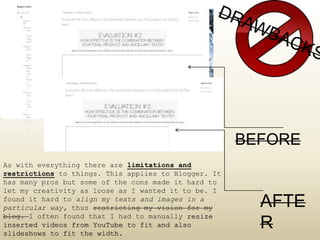
As with everything there are limitations and
restrictions to things. This applies to Blogger. It
has many pros but some of the cons made it hard to
let my creativity as loose as I wanted it to be. I
found it hard to align my texts and images in a
particular way, thus restricting my vision for my
blog. I often found that I had to manually resize
inserted videos from YouTube to fit and also
slideshows to fit the width.
BEFORE
AFTE
R
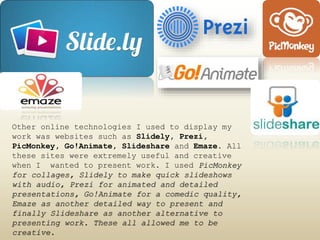
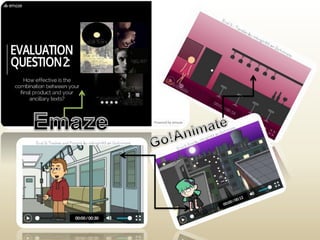
Other online technologies I used to display my
work was websites such as Slidely, Prezi,
PicMonkey, Go!Animate, Slideshare and Emaze. All
these sites were extremely useful and creative
when I wanted to present work. I used PicMonkey
for collages, Slidely to make quick slideshows
with audio, Prezi for animated and detailed
presentations, Go!Animate for a comedic quality,
Emaze as another detailed way to present and
finally Slideshare as another alternative to
presenting work. These all allowed me to be
creative.
Again, restrictions apply. Although all these
websites are brilliant ways to display ideas,
research etc. To use these sites you have to be
computer savvy and if you’re not you’ll need at
least a couple hours to familiarise yourself with
the design and tools of each program. I was new to
Slideshare and Emaze and I found it difficult to
understand how each program worked. Although most of
the tools are similar it is hard to figure out what
symbol means what and how it works. It was also
difficult reading my work on Slideshare as it would
downsize the images and texts so it would have to be
viewed in full screen.
Technology is ever changing and keeping up
with the latest up to date equipment and
software is important, especially when
trying to connect with a society of digital
natives. For my music video the use of
technology was a huge component including my
online blog to log my progress to the
filming process and equipment used and even
my studio location.
To film my music video I used a DSLR camera (Nikon
D3000) that would give me the ability to perform focus
pulls and would enable my video to be in high
definition which is exactly what I needed as my video
had to express a ‘crisp’ and ‘clean’ quality to it,
especially in the studio shots. Using the camera was
easy to manoeuvre and came with a SD card which made
importing an transferring my footage to the MACs very
simple and quick. I used the same camera to take my
album and magazine images as again, it took very high
quality photos and enabled me to zoom in and out and
achieve soft and harsh focus definition.
Initially I found the DSLR’s a little confusing to
use as in my AS year I had used a Panosonic handheld
device which did everything for me with the touch of
a button, but in less quality. However the fun part
about using the DSLR’s is getting to experiment with
the manual lens and working out how it all works.
Although this did draw me back a little on time I
found it much more beneficial in the end.
As my video was very abstract and
minimalistic I wanted to include
something a bit different. I used a
green screen for some cutaway shots
to infuse difference and keep the
audiences attention. I used HQ
background animations to overlay my
footage. I did this using the
software Final Cut Pro X and using an
effect called ‘mask’ under ‘keying’.
This enabled me to eliminate the
green screen and replace it with the
desired background.
Using the green screen held a few
difficulties. My original vision was to have a
shadowy image with a animated background so it
blended and didn’t look so fake. However, in
order to achieve a decent enough green screen
the subject and the backdrop have to be well
lit and this meant I had to further edit in
FCP the subject’s shadows, midtones and
highlights in order to make the edges blend
properly. While trying to use the keying mask
tool it also made it difficult as it couldn’t
detect the image properly due to the lighting
not being bright enough this meant I had to
fiddle around more in FCP effects settings to
try an make it work to the best of my ability.
During filming I also used a track and a crane to
achieve some of the slow panning shots in my music
video. Using this equipment was difficult as I hadn’t
used them before, however a track is pretty self-
explanatory and meant using a tri-pod to mount the
camera onto the track in order to move in smoothly in
what ever direction I wanted. The crane was again
another piece of equipment I hadn’t come across before
and required some assistance from friends. I found
that the crane was hard to move smooth enough without
it being a bit jittery and it was much heavier than it
seems!
When coming up with my music video idea I knew straight away I
wanted something different from other college videos and through
inspiration from people I watch on YouTube (BeautyCrush) I found
a video which incorporated what I wanted to used in my own video.
Smoke grenades. I knew straight away that using smoke grenades
would give my video a little edge and so I used websites such as
Amazon.com and eBay to search for some. Using the internet
technology I was able to purchase my own and it made my video a
whole lot more professional. However, the negatives to using the
internet to purchase props is that it is a huge place and finding
the right thing can be difficult. I ended up searching for days
looking for the right type of grenades in the right colours and
also trying to find Metallic gold paint and gold glitter proved
to me a struggle.
The most important piece of software used for
post-production was the program Final Cut Pro X.
I used this to do all of my editing for my music
video. The software was very easy to use and I
was aware of the features due to my first year
using in when doing my AS piece. I could import
my footage quickly and drag them to the
timeline. The tools such as blade made editing
very easy and meant that I could precisely cut
down the footage to the right spot.
I was also able to adjust the
brightness, contrast, lighting
and colour balance really easily
to create a true black and white
effect.
I used final cut pro frequently throughout my
progress on multiple things. I used it for my
preliminary tasks, my frame by frame and even to
put together my own diary entries. It enabled
variety and made my blog more creative. I also used
Final Cut Pro to answer my evaluation question 1 to
make it more entertaining to watch/listen to. I was
able to add layers to show visually what I was
explaining. FCP is a really professional and useful
piece of software and technology that enabled me to
easily use the variety of effects and tools to
produce a professional and convincing media
product.
I used another program called PhotoShop CS6
which I’m very accustomed too. I’ve used PS
many times on many things so using this
software was easy. I used PS to create my
album cover, digipak and magazine advert. I
used lots of layers to create smoother skin,
I used the smart blur tools, dodge and burn
tools and used it to mix brightness and
contracts. I also used fonts and was able to
create a professional looking digipak. I
also used online websites such as DaFont to
download all my font choices as these were
free to use and I could use them on my
digipak and magazine.
Youtube was the distribution site in
which I upload all my content too. I used
YouTube as it’s a familiar website to me
and it is one of the most popular and
most often visited sites ever. YT enabled
me to title my video, a space to describe
the content, a place to put tags so
people can find it quicker and includes a
‘like’ and ‘dislike’ button so audiences
can express their opinions.
I used YT a lot when
researching while
planning. I was able to
use YT to compare my
video to others, to
gain inspiration and to
analyse and evaluate
the genre conventions
of my chosen genre.
My target audience were digital natives and
digital immigrants who had recently converted
to online social media and networking. After
the movie ‘The Social Network’ it was clear
that Facebook was a very popular social
network worldwide and if I wanted to target my
audience I’d have to promote through this
platform. I also used Twitter as this is
another social site that communicates well
with my target audience age of 18-25. These
sites made it easy to share my work and
allowed people to comment and ‘like’ my
content. This was really helpful when getting
audience feedback during my rough cut and
digipak research.
I’ve discovered and understood more through this
process that technology has played a very key
feature in the production and promotion of my
music video. From start to finish it’s helped me
form ideas, communicate with my target market,
understand genres and urban tribes and enabled me
to experiment with different pieces of equipment
and software successfully and professionally. I
found my individual style and aesthetic really
helped with my digipak and making me stand out
and creating an abstract music video.
The more technology advances the more we become
disabled with understanding how things work but
this doesn’t mean we stop there, it enables us to
progress and expand our ideas and creativity.
I’ve become more aware of technology not
only in a creative way but also from a
theoretical perspective.

Eval4

  • 2.
    Technology has beenused in many different ways across a variety of platforms throughout the process of my work this year. From online social networking to communicate to my audience, to market free laissez-faire sites such as Amazon and eBay to Post-production software like Final Cut Pro X even technologies involved in the pre- production such as Blogger. Technology is a key component in media and especially in today’s society. I’ll be exploring the ways in which I have used technology to help me with the construction f my final product.
  • 3.
    Let’s start fromthe beginning. For post-production I used many websites in order to display research, feedback and diary entries. My main source was a online platform known as Blogger (or Blogspot). I used this website to log all my knowledge, planning, research etc. It was really useful as it allowed me to express my work creatively and it was on a digital platform which allowed me to access it from anywhere; making it easy and accessible to work with. I was able to create my own custom style blog to make it unique to me and my music video and I found this aspect of the website fun and interactive.
  • 4.
    As with everythingthere are limitations and restrictions to things. This applies to Blogger. It has many pros but some of the cons made it hard to let my creativity as loose as I wanted it to be. I found it hard to align my texts and images in a particular way, thus restricting my vision for my blog. I often found that I had to manually resize inserted videos from YouTube to fit and also slideshows to fit the width. BEFORE AFTE R
  • 5.
    Other online technologiesI used to display my work was websites such as Slidely, Prezi, PicMonkey, Go!Animate, Slideshare and Emaze. All these sites were extremely useful and creative when I wanted to present work. I used PicMonkey for collages, Slidely to make quick slideshows with audio, Prezi for animated and detailed presentations, Go!Animate for a comedic quality, Emaze as another detailed way to present and finally Slideshare as another alternative to presenting work. These all allowed me to be creative.
  • 8.
    Again, restrictions apply.Although all these websites are brilliant ways to display ideas, research etc. To use these sites you have to be computer savvy and if you’re not you’ll need at least a couple hours to familiarise yourself with the design and tools of each program. I was new to Slideshare and Emaze and I found it difficult to understand how each program worked. Although most of the tools are similar it is hard to figure out what symbol means what and how it works. It was also difficult reading my work on Slideshare as it would downsize the images and texts so it would have to be viewed in full screen.
  • 10.
    Technology is everchanging and keeping up with the latest up to date equipment and software is important, especially when trying to connect with a society of digital natives. For my music video the use of technology was a huge component including my online blog to log my progress to the filming process and equipment used and even my studio location.
  • 11.
    To film mymusic video I used a DSLR camera (Nikon D3000) that would give me the ability to perform focus pulls and would enable my video to be in high definition which is exactly what I needed as my video had to express a ‘crisp’ and ‘clean’ quality to it, especially in the studio shots. Using the camera was easy to manoeuvre and came with a SD card which made importing an transferring my footage to the MACs very simple and quick. I used the same camera to take my album and magazine images as again, it took very high quality photos and enabled me to zoom in and out and achieve soft and harsh focus definition.
  • 12.
    Initially I foundthe DSLR’s a little confusing to use as in my AS year I had used a Panosonic handheld device which did everything for me with the touch of a button, but in less quality. However the fun part about using the DSLR’s is getting to experiment with the manual lens and working out how it all works. Although this did draw me back a little on time I found it much more beneficial in the end.
  • 13.
    As my videowas very abstract and minimalistic I wanted to include something a bit different. I used a green screen for some cutaway shots to infuse difference and keep the audiences attention. I used HQ background animations to overlay my footage. I did this using the software Final Cut Pro X and using an effect called ‘mask’ under ‘keying’. This enabled me to eliminate the green screen and replace it with the desired background.
  • 14.
    Using the greenscreen held a few difficulties. My original vision was to have a shadowy image with a animated background so it blended and didn’t look so fake. However, in order to achieve a decent enough green screen the subject and the backdrop have to be well lit and this meant I had to further edit in FCP the subject’s shadows, midtones and highlights in order to make the edges blend properly. While trying to use the keying mask tool it also made it difficult as it couldn’t detect the image properly due to the lighting not being bright enough this meant I had to fiddle around more in FCP effects settings to try an make it work to the best of my ability.
  • 15.
    During filming Ialso used a track and a crane to achieve some of the slow panning shots in my music video. Using this equipment was difficult as I hadn’t used them before, however a track is pretty self- explanatory and meant using a tri-pod to mount the camera onto the track in order to move in smoothly in what ever direction I wanted. The crane was again another piece of equipment I hadn’t come across before and required some assistance from friends. I found that the crane was hard to move smooth enough without it being a bit jittery and it was much heavier than it seems!
  • 16.
    When coming upwith my music video idea I knew straight away I wanted something different from other college videos and through inspiration from people I watch on YouTube (BeautyCrush) I found a video which incorporated what I wanted to used in my own video. Smoke grenades. I knew straight away that using smoke grenades would give my video a little edge and so I used websites such as Amazon.com and eBay to search for some. Using the internet technology I was able to purchase my own and it made my video a whole lot more professional. However, the negatives to using the internet to purchase props is that it is a huge place and finding the right thing can be difficult. I ended up searching for days looking for the right type of grenades in the right colours and also trying to find Metallic gold paint and gold glitter proved to me a struggle.
  • 18.
    The most importantpiece of software used for post-production was the program Final Cut Pro X. I used this to do all of my editing for my music video. The software was very easy to use and I was aware of the features due to my first year using in when doing my AS piece. I could import my footage quickly and drag them to the timeline. The tools such as blade made editing very easy and meant that I could precisely cut down the footage to the right spot. I was also able to adjust the brightness, contrast, lighting and colour balance really easily to create a true black and white effect.
  • 19.
    I used finalcut pro frequently throughout my progress on multiple things. I used it for my preliminary tasks, my frame by frame and even to put together my own diary entries. It enabled variety and made my blog more creative. I also used Final Cut Pro to answer my evaluation question 1 to make it more entertaining to watch/listen to. I was able to add layers to show visually what I was explaining. FCP is a really professional and useful piece of software and technology that enabled me to easily use the variety of effects and tools to produce a professional and convincing media product.
  • 20.
    I used anotherprogram called PhotoShop CS6 which I’m very accustomed too. I’ve used PS many times on many things so using this software was easy. I used PS to create my album cover, digipak and magazine advert. I used lots of layers to create smoother skin, I used the smart blur tools, dodge and burn tools and used it to mix brightness and contracts. I also used fonts and was able to create a professional looking digipak. I also used online websites such as DaFont to download all my font choices as these were free to use and I could use them on my digipak and magazine.
  • 22.
    Youtube was thedistribution site in which I upload all my content too. I used YouTube as it’s a familiar website to me and it is one of the most popular and most often visited sites ever. YT enabled me to title my video, a space to describe the content, a place to put tags so people can find it quicker and includes a ‘like’ and ‘dislike’ button so audiences can express their opinions. I used YT a lot when researching while planning. I was able to use YT to compare my video to others, to gain inspiration and to analyse and evaluate the genre conventions of my chosen genre.
  • 23.
    My target audiencewere digital natives and digital immigrants who had recently converted to online social media and networking. After the movie ‘The Social Network’ it was clear that Facebook was a very popular social network worldwide and if I wanted to target my audience I’d have to promote through this platform. I also used Twitter as this is another social site that communicates well with my target audience age of 18-25. These sites made it easy to share my work and allowed people to comment and ‘like’ my content. This was really helpful when getting audience feedback during my rough cut and digipak research.
  • 24.
    I’ve discovered andunderstood more through this process that technology has played a very key feature in the production and promotion of my music video. From start to finish it’s helped me form ideas, communicate with my target market, understand genres and urban tribes and enabled me to experiment with different pieces of equipment and software successfully and professionally. I found my individual style and aesthetic really helped with my digipak and making me stand out and creating an abstract music video. The more technology advances the more we become disabled with understanding how things work but this doesn’t mean we stop there, it enables us to progress and expand our ideas and creativity. I’ve become more aware of technology not only in a creative way but also from a theoretical perspective.