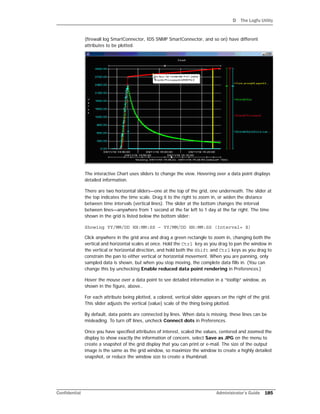
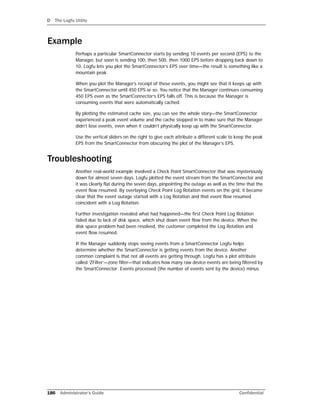
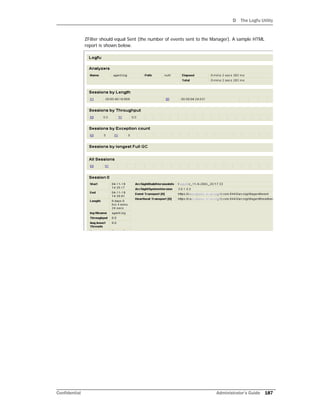
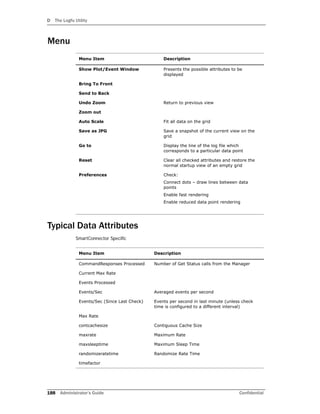
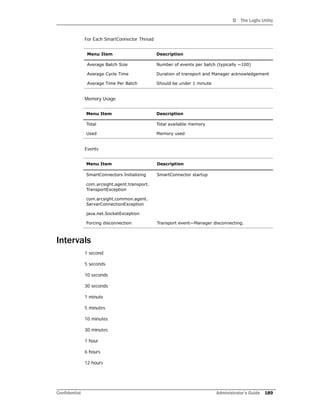
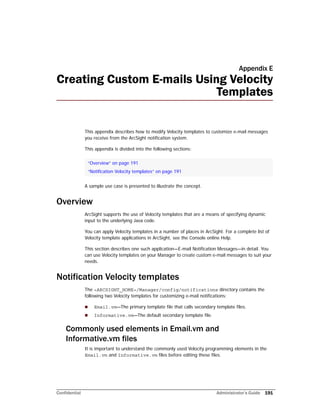
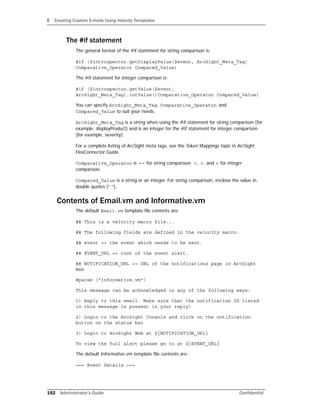
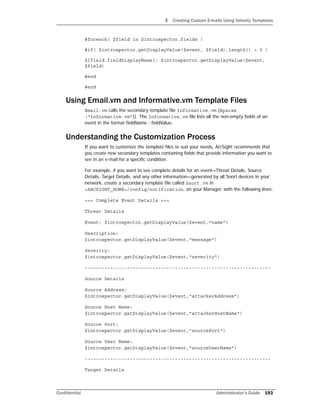
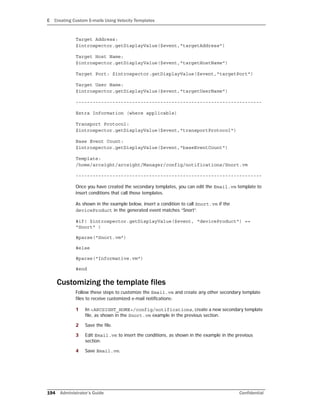
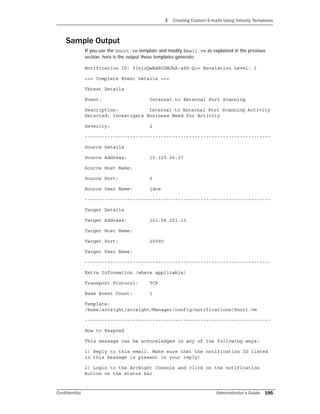
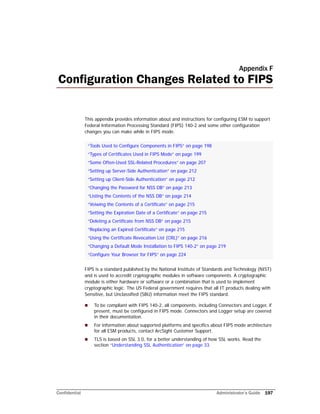
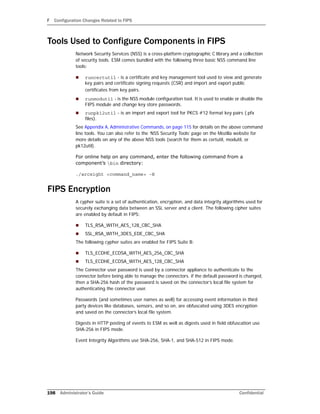
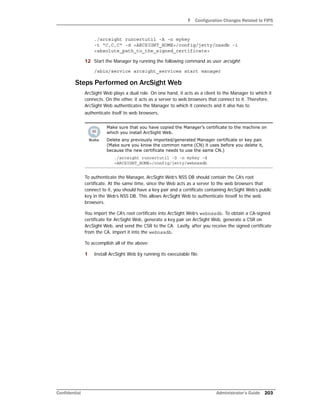
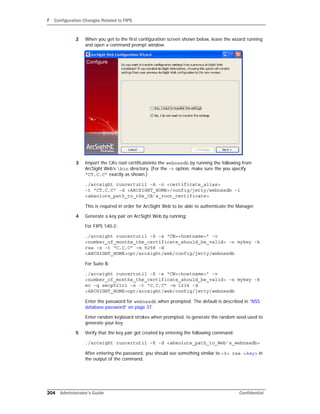
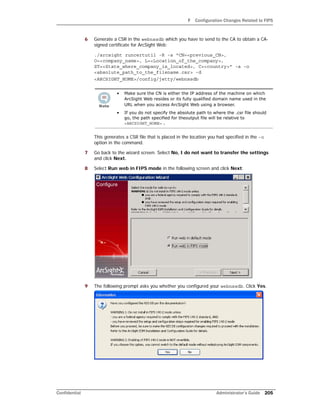
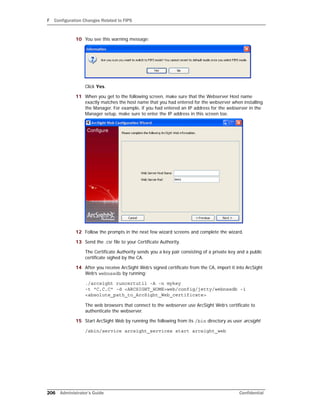
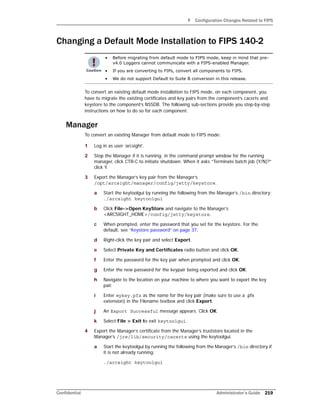
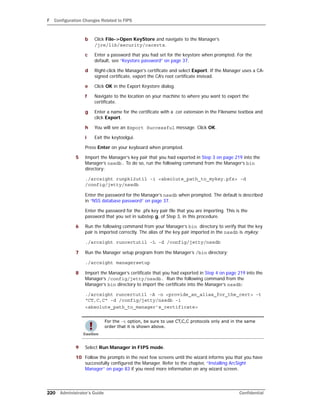
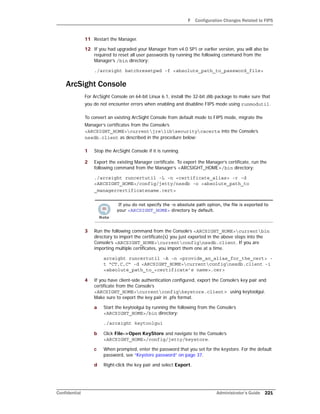
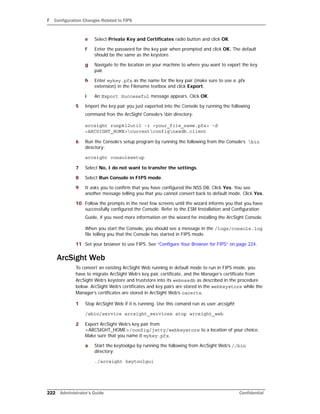
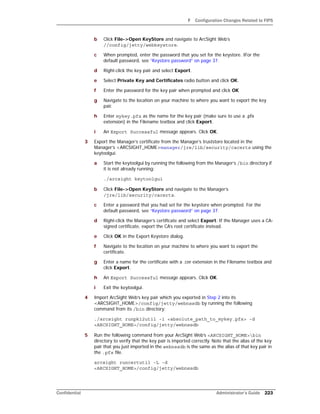
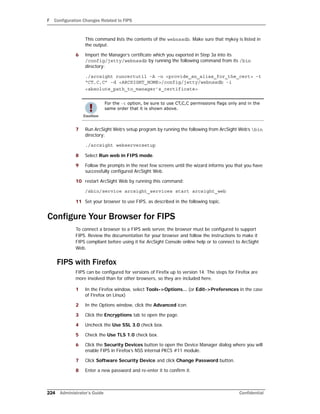
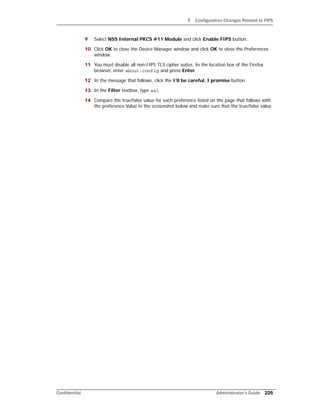
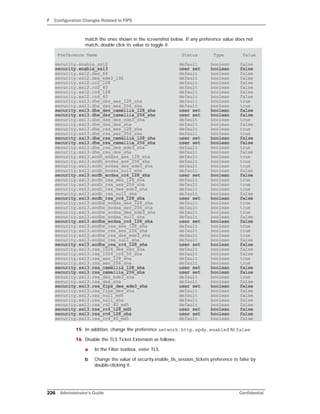
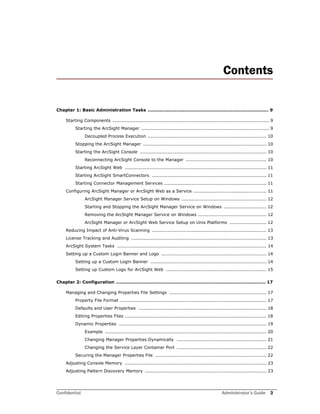
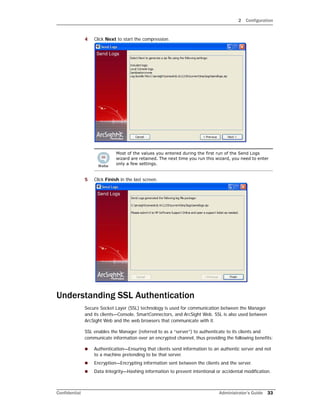
The ArcSight Manager can be started from the command line or configured as a service or daemon. On Linux/Unix systems, run "/sbin/service arcsight_services start manager" as the arcsight user. On Windows, configure it as a service using the ArcSight Manager installer. When started, the Manager displays status messages and is ready when the log shows it has loaded successfully.
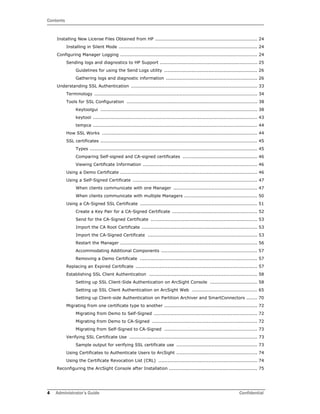
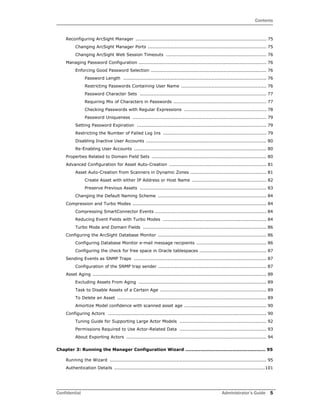
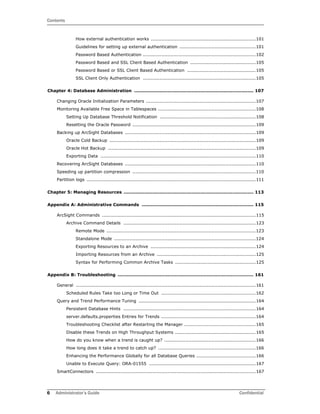
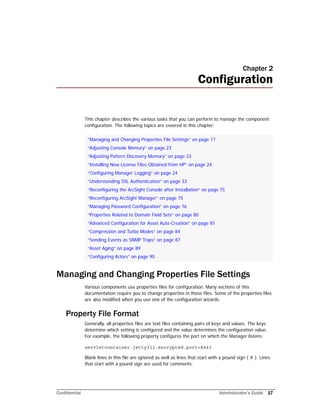
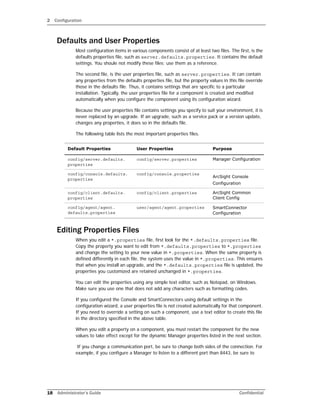
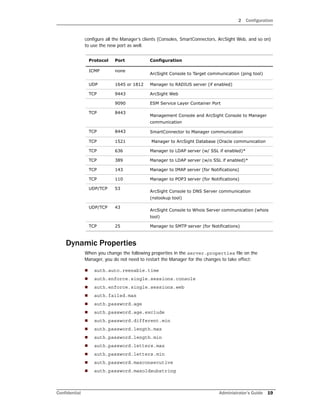
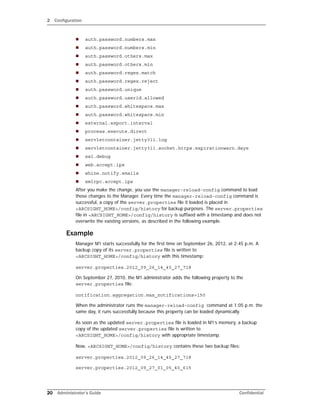
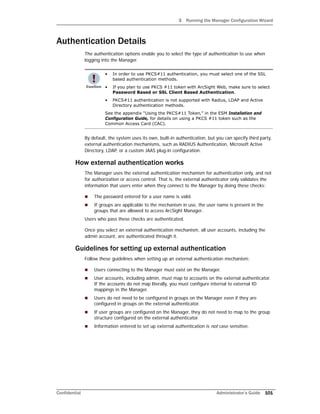
![1 Basic Administration Tasks
10 Administrator’s Guide Confidential
On Windows systems, you can use a “tail” equivalent tool to run the same command, such
as those available from http://www.cygwin.com, which provides Unix environments and
tools for Windows.
Decoupled Process Execution
On UNIX-based systems, Manager uses decoupled process execution to perform specific
tasks, for example to compile rulesets, either on initial startup or when the real-time rules
group changes. To do so, the Manager uses a standalone process executor (instead of
using “in process” or “direct process” execution). The Manager sends commands to be
executed via the file system. The process executor uses the <ARCSIGHT_HOME>/tmp
directory, so you should restrict system level access for this directory.
The process executor is used, by default, on all Unix platforms. The Manager scripts ensure
that the Process Executor runs as a daemon before the Manager is started. This has some
implications with regards to troubleshooting Manager startup and runtime problems. The
Manager, if configured to use the Process Executor, does not start unless it detects the
presence of a running Process Executor. The Process Executor runs within its own
watchdog, in the same fashion as the Manager, so if the process stops for any reason, it
restarts automatically. The process executor is transparent to users regarding the way that
the Manager is started or stopped.
The stdout and stderr of the executed process are written into the following two files:
<ARCSIGHT_HOME>/tmp/[commandfile-name].stdout
<ARCSIGHT_HOME>/tmp/[commandfile-name].stderr
Stopping the ArcSight Manager
When not running as a service, press Ctrl-C in the command window or terminal box
where the Manager is running to initiate a controlled shutdown of the Manager.
Starting the ArcSight Console
Before you start ArcSight Console or SmartConnectors, be sure the Manager is installed
and has completed a successful startup. To start up the ArcSight Console:
1 Open a command window or shell window on <ARCSIGHT_HOME>/bin.
2 Type in the following line and press Enter.
./arcsight console
Reconnecting ArcSight Console to the Manager
If the ArcSight Console loses its connection to the Manager—because the Manager was
restarted, for example—a dialog box appears in the ArcSight Console stating that your](https://image.slidesharecdn.com/esmadminguide5-170529125305/85/Esm-admin-guide_5-5-10-320.jpg)

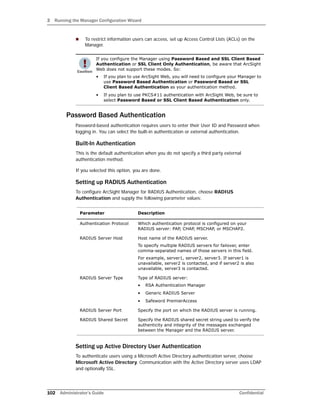
![2 Configuration
Confidential Administrator’s Guide 35
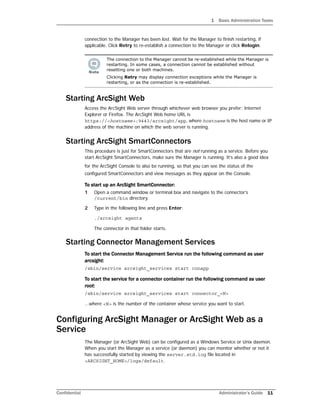
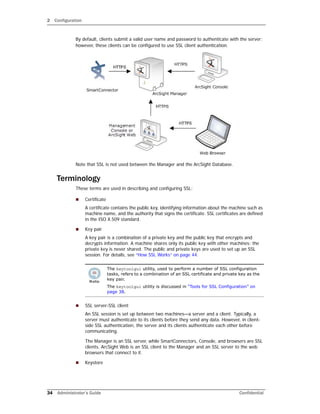
A keystore is an encrypted repository on the SSL server that holds the SSL certificate
and the server’s private key. The following table lists the ESM component, the name of
the keystore on that component, and its location.
[1] When client-side authentication is used, a keystore exists on both the server and
the client.
[2] Make sure you do not change the keystore file name.
Truststore
Truststore is an encrypted repository on SSL clients that contains a list of certificates of
the issuers that a client trusts.
When an issuer issues a certificate to the server, it signs the certificate with its private
key. When the server presents this certificate to the client, the client uses the issuer’s
public key from the certificate in its truststore to verify the signature. If the signature
matches, the client accepts the certificate. For more details, see how SSL handshake
occurs in “How SSL Works” on page 44.
Log File
keystore File
Name[2]
Location of keystore
Manager keystore <ARCSIGHT_HOME>/config/jetty
ArcSight Web webkeystore <ARCSIGHT_HOME>/config/jetty
Clients[1] (for
client-side
authentication)
keystore.client <ARCSIGHT_HOME>/config
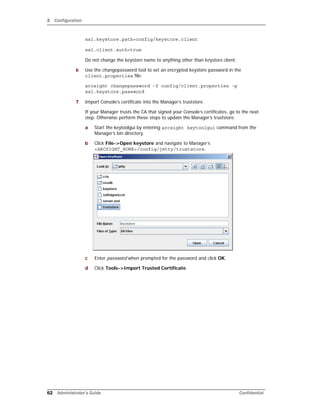
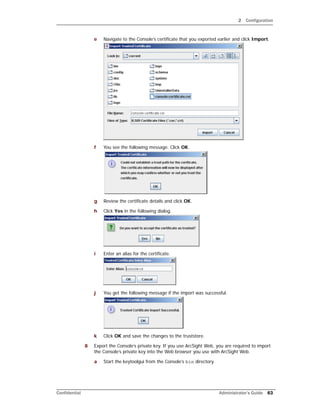
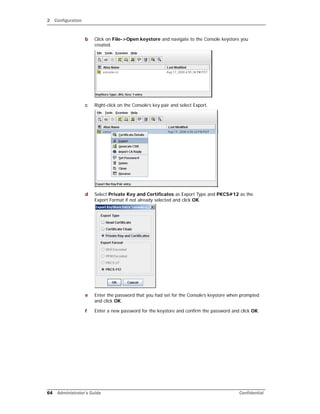
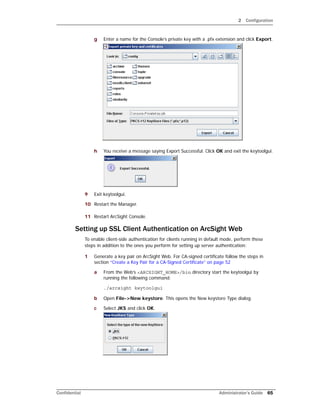
The keytoolgui utility, used to view a truststore, is discussed in “Tools
for SSL Configuration” on page 38.](https://image.slidesharecdn.com/esmadminguide5-170529125305/85/Esm-admin-guide_5-5-35-320.jpg)
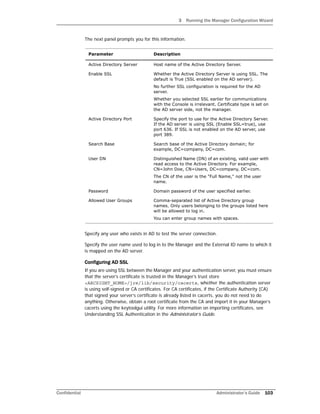
![2 Configuration
36 Administrator’s Guide Confidential
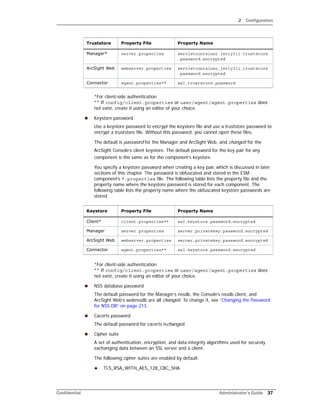
The following table lists the ESM component, the name of the truststore on that
component, and its location.
[1] The utilities that exist on the Manager machine such as archive are treated as
clients of the Manager. The cacerts file on the Manager is used for authenticating the
Manager to these clients.
[2] When client-side authentication is used.
[3] When client-side authentication is used, ArcSight Web contains two truststores—
cacerts for connections to the Manager and webtruststore for connections to browsers.
Alias
Certificates and key pairs in a keystore or a truststore are identified by an alias.
Truststore password
The *.defaults.properties file contains the default truststore password for each
ESM component (changeit). The password is in clear text and typically, you do not
need to change it. To change or obfuscate it, use the changepassword utility, as
described in Appendix A‚ Administrative Commands‚ on page 115. The following table
lists the property name where the obfuscated truststore passwords are stored.
Component truststore File Name Location of truststore
Clients cacerts <ARCSIGHT_HOME>/jre/lib/security
Manager cacerts[1] <ARCSIGHT_HOME>/jre/lib/security
ArcSight Web cacerts <ARCSIGHT_HOME>/jre/lib/security
Manager truststore[2] <ARCSIGHT_HOME>/config/jetty
ArcSight Web webtruststore[2][3] <ARCSIGHT_HOME>/config/jetty
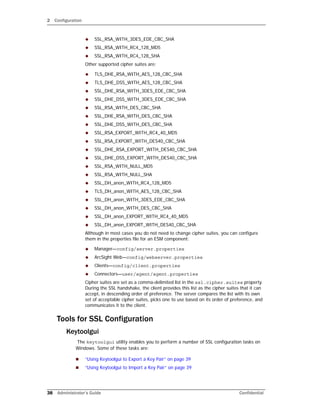
Truststore Property File Property Name
Client client.properties** ssl.truststore.password](https://image.slidesharecdn.com/esmadminguide5-170529125305/85/Esm-admin-guide_5-5-36-320.jpg)
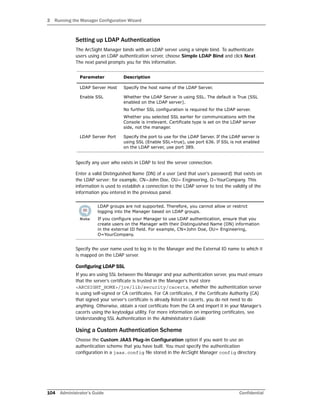
![2 Configuration
Confidential Administrator’s Guide 43
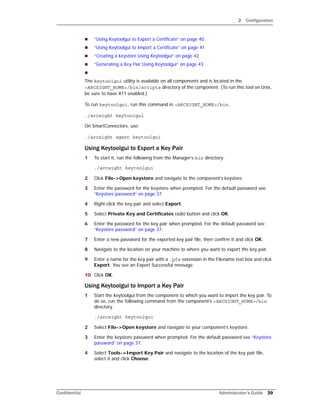
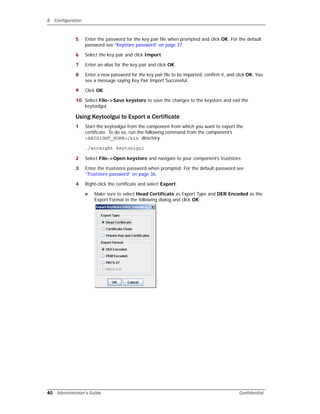
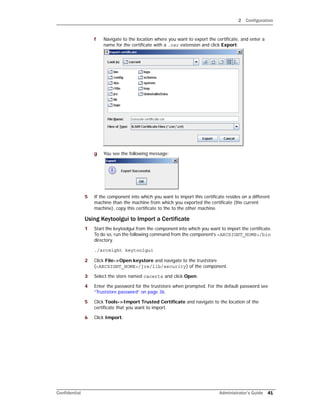
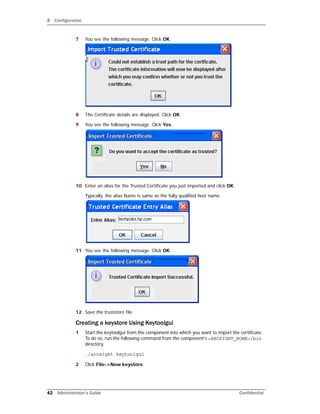
3 Select JKS and click OK.
4 Click File->Save keystore.
Generating a Key Pair Using Keytoolgui
1 Start the keytoolgui from the component into which you want to import the certificate.
To do so, run the following command from the component’s <ARCSIGHT_HOME>/bin
directory.
./arcsight keytoolgui
2 Click File->Open keystore and navigate to your keystore.
3 Click Tools->Generate Key Pair and fill in the fields in the General Certificate dialog
and click OK.
4 Enter an alias for the newly created key pair and click OK.
5 Save the keystore by clicking File->Save keystore.
Viewing Certificate Details
1 Start the keytoolgui from the component from which you want to export the
certificate. To do so, run the following command from the component’s
<ARCSIGHT_HOME>/bin directory.
./arcsight keytoolgui
2 Select File->Open keystore and navigate to your component’s truststore.
3 Enter the truststore password when prompted. For the default password see
“Truststore password” on page 36.
4 Double-click the certificate whose details you want to view. Details include valid date
range, and other information about the certificate.
keytool
The keytool utility is the command-line version of keytoolgui that you can use to
manipulate the keystores and truststores directly. Use the keytool utility on UNIX
environments without X11 or whenever a command-line option is more suitable.
Use keytool -help for a complete list of all command options and their arguments.
To use keytool, enter this command:
arcsight keytool [option] –store <store value>
where <store value> can be:
managerkeys—Manager keystore
managercerts—Manager truststore
webkeys—Web keystore
webcerts—Web truststore
ldapkeys—Manager LDAP Client keystore
ldapcerts—Manager LDAP Client truststore
clientkeys—Client keystore
clientcerts—Client truststore](https://image.slidesharecdn.com/esmadminguide5-170529125305/85/Esm-admin-guide_5-5-43-320.jpg)
![2 Configuration
44 Administrator’s Guide Confidential
On SmartConnector hosts, use:
arcsight agent keytool [option] –store <store value>
The following is an example for creating a 2048-bit, RSA key-pair with the mykey alias that
expires in 10 years (3650 days).
arcsight keytool -v -genkeypair -alias mykey -validity 3650
-keyalg rsa -keysize 2048 -store managerkeys
The following is an example for exporting the above key-pair as a "self-signed" RFC-1421
compliant ASCII certificate.
arcsight keytool -exportcert -alias mykey -v -store managerkeys
-rfc -file export_mykey.pem
You can also SCP your keystore file to a computer where the ArcSight Console is installed
and use keytoolgui to make changes before uploading back to the remote server.
tempca
The tempca utility enables you to manage the SSL certificate in many ways. To see a
complete list of parameters available for this utility, enter this in <ARCSIGHT_HOME>/bin:
./arcsight tempca
On SmartConnectors, use:
./arcsight agent tempca
Two frequently performed operations using this utility are:
Viewing the type of certificate in use on the Manager:
./arcsight tempca –i
Removing the Demo certificate from the list of trusted certificates, if applicable:
./arcsight tempca -rc
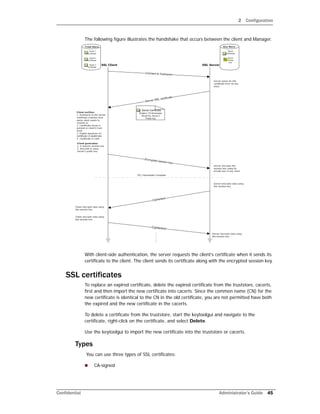
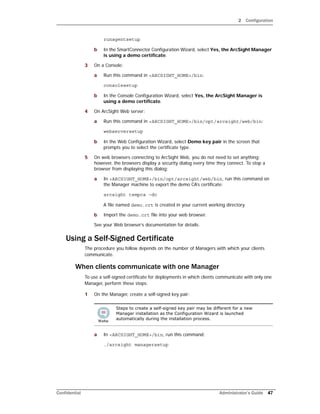
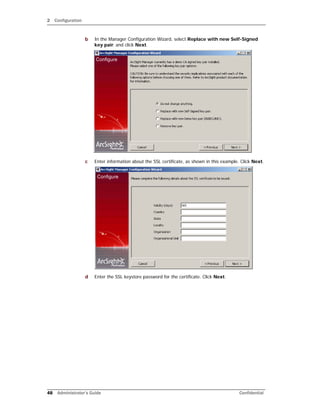
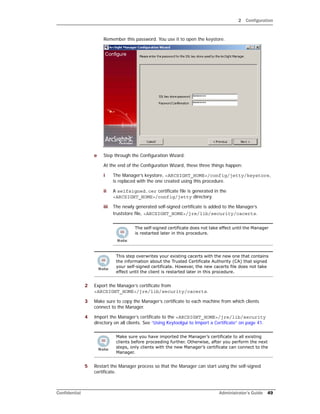
How SSL Works
When a client initiates communication with the SSL server, the server sends its certificate to
authenticate itself to the client. The client validates the certificate by verifying:
The hostname is identical to the one with which the client initiated communication.
The certificate issuer is in the list of trusted certificate authorities in the client’s
truststore (<ARCSIGHT_HOME>/jre/lib/security/cacerts) and the client is
able to verify the signature on the certificate by using the CA’s public key from the
certificate in its truststore.
The current time on the client machine is within the validity range specified in the
certificate to ensure that the certificate is valid.
If the certificate is validated, the client generates a random session key, encrypts it using
the server’s public key, and sends it to the server. The server decrypts the session key
using its private key. This session key is used to encrypt and decrypt data exchanged
between the server and the client from this point forward.](https://image.slidesharecdn.com/esmadminguide5-170529125305/85/Esm-admin-guide_5-5-44-320.jpg)

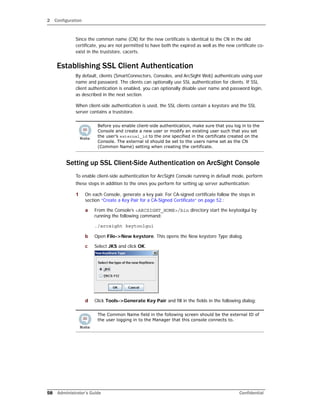
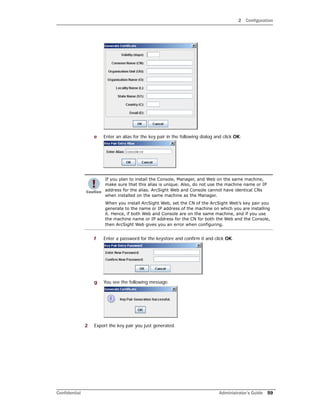
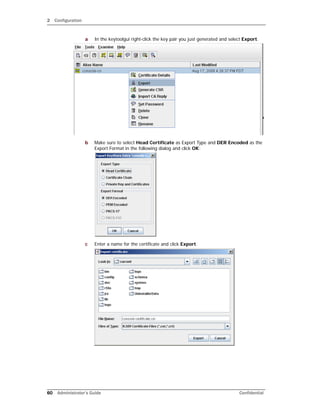
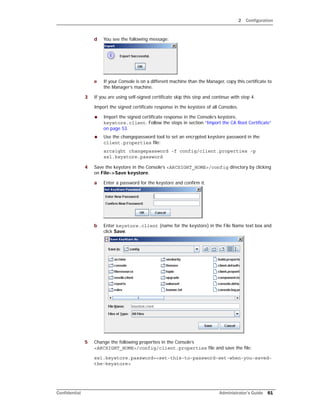
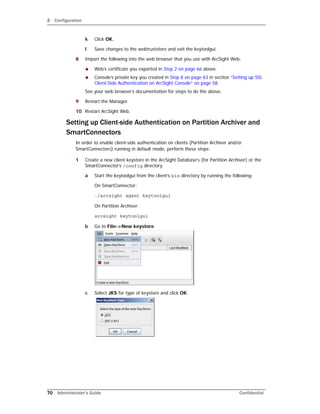
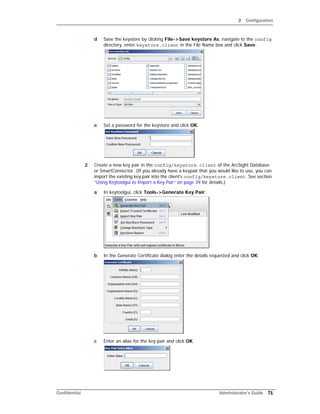
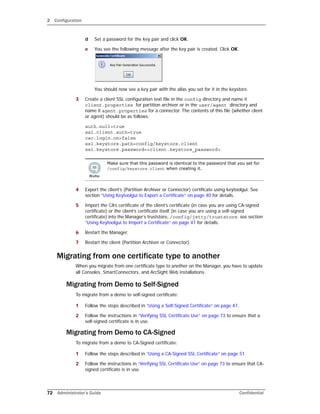
![2 Configuration
Confidential Administrator’s Guide 73
Migrating from Self-Signed to CA-Signed
To migrate from a self-signed to CA-signed certificate:
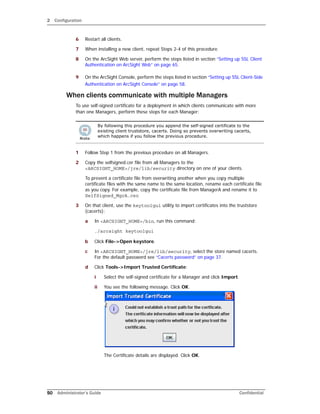
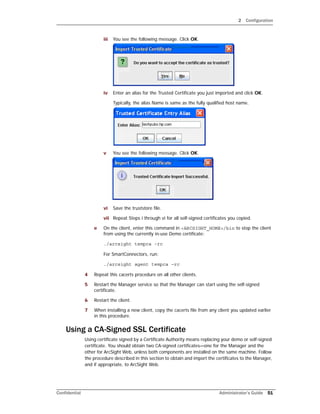
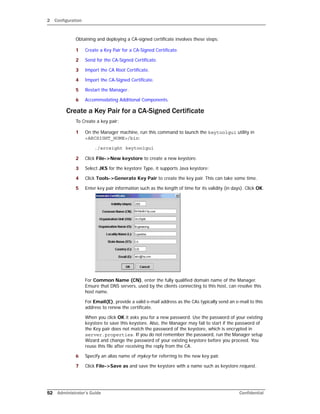
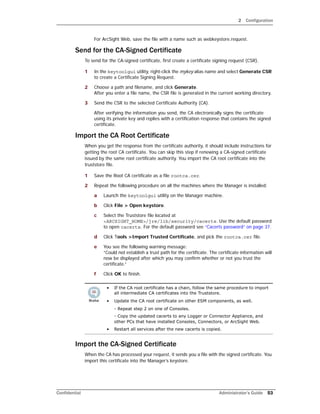
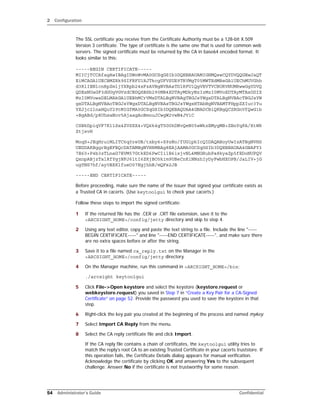
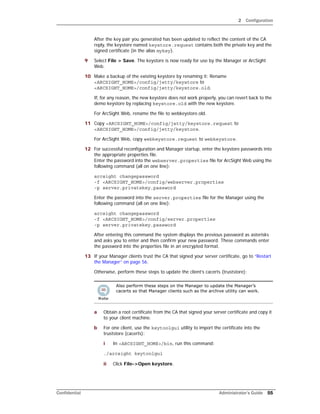
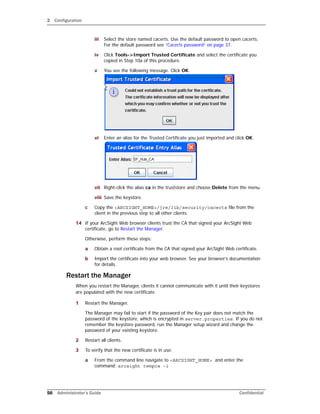
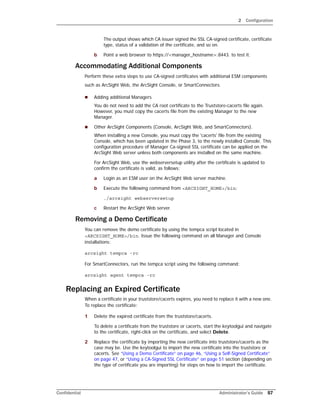
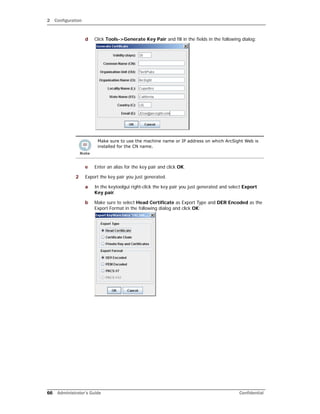
1 Follow the steps described in “Using a CA-Signed SSL Certificate” on page 51.
2 Follow the instructions in “Verifying SSL Certificate Use” on page 73 to ensure that a
CA-signed certificate is in use.
Verifying SSL Certificate Use
After the migration, run this command in <ARCSIGHT_HOME>/bin on the client to ensure
the certificate type you intended is in use:
./arcsight tempca –i
In the resulting output, a sample of which is available below, do the following:
1 Review the value of the line: Demo CA trusted.
The value should be “no.”
If the value is “yes,” the demo certificate is still in use. Follow these steps to stop using
the demo certificate:
a In <ARCSIGHT_HOME>/bin, enter the following command to make the client
stop using the currently in use demo certificate:
./arcsight tempca -rc
For SmartConnectors, run:
./arcsight agent tempca –rc
b Restart the client.
2 Verify that the Certificate Authority that signed your certificate is listed in the output.
For a self-signed certificate, the Trusted CA is the name of the machine on which you
created the certificate
Sample output for verifying SSL certificate use
This is a sample output of the arcsight tempca –i command run from a Console’s bin
directory on the Windows platform:
ArcSight TempCA starting...
SSL Client
truststore C:arcsightConsolecurrentjrelibsecuritycacerts
Type JKS
Demo CA trusted no
Trusted CA DigiCert Assured ID Root CA
[digicertassuredidrootca]
Trusted CA TC TrustCenter Class 2 CA II
[trustcenterclass2caii] .
.
.
Demo CA
keystore C:arcsightConsolecurrentconfigkeystore.tempca
Exiting...](https://image.slidesharecdn.com/esmadminguide5-170529125305/85/Esm-admin-guide_5-5-73-320.jpg)
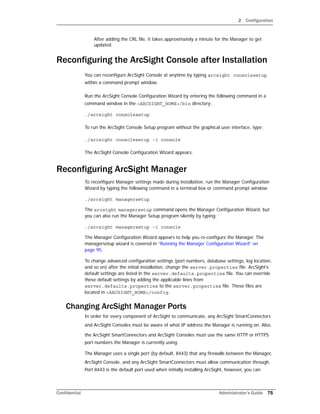
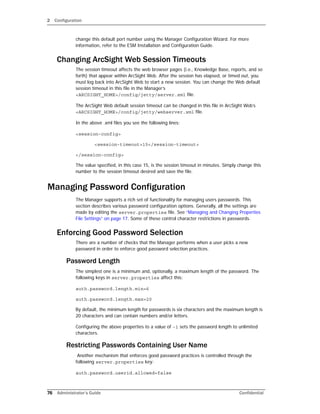
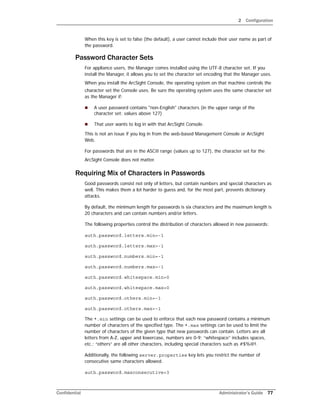
![2 Configuration
78 Administrator’s Guide Confidential
For example, the default setting of 3 would allow "adam999", but not "adam9999" as a
password.
Furthermore, the following server.properties key enables you to specify the length of
a substring that is allowed from the old password in the new password.
auth.password.maxoldsubstring=-1
For example, if the value is set to 3 and the old password is “secret”, neither “secretive”
nor “cretin” is allowed as a new password.
Checking Passwords with Regular Expressions
To accommodate more complex password format requirements, the Manager can also be
set up to check all new passwords against a regular expression. The following
server.properties keys can be used for this purpose:
auth.password.regex.match=
auth.password.regex.reject=
The auth.password.regex.match property describes a regular expression that all
passwords have to match. If a new password does not match this expression, the Manager
rejects it. The auth.password.regex.reject property describes a regular expression
that no password may match. If a new password matches this regular expression, it is
rejected.
For more information on creating an expression for this property, see http://www.regular-
expressions.info/. The following are a few examples of regular expressions and a
description of what they mean.
auth.password.regex.match= /^D.*D$/
Only passwords that do not start or end with a digit are accepted.
auth.password.regex.match= ^(?=.*[A-Z].*[A-Z])(?=.*[a-z].*[a-
z])(?=.*[0-9].*[0-9])(?=.*[^a-zA-Z0-9].*[^a-zA-Z0-9]).{10,}$
Only passwords that contain at least 10 characters with the following breakdown are
accepted:
At least two upper case letters
At least two lower case letters
At least two digits
At least two special characters (no digits or letters)
auth.password.regex.reject= ^(?=.*[A-Z].*[A-Z])(?=.*[a-z].*[a-
z])(?=.*[0-9].*[0-9])(?=.*[^a-zA-Z0-9].*[^a-zA-Z0-9]).{12,}$
The passwords that contain 12 characters with the following breakdown are rejected:
At least two upper case letters
At least two lower case letters
At least two digits
Backslash ( ) characters in regular expressions must be duplicated
(escaped)—instead of specifying , type .](https://image.slidesharecdn.com/esmadminguide5-170529125305/85/Esm-admin-guide_5-5-78-320.jpg)
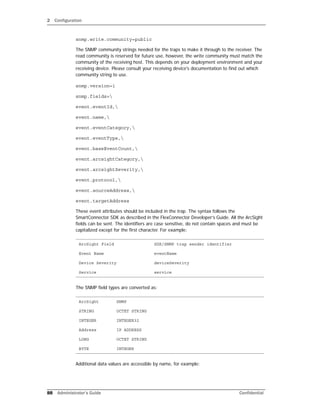
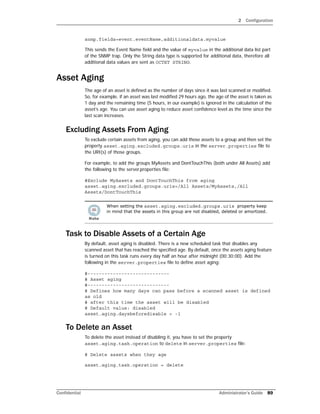
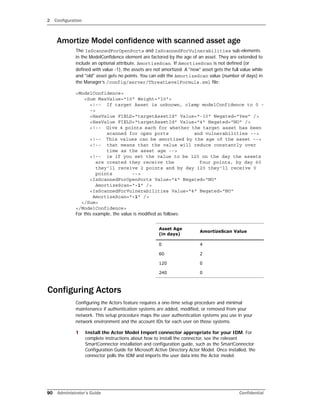
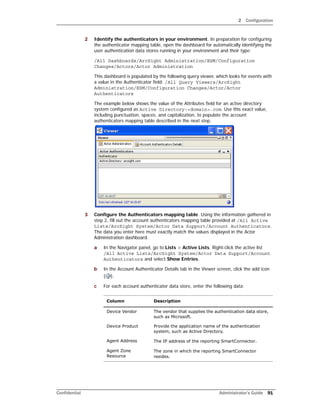
![2 Configuration
92 Administrator’s Guide Confidential
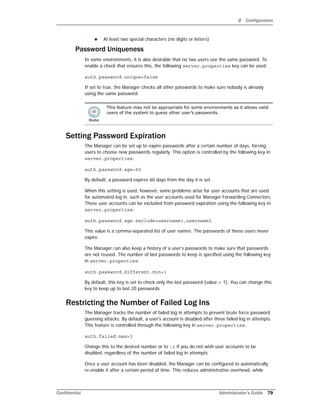
When you are finished, the Account Authenticators table should look something like
this:
Tuning Guide for Supporting Large Actor Models
If your actor model contains tens of thousands of members, follow the guidelines in this
section to allow adequate processing capacity for best results.
1 Shut down the Manager
2 Increase settings in server.properties. Increase the following default values
to support managing large blocks of actors by setting following properties in the
config/server.properties file:
3 Adjust Java Heap Memory Size in the arcsight managersetup utility.
Supporting 50,000 actors requires an additional 2 GB of Java heap memory in the
Manager. An additional 300 MB is needed for each category model you construct that
uses 50,000 actors. This additional memory is not in use all the time, but is needed for
certain operations.
For instructions about how to run the managersetup utility, see the Administrator’s
Guide.
4 Re-start the Manager.
5 Proceed with importing the actor model.
Authenticator Enter the exact value(s) returned for Authenticator in
the Actor Administration dashboard from the previous
step, including punctuation, capitalization, and spaces.
Using the example shown in the previous step, the
value you would enter in this column would be:
Active Directory: arcsight.com
Server Property
Name
Default
Setting
[units]
Comments
dbconmanager.provider.oracle.pool.maxcheckout
600
[seconds]
The maximum time for a database connection before the
process is terminated.
This setting comes into play when you want to delete a large
block of actors from the ArcSight Console. The default value
should be increased by a factor of 3-6x, for example, 1800 to
3600.
Column Description](https://image.slidesharecdn.com/esmadminguide5-170529125305/85/Esm-admin-guide_5-5-92-320.jpg)


![Confidential Administrator’s Guide 115
Appendix A
Administrative Commands
This appendix provides information about assorted Administrative commands.
ArcSight Commands
To run an ArcSight command script on a component, open a command window and switch
to the <ARCSIGHT_HOME> directory. The arcsight commands run using the file
arcsight.bat (on Windows) or arcsight.sh (on Unix) in <ARCSIGHT_HOME>bin.
The general syntax is as follows:
binarcsight <command_name> [parameters]
“ArcSight Commands” on page 115
Alphabetical ArcSight Commands List
ACLReportGen
agent logfu
agent tempca
agentcommand
agents
agentsvc
agenttempca
agentup
arcdbutil
arcdt
archive
archivefilter
archivewizard
bleep
bleepsetup
changepassword
checklist
console
consolesetup
database pc
database pm
database xts
databasesetup
dbcheck
dbview-generator
deploylicense
downloadcertificate
dropSLPartitions
exceptions
export_system_tables
flexagentwizard
groupconflictingassets
idefensesetup
import_system_tables
keytool
keytoolgui
kickbleep
listsubjectdns
logfu
manager
managerinventory
manager-no-wrapper
manager-reload-config
managersetup
managerstop
managersvc
managerthreaddump
managerup
monitor
netio
package
portinfo
querytuner
reenableuser
refcheck
regex
replayfilegen
resetpwd
resvalidate
ruledesc
runcertutil
runmodutil
runpk12util
script
searchindex
sendlogs
tee
tempca
testdbconnection
threaddumps
tproc
uninstallservice
webserver
webserver-no-wrapper
webserversetup
webserversvc
websetup
whois](https://image.slidesharecdn.com/esmadminguide5-170529125305/85/Esm-admin-guide_5-5-115-320.jpg)
![A Administrative Commands
116 Administrator’s Guide Confidential
In general, commands that accept a path, accept either a path that is absolute or relative
to <ARCSIGHT_HOME>. Running the command from <ARCSIGHT_HOME> and prefixing
it with bin enables you to use the shell’s capabilities in looking for relative paths.
Not all parameters are required. For example, username and password may be a
parameter for certain commands, such as the Manager and Package commands, but the
username and password are only required if the command is being run from a host that
does not also host the Manager.
ACLReportGen
agent logfu
Description
A tool for generating a report on ACLs either at the group level or at
the user level. By default, the generated report is placed in the
/opt/arcsight/manager/ACLReports directory.
Applies to Manager
Syntax ACLReportGen [parameters]
Parameters
Optional:
-config <config>
-locale
-m <mode>
-pc
<privateConfig>
-h
The primary configuration file
(config/server.defaults.properties)
The locale to run under
Mode in which this tool is run to generate the
ACLs report. Supported modes are
• grouplevel
• userlevel
Default value is grouplevel
The override configuration file
(config/server.properties)
Help
Examples
To run this tool:
arcsight ACLReportGen
Description Graphical SmartConnector log file analyzer
Applies to SmartConnectors
Syntax agent logfu –a [Parameters]
Parameters
-a SmartConnector log. Required.
For other Parameters, see logfu command
(Manager)
Examples
To run logfu:
arcsight agent logfu –a](https://image.slidesharecdn.com/esmadminguide5-170529125305/85/Esm-admin-guide_5-5-116-320.jpg)
![A Administrative Commands
118 Administrator’s Guide Confidential
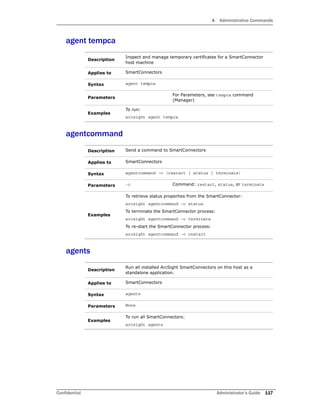
agentsvc
agenttempca
agentup
arcdbutil
Description Install ArcSight SmartConnector or Partition Archiver as a service.
Applies to SmartConnectors and Database
Syntax agentsvc –i –u <user>
Parameters -i Install the service
-u <user> Run service as specified user
Examples
To install a SmartConnector or Partition Archiver as a service:
arcsight agentsvc
Description See the agent tempca command
Applies to SmartConnectors
Description
Get the current state of a SmartConnector. Returns 0 if the
SmartConnector is running and reachable. Returns 1 if not
Applies to SmartConnectors
Syntax agentup
Parameters None
Examples
To check that the SmartConnector is up, running, and accessible:
arcsight agentup
Description
A utility that enables you to launch database utilities for operations
such as import, export, sql interface, backup, restore, and other
database commands
Applies to Database
Syntax arcdbutil <database_command> [command_Parameters]
Parameters
<database_comman
d>
Possible commands include: sql, listener,
backup, recover, import, export, and other
database commands
[command_Paramete
rs]
All valid Parameters for the database
command you use](https://image.slidesharecdn.com/esmadminguide5-170529125305/85/Esm-admin-guide_5-5-118-320.jpg)
![A Administrative Commands
120 Administrator’s Guide Confidential
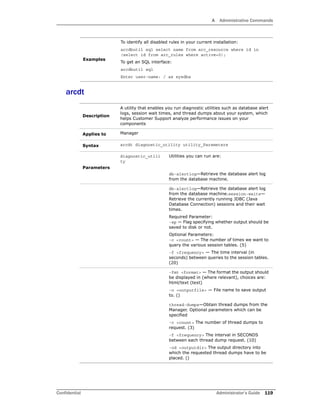
archive
help
help commands
help <command>
Use these help Parameters (no dash) to see the
Parameters, a list of commands, or help for a
specific command.
Examples
To retrieve the last 20 lines of database alert log from your database
machine and save it to a file called 20110720_dblog, run this
command:
arcsight arcdt db-alertlog -ln 20 -o 20110720_dblog
Description
Import or export resources (users, rules, and so on) to or from one or
more XML files.
Note: Generally, there is no need to use this command. The Packages
feature in the ArcSight Console is more robust and easier to use for
managing resources.
Applies to Manager, Console
Syntax archive –f <archivefile> [Parameters]
Required
Parameter
-f <archivefile> The input (import) or the output (export) file
specification.
Note: Filename paths can be absolute or
relative. Relative paths are relative to
<ARCSIGHT_HOME>, not the current directory.
Optional
Parameters
-action <action> Possible actions include: diff, export,
i18nsync, import, list, merge, sort, and
upgrade. Default: export.
-all Export all resources in the system (not
including events).
-autorepair Check ARL for expressions that operate
directly on resource URI's.
-base <basefile> The basefile when creating a migration
archive. The new archive file is specified with
–source (the result file is specified with –f).
-config <file> Configuration file to use.
Default:
config/server.defaults.properties
-conflict
<conflictpolicy>
The policy to use for conflicts resolution.
Possible policies are:
default: Prompts user to resolve import
conflicts.
force: Conflicts are resolved by the new
overwriting the old.
overwrite: Merges resources, but does not
perform any union of relationships.
preferpackage: if there is a conflict, it
prefers the information in the package that is
coming in over what is already there.
skip: Do not import resources with conflicts.](https://image.slidesharecdn.com/esmadminguide5-170529125305/85/Esm-admin-guide_5-5-120-320.jpg)
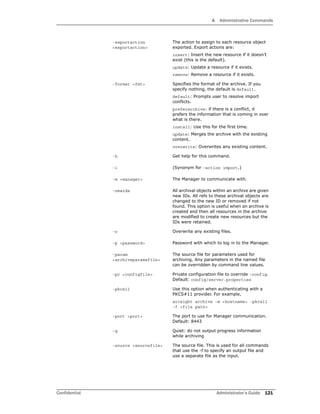
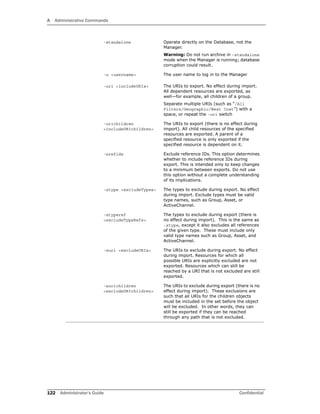
![A Administrative Commands
Confidential Administrator’s Guide 123
Archive Command Details
You can use the archive command line tool to import and export resources. It is useful
for managing configuration information, for example, importing asset information collected
from throughout your enterprise. You can also use this tool to archive resources so you can
restore it after installing new versions of this system.
The archive command automatically creates the archive files you specify, saving resource
objects in XML format. This documentation does not provide details on the structure of
archive files and the XML schema used to store resource objects for re-import into the
system. Generally it is easier to use packages.
This command displays a resource in the archive menu list of resources only if the user
running the utility has top-level access to the resource. Access is different for each mode.
Remote Mode
In remote mode, you can import or export from either a Manager or ArcSight Console
installation and can perform archive operations while the Manager is running.
arcsight archive -u Username -m Manager [-p Password] -f Filename
Examples
To import resources from an XML file (on a Unix host):
arcsight archive –action import –f /user/subdir/resfile.xml
To export certain resources (the program displays available resources):
arcsight archive –f resfile.xml –u admin –m mgrName –p pwd
To export all resources to an XML file in quiet, batch mode:
arcsight archive –all –q –f resfile.xml –u admin –m mgrName -p
password
To export a specific resource:
arcsight archive –uri “/All Filters/Geographic/West Coast” -f
resfile.xml
Manual import (program prompts for password):
arcsight archive –i –format preferarchive –f resfile.xml –u
admin -m mgrName
Scheduled or batch importing:
arcsight archive –i –q –format preferarchive –f resfile.xml –u
admin –m mgrName -p password
Scheduled or batch exporting:
arcsight archive –f resfile.xml –u admin –m mgrName -p
password uri “/All Filters/Geographic/East Coast” –uri “/All
Filters/Geographic/South”
Ordinarily, you should use the packages feature to archive and import
resources. For more information about packages and how to use them, see
the “Managing Packages” topic in ArcSight Console Online Help. Also, see the
packages command.](https://image.slidesharecdn.com/esmadminguide5-170529125305/85/Esm-admin-guide_5-5-123-320.jpg)
![A Administrative Commands
124 Administrator’s Guide Confidential
[-i | -sort] [-q] ...
When you run the archive utility in the remote mode, it runs as the user specified in the
command line. However, even users with the highest privilege level (administrator) do not
have top level access to , for example, the user resource ('All users'). Thus, the User
resource does not show up in the list of resources. You can export users with the -uri
option, but if you want to use the -u option, use the Standalone mode.
To export user resources, you can use the -uri option and specify a user resource to which
you have direct access. For example:
arcsight archive -u <username> -m <manager_hostname> -format
exportuser -f exportusers.xml -uri "/All Users/Administrators/John
Standalone Mode
In standalone mode, from the computer where the Manager is installed, you can connect
directly to the ArcSight Database to import or export resource information, however, the
Manager must be shut down before you perform archive operations.
When you run the archive utility in standalone mode, it runs as Root user. This is a special
system user which has top level access to all resources including the User resource (which
is 'All Users'), so, for example, User Resource shows up in the list of resources.
The basic syntax for the archive command in standalone mode is the following:
arcsight archive -standalone -f Filename [-i | -sort] [-q] ...
Note that the standalone mode only works from the archive command found in the
Manager installation, and does not work remotely. For example:
arcsight archive -standalone -format exportuser -f exportusers.xml
Exporting Resources to an Archive
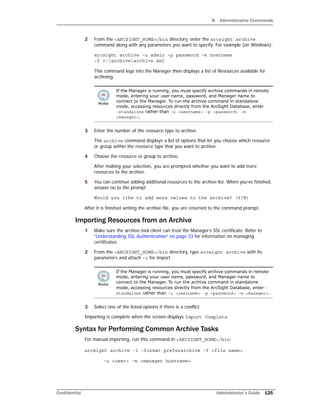
1 Make sure the archive tool client can trust the Manager’s SSL certificate. Refer to
“Understanding SSL Authentication” on page 33 for information on managing
certificates.
From the <ARCSIGHT_HOME>/bin directory, you can enter the command,
arcsight archive -h to get help.
The cacerts file on the Manager host must trust the Manager's certificate. You
may have to update cacerts if you are using demo certificates by running:
arcsight tempca –ac
You do not need to run the above command if you run the archive command
from the Console.
Do not run the archive tool in standalone mode against a database currently in
use by a Manager as it is possible to corrupt the database.
Both remote and standalone archive commands support the same optional
arguments.](https://image.slidesharecdn.com/esmadminguide5-170529125305/85/Esm-admin-guide_5-5-124-320.jpg)
![A Administrative Commands
126 Administrator’s Guide Confidential
Before performing the import operation, you are prompted for a password to log in to the
Manager.
For exporting:
arcsight archive -f <file name>
-u <user> -m <manager hostname>
Before performing the import operation, you are prompted for a password to log in to the
Manager and use a series of text menus to pick which Resources are archived.
For scheduled/batch importing:
arcsight archive -i -q -format preferarchive
-f <file name> -u <user>
-p <password> -m <manager hostname>
For scheduled/batch exporting:
arcsight archive -u admin -p password -m arcsightserver
-f somefile.xml -uri “/All Filters/Geographic Zones/West
Coast”
-uri “/All Filters/Geographic Zones/East Coast”
archivefilter
You can specify multiple URI resources with the URI parameter keyword by
separating each resource with a space character, or you can repeat the URI
keyword with each resource entry.
Description
Use the command to change the contents of the archive. The
archivefilter command takes a source archive xml file as input,
applies the filter specified and writes the output to the target file.
Applies to Manager
Syntax
archivefilter –source <sourcefile> –f <archivefile >
[Parameters]
Parameters
-a <action> Action to perform {insert, remove, none}
(Default: none)
-e
<element_list>
Elements to process (Default: ‘*’ which
denotes all elements)
-extid <regex> Regular expression to represent all of the
external IDs to include. This is the external ID
of the archival object. (Default: none)
-f <file> Target file (required). If a file with an identical
name already exists in the location where you
want to create your target file, the existing
file is overwritten. If you would like to receive
a prompt before this file gets overwritten, use
the –o option](https://image.slidesharecdn.com/esmadminguide5-170529125305/85/Esm-admin-guide_5-5-126-320.jpg)
![A Administrative Commands
128 Administrator’s Guide Confidential
bleep
bleepsetup
Examples
To run:
arcsight archivewizard
Description
Unsupported stress test command to supply a Manager with security
events from replay files (see replayfilegen). Replay files
containing more than 30,000 events require a lot of memory on the
bleep host.
Do not run bleep on the Manager host. Install the Manager on the
bleep host and cancel the configuration wizard when it asks for the
Manager’s host name.
Run arcsight tempca –ac on the bleep host if the Manager under
test is using a demo certificate.
Create the file config/bleep.properties using the descriptions in
bleep.defaults.properties.
Applies to Manager
Syntax bleep [-c <file>] [-D <key>=<value> [<key>=<value>…]]
Parameters
-c file Alternate configuration file (default:
config/bleep.properties)
-D <key>=<value> Override definition of configuration properties
-m <n> Maximum number of events to send. (Default:
-1)
-n <host> Manager host name
-p <password> Manager password
-t <port> Manager port (Default: 8443)
-u <username> Manager user name
-h Display command help
Examples
To run:
arcsight bleep
Description Wizard to help create the bleep.properties file
Applies to Manager
Syntax bleepsetup
Parameters -f Properties file (silent mode)
-i Mode: {swing, console, recorderui, silent}
Default: swing](https://image.slidesharecdn.com/esmadminguide5-170529125305/85/Esm-admin-guide_5-5-128-320.jpg)
![A Administrative Commands
Confidential Administrator’s Guide 129
changepassword
checklist
console
-g Generate sample properties file
Examples
To run:
arcsight bleepsetup
Description
Command to change obfuscated passwords in properties files. The
utility prompts for the new password at the command line
Applies to Manager
Syntax changepassword –f <file> –p <property_name>
Parameters
-f <file> Properties file, such as
config/server.properties
-p
<property_name>
Password property to change, such as
server.privatekey.password
Examples
To run:
arcsight changepassword
Description
ArcSight Environment Check. Used internally by the installer to see
if you have the correct JRE and supported OS and are connected to a
supported Database.
This can run from the Connector, Database, or Manager.
Description Run the ArcSight Console
Applies to Console
Syntax console [-i] [parameters]
Parameters -ast <file>
-debug
-i
-imageeditor
-laf <style> Look and feel style: metal, plastic, plastic3d.
The default style for Windows is dfferent than
these and not specified. FOr Unix it is
Plastic3d.
-p <password> Password](https://image.slidesharecdn.com/esmadminguide5-170529125305/85/Esm-admin-guide_5-5-129-320.jpg)
![A Administrative Commands
130 Administrator’s Guide Confidential
consolesetup
database pc
-port Port to connect to Manager (default: 8443)
-redirect
-relogin
-server Manager host name
-slideshow
-theme
-timezone <tz> Timezone: such as “GMT” or “GMT-8:00”
-trace Log all Manager calls
-u <name> User name
Examples
To run the console:
ArcSight Console
Description Run the ArcSight Console Configuration Wizard to reconfigure an
existing installation
Applies to Console
Syntax consolesetup [-i <mode>] [-f <file>] [-g]
Parameters -i <mode> Mode: console, silent, recorderui, swing
-f <file> Log file name (properties file in –i silent
mode)
-g Generate sample properties file for –i silent
mode
Examples
To change some console configuration parameters:
ArcSight Consolesetup
Description Partition configuration command
Applies to Database
Syntax database pc
Parameters -d <db_type> Database type: oracle, db2
-i <mode> Mode: silent](https://image.slidesharecdn.com/esmadminguide5-170529125305/85/Esm-admin-guide_5-5-130-320.jpg)
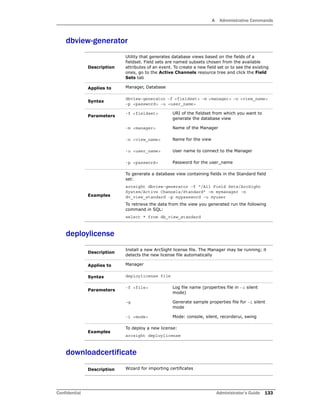
![A Administrative Commands
134 Administrator’s Guide Confidential
dropSLPartitions
exceptions
Applies to Manager
Syntax downloadcertificate
Parameters -i <mode> Mode: console, silent, recorderui, swing
-f <file> Log file name (properties file in –i silent
mode)
-g Generate sample properties file for –i silent
mode
Examples
To run:
arcsight downloadcertificate
Description Command for dropping old Session List partitions
Applies to Database
Syntax dropSLPartitions
Parameters -d <days> Number of days to retain data
-m <manager> The Manager to communicate with
-p <password> (Optional) The password to log in with
-u <username> The user name used for logging in
-p <port> (Optional) The port used for communication
(8443 by default)
-h (Optional) Get help for this command
Examples
To run:
arcsight dropSLPartitions
Description Search for logged exceptions in ArcSight log files
Applies to Manager, Console, SmartConnectors
Syntax
exceptions logfile_list [parameters] [path to the log
file]
The path to the log file must be specified relative to the current
working directory.
Parameters
-x Exclude exceptions/errors that contain the
given string. Use @filename to load a list from
a file.](https://image.slidesharecdn.com/esmadminguide5-170529125305/85/Esm-admin-guide_5-5-134-320.jpg)
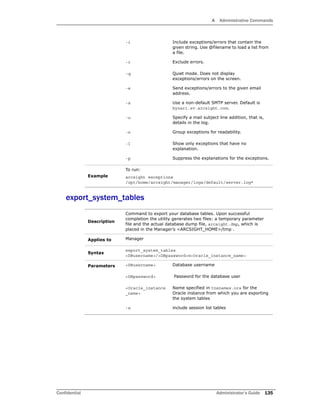
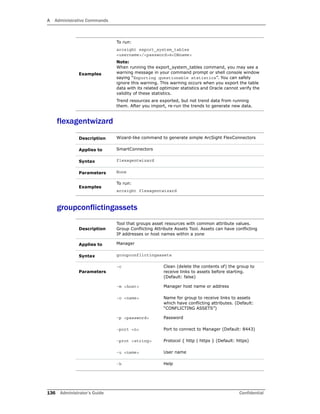
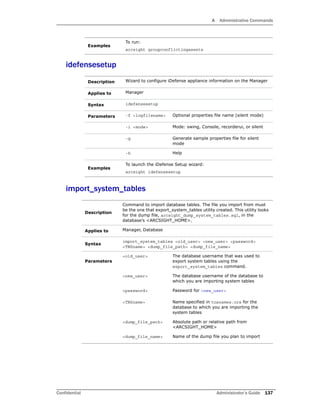
![A Administrative Commands
Confidential Administrator’s Guide 139
listsubjectdns
logfu
-g Generate sample properties file
-i Mode: {swing, console, recorderui, silent}
Default: swing
Examples
To run:
arcsight kickbleep
Description Display subject distinguished names (DN) from a key store
Applies to Manager, SmartConnectors
Syntax listsubjectdns
Parameters
-store name Specific store { managerkeys | managercerts
| clientkeys | clientcerts | ldapkeys |
ldapcerts} (Default: clientkeys.)
Examples
To list Distinguished Names in the Console key store:
arcsight listsubjectdns
Description Graphical tool for analyzing log files.
Applies to Manager (See also agent logfu.)
Syntax logfu {-a | -m} [parameters]
Parameters -a Analyze SmartConnector logs
-f <timestamp> From time
-i Display information about the log files to be
analyzed
-l <timespec> Analyze only the specified time (Format:
<time>{smhd}) Examples: 1d = one day, 4h
= four hours
-m Analyze Manager logs
-mempercent <n> Percent of memory messages to consider for
plotting. (Default: 100)
-noex Skip exception processing
-noplot Skip the plotting
-t <timestamp> To time
Examples
To analyze Manager logs for the last 12 hours:
arcsight logfu –m –l 12h](https://image.slidesharecdn.com/esmadminguide5-170529125305/85/Esm-admin-guide_5-5-139-320.jpg)
![A Administrative Commands
148 Administrator’s Guide Confidential
refcheck
regex
replayfilegen
Applies to Manager
Syntax reenableuser <username>
Parameters <username> The name of the user resource to re-enable
Examples
To re-enable a disabled user:
arcsight reenableuser <username>
Description Resource reference checker
Applies to Manager
Syntax refcheck
Parameters None
Examples
To run:
arcsight refcheck
Description Graphical tool for regex-based FlexConnectors
Applies to SmartConnectors
Syntax regex
Parameters None
Examples
To run:
arcsight regex
Description
Wizard for creating security event data files (“replay files”) that can
be run against a Manager for testing, analysis, or demonstration
purposes.
Note: This is a client side command only and should executed from
the Console’s ARCSIGHT_HOME/bin directory.
Applies to Console
Syntax replayfilegen –m mgr [parameters]
Parameters
-f <file> Log file name (properties file in –i silent
mode)
-g Generate sample properties file for –i silent
mode](https://image.slidesharecdn.com/esmadminguide5-170529125305/85/Esm-admin-guide_5-5-148-320.jpg)
![A Administrative Commands
150 Administrator’s Guide Confidential
ruledesc
runcertutil
-persist [false |
true]
If a resource is found to be invalid, whether to
mark it invalid or only report it as invalid. For
example, a rule depends on a filter that is
missing. When you run the resvalidate
command and –persist=false, the rule is
reported as invalid but not marked invalid.
However if –persist=true, the rule is marked
as invalid.
Default: persist=false.
Examples
To run, stop the Manager, then use:
arcsight resvalidate
Description
Rule description tool to fetch rules information. (Used by HPOVO.)
Tool to monitor managed objects in the Manager
Applies to Manager
Syntax ruledesc –t {ovo|uri} –i info [parameters]
Parameters -t <type> (Required) Type: { ovo | uri }
-i <info> (Required) Info (depends on type).
-m <host> Manager host name or address
-p <pwd> Password
-port <port> Port for Manager. Default: 8443
-prot <prot> Protocol {http | https}. Default: https
-u <name> User name
Examples
To run:
arcsight ruledesc
Description
A wrapper launcher for the nss certutil tool used for managing
certificates and key pairs. For more details on the certutil tool, you
can vist the ‘NSS Security Tools’ page on the Mozilla website.
Note: If you do not see any error or warning messages after
runcertutil has run, it is an indication that the command
completed successfully.
Applies to N/A
Syntax arcsight runcertutil
Parameters -A Add a certificate to the database
-a Use ASCII format or allow the use of ASCII
format for input or output.](https://image.slidesharecdn.com/esmadminguide5-170529125305/85/Esm-admin-guide_5-5-150-320.jpg)
![A Administrative Commands
152 Administrator’s Guide Confidential
runmodutil
runpk12util
-V Check the validity of the certificate
-n <cert_name> Certificate name
-H Help on this tool
Examples
To run:
arcsight runcertutil
Description
A wrapper launcher for the modutil nss cryptographic module utility.
For more details on the certutil tool, you can vist the ‘NSS Security
Tools’ page on the Mozilla website.
Applies to N/A
Syntax arcsight runmodutil
Parameters
-fips
[true|false]
Alias for the certificate
-dbdir
<dir_path>
The security database directory
-H Help on this tool
Examples
To run:
arcsight runmodutil
Description
The pk12util allows you to export certificates and keys from your
database and import them into nssdb. This is a wrapper launcher for
the pk12util nss tool.
For more details on the certutil tool, you can vist the ‘NSS Security
Tools’ page on the Mozilla website.
Applies to N/A
Syntax arcsight runpk12util
Parameters
-d
<Cert_directory>
Path to your certificate directory (nssdb)
-i <file> The name of the file to be imported
-h Help on this tool
Examples
To run:
arcsight runpk12util](https://image.slidesharecdn.com/esmadminguide5-170529125305/85/Esm-admin-guide_5-5-152-320.jpg)
![A Administrative Commands
Confidential Administrator’s Guide 157
webserver
webserver-no-wrapper
webserversetup
webserversvc
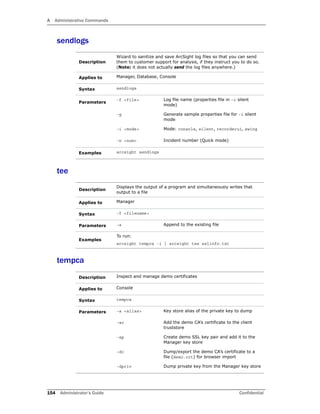
Description Start the ArcSight Web server
Applies to ArcSight Web
Syntax webserver
Parameters -c <file> Base configuration file
-host <host> Manager name or address
-p <port> Manager port
-pc <file> User configuration file
Examples
To start the ArcSight Web server:
arcsight webserver
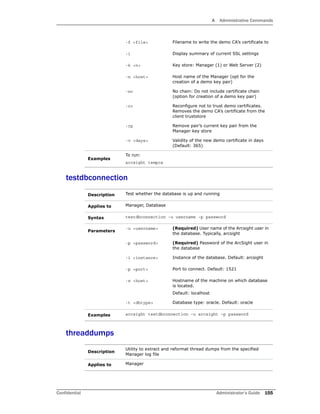
Description Start the ArcSight Web server without automatic restart
Applies to ArcSight Web
Syntax webserver-no-wrapper
Parameters -ms <mem> Minimum memory
-mx <mem> Maximum memory
Examples
To start the ArcSight Web server without automatic restart:
arcsight webserver-no-wrapper
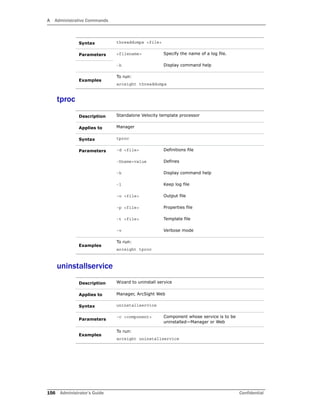
Description See runwebsetup and websetup
Applies to ArcSight Web
Description Start, stop, restart, or install the ArcSight Web server as a service
Applies to ArcSight Web
Syntax
webserversvc [parameters]
You can use the single letter parameters shown in brackets instead
of entering the whole word on Windows only
Parameters Description Windows Unix](https://image.slidesharecdn.com/esmadminguide5-170529125305/85/Esm-admin-guide_5-5-157-320.jpg)
![A Administrative Commands
158 Administrator’s Guide Confidential
websetup
whois
start or (-s)
Start the service No
(Command
available but does
not work)
Yes
stop or (-q) Stop the service Yes Yes
restart Restart the service No Yes
status Check status of service No No
install or (-i)
<initialHeap
>
<maxHeap>
Install the service
Optional parameters:
initialHeap—Initial heap
memory size, in MB.
(Default: 128)
maxHeap—Maximum heap
memory size, in MB.
(Default: 512)
Yes No
remove or (-
r)
Remove the service Yes No
console
or (-c)
Console Mode Yes No
Examples
To start the ArcSight Web server as a service:
arcsight webserversvc start
Description Run the ArcSight Web Configuration Wizard
Applies to ArcSight Web
Syntax websetup
Parameters None
Examples
To run the ArcSight Web Configuration Wizard:
arcsight websetup
Description Script used by the whois command of the console
Applies to Console
Syntax whois [-p <port>] [-s <host>] <target>
Parameters -p <port> Server port
-s <host> Name or address of ‘whois’ server](https://image.slidesharecdn.com/esmadminguide5-170529125305/85/Esm-admin-guide_5-5-158-320.jpg)


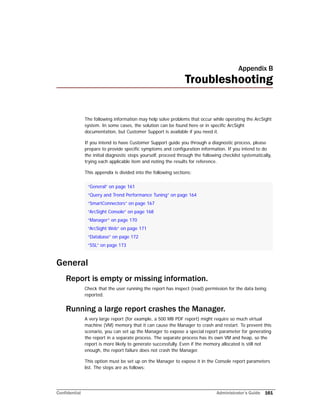
![B Troubleshooting
Confidential Administrator’s Guide 163
4 Run the report.
Some Asian language fonts appear mangled when
generating reports in PDF
This problem occurs because some Asian language fonts that are truetype fonts are not
supported directly by versions of Adobe Reader earlier than version 8.0. In order to work
around this, each truetype font must be mapped to an opentype font supported in Adobe
Reader 8.0. ArcSight provides this mapping in the
<ARCSIGHT_HOME>/i18n/server/reportpdf_config_<locale>.properties
file. You have the option to change the default mapping of any truetype font to the
opentype font by modifying the respective font mapping in this file.
To work around the issue of mangled fonts, ArcSight recommends that you:
1 Install a localized Adobe Reader 8.0 depending on the language of your platform on
your Manager machine. This version of the Adobe Reader installs the opentype fonts
by default.
2 Edit the server.properties file as follows:
a Set report.font.truetype.path property to point to the directory that
contains the truetype and opentype font. On Windows it is typically
C:WINNTfonts;C:Program FilesAdobeReader
8.0ResourceCIDFont where “;” is used as a path separator to separate
the multiple paths. Use “:” as a path separator in Unix. On Unix platforms, the
truetype font path may differ depending on the specific Unix platform, but it is
typically /usr/lib/font. The CIDFont directory is always the same relative to
the Adobe Reader installed directory. So, the default directory would be
/usr/lib/font:<adobe_reader_dir>/Resource/CIDFont.
b Set report.font.cmap.path property to point to Adobe Reader’s CMap
directory. On windows, it is typically C:Program FilesAdobeReader
8.0ResourceCMap. On Unix, the CMap path is relative to the Adobe
Reader installation -- <adobe_reader_dir>/Resource/CMap.
E-mail notification doesn’t happen.
If you receive the following error:
[2009-12-03 14:31:33,890][WARN
][default.com.arcsight.notification.NotifierBase][send] Unable to
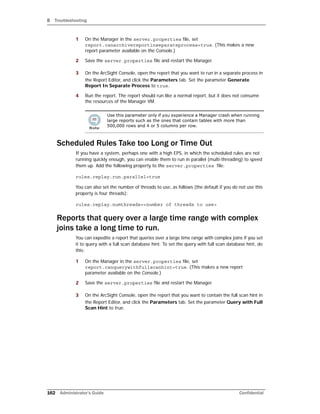
1 Use this parameter only in special circumstances if your organization has
determined with the help of Customer Support or professional services
that it is appropriate.
2 If a report is saved with the parameter set to “true”, the full database
optimization hint is applied even if the property
report.canquerywithfullscanhint in server.properties is set back
to false later on.
3 When the property report.canquerywithfullscanhint is set to “true”,
the report uses the FULL_SCAN hint in the SQL queries it generates to
query the database. The content of the report does not change, but the
queries logged in server.report.log contain the hint. The main benefit
of querying the database with the FULL_SCAN hint is that it can
significantly reduce the runtime for SQL queries that query over events
within a large time range and contain complex joins.](https://image.slidesharecdn.com/esmadminguide5-170529125305/85/Esm-admin-guide_5-5-163-320.jpg)
![B Troubleshooting
170 Administrator’s Guide Confidential
9 Go back to the Console and try to restart ArcSight Web from within the Console by
clicking File->Launch ArcSight Web.
Console does not start in Windows 2008
If you installed and then started the Console in Windows 2008, you may get an error due
to access refusal. In Windows 2008, make sure to configure the User Access Control (UAC)
of the ArcSight Console user. Consult the Microsoft web site for more details on UAC
specific to Windows 2008.
Manager
Can’t start Manager.
The Manager provides information on the command console which may suggest a solution
to the problem. Additional information is written to
<ARCSIGHT_HOME>/logs/default/server.std.log.
To check database connectivity manually, open a command window on
<ARCSIGHT_HOME>/bin (on the Manager host) and run:
arcsight testdbconnection
Manager shuts down.
The Manager stops when it encounters a fatal error. The file
<ARCSIGHT_HOME>/logs/default/server.std.log has more details about the
error condition.
For example, the following error indicates that a connection cannot be established with the
underlying Oracle DBMS:
[ERROR][default.com.arcsight.common.persist.oracle.OracleDatabaseI
nfoBroker][getDatabaseInfo]
com.arcsight.common.persist.PersistenceException: Unable to get
connection: Io exception: Connection reset by peer: socket write
error
This indicates that the Oracle TNS Listener is running but the actual ArcSight Database
service is not reachable.
Manager restarts automatically.
If the Java Virtual Machine (JVM) fails to respond within two minutes, an ArcSight
watchdog program automatically restarts it, which reduces system performance but does
not cause data loss. This situation has been observed on low-end Windows-based host
machines with page file size optimization enabled. Optimization complicates the garbage
collection process, rendering the JVM non-responsive for longer than two minutes.
Disable page file size optimization. Perform the following steps to disable page file size
optimization on Windows 2000 Manager hosts:
1 Right-click My Computer and select Properties from the menu. Select the
Advanced tab.
2 Click Performance Options for Windows 2000.](https://image.slidesharecdn.com/esmadminguide5-170529125305/85/Esm-admin-guide_5-5-170-320.jpg)
![B Troubleshooting
Confidential Administrator’s Guide 171
3 Set Initial size to the same value as Maximum size.
4 Click Set.
5 Click OK.
The log contains a warning “Side table for [name] is 100%
full. System performance will be affected.”
This log error message is the result of the default sizes for side object caches being too
small for some larger production deployments. Although system performance is generally
not affected, to stop generating the warning message, add the following lines to the
server.properties file and restart the Manager:
persist.securityevent.stcache.GeoDescriptor=50000
persist.securityevent.stcache.AgentDescriptor=500
persist.securityevent.stcache.DeviceDescriptor=50000
persist.securityevent.stcache.CategoryDescriptor=3000
persist.securityevent.stcache.LabelsDescriptor=2000
persist.securityevent.stcache.ResourceRef=20000
If you continue to see the error message after this change, one or more SmartConnectors
may be configured incorrectly. Contact HP Customer Support.
Scheduled Task Run is Off When Switching from Daylight
Savings Time to Standard Time or Vice Versa.
If the trigger time for a particular scheduled task run happens to fall during the
transition time from DST to ST or vice versa, the interval for that particular run gets
thrown off. The interval calculation for subsequent scheduled runs do not get affected.
Currently, there are four time zones that are not supported in ESM:
Kwajalein
Pacific/Kwajalein
Pacific/Enderbury
Pacific/Kiritimati
These time zones fall in two countries, Marshall Islands and Kiribati.
ArcSight Web
Some content, particularly dashboards, is not visible.
Install the latest Adobe Flash plug-in to your browser. Visit the Adobe web site to download
this free plug-in.
Can’t log in to ArcSight Web.
Check that the ArcSight Web Server is up and running. If ArcSight Web is up, check that
the Manager is also up and running.](https://image.slidesharecdn.com/esmadminguide5-170529125305/85/Esm-admin-guide_5-5-171-320.jpg)


![C Monitoring Database Attributes
178 Administrator’s Guide Confidential
[-- Attachment #1 --]
[-- Type: text/plain, Encoding: 7bit, Size: 1.0K --]
== SUBSYSTEM STATUS CHANGED ======================================
Error - Event Receiver
== ORIGIN OF CHANGE =============================================
Error - PartitionManagerCheckTaskTracker
-- DESCRIPTION ---------------------------------------------------
[PartitionManagerCheckTaskTracker: Fatal Error: There are only 0
of 7 reserve partitions available. This is likely due to failures
in Partition Manager runs for the past few days. If this situation
is not fixed, the MAX partition will become the CURRENT partition
in the next few days, causing system failure.
Check the Partition Manager logs for errors and fix the problem
before proceeding.
Fix the root cause of the error reported. If the event flow is
stopped, use the
following URL to resume:
https://yourmanager.mycompany.com:8443/arcsight/web/reactivate.jsp
?id=87160D7E0425A22FBE5354FE90387A96]
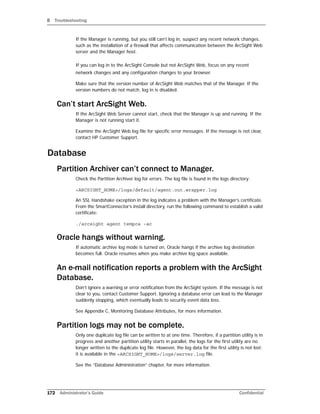
The following is an example of the notification message that is displayed on the Console:
Disabling Database Checks
If you do not want to run a specific database check, you can disable it.
To disable a database check task, specify the name of the check task as the value for the
whine.check.exclude property in the server.properties file on the Manager.
For example, to exclude PartitionManagerCheckTask, enter this in the
server.properties file:
To obtain the name of a task, see List of Database Check Tasks.](https://image.slidesharecdn.com/esmadminguide5-170529125305/85/Esm-admin-guide_5-5-178-320.jpg)