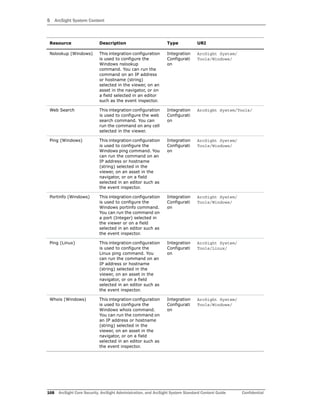
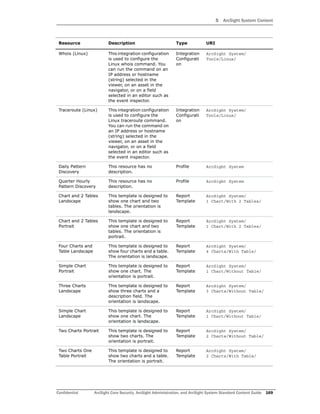
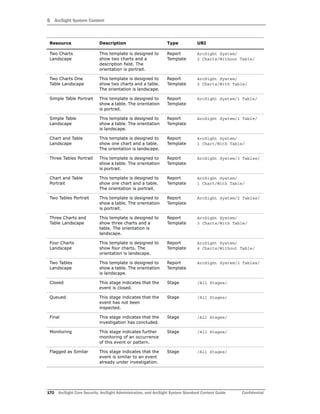
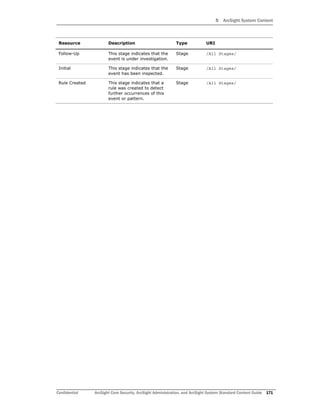
Standard Content Guide
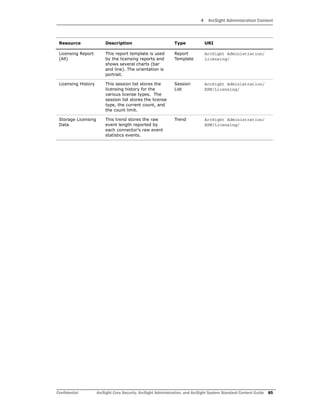
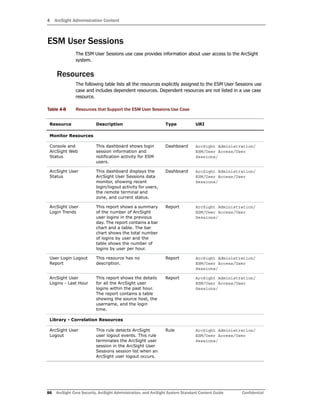
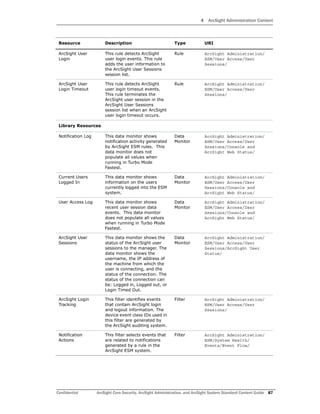
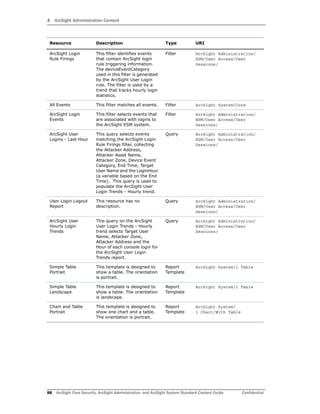
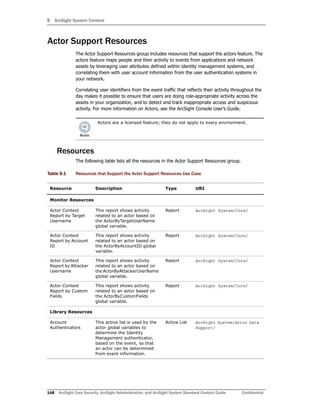
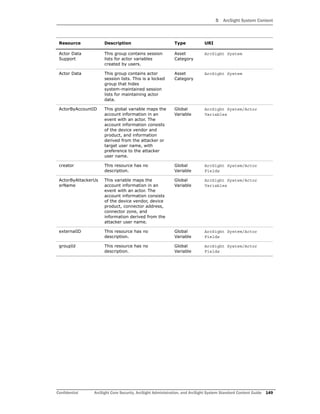
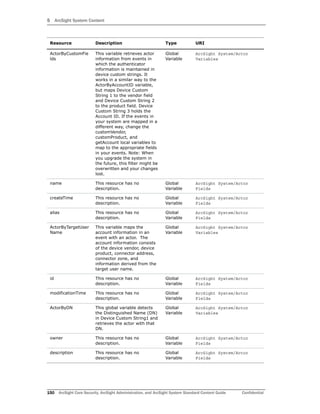
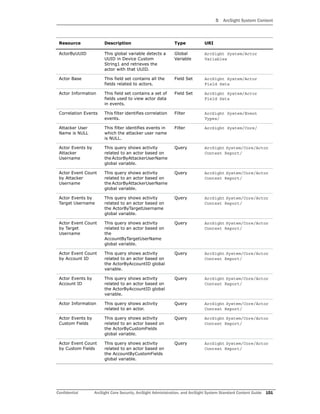
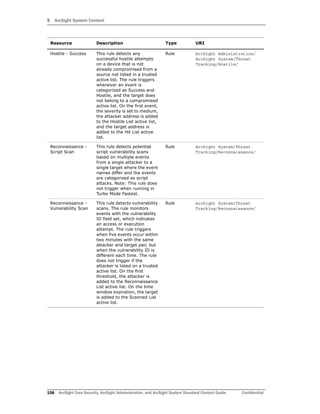
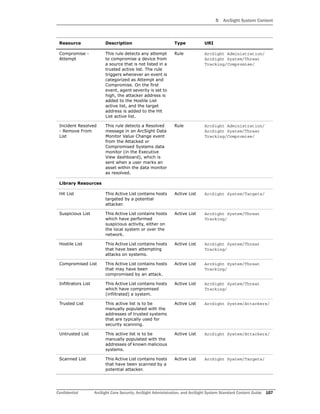
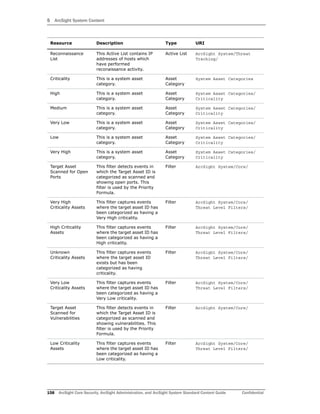
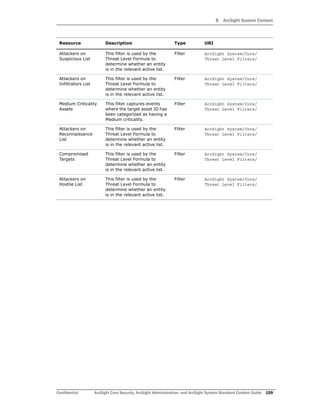
ArcSight Core Security, ArcSight
Administration, and ArcSight System
ArcSight ESM 6.5c
October 11, 2013
Copyright © 2013 Hewlett-Packard Development Company, L.P.
Confidential computer software. Valid license from HP required for possession, use or copying. Consistent
with FAR 12.211 and 12.212, Commercial Computer Software, Computer Software Documentation, and
Technical Data for Commercial Items are licensed to the U.S. Government under vendor's standard
commercial license.
The information contained herein is subject to change without notice. The only warranties for HP products
and services are set forth in the express warranty statements accompanying such products and services.
Nothing herein should be construed as constituting an additional warranty. HP shall not be liable for
technical or editorial errors or omissions contained herein.
Follow this link to see a complete statement of copyrights and acknowledgements:
http://www.hpenterprisesecurity.com/copyright
Contact Information
Revision History
Phone A list of phone numbers is available on the HP ArcSight Technical
Support page: http://www8.hp.com/us/en/software-
solutions/software.html?compURI=1345981#.URitMaVwpWI.
Support Web Site http://support.openview.hp.com
Protect 724 Community https://protect724.arcsight.com
Date Product Version Description
10/11/2013 ArcSight Core Security,
ArcSight Administration, and
ArcSight System content
for ArcSight ESM 6.5c
Final revision for release.
Confidential ArcSight Core Security, ArcSight Administration, and ArcSight System Standard Content Guide 3
Contents
Chapter 1: Standard Content Overview ............................................................................... 7
What is Standard Content? ............................................................................................... 7
Standard Content Packages .............................................................................................. 9
Standard Content Documentation ...................................................................................... 9
Chapter 2: Installation and Configuration ......................................................................... 11
Installing the Content .................................................................................................... 11
Configuring the Content ................................................................................................. 12
Modeling the Network .............................................................................................. 12
Categorizing Assets ................................................................................................. 13
Configuring Active Lists ............................................................................................ 14
Configuring Filters ................................................................................................... 14
Enabling Rules ........................................................................................................ 14
Configuring Notification Destinations .......................................................................... 15
Configuring Notifications and Cases ........................................................................... 15
Rules with Notifications to the CERT Team ............................................................ 15
Rules with Notifications to SOC Operators ............................................................ 15
Scheduling Reports ................................................................................................. 16
Configuring Trends .................................................................................................. 16
Monitoring Trend Performance ............................................................................ 16
Viewing Use Case Resources ..................................................................................... 17
Chapter 3: ArcSight Core Security Content ........................................................................ 19
Configuring the ArcSight Core Security Use Case ............................................................... 19
Using the ArcSight Core Security Use Case ....................................................................... 20
Using the Firewall Monitoring Overview Dashboard ...................................................... 21
Using the IDS - IPS Overview Dashboard ................................................................... 22
Using the Microsoft Windows Monitoring Overview Dashboard ....................................... 23
Using the NetFlow Bandwidth Usage Overview Dashboard ............................................ 24
Using the Security Alerts Overview Dashboard ............................................................ 25
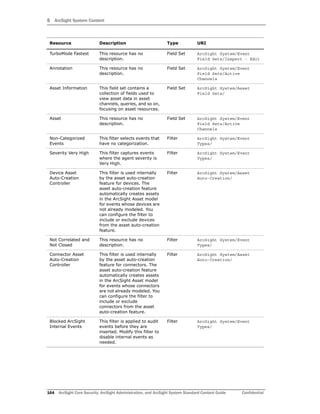
Resources .................................................................................................................... 27
Chapter 4: ArcSight Administration Content ..................................................................... 33
Connector Overview ...................................................................................................... 35
Contents
4 ArcSight Core Security, ArcSight Administration, and ArcSight System Standard Content Guide Confidential
Configuring the Connector Overview Use Case ............................................................ 35
Using the Connector Overview Use Case .................................................................... 35
Resources .............................................................................................................. 37
ESM Overview .............................................................................................................. 43
Using the ESM Overview Use Case ............................................................................. 43
Resources .............................................................................................................. 44
Logger Overview ........................................................................................................... 46
Configuring the Logger Overview Use Case ................................................................. 46
Using the Logger Overview Use Case ......................................................................... 47
Resources .............................................................................................................. 48
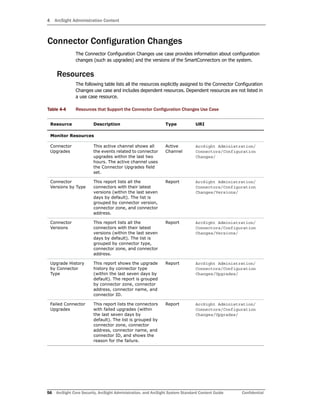
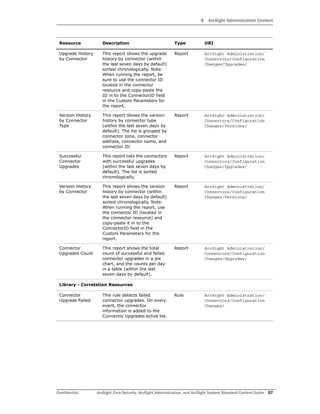
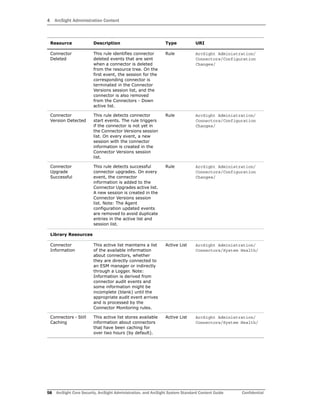
Connector Configuration Changes .................................................................................... 56
Resources .............................................................................................................. 56
Connector Connection and Cache Status ........................................................................... 62
Configuring the Connector Connection and Cache Status Use Case ................................ 62
Resources .............................................................................................................. 63
Device Monitoring ......................................................................................................... 73
Configuring the Device Monitoring Use Case ............................................................... 73
Resources .............................................................................................................. 74
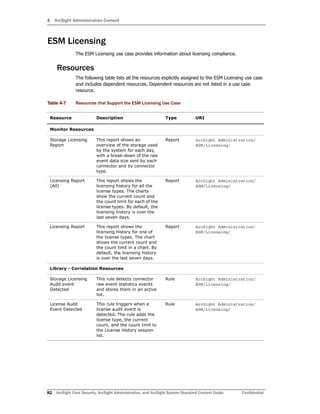
ESM Licensing ............................................................................................................... 82
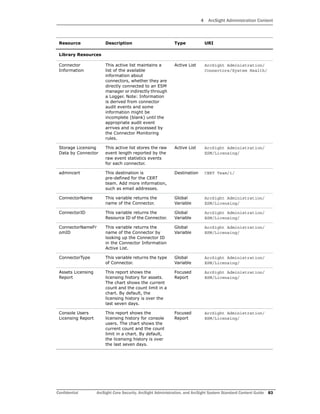
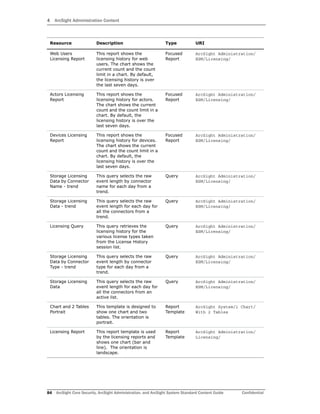
Resources .............................................................................................................. 82
ESM User Sessions ........................................................................................................ 86
Resources .............................................................................................................. 86
Actor Configuration Changes ........................................................................................... 90
Resources .............................................................................................................. 90
ESM Resource Configuration Changes .............................................................................. 98
Resources .............................................................................................................. 98
Content Management ...................................................................................................101
Configuring the Content Management Use Case .........................................................101
Resources .............................................................................................................101
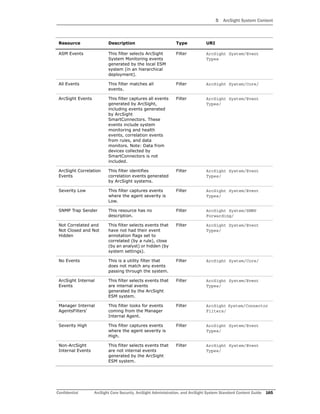
ESM Events .................................................................................................................104
Resources .............................................................................................................104
ESM Reporting Resource Monitoring ................................................................................113
Resources .............................................................................................................113
ESM Resource Monitoring ..............................................................................................120
Configuring the ESM Resource Monitoring Use Case ....................................................120
Resources .............................................................................................................120
ESM Storage Monitoring (CORR) .....................................................................................128
Devices ................................................................................................................128
Configuring the ESM Storage Monitoring (CORR) Use Case ..........................................128
Resources .............................................................................................................128
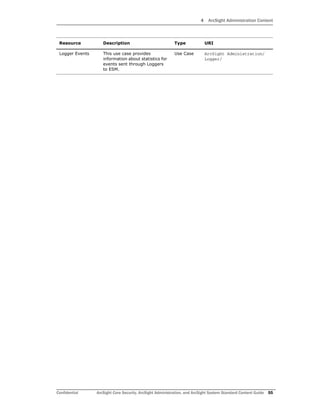
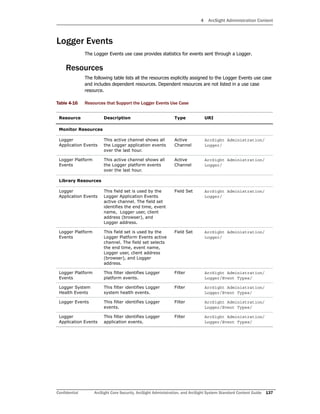
Logger Events ..............................................................................................................137
Resources .............................................................................................................137
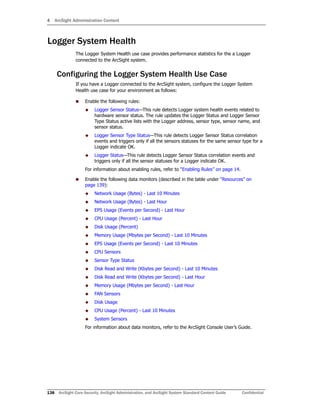
Logger System Health ...................................................................................................138
Contents
Confidential ArcSight Core Security, ArcSight Administration, and ArcSight System Standard Content Guide 5
Configuring the Logger System Health Use Case .........................................................138
Resources .............................................................................................................139
Chapter 5: ArcSight System Content ............................................................................... 147
Actor Support Resources ...............................................................................................148
Resources .............................................................................................................148
Priority Formula Resources ............................................................................................153
Configuring the Priority Formula Resources Group ......................................................153
Resources .............................................................................................................153
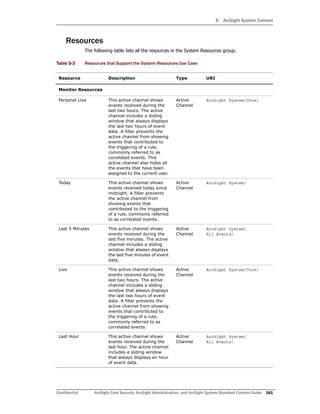
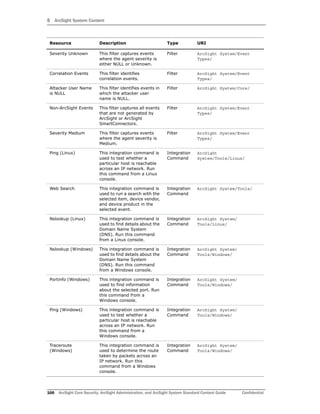
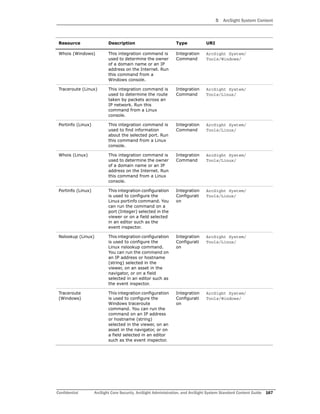
System Resources ........................................................................................................160
Configuring the System Resources Group ..................................................................160
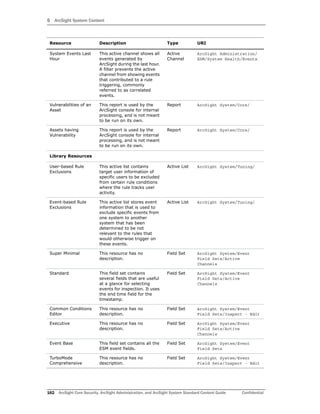
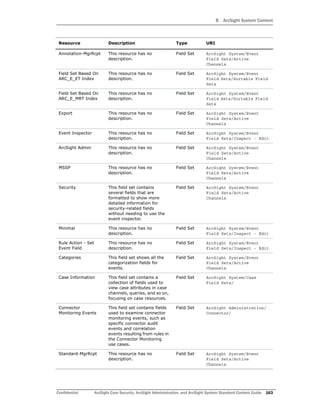
Resources .............................................................................................................161
Index ............................................................................................................................... 173
Contents
6 ArcSight Core Security, ArcSight Administration, and ArcSight System Standard Content Guide Confidential
Confidential ArcSight Core Security, ArcSight Administration, and ArcSight System Standard Content Guide 7
Chapter 1
Standard Content Overview
This chapter discusses the following topics.
What is Standard Content?
Standard content is a series of coordinated resources (filters, rules, dashboards, reports,
and so on) that address common security and management tasks. Standard content is
designed to give you comprehensive correlation, monitoring, reporting, alerting, and case
management out-of-the box with minimal configuration. The content provides a full
spectrum of security, network, and configuration monitoring tasks, as well as a
comprehensive set of tasks that monitor the health of the system.
Standard content is installed using a series of packages, some of which are installed
automatically with the ArcSight Manager to provide essential system health and status
operations. The remaining packages are presented as install-time options organized by
category.
Standard content consists of the following:
 ArcSight Core Security content is installed automatically with the ArcSight Manager
and consists of key resources for monitoring Microsoft Windows, firewall, IPS and IDS,
NetFlow, and other essential security information.
 ArcSight Administration content contains several packages that provide statistics
about the health and performance of ArcSight products.
 ArcSight Administration is installed automatically with the ArcSight Manager and is
essential for managing and tuning the performance of content and components.
 ArcSight Admin DB CORR is installed automatically with the ArcSight Manager for
ArcSight ESM with CORR- (Correlation Optimized Retention and Retrieval) Engine
and provides information on the health of the CORR-Engine.
 ArcSight Content Management is an optional package that shows information
about content package synchronization with the ESM Content Management
feature. The information includes a history of content packages synchronized from
a primary ESM source to multiple ESM destinations, and any common issues or
errors encountered. You can install this package during ArcSight ESM installation
or from the ArcSight Console any time after installation.
“What is Standard Content?” on page 7
“Standard Content Packages” on page 9
“Standard Content Documentation” on page 9
1 Standard Content Overview
8 ArcSight Core Security, ArcSight Administration, and ArcSight System Standard Content Guide Confidential
 ArcSight Search Filters is installed automatically with the ArcSight Manager for use
in the ArcSight Command Center. You cannot edit or use these filters in the
ArcSight Console. For information about the search filters, refer to the ArcSight
Command Center User’s Guide.
 ArcSight System content is installed automatically with the ArcSight Manager and
consists of resources required for basic security processing functions, such as threat
escalation and priority calculations, as well as basic throughput channels required for
out-of-the-box functionality.
 ArcSight Foundation content (such as Cisco Monitoring, Configuration Monitoring,
Intrusion Monitoring, IPv6, NetFlow Monitoring, Network Monitoring, and Workflow)
provide a coordinated system of resources with real-time monitoring capabilities for a
specific area of focus, as well as after-the-fact analysis in the form of reports and
trends. You can extend these foundations with additional resources specific to your
needs or you can use them as a template for building your own resources and tasks.
You can install a Foundation during ArcSight ESM installation or from the ArcSight
Console any time after installation.
 Shared Libraries - ArcSight Administration and several of the ArcSight Foundations
rely on a series of common resources that provide core functionality for common
security scenarios. Dependencies between these resources and the packages they
support are managed by the Package resource.
 Anti Virus content is a set of filters, reports, and report queries used by ArcSight
Foundations, such as Configuration Monitoring and Intrusion Monitoring.
 Conditional Variable Filters content is a library of filters used by variables in
standard content report queries, filters, and rule definitions. The Conditional
Variable Filters are used by ArcSight Administration and certain ArcSight
Foundations, such as Configuration Monitoring, Intrusion Monitoring, Network
Monitoring, and Workflow.
 Global Variables content is a set of variables used to create other resources and to
provide event-based fields that cover common event information, asset, host, and
user information, and commonly used timestamp formats. The Global Variables
are used by ArcSight Administration and certain ArcSight Foundations.
 Monitoring Support Data content is a set of active lists that store mapping
information for HTTP return status code classes, Cisco firewall syslog message
types, and encoded logon types.
 Network filters content is a set of filters required by ArcSight Administration and
certain ArcSight Foundations, such as Intrusion Monitoring and Network
Monitoring.
The ArcSight Admin DB CORR and ArcSight Search Filters content
packages are installed automatically when you perform a new
ArcSight ESM installation. However, when you upgrade your ArcSight
ESM system, these content packages are not installed automatically.
You can install these packages from the ArcSight Console any time
after upgrade by right-clicking the package on the Packages tab in the
Navigator and selecting Install Package.
Refer to the ArcSight ESM Upgrade Guide for information about
upgrading ArcSight ESM.
The resources in the ArcSight Core Security, ArcSight Administration,
ArcSight DB CORR, Conditional Variable Filters, Global Variables, and
Network Filters content packages are not locked even though they
manage core functionality; HP recommends that you do not delete or
modify these resources unless you are an advanced user who
understands fully the resources and their dependencies.
1 Standard Content Overview
Confidential ArcSight Core Security, ArcSight Administration, and ArcSight System Standard Content Guide 9
Standard Content Packages
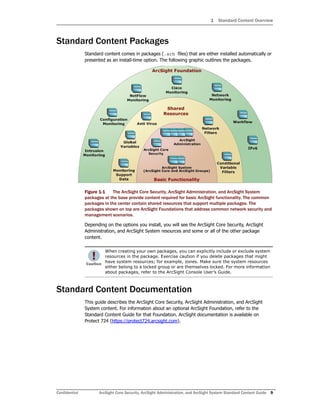
Standard content comes in packages (.arb files) that are either installed automatically or
presented as an install-time option. The following graphic outlines the packages.
Figure 1-1 The ArcSight Core Security, ArcSight Administration, and ArcSight System
packages at the base provide content required for basic ArcSight functionality. The common
packages in the center contain shared resources that support multiple packages. The
packages shown on top are ArcSight Foundations that address common network security and
management scenarios.
Depending on the options you install, you will see the ArcSight Core Security, ArcSight
Administration, and ArcSight System resources and some or all of the other package
content.
Standard Content Documentation
This guide describes the ArcSight Core Security, ArcSight Administration, and ArcSight
System content. For information about an optional ArcSight Foundation, refer to the
Standard Content Guide for that Foundation. ArcSight documentation is available on
Protect 724 (https://protect724.arcsight.com).
When creating your own packages, you can explicitly include or exclude system
resources in the package. Exercise caution if you delete packages that might
have system resources; for example, zones. Make sure the system resources
either belong to a locked group or are themselves locked. For more information
about packages, refer to the ArcSight Console User’s Guide.
1 Standard Content Overview
10 ArcSight Core Security, ArcSight Administration, and ArcSight System Standard Content Guide Confidential
Confidential ArcSight Core Security, ArcSight Administration, and ArcSight System Standard Content Guide 11
Chapter 2
Installation and Configuration
This chapter provides installation and basic configuration instructions for ArcSight Core
Security, ArcSight Administration, and ArcSight System content. For information about
installing and configuring an optional Foundation, refer to the Standard Content Guide for
that Foundation.
This chapter discusses the following topics.
Installing the Content
ArcSight Core Security, ArcSight Administration, and ArcSight System content is required
for basic functionality and is pre-installed on the ArcSight Manager. You do not have to
perform any additional installation tasks. However, some basic configuration is
recommended to tailor the content for your operating environment. See “Configuring the
Content” on page 12.
For detailed information about installing ESM, refer to the ESM Installation and
Configuration Guide.
Installing the Content
Configuring the Content
The ArcSight Content Management content is an optional package provided in
the ArcSight Administration package group that you can use to track the
content that is being managed across all the ESM systems in your
environment. You can install this package during ESM installation or from the
ArcSight Console any time after installation.
To install the ArcSight Content Management package from the ArcSight
Console, go to the Packages tab in the Navigator, open the ArcSight
Administration group, right-click the ArcSight Content Management package
and select Install Package. After you install the package, the Content
Management use case is listed in the ArcSight Administration group on the
Use Cases tab.
2 Installation and Configuration
12 ArcSight Core Security, ArcSight Administration, and ArcSight System Standard Content Guide Confidential
Configuring the Content
The list below shows the general tasks you need to complete to configure the standard
content with values specific to your environment.
 “Modeling the Network” on page 12
 “Categorizing Assets” on page 13
 “Configuring Active Lists” on page 14
 “Configuring Filters” on page 14
 “Enabling Rules” on page 14
 “Configuring Notification Destinations” on page 15
 “Configuring Notifications and Cases” on page 15
 “Scheduling Reports” on page 16
 “Configuring Trends” on page 16
 “Viewing Use Case Resources” on page 17
Modeling the Network
A network model keeps track of the network nodes participating in the event traffic.
Modeling your network and categorizing critical assets using the standard asset categories
is what activates some of the standard content and makes it effective.
There are several ways to model your network. For information about populating the
network model, refer to the ArcSight Console User’s Guide. To learn more about the
architecture of the ArcSight network modeling tools, refer to the ESM 101 guide.
2 Installation and Configuration
Confidential ArcSight Core Security, ArcSight Administration, and ArcSight System Standard Content Guide 13
Categorizing Assets
After you have populated your network model with assets, apply the standard asset
categories listed in the following table to activate standard content that uses these
categories so that you can apply criticality and business context to events.
You can assign asset categories to assets, zones, asset groups, or zone groups. If assigned
to a group, all resources under that group inherit the categories.
You can assign asset categories individually using the Asset editor or in a batch using the
Network Modeling wizard. For information about how to assign asset categories using the
ArcSight Console tools, refer to the ArcSight Console User’s Guide.
For more information about the Priority Formula and how it leverages these asset
categories to help assign priorities to events, refer to the ArcSight Console User’s Guide or
the ESM 101 guide.
Asset Category Description
/Site Asset Categories/
Address Spaces/Protected
Categorize all assets (or the zones to which the
assets belong) that are internal to the network
with this asset category.
Internal Assets are assets inside the company
network. Assets that are not categorized as
internal to the network are considered to be
external. Make sure that you also categorize
assets that have public addresses but are
controlled by the organization (such as web
servers) as Protected.
Note: Assets with a private IP address (such as
192.168.0.0) are considered Protected by the
system, even if they are not categorized as such.
/System Asset Categories/
Criticality/High
Categorize all assets that are considered critical
to protect (including assets that host proprietary
content, financial data, cardholder data, top
secret data, or perform functions critical to basic
operations) with this asset category.
The asset categories most essential to basic
event processing are those used by the Priority
Formula to calculate the criticality of an event.
Asset criticality is one of the four factors used by
the Priority Formula to generate an overall event
priority rating.
/System Asset Categories/
Criticality/Very High
See /System Asset
Categories/Criticality/High
2 Installation and Configuration
14 ArcSight Core Security, ArcSight Administration, and ArcSight System Standard Content Guide Confidential
Configuring Active Lists
The standard content includes active lists. Certain active lists are populated automatically
during run-time by rules. You do not have to add entries to these active lists manually
before you use them. Other active lists are designed to be populated manually with data
specific to your environment. After the lists are populated with values, they are referenced
by active channels, filters, rules, reports, and data monitors to provide more information
about the assets in your environment.
You can add entries manually to active lists using the following methods. Both methods are
described in the ArcSight Console User’s Guide.
 One by one using the Active List editor in the ArcSight Console.
 In a batch by importing values from a CSV file.
For a list of the ArcSight Core Security active lists you need to configure manually, refer to
the configuration information for the use case presented in Chapter 3‚ ArcSight Core
Security Content‚ on page 19.
For a list of the ArcSight Administration active lists you need to configure manually, refer to
the configuration information for each use case presented in Chapter 4‚ ArcSight
Administration Content‚ on page 33.
For a list of the ArcSight System active lists you need to configure manually, refer to the
configuration information for each resource group presented in Chapter 5‚ ArcSight System
Content‚ on page 147.
Configuring Filters
For a list of the ArcSight Administration filters you need to configure, refer to the
configuration information for each use case presented in Chapter 4‚ ArcSight Administration
Content‚ on page 33.
For a list of the ArcSight System filters you need to configure, refer to the configuration
information for each resource group presented in Chapter 5‚ ArcSight System Content‚ on
page 147.
ArcSight Core Security content does not include filters that you need to configure.
Enabling Rules
Rules trigger only if they are deployed in the Real-Time Rules group and are enabled.
 By default, all the ArcSight Core Security and ArcSight System rules are deployed in
the Real-Time Rules group and are also enabled.
 By default, all the ArcSight Administration rules are deployed in the Real-Time
Rules group and all rules, except for the Logger System Health rules, are enabled.
You can enable the Logger System Health rules if you have a Logger connected to your
system. The Logger System Health rules are described in “Logger Overview” on
page 46.
To enable or disable a rule:
1 In the Navigator panel, go to Rules and navigate to the Real-time Rules group.
2 Navigate to the rule you want to enable or disable.
3 Right-click the rule and select Enable Rule to enable the rule or Disable Rule to
disable the rule.
2 Installation and Configuration
Confidential ArcSight Core Security, ArcSight Administration, and ArcSight System Standard Content Guide 15
Configuring Notification Destinations
Configure notification destinations if you want to be notified when some of the standard
content rules are triggered. By default, notifications are disabled in the standard content
rules. However, the ArcSight Administrator can configure the destinations and enable the
notification in the rules. For information about enabling the notifications in rules, see
Configuring Notifications and Cases, below.
Rules reference two notification destination groups: CERT Team and SOC Operators. Add
new destinations for notification levels 1, 2, and 3 as appropriate to the personnel in your
security operations center. See the ArcSight Console User’s Guide for more details.
Configuring Notifications and Cases
Standard content depends on rules to send notifications and open cases when conditions
are met. Notifications and cases are the ArcSight tools used to track and resolve the
security issues that the content is designed to find. By default, notifications to the CERT
Team and the SOC Operators notification destination groups, and create case actions are
disabled in the standard content rules.
To configure rules to send notifications and open cases, first configure notification
destinations, then enable the notification and case actions in the rules. Refer to the
ArcSight Console User’s Guide for details about enabling notifications and opening cases.
Rules with Notifications to the CERT Team
These rules send notifications to the CERT Team notification destination group:
Rules with Notifications to SOC Operators
These rules send notifications to the SOC Operators notification destination group:
Rule Name Rule URI
High Number of IDS Alerts for DoS ArcSight Core Security/Security Activity/
SYN Flood Detected by IDS or
Firewall
ArcSight Core Security/Security Activity/
Out of Domain Fields ArcSight Administration/ESM/System
Health/Resources/Domains/
Rule Name Rule URI
Probable Successful Brute
Force Attack
ArcSight Core Security/Security Activity/
Connector Dropping Events ArcSight Administration/Connectors/System Health/
Connector Still Down ArcSight Administration/Connectors/System Health/
Connector Still Caching ArcSight Administration/Connectors/System Health/
Critical Device Not Reporting ArcSight Administration/Connectors/System
Health/Custom/
Excessive Rule Recursion ArcSight Administration/ESM/System
Health/Resources/Rules/
2 Installation and Configuration
16 ArcSight Core Security, ArcSight Administration, and ArcSight System Standard Content Guide Confidential
Scheduling Reports
You can schedule reports based on cases, notifications, assets, or events to run
automatically or on a regular schedule. By default, reports are not scheduled to run
automatically.
Evaluate the reports that come with the standard content, and schedule the reports that
are of interest to your organization and business objectives. For instructions about how to
schedule reports, refer to the ArcSight Console User’s Guide.
Configuring Trends
Trends are a type of resource that can gather data over longer periods of time, which can
be leveraged for reports. Trends streamline data gathering to the specific pieces of data
you want to track over a long range, and breaks the data gathering up into periodic
updates. For long-range queries, such as end-of-month summaries, trends greatly reduce
the burden on system resources. Trends can also provide a snapshot of which devices
report on the network over a series of days.
ArcSight System content does not contain any trends. ArcSight Core Security and ArcSight
Administration content includes trends, which are enabled by default. These enabled
trends are scheduled to run on an alternating schedule between the hours of midnight and
7:00 a.m., when network traffic is usually less busy than during peak daytime business
hours. You can customize these schedules to suit your needs using the Trend scheduler in
the ArcSight Console.
To disable a trend, go to the Navigator panel, right-click the trend you want to disable and
select Disable Trend.
For more information about trends, refer to the the ArcSight Console User’s Guide.
Monitoring Trend Performance
ArcSight Administration contains resources that enable you to monitor the performance of
your enabled trends. The Trends Details dashboard shows the runtime status for all
enabled trends. The trend reports show statistics about trend performance for all enabled
trends.
Rule Matching Too Many
Events
ArcSight Administration/ESM/System
Health/Resources/Rules/
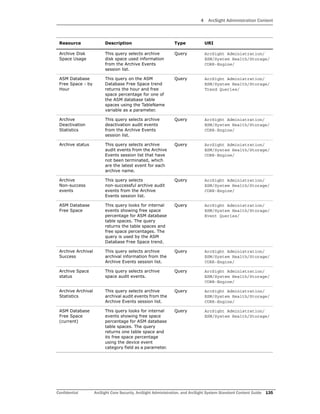
ASM Database Free Space -
Critical
ArcSight Administration/ESM/System Health/Storage/
To enable a disabled trend, you must first change the default start date in
the Trend editor.
If the start date is not changed, the trend takes the default start date
(derived from when the trend was first installed), and backfills the data from
that time. For example, if you enable the trend six months after the first
install, these trends try to get all the data for the last six months, which
might cause performance problems, overwhelm system resources, or cause
the trend to fail if that event data is not available.
Rule Name Rule URI
2 Installation and Configuration
Confidential ArcSight Core Security, ArcSight Administration, and ArcSight System Standard Content Guide 17
Viewing Use Case Resources
The ArcSight Core Security and ArcSight Administration resources are grouped together in
the ArcSight Console using use case resources. A use case resource provides a way to
group a set of resources that help address a specific security issue or business
requirement.
To view the resources associated with a use case resource:
1 In the Navigator panel, select the Use Cases tab.
2 Browse for an ArcSight Administration use case resource such as ArcSight
Administration/ESM Overview.
3 Right-click the use case resource and select the Open Use Case option, or
double-click the use case resource.
The resources that make up a use case resource are displayed in the Viewer.
The use case resource tables listed in Chapter 3‚ ArcSight Core Security Content‚ on page
19 and Chapter 4‚ ArcSight Administration Content‚ on page 33 describe all the resources
that have been assigned to each use case and include dependent resources.
Currently, ArcSight System content does not contain any use case resources.
Chapter 5‚ ArcSight System Content‚ on page 147 documents System
resources by grouping them by function.
2 Installation and Configuration
18 ArcSight Core Security, ArcSight Administration, and ArcSight System Standard Content Guide Confidential
Confidential ArcSight Core Security, ArcSight Administration, and ArcSight System Standard Content Guide 19
Chapter 3
ArcSight Core Security Content
The ArcSight Core Security content provides essential information about activity in your
environment that might be a security concern. Focusing on Microsoft Windows, firewall,
and intrusion detection and prevention activity, the ArcSight Core Security content
monitors:
 Anti-virus activity
 Outbound traffic to suspicious destinations
 Brute force attacks
 Denial of service attacks
 Suspicious mail
 Reconnaissance activity
 Network bandwidth usage
Rules in the ArcSight Core Security and ArcSight System rule groups detect the activities
listed above. You can create your own rules to detect any activity specific to your
organization. When the rules are triggered, the activity appears in the dashboards provided
by the ArcSight Core Security use case.
The key ArcSight Core Security resources are listed in the ArcSight Core Security use case.
Configuring the ArcSight Core Security Use Case
The ArcSight Core Security use case requires the following configuration for your
environment:
 Populate the Suspicious Countries active list with the countries that your organization
identifies as suspicious.
 Populate the Non-Security Alerts active list with the names of the rules you consider
insignificant or that do not trigger security-related alerts; the rules you specify in this
active list are not used by this use case.
ArcSight Core Security resources are not locked even though they manage
core functionality; HP recommends that you do not delete or modify these
resources unless you are an advanced user who understands fully the
resources and their dependencies.
3 ArcSight Core Security Content
20 ArcSight Core Security, ArcSight Administration, and ArcSight System Standard Content Guide Confidential
Using the ArcSight Core Security Use Case
This section highlights some key features of the ArcSight Core Security use case. Follow the
steps below to get started.
1 For an overall, event-level view of security activity in your organization, click the
Resources tab in the Navigator panel and open the Security Analysis active channel
located in:
All Active Channels/ArcSight Core Security/
This active channel shows the correlation events during the last two hours that you
need to investigate. Double-click an event to see details about both the correlation
event and base event that triggered it.
2 For a broader view of activity, based on various areas of security, click the Use Cases
tab in the Navigator panel and open the ArcSight Core Security use case located in:
All Use Cases/ArcSight Core Security
This use case provides access to the following overview dashboards, which you can
monitor to ensure that your environment is secure.
 Firewall Monitoring Overview
 IDS - IPS Overview
 Microsoft Windows Monitoring Overview
 NetFlow Bandwidth Usage Overview
 Security Alerts Overview
The following sections highlight some of the key features of these dashboards.
3 ArcSight Core Security Content
Confidential ArcSight Core Security, ArcSight Administration, and ArcSight System Standard Content Guide 21
Using the Firewall Monitoring Overview Dashboard
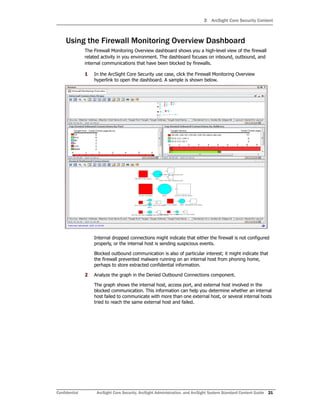
The Firewall Monitoring Overview dashboard shows you a high-level view of the firewall
related activity in you environment. The dashboard focuses on inbound, outbound, and
internal communications that have been blocked by firewalls.
1 In the ArcSight Core Security use case, click the Firewall Monitoring Overview
hyperlink to open the dashboard. A sample is shown below.
Internal dropped connections might indicate that either the firewall is not configured
properly, or the internal host is sending suspicious events.
Blocked outbound communication is also of particular interest; it might indicate that
the firewall prevented malware running on an internal host from phoning home,
perhaps to store extracted confidential information.
2 Analyze the graph in the Denied Outbound Connections component.
The graph shows the internal host, access port, and external host involved in the
blocked communication. This information can help you determine whether an internal
host failed to communicate with more than one external host, or several internal hosts
tried to reach the same external host and failed.
3 ArcSight Core Security Content
22 ArcSight Core Security, ArcSight Administration, and ArcSight System Standard Content Guide Confidential
Using the IDS - IPS Overview Dashboard
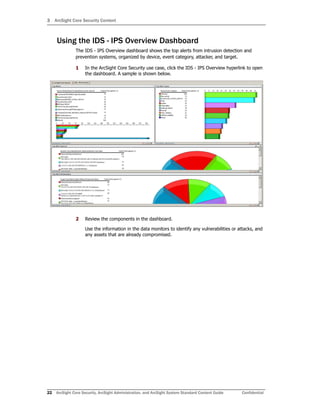
The IDS - IPS Overview dashboard shows the top alerts from intrusion detection and
prevention systems, organized by device, event category, attacker, and target.
1 In the ArcSight Core Security use case, click the IDS - IPS Overview hyperlink to open
the dashboard. A sample is shown below.
2 Review the components in the dashboard.
Use the information in the data monitors to identify any vulnerabilities or attacks, and
any assets that are already compromised.
3 ArcSight Core Security Content
Confidential ArcSight Core Security, ArcSight Administration, and ArcSight System Standard Content Guide 23
Using the Microsoft Windows Monitoring Overview
Dashboard
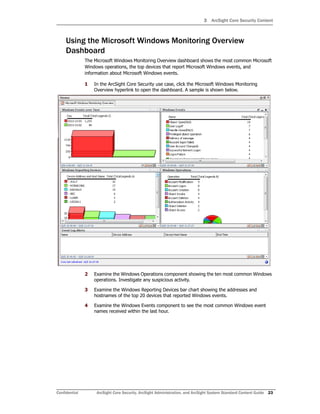
The Microsoft Windows Monitoring Overview dashboard shows the most common Microsoft
Windows operations, the top devices that report Microsoft Windows events, and
information about Microsoft Windows events.
1 In the ArcSight Core Security use case, click the Microsoft Windows Monitoring
Overview hyperlink to open the dashboard. A sample is shown below.
2 Examine the Windows Operations component showing the ten most common Windows
operations. Investigate any suspicious activity.
3 Examine the Windows Reporting Devices bar chart showing the addresses and
hostnames of the top 20 devices that reported Windows events.
4 Examine the Windows Events component to see the most common Windows event
names received within the last hour.
3 ArcSight Core Security Content
24 ArcSight Core Security, ArcSight Administration, and ArcSight System Standard Content Guide Confidential
Using the NetFlow Bandwidth Usage Overview Dashboard
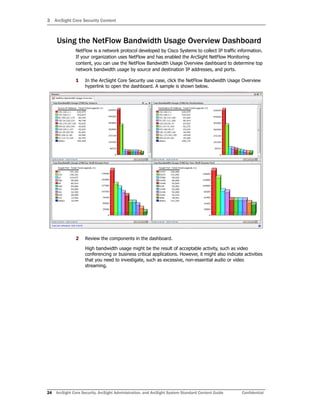
NetFlow is a network protocol developed by Cisco Systems to collect IP traffic information.
If your organization uses NetFlow and has enabled the ArcSight NetFlow Monitoring
content, you can use the NetFlow Bandwidth Usage Overview dashboard to determine top
network bandwidth usage by source and destination IP addresses, and ports.
1 In the ArcSight Core Security use case, click the NetFlow Bandwidth Usage Overview
hyperlink to open the dashboard. A sample is shown below.
2 Review the components in the dashboard.
High bandwidth usage might be the result of acceptable activity, such as video
conferencing or business critical applications. However, it might also indicate activities
that you need to investigate, such as excessive, non-essential audio or video
streaming.
3 ArcSight Core Security Content
Confidential ArcSight Core Security, ArcSight Administration, and ArcSight System Standard Content Guide 25
Using the Security Alerts Overview Dashboard
The Security Alerts Overview dashboard shows all security activity on your network that
requires your attention, including the top hosts at risk. The dashboard provides data from
the last hour.
1 In the ArcSight Core Security use case, click the Security Alerts Overview hyperlink to
open the dashboard. A sample is shown below.
The Internal Hosts at Risk component shows the internal hosts in your environment
most affected by the security issues. The higher the correlation count, the higher the
risk potential. Investigate these hosts to determine which issues are affecting them.
2 In the Internal Hosts at Risk component, right-click the top host IP address and select
Investigate > Create Channel [Internal Host=nnn.nnn.nnn.nnn].
3 In the resulting display, right-click a row and select Show Event Details to see
additional information about the base event in the Event Inspector.
4 Click the Details tab in the Event Inspector to see if there are any links to reference
pages or vulnerability pages. These pages typically provide a detailed explanation of
the event from the device vendor and information about associated vulnerabilities.
5 Return to the Security Alerts Overview dashboard and review the Security Alerts
component.
This component shows the top issues found in your network. The alert names
correspond to the rules in the ArcSight Core Security and ArcSight System rule groups.
If you determine that a particular alert is not a valid security concern and you do not
want it to appear in this component, you can add the alert’s corresponding rule name
to the Non-Security Alerts active list.
6 Return to the Security Alerts Overview dashboard and review the Security Analysis
Graph component (undock the component and zoom in to improve readability).
3 ArcSight Core Security Content
26 ArcSight Core Security, ArcSight Administration, and ArcSight System Standard Content Guide Confidential
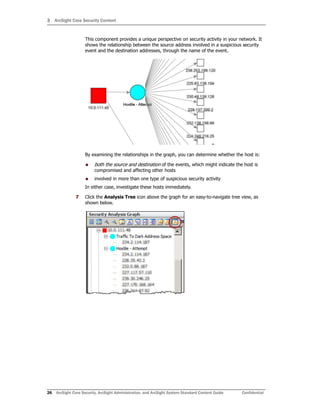
This component provides a unique perspective on security activity in your network. It
shows the relationship between the source address involved in a suspicious security
event and the destination addresses, through the name of the event.
By examining the relationships in the graph, you can determine whether the host is:
 both the source and destination of the events, which might indicate the host is
compromised and affecting other hosts
 involved in more than one type of suspicious security activity
In either case, investigate these hosts immediately.
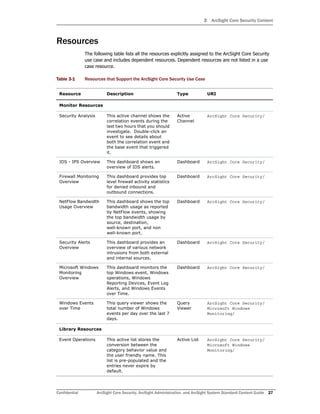
7 Click the Analysis Tree icon above the graph for an easy-to-navigate tree view, as
shown below.
3 ArcSight Core Security Content
Confidential ArcSight Core Security, ArcSight Administration, and ArcSight System Standard Content Guide 27
Resources
The following table lists all the resources explicitly assigned to the ArcSight Core Security
use case and includes dependent resources. Dependent resources are not listed in a use
case resource.
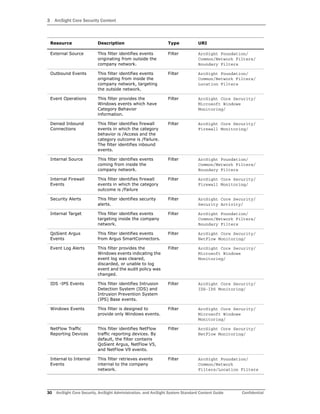
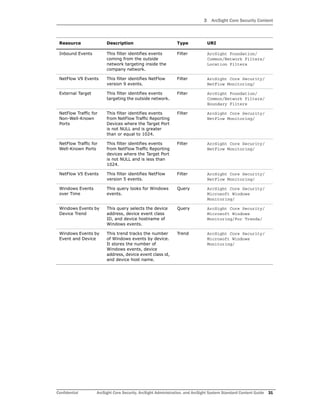
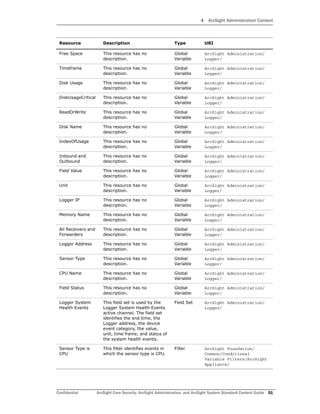
Table 3-1 Resources that Support the ArcSight Core Security Use Case
Resource Description Type URI
Monitor Resources
Security Analysis This active channel shows the
correlation events during the
last two hours that you should
investigate. Double-click an
event to see details about
both the correlation event and
the base event that triggered
it.
Active
Channel
ArcSight Core Security/
IDS - IPS Overview This dashboard shows an
overview of IDS alerts.
Dashboard ArcSight Core Security/
Firewall Monitoring
Overview
This dashboard provides top
level firewall activity statistics
for denied inbound and
outbound connections.
Dashboard ArcSight Core Security/
NetFlow Bandwidth
Usage Overview
This dashboard shows the top
bandwidth usage as reported
by NetFlow events, showing
the top bandwidth usage by
source, destination,
well-known port, and non
well-known port.
Dashboard ArcSight Core Security/
Security Alerts
Overview
This dashboard provides an
overview of various network
intrusions from both external
and internal sources.
Dashboard ArcSight Core Security/
Microsoft Windows
Monitoring
Overview
This dashboard monitors the
top Windows event, Windows
operations, Windows
Reporting Devices, Event Log
Alerts, and Windows Events
over Time.
Dashboard ArcSight Core Security/
Windows Events
over Time
This query viewer shows the
total number of Windows
events per day over the last 7
days.
Query
Viewer
ArcSight Core Security/
Microsoft Windows
Monitoring/
Library Resources
Event Operations This active list stores the
conversion between the
category behavior value and
the user friendly name. This
list is pre-populated and the
entries never expire by
default.
Active List ArcSight Core Security/
Microsoft Windows
Monitoring/
3 ArcSight Core Security Content
28 ArcSight Core Security, ArcSight Administration, and ArcSight System Standard Content Guide Confidential
Non-Security Alerts This active list stores the
names of non-security related
rules.
Active List ArcSight Core Security/
Security Activity/
Suspicious
Countries
This active list stores
suspicious country names.
Active List ArcSight Core Security/
Security Activity/
Protected This is a site asset category. Asset
Category
Site Asset Categories/
Address Spaces
Windows Reporting
Devices
This data monitor shows the
top devices that reported
Windows events.
Data
Monitor
ArcSight Core Security/
Microsoft Windows
Monitoring/
Top Bandwidth
Usage (MB) by
Destination
This data monitor displays the
total bandwidth usage in
MegaBytes (MB) from NetFlow
events for top Destination IP
Addresses.
Data
Monitor
ArcSight Core Security/
NetFlow Monitoring/
Windows
Operations
This data monitor shows the
top Windows operations.
Data
Monitor
ArcSight Core Security/
Microsoft Windows
Monitoring/
Security Analysis
Graph
This data monitor shows the
relationship between the
attacker and target for
security alerts.
Data
Monitor
ArcSight Core
Security/Security
Activity/
Windows Events This data monitor displays the
top Windows event names.
Data
Monitor
ArcSight Core Security/
Microsoft Windows
Monitoring/
Top Denied
Inbound
Connections by
Port
This data monitor shows the
top denied inbound firewall
connections by port.
Data
Monitor
ArcSight Core Security/
Firewall Monitoring/
Top Bandwidth
Usage (MB) by
Well-Known Port
This data monitor displays the
total bandwidth usage in
MegaBytes (MB) from NetFlow
events for Well Known Ports.
Data
Monitor
ArcSight Core Security/
NetFlow Monitoring/
Internal
Connection Drops
This data monitor shows
internal firewall connection
drops.
Data
Monitor
ArcSight Core Security/
Firewall Monitoring/
Top Bandwidth
Usage (MB) by
Non-Well-Known
Port
This data monitor displays the
total bandwidth usage in
MegaBytes (MB) from NetFlow
events for Non Well Known
Ports.
Data
Monitor
ArcSight Core Security/
NetFlow Monitoring/
Top Alert Types This data monitor shows the
top IDS alert types.
Data
Monitor
ArcSight Core Security/
IDS-IPS Monitoring/
Top Bandwidth
Usage (MB) by
Source
This data monitor displays the
total bandwidth usage in
MegaBytes (MB) from NetFlow
events for the top Source IP
Addresses.
Data
Monitor
ArcSight Core Security/
NetFlow Monitoring/
Resource Description Type URI
3 ArcSight Core Security Content
Confidential ArcSight Core Security, ArcSight Administration, and ArcSight System Standard Content Guide 29
Top Alert
Destinations
This data monitor shows the
top ten destination hosts with
IDS alert counts.
Data
Monitor
ArcSight Core Security/
IDS-IPS Monitoring/
Event Log Alerts This data monitor shows the
last 20 Windows events
indicating the event log was
cleared, discarded, or unable
to log event and the audit
policy was changed.
Data
Monitor
ArcSight Core Security/
Microsoft Windows
Monitoring/
Denied Outbound
Connections
This data monitor shows
denied outbound firewall
connections.
Data
Monitor
ArcSight Core Security/
Firewall Monitoring/
Top Alert Sources This data monitor shows the
top source hosts with IDS
alert counts.
Data
Monitor
ArcSight Core Security/
IDS-IPS Monitoring/
Internal Hosts at
Risk
This data monitor shows
internal hosts perceived to be
at risk.
Data
Monitor
ArcSight Core Security/
Security Activity/
Security Alerts This data monitor shows a
bucketized bar chart of
various security alerts.
Data
Monitor
ArcSight Core Security/
Security Activity/
Top Alerts This data monitor shows the
top IDS alerts.
Data
Monitor
ArcSight Core Security/
IDS-IPS Monitoring/
Top Denied
Inbound
Connections by
Address
This data monitor shows the
top denied inbound firewall
connections by address.
Data
Monitor
ArcSight Core Security/
Firewall Monitoring/
MBytesTotal This variable converts the
combination of the Bytes In
and Bytes Out fields to
MBytes, where a MByte is
defined as 1,000,000 bytes.
The value is set to have no
more than two digits past the
decimal point, so that 0.01 is
the smallest non-zero value
returned (for example, when
Bytes In + Bytes Out <
10,000, the result is 0).
Global
Variable
ArcSight Foundation/
Variables Library/Bytes
Security Alerts This field set is used to
investigate dashboard events
for ArcSight Core Security.
Field Set ArcSight Core Security/
Firewall Alerts This field set is used to
investigate dashboard events
for ArcSight Core Security.
Field Set ArcSight Core Security/
Denied Outbound
Connections
This filter identifies firewall
events in which the category
behavior is Access and the
category outcome is Failure.
The filter identifies outbound
events.
Filter ArcSight Core Security/
Firewall Monitoring/
Resource Description Type URI
3 ArcSight Core Security Content
30 ArcSight Core Security, ArcSight Administration, and ArcSight System Standard Content Guide Confidential
External Source This filter identifies events
originating from outside the
company network.
Filter ArcSight Foundation/
Common/Network Filters/
Boundary Filters
Outbound Events This filter identifies events
originating from inside the
company network, targeting
the outside network.
Filter ArcSight Foundation/
Common/Network Filters/
Location Filters
Event Operations This filter provides the
Windows events which have
Category Behavior
information.
Filter ArcSight Core Security/
Microsoft Windows
Monitoring/
Denied Inbound
Connections
This filter identifies firewall
events in which the category
behavior is /Access and the
category outcome is /Failure.
The filter identifies inbound
events.
Filter ArcSight Core Security/
Firewall Monitoring/
Internal Source This filter identifies events
coming from inside the
company network.
Filter ArcSight Foundation/
Common/Network Filters/
Boundary Filters
Internal Firewall
Events
This filter identifies firewall
events in which the category
outcome is /Failure
Filter ArcSight Core Security/
Firewall Monitoring/
Security Alerts This filter identifies security
alerts.
Filter ArcSight Core Security/
Security Activity/
Internal Target This filter identifies events
targeting inside the company
network.
Filter ArcSight Foundation/
Common/Network Filters/
Boundary Filters
QoSient Argus
Events
This filter identifies events
from Argus SmartConnectors.
Filter ArcSight Core Security/
NetFlow Monitoring/
Event Log Alerts This filter provides the
Windows events indicating the
event log was cleared,
discarded, or unable to log
event and the audit policy was
changed.
Filter ArcSight Core Security/
Microsoft Windows
Monitoring/
IDS -IPS Events This filter identifies Intrusion
Detection System (IDS) and
Intrusion Prevention System
(IPS) Base events.
Filter ArcSight Core Security/
IDS-IPS Monitoring/
Windows Events This filter is designed to
provide only Windows events.
Filter ArcSight Core Security/
Microsoft Windows
Monitoring/
NetFlow Traffic
Reporting Devices
This filter identifies NetFlow
traffic reporting devices. By
default, the filter contains
QoSient Argus, NetFlow V5,
and NetFlow V9 events.
Filter ArcSight Core Security/
NetFlow Monitoring/
Internal to Internal
Events
This filter retrieves events
internal to the company
network.
Filter ArcSight Foundation/
Common/Network
Filters/Location Filters
Resource Description Type URI
3 ArcSight Core Security Content
Confidential ArcSight Core Security, ArcSight Administration, and ArcSight System Standard Content Guide 31
Inbound Events This filter identifies events
coming from the outside
network targeting inside the
company network.
Filter ArcSight Foundation/
Common/Network Filters/
Location Filters
NetFlow V9 Events This filter identifies NetFlow
version 9 events.
Filter ArcSight Core Security/
NetFlow Monitoring/
External Target This filter identifies events
targeting the outside network.
Filter ArcSight Foundation/
Common/Network Filters/
Boundary Filters
NetFlow Traffic for
Non-Well-Known
Ports
This filter identifies events
from NetFlow Traffic Reporting
Devices where the Target Port
is not NULL and is greater
than or equal to 1024.
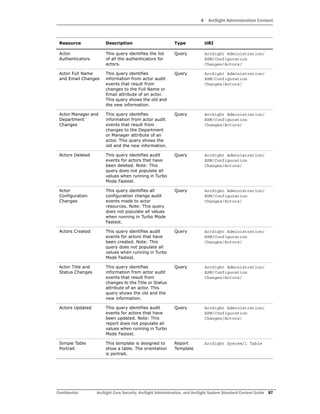
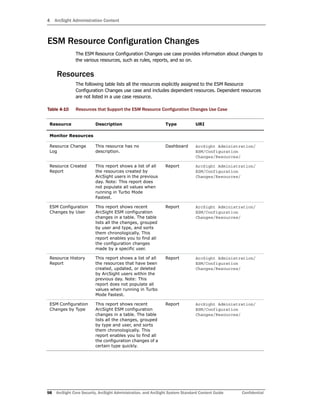
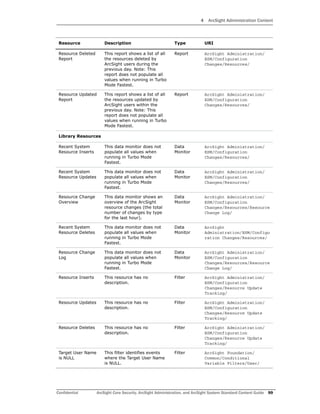
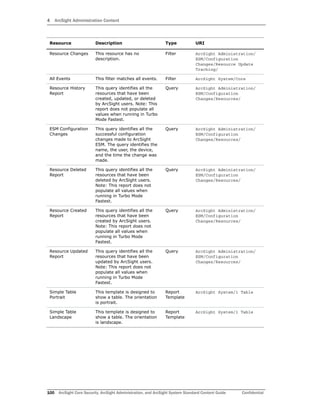
Filter ArcSight Core Security/
NetFlow Monitoring/
NetFlow Traffic for
Well-Known Ports
This filter identifies events
from NetFlow Traffic Reporting
devices where the Target Port
is not NULL and is less than
1024.
Filter ArcSight Core Security/
NetFlow Monitoring/
NetFlow V5 Events This filter identifies NetFlow
version 5 events.
Filter ArcSight Core Security/
NetFlow Monitoring/
Windows Events
over Time
This query looks for Windows
events.
Query ArcSight Core Security/
Microsoft Windows
Monitoring/
Windows Events by
Device Trend
This query selects the device
address, device event class
ID, and device hostname of
Windows events.
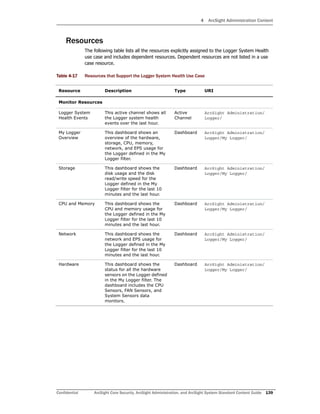
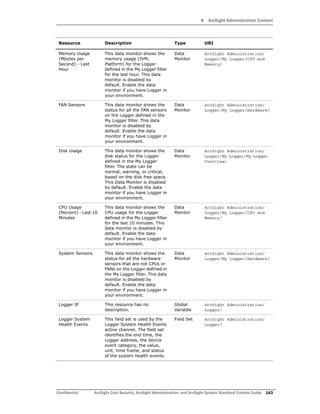
Query ArcSight Core Security/
Microsoft Windows
Monitoring/For Trends/
Windows Events by
Event and Device
This trend tracks the number
of Windows events by device.
It stores the number of
Windows events, device
address, device event class id,
and device host name.
Trend ArcSight Core Security/
Microsoft Windows
Monitoring/
Resource Description Type URI
3 ArcSight Core Security Content
32 ArcSight Core Security, ArcSight Administration, and ArcSight System Standard Content Guide Confidential
Confidential ArcSight Core Security, ArcSight Administration, and ArcSight System Standard Content Guide 33
Chapter 4
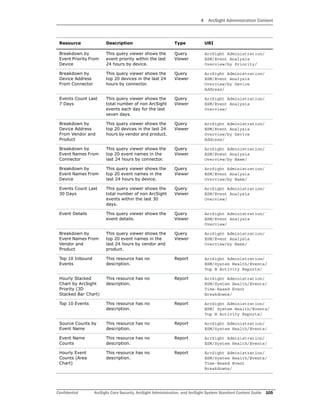
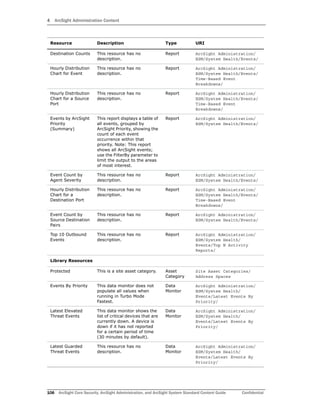
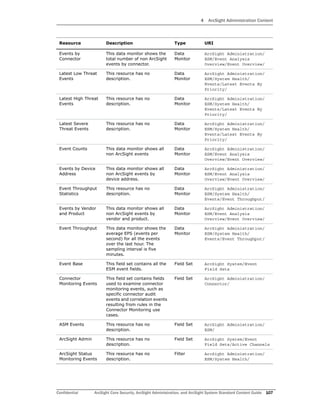
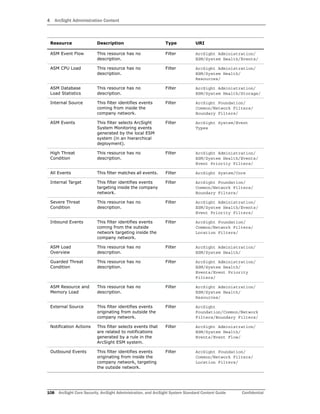
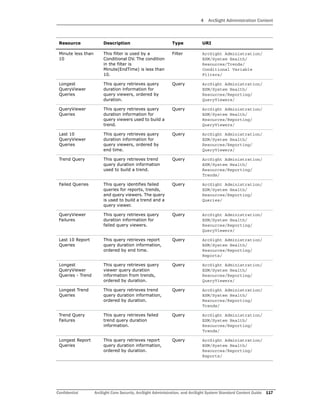
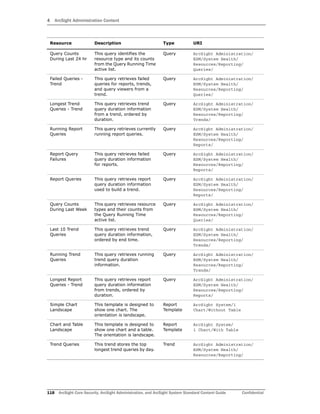
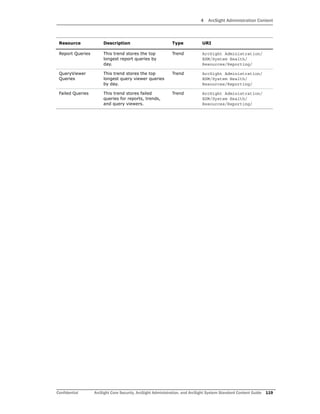
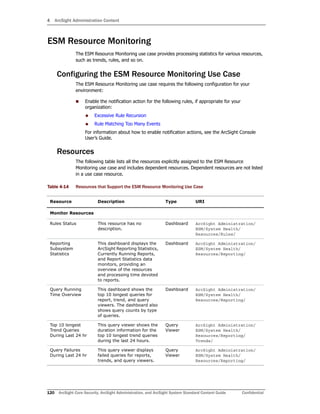
ArcSight Administration Content
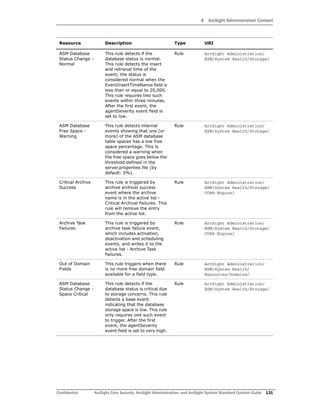
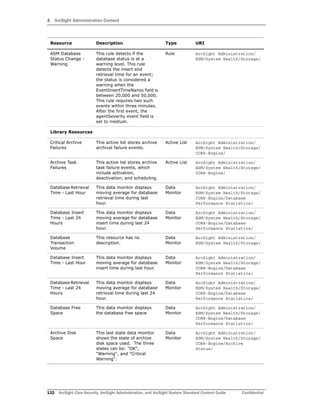
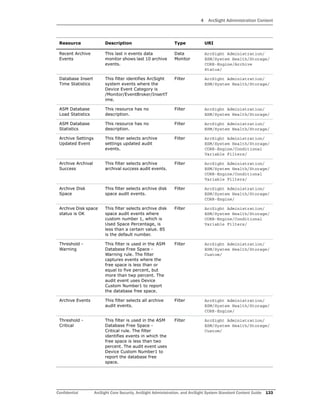
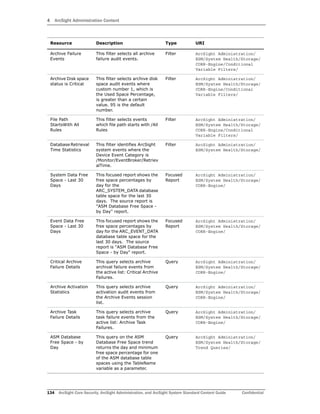
The ArcSight Administration resources provide statistics about the health and performance
of the ArcSight system and its components. This content is essential for managing and
tuning performance.
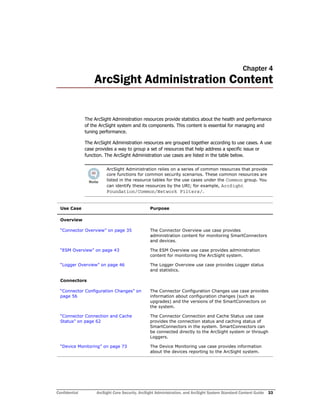
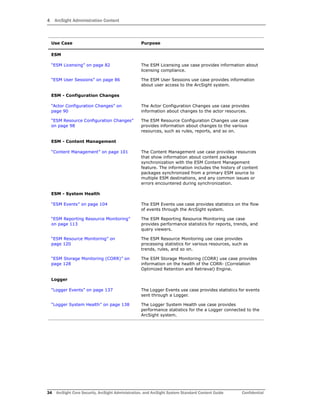
The ArcSight Administration resources are grouped together according to use cases. A use
case provides a way to group a set of resources that help address a specific issue or
function. The ArcSight Administration use cases are listed in the table below.
ArcSight Administration relies on a series of common resources that provide
core functions for common security scenarios. These common resources are
listed in the resource tables for the use cases under the Common group. You
can identify these resources by the URI; for example, ArcSight
Foundation/Common/Network Filters/.
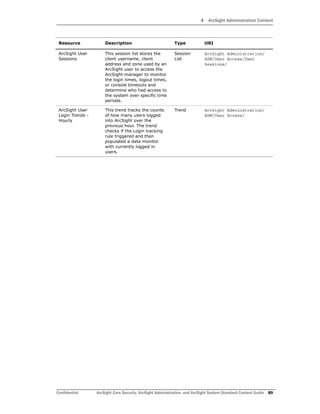
Use Case Purpose
Overview
“Connector Overview” on page 35 The Connector Overview use case provides
administration content for monitoring SmartConnectors
and devices.
“ESM Overview” on page 43 The ESM Overview use case provides administration
content for monitoring the ArcSight system.
“Logger Overview” on page 46 The Logger Overview use case provides Logger status
and statistics.
Connectors
“Connector Configuration Changes” on
page 56
The Connector Configuration Changes use case provides
information about configuration changes (such as
upgrades) and the versions of the SmartConnectors on
the system.
“Connector Connection and Cache
Status” on page 62
The Connector Connection and Cache Status use case
provides the connection status and caching status of
SmartConnectors in the system. SmartConnectors can
be connected directly to the ArcSight system or through
Loggers.
“Device Monitoring” on page 73 The Device Monitoring use case provides information
about the devices reporting to the ArcSight system.
4 ArcSight Administration Content
34 ArcSight Core Security, ArcSight Administration, and ArcSight System Standard Content Guide Confidential
ESM
“ESM Licensing” on page 82 The ESM Licensing use case provides information about
licensing compliance.
“ESM User Sessions” on page 86 The ESM User Sessions use case provides information
about user access to the ArcSight system.
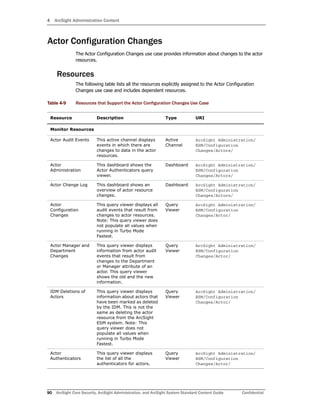
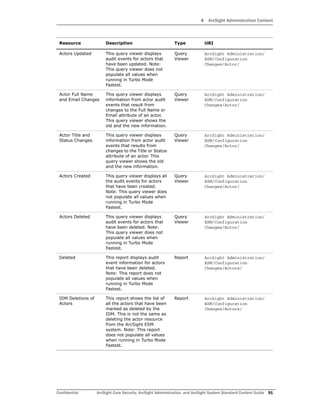
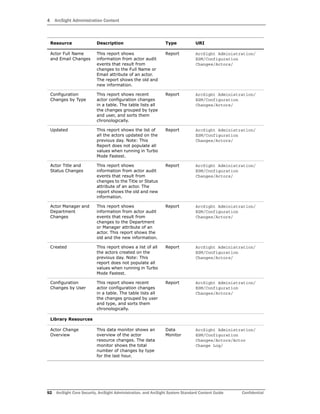
ESM - Configuration Changes
“Actor Configuration Changes” on
page 90
The Actor Configuration Changes use case provides
information about changes to the actor resources.
“ESM Resource Configuration Changes”
on page 98
The ESM Resource Configuration Changes use case
provides information about changes to the various
resources, such as rules, reports, and so on.
ESM - Content Management
“Content Management” on page 101 The Content Management use case provides resources
that show information about content package
synchronization with the ESM Content Management
feature. The information includes the history of content
packages synchronized from a primary ESM source to
multiple ESM destinations, and any common issues or
errors encountered during synchronization.
ESM - System Health
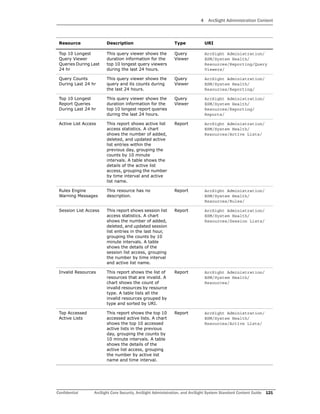
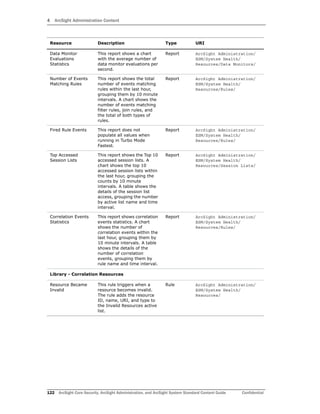
“ESM Events” on page 104 The ESM Events use case provides statistics on the flow
of events through the ArcSight system.
“ESM Reporting Resource Monitoring”
on page 113
The ESM Reporting Resource Monitoring use case
provides performance statistics for reports, trends, and
query viewers.
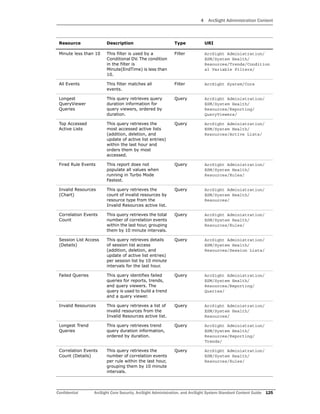
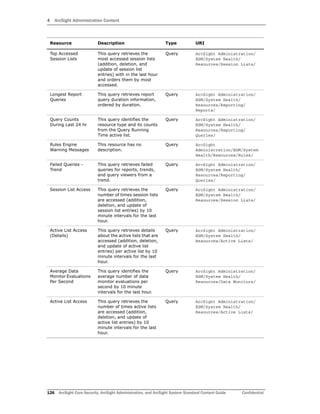
“ESM Resource Monitoring” on
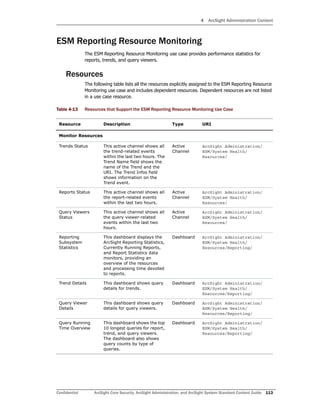
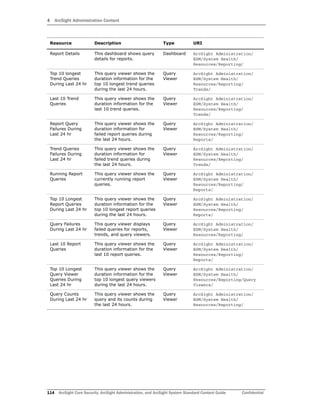
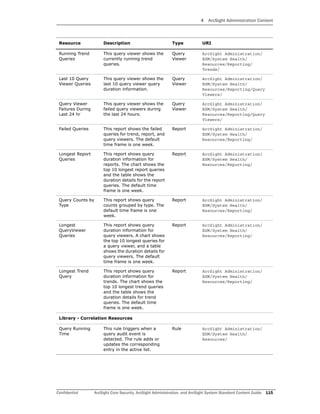
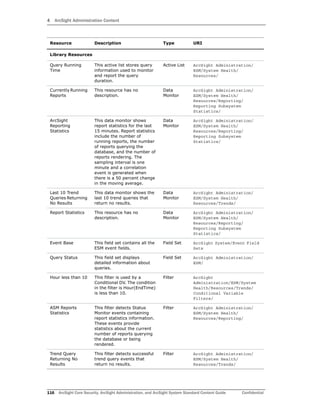
page 120
The ESM Resource Monitoring use case provides
processing statistics for various resources, such as
trends, rules, and so on.
“ESM Storage Monitoring (CORR)” on
page 128
The ESM Storage Monitoring (CORR) use case provides
information on the health of the CORR- (Correlation
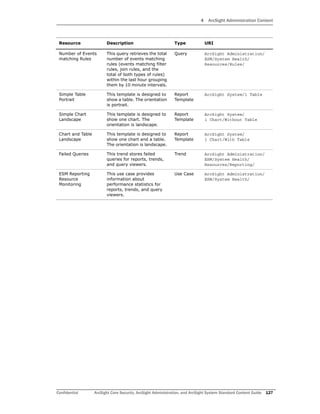
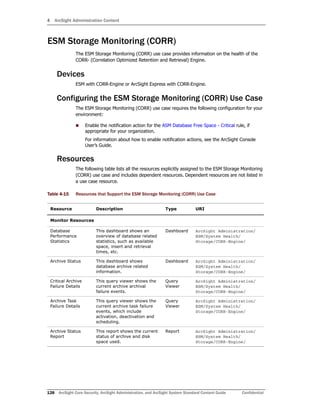
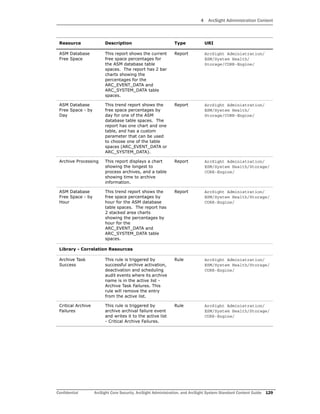
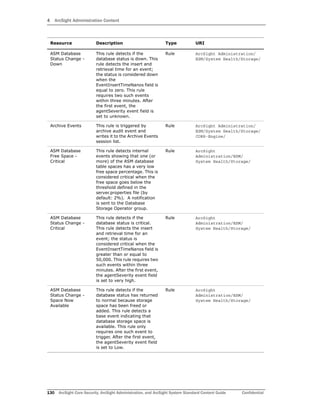
Optimized Retention and Retrieval) Engine.
Logger
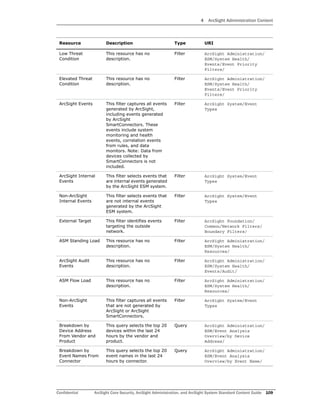
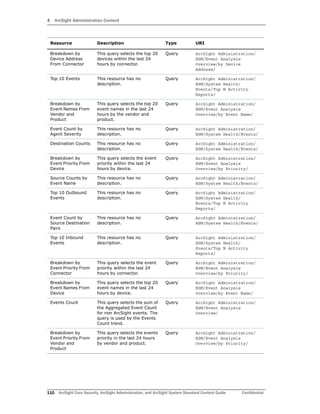
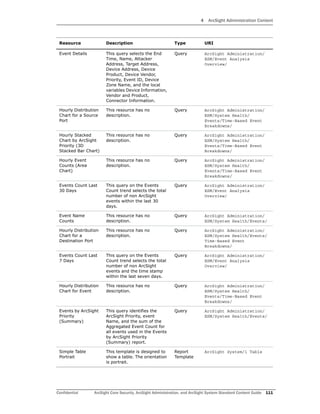
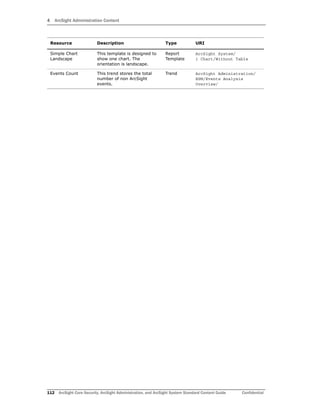
“Logger Events” on page 137 The Logger Events use case provides statistics for events
sent through a Logger.
“Logger System Health” on page 138 The Logger System Health use case provides
performance statistics for the a Logger connected to the
ArcSight system.
Use Case Purpose
4 ArcSight Administration Content
Confidential ArcSight Core Security, ArcSight Administration, and ArcSight System Standard Content Guide 35
Connector Overview
The Connector Overview use case provides administration content for monitoring
SmartConnectors and devices.
Configuring the Connector Overview Use Case
The Connector Overview use case uses the following active lists from the Connector
Connection and Cache Status use case:
 Connector Information
 Connectors - Down
 Connectors - Caching
 Black List - Connectors
For information about configuring these active lists, refer to the configuration section in
“Connector Connection and Cache Status” on page 62.
Using the Connector Overview Use Case
This section highlights some key features of the Connector Overview use case. Follow the
steps below to get started.
1 In the Navigator panel, click the Use Cases tab and open the Connector Overview
use case located in:
All Use Cases/ArcSight Administration
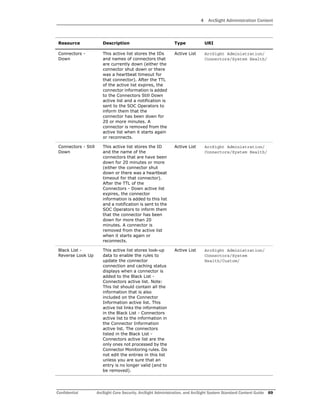
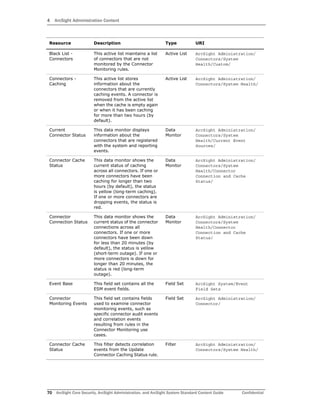
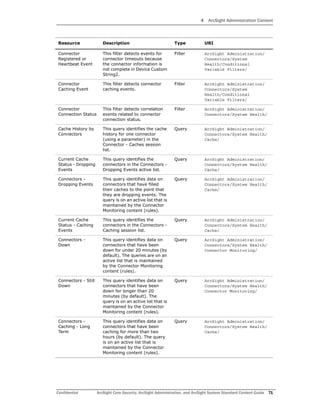
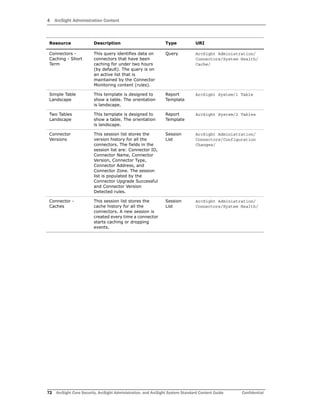
2 Click the Connector Connection and Cache Status hyperlink to open the dashboard. A
sample is shown below.
4 ArcSight Administration Content
36 ArcSight Core Security, ArcSight Administration, and ArcSight System Standard Content Guide Confidential
Focus on any yellow or red icons, as they represent connectors that might require
attention.
3 The center, left components show connectors that have been down for less than 20
minutes (yellow icons) and more than 20 minutes (red icons).
Down time of less than 20 minutes might be acceptable; for example, scheduled
maintenance of the host machine on which the connector is installed. However, more
than 20 minutes might indicate an issue that requires investigation. Maybe the
connector is improperly configured or needs to be restarted; or there is an underlying
network, connection, or hardware problem.
4 You can find more information about each connector in the Current Connector Status
component. Check the Failed Connection Attempts column to see if the connector
is repeatedly failing to connect to the ArcSight Manager. (You might need to undock
the component to see this column on the far right side.)
5 The components on the right side of the dashboard show connectors that are caching
events instead of sending them to the ArcSight Manager. Short term caching (for less
than two hours) is expected behavior when the connector receives bursts of events or
when the ArcSight Manager is down. However, investigate long term caching (more
than two hours), as it can result in a full cache and the permanent loss of events.
6 Check the Cache Size and Threshold Size columns to determine if the cache is
nearing its maximum capacity.
7 Check the Connectors - Dropping Events component to see if events have been
dropped. If so, review the connector logs and ArcSight Manager logs for errors, and
adjust the connector configuration properties as needed.
For answers to frequently asked questions about caching, see the ArcSight
SmartConnectors User’s Guide. For configuration information about a specific connector,
see its configuration guide. For information about connector caching issues, check the
Protect 724 community.
4 ArcSight Administration Content
Confidential ArcSight Core Security, ArcSight Administration, and ArcSight System Standard Content Guide 37
Resources
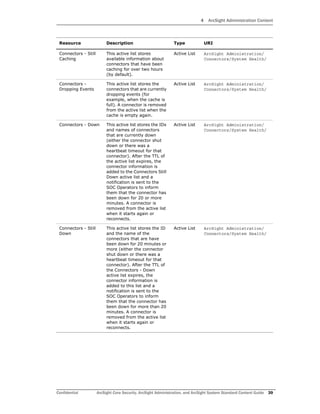
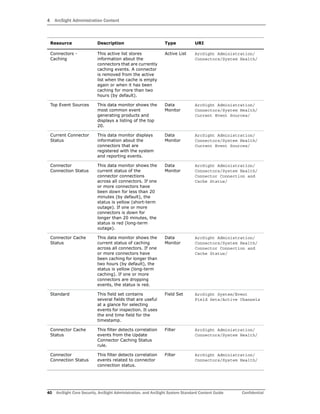
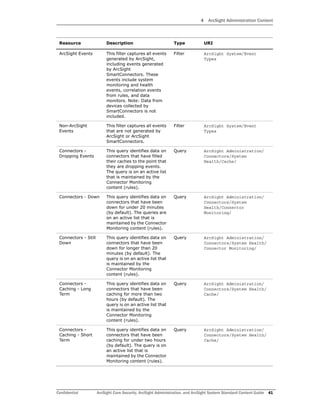
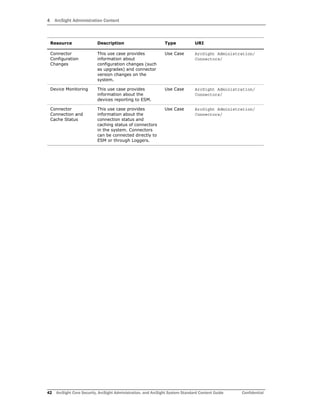
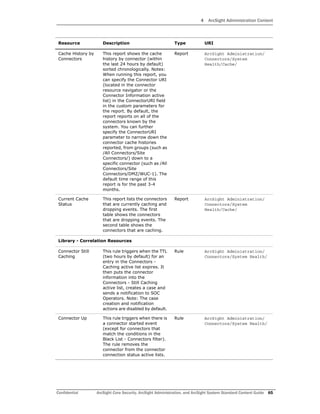
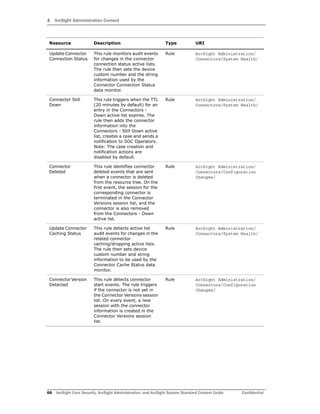
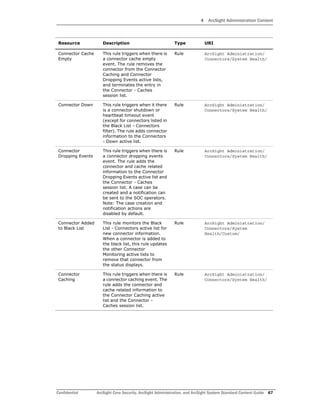
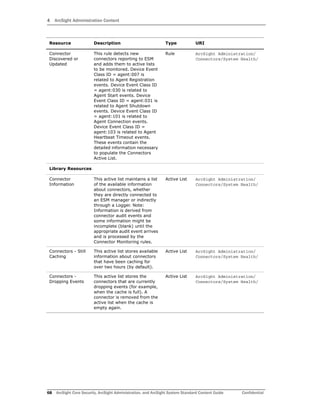
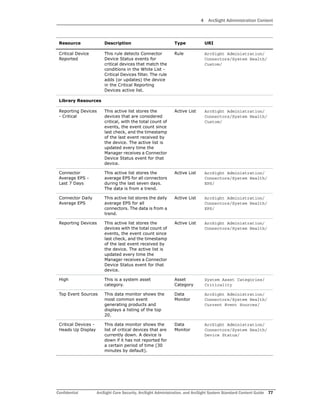
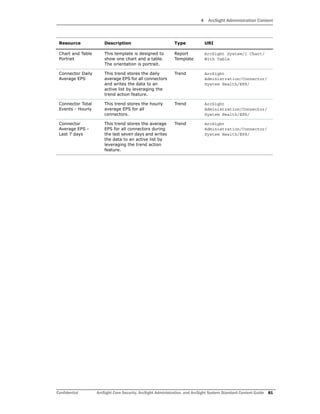
The following table lists all the resources explicitly assigned to the Connector Overview use
case and includes dependent resources. Dependent resources are not listed in a use case
resource.
Table 4-1 Resources that Support the Connector Overview Use Case
Resource Description Type URI
Monitor Resources
Connector
Connection and
Cache Status
This dashboard displays the
overall status of connectors
and information on
connectors that are down,
caching, or dropping events.
Dashboard ArcSight Administration/
Connectors/System Health/
Current Event
Sources
This dashboard displays
information about the status
of your connectors, as well
as the top devices (vendor
and product) that are
contributing events.
Dashboard ArcSight Administration/
Connectors/System Health/
Connectors -
Dropping Events
This query viewer displays
data on connectors that have
filled their caches to the
point that they are dropping
events. This query viewer
queries on an active list that
is maintained by the
Connector Monitoring
content (rules), so it can
update every minute.
Query
Viewer
ArcSight Administration/
Connectors/System Health/
Connectors - Down
- Short Term
This query viewer displays
data on connectors that have
been down for under 20
minutes (by default). This
query viewer queries on an
active list that is maintained
by the Connector Monitoring
content (rules), so it can
update every minute.
Query
Viewer
ArcSight Administration/
Connectors/System Health/
Connectors - Down
- Long Term
This query viewer displays
data on connectors that have
been down for longer than
20 minutes (by default). This
query viewer queries on an
active list that is maintained
by the Connector Monitoring
content (rules), so it can
update every minute.
Query
Viewer
ArcSight Administration/
Connectors/System Health/
4 ArcSight Administration Content
38 ArcSight Core Security, ArcSight Administration, and ArcSight System Standard Content Guide Confidential
Connectors -
Caching - Long
Term
This query viewer displays
data on connectors that have
been caching for more than
two hours (by default). This
query viewer queries on an
active list that is maintained
by the Connector Monitoring
content (rules), so it can
update every minute.
Query
Viewer
ArcSight Administration/
Connectors/System Health/
Connectors -
Caching - Short
Term
This query viewer displays
data on connectors that have
been caching for under two
hours (by default). This
query viewer queries on an
active list that is maintained
by the Connector Monitoring
content (rules), so it can
update every minute.
Query
Viewer
ArcSight Administration/
Connectors/System Health/
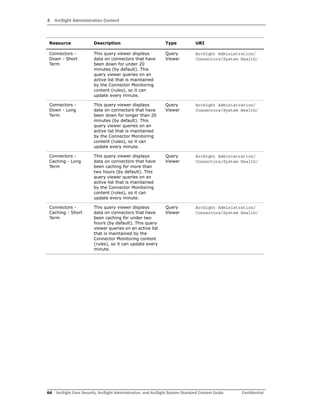
Library - Correlation Resources
Update Connector
Connection Status
This rule monitors audit
events for changes in the
connector connection status
active lists. The rule then
sets the device custom
number and the string
information used by the
Connector Connection Status
data monitor.
Rule ArcSight Administration/
Connectors/System Health/
Update Connector
Caching Status
This rule detects active list
audit events for changes in
the related connector
caching/dropping active
lists. The rule then sets
device custom number and
string information to be used
by the Connector Cache
Status data monitor.
Rule ArcSight Administration/
Connectors/System Health/
Library Resources
Connector
Information
This active list maintains a
list of the available
information about
connectors, whether they
are directly connected to an
ESM manager or indirectly
through a Logger. Note:
Information is derived from
connector audit events and
some information might be
incomplete (blank) until the
appropriate audit event
arrives and is processed by
the Connector Monitoring
rules.
Active List ArcSight Administration/
Connectors/System Health/
Resource Description Type URI
4 ArcSight Administration Content
Confidential ArcSight Core Security, ArcSight Administration, and ArcSight System Standard Content Guide 39
Connectors - Still
Caching
This active list stores
available information about
connectors that have been
caching for over two hours
(by default).
Active List ArcSight Administration/
Connectors/System Health/
Connectors -
Dropping Events
This active list stores the
connectors that are currently
dropping events (for
example, when the cache is
full). A connector is removed
from the active list when the
cache is empty again.
Active List ArcSight Administration/
Connectors/System Health/
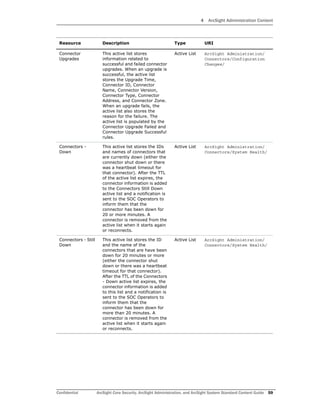
Connectors - Down This active list stores the IDs
and names of connectors
that are currently down
(either the connector shut
down or there was a
heartbeat timeout for that
connector). After the TTL of
the active list expires, the
connector information is
added to the Connectors Still
Down active list and a
notification is sent to the
SOC Operators to inform
them that the connector has
been down for 20 or more
minutes. A connector is
removed from the active list
when it starts again or
reconnects.
Active List ArcSight Administration/
Connectors/System Health/
Connectors - Still
Down
This active list stores the ID
and the name of the
connectors that are have
been down for 20 minutes or
more (either the connector
shut down or there was a
heartbeat timeout for that
connector). After the TTL of
the Connectors - Down
active list expires, the
connector information is
added to this list and a
notification is sent to the
SOC Operators to inform
them that the connector has
been down for more than 20
minutes. A connector is
removed from the active list
when it starts again or
reconnects.
Active List ArcSight Administration/
Connectors/System Health/
Resource Description Type URI
4 ArcSight Administration Content
40 ArcSight Core Security, ArcSight Administration, and ArcSight System Standard Content Guide Confidential
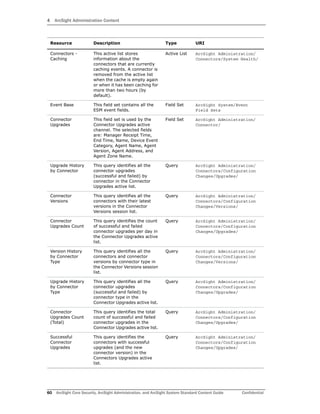
Connectors -
Caching
This active list stores
information about the
connectors that are currently
caching events. A connector
is removed from the active
list when the cache is empty
again or when it has been
caching for more than two
hours (by default).
Active List ArcSight Administration/
Connectors/System Health/
Top Event Sources This data monitor shows the
most common event
generating products and
displays a listing of the top
20.
Data
Monitor
ArcSight Administration/
Connectors/System Health/
Current Event Sources/
Current Connector
Status
This data monitor displays
information about the
connectors that are
registered with the system
and reporting events.
Data
Monitor
ArcSight Administration/
Connectors/System Health/
Current Event Sources/
Connector
Connection Status
This data monitor shows the
current status of the
connector connections
across all connectors. If one
or more connectors have
been down for less than 20
minutes (by default), the
status is yellow (short-term
outage). If one or more
connectors is down for
longer than 20 minutes, the
status is red (long-term
outage).
Data
Monitor
ArcSight Administration/
Connectors/System Health/
Connector Connection and
Cache Status/
Connector Cache
Status
This data monitor shows the
current status of caching
across all connectors. If one
or more connectors have
been caching for longer than
two hours (by default), the
status is yellow (long-term
caching). If one or more
connectors are dropping
events, the status is red.
Data
Monitor
ArcSight Administration/
Connectors/System Health/
Connector Connection and
Cache Status/
Standard This field set contains
several fields that are useful
at a glance for selecting
events for inspection. It uses
the end time field for the
timestamp.
Field Set ArcSight System/Event
Field Sets/Active Channels
Connector Cache
Status
This filter detects correlation
events from the Update
Connector Caching Status
rule.
Filter ArcSight Administration/
Connectors/System Health/
Connector
Connection Status
This filter detects correlation
events related to connector
connection status.
Filter ArcSight Administration/
Connectors/System Health/
Resource Description Type URI
4 ArcSight Administration Content
Confidential ArcSight Core Security, ArcSight Administration, and ArcSight System Standard Content Guide 41
ArcSight Events This filter captures all events
generated by ArcSight,
including events generated
by ArcSight
SmartConnectors. These
events include system
monitoring and health
events, correlation events
from rules, and data
monitors. Note: Data from
devices collected by
SmartConnectors is not
included.
Filter ArcSight System/Event
Types
Non-ArcSight
Events
This filter captures all events
that are not generated by
ArcSight or ArcSight
SmartConnectors.
Filter ArcSight System/Event
Types
Connectors -
Dropping Events
This query identifies data on
connectors that have filled
their caches to the point that
they are dropping events.
The query is on an active list
that is maintained by the
Connector Monitoring
content (rules).
Query ArcSight Administration/
Connectors/System
Health/Cache/
Connectors - Down This query identifies data on
connectors that have been
down for under 20 minutes
(by default). The queries are
on an active list that is
maintained by the Connector
Monitoring content (rules).
Query ArcSight Administration/
Connectors/System
Health/Connector
Monitoring/
Connectors - Still
Down
This query identifies data on
connectors that have been
down for longer than 20
minutes (by default). The
query is on an active list that
is maintained by the
Connector Monitoring
content (rules).
Query ArcSight Administration/
Connectors/System Health/
Connector Monitoring/
Connectors -
Caching - Long
Term
This query identifies data on
connectors that have been
caching for more than two
hours (by default). The
query is on an active list that
is maintained by the
Connector Monitoring
content (rules).
Query ArcSight Administration/
Connectors/System Health/
Cache/
Connectors -
Caching - Short
Term
This query identifies data on
connectors that have been
caching for under two hours
(by default). The query is on
an active list that is
maintained by the Connector
Monitoring content (rules).
Query ArcSight Administration/
Connectors/System Health/
Cache/
Resource Description Type URI
4 ArcSight Administration Content
42 ArcSight Core Security, ArcSight Administration, and ArcSight System Standard Content Guide Confidential
Connector
Configuration
Changes
This use case provides
information about
configuration changes (such
as upgrades) and connector
version changes on the
system.
Use Case ArcSight Administration/
Connectors/
Device Monitoring This use case provides
information about the
devices reporting to ESM.
Use Case ArcSight Administration/
Connectors/
Connector
Connection and
Cache Status
This use case provides
information about the
connection status and
caching status of connectors
in the system. Connectors
can be connected directly to
ESM or through Loggers.
Use Case ArcSight Administration/
Connectors/
Resource Description Type URI
4 ArcSight Administration Content
Confidential ArcSight Core Security, ArcSight Administration, and ArcSight System Standard Content Guide 43
ESM Overview
The ESM Overview use case provides administration content for monitoring the ArcSight
system.
Using the ESM Overview Use Case
This section highlights some key features of the ESM Overview use case. Follow the steps
below to get started.
1 For an event-level view of ESM, click the Resources tab in the Navigator panel and
open the System Events Last Hour active channel located in:
All Active Channels/ArcSight Administration/
This active channel shows all events generated by ArcSight during the last hour. A filter
prevents the active channel from showing events that contributed to a rule triggering,
commonly referred to as correlation events. Double-click an event to see details about
the event in the Event Inspector.
2 For a broader view of ESM, click the Use Cases tab in the Navigator panel and open
the ESM Overview use case located in:
All Use Cases/ArcSight Administration
3 Click the ESM System Information hyperlink to open the dashboard. A sample is shown
below.
Review the System Information shown, which provides version, licensing, system resource
availability and statistics, and other important settings and status for your ArcSight system.
4 ArcSight Administration Content
44 ArcSight Core Security, ArcSight Administration, and ArcSight System Standard Content Guide Confidential
Resources
The following table lists all the resources explicitly assigned to the ESM Overview use case
and includes dependent resources. Dependent resources are not listed in a use case
resource.
Table 4-2 Resources that Support the ESM Overview Use Case
Resource Description Type URI
Monitor Resources
System Events
Last Hour
This active channel shows all
events generated by ArcSight
during the last hour. A filter
prevents the active channel
from showing events that
contributed to a rule
triggering, commonly referred
to as correlated events.
Active
Channel
ArcSight Administration/
ESM/System Health/Events
ESM System
Information
This dashboard displays the
System Information data
monitor, which provides
version, licensing, system
resources availability and
statistics, and other important
settings and status.
Dashboard ArcSight Administration/
ESM/System Health/
Library Resources
System
Information
This resource has no
description.
Data
Monitor
ArcSight Administration/
ESM/System Health/ESM
System Information/
Event Base This field set contains all the
ESM event fields.
Field Set ArcSight System/Event
Field Sets
Connector
Monitoring
Events
This field set contains fields
used to examine connector
monitoring events, such as
specific connector audit events
and correlation events
resulting from rules in the
Connector Monitoring use
cases.
Field Set ArcSight Administration/
Connector/
ArcSight Admin This resource has no
description.
Field Set ArcSight System/Event
Field Sets/Active Channels
ArcSight Internal
Events
This filter selects events that
are internal events generated
by the ArcSight ESM system.
Filter ArcSight System/Event
Types
ASM Events This filter selects ArcSight
System Monitoring events
generated by the local ESM
system (in an hierarchical
deployment).
Filter ArcSight System/Event
Types
4 ArcSight Administration Content
Confidential ArcSight Core Security, ArcSight Administration, and ArcSight System Standard Content Guide 45
ESM Resource
Monitoring
This use case provides
processing statistics for
various ESM resources, such as
trends, rules, and so on.
Use Case ArcSight Administration/
ESM/System Health/
Actor
Configuration
Changes
This use case provides
information about changes
made to the actor resources.
Use Case ArcSight Administration/
ESM/Configuration Changes/
ESM User
Sessions
This use case provides
information about user access
to ESM.
Use Case ArcSight Administration/
ESM/
ESM Storage
Monitoring
(CORR)
This use case covers the health
of the CORR Engine (ArcSight
Express 3.0 and beyond).
Use Case ArcSight Administration/
ESM/System Health/
ESM Licensing This use case provides
information about ESM
licensing compliance.
Use Case ArcSight Administration/
ESM/
ESM Events This use case provides
statistics about the flow of
events through ESM.
Use Case ArcSight Administration/
ESM/System Health/
ESM Resource
Configuration
Changes
This use case provides
information about changes to
the ESM resources, such as
rules, reports, and so on.
Use Case ArcSight Administration/
ESM/Configuration Changes/
ESM Reporting
Resource
Monitoring
This use case provides
information about performance
statistics for reports, trends,
and query viewers.
Use Case ArcSight Administration/
ESM/System Health/
Resource Description Type URI
4 ArcSight Administration Content
46 ArcSight Core Security, ArcSight Administration, and ArcSight System Standard Content Guide Confidential
Logger Overview
The Logger Overview use case provides Logger status and statistics.
Configuring the Logger Overview Use Case
The Logger Overview use case requires the following configuration for your environment if
you have a Logger connected to the ArcSight system:
 Enable the following rules:
 Logger Sensor Status—This rule detects Logger system health events related to
hardware sensor status. The rule updates the Logger Status and Logger Sensor
Type Status active lists with the Logger address, sensor type, sensor name, and
sensor status.
 Logger Sensor Type Status—This rule detects Logger Sensor Status correlation
events and triggers only if all the sensors statuses for the same sensor type for a
Logger indicate OK.
 Logger Status—This rule detects Logger Sensor Status correlation events and
triggers only if all the sensor statuses for a Logger indicate OK.
For information about enabling rules, refer to “Enabling Rules” on page 14.
 Enable the notification action for the above listed rules, if appropriate for your
organization. For information on how to enable notifications, refer to the ArcSight
Console User’s Guide.
 Enable the following data monitors (described in the table under “Resources” on
page 48).
 Logger Hardware Status
 Logger Disk Usage
 Network Usage (Bytes) - Last 10 Minutes
 Disk Usage
 CPU Usage (Percent) - Last 10 Minutes
 EPS Usage (Events per Second) - Last 10 Minutes
 Memory Usage (Mbytes per Second) - Last 10 Minutes
 Disk Read and Write (Kbytes per Second) - Last 10 Minutes
 Sensor Type Status
For information about data monitors, refer to the ArcSight Console User’s Guide.
These data monitors are disabled by default to avoid increasing the load
on environments without Logger.
4 ArcSight Administration Content
Confidential ArcSight Core Security, ArcSight Administration, and ArcSight System Standard Content Guide 47
Using the Logger Overview Use Case
This section highlights some key features of the Logger Overview use case. Follow the
steps below to get started.
1 In the Navigator panel, click the Use Cases tab and open the Logger Overview use
case located in:
All Use Cases/ArcSight Administration
2 Click the My Logger Overview hyperlink to open the dashboard.
3 Review the data monitors on the dashboard to check the hardware, storage, CPU,
memory, network, and EPS usage for the Logger defined in the My Logger filter. The
information is collected over the last ten minutes.
4 In the Logger Overview use case, click the ArcSight Appliances Overview hyperlink to
open the dashboard.
Review the data monitors on the dashboard to check your ArcSight appliances.
 Focus on any red icons, as they represent appliances that might require attention.
 Examine the disk status for all appliances; a warning or critical status requires
your attention.
The data monitors in the My Logger Overview and ArcSight Appliances
Overview dashboards are disabled by default to avoid increasing the load on
environments without Logger. Enable these data monitors if you have a
Logger in your environment as described in “Configuring the Logger Overview
Use Case” on page 46.
4 ArcSight Administration Content
48 ArcSight Core Security, ArcSight Administration, and ArcSight System Standard Content Guide Confidential
Resources
The following table lists all the resources explicitly assigned to the Logger Overview use
case and includes dependent resources. Dependent resources are not listed in a use case
resource.
Table 4-3 Resources that Support the Logger Overview Use Case
Resource Description Type URI
Monitor Resources
My Logger
Overview
This dashboard shows an
overview of the hardware,
storage, CPU, memory,
network, and EPS usage for
the Logger defined in the My
Logger filter.
Dashboard ArcSight Administration/
Logger/My Logger/
ArcSight
Appliances
Overview
This dashboard shows an
overview of all the ArcSight
appliances. The dashboard
includes the Logger Hardware
Status, Logger Disk Usage,
Connector Appliance Status,
and Connector Appliance Disk
Usage data monitors.
Dashboard ArcSight Administration/
Logger/
Library - Correlation Resources
Logger Sensor
Status
This rule identifies Logger
system health events related
to hardware sensor status.
The rule updates the Logger
Status and Logger Sensor
Type Status with the Logger IP
address, the sensor type, the
sensor name, and the sensor
status. This rule is disabled by
default. Enable the rule if you
have Logger in your
environment.
Rule ArcSight Administration/
Logger/System Health/
Logger Sensor
Type Status
This rule identifies Logger
Sensor Status correlation
events and triggers only if all
the sensor statuses for the
same sensor type for a Logger
are in an OK state. This rule is
disabled by default. Enable the
rule if you have Logger in your
environment.
Rule ArcSight Administration/
Logger/System Health/
Logger Status This rule identifies Logger
Sensor Status correlation
events and triggers only if all
the sensor statuses for a
Logger are in an OK state. This
rule is disabled by default.
Enable the rule if you have
Logger in your environment.
Rule ArcSight Administration/
Logger/System Health/
4 ArcSight Administration Content
Confidential ArcSight Core Security, ArcSight Administration, and ArcSight System Standard Content Guide 49
Library Resources
Logger Status This active list stores the
status of the various hardware
sensors on the Loggers. The
active list stores the Logger
address, the sensor type, the
sensor name, and the sensor
status. The Logger address is
the key field. This active list is
used by a set of rules to
identify the overall status of a
Logger.
Active List ArcSight Administration/
Logger/System Health/
Logger Sensor
Type Status
This active list stores the
status of the various hardware
sensors on the Loggers. The
active list stores the Logger
address, the sensor type, the
sensor name, and the sensor
status. The Logger address
and the sensor type are the
key fields. This active list is
used by a set of rules to
identify the status of a sensor
type for a Logger.
Active List ArcSight Administration/
Logger/System Health/
Logger Hardware
Status
This data monitor shows the
overall hardware status for all
Loggers. The state is green
(OK) if all the hardware
sensors for a Logger are OK,
red (NOT OK) if any of the
sensors are not OK. This data
monitor is disabled by default.
Enable the data monitor if you
have Logger in your
environment.
Data
Monitor
ArcSight Administration/
Logger/ArcSight Appliances
Overview/
Logger Disk
Usage
This data monitor shows the
disk status for all Loggers. The
state can be normal, warning,
or critical, based on the disk
free space. This data monitor
is disabled by default. Enable
the data monitor if you have
Logger in your environment.
Data
Monitor
ArcSight Administration/
Logger/ArcSight Appliances
Overview/
Network Usage
(Bytes) - Last 10
Minutes
This data monitor shows the
network usage for the Logger
defined in the My Logger filter
for the last 10 minutes. This
data monitor is disabled by
default. Enable the data
monitor if you have Logger in
your environment.
Data
Monitor
ArcSight Administration/
Logger/My Logger/Network
Resource Description Type URI
4 ArcSight Administration Content
50 ArcSight Core Security, ArcSight Administration, and ArcSight System Standard Content Guide Confidential
Disk Usage This data monitor shows the
disk status for the Logger
defined in the My Logger filter.
The state can be normal,
warning, or critical, based on
the disk free space. This Data
Monitor is disabled by default.
Enable the data monitor if you
have Logger in your
environment.
Data
Monitor
ArcSight Administration/
Logger/My Logger/My Logger
Overview/
CPU Usage
(Percent) - Last
10 Minutes
This data monitor shows the
CPU usage for the Logger
defined in the My Logger filter
for the last 10 minutes. This
data monitor is disabled by
default. Enable the data
monitor if you have Logger in
your environment.
Data
Monitor
ArcSight Administration/
Logger/My Logger/CPU and
Memory/
EPS Usage
(Events per
Second) - Last 10
Minutes
This data monitor shows the
EPS usage for the Logger
defined in the My Logger filter
for the last 10 minutes. This
data monitor is disabled by
default. Enable the data
monitor if you have Logger in
your environment.
Data
Monitor
ArcSight Administration/
Logger/My Logger/Network
Memory Usage
(Mbytes per
Second) - Last 10
Minutes
This data monitor shows the
memory usage (JVM,
Platform) for the Logger
defined in the My Logger filter
for the last 10 minutes. This
data monitor is disabled by
default. Enable the data
monitor if you have Logger in
your environment.
Data
Monitor
ArcSight Administration/
Logger/My Logger/CPU and
Memory/
Disk Read and
Write (Kbytes per
Second) - Last 10
Minutes
This data monitor shows the
disk read/write speed for the
Logger defined in the My
Logger filter for the last 10
minutes. This data monitor is
disabled by default. Enable the
data monitor if you have
Logger in your environment.
Data
Monitor
ArcSight Administration/
Logger/My Logger/My Logger
Overview/
Sensor Type
Status
This data monitor shows the
hardware status by sensor
type for the Logger defined in
the My Logger filter. This data
monitor is disabled by default.
Enable the data monitor if you
have Logger in your
environment.
Data
Monitor
ArcSight Administration/
Logger/My Logger/My Logger
Overview/
Sensor Status This resource has no
description.
Global
Variable
ArcSight Administration/
Logger/
Sensor Name This resource has no
description.
Global
Variable
ArcSight Administration/
Logger/
Resource Description Type URI
4 ArcSight Administration Content
Confidential ArcSight Core Security, ArcSight Administration, and ArcSight System Standard Content Guide 51
Free Space This resource has no
description.
Global
Variable
ArcSight Administration/
Logger/
Timeframe This resource has no
description.
Global
Variable
ArcSight Administration/
Logger/
Disk Usage This resource has no
description.
Global
Variable
ArcSight Administration/
Logger/
DiskUsageCritical This resource has no
description.
Global
Variable
ArcSight Administration/
Logger/
ReadOrWrite This resource has no
description.
Global
Variable
ArcSight Administration/
Logger/
Disk Name This resource has no
description.
Global
Variable
ArcSight Administration/
Logger/
IndexOfUsage This resource has no
description.
Global
Variable
ArcSight Administration/
Logger/
Inbound and
Outbound
This resource has no
description.
Global
Variable
ArcSight Administration/
Logger/
Field Value This resource has no
description.
Global
Variable
ArcSight Administration/
Logger/
Unit This resource has no
description.
Global
Variable
ArcSight Administration/
Logger/
Logger IP This resource has no
description.
Global
Variable
ArcSight Administration/
Logger/
Memory Name This resource has no
description.
Global
Variable
ArcSight Administration/
Logger/
All Receivers and
Forwarders
This resource has no
description.
Global
Variable
ArcSight Administration/
Logger/
Logger Address This resource has no
description.
Global
Variable
ArcSight Administration/
Logger/
Sensor Type This resource has no
description.
Global
Variable
ArcSight Administration/
Logger/
CPU Name This resource has no
description.
Global
Variable
ArcSight Administration/
Logger/
Field Status This resource has no
description.
Global
Variable
ArcSight Administration/
Logger/
Logger System
Health Events
This field set is used by the
Logger System Health Events
active channel. The field set
identifies the end time, the
Logger address, the device
event category, the value,
unit, time frame, and status of
the system health events.
Field Set ArcSight Administration/
Logger/
Sensor Type is
CPU
This filter identifies events in
which the sensor type is CPU.
Filter ArcSight Foundation/
Common/Conditional
Variable Filters/ArcSight
Appliance/
Resource Description Type URI
4 ArcSight Administration Content
52 ArcSight Core Security, ArcSight Administration, and ArcSight System Standard Content Guide Confidential
Memory Usage This filter identifies Logger
system health events related
to memory usage that
originate from the Logger
defined in the My Logger filter.
Filter ArcSight Administration/
Logger/System Health/CPU
and Memory/
Logger System
Health Events
This filter identifies Logger
system health events.
Filter ArcSight Administration/
Logger/Event Types/
Network Usage This filter identifies Logger
system health events related
to network usage that
originate from the Logger
defined in the My Logger filter.
Filter ArcSight Administration/
Logger/System
Health/Network/
Logger Events This filter identifies Logger
events.
Filter ArcSight Administration/
Logger/Event Types/
Logger Hardware
Status
This filter identifies ArcSight
correlation events that are
generated by the Logger
Status rule or by the Logger
Sensor Status rule and where
the sensor status (device
custom string 3) is not OK.
Filter ArcSight Administration/
Logger/ArcSight Appliances
Overview/
All Receivers EPS This filter identifies events in
which the device event
category is
/Monitor/Receiver/All/EPS.
Filter ArcSight Foundation/
Common/Conditional
Variable Filters/ArcSight
Appliance/
Sensor Type is
FAN
This filter identifies events in
which the sensor type is FAN.
Filter ArcSight Foundation/
Common/Conditional
Variable Filters/ArcSight
Appliance/
CPU Usage This filter identifies Logger
system health events related
to CPU usage that originate
from the Logger defined in the
My Logger filter.
Filter ArcSight Administration/
Logger/System Health/CPU
and Memory/
My Logger This filter is used by all the My
Logger dashboards and data
monitors. The filter defines
conditions to select one Logger
to be used by these
dashboards and data
monitors. The default value is
127.0.0.1. Edit the IP address
to match your Logger. Note:
Only monitor one Logger at a
time.
Filter ArcSight Administration/
Logger/System Health/
Remaining Disk
More than 10
Percent
This filter identifies events in
which the remaining disk
space is greater than ten
percent.
Filter ArcSight Foundation/
Common/Conditional
Variable Filters/ArcSight
Appliance/
Resource Description Type URI
4 ArcSight Administration Content
Confidential ArcSight Core Security, ArcSight Administration, and ArcSight System Standard Content Guide 53
Sensor Type
Update
This filter identifies ArcSight
correlation events that are
generated by the Logger
Sensor Type Status rule or by
the Logger Sensor Status rule
and where the sensor status
(device custom string 3) is not
OK for the Logger defined in
the My Logger filter.
Filter ArcSight Administration/
Logger/System
Health/Hardware/
EPS Usage This filter identifies Logger
system health events related
to EPS usage that originate
from the Logger defined in the
My Logger filter.
Filter ArcSight Administration/
Logger/System
Health/Network/
ArcSight
Correlation
Events
This filter identifies correlation
events generated by ArcSight
systems.
Filter ArcSight System/Event
Types
Logger Disk
Usage
This filter detects Logger
system health events related
to remaining disk space.
Filter ArcSight Administration/
Logger/ArcSight Appliances
Overview/
Inbound Network This filter identifies events in
which the device event
category ends with /In.
Filter ArcSight Foundation/
Common/Conditional
Variable Filters/ArcSight
Appliance/
Remaining Disk
Less than 5
Percent
This filter identifies events in
which the remaining disk
space is less than five percent.
Filter ArcSight Foundation/
Common/Conditional
Variable Filters/ArcSight
Appliance/
Disk Read and
Write
This filter identifies Logger
system health events related
to disk read/write speed that
originate from the Logger
defined in the My Logger filter.
Filter ArcSight Administration/
Logger/System
Health/Storage/
By Event Name This integration command
enables you to run a search by
event name on an ArcSight
Logger appliance. The search
returns all the events
matching the condition within
the last two hours.
Integration
Command
ArcSight Administration/
Logger/
By User This integration command
enables you to run a search by
user on an ArcSight Logger
appliance. The search returns
all the events matching the
condition within the last two
hours.
Integration
Command
ArcSight Administration/
Logger/
By Source This integration command
enables you to run a search by
source address on an ArcSight
Logger appliance. The search
returns all the events
matching the condition within
the last two hours.
Integration
Command
ArcSight Administration/
Logger/
Resource Description Type URI
4 ArcSight Administration Content
54 ArcSight Core Security, ArcSight Administration, and ArcSight System Standard Content Guide Confidential
By Destination This integration command
enables you to run a search by
destination address on an
ArcSight Logger appliance.
The search returns all the
events matching the condition
within the last two hours.
Integration
Command
ArcSight Administration/
Logger/
By Source and
Destination
This integration command
enables you to run a search by
source and destination
address on an ArcSight Logger
appliance. The search returns
all the events matching the
condition within the last two
hours.
Integration
Command
ArcSight Administration/
Logger/
By Vendor and
Product
This integration command
enables you to run a search by
device vendor and product on
an ArcSight Logger appliance.
The search returns all the
events matching the condition
within the last two hours.
Integration
Command
ArcSight Administration/
Logger/
Logger Quick
Search
This integration command
enables you to run a search on
an ArcSight Logger appliance.
The search takes the selected
field type and value as
parameters, and returns all
the events matching the
condition within the last two
hours.
Integration
Command
ArcSight Administration/
Logger/
Logger Quick
Search
This integration configuration
is used to configure the Logger
Quick Search command.
Integration
Configurati
on
ArcSight Administration/
Logger/
Logger Search This integration configuration
is used to configure the Logger
Search command.
Integration
Configurati
on
ArcSight Administration/
Logger/
Logger Appliance
1
This integration target stores
the IP address of an ArcSight
Logger appliance. This target
is used by the set of
integration commands for
Logger.
Integration
Target
ArcSight Administration/
Logger/
Logger Appliance
2
This integration target stores
the IP address of an ArcSight
Logger appliance. This target
is used by the set of
integration commands for
Logger.
Integration
Target
ArcSight Administration/
Logger/
Logger System
Health
This use case provides
performance statistics for the
Loggers connected to ESM.
Use Case ArcSight Administration/
Logger/
Resource Description Type URI
4 ArcSight Administration Content
Confidential ArcSight Core Security, ArcSight Administration, and ArcSight System Standard Content Guide 55
Logger Events This use case provides
information about statistics for
events sent through Loggers
to ESM.
Use Case ArcSight Administration/
Logger/
Resource Description Type URI
4 ArcSight Administration Content
56 ArcSight Core Security, ArcSight Administration, and ArcSight System Standard Content Guide Confidential
Connector Configuration Changes
The Connector Configuration Changes use case provides information about configuration
changes (such as upgrades) and the versions of the SmartConnectors on the system.
Resources
The following table lists all the resources explicitly assigned to the Connector Configuration
Changes use case and includes dependent resources. Dependent resources are not listed in
a use case resource.
Table 4-4 Resources that Support the Connector Configuration Changes Use Case
Resource Description Type URI
Monitor Resources
Connector
Upgrades
This active channel shows all
the events related to connector
upgrades within the last two
hours. The active channel uses
the Connector Upgrades field
set.
Active
Channel
ArcSight Administration/
Connectors/Configuration
Changes/
Connector
Versions by Type
This report lists all the
connectors with their latest
versions (within the last seven
days by default). The list is
grouped by connector version,
connector zone, and connector
address.
Report ArcSight Administration/
Connectors/Configuration
Changes/Versions/
Connector
Versions
This report lists all the
connectors with their latest
versions (within the last seven
days by default). The list is
grouped by connector type,
connector zone, and connector
address.
Report ArcSight Administration/
Connectors/Configuration
Changes/Versions/
Upgrade History
by Connector
Type
This report shows the upgrade
history by connector type
(within the last seven days by
default). The report is grouped
by connector zone, connector
address, connector name, and
connector ID.
Report ArcSight Administration/
Connectors/Configuration
Changes/Upgrades/
Failed Connector
Upgrades
This report lists the connectors
with failed upgrades (within
the last seven days by
default). The list is grouped by
connector zone, connector
address, connector name, and
connector ID, and shows the
reason for the failure.
Report ArcSight Administration/
Connectors/Configuration
Changes/Upgrades/
4 ArcSight Administration Content
Confidential ArcSight Core Security, ArcSight Administration, and ArcSight System Standard Content Guide 57
Upgrade History
by Connector
This report shows the upgrade
history by connector (within
the last seven days by default)
sorted chronologically. Note:
When running the report, be
sure to use the connector ID
located in the connector
resource and copy-paste the
ID in to the ConnectorID field
in the Custom Parameters for
the report.
Report ArcSight Administration/
Connectors/Configuration
Changes/Upgrades/
Version History
by Connector
Type
This report shows the version
history by connector type
(within the last seven days by
default). The list is grouped by
connector zone, connector
address, connector name, and
connector ID.
Report ArcSight Administration/
Connectors/Configuration
Changes/Versions/
Successful
Connector
Upgrades
This report lists the connectors
with successful upgrades
(within the last seven days by
default). The list is sorted
chronologically.
Report ArcSight Administration/
Connectors/Configuration
Changes/Upgrades/
Version History
by Connector
This report shows the version
history by connector (within
the last seven days by default)
sorted chronologically. Note:
When running the report, use
the connector ID (located in
the connector resource) and
copy-paste it in to the
ConnectorID field in the
Custom Parameters for the
report.
Report ArcSight Administration/
Connectors/Configuration
Changes/Versions/
Connector
Upgrades Count
This report shows the total
count of successful and failed
connector upgrades in a pie
chart, and the counts per day
in a table (within the last
seven days by default).
Report ArcSight Administration/
Connectors/Configuration
Changes/Upgrades/
Library - Correlation Resources
Connector
Upgrade Failed
This rule detects failed
connector upgrades. On every
event, the connector
information is added to the
Connector Upgrades active list.
Rule ArcSight Administration/
Connectors/Configuration
Changes/
Resource Description Type URI
4 ArcSight Administration Content
58 ArcSight Core Security, ArcSight Administration, and ArcSight System Standard Content Guide Confidential
Connector
Deleted
This rule identifies connector
deleted events that are sent
when a connector is deleted
from the resource tree. On the
first event, the session for the
corresponding connector is
terminated in the Connector
Versions session list, and the
connector is also removed
from the Connectors - Down
active list.
Rule ArcSight Administration/
Connectors/Configuration
Changes/
Connector
Version Detected
This rule detects connector
start events. The rule triggers
if the connector is not yet in
the Connector Versions session
list. On every event, a new
session with the connector
information is created in the
Connector Versions session
list.
Rule ArcSight Administration/
Connectors/Configuration
Changes/
Connector
Upgrade
Successful
This rule detects successful
connector upgrades. On every
event, the connector
information is added to the
Connector Upgrades active list.
A new session is created in the
Connector Versions session
list. Note: The Agent
configuration updated events
are removed to avoid duplicate
entries in the active list and
session list.
Rule ArcSight Administration/
Connectors/Configuration
Changes/
Library Resources
Connector
Information
This active list maintains a list
of the available information
about connectors, whether
they are directly connected to
an ESM manager or indirectly
through a Logger. Note:
Information is derived from
connector audit events and
some information might be
incomplete (blank) until the
appropriate audit event arrives
and is processed by the
Connector Monitoring rules.
Active List ArcSight Administration/
Connectors/System Health/
Connectors - Still
Caching
This active list stores available
information about connectors
that have been caching for
over two hours (by default).
Active List ArcSight Administration/
Connectors/System Health/
Resource Description Type URI
4 ArcSight Administration Content
Confidential ArcSight Core Security, ArcSight Administration, and ArcSight System Standard Content Guide 59
Connector
Upgrades
This active list stores
information related to
successful and failed connector
upgrades. When an upgrade is
successful, the active list
stores the Upgrade Time,
Connector ID, Connector
Name, Connector Version,
Connector Type, Connector
Address, and Connector Zone.
When an upgrade fails, the
active list also stores the
reason for the failure. The
active list is populated by the
Connector Upgrade Failed and
Connector Upgrade Successful
rules.
Active List ArcSight Administration/
Connectors/Configuration
Changes/
Connectors -
Down
This active list stores the IDs
and names of connectors that
are currently down (either the
connector shut down or there
was a heartbeat timeout for
that connector). After the TTL
of the active list expires, the
connector information is added
to the Connectors Still Down
active list and a notification is
sent to the SOC Operators to
inform them that the
connector has been down for
20 or more minutes. A
connector is removed from the
active list when it starts again
or reconnects.
Active List ArcSight Administration/
Connectors/System Health/
Connectors - Still
Down
This active list stores the ID
and the name of the
connectors that are have been
down for 20 minutes or more
(either the connector shut
down or there was a heartbeat
timeout for that connector).
After the TTL of the Connectors
- Down active list expires, the
connector information is added
to this list and a notification is
sent to the SOC Operators to
inform them that the
connector has been down for
more than 20 minutes. A
connector is removed from the
active list when it starts again
or reconnects.
Active List ArcSight Administration/
Connectors/System Health/
Resource Description Type URI
4 ArcSight Administration Content
60 ArcSight Core Security, ArcSight Administration, and ArcSight System Standard Content Guide Confidential
Connectors -
Caching
This active list stores
information about the
connectors that are currently
caching events. A connector is
removed from the active list
when the cache is empty again
or when it has been caching for
more than two hours (by
default).
Active List ArcSight Administration/
Connectors/System Health/
Event Base This field set contains all the
ESM event fields.
Field Set ArcSight System/Event
Field Sets
Connector
Upgrades
This field set is used by the
Connector Upgrades active
channel. The selected fields
are: Manager Receipt Time,
End Time, Name, Device Event
Category, Agent Name, Agent
Version, Agent Address, and
Agent Zone Name.
Field Set ArcSight Administration/
Connector/
Upgrade History
by Connector
This query identifies all the
connector upgrades
(successful and failed) by
connector in the Connector
Upgrades active list.
Query ArcSight Administration/
Connectors/Configuration
Changes/Upgrades/
Connector
Versions
This query identifies all the
connectors with their latest
versions in the Connector
Versions session list.
Query ArcSight Administration/
Connectors/Configuration
Changes/Versions/
Connector
Upgrades Count
This query identifies the count
of successful and failed
connector upgrades per day in
the Connector Upgrades active
list.
Query ArcSight Administration/
Connectors/Configuration
Changes/Upgrades/
Version History
by Connector
Type
This query identifies all the
connectors and connector
versions by connector type in
the Connector Versions session
list.
Query ArcSight Administration/
Connectors/Configuration
Changes/Versions/
Upgrade History
by Connector
Type
This query identifies all the
connector upgrades
(successful and failed) by
connector type in the
Connector Upgrades active list.
Query ArcSight Administration/
Connectors/Configuration
Changes/Upgrades/
Connector
Upgrades Count
(Total)
This query identifies the total
count of successful and failed
connector upgrades in the
Connector Upgrades active list.
Query ArcSight Administration/
Connectors/Configuration
Changes/Upgrades/
Successful
Connector
Upgrades
This query identifies the
connectors with successful
upgrades (and the new
connector version) in the
Connectors Upgrades active
list.
Query ArcSight Administration/
Connectors/Configuration
Changes/Upgrades/
Resource Description Type URI
4 ArcSight Administration Content
Confidential ArcSight Core Security, ArcSight Administration, and ArcSight System Standard Content Guide 61
Connector
Versions by Type
This query identifies all the
connectors with their latest
versions by connector type in
the Connector Versions session
list.
Query ArcSight Administration/
Connectors/Configuration
Changes/Versions/
Failed Connector
Upgrades
This query identifies the
connectors with failed
upgrades (and the reason for
the failure) in the Connector
Upgrades active list.
Query ArcSight Administration/
Connectors/Configuration
Changes/Upgrades/
Version History
by Connector
This query identifies all the
connector versions by
connector in the Connector
Versions session list.
Query ArcSight Administration/
Connectors/Configuration
Changes/Versions/
Simple Table
Portrait
This template is designed to
show a table. The orientation is
portrait.
Report
Template
ArcSight System/1 Table
Simple Table
Landscape
This template is designed to
show a table. The orientation is
landscape.
Report
Template
ArcSight System/1 Table
Chart and Table
Portrait
This template is designed to
show one chart and a table.
The orientation is portrait.
Report
Template
ArcSight System/1 Chart/
With Table
Connector
Versions
This session list stores the
version history for all the
connectors. The fields in the
session list are: Connector ID,
Connector Name, Connector
Version, Connector Type,
Connector Address, and
Connector Zone. The session
list is populated by the
Connector Upgrade Successful
and Connector Version
Detected rules.
Session
List
ArcSight Administration/
Connectors/Configuration
Changes/
Resource Description Type URI
4 ArcSight Administration Content
62 ArcSight Core Security, ArcSight Administration, and ArcSight System Standard Content Guide Confidential
Connector Connection and Cache Status
The Connector Connection and Cache Status use case provides the connection status and
caching status of SmartConnectors in the system. SmartConnectors can be connected
directly to the ArcSight system or through Loggers.
Configuring the Connector Connection and Cache Status
Use Case
The Connector Configuration and Cache Status use case requires the following
configuration for your environment:
 Customize the following active lists:
 In the Connectors - Down active list, adjust the Time to Live (TTL) attribute, if
needed.
By default, the TTL is set to 20 minutes. A SmartConnector down for fewer than
20 minutes is considered to be down for a short term. After 20 minutes, the entry
for this active list expires and the SmartConnector information is moved to the
Connectors - Still Down active list, unless the connector comes back up before
20 minutes.
 In the Connectors - Caching active list, adjust the Time to Live (TTL) attribute, if
needed.
By default, the TTL is set to two hours. A SmartConnector that has been caching
for fewer than two hours is considered to be caching for a short term.
SmartConnectors caching for up to two hours are not considered to be a problem.
After two hours, the entry for this active list expires and the connector information
is moved to the Connectors - Still Caching active list, unless the
SmartConnector cache is emptied in fewer than two hours, and it is removed by
the Connector Cache Empty rule.
 Populate the Black List - Connectors active list with the URI and IP address of
each SmartConnector you want to exclude from being evaluated by the Connector
UP and Connector Down rules.
The Connector UP and Connector Down rules detect SmartConnectors that are
started and are reporting events, and those that are shut down. These rules can
send a notification (if notifications are enabled) when the SmartConnectors have
been down for a certain period of time. You might want to exclude
SmartConnectors that you start and stop manually, SmartConnectors that are
scheduled to run once every week (such as vulnerability scanners), or
SmartConnectors that you are testing (starting and stopping frequently during the
setup process).
 Optional: Populate the Connector Information active list with the contact
information for each SmartConnector, if needed. For example, you can add
contact information for SmartConnectors maintained by other individuals or
organizations. Add the contact information in the SupportInformation field in the
format provided (poc= | email= | phone= | dept= | action=).
The Connector Information active list collects information about SmartConnectors
that have reported into the system, as well as information from the ArcSight
Manager when the SmartConnector is first registered. Do not add information to
this active list for SmartConnectors that are not already reported into the system
and registered.
For information about how to configure an active list, refer to “Configuring Active Lists”
on page 14.
4 ArcSight Administration Content
Confidential ArcSight Core Security, ArcSight Administration, and ArcSight System Standard Content Guide 63
 Optional: Enable the notification action for the following rules, if appropriate for your
organization:
 Connector Up
 Connector Down
 Connector Dropping Events
 Connector Still Down
For information on how to enable notifications, refer to the ArcSight Console User’s
Guide.
Resources
The following table lists all the resources explicitly assigned to the Connector Connection
and Cache Status use case and includes dependent resources. Dependent resources are
not listed in a use case resource.
Table 4-5 Resources that Support the Connector Connection and Cache Status Use Case
Resource Description Type URI
Monitor Resources
Connector
Caching Events
This active channel displays
information about Connector
cache status audit events and
correlation events from the
related Connector Monitoring
rules.
Active
Channel
ArcSight Administration/
Connectors/System Health/
Connector
Connection Status
Events
This active channel displays
information about connector
connection status audit events
and correlation events from
the related Connector
Monitoring rules.
Active
Channel
ArcSight Administration/
Connectors/System Health/
Connector
Connection and
Cache Status
This dashboard displays the
overall status of connectors
and information on connectors
that are down, caching, or
dropping events.
Dashboard ArcSight Administration/
Connectors/System Health/
Connectors -
Dropping Events
This query viewer displays
data on connectors that have
filled their caches to the point
that they are dropping events.
This query viewer queries on
an active list that is
maintained by the Connector
Monitoring content (rules), so
it can update every minute.
Query
Viewer
ArcSight Administration/
Connectors/System Health/
4 ArcSight Administration Content
64 ArcSight Core Security, ArcSight Administration, and ArcSight System Standard Content Guide Confidential
Connectors -
Down - Short
Term
This query viewer displays
data on connectors that have
been down for under 20
minutes (by default). This
query viewer queries on an
active list that is maintained
by the Connector Monitoring
content (rules), so it can
update every minute.
Query
Viewer
ArcSight Administration/
Connectors/System Health/
Connectors -
Down - Long
Term
This query viewer displays
data on connectors that have
been down for longer than 20
minutes (by default). This
query viewer queries on an
active list that is maintained
by the Connector Monitoring
content (rules), so it can
update every minute.
Query
Viewer
ArcSight Administration/
Connectors/System Health/
Connectors -
Caching - Long
Term
This query viewer displays
data on connectors that have
been caching for more than
two hours (by default). This
query viewer queries on an
active list that is maintained
by the Connector Monitoring
content (rules), so it can
update every minute.
Query
Viewer
ArcSight Administration/
Connectors/System Health/
Connectors -
Caching - Short
Term
This query viewer displays
data on connectors that have
been caching for under two
hours (by default). This query
viewer queries on an active list
that is maintained by the
Connector Monitoring content
(rules), so it can update every
minute.
Query
Viewer
ArcSight Administration/
Connectors/System Health/
Resource Description Type URI
4 ArcSight Administration Content
Confidential ArcSight Core Security, ArcSight Administration, and ArcSight System Standard Content Guide 65
Cache History by
Connectors
This report shows the cache
history by connector (within
the last 24 hours by default)
sorted chronologically. Notes:
When running this report, you
can specify the Connector URI
(located in the connector
resource navigator or the
Connector Information active
list) in the ConnectorURI field
in the custom parameters for
the report. By default, the
report reports on all of the
connectors known by the
system. You can further
specify the ConnectorURI
parameter to narrow down the
connector cache histories
reported, from groups (such as
/All Connectors/Site
Connectors/) down to a
specific connector (such as /All
Connectors/Site
Connectors/DMZ/WUC-1). The
default time range of this
report is for the past 3-4
months.
Report ArcSight Administration/
Connectors/System
Health/Cache/
Current Cache
Status
This report lists the connectors
that are currently caching and
dropping events. The first
table shows the connectors
that are dropping events. The
second table shows the
connectors that are caching.
Report ArcSight Administration/
Connectors/System
Health/Cache/
Library - Correlation Resources
Connector Still
Caching
This rule triggers when the TTL
(two hours by default) for an
entry in the Connectors -
Caching active list expires. It
then puts the connector
information into the
Connectors - Still Caching
active list, creates a case and
sends a notification to SOC
Operators. Note: The case
creation and notification
actions are disabled by default.
Rule ArcSight Administration/
Connectors/System Health/
Connector Up This rule triggers when there is
a connector started event
(except for connectors that
match the conditions in the
Black List - Connectors filter).
The rule removes the
connector from the connector
connection status active lists.
Rule ArcSight Administration/
Connectors/System Health/
Resource Description Type URI
4 ArcSight Administration Content
66 ArcSight Core Security, ArcSight Administration, and ArcSight System Standard Content Guide Confidential
Update Connector
Connection Status
This rule monitors audit events
for changes in the connector
connection status active lists.
The rule then sets the device
custom number and the string
information used by the
Connector Connection Status
data monitor.
Rule ArcSight Administration/
Connectors/System Health/
Connector Still
Down
This rule triggers when the TTL
(20 minutes by default) for an
entry in the Connectors -
Down active list expires. The
rule then adds the connector
information into the
Connectors - Still Down active
list, creates a case and sends a
notification to SOC Operators.
Note: The case creation and
notification actions are
disabled by default.
Rule ArcSight Administration/
Connectors/System Health/
Connector
Deleted
This rule identifies connector
deleted events that are sent
when a connector is deleted
from the resource tree. On the
first event, the session for the
corresponding connector is
terminated in the Connector
Versions session list, and the
connector is also removed
from the Connectors - Down
active list.
Rule ArcSight Administration/
Connectors/Configuration
Changes/
Update Connector
Caching Status
This rule detects active list
audit events for changes in the
related connector
caching/dropping active lists.
The rule then sets device
custom number and string
information to be used by the
Connector Cache Status data
monitor.
Rule ArcSight Administration/
Connectors/System Health/
Connector Version
Detected
This rule detects connector
start events. The rule triggers
if the connector is not yet in
the Connector Versions session
list. On every event, a new
session with the connector
information is created in the
Connector Versions session
list.
Rule ArcSight Administration/
Connectors/Configuration
Changes/
Resource Description Type URI
4 ArcSight Administration Content
Confidential ArcSight Core Security, ArcSight Administration, and ArcSight System Standard Content Guide 67
Connector Cache
Empty
This rule triggers when there is
a connector cache empty
event. The rule removes the
connector from the Connector
Caching and Connector
Dropping Events active lists,
and terminates the entry in
the Connector - Caches
session list.
Rule ArcSight Administration/
Connectors/System Health/
Connector Down This rule triggers when it there
is a connector shutdown or
heartbeat timeout event
(except for connectors listed in
the Black List - Connectors
filter). The rule adds connector
information to the Connectors
- Down active list.
Rule ArcSight Administration/
Connectors/System Health/
Connector
Dropping Events
This rule triggers when there is
a connector dropping events
event. The rule adds the
connector and cache related
information to the Connector
Dropping Events active list and
the Connector - Caches
session list. A case can be
created and a notification can
be sent to the SOC operators.
Note: The case creation and
notification actions are
disabled by default.
Rule ArcSight Administration/
Connectors/System Health/
Connector Added
to Black List
This rule monitors the Black
List - Connectors active list for
new connector information.
When a connector is added to
the black list, this rule updates
the other Connector
Monitoring active lists to
remove that connector from
the status displays.
Rule ArcSight Administration/
Connectors/System
Health/Custom/
Connector
Caching
This rule triggers when there is
a connector caching event. The
rule adds the connector and
cache related information to
the Connector Caching active
list and the Connector -
Caches session list.
Rule ArcSight Administration/
Connectors/System Health/
Resource Description Type URI
4 ArcSight Administration Content
68 ArcSight Core Security, ArcSight Administration, and ArcSight System Standard Content Guide Confidential
Connector
Discovered or
Updated
This rule detects new
connectors reporting to ESM
and adds them to active lists
to be monitored. Device Event
Class ID = agent:007 is
related to Agent Registration
events. Device Event Class ID
= agent:030 is related to
Agent Start events. Device
Event Class ID = agent:031 is
related to Agent Shutdown
events. Device Event Class ID
= agent:101 is related to
Agent Connection events.
Device Event Class ID =
agent:103 is related to Agent
Heartbeat Timeout events.
These events contain the
detailed information necessary
to populate the Connectors
Active List.
Rule ArcSight Administration/
Connectors/System Health/
Library Resources
Connector
Information
This active list maintains a list
of the available information
about connectors, whether
they are directly connected to
an ESM manager or indirectly
through a Logger. Note:
Information is derived from
connector audit events and
some information might be
incomplete (blank) until the
appropriate audit event arrives
and is processed by the
Connector Monitoring rules.
Active List ArcSight Administration/
Connectors/System Health/
Connectors - Still
Caching
This active list stores available
information about connectors
that have been caching for
over two hours (by default).
Active List ArcSight Administration/
Connectors/System Health/
Connectors -
Dropping Events
This active list stores the
connectors that are currently
dropping events (for example,
when the cache is full). A
connector is removed from the
active list when the cache is
empty again.
Active List ArcSight Administration/
Connectors/System Health/
Resource Description Type URI
4 ArcSight Administration Content
Confidential ArcSight Core Security, ArcSight Administration, and ArcSight System Standard Content Guide 69
Connectors -
Down
This active list stores the IDs
and names of connectors that
are currently down (either the
connector shut down or there
was a heartbeat timeout for
that connector). After the TTL
of the active list expires, the
connector information is added
to the Connectors Still Down
active list and a notification is
sent to the SOC Operators to
inform them that the
connector has been down for
20 or more minutes. A
connector is removed from the
active list when it starts again
or reconnects.
Active List ArcSight Administration/
Connectors/System Health/
Connectors - Still
Down
This active list stores the ID
and the name of the
connectors that are have been
down for 20 minutes or more
(either the connector shut
down or there was a heartbeat
timeout for that connector).
After the TTL of the
Connectors - Down active list
expires, the connector
information is added to this list
and a notification is sent to the
SOC Operators to inform them
that the connector has been
down for more than 20
minutes. A connector is
removed from the active list
when it starts again or
reconnects.
Active List ArcSight Administration/
Connectors/System Health/
Black List -
Reverse Look Up
This active list stores look-up
data to enable the rules to
update the connector
connection and caching status
displays when a connector is
added to the Black List -
Connectors active list. Note:
This list should contain all the
information that is also
included on the Connector
Information active list. This
active list links the information
in the Black List - Connectors
active list to the information in
the Connector Information
active list. The connectors
listed in the Black List -
Connectors active list are the
only ones not processed by the
Connector Monitoring rules. Do
not edit the entries in this list
unless you are sure that an
entry is no longer valid (and to
be removed).
Active List ArcSight Administration/
Connectors/System
Health/Custom/
Resource Description Type URI
4 ArcSight Administration Content
70 ArcSight Core Security, ArcSight Administration, and ArcSight System Standard Content Guide Confidential
Black List -
Connectors
This active list maintains a list
of connectors that are not
monitored by the Connector
Monitoring rules.
Active List ArcSight Administration/
Connectors/System
Health/Custom/
Connectors -
Caching
This active list stores
information about the
connectors that are currently
caching events. A connector is
removed from the active list
when the cache is empty again
or when it has been caching
for more than two hours (by
default).
Active List ArcSight Administration/
Connectors/System Health/
Current
Connector Status
This data monitor displays
information about the
connectors that are registered
with the system and reporting
events.
Data
Monitor
ArcSight Administration/
Connectors/System
Health/Current Event
Sources/
Connector Cache
Status
This data monitor shows the
current status of caching
across all connectors. If one or
more connectors have been
caching for longer than two
hours (by default), the status
is yellow (long-term caching).
If one or more connectors are
dropping events, the status is
red.
Data
Monitor
ArcSight Administration/
Connectors/System
Health/Connector
Connection and Cache
Status/
Connector
Connection Status
This data monitor shows the
current status of the connector
connections across all
connectors. If one or more
connectors have been down
for less than 20 minutes (by
default), the status is yellow
(short-term outage). If one or
more connectors is down for
longer than 20 minutes, the
status is red (long-term
outage).
Data
Monitor
ArcSight Administration/
Connectors/System
Health/Connector
Connection and Cache
Status/
Event Base This field set contains all the
ESM event fields.
Field Set ArcSight System/Event
Field Sets
Connector
Monitoring Events
This field set contains fields
used to examine connector
monitoring events, such as
specific connector audit events
and correlation events
resulting from rules in the
Connector Monitoring use
cases.
Field Set ArcSight Administration/
Connector/
Connector Cache
Status
This filter detects correlation
events from the Update
Connector Caching Status rule.
Filter ArcSight Administration/
Connectors/System Health/
Resource Description Type URI
4 ArcSight Administration Content
Confidential ArcSight Core Security, ArcSight Administration, and ArcSight System Standard Content Guide 71
Connector
Registered or
Heartbeat Event
This filter detects events for
connector timeouts because
the connector information is
not complete in Device Custom
String2.
Filter ArcSight Administration/
Connectors/System
Health/Conditional
Variable Filters/
Connector
Caching Event
This filter detects connector
caching events.
Filter ArcSight Administration/
Connectors/System
Health/Conditional
Variable Filters/
Connector
Connection Status
This filter detects correlation
events related to connector
connection status.
Filter ArcSight Administration/
Connectors/System Health/
Cache History by
Connectors
This query identifies the cache
history for one connector
(using a parameter) in the
Connector - Caches session
list.
Query ArcSight Administration/
Connectors/System Health/
Cache/
Current Cache
Status - Dropping
Events
This query identifies the
connectors in the Connectors -
Dropping Events active list.
Query ArcSight Administration/
Connectors/System Health/
Cache/
Connectors -
Dropping Events
This query identifies data on
connectors that have filled
their caches to the point that
they are dropping events. The
query is on an active list that is
maintained by the Connector
Monitoring content (rules).
Query ArcSight Administration/
Connectors/System Health/
Cache/
Current Cache
Status - Caching
Events
This query identifies the
connectors in the Connectors -
Caching session list.
Query ArcSight Administration/
Connectors/System Health/
Cache/
Connectors -
Down
This query identifies data on
connectors that have been
down for under 20 minutes (by
default). The queries are on an
active list that is maintained
by the Connector Monitoring
content (rules).
Query ArcSight Administration/
Connectors/System Health/
Connector Monitoring/
Connectors - Still
Down
This query identifies data on
connectors that have been
down for longer than 20
minutes (by default). The
query is on an active list that is
maintained by the Connector
Monitoring content (rules).
Query ArcSight Administration/
Connectors/System Health/
Connector Monitoring/
Connectors -
Caching - Long
Term
This query identifies data on
connectors that have been
caching for more than two
hours (by default). The query
is on an active list that is
maintained by the Connector
Monitoring content (rules).
Query ArcSight Administration/
Connectors/System Health/
Cache/
Resource Description Type URI
4 ArcSight Administration Content
72 ArcSight Core Security, ArcSight Administration, and ArcSight System Standard Content Guide Confidential
Connectors -
Caching - Short
Term
This query identifies data on
connectors that have been
caching for under two hours
(by default). The query is on
an active list that is
maintained by the Connector
Monitoring content (rules).
Query ArcSight Administration/
Connectors/System Health/
Cache/
Simple Table
Landscape
This template is designed to
show a table. The orientation
is landscape.
Report
Template
ArcSight System/1 Table
Two Tables
Landscape
This template is designed to
show a table. The orientation
is landscape.
Report
Template
ArcSight System/2 Tables
Connector
Versions
This session list stores the
version history for all the
connectors. The fields in the
session list are: Connector ID,
Connector Name, Connector
Version, Connector Type,
Connector Address, and
Connector Zone. The session
list is populated by the
Connector Upgrade Successful
and Connector Version
Detected rules.
Session
List
ArcSight Administration/
Connectors/Configuration
Changes/
Connector -
Caches
This session list stores the
cache history for all the
connectors. A new session is
created every time a connector
starts caching or dropping
events.
Session
List
ArcSight Administration/
Connectors/System Health/
Resource Description Type URI
4 ArcSight Administration Content
Confidential ArcSight Core Security, ArcSight Administration, and ArcSight System Standard Content Guide 73
Device Monitoring
The Device Monitoring use case provides information about the devices reporting to the
ArcSight system.
Configuring the Device Monitoring Use Case
The Device Monitoring use case requires the following configuration for your environment:
 Customize the following filters:
 Modify the White List - Devices filter to specify only the devices you want to insert
in the Reporting Devices active list. Entries in this active list never expire.
The White List - Devices filter is used by the Device Reported rule to track the
devices that send Device Status events to the Manager. By default, the condition
in the filter is True, which means that all the devices that send Device Status
events are inserted in the Reporting Devices active list.
 Modify the White List - Critical Devices filter to specify the critical devices you
want to monitor closely and about which you want to be notified when they are
not reporting. By default, the filter picks all the assets that are categorized as
/System Asset Categories/Criticality/High.
The White List - Critical Devices filter is used by the Critical Device Reported rule
to track the devices that send Device Status events and are also categorized as
criticality High (/System Asset Categories/Criticality/High).
For information about how to configure filters, refer to the ArcSight Console User’s
Guide.
 Enable the Critical Device Not Reporting rule (disabled by default) if you want to be
notified when one of your critical devices is down. Enable the rule only after you
modify the White List - Critical Devices filter. For information about how to enable a
rule, refer to “Enabling Rules” on page 14.
To create a case when the Critical Device Not Reporting rule conditions are met, edit
the Create New Case action to provide an owner and enable the action. See
“Configuring Notifications and Cases” on page 15.
 Enable the notification action for the Critical Device Not Reporting rule, if appropriate
for your organization. For information about how to enable notification actions, see the
ArcSight Console User’s Guide.
4 ArcSight Administration Content
74 ArcSight Core Security, ArcSight Administration, and ArcSight System Standard Content Guide Confidential
Resources
The following table lists all the resources explicitly assigned to the Device Monitoring use
case and includes dependent resources. Dependent resources are not listed in a use case
resource.
Table 4-6 Resources that Support the Device Monitoring Use Case
Resource Description Type URI
Monitor Resources
Device Status This dashboard displays the
Device Status Monitor and
Device Status Log
(Throughput) data monitors,
and provides an overview of
the devices, their status, and
how much they are reporting.
Dashboard ArcSight Administration/
Connectors/System Health/
Current Event
Sources
This dashboard displays
information about the status
of your connectors, as well as
the top devices (vendor and
product) that are contributing
events.
Dashboard ArcSight Administration/
Connectors/System Health/
Events by Device
(Summary)
This resource has no
description.
Report ArcSight Administration/
Connectors/System Health/
Event Breakdown/
Connector
Severity Hourly
Stacked Chart
This resource has no
description.
Report ArcSight Administration/
Connectors/System Health/
Event Breakdown/
Events by
Connector Type
(Summary)
This resource has no
description.
Report ArcSight Administration/
Connectors/System Health/
Event Breakdown/
Low Volume
Connector EPS -
Daily
This report shows the hourly
average EPS for low volume
connectors. The default time
frame is yesterday. By
default, a connector with a
daily average EPS less than
100 is considered a low
volume connector.
Report ArcSight Administration/
Connectors/System Health/
EPS/
4 ArcSight Administration Content
Confidential ArcSight Core Security, ArcSight Administration, and ArcSight System Standard Content Guide 75
Events for a
Destination by
Connector Type
This report displays a table of
all events showing time,
source, and connector
information based on the
Target Zone and Target
Address fields. These fields
are used as the event
destinations, and default to
RFC1918:
192.168.0.0-192.168.255.25
5 and 192.168.10.10. You can
change these default values
either in the Parameters tab
of the report or manually
when running the report.
Note: This report does not
populate all values when
running in Turbo Mode
Fastest.
Report ArcSight Administration/
Connectors/System Health/
Event Breakdown/
Events by
Selected
Connector Type
This resource has no
description.
Report ArcSight Administration/
Connectors/System Health/
Event Breakdown/
Source Counts by
Connector Type
This report displays a table
that shows the connector
type, the source zones and IP
addresses, and the count
from each source within the
specified time period. Make
sure that a filter parameter
other than the default of All
Events is selected. You can
also adjust the start and end
times of the report to reduce
the number of events
selected.
Report ArcSight Administration/
Connectors/System Health/
Event Breakdown/
Event Distribution
Chart for a
Connector Type
This resource has no
description.
Report ArcSight Administration/
Connectors/System Health/
Event Breakdown/
High Volume
Connector EPS -
Weekly
This report shows the daily
average EPS for high volume
connectors. The default time
frame is one week. By default,
a connector with a daily
average EPS greater than or
equal to 100 is considered a
high volume connector.
Report ArcSight Administration/
Connectors/System Health/
EPS/
Destination
Counts by
Connector Type
This report displays a table
showing the connector type,
the destination zones and
addresses, and the count
from each source. Make sure
you select a filter parameter
other than the default of All
Events. You can also adjust
the Start and End times of the
report to reduce the number
of events selected.
Report ArcSight Administration/
Connectors/System Health/
Event Breakdown/
Resource Description Type URI
4 ArcSight Administration Content
76 ArcSight Core Security, ArcSight Administration, and ArcSight System Standard Content Guide Confidential
High Volume
Connector EPS -
Daily
This report shows the hourly
average EPS for high volume
connectors. The default time
frame is yesterday. By
default, a connector with a
daily average EPS greater
than or equal to 100 is
considered a high volume
connector.
Report ArcSight Administration/
Connectors/System Health/
EPS/
Top Connector
Types Chart
This resource has no
description.
Report ArcSight Administration/
Connectors/System Health/
Event Breakdown/
Events from a
Source by
Connector Type
This report displays a table of
all events showing time,
destination, and connector
information based on the
Attacker Zone and Attacker
Address fields. These fields
are used as the source of the
events, and default to
RFC1918:
192.168.0.0-192.168.255.25
5 and 192.168.10.10. You can
be change these default
values either in the
Parameters tab of the report
or manually when running the
report.
Report ArcSight Administration/
Connectors/System Health/
Event Breakdown/
Low Volume
Connector EPS -
Weekly
This report shows the daily
average EPS for low volume
connectors. The default time
frame is one week. By default,
a connector with a daily
average EPS less than 100 is
considered a low volume
connector.
Report ArcSight Administration/
Connectors/System Health/
EPS/
Library - Correlation Resources
Device Reported This rule detects Connector
device status events for
devices that match the
conditions in the White List -
Devices filter. The rule adds
(or updates) the device in the
Reporting Devices active list.
Rule ArcSight Administration/
Connectors/System Health/
Critical Device Not
Reporting
This rule triggers when the
TTL for an entry in the
Reporting Devices - Critical
active list expires (30 minutes
by default) and sends a
notification to the SOC
operators. This rule is
disabled by default.
Rule ArcSight Administration/
Connectors/System Health/
Custom/
Resource Description Type URI
4 ArcSight Administration Content
Confidential ArcSight Core Security, ArcSight Administration, and ArcSight System Standard Content Guide 77
Critical Device
Reported
This rule detects Connector
Device Status events for
critical devices that match the
conditions in the White List -
Critical Devices filter. The rule
adds (or updates) the device
in the Critical Reporting
Devices active list.
Rule ArcSight Administration/
Connectors/System Health/
Custom/
Library Resources
Reporting Devices
- Critical
This active list stores the
devices that are considered
critical, with the total count of
events, the event count since
last check, and the timestamp
of the last event received by
the device. The active list is
updated every time the
Manager receives a Connector
Device Status event for that
device.
Active List ArcSight Administration/
Connectors/System Health/
Custom/
Connector
Average EPS -
Last 7 Days
This active list stores the
average EPS for all connectors
during the last seven days.
The data is from a trend.
Active List ArcSight Administration/
Connectors/System Health/
EPS/
Connector Daily
Average EPS
This active list stores the daily
average EPS for all
connectors. The data is from a
trend.
Active List ArcSight Administration/
Connectors/System Health/
EPS/
Reporting Devices This active list stores the
devices with the total count of
events, the event count since
last check, and the timestamp
of the last event received by
the device. The active list is
updated every time the
Manager receives a Connector
Device Status event for that
device.
Active List ArcSight Administration/
Connectors/System Health/
High This is a system asset
category.
Asset
Category
System Asset Categories/
Criticality
Top Event Sources This data monitor shows the
most common event
generating products and
displays a listing of the top
20.
Data
Monitor
ArcSight Administration/
Connectors/System Health/
Current Event Sources/
Critical Devices -
Heads Up Display
This data monitor shows the
list of critical devices that are
currently down. A device is
down if it has not reported for
a certain period of time (30
minutes by default).
Data
Monitor
ArcSight Administration/
Connectors/System Health/
Device Status/
Resource Description Type URI
4 ArcSight Administration Content
78 ArcSight Core Security, ArcSight Administration, and ArcSight System Standard Content Guide Confidential
Standard This field set contains several
fields that are useful at a
glance for selecting events for
inspection. It uses the end
time field for the timestamp.
Field Set ArcSight System/Event
Field Sets/Active Channels
Critical Device Not
Reporting
This filter identifies Critical
Device Not Reporting rule
events. The filter is used by a
conditionalEvaluation variable
in the Critical Devices - Heads
Up Display data monitor.
Filter ArcSight Administration/
Connectors/System Health/
Conditional Variable
Filters/
White List -
Critical Devices
This filter identifies the list of
devices that are considered
critical and are stored in the
Reporting Devices - Critical
active list.
Filter ArcSight Administration/
Connectors/System Health/
Custom/
All Events This filter matches all events. Filter ArcSight System/Core
ArcSight Events This filter captures all events
generated by ArcSight,
including events generated by
ArcSight SmartConnectors.
These events include system
monitoring and health events,
correlation events from rules,
and data monitors. Note:
Data from devices collected
by SmartConnectors is not
included.
Filter ArcSight System/Event
Types
Non-ArcSight
Events
This filter captures all events
that are not generated by
ArcSight or ArcSight
SmartConnectors.
Filter ArcSight System/Event
Types
White List -
Devices
This filter defines the list of
devices that are stored in the
Reporting Devices active list.
Filter ArcSight Administration/
Connectors/System Health/
Custom/
Critical Devices Up
Down
This filter identifies Critical
Device Reported and Critical
Device Not Reporting
correlation events.
Filter ArcSight Administration/
Connectors/System Health/
Low Volume
Connector EPS -
By Day
This query defines the daily
average EPS for low volume
connectors from a trend.
Query ArcSight Administration/
Connectors/System
Health/EPS/
Source Counts by
Connector Type
This query identifies the
Agent Type (Connector),
Attacker Zone Name and
Attacker Address, and a count
of these events, sorted by
Agent Type. The events are
not restricted by any filtering
conditions.
Query ArcSight Administration/
Connectors/System Health/
Event Breakdown/
Resource Description Type URI
4 ArcSight Administration Content
Confidential ArcSight Core Security, ArcSight Administration, and ArcSight System Standard Content Guide 79
Events for a
Destination by
Connector Type
This query identifies the
Priority, End Time, Agent
Type, Attacker Zone Name,
Attacker Address, event
Name, and the sum of the
Aggregated Event Count,
ordered by descending
priority and by time (hour).
The events selected are from
the Target Zone and Target
Address fields, which default
to RFC1918:
192.168.0.0-192.168.255.25
5 and 192.168.10.10. You can
change these default values,
either in the Parameters tab
of the report or manually
when running the report. The
Attacker and Target fields are
used instead of Source and
Destination fields. Note: This
report does not populate all
values when running in Turbo
Mode Fastest.
Query ArcSight Administration/
Connectors/System Health/
Event Breakdown/
Events by Device
(Summary)
This resource has no
description.
Query ArcSight Administration/
Connectors/System Health/
Event Breakdown/
Connector Monitor
Event
This query identifies the total
number of events that
connectors forward to the
Manager per hour.
Query ArcSight Administration/
Connectors/System Health/
EPS/
Event Distribution
Chart for a
Connector Type
This resource has no
description.
Query ArcSight Administration/
Connectors/System Health/
Event Breakdown/
High Volume
Connector EPS -
By Day
This query identifies the daily
average EPS for high volume
connectors from a trend.
Query ArcSight Administration/
Connectors/System Health/
EPS/
Events by
Selected
Connector Type
This resource has no
description.
Query ArcSight Administration/
Connectors/System Health/
Event Breakdown/
Low Volume
Connector EPS -
Hourly
This query defines the hourly
average EPS for low volume
connectors from a trend.
Query ArcSight Administration/
Connectors/System Health/
EPS/
High Volume
Connector EPS -
Hourly
This query identifies the
hourly average EPS for high
volume connectors from a
trend.
Query ArcSight Administration/
Connectors/System Health/
EPS/
Resource Description Type URI
4 ArcSight Administration Content
80 ArcSight Core Security, ArcSight Administration, and ArcSight System Standard Content Guide Confidential
Events from a
Source by
Connector Type
This query identifies the
Priority, End Time, Agent
Type, Target Zone Name,
Target Address, event Name,
and the sum of the
Aggregated Event Count,
ordered by descending
priority and by time. The
events selected are from the
Attacker Zone and Attacker
Address fields, which default
to RFC1918:
192.168.0.0-192.168.255.25
5 and 192.168.10.10. You can
change these default values
either in the Parameters tab
of the report or manually
when running the report. The
Attacker and Target fields are
used instead of Source and
Destination fields.
Query ArcSight Administration/
Connectors/System Health/
Event Breakdown/
Connector
Average EPS -
Last 7 Days
This query identifies the
average EPS for all connectors
during the last seven days
from a trend.
Query ArcSight Administration/
Connectors/System Health/
EPS/
Connector Daily
Average EPS
This query identifies the daily
average EPS for all connectors
from a trend. It is used to
build a trend-on-trend.
Query ArcSight Administration/
Connectors/System Health/
EPS/
Events by
Connector Type
(Summary)
This resource has no
description.
Query ArcSight Administration/
Connectors/System Health/
Event Breakdown/
Connector
Severity Hourly
Stacked Chart
This query replaces the Agent
Severity Hourly Stacked Chart
Query.
Query ArcSight Administration/
Connectors/System Health/
Event Breakdown/
Top Connector
Types Chart
This resource has no
description.
Query ArcSight Administration/
Connectors/System Health/
Event Breakdown/
Destination
Counts by
Connector Type
This query identifies the
Agent Type (Connector),
Target Zone Name and Target
Address, and a count of these
events, sorted by Agent Type.
The events are not restricted
by any filtering conditions.
Query ArcSight Administration/
Connectors/System Health/
Event Breakdown/
Simple Table
Portrait
This template is designed to
show a table. The orientation
is portrait.
Report
Template
ArcSight System/1 Table
Simple Table
Landscape
This template is designed to
show a table. The orientation
is landscape.
Report
Template
ArcSight System/1 Table
Simple Chart
Landscape
This template is designed to
show one chart. The
orientation is landscape.
Report
Template
ArcSight System/1 Chart/
Without Table
Resource Description Type URI
4 ArcSight Administration Content
Confidential ArcSight Core Security, ArcSight Administration, and ArcSight System Standard Content Guide 81
Chart and Table
Portrait
This template is designed to
show one chart and a table.
The orientation is portrait.
Report
Template
ArcSight System/1 Chart/
With Table
Connector Daily
Average EPS
This trend stores the daily
average EPS for all connectors
and writes the data to an
active list by leveraging the
trend action feature.
Trend ArcSight
Administration/Connector/
System Health/EPS/
Connector Total
Events - Hourly
This trend stores the hourly
average EPS for all
connectors.
Trend ArcSight
Administration/Connector/
System Health/EPS/
Connector
Average EPS -
Last 7 days
This trend stores the average
EPS for all connectors during
the last seven days and writes
the data to an active list by
leveraging the trend action
feature.
Trend ArcSight
Administration/Connector/
System Health/EPS/
Resource Description Type URI
4 ArcSight Administration Content
82 ArcSight Core Security, ArcSight Administration, and ArcSight System Standard Content Guide Confidential
ESM Licensing
The ESM Licensing use case provides information about licensing compliance.
Resources
The following table lists all the resources explicitly assigned to the ESM Licensing use case
and includes dependent resources. Dependent resources are not listed in a use case
resource.
Table 4-7 Resources that Support the ESM Licensing Use Case
Resource Description Type URI
Monitor Resources
Storage Licensing
Report
This report shows an
overview of the storage used
by the system for each day,
with a break-down of the raw
event data size sent by each
connector and by connector
type.
Report ArcSight Administration/
ESM/Licensing/
Licensing Report
(All)
This report shows the
licensing history for all the
license types. The charts
show the current count and
the count limit for each of the
license types. By default, the
licensing history is over the
last seven days.
Report ArcSight Administration/
ESM/Licensing/
Licensing Report This report shows the
licensing history for one of
the license types. The chart
shows the current count and
the count limit in a chart. By
default, the licensing history
is over the last seven days.
Report ArcSight Administration/
ESM/Licensing/
Library - Correlation Resources
Storage Licensing
Audit event
Detected
This rule detects connector
raw event statistics events
and stores them in an active
list.
Rule ArcSight Administration/
ESM/Licensing/
License Audit
Event Detected
This rule triggers when a
license audit event is
detected. The rule adds the
license type, the current
count, and the count limit to
the License History session
list.
Rule ArcSight Administration/
ESM/Licensing/
4 ArcSight Administration Content
Confidential ArcSight Core Security, ArcSight Administration, and ArcSight System Standard Content Guide 83
Library Resources
Connector
Information
This active list maintains a
list of the available
information about
connectors, whether they are
directly connected to an ESM
manager or indirectly through
a Logger. Note: Information
is derived from connector
audit events and some
information might be
incomplete (blank) until the
appropriate audit event
arrives and is processed by
the Connector Monitoring
rules.
Active List ArcSight Administration/
Connectors/System Health/
Storage Licensing
Data by Connector
This active list stores the raw
event length reported by the
raw event statistics events
for each connector.
Active List ArcSight Administration/
ESM/Licensing/
admincert This destination is
pre-defined for the CERT
team. Add more information,
such as email addresses.
Destination CERT Team/1/
ConnectorName This variable returns the
name of the Connector.
Global
Variable
ArcSight Administration/
ESM/Licensing/
ConnectorID This variable returns the
Resource ID of the Connector.
Global
Variable
ArcSight Administration/
ESM/Licensing/
ConnectorNameFr
omID
This variable returns the
name of the Connector by
looking up the Connector ID
in the Connector Information
Active List.
Global
Variable
ArcSight Administration/
ESM/Licensing/
ConnectorType This variable returns the type
of Connector.
Global
Variable
ArcSight Administration/
ESM/Licensing/
Assets Licensing
Report
This report shows the
licensing history for assets.
The chart shows the current
count and the count limit in a
chart. By default, the
licensing history is over the
last seven days.
Focused
Report
ArcSight Administration/
ESM/Licensing/
Console Users
Licensing Report
This report shows the
licensing history for console
users. The chart shows the
current count and the count
limit in a chart. By default,
the licensing history is over
the last seven days.
Focused
Report
ArcSight Administration/
ESM/Licensing/
Resource Description Type URI
4 ArcSight Administration Content
84 ArcSight Core Security, ArcSight Administration, and ArcSight System Standard Content Guide Confidential
Web Users
Licensing Report
This report shows the
licensing history for web
users. The chart shows the
current count and the count
limit in a chart. By default,
the licensing history is over
the last seven days.
Focused
Report
ArcSight Administration/
ESM/Licensing/
Actors Licensing
Report
This report shows the
licensing history for actors.
The chart shows the current
count and the count limit in a
chart. By default, the
licensing history is over the
last seven days.
Focused
Report
ArcSight Administration/
ESM/Licensing/
Devices Licensing
Report
This report shows the
licensing history for devices.
The chart shows the current
count and the count limit in a
chart. By default, the
licensing history is over the
last seven days.
Focused
Report
ArcSight Administration/
ESM/Licensing/
Storage Licensing
Data by Connector
Name - trend
This query selects the raw
event length by connector
name for each day from a
trend.
Query ArcSight Administration/
ESM/Licensing/
Storage Licensing
Data - trend
This query selects the raw
event length for each day for
all the connectors from a
trend.
Query ArcSight Administration/
ESM/Licensing/
Licensing Query This query retrieves the
licensing history for the
various license types taken
from the License History
session list.
Query ArcSight Administration/
ESM/Licensing/
Storage Licensing
Data by Connector
Type - trend
This query selects the raw
event length by connector
type for each day from a
trend.
Query ArcSight Administration/
ESM/Licensing/
Storage Licensing
Data
This query selects the raw
event length for each day for
all the connectors from an
active list.
Query ArcSight Administration/
ESM/Licensing/
Chart and 2 Tables
Portrait
This template is designed to
show one chart and two
tables. The orientation is
portrait.
Report
Template
ArcSight System/1 Chart/
With 2 Tables
Licensing Report This report template is used
by the licensing reports and
shows one chart (bar and
line). The orientation is
landscape.
Report
Template
ArcSight Administration/
Licensing/
Resource Description Type URI
4 ArcSight Administration Content
Confidential ArcSight Core Security, ArcSight Administration, and ArcSight System Standard Content Guide 85
Licensing Report
(All)
This report template is used
by the licensing reports and
shows several charts (bar
and line). The orientation is
portrait.
Report
Template
ArcSight Administration/
Licensing/
Licensing History This session list stores the
licensing history for the
various license types. The
session list stores the license
type, the current count, and
the count limit.
Session
List
ArcSight Administration/
ESM/Licensing/
Storage Licensing
Data
This trend stores the raw
event length reported by
each connector's raw event
statistics events.
Trend ArcSight Administration/
ESM/Licensing/
Resource Description Type URI
4 ArcSight Administration Content
86 ArcSight Core Security, ArcSight Administration, and ArcSight System Standard Content Guide Confidential
ESM User Sessions
The ESM User Sessions use case provides information about user access to the ArcSight
system.
Resources
The following table lists all the resources explicitly assigned to the ESM User Sessions use
case and includes dependent resources. Dependent resources are not listed in a use case
resource.
Table 4-8 Resources that Support the ESM User Sessions Use Case
Resource Description Type URI
Monitor Resources
Console and
ArcSight Web
Status
This dashboard shows login
session information and
notification activity for ESM
users.
Dashboard ArcSight Administration/
ESM/User Access/User
Sessions/
ArcSight User
Status
This dashboard displays the
ArcSight User Sessions data
monitor, showing recent
login/logout activity for users,
the remote terminal and
zone, and current status.
Dashboard ArcSight Administration/
ESM/User Access/User
Sessions/
ArcSight User
Login Trends
This report shows a summary
of the number of ArcSight
user logins in the previous
day. The report contains a bar
chart and a table. The bar
chart shows the total number
of logins by user and the
table shows the number of
logins by user per hour.
Report ArcSight Administration/
ESM/User Access/User
Sessions/
User Login Logout
Report
This resource has no
description.
Report ArcSight Administration/
ESM/User Access/User
Sessions/
ArcSight User
Logins - Last Hour
This report shows the details
for all the ArcSight user
logins within the past hour.
The report contains a table
showing the source host, the
username, and the login
time.
Report ArcSight Administration/
ESM/User Access/User
Sessions/
Library - Correlation Resources
ArcSight User
Logout
This rule detects ArcSight
user logout events. This rule
terminates the ArcSight user
session in the ArcSight User
Sessions session list when an
ArcSight user logout occurs.
Rule ArcSight Administration/
ESM/User Access/User
Sessions/
4 ArcSight Administration Content
Confidential ArcSight Core Security, ArcSight Administration, and ArcSight System Standard Content Guide 87
ArcSight User
Login
This rule detects ArcSight
user login events. This rule
adds the user information to
the ArcSight User Sessions
session list.
Rule ArcSight Administration/
ESM/User Access/User
Sessions/
ArcSight User
Login Timeout
This rule detects ArcSight
user login timeout events.
This rule terminates the
ArcSight user session in the
ArcSight User Sessions
session list when an ArcSight
user login timeout occurs.
Rule ArcSight Administration/
ESM/User Access/User
Sessions/
Library Resources
Notification Log This data monitor shows
notification activity generated
by ArcSight ESM rules. This
data monitor does not
populate all values when
running in Turbo Mode
Fastest.
Data
Monitor
ArcSight Administration/
ESM/User Access/User
Sessions/Console and
ArcSight Web Status/
Current Users
Logged In
This data monitor shows
information on the users
currently logged into the ESM
system.
Data
Monitor
ArcSight Administration/
ESM/User Access/User
Sessions/Console and
ArcSight Web Status/
User Access Log This data monitor shows
recent user session data
events. This data monitor
does not populate all values
when running in Turbo Mode
Fastest.
Data
Monitor
ArcSight Administration/
ESM/User Access/User
Sessions/Console and
ArcSight Web Status/
ArcSight User
Sessions
This data monitor shows the
status of the ArcSight user
sessions to the manager. The
data monitor shows the
username, the IP address of
the machine from which the
user is connecting, and the
status of the connection. The
status of the connection can
be: Logged in, Logged out, or
Login Timed Out.
Data
Monitor
ArcSight Administration/
ESM/User Access/User
Sessions/ArcSight User
Status/
ArcSight Login
Tracking
This filter identifies events
that contain ArcSight login
and logout information. The
device event class IDs used in
this filter are generated by
the ArcSight auditing system.
Filter ArcSight Administration/
ESM/User Access/User
Sessions/
Notification
Actions
This filter selects events that
are related to notifications
generated by a rule in the
ArcSight ESM system.
Filter ArcSight Administration/
ESM/System Health/
Events/Event Flow/
Resource Description Type URI
4 ArcSight Administration Content
88 ArcSight Core Security, ArcSight Administration, and ArcSight System Standard Content Guide Confidential
ArcSight Login
Rule Firings
This filter identifies events
that contain ArcSight login
rule triggering information.
The deviceEventCategory
used in this filter is generated
by the ArcSight User Login
rule. The filter is used by a
trend that tracks hourly login
statistics.
Filter ArcSight Administration/
ESM/User Access/User
Sessions/
All Events This filter matches all events. Filter ArcSight System/Core
ArcSight Login
Events
This filter selects events that
are associated with logins to
the ArcSight ESM system.
Filter ArcSight Administration/
ESM/User Access/User
Sessions/
ArcSight User
Logins - Last Hour
This query selects events
matching the ArcSight Login
Rule Firings filter, collecting
the Attacker Address,
Attacker Asset Name,
Attacker Zone, Device Event
Category, End Time, Target
User Name and the LoginHour
(a variable based on the End
Time). This query is used to
populate the ArcSight User
Login Trends - Hourly trend.
Query ArcSight Administration/
ESM/User Access/User
Sessions/
User Login Logout
Report
This resource has no
description.
Query ArcSight Administration/
ESM/User Access/User
Sessions/
ArcSight User
Hourly Login
Trends
This query on the ArcSight
User Login Trends - Hourly
trend selects Target User
Name, Attacker Zone,
Attacker Address and the
Hour of each console login for
the ArcSight User Login
Trends report.
Query ArcSight Administration/
ESM/User Access/User
Sessions/
Simple Table
Portrait
This template is designed to
show a table. The orientation
is portrait.
Report
Template
ArcSight System/1 Table
Simple Table
Landscape
This template is designed to
show a table. The orientation
is landscape.
Report
Template
ArcSight System/1 Table
Chart and Table
Portrait
This template is designed to
show one chart and a table.
The orientation is portrait.
Report
Template
ArcSight System/
1 Chart/With Table
Resource Description Type URI
4 ArcSight Administration Content
Confidential ArcSight Core Security, ArcSight Administration, and ArcSight System Standard Content Guide 89
ArcSight User
Sessions
This session list stores the
client username, client
address and zone used by an
ArcSight user to access the
ArcSight manager to monitor
the login times, logout times,
or console timeouts and
determine who had access to
the system over specific time
periods.
Session
List
ArcSight Administration/
ESM/User Access/User
Sessions/
ArcSight User
Login Trends -
Hourly
This trend tracks the counts
of how many users logged
into ArcSight over the
previous hour. The trend
checks if the Login tracking
rule triggered and then
populated a data monitor
with currently logged in
users.
Trend ArcSight Administration/
ESM/User Access/
Resource Description Type URI
4 ArcSight Administration Content
90 ArcSight Core Security, ArcSight Administration, and ArcSight System Standard Content Guide Confidential
Actor Configuration Changes
The Actor Configuration Changes use case provides information about changes to the actor
resources.
Resources
The following table lists all the resources explicitly assigned to the Actor Configuration
Changes use case and includes dependent resources.
Table 4-9 Resources that Support the Actor Configuration Changes Use Case
Resource Description Type URI
Monitor Resources
Actor Audit Events This active channel displays
events in which there are
changes to data in the actor
resources.
Active
Channel
ArcSight Administration/
ESM/Configuration
Changes/Actors/
Actor
Administration
This dashboard shows the
Actor Authenticators query
viewer.
Dashboard ArcSight Administration/
ESM/Configuration
Changes/Actors/
Actor Change Log This dashboard shows an
overview of actor resource
changes.
Dashboard ArcSight Administration/
ESM/Configuration
Changes/Actors/
Actor
Configuration
Changes
This query viewer displays all
audit events that result from
changes to actor resources.
Note: This query viewer does
not populate all values when
running in Turbo Mode
Fastest.
Query
Viewer
ArcSight Administration/
ESM/Configuration
Changes/Actor/
Actor Manager and
Department
Changes
This query viewer displays
information from actor audit
events that result from
changes to the Department
or Manager attribute of an
actor. This query viewer
shows the old and the new
information.
Query
Viewer
ArcSight Administration/
ESM/Configuration
Changes/Actor/
IDM Deletions of
Actors
This query viewer displays
information about actors that
have been marked as deleted
by the IDM. This is not the
same as deleting the actor
resource from the ArcSight
ESM system. Note: This
query viewer does not
populate all values when
running in Turbo Mode
Fastest.
Query
Viewer
ArcSight Administration/
ESM/Configuration
Changes/Actor/
Actor
Authenticators
This query viewer displays
the list of all the
authenticators for actors.
Query
Viewer
ArcSight Administration/
ESM/Configuration
Changes/Actor/
4 ArcSight Administration Content
Confidential ArcSight Core Security, ArcSight Administration, and ArcSight System Standard Content Guide 91
Actors Updated This query viewer displays
audit events for actors that
have been updated. Note:
This query viewer does not
populate all values when
running in Turbo Mode
Fastest.
Query
Viewer
ArcSight Administration/
ESM/Configuration
Changes/Actor/
Actor Full Name
and Email Changes
This query viewer displays
information from actor audit
events that result from
changes to the Full Name or
Email attribute of an actor.
This query viewer shows the
old and the new information.
Query
Viewer
ArcSight Administration/
ESM/Configuration
Changes/Actor/
Actor Title and
Status Changes
This query viewer displays
information from actor audit
events that results from
changes to the Title or Status
attribute of an actor. This
query viewer shows the old
and the new information.
Query
Viewer
ArcSight Administration/
ESM/Configuration
Changes/Actor/
Actors Created This query viewer displays all
the audit events for actors
that have been created.
Note: This query viewer does
not populate all values when
running in Turbo Mode
Fastest.
Query
Viewer
ArcSight Administration/
ESM/Configuration
Changes/Actor/
Actors Deleted This query viewer displays
audit events for actors that
have been deleted. Note:
This query viewer does not
populate all values when
running in Turbo Mode
Fastest.
Query
Viewer
ArcSight Administration/
ESM/Configuration
Changes/Actor/
Deleted This report displays audit
event information for actors
that have been deleted.
Note: This report does not
populate all values when
running in Turbo Mode
Fastest.
Report ArcSight Administration/
ESM/Configuration
Changes/Actors/
IDM Deletions of
Actors
This report shows the list of
all the actors that have been
marked as deleted by the
IDM. This is not the same as
deleting the actor resource
from the ArcSight ESM
system. Note: This report
does not populate all values
when running in Turbo Mode
Fastest.
Report ArcSight Administration/
ESM/Configuration
Changes/Actors/
Resource Description Type URI
4 ArcSight Administration Content
92 ArcSight Core Security, ArcSight Administration, and ArcSight System Standard Content Guide Confidential
Actor Full Name
and Email Changes
This report shows
information from actor audit
events that result from
changes to the Full Name or
Email attribute of an actor.
The report shows the old and
new information.
Report ArcSight Administration/
ESM/Configuration
Changes/Actors/
Configuration
Changes by Type
This report shows recent
actor configuration changes
in a table. The table lists all
the changes grouped by type
and user, and sorts them
chronologically.
Report ArcSight Administration/
ESM/Configuration
Changes/Actors/
Updated This report shows the list of
all the actors updated on the
previous day. Note: This
Report does not populate all
values when running in Turbo
Mode Fastest.
Report ArcSight Administration/
ESM/Configuration
Changes/Actors/
Actor Title and
Status Changes
This report shows
information from actor audit
events that result from
changes to the Title or Status
attribute of an actor. The
report shows the old and new
information.
Report ArcSight Administration/
ESM/Configuration
Changes/Actors/
Actor Manager and
Department
Changes
This report shows
information from actor audit
events that result from
changes to the Department
or Manager attribute of an
actor. This report shows the
old and the new information.
Report ArcSight Administration/
ESM/Configuration
Changes/Actors/
Created This report shows a list of all
the actors created on the
previous day. Note: This
report does not populate all
values when running in Turbo
Mode Fastest.
Report ArcSight Administration/
ESM/Configuration
Changes/Actors/
Configuration
Changes by User
This report shows recent
actor configuration changes
in a table. The table lists all
the changes grouped by user
and type, and sorts them
chronologically.
Report ArcSight Administration/
ESM/Configuration
Changes/Actors/
Library Resources
Actor Change
Overview
This data monitor shows an
overview of the actor
resource changes. The data
monitor shows the total
number of changes by type
for the last hour.
Data
Monitor
ArcSight Administration/
ESM/Configuration
Changes/Actors/Actor
Change Log/
Resource Description Type URI
4 ArcSight Administration Content
Confidential ArcSight Core Security, ArcSight Administration, and ArcSight System Standard Content Guide 93
Actor Change Log This data monitor displays
the most recent events
related to changes in actors.
These changes include
creation, deletion, and
modification of single-valued
and multi-valued parameters
of actor resources. Note: This
data monitor does not
populate all values when
running in Turbo Mode
Fastest.
Data
Monitor
ArcSight Administration/
ESM/Configuration
Changes/Actors/Actor
Change Log/
Department New
Value
This global variable extracts
the new value for the
Department in actor update
audit events (single-value
parameters).
Global
Variable
ArcSight Administration/
ESM/Actor/
DN New Value This global variable extracts
the new value for the DN
(Distinguished Name) in
actor update audit events
(single-value parameters).
Global
Variable
ArcSight Administration/
ESM/Actor/
Full Name New
Value
This global variable extracts
the new value for the Full
Name in actor update audit
events (single-value
parameters).
Global
Variable
ArcSight Administration/
ESM/Actor/
Org New Value This global variable extracts
the new value for the Org in
actor update audit events
(single-value parameters).
Global
Variable
ArcSight Administration/
ESM/Actor/
Title New Value This global variable extracts
the new value for the Title in
actor update audit events
(single-value parameters).
Global
Variable
ArcSight
Administration/ESM/Actor/
ActorFromFileNam
e
This global variable selects
the actor based on the value
in the file name. It is
intended to be used with
actor audit events.
Global
Variable
ArcSight Administration/
ESM/Actor/
Location Old Value This global variable extracts
the old value for the Location
in actor update audit events
(single-value parameters).
Global
Variable
ArcSight Administration/
ESM/Actor/
Change Source This resource has no
description.
Global
Variable
ArcSight Administration/
ESM/Actor/
Manager New
Value
This global variable extracts
the new value for the
Manager in actor update
audit events (single-value
parameters).
Global
Variable
ArcSight Administration/
ESM/Actor/
Actor This resource has no
description.
Global
Variable
ArcSight Administration/
ESM/Actor/
Resource Description Type URI
4 ArcSight Administration Content
94 ArcSight Core Security, ArcSight Administration, and ArcSight System Standard Content Guide Confidential
Employee Type Old
Value
This global variable extracts
the old value for the
Employee Type in actor
update audit events
(single-value parameters).
Global
Variable
ArcSight Administration/
ESM/Actor/
DN Old Value This global variable extracts
the old value for the DN
(Distinguished Name) in
actor update audit events
(single-value parameters).
Global
Variable
ArcSight Administration/
ESM/Actor/
Location New
Value
This global variable extracts
the new value for the
Location in actor update audit
events (single-value
parameters).
Global
Variable
ArcSight Administration/
ESM/Actor/
AttackerHost This variable returns
available attacker
information from an event.
The format of the information
is: <attackerZoneName>.|
<attackerHostName> |
<attackerAddress>:<attacke
rPort>. Information that is
not in the event does not
show a place-holder. For
example: RFC1918:
192.168.0.0-192.168.255.25
5 | Itwiki.sv.arcsight.com |
192.168.10.20:80 RFC1918:
192.168.0.0-192.168.255.25
5 | 192.168.10.30:53
RFC1918:
192.168.0.0-192.168.255.25
5:53 192.168.10.30:53
unknown|
Global
Variable
ArcSight Foundation/
Variables Library/Host
Information/
Manager Old Value This global variable extracts
the old value for the Manager
in actor update audit events
(single-value parameters).
Global
Variable
ArcSight Administration/
ESM/Actor/
Email Address Old
Value
This global variable extracts
the old value for the Email
Address in actor update audit
events (single-value
parameters).
Global
Variable
ArcSight Administration/
ESM/Actor/
Email Address New
Value
This global variable extracts
the new value for the Email
Address in actor update audit
events (single-value
parameters).
Global
Variable
ArcSight Administration/
ESM/Actor/
Status New Value This global variable extracts
the new value for the Status
in actor update audit events
(single-value parameters).
Global
Variable
ArcSight Administration/
ESM/Actor/
Resource Description Type URI
4 ArcSight Administration Content
Confidential ArcSight Core Security, ArcSight Administration, and ArcSight System Standard Content Guide 95
Employee Type
New Value
This global variable extracts
the new value for the
Employee Type in actor
update audit events
(single-value parameters).
Global
Variable
ArcSight Administration/
ESM/Actor/
Full Name Old
Value
This global variable extracts
the old value for the Full
Name in actor update audit
events (single-value
parameters).
Global
Variable
ArcSight Administration/
ESM/Actor/
Status Old Value This global variable extracts
the old value for the Status in
actor update audit events
(single-value parameters).
Global
Variable
ArcSight Administration/
ESM/Actor/
Org Old Value This global variable extracts
the old value for the Org in
actor update audit events
(single-value parameters).
Global
Variable
ArcSight Administration/
ESM/Actor/
Title Old Value This global variable extracts
the old value for the Title in
actor update audit events
(single-value parameters).
Global
Variable
ArcSight Administration/
ESM/Actor/
Department Old
Value
This global variable extracts
the old value for the
Department in actor update
audit events (single-value
parameters).
Global
Variable
ArcSight Administration/
ESM/Actor/
Actor Audit Field
Set
This field set contains fields
of interest for monitoring
changes to actor resources.
Field Set ArcSight Administration/
ESM/Actor/
Attacker
Information is
NULL
This filter identifies events in
which the attacker zone,
attacker host name, and
attacker address fields are
NULL.
Filter ArcSight Foundation/
Common/Conditional
Variable Filters/Host/
Actor Updates This filter detects changes to
the actor resources. Note:
Actors can have three types
of updates: an update to a
single value parameter, and
addition or deletion of
multi-value parameters.
Filter ArcSight Administration/
ESM/Configuration
Changes/Actor Update
Tracking/
All Events This filter matches all events. Filter ArcSight System/Core
Attacker Zone OR
Host is NULL
This filter identifies events in
which either the attacker
zone or attacker host name
field is NULL.
Filter ArcSight Foundation/
Common/Conditional
Variable Filters/Host/
Attacker Zone is
NULL
This filter identifies events in
which the attacker zone field
is NULL.
Filter ArcSight Foundation/
Common/Conditional
Variable Filters/Host/
Resource Description Type URI
4 ArcSight Administration Content
96 ArcSight Core Security, ArcSight Administration, and ArcSight System Standard Content Guide Confidential
Attacker Port is
NULL
This variable identifies events
in which the attacker port
field is NULL.
Filter ArcSight Foundation/
Common/Conditional
Variable Filters/Host/
Actor Deletes This filter detects deleted
actor resources. Note: This
filter only detects deleted
actor events and ignores
deleted entries for
multi-value parameters.
Filter ArcSight Administration/
ESM/Configuration
Changes/Actor Update
Tracking/
Actor Name or
UUID
This filter detects actor audit
events in which the file name
is a UUID. If the file name is
a UUID, an actor is returned
and the full name is
available. Otherwise, the field
is either not a UUID or the
actor resource is not in the
system.
Filter ArcSight Administration/
ESM/Configuration
Changes/Actor Update
Tracking/
Actor Inserts This filter detects new actor
resources. Note: This filter
searches for new actors only
and ignores new entries for
multi-value parameters.
Filter ArcSight Administration/
ESM/Configuration
Changes/Actor Update
Tracking/
Attacker Zone AND
Host are NULL
This filter identifies events in
which the attacker zone and
attacker address fields are
NULL.
Filter ArcSight Foundation/
Common/Conditional
Variable Filters/Host/
Attacker Zone AND
Host are NULL but
Address is NOT
NULL
This filter identifies events in
which either the attacker
zone or attacker address field
is NULL.
Filter ArcSight Foundation/
Common/Conditional
Variable Filters/Host/
Attacker Host
Name is NULL
This filter is used by variables
to identify events in which
the attacker host name field
is NULL.
Filter ArcSight Foundation/
Common/Conditional
Variable Filters/Host/
Target User Name
is NULL
This filter identifies events
where the Target User Name
is NULL.
Filter ArcSight Foundation/
Common/Conditional
Variable Filters/User/
Attacker Address is
NULL
This variable identifies events
in which the attacker address
field is NULL.
Filter ArcSight Foundation/
Common/Conditional
Variable Filters/Host/
Actor Changes This filter detects actor
resource audit events.
Filter ArcSight Administration/
ESM/Configuration
Changes/Actor Update
Tracking/
IDM Deletions of
Actors
This query identifies
information about actors that
have been marked as deleted
by the IDM. This is not the
same as deleting the actor
resource from the ArcSight
ESM system.
Query ArcSight Administration/
ESM/Configuration
Changes/Actors/
Resource Description Type URI
4 ArcSight Administration Content
Confidential ArcSight Core Security, ArcSight Administration, and ArcSight System Standard Content Guide 97
Actor
Authenticators
This query identifies the list
of all the authenticators for
actors.
Query ArcSight Administration/
ESM/Configuration
Changes/Actors/
Actor Full Name
and Email Changes
This query identifies
information from actor audit
events that result from
changes to the Full Name or
Email attribute of an actor.
This query shows the old and
the new information.
Query ArcSight Administration/
ESM/Configuration
Changes/Actors/
Actor Manager and
Department
Changes
This query identifies
information from actor audit
events that result from
changes to the Department
or Manager attribute of an
actor. This query shows the
old and the new information.
Query ArcSight Administration/
ESM/Configuration
Changes/Actors/
Actors Deleted This query identifies audit
events for actors that have
been deleted. Note: This
query does not populate all
values when running in Turbo
Mode Fastest.
Query ArcSight Administration/
ESM/Configuration
Changes/Actors/
Actor
Configuration
Changes
This query identifies all
configuration change audit
events made to actor
resources. Note: This query
does not populate all values
when running in Turbo Mode
Fastest.
Query ArcSight Administration/
ESM/Configuration
Changes/Actors/
Actors Created This query identifies audit
events for actors that have
been created. Note: This
query does not populate all
values when running in Turbo
Mode Fastest.
Query ArcSight Administration/
ESM/Configuration
Changes/Actors/
Actor Title and
Status Changes
This query identifies
information from actor audit
events that result from
changes to the Title or Status
attribute of an actor. This
query shows the old and the
new information.
Query ArcSight Administration/
ESM/Configuration
Changes/Actors/
Actors Updated This query identifies audit
events for actors that have
been updated. Note: This
report does not populate all
values when running in Turbo
Mode Fastest.
Query ArcSight Administration/
ESM/Configuration
Changes/Actors/
Simple Table
Portrait
This template is designed to
show a table. The orientation
is portrait.
Report
Template
ArcSight System/1 Table
Resource Description Type URI
4 ArcSight Administration Content
98 ArcSight Core Security, ArcSight Administration, and ArcSight System Standard Content Guide Confidential
ESM Resource Configuration Changes
The ESM Resource Configuration Changes use case provides information about changes to
the various resources, such as rules, reports, and so on.
Resources
The following table lists all the resources explicitly assigned to the ESM Resource
Configuration Changes use case and includes dependent resources. Dependent resources
are not listed in a use case resource.
Table 4-10 Resources that Support the ESM Resource Configuration Changes Use Case
Resource Description Type URI
Monitor Resources
Resource Change
Log
This resource has no
description.
Dashboard ArcSight Administration/
ESM/Configuration
Changes/Resources/
Resource Created
Report
This report shows a list of all
the resources created by
ArcSight users in the previous
day. Note: This report does
not populate all values when
running in Turbo Mode
Fastest.
Report ArcSight Administration/
ESM/Configuration
Changes/Resources/
ESM Configuration
Changes by User
This report shows recent
ArcSight ESM configuration
changes in a table. The table
lists all the changes, grouped
by user and type, and sorts
them chronologically. This
report enables you to find all
the configuration changes
made by a specific user.
Report ArcSight Administration/
ESM/Configuration
Changes/Resources/
Resource History
Report
This report shows a list of all
the resources that have been
created, updated, or deleted
by ArcSight users within the
previous day. Note: This
report does not populate all
values when running in Turbo
Mode Fastest.
Report ArcSight Administration/
ESM/Configuration
Changes/Resources/
ESM Configuration
Changes by Type
This report shows recent
ArcSight ESM configuration
changes in a table. The table
lists all the changes, grouped
by type and user, and sorts
them chronologically. This
report enables you to find all
the configuration changes of a
certain type quickly.
Report ArcSight Administration/
ESM/Configuration
Changes/Resources/
4 ArcSight Administration Content
Confidential ArcSight Core Security, ArcSight Administration, and ArcSight System Standard Content Guide 99
Resource Deleted
Report
This report shows a list of all
the resources deleted by
ArcSight users during the
previous day. Note: This
report does not populate all
values when running in Turbo
Mode Fastest.
Report ArcSight Administration/
ESM/Configuration
Changes/Resources/
Resource Updated
Report
This report shows a list of all
the resources updated by
ArcSight users within the
previous day. Note: This
report does not populate all
values when running in Turbo
Mode Fastest.
Report ArcSight Administration/
ESM/Configuration
Changes/Resources/
Library Resources
Recent System
Resource Inserts
This data monitor does not
populate all values when
running in Turbo Mode
Fastest.
Data
Monitor
ArcSight Administration/
ESM/Configuration
Changes/Resources/
Recent System
Resource Updates
This data monitor does not
populate all values when
running in Turbo Mode
Fastest.
Data
Monitor
ArcSight Administration/
ESM/Configuration
Changes/Resources/
Resource Change
Overview
This data monitor shows an
overview of the ArcSight
resource changes (the total
number of changes by type
for the last hour).
Data
Monitor
ArcSight Administration/
ESM/Configuration
Changes/Resources/Resource
Change Log/
Recent System
Resource Deletes
This data monitor does not
populate all values when
running in Turbo Mode
Fastest.
Data
Monitor
ArcSight
Administration/ESM/Configu
ration Changes/Resources/
Resource Change
Log
This data monitor does not
populate all values when
running in Turbo Mode
Fastest.
Data
Monitor
ArcSight Administration/
ESM/Configuration
Changes/Resources/Resource
Change Log/
Resource Inserts This resource has no
description.
Filter ArcSight Administration/
ESM/Configuration
Changes/Resource Update
Tracking/
Resource Updates This resource has no
description.
Filter ArcSight Administration/
ESM/Configuration
Changes/Resource Update
Tracking/
Resource Deletes This resource has no
description.
Filter ArcSight Administration/
ESM/Configuration
Changes/Resource Update
Tracking/
Target User Name
is NULL
This filter identifies events
where the Target User Name
is NULL.
Filter ArcSight Foundation/
Common/Conditional
Variable Filters/User/
Resource Description Type URI
4 ArcSight Administration Content
100 ArcSight Core Security, ArcSight Administration, and ArcSight System Standard Content Guide Confidential
Resource Changes This resource has no
description.
Filter ArcSight Administration/
ESM/Configuration
Changes/Resource Update
Tracking/
All Events This filter matches all events. Filter ArcSight System/Core
Resource History
Report
This query identifies all the
resources that have been
created, updated, or deleted
by ArcSight users. Note: This
report does not populate all
values when running in Turbo
Mode Fastest.
Query ArcSight Administration/
ESM/Configuration
Changes/Resources/
ESM Configuration
Changes
This query identifies all the
successful configuration
changes made to ArcSight
ESM. The query identifies the
name, the user, the device,
and the time the change was
made.
Query ArcSight Administration/
ESM/Configuration
Changes/Resources/
Resource Deleted
Report
This query identifies all the
resources that have been
deleted by ArcSight users.
Note: This report does not
populate all values when
running in Turbo Mode
Fastest.
Query ArcSight Administration/
ESM/Configuration
Changes/Resources/
Resource Created
Report
This query identifies all the
resources that have been
created by ArcSight users.
Note: This report does not
populate all values when
running in Turbo Mode
Fastest.
Query ArcSight Administration/
ESM/Configuration
Changes/Resources/
Resource Updated
Report
This query identifies all the
resources that have been
updated by ArcSight users.
Note: This report does not
populate all values when
running in Turbo Mode
Fastest.
Query ArcSight Administration/
ESM/Configuration
Changes/Resources/
Simple Table
Portrait
This template is designed to
show a table. The orientation
is portrait.
Report
Template
ArcSight System/1 Table
Simple Table
Landscape
This template is designed to
show a table. The orientation
is landscape.
Report
Template
ArcSight System/1 Table
Resource Description Type URI
4 ArcSight Administration Content
Confidential ArcSight Core Security, ArcSight Administration, and ArcSight System Standard Content Guide 101
Content Management
The Content Management use case provides resources that show information about
content package synchronization with the ESM Content Management feature. The
information includes the history of content packages synchronized from a primary ESM
source to multiple ESM destinations, and any common issues or errors encountered during
synchronization.
For information about ESM Content Management feature, refer to the ArcSight Command
Center User’s Guide.
Configuring the Content Management Use Case
The Content Management use case requires the following configuration for your
environment:
 Enable the Content Management Data rule. This rule maintains list information for the
ESM Content Management feature.
Resources
The following table lists all the resources explicitly assigned to the Content Management
use case and includes dependent resources. Dependent resources are not listed in a use
case resource.
Table 4-11 Resources that Support the Content Management Use Case
The Content Management use case is available only if you install the optional
ArcSight Content Management package located in the ArcSight
Administration package group. Refer to “Installing the Content” on page 11.
Resource Description Type URI
Monitor Resources
Synchronization
Status History
This dashboard shows
information about the history
of content packages
synchronized across peered
ArcSight Managers or
subscribers.
Dashboard ArcSight Administration/
ESM/Content Management/
Top Subscribers
with Errors
This query viewer displays
information about the
subscribers experiencing the
most issues with managed
package delivery or
installation.
Query
Viewer
ArcSight Administration/
ESM/Content Management/
Top
Synchronization
Errors
This query viewer displays
information about the most
common issues with delivery
or installation of managed
packages.
Query
Viewer
ArcSight Administration/
ESM/Content Management/
4 ArcSight Administration Content
102 ArcSight Core Security, ArcSight Administration, and ArcSight System Standard Content Guide Confidential
Top Packages with
Synchronization
Errors
This query viewer displays
information about the content
packages with the most
issues related to either
package update delivery or to
installation after the package
has been delivered.
Query
Viewer
ArcSight Administration/
ESM/Content Management/
Top Packages with
Synchronization
Errors
This report shows information
about the content packages
with the most update delivery
issues or installation issues
after the package has been
delivered.
Report ArcSight Administration/
ESM/Content Management/
Synchronization
Status History
This report shows information
about the history of content
packages synchronized
across peered Arcsight
Managers or subscribers.
Report ArcSight Administration/
ESM/Content Management/
Top
Synchronization
Errors
This report shows information
about the most common
issues experienced by
subscribers with managed
package delivery or
installation.
Report ArcSight Administration/
ESM/Content Management/
Top Subscribers
with Errors
This report shows information
about the subscribers
experiencing the most issues
with managed package
delivery or installation.
Report ArcSight Administration/
ESM/Content Management/
Library - Correlation Resources
Content
Management Data
This rule maintains list
information for the Content
Management feature.
Rule ArcSight Administration/
ESM/Content Management/
Library Resources
Content
Management
History
This active list stores data
about Content Management
activity.
Active List ArcSight Administration/
ESM/Content Management/
Top
Synchronization
Errors
This query selects information
about the most common
issues with the delivery or
installation of managed
packages.
Query ArcSight Administration/
ESM/Content Management/
Top Subscribers
with Errors
This query selects information
about the subscribers
experiencing the most issues
with managed package
delivery or installation.
Query ArcSight Administration/
ESM/Content Management/
Resource Description Type URI
4 ArcSight Administration Content
Confidential ArcSight Core Security, ArcSight Administration, and ArcSight System Standard Content Guide 103
Top Packages with
Synchronization
Errors
This query selects information
about the content packages
with the most issues related
to either package update
delivery or installation after
the package has been
delivered.
Query ArcSight Administration/
ESM/Content Management/
Three Charts
Landscape
This template is designed to
show three charts and a
description field. The
orientation is landscape.
Report
Template
ArcSight System/3 Charts/
Without Table
Chart and Table
Portrait
This template is designed to
show one chart and a table.
The orientation is portrait.
Report
Template
ArcSight System/1 Chart/
With Table
Resource Description Type URI
4 ArcSight Administration Content
104 ArcSight Core Security, ArcSight Administration, and ArcSight System Standard Content Guide Confidential
ESM Events
The ESM Events use case provides statistics on the flow of events through the ArcSight
system.
Resources
The following table lists all the resources explicitly assigned to the ESM Events use case
and includes dependent resources. Dependent resources are not listed in a use case
resource.
Table 4-12 Resources that Support the ESM Events Use Case
Resource Description Type URI
Monitor Resources
ASM Events This resource has no
description.
Active
Channel
ArcSight Administration/
ESM/System Health/Events/
System Events
Last Hour
This active channel shows all
events generated by ArcSight
during the last hour. A filter
prevents the active channel
from showing events that
contributed to a rule
triggering, commonly
referred to as correlated
events.
Active
Channel
ArcSight Administration/
ESM/System Health/Events
Event Count
History
This dashboard displays the
total number of non-ArcSight
events within the last 7 days
and the last 30 days.
Dashboard ArcSight Administration/
ESM/Event Analysis
Overview/
Latest Events By
Priority
This resource has no
description.
Dashboard ArcSight Administration/
ESM/System Health/Events/
Event Overview This dashboard displays an
overview of non-ArcSight
events focusing on Events
Count Last 24 Hours, Events
by Connector, Events by
Vendor and Product, and
Events by Device Address.
Dashboard ArcSight Administration/
ESM/Event Analysis
Overview/
Event Throughput This dashboard displays the
Event Throughput and Event
Throughput Statistics data
monitors, providing an
overview of the system
activity related to
connectors.
Dashboard ArcSight Administration/
ESM/System Health/Events/
Breakdown by
Event Priority From
Connector
This query viewer shows the
event priority within the last
24 hours by connector.
Query
Viewer
ArcSight Administration/
ESM/Event Analysis
Overview/by Priority/
Breakdown by
Event Priority From
Vendor and
Product
This query viewer shows the
event priority in the last 24
hours by vendor and product.
Query
Viewer
ArcSight Administration/
ESM/Event Analysis
Overview/by Priority/
4 ArcSight Administration Content
Confidential ArcSight Core Security, ArcSight Administration, and ArcSight System Standard Content Guide 105
Breakdown by
Event Priority From
Device
This query viewer shows the
event priority within the last
24 hours by device.
Query
Viewer
ArcSight Administration/
ESM/Event Analysis
Overview/by Priority/
Breakdown by
Device Address
From Connector
This query viewer shows the
top 20 devices in the last 24
hours by connector.
Query
Viewer
ArcSight Administration/
ESM/Event Analysis
Overview/by Device
Address/
Events Count Last
7 Days
This query viewer shows the
total number of non ArcSight
events each day for the last
seven days.
Query
Viewer
ArcSight Administration/
ESM/Event Analysis
Overview/
Breakdown by
Device Address
From Vendor and
Product
This query viewer shows the
top 20 devices in the last 24
hours by vendor and product.
Query
Viewer
ArcSight Administration/
ESM/Event Analysis
Overview/by Device
Address/
Breakdown by
Event Names From
Connector
This query viewer shows the
top 20 event names in the
last 24 hours by connector.
Query
Viewer
ArcSight Administration/
ESM/Event Analysis
Overview/by Name/
Breakdown by
Event Names From
Device
This query viewer shows the
top 20 event names in the
last 24 hours by device.
Query
Viewer
ArcSight Administration/
ESM/Event Analysis
Overview/by Name/
Events Count Last
30 Days
This query viewer shows the
total number of non ArcSight
events within the last 30
days.
Query
Viewer
ArcSight Administration/
ESM/Event Analysis
Overview/
Event Details This query viewer shows the
event details.
Query
Viewer
ArcSight Administration/
ESM/Event Analysis
Overview/
Breakdown by
Event Names From
Vendor and
Product
This query viewer shows the
top 20 event names in the
last 24 hours by vendor and
product.
Query
Viewer
ArcSight Administration/
ESM/Event Analysis
Overview/by Name/
Top 10 Inbound
Events
This resource has no
description.
Report ArcSight Administration/
ESM/System Health/Events/
Top N Activity Reports/
Hourly Stacked
Chart by ArcSight
Priority (3D
Stacked Bar Chart)
This resource has no
description.
Report ArcSight Administration/
ESM/System Health/Events/
Time-Based Event
Breakdowns/
Top 10 Events This resource has no
description.
Report ArcSight Administration/
ESM/ System Health/Events/
Top N Activity Reports/
Source Counts by
Event Name
This resource has no
description.
Report ArcSight Administration/
ESM/System Health/Events/
Event Name
Counts
This resource has no
description.
Report ArcSight Administration/
ESM/System Health/Events/
Hourly Event
Counts (Area
Chart)
This resource has no
description.
Report ArcSight Administration/
ESM/System Health/Events/
Time-Based Event
Breakdowns/
Resource Description Type URI
4 ArcSight Administration Content
106 ArcSight Core Security, ArcSight Administration, and ArcSight System Standard Content Guide Confidential
Destination Counts This resource has no
description.
Report ArcSight Administration/
ESM/System Health/Events/
Hourly Distribution
Chart for Event
This resource has no
description.
Report ArcSight Administration/
ESM/System Health/Events/
Time-Based Event
Breakdowns/
Hourly Distribution
Chart for a Source
Port
This resource has no
description.
Report ArcSight Administration/
ESM/System Health/Events/
Time-Based Event
Breakdowns/
Events by ArcSight
Priority
(Summary)
This report displays a table of
all events, grouped by
ArcSight Priority, showing the
count of each event
occurrence within that
priority. Note: This report
shows all ArcSight events;
use the FilterBy parameter to
limit the output to the areas
of most interest.
Report ArcSight Administration/
ESM/System Health/Events/
Event Count by
Agent Severity
This resource has no
description.
Report ArcSight Administration/
ESM/System Health/Events/
Hourly Distribution
Chart for a
Destination Port
This resource has no
description.
Report ArcSight Administration/
ESM/System Health/Events/
Time-Based Event
Breakdowns/
Event Count by
Source Destination
Pairs
This resource has no
description.
Report ArcSight Administration/
ESM/System Health/Events/
Top 10 Outbound
Events
This resource has no
description.
Report ArcSight Administration/
ESM/System Health/
Events/Top N Activity
Reports/
Library Resources
Protected This is a site asset category. Asset
Category
Site Asset Categories/
Address Spaces
Events By Priority This data monitor does not
populate all values when
running in Turbo Mode
Fastest.
Data
Monitor
ArcSight Administration/
ESM/System Health/
Events/Latest Events By
Priority/
Latest Elevated
Threat Events
This data monitor shows the
list of critical devices that are
currently down. A device is
down if it has not reported
for a certain period of time
(30 minutes by default).
Data
Monitor
ArcSight Administration/
ESM/System Health/
Events/Latest Events By
Priority/
Latest Guarded
Threat Events
This resource has no
description.
Data
Monitor
ArcSight Administration/
ESM/System Health/
Events/Latest Events By
Priority/
Resource Description Type URI
4 ArcSight Administration Content
Confidential ArcSight Core Security, ArcSight Administration, and ArcSight System Standard Content Guide 107
Events by
Connector
This data monitor shows the
total number of non ArcSight
events by connector.
Data
Monitor
ArcSight Administration/
ESM/Event Analysis
Overview/Event Overview/
Latest Low Threat
Events
This resource has no
description.
Data
Monitor
ArcSight Administration/
ESM/System Health/
Events/Latest Events By
Priority/
Latest High Threat
Events
This resource has no
description.
Data
Monitor
ArcSight Administration/
ESM/System Health/
Events/Latest Events By
Priority/
Latest Severe
Threat Events
This resource has no
description.
Data
Monitor
ArcSight Administration/
ESM/System Health/
Events/Latest Events By
Priority/
Event Counts This data monitor shows all
non ArcSight events
Data
Monitor
ArcSight Administration/
ESM/Event Analysis
Overview/Event Overview/
Events by Device
Address
This data monitor shows all
non ArcSight events by
device address.
Data
Monitor
ArcSight Administration/
ESM/Event Analysis
Overview/Event Overview/
Event Throughput
Statistics
This resource has no
description.
Data
Monitor
ArcSight Administration/
ESM/System Health/
Events/Event Throughput/
Events by Vendor
and Product
This data monitor shows all
non ArcSight events by
vendor and product.
Data
Monitor
ArcSight Administration/
ESM/Event Analysis
Overview/Event Overview/
Event Throughput This data monitor shows the
average EPS (events per
second) for all the events
over the last hour. The
sampling interval is five
minutes.
Data
Monitor
ArcSight Administration/
ESM/System Health/
Events/Event Throughput/
Event Base This field set contains all the
ESM event fields.
Field Set ArcSight System/Event
Field Sets
Connector
Monitoring Events
This field set contains fields
used to examine connector
monitoring events, such as
specific connector audit
events and correlation events
resulting from rules in the
Connector Monitoring use
cases.
Field Set ArcSight Administration/
Connector/
ASM Events This resource has no
description.
Field Set ArcSight Administration/
ESM/
ArcSight Admin This resource has no
description.
Field Set ArcSight System/Event
Field Sets/Active Channels
ArcSight Status
Monitoring Events
This resource has no
description.
Filter ArcSight Administration/
ESM/System Health/
Resource Description Type URI
4 ArcSight Administration Content
108 ArcSight Core Security, ArcSight Administration, and ArcSight System Standard Content Guide Confidential
ASM Event Flow This resource has no
description.
Filter ArcSight Administration/
ESM/System Health/Events/
ASM CPU Load This resource has no
description.
Filter ArcSight Administration/
ESM/System Health/
Resources/
ASM Database
Load Statistics
This resource has no
description.
Filter ArcSight Administration/
ESM/System Health/Storage/
Internal Source This filter identifies events
coming from inside the
company network.
Filter ArcSight Foundation/
Common/Network Filters/
Boundary Filters/
ASM Events This filter selects ArcSight
System Monitoring events
generated by the local ESM
system (in an hierarchical
deployment).
Filter ArcSight System/Event
Types
High Threat
Condition
This resource has no
description.
Filter ArcSight Administration/
ESM/System Health/Events/
Event Priority Filters/
All Events This filter matches all events. Filter ArcSight System/Core
Internal Target This filter identifies events
targeting inside the company
network.
Filter ArcSight Foundation/
Common/Network Filters/
Boundary Filters/
Severe Threat
Condition
This resource has no
description.
Filter ArcSight Administration/
ESM/System Health/Events/
Event Priority Filters/
Inbound Events This filter identifies events
coming from the outside
network targeting inside the
company network.
Filter ArcSight Foundation/
Common/Network Filters/
Location Filters/
ASM Load
Overview
This resource has no
description.
Filter ArcSight Administration/
ESM/System Health/
Guarded Threat
Condition
This resource has no
description.
Filter ArcSight Administration/
ESM/System Health/
Events/Event Priority
Filters/
ASM Resource and
Memory Load
This resource has no
description.
Filter ArcSight Administration/
ESM/System Health/
Resources/
External Source This filter identifies events
originating from outside the
company network.
Filter ArcSight
Foundation/Common/Network
Filters/Boundary Filters/
Notification Actions This filter selects events that
are related to notifications
generated by a rule in the
ArcSight ESM system.
Filter ArcSight Administration/
ESM/System Health/
Events/Event Flow/
Outbound Events This filter identifies events
originating from inside the
company network, targeting
the outside network.
Filter ArcSight Foundation/
Common/Network Filters/
Location Filters/
Resource Description Type URI
4 ArcSight Administration Content
Confidential ArcSight Core Security, ArcSight Administration, and ArcSight System Standard Content Guide 109
Low Threat
Condition
This resource has no
description.
Filter ArcSight Administration/
ESM/System Health/
Events/Event Priority
Filters/
Elevated Threat
Condition
This resource has no
description.
Filter ArcSight Administration/
ESM/System Health/
Events/Event Priority
Filters/
ArcSight Events This filter captures all events
generated by ArcSight,
including events generated
by ArcSight
SmartConnectors. These
events include system
monitoring and health
events, correlation events
from rules, and data
monitors. Note: Data from
devices collected by
SmartConnectors is not
included.
Filter ArcSight System/Event
Types
ArcSight Internal
Events
This filter selects events that
are internal events generated
by the ArcSight ESM system.
Filter ArcSight System/Event
Types
Non-ArcSight
Internal Events
This filter selects events that
are not internal events
generated by the ArcSight
ESM system.
Filter ArcSight System/Event
Types
External Target This filter identifies events
targeting the outside
network.
Filter ArcSight Foundation/
Common/Network Filters/
Boundary Filters/
ASM Standing Load This resource has no
description.
Filter ArcSight Administration/
ESM/System Health/
Resources/
ArcSight Audit
Events
This resource has no
description.
Filter ArcSight Administration/
ESM/System Health/
Events/Audit/
ASM Flow Load This resource has no
description.
Filter ArcSight Administration/
ESM/System Health/
Resources/
Non-ArcSight
Events
This filter captures all events
that are not generated by
ArcSight or ArcSight
SmartConnectors.
Filter ArcSight System/Event
Types
Breakdown by
Device Address
From Vendor and
Product
This query selects the top 20
devices within the last 24
hours by the vendor and
product.
Query ArcSight Administration/
ESM/Event Analysis
Overview/by Device
Address/
Breakdown by
Event Names From
Connector
This query selects the top 20
event names in the last 24
hours by connector.
Query ArcSight Administration/
ESM/Event Analysis
Overview/by Event Name/
Resource Description Type URI
4 ArcSight Administration Content
110 ArcSight Core Security, ArcSight Administration, and ArcSight System Standard Content Guide Confidential
Breakdown by
Device Address
From Connector
This query selects the top 20
devices within the last 24
hours by connector.
Query ArcSight Administration/
ESM/Event Analysis
Overview/by Device
Address/
Top 10 Events This resource has no
description.
Query ArcSight Administration/
ESM/System Health/
Events/Top N Activity
Reports/
Breakdown by
Event Names From
Vendor and
Product
This query selects the top 20
event names in the last 24
hours by the vendor and
product.
Query ArcSight Administration/
ESM/Event Analysis
Overview/by Event Name/
Event Count by
Agent Severity
This resource has no
description.
Query ArcSight Administration/
ESM/System Health/Events/
Destination Counts This resource has no
description.
Query ArcSight Administration/
ESM/System Health/Events/
Breakdown by
Event Priority From
Device
This query selects the event
priority within the last 24
hours by device.
Query ArcSight Administration/
ESM/Event Analysis
Overview/by Priority/
Source Counts by
Event Name
This resource has no
description.
Query ArcSight Administration/
ESM/System Health/Events/
Top 10 Outbound
Events
This resource has no
description.
Query ArcSight Administration/
ESM/System Health/
Events/Top N Activity
Reports/
Event Count by
Source Destination
Pairs
This resource has no
description.
Query ArcSight Administration/
ESM/System Health/Events/
Top 10 Inbound
Events
This resource has no
description.
Query ArcSight Administration/
ESM/System Health/
Events/Top N Activity
Reports/
Breakdown by
Event Priority From
Connector
This query selects the event
priority within the last 24
hours by connector.
Query ArcSight Administration/
ESM/Event Analysis
Overview/by Priority/
Breakdown by
Event Names From
Device
This query selects the top 20
event names in the last 24
hours by device.
Query ArcSight Administration/
ESM/Event Analysis
Overview/by Event Name/
Events Count This query selects the sum of
the Aggregated Event Count
for non ArcSight events. The
query is used by the Events
Count trend.
Query ArcSight Administration/
ESM/Event Analysis
Overview/
Breakdown by
Event Priority From
Vendor and
Product
This query selects the events
priority in the last 24 hours
by vendor and product.
Query ArcSight Administration/
ESM/Event Analysis
Overview/by Priority/
Resource Description Type URI
4 ArcSight Administration Content
Confidential ArcSight Core Security, ArcSight Administration, and ArcSight System Standard Content Guide 111
Event Details This query selects the End
Time, Name, Attacker
Address, Target Address,
Device Address, Device
Product, Device Vendor,
Priority, Event ID, Device
Zone Name, and the local
variables Device Information,
Vendor and Product,
Connector Information.
Query ArcSight Administration/
ESM/Event Analysis
Overview/
Hourly Distribution
Chart for a Source
Port
This resource has no
description.
Query ArcSight Administration/
ESM/System Health/
Events/Time-Based Event
Breakdowns/
Hourly Stacked
Chart by ArcSight
Priority (3D
Stacked Bar Chart)
This resource has no
description.
Query ArcSight Administration/
ESM/System Health/
Events/Time-Based Event
Breakdowns/
Hourly Event
Counts (Area
Chart)
This resource has no
description.
Query ArcSight Administration/
ESM/System Health/
Events/Time-Based Event
Breakdowns/
Events Count Last
30 Days
This query on the Events
Count trend selects the total
number of non ArcSight
events within the last 30
days.
Query ArcSight Administration/
ESM/Event Analysis
Overview/
Event Name
Counts
This resource has no
description.
Query ArcSight Administration/
ESM/System Health/Events/
Hourly Distribution
Chart for a
Destination Port
This resource has no
description.
Query ArcSight Administration/
ESM/System Health/Events/
Time-Based Event
Breakdowns/
Events Count Last
7 Days
This query on the Events
Count trend selects the total
number of non ArcSight
events and the time stamp
within the last seven days.
Query ArcSight Administration/
ESM/Event Analysis
Overview/
Hourly Distribution
Chart for Event
This resource has no
description.
Query ArcSight Administration/
ESM/System Health/
Events/Time-Based Event
Breakdowns/
Events by ArcSight
Priority
(Summary)
This query identifies the
ArcSight Priority, event
Name, and the sum of the
Aggregated Event Count for
all events used in the Events
by ArcSight Priority
(Summary) report.
Query ArcSight Administration/
ESM/System Health/Events/
Simple Table
Portrait
This template is designed to
show a table. The orientation
is portrait.
Report
Template
ArcSight System/1 Table
Resource Description Type URI
4 ArcSight Administration Content
112 ArcSight Core Security, ArcSight Administration, and ArcSight System Standard Content Guide Confidential
Simple Chart
Landscape
This template is designed to
show one chart. The
orientation is landscape.
Report
Template
ArcSight System/
1 Chart/Without Table
Events Count This trend stores the total
number of non ArcSight
events.
Trend ArcSight Administration/
ESM/Events Analysis
Overview/
Resource Description Type URI
4 ArcSight Administration Content
Confidential ArcSight Core Security, ArcSight Administration, and ArcSight System Standard Content Guide 113
ESM Reporting Resource Monitoring
The ESM Reporting Resource Monitoring use case provides performance statistics for
reports, trends, and query viewers.
Resources
The following table lists all the resources explicitly assigned to the ESM Reporting Resource
Monitoring use case and includes dependent resources. Dependent resources are not listed
in a use case resource.
Table 4-13 Resources that Support the ESM Reporting Resource Monitoring Use Case
Resource Description Type URI
Monitor Resources
Trends Status This active channel shows all
the trend-related events
within the last two hours. The
Trend Name field shows the
name of the Trend and the
URI. The Trend Infos field
shows information on the
Trend event.
Active
Channel
ArcSight Administration/
ESM/System Health/
Resources/
Reports Status This active channel shows all
the report-related events
within the last two hours.
Active
Channel
ArcSight Administration/
ESM/System Health/
Resources/
Query Viewers
Status
This active channel shows all
the query viewer-related
events within the last two
hours.
Active
Channel
ArcSight Administration/
ESM/System Health/
Resources/
Reporting
Subsystem
Statistics
This dashboard displays the
ArcSight Reporting Statistics,
Currently Running Reports,
and Report Statistics data
monitors, providing an
overview of the resources
and processing time devoted
to reports.
Dashboard ArcSight Administration/
ESM/System Health/
Resources/Reporting/
Trend Details This dashboard shows query
details for trends.
Dashboard ArcSight Administration/
ESM/System Health/
Resources/Reporting/
Query Viewer
Details
This dashboard shows query
details for query viewers.
Dashboard ArcSight Administration/
ESM/System Health/
Resources/Reporting/
Query Running
Time Overview
This dashboard shows the top
10 longest queries for report,
trend, and query viewers.
The dashboard also shows
query counts by type of
queries.
Dashboard ArcSight Administration/
ESM/System Health/
Resources/Reporting/
4 ArcSight Administration Content
114 ArcSight Core Security, ArcSight Administration, and ArcSight System Standard Content Guide Confidential
Report Details This dashboard shows query
details for reports.
Dashboard ArcSight Administration/
ESM/System Health/
Resources/Reporting/
Top 10 longest
Trend Queries
During Last 24 hr
This query viewer shows the
duration information for the
top 10 longest trend queries
during the last 24 hours.
Query
Viewer
ArcSight Administration/
ESM/System Health/
Resources/Reporting/
Trends/
Last 10 Trend
Queries
This query viewer shows the
duration information for the
last 10 trend queries.
Query
Viewer
ArcSight Administration/
ESM/System Health/
Resources/Reporting/
Trends/
Report Query
Failures During
Last 24 hr
This query viewer shows the
duration information for
failed report queries during
the last 24 hours.
Query
Viewer
ArcSight Administration/
ESM/System Health/
Resources/Reporting/
Reports/
Trend Queries
Failures During
Last 24 hr
This query viewer shows the
duration information for
failed trend queries during
the last 24 hours.
Query
Viewer
ArcSight Administration/
ESM/System Health/
Resources/Reporting/
Trends/
Running Report
Queries
This query viewer shows the
currently running report
queries.
Query
Viewer
ArcSight Administration/
ESM/System Health/
Resources/Reporting/
Reports/
Top 10 Longest
Report Queries
During Last 24 hr
This query viewer shows the
duration information for the
top 10 longest report queries
during the last 24 hours.
Query
Viewer
ArcSight Administration/
ESM/System Health/
Resources/Reporting/
Reports/
Query Failures
During Last 24 hr
This query viewer displays
failed queries for reports,
trends, and query viewers.
Query
Viewer
ArcSight Administration/
ESM/System Health/
Resources/Reporting/
Last 10 Report
Queries
This query viewer shows the
duration information for the
last 10 report queries.
Query
Viewer
ArcSight Administration/
ESM/System Health/
Resources/Reporting/
Reports/
Top 10 Longest
Query Viewer
Queries During
Last 24 hr
This query viewer shows the
duration information for the
top 10 longest query viewers
during the last 24 hours.
Query
Viewer
ArcSight Administration/
ESM/System Health/
Resources/Reporting/Query
Viewers/
Query Counts
During Last 24 hr
This query viewer shows the
query and its counts during
the last 24 hours.
Query
Viewer
ArcSight Administration/
ESM/System Health/
Resources/Reporting/
Resource Description Type URI
4 ArcSight Administration Content
Confidential ArcSight Core Security, ArcSight Administration, and ArcSight System Standard Content Guide 115
Running Trend
Queries
This query viewer shows the
currently running trend
queries.
Query
Viewer
ArcSight Administration/
ESM/System Health/
Resources/Reporting/
Trends/
Last 10 Query
Viewer Queries
This query viewer shows the
last 10 query viewer query
duration information.
Query
Viewer
ArcSight Administration/
ESM/System Health/
Resources/Reporting/Query
Viewers/
Query Viewer
Failures During
Last 24 hr
This query viewer shows the
failed query viewers during
the last 24 hours.
Query
Viewer
ArcSight Administration/
ESM/System Health/
Resources/Reporting/Query
Viewers/
Failed Queries This report shows the failed
queries for trend, report, and
query viewers. The default
time frame is one week.
Report ArcSight Administration/
ESM/System Health/
Resources/Reporting/
Longest Report
Queries
This report shows query
duration information for
reports. The chart shows the
top 10 longest report queries
and the table shows the
duration details for the report
queries. The default time
frame is one week.
Report ArcSight Administration/
ESM/System Health/
Resources/Reporting/
Query Counts by
Type
This report shows query
counts grouped by type. The
default time frame is one
week.
Report ArcSight Administration/
ESM/System Health/
Resources/Reporting/
Longest
QueryViewer
Queries
This report shows query
duration information for
query viewers. A chart shows
the top 10 longest queries for
a query viewer, and a table
shows the duration details for
query viewers. The default
time frame is one week.
Report ArcSight Administration/
ESM/System Health/
Resources/Reporting/
Longest Trend
Query
This report shows query
duration information for
trends. The chart shows the
top 10 longest trend queries
and the table shows the
duration details for trend
queries. The default time
frame is one week.
Report ArcSight Administration/
ESM/System Health/
Resources/Reporting/
Library - Correlation Resources
Query Running
Time
This rule triggers when a
query audit event is
detected. The rule adds or
updates the corresponding
entry in the active list.
Rule ArcSight Administration/
ESM/System Health/
Resources/
Resource Description Type URI
4 ArcSight Administration Content
116 ArcSight Core Security, ArcSight Administration, and ArcSight System Standard Content Guide Confidential
Library Resources
Query Running
Time
This active list stores query
information used to monitor
and report the query
duration.
Active List ArcSight Administration/
ESM/System Health/
Resources/
Currently Running
Reports
This resource has no
description.
Data
Monitor
ArcSight Administration/
ESM/System Health/
Resources/Reporting/
Reporting Subsystem
Statistics/
ArcSight
Reporting
Statistics
This data monitor shows
report statistics for the last
15 minutes. Report statistics
include the number of
running reports, the number
of reports querying the
database, and the number of
reports rendering. The
sampling interval is one
minute and a correlation
event is generated when
there is a 50 percent change
in the moving average.
Data
Monitor
ArcSight Administration/
ESM/System Health/
Resources/Reporting/
Reporting Subsystem
Statistics/
Last 10 Trend
Queries Returning
No Results
This data monitor shows the
last 10 trend queries that
return no results.
Data
Monitor
ArcSight Administration/
ESM/System Health/
Resources/Trends/
Report Statistics This resource has no
description.
Data
Monitor
ArcSight Administration/
ESM/System Health/
Resources/Reporting/
Reporting Subsystem
Statistics/
Event Base This field set contains all the
ESM event fields.
Field Set ArcSight System/Event Field
Sets
Query Status This field set displays
detailed information about
queries.
Field Set ArcSight Administration/
ESM/
Hour less than 10 This filter is used by a
Conditional DV. The condition
in the filter is Hour(EndTime)
is less than 10.
Filter ArcSight
Administration/ESM/System
Health/Resources/Trends/
Conditional Variable
Filters/
ASM Reports
Statistics
This filter detects Status
Monitor events containing
report statistics information.
These events provide
statistics about the current
number of reports querying
the database or being
rendered.
Filter ArcSight Administration/
ESM/System Health/
Resources/Reporting/
Trend Query
Returning No
Results
This filter detects successful
trend query events that
return no results.
Filter ArcSight Administration/
ESM/System Health/
Resources/Trends/
Resource Description Type URI
4 ArcSight Administration Content
Confidential ArcSight Core Security, ArcSight Administration, and ArcSight System Standard Content Guide 117
Minute less than
10
This filter is used by a
Conditional DV. The condition
in the filter is
Minute(EndTime) is less than
10.
Filter ArcSight Administration/
ESM/System Health/
Resources/Trends/
Conditional Variable
Filters/
Longest
QueryViewer
Queries
This query retrieves query
duration information for
query viewers, ordered by
duration.
Query ArcSight Administration/
ESM/System Health/
Resources/Reporting/
QueryViewers/
QueryViewer
Queries
This query retrieves query
duration information for
query viewers used to build a
trend.
Query ArcSight Administration/
ESM/System Health/
Resources/Reporting/
QueryViewers/
Last 10
QueryViewer
Queries
This query retrieves query
duration information for
query viewers, ordered by
end time.
Query ArcSight Administration/
ESM/System Health/
Resources/Reporting/
QueryViewers/
Trend Query This query retrieves trend
query duration information
used to build a trend.
Query ArcSight Administration/
ESM/System Health/
Resources/Reporting/
Trends/
Failed Queries This query identifies failed
queries for reports, trends,
and query viewers. The query
is used to build a trend and a
query viewer.
Query ArcSight Administration/
ESM/System Health/
Resources/Reporting/
Queries/
QueryViewer
Failures
This query retrieves query
duration information for
failed query viewers.
Query ArcSight Administration/
ESM/System Health/
Resources/Reporting/
QueryViewers/
Last 10 Report
Queries
This query retrieves report
query duration information,
ordered by end time.
Query ArcSight Administration/
ESM/System Health/
Resources/Reporting/
Reports/
Longest
QueryViewer
Queries - Trend
This query retrieves query
viewer query duration
information from trends,
ordered by duration.
Query ArcSight Administration/
ESM/System Health/
Resources/Reporting/
QueryViewers/
Longest Trend
Queries
This query retrieves trend
query duration information,
ordered by duration.
Query ArcSight Administration/
ESM/System Health/
Resources/Reporting/
Trends/
Trend Query
Failures
This query retrieves failed
trend query duration
information.
Query ArcSight Administration/
ESM/System Health/
Resources/Reporting/
Trends/
Longest Report
Queries
This query retrieves report
query duration information,
ordered by duration.
Query ArcSight Administration/
ESM/System Health/
Resources/Reporting/
Reports/
Resource Description Type URI
4 ArcSight Administration Content
118 ArcSight Core Security, ArcSight Administration, and ArcSight System Standard Content Guide Confidential
Query Counts
During Last 24 hr
This query identifies the
resource type and its counts
from the Query Running Time
active list.
Query ArcSight Administration/
ESM/System Health/
Resources/Reporting/
Queries/
Failed Queries -
Trend
This query retrieves failed
queries for reports, trends,
and query viewers from a
trend.
Query ArcSight Administration/
ESM/System Health/
Resources/Reporting/
Queries/
Longest Trend
Queries - Trend
This query retrieves trend
query duration information
from a trend, ordered by
duration.
Query ArcSight Administration/
ESM/System Health/
Resources/Reporting/
Trends/
Running Report
Queries
This query retrieves currently
running report queries.
Query ArcSight Administration/
ESM/System Health/
Resources/Reporting/
Reports/
Report Query
Failures
This query retrieves failed
query duration information
for reports.
Query ArcSight Administration/
ESM/System Health/
Resources/Reporting/
Reports/
Report Queries This query retrieves report
query duration information
used to build a trend.
Query ArcSight Administration/
ESM/System Health/
Resources/Reporting/
Reports/
Query Counts
During Last Week
This query retrieves resource
types and their counts from
the Query Running Time
active list.
Query ArcSight Administration/
ESM/System Health/
Resources/Reporting/
Queries/
Last 10 Trend
Queries
This query retrieves trend
query duration information,
ordered by end time.
Query ArcSight Administration/
ESM/System Health/
Resources/Reporting/
Trends/
Running Trend
Queries
This query retrieves running
trend query duration
information.
Query ArcSight Administration/
ESM/System Health/
Resources/Reporting/
Trends/
Longest Report
Queries - Trend
This query retrieves report
query duration information
from trends, ordered by
duration.
Query ArcSight Administration/
ESM/System Health/
Resources/Reporting/
Reports/
Simple Chart
Landscape
This template is designed to
show one chart. The
orientation is landscape.
Report
Template
ArcSight System/1
Chart/Without Table
Chart and Table
Landscape
This template is designed to
show one chart and a table.
The orientation is landscape.
Report
Template
ArcSight System/
1 Chart/With Table
Trend Queries This trend stores the top
longest trend queries by day.
Trend ArcSight Administration/
ESM/System Health/
Resources/Reporting/
Resource Description Type URI
4 ArcSight Administration Content
Confidential ArcSight Core Security, ArcSight Administration, and ArcSight System Standard Content Guide 119
Report Queries This trend stores the top
longest report queries by
day.
Trend ArcSight Administration/
ESM/System Health/
Resources/Reporting/
QueryViewer
Queries
This trend stores the top
longest query viewer queries
by day.
Trend ArcSight Administration/
ESM/System Health/
Resources/Reporting/
Failed Queries This trend stores failed
queries for reports, trends,
and query viewers.
Trend ArcSight Administration/
ESM/System Health/
Resources/Reporting/
Resource Description Type URI
4 ArcSight Administration Content
120 ArcSight Core Security, ArcSight Administration, and ArcSight System Standard Content Guide Confidential
ESM Resource Monitoring
The ESM Resource Monitoring use case provides processing statistics for various resources,
such as trends, rules, and so on.
Configuring the ESM Resource Monitoring Use Case
The ESM Resource Monitoring use case requires the following configuration for your
environment:
 Enable the notification action for the following rules, if appropriate for your
organization:
 Excessive Rule Recursion
 Rule Matching Too Many Events
For information about how to enable notification actions, see the ArcSight Console
User’s Guide.
Resources
The following table lists all the resources explicitly assigned to the ESM Resource
Monitoring use case and includes dependent resources. Dependent resources are not listed
in a use case resource.
Table 4-14 Resources that Support the ESM Resource Monitoring Use Case
Resource Description Type URI
Monitor Resources
Rules Status This resource has no
description.
Dashboard ArcSight Administration/
ESM/System Health/
Resources/Rules/
Reporting
Subsystem
Statistics
This dashboard displays the
ArcSight Reporting Statistics,
Currently Running Reports,
and Report Statistics data
monitors, providing an
overview of the resources
and processing time devoted
to reports.
Dashboard ArcSight Administration/
ESM/System Health/
Resources/Reporting/
Query Running
Time Overview
This dashboard shows the
top 10 longest queries for
report, trend, and query
viewers. The dashboard also
shows query counts by type
of queries.
Dashboard ArcSight Administration/
ESM/System Health/
Resources/Reporting/
Top 10 longest
Trend Queries
During Last 24 hr
This query viewer shows the
duration information for the
top 10 longest trend queries
during the last 24 hours.
Query
Viewer
ArcSight Administration/
ESM/System Health/
Resources/Reporting/
Trends/
Query Failures
During Last 24 hr
This query viewer displays
failed queries for reports,
trends, and query viewers.
Query
Viewer
ArcSight Administration/
ESM/System Health/
Resources/Reporting/
4 ArcSight Administration Content
Confidential ArcSight Core Security, ArcSight Administration, and ArcSight System Standard Content Guide 121
Top 10 Longest
Query Viewer
Queries During Last
24 hr
This query viewer shows the
duration information for the
top 10 longest query viewers
during the last 24 hours.
Query
Viewer
ArcSight Administration/
ESM/System Health/
Resources/Reporting/Query
Viewers/
Query Counts
During Last 24 hr
This query viewer shows the
query and its counts during
the last 24 hours.
Query
Viewer
ArcSight Administration/
ESM/System Health/
Resources/Reporting/
Top 10 Longest
Report Queries
During Last 24 hr
This query viewer shows the
duration information for the
top 10 longest report queries
during the last 24 hours.
Query
Viewer
ArcSight Administration/
ESM/System Health/
Resources/Reporting/
Reports/
Active List Access This report shows active list
access statistics. A chart
shows the number of added,
deleted, and updated active
list entries within the
previous day, grouping the
counts by 10 minute
intervals. A table shows the
details of the active list
access, grouping the number
by time interval and active
list name.
Report ArcSight Administration/
ESM/System Health/
Resources/Active Lists/
Rules Engine
Warning Messages
This resource has no
description.
Report ArcSight Administration/
ESM/System Health/
Resources/Rules/
Session List Access This report shows session list
access statistics. A chart
shows the number of added,
deleted, and updated session
list entries in the last hour,
grouping the counts by 10
minute intervals. A table
shows the details of the
session list access, grouping
the number by time interval
and active list name.
Report ArcSight Administration/
ESM/System Health/
Resources/Session Lists/
Invalid Resources This report shows the list of
resources that are invalid. A
chart shows the count of
invalid resources by resource
type. A table lists all the
invalid resources grouped by
type and sorted by URI.
Report ArcSight Administration/
ESM/System Health/
Resources/
Top Accessed
Active Lists
This report shows the top 10
accessed active lists. A chart
shows the top 10 accessed
active lists in the previous
day, grouping the counts by
10 minute intervals. A table
shows the details of the
active list access, grouping
the number by active list
name and time interval.
Report ArcSight Administration/
ESM/System Health/
Resources/Active Lists/
Resource Description Type URI
4 ArcSight Administration Content
122 ArcSight Core Security, ArcSight Administration, and ArcSight System Standard Content Guide Confidential
Data Monitor
Evaluations
Statistics
This report shows a chart
with the average number of
data monitor evaluations per
second.
Report ArcSight Administration/
ESM/System Health/
Resources/Data Monitors/
Number of Events
Matching Rules
This report shows the total
number of events matching
rules within the last hour,
grouping them by 10 minute
intervals. A chart shows the
number of events matching
filter rules, join rules, and
the total of both types of
rules.
Report ArcSight Administration/
ESM/System Health/
Resources/Rules/
Fired Rule Events This report does not
populate all values when
running in Turbo Mode
Fastest.
Report ArcSight Administration/
ESM/System Health/
Resources/Rules/
Top Accessed
Session Lists
This report shows the Top 10
accessed session lists. A
chart shows the top 10
accessed session lists within
the last hour, grouping the
counts by 10 minute
intervals. A table shows the
details of the session list
access, grouping the number
by active list name and time
interval.
Report ArcSight Administration/
ESM/System Health/
Resources/Session Lists/
Correlation Events
Statistics
This report shows correlation
events statistics. A chart
shows the number of
correlation events within the
last hour, grouping them by
10 minute intervals. A table
shows the details of the
number of correlation
events, grouping them by
rule name and time interval.
Report ArcSight Administration/
ESM/System Health/
Resources/Rules/
Library - Correlation Resources
Resource Became
Invalid
This rule triggers when a
resource becomes invalid.
The rule adds the resource
ID, name, URI, and type to
the Invalid Resources active
list.
Rule ArcSight Administration/
ESM/System Health/
Resources/
Resource Description Type URI
4 ArcSight Administration Content
Confidential ArcSight Core Security, ArcSight Administration, and ArcSight System Standard Content Guide 123
Excessive Rule
Recursion
This rule detects excessive
rule recursion. This rule
looks for events coming from
the ArcSight Security
Manager with the Device
Event Category set to
/Rule/Warning/Loop. This
rule only requires one such
event in a time frame of five
minutes. After this rule is
triggered, a notification is
sent to the SOC Operators.
Rule ArcSight Administration/
ESM/System Health/
Resources/Rules/
Rule Matching Too
Many Events
This rule detects rules that
match too many events. The
rule identifies events that
come from the ArcSight
Security Manager with the
Device Event Category set to
/Rule/Error/Deactivate/Unsaf
e. This rule only requires one
such event in a time frame of
five minutes. After this rule
is triggered, a notification is
sent to the SOC Operators.
Rule ArcSight Administration/
ESM/System Health/
Resources/Rules/
Resource Became
Valid
This rule triggers when an
invalid resource becomes
valid. The rule removes the
resource from the Invalid
Resources active list.
Rule ArcSight Administration/
ESM/System Health/
Resources/
Library Resources
Query Running
Time
This active list stores query
information used to monitor
and report the query
duration.
Active List ArcSight Administration/
ESM/System Health/
Resources/
Invalid Resources This active list stores a list of
resources that become
invalid. The Resource
Became Invalid rule adds an
entry to the active list and
the Resource Became Valid
rule removes the
corresponding entry from the
active list.
Active List ArcSight Administration/
ESM/System Health/
Resources/
Currently Running
Reports
This resource has no
description.
Data
Monitor
ArcSight Administration/
ESM/System Health/
Resources/Reporting/
Reporting Subsystem
Statistics/
Rules Engine
Internal Stats
This resource has no
description.
Data
Monitor
ArcSight Administration/
ESM/System Health/
Resources/Rules/Rules
Status/
Resource Description Type URI
4 ArcSight Administration Content
124 ArcSight Core Security, ArcSight Administration, and ArcSight System Standard Content Guide Confidential
ArcSight Reporting
Statistics
This data monitor shows
report statistics for the last
15 minutes. Report statistics
include the number of
running reports, the number
of reports querying the
database, and the number of
reports rendering. The
sampling interval is one
minute and a correlation
event is generated when
there is a 50 percent change
in the moving average.
Data
Monitor
ArcSight Administration/
ESM/System Health/
Resources/Reporting/Report
ing Subsystem Statistics/
Recent Fired Rules This resource has no
description.
Data
Monitor
ArcSight Administration/
ESM/System Health/
Resources/Rules/Rules
Status/
Partial Matches per
Rule
This resource has no
description.
Data
Monitor
ArcSight Administration/
ESM/System Health/
Resources/Rules/Rules
Status/
Report Statistics This resource has no
description.
Data
Monitor
ArcSight Administration/
ESM/System Health/
Resources/Reporting/Report
ing Subsystem Statistics/
Top Firing Rules This resource has no
description.
Data
Monitor
ArcSight Administration/
ESM/System Health/
Resources/Rules/Rules
Status/
Rule Error Logs This resource has no
description.
Data
Monitor
ArcSight Administration/
ESM/System Health/
Resources/Rules/Rules
Status/
Hour less than 10 This filter is used by a
Conditional DV. The condition
in the filter is Hour(EndTime)
is less than 10.
Filter ArcSight Administration/
ESM/System Health/
Resources/Trends/Condition
al Variable Filters/
ArcSight Rules This resource has no
description.
Filter ArcSight Administration/
ESM/System Health/
Resources/Rules/
ASM Reports
Statistics
This filter detects Status
Monitor events containing
report statistics information.
These events provide
statistics about the current
number of reports querying
the database or being
rendered.
Filter ArcSight Administration/
ESM/System Health/
Resources/Reporting/
Rules Engine
Internal Events
This resource has no
description.
Filter ArcSight Administration/
ESM/System Health/
Resources/Rules/
Resource Description Type URI
4 ArcSight Administration Content
Confidential ArcSight Core Security, ArcSight Administration, and ArcSight System Standard Content Guide 125
Minute less than 10 This filter is used by a
Conditional DV. The condition
in the filter is
Minute(EndTime) is less than
10.
Filter ArcSight Administration/
ESM/System Health/
Resources/Trends/Condition
al Variable Filters/
All Events This filter matches all
events.
Filter ArcSight System/Core
Longest
QueryViewer
Queries
This query retrieves query
duration information for
query viewers, ordered by
duration.
Query ArcSight Administration/
ESM/System Health/
Resources/Reporting/
QueryViewers/
Top Accessed
Active Lists
This query retrieves the
most accessed active lists
(addition, deletion, and
update of active list entries)
within the last hour and
orders them by most
accessed.
Query ArcSight Administration/
ESM/System Health/
Resources/Active Lists/
Fired Rule Events This report does not
populate all values when
running in Turbo Mode
Fastest.
Query ArcSight Administration/
ESM/System Health/
Resources/Rules/
Invalid Resources
(Chart)
This query retrieves the
count of invalid resources by
resource type from the
Invalid Resources active list.
Query ArcSight Administration/
ESM/System Health/
Resources/
Correlation Events
Count
This query retrieves the total
number of correlation events
within the last hour, grouping
them by 10 minute intervals.
Query ArcSight Administration/
ESM/System Health/
Resources/Rules/
Session List Access
(Details)
This query retrieves details
of session list access
(addition, deletion, and
update of active list entries)
per session list by 10 minute
intervals for the last hour.
Query ArcSight Administration/
ESM/System Health/
Resources/Session Lists/
Failed Queries This query identifies failed
queries for reports, trends,
and query viewers. The
query is used to build a trend
and a query viewer.
Query ArcSight Administration/
ESM/System Health/
Resources/Reporting/
Queries/
Invalid Resources This query retrieves a list of
invalid resources from the
Invalid Resources active list.
Query ArcSight Administration/
ESM/System Health/
Resources/
Longest Trend
Queries
This query retrieves trend
query duration information,
ordered by duration.
Query ArcSight Administration/
ESM/System Health/
Resources/Reporting/
Trends/
Correlation Events
Count (Details)
This query retrieves the
number of correlation events
per rule within the last hour,
grouping them by 10 minute
intervals.
Query ArcSight Administration/
ESM/System Health/
Resources/Rules/
Resource Description Type URI
4 ArcSight Administration Content
126 ArcSight Core Security, ArcSight Administration, and ArcSight System Standard Content Guide Confidential
Top Accessed
Session Lists
This query retrieves the
most accessed session lists
(addition, deletion, and
update of session list
entries) with in the last hour
and orders them by most
accessed.
Query ArcSight Administration/
ESM/System Health/
Resources/Session Lists/
Longest Report
Queries
This query retrieves report
query duration information,
ordered by duration.
Query ArcSight Administration/
ESM/System Health/
Resources/Reporting/
Reports/
Query Counts
During Last 24 hr
This query identifies the
resource type and its counts
from the Query Running
Time active list.
Query ArcSight Administration/
ESM/System Health/
Resources/Reporting/
Queries/
Rules Engine
Warning Messages
This resource has no
description.
Query ArcSight
Administration/ESM/System
Health/Resources/Rules/
Failed Queries -
Trend
This query retrieves failed
queries for reports, trends,
and query viewers from a
trend.
Query ArcSight Administration/
ESM/System Health/
Resources/Reporting/
Queries/
Session List Access This query retrieves the
number of times session lists
are accessed (addition,
deletion, and update of
session list entries) by 10
minute intervals for the last
hour.
Query ArcSight Administration/
ESM/System Health/
Resources/Session Lists/
Active List Access
(Details)
This query retrieves details
about the active lists that are
accessed (addition, deletion,
and update of active list
entries) per active list by 10
minute intervals for the last
hour.
Query ArcSight Administration/
ESM/System Health/
Resources/Active Lists/
Average Data
Monitor Evaluations
Per Second
This query identifies the
average number of data
monitor evaluations per
second by 10 minute
intervals for the last hour.
Query ArcSight Administration/
ESM/System Health/
Resources/Data Monitors/
Active List Access This query retrieves the
number of times active lists
are accessed (addition,
deletion, and update of
active list entries) by 10
minute intervals for the last
hour.
Query ArcSight Administration/
ESM/System Health/
Resources/Active Lists/
Resource Description Type URI
4 ArcSight Administration Content
Confidential ArcSight Core Security, ArcSight Administration, and ArcSight System Standard Content Guide 127
Number of Events
matching Rules
This query retrieves the total
number of events matching
rules (events matching filter
rules, join rules, and the
total of both types of rules)
within the last hour grouping
them by 10 minute intervals.
Query ArcSight Administration/
ESM/System Health/
Resources/Rules/
Simple Table
Portrait
This template is designed to
show a table. The orientation
is portrait.
Report
Template
ArcSight System/1 Table
Simple Chart
Landscape
This template is designed to
show one chart. The
orientation is landscape.
Report
Template
ArcSight System/
1 Chart/Without Table
Chart and Table
Landscape
This template is designed to
show one chart and a table.
The orientation is landscape.
Report
Template
ArcSight System/
1 Chart/With Table
Failed Queries This trend stores failed
queries for reports, trends,
and query viewers.
Trend ArcSight Administration/
ESM/System Health/
Resources/Reporting/
ESM Reporting
Resource
Monitoring
This use case provides
information about
performance statistics for
reports, trends, and query
viewers.
Use Case ArcSight Administration/
ESM/System Health/
Resource Description Type URI
4 ArcSight Administration Content
128 ArcSight Core Security, ArcSight Administration, and ArcSight System Standard Content Guide Confidential
ESM Storage Monitoring (CORR)
The ESM Storage Monitoring (CORR) use case provides information on the health of the
CORR- (Correlation Optimized Retention and Retrieval) Engine.
Devices
ESM with CORR-Engine or ArcSight Express with CORR-Engine.
Configuring the ESM Storage Monitoring (CORR) Use Case
The ESM Storage Monitoring (CORR) use case requires the following configuration for your
environment:
 Enable the notification action for the ASM Database Free Space - Critical rule, if
appropriate for your organization.
For information about how to enable notification actions, see the ArcSight Console
User’s Guide.
Resources
The following table lists all the resources explicitly assigned to the ESM Storage Monitoring
(CORR) use case and includes dependent resources. Dependent resources are not listed in
a use case resource.
Table 4-15 Resources that Support the ESM Storage Monitoring (CORR) Use Case
Resource Description Type URI
Monitor Resources
Database
Performance
Statistics
This dashboard shows an
overview of database related
statistics, such as available
space, insert and retrieval
times, etc.
Dashboard ArcSight Administration/
ESM/System Health/
Storage/CORR-Engine/
Archive Status This dashboard shows
database archive related
information.
Dashboard ArcSight Administration/
ESM/System Health/
Storage/CORR-Engine/
Critical Archive
Failure Details
This query viewer shows the
current archive archival
failure events.
Query
Viewer
ArcSight Administration/
ESM/System Health/
Storage/CORR-Engine/
Archive Task
Failure Details
This query viewer shows the
current archive task failure
events, which include
activation, deactivation and
scheduling.
Query
Viewer
ArcSight Administration/
ESM/System Health/
Storage/CORR-Engine/
Archive Status
Report
This report shows the current
status of archive and disk
space used.
Report ArcSight Administration/
ESM/System Health/
Storage/CORR-Engine/
4 ArcSight Administration Content
Confidential ArcSight Core Security, ArcSight Administration, and ArcSight System Standard Content Guide 129
ASM Database
Free Space
This report shows the current
free space percentages for
the ASM database table
spaces. The report has 2 bar
charts showing the
percentages for the
ARC_EVENT_DATA and
ARC_SYSTEM_DATA table
spaces.
Report ArcSight Administration/
ESM/System Health/
Storage/CORR-Engine/
ASM Database
Free Space - by
Day
This trend report shows the
free space percentages by
day for one of the ASM
database table spaces. The
report has one chart and one
table, and has a custom
parameter that can be used
to choose one of the table
spaces (ARC_EVENT_DATA or
ARC_SYSTEM_DATA).
Report ArcSight Administration/
ESM/System Health/
Storage/CORR-Engine/
Archive Processing This report displays a chart
showing the longest to
process archives, and a table
showing time to archive
information.
Report ArcSight Administration/
ESM/System Health/Storage/
CORR-Engine/
ASM Database
Free Space - by
Hour
This trend report shows the
free space percentages by
hour for the ASM database
table spaces. The report has
2 stacked area charts
showing the percentages by
hour for the
ARC_EVENT_DATA and
ARC_SYSTEM_DATA table
spaces.
Report ArcSight Administration/
ESM/System Health/Storage/
CORR-Engine/
Library - Correlation Resources
Archive Task
Success
This rule is triggered by
successful archive activation,
deactivation and scheduling
audit events where its archive
name is in the active list -
Archive Task Failures. This
rule will remove the entry
from the active list.
Rule ArcSight Administration/
ESM/System Health/Storage/
CORR-Engine/
Critical Archive
Failures
This rule is triggered by
archive archival failure event
and writes it to the active list
- Critical Archive Failures.
Rule ArcSight Administration/
ESM/System Health/Storage/
CORR-Engine/
Resource Description Type URI
4 ArcSight Administration Content
130 ArcSight Core Security, ArcSight Administration, and ArcSight System Standard Content Guide Confidential
ASM Database
Status Change -
Down
This rule detects if the
database status is down. This
rule detects the insert and
retrieval time for an event;
the status is considered down
when the
EventInsertTimeNanos field is
equal to zero. This rule
requires two such events
within three minutes. After
the first event, the
agentSeverity event field is
set to unknown.
Rule ArcSight Administration/
ESM/System Health/Storage/
Archive Events This rule is triggered by
archive audit event and
writes it to the Archive Events
session list.
Rule ArcSight Administration/
ESM/System Health/Storage/
CORR-Engine/
ASM Database
Free Space -
Critical
This rule detects internal
events showing that one (or
more) of the ASM database
table spaces has a very low
free space percentage. This is
considered critical when the
free space goes below the
threshold defined in the
server.properties file (by
default: 2%). A notification
is sent to the Database
Storage Operator group.
Rule ArcSight
Administration/ESM/
System Health/Storage/
ASM Database
Status Change -
Critical
This rule detects if the
database status is critical.
This rule detects the insert
and retrieval time for an
event; the status is
considered critical when the
EventInsertTimeNanos field is
greater than or equal to
50,000. This rule requires two
such events within three
minutes. After the first event,
the agentSeverity event field
is set to very high.
Rule ArcSight
Administration/ESM/
System Health/Storage/
ASM Database
Status Change -
Space Now
Available
This rule detects if the
database status has returned
to normal because storage
space has been freed or
added. This rule detects a
base event indicating that
database storage space is
available. This rule only
requires one such event to
trigger. After the first event,
the agentSeverity event field
is set to Low.
Rule ArcSight
Administration/ESM/
System Health/Storage/
Resource Description Type URI
4 ArcSight Administration Content
Confidential ArcSight Core Security, ArcSight Administration, and ArcSight System Standard Content Guide 131
ASM Database
Status Change -
Normal
This rule detects if the
database status is normal.
This rule detects the insert
and retrieval time of the
event; the status is
considered normal when the
EventInsertTimeNanos field is
less than or equal to 20,000.
This rule requires two such
events within three minutes.
After the first event, the
agentSeverity event field is
set to low.
Rule ArcSight Administration/
ESM/System Health/Storage/
ASM Database
Free Space -
Warning
This rule detects internal
events showing that one (or
more) of the ASM database
table spaces has a low free
space percentage. This is
considered a warning when
the free space goes below the
threshold defined in the
server.properties file (by
default: 5%).
Rule ArcSight Administration/
ESM/System Health/Storage/
Critical Archive
Success
This rule is triggered by
archive archival success
event where the archive
name is in the active list -
Critical Archival Failures. This
rule will remove the entry
from the active list.
Rule ArcSight Administration/
ESM/System Health/Storage/
CORR-Engine/
Archive Task
Failures
This rule is triggered by
archive task failure event,
which includes activation,
deactivation and scheduling
events, and writes it to the
active list - Archive Task
Failures.
Rule ArcSight Administration/
ESM/System Health/Storage/
CORR-Engine/
Out of Domain
Fields
This rule triggers when there
is no more free domain field
available for a field type.
Rule ArcSight Administration/
ESM/System Health/
Resources/Domains/
ASM Database
Status Change -
Space Critical
This rule detects if the
database status is critical due
to storage concerns. This rule
detects a base event
indicating that the database
storage space is low. This rule
only requires one such event
to trigger. After the first
event, the agentSeverity
event field is set to very high.
Rule ArcSight Administration/
ESM/System Health/Storage/
Resource Description Type URI
4 ArcSight Administration Content
132 ArcSight Core Security, ArcSight Administration, and ArcSight System Standard Content Guide Confidential
ASM Database
Status Change -
Warning
This rule detects if the
database status is at a
warning level. This rule
detects the insert and
retrieval time for an event;
the status is considered a
warning when the
EventInsertTimeNanos field is
between 20,000 and 50,000.
This rule requires two such
events within three minutes.
After the first event, the
agentSeverity event field is
set to medium.
Rule ArcSight Administration/
ESM/System Health/Storage/
Library Resources
Critical Archive
Failures
This active list stores archive
archival failure events.
Active List ArcSight Administration/
ESM/System Health/Storage/
CORR-Engine/
Archive Task
Failures
This active list stores archive
task failure events, which
include activation,
deactivation, and scheduling.
Active List ArcSight Administration/
ESM/System Health/Storage/
CORR-Engine/
Database Retrieval
Time - Last Hour
This data monitor displays
moving average for database
retrieval time during last
hour.
Data
Monitor
ArcSight Administration/
ESM/System Health/Storage/
CORR-Engine/Database
Performance Statistics/
Database Insert
Time - Last 24
Hours
This data monitor displays
moving average for database
insert time during last 24
hour.
Data
Monitor
ArcSight Administration/
ESM/System Health/Storage/
CORR-Engine/Database
Performance Statistics/
Database
Transaction
Volume
This resource has no
description.
Data
Monitor
ArcSight Administration/
ESM/System Health/Storage/
Database Insert
Time - Last Hour
This data monitor displays
moving average for database
insert time during last hour.
Data
Monitor
ArcSight Administration/
ESM/System Health/Storage/
CORR-Engine/Database
Performance Statistics/
Database Retrieval
Time - Last 24
Hours
This data monitor displays
moving average for database
retrieval time during last 24
hour.
Data
Monitor
ArcSight Administration/
ESM/System Health/Storage/
CORR-Engine/Database
Performance Statistics/
Database Free
Space
This data monitor displays
the database free space
Data
Monitor
ArcSight Administration/
ESM/System Health/Storage/
CORR-Engine/Database
Performance Statistics/
Archive Disk
Space
This last state data monitor
shows the state of archive
disk space used. The three
states can be: "OK",
"Warning", and "Critical
Warning".
Data
Monitor
ArcSight Administration/
ESM/System Health/Storage/
CORR-Engine/Archive
Status/
Resource Description Type URI
4 ArcSight Administration Content
Confidential ArcSight Core Security, ArcSight Administration, and ArcSight System Standard Content Guide 133
Recent Archive
Events
This last n events data
monitor shows last 10 archive
events.
Data
Monitor
ArcSight Administration/
ESM/System Health/Storage/
CORR-Engine/Archive
Status/
Database Insert
Time Statistics
This filter identifies ArcSight
system events where the
Device Event Category is
/Monitor/EventBroker/InsertT
ime.
Filter ArcSight Administration/
ESM/System Health/Storage/
ASM Database
Load Statistics
This resource has no
description.
Filter ArcSight Administration/
ESM/System Health/Storage/
ASM Database
Statistics
This resource has no
description.
Filter ArcSight Administration/
ESM/System Health/Storage/
Archive Settings
Updated Event
This filter selects archive
settings updated audit
events.
Filter ArcSight Administration/
ESM/System Health/Storage/
CORR-Engine/Conditional
Variable Filters/
Archive Archival
Success
This filter selects archive
archival success audit events.
Filter ArcSight Administration/
ESM/System Health/Storage/
CORR-Engine/Conditional
Variable Filters/
Archive Disk
Space
This filter selects archive disk
space audit events.
Filter ArcSight Administration/
ESM/System Health/Storage/
CORR-Engine/
Archive Disk space
status is OK
This filter selects archive disk
space audit events where
custom number 1, which is
Used Space Percentage, is
less than a certain value. 85
is the default number.
Filter ArcSight Administration/
ESM/System Health/Storage/
CORR-Engine/Conditional
Variable Filters/
Threshold -
Warning
This filter is used in the ASM
Database Free Space -
Warning rule. The filter
captures events where the
free space is less than or
equal to five percent, but
more than twp percent. The
audit event uses Device
Custom Number1 to report
the database free space.
Filter ArcSight Administration/
ESM/System Health/Storage/
Custom/
Archive Events This filter selects all archive
audit events.
Filter ArcSight Administration/
ESM/System Health/Storage/
CORR-Engine/
Threshold -
Critical
This filter is used in the ASM
Database Free Space -
Critical rule. The filter
identifies events in which the
free space is less than two
percent. The audit event uses
Device Custom Number1 to
report the database free
space.
Filter ArcSight Administration/
ESM/System Health/Storage/
Custom/
Resource Description Type URI
4 ArcSight Administration Content
134 ArcSight Core Security, ArcSight Administration, and ArcSight System Standard Content Guide Confidential
Archive Failure
Events
This filter selects all archive
failure audit events.
Filter ArcSight Administration/
ESM/System Health/Storage/
CORR-Engine/Conditional
Variable Filters/
Archive Disk space
status is Critical
This filter selects archive disk
space audit events where
custom number 1, which is
the Used Space Percentage,
is greater than a certain
value. 95 is the default
number.
Filter ArcSight Administration/
ESM/System Health/Storage/
CORR-Engine/Conditional
Variable Filters/
File Path
StartsWith All
Rules
This filter selects events
which file path starts with /All
Rules
Filter ArcSight Administration/
ESM/System Health/Storage/
CORR-Engine/Conditional
Variable Filters/
Database Retrieval
Time Statistics
This filter identifies ArcSight
system events where the
Device Event Category is
/Monitor/EventBroker/Retriev
alTime.
Filter ArcSight Administration/
ESM/System Health/Storage/
System Data Free
Space - Last 30
Days
This focused report shows the
free space percentages by
day for the
ARC_SYSTEM_DATA database
table space for the last 30
days. The source report is
"ASM Database Free Space -
by Day" report.
Focused
Report
ArcSight Administration/
ESM/System Health/Storage/
CORR-Engine/
Event Data Free
Space - Last 30
Days
This focused report shows the
free space percentages by
day for the ARC_EVENT_DATA
database table space for the
last 30 days. The source
report is "ASM Database Free
Space - by Day" report.
Focused
Report
ArcSight Administration/
ESM/System Health/Storage/
CORR-Engine/
Critical Archive
Failure Details
This query selects archive
archival failure events from
the active list: Critical Archive
Failures.
Query ArcSight Administration/
ESM/System Health/Storage/
CORR-Engine/
Archive Activation
Statistics
This query selects archive
activation audit events from
the Archive Events session
list.
Query ArcSight Administration/
ESM/System Health/Storage/
CORR-Engine/
Archive Task
Failure Details
This query selects archive
task failure events from the
active list: Archive Task
Failures.
Query ArcSight Administration/
ESM/System Health/Storage/
CORR-Engine/
ASM Database
Free Space - by
Day
This query on the ASM
Database Free Space trend
returns the day and minimum
free space percentage for one
of the ASM database table
spaces using the TableName
variable as a parameter.
Query ArcSight Administration/
ESM/System Health/Storage/
Trend Queries/
Resource Description Type URI
4 ArcSight Administration Content
Confidential ArcSight Core Security, ArcSight Administration, and ArcSight System Standard Content Guide 135
Archive Disk
Space Usage
This query selects archive
disk space used information
from the Archive Events
session list.
Query ArcSight Administration/
ESM/System Health/Storage/
CORR-Engine/
ASM Database
Free Space - by
Hour
This query on the ASM
Database Free Space trend
returns the hour and free
space percentage for one of
the ASM database table
spaces using the TableName
variable as a parameter.
Query ArcSight Administration/
ESM/System Health/Storage/
Trend Queries/
Archive
Deactivation
Statistics
This query selects archive
deactivation audit events
from the Archive Events
session list.
Query ArcSight Administration/
ESM/System Health/Storage/
CORR-Engine/
Archive status This query selects archive
audit events from the Archive
Events session list that have
not been terminated, which
are the latest event for each
archive name.
Query ArcSight Administration/
ESM/System Health/Storage/
CORR-Engine/
Archive
Non-success
events
This query selects
non-successful archive audit
events from the Archive
Events session list.
Query ArcSight Administration/
ESM/System Health/Storage/
CORR-Engine/
ASM Database
Free Space
This query looks for internal
events showing free space
percentage for ASM database
table spaces. The query
returns the table spaces and
free space percentages. The
query is used by the ASM
Database Free Space trend.
Query ArcSight Administration/
ESM/System Health/Storage/
Event Queries/
Archive Archival
Success
This query selects archive
archival information from the
Archive Events session list.
Query ArcSight Administration/
ESM/System Health/Storage/
CORR-Engine/
Archive Space
status
This query selects archive
space audit events.
Query ArcSight Administration/
ESM/System Health/Storage/
CORR-Engine/
Archive Archival
Statistics
This query selects archive
archival audit events from the
Archive Events session list.
Query ArcSight Administration/
ESM/System Health/Storage/
CORR-Engine/
ASM Database
Free Space
(current)
This query looks for internal
events showing free space
percentage for ASM database
table spaces. The query
returns one table space and
its free space percentage
using the device event
category field as a parameter.
Query ArcSight Administration/
ESM/System Health/Storage/
Resource Description Type URI
4 ArcSight Administration Content
136 ArcSight Core Security, ArcSight Administration, and ArcSight System Standard Content Guide Confidential
Archive
Scheduling
Statistics
This query selects archive
scheduling audit events from
the Archive Events session
list.
Query ArcSight Administration/
ESM/System Health/Storage/
CORR-Engine/
Archive Template This report template contains
two tables. It is designed for
archive status report. It
includes some scripting to
make the first column in the
tables a color: red, yellow or
green, based on the value in
another column.
Report
Template
ArcSight Administration/
System Health/Storage/
CORR-Engine/
Chart and Table
Landscape
This template is designed to
show one chart and a table.
The orientation is landscape.
Report
Template
ArcSight System/
1 Chart/With Table
Two Charts
Landscape
This template is designed to
show two charts and a
description field. The
orientation is portrait.
Report
Template
ArcSight System/
2 Charts/Without Table
Archive Events This session list stores
archive audit events.
Session
List
ArcSight Administration/
ESM/System Health/Storage/
CORR-Engine/
ASM Database
Free Space
This trend stores the free
space percentages by hour
for the four ASM database
table spaces
(ARC_EVENT_DATA,
ARC_EVENT_INDEX,
ARC_SYSTEM_DATA, and
ARC_SYSTEM_INDEX).
Trend ArcSight Administration/
ESM/System Health/Storage/
Resource Description Type URI
4 ArcSight Administration Content
Confidential ArcSight Core Security, ArcSight Administration, and ArcSight System Standard Content Guide 137
Logger Events
The Logger Events use case provides statistics for events sent through a Logger.
Resources
The following table lists all the resources explicitly assigned to the Logger Events use case
and includes dependent resources. Dependent resources are not listed in a use case
resource.
Table 4-16 Resources that Support the Logger Events Use Case
Resource Description Type URI
Monitor Resources
Logger
Application Events
This active channel shows all
the Logger application events
over the last hour.
Active
Channel
ArcSight Administration/
Logger/
Logger Platform
Events
This active channel shows all
the Logger platform events
over the last hour.
Active
Channel
ArcSight Administration/
Logger/
Library Resources
Logger
Application Events
This field set is used by the
Logger Application Events
active channel. The field set
identifies the end time, event
name, Logger user, client
address (browser), and
Logger address.
Field Set ArcSight Administration/
Logger/
Logger Platform
Events
This field set is used by the
Logger Platform Events active
channel. The field set selects
the end time, event name,
Logger user, client address
(browser), and Logger
address.
Field Set ArcSight Administration/
Logger/
Logger Platform
Events
This filter identifies Logger
platform events.
Filter ArcSight Administration/
Logger/Event Types/
Logger System
Health Events
This filter identifies Logger
system health events.
Filter ArcSight Administration/
Logger/Event Types/
Logger Events This filter identifies Logger
events.
Filter ArcSight Administration/
Logger/Event Types/
Logger
Application Events
This filter identifies Logger
application events.
Filter ArcSight Administration/
Logger/Event Types/
4 ArcSight Administration Content
138 ArcSight Core Security, ArcSight Administration, and ArcSight System Standard Content Guide Confidential
Logger System Health
The Logger System Health use case provides performance statistics for the a Logger
connected to the ArcSight system.
Configuring the Logger System Health Use Case
If you have a Logger connected to the ArcSight system, configure the Logger System
Health use case for your environment as follows:
 Enable the following rules:
 Logger Sensor Status—This rule detects Logger system health events related to
hardware sensor status. The rule updates the Logger Status and Logger Sensor
Type Status active lists with the Logger address, sensor type, sensor name, and
sensor status.
 Logger Sensor Type Status—This rule detects Logger Sensor Status correlation
events and triggers only if all the sensors statuses for the same sensor type for a
Logger indicate OK.
 Logger Status—This rule detects Logger Sensor Status correlation events and
triggers only if all the sensor statuses for a Logger indicate OK.
For information about enabling rules, refer to “Enabling Rules” on page 14.
 Enable the following data monitors (described in the table under “Resources” on
page 139):
 Network Usage (Bytes) - Last 10 Minutes
 Network Usage (Bytes) - Last Hour
 EPS Usage (Events per Second) - Last Hour
 CPU Usage (Percent) - Last Hour
 Disk Usage (Percent)
 Memory Usage (Mbytes per Second) - Last 10 Minutes
 EPS Usage (Events per Second) - Last 10 Minutes
 CPU Sensors
 Sensor Type Status
 Disk Read and Write (Kbytes per Second) - Last 10 Minutes
 Disk Read and Write (Kbytes per Second) - Last Hour
 Memory Usage (Mbytes per Second) - Last Hour
 FAN Sensors
 Disk Usage
 CPU Usage (Percent) - Last 10 Minutes
 System Sensors
For information about data monitors, refer to the ArcSight Console User’s Guide.
4 ArcSight Administration Content
Confidential ArcSight Core Security, ArcSight Administration, and ArcSight System Standard Content Guide 139
Resources
The following table lists all the resources explicitly assigned to the Logger System Health
use case and includes dependent resources. Dependent resources are not listed in a use
case resource.
Table 4-17 Resources that Support the Logger System Health Use Case
Resource Description Type URI
Monitor Resources
Logger System
Health Events
This active channel shows all
the Logger system health
events over the last hour.
Active
Channel
ArcSight Administration/
Logger/
My Logger
Overview
This dashboard shows an
overview of the hardware,
storage, CPU, memory,
network, and EPS usage for
the Logger defined in the My
Logger filter.
Dashboard ArcSight Administration/
Logger/My Logger/
Storage This dashboard shows the
disk usage and the disk
read/write speed for the
Logger defined in the My
Logger filter for the last 10
minutes and the last hour.
Dashboard ArcSight Administration/
Logger/My Logger/
CPU and Memory This dashboard shows the
CPU and memory usage for
the Logger defined in the My
Logger filter for the last 10
minutes and the last hour.
Dashboard ArcSight Administration/
Logger/My Logger/
Network This dashboard shows the
network and EPS usage for
the Logger defined in the My
Logger filter for the last 10
minutes and the last hour.
Dashboard ArcSight Administration/
Logger/My Logger/
Hardware This dashboard shows the
status for all the hardware
sensors on the Logger defined
in the My Logger filter. The
dashboard includes the CPU
Sensors, FAN Sensors, and
System Sensors data
monitors.
Dashboard ArcSight Administration/
Logger/My Logger/
4 ArcSight Administration Content
140 ArcSight Core Security, ArcSight Administration, and ArcSight System Standard Content Guide Confidential
Library - Correlation Resources
Logger Sensor
Status
This rule identifies Logger
system health events related
to hardware sensor status.
The rule updates the Logger
Status and Logger Sensor
Type Status with the Logger
IP address, the sensor type,
the sensor name, and the
sensor status. This rule is
disabled by default. Enable
the rule if you have Logger in
your environment.
Rule ArcSight Administration/
Logger/System Health/
Logger Sensor
Type Status
This rule identifies Logger
Sensor Status correlation
events and triggers only if all
the sensor statuses for the
same sensor type for a
Logger are in an OK state.
This rule is disabled by
default. Enable the rule if you
have Logger in your
environment.
Rule ArcSight Administration/
Logger/System Health/
Logger Status This rule identifies Logger
Sensor Status correlation
events and triggers only if all
the sensor statuses for a
Logger are in an OK state.
This rule is disabled by
default. Enable the rule if you
have Logger in your
environment.
Rule ArcSight Administration/
Logger/System Health/
Library Resources
Logger Status This active list stores the
status of the various
hardware sensors on the
Loggers. The active list stores
the Logger address, the
sensor type, the sensor
name, and the sensor status.
The Logger address is the key
field. This active list is used
by a set of rules to identify
the overall status of a Logger.
Active List ArcSight Administration/
Logger/System Health/
Resource Description Type URI
4 ArcSight Administration Content
Confidential ArcSight Core Security, ArcSight Administration, and ArcSight System Standard Content Guide 141
Logger Sensor
Type Status
This active list stores the
status of the various
hardware sensors on the
Loggers. The active list stores
the Logger address, the
sensor type, the sensor
name, and the sensor status.
The Logger address and the
sensor type are the key fields.
This active list is used by a
set of rules to identify the
status of a sensor type for a
Logger.
Active List ArcSight Administration/
Logger/System Health/
Network Usage
(Bytes) - Last 10
Minutes
This data monitor shows the
network usage for the Logger
defined in the My Logger filter
for the last 10 minutes. This
data monitor is disabled by
default. Enable the data
monitor if you have Logger in
your environment.
Data
Monitor
ArcSight Administration/
Logger/My Logger/Network
Network Usage
(Bytes) - Last
Hour
This data monitor shows the
network usage for the Logger
defined in the My Logger filter
for the last hour. This data
monitor is disabled by
default. Enable the data
monitor if you have Logger in
your environment.
Data
Monitor
ArcSight Administration/
Logger/My Logger/Network/
EPS Usage (Events
per Second) - Last
Hour
This data monitor shows the
EPS usage for the Logger
defined in the My Logger filter
for the last hour. This data
monitor is disabled by
default. Enable the data
monitor if you have Logger in
your environment.
Data
Monitor
ArcSight Administration/
Logger/My Logger/Network/
CPU Usage
(Percent) - Last
Hour
This data monitor shows the
CPU usage for the Logger
defined in the My Logger filter
for the last hour. This Data
Monitor is disabled by default.
Enable the data monitor if you
have Logger in your
environment.
Data
Monitor
ArcSight Administration/
Logger/My Logger/CPU and
Memory/
Disk Usage
(Percent)
This data monitor shows the
disk free space for the Logger
defined in the My Logger
filter. This data monitor is
disabled by default. Enable
the data monitor if you have
Logger in your environment.
Data
Monitor
ArcSight Administration/
Logger/My Logger/Storage/
Resource Description Type URI
4 ArcSight Administration Content
142 ArcSight Core Security, ArcSight Administration, and ArcSight System Standard Content Guide Confidential
Memory Usage
(Mbytes per
Second) - Last 10
Minutes
This data monitor shows the
memory usage (JVM,
Platform) for the Logger
defined in the My Logger filter
for the last 10 minutes. This
data monitor is disabled by
default. Enable the data
monitor if you have Logger in
your environment.
Data
Monitor
ArcSight Administration/
Logger/My Logger/CPU and
Memory/
EPS Usage (Events
per Second) - Last
10 Minutes
This data monitor shows the
EPS usage for the Logger
defined in the My Logger filter
for the last 10 minutes. This
data monitor is disabled by
default. Enable the data
monitor if you have Logger in
your environment.
Data
Monitor
ArcSight Administration/
Logger/My Logger/Network
CPU Sensors This data monitor shows the
status for all the CPU sensors
on the Logger defined in the
My Logger filter. This data
monitor is disabled by
default. Enable the data
monitor if you have Logger in
your environment.
Data
Monitor
ArcSight Administration/
Logger/My Logger/Hardware/
Sensor Type
Status
This data monitor shows the
hardware status by sensor
type for the Logger defined in
the My Logger filter. This data
monitor is disabled by
default. Enable the data
monitor if you have Logger in
your environment.
Data
Monitor
ArcSight Administration/
Logger/My Logger/My Logger
Overview/
Disk Read and
Write (Kbytes per
Second) - Last 10
Minutes
This data monitor shows the
disk read/write speed for the
Logger defined in the My
Logger filter for the last 10
minutes. This data monitor is
disabled by default. Enable
the data monitor if you have
Logger in your environment.
Data
Monitor
ArcSight Administration/
Logger/My Logger/My Logger
Overview/
Disk Read and
Write (Kbytes per
Second) - Last
Hour
This data monitor shows the
disk read/write speed for the
Logger defined in the My
Logger filter for the last hour.
This data monitor is disabled
by default. Enable the data
monitor if you have Logger in
your environment.
Data
Monitor
ArcSight Administration/
Logger/My Logger/Storage/
Resource Description Type URI
4 ArcSight Administration Content
Confidential ArcSight Core Security, ArcSight Administration, and ArcSight System Standard Content Guide 143
Memory Usage
(Mbytes per
Second) - Last
Hour
This data monitor shows the
memory usage (JVM,
Platform) for the Logger
defined in the My Logger filter
for the last hour. This data
monitor is disabled by
default. Enable the data
monitor if you have Logger in
your environment.
Data
Monitor
ArcSight Administration/
Logger/My Logger/CPU and
Memory/
FAN Sensors This data monitor shows the
status for all the FAN sensors
on the Logger defined in the
My Logger filter. This data
monitor is disabled by
default. Enable the data
monitor if you have Logger in
your environment.
Data
Monitor
ArcSight Administration/
Logger/My Logger/Hardware/
Disk Usage This data monitor shows the
disk status for the Logger
defined in the My Logger
filter. The state can be
normal, warning, or critical,
based on the disk free space.
This Data Monitor is disabled
by default. Enable the data
monitor if you have Logger in
your environment.
Data
Monitor
ArcSight Administration/
Logger/My Logger/My Logger
Overview/
CPU Usage
(Percent) - Last 10
Minutes
This data monitor shows the
CPU usage for the Logger
defined in the My Logger filter
for the last 10 minutes. This
data monitor is disabled by
default. Enable the data
monitor if you have Logger in
your environment.
Data
Monitor
ArcSight Administration/
Logger/My Logger/CPU and
Memory/
System Sensors This data monitor shows the
status for all the hardware
sensors that are not CPUs or
FANs on the Logger defined in
the My Logger filter. This data
monitor is disabled by
default. Enable the data
monitor if you have Logger in
your environment.
Data
Monitor
ArcSight Administration/
Logger/My Logger/Hardware/
Logger IP This resource has no
description.
Global
Variable
ArcSight Administration/
Logger/
Logger System
Health Events
This field set is used by the
Logger System Health Events
active channel. The field set
identifies the end time, the
Logger address, the device
event category, the value,
unit, time frame, and status
of the system health events.
Field Set ArcSight Administration/
Logger/
Resource Description Type URI
4 ArcSight Administration Content
144 ArcSight Core Security, ArcSight Administration, and ArcSight System Standard Content Guide Confidential
Sensor Type is
CPU
This filter identifies events in
which the sensor type is CPU.
Filter ArcSight Foundation/
Common/Conditional
Variable Filters/
ArcSight Appliance/
Memory Usage This filter identifies Logger
system health events related
to memory usage that
originate from the Logger
defined in the My Logger
filter.
Filter ArcSight Administration/
Logger/System Health/CPU
and Memory/
Logger System
Health Events
This filter identifies Logger
system health events.
Filter ArcSight Administration/
Logger/Event Types/
Logger Events This filter identifies Logger
events.
Filter ArcSight Administration/
Logger/Event Types/
Network Usage This filter identifies Logger
system health events related
to network usage that
originate from the Logger
defined in the My Logger
filter.
Filter ArcSight Administration/
Logger/System Health/
Network/
CPU Sensors This filter identifies ArcSight
correlation events that are
generated by the Logger
Sensor Status rule and where
the sensor type (device
custom string 4) is CPU for
the Logger defined in the My
Logger filter.
Filter ArcSight Administration/
Logger/System Health/
Hardware/Sensors/
Sensor Type is FAN This filter identifies events in
which the sensor type is FAN.
Filter ArcSight Foundation/
Common/Conditional
Variable Filters/ArcSight
Appliance/
CPU Usage This filter identifies Logger
system health events related
to CPU usage that originate
from the Logger defined in
the My Logger filter.
Filter ArcSight Administration/
Logger/System Health/
CPU and Memory/
My Logger This filter is used by all the
My Logger dashboards and
data monitors. The filter
defines conditions to select
one Logger to be used by
these dashboards and data
monitors. The default value is
127.0.0.1. Edit the IP address
to match your Logger. Note:
Only monitor one Logger at a
time.
Filter ArcSight Administration/
Logger/System Health/
Resource Description Type URI
4 ArcSight Administration Content
Confidential ArcSight Core Security, ArcSight Administration, and ArcSight System Standard Content Guide 145
Sensor Type
Update
This filter identifies ArcSight
correlation events that are
generated by the Logger
Sensor Type Status rule or by
the Logger Sensor Status rule
and where the sensor status
(device custom string 3) is
not OK for the Logger defined
in the My Logger filter.
Filter ArcSight Administration/
Logger/System Health/
Hardware/
EPS Usage This filter identifies Logger
system health events related
to EPS usage that originate
from the Logger defined in
the My Logger filter.
Filter ArcSight Administration/
Logger/System Health/
Network/
Disk Usage This filter identifies Logger
system health events related
to disk usage that originate
from the Logger defined in
the My Logger filter.
Filter ArcSight Administration/
Logger/System Health/
Storage/
ArcSight
Correlation Events
This filter identifies
correlation events generated
by ArcSight systems.
Filter ArcSight System/
Event Types
FAN Sensors This filter identifies ArcSight
correlation events that are
generated by the Logger
Sensor Status rule and where
the sensor type (device
custom string 4) is FAN for
the Logger defined in the My
Logger filter.
Filter ArcSight Administration/
Logger/System Health/
Hardware/Sensors/
Logger Disk Usage This filter detects Logger
system health events related
to remaining disk space.
Filter ArcSight Administration/
Logger/ArcSight Appliances
Overview/
Disk Read and
Write
This filter identifies Logger
system health events related
to disk read/write speed that
originate from the Logger
defined in the My Logger
filter.
Filter ArcSight Administration/
Logger/System Health/
Storage/
System Sensors This filter identifies ArcSight
correlation events that are
generated by the Logger
Sensor Status rule and where
the sensor type (device
custom string 4) is not CPU or
FAN for the Logger defined in
the My Logger filter.
Filter ArcSight Administration/
Logger/System Health/
Hardware/Sensors/
Resource Description Type URI
4 ArcSight Administration Content
146 ArcSight Core Security, ArcSight Administration, and ArcSight System Standard Content Guide Confidential
Confidential ArcSight Core Security, ArcSight Administration, and ArcSight System Standard Content Guide 147
Chapter 5
ArcSight System Content
The ArcSight System content consists of resources required for basic security processing
functions, such as threat escalation and priority calculations, as well as basic throughput
channels required for out-of-the-box functionality. Resources that manage core
functionality are locked to protect them from unintended change or deletion.
In this section, the ArcSight System resources are grouped together based on the
functionality they provide. The ArcSight System resource groups are listed in the table
below.
Resource Group Purpose
“Actor Support Resources”
on page 148
The Actor Support Resources group includes resources that support
the actors feature. The actors feature maps people and their activity
to events from applications and network assets by leveraging user
attributes defined within identity management systems, and
correlating them with user account information from the user
authentication systems in your network.
“Priority Formula Resources”
on page 153
The Priority Formula Resources group includes resources that
directly or indirectly affect the Priority Formula. The Priority Formula
is a series of five criteria against which each event is evaluated to
determine its relative importance, or urgency, to your network. The
Priority Formula is also referred to as the Threat Level Formula.
“System Resources” on
page 160
The System Resources group includes resources that are either
required by the system to operate or are customizable so you can
adjust the behavior of the system.
5 ArcSight System Content
148 ArcSight Core Security, ArcSight Administration, and ArcSight System Standard Content Guide Confidential
Actor Support Resources
The Actor Support Resources group includes resources that support the actors feature. The
actors feature maps people and their activity to events from applications and network
assets by leveraging user attributes defined within identity management systems, and
correlating them with user account information from the user authentication systems in
your network.
Correlating user identifiers from the event traffic that reflects their activity throughout the
day makes it possible to ensure that users are doing role-appropriate activity across the
assets in your organization, and to detect and track inappropriate access and suspicious
activity. For more information on Actors, see the ArcSight Console User’s Guide.
Resources
The following table lists all the resources in the Actor Support Resources group.
Table 5-1 Resources that Support the Actor Support Resources Use Case
Actors are a licensed feature; they do not apply to every environment.
Resource Description Type URI
Monitor Resources
Actor Context
Report by Target
Username
This report shows activity
related to an actor based on
the ActorByTargetUserName
global variable.
Report ArcSight System/Core/
Actor Context
Report by Account
ID
This report shows activity
related to an actor based on
the ActorByAccountID global
variable.
Report ArcSight System/Core/
Actor Context
Report by Attacker
Username
This report shows activity
related to an actor based on
the ActorByAttackerUserName
global variable.
Report ArcSight System/Core/
Actor Context
Report by Custom
Fields
This report shows activity
related to an actor based on
the ActorByCustomFields
global variable.
Report ArcSight System/Core/
Library Resources
Account
Authenticators
This active list is used by the
actor global variables to
determine the Identity
Management authenticator,
based on the event, so that
an actor can be determined
from event information.
Active List ArcSight System/Actor Data
Support/
5 ArcSight System Content
Confidential ArcSight Core Security, ArcSight Administration, and ArcSight System Standard Content Guide 149
Actor Data
Support
This group contains session
lists for actor variables
created by users.
Asset
Category
ArcSight System
Actor Data This group contains actor
session lists. This is a locked
group that hides
system-maintained session
lists for maintaining actor
data.
Asset
Category
ArcSight System
ActorByAccountID This global variable maps the
account information in an
event with an actor. The
account information consists
of the device vendor and
product, and information
derived from the attacker or
target user name, with
preference to the attacker
user name.
Global
Variable
ArcSight System/Actor
Variables
creator This resource has no
description.
Global
Variable
ArcSight System/Actor
Fields
ActorByAttackerUs
erName
This variable maps the
account information in an
event with an actor. The
account information consists
of the device vendor, device
product, connector address,
connector zone, and
information derived from the
attacker user name.
Global
Variable
ArcSight System/Actor
Variables
externalID This resource has no
description.
Global
Variable
ArcSight System/Actor
Fields
groupId This resource has no
description.
Global
Variable
ArcSight System/Actor
Fields
Resource Description Type URI
5 ArcSight System Content
150 ArcSight Core Security, ArcSight Administration, and ArcSight System Standard Content Guide Confidential
ActorByCustomFie
lds
This variable retrieves actor
information from events in
which the authenticator
information is maintained in
device custom strings. It
works in a similar way to the
ActorByAccountID variable,
but maps Device Custom
String 1 to the vendor field
and Device Custom String 2
to the product field. Device
Custom String 3 holds the
Account ID. If the events in
your system are mapped in a
different way, change the
customVendor,
customProduct, and
getAccount local variables to
map to the appropriate fields
in your events. Note: When
you upgrade the system in
the future, this filter might be
overwritten and your changes
lost.
Global
Variable
ArcSight System/Actor
Variables
name This resource has no
description.
Global
Variable
ArcSight System/Actor
Fields
createTime This resource has no
description.
Global
Variable
ArcSight System/Actor
Fields
alias This resource has no
description.
Global
Variable
ArcSight System/Actor
Fields
ActorByTargetUser
Name
This variable maps the
account information in an
event with an actor. The
account information consists
of the device vendor, device
product, connector address,
connector zone, and
information derived from the
target user name.
Global
Variable
ArcSight System/Actor
Variables
id This resource has no
description.
Global
Variable
ArcSight System/Actor
Fields
modificationTime This resource has no
description.
Global
Variable
ArcSight System/Actor
Fields
ActorByDN This global variable detects
the Distinguished Name (DN)
in Device Custom String1 and
retrieves the actor with that
DN.
Global
Variable
ArcSight System/Actor
Variables
owner This resource has no
description.
Global
Variable
ArcSight System/Actor
Fields
description This resource has no
description.
Global
Variable
ArcSight System/Actor
Fields
Resource Description Type URI
5 ArcSight System Content
Confidential ArcSight Core Security, ArcSight Administration, and ArcSight System Standard Content Guide 151
ActorByUUID This global variable detects a
UUID in Device Custom
String1 and retrieves the
actor with that UUID.
Global
Variable
ArcSight System/Actor
Variables
Actor Base This field set contains all the
fields related to actors.
Field Set ArcSight System/Actor
Field Sets
Actor Information This field set contains a set of
fields used to view actor data
in events.
Field Set ArcSight System/Actor
Field Sets
Correlation Events This filter identifies correlation
events.
Filter ArcSight System/Event
Types/
Attacker User
Name is NULL
This filter identifies events in
which the attacker user name
is NULL.
Filter ArcSight System/Core/
Actor Events by
Attacker
Username
This query shows activity
related to an actor based on
the ActorByAttackerUserName
global variable.
Query ArcSight System/Core/Actor
Context Report/
Actor Event Count
by Attacker
Username
This query shows activity
related to an actor based on
the ActorByAttackerUserName
global variable.
Query ArcSight System/Core/Actor
Context Report/
Actor Events by
Target Username
This query shows activity
related to an actor based on
the ActorByTargetUsername
global variable.
Query ArcSight System/Core/Actor
Context Report/
Actor Event Count
by Target
Username
This query shows activity
related to an actor based on
the
AccountByTargetUserName
global variable.
Query ArcSight System/Core/Actor
Context Report/
Actor Event Count
by Account ID
This query shows activity
related to an actor based on
the ActorByAccountID global
variable.
Query ArcSight System/Core/Actor
Context Report/
Actor Events by
Account ID
This query shows activity
related to an actor based on
the ActorByAccountID global
variable.
Query ArcSight System/Core/Actor
Context Report/
Actor Information This query shows activity
related to an actor.
Query ArcSight System/Core/Actor
Context Report/
Actor Events by
Custom Fields
This query shows activity
related to an actor based on
the ActorByCustomFields
global variable.
Query ArcSight System/Core/Actor
Context Report/
Actor Event Count
by Custom Fields
This query shows activity
related to an actor based on
the AccountByCustomFields
global variable.
Query ArcSight System/Core/Actor
Context Report/
Resource Description Type URI
5 ArcSight System Content
152 ArcSight Core Security, ArcSight Administration, and ArcSight System Standard Content Guide Confidential
Actor Context
Report
This report template is used
by the Actor Context Report.
Report
Template
ArcSight System/
Resource Description Type URI
5 ArcSight System Content
Confidential ArcSight Core Security, ArcSight Administration, and ArcSight System Standard Content Guide 153
Priority Formula Resources
The Priority Formula Resources group includes resources that directly or indirectly affect
the Priority Formula. The Priority Formula is a series of five criteria against which each
event is evaluated to determine its relative importance, or urgency, to your network. The
Priority Formula is also referred to as the Threat Level Formula.
For more information about the Priority Formula, refer to the ArcSight Console User’s Guide
or the ESM 101 guide.
Configuring the Priority Formula Resources Group
The Priority Formula Resources group requires the following configuration for your
environment.
 Configure the following active lists:
 Populate the Trusted List active list with the IP sources on your network that are
known to be safe.
 Populate the Untrusted List active list with the IP sources on your network that
are known to be unsafe.
For more information about working with active lists, see “Configuring Active Lists” on
page 14.
Resources
The following table lists all the resources in the Priority Formula Resources group.
Table 5-2 Resources that Support the Priority Formula Resources Use Case
You can set up rules to add and remove entries from the Trusted List and
Untrusted List active lists dynamically. The information in these active
lists is then used in the Priority Formula.
Resource Description Type URI
Library - Correlation Resources
Reconnaissance -
In Progress
This rule detects a
reconnaissance in progress.
The rule triggers whenever
there are 10 attempts from
the same attacker to the
same target within three
minutes. On the first
threshold, the attacker
address is added to the
Reconnaissance List active
list and the target address is
added to the Scanned List
active list.
Rule ArcSight Administration/
ArcSight System/Threat
Tracking/Reconnaissance/
5 ArcSight System Content
154 ArcSight Core Security, ArcSight Administration, and ArcSight System Standard Content Guide Confidential
Reconnaissance -
Network Service
Scan
This rule detects a single
source that scans multiple
targets on the same port or
service. This rule triggers
when three events occur
within five minutes with the
same target port and
attacker address, but with a
different target host name
each time. On the first
threshold, the attacker is
added to the Reconnaissance
List active list.
Rule ArcSight System/Threat
Tracking/Reconnaissance/
Reconnaissance -
Distributed Host
Port Scan
This rule detects port scans
on a host by different
attackers. The rule triggers
when three events occur
within five minutes detected
by the same device with the
same target, but with a
different attacker address
and zone resource each time.
On the first threshold, the
target address is added to
the Scanned List active list.
Rule ArcSight System/Threat
Tracking/Reconnaissance/
Reconnaissance -
Stealthy Host Port
Scan
This rule detects a stealthy
host port scan. It correlates
two events: Stealthy_packet,
which monitors any anomaly
in the transport layer
protocol, and
Host_Port_Scan, which
monitors port scans on a
host. The correlation implies
that the two events have the
same attacker and target,
and Stealthy_packet starts
before Host_Port_Scan. The
rule triggers whenever four
correlated events occur
within one minute with the
same attacker and target
pair, but the target source
port is different each time.
The rule does not trigger if
the attacker is on a trusted
active list. On the first
threshold, the attacker is
added to the Reconnaissance
List active list and the target
is added to Scanned List
active list.
Rule ArcSight System/Threat
Tracking/Reconnaissance/
Resource Description Type URI
5 ArcSight System Content
Confidential ArcSight Core Security, ArcSight Administration, and ArcSight System Standard Content Guide 155
Reconnaissance -
Multiple Host Scan
This rule detects port scans
by looking for many scan
events from the same source
against multiple targets on
the same network within a
short period of time. Note:
This rule does not trigger
when running in Turbo Mode
Fastest.
Rule ArcSight System/Threat
Tracking/Reconnaissance/
Reconnaissance -
Distributed
Network Host Scan
This rule detects port scans
on a host by different
attackers. The rule triggers
when three events are
detected by the same device
within five minutes with the
same target, but with a
different attacker address
and zone each time. On the
first threshold, the target
address is added to the
Scanned List active list.
Rule ArcSight System/Threat
Tracking/Reconnaissance/
Compromise -
Success
This rule detects any
successful attempt to
compromise a device from a
source that is not listed in a
trusted active list, with either
the attacker information
(zone and address) or the
target information present.
The rule triggers whenever
an event is categorized as
Success and Compromise. On
the first event, agent severity
is set to high, the attacker
address is added to the
Hostile List and Infiltrators
List active lists, and the
target address is added to
the Compromised List and Hit
List active lists.
Rule ArcSight Administration/
ArcSight System/Threat
Tracking/Compromise/
Hostile - Attempt This rule detects any hostile
attempt on a device that is
not already compromised
from a source that is not
listed in a trusted active list.
The rule triggers whenever
an event is categorized as
Attempt and Hostile, and the
target does not belong to a
compromised active list. On
the first event, agent severity
is set to medium, attacker
address is added to the
Hostile List active list, and
the target address is added
to the Hit List active list.
Rule ArcSight Administration/
ArcSight System/Threat
Tracking/Hostile/
Resource Description Type URI
5 ArcSight System Content
156 ArcSight Core Security, ArcSight Administration, and ArcSight System Standard Content Guide Confidential
Hostile - Success This rule detects any
successful hostile attempts
on a device that is not
already compromised from a
source not listed in a trusted
active list. The rule triggers
whenever an event is
categorized as Success and
Hostile, and the target does
not belong to a compromised
active list. On the first event,
the severity is set to medium,
the attacker address is added
to the Hostile List active list,
and the target address is
added to the Hit List active
list.
Rule ArcSight Administration/
ArcSight System/Threat
Tracking/Hostile/
Reconnaissance -
Script Scan
This rule detects potential
script vulnerability scans
based on multiple events
from a single attacker to a
single target where the event
names differ and the events
are categorized as script
attacks. Note: This rule does
not trigger when running in
Turbo Mode Fastest.
Rule ArcSight System/Threat
Tracking/Reconnaissance/
Reconnaissance -
Vulnerability Scan
This rule detects vulnerability
scans. The rule monitors
events with the vulnerability
ID field set, which indicates
an access or execution
attempt. The rule triggers
when five events occur within
two minutes with the same
attacker and target pair, but
when the vulnerability ID is
different each time. The rule
does not trigger if the
attacker is listed on a trusted
active list. On the first
threshold, the attacker is
added to the Reconnaissance
List active list. On the time
window expiration, the target
is added to the Scanned List
active list.
Rule ArcSight System/Threat
Tracking/Reconnaissance/
Resource Description Type URI
5 ArcSight System Content
Confidential ArcSight Core Security, ArcSight Administration, and ArcSight System Standard Content Guide 157
Compromise -
Attempt
This rule detects any attempt
to compromise a device from
a source that is not listed in a
trusted active list. The rule
triggers whenever an event is
categorized as Attempt and
Compromise. On the first
event, agent severity is set to
high, the attacker address is
added to the Hostile List
active list, and the target
address is added to the Hit
List active list.
Rule ArcSight Administration/
ArcSight System/Threat
Tracking/Compromise/
Incident Resolved
- Remove From
List
This rule detects a Resolved
message in an ArcSight Data
Monitor Value Change event
from the Attacked or
Compromised Systems data
monitor (in the Executive
View dashboard), which is
sent when a user marks an
asset within the data monitor
as resolved.
Rule ArcSight Administration/
ArcSight System/Threat
Tracking/Compromise/
Library Resources
Hit List This Active List contains hosts
targeted by a potential
attacker.
Active List ArcSight System/Targets/
Suspicious List This Active List contains hosts
which have performed
suspicious activity, either on
the local system or over the
network.
Active List ArcSight System/Threat
Tracking/
Hostile List This Active List contains hosts
that have been attempting
attacks on systems.
Active List ArcSight System/Threat
Tracking/
Compromised List This Active List contains hosts
that may have been
compromised by an attack.
Active List ArcSight System/Threat
Tracking/
Infiltrators List This Active List contains hosts
which have compromised
(infiltrated) a system.
Active List ArcSight System/Threat
Tracking/
Trusted List This active list is to be
manually populated with the
addresses of trusted systems
that are typically used for
security scanning.
Active List ArcSight System/Attackers/
Untrusted List This active list is to be
manually populated with the
addresses of known malicious
systems.
Active List ArcSight System/Attackers/
Scanned List This Active List contains hosts
that have been scanned by a
potential attacker.
Active List ArcSight System/Targets/
Resource Description Type URI
5 ArcSight System Content
158 ArcSight Core Security, ArcSight Administration, and ArcSight System Standard Content Guide Confidential
Reconnaissance
List
This Active List contains IP
addresses of hosts which
have performed
reconaissance activity.
Active List ArcSight System/Threat
Tracking/
Criticality This is a system asset
category.
Asset
Category
System Asset Categories
High This is a system asset
category.
Asset
Category
System Asset Categories/
Criticality
Medium This is a system asset
category.
Asset
Category
System Asset Categories/
Criticality
Very Low This is a system asset
category.
Asset
Category
System Asset Categories/
Criticality
Low This is a system asset
category.
Asset
Category
System Asset Categories/
Criticality
Very High This is a system asset
category.
Asset
Category
System Asset Categories/
Criticality
Target Asset
Scanned for Open
Ports
This filter detects events in
which the Target Asset ID is
categorized as scanned and
showing open ports. This
filter is used by the Priority
Formula.
Filter ArcSight System/Core/
Very High
Criticality Assets
This filter captures events
where the target asset ID has
been categorized as having a
Very High criticality.
Filter ArcSight System/Core/
Threat Level Filters/
High Criticality
Assets
This filter captures events
where the target asset ID has
been categorized as having a
High criticality.
Filter ArcSight System/Core/
Threat Level Filters/
Unknown
Criticality Assets
This filter captures events
where the target asset ID
exists but has been
categorized as having
criticality.
Filter ArcSight System/Core/
Threat Level Filters/
Very Low
Criticality Assets
This filter captures events
where the target asset ID has
been categorized as having a
Very Low criticality.
Filter ArcSight System/Core/
Threat Level Filters/
Target Asset
Scanned for
Vulnerabilities
This filter detects events in
which the Target Asset ID is
categorized as scanned and
showing vulnerabilities. This
filter is used by the Priority
Formula.
Filter ArcSight System/Core/
Low Criticality
Assets
This filter captures events
where the target asset ID has
been categorized as having a
Low criticality.
Filter ArcSight System/Core/
Threat Level Filters/
Resource Description Type URI
5 ArcSight System Content
Confidential ArcSight Core Security, ArcSight Administration, and ArcSight System Standard Content Guide 159
Attackers on
Suspicious List
This filter is used by the
Threat Level Formula to
determine whether an entity
is in the relevant active list.
Filter ArcSight System/Core/
Threat Level Filters/
Attackers on
Infiltrators List
This filter is used by the
Threat Level Formula to
determine whether an entity
is in the relevant active list.
Filter ArcSight System/Core/
Threat Level Filters/
Medium Criticality
Assets
This filter captures events
where the target asset ID has
been categorized as having a
Medium criticality.
Filter ArcSight System/Core/
Threat Level Filters/
Attackers on
Reconnaissance
List
This filter is used by the
Threat Level Formula to
determine whether an entity
is in the relevant active list.
Filter ArcSight System/Core/
Threat Level Filters/
Compromised
Targets
This filter is used by the
Threat Level Formula to
determine whether an entity
is in the relevant active list.
Filter ArcSight System/Core/
Threat Level Filters/
Attackers on
Hostile List
This filter is used by the
Threat Level Formula to
determine whether an entity
is in the relevant active list.
Filter ArcSight System/Core/
Threat Level Filters/
Resource Description Type URI
5 ArcSight System Content
160 ArcSight Core Security, ArcSight Administration, and ArcSight System Standard Content Guide Confidential
System Resources
The System Resources group includes resources that are either required by the system to
operate or are customizable so you can adjust the behavior of the system.
Configuring the System Resources Group
The System Resources group requires the following configuration for your environment:
 Configure the following filters:
 Modify the Connector Asset Auto-Creation Controller filter to specify which assets
to exclude from the asset auto creation feature.
The Connector Asset Auto Creation Controller filter directs the creation of an asset
for network nodes represented in events received from the SmartConnectors
present in your environment. By default, the Connector Asset Auto Creation
Controller filter is configured with the generic condition True, which matches all
events. You can exclude connectors from a specific zone, such as a VPN zone,
(where the asset already exists, but traffic is coming into the network from an
alternate VPN interface). You can also exclude traffic from different types of
Connectors, such as from a particular device and vendor. For more information
about asset auto creation, refer to the ArcSight Console User’s Guide.
 Modify the Device Asset Auto-Creation Controller filter.
ArcSight creates assets in the asset model automatically for events whose devices
are not already modeled either manually or using an asset scanner. Depending on
what devices you have reporting to ArcSight and what devices report in to your
network, this can cause more individual assets to be added to your asset model
than necessary. For example, every time a laptop logs onto the network via a VPN
or wireless network, a new asset ID is generated for that device.
By default, the Device Asset Auto Creation Controller filter is configured with the
generic condition True, which matches all events. Configure this filter to specify
traffic from specific devices and device vendors, or event categories, such as
Hostile. When you specify an event category, the filter directs the system to
only create assets for events with this severity.
 Modify the SNMP Trap Sender filter if you have the SNMP Trap Sender enabled to
forward events through SNMP to a network management system, such as HP
Openview.
By default, this filter is configured with the filter /ArcSight System/Event
Types/ArcSight Correlation Events. If you leave this default setting and
you have SNMP forwarding enabled, all ArcSight correlation events are trapped
and forwarded to the network management system.
To configure this filter to forward certain events as an SNMP trap, change the
default condition in the SNMP Trap Sender filter to specify which events are
forwarded as traps. You can express this condition directly in the SNMP Trap
Forwarding filter, or you can create another filter that expresses these parameters
and point to it in the SNMP Trap Sender filter.
To enable the SNMP trap sender, refer to the ArcSight Express Administrator’s
Guide.
5 ArcSight System Content
Confidential ArcSight Core Security, ArcSight Administration, and ArcSight System Standard Content Guide 161
Resources
The following table lists all the resources in the System Resources group.
Table 5-3 Resources that Support the System Resources Use Case
Resource Description Type URI
Monitor Resources
Personal Live This active channel shows
events received during the
last two hours. The active
channel includes a sliding
window that always displays
the last two hours of event
data. A filter prevents the
active channel from showing
events that contributed to
the triggering of a rule,
commonly referred to as
correlated events. This
active channel also hides all
the events that have been
assigned to the current user.
Active
Channel
ArcSight System/Core/
Today This active channel shows
events received today since
midnight. A filter prevents
the active channel from
showing events that
contributed to the triggering
of a rule, commonly referred
to as correlated events.
Active
Channel
ArcSight System/
Last 5 Minutes This active channel shows
events received during the
last five minutes. The active
channel includes a sliding
window that always displays
the last five minutes of event
data.
Active
Channel
ArcSight System/
All Events/
Live This active channel shows
events received during the
last two hours. The active
channel includes a sliding
window that always displays
the last two hours of event
data. A filter prevents the
active channel from showing
events that contributed to
the triggering of a rule,
commonly referred to as
correlated events.
Active
Channel
ArcSight System/Core/
Last Hour This active channel shows
events received during the
last hour. The active channel
includes a sliding window
that always displays an hour
of event data.
Active
Channel
ArcSight System/
All Events/
5 ArcSight System Content
162 ArcSight Core Security, ArcSight Administration, and ArcSight System Standard Content Guide Confidential
System Events Last
Hour
This active channel shows all
events generated by
ArcSight during the last hour.
A filter prevents the active
channel from showing events
that contributed to a rule
triggering, commonly
referred to as correlated
events.
Active
Channel
ArcSight Administration/
ESM/System Health/Events
Vulnerabilities of an
Asset
This report is used by the
ArcSight console for internal
processing, and is not meant
to be run on its own.
Report ArcSight System/Core/
Assets having
Vulnerability
This report is used by the
ArcSight console for internal
processing, and is not meant
to be run on its own.
Report ArcSight System/Core/
Library Resources
User-based Rule
Exclusions
This active list contains
target user information of
specific users to be excluded
from certain rule conditions
where the rule tracks user
activity.
Active List ArcSight System/Tuning/
Event-based Rule
Exclusions
This active list stores event
information that is used to
exclude specific events from
one system to another
system that has been
determined to be not
relevant to the rules that
would otherwise trigger on
these events.
Active List ArcSight System/Tuning/
Super Minimal This resource has no
description.
Field Set ArcSight System/Event
Field Sets/Active
Channels
Standard This field set contains
several fields that are useful
at a glance for selecting
events for inspection. It uses
the end time field for the
timestamp.
Field Set ArcSight System/Event
Field Sets/Active
Channels
Common Conditions
Editor
This resource has no
description.
Field Set ArcSight System/Event
Field Sets/Inspect - Edit
Executive This resource has no
description.
Field Set ArcSight System/Event
Field Sets/Active
Channels
Event Base This field set contains all the
ESM event fields.
Field Set ArcSight System/Event
Field Sets
TurboMode
Comprehensive
This resource has no
description.
Field Set ArcSight System/Event
Field Sets/Inspect - Edit
Resource Description Type URI
5 ArcSight System Content
Confidential ArcSight Core Security, ArcSight Administration, and ArcSight System Standard Content Guide 163
Annotation-MgrRcpt This resource has no
description.
Field Set ArcSight System/Event
Field Sets/Active
Channels
Field Set Based On
ARC_E_ET Index
This resource has no
description.
Field Set ArcSight System/Event
Field Sets/Sortable Field
Sets
Field Set Based On
ARC_E_MRT Index
This resource has no
description.
Field Set ArcSight System/Event
Field Sets/Sortable Field
Sets
Export This resource has no
description.
Field Set ArcSight System/Event
Field Sets/Active
Channels
Event Inspector This resource has no
description.
Field Set ArcSight System/Event
Field Sets/Inspect - Edit
ArcSight Admin This resource has no
description.
Field Set ArcSight System/Event
Field Sets/Active
Channels
MSSP This resource has no
description.
Field Set ArcSight System/Event
Field Sets/Active
Channels
Security This field set contains
several fields that are
formatted to show more
detailed information for
security-related fields
without needing to use the
event inspector.
Field Set ArcSight System/Event
Field Sets/Active
Channels
Minimal This resource has no
description.
Field Set ArcSight System/Event
Field Sets/Inspect - Edit
Rule Action - Set
Event Field
This resource has no
description.
Field Set ArcSight System/Event
Field Sets/Inspect - Edit
Categories This field set shows all the
categorization fields for
events.
Field Set ArcSight System/Event
Field Sets/Active
Channels
Case Information This field set contains a
collection of fields used to
view case attributes in case
channels, queries, and so on,
focusing on case resources.
Field Set ArcSight System/Case
Field Sets/
Connector
Monitoring Events
This field set contains fields
used to examine connector
monitoring events, such as
specific connector audit
events and correlation
events resulting from rules in
the Connector Monitoring
use cases.
Field Set ArcSight Administration/
Connector/
Standard-MgrRcpt This resource has no
description.
Field Set ArcSight System/Event
Field Sets/Active
Channels
Resource Description Type URI
5 ArcSight System Content
164 ArcSight Core Security, ArcSight Administration, and ArcSight System Standard Content Guide Confidential
TurboMode Fastest This resource has no
description.
Field Set ArcSight System/Event
Field Sets/Inspect - Edit
Annotation This resource has no
description.
Field Set ArcSight System/Event
Field Sets/Active
Channels
Asset Information This field set contains a
collection of fields used to
view asset data in asset
channels, queries, and so on,
focusing on asset resources.
Field Set ArcSight System/Asset
Field Sets/
Asset This resource has no
description.
Field Set ArcSight System/Event
Field Sets/Active
Channels
Non-Categorized
Events
This filter selects events that
have no categorization.
Filter ArcSight System/Event
Types/
Severity Very High This filter captures events
where the agent severity is
Very High.
Filter ArcSight System/Event
Types/
Device Asset
Auto-Creation
Controller
This filter is used internally
by the asset auto-creation
feature for devices. The
asset auto-creation feature
automatically creates assets
in the ArcSight Asset model
for events whose devices are
not already modeled. You
can configure the filter to
include or exclude devices
from the asset auto-creation
feature.
Filter ArcSight System/Asset
Auto-Creation/
Not Correlated and
Not Closed
This resource has no
description.
Filter ArcSight System/Event
Types/
Connector Asset
Auto-Creation
Controller
This filter is used internally
by the asset auto-creation
feature for connectors. The
asset auto-creation feature
automatically creates assets
in the ArcSight Asset model
for events whose connectors
are not already modeled. You
can configure the filter to
include or exclude
connectors from the asset
auto-creation feature.
Filter ArcSight System/Asset
Auto-Creation/
Blocked ArcSight
Internal Events
This filter is applied to audit
events before they are
inserted. Modify this filter to
disable internal events as
needed.
Filter ArcSight System/Event
Types/
Resource Description Type URI
5 ArcSight System Content
Confidential ArcSight Core Security, ArcSight Administration, and ArcSight System Standard Content Guide 165
ASM Events This filter selects ArcSight
System Monitoring events
generated by the local ESM
system (in an hierarchical
deployment).
Filter ArcSight System/Event
Types
All Events This filter matches all
events.
Filter ArcSight System/Core/
ArcSight Events This filter captures all events
generated by ArcSight,
including events generated
by ArcSight
SmartConnectors. These
events include system
monitoring and health
events, correlation events
from rules, and data
monitors. Note: Data from
devices collected by
SmartConnectors is not
included.
Filter ArcSight System/Event
Types/
ArcSight Correlation
Events
This filter identifies
correlation events generated
by ArcSight systems.
Filter ArcSight System/Event
Types/
Severity Low This filter captures events
where the agent severity is
Low.
Filter ArcSight System/Event
Types/
SNMP Trap Sender This resource has no
description.
Filter ArcSight System/SNMP
Forwarding/
Not Correlated and
Not Closed and Not
Hidden
This filter selects events that
have not had their event
annotation flags set to
correlated (by a rule), close
(by an analyst) or hidden (by
system settings).
Filter ArcSight System/Event
Types/
No Events This is a utility filter that
does not match any events
passing through the system.
Filter ArcSight System/Core/
ArcSight Internal
Events
This filter selects events that
are internal events
generated by the ArcSight
ESM system.
Filter ArcSight System/Event
Types/
Manager Internal
AgentsFilters'
This filter looks for events
coming from the Manager
Internal Agent.
Filter ArcSight System/Connector
Filters/
Severity High This filter captures events
where the agent severity is
High.
Filter ArcSight System/Event
Types/
Non-ArcSight
Internal Events
This filter selects events that
are not internal events
generated by the ArcSight
ESM system.
Filter ArcSight System/Event
Types/
Resource Description Type URI
5 ArcSight System Content
166 ArcSight Core Security, ArcSight Administration, and ArcSight System Standard Content Guide Confidential
Severity Unknown This filter captures events
where the agent severity is
either NULL or Unknown.
Filter ArcSight System/Event
Types/
Correlation Events This filter identifies
correlation events.
Filter ArcSight System/Event
Types/
Attacker User Name
is NULL
This filter identifies events in
which the attacker user
name is NULL.
Filter ArcSight System/Core/
Non-ArcSight Events This filter captures all events
that are not generated by
ArcSight or ArcSight
SmartConnectors.
Filter ArcSight System/Event
Types/
Severity Medium This filter captures events
where the agent severity is
Medium.
Filter ArcSight System/Event
Types/
Ping (Linux) This integration command is
used to test whether a
particular host is reachable
across an IP network. Run
this command from a Linux
console.
Integration
Command
ArcSight
System/Tools/Linux/
Web Search This integration command is
used to run a search with the
selected item, device vendor,
and device product in the
selected event.
Integration
Command
ArcSight System/Tools/
Nslookup (Linux) This integration command is
used to find details about the
Domain Name System
(DNS). Run this command
from a Linux console.
Integration
Command
ArcSight System/
Tools/Linux/
Nslookup (Windows) This integration command is
used to find details about the
Domain Name System
(DNS). Run this command
from a Windows console.
Integration
Command
ArcSight System/
Tools/Windows/
Portinfo (Windows) This integration command is
used to find information
about the selected port. Run
this command from a
Windows console.
Integration
Command
ArcSight System/
Tools/Windows/
Ping (Windows) This integration command is
used to test whether a
particular host is reachable
across an IP network. Run
this command from a
Windows console.
Integration
Command
ArcSight System/
Tools/Windows/
Traceroute
(Windows)
This integration command is
used to determine the route
taken by packets across an
IP network. Run this
command from a Windows
console.
Integration
Command
ArcSight System/
Tools/Windows/
Resource Description Type URI
5 ArcSight System Content
Confidential ArcSight Core Security, ArcSight Administration, and ArcSight System Standard Content Guide 167
Whois (Windows) This integration command is
used to determine the owner
of a domain name or an IP
address on the Internet. Run
this command from a
Windows console.
Integration
Command
ArcSight System/
Tools/Windows/
Traceroute (Linux) This integration command is
used to determine the route
taken by packets across an
IP network. Run this
command from a Linux
console.
Integration
Command
ArcSight System/
Tools/Linux/
Portinfo (Linux) This integration command is
used to find information
about the selected port. Run
this command from a Linux
console.
Integration
Command
ArcSight System/
Tools/Linux/
Whois (Linux) This integration command is
used to determine the owner
of a domain name or an IP
address on the Internet. Run
this command from a Linux
console.
Integration
Command
ArcSight System/
Tools/Linux/
Portinfo (Linux) This integration configuration
is used to configure the
Linux portinfo command. You
can run the command on a
port (Integer) selected in the
viewer or on a field selected
in an editor such as the
event inspector.
Integration
Configurati
on
ArcSight System/
Tools/Linux/
Nslookup (Linux) This integration configuration
is used to configure the
Linux nslookup command.
You can run the command on
an IP address or hostname
(string) selected in the
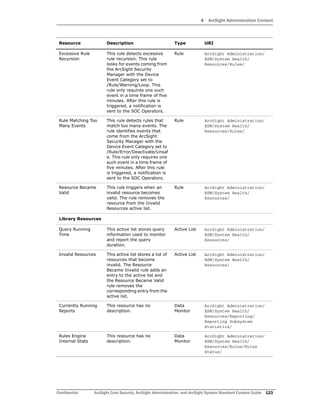
viewer, on an asset in the
navigator, or on a field
selected in an editor such as
the event inspector.
Integration
Configurati
on
ArcSight System/
Tools/Linux/
Traceroute
(Windows)
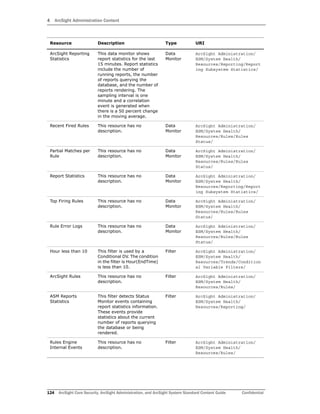
This integration configuration
is used to configure the
Windows traceroute
command. You can run the
command on an IP address
or hostname (string)
selected in the viewer, on an
asset in the navigator, or on
a field selected in an editor
such as the event inspector.
Integration
Configurati
on
ArcSight System/
Tools/Windows/
Resource Description Type URI
5 ArcSight System Content
168 ArcSight Core Security, ArcSight Administration, and ArcSight System Standard Content Guide Confidential
Nslookup (Windows) This integration configuration
is used to configure the
Windows nslookup
command. You can run the
command on an IP address
or hostname (string)
selected in the viewer, on an
asset in the navigator, or on
a field selected in an editor
such as the event inspector.
Integration
Configurati
on
ArcSight System/
Tools/Windows/
Web Search This integration configuration
is used to configure the web
search command. You can
run the command on any cell
selected in the viewer.
Integration
Configurati
on
ArcSight System/Tools/
Ping (Windows) This integration configuration
is used to configure the
Windows ping command. You
can run the command on an
IP address or hostname
(string) selected in the
viewer, on an asset in the
navigator, or on a field
selected in an editor such as
the event inspector.
Integration
Configurati
on
ArcSight System/
Tools/Windows/
Portinfo (Windows) This integration configuration
is used to configure the
Windows portinfo command.
You can run the command on
a port (Integer) selected in
the viewer or on a field
selected in an editor such as
the event inspector.
Integration
Configurati
on
ArcSight System/
Tools/Windows/
Ping (Linux) This integration configuration
is used to configure the
Linux ping command. You
can run the command on an
IP address or hostname
(string) selected in the
viewer, on an asset in the
navigator, or on a field
selected in an editor such as
the event inspector.
Integration
Configurati
on
ArcSight System/
Tools/Linux/
Whois (Windows) This integration configuration
is used to configure the
Windows whois command.
You can run the command on
an IP address or hostname
(string) selected in the
viewer, on an asset in the
navigator, or on a field
selected in an editor such as
the event inspector.
Integration
Configurati
on
ArcSight System/
Tools/Windows/
Resource Description Type URI
5 ArcSight System Content
Confidential ArcSight Core Security, ArcSight Administration, and ArcSight System Standard Content Guide 169
Whois (Linux) This integration configuration
is used to configure the
Linux whois command. You
can run the command on an
IP address or hostname
(string) selected in the
viewer, on an asset in the
navigator, or on a field
selected in an editor such as
the event inspector.
Integration
Configurati
on
ArcSight System/
Tools/Linux/
Traceroute (Linux) This integration configuration
is used to configure the
Linux traceroute command.
You can run the command on
an IP address or hostname
(string) selected in the
viewer, on an asset in the
navigator, or on a field
selected in an editor such as
the event inspector.
Integration
Configurati
on
ArcSight System/
Tools/Linux/
Daily Pattern
Discovery
This resource has no
description.
Profile ArcSight System
Quarter Hourly
Pattern Discovery
This resource has no
description.
Profile ArcSight System
Chart and 2 Tables
Landscape
This template is designed to
show one chart and two
tables. The orientation is
landscape.
Report
Template
ArcSight System/
1 Chart/With 2 Tables/
Chart and 2 Tables
Portrait
This template is designed to
show one chart and two
tables. The orientation is
portrait.
Report
Template
ArcSight System/
1 Chart/With 2 Tables/
Four Charts and
Table Landscape
This template is designed to
show four charts and a table.
The orientation is landscape.
Report
Template
ArcSight System/
4 Charts/With Table/
Simple Chart
Portrait
This template is designed to
show one chart. The
orientation is portrait.
Report
Template
ArcSight System/
1 Chart/Without Table/
Three Charts
Landscape
This template is designed to
show three charts and a
description field. The
orientation is landscape.
Report
Template
ArcSight System/
3 Charts/Without Table/
Simple Chart
Landscape
This template is designed to
show one chart. The
orientation is landscape.
Report
Template
ArcSight System/
1 Chart/Without Table/
Two Charts Portrait This template is designed to
show two charts. The
orientation is portrait.
Report
Template
ArcSight System/
2 Charts/Without Table/
Two Charts One
Table Portrait
This template is designed to
show two charts and a table.
The orientation is portrait.
Report
Template
ArcSight System/
2 Charts/With Table/
Resource Description Type URI
5 ArcSight System Content
170 ArcSight Core Security, ArcSight Administration, and ArcSight System Standard Content Guide Confidential
Two Charts
Landscape
This template is designed to
show two charts and a
description field. The
orientation is portrait.
Report
Template
ArcSight System/
2 Charts/Without Table/
Two Charts One
Table Landscape
This template is designed to
show two charts and a table.
The orientation is landscape.
Report
Template
ArcSight System/
2 Charts/With Table/
Simple Table Portrait This template is designed to
show a table. The orientation
is portrait.
Report
Template
ArcSight System/1 Table/
Simple Table
Landscape
This template is designed to
show a table. The orientation
is landscape.
Report
Template
ArcSight System/1 Table/
Chart and Table
Landscape
This template is designed to
show one chart and a table.
The orientation is landscape.
Report
Template
ArcSight System/
1 Chart/With Table/
Three Tables Portrait This template is designed to
show a table. The orientation
is portrait.
Report
Template
ArcSight System/3 Tables/
Chart and Table
Portrait
This template is designed to
show one chart and a table.
The orientation is portrait.
Report
Template
ArcSight System/
1 Chart/With Table/
Two Tables Portrait This template is designed to
show a table. The orientation
is portrait.
Report
Template
ArcSight System/2 Tables/
Three Charts and
Table Landscape
This template is designed to
show three charts and a
table. The orientation is
landscape.
Report
Template
ArcSight System/
3 Charts/With Table/
Four Charts
Landscape
This template is designed to
show four charts. The
orientation is landscape.
Report
Template
ArcSight System/
4 Charts/Without Table/
Two Tables
Landscape
This template is designed to
show a table. The orientation
is landscape.
Report
Template
ArcSight System/2 Tables/
Closed This stage indicates that the
event is closed.
Stage /All Stages/
Queued This stage indicates that the
event has not been
inspected.
Stage /All Stages/
Final This stage indicates that the
investigation has concluded.
Stage /All Stages/
Monitoring This stage indicates further
monitoring of an occurrence
of this event or pattern.
Stage /All Stages/
Flagged as Similar This stage indicates that the
event is similar to an event
already under investigation.
Stage /All Stages/
Resource Description Type URI
5 ArcSight System Content
Confidential ArcSight Core Security, ArcSight Administration, and ArcSight System Standard Content Guide 171
Follow-Up This stage indicates that the
event is under investigation.
Stage /All Stages/
Initial This stage indicates that the
event has been inspected.
Stage /All Stages/
Rule Created This stage indicates that a
rule was created to detect
further occurrences of this
event or pattern.
Stage /All Stages/
Resource Description Type URI
5 ArcSight System Content
172 ArcSight Core Security, ArcSight Administration, and ArcSight System Standard Content Guide Confidential
Confidential ArcSight Core Security, ArcSight Administration, and ArcSight System Standard Content Guide 173
A
Account Authenticators active list 148
active channels
Actor Audit Events 90
ASM Events 104
Connector Caching Events 63
Connector Connection Status Events 63
Connector Upgrades 56
Last 5 Minutes 161
Last Hour 161
Live 161
Logger Application Events 137
Logger Platform Events 137
Logger System Health Events 139
Personal Live 161
Query Viewers Status 113
Reports Status 113
Security Analysis 27
System Events Last Hour 44, 104, 162
Today 161
Trends Status 113
Active List Access (Details) query 126
Active List Access query 126
Active List Access report 121
active lists
Account Authenticators 148
Archive Task Failures 132
Black List - Connectors 70
Black List - Reverse Look Up 69
Compromised List 157
Connector Average EPS - Last 7 Days 77
Connector Daily Average EPS 77
Connector Information 38, 58, 68, 83
Connector Upgrades 59
Connectors - Caching 40, 60, 70
Connectors - Down 39, 59, 69
Connectors - Dropping Events 39, 68
Connectors - Still Caching 39, 58, 68
Connectors - Still Down 39, 59, 69
Content Management History 102
Critical Archive Failures 132
Event Operations 27
Event-based Rule Exclusions 162
general configuration 14, 15, 16
Hit List 157
Hostile List 157
Infiltrators List 157
Invalid Resources 123
Logger Sensor Type Status 49, 141
Logger Status 49, 140
Non-Security Alerts 28
Query Running Time 116, 123
Reconnaissance List 158
Reporting Devices 77
Reporting Devices - Critical 77
Scanned List 157
Storage Licensing Data by Connector 83
Suspicious Countries 28
Suspicious List 157
Trusted List 157
Untrusted List 157
User-based Rule Exclusions 162
Actor Administration dashboard 90
Actor Audit Events active channel 90
Actor Audit Field Set field set 95
Actor Authenticators query 97
Actor Authenticators query viewer 90
Actor Base field set 151
Actor Change Log dashboard 90
Actor Change Log data monitor 93
Actor Change Overview data monitor 92
Actor Changes filter 96
Actor Configuration Changes query 97
Actor Configuration Changes query viewer 90
Actor Configuration Changes use case 45
Actor Context Report by Account ID report 148
Actor Context Report by Attacker Username report 148
Actor Context Report by Custom Fields report 148
Actor Context Report by Target Username report 148
Actor Context Report report template 152
Actor Data asset category 149
Actor Data Support asset category 149
Actor Deletes filter 96
Actor Event Count by Account ID query 151
Actor Event Count by Attacker Username query 151
Actor Event Count by Custom Fields query 151
Actor Event Count by Target Username query 151
Actor Events by Account ID query 151
Actor Events by Attacker Username query 151
Actor Events by Custom Fields query 151
Actor Events by Target Username query 151
Actor Full Name and Email Changes query 97
Actor Full Name and Email Changes query viewer 91
Actor Full Name and Email Changes report 92
Actor global variable 93
Actor Information field set 151
Actor Information query 151
Actor Inserts filter 96
Actor Manager and Department Changes query 97
Actor Manager and Department Changes query viewer
90
Actor Manager and Department Changes report 92
Index
Index
174 ArcSight Core Security, ArcSight Administration, and ArcSight System Standard Content Guide Confidential
Actor Name or UUID filter 96
Actor Title and Status Changes query 97
Actor Title and Status Changes query viewer 91
Actor Title and Status Changes report 92
Actor Updates filter 95
ActorByAccountID global variable 149
ActorByAttackerUserName global variable 149
ActorByCustomFields global variable 150
ActorByDN global variable 150
ActorByTargetUserName global variable 150
ActorByUUID global variable 151
ActorFromFileName global variable 93
Actors Created query 97
Actors Created query viewer 91
Actors Deleted query 97
Actors Deleted query viewer 91
Actors Licensing Report focused report 84
Actors Updated query 97
Actors Updated query viewer 91
admincert destination 83
alias global variable 150
All Events filter 78, 88, 95, 100, 108, 125, 165
All Receivers and Forwarders global variable 51
All Receivers EPS filter 52
Annotation field set 164
Annotation-MgrRcpt field set 163
Archive Activation Statistics query 134
Archive Archival Statistics query 135
Archive Archival Success filter 133
Archive Archival Success query 135
Archive Deactivation Statistics query 135
Archive Disk Space data monitor 132
Archive Disk Space filter 133
Archive Disk space status is Critical filter 134
Archive Disk space status is OK filter 133
Archive Disk Space Usage query 135
Archive Events filter 133
Archive Events rule 130
Archive Events session list 136
Archive Failure Events filter 134
Archive Non-success events query 135
Archive Processing report 129
Archive Scheduling Statistics query 136
Archive Settings Updated Event filter 133
Archive Space status query 135
Archive Status dashboard 128
Archive status query 135
Archive Status Report report 128
Archive Task Failure Details query 134
Archive Task Failure Details query viewer 128
Archive Task Failures active list 132
Archive Task Failures rule 131
Archive Task Success rule 129
Archive Template report template 136
ArcSight Admin field set 44, 107, 163
ArcSight Administration
configuring 12
installing 11
ArcSight Administration overview 7
ArcSight Appliances Overview dashboard 48
ArcSight Audit Events filter 109
ArcSight Core Security overview 7
ArcSight Correlation Events filter 53, 145, 165
ArcSight Events filter 41, 78, 109, 165
ArcSight Foundations overview 8
ArcSight Internal Events filter 44, 109, 165
ArcSight Login Events filter 88
ArcSight Login Rule Firings filter 88
ArcSight Login Tracking filter 87
ArcSight Reporting Statistics data monitor 116, 124
ArcSight Rules filter 124
ArcSight Status Monitoring Events filter 107
ArcSight System
configuring 12
installing 11
ArcSight System overview 8
ArcSight User Hourly Login Trends query 88
ArcSight User Login rule 87
ArcSight User Login Timeout rule 87
ArcSight User Login Trends - Hourly trend 89
ArcSight User Login Trends report 86
ArcSight User Logins - Last Hour query 88
ArcSight User Logins - Last Hour report 86
ArcSight User Logout rule 86
ArcSight User Sessions data monitor 87
ArcSight User Sessions session list 89
ArcSight User Status dashboard 86
ASM CPU Load filter 108
ASM Database Free Space - by Day query 134
ASM Database Free Space - by Day report 129
ASM Database Free Space - by Hour query 135
ASM Database Free Space - by Hour report 129
ASM Database Free Space - Critical rule 130
ASM Database Free Space - Warning rule 131
ASM Database Free Space (current) query 135
ASM Database Free Space query 135
ASM Database Free Space report 129
ASM Database Free Space trend 136
ASM Database Load Statistics filter 108, 133
ASM Database Statistics filter 133
ASM Database Status Change - Critical rule 130
ASM Database Status Change - Down rule 130
ASM Database Status Change - Normal rule 131
ASM Database Status Change - Space Critical rule 131
ASM Database Status Change - Space Now Available rule
130
ASM Database Status Change - Warning rule 132
ASM Event Flow filter 108
ASM Events active channel 104
ASM Events field set 107
ASM Events filter 44, 108, 165
ASM Flow Load filter 109
ASM Load Overview filter 108
ASM Reports Statistics filter 116, 124
ASM Resource and Memory Load filter 108
ASM Standing Load filter 109
asset categories
Actor Data 149
Actor Data Support 149
Criticality 158
High 77, 158
Low 158
Medium 158
Protected 28, 106
Very High 158
Very Low 158
Asset field set 164
Asset Information field set 164
Assets having Vulnerability report 162
Assets Licensing Report focused report 83
Index
Confidential ArcSight Core Security, ArcSight Administration, and ArcSight System Standard Content Guide 175
Attacker Address is NULL filter 96
Attacker Host Name is NULL filter 96
Attacker Information is NULL filter 95
Attacker Port is NULL filter 96
Attacker User Name is NULL filter 151, 166
Attacker Zone AND Host are NULL but Address is NOT
NULL filter 96
Attacker Zone AND Host are NULL filter 96
Attacker Zone is NULL filter 95
Attacker Zone OR Host is NULL filter 95
AttackerHost global variable 94
Attackers on Hostile List filter 159
Attackers on Infiltrators List filter 159
Attackers on Reconnaissance List filter 159
Attackers on Suspicious List filter 159
Average Data Monitor Evaluations Per Second query 126
B
Black List - Connectors active list 70
Black List - Reverse Look Up active list 69
Blocked ArcSight Internal Events filter 164
Breakdown by Device Address From Connector query
110
Breakdown by Device Address From Connector query
viewer 105
Breakdown by Device Address From Vendor and Product
query 109
Breakdown by Device Address From Vendor and Product
query viewer 105
Breakdown by Event Names From Connector query 109
Breakdown by Event Names From Connector query
viewer 105
Breakdown by Event Names From Device query 110
Breakdown by Event Names From Device query viewer
105
Breakdown by Event Names From Vendor and Product
query 110
Breakdown by Event Names From Vendor and Product
query viewer 105
Breakdown by Event Priority From Connector query 110
Breakdown by Event Priority From Connector query
viewer 104
Breakdown by Event Priority From Device query 110
Breakdown by Event Priority From Device query viewer
105
Breakdown by Event Priority From Vendor and Product
query 110
Breakdown by Event Priority From Vendor and Product
query viewer 104
By Destination integration command 54
By Event Name integration command 53
By Source and Destination integration command 54
By Source integration command 53
By User integration command 53
By Vendor and Product integration command 54
C
Cache History by Connectors query 71
Cache History by Connectors report 65
Case Information field set 163
Categories field set 163
Change Source global variable 93
Chart and 2 Tables Landscape report template 169
Chart and 2 Tables Portrait report template 84, 169
Chart and Table Landscape report template 118, 127,
136, 170
Chart and Table Portrait report template 61, 81, 88,
103, 170
Closed stage 170
Common Conditions Editor field set 162
Compromise - Attempt rule 157
Compromise - Success rule 155
Compromised List active list 157
Compromised Targets filter 159
configuration
active lists 14, 15, 16
ArcSight Administration 12
ArcSight System 12
Configuration Changes by Type report 92
Configuration Changes by User report 92
Connector - Caches session list 72
Connector Added to Black List rule 67
Connector Asset Auto-Creation Controller filter 164
Connector Average EPS - Last 7 Days active list 77
Connector Average EPS - Last 7 Days query 80
Connector Average EPS - Last 7 days trend 81
Connector Cache Empty rule 67
Connector Cache Status data monitor 40, 70
Connector Cache Status filter 40, 70
Connector Caching Event filter 71
Connector Caching Events active channel 63
Connector Caching rule 67
Connector Configuration Changes use case 42
Connector Connection and Cache Status dashboard 37,
63
Connector Connection and Cache Status use case 42
Connector Connection Status data monitor 40, 70
Connector Connection Status Events active channel 63
Connector Connection Status filter 40, 71
Connector Daily Average EPS active list 77
Connector Daily Average EPS query 80
Connector Daily Average EPS trend 81
Connector Deleted rule 58, 66
Connector Discovered or Updated rule 68
Connector Down rule 67
Connector Dropping Events rule 67
Connector Information active list 38, 58, 68, 83
Connector Monitor Event query 79
Connector Monitoring Events field set 44, 70, 107, 163
Connector Registered or Heartbeat Event filter 71
Connector Severity Hourly Stacked Chart query 80
Connector Severity Hourly Stacked Chart report 74
Connector Still Caching rule 65
Connector Still Down rule 66
Connector Total Events - Hourly trend 81
Connector Up rule 65
Connector Upgrade Failed rule 57
Connector Upgrade Successful rule 58
Connector Upgrades active channel 56
Connector Upgrades active list 59
Connector Upgrades Count (Total) query 60
Connector Upgrades Count query 60
Connector Upgrades Count report 57
Connector Upgrades field set 60
Connector Version Detected rule 58, 66
Connector Versions by Type query 61
Connector Versions by Type report 56
Connector Versions query 60
Index
176 ArcSight Core Security, ArcSight Administration, and ArcSight System Standard Content Guide Confidential
Connector Versions report 56
Connector Versions session list 61, 72
ConnectorID global variable 83
ConnectorName global variable 83
ConnectorNameFromID global variable 83
Connectors - Caching - Long Term query 41, 71
Connectors - Caching - Long Term query viewer 38, 64
Connectors - Caching - Short Term query 41, 72
Connectors - Caching - Short Term query viewer 38, 64
Connectors - Caching active list 40, 60, 70
Connectors - Down - Long Term query viewer 37, 64
Connectors - Down - Short Term query viewer 37, 64
Connectors - Down active list 39, 59, 69
Connectors - Down query 41, 71
Connectors - Dropping Events active list 39, 68
Connectors - Dropping Events query 41, 71
Connectors - Dropping Events query viewer 37, 63
Connectors - Still Caching active list 39, 58, 68
Connectors - Still Down active list 39, 59, 69
Connectors - Still Down query 41, 71
ConnectorType global variable 83
Console and ArcSight Web Status dashboard 86
Console Users Licensing Report focused report 83
Content Management Data rule 102
Content Management History active list 102
content packages 9
Correlation Events Count (Details) query 125
Correlation Events Count query 125
Correlation Events filter 151, 166
Correlation Events Statistics report 122
CPU and Memory dashboard 139
CPU Name global variable 51
CPU Sensors data monitor 142
CPU Sensors filter 144
CPU Usage (Percent) - Last 10 Minutes data monitor 50,
143
CPU Usage (Percent) - Last Hour data monitor 141
CPU Usage filter 52, 144
Created report 92
createTime global variable 150
creator global variable 149
Critical Archive Failure Details query 134
Critical Archive Failure Details query viewer 128
Critical Archive Failures active list 132
Critical Archive Failures rule 129
Critical Archive Success rule 131
Critical Device Not Reporting filter 78
Critical Device Not Reporting rule 76
Critical Device Reported rule 77
Critical Devices - Heads Up Display data monitor 77
Critical Devices Up Down filter 78
Criticality asset category 158
Current Cache Status - Caching Events query 71
Current Cache Status - Dropping Events query 71
Current Cache Status report 65
Current Connector Status data monitor 40, 70
Current Event Sources dashboard 37, 74
Current Users Logged In data monitor 87
Currently Running Reports data monitor 116, 123
D
Daily Pattern Discovery profile 169
dashboards
Actor Administration 90
Actor Change Log 90
Archive Status 128
ArcSight Appliances Overview 48
ArcSight User Status 86
Connector Connection and Cache Status 37, 63
Console and ArcSight Web Status 86
CPU and Memory 139
Current Event Sources 37, 74
Database Performance Statistics 128
Device Status 74
ESM System Information 44
Event Count History 104
Event Overview 104
Event Throughput 104
Firewall Monitoring Overview 27
Hardware 139
IDS - IPS Overview 27
Latest Events By Priority 104
Microsoft Windows Monitoring Overview 27
My Logger Overview 48, 139
NetFlow Bandwidth Usage Overview 27
Network 139
Query Running Time Overview 113, 120
Query Viewer Details 113
Report Details 114
Reporting Subsystem Statistics 113, 120
Resource Change Log 98
Rules Status 120
Security Alerts Overview 27
Storage 139
Synchronization Status History 101
Trend Details 113
Data Monitor Evaluations Statistics report 122
data monitors
Actor Change Log 93
Actor Change Overview 92
Archive Disk Space 132
ArcSight Reporting Statistics 116, 124
ArcSight User Sessions 87
Connector Cache Status 40, 70
Connector Connection Status 40, 70
CPU Sensors 142
CPU Usage (Percent) - Last 10 Minutes 50, 143
CPU Usage (Percent) - Last Hour 141
Critical Devices - Heads Up Display 77
Current Connector Status 40, 70
Current Users Logged In 87
Currently Running Reports 116, 123
Database Free Space 132
Database Insert Time - Last 24 Hours 132
Database Insert Time - Last Hour 132
Database Retrieval Time - Last 24 Hours 132
Database Retrieval Time - Last Hour 132
Database Transaction Volume 132
Denied Outbound Connections 29
Disk Read and Write (Kbytes per Second) - Last 10
Minutes 50, 142
Disk Read and Write (Kbytes per Second) - Last
Hour 142
Disk Usage 50, 143
Disk Usage (Percent) 141
EPS Usage (Events per Second) - Last 10 Minutes
50, 142
EPS Usage (Events per Second) - Last Hour 141
Event Counts 107
Index
Confidential ArcSight Core Security, ArcSight Administration, and ArcSight System Standard Content Guide 177
Event Log Alerts 29
Event Throughput 107
Event Throughput Statistics 107
Events by Connector 107
Events by Device Address 107
Events By Priority 106
Events by Vendor and Product 107
FAN Sensors 143
Internal Connection Drops 28
Internal Hosts at Risk 29
Last 10 Trend Queries Returning No Results 116
Latest Elevated Threat Events 106
Latest Guarded Threat Events 106
Latest High Threat Events 107
Latest Low Threat Events 107
Latest Severe Threat Events 107
Logger Disk Usage 49
Logger Hardware Status 49
Memory Usage (Mbytes per Second) - Last 10
Minutes 50, 142
Memory Usage (Mbytes per Second) - Last Hour
143
Network Usage (Bytes) - Last 10 Minutes 49, 141
Network Usage (Bytes) - Last Hour 141
Notification Log 87
Partial Matches per Rule 124
Recent Archive Events 133
Recent Fired Rules 124
Recent System Resource Deletes 99
Recent System Resource Inserts 99
Recent System Resource Updates 99
Report Statistics 116, 124
Resource Change Log 99
Resource Change Overview 99
Rule Error Logs 124
Rules Engine Internal Stats 123
Security Alerts 29
Security Analysis Graph 28
Sensor Type Status 50, 142
System Information 44
System Sensors 143
Top Alert Destinations 29
Top Alert Sources 29
Top Alert Types 28
Top Alerts 29
Top Bandwidth Usage (MB) by Destination 28
Top Bandwidth Usage (MB) by Non-Well-Known
Port 28
Top Bandwidth Usage (MB) by Source 28
Top Bandwidth Usage (MB) by Well-Known Port 28
Top Denied Inbound Connections by Address 29
Top Denied Inbound Connections by Port 28
Top Event Sources 40, 77
Top Firing Rules 124
User Access Log 87
Windows Events 28
Windows Operations 28
Windows Reporting Devices 28
Database Free Space data monitor 132
Database Insert Time - Last 24 Hours data monitor 132
Database Insert Time - Last Hour data monitor 132
Database Insert Time Statistics filter 133
Database Performance Statistics dashboard 128
Database Retrieval Time - Last 24 Hours data monitor
132
Database Retrieval Time - Last Hour data monitor 132
Database Retrieval Time Statistics filter 134
Database Transaction Volume data monitor 132
Deleted report 91
Denied Inbound Connections filter 30
Denied Outbound Connections data monitor 29
Denied Outbound Connections filter 29
Department New Value global variable 93
Department Old Value global variable 95
description global variable 150
Destination Counts by Connector Type query 80
Destination Counts by Connector Type report 75
Destination Counts query 110
Destination Counts report 106
destinations
admincert 83
Device Asset Auto-Creation Controller filter 164
Device Monitoring use case 42
Device Reported rule 76
Device Status dashboard 74
Devices Licensing Report focused report 84
Disk Name global variable 51
Disk Read and Write (Kbytes per Second) - Last 10
Minutes data monitor 50, 142
Disk Read and Write (Kbytes per Second) - Last Hour
data monitor 142
Disk Read and Write filter 53, 145
Disk Usage (Percent) data monitor 141
Disk Usage data monitor 50, 143
Disk Usage filter 145
Disk Usage global variable 51
DiskUsageCritical global variable 51
DN New Value global variable 93
DN Old Value global variable 94
E
Elevated Threat Condition filter 109
Email Address New Value global variable 94
Email Address Old Value global variable 94
Employee Type New Value global variable 95
Employee Type Old Value global variable 94
EPS Usage (Events per Second) - Last 10 Minutes data
monitor 50, 142
EPS Usage (Events per Second) - Last Hour data monitor
141
EPS Usage filter 53, 145
ESM Configuration Changes by Type report 98
ESM Configuration Changes by User report 98
ESM Configuration Changes query 100
ESM Events use case 45
ESM Licensing use case 45
ESM Reporting Resource Monitoring use case 45, 127
ESM Resource Configuration Changes use case 45
ESM Resource Monitoring use case 45
ESM Storage Monitoring (CORR) use case 45
ESM System Information dashboard 44
ESM User Sessions use case 45
Event Base field set 44, 60, 70, 107, 116, 162
Event Count by Agent Severity query 110
Event Count by Agent Severity report 106
Event Count by Source Destination Pairs query 110
Event Count by Source Destination Pairs report 106
Event Count History dashboard 104
Event Counts data monitor 107
Index
178 ArcSight Core Security, ArcSight Administration, and ArcSight System Standard Content Guide Confidential
Event Data Free Space - Last 30 Days focused report 134
Event Details query 111
Event Details query viewer 105
Event Distribution Chart for a Connector Type query 79
Event Distribution Chart for a Connector Type report 75
Event Inspector field set 163
Event Log Alerts data monitor 29
Event Log Alerts filter 30
Event Name Counts query 111
Event Name Counts report 105
Event Operations active list 27
Event Operations filter 30
Event Overview dashboard 104
Event Throughput dashboard 104
Event Throughput data monitor 107
Event Throughput Statistics data monitor 107
Event-based Rule Exclusions active list 162
Events by ArcSight Priority (Summary) query 111
Events by ArcSight Priority (Summary) report 106
Events by Connector data monitor 107
Events by Connector Type (Summary) query 80
Events by Connector Type (Summary) report 74
Events by Device (Summary) query 79
Events by Device (Summary) report 74
Events by Device Address data monitor 107
Events By Priority data monitor 106
Events by Selected Connector Type query 79
Events by Selected Connector Type report 75
Events by Vendor and Product data monitor 107
Events Count Last 30 Days query 111
Events Count Last 30 Days query viewer 105
Events Count Last 7 Days query 111
Events Count Last 7 Days query viewer 105
Events Count query 110
Events Count trend 112
Events for a Destination by Connector Type query 79
Events for a Destination by Connector Type report 75
Events from a Source by Connector Type query 80
Events from a Source by Connector Type report 76
Excessive Rule Recursion rule 123
Executive field set 162
Export field set 163
External Source filter 30, 108
External Target filter 31, 109
externalID global variable 149
F
Failed Connector Upgrades query 61
Failed Connector Upgrades report 56
Failed Queries - Trend query 118, 126
Failed Queries query 117, 125
Failed Queries report 115
Failed Queries trend 119, 127
FAN Sensors data monitor 143
FAN Sensors filter 145
Field Set Based On ARC_E_ET Index field set 163
Field Set Based On ARC_E_MRT Index field set 163
field sets
Actor Audit Field Set 95
Actor Base 151
Actor Information 151
Annotation 164
Annotation-MgrRcpt 163
ArcSight Admin 44, 107, 163
ASM Events 107
Asset 164
Asset Information 164
Case Information 163
Categories 163
Common Conditions Editor 162
Connector Monitoring Events 44, 70, 107, 163
Connector Upgrades 60
Event Base 44, 60, 70, 107, 116, 162
Event Inspector 163
Executive 162
Export 163
Field Set Based On ARC_E_ET Index 163
Field Set Based On ARC_E_MRT Index 163
Firewall Alerts 29
Logger Application Events 137
Logger Platform Events 137
Logger System Health Events 51, 143
Minimal 163
MSSP 163
Query Status 116
Rule Action - Set Event Field 163
Security 163
Security Alerts 29
Standard 40, 78, 162
Standard-MgrRcpt 163
Super Minimal 162
TurboMode Comprehensive 162
TurboMode Fastest 164
Field Status global variable 51
Field Value global variable 51
File Path StartsWith All Rules filter 134
filters
Actor Changes 96
Actor Deletes 96
Actor Inserts 96
Actor Name or UUID 96
Actor Updates 95
All Events 78, 88, 95, 100, 108, 125, 165
All Receivers EPS 52
Archive Archival Success 133
Archive Disk Space 133
Archive Disk space status is Critical 134
Archive Disk space status is OK 133
Archive Events 133
Archive Failure Events 134
Archive Settings Updated Event 133
ArcSight Audit Events 109
ArcSight Correlation Events 53, 145, 165
ArcSight Events 41, 78, 109, 165
ArcSight Internal Events 44, 109, 165
ArcSight Login Events 88
ArcSight Login Rule Firings 88
ArcSight Login Tracking 87
ArcSight Rules 124
ArcSight Status Monitoring Events 107
ASM CPU Load 108
ASM Database Load Statistics 108, 133
ASM Database Statistics 133
ASM Event Flow 108
ASM Events 44, 108, 165
ASM Flow Load 109
ASM Load Overview 108
ASM Reports Statistics 116, 124
ASM Resource and Memory Load 108
Index
Confidential ArcSight Core Security, ArcSight Administration, and ArcSight System Standard Content Guide 179
ASM Standing Load 109
Attacker Address is NULL 96
Attacker Host Name is NULL 96
Attacker Information is NULL 95
Attacker Port is NULL 96
Attacker User Name is NULL 151, 166
Attacker Zone AND Host are NULL 96
Attacker Zone AND Host are NULL but Address is
NOT NULL 96
Attacker Zone is NULL 95
Attacker Zone OR Host is NULL 95
Attackers on Hostile List 159
Attackers on Infiltrators List 159
Attackers on Reconnaissance List 159
Attackers on Suspicious List 159
Blocked ArcSight Internal Events 164
Compromised Targets 159
Connector Asset Auto-Creation Controller 164
Connector Cache Status 40, 70
Connector Caching Event 71
Connector Connection Status 40, 71
Connector Registered or Heartbeat Event 71
Correlation Events 151, 166
CPU Sensors 144
CPU Usage 52, 144
Critical Device Not Reporting 78
Critical Devices Up Down 78
Database Insert Time Statistics 133
Database Retrieval Time Statistics 134
Denied Inbound Connections 30
Denied Outbound Connections 29
Device Asset Auto-Creation Controller 164
Disk Read and Write 53, 145
Disk Usage 145
Elevated Threat Condition 109
EPS Usage 53, 145
Event Log Alerts 30
Event Operations 30
External Source 30, 108
External Target 31, 109
FAN Sensors 145
File Path StartsWith All Rules 134
Guarded Threat Condition 108
High Criticality Assets 158
High Threat Condition 108
Hour less than 10 116, 124
IDS -IPS Events 30
Inbound Events 31, 108
Inbound Network 53
Internal Firewall Events 30
Internal Source 30, 108
Internal Target 30, 108
Internal to Internal Events 30
Logger Application Events 137
Logger Disk Usage 53, 145
Logger Events 52, 137, 144
Logger Hardware Status 52
Logger Platform Events 137
Logger System Health Events 52, 137, 144
Low Criticality Assets 158
Low Threat Condition 109
ManagerInternalAgent'sFilters' 165
Medium Criticality Assets 159
Memory Usage 52, 144
Minute less than 10 117, 125
My Logger 52, 144
NetFlow Traffic for Non-Well-Known Ports 31
NetFlow Traffic for Well-Known Ports 31
NetFlow Traffic Reporting Devices 30
NetFlow V5 Events 31
NetFlow V9 Events 31
Network Usage 52, 144
No Events 165
Non-ArcSight Events 41, 78, 109, 166
Non-ArcSight Internal Events 109, 165
Non-Categorized Events 164
Not Correlated and Not Closed 164
Not Correlated and Not Closed and Not Hidden 165
Notification Actions 87, 108
Outbound Events 30, 108
QoSient Argus Events 30
Remaining Disk Less than 5 Percent 53
Remaining Disk More than 10 Percent 52
Resource Changes 100
Resource Deletes 99
Resource Inserts 99
Resource Updates 99
Rules Engine Internal Events 124
Security Alerts 30
Sensor Type is CPU 51, 144
Sensor Type is FAN 52, 144
Sensor Type Update 53, 145
Severe Threat Condition 108
Severity High 165
Severity Low 165
Severity Medium 166
Severity Unknown 166
Severity Very High 164
SNMP Trap Sender 165
System Sensors 145
Target Asset Scanned for Open Ports 158
Target Asset Scanned for Vulnerabilities 158
Target User Name is NULL 96, 99
Threshold - Critical 133
Threshold - Warning 133
Trend Query Returning No Results 116
Unknown Criticality Assets 158
Very High Criticality Assets 158
Very Low Criticality Assets 158
White List - Critical Devices 78
White List - Devices 78
Windows Events 30
Final stage 170
Fired Rule Events query 125
Fired Rule Events report 122
Firewall Alerts field set 29
Firewall Monitoring Overview dashboard 27
Flagged as Similar stage 170
focused reports
Actors Licensing Report 84
Assets Licensing Report 83
Console Users Licensing Report 83
Devices Licensing Report 84
Event Data Free Space - Last 30 Days 134
System Data Free Space - Last 30 Days 134
Web Users Licensing Report 84
Follow-Up stage 171
Four Charts and Table Landscape report template 169
Four Charts Landscape report template 170
Free Space global variable 51
Index
180 ArcSight Core Security, ArcSight Administration, and ArcSight System Standard Content Guide Confidential
Full Name New Value global variable 93
Full Name Old Value global variable 95
G
global variables
Actor 93
ActorByAccountID 149
ActorByAttackerUserName 149
ActorByCustomFields 150
ActorByDN 150
ActorByTargetUserName 150
ActorByUUID 151
ActorFromFileName 93
alias 150
All Receivers and Forwarders 51
AttackerHost 94
Change Source 93
ConnectorID 83
ConnectorName 83
ConnectorNameFromID 83
ConnectorType 83
CPU Name 51
createTime 150
creator 149
Department New Value 93
Department Old Value 95
description 150
Disk Name 51
Disk Usage 51
DiskUsageCritical 51
DN New Value 93
DN Old Value 94
Email Address New Value 94
Email Address Old Value 94
Employee Type New Value 95
Employee Type Old Value 94
externalID 149
Field Status 51
Field Value 51
Free Space 51
Full Name New Value 93
Full Name Old Value 95
groupId 149
id 150
Inbound and Outbound 51
IndexOfUsage 51
Location New Value 94
Location Old Value 93
Logger Address 51
Logger IP 51, 143
Manager New Value 93
Manager Old Value 94
MBytesTotal 29
Memory Name 51
modificationTime 150
name 150
Org New Value 93
Org Old Value 95
owner 150
ReadOrWrite 51
Sensor Name 50
Sensor Status 50
Sensor Type 51
Status New Value 94
Status Old Value 95
Timeframe 51
Title New Value 93
Title Old Value 95
Unit 51
groupId global variable 149
Guarded Threat Condition filter 108
H
Hardware dashboard 139
High asset category 77, 158
High Criticality Assets filter 158
High Threat Condition filter 108
High Volume Connector EPS - By Day query 79
High Volume Connector EPS - Daily report 76
High Volume Connector EPS - Hourly query 79
High Volume Connector EPS - Weekly report 75
Hit List active list 157
Hostile - Attempt rule 155
Hostile - Success rule 156
Hostile List active list 157
Hour less than 10 filter 116, 124
Hourly Distribution Chart for a Destination Port query
111
Hourly Distribution Chart for a Destination Port report
106
Hourly Distribution Chart for a Source Port query 111
Hourly Distribution Chart for a Source Port report 106
Hourly Distribution Chart for Event query 111
Hourly Distribution Chart for Event report 106
Hourly Event Counts (Area Chart) query 111
Hourly Event Counts (Area Chart) report 105
Hourly Stacked Chart by ArcSight Priority (3D Stacked
Bar Chart) query 111
Hourly Stacked Chart by ArcSight Priority (3D Stacked
Bar Chart) report 105
I
id global variable 150
IDM Deletions of Actors query 96
IDM Deletions of Actors query viewer 90
IDM Deletions of Actors report 91
IDS - IPS Overview dashboard 27
IDS -IPS Events filter 30
Inbound and Outbound global variable 51
Inbound Events filter 31, 108
Inbound Network filter 53
Incident Resolved - Remove From List rule 157
IndexOfUsage global variable 51
Infiltrators List active list 157
Initial stage 171
installing
ArcSight Administration 11
ArcSight System 11
integration commands
By Destination 54
By Event Name 53
By Source 53
By Source and Destination 54
By User 53
By Vendor and Product 54
Logger Quick Search 54
Nslookup (Linux) 166
Index
Confidential ArcSight Core Security, ArcSight Administration, and ArcSight System Standard Content Guide 181
Nslookup (Windows) 166
Ping (Linux) 166
Ping (Windows) 166
Portinfo (Linux) 167
Portinfo (Windows) 166
Traceroute (Linux) 167
Traceroute (Windows) 166
Web Search 166
Whois (Linux) 167
Whois (Windows) 167
integration configurations
Logger Quick Search 54
Logger Search 54
Nslookup (Linux) 167
Nslookup (Windows) 168
Ping (Linux) 168
Ping (Windows) 168
Portinfo (Linux) 167
Portinfo (Windows) 168
Traceroute (Linux) 169
Traceroute (Windows) 167
Web Search 168
Whois (Linux) 169
Whois (Windows) 168
integration targets
Logger Appliance 1 54
Logger Appliance 2 54
Internal Connection Drops data monitor 28
Internal Firewall Events filter 30
Internal Hosts at Risk data monitor 29
Internal Source filter 30, 108
Internal Target filter 30, 108
Internal to Internal Events filter 30
Invalid Resources (Chart) query 125
Invalid Resources active list 123
Invalid Resources query 125
Invalid Resources report 121
L
Last 10 Query Viewer Queries query viewer 115
Last 10 QueryViewer Queries query 117
Last 10 Report Queries query 117
Last 10 Report Queries query viewer 114
Last 10 Trend Queries query 118
Last 10 Trend Queries query viewer 114
Last 10 Trend Queries Returning No Results data monitor
116
Last 5 Minutes active channel 161
Last Hour active channel 161
Latest Elevated Threat Events data monitor 106
Latest Events By Priority dashboard 104
Latest Guarded Threat Events data monitor 106
Latest High Threat Events data monitor 107
Latest Low Threat Events data monitor 107
Latest Severe Threat Events data monitor 107
License Audit Event Detected rule 82
Licensing History session list 85
Licensing Query query 84
Licensing Report (All) report 82
Licensing Report (All) report template 85
Licensing Report report 82
Licensing Report report template 84
Live active channel 161
Location New Value global variable 94
Location Old Value global variable 93
Logger Address global variable 51
Logger Appliance 1 integration target 54
Logger Appliance 2 integration target 54
Logger Application Events active channel 137
Logger Application Events field set 137
Logger Application Events filter 137
Logger Disk Usage data monitor 49
Logger Disk Usage filter 53, 145
Logger Events filter 52, 137, 144
Logger Events use case 55
Logger Hardware Status data monitor 49
Logger Hardware Status filter 52
Logger IP global variable 51, 143
Logger Platform Events active channel 137
Logger Platform Events field set 137
Logger Platform Events filter 137
Logger Quick Search integration command 54
Logger Quick Search integration configuration 54
Logger Search integration configuration 54
Logger Sensor Status rule 48, 140
Logger Sensor Type Status active list 49, 141
Logger Sensor Type Status rule 48, 140
Logger Status active list 49, 140
Logger Status rule 48, 140
Logger System Health Events active channel 139
Logger System Health Events field set 51, 143
Logger System Health Events filter 52, 137, 144
Logger System Health use case 54
Longest QueryViewer Queries - Trend query 117
Longest QueryViewer Queries query 117, 125
Longest QueryViewer Queries report 115
Longest Report Queries - Trend query 118
Longest Report Queries query 117, 126
Longest Report Queries report 115
Longest Trend Queries - Trend query 118
Longest Trend Queries query 117, 125
Longest Trend Query report 115
Low asset category 158
Low Criticality Assets filter 158
Low Threat Condition filter 109
Low Volume Connector EPS - By Day query 78
Low Volume Connector EPS - Daily report 74
Low Volume Connector EPS - Hourly query 79
Low Volume Connector EPS - Weekly report 76
M
Manager Internal AgentsFiltersfilter 165
Manager New Value global variable 93
Manager Old Value global variable 94
MBytesTotal global variable 29
Medium asset category 158
Medium Criticality Assets filter 159
Memory Name global variable 51
Memory Usage (Mbytes per Second) - Last 10 Minutes
data monitor 50, 142
Memory Usage (Mbytes per Second) - Last Hour data
monitor 143
Memory Usage filter 52, 144
Microsoft Windows Monitoring Overview dashboard 27
Minimal field set 163
Minute less than 10 filter 117, 125
modificationTime global variable 150
Monitoring stage 170
Index
182 ArcSight Core Security, ArcSight Administration, and ArcSight System Standard Content Guide Confidential
MSSP field set 163
My Logger filter 52, 144
My Logger Overview dashboard 48, 139
N
name global variable 150
NetFlow Bandwidth Usage Overview dashboard 27
NetFlow Traffic for Non-Well-Known Ports filter 31
NetFlow Traffic for Well-Known Ports filter 31
NetFlow Traffic Reporting Devices filter 30
NetFlow V5 Events filter 31
NetFlow V9 Events filter 31
Network dashboard 139
Network Usage (Bytes) - Last 10 Minutes data monitor
49, 141
Network Usage (Bytes) - Last Hour data monitor 141
Network Usage filter 52, 144
No Events filter 165
Non-ArcSight Events filter 41, 78, 109, 166
Non-ArcSight Internal Events filter 109, 165
Non-Categorized Events filter 164
Non-Security Alerts active list 28
Not Correlated and Not Closed and Not Hidden filter 165
Not Correlated and Not Closed filter 164
Notification Actions filter 87, 108
Notification Log data monitor 87
Nslookup (Linux) integration command 166
Nslookup (Linux) integration configuration 167
Nslookup (Windows) integration command 166
Nslookup (Windows) integration configuration 168
Number of Events matching Rules query 127
Number of Events Matching Rules report 122
O
Org New Value global variable 93
Org Old Value global variable 95
Out of Domain Fields rule 131
Outbound Events filter 30, 108
owner global variable 150
P
Partial Matches per Rule data monitor 124
Personal Live active channel 161
Ping (Linux) integration command 166
Ping (Linux) integration configuration 168
Ping (Windows) integration command 166
Ping (Windows) integration configuration 168
Portinfo (Linux) integration command 167
Portinfo (Linux) integration configuration 167
Portinfo (Windows) integration command 166
Portinfo (Windows) integration configuration 168
profiles
Daily Pattern Discovery 169
Quarter Hourly Pattern Discovery 169
Protected asset category 28, 106
Q
QoSient Argus Events filter 30
Quarter Hourly Pattern Discovery profile 169
queries
Active List Access 126
Active List Access (Details) 126
Actor Authenticators 97
Actor Configuration Changes 97
Actor Event Count by Account ID 151
Actor Event Count by Attacker Username 151
Actor Event Count by Custom Fields 151
Actor Event Count by Target Username 151
Actor Events by Account ID 151
Actor Events by Attacker Username 151
Actor Events by Custom Fields 151
Actor Events by Target Username 151
Actor Full Name and Email Changes 97
Actor Information 151
Actor Manager and Department Changes 97
Actor Title and Status Changes 97
Actors Created 97
Actors Deleted 97
Actors Updated 97
Archive Activation Statistics 134
Archive Archival Statistics 135
Archive Archival Success 135
Archive Deactivation Statistics 135
Archive Disk Space Usage 135
Archive Non-success events 135
Archive Scheduling Statistics 136
Archive Space status 135
Archive status 135
Archive Task Failure Details 134
ArcSight User Hourly Login Trends 88
ArcSight User Logins - Last Hour 88
ASM Database Free Space 135
ASM Database Free Space - by Day 134
ASM Database Free Space - by Hour 135
ASM Database Free Space (current) 135
Average Data Monitor Evaluations Per Second 126
Breakdown by Device Address From Connector 110
Breakdown by Device Address From Vendor and
Product 109
Breakdown by Event Names From Connector 109
Breakdown by Event Names From Device 110
Breakdown by Event Names From Vendor and
Product 110
Breakdown by Event Priority From Connector 110
Breakdown by Event Priority From Device 110
Breakdown by Event Priority From Vendor and
Product 110
Cache History by Connectors 71
Connector Average EPS - Last 7 Days 80
Connector Daily Average EPS 80
Connector Monitor Event 79
Connector Severity Hourly Stacked Chart 80
Connector Upgrades Count 60
Connector Upgrades Count (Total) 60
Connector Versions 60
Connector Versions by Type 61
Connectors - Caching - Long Term 41, 71
Connectors - Caching - Short Term 41, 72
Connectors - Down 41, 71
Connectors - Dropping Events 41, 71
Connectors - Still Down 41, 71
Correlation Events Count 125
Correlation Events Count (Details) 125
Critical Archive Failure Details 134
Current Cache Status - Caching Events 71
Current Cache Status - Dropping Events 71
Index
Confidential ArcSight Core Security, ArcSight Administration, and ArcSight System Standard Content Guide 183
Destination Counts 110
Destination Counts by Connector Type 80
ESM Configuration Changes 100
Event Count by Agent Severity 110
Event Count by Source Destination Pairs 110
Event Details 111
Event Distribution Chart for a Connector Type 79
Event Name Counts 111
Events by ArcSight Priority (Summary) 111
Events by Connector Type (Summary) 80
Events by Device (Summary) 79
Events by Selected Connector Type 79
Events Count 110
Events Count Last 30 Days 111
Events Count Last 7 Days 111
Events for a Destination by Connector Type 79
Events from a Source by Connector Type 80
Failed Connector Upgrades 61
Failed Queries 117, 125
Failed Queries - Trend 118, 126
Fired Rule Events 125
High Volume Connector EPS - By Day 79
High Volume Connector EPS - Hourly 79
Hourly Distribution Chart for a Destination Port 111
Hourly Distribution Chart for a Source Port 111
Hourly Distribution Chart for Event 111
Hourly Event Counts (Area Chart) 111
Hourly Stacked Chart by ArcSight Priority (3D
Stacked Bar Chart) 111
IDM Deletions of Actors 96
Invalid Resources 125
Invalid Resources (Chart) 125
Last 10 QueryViewer Queries 117
Last 10 Report Queries 117
Last 10 Trend Queries 118
Licensing Query 84
Longest QueryViewer Queries 117, 125
Longest QueryViewer Queries - Trend 117
Longest Report Queries 117, 126
Longest Report Queries - Trend 118
Longest Trend Queries 117, 125
Longest Trend Queries - Trend 118
Low Volume Connector EPS - By Day 78
Low Volume Connector EPS - Hourly 79
Number of Events matching Rules 127
Query Counts During Last 24 hr 118, 126
Query Counts During Last Week 118
QueryViewer Failures 117
QueryViewer Queries 117
Report Queries 118
Report Query Failures 118
Resource Created Report 100
Resource Deleted Report 100
Resource History Report 100
Resource Updated Report 100
Rules Engine Warning Messages 126
Running Report Queries 118
Running Trend Queries 118
Session List Access 126
Session List Access (Details) 125
Source Counts by Connector Type 78
Source Counts by Event Name 110
Storage Licensing Data 84
Storage Licensing Data - trend 84
Storage Licensing Data by Connector Name - trend
84
Storage Licensing Data by Connector Type - trend
84
Successful Connector Upgrades 60
Top 10 Events 110
Top 10 Inbound Events 110
Top 10 Outbound Events 110
Top Accessed Active Lists 125
Top Accessed Session Lists 126
Top Connector Types Chart 80
Top Packages with Synchronization Errors 103
Top Subscribers with Errors 102
Top Synchronization Errors 102
Trend Query 117
Trend Query Failures 117
Upgrade History by Connector 60
Upgrade History by Connector Type 60
User Login Logout Report 88
Version History by Connector 61
Version History by Connector Type 60
Windows Events by Device Trend 31
Windows Events over Time 31
Query Counts by Type report 115
Query Counts During Last 24 hr query 118, 126
Query Counts During Last 24 hr query viewer 114, 121
Query Counts During Last Week query 118
Query Failures During Last 24 hr query viewer 114, 120
Query Running Time active list 116, 123
Query Running Time Overview dashboard 113, 120
Query Running Time rule 115
Query Status field set 116
Query Viewer Details dashboard 113
Query Viewer Failures During Last 24 hr query viewer
115
query viewers
Actor Authenticators 90
Actor Configuration Changes 90
Actor Full Name and Email Changes 91
Actor Manager and Department Changes 90
Actor Title and Status Changes 91
Actors Created 91
Actors Deleted 91
Actors Updated 91
Archive Task Failure Details 128
Breakdown by Device Address From Connector 105
Breakdown by Device Address From Vendor and
Product 105
Breakdown by Event Names From Connector 105
Breakdown by Event Names From Device 105
Breakdown by Event Names From Vendor and
Product 105
Breakdown by Event Priority From Connector 104
Breakdown by Event Priority From Device 105
Breakdown by Event Priority From Vendor and
Product 104
Connectors - Caching - Long Term 38, 64
Connectors - Caching - Short Term 38, 64
Connectors - Down - Long Term 37, 64
Connectors - Down - Short Term 37, 64
Connectors - Dropping Events 37, 63
Critical Archive Failure Details 128
Event Details 105
Events Count Last 30 Days 105
Events Count Last 7 Days 105
IDM Deletions of Actors 90
Index
184 ArcSight Core Security, ArcSight Administration, and ArcSight System Standard Content Guide Confidential
Last 10 Query Viewer Queries 115
Last 10 Report Queries 114
Last 10 Trend Queries 114
Query Counts During Last 24 hr 114, 121
Query Failures During Last 24 hr 114, 120
Query Viewer Failures During Last 24 hr 115
Report Query Failures During Last 24 hr 114
Running Report Queries 114
Running Trend Queries 115
Top 10 Longest Query Viewer Queries During Last
24 hr 114, 121
Top 10 Longest Report Queries During Last 24 hr
114, 121
Top 10 longest Trend Queries During Last 24 hr
114, 120
Top Packages with Synchronization Errors 102
Top Subscribers with Errors 101
Top Synchronization Errors 101
Trend Queries Failures During Last 24 hr 114
Windows Events over Time 27
Query Viewers Status active channel 113
QueryViewer Failures query 117
QueryViewer Queries query 117
QueryViewer Queries trend 119
Queued stage 170
R
ReadOrWrite global variable 51
Recent Archive Events data monitor 133
Recent Fired Rules data monitor 124
Recent System Resource Deletes data monitor 99
Recent System Resource Inserts data monitor 99
Recent System Resource Updates data monitor 99
Reconnaissance - Distributed Host Port Scan rule 154
Reconnaissance - Distributed Network Host Scan rule
155
Reconnaissance - In Progress rule 153
Reconnaissance - Multiple Host Scan rule 155
Reconnaissance - Network Service Scan rule 154
Reconnaissance - Script Scan rule 156
Reconnaissance - Stealthy Host Port Scan rule 154
Reconnaissance - Vulnerability Scan rule 156
Reconnaissance List active list 158
Remaining Disk Less than 5 Percent filter 53
Remaining Disk More than 10 Percent filter 52
Report Details dashboard 114
Report Queries query 118
Report Queries trend 119
Report Query Failures During Last 24 hr query viewer
114
Report Query Failures query 118
Report Statistics data monitor 116, 124
report templates
Actor Context Report 152
Archive Template 136
Chart and 2 Tables Landscape 169
Chart and 2 Tables Portrait 84, 169
Chart and Table Landscape 118, 127, 136, 170
Chart and Table Portrait 61, 81, 88, 103, 170
Four Charts and Table Landscape 169
Four Charts Landscape 170
Licensing Report 84
Licensing Report (All) 85
Simple Chart Landscape 80, 112, 118, 127, 169
Simple Chart Portrait 169
Simple Table Landscape 61, 72, 80, 88, 100, 170
Simple Table Portrait 61, 80, 88, 97, 100, 111,
127, 170
Three Charts and Table Landscape 170
Three Charts Landscape 103, 169
Three Tables Portrait 170
Two Charts Landscape 136, 170
Two Charts One Table Landscape 170
Two Charts One Table Portrait 169
Two Charts Portrait 169
Two Tables Landscape 72, 170
Two Tables Portrait 170
Reporting Devices - Critical active list 77
Reporting Devices active list 77
Reporting Subsystem Statistics dashboard 113, 120
reports
Active List Access 121
Actor Context Report by Account ID 148
Actor Context Report by Attacker Username 148
Actor Context Report by Custom Fields 148
Actor Context Report by Target Username 148
Actor Full Name and Email Changes 92
Actor Manager and Department Changes 92
Actor Title and Status Changes 92
Archive Processing 129
Archive Status Report 128
ArcSight User Login Trends 86
ArcSight User Logins - Last Hour 86
ASM Database Free Space 129
ASM Database Free Space - by Day 129
ASM Database Free Space - by Hour 129
Assets having Vulnerability 162
Cache History by Connectors 65
Configuration Changes by Type 92
Configuration Changes by User 92
Connector Severity Hourly Stacked Chart 74
Connector Upgrades Count 57
Connector Versions 56
Connector Versions by Type 56
Correlation Events Statistics 122
Created 92
Current Cache Status 65
Data Monitor Evaluations Statistics 122
Deleted 91
Destination Counts 106
Destination Counts by Connector Type 75
ESM Configuration Changes by Type 98
ESM Configuration Changes by User 98
Event Count by Agent Severity 106
Event Count by Source Destination Pairs 106
Event Distribution Chart for a Connector Type 75
Event Name Counts 105
Events by ArcSight Priority (Summary) 106
Events by Connector Type (Summary) 74
Events by Device (Summary) 74
Events by Selected Connector Type 75
Events for a Destination by Connector Type 75
Events from a Source by Connector Type 76
Failed Connector Upgrades 56
Failed Queries 115
Fired Rule Events 122
High Volume Connector EPS - Daily 76
High Volume Connector EPS - Weekly 75
Hourly Distribution Chart for a Destination Port 106
Index
Confidential ArcSight Core Security, ArcSight Administration, and ArcSight System Standard Content Guide 185
Hourly Distribution Chart for a Source Port 106
Hourly Distribution Chart for Event 106
Hourly Event Counts (Area Chart) 105
Hourly Stacked Chart by ArcSight Priority (3D
Stacked Bar Chart) 105
IDM Deletions of Actors 91
Invalid Resources 121
Licensing Report 82
Licensing Report (All) 82
Longest QueryViewer Queries 115
Longest Report Queries 115
Longest Trend Query 115
Low Volume Connector EPS - Daily 74
Low Volume Connector EPS - Weekly 76
Number of Events Matching Rules 122
Query Counts by Type 115
Resource Created Report 98
Resource Deleted Report 99
Resource History Report 98
Resource Updated Report 99
Rules Engine Warning Messages 121
Session List Access 121
Source Counts by Connector Type 75
Source Counts by Event Name 105
Storage Licensing Report 82
Successful Connector Upgrades 57
Synchronization Status History 102
Top 10 Events 105
Top 10 Inbound Events 105
Top 10 Outbound Events 106
Top Accessed Active Lists 121
Top Accessed Session Lists 122
Top Connector Types Chart 76
Top Packages with Synchronization Errors 102
Top Subscribers with Errors 102
Top Synchronization Errors 102
Updated 92
Upgrade History by Connector 57
Upgrade History by Connector Type 56
User Login Logout Report 86
Version History by Connector 57
Version History by Connector Type 57
Vulnerabilities of an Asset 162
Reports Status active channel 113
Resource Became Invalid rule 122
Resource Became Valid rule 123
Resource Change Log dashboard 98
Resource Change Log data monitor 99
Resource Change Overview data monitor 99
Resource Changes filter 100
Resource Created Report query 100
Resource Created Report report 98
Resource Deleted Report query 100
Resource Deleted Report report 99
Resource Deletes filter 99
Resource History Report query 100
Resource History Report report 98
Resource Inserts filter 99
Resource Updated Report query 100
Resource Updated Report report 99
Resource Updates filter 99
Rule Action - Set Event Field field set 163
Rule Created stage 171
Rule Error Logs data monitor 124
Rule Matching Too Many Events rule 123
rules
Archive Events 130
Archive Task Failures 131
Archive Task Success 129
ArcSight User Login 87
ArcSight User Login Timeout 87
ArcSight User Logout 86
ASM Database Free Space - Critical 130
ASM Database Free Space - Warning 131
ASM Database Status Change - Critical 130
ASM Database Status Change - Down 130
ASM Database Status Change - Normal 131
ASM Database Status Change - Space Critical 131
ASM Database Status Change - Space Now
Available 130
ASM Database Status Change - Warning 132
Compromise - Attempt 157
Compromise - Success 155
Connector Added to Black List 67
Connector Cache Empty 67
Connector Caching 67
Connector Deleted 58, 66
Connector Discovered or Updated 68
Connector Down 67
Connector Dropping Events 67
Connector Still Caching 65
Connector Still Down 66
Connector Up 65
Connector Upgrade Failed 57
Connector Upgrade Successful 58
Connector Version Detected 58, 66
Content Management Data 102
Critical Archive Failures 129
Critical Archive Success 131
Critical Device Not Reporting 76
Critical Device Reported 77
Device Reported 76
Excessive Rule Recursion 123
Hostile - Attempt 155
Hostile - Success 156
Incident Resolved - Remove From List 157
License Audit Event Detected 82
Logger Sensor Status 48, 140
Logger Sensor Type Status 48, 140
Logger Status 48, 140
Out of Domain Fields 131
Query Running Time 115
Reconnaissance - Distributed Host Port Scan 154
Reconnaissance - Distributed Network Host Scan
155
Reconnaissance - In Progress 153
Reconnaissance - Multiple Host Scan 155
Reconnaissance - Network Service Scan 154
Reconnaissance - Script Scan 156
Reconnaissance - Stealthy Host Port Scan 154
Reconnaissance - Vulnerability Scan 156
Resource Became Invalid 122
Resource Became Valid 123
Rule Matching Too Many Events 123
Storage Licensing Audit event Detected 82
Update Connector Caching Status 38, 66
Update Connector Connection Status 38, 66
Rules Engine Internal Events filter 124
Rules Engine Internal Stats data monitor 123
Rules Engine Warning Messages query 126
Index
186 ArcSight Core Security, ArcSight Administration, and ArcSight System Standard Content Guide Confidential
Rules Engine Warning Messages report 121
Rules Status dashboard 120
Running Report Queries query 118
Running Report Queries query viewer 114
Running Trend Queries query 118
Running Trend Queries query viewer 115
S
Scanned List active list 157
Security Alerts data monitor 29
Security Alerts field set 29
Security Alerts filter 30
Security Alerts Overview dashboard 27
Security Analysis active channel 27
Security Analysis Graph data monitor 28
Security field set 163
Sensor Name global variable 50
Sensor Status global variable 50
Sensor Type global variable 51
Sensor Type is CPU filter 51, 144
Sensor Type is FAN filter 52, 144
Sensor Type Status data monitor 50, 142
Sensor Type Update filter 53, 145
Session List Access (Details) query 125
Session List Access query 126
Session List Access report 121
session lists
Archive Events 136
ArcSight User Sessions 89
Connector - Caches 72
Connector Versions 61, 72
Licensing History 85
Severe Threat Condition filter 108
Severity High filter 165
Severity Low filter 165
Severity Medium filter 166
Severity Unknown filter 166
Severity Very High filter 164
shared libraries 8
Simple Chart Landscape report template 80, 112, 118,
127, 169
Simple Chart Portrait report template 169
Simple Table Landscape report template 61, 72, 80, 88,
100, 170
Simple Table Portrait report template 61, 80, 88, 97,
100, 111, 127, 170
SNMP Trap Sender filter 165
Source Counts by Connector Type query 78
Source Counts by Connector Type report 75
Source Counts by Event Name query 110
Source Counts by Event Name report 105
stages
Closed 170
Final 170
Flagged as Similar 170
Follow-Up 171
Initial 171
Monitoring 170
Queued 170
Rule Created 171
Standard field set 40, 78, 162
Standard-MgrRcpt field set 163
Status New Value global variable 94
Status Old Value global variable 95
Storage dashboard 139
Storage Licensing Audit event Detected rule 82
Storage Licensing Data - trend query 84
Storage Licensing Data by Connector active list 83
Storage Licensing Data by Connector Name - trend query
84
Storage Licensing Data by Connector Type - trend query
84
Storage Licensing Data query 84
Storage Licensing Data trend 85
Storage Licensing Report report 82
Successful Connector Upgrades query 60
Successful Connector Upgrades report 57
Super Minimal field set 162
Suspicious Countries active list 28
Suspicious List active list 157
Synchronization Status History dashboard 101
Synchronization Status History report 102
System Data Free Space - Last 30 Days focused report
134
System Events Last Hour active channel 44, 104, 162
System Information data monitor 44
System Sensors data monitor 143
System Sensors filter 145
T
Target Asset Scanned for Open Ports filter 158
Target Asset Scanned for Vulnerabilities filter 158
Target User Name is NULL filter 96, 99
Three Charts and Table Landscape report template 170
Three Charts Landscape report template 103, 169
Three Tables Portrait report template 170
Threshold - Critical filter 133
Threshold - Warning filter 133
Timeframe global variable 51
Title New Value global variable 93
Title Old Value global variable 95
Today active channel 161
Top 10 Events query 110
Top 10 Events report 105
Top 10 Inbound Events query 110
Top 10 Inbound Events report 105
Top 10 Longest Query Viewer Queries During Last 24 hr
query viewer 114, 121
Top 10 Longest Report Queries During Last 24 hr query
viewer 114, 121
Top 10 longest Trend Queries During Last 24 hr query
viewer 114, 120
Top 10 Outbound Events query 110
Top 10 Outbound Events report 106
Top Accessed Active Lists query 125
Top Accessed Active Lists report 121
Top Accessed Session Lists query 126
Top Accessed Session Lists report 122
Top Alert Destinations data monitor 29
Top Alert Sources data monitor 29
Top Alert Types data monitor 28
Top Alerts data monitor 29
Top Bandwidth Usage (MB) by Destination data monitor
28
Top Bandwidth Usage (MB) by Non-Well-Known Port
data monitor 28
Top Bandwidth Usage (MB) by Source data monitor 28
Top Bandwidth Usage (MB) by Well-Known Port data
Index
Confidential ArcSight Core Security, ArcSight Administration, and ArcSight System Standard Content Guide 187
monitor 28
Top Connector Types Chart query 80
Top Connector Types Chart report 76
Top Denied Inbound Connections by Address data
monitor 29
Top Denied Inbound Connections by Port data monitor
28
Top Event Sources data monitor 40, 77
Top Firing Rules data monitor 124
Top Packages with Synchronization Errors query 103
Top Packages with Synchronization Errors query viewer
102
Top Packages with Synchronization Errors report 102
Top Subscribers with Errors query 102
Top Subscribers with Errors query viewer 101
Top Subscribers with Errors report 102
Top Synchronization Errors query 102
Top Synchronization Errors query viewer 101
Top Synchronization Errors report 102
Traceroute (Linux) integration command 167
Traceroute (Linux) integration configuration 169
Traceroute (Windows) integration command 166
Traceroute (Windows) integration configuration 167
Trend Details dashboard 113
Trend Queries Failures During Last 24 hr query viewer
114
Trend Queries trend 118
Trend Query Failures query 117
Trend Query query 117
Trend Query Returning No Results filter 116
trends
ArcSight User Login Trends - Hourly 89
ASM Database Free Space 136
Connector Average EPS - Last 7 days 81
Connector Daily Average EPS 81
Connector Total Events - Hourly 81
Events Count 112
Failed Queries 119, 127
QueryViewer Queries 119
Report Queries 119
Storage Licensing Data 85
Trend Queries 118
Windows Events by Event and Device 31
Trends Status active channel 113
Trusted List active list 157
TurboMode Comprehensive field set 162
TurboMode Fastest field set 164
Two Charts Landscape report template 136, 170
Two Charts One Table Landscape report template 170
Two Charts One Table Portrait report template 169
Two Charts Portrait report template 169
Two Tables Landscape report template 72, 170
Two Tables Portrait report template 170
U
Unit global variable 51
Unknown Criticality Assets filter 158
Untrusted List active list 157
Update Connector Caching Status rule 38, 66
Update Connector Connection Status rule 38, 66
Updated report 92
Upgrade History by Connector query 60
Upgrade History by Connector report 57
Upgrade History by Connector Type query 60
Upgrade History by Connector Type report 56
use cases
Actor Configuration Changes 45
Connector Configuration Changes 42
Connector Connection and Cache Status 42
Device Monitoring 42
ESM Events 45
ESM Licensing 45
ESM Reporting Resource Monitoring 45, 127
ESM Resource Configuration Changes 45
ESM Resource Monitoring 45
ESM Storage Monitoring (CORR) 45
ESM User Sessions 45
Logger Events 55
Logger System Health 54
viewing 17
User Access Log data monitor 87
User Login Logout Report query 88
User Login Logout Report report 86
User-based Rule Exclusions active list 162
V
Version History by Connector query 61
Version History by Connector report 57
Version History by Connector Type query 60
Version History by Connector Type report 57
Very High asset category 158
Very High Criticality Assets filter 158
Very Low asset category 158
Very Low Criticality Assets filter 158
Vulnerabilities of an Asset report 162
W
Web Search integration command 166
Web Search integration configuration 168
Web Users Licensing Report focused report 84
White List - Critical Devices filter 78
White List - Devices filter 78
Whois (Linux) integration command 167
Whois (Linux) integration configuration 169
Whois (Windows) integration command 167
Whois (Windows) integration configuration 168
Windows Events by Device Trend query 31
Windows Events by Event and Device trend 31
Windows Events data monitor 28
Windows Events filter 30
Windows Events over Time query 31
Windows Events over Time query viewer 27
Windows Operations data monitor 28
Windows Reporting Devices data monitor 28
Index
188 ArcSight Core Security, ArcSight Administration, and ArcSight System Standard Content Guide Confidential

ArcSight Core Security, ArcSight Administration, and ArcSight System Standard Content Guide for ESM 6.5c

  • 1.
    Standard Content Guide ArcSightCore Security, ArcSight Administration, and ArcSight System ArcSight ESM 6.5c October 11, 2013
  • 2.
    Copyright © 2013Hewlett-Packard Development Company, L.P. Confidential computer software. Valid license from HP required for possession, use or copying. Consistent with FAR 12.211 and 12.212, Commercial Computer Software, Computer Software Documentation, and Technical Data for Commercial Items are licensed to the U.S. Government under vendor's standard commercial license. The information contained herein is subject to change without notice. The only warranties for HP products and services are set forth in the express warranty statements accompanying such products and services. Nothing herein should be construed as constituting an additional warranty. HP shall not be liable for technical or editorial errors or omissions contained herein. Follow this link to see a complete statement of copyrights and acknowledgements: http://www.hpenterprisesecurity.com/copyright Contact Information Revision History Phone A list of phone numbers is available on the HP ArcSight Technical Support page: http://www8.hp.com/us/en/software- solutions/software.html?compURI=1345981#.URitMaVwpWI. Support Web Site http://support.openview.hp.com Protect 724 Community https://protect724.arcsight.com Date Product Version Description 10/11/2013 ArcSight Core Security, ArcSight Administration, and ArcSight System content for ArcSight ESM 6.5c Final revision for release.
  • 3.
    Confidential ArcSight CoreSecurity, ArcSight Administration, and ArcSight System Standard Content Guide 3 Contents Chapter 1: Standard Content Overview ............................................................................... 7 What is Standard Content? ............................................................................................... 7 Standard Content Packages .............................................................................................. 9 Standard Content Documentation ...................................................................................... 9 Chapter 2: Installation and Configuration ......................................................................... 11 Installing the Content .................................................................................................... 11 Configuring the Content ................................................................................................. 12 Modeling the Network .............................................................................................. 12 Categorizing Assets ................................................................................................. 13 Configuring Active Lists ............................................................................................ 14 Configuring Filters ................................................................................................... 14 Enabling Rules ........................................................................................................ 14 Configuring Notification Destinations .......................................................................... 15 Configuring Notifications and Cases ........................................................................... 15 Rules with Notifications to the CERT Team ............................................................ 15 Rules with Notifications to SOC Operators ............................................................ 15 Scheduling Reports ................................................................................................. 16 Configuring Trends .................................................................................................. 16 Monitoring Trend Performance ............................................................................ 16 Viewing Use Case Resources ..................................................................................... 17 Chapter 3: ArcSight Core Security Content ........................................................................ 19 Configuring the ArcSight Core Security Use Case ............................................................... 19 Using the ArcSight Core Security Use Case ....................................................................... 20 Using the Firewall Monitoring Overview Dashboard ...................................................... 21 Using the IDS - IPS Overview Dashboard ................................................................... 22 Using the Microsoft Windows Monitoring Overview Dashboard ....................................... 23 Using the NetFlow Bandwidth Usage Overview Dashboard ............................................ 24 Using the Security Alerts Overview Dashboard ............................................................ 25 Resources .................................................................................................................... 27 Chapter 4: ArcSight Administration Content ..................................................................... 33 Connector Overview ...................................................................................................... 35
  • 4.
    Contents 4 ArcSight CoreSecurity, ArcSight Administration, and ArcSight System Standard Content Guide Confidential Configuring the Connector Overview Use Case ............................................................ 35 Using the Connector Overview Use Case .................................................................... 35 Resources .............................................................................................................. 37 ESM Overview .............................................................................................................. 43 Using the ESM Overview Use Case ............................................................................. 43 Resources .............................................................................................................. 44 Logger Overview ........................................................................................................... 46 Configuring the Logger Overview Use Case ................................................................. 46 Using the Logger Overview Use Case ......................................................................... 47 Resources .............................................................................................................. 48 Connector Configuration Changes .................................................................................... 56 Resources .............................................................................................................. 56 Connector Connection and Cache Status ........................................................................... 62 Configuring the Connector Connection and Cache Status Use Case ................................ 62 Resources .............................................................................................................. 63 Device Monitoring ......................................................................................................... 73 Configuring the Device Monitoring Use Case ............................................................... 73 Resources .............................................................................................................. 74 ESM Licensing ............................................................................................................... 82 Resources .............................................................................................................. 82 ESM User Sessions ........................................................................................................ 86 Resources .............................................................................................................. 86 Actor Configuration Changes ........................................................................................... 90 Resources .............................................................................................................. 90 ESM Resource Configuration Changes .............................................................................. 98 Resources .............................................................................................................. 98 Content Management ...................................................................................................101 Configuring the Content Management Use Case .........................................................101 Resources .............................................................................................................101 ESM Events .................................................................................................................104 Resources .............................................................................................................104 ESM Reporting Resource Monitoring ................................................................................113 Resources .............................................................................................................113 ESM Resource Monitoring ..............................................................................................120 Configuring the ESM Resource Monitoring Use Case ....................................................120 Resources .............................................................................................................120 ESM Storage Monitoring (CORR) .....................................................................................128 Devices ................................................................................................................128 Configuring the ESM Storage Monitoring (CORR) Use Case ..........................................128 Resources .............................................................................................................128 Logger Events ..............................................................................................................137 Resources .............................................................................................................137 Logger System Health ...................................................................................................138
  • 5.
    Contents Confidential ArcSight CoreSecurity, ArcSight Administration, and ArcSight System Standard Content Guide 5 Configuring the Logger System Health Use Case .........................................................138 Resources .............................................................................................................139 Chapter 5: ArcSight System Content ............................................................................... 147 Actor Support Resources ...............................................................................................148 Resources .............................................................................................................148 Priority Formula Resources ............................................................................................153 Configuring the Priority Formula Resources Group ......................................................153 Resources .............................................................................................................153 System Resources ........................................................................................................160 Configuring the System Resources Group ..................................................................160 Resources .............................................................................................................161 Index ............................................................................................................................... 173
  • 6.
    Contents 6 ArcSight CoreSecurity, ArcSight Administration, and ArcSight System Standard Content Guide Confidential
  • 7.
    Confidential ArcSight CoreSecurity, ArcSight Administration, and ArcSight System Standard Content Guide 7 Chapter 1 Standard Content Overview This chapter discusses the following topics. What is Standard Content? Standard content is a series of coordinated resources (filters, rules, dashboards, reports, and so on) that address common security and management tasks. Standard content is designed to give you comprehensive correlation, monitoring, reporting, alerting, and case management out-of-the box with minimal configuration. The content provides a full spectrum of security, network, and configuration monitoring tasks, as well as a comprehensive set of tasks that monitor the health of the system. Standard content is installed using a series of packages, some of which are installed automatically with the ArcSight Manager to provide essential system health and status operations. The remaining packages are presented as install-time options organized by category. Standard content consists of the following:  ArcSight Core Security content is installed automatically with the ArcSight Manager and consists of key resources for monitoring Microsoft Windows, firewall, IPS and IDS, NetFlow, and other essential security information.  ArcSight Administration content contains several packages that provide statistics about the health and performance of ArcSight products.  ArcSight Administration is installed automatically with the ArcSight Manager and is essential for managing and tuning the performance of content and components.  ArcSight Admin DB CORR is installed automatically with the ArcSight Manager for ArcSight ESM with CORR- (Correlation Optimized Retention and Retrieval) Engine and provides information on the health of the CORR-Engine.  ArcSight Content Management is an optional package that shows information about content package synchronization with the ESM Content Management feature. The information includes a history of content packages synchronized from a primary ESM source to multiple ESM destinations, and any common issues or errors encountered. You can install this package during ArcSight ESM installation or from the ArcSight Console any time after installation. “What is Standard Content?” on page 7 “Standard Content Packages” on page 9 “Standard Content Documentation” on page 9
  • 8.
    1 Standard ContentOverview 8 ArcSight Core Security, ArcSight Administration, and ArcSight System Standard Content Guide Confidential  ArcSight Search Filters is installed automatically with the ArcSight Manager for use in the ArcSight Command Center. You cannot edit or use these filters in the ArcSight Console. For information about the search filters, refer to the ArcSight Command Center User’s Guide.  ArcSight System content is installed automatically with the ArcSight Manager and consists of resources required for basic security processing functions, such as threat escalation and priority calculations, as well as basic throughput channels required for out-of-the-box functionality.  ArcSight Foundation content (such as Cisco Monitoring, Configuration Monitoring, Intrusion Monitoring, IPv6, NetFlow Monitoring, Network Monitoring, and Workflow) provide a coordinated system of resources with real-time monitoring capabilities for a specific area of focus, as well as after-the-fact analysis in the form of reports and trends. You can extend these foundations with additional resources specific to your needs or you can use them as a template for building your own resources and tasks. You can install a Foundation during ArcSight ESM installation or from the ArcSight Console any time after installation.  Shared Libraries - ArcSight Administration and several of the ArcSight Foundations rely on a series of common resources that provide core functionality for common security scenarios. Dependencies between these resources and the packages they support are managed by the Package resource.  Anti Virus content is a set of filters, reports, and report queries used by ArcSight Foundations, such as Configuration Monitoring and Intrusion Monitoring.  Conditional Variable Filters content is a library of filters used by variables in standard content report queries, filters, and rule definitions. The Conditional Variable Filters are used by ArcSight Administration and certain ArcSight Foundations, such as Configuration Monitoring, Intrusion Monitoring, Network Monitoring, and Workflow.  Global Variables content is a set of variables used to create other resources and to provide event-based fields that cover common event information, asset, host, and user information, and commonly used timestamp formats. The Global Variables are used by ArcSight Administration and certain ArcSight Foundations.  Monitoring Support Data content is a set of active lists that store mapping information for HTTP return status code classes, Cisco firewall syslog message types, and encoded logon types.  Network filters content is a set of filters required by ArcSight Administration and certain ArcSight Foundations, such as Intrusion Monitoring and Network Monitoring. The ArcSight Admin DB CORR and ArcSight Search Filters content packages are installed automatically when you perform a new ArcSight ESM installation. However, when you upgrade your ArcSight ESM system, these content packages are not installed automatically. You can install these packages from the ArcSight Console any time after upgrade by right-clicking the package on the Packages tab in the Navigator and selecting Install Package. Refer to the ArcSight ESM Upgrade Guide for information about upgrading ArcSight ESM. The resources in the ArcSight Core Security, ArcSight Administration, ArcSight DB CORR, Conditional Variable Filters, Global Variables, and Network Filters content packages are not locked even though they manage core functionality; HP recommends that you do not delete or modify these resources unless you are an advanced user who understands fully the resources and their dependencies.
  • 9.
    1 Standard ContentOverview Confidential ArcSight Core Security, ArcSight Administration, and ArcSight System Standard Content Guide 9 Standard Content Packages Standard content comes in packages (.arb files) that are either installed automatically or presented as an install-time option. The following graphic outlines the packages. Figure 1-1 The ArcSight Core Security, ArcSight Administration, and ArcSight System packages at the base provide content required for basic ArcSight functionality. The common packages in the center contain shared resources that support multiple packages. The packages shown on top are ArcSight Foundations that address common network security and management scenarios. Depending on the options you install, you will see the ArcSight Core Security, ArcSight Administration, and ArcSight System resources and some or all of the other package content. Standard Content Documentation This guide describes the ArcSight Core Security, ArcSight Administration, and ArcSight System content. For information about an optional ArcSight Foundation, refer to the Standard Content Guide for that Foundation. ArcSight documentation is available on Protect 724 (https://protect724.arcsight.com). When creating your own packages, you can explicitly include or exclude system resources in the package. Exercise caution if you delete packages that might have system resources; for example, zones. Make sure the system resources either belong to a locked group or are themselves locked. For more information about packages, refer to the ArcSight Console User’s Guide.
  • 10.
    1 Standard ContentOverview 10 ArcSight Core Security, ArcSight Administration, and ArcSight System Standard Content Guide Confidential
  • 11.
    Confidential ArcSight CoreSecurity, ArcSight Administration, and ArcSight System Standard Content Guide 11 Chapter 2 Installation and Configuration This chapter provides installation and basic configuration instructions for ArcSight Core Security, ArcSight Administration, and ArcSight System content. For information about installing and configuring an optional Foundation, refer to the Standard Content Guide for that Foundation. This chapter discusses the following topics. Installing the Content ArcSight Core Security, ArcSight Administration, and ArcSight System content is required for basic functionality and is pre-installed on the ArcSight Manager. You do not have to perform any additional installation tasks. However, some basic configuration is recommended to tailor the content for your operating environment. See “Configuring the Content” on page 12. For detailed information about installing ESM, refer to the ESM Installation and Configuration Guide. Installing the Content Configuring the Content The ArcSight Content Management content is an optional package provided in the ArcSight Administration package group that you can use to track the content that is being managed across all the ESM systems in your environment. You can install this package during ESM installation or from the ArcSight Console any time after installation. To install the ArcSight Content Management package from the ArcSight Console, go to the Packages tab in the Navigator, open the ArcSight Administration group, right-click the ArcSight Content Management package and select Install Package. After you install the package, the Content Management use case is listed in the ArcSight Administration group on the Use Cases tab.
  • 12.
    2 Installation andConfiguration 12 ArcSight Core Security, ArcSight Administration, and ArcSight System Standard Content Guide Confidential Configuring the Content The list below shows the general tasks you need to complete to configure the standard content with values specific to your environment.  “Modeling the Network” on page 12  “Categorizing Assets” on page 13  “Configuring Active Lists” on page 14  “Configuring Filters” on page 14  “Enabling Rules” on page 14  “Configuring Notification Destinations” on page 15  “Configuring Notifications and Cases” on page 15  “Scheduling Reports” on page 16  “Configuring Trends” on page 16  “Viewing Use Case Resources” on page 17 Modeling the Network A network model keeps track of the network nodes participating in the event traffic. Modeling your network and categorizing critical assets using the standard asset categories is what activates some of the standard content and makes it effective. There are several ways to model your network. For information about populating the network model, refer to the ArcSight Console User’s Guide. To learn more about the architecture of the ArcSight network modeling tools, refer to the ESM 101 guide.
  • 13.
    2 Installation andConfiguration Confidential ArcSight Core Security, ArcSight Administration, and ArcSight System Standard Content Guide 13 Categorizing Assets After you have populated your network model with assets, apply the standard asset categories listed in the following table to activate standard content that uses these categories so that you can apply criticality and business context to events. You can assign asset categories to assets, zones, asset groups, or zone groups. If assigned to a group, all resources under that group inherit the categories. You can assign asset categories individually using the Asset editor or in a batch using the Network Modeling wizard. For information about how to assign asset categories using the ArcSight Console tools, refer to the ArcSight Console User’s Guide. For more information about the Priority Formula and how it leverages these asset categories to help assign priorities to events, refer to the ArcSight Console User’s Guide or the ESM 101 guide. Asset Category Description /Site Asset Categories/ Address Spaces/Protected Categorize all assets (or the zones to which the assets belong) that are internal to the network with this asset category. Internal Assets are assets inside the company network. Assets that are not categorized as internal to the network are considered to be external. Make sure that you also categorize assets that have public addresses but are controlled by the organization (such as web servers) as Protected. Note: Assets with a private IP address (such as 192.168.0.0) are considered Protected by the system, even if they are not categorized as such. /System Asset Categories/ Criticality/High Categorize all assets that are considered critical to protect (including assets that host proprietary content, financial data, cardholder data, top secret data, or perform functions critical to basic operations) with this asset category. The asset categories most essential to basic event processing are those used by the Priority Formula to calculate the criticality of an event. Asset criticality is one of the four factors used by the Priority Formula to generate an overall event priority rating. /System Asset Categories/ Criticality/Very High See /System Asset Categories/Criticality/High
  • 14.
    2 Installation andConfiguration 14 ArcSight Core Security, ArcSight Administration, and ArcSight System Standard Content Guide Confidential Configuring Active Lists The standard content includes active lists. Certain active lists are populated automatically during run-time by rules. You do not have to add entries to these active lists manually before you use them. Other active lists are designed to be populated manually with data specific to your environment. After the lists are populated with values, they are referenced by active channels, filters, rules, reports, and data monitors to provide more information about the assets in your environment. You can add entries manually to active lists using the following methods. Both methods are described in the ArcSight Console User’s Guide.  One by one using the Active List editor in the ArcSight Console.  In a batch by importing values from a CSV file. For a list of the ArcSight Core Security active lists you need to configure manually, refer to the configuration information for the use case presented in Chapter 3‚ ArcSight Core Security Content‚ on page 19. For a list of the ArcSight Administration active lists you need to configure manually, refer to the configuration information for each use case presented in Chapter 4‚ ArcSight Administration Content‚ on page 33. For a list of the ArcSight System active lists you need to configure manually, refer to the configuration information for each resource group presented in Chapter 5‚ ArcSight System Content‚ on page 147. Configuring Filters For a list of the ArcSight Administration filters you need to configure, refer to the configuration information for each use case presented in Chapter 4‚ ArcSight Administration Content‚ on page 33. For a list of the ArcSight System filters you need to configure, refer to the configuration information for each resource group presented in Chapter 5‚ ArcSight System Content‚ on page 147. ArcSight Core Security content does not include filters that you need to configure. Enabling Rules Rules trigger only if they are deployed in the Real-Time Rules group and are enabled.  By default, all the ArcSight Core Security and ArcSight System rules are deployed in the Real-Time Rules group and are also enabled.  By default, all the ArcSight Administration rules are deployed in the Real-Time Rules group and all rules, except for the Logger System Health rules, are enabled. You can enable the Logger System Health rules if you have a Logger connected to your system. The Logger System Health rules are described in “Logger Overview” on page 46. To enable or disable a rule: 1 In the Navigator panel, go to Rules and navigate to the Real-time Rules group. 2 Navigate to the rule you want to enable or disable. 3 Right-click the rule and select Enable Rule to enable the rule or Disable Rule to disable the rule.
  • 15.
    2 Installation andConfiguration Confidential ArcSight Core Security, ArcSight Administration, and ArcSight System Standard Content Guide 15 Configuring Notification Destinations Configure notification destinations if you want to be notified when some of the standard content rules are triggered. By default, notifications are disabled in the standard content rules. However, the ArcSight Administrator can configure the destinations and enable the notification in the rules. For information about enabling the notifications in rules, see Configuring Notifications and Cases, below. Rules reference two notification destination groups: CERT Team and SOC Operators. Add new destinations for notification levels 1, 2, and 3 as appropriate to the personnel in your security operations center. See the ArcSight Console User’s Guide for more details. Configuring Notifications and Cases Standard content depends on rules to send notifications and open cases when conditions are met. Notifications and cases are the ArcSight tools used to track and resolve the security issues that the content is designed to find. By default, notifications to the CERT Team and the SOC Operators notification destination groups, and create case actions are disabled in the standard content rules. To configure rules to send notifications and open cases, first configure notification destinations, then enable the notification and case actions in the rules. Refer to the ArcSight Console User’s Guide for details about enabling notifications and opening cases. Rules with Notifications to the CERT Team These rules send notifications to the CERT Team notification destination group: Rules with Notifications to SOC Operators These rules send notifications to the SOC Operators notification destination group: Rule Name Rule URI High Number of IDS Alerts for DoS ArcSight Core Security/Security Activity/ SYN Flood Detected by IDS or Firewall ArcSight Core Security/Security Activity/ Out of Domain Fields ArcSight Administration/ESM/System Health/Resources/Domains/ Rule Name Rule URI Probable Successful Brute Force Attack ArcSight Core Security/Security Activity/ Connector Dropping Events ArcSight Administration/Connectors/System Health/ Connector Still Down ArcSight Administration/Connectors/System Health/ Connector Still Caching ArcSight Administration/Connectors/System Health/ Critical Device Not Reporting ArcSight Administration/Connectors/System Health/Custom/ Excessive Rule Recursion ArcSight Administration/ESM/System Health/Resources/Rules/
  • 16.
    2 Installation andConfiguration 16 ArcSight Core Security, ArcSight Administration, and ArcSight System Standard Content Guide Confidential Scheduling Reports You can schedule reports based on cases, notifications, assets, or events to run automatically or on a regular schedule. By default, reports are not scheduled to run automatically. Evaluate the reports that come with the standard content, and schedule the reports that are of interest to your organization and business objectives. For instructions about how to schedule reports, refer to the ArcSight Console User’s Guide. Configuring Trends Trends are a type of resource that can gather data over longer periods of time, which can be leveraged for reports. Trends streamline data gathering to the specific pieces of data you want to track over a long range, and breaks the data gathering up into periodic updates. For long-range queries, such as end-of-month summaries, trends greatly reduce the burden on system resources. Trends can also provide a snapshot of which devices report on the network over a series of days. ArcSight System content does not contain any trends. ArcSight Core Security and ArcSight Administration content includes trends, which are enabled by default. These enabled trends are scheduled to run on an alternating schedule between the hours of midnight and 7:00 a.m., when network traffic is usually less busy than during peak daytime business hours. You can customize these schedules to suit your needs using the Trend scheduler in the ArcSight Console. To disable a trend, go to the Navigator panel, right-click the trend you want to disable and select Disable Trend. For more information about trends, refer to the the ArcSight Console User’s Guide. Monitoring Trend Performance ArcSight Administration contains resources that enable you to monitor the performance of your enabled trends. The Trends Details dashboard shows the runtime status for all enabled trends. The trend reports show statistics about trend performance for all enabled trends. Rule Matching Too Many Events ArcSight Administration/ESM/System Health/Resources/Rules/ ASM Database Free Space - Critical ArcSight Administration/ESM/System Health/Storage/ To enable a disabled trend, you must first change the default start date in the Trend editor. If the start date is not changed, the trend takes the default start date (derived from when the trend was first installed), and backfills the data from that time. For example, if you enable the trend six months after the first install, these trends try to get all the data for the last six months, which might cause performance problems, overwhelm system resources, or cause the trend to fail if that event data is not available. Rule Name Rule URI
  • 17.
    2 Installation andConfiguration Confidential ArcSight Core Security, ArcSight Administration, and ArcSight System Standard Content Guide 17 Viewing Use Case Resources The ArcSight Core Security and ArcSight Administration resources are grouped together in the ArcSight Console using use case resources. A use case resource provides a way to group a set of resources that help address a specific security issue or business requirement. To view the resources associated with a use case resource: 1 In the Navigator panel, select the Use Cases tab. 2 Browse for an ArcSight Administration use case resource such as ArcSight Administration/ESM Overview. 3 Right-click the use case resource and select the Open Use Case option, or double-click the use case resource. The resources that make up a use case resource are displayed in the Viewer. The use case resource tables listed in Chapter 3‚ ArcSight Core Security Content‚ on page 19 and Chapter 4‚ ArcSight Administration Content‚ on page 33 describe all the resources that have been assigned to each use case and include dependent resources. Currently, ArcSight System content does not contain any use case resources. Chapter 5‚ ArcSight System Content‚ on page 147 documents System resources by grouping them by function.
  • 18.
    2 Installation andConfiguration 18 ArcSight Core Security, ArcSight Administration, and ArcSight System Standard Content Guide Confidential
  • 19.
    Confidential ArcSight CoreSecurity, ArcSight Administration, and ArcSight System Standard Content Guide 19 Chapter 3 ArcSight Core Security Content The ArcSight Core Security content provides essential information about activity in your environment that might be a security concern. Focusing on Microsoft Windows, firewall, and intrusion detection and prevention activity, the ArcSight Core Security content monitors:  Anti-virus activity  Outbound traffic to suspicious destinations  Brute force attacks  Denial of service attacks  Suspicious mail  Reconnaissance activity  Network bandwidth usage Rules in the ArcSight Core Security and ArcSight System rule groups detect the activities listed above. You can create your own rules to detect any activity specific to your organization. When the rules are triggered, the activity appears in the dashboards provided by the ArcSight Core Security use case. The key ArcSight Core Security resources are listed in the ArcSight Core Security use case. Configuring the ArcSight Core Security Use Case The ArcSight Core Security use case requires the following configuration for your environment:  Populate the Suspicious Countries active list with the countries that your organization identifies as suspicious.  Populate the Non-Security Alerts active list with the names of the rules you consider insignificant or that do not trigger security-related alerts; the rules you specify in this active list are not used by this use case. ArcSight Core Security resources are not locked even though they manage core functionality; HP recommends that you do not delete or modify these resources unless you are an advanced user who understands fully the resources and their dependencies.
  • 20.
    3 ArcSight CoreSecurity Content 20 ArcSight Core Security, ArcSight Administration, and ArcSight System Standard Content Guide Confidential Using the ArcSight Core Security Use Case This section highlights some key features of the ArcSight Core Security use case. Follow the steps below to get started. 1 For an overall, event-level view of security activity in your organization, click the Resources tab in the Navigator panel and open the Security Analysis active channel located in: All Active Channels/ArcSight Core Security/ This active channel shows the correlation events during the last two hours that you need to investigate. Double-click an event to see details about both the correlation event and base event that triggered it. 2 For a broader view of activity, based on various areas of security, click the Use Cases tab in the Navigator panel and open the ArcSight Core Security use case located in: All Use Cases/ArcSight Core Security This use case provides access to the following overview dashboards, which you can monitor to ensure that your environment is secure.  Firewall Monitoring Overview  IDS - IPS Overview  Microsoft Windows Monitoring Overview  NetFlow Bandwidth Usage Overview  Security Alerts Overview The following sections highlight some of the key features of these dashboards.
  • 21.
    3 ArcSight CoreSecurity Content Confidential ArcSight Core Security, ArcSight Administration, and ArcSight System Standard Content Guide 21 Using the Firewall Monitoring Overview Dashboard The Firewall Monitoring Overview dashboard shows you a high-level view of the firewall related activity in you environment. The dashboard focuses on inbound, outbound, and internal communications that have been blocked by firewalls. 1 In the ArcSight Core Security use case, click the Firewall Monitoring Overview hyperlink to open the dashboard. A sample is shown below. Internal dropped connections might indicate that either the firewall is not configured properly, or the internal host is sending suspicious events. Blocked outbound communication is also of particular interest; it might indicate that the firewall prevented malware running on an internal host from phoning home, perhaps to store extracted confidential information. 2 Analyze the graph in the Denied Outbound Connections component. The graph shows the internal host, access port, and external host involved in the blocked communication. This information can help you determine whether an internal host failed to communicate with more than one external host, or several internal hosts tried to reach the same external host and failed.
  • 22.
    3 ArcSight CoreSecurity Content 22 ArcSight Core Security, ArcSight Administration, and ArcSight System Standard Content Guide Confidential Using the IDS - IPS Overview Dashboard The IDS - IPS Overview dashboard shows the top alerts from intrusion detection and prevention systems, organized by device, event category, attacker, and target. 1 In the ArcSight Core Security use case, click the IDS - IPS Overview hyperlink to open the dashboard. A sample is shown below. 2 Review the components in the dashboard. Use the information in the data monitors to identify any vulnerabilities or attacks, and any assets that are already compromised.
  • 23.
    3 ArcSight CoreSecurity Content Confidential ArcSight Core Security, ArcSight Administration, and ArcSight System Standard Content Guide 23 Using the Microsoft Windows Monitoring Overview Dashboard The Microsoft Windows Monitoring Overview dashboard shows the most common Microsoft Windows operations, the top devices that report Microsoft Windows events, and information about Microsoft Windows events. 1 In the ArcSight Core Security use case, click the Microsoft Windows Monitoring Overview hyperlink to open the dashboard. A sample is shown below. 2 Examine the Windows Operations component showing the ten most common Windows operations. Investigate any suspicious activity. 3 Examine the Windows Reporting Devices bar chart showing the addresses and hostnames of the top 20 devices that reported Windows events. 4 Examine the Windows Events component to see the most common Windows event names received within the last hour.
  • 24.
    3 ArcSight CoreSecurity Content 24 ArcSight Core Security, ArcSight Administration, and ArcSight System Standard Content Guide Confidential Using the NetFlow Bandwidth Usage Overview Dashboard NetFlow is a network protocol developed by Cisco Systems to collect IP traffic information. If your organization uses NetFlow and has enabled the ArcSight NetFlow Monitoring content, you can use the NetFlow Bandwidth Usage Overview dashboard to determine top network bandwidth usage by source and destination IP addresses, and ports. 1 In the ArcSight Core Security use case, click the NetFlow Bandwidth Usage Overview hyperlink to open the dashboard. A sample is shown below. 2 Review the components in the dashboard. High bandwidth usage might be the result of acceptable activity, such as video conferencing or business critical applications. However, it might also indicate activities that you need to investigate, such as excessive, non-essential audio or video streaming.
  • 25.
    3 ArcSight CoreSecurity Content Confidential ArcSight Core Security, ArcSight Administration, and ArcSight System Standard Content Guide 25 Using the Security Alerts Overview Dashboard The Security Alerts Overview dashboard shows all security activity on your network that requires your attention, including the top hosts at risk. The dashboard provides data from the last hour. 1 In the ArcSight Core Security use case, click the Security Alerts Overview hyperlink to open the dashboard. A sample is shown below. The Internal Hosts at Risk component shows the internal hosts in your environment most affected by the security issues. The higher the correlation count, the higher the risk potential. Investigate these hosts to determine which issues are affecting them. 2 In the Internal Hosts at Risk component, right-click the top host IP address and select Investigate > Create Channel [Internal Host=nnn.nnn.nnn.nnn]. 3 In the resulting display, right-click a row and select Show Event Details to see additional information about the base event in the Event Inspector. 4 Click the Details tab in the Event Inspector to see if there are any links to reference pages or vulnerability pages. These pages typically provide a detailed explanation of the event from the device vendor and information about associated vulnerabilities. 5 Return to the Security Alerts Overview dashboard and review the Security Alerts component. This component shows the top issues found in your network. The alert names correspond to the rules in the ArcSight Core Security and ArcSight System rule groups. If you determine that a particular alert is not a valid security concern and you do not want it to appear in this component, you can add the alert’s corresponding rule name to the Non-Security Alerts active list. 6 Return to the Security Alerts Overview dashboard and review the Security Analysis Graph component (undock the component and zoom in to improve readability).
  • 26.
    3 ArcSight CoreSecurity Content 26 ArcSight Core Security, ArcSight Administration, and ArcSight System Standard Content Guide Confidential This component provides a unique perspective on security activity in your network. It shows the relationship between the source address involved in a suspicious security event and the destination addresses, through the name of the event. By examining the relationships in the graph, you can determine whether the host is:  both the source and destination of the events, which might indicate the host is compromised and affecting other hosts  involved in more than one type of suspicious security activity In either case, investigate these hosts immediately. 7 Click the Analysis Tree icon above the graph for an easy-to-navigate tree view, as shown below.
  • 27.
    3 ArcSight CoreSecurity Content Confidential ArcSight Core Security, ArcSight Administration, and ArcSight System Standard Content Guide 27 Resources The following table lists all the resources explicitly assigned to the ArcSight Core Security use case and includes dependent resources. Dependent resources are not listed in a use case resource. Table 3-1 Resources that Support the ArcSight Core Security Use Case Resource Description Type URI Monitor Resources Security Analysis This active channel shows the correlation events during the last two hours that you should investigate. Double-click an event to see details about both the correlation event and the base event that triggered it. Active Channel ArcSight Core Security/ IDS - IPS Overview This dashboard shows an overview of IDS alerts. Dashboard ArcSight Core Security/ Firewall Monitoring Overview This dashboard provides top level firewall activity statistics for denied inbound and outbound connections. Dashboard ArcSight Core Security/ NetFlow Bandwidth Usage Overview This dashboard shows the top bandwidth usage as reported by NetFlow events, showing the top bandwidth usage by source, destination, well-known port, and non well-known port. Dashboard ArcSight Core Security/ Security Alerts Overview This dashboard provides an overview of various network intrusions from both external and internal sources. Dashboard ArcSight Core Security/ Microsoft Windows Monitoring Overview This dashboard monitors the top Windows event, Windows operations, Windows Reporting Devices, Event Log Alerts, and Windows Events over Time. Dashboard ArcSight Core Security/ Windows Events over Time This query viewer shows the total number of Windows events per day over the last 7 days. Query Viewer ArcSight Core Security/ Microsoft Windows Monitoring/ Library Resources Event Operations This active list stores the conversion between the category behavior value and the user friendly name. This list is pre-populated and the entries never expire by default. Active List ArcSight Core Security/ Microsoft Windows Monitoring/
  • 28.
    3 ArcSight CoreSecurity Content 28 ArcSight Core Security, ArcSight Administration, and ArcSight System Standard Content Guide Confidential Non-Security Alerts This active list stores the names of non-security related rules. Active List ArcSight Core Security/ Security Activity/ Suspicious Countries This active list stores suspicious country names. Active List ArcSight Core Security/ Security Activity/ Protected This is a site asset category. Asset Category Site Asset Categories/ Address Spaces Windows Reporting Devices This data monitor shows the top devices that reported Windows events. Data Monitor ArcSight Core Security/ Microsoft Windows Monitoring/ Top Bandwidth Usage (MB) by Destination This data monitor displays the total bandwidth usage in MegaBytes (MB) from NetFlow events for top Destination IP Addresses. Data Monitor ArcSight Core Security/ NetFlow Monitoring/ Windows Operations This data monitor shows the top Windows operations. Data Monitor ArcSight Core Security/ Microsoft Windows Monitoring/ Security Analysis Graph This data monitor shows the relationship between the attacker and target for security alerts. Data Monitor ArcSight Core Security/Security Activity/ Windows Events This data monitor displays the top Windows event names. Data Monitor ArcSight Core Security/ Microsoft Windows Monitoring/ Top Denied Inbound Connections by Port This data monitor shows the top denied inbound firewall connections by port. Data Monitor ArcSight Core Security/ Firewall Monitoring/ Top Bandwidth Usage (MB) by Well-Known Port This data monitor displays the total bandwidth usage in MegaBytes (MB) from NetFlow events for Well Known Ports. Data Monitor ArcSight Core Security/ NetFlow Monitoring/ Internal Connection Drops This data monitor shows internal firewall connection drops. Data Monitor ArcSight Core Security/ Firewall Monitoring/ Top Bandwidth Usage (MB) by Non-Well-Known Port This data monitor displays the total bandwidth usage in MegaBytes (MB) from NetFlow events for Non Well Known Ports. Data Monitor ArcSight Core Security/ NetFlow Monitoring/ Top Alert Types This data monitor shows the top IDS alert types. Data Monitor ArcSight Core Security/ IDS-IPS Monitoring/ Top Bandwidth Usage (MB) by Source This data monitor displays the total bandwidth usage in MegaBytes (MB) from NetFlow events for the top Source IP Addresses. Data Monitor ArcSight Core Security/ NetFlow Monitoring/ Resource Description Type URI
  • 29.
    3 ArcSight CoreSecurity Content Confidential ArcSight Core Security, ArcSight Administration, and ArcSight System Standard Content Guide 29 Top Alert Destinations This data monitor shows the top ten destination hosts with IDS alert counts. Data Monitor ArcSight Core Security/ IDS-IPS Monitoring/ Event Log Alerts This data monitor shows the last 20 Windows events indicating the event log was cleared, discarded, or unable to log event and the audit policy was changed. Data Monitor ArcSight Core Security/ Microsoft Windows Monitoring/ Denied Outbound Connections This data monitor shows denied outbound firewall connections. Data Monitor ArcSight Core Security/ Firewall Monitoring/ Top Alert Sources This data monitor shows the top source hosts with IDS alert counts. Data Monitor ArcSight Core Security/ IDS-IPS Monitoring/ Internal Hosts at Risk This data monitor shows internal hosts perceived to be at risk. Data Monitor ArcSight Core Security/ Security Activity/ Security Alerts This data monitor shows a bucketized bar chart of various security alerts. Data Monitor ArcSight Core Security/ Security Activity/ Top Alerts This data monitor shows the top IDS alerts. Data Monitor ArcSight Core Security/ IDS-IPS Monitoring/ Top Denied Inbound Connections by Address This data monitor shows the top denied inbound firewall connections by address. Data Monitor ArcSight Core Security/ Firewall Monitoring/ MBytesTotal This variable converts the combination of the Bytes In and Bytes Out fields to MBytes, where a MByte is defined as 1,000,000 bytes. The value is set to have no more than two digits past the decimal point, so that 0.01 is the smallest non-zero value returned (for example, when Bytes In + Bytes Out < 10,000, the result is 0). Global Variable ArcSight Foundation/ Variables Library/Bytes Security Alerts This field set is used to investigate dashboard events for ArcSight Core Security. Field Set ArcSight Core Security/ Firewall Alerts This field set is used to investigate dashboard events for ArcSight Core Security. Field Set ArcSight Core Security/ Denied Outbound Connections This filter identifies firewall events in which the category behavior is Access and the category outcome is Failure. The filter identifies outbound events. Filter ArcSight Core Security/ Firewall Monitoring/ Resource Description Type URI
  • 30.
    3 ArcSight CoreSecurity Content 30 ArcSight Core Security, ArcSight Administration, and ArcSight System Standard Content Guide Confidential External Source This filter identifies events originating from outside the company network. Filter ArcSight Foundation/ Common/Network Filters/ Boundary Filters Outbound Events This filter identifies events originating from inside the company network, targeting the outside network. Filter ArcSight Foundation/ Common/Network Filters/ Location Filters Event Operations This filter provides the Windows events which have Category Behavior information. Filter ArcSight Core Security/ Microsoft Windows Monitoring/ Denied Inbound Connections This filter identifies firewall events in which the category behavior is /Access and the category outcome is /Failure. The filter identifies inbound events. Filter ArcSight Core Security/ Firewall Monitoring/ Internal Source This filter identifies events coming from inside the company network. Filter ArcSight Foundation/ Common/Network Filters/ Boundary Filters Internal Firewall Events This filter identifies firewall events in which the category outcome is /Failure Filter ArcSight Core Security/ Firewall Monitoring/ Security Alerts This filter identifies security alerts. Filter ArcSight Core Security/ Security Activity/ Internal Target This filter identifies events targeting inside the company network. Filter ArcSight Foundation/ Common/Network Filters/ Boundary Filters QoSient Argus Events This filter identifies events from Argus SmartConnectors. Filter ArcSight Core Security/ NetFlow Monitoring/ Event Log Alerts This filter provides the Windows events indicating the event log was cleared, discarded, or unable to log event and the audit policy was changed. Filter ArcSight Core Security/ Microsoft Windows Monitoring/ IDS -IPS Events This filter identifies Intrusion Detection System (IDS) and Intrusion Prevention System (IPS) Base events. Filter ArcSight Core Security/ IDS-IPS Monitoring/ Windows Events This filter is designed to provide only Windows events. Filter ArcSight Core Security/ Microsoft Windows Monitoring/ NetFlow Traffic Reporting Devices This filter identifies NetFlow traffic reporting devices. By default, the filter contains QoSient Argus, NetFlow V5, and NetFlow V9 events. Filter ArcSight Core Security/ NetFlow Monitoring/ Internal to Internal Events This filter retrieves events internal to the company network. Filter ArcSight Foundation/ Common/Network Filters/Location Filters Resource Description Type URI
  • 31.
    3 ArcSight CoreSecurity Content Confidential ArcSight Core Security, ArcSight Administration, and ArcSight System Standard Content Guide 31 Inbound Events This filter identifies events coming from the outside network targeting inside the company network. Filter ArcSight Foundation/ Common/Network Filters/ Location Filters NetFlow V9 Events This filter identifies NetFlow version 9 events. Filter ArcSight Core Security/ NetFlow Monitoring/ External Target This filter identifies events targeting the outside network. Filter ArcSight Foundation/ Common/Network Filters/ Boundary Filters NetFlow Traffic for Non-Well-Known Ports This filter identifies events from NetFlow Traffic Reporting Devices where the Target Port is not NULL and is greater than or equal to 1024. Filter ArcSight Core Security/ NetFlow Monitoring/ NetFlow Traffic for Well-Known Ports This filter identifies events from NetFlow Traffic Reporting devices where the Target Port is not NULL and is less than 1024. Filter ArcSight Core Security/ NetFlow Monitoring/ NetFlow V5 Events This filter identifies NetFlow version 5 events. Filter ArcSight Core Security/ NetFlow Monitoring/ Windows Events over Time This query looks for Windows events. Query ArcSight Core Security/ Microsoft Windows Monitoring/ Windows Events by Device Trend This query selects the device address, device event class ID, and device hostname of Windows events. Query ArcSight Core Security/ Microsoft Windows Monitoring/For Trends/ Windows Events by Event and Device This trend tracks the number of Windows events by device. It stores the number of Windows events, device address, device event class id, and device host name. Trend ArcSight Core Security/ Microsoft Windows Monitoring/ Resource Description Type URI
  • 32.
    3 ArcSight CoreSecurity Content 32 ArcSight Core Security, ArcSight Administration, and ArcSight System Standard Content Guide Confidential
  • 33.
    Confidential ArcSight CoreSecurity, ArcSight Administration, and ArcSight System Standard Content Guide 33 Chapter 4 ArcSight Administration Content The ArcSight Administration resources provide statistics about the health and performance of the ArcSight system and its components. This content is essential for managing and tuning performance. The ArcSight Administration resources are grouped together according to use cases. A use case provides a way to group a set of resources that help address a specific issue or function. The ArcSight Administration use cases are listed in the table below. ArcSight Administration relies on a series of common resources that provide core functions for common security scenarios. These common resources are listed in the resource tables for the use cases under the Common group. You can identify these resources by the URI; for example, ArcSight Foundation/Common/Network Filters/. Use Case Purpose Overview “Connector Overview” on page 35 The Connector Overview use case provides administration content for monitoring SmartConnectors and devices. “ESM Overview” on page 43 The ESM Overview use case provides administration content for monitoring the ArcSight system. “Logger Overview” on page 46 The Logger Overview use case provides Logger status and statistics. Connectors “Connector Configuration Changes” on page 56 The Connector Configuration Changes use case provides information about configuration changes (such as upgrades) and the versions of the SmartConnectors on the system. “Connector Connection and Cache Status” on page 62 The Connector Connection and Cache Status use case provides the connection status and caching status of SmartConnectors in the system. SmartConnectors can be connected directly to the ArcSight system or through Loggers. “Device Monitoring” on page 73 The Device Monitoring use case provides information about the devices reporting to the ArcSight system.
  • 34.
    4 ArcSight AdministrationContent 34 ArcSight Core Security, ArcSight Administration, and ArcSight System Standard Content Guide Confidential ESM “ESM Licensing” on page 82 The ESM Licensing use case provides information about licensing compliance. “ESM User Sessions” on page 86 The ESM User Sessions use case provides information about user access to the ArcSight system. ESM - Configuration Changes “Actor Configuration Changes” on page 90 The Actor Configuration Changes use case provides information about changes to the actor resources. “ESM Resource Configuration Changes” on page 98 The ESM Resource Configuration Changes use case provides information about changes to the various resources, such as rules, reports, and so on. ESM - Content Management “Content Management” on page 101 The Content Management use case provides resources that show information about content package synchronization with the ESM Content Management feature. The information includes the history of content packages synchronized from a primary ESM source to multiple ESM destinations, and any common issues or errors encountered during synchronization. ESM - System Health “ESM Events” on page 104 The ESM Events use case provides statistics on the flow of events through the ArcSight system. “ESM Reporting Resource Monitoring” on page 113 The ESM Reporting Resource Monitoring use case provides performance statistics for reports, trends, and query viewers. “ESM Resource Monitoring” on page 120 The ESM Resource Monitoring use case provides processing statistics for various resources, such as trends, rules, and so on. “ESM Storage Monitoring (CORR)” on page 128 The ESM Storage Monitoring (CORR) use case provides information on the health of the CORR- (Correlation Optimized Retention and Retrieval) Engine. Logger “Logger Events” on page 137 The Logger Events use case provides statistics for events sent through a Logger. “Logger System Health” on page 138 The Logger System Health use case provides performance statistics for the a Logger connected to the ArcSight system. Use Case Purpose
  • 35.
    4 ArcSight AdministrationContent Confidential ArcSight Core Security, ArcSight Administration, and ArcSight System Standard Content Guide 35 Connector Overview The Connector Overview use case provides administration content for monitoring SmartConnectors and devices. Configuring the Connector Overview Use Case The Connector Overview use case uses the following active lists from the Connector Connection and Cache Status use case:  Connector Information  Connectors - Down  Connectors - Caching  Black List - Connectors For information about configuring these active lists, refer to the configuration section in “Connector Connection and Cache Status” on page 62. Using the Connector Overview Use Case This section highlights some key features of the Connector Overview use case. Follow the steps below to get started. 1 In the Navigator panel, click the Use Cases tab and open the Connector Overview use case located in: All Use Cases/ArcSight Administration 2 Click the Connector Connection and Cache Status hyperlink to open the dashboard. A sample is shown below.
  • 36.
    4 ArcSight AdministrationContent 36 ArcSight Core Security, ArcSight Administration, and ArcSight System Standard Content Guide Confidential Focus on any yellow or red icons, as they represent connectors that might require attention. 3 The center, left components show connectors that have been down for less than 20 minutes (yellow icons) and more than 20 minutes (red icons). Down time of less than 20 minutes might be acceptable; for example, scheduled maintenance of the host machine on which the connector is installed. However, more than 20 minutes might indicate an issue that requires investigation. Maybe the connector is improperly configured or needs to be restarted; or there is an underlying network, connection, or hardware problem. 4 You can find more information about each connector in the Current Connector Status component. Check the Failed Connection Attempts column to see if the connector is repeatedly failing to connect to the ArcSight Manager. (You might need to undock the component to see this column on the far right side.) 5 The components on the right side of the dashboard show connectors that are caching events instead of sending them to the ArcSight Manager. Short term caching (for less than two hours) is expected behavior when the connector receives bursts of events or when the ArcSight Manager is down. However, investigate long term caching (more than two hours), as it can result in a full cache and the permanent loss of events. 6 Check the Cache Size and Threshold Size columns to determine if the cache is nearing its maximum capacity. 7 Check the Connectors - Dropping Events component to see if events have been dropped. If so, review the connector logs and ArcSight Manager logs for errors, and adjust the connector configuration properties as needed. For answers to frequently asked questions about caching, see the ArcSight SmartConnectors User’s Guide. For configuration information about a specific connector, see its configuration guide. For information about connector caching issues, check the Protect 724 community.
  • 37.
    4 ArcSight AdministrationContent Confidential ArcSight Core Security, ArcSight Administration, and ArcSight System Standard Content Guide 37 Resources The following table lists all the resources explicitly assigned to the Connector Overview use case and includes dependent resources. Dependent resources are not listed in a use case resource. Table 4-1 Resources that Support the Connector Overview Use Case Resource Description Type URI Monitor Resources Connector Connection and Cache Status This dashboard displays the overall status of connectors and information on connectors that are down, caching, or dropping events. Dashboard ArcSight Administration/ Connectors/System Health/ Current Event Sources This dashboard displays information about the status of your connectors, as well as the top devices (vendor and product) that are contributing events. Dashboard ArcSight Administration/ Connectors/System Health/ Connectors - Dropping Events This query viewer displays data on connectors that have filled their caches to the point that they are dropping events. This query viewer queries on an active list that is maintained by the Connector Monitoring content (rules), so it can update every minute. Query Viewer ArcSight Administration/ Connectors/System Health/ Connectors - Down - Short Term This query viewer displays data on connectors that have been down for under 20 minutes (by default). This query viewer queries on an active list that is maintained by the Connector Monitoring content (rules), so it can update every minute. Query Viewer ArcSight Administration/ Connectors/System Health/ Connectors - Down - Long Term This query viewer displays data on connectors that have been down for longer than 20 minutes (by default). This query viewer queries on an active list that is maintained by the Connector Monitoring content (rules), so it can update every minute. Query Viewer ArcSight Administration/ Connectors/System Health/
  • 38.
    4 ArcSight AdministrationContent 38 ArcSight Core Security, ArcSight Administration, and ArcSight System Standard Content Guide Confidential Connectors - Caching - Long Term This query viewer displays data on connectors that have been caching for more than two hours (by default). This query viewer queries on an active list that is maintained by the Connector Monitoring content (rules), so it can update every minute. Query Viewer ArcSight Administration/ Connectors/System Health/ Connectors - Caching - Short Term This query viewer displays data on connectors that have been caching for under two hours (by default). This query viewer queries on an active list that is maintained by the Connector Monitoring content (rules), so it can update every minute. Query Viewer ArcSight Administration/ Connectors/System Health/ Library - Correlation Resources Update Connector Connection Status This rule monitors audit events for changes in the connector connection status active lists. The rule then sets the device custom number and the string information used by the Connector Connection Status data monitor. Rule ArcSight Administration/ Connectors/System Health/ Update Connector Caching Status This rule detects active list audit events for changes in the related connector caching/dropping active lists. The rule then sets device custom number and string information to be used by the Connector Cache Status data monitor. Rule ArcSight Administration/ Connectors/System Health/ Library Resources Connector Information This active list maintains a list of the available information about connectors, whether they are directly connected to an ESM manager or indirectly through a Logger. Note: Information is derived from connector audit events and some information might be incomplete (blank) until the appropriate audit event arrives and is processed by the Connector Monitoring rules. Active List ArcSight Administration/ Connectors/System Health/ Resource Description Type URI
  • 39.
    4 ArcSight AdministrationContent Confidential ArcSight Core Security, ArcSight Administration, and ArcSight System Standard Content Guide 39 Connectors - Still Caching This active list stores available information about connectors that have been caching for over two hours (by default). Active List ArcSight Administration/ Connectors/System Health/ Connectors - Dropping Events This active list stores the connectors that are currently dropping events (for example, when the cache is full). A connector is removed from the active list when the cache is empty again. Active List ArcSight Administration/ Connectors/System Health/ Connectors - Down This active list stores the IDs and names of connectors that are currently down (either the connector shut down or there was a heartbeat timeout for that connector). After the TTL of the active list expires, the connector information is added to the Connectors Still Down active list and a notification is sent to the SOC Operators to inform them that the connector has been down for 20 or more minutes. A connector is removed from the active list when it starts again or reconnects. Active List ArcSight Administration/ Connectors/System Health/ Connectors - Still Down This active list stores the ID and the name of the connectors that are have been down for 20 minutes or more (either the connector shut down or there was a heartbeat timeout for that connector). After the TTL of the Connectors - Down active list expires, the connector information is added to this list and a notification is sent to the SOC Operators to inform them that the connector has been down for more than 20 minutes. A connector is removed from the active list when it starts again or reconnects. Active List ArcSight Administration/ Connectors/System Health/ Resource Description Type URI
  • 40.
    4 ArcSight AdministrationContent 40 ArcSight Core Security, ArcSight Administration, and ArcSight System Standard Content Guide Confidential Connectors - Caching This active list stores information about the connectors that are currently caching events. A connector is removed from the active list when the cache is empty again or when it has been caching for more than two hours (by default). Active List ArcSight Administration/ Connectors/System Health/ Top Event Sources This data monitor shows the most common event generating products and displays a listing of the top 20. Data Monitor ArcSight Administration/ Connectors/System Health/ Current Event Sources/ Current Connector Status This data monitor displays information about the connectors that are registered with the system and reporting events. Data Monitor ArcSight Administration/ Connectors/System Health/ Current Event Sources/ Connector Connection Status This data monitor shows the current status of the connector connections across all connectors. If one or more connectors have been down for less than 20 minutes (by default), the status is yellow (short-term outage). If one or more connectors is down for longer than 20 minutes, the status is red (long-term outage). Data Monitor ArcSight Administration/ Connectors/System Health/ Connector Connection and Cache Status/ Connector Cache Status This data monitor shows the current status of caching across all connectors. If one or more connectors have been caching for longer than two hours (by default), the status is yellow (long-term caching). If one or more connectors are dropping events, the status is red. Data Monitor ArcSight Administration/ Connectors/System Health/ Connector Connection and Cache Status/ Standard This field set contains several fields that are useful at a glance for selecting events for inspection. It uses the end time field for the timestamp. Field Set ArcSight System/Event Field Sets/Active Channels Connector Cache Status This filter detects correlation events from the Update Connector Caching Status rule. Filter ArcSight Administration/ Connectors/System Health/ Connector Connection Status This filter detects correlation events related to connector connection status. Filter ArcSight Administration/ Connectors/System Health/ Resource Description Type URI
  • 41.
    4 ArcSight AdministrationContent Confidential ArcSight Core Security, ArcSight Administration, and ArcSight System Standard Content Guide 41 ArcSight Events This filter captures all events generated by ArcSight, including events generated by ArcSight SmartConnectors. These events include system monitoring and health events, correlation events from rules, and data monitors. Note: Data from devices collected by SmartConnectors is not included. Filter ArcSight System/Event Types Non-ArcSight Events This filter captures all events that are not generated by ArcSight or ArcSight SmartConnectors. Filter ArcSight System/Event Types Connectors - Dropping Events This query identifies data on connectors that have filled their caches to the point that they are dropping events. The query is on an active list that is maintained by the Connector Monitoring content (rules). Query ArcSight Administration/ Connectors/System Health/Cache/ Connectors - Down This query identifies data on connectors that have been down for under 20 minutes (by default). The queries are on an active list that is maintained by the Connector Monitoring content (rules). Query ArcSight Administration/ Connectors/System Health/Connector Monitoring/ Connectors - Still Down This query identifies data on connectors that have been down for longer than 20 minutes (by default). The query is on an active list that is maintained by the Connector Monitoring content (rules). Query ArcSight Administration/ Connectors/System Health/ Connector Monitoring/ Connectors - Caching - Long Term This query identifies data on connectors that have been caching for more than two hours (by default). The query is on an active list that is maintained by the Connector Monitoring content (rules). Query ArcSight Administration/ Connectors/System Health/ Cache/ Connectors - Caching - Short Term This query identifies data on connectors that have been caching for under two hours (by default). The query is on an active list that is maintained by the Connector Monitoring content (rules). Query ArcSight Administration/ Connectors/System Health/ Cache/ Resource Description Type URI
  • 42.
    4 ArcSight AdministrationContent 42 ArcSight Core Security, ArcSight Administration, and ArcSight System Standard Content Guide Confidential Connector Configuration Changes This use case provides information about configuration changes (such as upgrades) and connector version changes on the system. Use Case ArcSight Administration/ Connectors/ Device Monitoring This use case provides information about the devices reporting to ESM. Use Case ArcSight Administration/ Connectors/ Connector Connection and Cache Status This use case provides information about the connection status and caching status of connectors in the system. Connectors can be connected directly to ESM or through Loggers. Use Case ArcSight Administration/ Connectors/ Resource Description Type URI
  • 43.
    4 ArcSight AdministrationContent Confidential ArcSight Core Security, ArcSight Administration, and ArcSight System Standard Content Guide 43 ESM Overview The ESM Overview use case provides administration content for monitoring the ArcSight system. Using the ESM Overview Use Case This section highlights some key features of the ESM Overview use case. Follow the steps below to get started. 1 For an event-level view of ESM, click the Resources tab in the Navigator panel and open the System Events Last Hour active channel located in: All Active Channels/ArcSight Administration/ This active channel shows all events generated by ArcSight during the last hour. A filter prevents the active channel from showing events that contributed to a rule triggering, commonly referred to as correlation events. Double-click an event to see details about the event in the Event Inspector. 2 For a broader view of ESM, click the Use Cases tab in the Navigator panel and open the ESM Overview use case located in: All Use Cases/ArcSight Administration 3 Click the ESM System Information hyperlink to open the dashboard. A sample is shown below. Review the System Information shown, which provides version, licensing, system resource availability and statistics, and other important settings and status for your ArcSight system.
  • 44.
    4 ArcSight AdministrationContent 44 ArcSight Core Security, ArcSight Administration, and ArcSight System Standard Content Guide Confidential Resources The following table lists all the resources explicitly assigned to the ESM Overview use case and includes dependent resources. Dependent resources are not listed in a use case resource. Table 4-2 Resources that Support the ESM Overview Use Case Resource Description Type URI Monitor Resources System Events Last Hour This active channel shows all events generated by ArcSight during the last hour. A filter prevents the active channel from showing events that contributed to a rule triggering, commonly referred to as correlated events. Active Channel ArcSight Administration/ ESM/System Health/Events ESM System Information This dashboard displays the System Information data monitor, which provides version, licensing, system resources availability and statistics, and other important settings and status. Dashboard ArcSight Administration/ ESM/System Health/ Library Resources System Information This resource has no description. Data Monitor ArcSight Administration/ ESM/System Health/ESM System Information/ Event Base This field set contains all the ESM event fields. Field Set ArcSight System/Event Field Sets Connector Monitoring Events This field set contains fields used to examine connector monitoring events, such as specific connector audit events and correlation events resulting from rules in the Connector Monitoring use cases. Field Set ArcSight Administration/ Connector/ ArcSight Admin This resource has no description. Field Set ArcSight System/Event Field Sets/Active Channels ArcSight Internal Events This filter selects events that are internal events generated by the ArcSight ESM system. Filter ArcSight System/Event Types ASM Events This filter selects ArcSight System Monitoring events generated by the local ESM system (in an hierarchical deployment). Filter ArcSight System/Event Types
  • 45.
    4 ArcSight AdministrationContent Confidential ArcSight Core Security, ArcSight Administration, and ArcSight System Standard Content Guide 45 ESM Resource Monitoring This use case provides processing statistics for various ESM resources, such as trends, rules, and so on. Use Case ArcSight Administration/ ESM/System Health/ Actor Configuration Changes This use case provides information about changes made to the actor resources. Use Case ArcSight Administration/ ESM/Configuration Changes/ ESM User Sessions This use case provides information about user access to ESM. Use Case ArcSight Administration/ ESM/ ESM Storage Monitoring (CORR) This use case covers the health of the CORR Engine (ArcSight Express 3.0 and beyond). Use Case ArcSight Administration/ ESM/System Health/ ESM Licensing This use case provides information about ESM licensing compliance. Use Case ArcSight Administration/ ESM/ ESM Events This use case provides statistics about the flow of events through ESM. Use Case ArcSight Administration/ ESM/System Health/ ESM Resource Configuration Changes This use case provides information about changes to the ESM resources, such as rules, reports, and so on. Use Case ArcSight Administration/ ESM/Configuration Changes/ ESM Reporting Resource Monitoring This use case provides information about performance statistics for reports, trends, and query viewers. Use Case ArcSight Administration/ ESM/System Health/ Resource Description Type URI
  • 46.
    4 ArcSight AdministrationContent 46 ArcSight Core Security, ArcSight Administration, and ArcSight System Standard Content Guide Confidential Logger Overview The Logger Overview use case provides Logger status and statistics. Configuring the Logger Overview Use Case The Logger Overview use case requires the following configuration for your environment if you have a Logger connected to the ArcSight system:  Enable the following rules:  Logger Sensor Status—This rule detects Logger system health events related to hardware sensor status. The rule updates the Logger Status and Logger Sensor Type Status active lists with the Logger address, sensor type, sensor name, and sensor status.  Logger Sensor Type Status—This rule detects Logger Sensor Status correlation events and triggers only if all the sensors statuses for the same sensor type for a Logger indicate OK.  Logger Status—This rule detects Logger Sensor Status correlation events and triggers only if all the sensor statuses for a Logger indicate OK. For information about enabling rules, refer to “Enabling Rules” on page 14.  Enable the notification action for the above listed rules, if appropriate for your organization. For information on how to enable notifications, refer to the ArcSight Console User’s Guide.  Enable the following data monitors (described in the table under “Resources” on page 48).  Logger Hardware Status  Logger Disk Usage  Network Usage (Bytes) - Last 10 Minutes  Disk Usage  CPU Usage (Percent) - Last 10 Minutes  EPS Usage (Events per Second) - Last 10 Minutes  Memory Usage (Mbytes per Second) - Last 10 Minutes  Disk Read and Write (Kbytes per Second) - Last 10 Minutes  Sensor Type Status For information about data monitors, refer to the ArcSight Console User’s Guide. These data monitors are disabled by default to avoid increasing the load on environments without Logger.
  • 47.
    4 ArcSight AdministrationContent Confidential ArcSight Core Security, ArcSight Administration, and ArcSight System Standard Content Guide 47 Using the Logger Overview Use Case This section highlights some key features of the Logger Overview use case. Follow the steps below to get started. 1 In the Navigator panel, click the Use Cases tab and open the Logger Overview use case located in: All Use Cases/ArcSight Administration 2 Click the My Logger Overview hyperlink to open the dashboard. 3 Review the data monitors on the dashboard to check the hardware, storage, CPU, memory, network, and EPS usage for the Logger defined in the My Logger filter. The information is collected over the last ten minutes. 4 In the Logger Overview use case, click the ArcSight Appliances Overview hyperlink to open the dashboard. Review the data monitors on the dashboard to check your ArcSight appliances.  Focus on any red icons, as they represent appliances that might require attention.  Examine the disk status for all appliances; a warning or critical status requires your attention. The data monitors in the My Logger Overview and ArcSight Appliances Overview dashboards are disabled by default to avoid increasing the load on environments without Logger. Enable these data monitors if you have a Logger in your environment as described in “Configuring the Logger Overview Use Case” on page 46.
  • 48.
    4 ArcSight AdministrationContent 48 ArcSight Core Security, ArcSight Administration, and ArcSight System Standard Content Guide Confidential Resources The following table lists all the resources explicitly assigned to the Logger Overview use case and includes dependent resources. Dependent resources are not listed in a use case resource. Table 4-3 Resources that Support the Logger Overview Use Case Resource Description Type URI Monitor Resources My Logger Overview This dashboard shows an overview of the hardware, storage, CPU, memory, network, and EPS usage for the Logger defined in the My Logger filter. Dashboard ArcSight Administration/ Logger/My Logger/ ArcSight Appliances Overview This dashboard shows an overview of all the ArcSight appliances. The dashboard includes the Logger Hardware Status, Logger Disk Usage, Connector Appliance Status, and Connector Appliance Disk Usage data monitors. Dashboard ArcSight Administration/ Logger/ Library - Correlation Resources Logger Sensor Status This rule identifies Logger system health events related to hardware sensor status. The rule updates the Logger Status and Logger Sensor Type Status with the Logger IP address, the sensor type, the sensor name, and the sensor status. This rule is disabled by default. Enable the rule if you have Logger in your environment. Rule ArcSight Administration/ Logger/System Health/ Logger Sensor Type Status This rule identifies Logger Sensor Status correlation events and triggers only if all the sensor statuses for the same sensor type for a Logger are in an OK state. This rule is disabled by default. Enable the rule if you have Logger in your environment. Rule ArcSight Administration/ Logger/System Health/ Logger Status This rule identifies Logger Sensor Status correlation events and triggers only if all the sensor statuses for a Logger are in an OK state. This rule is disabled by default. Enable the rule if you have Logger in your environment. Rule ArcSight Administration/ Logger/System Health/
  • 49.
    4 ArcSight AdministrationContent Confidential ArcSight Core Security, ArcSight Administration, and ArcSight System Standard Content Guide 49 Library Resources Logger Status This active list stores the status of the various hardware sensors on the Loggers. The active list stores the Logger address, the sensor type, the sensor name, and the sensor status. The Logger address is the key field. This active list is used by a set of rules to identify the overall status of a Logger. Active List ArcSight Administration/ Logger/System Health/ Logger Sensor Type Status This active list stores the status of the various hardware sensors on the Loggers. The active list stores the Logger address, the sensor type, the sensor name, and the sensor status. The Logger address and the sensor type are the key fields. This active list is used by a set of rules to identify the status of a sensor type for a Logger. Active List ArcSight Administration/ Logger/System Health/ Logger Hardware Status This data monitor shows the overall hardware status for all Loggers. The state is green (OK) if all the hardware sensors for a Logger are OK, red (NOT OK) if any of the sensors are not OK. This data monitor is disabled by default. Enable the data monitor if you have Logger in your environment. Data Monitor ArcSight Administration/ Logger/ArcSight Appliances Overview/ Logger Disk Usage This data monitor shows the disk status for all Loggers. The state can be normal, warning, or critical, based on the disk free space. This data monitor is disabled by default. Enable the data monitor if you have Logger in your environment. Data Monitor ArcSight Administration/ Logger/ArcSight Appliances Overview/ Network Usage (Bytes) - Last 10 Minutes This data monitor shows the network usage for the Logger defined in the My Logger filter for the last 10 minutes. This data monitor is disabled by default. Enable the data monitor if you have Logger in your environment. Data Monitor ArcSight Administration/ Logger/My Logger/Network Resource Description Type URI
  • 50.
    4 ArcSight AdministrationContent 50 ArcSight Core Security, ArcSight Administration, and ArcSight System Standard Content Guide Confidential Disk Usage This data monitor shows the disk status for the Logger defined in the My Logger filter. The state can be normal, warning, or critical, based on the disk free space. This Data Monitor is disabled by default. Enable the data monitor if you have Logger in your environment. Data Monitor ArcSight Administration/ Logger/My Logger/My Logger Overview/ CPU Usage (Percent) - Last 10 Minutes This data monitor shows the CPU usage for the Logger defined in the My Logger filter for the last 10 minutes. This data monitor is disabled by default. Enable the data monitor if you have Logger in your environment. Data Monitor ArcSight Administration/ Logger/My Logger/CPU and Memory/ EPS Usage (Events per Second) - Last 10 Minutes This data monitor shows the EPS usage for the Logger defined in the My Logger filter for the last 10 minutes. This data monitor is disabled by default. Enable the data monitor if you have Logger in your environment. Data Monitor ArcSight Administration/ Logger/My Logger/Network Memory Usage (Mbytes per Second) - Last 10 Minutes This data monitor shows the memory usage (JVM, Platform) for the Logger defined in the My Logger filter for the last 10 minutes. This data monitor is disabled by default. Enable the data monitor if you have Logger in your environment. Data Monitor ArcSight Administration/ Logger/My Logger/CPU and Memory/ Disk Read and Write (Kbytes per Second) - Last 10 Minutes This data monitor shows the disk read/write speed for the Logger defined in the My Logger filter for the last 10 minutes. This data monitor is disabled by default. Enable the data monitor if you have Logger in your environment. Data Monitor ArcSight Administration/ Logger/My Logger/My Logger Overview/ Sensor Type Status This data monitor shows the hardware status by sensor type for the Logger defined in the My Logger filter. This data monitor is disabled by default. Enable the data monitor if you have Logger in your environment. Data Monitor ArcSight Administration/ Logger/My Logger/My Logger Overview/ Sensor Status This resource has no description. Global Variable ArcSight Administration/ Logger/ Sensor Name This resource has no description. Global Variable ArcSight Administration/ Logger/ Resource Description Type URI
  • 51.
    4 ArcSight AdministrationContent Confidential ArcSight Core Security, ArcSight Administration, and ArcSight System Standard Content Guide 51 Free Space This resource has no description. Global Variable ArcSight Administration/ Logger/ Timeframe This resource has no description. Global Variable ArcSight Administration/ Logger/ Disk Usage This resource has no description. Global Variable ArcSight Administration/ Logger/ DiskUsageCritical This resource has no description. Global Variable ArcSight Administration/ Logger/ ReadOrWrite This resource has no description. Global Variable ArcSight Administration/ Logger/ Disk Name This resource has no description. Global Variable ArcSight Administration/ Logger/ IndexOfUsage This resource has no description. Global Variable ArcSight Administration/ Logger/ Inbound and Outbound This resource has no description. Global Variable ArcSight Administration/ Logger/ Field Value This resource has no description. Global Variable ArcSight Administration/ Logger/ Unit This resource has no description. Global Variable ArcSight Administration/ Logger/ Logger IP This resource has no description. Global Variable ArcSight Administration/ Logger/ Memory Name This resource has no description. Global Variable ArcSight Administration/ Logger/ All Receivers and Forwarders This resource has no description. Global Variable ArcSight Administration/ Logger/ Logger Address This resource has no description. Global Variable ArcSight Administration/ Logger/ Sensor Type This resource has no description. Global Variable ArcSight Administration/ Logger/ CPU Name This resource has no description. Global Variable ArcSight Administration/ Logger/ Field Status This resource has no description. Global Variable ArcSight Administration/ Logger/ Logger System Health Events This field set is used by the Logger System Health Events active channel. The field set identifies the end time, the Logger address, the device event category, the value, unit, time frame, and status of the system health events. Field Set ArcSight Administration/ Logger/ Sensor Type is CPU This filter identifies events in which the sensor type is CPU. Filter ArcSight Foundation/ Common/Conditional Variable Filters/ArcSight Appliance/ Resource Description Type URI
  • 52.
    4 ArcSight AdministrationContent 52 ArcSight Core Security, ArcSight Administration, and ArcSight System Standard Content Guide Confidential Memory Usage This filter identifies Logger system health events related to memory usage that originate from the Logger defined in the My Logger filter. Filter ArcSight Administration/ Logger/System Health/CPU and Memory/ Logger System Health Events This filter identifies Logger system health events. Filter ArcSight Administration/ Logger/Event Types/ Network Usage This filter identifies Logger system health events related to network usage that originate from the Logger defined in the My Logger filter. Filter ArcSight Administration/ Logger/System Health/Network/ Logger Events This filter identifies Logger events. Filter ArcSight Administration/ Logger/Event Types/ Logger Hardware Status This filter identifies ArcSight correlation events that are generated by the Logger Status rule or by the Logger Sensor Status rule and where the sensor status (device custom string 3) is not OK. Filter ArcSight Administration/ Logger/ArcSight Appliances Overview/ All Receivers EPS This filter identifies events in which the device event category is /Monitor/Receiver/All/EPS. Filter ArcSight Foundation/ Common/Conditional Variable Filters/ArcSight Appliance/ Sensor Type is FAN This filter identifies events in which the sensor type is FAN. Filter ArcSight Foundation/ Common/Conditional Variable Filters/ArcSight Appliance/ CPU Usage This filter identifies Logger system health events related to CPU usage that originate from the Logger defined in the My Logger filter. Filter ArcSight Administration/ Logger/System Health/CPU and Memory/ My Logger This filter is used by all the My Logger dashboards and data monitors. The filter defines conditions to select one Logger to be used by these dashboards and data monitors. The default value is 127.0.0.1. Edit the IP address to match your Logger. Note: Only monitor one Logger at a time. Filter ArcSight Administration/ Logger/System Health/ Remaining Disk More than 10 Percent This filter identifies events in which the remaining disk space is greater than ten percent. Filter ArcSight Foundation/ Common/Conditional Variable Filters/ArcSight Appliance/ Resource Description Type URI
  • 53.
    4 ArcSight AdministrationContent Confidential ArcSight Core Security, ArcSight Administration, and ArcSight System Standard Content Guide 53 Sensor Type Update This filter identifies ArcSight correlation events that are generated by the Logger Sensor Type Status rule or by the Logger Sensor Status rule and where the sensor status (device custom string 3) is not OK for the Logger defined in the My Logger filter. Filter ArcSight Administration/ Logger/System Health/Hardware/ EPS Usage This filter identifies Logger system health events related to EPS usage that originate from the Logger defined in the My Logger filter. Filter ArcSight Administration/ Logger/System Health/Network/ ArcSight Correlation Events This filter identifies correlation events generated by ArcSight systems. Filter ArcSight System/Event Types Logger Disk Usage This filter detects Logger system health events related to remaining disk space. Filter ArcSight Administration/ Logger/ArcSight Appliances Overview/ Inbound Network This filter identifies events in which the device event category ends with /In. Filter ArcSight Foundation/ Common/Conditional Variable Filters/ArcSight Appliance/ Remaining Disk Less than 5 Percent This filter identifies events in which the remaining disk space is less than five percent. Filter ArcSight Foundation/ Common/Conditional Variable Filters/ArcSight Appliance/ Disk Read and Write This filter identifies Logger system health events related to disk read/write speed that originate from the Logger defined in the My Logger filter. Filter ArcSight Administration/ Logger/System Health/Storage/ By Event Name This integration command enables you to run a search by event name on an ArcSight Logger appliance. The search returns all the events matching the condition within the last two hours. Integration Command ArcSight Administration/ Logger/ By User This integration command enables you to run a search by user on an ArcSight Logger appliance. The search returns all the events matching the condition within the last two hours. Integration Command ArcSight Administration/ Logger/ By Source This integration command enables you to run a search by source address on an ArcSight Logger appliance. The search returns all the events matching the condition within the last two hours. Integration Command ArcSight Administration/ Logger/ Resource Description Type URI
  • 54.
    4 ArcSight AdministrationContent 54 ArcSight Core Security, ArcSight Administration, and ArcSight System Standard Content Guide Confidential By Destination This integration command enables you to run a search by destination address on an ArcSight Logger appliance. The search returns all the events matching the condition within the last two hours. Integration Command ArcSight Administration/ Logger/ By Source and Destination This integration command enables you to run a search by source and destination address on an ArcSight Logger appliance. The search returns all the events matching the condition within the last two hours. Integration Command ArcSight Administration/ Logger/ By Vendor and Product This integration command enables you to run a search by device vendor and product on an ArcSight Logger appliance. The search returns all the events matching the condition within the last two hours. Integration Command ArcSight Administration/ Logger/ Logger Quick Search This integration command enables you to run a search on an ArcSight Logger appliance. The search takes the selected field type and value as parameters, and returns all the events matching the condition within the last two hours. Integration Command ArcSight Administration/ Logger/ Logger Quick Search This integration configuration is used to configure the Logger Quick Search command. Integration Configurati on ArcSight Administration/ Logger/ Logger Search This integration configuration is used to configure the Logger Search command. Integration Configurati on ArcSight Administration/ Logger/ Logger Appliance 1 This integration target stores the IP address of an ArcSight Logger appliance. This target is used by the set of integration commands for Logger. Integration Target ArcSight Administration/ Logger/ Logger Appliance 2 This integration target stores the IP address of an ArcSight Logger appliance. This target is used by the set of integration commands for Logger. Integration Target ArcSight Administration/ Logger/ Logger System Health This use case provides performance statistics for the Loggers connected to ESM. Use Case ArcSight Administration/ Logger/ Resource Description Type URI
  • 55.
    4 ArcSight AdministrationContent Confidential ArcSight Core Security, ArcSight Administration, and ArcSight System Standard Content Guide 55 Logger Events This use case provides information about statistics for events sent through Loggers to ESM. Use Case ArcSight Administration/ Logger/ Resource Description Type URI
  • 56.
    4 ArcSight AdministrationContent 56 ArcSight Core Security, ArcSight Administration, and ArcSight System Standard Content Guide Confidential Connector Configuration Changes The Connector Configuration Changes use case provides information about configuration changes (such as upgrades) and the versions of the SmartConnectors on the system. Resources The following table lists all the resources explicitly assigned to the Connector Configuration Changes use case and includes dependent resources. Dependent resources are not listed in a use case resource. Table 4-4 Resources that Support the Connector Configuration Changes Use Case Resource Description Type URI Monitor Resources Connector Upgrades This active channel shows all the events related to connector upgrades within the last two hours. The active channel uses the Connector Upgrades field set. Active Channel ArcSight Administration/ Connectors/Configuration Changes/ Connector Versions by Type This report lists all the connectors with their latest versions (within the last seven days by default). The list is grouped by connector version, connector zone, and connector address. Report ArcSight Administration/ Connectors/Configuration Changes/Versions/ Connector Versions This report lists all the connectors with their latest versions (within the last seven days by default). The list is grouped by connector type, connector zone, and connector address. Report ArcSight Administration/ Connectors/Configuration Changes/Versions/ Upgrade History by Connector Type This report shows the upgrade history by connector type (within the last seven days by default). The report is grouped by connector zone, connector address, connector name, and connector ID. Report ArcSight Administration/ Connectors/Configuration Changes/Upgrades/ Failed Connector Upgrades This report lists the connectors with failed upgrades (within the last seven days by default). The list is grouped by connector zone, connector address, connector name, and connector ID, and shows the reason for the failure. Report ArcSight Administration/ Connectors/Configuration Changes/Upgrades/
  • 57.
    4 ArcSight AdministrationContent Confidential ArcSight Core Security, ArcSight Administration, and ArcSight System Standard Content Guide 57 Upgrade History by Connector This report shows the upgrade history by connector (within the last seven days by default) sorted chronologically. Note: When running the report, be sure to use the connector ID located in the connector resource and copy-paste the ID in to the ConnectorID field in the Custom Parameters for the report. Report ArcSight Administration/ Connectors/Configuration Changes/Upgrades/ Version History by Connector Type This report shows the version history by connector type (within the last seven days by default). The list is grouped by connector zone, connector address, connector name, and connector ID. Report ArcSight Administration/ Connectors/Configuration Changes/Versions/ Successful Connector Upgrades This report lists the connectors with successful upgrades (within the last seven days by default). The list is sorted chronologically. Report ArcSight Administration/ Connectors/Configuration Changes/Upgrades/ Version History by Connector This report shows the version history by connector (within the last seven days by default) sorted chronologically. Note: When running the report, use the connector ID (located in the connector resource) and copy-paste it in to the ConnectorID field in the Custom Parameters for the report. Report ArcSight Administration/ Connectors/Configuration Changes/Versions/ Connector Upgrades Count This report shows the total count of successful and failed connector upgrades in a pie chart, and the counts per day in a table (within the last seven days by default). Report ArcSight Administration/ Connectors/Configuration Changes/Upgrades/ Library - Correlation Resources Connector Upgrade Failed This rule detects failed connector upgrades. On every event, the connector information is added to the Connector Upgrades active list. Rule ArcSight Administration/ Connectors/Configuration Changes/ Resource Description Type URI
  • 58.
    4 ArcSight AdministrationContent 58 ArcSight Core Security, ArcSight Administration, and ArcSight System Standard Content Guide Confidential Connector Deleted This rule identifies connector deleted events that are sent when a connector is deleted from the resource tree. On the first event, the session for the corresponding connector is terminated in the Connector Versions session list, and the connector is also removed from the Connectors - Down active list. Rule ArcSight Administration/ Connectors/Configuration Changes/ Connector Version Detected This rule detects connector start events. The rule triggers if the connector is not yet in the Connector Versions session list. On every event, a new session with the connector information is created in the Connector Versions session list. Rule ArcSight Administration/ Connectors/Configuration Changes/ Connector Upgrade Successful This rule detects successful connector upgrades. On every event, the connector information is added to the Connector Upgrades active list. A new session is created in the Connector Versions session list. Note: The Agent configuration updated events are removed to avoid duplicate entries in the active list and session list. Rule ArcSight Administration/ Connectors/Configuration Changes/ Library Resources Connector Information This active list maintains a list of the available information about connectors, whether they are directly connected to an ESM manager or indirectly through a Logger. Note: Information is derived from connector audit events and some information might be incomplete (blank) until the appropriate audit event arrives and is processed by the Connector Monitoring rules. Active List ArcSight Administration/ Connectors/System Health/ Connectors - Still Caching This active list stores available information about connectors that have been caching for over two hours (by default). Active List ArcSight Administration/ Connectors/System Health/ Resource Description Type URI
  • 59.
    4 ArcSight AdministrationContent Confidential ArcSight Core Security, ArcSight Administration, and ArcSight System Standard Content Guide 59 Connector Upgrades This active list stores information related to successful and failed connector upgrades. When an upgrade is successful, the active list stores the Upgrade Time, Connector ID, Connector Name, Connector Version, Connector Type, Connector Address, and Connector Zone. When an upgrade fails, the active list also stores the reason for the failure. The active list is populated by the Connector Upgrade Failed and Connector Upgrade Successful rules. Active List ArcSight Administration/ Connectors/Configuration Changes/ Connectors - Down This active list stores the IDs and names of connectors that are currently down (either the connector shut down or there was a heartbeat timeout for that connector). After the TTL of the active list expires, the connector information is added to the Connectors Still Down active list and a notification is sent to the SOC Operators to inform them that the connector has been down for 20 or more minutes. A connector is removed from the active list when it starts again or reconnects. Active List ArcSight Administration/ Connectors/System Health/ Connectors - Still Down This active list stores the ID and the name of the connectors that are have been down for 20 minutes or more (either the connector shut down or there was a heartbeat timeout for that connector). After the TTL of the Connectors - Down active list expires, the connector information is added to this list and a notification is sent to the SOC Operators to inform them that the connector has been down for more than 20 minutes. A connector is removed from the active list when it starts again or reconnects. Active List ArcSight Administration/ Connectors/System Health/ Resource Description Type URI
  • 60.
    4 ArcSight AdministrationContent 60 ArcSight Core Security, ArcSight Administration, and ArcSight System Standard Content Guide Confidential Connectors - Caching This active list stores information about the connectors that are currently caching events. A connector is removed from the active list when the cache is empty again or when it has been caching for more than two hours (by default). Active List ArcSight Administration/ Connectors/System Health/ Event Base This field set contains all the ESM event fields. Field Set ArcSight System/Event Field Sets Connector Upgrades This field set is used by the Connector Upgrades active channel. The selected fields are: Manager Receipt Time, End Time, Name, Device Event Category, Agent Name, Agent Version, Agent Address, and Agent Zone Name. Field Set ArcSight Administration/ Connector/ Upgrade History by Connector This query identifies all the connector upgrades (successful and failed) by connector in the Connector Upgrades active list. Query ArcSight Administration/ Connectors/Configuration Changes/Upgrades/ Connector Versions This query identifies all the connectors with their latest versions in the Connector Versions session list. Query ArcSight Administration/ Connectors/Configuration Changes/Versions/ Connector Upgrades Count This query identifies the count of successful and failed connector upgrades per day in the Connector Upgrades active list. Query ArcSight Administration/ Connectors/Configuration Changes/Upgrades/ Version History by Connector Type This query identifies all the connectors and connector versions by connector type in the Connector Versions session list. Query ArcSight Administration/ Connectors/Configuration Changes/Versions/ Upgrade History by Connector Type This query identifies all the connector upgrades (successful and failed) by connector type in the Connector Upgrades active list. Query ArcSight Administration/ Connectors/Configuration Changes/Upgrades/ Connector Upgrades Count (Total) This query identifies the total count of successful and failed connector upgrades in the Connector Upgrades active list. Query ArcSight Administration/ Connectors/Configuration Changes/Upgrades/ Successful Connector Upgrades This query identifies the connectors with successful upgrades (and the new connector version) in the Connectors Upgrades active list. Query ArcSight Administration/ Connectors/Configuration Changes/Upgrades/ Resource Description Type URI
  • 61.
    4 ArcSight AdministrationContent Confidential ArcSight Core Security, ArcSight Administration, and ArcSight System Standard Content Guide 61 Connector Versions by Type This query identifies all the connectors with their latest versions by connector type in the Connector Versions session list. Query ArcSight Administration/ Connectors/Configuration Changes/Versions/ Failed Connector Upgrades This query identifies the connectors with failed upgrades (and the reason for the failure) in the Connector Upgrades active list. Query ArcSight Administration/ Connectors/Configuration Changes/Upgrades/ Version History by Connector This query identifies all the connector versions by connector in the Connector Versions session list. Query ArcSight Administration/ Connectors/Configuration Changes/Versions/ Simple Table Portrait This template is designed to show a table. The orientation is portrait. Report Template ArcSight System/1 Table Simple Table Landscape This template is designed to show a table. The orientation is landscape. Report Template ArcSight System/1 Table Chart and Table Portrait This template is designed to show one chart and a table. The orientation is portrait. Report Template ArcSight System/1 Chart/ With Table Connector Versions This session list stores the version history for all the connectors. The fields in the session list are: Connector ID, Connector Name, Connector Version, Connector Type, Connector Address, and Connector Zone. The session list is populated by the Connector Upgrade Successful and Connector Version Detected rules. Session List ArcSight Administration/ Connectors/Configuration Changes/ Resource Description Type URI
  • 62.
    4 ArcSight AdministrationContent 62 ArcSight Core Security, ArcSight Administration, and ArcSight System Standard Content Guide Confidential Connector Connection and Cache Status The Connector Connection and Cache Status use case provides the connection status and caching status of SmartConnectors in the system. SmartConnectors can be connected directly to the ArcSight system or through Loggers. Configuring the Connector Connection and Cache Status Use Case The Connector Configuration and Cache Status use case requires the following configuration for your environment:  Customize the following active lists:  In the Connectors - Down active list, adjust the Time to Live (TTL) attribute, if needed. By default, the TTL is set to 20 minutes. A SmartConnector down for fewer than 20 minutes is considered to be down for a short term. After 20 minutes, the entry for this active list expires and the SmartConnector information is moved to the Connectors - Still Down active list, unless the connector comes back up before 20 minutes.  In the Connectors - Caching active list, adjust the Time to Live (TTL) attribute, if needed. By default, the TTL is set to two hours. A SmartConnector that has been caching for fewer than two hours is considered to be caching for a short term. SmartConnectors caching for up to two hours are not considered to be a problem. After two hours, the entry for this active list expires and the connector information is moved to the Connectors - Still Caching active list, unless the SmartConnector cache is emptied in fewer than two hours, and it is removed by the Connector Cache Empty rule.  Populate the Black List - Connectors active list with the URI and IP address of each SmartConnector you want to exclude from being evaluated by the Connector UP and Connector Down rules. The Connector UP and Connector Down rules detect SmartConnectors that are started and are reporting events, and those that are shut down. These rules can send a notification (if notifications are enabled) when the SmartConnectors have been down for a certain period of time. You might want to exclude SmartConnectors that you start and stop manually, SmartConnectors that are scheduled to run once every week (such as vulnerability scanners), or SmartConnectors that you are testing (starting and stopping frequently during the setup process).  Optional: Populate the Connector Information active list with the contact information for each SmartConnector, if needed. For example, you can add contact information for SmartConnectors maintained by other individuals or organizations. Add the contact information in the SupportInformation field in the format provided (poc= | email= | phone= | dept= | action=). The Connector Information active list collects information about SmartConnectors that have reported into the system, as well as information from the ArcSight Manager when the SmartConnector is first registered. Do not add information to this active list for SmartConnectors that are not already reported into the system and registered. For information about how to configure an active list, refer to “Configuring Active Lists” on page 14.
  • 63.
    4 ArcSight AdministrationContent Confidential ArcSight Core Security, ArcSight Administration, and ArcSight System Standard Content Guide 63  Optional: Enable the notification action for the following rules, if appropriate for your organization:  Connector Up  Connector Down  Connector Dropping Events  Connector Still Down For information on how to enable notifications, refer to the ArcSight Console User’s Guide. Resources The following table lists all the resources explicitly assigned to the Connector Connection and Cache Status use case and includes dependent resources. Dependent resources are not listed in a use case resource. Table 4-5 Resources that Support the Connector Connection and Cache Status Use Case Resource Description Type URI Monitor Resources Connector Caching Events This active channel displays information about Connector cache status audit events and correlation events from the related Connector Monitoring rules. Active Channel ArcSight Administration/ Connectors/System Health/ Connector Connection Status Events This active channel displays information about connector connection status audit events and correlation events from the related Connector Monitoring rules. Active Channel ArcSight Administration/ Connectors/System Health/ Connector Connection and Cache Status This dashboard displays the overall status of connectors and information on connectors that are down, caching, or dropping events. Dashboard ArcSight Administration/ Connectors/System Health/ Connectors - Dropping Events This query viewer displays data on connectors that have filled their caches to the point that they are dropping events. This query viewer queries on an active list that is maintained by the Connector Monitoring content (rules), so it can update every minute. Query Viewer ArcSight Administration/ Connectors/System Health/
  • 64.
    4 ArcSight AdministrationContent 64 ArcSight Core Security, ArcSight Administration, and ArcSight System Standard Content Guide Confidential Connectors - Down - Short Term This query viewer displays data on connectors that have been down for under 20 minutes (by default). This query viewer queries on an active list that is maintained by the Connector Monitoring content (rules), so it can update every minute. Query Viewer ArcSight Administration/ Connectors/System Health/ Connectors - Down - Long Term This query viewer displays data on connectors that have been down for longer than 20 minutes (by default). This query viewer queries on an active list that is maintained by the Connector Monitoring content (rules), so it can update every minute. Query Viewer ArcSight Administration/ Connectors/System Health/ Connectors - Caching - Long Term This query viewer displays data on connectors that have been caching for more than two hours (by default). This query viewer queries on an active list that is maintained by the Connector Monitoring content (rules), so it can update every minute. Query Viewer ArcSight Administration/ Connectors/System Health/ Connectors - Caching - Short Term This query viewer displays data on connectors that have been caching for under two hours (by default). This query viewer queries on an active list that is maintained by the Connector Monitoring content (rules), so it can update every minute. Query Viewer ArcSight Administration/ Connectors/System Health/ Resource Description Type URI
  • 65.
    4 ArcSight AdministrationContent Confidential ArcSight Core Security, ArcSight Administration, and ArcSight System Standard Content Guide 65 Cache History by Connectors This report shows the cache history by connector (within the last 24 hours by default) sorted chronologically. Notes: When running this report, you can specify the Connector URI (located in the connector resource navigator or the Connector Information active list) in the ConnectorURI field in the custom parameters for the report. By default, the report reports on all of the connectors known by the system. You can further specify the ConnectorURI parameter to narrow down the connector cache histories reported, from groups (such as /All Connectors/Site Connectors/) down to a specific connector (such as /All Connectors/Site Connectors/DMZ/WUC-1). The default time range of this report is for the past 3-4 months. Report ArcSight Administration/ Connectors/System Health/Cache/ Current Cache Status This report lists the connectors that are currently caching and dropping events. The first table shows the connectors that are dropping events. The second table shows the connectors that are caching. Report ArcSight Administration/ Connectors/System Health/Cache/ Library - Correlation Resources Connector Still Caching This rule triggers when the TTL (two hours by default) for an entry in the Connectors - Caching active list expires. It then puts the connector information into the Connectors - Still Caching active list, creates a case and sends a notification to SOC Operators. Note: The case creation and notification actions are disabled by default. Rule ArcSight Administration/ Connectors/System Health/ Connector Up This rule triggers when there is a connector started event (except for connectors that match the conditions in the Black List - Connectors filter). The rule removes the connector from the connector connection status active lists. Rule ArcSight Administration/ Connectors/System Health/ Resource Description Type URI
  • 66.
    4 ArcSight AdministrationContent 66 ArcSight Core Security, ArcSight Administration, and ArcSight System Standard Content Guide Confidential Update Connector Connection Status This rule monitors audit events for changes in the connector connection status active lists. The rule then sets the device custom number and the string information used by the Connector Connection Status data monitor. Rule ArcSight Administration/ Connectors/System Health/ Connector Still Down This rule triggers when the TTL (20 minutes by default) for an entry in the Connectors - Down active list expires. The rule then adds the connector information into the Connectors - Still Down active list, creates a case and sends a notification to SOC Operators. Note: The case creation and notification actions are disabled by default. Rule ArcSight Administration/ Connectors/System Health/ Connector Deleted This rule identifies connector deleted events that are sent when a connector is deleted from the resource tree. On the first event, the session for the corresponding connector is terminated in the Connector Versions session list, and the connector is also removed from the Connectors - Down active list. Rule ArcSight Administration/ Connectors/Configuration Changes/ Update Connector Caching Status This rule detects active list audit events for changes in the related connector caching/dropping active lists. The rule then sets device custom number and string information to be used by the Connector Cache Status data monitor. Rule ArcSight Administration/ Connectors/System Health/ Connector Version Detected This rule detects connector start events. The rule triggers if the connector is not yet in the Connector Versions session list. On every event, a new session with the connector information is created in the Connector Versions session list. Rule ArcSight Administration/ Connectors/Configuration Changes/ Resource Description Type URI
  • 67.
    4 ArcSight AdministrationContent Confidential ArcSight Core Security, ArcSight Administration, and ArcSight System Standard Content Guide 67 Connector Cache Empty This rule triggers when there is a connector cache empty event. The rule removes the connector from the Connector Caching and Connector Dropping Events active lists, and terminates the entry in the Connector - Caches session list. Rule ArcSight Administration/ Connectors/System Health/ Connector Down This rule triggers when it there is a connector shutdown or heartbeat timeout event (except for connectors listed in the Black List - Connectors filter). The rule adds connector information to the Connectors - Down active list. Rule ArcSight Administration/ Connectors/System Health/ Connector Dropping Events This rule triggers when there is a connector dropping events event. The rule adds the connector and cache related information to the Connector Dropping Events active list and the Connector - Caches session list. A case can be created and a notification can be sent to the SOC operators. Note: The case creation and notification actions are disabled by default. Rule ArcSight Administration/ Connectors/System Health/ Connector Added to Black List This rule monitors the Black List - Connectors active list for new connector information. When a connector is added to the black list, this rule updates the other Connector Monitoring active lists to remove that connector from the status displays. Rule ArcSight Administration/ Connectors/System Health/Custom/ Connector Caching This rule triggers when there is a connector caching event. The rule adds the connector and cache related information to the Connector Caching active list and the Connector - Caches session list. Rule ArcSight Administration/ Connectors/System Health/ Resource Description Type URI
  • 68.
    4 ArcSight AdministrationContent 68 ArcSight Core Security, ArcSight Administration, and ArcSight System Standard Content Guide Confidential Connector Discovered or Updated This rule detects new connectors reporting to ESM and adds them to active lists to be monitored. Device Event Class ID = agent:007 is related to Agent Registration events. Device Event Class ID = agent:030 is related to Agent Start events. Device Event Class ID = agent:031 is related to Agent Shutdown events. Device Event Class ID = agent:101 is related to Agent Connection events. Device Event Class ID = agent:103 is related to Agent Heartbeat Timeout events. These events contain the detailed information necessary to populate the Connectors Active List. Rule ArcSight Administration/ Connectors/System Health/ Library Resources Connector Information This active list maintains a list of the available information about connectors, whether they are directly connected to an ESM manager or indirectly through a Logger. Note: Information is derived from connector audit events and some information might be incomplete (blank) until the appropriate audit event arrives and is processed by the Connector Monitoring rules. Active List ArcSight Administration/ Connectors/System Health/ Connectors - Still Caching This active list stores available information about connectors that have been caching for over two hours (by default). Active List ArcSight Administration/ Connectors/System Health/ Connectors - Dropping Events This active list stores the connectors that are currently dropping events (for example, when the cache is full). A connector is removed from the active list when the cache is empty again. Active List ArcSight Administration/ Connectors/System Health/ Resource Description Type URI
  • 69.
    4 ArcSight AdministrationContent Confidential ArcSight Core Security, ArcSight Administration, and ArcSight System Standard Content Guide 69 Connectors - Down This active list stores the IDs and names of connectors that are currently down (either the connector shut down or there was a heartbeat timeout for that connector). After the TTL of the active list expires, the connector information is added to the Connectors Still Down active list and a notification is sent to the SOC Operators to inform them that the connector has been down for 20 or more minutes. A connector is removed from the active list when it starts again or reconnects. Active List ArcSight Administration/ Connectors/System Health/ Connectors - Still Down This active list stores the ID and the name of the connectors that are have been down for 20 minutes or more (either the connector shut down or there was a heartbeat timeout for that connector). After the TTL of the Connectors - Down active list expires, the connector information is added to this list and a notification is sent to the SOC Operators to inform them that the connector has been down for more than 20 minutes. A connector is removed from the active list when it starts again or reconnects. Active List ArcSight Administration/ Connectors/System Health/ Black List - Reverse Look Up This active list stores look-up data to enable the rules to update the connector connection and caching status displays when a connector is added to the Black List - Connectors active list. Note: This list should contain all the information that is also included on the Connector Information active list. This active list links the information in the Black List - Connectors active list to the information in the Connector Information active list. The connectors listed in the Black List - Connectors active list are the only ones not processed by the Connector Monitoring rules. Do not edit the entries in this list unless you are sure that an entry is no longer valid (and to be removed). Active List ArcSight Administration/ Connectors/System Health/Custom/ Resource Description Type URI
  • 70.
    4 ArcSight AdministrationContent 70 ArcSight Core Security, ArcSight Administration, and ArcSight System Standard Content Guide Confidential Black List - Connectors This active list maintains a list of connectors that are not monitored by the Connector Monitoring rules. Active List ArcSight Administration/ Connectors/System Health/Custom/ Connectors - Caching This active list stores information about the connectors that are currently caching events. A connector is removed from the active list when the cache is empty again or when it has been caching for more than two hours (by default). Active List ArcSight Administration/ Connectors/System Health/ Current Connector Status This data monitor displays information about the connectors that are registered with the system and reporting events. Data Monitor ArcSight Administration/ Connectors/System Health/Current Event Sources/ Connector Cache Status This data monitor shows the current status of caching across all connectors. If one or more connectors have been caching for longer than two hours (by default), the status is yellow (long-term caching). If one or more connectors are dropping events, the status is red. Data Monitor ArcSight Administration/ Connectors/System Health/Connector Connection and Cache Status/ Connector Connection Status This data monitor shows the current status of the connector connections across all connectors. If one or more connectors have been down for less than 20 minutes (by default), the status is yellow (short-term outage). If one or more connectors is down for longer than 20 minutes, the status is red (long-term outage). Data Monitor ArcSight Administration/ Connectors/System Health/Connector Connection and Cache Status/ Event Base This field set contains all the ESM event fields. Field Set ArcSight System/Event Field Sets Connector Monitoring Events This field set contains fields used to examine connector monitoring events, such as specific connector audit events and correlation events resulting from rules in the Connector Monitoring use cases. Field Set ArcSight Administration/ Connector/ Connector Cache Status This filter detects correlation events from the Update Connector Caching Status rule. Filter ArcSight Administration/ Connectors/System Health/ Resource Description Type URI
  • 71.
    4 ArcSight AdministrationContent Confidential ArcSight Core Security, ArcSight Administration, and ArcSight System Standard Content Guide 71 Connector Registered or Heartbeat Event This filter detects events for connector timeouts because the connector information is not complete in Device Custom String2. Filter ArcSight Administration/ Connectors/System Health/Conditional Variable Filters/ Connector Caching Event This filter detects connector caching events. Filter ArcSight Administration/ Connectors/System Health/Conditional Variable Filters/ Connector Connection Status This filter detects correlation events related to connector connection status. Filter ArcSight Administration/ Connectors/System Health/ Cache History by Connectors This query identifies the cache history for one connector (using a parameter) in the Connector - Caches session list. Query ArcSight Administration/ Connectors/System Health/ Cache/ Current Cache Status - Dropping Events This query identifies the connectors in the Connectors - Dropping Events active list. Query ArcSight Administration/ Connectors/System Health/ Cache/ Connectors - Dropping Events This query identifies data on connectors that have filled their caches to the point that they are dropping events. The query is on an active list that is maintained by the Connector Monitoring content (rules). Query ArcSight Administration/ Connectors/System Health/ Cache/ Current Cache Status - Caching Events This query identifies the connectors in the Connectors - Caching session list. Query ArcSight Administration/ Connectors/System Health/ Cache/ Connectors - Down This query identifies data on connectors that have been down for under 20 minutes (by default). The queries are on an active list that is maintained by the Connector Monitoring content (rules). Query ArcSight Administration/ Connectors/System Health/ Connector Monitoring/ Connectors - Still Down This query identifies data on connectors that have been down for longer than 20 minutes (by default). The query is on an active list that is maintained by the Connector Monitoring content (rules). Query ArcSight Administration/ Connectors/System Health/ Connector Monitoring/ Connectors - Caching - Long Term This query identifies data on connectors that have been caching for more than two hours (by default). The query is on an active list that is maintained by the Connector Monitoring content (rules). Query ArcSight Administration/ Connectors/System Health/ Cache/ Resource Description Type URI
  • 72.
    4 ArcSight AdministrationContent 72 ArcSight Core Security, ArcSight Administration, and ArcSight System Standard Content Guide Confidential Connectors - Caching - Short Term This query identifies data on connectors that have been caching for under two hours (by default). The query is on an active list that is maintained by the Connector Monitoring content (rules). Query ArcSight Administration/ Connectors/System Health/ Cache/ Simple Table Landscape This template is designed to show a table. The orientation is landscape. Report Template ArcSight System/1 Table Two Tables Landscape This template is designed to show a table. The orientation is landscape. Report Template ArcSight System/2 Tables Connector Versions This session list stores the version history for all the connectors. The fields in the session list are: Connector ID, Connector Name, Connector Version, Connector Type, Connector Address, and Connector Zone. The session list is populated by the Connector Upgrade Successful and Connector Version Detected rules. Session List ArcSight Administration/ Connectors/Configuration Changes/ Connector - Caches This session list stores the cache history for all the connectors. A new session is created every time a connector starts caching or dropping events. Session List ArcSight Administration/ Connectors/System Health/ Resource Description Type URI
  • 73.
    4 ArcSight AdministrationContent Confidential ArcSight Core Security, ArcSight Administration, and ArcSight System Standard Content Guide 73 Device Monitoring The Device Monitoring use case provides information about the devices reporting to the ArcSight system. Configuring the Device Monitoring Use Case The Device Monitoring use case requires the following configuration for your environment:  Customize the following filters:  Modify the White List - Devices filter to specify only the devices you want to insert in the Reporting Devices active list. Entries in this active list never expire. The White List - Devices filter is used by the Device Reported rule to track the devices that send Device Status events to the Manager. By default, the condition in the filter is True, which means that all the devices that send Device Status events are inserted in the Reporting Devices active list.  Modify the White List - Critical Devices filter to specify the critical devices you want to monitor closely and about which you want to be notified when they are not reporting. By default, the filter picks all the assets that are categorized as /System Asset Categories/Criticality/High. The White List - Critical Devices filter is used by the Critical Device Reported rule to track the devices that send Device Status events and are also categorized as criticality High (/System Asset Categories/Criticality/High). For information about how to configure filters, refer to the ArcSight Console User’s Guide.  Enable the Critical Device Not Reporting rule (disabled by default) if you want to be notified when one of your critical devices is down. Enable the rule only after you modify the White List - Critical Devices filter. For information about how to enable a rule, refer to “Enabling Rules” on page 14. To create a case when the Critical Device Not Reporting rule conditions are met, edit the Create New Case action to provide an owner and enable the action. See “Configuring Notifications and Cases” on page 15.  Enable the notification action for the Critical Device Not Reporting rule, if appropriate for your organization. For information about how to enable notification actions, see the ArcSight Console User’s Guide.
  • 74.
    4 ArcSight AdministrationContent 74 ArcSight Core Security, ArcSight Administration, and ArcSight System Standard Content Guide Confidential Resources The following table lists all the resources explicitly assigned to the Device Monitoring use case and includes dependent resources. Dependent resources are not listed in a use case resource. Table 4-6 Resources that Support the Device Monitoring Use Case Resource Description Type URI Monitor Resources Device Status This dashboard displays the Device Status Monitor and Device Status Log (Throughput) data monitors, and provides an overview of the devices, their status, and how much they are reporting. Dashboard ArcSight Administration/ Connectors/System Health/ Current Event Sources This dashboard displays information about the status of your connectors, as well as the top devices (vendor and product) that are contributing events. Dashboard ArcSight Administration/ Connectors/System Health/ Events by Device (Summary) This resource has no description. Report ArcSight Administration/ Connectors/System Health/ Event Breakdown/ Connector Severity Hourly Stacked Chart This resource has no description. Report ArcSight Administration/ Connectors/System Health/ Event Breakdown/ Events by Connector Type (Summary) This resource has no description. Report ArcSight Administration/ Connectors/System Health/ Event Breakdown/ Low Volume Connector EPS - Daily This report shows the hourly average EPS for low volume connectors. The default time frame is yesterday. By default, a connector with a daily average EPS less than 100 is considered a low volume connector. Report ArcSight Administration/ Connectors/System Health/ EPS/
  • 75.
    4 ArcSight AdministrationContent Confidential ArcSight Core Security, ArcSight Administration, and ArcSight System Standard Content Guide 75 Events for a Destination by Connector Type This report displays a table of all events showing time, source, and connector information based on the Target Zone and Target Address fields. These fields are used as the event destinations, and default to RFC1918: 192.168.0.0-192.168.255.25 5 and 192.168.10.10. You can change these default values either in the Parameters tab of the report or manually when running the report. Note: This report does not populate all values when running in Turbo Mode Fastest. Report ArcSight Administration/ Connectors/System Health/ Event Breakdown/ Events by Selected Connector Type This resource has no description. Report ArcSight Administration/ Connectors/System Health/ Event Breakdown/ Source Counts by Connector Type This report displays a table that shows the connector type, the source zones and IP addresses, and the count from each source within the specified time period. Make sure that a filter parameter other than the default of All Events is selected. You can also adjust the start and end times of the report to reduce the number of events selected. Report ArcSight Administration/ Connectors/System Health/ Event Breakdown/ Event Distribution Chart for a Connector Type This resource has no description. Report ArcSight Administration/ Connectors/System Health/ Event Breakdown/ High Volume Connector EPS - Weekly This report shows the daily average EPS for high volume connectors. The default time frame is one week. By default, a connector with a daily average EPS greater than or equal to 100 is considered a high volume connector. Report ArcSight Administration/ Connectors/System Health/ EPS/ Destination Counts by Connector Type This report displays a table showing the connector type, the destination zones and addresses, and the count from each source. Make sure you select a filter parameter other than the default of All Events. You can also adjust the Start and End times of the report to reduce the number of events selected. Report ArcSight Administration/ Connectors/System Health/ Event Breakdown/ Resource Description Type URI
  • 76.
    4 ArcSight AdministrationContent 76 ArcSight Core Security, ArcSight Administration, and ArcSight System Standard Content Guide Confidential High Volume Connector EPS - Daily This report shows the hourly average EPS for high volume connectors. The default time frame is yesterday. By default, a connector with a daily average EPS greater than or equal to 100 is considered a high volume connector. Report ArcSight Administration/ Connectors/System Health/ EPS/ Top Connector Types Chart This resource has no description. Report ArcSight Administration/ Connectors/System Health/ Event Breakdown/ Events from a Source by Connector Type This report displays a table of all events showing time, destination, and connector information based on the Attacker Zone and Attacker Address fields. These fields are used as the source of the events, and default to RFC1918: 192.168.0.0-192.168.255.25 5 and 192.168.10.10. You can be change these default values either in the Parameters tab of the report or manually when running the report. Report ArcSight Administration/ Connectors/System Health/ Event Breakdown/ Low Volume Connector EPS - Weekly This report shows the daily average EPS for low volume connectors. The default time frame is one week. By default, a connector with a daily average EPS less than 100 is considered a low volume connector. Report ArcSight Administration/ Connectors/System Health/ EPS/ Library - Correlation Resources Device Reported This rule detects Connector device status events for devices that match the conditions in the White List - Devices filter. The rule adds (or updates) the device in the Reporting Devices active list. Rule ArcSight Administration/ Connectors/System Health/ Critical Device Not Reporting This rule triggers when the TTL for an entry in the Reporting Devices - Critical active list expires (30 minutes by default) and sends a notification to the SOC operators. This rule is disabled by default. Rule ArcSight Administration/ Connectors/System Health/ Custom/ Resource Description Type URI
  • 77.
    4 ArcSight AdministrationContent Confidential ArcSight Core Security, ArcSight Administration, and ArcSight System Standard Content Guide 77 Critical Device Reported This rule detects Connector Device Status events for critical devices that match the conditions in the White List - Critical Devices filter. The rule adds (or updates) the device in the Critical Reporting Devices active list. Rule ArcSight Administration/ Connectors/System Health/ Custom/ Library Resources Reporting Devices - Critical This active list stores the devices that are considered critical, with the total count of events, the event count since last check, and the timestamp of the last event received by the device. The active list is updated every time the Manager receives a Connector Device Status event for that device. Active List ArcSight Administration/ Connectors/System Health/ Custom/ Connector Average EPS - Last 7 Days This active list stores the average EPS for all connectors during the last seven days. The data is from a trend. Active List ArcSight Administration/ Connectors/System Health/ EPS/ Connector Daily Average EPS This active list stores the daily average EPS for all connectors. The data is from a trend. Active List ArcSight Administration/ Connectors/System Health/ EPS/ Reporting Devices This active list stores the devices with the total count of events, the event count since last check, and the timestamp of the last event received by the device. The active list is updated every time the Manager receives a Connector Device Status event for that device. Active List ArcSight Administration/ Connectors/System Health/ High This is a system asset category. Asset Category System Asset Categories/ Criticality Top Event Sources This data monitor shows the most common event generating products and displays a listing of the top 20. Data Monitor ArcSight Administration/ Connectors/System Health/ Current Event Sources/ Critical Devices - Heads Up Display This data monitor shows the list of critical devices that are currently down. A device is down if it has not reported for a certain period of time (30 minutes by default). Data Monitor ArcSight Administration/ Connectors/System Health/ Device Status/ Resource Description Type URI
  • 78.
    4 ArcSight AdministrationContent 78 ArcSight Core Security, ArcSight Administration, and ArcSight System Standard Content Guide Confidential Standard This field set contains several fields that are useful at a glance for selecting events for inspection. It uses the end time field for the timestamp. Field Set ArcSight System/Event Field Sets/Active Channels Critical Device Not Reporting This filter identifies Critical Device Not Reporting rule events. The filter is used by a conditionalEvaluation variable in the Critical Devices - Heads Up Display data monitor. Filter ArcSight Administration/ Connectors/System Health/ Conditional Variable Filters/ White List - Critical Devices This filter identifies the list of devices that are considered critical and are stored in the Reporting Devices - Critical active list. Filter ArcSight Administration/ Connectors/System Health/ Custom/ All Events This filter matches all events. Filter ArcSight System/Core ArcSight Events This filter captures all events generated by ArcSight, including events generated by ArcSight SmartConnectors. These events include system monitoring and health events, correlation events from rules, and data monitors. Note: Data from devices collected by SmartConnectors is not included. Filter ArcSight System/Event Types Non-ArcSight Events This filter captures all events that are not generated by ArcSight or ArcSight SmartConnectors. Filter ArcSight System/Event Types White List - Devices This filter defines the list of devices that are stored in the Reporting Devices active list. Filter ArcSight Administration/ Connectors/System Health/ Custom/ Critical Devices Up Down This filter identifies Critical Device Reported and Critical Device Not Reporting correlation events. Filter ArcSight Administration/ Connectors/System Health/ Low Volume Connector EPS - By Day This query defines the daily average EPS for low volume connectors from a trend. Query ArcSight Administration/ Connectors/System Health/EPS/ Source Counts by Connector Type This query identifies the Agent Type (Connector), Attacker Zone Name and Attacker Address, and a count of these events, sorted by Agent Type. The events are not restricted by any filtering conditions. Query ArcSight Administration/ Connectors/System Health/ Event Breakdown/ Resource Description Type URI
  • 79.
    4 ArcSight AdministrationContent Confidential ArcSight Core Security, ArcSight Administration, and ArcSight System Standard Content Guide 79 Events for a Destination by Connector Type This query identifies the Priority, End Time, Agent Type, Attacker Zone Name, Attacker Address, event Name, and the sum of the Aggregated Event Count, ordered by descending priority and by time (hour). The events selected are from the Target Zone and Target Address fields, which default to RFC1918: 192.168.0.0-192.168.255.25 5 and 192.168.10.10. You can change these default values, either in the Parameters tab of the report or manually when running the report. The Attacker and Target fields are used instead of Source and Destination fields. Note: This report does not populate all values when running in Turbo Mode Fastest. Query ArcSight Administration/ Connectors/System Health/ Event Breakdown/ Events by Device (Summary) This resource has no description. Query ArcSight Administration/ Connectors/System Health/ Event Breakdown/ Connector Monitor Event This query identifies the total number of events that connectors forward to the Manager per hour. Query ArcSight Administration/ Connectors/System Health/ EPS/ Event Distribution Chart for a Connector Type This resource has no description. Query ArcSight Administration/ Connectors/System Health/ Event Breakdown/ High Volume Connector EPS - By Day This query identifies the daily average EPS for high volume connectors from a trend. Query ArcSight Administration/ Connectors/System Health/ EPS/ Events by Selected Connector Type This resource has no description. Query ArcSight Administration/ Connectors/System Health/ Event Breakdown/ Low Volume Connector EPS - Hourly This query defines the hourly average EPS for low volume connectors from a trend. Query ArcSight Administration/ Connectors/System Health/ EPS/ High Volume Connector EPS - Hourly This query identifies the hourly average EPS for high volume connectors from a trend. Query ArcSight Administration/ Connectors/System Health/ EPS/ Resource Description Type URI
  • 80.
    4 ArcSight AdministrationContent 80 ArcSight Core Security, ArcSight Administration, and ArcSight System Standard Content Guide Confidential Events from a Source by Connector Type This query identifies the Priority, End Time, Agent Type, Target Zone Name, Target Address, event Name, and the sum of the Aggregated Event Count, ordered by descending priority and by time. The events selected are from the Attacker Zone and Attacker Address fields, which default to RFC1918: 192.168.0.0-192.168.255.25 5 and 192.168.10.10. You can change these default values either in the Parameters tab of the report or manually when running the report. The Attacker and Target fields are used instead of Source and Destination fields. Query ArcSight Administration/ Connectors/System Health/ Event Breakdown/ Connector Average EPS - Last 7 Days This query identifies the average EPS for all connectors during the last seven days from a trend. Query ArcSight Administration/ Connectors/System Health/ EPS/ Connector Daily Average EPS This query identifies the daily average EPS for all connectors from a trend. It is used to build a trend-on-trend. Query ArcSight Administration/ Connectors/System Health/ EPS/ Events by Connector Type (Summary) This resource has no description. Query ArcSight Administration/ Connectors/System Health/ Event Breakdown/ Connector Severity Hourly Stacked Chart This query replaces the Agent Severity Hourly Stacked Chart Query. Query ArcSight Administration/ Connectors/System Health/ Event Breakdown/ Top Connector Types Chart This resource has no description. Query ArcSight Administration/ Connectors/System Health/ Event Breakdown/ Destination Counts by Connector Type This query identifies the Agent Type (Connector), Target Zone Name and Target Address, and a count of these events, sorted by Agent Type. The events are not restricted by any filtering conditions. Query ArcSight Administration/ Connectors/System Health/ Event Breakdown/ Simple Table Portrait This template is designed to show a table. The orientation is portrait. Report Template ArcSight System/1 Table Simple Table Landscape This template is designed to show a table. The orientation is landscape. Report Template ArcSight System/1 Table Simple Chart Landscape This template is designed to show one chart. The orientation is landscape. Report Template ArcSight System/1 Chart/ Without Table Resource Description Type URI
  • 81.
    4 ArcSight AdministrationContent Confidential ArcSight Core Security, ArcSight Administration, and ArcSight System Standard Content Guide 81 Chart and Table Portrait This template is designed to show one chart and a table. The orientation is portrait. Report Template ArcSight System/1 Chart/ With Table Connector Daily Average EPS This trend stores the daily average EPS for all connectors and writes the data to an active list by leveraging the trend action feature. Trend ArcSight Administration/Connector/ System Health/EPS/ Connector Total Events - Hourly This trend stores the hourly average EPS for all connectors. Trend ArcSight Administration/Connector/ System Health/EPS/ Connector Average EPS - Last 7 days This trend stores the average EPS for all connectors during the last seven days and writes the data to an active list by leveraging the trend action feature. Trend ArcSight Administration/Connector/ System Health/EPS/ Resource Description Type URI
  • 82.
    4 ArcSight AdministrationContent 82 ArcSight Core Security, ArcSight Administration, and ArcSight System Standard Content Guide Confidential ESM Licensing The ESM Licensing use case provides information about licensing compliance. Resources The following table lists all the resources explicitly assigned to the ESM Licensing use case and includes dependent resources. Dependent resources are not listed in a use case resource. Table 4-7 Resources that Support the ESM Licensing Use Case Resource Description Type URI Monitor Resources Storage Licensing Report This report shows an overview of the storage used by the system for each day, with a break-down of the raw event data size sent by each connector and by connector type. Report ArcSight Administration/ ESM/Licensing/ Licensing Report (All) This report shows the licensing history for all the license types. The charts show the current count and the count limit for each of the license types. By default, the licensing history is over the last seven days. Report ArcSight Administration/ ESM/Licensing/ Licensing Report This report shows the licensing history for one of the license types. The chart shows the current count and the count limit in a chart. By default, the licensing history is over the last seven days. Report ArcSight Administration/ ESM/Licensing/ Library - Correlation Resources Storage Licensing Audit event Detected This rule detects connector raw event statistics events and stores them in an active list. Rule ArcSight Administration/ ESM/Licensing/ License Audit Event Detected This rule triggers when a license audit event is detected. The rule adds the license type, the current count, and the count limit to the License History session list. Rule ArcSight Administration/ ESM/Licensing/
  • 83.
    4 ArcSight AdministrationContent Confidential ArcSight Core Security, ArcSight Administration, and ArcSight System Standard Content Guide 83 Library Resources Connector Information This active list maintains a list of the available information about connectors, whether they are directly connected to an ESM manager or indirectly through a Logger. Note: Information is derived from connector audit events and some information might be incomplete (blank) until the appropriate audit event arrives and is processed by the Connector Monitoring rules. Active List ArcSight Administration/ Connectors/System Health/ Storage Licensing Data by Connector This active list stores the raw event length reported by the raw event statistics events for each connector. Active List ArcSight Administration/ ESM/Licensing/ admincert This destination is pre-defined for the CERT team. Add more information, such as email addresses. Destination CERT Team/1/ ConnectorName This variable returns the name of the Connector. Global Variable ArcSight Administration/ ESM/Licensing/ ConnectorID This variable returns the Resource ID of the Connector. Global Variable ArcSight Administration/ ESM/Licensing/ ConnectorNameFr omID This variable returns the name of the Connector by looking up the Connector ID in the Connector Information Active List. Global Variable ArcSight Administration/ ESM/Licensing/ ConnectorType This variable returns the type of Connector. Global Variable ArcSight Administration/ ESM/Licensing/ Assets Licensing Report This report shows the licensing history for assets. The chart shows the current count and the count limit in a chart. By default, the licensing history is over the last seven days. Focused Report ArcSight Administration/ ESM/Licensing/ Console Users Licensing Report This report shows the licensing history for console users. The chart shows the current count and the count limit in a chart. By default, the licensing history is over the last seven days. Focused Report ArcSight Administration/ ESM/Licensing/ Resource Description Type URI
  • 84.
    4 ArcSight AdministrationContent 84 ArcSight Core Security, ArcSight Administration, and ArcSight System Standard Content Guide Confidential Web Users Licensing Report This report shows the licensing history for web users. The chart shows the current count and the count limit in a chart. By default, the licensing history is over the last seven days. Focused Report ArcSight Administration/ ESM/Licensing/ Actors Licensing Report This report shows the licensing history for actors. The chart shows the current count and the count limit in a chart. By default, the licensing history is over the last seven days. Focused Report ArcSight Administration/ ESM/Licensing/ Devices Licensing Report This report shows the licensing history for devices. The chart shows the current count and the count limit in a chart. By default, the licensing history is over the last seven days. Focused Report ArcSight Administration/ ESM/Licensing/ Storage Licensing Data by Connector Name - trend This query selects the raw event length by connector name for each day from a trend. Query ArcSight Administration/ ESM/Licensing/ Storage Licensing Data - trend This query selects the raw event length for each day for all the connectors from a trend. Query ArcSight Administration/ ESM/Licensing/ Licensing Query This query retrieves the licensing history for the various license types taken from the License History session list. Query ArcSight Administration/ ESM/Licensing/ Storage Licensing Data by Connector Type - trend This query selects the raw event length by connector type for each day from a trend. Query ArcSight Administration/ ESM/Licensing/ Storage Licensing Data This query selects the raw event length for each day for all the connectors from an active list. Query ArcSight Administration/ ESM/Licensing/ Chart and 2 Tables Portrait This template is designed to show one chart and two tables. The orientation is portrait. Report Template ArcSight System/1 Chart/ With 2 Tables Licensing Report This report template is used by the licensing reports and shows one chart (bar and line). The orientation is landscape. Report Template ArcSight Administration/ Licensing/ Resource Description Type URI
  • 85.
    4 ArcSight AdministrationContent Confidential ArcSight Core Security, ArcSight Administration, and ArcSight System Standard Content Guide 85 Licensing Report (All) This report template is used by the licensing reports and shows several charts (bar and line). The orientation is portrait. Report Template ArcSight Administration/ Licensing/ Licensing History This session list stores the licensing history for the various license types. The session list stores the license type, the current count, and the count limit. Session List ArcSight Administration/ ESM/Licensing/ Storage Licensing Data This trend stores the raw event length reported by each connector's raw event statistics events. Trend ArcSight Administration/ ESM/Licensing/ Resource Description Type URI
  • 86.
    4 ArcSight AdministrationContent 86 ArcSight Core Security, ArcSight Administration, and ArcSight System Standard Content Guide Confidential ESM User Sessions The ESM User Sessions use case provides information about user access to the ArcSight system. Resources The following table lists all the resources explicitly assigned to the ESM User Sessions use case and includes dependent resources. Dependent resources are not listed in a use case resource. Table 4-8 Resources that Support the ESM User Sessions Use Case Resource Description Type URI Monitor Resources Console and ArcSight Web Status This dashboard shows login session information and notification activity for ESM users. Dashboard ArcSight Administration/ ESM/User Access/User Sessions/ ArcSight User Status This dashboard displays the ArcSight User Sessions data monitor, showing recent login/logout activity for users, the remote terminal and zone, and current status. Dashboard ArcSight Administration/ ESM/User Access/User Sessions/ ArcSight User Login Trends This report shows a summary of the number of ArcSight user logins in the previous day. The report contains a bar chart and a table. The bar chart shows the total number of logins by user and the table shows the number of logins by user per hour. Report ArcSight Administration/ ESM/User Access/User Sessions/ User Login Logout Report This resource has no description. Report ArcSight Administration/ ESM/User Access/User Sessions/ ArcSight User Logins - Last Hour This report shows the details for all the ArcSight user logins within the past hour. The report contains a table showing the source host, the username, and the login time. Report ArcSight Administration/ ESM/User Access/User Sessions/ Library - Correlation Resources ArcSight User Logout This rule detects ArcSight user logout events. This rule terminates the ArcSight user session in the ArcSight User Sessions session list when an ArcSight user logout occurs. Rule ArcSight Administration/ ESM/User Access/User Sessions/
  • 87.
    4 ArcSight AdministrationContent Confidential ArcSight Core Security, ArcSight Administration, and ArcSight System Standard Content Guide 87 ArcSight User Login This rule detects ArcSight user login events. This rule adds the user information to the ArcSight User Sessions session list. Rule ArcSight Administration/ ESM/User Access/User Sessions/ ArcSight User Login Timeout This rule detects ArcSight user login timeout events. This rule terminates the ArcSight user session in the ArcSight User Sessions session list when an ArcSight user login timeout occurs. Rule ArcSight Administration/ ESM/User Access/User Sessions/ Library Resources Notification Log This data monitor shows notification activity generated by ArcSight ESM rules. This data monitor does not populate all values when running in Turbo Mode Fastest. Data Monitor ArcSight Administration/ ESM/User Access/User Sessions/Console and ArcSight Web Status/ Current Users Logged In This data monitor shows information on the users currently logged into the ESM system. Data Monitor ArcSight Administration/ ESM/User Access/User Sessions/Console and ArcSight Web Status/ User Access Log This data monitor shows recent user session data events. This data monitor does not populate all values when running in Turbo Mode Fastest. Data Monitor ArcSight Administration/ ESM/User Access/User Sessions/Console and ArcSight Web Status/ ArcSight User Sessions This data monitor shows the status of the ArcSight user sessions to the manager. The data monitor shows the username, the IP address of the machine from which the user is connecting, and the status of the connection. The status of the connection can be: Logged in, Logged out, or Login Timed Out. Data Monitor ArcSight Administration/ ESM/User Access/User Sessions/ArcSight User Status/ ArcSight Login Tracking This filter identifies events that contain ArcSight login and logout information. The device event class IDs used in this filter are generated by the ArcSight auditing system. Filter ArcSight Administration/ ESM/User Access/User Sessions/ Notification Actions This filter selects events that are related to notifications generated by a rule in the ArcSight ESM system. Filter ArcSight Administration/ ESM/System Health/ Events/Event Flow/ Resource Description Type URI
  • 88.
    4 ArcSight AdministrationContent 88 ArcSight Core Security, ArcSight Administration, and ArcSight System Standard Content Guide Confidential ArcSight Login Rule Firings This filter identifies events that contain ArcSight login rule triggering information. The deviceEventCategory used in this filter is generated by the ArcSight User Login rule. The filter is used by a trend that tracks hourly login statistics. Filter ArcSight Administration/ ESM/User Access/User Sessions/ All Events This filter matches all events. Filter ArcSight System/Core ArcSight Login Events This filter selects events that are associated with logins to the ArcSight ESM system. Filter ArcSight Administration/ ESM/User Access/User Sessions/ ArcSight User Logins - Last Hour This query selects events matching the ArcSight Login Rule Firings filter, collecting the Attacker Address, Attacker Asset Name, Attacker Zone, Device Event Category, End Time, Target User Name and the LoginHour (a variable based on the End Time). This query is used to populate the ArcSight User Login Trends - Hourly trend. Query ArcSight Administration/ ESM/User Access/User Sessions/ User Login Logout Report This resource has no description. Query ArcSight Administration/ ESM/User Access/User Sessions/ ArcSight User Hourly Login Trends This query on the ArcSight User Login Trends - Hourly trend selects Target User Name, Attacker Zone, Attacker Address and the Hour of each console login for the ArcSight User Login Trends report. Query ArcSight Administration/ ESM/User Access/User Sessions/ Simple Table Portrait This template is designed to show a table. The orientation is portrait. Report Template ArcSight System/1 Table Simple Table Landscape This template is designed to show a table. The orientation is landscape. Report Template ArcSight System/1 Table Chart and Table Portrait This template is designed to show one chart and a table. The orientation is portrait. Report Template ArcSight System/ 1 Chart/With Table Resource Description Type URI
  • 89.
    4 ArcSight AdministrationContent Confidential ArcSight Core Security, ArcSight Administration, and ArcSight System Standard Content Guide 89 ArcSight User Sessions This session list stores the client username, client address and zone used by an ArcSight user to access the ArcSight manager to monitor the login times, logout times, or console timeouts and determine who had access to the system over specific time periods. Session List ArcSight Administration/ ESM/User Access/User Sessions/ ArcSight User Login Trends - Hourly This trend tracks the counts of how many users logged into ArcSight over the previous hour. The trend checks if the Login tracking rule triggered and then populated a data monitor with currently logged in users. Trend ArcSight Administration/ ESM/User Access/ Resource Description Type URI
  • 90.
    4 ArcSight AdministrationContent 90 ArcSight Core Security, ArcSight Administration, and ArcSight System Standard Content Guide Confidential Actor Configuration Changes The Actor Configuration Changes use case provides information about changes to the actor resources. Resources The following table lists all the resources explicitly assigned to the Actor Configuration Changes use case and includes dependent resources. Table 4-9 Resources that Support the Actor Configuration Changes Use Case Resource Description Type URI Monitor Resources Actor Audit Events This active channel displays events in which there are changes to data in the actor resources. Active Channel ArcSight Administration/ ESM/Configuration Changes/Actors/ Actor Administration This dashboard shows the Actor Authenticators query viewer. Dashboard ArcSight Administration/ ESM/Configuration Changes/Actors/ Actor Change Log This dashboard shows an overview of actor resource changes. Dashboard ArcSight Administration/ ESM/Configuration Changes/Actors/ Actor Configuration Changes This query viewer displays all audit events that result from changes to actor resources. Note: This query viewer does not populate all values when running in Turbo Mode Fastest. Query Viewer ArcSight Administration/ ESM/Configuration Changes/Actor/ Actor Manager and Department Changes This query viewer displays information from actor audit events that result from changes to the Department or Manager attribute of an actor. This query viewer shows the old and the new information. Query Viewer ArcSight Administration/ ESM/Configuration Changes/Actor/ IDM Deletions of Actors This query viewer displays information about actors that have been marked as deleted by the IDM. This is not the same as deleting the actor resource from the ArcSight ESM system. Note: This query viewer does not populate all values when running in Turbo Mode Fastest. Query Viewer ArcSight Administration/ ESM/Configuration Changes/Actor/ Actor Authenticators This query viewer displays the list of all the authenticators for actors. Query Viewer ArcSight Administration/ ESM/Configuration Changes/Actor/
  • 91.
    4 ArcSight AdministrationContent Confidential ArcSight Core Security, ArcSight Administration, and ArcSight System Standard Content Guide 91 Actors Updated This query viewer displays audit events for actors that have been updated. Note: This query viewer does not populate all values when running in Turbo Mode Fastest. Query Viewer ArcSight Administration/ ESM/Configuration Changes/Actor/ Actor Full Name and Email Changes This query viewer displays information from actor audit events that result from changes to the Full Name or Email attribute of an actor. This query viewer shows the old and the new information. Query Viewer ArcSight Administration/ ESM/Configuration Changes/Actor/ Actor Title and Status Changes This query viewer displays information from actor audit events that results from changes to the Title or Status attribute of an actor. This query viewer shows the old and the new information. Query Viewer ArcSight Administration/ ESM/Configuration Changes/Actor/ Actors Created This query viewer displays all the audit events for actors that have been created. Note: This query viewer does not populate all values when running in Turbo Mode Fastest. Query Viewer ArcSight Administration/ ESM/Configuration Changes/Actor/ Actors Deleted This query viewer displays audit events for actors that have been deleted. Note: This query viewer does not populate all values when running in Turbo Mode Fastest. Query Viewer ArcSight Administration/ ESM/Configuration Changes/Actor/ Deleted This report displays audit event information for actors that have been deleted. Note: This report does not populate all values when running in Turbo Mode Fastest. Report ArcSight Administration/ ESM/Configuration Changes/Actors/ IDM Deletions of Actors This report shows the list of all the actors that have been marked as deleted by the IDM. This is not the same as deleting the actor resource from the ArcSight ESM system. Note: This report does not populate all values when running in Turbo Mode Fastest. Report ArcSight Administration/ ESM/Configuration Changes/Actors/ Resource Description Type URI
  • 92.
    4 ArcSight AdministrationContent 92 ArcSight Core Security, ArcSight Administration, and ArcSight System Standard Content Guide Confidential Actor Full Name and Email Changes This report shows information from actor audit events that result from changes to the Full Name or Email attribute of an actor. The report shows the old and new information. Report ArcSight Administration/ ESM/Configuration Changes/Actors/ Configuration Changes by Type This report shows recent actor configuration changes in a table. The table lists all the changes grouped by type and user, and sorts them chronologically. Report ArcSight Administration/ ESM/Configuration Changes/Actors/ Updated This report shows the list of all the actors updated on the previous day. Note: This Report does not populate all values when running in Turbo Mode Fastest. Report ArcSight Administration/ ESM/Configuration Changes/Actors/ Actor Title and Status Changes This report shows information from actor audit events that result from changes to the Title or Status attribute of an actor. The report shows the old and new information. Report ArcSight Administration/ ESM/Configuration Changes/Actors/ Actor Manager and Department Changes This report shows information from actor audit events that result from changes to the Department or Manager attribute of an actor. This report shows the old and the new information. Report ArcSight Administration/ ESM/Configuration Changes/Actors/ Created This report shows a list of all the actors created on the previous day. Note: This report does not populate all values when running in Turbo Mode Fastest. Report ArcSight Administration/ ESM/Configuration Changes/Actors/ Configuration Changes by User This report shows recent actor configuration changes in a table. The table lists all the changes grouped by user and type, and sorts them chronologically. Report ArcSight Administration/ ESM/Configuration Changes/Actors/ Library Resources Actor Change Overview This data monitor shows an overview of the actor resource changes. The data monitor shows the total number of changes by type for the last hour. Data Monitor ArcSight Administration/ ESM/Configuration Changes/Actors/Actor Change Log/ Resource Description Type URI
  • 93.
    4 ArcSight AdministrationContent Confidential ArcSight Core Security, ArcSight Administration, and ArcSight System Standard Content Guide 93 Actor Change Log This data monitor displays the most recent events related to changes in actors. These changes include creation, deletion, and modification of single-valued and multi-valued parameters of actor resources. Note: This data monitor does not populate all values when running in Turbo Mode Fastest. Data Monitor ArcSight Administration/ ESM/Configuration Changes/Actors/Actor Change Log/ Department New Value This global variable extracts the new value for the Department in actor update audit events (single-value parameters). Global Variable ArcSight Administration/ ESM/Actor/ DN New Value This global variable extracts the new value for the DN (Distinguished Name) in actor update audit events (single-value parameters). Global Variable ArcSight Administration/ ESM/Actor/ Full Name New Value This global variable extracts the new value for the Full Name in actor update audit events (single-value parameters). Global Variable ArcSight Administration/ ESM/Actor/ Org New Value This global variable extracts the new value for the Org in actor update audit events (single-value parameters). Global Variable ArcSight Administration/ ESM/Actor/ Title New Value This global variable extracts the new value for the Title in actor update audit events (single-value parameters). Global Variable ArcSight Administration/ESM/Actor/ ActorFromFileNam e This global variable selects the actor based on the value in the file name. It is intended to be used with actor audit events. Global Variable ArcSight Administration/ ESM/Actor/ Location Old Value This global variable extracts the old value for the Location in actor update audit events (single-value parameters). Global Variable ArcSight Administration/ ESM/Actor/ Change Source This resource has no description. Global Variable ArcSight Administration/ ESM/Actor/ Manager New Value This global variable extracts the new value for the Manager in actor update audit events (single-value parameters). Global Variable ArcSight Administration/ ESM/Actor/ Actor This resource has no description. Global Variable ArcSight Administration/ ESM/Actor/ Resource Description Type URI
  • 94.
    4 ArcSight AdministrationContent 94 ArcSight Core Security, ArcSight Administration, and ArcSight System Standard Content Guide Confidential Employee Type Old Value This global variable extracts the old value for the Employee Type in actor update audit events (single-value parameters). Global Variable ArcSight Administration/ ESM/Actor/ DN Old Value This global variable extracts the old value for the DN (Distinguished Name) in actor update audit events (single-value parameters). Global Variable ArcSight Administration/ ESM/Actor/ Location New Value This global variable extracts the new value for the Location in actor update audit events (single-value parameters). Global Variable ArcSight Administration/ ESM/Actor/ AttackerHost This variable returns available attacker information from an event. The format of the information is: <attackerZoneName>.| <attackerHostName> | <attackerAddress>:<attacke rPort>. Information that is not in the event does not show a place-holder. For example: RFC1918: 192.168.0.0-192.168.255.25 5 | Itwiki.sv.arcsight.com | 192.168.10.20:80 RFC1918: 192.168.0.0-192.168.255.25 5 | 192.168.10.30:53 RFC1918: 192.168.0.0-192.168.255.25 5:53 192.168.10.30:53 unknown| Global Variable ArcSight Foundation/ Variables Library/Host Information/ Manager Old Value This global variable extracts the old value for the Manager in actor update audit events (single-value parameters). Global Variable ArcSight Administration/ ESM/Actor/ Email Address Old Value This global variable extracts the old value for the Email Address in actor update audit events (single-value parameters). Global Variable ArcSight Administration/ ESM/Actor/ Email Address New Value This global variable extracts the new value for the Email Address in actor update audit events (single-value parameters). Global Variable ArcSight Administration/ ESM/Actor/ Status New Value This global variable extracts the new value for the Status in actor update audit events (single-value parameters). Global Variable ArcSight Administration/ ESM/Actor/ Resource Description Type URI
  • 95.
    4 ArcSight AdministrationContent Confidential ArcSight Core Security, ArcSight Administration, and ArcSight System Standard Content Guide 95 Employee Type New Value This global variable extracts the new value for the Employee Type in actor update audit events (single-value parameters). Global Variable ArcSight Administration/ ESM/Actor/ Full Name Old Value This global variable extracts the old value for the Full Name in actor update audit events (single-value parameters). Global Variable ArcSight Administration/ ESM/Actor/ Status Old Value This global variable extracts the old value for the Status in actor update audit events (single-value parameters). Global Variable ArcSight Administration/ ESM/Actor/ Org Old Value This global variable extracts the old value for the Org in actor update audit events (single-value parameters). Global Variable ArcSight Administration/ ESM/Actor/ Title Old Value This global variable extracts the old value for the Title in actor update audit events (single-value parameters). Global Variable ArcSight Administration/ ESM/Actor/ Department Old Value This global variable extracts the old value for the Department in actor update audit events (single-value parameters). Global Variable ArcSight Administration/ ESM/Actor/ Actor Audit Field Set This field set contains fields of interest for monitoring changes to actor resources. Field Set ArcSight Administration/ ESM/Actor/ Attacker Information is NULL This filter identifies events in which the attacker zone, attacker host name, and attacker address fields are NULL. Filter ArcSight Foundation/ Common/Conditional Variable Filters/Host/ Actor Updates This filter detects changes to the actor resources. Note: Actors can have three types of updates: an update to a single value parameter, and addition or deletion of multi-value parameters. Filter ArcSight Administration/ ESM/Configuration Changes/Actor Update Tracking/ All Events This filter matches all events. Filter ArcSight System/Core Attacker Zone OR Host is NULL This filter identifies events in which either the attacker zone or attacker host name field is NULL. Filter ArcSight Foundation/ Common/Conditional Variable Filters/Host/ Attacker Zone is NULL This filter identifies events in which the attacker zone field is NULL. Filter ArcSight Foundation/ Common/Conditional Variable Filters/Host/ Resource Description Type URI
  • 96.
    4 ArcSight AdministrationContent 96 ArcSight Core Security, ArcSight Administration, and ArcSight System Standard Content Guide Confidential Attacker Port is NULL This variable identifies events in which the attacker port field is NULL. Filter ArcSight Foundation/ Common/Conditional Variable Filters/Host/ Actor Deletes This filter detects deleted actor resources. Note: This filter only detects deleted actor events and ignores deleted entries for multi-value parameters. Filter ArcSight Administration/ ESM/Configuration Changes/Actor Update Tracking/ Actor Name or UUID This filter detects actor audit events in which the file name is a UUID. If the file name is a UUID, an actor is returned and the full name is available. Otherwise, the field is either not a UUID or the actor resource is not in the system. Filter ArcSight Administration/ ESM/Configuration Changes/Actor Update Tracking/ Actor Inserts This filter detects new actor resources. Note: This filter searches for new actors only and ignores new entries for multi-value parameters. Filter ArcSight Administration/ ESM/Configuration Changes/Actor Update Tracking/ Attacker Zone AND Host are NULL This filter identifies events in which the attacker zone and attacker address fields are NULL. Filter ArcSight Foundation/ Common/Conditional Variable Filters/Host/ Attacker Zone AND Host are NULL but Address is NOT NULL This filter identifies events in which either the attacker zone or attacker address field is NULL. Filter ArcSight Foundation/ Common/Conditional Variable Filters/Host/ Attacker Host Name is NULL This filter is used by variables to identify events in which the attacker host name field is NULL. Filter ArcSight Foundation/ Common/Conditional Variable Filters/Host/ Target User Name is NULL This filter identifies events where the Target User Name is NULL. Filter ArcSight Foundation/ Common/Conditional Variable Filters/User/ Attacker Address is NULL This variable identifies events in which the attacker address field is NULL. Filter ArcSight Foundation/ Common/Conditional Variable Filters/Host/ Actor Changes This filter detects actor resource audit events. Filter ArcSight Administration/ ESM/Configuration Changes/Actor Update Tracking/ IDM Deletions of Actors This query identifies information about actors that have been marked as deleted by the IDM. This is not the same as deleting the actor resource from the ArcSight ESM system. Query ArcSight Administration/ ESM/Configuration Changes/Actors/ Resource Description Type URI
  • 97.
    4 ArcSight AdministrationContent Confidential ArcSight Core Security, ArcSight Administration, and ArcSight System Standard Content Guide 97 Actor Authenticators This query identifies the list of all the authenticators for actors. Query ArcSight Administration/ ESM/Configuration Changes/Actors/ Actor Full Name and Email Changes This query identifies information from actor audit events that result from changes to the Full Name or Email attribute of an actor. This query shows the old and the new information. Query ArcSight Administration/ ESM/Configuration Changes/Actors/ Actor Manager and Department Changes This query identifies information from actor audit events that result from changes to the Department or Manager attribute of an actor. This query shows the old and the new information. Query ArcSight Administration/ ESM/Configuration Changes/Actors/ Actors Deleted This query identifies audit events for actors that have been deleted. Note: This query does not populate all values when running in Turbo Mode Fastest. Query ArcSight Administration/ ESM/Configuration Changes/Actors/ Actor Configuration Changes This query identifies all configuration change audit events made to actor resources. Note: This query does not populate all values when running in Turbo Mode Fastest. Query ArcSight Administration/ ESM/Configuration Changes/Actors/ Actors Created This query identifies audit events for actors that have been created. Note: This query does not populate all values when running in Turbo Mode Fastest. Query ArcSight Administration/ ESM/Configuration Changes/Actors/ Actor Title and Status Changes This query identifies information from actor audit events that result from changes to the Title or Status attribute of an actor. This query shows the old and the new information. Query ArcSight Administration/ ESM/Configuration Changes/Actors/ Actors Updated This query identifies audit events for actors that have been updated. Note: This report does not populate all values when running in Turbo Mode Fastest. Query ArcSight Administration/ ESM/Configuration Changes/Actors/ Simple Table Portrait This template is designed to show a table. The orientation is portrait. Report Template ArcSight System/1 Table Resource Description Type URI
  • 98.
    4 ArcSight AdministrationContent 98 ArcSight Core Security, ArcSight Administration, and ArcSight System Standard Content Guide Confidential ESM Resource Configuration Changes The ESM Resource Configuration Changes use case provides information about changes to the various resources, such as rules, reports, and so on. Resources The following table lists all the resources explicitly assigned to the ESM Resource Configuration Changes use case and includes dependent resources. Dependent resources are not listed in a use case resource. Table 4-10 Resources that Support the ESM Resource Configuration Changes Use Case Resource Description Type URI Monitor Resources Resource Change Log This resource has no description. Dashboard ArcSight Administration/ ESM/Configuration Changes/Resources/ Resource Created Report This report shows a list of all the resources created by ArcSight users in the previous day. Note: This report does not populate all values when running in Turbo Mode Fastest. Report ArcSight Administration/ ESM/Configuration Changes/Resources/ ESM Configuration Changes by User This report shows recent ArcSight ESM configuration changes in a table. The table lists all the changes, grouped by user and type, and sorts them chronologically. This report enables you to find all the configuration changes made by a specific user. Report ArcSight Administration/ ESM/Configuration Changes/Resources/ Resource History Report This report shows a list of all the resources that have been created, updated, or deleted by ArcSight users within the previous day. Note: This report does not populate all values when running in Turbo Mode Fastest. Report ArcSight Administration/ ESM/Configuration Changes/Resources/ ESM Configuration Changes by Type This report shows recent ArcSight ESM configuration changes in a table. The table lists all the changes, grouped by type and user, and sorts them chronologically. This report enables you to find all the configuration changes of a certain type quickly. Report ArcSight Administration/ ESM/Configuration Changes/Resources/
  • 99.
    4 ArcSight AdministrationContent Confidential ArcSight Core Security, ArcSight Administration, and ArcSight System Standard Content Guide 99 Resource Deleted Report This report shows a list of all the resources deleted by ArcSight users during the previous day. Note: This report does not populate all values when running in Turbo Mode Fastest. Report ArcSight Administration/ ESM/Configuration Changes/Resources/ Resource Updated Report This report shows a list of all the resources updated by ArcSight users within the previous day. Note: This report does not populate all values when running in Turbo Mode Fastest. Report ArcSight Administration/ ESM/Configuration Changes/Resources/ Library Resources Recent System Resource Inserts This data monitor does not populate all values when running in Turbo Mode Fastest. Data Monitor ArcSight Administration/ ESM/Configuration Changes/Resources/ Recent System Resource Updates This data monitor does not populate all values when running in Turbo Mode Fastest. Data Monitor ArcSight Administration/ ESM/Configuration Changes/Resources/ Resource Change Overview This data monitor shows an overview of the ArcSight resource changes (the total number of changes by type for the last hour). Data Monitor ArcSight Administration/ ESM/Configuration Changes/Resources/Resource Change Log/ Recent System Resource Deletes This data monitor does not populate all values when running in Turbo Mode Fastest. Data Monitor ArcSight Administration/ESM/Configu ration Changes/Resources/ Resource Change Log This data monitor does not populate all values when running in Turbo Mode Fastest. Data Monitor ArcSight Administration/ ESM/Configuration Changes/Resources/Resource Change Log/ Resource Inserts This resource has no description. Filter ArcSight Administration/ ESM/Configuration Changes/Resource Update Tracking/ Resource Updates This resource has no description. Filter ArcSight Administration/ ESM/Configuration Changes/Resource Update Tracking/ Resource Deletes This resource has no description. Filter ArcSight Administration/ ESM/Configuration Changes/Resource Update Tracking/ Target User Name is NULL This filter identifies events where the Target User Name is NULL. Filter ArcSight Foundation/ Common/Conditional Variable Filters/User/ Resource Description Type URI
  • 100.
    4 ArcSight AdministrationContent 100 ArcSight Core Security, ArcSight Administration, and ArcSight System Standard Content Guide Confidential Resource Changes This resource has no description. Filter ArcSight Administration/ ESM/Configuration Changes/Resource Update Tracking/ All Events This filter matches all events. Filter ArcSight System/Core Resource History Report This query identifies all the resources that have been created, updated, or deleted by ArcSight users. Note: This report does not populate all values when running in Turbo Mode Fastest. Query ArcSight Administration/ ESM/Configuration Changes/Resources/ ESM Configuration Changes This query identifies all the successful configuration changes made to ArcSight ESM. The query identifies the name, the user, the device, and the time the change was made. Query ArcSight Administration/ ESM/Configuration Changes/Resources/ Resource Deleted Report This query identifies all the resources that have been deleted by ArcSight users. Note: This report does not populate all values when running in Turbo Mode Fastest. Query ArcSight Administration/ ESM/Configuration Changes/Resources/ Resource Created Report This query identifies all the resources that have been created by ArcSight users. Note: This report does not populate all values when running in Turbo Mode Fastest. Query ArcSight Administration/ ESM/Configuration Changes/Resources/ Resource Updated Report This query identifies all the resources that have been updated by ArcSight users. Note: This report does not populate all values when running in Turbo Mode Fastest. Query ArcSight Administration/ ESM/Configuration Changes/Resources/ Simple Table Portrait This template is designed to show a table. The orientation is portrait. Report Template ArcSight System/1 Table Simple Table Landscape This template is designed to show a table. The orientation is landscape. Report Template ArcSight System/1 Table Resource Description Type URI
  • 101.
    4 ArcSight AdministrationContent Confidential ArcSight Core Security, ArcSight Administration, and ArcSight System Standard Content Guide 101 Content Management The Content Management use case provides resources that show information about content package synchronization with the ESM Content Management feature. The information includes the history of content packages synchronized from a primary ESM source to multiple ESM destinations, and any common issues or errors encountered during synchronization. For information about ESM Content Management feature, refer to the ArcSight Command Center User’s Guide. Configuring the Content Management Use Case The Content Management use case requires the following configuration for your environment:  Enable the Content Management Data rule. This rule maintains list information for the ESM Content Management feature. Resources The following table lists all the resources explicitly assigned to the Content Management use case and includes dependent resources. Dependent resources are not listed in a use case resource. Table 4-11 Resources that Support the Content Management Use Case The Content Management use case is available only if you install the optional ArcSight Content Management package located in the ArcSight Administration package group. Refer to “Installing the Content” on page 11. Resource Description Type URI Monitor Resources Synchronization Status History This dashboard shows information about the history of content packages synchronized across peered ArcSight Managers or subscribers. Dashboard ArcSight Administration/ ESM/Content Management/ Top Subscribers with Errors This query viewer displays information about the subscribers experiencing the most issues with managed package delivery or installation. Query Viewer ArcSight Administration/ ESM/Content Management/ Top Synchronization Errors This query viewer displays information about the most common issues with delivery or installation of managed packages. Query Viewer ArcSight Administration/ ESM/Content Management/
  • 102.
    4 ArcSight AdministrationContent 102 ArcSight Core Security, ArcSight Administration, and ArcSight System Standard Content Guide Confidential Top Packages with Synchronization Errors This query viewer displays information about the content packages with the most issues related to either package update delivery or to installation after the package has been delivered. Query Viewer ArcSight Administration/ ESM/Content Management/ Top Packages with Synchronization Errors This report shows information about the content packages with the most update delivery issues or installation issues after the package has been delivered. Report ArcSight Administration/ ESM/Content Management/ Synchronization Status History This report shows information about the history of content packages synchronized across peered Arcsight Managers or subscribers. Report ArcSight Administration/ ESM/Content Management/ Top Synchronization Errors This report shows information about the most common issues experienced by subscribers with managed package delivery or installation. Report ArcSight Administration/ ESM/Content Management/ Top Subscribers with Errors This report shows information about the subscribers experiencing the most issues with managed package delivery or installation. Report ArcSight Administration/ ESM/Content Management/ Library - Correlation Resources Content Management Data This rule maintains list information for the Content Management feature. Rule ArcSight Administration/ ESM/Content Management/ Library Resources Content Management History This active list stores data about Content Management activity. Active List ArcSight Administration/ ESM/Content Management/ Top Synchronization Errors This query selects information about the most common issues with the delivery or installation of managed packages. Query ArcSight Administration/ ESM/Content Management/ Top Subscribers with Errors This query selects information about the subscribers experiencing the most issues with managed package delivery or installation. Query ArcSight Administration/ ESM/Content Management/ Resource Description Type URI
  • 103.
    4 ArcSight AdministrationContent Confidential ArcSight Core Security, ArcSight Administration, and ArcSight System Standard Content Guide 103 Top Packages with Synchronization Errors This query selects information about the content packages with the most issues related to either package update delivery or installation after the package has been delivered. Query ArcSight Administration/ ESM/Content Management/ Three Charts Landscape This template is designed to show three charts and a description field. The orientation is landscape. Report Template ArcSight System/3 Charts/ Without Table Chart and Table Portrait This template is designed to show one chart and a table. The orientation is portrait. Report Template ArcSight System/1 Chart/ With Table Resource Description Type URI
  • 104.
    4 ArcSight AdministrationContent 104 ArcSight Core Security, ArcSight Administration, and ArcSight System Standard Content Guide Confidential ESM Events The ESM Events use case provides statistics on the flow of events through the ArcSight system. Resources The following table lists all the resources explicitly assigned to the ESM Events use case and includes dependent resources. Dependent resources are not listed in a use case resource. Table 4-12 Resources that Support the ESM Events Use Case Resource Description Type URI Monitor Resources ASM Events This resource has no description. Active Channel ArcSight Administration/ ESM/System Health/Events/ System Events Last Hour This active channel shows all events generated by ArcSight during the last hour. A filter prevents the active channel from showing events that contributed to a rule triggering, commonly referred to as correlated events. Active Channel ArcSight Administration/ ESM/System Health/Events Event Count History This dashboard displays the total number of non-ArcSight events within the last 7 days and the last 30 days. Dashboard ArcSight Administration/ ESM/Event Analysis Overview/ Latest Events By Priority This resource has no description. Dashboard ArcSight Administration/ ESM/System Health/Events/ Event Overview This dashboard displays an overview of non-ArcSight events focusing on Events Count Last 24 Hours, Events by Connector, Events by Vendor and Product, and Events by Device Address. Dashboard ArcSight Administration/ ESM/Event Analysis Overview/ Event Throughput This dashboard displays the Event Throughput and Event Throughput Statistics data monitors, providing an overview of the system activity related to connectors. Dashboard ArcSight Administration/ ESM/System Health/Events/ Breakdown by Event Priority From Connector This query viewer shows the event priority within the last 24 hours by connector. Query Viewer ArcSight Administration/ ESM/Event Analysis Overview/by Priority/ Breakdown by Event Priority From Vendor and Product This query viewer shows the event priority in the last 24 hours by vendor and product. Query Viewer ArcSight Administration/ ESM/Event Analysis Overview/by Priority/
  • 105.
    4 ArcSight AdministrationContent Confidential ArcSight Core Security, ArcSight Administration, and ArcSight System Standard Content Guide 105 Breakdown by Event Priority From Device This query viewer shows the event priority within the last 24 hours by device. Query Viewer ArcSight Administration/ ESM/Event Analysis Overview/by Priority/ Breakdown by Device Address From Connector This query viewer shows the top 20 devices in the last 24 hours by connector. Query Viewer ArcSight Administration/ ESM/Event Analysis Overview/by Device Address/ Events Count Last 7 Days This query viewer shows the total number of non ArcSight events each day for the last seven days. Query Viewer ArcSight Administration/ ESM/Event Analysis Overview/ Breakdown by Device Address From Vendor and Product This query viewer shows the top 20 devices in the last 24 hours by vendor and product. Query Viewer ArcSight Administration/ ESM/Event Analysis Overview/by Device Address/ Breakdown by Event Names From Connector This query viewer shows the top 20 event names in the last 24 hours by connector. Query Viewer ArcSight Administration/ ESM/Event Analysis Overview/by Name/ Breakdown by Event Names From Device This query viewer shows the top 20 event names in the last 24 hours by device. Query Viewer ArcSight Administration/ ESM/Event Analysis Overview/by Name/ Events Count Last 30 Days This query viewer shows the total number of non ArcSight events within the last 30 days. Query Viewer ArcSight Administration/ ESM/Event Analysis Overview/ Event Details This query viewer shows the event details. Query Viewer ArcSight Administration/ ESM/Event Analysis Overview/ Breakdown by Event Names From Vendor and Product This query viewer shows the top 20 event names in the last 24 hours by vendor and product. Query Viewer ArcSight Administration/ ESM/Event Analysis Overview/by Name/ Top 10 Inbound Events This resource has no description. Report ArcSight Administration/ ESM/System Health/Events/ Top N Activity Reports/ Hourly Stacked Chart by ArcSight Priority (3D Stacked Bar Chart) This resource has no description. Report ArcSight Administration/ ESM/System Health/Events/ Time-Based Event Breakdowns/ Top 10 Events This resource has no description. Report ArcSight Administration/ ESM/ System Health/Events/ Top N Activity Reports/ Source Counts by Event Name This resource has no description. Report ArcSight Administration/ ESM/System Health/Events/ Event Name Counts This resource has no description. Report ArcSight Administration/ ESM/System Health/Events/ Hourly Event Counts (Area Chart) This resource has no description. Report ArcSight Administration/ ESM/System Health/Events/ Time-Based Event Breakdowns/ Resource Description Type URI
  • 106.
    4 ArcSight AdministrationContent 106 ArcSight Core Security, ArcSight Administration, and ArcSight System Standard Content Guide Confidential Destination Counts This resource has no description. Report ArcSight Administration/ ESM/System Health/Events/ Hourly Distribution Chart for Event This resource has no description. Report ArcSight Administration/ ESM/System Health/Events/ Time-Based Event Breakdowns/ Hourly Distribution Chart for a Source Port This resource has no description. Report ArcSight Administration/ ESM/System Health/Events/ Time-Based Event Breakdowns/ Events by ArcSight Priority (Summary) This report displays a table of all events, grouped by ArcSight Priority, showing the count of each event occurrence within that priority. Note: This report shows all ArcSight events; use the FilterBy parameter to limit the output to the areas of most interest. Report ArcSight Administration/ ESM/System Health/Events/ Event Count by Agent Severity This resource has no description. Report ArcSight Administration/ ESM/System Health/Events/ Hourly Distribution Chart for a Destination Port This resource has no description. Report ArcSight Administration/ ESM/System Health/Events/ Time-Based Event Breakdowns/ Event Count by Source Destination Pairs This resource has no description. Report ArcSight Administration/ ESM/System Health/Events/ Top 10 Outbound Events This resource has no description. Report ArcSight Administration/ ESM/System Health/ Events/Top N Activity Reports/ Library Resources Protected This is a site asset category. Asset Category Site Asset Categories/ Address Spaces Events By Priority This data monitor does not populate all values when running in Turbo Mode Fastest. Data Monitor ArcSight Administration/ ESM/System Health/ Events/Latest Events By Priority/ Latest Elevated Threat Events This data monitor shows the list of critical devices that are currently down. A device is down if it has not reported for a certain period of time (30 minutes by default). Data Monitor ArcSight Administration/ ESM/System Health/ Events/Latest Events By Priority/ Latest Guarded Threat Events This resource has no description. Data Monitor ArcSight Administration/ ESM/System Health/ Events/Latest Events By Priority/ Resource Description Type URI
  • 107.
    4 ArcSight AdministrationContent Confidential ArcSight Core Security, ArcSight Administration, and ArcSight System Standard Content Guide 107 Events by Connector This data monitor shows the total number of non ArcSight events by connector. Data Monitor ArcSight Administration/ ESM/Event Analysis Overview/Event Overview/ Latest Low Threat Events This resource has no description. Data Monitor ArcSight Administration/ ESM/System Health/ Events/Latest Events By Priority/ Latest High Threat Events This resource has no description. Data Monitor ArcSight Administration/ ESM/System Health/ Events/Latest Events By Priority/ Latest Severe Threat Events This resource has no description. Data Monitor ArcSight Administration/ ESM/System Health/ Events/Latest Events By Priority/ Event Counts This data monitor shows all non ArcSight events Data Monitor ArcSight Administration/ ESM/Event Analysis Overview/Event Overview/ Events by Device Address This data monitor shows all non ArcSight events by device address. Data Monitor ArcSight Administration/ ESM/Event Analysis Overview/Event Overview/ Event Throughput Statistics This resource has no description. Data Monitor ArcSight Administration/ ESM/System Health/ Events/Event Throughput/ Events by Vendor and Product This data monitor shows all non ArcSight events by vendor and product. Data Monitor ArcSight Administration/ ESM/Event Analysis Overview/Event Overview/ Event Throughput This data monitor shows the average EPS (events per second) for all the events over the last hour. The sampling interval is five minutes. Data Monitor ArcSight Administration/ ESM/System Health/ Events/Event Throughput/ Event Base This field set contains all the ESM event fields. Field Set ArcSight System/Event Field Sets Connector Monitoring Events This field set contains fields used to examine connector monitoring events, such as specific connector audit events and correlation events resulting from rules in the Connector Monitoring use cases. Field Set ArcSight Administration/ Connector/ ASM Events This resource has no description. Field Set ArcSight Administration/ ESM/ ArcSight Admin This resource has no description. Field Set ArcSight System/Event Field Sets/Active Channels ArcSight Status Monitoring Events This resource has no description. Filter ArcSight Administration/ ESM/System Health/ Resource Description Type URI
  • 108.
    4 ArcSight AdministrationContent 108 ArcSight Core Security, ArcSight Administration, and ArcSight System Standard Content Guide Confidential ASM Event Flow This resource has no description. Filter ArcSight Administration/ ESM/System Health/Events/ ASM CPU Load This resource has no description. Filter ArcSight Administration/ ESM/System Health/ Resources/ ASM Database Load Statistics This resource has no description. Filter ArcSight Administration/ ESM/System Health/Storage/ Internal Source This filter identifies events coming from inside the company network. Filter ArcSight Foundation/ Common/Network Filters/ Boundary Filters/ ASM Events This filter selects ArcSight System Monitoring events generated by the local ESM system (in an hierarchical deployment). Filter ArcSight System/Event Types High Threat Condition This resource has no description. Filter ArcSight Administration/ ESM/System Health/Events/ Event Priority Filters/ All Events This filter matches all events. Filter ArcSight System/Core Internal Target This filter identifies events targeting inside the company network. Filter ArcSight Foundation/ Common/Network Filters/ Boundary Filters/ Severe Threat Condition This resource has no description. Filter ArcSight Administration/ ESM/System Health/Events/ Event Priority Filters/ Inbound Events This filter identifies events coming from the outside network targeting inside the company network. Filter ArcSight Foundation/ Common/Network Filters/ Location Filters/ ASM Load Overview This resource has no description. Filter ArcSight Administration/ ESM/System Health/ Guarded Threat Condition This resource has no description. Filter ArcSight Administration/ ESM/System Health/ Events/Event Priority Filters/ ASM Resource and Memory Load This resource has no description. Filter ArcSight Administration/ ESM/System Health/ Resources/ External Source This filter identifies events originating from outside the company network. Filter ArcSight Foundation/Common/Network Filters/Boundary Filters/ Notification Actions This filter selects events that are related to notifications generated by a rule in the ArcSight ESM system. Filter ArcSight Administration/ ESM/System Health/ Events/Event Flow/ Outbound Events This filter identifies events originating from inside the company network, targeting the outside network. Filter ArcSight Foundation/ Common/Network Filters/ Location Filters/ Resource Description Type URI
  • 109.
    4 ArcSight AdministrationContent Confidential ArcSight Core Security, ArcSight Administration, and ArcSight System Standard Content Guide 109 Low Threat Condition This resource has no description. Filter ArcSight Administration/ ESM/System Health/ Events/Event Priority Filters/ Elevated Threat Condition This resource has no description. Filter ArcSight Administration/ ESM/System Health/ Events/Event Priority Filters/ ArcSight Events This filter captures all events generated by ArcSight, including events generated by ArcSight SmartConnectors. These events include system monitoring and health events, correlation events from rules, and data monitors. Note: Data from devices collected by SmartConnectors is not included. Filter ArcSight System/Event Types ArcSight Internal Events This filter selects events that are internal events generated by the ArcSight ESM system. Filter ArcSight System/Event Types Non-ArcSight Internal Events This filter selects events that are not internal events generated by the ArcSight ESM system. Filter ArcSight System/Event Types External Target This filter identifies events targeting the outside network. Filter ArcSight Foundation/ Common/Network Filters/ Boundary Filters/ ASM Standing Load This resource has no description. Filter ArcSight Administration/ ESM/System Health/ Resources/ ArcSight Audit Events This resource has no description. Filter ArcSight Administration/ ESM/System Health/ Events/Audit/ ASM Flow Load This resource has no description. Filter ArcSight Administration/ ESM/System Health/ Resources/ Non-ArcSight Events This filter captures all events that are not generated by ArcSight or ArcSight SmartConnectors. Filter ArcSight System/Event Types Breakdown by Device Address From Vendor and Product This query selects the top 20 devices within the last 24 hours by the vendor and product. Query ArcSight Administration/ ESM/Event Analysis Overview/by Device Address/ Breakdown by Event Names From Connector This query selects the top 20 event names in the last 24 hours by connector. Query ArcSight Administration/ ESM/Event Analysis Overview/by Event Name/ Resource Description Type URI
  • 110.
    4 ArcSight AdministrationContent 110 ArcSight Core Security, ArcSight Administration, and ArcSight System Standard Content Guide Confidential Breakdown by Device Address From Connector This query selects the top 20 devices within the last 24 hours by connector. Query ArcSight Administration/ ESM/Event Analysis Overview/by Device Address/ Top 10 Events This resource has no description. Query ArcSight Administration/ ESM/System Health/ Events/Top N Activity Reports/ Breakdown by Event Names From Vendor and Product This query selects the top 20 event names in the last 24 hours by the vendor and product. Query ArcSight Administration/ ESM/Event Analysis Overview/by Event Name/ Event Count by Agent Severity This resource has no description. Query ArcSight Administration/ ESM/System Health/Events/ Destination Counts This resource has no description. Query ArcSight Administration/ ESM/System Health/Events/ Breakdown by Event Priority From Device This query selects the event priority within the last 24 hours by device. Query ArcSight Administration/ ESM/Event Analysis Overview/by Priority/ Source Counts by Event Name This resource has no description. Query ArcSight Administration/ ESM/System Health/Events/ Top 10 Outbound Events This resource has no description. Query ArcSight Administration/ ESM/System Health/ Events/Top N Activity Reports/ Event Count by Source Destination Pairs This resource has no description. Query ArcSight Administration/ ESM/System Health/Events/ Top 10 Inbound Events This resource has no description. Query ArcSight Administration/ ESM/System Health/ Events/Top N Activity Reports/ Breakdown by Event Priority From Connector This query selects the event priority within the last 24 hours by connector. Query ArcSight Administration/ ESM/Event Analysis Overview/by Priority/ Breakdown by Event Names From Device This query selects the top 20 event names in the last 24 hours by device. Query ArcSight Administration/ ESM/Event Analysis Overview/by Event Name/ Events Count This query selects the sum of the Aggregated Event Count for non ArcSight events. The query is used by the Events Count trend. Query ArcSight Administration/ ESM/Event Analysis Overview/ Breakdown by Event Priority From Vendor and Product This query selects the events priority in the last 24 hours by vendor and product. Query ArcSight Administration/ ESM/Event Analysis Overview/by Priority/ Resource Description Type URI
  • 111.
    4 ArcSight AdministrationContent Confidential ArcSight Core Security, ArcSight Administration, and ArcSight System Standard Content Guide 111 Event Details This query selects the End Time, Name, Attacker Address, Target Address, Device Address, Device Product, Device Vendor, Priority, Event ID, Device Zone Name, and the local variables Device Information, Vendor and Product, Connector Information. Query ArcSight Administration/ ESM/Event Analysis Overview/ Hourly Distribution Chart for a Source Port This resource has no description. Query ArcSight Administration/ ESM/System Health/ Events/Time-Based Event Breakdowns/ Hourly Stacked Chart by ArcSight Priority (3D Stacked Bar Chart) This resource has no description. Query ArcSight Administration/ ESM/System Health/ Events/Time-Based Event Breakdowns/ Hourly Event Counts (Area Chart) This resource has no description. Query ArcSight Administration/ ESM/System Health/ Events/Time-Based Event Breakdowns/ Events Count Last 30 Days This query on the Events Count trend selects the total number of non ArcSight events within the last 30 days. Query ArcSight Administration/ ESM/Event Analysis Overview/ Event Name Counts This resource has no description. Query ArcSight Administration/ ESM/System Health/Events/ Hourly Distribution Chart for a Destination Port This resource has no description. Query ArcSight Administration/ ESM/System Health/Events/ Time-Based Event Breakdowns/ Events Count Last 7 Days This query on the Events Count trend selects the total number of non ArcSight events and the time stamp within the last seven days. Query ArcSight Administration/ ESM/Event Analysis Overview/ Hourly Distribution Chart for Event This resource has no description. Query ArcSight Administration/ ESM/System Health/ Events/Time-Based Event Breakdowns/ Events by ArcSight Priority (Summary) This query identifies the ArcSight Priority, event Name, and the sum of the Aggregated Event Count for all events used in the Events by ArcSight Priority (Summary) report. Query ArcSight Administration/ ESM/System Health/Events/ Simple Table Portrait This template is designed to show a table. The orientation is portrait. Report Template ArcSight System/1 Table Resource Description Type URI
  • 112.
    4 ArcSight AdministrationContent 112 ArcSight Core Security, ArcSight Administration, and ArcSight System Standard Content Guide Confidential Simple Chart Landscape This template is designed to show one chart. The orientation is landscape. Report Template ArcSight System/ 1 Chart/Without Table Events Count This trend stores the total number of non ArcSight events. Trend ArcSight Administration/ ESM/Events Analysis Overview/ Resource Description Type URI
  • 113.
    4 ArcSight AdministrationContent Confidential ArcSight Core Security, ArcSight Administration, and ArcSight System Standard Content Guide 113 ESM Reporting Resource Monitoring The ESM Reporting Resource Monitoring use case provides performance statistics for reports, trends, and query viewers. Resources The following table lists all the resources explicitly assigned to the ESM Reporting Resource Monitoring use case and includes dependent resources. Dependent resources are not listed in a use case resource. Table 4-13 Resources that Support the ESM Reporting Resource Monitoring Use Case Resource Description Type URI Monitor Resources Trends Status This active channel shows all the trend-related events within the last two hours. The Trend Name field shows the name of the Trend and the URI. The Trend Infos field shows information on the Trend event. Active Channel ArcSight Administration/ ESM/System Health/ Resources/ Reports Status This active channel shows all the report-related events within the last two hours. Active Channel ArcSight Administration/ ESM/System Health/ Resources/ Query Viewers Status This active channel shows all the query viewer-related events within the last two hours. Active Channel ArcSight Administration/ ESM/System Health/ Resources/ Reporting Subsystem Statistics This dashboard displays the ArcSight Reporting Statistics, Currently Running Reports, and Report Statistics data monitors, providing an overview of the resources and processing time devoted to reports. Dashboard ArcSight Administration/ ESM/System Health/ Resources/Reporting/ Trend Details This dashboard shows query details for trends. Dashboard ArcSight Administration/ ESM/System Health/ Resources/Reporting/ Query Viewer Details This dashboard shows query details for query viewers. Dashboard ArcSight Administration/ ESM/System Health/ Resources/Reporting/ Query Running Time Overview This dashboard shows the top 10 longest queries for report, trend, and query viewers. The dashboard also shows query counts by type of queries. Dashboard ArcSight Administration/ ESM/System Health/ Resources/Reporting/
  • 114.
    4 ArcSight AdministrationContent 114 ArcSight Core Security, ArcSight Administration, and ArcSight System Standard Content Guide Confidential Report Details This dashboard shows query details for reports. Dashboard ArcSight Administration/ ESM/System Health/ Resources/Reporting/ Top 10 longest Trend Queries During Last 24 hr This query viewer shows the duration information for the top 10 longest trend queries during the last 24 hours. Query Viewer ArcSight Administration/ ESM/System Health/ Resources/Reporting/ Trends/ Last 10 Trend Queries This query viewer shows the duration information for the last 10 trend queries. Query Viewer ArcSight Administration/ ESM/System Health/ Resources/Reporting/ Trends/ Report Query Failures During Last 24 hr This query viewer shows the duration information for failed report queries during the last 24 hours. Query Viewer ArcSight Administration/ ESM/System Health/ Resources/Reporting/ Reports/ Trend Queries Failures During Last 24 hr This query viewer shows the duration information for failed trend queries during the last 24 hours. Query Viewer ArcSight Administration/ ESM/System Health/ Resources/Reporting/ Trends/ Running Report Queries This query viewer shows the currently running report queries. Query Viewer ArcSight Administration/ ESM/System Health/ Resources/Reporting/ Reports/ Top 10 Longest Report Queries During Last 24 hr This query viewer shows the duration information for the top 10 longest report queries during the last 24 hours. Query Viewer ArcSight Administration/ ESM/System Health/ Resources/Reporting/ Reports/ Query Failures During Last 24 hr This query viewer displays failed queries for reports, trends, and query viewers. Query Viewer ArcSight Administration/ ESM/System Health/ Resources/Reporting/ Last 10 Report Queries This query viewer shows the duration information for the last 10 report queries. Query Viewer ArcSight Administration/ ESM/System Health/ Resources/Reporting/ Reports/ Top 10 Longest Query Viewer Queries During Last 24 hr This query viewer shows the duration information for the top 10 longest query viewers during the last 24 hours. Query Viewer ArcSight Administration/ ESM/System Health/ Resources/Reporting/Query Viewers/ Query Counts During Last 24 hr This query viewer shows the query and its counts during the last 24 hours. Query Viewer ArcSight Administration/ ESM/System Health/ Resources/Reporting/ Resource Description Type URI
  • 115.
    4 ArcSight AdministrationContent Confidential ArcSight Core Security, ArcSight Administration, and ArcSight System Standard Content Guide 115 Running Trend Queries This query viewer shows the currently running trend queries. Query Viewer ArcSight Administration/ ESM/System Health/ Resources/Reporting/ Trends/ Last 10 Query Viewer Queries This query viewer shows the last 10 query viewer query duration information. Query Viewer ArcSight Administration/ ESM/System Health/ Resources/Reporting/Query Viewers/ Query Viewer Failures During Last 24 hr This query viewer shows the failed query viewers during the last 24 hours. Query Viewer ArcSight Administration/ ESM/System Health/ Resources/Reporting/Query Viewers/ Failed Queries This report shows the failed queries for trend, report, and query viewers. The default time frame is one week. Report ArcSight Administration/ ESM/System Health/ Resources/Reporting/ Longest Report Queries This report shows query duration information for reports. The chart shows the top 10 longest report queries and the table shows the duration details for the report queries. The default time frame is one week. Report ArcSight Administration/ ESM/System Health/ Resources/Reporting/ Query Counts by Type This report shows query counts grouped by type. The default time frame is one week. Report ArcSight Administration/ ESM/System Health/ Resources/Reporting/ Longest QueryViewer Queries This report shows query duration information for query viewers. A chart shows the top 10 longest queries for a query viewer, and a table shows the duration details for query viewers. The default time frame is one week. Report ArcSight Administration/ ESM/System Health/ Resources/Reporting/ Longest Trend Query This report shows query duration information for trends. The chart shows the top 10 longest trend queries and the table shows the duration details for trend queries. The default time frame is one week. Report ArcSight Administration/ ESM/System Health/ Resources/Reporting/ Library - Correlation Resources Query Running Time This rule triggers when a query audit event is detected. The rule adds or updates the corresponding entry in the active list. Rule ArcSight Administration/ ESM/System Health/ Resources/ Resource Description Type URI
  • 116.
    4 ArcSight AdministrationContent 116 ArcSight Core Security, ArcSight Administration, and ArcSight System Standard Content Guide Confidential Library Resources Query Running Time This active list stores query information used to monitor and report the query duration. Active List ArcSight Administration/ ESM/System Health/ Resources/ Currently Running Reports This resource has no description. Data Monitor ArcSight Administration/ ESM/System Health/ Resources/Reporting/ Reporting Subsystem Statistics/ ArcSight Reporting Statistics This data monitor shows report statistics for the last 15 minutes. Report statistics include the number of running reports, the number of reports querying the database, and the number of reports rendering. The sampling interval is one minute and a correlation event is generated when there is a 50 percent change in the moving average. Data Monitor ArcSight Administration/ ESM/System Health/ Resources/Reporting/ Reporting Subsystem Statistics/ Last 10 Trend Queries Returning No Results This data monitor shows the last 10 trend queries that return no results. Data Monitor ArcSight Administration/ ESM/System Health/ Resources/Trends/ Report Statistics This resource has no description. Data Monitor ArcSight Administration/ ESM/System Health/ Resources/Reporting/ Reporting Subsystem Statistics/ Event Base This field set contains all the ESM event fields. Field Set ArcSight System/Event Field Sets Query Status This field set displays detailed information about queries. Field Set ArcSight Administration/ ESM/ Hour less than 10 This filter is used by a Conditional DV. The condition in the filter is Hour(EndTime) is less than 10. Filter ArcSight Administration/ESM/System Health/Resources/Trends/ Conditional Variable Filters/ ASM Reports Statistics This filter detects Status Monitor events containing report statistics information. These events provide statistics about the current number of reports querying the database or being rendered. Filter ArcSight Administration/ ESM/System Health/ Resources/Reporting/ Trend Query Returning No Results This filter detects successful trend query events that return no results. Filter ArcSight Administration/ ESM/System Health/ Resources/Trends/ Resource Description Type URI
  • 117.
    4 ArcSight AdministrationContent Confidential ArcSight Core Security, ArcSight Administration, and ArcSight System Standard Content Guide 117 Minute less than 10 This filter is used by a Conditional DV. The condition in the filter is Minute(EndTime) is less than 10. Filter ArcSight Administration/ ESM/System Health/ Resources/Trends/ Conditional Variable Filters/ Longest QueryViewer Queries This query retrieves query duration information for query viewers, ordered by duration. Query ArcSight Administration/ ESM/System Health/ Resources/Reporting/ QueryViewers/ QueryViewer Queries This query retrieves query duration information for query viewers used to build a trend. Query ArcSight Administration/ ESM/System Health/ Resources/Reporting/ QueryViewers/ Last 10 QueryViewer Queries This query retrieves query duration information for query viewers, ordered by end time. Query ArcSight Administration/ ESM/System Health/ Resources/Reporting/ QueryViewers/ Trend Query This query retrieves trend query duration information used to build a trend. Query ArcSight Administration/ ESM/System Health/ Resources/Reporting/ Trends/ Failed Queries This query identifies failed queries for reports, trends, and query viewers. The query is used to build a trend and a query viewer. Query ArcSight Administration/ ESM/System Health/ Resources/Reporting/ Queries/ QueryViewer Failures This query retrieves query duration information for failed query viewers. Query ArcSight Administration/ ESM/System Health/ Resources/Reporting/ QueryViewers/ Last 10 Report Queries This query retrieves report query duration information, ordered by end time. Query ArcSight Administration/ ESM/System Health/ Resources/Reporting/ Reports/ Longest QueryViewer Queries - Trend This query retrieves query viewer query duration information from trends, ordered by duration. Query ArcSight Administration/ ESM/System Health/ Resources/Reporting/ QueryViewers/ Longest Trend Queries This query retrieves trend query duration information, ordered by duration. Query ArcSight Administration/ ESM/System Health/ Resources/Reporting/ Trends/ Trend Query Failures This query retrieves failed trend query duration information. Query ArcSight Administration/ ESM/System Health/ Resources/Reporting/ Trends/ Longest Report Queries This query retrieves report query duration information, ordered by duration. Query ArcSight Administration/ ESM/System Health/ Resources/Reporting/ Reports/ Resource Description Type URI
  • 118.
    4 ArcSight AdministrationContent 118 ArcSight Core Security, ArcSight Administration, and ArcSight System Standard Content Guide Confidential Query Counts During Last 24 hr This query identifies the resource type and its counts from the Query Running Time active list. Query ArcSight Administration/ ESM/System Health/ Resources/Reporting/ Queries/ Failed Queries - Trend This query retrieves failed queries for reports, trends, and query viewers from a trend. Query ArcSight Administration/ ESM/System Health/ Resources/Reporting/ Queries/ Longest Trend Queries - Trend This query retrieves trend query duration information from a trend, ordered by duration. Query ArcSight Administration/ ESM/System Health/ Resources/Reporting/ Trends/ Running Report Queries This query retrieves currently running report queries. Query ArcSight Administration/ ESM/System Health/ Resources/Reporting/ Reports/ Report Query Failures This query retrieves failed query duration information for reports. Query ArcSight Administration/ ESM/System Health/ Resources/Reporting/ Reports/ Report Queries This query retrieves report query duration information used to build a trend. Query ArcSight Administration/ ESM/System Health/ Resources/Reporting/ Reports/ Query Counts During Last Week This query retrieves resource types and their counts from the Query Running Time active list. Query ArcSight Administration/ ESM/System Health/ Resources/Reporting/ Queries/ Last 10 Trend Queries This query retrieves trend query duration information, ordered by end time. Query ArcSight Administration/ ESM/System Health/ Resources/Reporting/ Trends/ Running Trend Queries This query retrieves running trend query duration information. Query ArcSight Administration/ ESM/System Health/ Resources/Reporting/ Trends/ Longest Report Queries - Trend This query retrieves report query duration information from trends, ordered by duration. Query ArcSight Administration/ ESM/System Health/ Resources/Reporting/ Reports/ Simple Chart Landscape This template is designed to show one chart. The orientation is landscape. Report Template ArcSight System/1 Chart/Without Table Chart and Table Landscape This template is designed to show one chart and a table. The orientation is landscape. Report Template ArcSight System/ 1 Chart/With Table Trend Queries This trend stores the top longest trend queries by day. Trend ArcSight Administration/ ESM/System Health/ Resources/Reporting/ Resource Description Type URI
  • 119.
    4 ArcSight AdministrationContent Confidential ArcSight Core Security, ArcSight Administration, and ArcSight System Standard Content Guide 119 Report Queries This trend stores the top longest report queries by day. Trend ArcSight Administration/ ESM/System Health/ Resources/Reporting/ QueryViewer Queries This trend stores the top longest query viewer queries by day. Trend ArcSight Administration/ ESM/System Health/ Resources/Reporting/ Failed Queries This trend stores failed queries for reports, trends, and query viewers. Trend ArcSight Administration/ ESM/System Health/ Resources/Reporting/ Resource Description Type URI
  • 120.
    4 ArcSight AdministrationContent 120 ArcSight Core Security, ArcSight Administration, and ArcSight System Standard Content Guide Confidential ESM Resource Monitoring The ESM Resource Monitoring use case provides processing statistics for various resources, such as trends, rules, and so on. Configuring the ESM Resource Monitoring Use Case The ESM Resource Monitoring use case requires the following configuration for your environment:  Enable the notification action for the following rules, if appropriate for your organization:  Excessive Rule Recursion  Rule Matching Too Many Events For information about how to enable notification actions, see the ArcSight Console User’s Guide. Resources The following table lists all the resources explicitly assigned to the ESM Resource Monitoring use case and includes dependent resources. Dependent resources are not listed in a use case resource. Table 4-14 Resources that Support the ESM Resource Monitoring Use Case Resource Description Type URI Monitor Resources Rules Status This resource has no description. Dashboard ArcSight Administration/ ESM/System Health/ Resources/Rules/ Reporting Subsystem Statistics This dashboard displays the ArcSight Reporting Statistics, Currently Running Reports, and Report Statistics data monitors, providing an overview of the resources and processing time devoted to reports. Dashboard ArcSight Administration/ ESM/System Health/ Resources/Reporting/ Query Running Time Overview This dashboard shows the top 10 longest queries for report, trend, and query viewers. The dashboard also shows query counts by type of queries. Dashboard ArcSight Administration/ ESM/System Health/ Resources/Reporting/ Top 10 longest Trend Queries During Last 24 hr This query viewer shows the duration information for the top 10 longest trend queries during the last 24 hours. Query Viewer ArcSight Administration/ ESM/System Health/ Resources/Reporting/ Trends/ Query Failures During Last 24 hr This query viewer displays failed queries for reports, trends, and query viewers. Query Viewer ArcSight Administration/ ESM/System Health/ Resources/Reporting/
  • 121.
    4 ArcSight AdministrationContent Confidential ArcSight Core Security, ArcSight Administration, and ArcSight System Standard Content Guide 121 Top 10 Longest Query Viewer Queries During Last 24 hr This query viewer shows the duration information for the top 10 longest query viewers during the last 24 hours. Query Viewer ArcSight Administration/ ESM/System Health/ Resources/Reporting/Query Viewers/ Query Counts During Last 24 hr This query viewer shows the query and its counts during the last 24 hours. Query Viewer ArcSight Administration/ ESM/System Health/ Resources/Reporting/ Top 10 Longest Report Queries During Last 24 hr This query viewer shows the duration information for the top 10 longest report queries during the last 24 hours. Query Viewer ArcSight Administration/ ESM/System Health/ Resources/Reporting/ Reports/ Active List Access This report shows active list access statistics. A chart shows the number of added, deleted, and updated active list entries within the previous day, grouping the counts by 10 minute intervals. A table shows the details of the active list access, grouping the number by time interval and active list name. Report ArcSight Administration/ ESM/System Health/ Resources/Active Lists/ Rules Engine Warning Messages This resource has no description. Report ArcSight Administration/ ESM/System Health/ Resources/Rules/ Session List Access This report shows session list access statistics. A chart shows the number of added, deleted, and updated session list entries in the last hour, grouping the counts by 10 minute intervals. A table shows the details of the session list access, grouping the number by time interval and active list name. Report ArcSight Administration/ ESM/System Health/ Resources/Session Lists/ Invalid Resources This report shows the list of resources that are invalid. A chart shows the count of invalid resources by resource type. A table lists all the invalid resources grouped by type and sorted by URI. Report ArcSight Administration/ ESM/System Health/ Resources/ Top Accessed Active Lists This report shows the top 10 accessed active lists. A chart shows the top 10 accessed active lists in the previous day, grouping the counts by 10 minute intervals. A table shows the details of the active list access, grouping the number by active list name and time interval. Report ArcSight Administration/ ESM/System Health/ Resources/Active Lists/ Resource Description Type URI
  • 122.
    4 ArcSight AdministrationContent 122 ArcSight Core Security, ArcSight Administration, and ArcSight System Standard Content Guide Confidential Data Monitor Evaluations Statistics This report shows a chart with the average number of data monitor evaluations per second. Report ArcSight Administration/ ESM/System Health/ Resources/Data Monitors/ Number of Events Matching Rules This report shows the total number of events matching rules within the last hour, grouping them by 10 minute intervals. A chart shows the number of events matching filter rules, join rules, and the total of both types of rules. Report ArcSight Administration/ ESM/System Health/ Resources/Rules/ Fired Rule Events This report does not populate all values when running in Turbo Mode Fastest. Report ArcSight Administration/ ESM/System Health/ Resources/Rules/ Top Accessed Session Lists This report shows the Top 10 accessed session lists. A chart shows the top 10 accessed session lists within the last hour, grouping the counts by 10 minute intervals. A table shows the details of the session list access, grouping the number by active list name and time interval. Report ArcSight Administration/ ESM/System Health/ Resources/Session Lists/ Correlation Events Statistics This report shows correlation events statistics. A chart shows the number of correlation events within the last hour, grouping them by 10 minute intervals. A table shows the details of the number of correlation events, grouping them by rule name and time interval. Report ArcSight Administration/ ESM/System Health/ Resources/Rules/ Library - Correlation Resources Resource Became Invalid This rule triggers when a resource becomes invalid. The rule adds the resource ID, name, URI, and type to the Invalid Resources active list. Rule ArcSight Administration/ ESM/System Health/ Resources/ Resource Description Type URI
  • 123.
    4 ArcSight AdministrationContent Confidential ArcSight Core Security, ArcSight Administration, and ArcSight System Standard Content Guide 123 Excessive Rule Recursion This rule detects excessive rule recursion. This rule looks for events coming from the ArcSight Security Manager with the Device Event Category set to /Rule/Warning/Loop. This rule only requires one such event in a time frame of five minutes. After this rule is triggered, a notification is sent to the SOC Operators. Rule ArcSight Administration/ ESM/System Health/ Resources/Rules/ Rule Matching Too Many Events This rule detects rules that match too many events. The rule identifies events that come from the ArcSight Security Manager with the Device Event Category set to /Rule/Error/Deactivate/Unsaf e. This rule only requires one such event in a time frame of five minutes. After this rule is triggered, a notification is sent to the SOC Operators. Rule ArcSight Administration/ ESM/System Health/ Resources/Rules/ Resource Became Valid This rule triggers when an invalid resource becomes valid. The rule removes the resource from the Invalid Resources active list. Rule ArcSight Administration/ ESM/System Health/ Resources/ Library Resources Query Running Time This active list stores query information used to monitor and report the query duration. Active List ArcSight Administration/ ESM/System Health/ Resources/ Invalid Resources This active list stores a list of resources that become invalid. The Resource Became Invalid rule adds an entry to the active list and the Resource Became Valid rule removes the corresponding entry from the active list. Active List ArcSight Administration/ ESM/System Health/ Resources/ Currently Running Reports This resource has no description. Data Monitor ArcSight Administration/ ESM/System Health/ Resources/Reporting/ Reporting Subsystem Statistics/ Rules Engine Internal Stats This resource has no description. Data Monitor ArcSight Administration/ ESM/System Health/ Resources/Rules/Rules Status/ Resource Description Type URI
  • 124.
    4 ArcSight AdministrationContent 124 ArcSight Core Security, ArcSight Administration, and ArcSight System Standard Content Guide Confidential ArcSight Reporting Statistics This data monitor shows report statistics for the last 15 minutes. Report statistics include the number of running reports, the number of reports querying the database, and the number of reports rendering. The sampling interval is one minute and a correlation event is generated when there is a 50 percent change in the moving average. Data Monitor ArcSight Administration/ ESM/System Health/ Resources/Reporting/Report ing Subsystem Statistics/ Recent Fired Rules This resource has no description. Data Monitor ArcSight Administration/ ESM/System Health/ Resources/Rules/Rules Status/ Partial Matches per Rule This resource has no description. Data Monitor ArcSight Administration/ ESM/System Health/ Resources/Rules/Rules Status/ Report Statistics This resource has no description. Data Monitor ArcSight Administration/ ESM/System Health/ Resources/Reporting/Report ing Subsystem Statistics/ Top Firing Rules This resource has no description. Data Monitor ArcSight Administration/ ESM/System Health/ Resources/Rules/Rules Status/ Rule Error Logs This resource has no description. Data Monitor ArcSight Administration/ ESM/System Health/ Resources/Rules/Rules Status/ Hour less than 10 This filter is used by a Conditional DV. The condition in the filter is Hour(EndTime) is less than 10. Filter ArcSight Administration/ ESM/System Health/ Resources/Trends/Condition al Variable Filters/ ArcSight Rules This resource has no description. Filter ArcSight Administration/ ESM/System Health/ Resources/Rules/ ASM Reports Statistics This filter detects Status Monitor events containing report statistics information. These events provide statistics about the current number of reports querying the database or being rendered. Filter ArcSight Administration/ ESM/System Health/ Resources/Reporting/ Rules Engine Internal Events This resource has no description. Filter ArcSight Administration/ ESM/System Health/ Resources/Rules/ Resource Description Type URI
  • 125.
    4 ArcSight AdministrationContent Confidential ArcSight Core Security, ArcSight Administration, and ArcSight System Standard Content Guide 125 Minute less than 10 This filter is used by a Conditional DV. The condition in the filter is Minute(EndTime) is less than 10. Filter ArcSight Administration/ ESM/System Health/ Resources/Trends/Condition al Variable Filters/ All Events This filter matches all events. Filter ArcSight System/Core Longest QueryViewer Queries This query retrieves query duration information for query viewers, ordered by duration. Query ArcSight Administration/ ESM/System Health/ Resources/Reporting/ QueryViewers/ Top Accessed Active Lists This query retrieves the most accessed active lists (addition, deletion, and update of active list entries) within the last hour and orders them by most accessed. Query ArcSight Administration/ ESM/System Health/ Resources/Active Lists/ Fired Rule Events This report does not populate all values when running in Turbo Mode Fastest. Query ArcSight Administration/ ESM/System Health/ Resources/Rules/ Invalid Resources (Chart) This query retrieves the count of invalid resources by resource type from the Invalid Resources active list. Query ArcSight Administration/ ESM/System Health/ Resources/ Correlation Events Count This query retrieves the total number of correlation events within the last hour, grouping them by 10 minute intervals. Query ArcSight Administration/ ESM/System Health/ Resources/Rules/ Session List Access (Details) This query retrieves details of session list access (addition, deletion, and update of active list entries) per session list by 10 minute intervals for the last hour. Query ArcSight Administration/ ESM/System Health/ Resources/Session Lists/ Failed Queries This query identifies failed queries for reports, trends, and query viewers. The query is used to build a trend and a query viewer. Query ArcSight Administration/ ESM/System Health/ Resources/Reporting/ Queries/ Invalid Resources This query retrieves a list of invalid resources from the Invalid Resources active list. Query ArcSight Administration/ ESM/System Health/ Resources/ Longest Trend Queries This query retrieves trend query duration information, ordered by duration. Query ArcSight Administration/ ESM/System Health/ Resources/Reporting/ Trends/ Correlation Events Count (Details) This query retrieves the number of correlation events per rule within the last hour, grouping them by 10 minute intervals. Query ArcSight Administration/ ESM/System Health/ Resources/Rules/ Resource Description Type URI
  • 126.
    4 ArcSight AdministrationContent 126 ArcSight Core Security, ArcSight Administration, and ArcSight System Standard Content Guide Confidential Top Accessed Session Lists This query retrieves the most accessed session lists (addition, deletion, and update of session list entries) with in the last hour and orders them by most accessed. Query ArcSight Administration/ ESM/System Health/ Resources/Session Lists/ Longest Report Queries This query retrieves report query duration information, ordered by duration. Query ArcSight Administration/ ESM/System Health/ Resources/Reporting/ Reports/ Query Counts During Last 24 hr This query identifies the resource type and its counts from the Query Running Time active list. Query ArcSight Administration/ ESM/System Health/ Resources/Reporting/ Queries/ Rules Engine Warning Messages This resource has no description. Query ArcSight Administration/ESM/System Health/Resources/Rules/ Failed Queries - Trend This query retrieves failed queries for reports, trends, and query viewers from a trend. Query ArcSight Administration/ ESM/System Health/ Resources/Reporting/ Queries/ Session List Access This query retrieves the number of times session lists are accessed (addition, deletion, and update of session list entries) by 10 minute intervals for the last hour. Query ArcSight Administration/ ESM/System Health/ Resources/Session Lists/ Active List Access (Details) This query retrieves details about the active lists that are accessed (addition, deletion, and update of active list entries) per active list by 10 minute intervals for the last hour. Query ArcSight Administration/ ESM/System Health/ Resources/Active Lists/ Average Data Monitor Evaluations Per Second This query identifies the average number of data monitor evaluations per second by 10 minute intervals for the last hour. Query ArcSight Administration/ ESM/System Health/ Resources/Data Monitors/ Active List Access This query retrieves the number of times active lists are accessed (addition, deletion, and update of active list entries) by 10 minute intervals for the last hour. Query ArcSight Administration/ ESM/System Health/ Resources/Active Lists/ Resource Description Type URI
  • 127.
    4 ArcSight AdministrationContent Confidential ArcSight Core Security, ArcSight Administration, and ArcSight System Standard Content Guide 127 Number of Events matching Rules This query retrieves the total number of events matching rules (events matching filter rules, join rules, and the total of both types of rules) within the last hour grouping them by 10 minute intervals. Query ArcSight Administration/ ESM/System Health/ Resources/Rules/ Simple Table Portrait This template is designed to show a table. The orientation is portrait. Report Template ArcSight System/1 Table Simple Chart Landscape This template is designed to show one chart. The orientation is landscape. Report Template ArcSight System/ 1 Chart/Without Table Chart and Table Landscape This template is designed to show one chart and a table. The orientation is landscape. Report Template ArcSight System/ 1 Chart/With Table Failed Queries This trend stores failed queries for reports, trends, and query viewers. Trend ArcSight Administration/ ESM/System Health/ Resources/Reporting/ ESM Reporting Resource Monitoring This use case provides information about performance statistics for reports, trends, and query viewers. Use Case ArcSight Administration/ ESM/System Health/ Resource Description Type URI
  • 128.
    4 ArcSight AdministrationContent 128 ArcSight Core Security, ArcSight Administration, and ArcSight System Standard Content Guide Confidential ESM Storage Monitoring (CORR) The ESM Storage Monitoring (CORR) use case provides information on the health of the CORR- (Correlation Optimized Retention and Retrieval) Engine. Devices ESM with CORR-Engine or ArcSight Express with CORR-Engine. Configuring the ESM Storage Monitoring (CORR) Use Case The ESM Storage Monitoring (CORR) use case requires the following configuration for your environment:  Enable the notification action for the ASM Database Free Space - Critical rule, if appropriate for your organization. For information about how to enable notification actions, see the ArcSight Console User’s Guide. Resources The following table lists all the resources explicitly assigned to the ESM Storage Monitoring (CORR) use case and includes dependent resources. Dependent resources are not listed in a use case resource. Table 4-15 Resources that Support the ESM Storage Monitoring (CORR) Use Case Resource Description Type URI Monitor Resources Database Performance Statistics This dashboard shows an overview of database related statistics, such as available space, insert and retrieval times, etc. Dashboard ArcSight Administration/ ESM/System Health/ Storage/CORR-Engine/ Archive Status This dashboard shows database archive related information. Dashboard ArcSight Administration/ ESM/System Health/ Storage/CORR-Engine/ Critical Archive Failure Details This query viewer shows the current archive archival failure events. Query Viewer ArcSight Administration/ ESM/System Health/ Storage/CORR-Engine/ Archive Task Failure Details This query viewer shows the current archive task failure events, which include activation, deactivation and scheduling. Query Viewer ArcSight Administration/ ESM/System Health/ Storage/CORR-Engine/ Archive Status Report This report shows the current status of archive and disk space used. Report ArcSight Administration/ ESM/System Health/ Storage/CORR-Engine/
  • 129.
    4 ArcSight AdministrationContent Confidential ArcSight Core Security, ArcSight Administration, and ArcSight System Standard Content Guide 129 ASM Database Free Space This report shows the current free space percentages for the ASM database table spaces. The report has 2 bar charts showing the percentages for the ARC_EVENT_DATA and ARC_SYSTEM_DATA table spaces. Report ArcSight Administration/ ESM/System Health/ Storage/CORR-Engine/ ASM Database Free Space - by Day This trend report shows the free space percentages by day for one of the ASM database table spaces. The report has one chart and one table, and has a custom parameter that can be used to choose one of the table spaces (ARC_EVENT_DATA or ARC_SYSTEM_DATA). Report ArcSight Administration/ ESM/System Health/ Storage/CORR-Engine/ Archive Processing This report displays a chart showing the longest to process archives, and a table showing time to archive information. Report ArcSight Administration/ ESM/System Health/Storage/ CORR-Engine/ ASM Database Free Space - by Hour This trend report shows the free space percentages by hour for the ASM database table spaces. The report has 2 stacked area charts showing the percentages by hour for the ARC_EVENT_DATA and ARC_SYSTEM_DATA table spaces. Report ArcSight Administration/ ESM/System Health/Storage/ CORR-Engine/ Library - Correlation Resources Archive Task Success This rule is triggered by successful archive activation, deactivation and scheduling audit events where its archive name is in the active list - Archive Task Failures. This rule will remove the entry from the active list. Rule ArcSight Administration/ ESM/System Health/Storage/ CORR-Engine/ Critical Archive Failures This rule is triggered by archive archival failure event and writes it to the active list - Critical Archive Failures. Rule ArcSight Administration/ ESM/System Health/Storage/ CORR-Engine/ Resource Description Type URI
  • 130.
    4 ArcSight AdministrationContent 130 ArcSight Core Security, ArcSight Administration, and ArcSight System Standard Content Guide Confidential ASM Database Status Change - Down This rule detects if the database status is down. This rule detects the insert and retrieval time for an event; the status is considered down when the EventInsertTimeNanos field is equal to zero. This rule requires two such events within three minutes. After the first event, the agentSeverity event field is set to unknown. Rule ArcSight Administration/ ESM/System Health/Storage/ Archive Events This rule is triggered by archive audit event and writes it to the Archive Events session list. Rule ArcSight Administration/ ESM/System Health/Storage/ CORR-Engine/ ASM Database Free Space - Critical This rule detects internal events showing that one (or more) of the ASM database table spaces has a very low free space percentage. This is considered critical when the free space goes below the threshold defined in the server.properties file (by default: 2%). A notification is sent to the Database Storage Operator group. Rule ArcSight Administration/ESM/ System Health/Storage/ ASM Database Status Change - Critical This rule detects if the database status is critical. This rule detects the insert and retrieval time for an event; the status is considered critical when the EventInsertTimeNanos field is greater than or equal to 50,000. This rule requires two such events within three minutes. After the first event, the agentSeverity event field is set to very high. Rule ArcSight Administration/ESM/ System Health/Storage/ ASM Database Status Change - Space Now Available This rule detects if the database status has returned to normal because storage space has been freed or added. This rule detects a base event indicating that database storage space is available. This rule only requires one such event to trigger. After the first event, the agentSeverity event field is set to Low. Rule ArcSight Administration/ESM/ System Health/Storage/ Resource Description Type URI
  • 131.
    4 ArcSight AdministrationContent Confidential ArcSight Core Security, ArcSight Administration, and ArcSight System Standard Content Guide 131 ASM Database Status Change - Normal This rule detects if the database status is normal. This rule detects the insert and retrieval time of the event; the status is considered normal when the EventInsertTimeNanos field is less than or equal to 20,000. This rule requires two such events within three minutes. After the first event, the agentSeverity event field is set to low. Rule ArcSight Administration/ ESM/System Health/Storage/ ASM Database Free Space - Warning This rule detects internal events showing that one (or more) of the ASM database table spaces has a low free space percentage. This is considered a warning when the free space goes below the threshold defined in the server.properties file (by default: 5%). Rule ArcSight Administration/ ESM/System Health/Storage/ Critical Archive Success This rule is triggered by archive archival success event where the archive name is in the active list - Critical Archival Failures. This rule will remove the entry from the active list. Rule ArcSight Administration/ ESM/System Health/Storage/ CORR-Engine/ Archive Task Failures This rule is triggered by archive task failure event, which includes activation, deactivation and scheduling events, and writes it to the active list - Archive Task Failures. Rule ArcSight Administration/ ESM/System Health/Storage/ CORR-Engine/ Out of Domain Fields This rule triggers when there is no more free domain field available for a field type. Rule ArcSight Administration/ ESM/System Health/ Resources/Domains/ ASM Database Status Change - Space Critical This rule detects if the database status is critical due to storage concerns. This rule detects a base event indicating that the database storage space is low. This rule only requires one such event to trigger. After the first event, the agentSeverity event field is set to very high. Rule ArcSight Administration/ ESM/System Health/Storage/ Resource Description Type URI
  • 132.
    4 ArcSight AdministrationContent 132 ArcSight Core Security, ArcSight Administration, and ArcSight System Standard Content Guide Confidential ASM Database Status Change - Warning This rule detects if the database status is at a warning level. This rule detects the insert and retrieval time for an event; the status is considered a warning when the EventInsertTimeNanos field is between 20,000 and 50,000. This rule requires two such events within three minutes. After the first event, the agentSeverity event field is set to medium. Rule ArcSight Administration/ ESM/System Health/Storage/ Library Resources Critical Archive Failures This active list stores archive archival failure events. Active List ArcSight Administration/ ESM/System Health/Storage/ CORR-Engine/ Archive Task Failures This active list stores archive task failure events, which include activation, deactivation, and scheduling. Active List ArcSight Administration/ ESM/System Health/Storage/ CORR-Engine/ Database Retrieval Time - Last Hour This data monitor displays moving average for database retrieval time during last hour. Data Monitor ArcSight Administration/ ESM/System Health/Storage/ CORR-Engine/Database Performance Statistics/ Database Insert Time - Last 24 Hours This data monitor displays moving average for database insert time during last 24 hour. Data Monitor ArcSight Administration/ ESM/System Health/Storage/ CORR-Engine/Database Performance Statistics/ Database Transaction Volume This resource has no description. Data Monitor ArcSight Administration/ ESM/System Health/Storage/ Database Insert Time - Last Hour This data monitor displays moving average for database insert time during last hour. Data Monitor ArcSight Administration/ ESM/System Health/Storage/ CORR-Engine/Database Performance Statistics/ Database Retrieval Time - Last 24 Hours This data monitor displays moving average for database retrieval time during last 24 hour. Data Monitor ArcSight Administration/ ESM/System Health/Storage/ CORR-Engine/Database Performance Statistics/ Database Free Space This data monitor displays the database free space Data Monitor ArcSight Administration/ ESM/System Health/Storage/ CORR-Engine/Database Performance Statistics/ Archive Disk Space This last state data monitor shows the state of archive disk space used. The three states can be: "OK", "Warning", and "Critical Warning". Data Monitor ArcSight Administration/ ESM/System Health/Storage/ CORR-Engine/Archive Status/ Resource Description Type URI
  • 133.
    4 ArcSight AdministrationContent Confidential ArcSight Core Security, ArcSight Administration, and ArcSight System Standard Content Guide 133 Recent Archive Events This last n events data monitor shows last 10 archive events. Data Monitor ArcSight Administration/ ESM/System Health/Storage/ CORR-Engine/Archive Status/ Database Insert Time Statistics This filter identifies ArcSight system events where the Device Event Category is /Monitor/EventBroker/InsertT ime. Filter ArcSight Administration/ ESM/System Health/Storage/ ASM Database Load Statistics This resource has no description. Filter ArcSight Administration/ ESM/System Health/Storage/ ASM Database Statistics This resource has no description. Filter ArcSight Administration/ ESM/System Health/Storage/ Archive Settings Updated Event This filter selects archive settings updated audit events. Filter ArcSight Administration/ ESM/System Health/Storage/ CORR-Engine/Conditional Variable Filters/ Archive Archival Success This filter selects archive archival success audit events. Filter ArcSight Administration/ ESM/System Health/Storage/ CORR-Engine/Conditional Variable Filters/ Archive Disk Space This filter selects archive disk space audit events. Filter ArcSight Administration/ ESM/System Health/Storage/ CORR-Engine/ Archive Disk space status is OK This filter selects archive disk space audit events where custom number 1, which is Used Space Percentage, is less than a certain value. 85 is the default number. Filter ArcSight Administration/ ESM/System Health/Storage/ CORR-Engine/Conditional Variable Filters/ Threshold - Warning This filter is used in the ASM Database Free Space - Warning rule. The filter captures events where the free space is less than or equal to five percent, but more than twp percent. The audit event uses Device Custom Number1 to report the database free space. Filter ArcSight Administration/ ESM/System Health/Storage/ Custom/ Archive Events This filter selects all archive audit events. Filter ArcSight Administration/ ESM/System Health/Storage/ CORR-Engine/ Threshold - Critical This filter is used in the ASM Database Free Space - Critical rule. The filter identifies events in which the free space is less than two percent. The audit event uses Device Custom Number1 to report the database free space. Filter ArcSight Administration/ ESM/System Health/Storage/ Custom/ Resource Description Type URI
  • 134.
    4 ArcSight AdministrationContent 134 ArcSight Core Security, ArcSight Administration, and ArcSight System Standard Content Guide Confidential Archive Failure Events This filter selects all archive failure audit events. Filter ArcSight Administration/ ESM/System Health/Storage/ CORR-Engine/Conditional Variable Filters/ Archive Disk space status is Critical This filter selects archive disk space audit events where custom number 1, which is the Used Space Percentage, is greater than a certain value. 95 is the default number. Filter ArcSight Administration/ ESM/System Health/Storage/ CORR-Engine/Conditional Variable Filters/ File Path StartsWith All Rules This filter selects events which file path starts with /All Rules Filter ArcSight Administration/ ESM/System Health/Storage/ CORR-Engine/Conditional Variable Filters/ Database Retrieval Time Statistics This filter identifies ArcSight system events where the Device Event Category is /Monitor/EventBroker/Retriev alTime. Filter ArcSight Administration/ ESM/System Health/Storage/ System Data Free Space - Last 30 Days This focused report shows the free space percentages by day for the ARC_SYSTEM_DATA database table space for the last 30 days. The source report is "ASM Database Free Space - by Day" report. Focused Report ArcSight Administration/ ESM/System Health/Storage/ CORR-Engine/ Event Data Free Space - Last 30 Days This focused report shows the free space percentages by day for the ARC_EVENT_DATA database table space for the last 30 days. The source report is "ASM Database Free Space - by Day" report. Focused Report ArcSight Administration/ ESM/System Health/Storage/ CORR-Engine/ Critical Archive Failure Details This query selects archive archival failure events from the active list: Critical Archive Failures. Query ArcSight Administration/ ESM/System Health/Storage/ CORR-Engine/ Archive Activation Statistics This query selects archive activation audit events from the Archive Events session list. Query ArcSight Administration/ ESM/System Health/Storage/ CORR-Engine/ Archive Task Failure Details This query selects archive task failure events from the active list: Archive Task Failures. Query ArcSight Administration/ ESM/System Health/Storage/ CORR-Engine/ ASM Database Free Space - by Day This query on the ASM Database Free Space trend returns the day and minimum free space percentage for one of the ASM database table spaces using the TableName variable as a parameter. Query ArcSight Administration/ ESM/System Health/Storage/ Trend Queries/ Resource Description Type URI
  • 135.
    4 ArcSight AdministrationContent Confidential ArcSight Core Security, ArcSight Administration, and ArcSight System Standard Content Guide 135 Archive Disk Space Usage This query selects archive disk space used information from the Archive Events session list. Query ArcSight Administration/ ESM/System Health/Storage/ CORR-Engine/ ASM Database Free Space - by Hour This query on the ASM Database Free Space trend returns the hour and free space percentage for one of the ASM database table spaces using the TableName variable as a parameter. Query ArcSight Administration/ ESM/System Health/Storage/ Trend Queries/ Archive Deactivation Statistics This query selects archive deactivation audit events from the Archive Events session list. Query ArcSight Administration/ ESM/System Health/Storage/ CORR-Engine/ Archive status This query selects archive audit events from the Archive Events session list that have not been terminated, which are the latest event for each archive name. Query ArcSight Administration/ ESM/System Health/Storage/ CORR-Engine/ Archive Non-success events This query selects non-successful archive audit events from the Archive Events session list. Query ArcSight Administration/ ESM/System Health/Storage/ CORR-Engine/ ASM Database Free Space This query looks for internal events showing free space percentage for ASM database table spaces. The query returns the table spaces and free space percentages. The query is used by the ASM Database Free Space trend. Query ArcSight Administration/ ESM/System Health/Storage/ Event Queries/ Archive Archival Success This query selects archive archival information from the Archive Events session list. Query ArcSight Administration/ ESM/System Health/Storage/ CORR-Engine/ Archive Space status This query selects archive space audit events. Query ArcSight Administration/ ESM/System Health/Storage/ CORR-Engine/ Archive Archival Statistics This query selects archive archival audit events from the Archive Events session list. Query ArcSight Administration/ ESM/System Health/Storage/ CORR-Engine/ ASM Database Free Space (current) This query looks for internal events showing free space percentage for ASM database table spaces. The query returns one table space and its free space percentage using the device event category field as a parameter. Query ArcSight Administration/ ESM/System Health/Storage/ Resource Description Type URI
  • 136.
    4 ArcSight AdministrationContent 136 ArcSight Core Security, ArcSight Administration, and ArcSight System Standard Content Guide Confidential Archive Scheduling Statistics This query selects archive scheduling audit events from the Archive Events session list. Query ArcSight Administration/ ESM/System Health/Storage/ CORR-Engine/ Archive Template This report template contains two tables. It is designed for archive status report. It includes some scripting to make the first column in the tables a color: red, yellow or green, based on the value in another column. Report Template ArcSight Administration/ System Health/Storage/ CORR-Engine/ Chart and Table Landscape This template is designed to show one chart and a table. The orientation is landscape. Report Template ArcSight System/ 1 Chart/With Table Two Charts Landscape This template is designed to show two charts and a description field. The orientation is portrait. Report Template ArcSight System/ 2 Charts/Without Table Archive Events This session list stores archive audit events. Session List ArcSight Administration/ ESM/System Health/Storage/ CORR-Engine/ ASM Database Free Space This trend stores the free space percentages by hour for the four ASM database table spaces (ARC_EVENT_DATA, ARC_EVENT_INDEX, ARC_SYSTEM_DATA, and ARC_SYSTEM_INDEX). Trend ArcSight Administration/ ESM/System Health/Storage/ Resource Description Type URI
  • 137.
    4 ArcSight AdministrationContent Confidential ArcSight Core Security, ArcSight Administration, and ArcSight System Standard Content Guide 137 Logger Events The Logger Events use case provides statistics for events sent through a Logger. Resources The following table lists all the resources explicitly assigned to the Logger Events use case and includes dependent resources. Dependent resources are not listed in a use case resource. Table 4-16 Resources that Support the Logger Events Use Case Resource Description Type URI Monitor Resources Logger Application Events This active channel shows all the Logger application events over the last hour. Active Channel ArcSight Administration/ Logger/ Logger Platform Events This active channel shows all the Logger platform events over the last hour. Active Channel ArcSight Administration/ Logger/ Library Resources Logger Application Events This field set is used by the Logger Application Events active channel. The field set identifies the end time, event name, Logger user, client address (browser), and Logger address. Field Set ArcSight Administration/ Logger/ Logger Platform Events This field set is used by the Logger Platform Events active channel. The field set selects the end time, event name, Logger user, client address (browser), and Logger address. Field Set ArcSight Administration/ Logger/ Logger Platform Events This filter identifies Logger platform events. Filter ArcSight Administration/ Logger/Event Types/ Logger System Health Events This filter identifies Logger system health events. Filter ArcSight Administration/ Logger/Event Types/ Logger Events This filter identifies Logger events. Filter ArcSight Administration/ Logger/Event Types/ Logger Application Events This filter identifies Logger application events. Filter ArcSight Administration/ Logger/Event Types/
  • 138.
    4 ArcSight AdministrationContent 138 ArcSight Core Security, ArcSight Administration, and ArcSight System Standard Content Guide Confidential Logger System Health The Logger System Health use case provides performance statistics for the a Logger connected to the ArcSight system. Configuring the Logger System Health Use Case If you have a Logger connected to the ArcSight system, configure the Logger System Health use case for your environment as follows:  Enable the following rules:  Logger Sensor Status—This rule detects Logger system health events related to hardware sensor status. The rule updates the Logger Status and Logger Sensor Type Status active lists with the Logger address, sensor type, sensor name, and sensor status.  Logger Sensor Type Status—This rule detects Logger Sensor Status correlation events and triggers only if all the sensors statuses for the same sensor type for a Logger indicate OK.  Logger Status—This rule detects Logger Sensor Status correlation events and triggers only if all the sensor statuses for a Logger indicate OK. For information about enabling rules, refer to “Enabling Rules” on page 14.  Enable the following data monitors (described in the table under “Resources” on page 139):  Network Usage (Bytes) - Last 10 Minutes  Network Usage (Bytes) - Last Hour  EPS Usage (Events per Second) - Last Hour  CPU Usage (Percent) - Last Hour  Disk Usage (Percent)  Memory Usage (Mbytes per Second) - Last 10 Minutes  EPS Usage (Events per Second) - Last 10 Minutes  CPU Sensors  Sensor Type Status  Disk Read and Write (Kbytes per Second) - Last 10 Minutes  Disk Read and Write (Kbytes per Second) - Last Hour  Memory Usage (Mbytes per Second) - Last Hour  FAN Sensors  Disk Usage  CPU Usage (Percent) - Last 10 Minutes  System Sensors For information about data monitors, refer to the ArcSight Console User’s Guide.
  • 139.
    4 ArcSight AdministrationContent Confidential ArcSight Core Security, ArcSight Administration, and ArcSight System Standard Content Guide 139 Resources The following table lists all the resources explicitly assigned to the Logger System Health use case and includes dependent resources. Dependent resources are not listed in a use case resource. Table 4-17 Resources that Support the Logger System Health Use Case Resource Description Type URI Monitor Resources Logger System Health Events This active channel shows all the Logger system health events over the last hour. Active Channel ArcSight Administration/ Logger/ My Logger Overview This dashboard shows an overview of the hardware, storage, CPU, memory, network, and EPS usage for the Logger defined in the My Logger filter. Dashboard ArcSight Administration/ Logger/My Logger/ Storage This dashboard shows the disk usage and the disk read/write speed for the Logger defined in the My Logger filter for the last 10 minutes and the last hour. Dashboard ArcSight Administration/ Logger/My Logger/ CPU and Memory This dashboard shows the CPU and memory usage for the Logger defined in the My Logger filter for the last 10 minutes and the last hour. Dashboard ArcSight Administration/ Logger/My Logger/ Network This dashboard shows the network and EPS usage for the Logger defined in the My Logger filter for the last 10 minutes and the last hour. Dashboard ArcSight Administration/ Logger/My Logger/ Hardware This dashboard shows the status for all the hardware sensors on the Logger defined in the My Logger filter. The dashboard includes the CPU Sensors, FAN Sensors, and System Sensors data monitors. Dashboard ArcSight Administration/ Logger/My Logger/
  • 140.
    4 ArcSight AdministrationContent 140 ArcSight Core Security, ArcSight Administration, and ArcSight System Standard Content Guide Confidential Library - Correlation Resources Logger Sensor Status This rule identifies Logger system health events related to hardware sensor status. The rule updates the Logger Status and Logger Sensor Type Status with the Logger IP address, the sensor type, the sensor name, and the sensor status. This rule is disabled by default. Enable the rule if you have Logger in your environment. Rule ArcSight Administration/ Logger/System Health/ Logger Sensor Type Status This rule identifies Logger Sensor Status correlation events and triggers only if all the sensor statuses for the same sensor type for a Logger are in an OK state. This rule is disabled by default. Enable the rule if you have Logger in your environment. Rule ArcSight Administration/ Logger/System Health/ Logger Status This rule identifies Logger Sensor Status correlation events and triggers only if all the sensor statuses for a Logger are in an OK state. This rule is disabled by default. Enable the rule if you have Logger in your environment. Rule ArcSight Administration/ Logger/System Health/ Library Resources Logger Status This active list stores the status of the various hardware sensors on the Loggers. The active list stores the Logger address, the sensor type, the sensor name, and the sensor status. The Logger address is the key field. This active list is used by a set of rules to identify the overall status of a Logger. Active List ArcSight Administration/ Logger/System Health/ Resource Description Type URI
  • 141.
    4 ArcSight AdministrationContent Confidential ArcSight Core Security, ArcSight Administration, and ArcSight System Standard Content Guide 141 Logger Sensor Type Status This active list stores the status of the various hardware sensors on the Loggers. The active list stores the Logger address, the sensor type, the sensor name, and the sensor status. The Logger address and the sensor type are the key fields. This active list is used by a set of rules to identify the status of a sensor type for a Logger. Active List ArcSight Administration/ Logger/System Health/ Network Usage (Bytes) - Last 10 Minutes This data monitor shows the network usage for the Logger defined in the My Logger filter for the last 10 minutes. This data monitor is disabled by default. Enable the data monitor if you have Logger in your environment. Data Monitor ArcSight Administration/ Logger/My Logger/Network Network Usage (Bytes) - Last Hour This data monitor shows the network usage for the Logger defined in the My Logger filter for the last hour. This data monitor is disabled by default. Enable the data monitor if you have Logger in your environment. Data Monitor ArcSight Administration/ Logger/My Logger/Network/ EPS Usage (Events per Second) - Last Hour This data monitor shows the EPS usage for the Logger defined in the My Logger filter for the last hour. This data monitor is disabled by default. Enable the data monitor if you have Logger in your environment. Data Monitor ArcSight Administration/ Logger/My Logger/Network/ CPU Usage (Percent) - Last Hour This data monitor shows the CPU usage for the Logger defined in the My Logger filter for the last hour. This Data Monitor is disabled by default. Enable the data monitor if you have Logger in your environment. Data Monitor ArcSight Administration/ Logger/My Logger/CPU and Memory/ Disk Usage (Percent) This data monitor shows the disk free space for the Logger defined in the My Logger filter. This data monitor is disabled by default. Enable the data monitor if you have Logger in your environment. Data Monitor ArcSight Administration/ Logger/My Logger/Storage/ Resource Description Type URI
  • 142.
    4 ArcSight AdministrationContent 142 ArcSight Core Security, ArcSight Administration, and ArcSight System Standard Content Guide Confidential Memory Usage (Mbytes per Second) - Last 10 Minutes This data monitor shows the memory usage (JVM, Platform) for the Logger defined in the My Logger filter for the last 10 minutes. This data monitor is disabled by default. Enable the data monitor if you have Logger in your environment. Data Monitor ArcSight Administration/ Logger/My Logger/CPU and Memory/ EPS Usage (Events per Second) - Last 10 Minutes This data monitor shows the EPS usage for the Logger defined in the My Logger filter for the last 10 minutes. This data monitor is disabled by default. Enable the data monitor if you have Logger in your environment. Data Monitor ArcSight Administration/ Logger/My Logger/Network CPU Sensors This data monitor shows the status for all the CPU sensors on the Logger defined in the My Logger filter. This data monitor is disabled by default. Enable the data monitor if you have Logger in your environment. Data Monitor ArcSight Administration/ Logger/My Logger/Hardware/ Sensor Type Status This data monitor shows the hardware status by sensor type for the Logger defined in the My Logger filter. This data monitor is disabled by default. Enable the data monitor if you have Logger in your environment. Data Monitor ArcSight Administration/ Logger/My Logger/My Logger Overview/ Disk Read and Write (Kbytes per Second) - Last 10 Minutes This data monitor shows the disk read/write speed for the Logger defined in the My Logger filter for the last 10 minutes. This data monitor is disabled by default. Enable the data monitor if you have Logger in your environment. Data Monitor ArcSight Administration/ Logger/My Logger/My Logger Overview/ Disk Read and Write (Kbytes per Second) - Last Hour This data monitor shows the disk read/write speed for the Logger defined in the My Logger filter for the last hour. This data monitor is disabled by default. Enable the data monitor if you have Logger in your environment. Data Monitor ArcSight Administration/ Logger/My Logger/Storage/ Resource Description Type URI
  • 143.
    4 ArcSight AdministrationContent Confidential ArcSight Core Security, ArcSight Administration, and ArcSight System Standard Content Guide 143 Memory Usage (Mbytes per Second) - Last Hour This data monitor shows the memory usage (JVM, Platform) for the Logger defined in the My Logger filter for the last hour. This data monitor is disabled by default. Enable the data monitor if you have Logger in your environment. Data Monitor ArcSight Administration/ Logger/My Logger/CPU and Memory/ FAN Sensors This data monitor shows the status for all the FAN sensors on the Logger defined in the My Logger filter. This data monitor is disabled by default. Enable the data monitor if you have Logger in your environment. Data Monitor ArcSight Administration/ Logger/My Logger/Hardware/ Disk Usage This data monitor shows the disk status for the Logger defined in the My Logger filter. The state can be normal, warning, or critical, based on the disk free space. This Data Monitor is disabled by default. Enable the data monitor if you have Logger in your environment. Data Monitor ArcSight Administration/ Logger/My Logger/My Logger Overview/ CPU Usage (Percent) - Last 10 Minutes This data monitor shows the CPU usage for the Logger defined in the My Logger filter for the last 10 minutes. This data monitor is disabled by default. Enable the data monitor if you have Logger in your environment. Data Monitor ArcSight Administration/ Logger/My Logger/CPU and Memory/ System Sensors This data monitor shows the status for all the hardware sensors that are not CPUs or FANs on the Logger defined in the My Logger filter. This data monitor is disabled by default. Enable the data monitor if you have Logger in your environment. Data Monitor ArcSight Administration/ Logger/My Logger/Hardware/ Logger IP This resource has no description. Global Variable ArcSight Administration/ Logger/ Logger System Health Events This field set is used by the Logger System Health Events active channel. The field set identifies the end time, the Logger address, the device event category, the value, unit, time frame, and status of the system health events. Field Set ArcSight Administration/ Logger/ Resource Description Type URI
  • 144.
    4 ArcSight AdministrationContent 144 ArcSight Core Security, ArcSight Administration, and ArcSight System Standard Content Guide Confidential Sensor Type is CPU This filter identifies events in which the sensor type is CPU. Filter ArcSight Foundation/ Common/Conditional Variable Filters/ ArcSight Appliance/ Memory Usage This filter identifies Logger system health events related to memory usage that originate from the Logger defined in the My Logger filter. Filter ArcSight Administration/ Logger/System Health/CPU and Memory/ Logger System Health Events This filter identifies Logger system health events. Filter ArcSight Administration/ Logger/Event Types/ Logger Events This filter identifies Logger events. Filter ArcSight Administration/ Logger/Event Types/ Network Usage This filter identifies Logger system health events related to network usage that originate from the Logger defined in the My Logger filter. Filter ArcSight Administration/ Logger/System Health/ Network/ CPU Sensors This filter identifies ArcSight correlation events that are generated by the Logger Sensor Status rule and where the sensor type (device custom string 4) is CPU for the Logger defined in the My Logger filter. Filter ArcSight Administration/ Logger/System Health/ Hardware/Sensors/ Sensor Type is FAN This filter identifies events in which the sensor type is FAN. Filter ArcSight Foundation/ Common/Conditional Variable Filters/ArcSight Appliance/ CPU Usage This filter identifies Logger system health events related to CPU usage that originate from the Logger defined in the My Logger filter. Filter ArcSight Administration/ Logger/System Health/ CPU and Memory/ My Logger This filter is used by all the My Logger dashboards and data monitors. The filter defines conditions to select one Logger to be used by these dashboards and data monitors. The default value is 127.0.0.1. Edit the IP address to match your Logger. Note: Only monitor one Logger at a time. Filter ArcSight Administration/ Logger/System Health/ Resource Description Type URI
  • 145.
    4 ArcSight AdministrationContent Confidential ArcSight Core Security, ArcSight Administration, and ArcSight System Standard Content Guide 145 Sensor Type Update This filter identifies ArcSight correlation events that are generated by the Logger Sensor Type Status rule or by the Logger Sensor Status rule and where the sensor status (device custom string 3) is not OK for the Logger defined in the My Logger filter. Filter ArcSight Administration/ Logger/System Health/ Hardware/ EPS Usage This filter identifies Logger system health events related to EPS usage that originate from the Logger defined in the My Logger filter. Filter ArcSight Administration/ Logger/System Health/ Network/ Disk Usage This filter identifies Logger system health events related to disk usage that originate from the Logger defined in the My Logger filter. Filter ArcSight Administration/ Logger/System Health/ Storage/ ArcSight Correlation Events This filter identifies correlation events generated by ArcSight systems. Filter ArcSight System/ Event Types FAN Sensors This filter identifies ArcSight correlation events that are generated by the Logger Sensor Status rule and where the sensor type (device custom string 4) is FAN for the Logger defined in the My Logger filter. Filter ArcSight Administration/ Logger/System Health/ Hardware/Sensors/ Logger Disk Usage This filter detects Logger system health events related to remaining disk space. Filter ArcSight Administration/ Logger/ArcSight Appliances Overview/ Disk Read and Write This filter identifies Logger system health events related to disk read/write speed that originate from the Logger defined in the My Logger filter. Filter ArcSight Administration/ Logger/System Health/ Storage/ System Sensors This filter identifies ArcSight correlation events that are generated by the Logger Sensor Status rule and where the sensor type (device custom string 4) is not CPU or FAN for the Logger defined in the My Logger filter. Filter ArcSight Administration/ Logger/System Health/ Hardware/Sensors/ Resource Description Type URI
  • 146.
    4 ArcSight AdministrationContent 146 ArcSight Core Security, ArcSight Administration, and ArcSight System Standard Content Guide Confidential
  • 147.
    Confidential ArcSight CoreSecurity, ArcSight Administration, and ArcSight System Standard Content Guide 147 Chapter 5 ArcSight System Content The ArcSight System content consists of resources required for basic security processing functions, such as threat escalation and priority calculations, as well as basic throughput channels required for out-of-the-box functionality. Resources that manage core functionality are locked to protect them from unintended change or deletion. In this section, the ArcSight System resources are grouped together based on the functionality they provide. The ArcSight System resource groups are listed in the table below. Resource Group Purpose “Actor Support Resources” on page 148 The Actor Support Resources group includes resources that support the actors feature. The actors feature maps people and their activity to events from applications and network assets by leveraging user attributes defined within identity management systems, and correlating them with user account information from the user authentication systems in your network. “Priority Formula Resources” on page 153 The Priority Formula Resources group includes resources that directly or indirectly affect the Priority Formula. The Priority Formula is a series of five criteria against which each event is evaluated to determine its relative importance, or urgency, to your network. The Priority Formula is also referred to as the Threat Level Formula. “System Resources” on page 160 The System Resources group includes resources that are either required by the system to operate or are customizable so you can adjust the behavior of the system.
  • 148.
    5 ArcSight SystemContent 148 ArcSight Core Security, ArcSight Administration, and ArcSight System Standard Content Guide Confidential Actor Support Resources The Actor Support Resources group includes resources that support the actors feature. The actors feature maps people and their activity to events from applications and network assets by leveraging user attributes defined within identity management systems, and correlating them with user account information from the user authentication systems in your network. Correlating user identifiers from the event traffic that reflects their activity throughout the day makes it possible to ensure that users are doing role-appropriate activity across the assets in your organization, and to detect and track inappropriate access and suspicious activity. For more information on Actors, see the ArcSight Console User’s Guide. Resources The following table lists all the resources in the Actor Support Resources group. Table 5-1 Resources that Support the Actor Support Resources Use Case Actors are a licensed feature; they do not apply to every environment. Resource Description Type URI Monitor Resources Actor Context Report by Target Username This report shows activity related to an actor based on the ActorByTargetUserName global variable. Report ArcSight System/Core/ Actor Context Report by Account ID This report shows activity related to an actor based on the ActorByAccountID global variable. Report ArcSight System/Core/ Actor Context Report by Attacker Username This report shows activity related to an actor based on the ActorByAttackerUserName global variable. Report ArcSight System/Core/ Actor Context Report by Custom Fields This report shows activity related to an actor based on the ActorByCustomFields global variable. Report ArcSight System/Core/ Library Resources Account Authenticators This active list is used by the actor global variables to determine the Identity Management authenticator, based on the event, so that an actor can be determined from event information. Active List ArcSight System/Actor Data Support/
  • 149.
    5 ArcSight SystemContent Confidential ArcSight Core Security, ArcSight Administration, and ArcSight System Standard Content Guide 149 Actor Data Support This group contains session lists for actor variables created by users. Asset Category ArcSight System Actor Data This group contains actor session lists. This is a locked group that hides system-maintained session lists for maintaining actor data. Asset Category ArcSight System ActorByAccountID This global variable maps the account information in an event with an actor. The account information consists of the device vendor and product, and information derived from the attacker or target user name, with preference to the attacker user name. Global Variable ArcSight System/Actor Variables creator This resource has no description. Global Variable ArcSight System/Actor Fields ActorByAttackerUs erName This variable maps the account information in an event with an actor. The account information consists of the device vendor, device product, connector address, connector zone, and information derived from the attacker user name. Global Variable ArcSight System/Actor Variables externalID This resource has no description. Global Variable ArcSight System/Actor Fields groupId This resource has no description. Global Variable ArcSight System/Actor Fields Resource Description Type URI
  • 150.
    5 ArcSight SystemContent 150 ArcSight Core Security, ArcSight Administration, and ArcSight System Standard Content Guide Confidential ActorByCustomFie lds This variable retrieves actor information from events in which the authenticator information is maintained in device custom strings. It works in a similar way to the ActorByAccountID variable, but maps Device Custom String 1 to the vendor field and Device Custom String 2 to the product field. Device Custom String 3 holds the Account ID. If the events in your system are mapped in a different way, change the customVendor, customProduct, and getAccount local variables to map to the appropriate fields in your events. Note: When you upgrade the system in the future, this filter might be overwritten and your changes lost. Global Variable ArcSight System/Actor Variables name This resource has no description. Global Variable ArcSight System/Actor Fields createTime This resource has no description. Global Variable ArcSight System/Actor Fields alias This resource has no description. Global Variable ArcSight System/Actor Fields ActorByTargetUser Name This variable maps the account information in an event with an actor. The account information consists of the device vendor, device product, connector address, connector zone, and information derived from the target user name. Global Variable ArcSight System/Actor Variables id This resource has no description. Global Variable ArcSight System/Actor Fields modificationTime This resource has no description. Global Variable ArcSight System/Actor Fields ActorByDN This global variable detects the Distinguished Name (DN) in Device Custom String1 and retrieves the actor with that DN. Global Variable ArcSight System/Actor Variables owner This resource has no description. Global Variable ArcSight System/Actor Fields description This resource has no description. Global Variable ArcSight System/Actor Fields Resource Description Type URI
  • 151.
    5 ArcSight SystemContent Confidential ArcSight Core Security, ArcSight Administration, and ArcSight System Standard Content Guide 151 ActorByUUID This global variable detects a UUID in Device Custom String1 and retrieves the actor with that UUID. Global Variable ArcSight System/Actor Variables Actor Base This field set contains all the fields related to actors. Field Set ArcSight System/Actor Field Sets Actor Information This field set contains a set of fields used to view actor data in events. Field Set ArcSight System/Actor Field Sets Correlation Events This filter identifies correlation events. Filter ArcSight System/Event Types/ Attacker User Name is NULL This filter identifies events in which the attacker user name is NULL. Filter ArcSight System/Core/ Actor Events by Attacker Username This query shows activity related to an actor based on the ActorByAttackerUserName global variable. Query ArcSight System/Core/Actor Context Report/ Actor Event Count by Attacker Username This query shows activity related to an actor based on the ActorByAttackerUserName global variable. Query ArcSight System/Core/Actor Context Report/ Actor Events by Target Username This query shows activity related to an actor based on the ActorByTargetUsername global variable. Query ArcSight System/Core/Actor Context Report/ Actor Event Count by Target Username This query shows activity related to an actor based on the AccountByTargetUserName global variable. Query ArcSight System/Core/Actor Context Report/ Actor Event Count by Account ID This query shows activity related to an actor based on the ActorByAccountID global variable. Query ArcSight System/Core/Actor Context Report/ Actor Events by Account ID This query shows activity related to an actor based on the ActorByAccountID global variable. Query ArcSight System/Core/Actor Context Report/ Actor Information This query shows activity related to an actor. Query ArcSight System/Core/Actor Context Report/ Actor Events by Custom Fields This query shows activity related to an actor based on the ActorByCustomFields global variable. Query ArcSight System/Core/Actor Context Report/ Actor Event Count by Custom Fields This query shows activity related to an actor based on the AccountByCustomFields global variable. Query ArcSight System/Core/Actor Context Report/ Resource Description Type URI
  • 152.
    5 ArcSight SystemContent 152 ArcSight Core Security, ArcSight Administration, and ArcSight System Standard Content Guide Confidential Actor Context Report This report template is used by the Actor Context Report. Report Template ArcSight System/ Resource Description Type URI
  • 153.
    5 ArcSight SystemContent Confidential ArcSight Core Security, ArcSight Administration, and ArcSight System Standard Content Guide 153 Priority Formula Resources The Priority Formula Resources group includes resources that directly or indirectly affect the Priority Formula. The Priority Formula is a series of five criteria against which each event is evaluated to determine its relative importance, or urgency, to your network. The Priority Formula is also referred to as the Threat Level Formula. For more information about the Priority Formula, refer to the ArcSight Console User’s Guide or the ESM 101 guide. Configuring the Priority Formula Resources Group The Priority Formula Resources group requires the following configuration for your environment.  Configure the following active lists:  Populate the Trusted List active list with the IP sources on your network that are known to be safe.  Populate the Untrusted List active list with the IP sources on your network that are known to be unsafe. For more information about working with active lists, see “Configuring Active Lists” on page 14. Resources The following table lists all the resources in the Priority Formula Resources group. Table 5-2 Resources that Support the Priority Formula Resources Use Case You can set up rules to add and remove entries from the Trusted List and Untrusted List active lists dynamically. The information in these active lists is then used in the Priority Formula. Resource Description Type URI Library - Correlation Resources Reconnaissance - In Progress This rule detects a reconnaissance in progress. The rule triggers whenever there are 10 attempts from the same attacker to the same target within three minutes. On the first threshold, the attacker address is added to the Reconnaissance List active list and the target address is added to the Scanned List active list. Rule ArcSight Administration/ ArcSight System/Threat Tracking/Reconnaissance/
  • 154.
    5 ArcSight SystemContent 154 ArcSight Core Security, ArcSight Administration, and ArcSight System Standard Content Guide Confidential Reconnaissance - Network Service Scan This rule detects a single source that scans multiple targets on the same port or service. This rule triggers when three events occur within five minutes with the same target port and attacker address, but with a different target host name each time. On the first threshold, the attacker is added to the Reconnaissance List active list. Rule ArcSight System/Threat Tracking/Reconnaissance/ Reconnaissance - Distributed Host Port Scan This rule detects port scans on a host by different attackers. The rule triggers when three events occur within five minutes detected by the same device with the same target, but with a different attacker address and zone resource each time. On the first threshold, the target address is added to the Scanned List active list. Rule ArcSight System/Threat Tracking/Reconnaissance/ Reconnaissance - Stealthy Host Port Scan This rule detects a stealthy host port scan. It correlates two events: Stealthy_packet, which monitors any anomaly in the transport layer protocol, and Host_Port_Scan, which monitors port scans on a host. The correlation implies that the two events have the same attacker and target, and Stealthy_packet starts before Host_Port_Scan. The rule triggers whenever four correlated events occur within one minute with the same attacker and target pair, but the target source port is different each time. The rule does not trigger if the attacker is on a trusted active list. On the first threshold, the attacker is added to the Reconnaissance List active list and the target is added to Scanned List active list. Rule ArcSight System/Threat Tracking/Reconnaissance/ Resource Description Type URI
  • 155.
    5 ArcSight SystemContent Confidential ArcSight Core Security, ArcSight Administration, and ArcSight System Standard Content Guide 155 Reconnaissance - Multiple Host Scan This rule detects port scans by looking for many scan events from the same source against multiple targets on the same network within a short period of time. Note: This rule does not trigger when running in Turbo Mode Fastest. Rule ArcSight System/Threat Tracking/Reconnaissance/ Reconnaissance - Distributed Network Host Scan This rule detects port scans on a host by different attackers. The rule triggers when three events are detected by the same device within five minutes with the same target, but with a different attacker address and zone each time. On the first threshold, the target address is added to the Scanned List active list. Rule ArcSight System/Threat Tracking/Reconnaissance/ Compromise - Success This rule detects any successful attempt to compromise a device from a source that is not listed in a trusted active list, with either the attacker information (zone and address) or the target information present. The rule triggers whenever an event is categorized as Success and Compromise. On the first event, agent severity is set to high, the attacker address is added to the Hostile List and Infiltrators List active lists, and the target address is added to the Compromised List and Hit List active lists. Rule ArcSight Administration/ ArcSight System/Threat Tracking/Compromise/ Hostile - Attempt This rule detects any hostile attempt on a device that is not already compromised from a source that is not listed in a trusted active list. The rule triggers whenever an event is categorized as Attempt and Hostile, and the target does not belong to a compromised active list. On the first event, agent severity is set to medium, attacker address is added to the Hostile List active list, and the target address is added to the Hit List active list. Rule ArcSight Administration/ ArcSight System/Threat Tracking/Hostile/ Resource Description Type URI
  • 156.
    5 ArcSight SystemContent 156 ArcSight Core Security, ArcSight Administration, and ArcSight System Standard Content Guide Confidential Hostile - Success This rule detects any successful hostile attempts on a device that is not already compromised from a source not listed in a trusted active list. The rule triggers whenever an event is categorized as Success and Hostile, and the target does not belong to a compromised active list. On the first event, the severity is set to medium, the attacker address is added to the Hostile List active list, and the target address is added to the Hit List active list. Rule ArcSight Administration/ ArcSight System/Threat Tracking/Hostile/ Reconnaissance - Script Scan This rule detects potential script vulnerability scans based on multiple events from a single attacker to a single target where the event names differ and the events are categorized as script attacks. Note: This rule does not trigger when running in Turbo Mode Fastest. Rule ArcSight System/Threat Tracking/Reconnaissance/ Reconnaissance - Vulnerability Scan This rule detects vulnerability scans. The rule monitors events with the vulnerability ID field set, which indicates an access or execution attempt. The rule triggers when five events occur within two minutes with the same attacker and target pair, but when the vulnerability ID is different each time. The rule does not trigger if the attacker is listed on a trusted active list. On the first threshold, the attacker is added to the Reconnaissance List active list. On the time window expiration, the target is added to the Scanned List active list. Rule ArcSight System/Threat Tracking/Reconnaissance/ Resource Description Type URI
  • 157.
    5 ArcSight SystemContent Confidential ArcSight Core Security, ArcSight Administration, and ArcSight System Standard Content Guide 157 Compromise - Attempt This rule detects any attempt to compromise a device from a source that is not listed in a trusted active list. The rule triggers whenever an event is categorized as Attempt and Compromise. On the first event, agent severity is set to high, the attacker address is added to the Hostile List active list, and the target address is added to the Hit List active list. Rule ArcSight Administration/ ArcSight System/Threat Tracking/Compromise/ Incident Resolved - Remove From List This rule detects a Resolved message in an ArcSight Data Monitor Value Change event from the Attacked or Compromised Systems data monitor (in the Executive View dashboard), which is sent when a user marks an asset within the data monitor as resolved. Rule ArcSight Administration/ ArcSight System/Threat Tracking/Compromise/ Library Resources Hit List This Active List contains hosts targeted by a potential attacker. Active List ArcSight System/Targets/ Suspicious List This Active List contains hosts which have performed suspicious activity, either on the local system or over the network. Active List ArcSight System/Threat Tracking/ Hostile List This Active List contains hosts that have been attempting attacks on systems. Active List ArcSight System/Threat Tracking/ Compromised List This Active List contains hosts that may have been compromised by an attack. Active List ArcSight System/Threat Tracking/ Infiltrators List This Active List contains hosts which have compromised (infiltrated) a system. Active List ArcSight System/Threat Tracking/ Trusted List This active list is to be manually populated with the addresses of trusted systems that are typically used for security scanning. Active List ArcSight System/Attackers/ Untrusted List This active list is to be manually populated with the addresses of known malicious systems. Active List ArcSight System/Attackers/ Scanned List This Active List contains hosts that have been scanned by a potential attacker. Active List ArcSight System/Targets/ Resource Description Type URI
  • 158.
    5 ArcSight SystemContent 158 ArcSight Core Security, ArcSight Administration, and ArcSight System Standard Content Guide Confidential Reconnaissance List This Active List contains IP addresses of hosts which have performed reconaissance activity. Active List ArcSight System/Threat Tracking/ Criticality This is a system asset category. Asset Category System Asset Categories High This is a system asset category. Asset Category System Asset Categories/ Criticality Medium This is a system asset category. Asset Category System Asset Categories/ Criticality Very Low This is a system asset category. Asset Category System Asset Categories/ Criticality Low This is a system asset category. Asset Category System Asset Categories/ Criticality Very High This is a system asset category. Asset Category System Asset Categories/ Criticality Target Asset Scanned for Open Ports This filter detects events in which the Target Asset ID is categorized as scanned and showing open ports. This filter is used by the Priority Formula. Filter ArcSight System/Core/ Very High Criticality Assets This filter captures events where the target asset ID has been categorized as having a Very High criticality. Filter ArcSight System/Core/ Threat Level Filters/ High Criticality Assets This filter captures events where the target asset ID has been categorized as having a High criticality. Filter ArcSight System/Core/ Threat Level Filters/ Unknown Criticality Assets This filter captures events where the target asset ID exists but has been categorized as having criticality. Filter ArcSight System/Core/ Threat Level Filters/ Very Low Criticality Assets This filter captures events where the target asset ID has been categorized as having a Very Low criticality. Filter ArcSight System/Core/ Threat Level Filters/ Target Asset Scanned for Vulnerabilities This filter detects events in which the Target Asset ID is categorized as scanned and showing vulnerabilities. This filter is used by the Priority Formula. Filter ArcSight System/Core/ Low Criticality Assets This filter captures events where the target asset ID has been categorized as having a Low criticality. Filter ArcSight System/Core/ Threat Level Filters/ Resource Description Type URI
  • 159.
    5 ArcSight SystemContent Confidential ArcSight Core Security, ArcSight Administration, and ArcSight System Standard Content Guide 159 Attackers on Suspicious List This filter is used by the Threat Level Formula to determine whether an entity is in the relevant active list. Filter ArcSight System/Core/ Threat Level Filters/ Attackers on Infiltrators List This filter is used by the Threat Level Formula to determine whether an entity is in the relevant active list. Filter ArcSight System/Core/ Threat Level Filters/ Medium Criticality Assets This filter captures events where the target asset ID has been categorized as having a Medium criticality. Filter ArcSight System/Core/ Threat Level Filters/ Attackers on Reconnaissance List This filter is used by the Threat Level Formula to determine whether an entity is in the relevant active list. Filter ArcSight System/Core/ Threat Level Filters/ Compromised Targets This filter is used by the Threat Level Formula to determine whether an entity is in the relevant active list. Filter ArcSight System/Core/ Threat Level Filters/ Attackers on Hostile List This filter is used by the Threat Level Formula to determine whether an entity is in the relevant active list. Filter ArcSight System/Core/ Threat Level Filters/ Resource Description Type URI
  • 160.
    5 ArcSight SystemContent 160 ArcSight Core Security, ArcSight Administration, and ArcSight System Standard Content Guide Confidential System Resources The System Resources group includes resources that are either required by the system to operate or are customizable so you can adjust the behavior of the system. Configuring the System Resources Group The System Resources group requires the following configuration for your environment:  Configure the following filters:  Modify the Connector Asset Auto-Creation Controller filter to specify which assets to exclude from the asset auto creation feature. The Connector Asset Auto Creation Controller filter directs the creation of an asset for network nodes represented in events received from the SmartConnectors present in your environment. By default, the Connector Asset Auto Creation Controller filter is configured with the generic condition True, which matches all events. You can exclude connectors from a specific zone, such as a VPN zone, (where the asset already exists, but traffic is coming into the network from an alternate VPN interface). You can also exclude traffic from different types of Connectors, such as from a particular device and vendor. For more information about asset auto creation, refer to the ArcSight Console User’s Guide.  Modify the Device Asset Auto-Creation Controller filter. ArcSight creates assets in the asset model automatically for events whose devices are not already modeled either manually or using an asset scanner. Depending on what devices you have reporting to ArcSight and what devices report in to your network, this can cause more individual assets to be added to your asset model than necessary. For example, every time a laptop logs onto the network via a VPN or wireless network, a new asset ID is generated for that device. By default, the Device Asset Auto Creation Controller filter is configured with the generic condition True, which matches all events. Configure this filter to specify traffic from specific devices and device vendors, or event categories, such as Hostile. When you specify an event category, the filter directs the system to only create assets for events with this severity.  Modify the SNMP Trap Sender filter if you have the SNMP Trap Sender enabled to forward events through SNMP to a network management system, such as HP Openview. By default, this filter is configured with the filter /ArcSight System/Event Types/ArcSight Correlation Events. If you leave this default setting and you have SNMP forwarding enabled, all ArcSight correlation events are trapped and forwarded to the network management system. To configure this filter to forward certain events as an SNMP trap, change the default condition in the SNMP Trap Sender filter to specify which events are forwarded as traps. You can express this condition directly in the SNMP Trap Forwarding filter, or you can create another filter that expresses these parameters and point to it in the SNMP Trap Sender filter. To enable the SNMP trap sender, refer to the ArcSight Express Administrator’s Guide.
  • 161.
    5 ArcSight SystemContent Confidential ArcSight Core Security, ArcSight Administration, and ArcSight System Standard Content Guide 161 Resources The following table lists all the resources in the System Resources group. Table 5-3 Resources that Support the System Resources Use Case Resource Description Type URI Monitor Resources Personal Live This active channel shows events received during the last two hours. The active channel includes a sliding window that always displays the last two hours of event data. A filter prevents the active channel from showing events that contributed to the triggering of a rule, commonly referred to as correlated events. This active channel also hides all the events that have been assigned to the current user. Active Channel ArcSight System/Core/ Today This active channel shows events received today since midnight. A filter prevents the active channel from showing events that contributed to the triggering of a rule, commonly referred to as correlated events. Active Channel ArcSight System/ Last 5 Minutes This active channel shows events received during the last five minutes. The active channel includes a sliding window that always displays the last five minutes of event data. Active Channel ArcSight System/ All Events/ Live This active channel shows events received during the last two hours. The active channel includes a sliding window that always displays the last two hours of event data. A filter prevents the active channel from showing events that contributed to the triggering of a rule, commonly referred to as correlated events. Active Channel ArcSight System/Core/ Last Hour This active channel shows events received during the last hour. The active channel includes a sliding window that always displays an hour of event data. Active Channel ArcSight System/ All Events/
  • 162.
    5 ArcSight SystemContent 162 ArcSight Core Security, ArcSight Administration, and ArcSight System Standard Content Guide Confidential System Events Last Hour This active channel shows all events generated by ArcSight during the last hour. A filter prevents the active channel from showing events that contributed to a rule triggering, commonly referred to as correlated events. Active Channel ArcSight Administration/ ESM/System Health/Events Vulnerabilities of an Asset This report is used by the ArcSight console for internal processing, and is not meant to be run on its own. Report ArcSight System/Core/ Assets having Vulnerability This report is used by the ArcSight console for internal processing, and is not meant to be run on its own. Report ArcSight System/Core/ Library Resources User-based Rule Exclusions This active list contains target user information of specific users to be excluded from certain rule conditions where the rule tracks user activity. Active List ArcSight System/Tuning/ Event-based Rule Exclusions This active list stores event information that is used to exclude specific events from one system to another system that has been determined to be not relevant to the rules that would otherwise trigger on these events. Active List ArcSight System/Tuning/ Super Minimal This resource has no description. Field Set ArcSight System/Event Field Sets/Active Channels Standard This field set contains several fields that are useful at a glance for selecting events for inspection. It uses the end time field for the timestamp. Field Set ArcSight System/Event Field Sets/Active Channels Common Conditions Editor This resource has no description. Field Set ArcSight System/Event Field Sets/Inspect - Edit Executive This resource has no description. Field Set ArcSight System/Event Field Sets/Active Channels Event Base This field set contains all the ESM event fields. Field Set ArcSight System/Event Field Sets TurboMode Comprehensive This resource has no description. Field Set ArcSight System/Event Field Sets/Inspect - Edit Resource Description Type URI
  • 163.
    5 ArcSight SystemContent Confidential ArcSight Core Security, ArcSight Administration, and ArcSight System Standard Content Guide 163 Annotation-MgrRcpt This resource has no description. Field Set ArcSight System/Event Field Sets/Active Channels Field Set Based On ARC_E_ET Index This resource has no description. Field Set ArcSight System/Event Field Sets/Sortable Field Sets Field Set Based On ARC_E_MRT Index This resource has no description. Field Set ArcSight System/Event Field Sets/Sortable Field Sets Export This resource has no description. Field Set ArcSight System/Event Field Sets/Active Channels Event Inspector This resource has no description. Field Set ArcSight System/Event Field Sets/Inspect - Edit ArcSight Admin This resource has no description. Field Set ArcSight System/Event Field Sets/Active Channels MSSP This resource has no description. Field Set ArcSight System/Event Field Sets/Active Channels Security This field set contains several fields that are formatted to show more detailed information for security-related fields without needing to use the event inspector. Field Set ArcSight System/Event Field Sets/Active Channels Minimal This resource has no description. Field Set ArcSight System/Event Field Sets/Inspect - Edit Rule Action - Set Event Field This resource has no description. Field Set ArcSight System/Event Field Sets/Inspect - Edit Categories This field set shows all the categorization fields for events. Field Set ArcSight System/Event Field Sets/Active Channels Case Information This field set contains a collection of fields used to view case attributes in case channels, queries, and so on, focusing on case resources. Field Set ArcSight System/Case Field Sets/ Connector Monitoring Events This field set contains fields used to examine connector monitoring events, such as specific connector audit events and correlation events resulting from rules in the Connector Monitoring use cases. Field Set ArcSight Administration/ Connector/ Standard-MgrRcpt This resource has no description. Field Set ArcSight System/Event Field Sets/Active Channels Resource Description Type URI
  • 164.
    5 ArcSight SystemContent 164 ArcSight Core Security, ArcSight Administration, and ArcSight System Standard Content Guide Confidential TurboMode Fastest This resource has no description. Field Set ArcSight System/Event Field Sets/Inspect - Edit Annotation This resource has no description. Field Set ArcSight System/Event Field Sets/Active Channels Asset Information This field set contains a collection of fields used to view asset data in asset channels, queries, and so on, focusing on asset resources. Field Set ArcSight System/Asset Field Sets/ Asset This resource has no description. Field Set ArcSight System/Event Field Sets/Active Channels Non-Categorized Events This filter selects events that have no categorization. Filter ArcSight System/Event Types/ Severity Very High This filter captures events where the agent severity is Very High. Filter ArcSight System/Event Types/ Device Asset Auto-Creation Controller This filter is used internally by the asset auto-creation feature for devices. The asset auto-creation feature automatically creates assets in the ArcSight Asset model for events whose devices are not already modeled. You can configure the filter to include or exclude devices from the asset auto-creation feature. Filter ArcSight System/Asset Auto-Creation/ Not Correlated and Not Closed This resource has no description. Filter ArcSight System/Event Types/ Connector Asset Auto-Creation Controller This filter is used internally by the asset auto-creation feature for connectors. The asset auto-creation feature automatically creates assets in the ArcSight Asset model for events whose connectors are not already modeled. You can configure the filter to include or exclude connectors from the asset auto-creation feature. Filter ArcSight System/Asset Auto-Creation/ Blocked ArcSight Internal Events This filter is applied to audit events before they are inserted. Modify this filter to disable internal events as needed. Filter ArcSight System/Event Types/ Resource Description Type URI
  • 165.
    5 ArcSight SystemContent Confidential ArcSight Core Security, ArcSight Administration, and ArcSight System Standard Content Guide 165 ASM Events This filter selects ArcSight System Monitoring events generated by the local ESM system (in an hierarchical deployment). Filter ArcSight System/Event Types All Events This filter matches all events. Filter ArcSight System/Core/ ArcSight Events This filter captures all events generated by ArcSight, including events generated by ArcSight SmartConnectors. These events include system monitoring and health events, correlation events from rules, and data monitors. Note: Data from devices collected by SmartConnectors is not included. Filter ArcSight System/Event Types/ ArcSight Correlation Events This filter identifies correlation events generated by ArcSight systems. Filter ArcSight System/Event Types/ Severity Low This filter captures events where the agent severity is Low. Filter ArcSight System/Event Types/ SNMP Trap Sender This resource has no description. Filter ArcSight System/SNMP Forwarding/ Not Correlated and Not Closed and Not Hidden This filter selects events that have not had their event annotation flags set to correlated (by a rule), close (by an analyst) or hidden (by system settings). Filter ArcSight System/Event Types/ No Events This is a utility filter that does not match any events passing through the system. Filter ArcSight System/Core/ ArcSight Internal Events This filter selects events that are internal events generated by the ArcSight ESM system. Filter ArcSight System/Event Types/ Manager Internal AgentsFilters' This filter looks for events coming from the Manager Internal Agent. Filter ArcSight System/Connector Filters/ Severity High This filter captures events where the agent severity is High. Filter ArcSight System/Event Types/ Non-ArcSight Internal Events This filter selects events that are not internal events generated by the ArcSight ESM system. Filter ArcSight System/Event Types/ Resource Description Type URI
  • 166.
    5 ArcSight SystemContent 166 ArcSight Core Security, ArcSight Administration, and ArcSight System Standard Content Guide Confidential Severity Unknown This filter captures events where the agent severity is either NULL or Unknown. Filter ArcSight System/Event Types/ Correlation Events This filter identifies correlation events. Filter ArcSight System/Event Types/ Attacker User Name is NULL This filter identifies events in which the attacker user name is NULL. Filter ArcSight System/Core/ Non-ArcSight Events This filter captures all events that are not generated by ArcSight or ArcSight SmartConnectors. Filter ArcSight System/Event Types/ Severity Medium This filter captures events where the agent severity is Medium. Filter ArcSight System/Event Types/ Ping (Linux) This integration command is used to test whether a particular host is reachable across an IP network. Run this command from a Linux console. Integration Command ArcSight System/Tools/Linux/ Web Search This integration command is used to run a search with the selected item, device vendor, and device product in the selected event. Integration Command ArcSight System/Tools/ Nslookup (Linux) This integration command is used to find details about the Domain Name System (DNS). Run this command from a Linux console. Integration Command ArcSight System/ Tools/Linux/ Nslookup (Windows) This integration command is used to find details about the Domain Name System (DNS). Run this command from a Windows console. Integration Command ArcSight System/ Tools/Windows/ Portinfo (Windows) This integration command is used to find information about the selected port. Run this command from a Windows console. Integration Command ArcSight System/ Tools/Windows/ Ping (Windows) This integration command is used to test whether a particular host is reachable across an IP network. Run this command from a Windows console. Integration Command ArcSight System/ Tools/Windows/ Traceroute (Windows) This integration command is used to determine the route taken by packets across an IP network. Run this command from a Windows console. Integration Command ArcSight System/ Tools/Windows/ Resource Description Type URI
  • 167.
    5 ArcSight SystemContent Confidential ArcSight Core Security, ArcSight Administration, and ArcSight System Standard Content Guide 167 Whois (Windows) This integration command is used to determine the owner of a domain name or an IP address on the Internet. Run this command from a Windows console. Integration Command ArcSight System/ Tools/Windows/ Traceroute (Linux) This integration command is used to determine the route taken by packets across an IP network. Run this command from a Linux console. Integration Command ArcSight System/ Tools/Linux/ Portinfo (Linux) This integration command is used to find information about the selected port. Run this command from a Linux console. Integration Command ArcSight System/ Tools/Linux/ Whois (Linux) This integration command is used to determine the owner of a domain name or an IP address on the Internet. Run this command from a Linux console. Integration Command ArcSight System/ Tools/Linux/ Portinfo (Linux) This integration configuration is used to configure the Linux portinfo command. You can run the command on a port (Integer) selected in the viewer or on a field selected in an editor such as the event inspector. Integration Configurati on ArcSight System/ Tools/Linux/ Nslookup (Linux) This integration configuration is used to configure the Linux nslookup command. You can run the command on an IP address or hostname (string) selected in the viewer, on an asset in the navigator, or on a field selected in an editor such as the event inspector. Integration Configurati on ArcSight System/ Tools/Linux/ Traceroute (Windows) This integration configuration is used to configure the Windows traceroute command. You can run the command on an IP address or hostname (string) selected in the viewer, on an asset in the navigator, or on a field selected in an editor such as the event inspector. Integration Configurati on ArcSight System/ Tools/Windows/ Resource Description Type URI
  • 168.
    5 ArcSight SystemContent 168 ArcSight Core Security, ArcSight Administration, and ArcSight System Standard Content Guide Confidential Nslookup (Windows) This integration configuration is used to configure the Windows nslookup command. You can run the command on an IP address or hostname (string) selected in the viewer, on an asset in the navigator, or on a field selected in an editor such as the event inspector. Integration Configurati on ArcSight System/ Tools/Windows/ Web Search This integration configuration is used to configure the web search command. You can run the command on any cell selected in the viewer. Integration Configurati on ArcSight System/Tools/ Ping (Windows) This integration configuration is used to configure the Windows ping command. You can run the command on an IP address or hostname (string) selected in the viewer, on an asset in the navigator, or on a field selected in an editor such as the event inspector. Integration Configurati on ArcSight System/ Tools/Windows/ Portinfo (Windows) This integration configuration is used to configure the Windows portinfo command. You can run the command on a port (Integer) selected in the viewer or on a field selected in an editor such as the event inspector. Integration Configurati on ArcSight System/ Tools/Windows/ Ping (Linux) This integration configuration is used to configure the Linux ping command. You can run the command on an IP address or hostname (string) selected in the viewer, on an asset in the navigator, or on a field selected in an editor such as the event inspector. Integration Configurati on ArcSight System/ Tools/Linux/ Whois (Windows) This integration configuration is used to configure the Windows whois command. You can run the command on an IP address or hostname (string) selected in the viewer, on an asset in the navigator, or on a field selected in an editor such as the event inspector. Integration Configurati on ArcSight System/ Tools/Windows/ Resource Description Type URI
  • 169.
    5 ArcSight SystemContent Confidential ArcSight Core Security, ArcSight Administration, and ArcSight System Standard Content Guide 169 Whois (Linux) This integration configuration is used to configure the Linux whois command. You can run the command on an IP address or hostname (string) selected in the viewer, on an asset in the navigator, or on a field selected in an editor such as the event inspector. Integration Configurati on ArcSight System/ Tools/Linux/ Traceroute (Linux) This integration configuration is used to configure the Linux traceroute command. You can run the command on an IP address or hostname (string) selected in the viewer, on an asset in the navigator, or on a field selected in an editor such as the event inspector. Integration Configurati on ArcSight System/ Tools/Linux/ Daily Pattern Discovery This resource has no description. Profile ArcSight System Quarter Hourly Pattern Discovery This resource has no description. Profile ArcSight System Chart and 2 Tables Landscape This template is designed to show one chart and two tables. The orientation is landscape. Report Template ArcSight System/ 1 Chart/With 2 Tables/ Chart and 2 Tables Portrait This template is designed to show one chart and two tables. The orientation is portrait. Report Template ArcSight System/ 1 Chart/With 2 Tables/ Four Charts and Table Landscape This template is designed to show four charts and a table. The orientation is landscape. Report Template ArcSight System/ 4 Charts/With Table/ Simple Chart Portrait This template is designed to show one chart. The orientation is portrait. Report Template ArcSight System/ 1 Chart/Without Table/ Three Charts Landscape This template is designed to show three charts and a description field. The orientation is landscape. Report Template ArcSight System/ 3 Charts/Without Table/ Simple Chart Landscape This template is designed to show one chart. The orientation is landscape. Report Template ArcSight System/ 1 Chart/Without Table/ Two Charts Portrait This template is designed to show two charts. The orientation is portrait. Report Template ArcSight System/ 2 Charts/Without Table/ Two Charts One Table Portrait This template is designed to show two charts and a table. The orientation is portrait. Report Template ArcSight System/ 2 Charts/With Table/ Resource Description Type URI
  • 170.
    5 ArcSight SystemContent 170 ArcSight Core Security, ArcSight Administration, and ArcSight System Standard Content Guide Confidential Two Charts Landscape This template is designed to show two charts and a description field. The orientation is portrait. Report Template ArcSight System/ 2 Charts/Without Table/ Two Charts One Table Landscape This template is designed to show two charts and a table. The orientation is landscape. Report Template ArcSight System/ 2 Charts/With Table/ Simple Table Portrait This template is designed to show a table. The orientation is portrait. Report Template ArcSight System/1 Table/ Simple Table Landscape This template is designed to show a table. The orientation is landscape. Report Template ArcSight System/1 Table/ Chart and Table Landscape This template is designed to show one chart and a table. The orientation is landscape. Report Template ArcSight System/ 1 Chart/With Table/ Three Tables Portrait This template is designed to show a table. The orientation is portrait. Report Template ArcSight System/3 Tables/ Chart and Table Portrait This template is designed to show one chart and a table. The orientation is portrait. Report Template ArcSight System/ 1 Chart/With Table/ Two Tables Portrait This template is designed to show a table. The orientation is portrait. Report Template ArcSight System/2 Tables/ Three Charts and Table Landscape This template is designed to show three charts and a table. The orientation is landscape. Report Template ArcSight System/ 3 Charts/With Table/ Four Charts Landscape This template is designed to show four charts. The orientation is landscape. Report Template ArcSight System/ 4 Charts/Without Table/ Two Tables Landscape This template is designed to show a table. The orientation is landscape. Report Template ArcSight System/2 Tables/ Closed This stage indicates that the event is closed. Stage /All Stages/ Queued This stage indicates that the event has not been inspected. Stage /All Stages/ Final This stage indicates that the investigation has concluded. Stage /All Stages/ Monitoring This stage indicates further monitoring of an occurrence of this event or pattern. Stage /All Stages/ Flagged as Similar This stage indicates that the event is similar to an event already under investigation. Stage /All Stages/ Resource Description Type URI
  • 171.
    5 ArcSight SystemContent Confidential ArcSight Core Security, ArcSight Administration, and ArcSight System Standard Content Guide 171 Follow-Up This stage indicates that the event is under investigation. Stage /All Stages/ Initial This stage indicates that the event has been inspected. Stage /All Stages/ Rule Created This stage indicates that a rule was created to detect further occurrences of this event or pattern. Stage /All Stages/ Resource Description Type URI
  • 172.
    5 ArcSight SystemContent 172 ArcSight Core Security, ArcSight Administration, and ArcSight System Standard Content Guide Confidential
  • 173.
    Confidential ArcSight CoreSecurity, ArcSight Administration, and ArcSight System Standard Content Guide 173 A Account Authenticators active list 148 active channels Actor Audit Events 90 ASM Events 104 Connector Caching Events 63 Connector Connection Status Events 63 Connector Upgrades 56 Last 5 Minutes 161 Last Hour 161 Live 161 Logger Application Events 137 Logger Platform Events 137 Logger System Health Events 139 Personal Live 161 Query Viewers Status 113 Reports Status 113 Security Analysis 27 System Events Last Hour 44, 104, 162 Today 161 Trends Status 113 Active List Access (Details) query 126 Active List Access query 126 Active List Access report 121 active lists Account Authenticators 148 Archive Task Failures 132 Black List - Connectors 70 Black List - Reverse Look Up 69 Compromised List 157 Connector Average EPS - Last 7 Days 77 Connector Daily Average EPS 77 Connector Information 38, 58, 68, 83 Connector Upgrades 59 Connectors - Caching 40, 60, 70 Connectors - Down 39, 59, 69 Connectors - Dropping Events 39, 68 Connectors - Still Caching 39, 58, 68 Connectors - Still Down 39, 59, 69 Content Management History 102 Critical Archive Failures 132 Event Operations 27 Event-based Rule Exclusions 162 general configuration 14, 15, 16 Hit List 157 Hostile List 157 Infiltrators List 157 Invalid Resources 123 Logger Sensor Type Status 49, 141 Logger Status 49, 140 Non-Security Alerts 28 Query Running Time 116, 123 Reconnaissance List 158 Reporting Devices 77 Reporting Devices - Critical 77 Scanned List 157 Storage Licensing Data by Connector 83 Suspicious Countries 28 Suspicious List 157 Trusted List 157 Untrusted List 157 User-based Rule Exclusions 162 Actor Administration dashboard 90 Actor Audit Events active channel 90 Actor Audit Field Set field set 95 Actor Authenticators query 97 Actor Authenticators query viewer 90 Actor Base field set 151 Actor Change Log dashboard 90 Actor Change Log data monitor 93 Actor Change Overview data monitor 92 Actor Changes filter 96 Actor Configuration Changes query 97 Actor Configuration Changes query viewer 90 Actor Configuration Changes use case 45 Actor Context Report by Account ID report 148 Actor Context Report by Attacker Username report 148 Actor Context Report by Custom Fields report 148 Actor Context Report by Target Username report 148 Actor Context Report report template 152 Actor Data asset category 149 Actor Data Support asset category 149 Actor Deletes filter 96 Actor Event Count by Account ID query 151 Actor Event Count by Attacker Username query 151 Actor Event Count by Custom Fields query 151 Actor Event Count by Target Username query 151 Actor Events by Account ID query 151 Actor Events by Attacker Username query 151 Actor Events by Custom Fields query 151 Actor Events by Target Username query 151 Actor Full Name and Email Changes query 97 Actor Full Name and Email Changes query viewer 91 Actor Full Name and Email Changes report 92 Actor global variable 93 Actor Information field set 151 Actor Information query 151 Actor Inserts filter 96 Actor Manager and Department Changes query 97 Actor Manager and Department Changes query viewer 90 Actor Manager and Department Changes report 92 Index
  • 174.
    Index 174 ArcSight CoreSecurity, ArcSight Administration, and ArcSight System Standard Content Guide Confidential Actor Name or UUID filter 96 Actor Title and Status Changes query 97 Actor Title and Status Changes query viewer 91 Actor Title and Status Changes report 92 Actor Updates filter 95 ActorByAccountID global variable 149 ActorByAttackerUserName global variable 149 ActorByCustomFields global variable 150 ActorByDN global variable 150 ActorByTargetUserName global variable 150 ActorByUUID global variable 151 ActorFromFileName global variable 93 Actors Created query 97 Actors Created query viewer 91 Actors Deleted query 97 Actors Deleted query viewer 91 Actors Licensing Report focused report 84 Actors Updated query 97 Actors Updated query viewer 91 admincert destination 83 alias global variable 150 All Events filter 78, 88, 95, 100, 108, 125, 165 All Receivers and Forwarders global variable 51 All Receivers EPS filter 52 Annotation field set 164 Annotation-MgrRcpt field set 163 Archive Activation Statistics query 134 Archive Archival Statistics query 135 Archive Archival Success filter 133 Archive Archival Success query 135 Archive Deactivation Statistics query 135 Archive Disk Space data monitor 132 Archive Disk Space filter 133 Archive Disk space status is Critical filter 134 Archive Disk space status is OK filter 133 Archive Disk Space Usage query 135 Archive Events filter 133 Archive Events rule 130 Archive Events session list 136 Archive Failure Events filter 134 Archive Non-success events query 135 Archive Processing report 129 Archive Scheduling Statistics query 136 Archive Settings Updated Event filter 133 Archive Space status query 135 Archive Status dashboard 128 Archive status query 135 Archive Status Report report 128 Archive Task Failure Details query 134 Archive Task Failure Details query viewer 128 Archive Task Failures active list 132 Archive Task Failures rule 131 Archive Task Success rule 129 Archive Template report template 136 ArcSight Admin field set 44, 107, 163 ArcSight Administration configuring 12 installing 11 ArcSight Administration overview 7 ArcSight Appliances Overview dashboard 48 ArcSight Audit Events filter 109 ArcSight Core Security overview 7 ArcSight Correlation Events filter 53, 145, 165 ArcSight Events filter 41, 78, 109, 165 ArcSight Foundations overview 8 ArcSight Internal Events filter 44, 109, 165 ArcSight Login Events filter 88 ArcSight Login Rule Firings filter 88 ArcSight Login Tracking filter 87 ArcSight Reporting Statistics data monitor 116, 124 ArcSight Rules filter 124 ArcSight Status Monitoring Events filter 107 ArcSight System configuring 12 installing 11 ArcSight System overview 8 ArcSight User Hourly Login Trends query 88 ArcSight User Login rule 87 ArcSight User Login Timeout rule 87 ArcSight User Login Trends - Hourly trend 89 ArcSight User Login Trends report 86 ArcSight User Logins - Last Hour query 88 ArcSight User Logins - Last Hour report 86 ArcSight User Logout rule 86 ArcSight User Sessions data monitor 87 ArcSight User Sessions session list 89 ArcSight User Status dashboard 86 ASM CPU Load filter 108 ASM Database Free Space - by Day query 134 ASM Database Free Space - by Day report 129 ASM Database Free Space - by Hour query 135 ASM Database Free Space - by Hour report 129 ASM Database Free Space - Critical rule 130 ASM Database Free Space - Warning rule 131 ASM Database Free Space (current) query 135 ASM Database Free Space query 135 ASM Database Free Space report 129 ASM Database Free Space trend 136 ASM Database Load Statistics filter 108, 133 ASM Database Statistics filter 133 ASM Database Status Change - Critical rule 130 ASM Database Status Change - Down rule 130 ASM Database Status Change - Normal rule 131 ASM Database Status Change - Space Critical rule 131 ASM Database Status Change - Space Now Available rule 130 ASM Database Status Change - Warning rule 132 ASM Event Flow filter 108 ASM Events active channel 104 ASM Events field set 107 ASM Events filter 44, 108, 165 ASM Flow Load filter 109 ASM Load Overview filter 108 ASM Reports Statistics filter 116, 124 ASM Resource and Memory Load filter 108 ASM Standing Load filter 109 asset categories Actor Data 149 Actor Data Support 149 Criticality 158 High 77, 158 Low 158 Medium 158 Protected 28, 106 Very High 158 Very Low 158 Asset field set 164 Asset Information field set 164 Assets having Vulnerability report 162 Assets Licensing Report focused report 83
  • 175.
    Index Confidential ArcSight CoreSecurity, ArcSight Administration, and ArcSight System Standard Content Guide 175 Attacker Address is NULL filter 96 Attacker Host Name is NULL filter 96 Attacker Information is NULL filter 95 Attacker Port is NULL filter 96 Attacker User Name is NULL filter 151, 166 Attacker Zone AND Host are NULL but Address is NOT NULL filter 96 Attacker Zone AND Host are NULL filter 96 Attacker Zone is NULL filter 95 Attacker Zone OR Host is NULL filter 95 AttackerHost global variable 94 Attackers on Hostile List filter 159 Attackers on Infiltrators List filter 159 Attackers on Reconnaissance List filter 159 Attackers on Suspicious List filter 159 Average Data Monitor Evaluations Per Second query 126 B Black List - Connectors active list 70 Black List - Reverse Look Up active list 69 Blocked ArcSight Internal Events filter 164 Breakdown by Device Address From Connector query 110 Breakdown by Device Address From Connector query viewer 105 Breakdown by Device Address From Vendor and Product query 109 Breakdown by Device Address From Vendor and Product query viewer 105 Breakdown by Event Names From Connector query 109 Breakdown by Event Names From Connector query viewer 105 Breakdown by Event Names From Device query 110 Breakdown by Event Names From Device query viewer 105 Breakdown by Event Names From Vendor and Product query 110 Breakdown by Event Names From Vendor and Product query viewer 105 Breakdown by Event Priority From Connector query 110 Breakdown by Event Priority From Connector query viewer 104 Breakdown by Event Priority From Device query 110 Breakdown by Event Priority From Device query viewer 105 Breakdown by Event Priority From Vendor and Product query 110 Breakdown by Event Priority From Vendor and Product query viewer 104 By Destination integration command 54 By Event Name integration command 53 By Source and Destination integration command 54 By Source integration command 53 By User integration command 53 By Vendor and Product integration command 54 C Cache History by Connectors query 71 Cache History by Connectors report 65 Case Information field set 163 Categories field set 163 Change Source global variable 93 Chart and 2 Tables Landscape report template 169 Chart and 2 Tables Portrait report template 84, 169 Chart and Table Landscape report template 118, 127, 136, 170 Chart and Table Portrait report template 61, 81, 88, 103, 170 Closed stage 170 Common Conditions Editor field set 162 Compromise - Attempt rule 157 Compromise - Success rule 155 Compromised List active list 157 Compromised Targets filter 159 configuration active lists 14, 15, 16 ArcSight Administration 12 ArcSight System 12 Configuration Changes by Type report 92 Configuration Changes by User report 92 Connector - Caches session list 72 Connector Added to Black List rule 67 Connector Asset Auto-Creation Controller filter 164 Connector Average EPS - Last 7 Days active list 77 Connector Average EPS - Last 7 Days query 80 Connector Average EPS - Last 7 days trend 81 Connector Cache Empty rule 67 Connector Cache Status data monitor 40, 70 Connector Cache Status filter 40, 70 Connector Caching Event filter 71 Connector Caching Events active channel 63 Connector Caching rule 67 Connector Configuration Changes use case 42 Connector Connection and Cache Status dashboard 37, 63 Connector Connection and Cache Status use case 42 Connector Connection Status data monitor 40, 70 Connector Connection Status Events active channel 63 Connector Connection Status filter 40, 71 Connector Daily Average EPS active list 77 Connector Daily Average EPS query 80 Connector Daily Average EPS trend 81 Connector Deleted rule 58, 66 Connector Discovered or Updated rule 68 Connector Down rule 67 Connector Dropping Events rule 67 Connector Information active list 38, 58, 68, 83 Connector Monitor Event query 79 Connector Monitoring Events field set 44, 70, 107, 163 Connector Registered or Heartbeat Event filter 71 Connector Severity Hourly Stacked Chart query 80 Connector Severity Hourly Stacked Chart report 74 Connector Still Caching rule 65 Connector Still Down rule 66 Connector Total Events - Hourly trend 81 Connector Up rule 65 Connector Upgrade Failed rule 57 Connector Upgrade Successful rule 58 Connector Upgrades active channel 56 Connector Upgrades active list 59 Connector Upgrades Count (Total) query 60 Connector Upgrades Count query 60 Connector Upgrades Count report 57 Connector Upgrades field set 60 Connector Version Detected rule 58, 66 Connector Versions by Type query 61 Connector Versions by Type report 56 Connector Versions query 60
  • 176.
    Index 176 ArcSight CoreSecurity, ArcSight Administration, and ArcSight System Standard Content Guide Confidential Connector Versions report 56 Connector Versions session list 61, 72 ConnectorID global variable 83 ConnectorName global variable 83 ConnectorNameFromID global variable 83 Connectors - Caching - Long Term query 41, 71 Connectors - Caching - Long Term query viewer 38, 64 Connectors - Caching - Short Term query 41, 72 Connectors - Caching - Short Term query viewer 38, 64 Connectors - Caching active list 40, 60, 70 Connectors - Down - Long Term query viewer 37, 64 Connectors - Down - Short Term query viewer 37, 64 Connectors - Down active list 39, 59, 69 Connectors - Down query 41, 71 Connectors - Dropping Events active list 39, 68 Connectors - Dropping Events query 41, 71 Connectors - Dropping Events query viewer 37, 63 Connectors - Still Caching active list 39, 58, 68 Connectors - Still Down active list 39, 59, 69 Connectors - Still Down query 41, 71 ConnectorType global variable 83 Console and ArcSight Web Status dashboard 86 Console Users Licensing Report focused report 83 Content Management Data rule 102 Content Management History active list 102 content packages 9 Correlation Events Count (Details) query 125 Correlation Events Count query 125 Correlation Events filter 151, 166 Correlation Events Statistics report 122 CPU and Memory dashboard 139 CPU Name global variable 51 CPU Sensors data monitor 142 CPU Sensors filter 144 CPU Usage (Percent) - Last 10 Minutes data monitor 50, 143 CPU Usage (Percent) - Last Hour data monitor 141 CPU Usage filter 52, 144 Created report 92 createTime global variable 150 creator global variable 149 Critical Archive Failure Details query 134 Critical Archive Failure Details query viewer 128 Critical Archive Failures active list 132 Critical Archive Failures rule 129 Critical Archive Success rule 131 Critical Device Not Reporting filter 78 Critical Device Not Reporting rule 76 Critical Device Reported rule 77 Critical Devices - Heads Up Display data monitor 77 Critical Devices Up Down filter 78 Criticality asset category 158 Current Cache Status - Caching Events query 71 Current Cache Status - Dropping Events query 71 Current Cache Status report 65 Current Connector Status data monitor 40, 70 Current Event Sources dashboard 37, 74 Current Users Logged In data monitor 87 Currently Running Reports data monitor 116, 123 D Daily Pattern Discovery profile 169 dashboards Actor Administration 90 Actor Change Log 90 Archive Status 128 ArcSight Appliances Overview 48 ArcSight User Status 86 Connector Connection and Cache Status 37, 63 Console and ArcSight Web Status 86 CPU and Memory 139 Current Event Sources 37, 74 Database Performance Statistics 128 Device Status 74 ESM System Information 44 Event Count History 104 Event Overview 104 Event Throughput 104 Firewall Monitoring Overview 27 Hardware 139 IDS - IPS Overview 27 Latest Events By Priority 104 Microsoft Windows Monitoring Overview 27 My Logger Overview 48, 139 NetFlow Bandwidth Usage Overview 27 Network 139 Query Running Time Overview 113, 120 Query Viewer Details 113 Report Details 114 Reporting Subsystem Statistics 113, 120 Resource Change Log 98 Rules Status 120 Security Alerts Overview 27 Storage 139 Synchronization Status History 101 Trend Details 113 Data Monitor Evaluations Statistics report 122 data monitors Actor Change Log 93 Actor Change Overview 92 Archive Disk Space 132 ArcSight Reporting Statistics 116, 124 ArcSight User Sessions 87 Connector Cache Status 40, 70 Connector Connection Status 40, 70 CPU Sensors 142 CPU Usage (Percent) - Last 10 Minutes 50, 143 CPU Usage (Percent) - Last Hour 141 Critical Devices - Heads Up Display 77 Current Connector Status 40, 70 Current Users Logged In 87 Currently Running Reports 116, 123 Database Free Space 132 Database Insert Time - Last 24 Hours 132 Database Insert Time - Last Hour 132 Database Retrieval Time - Last 24 Hours 132 Database Retrieval Time - Last Hour 132 Database Transaction Volume 132 Denied Outbound Connections 29 Disk Read and Write (Kbytes per Second) - Last 10 Minutes 50, 142 Disk Read and Write (Kbytes per Second) - Last Hour 142 Disk Usage 50, 143 Disk Usage (Percent) 141 EPS Usage (Events per Second) - Last 10 Minutes 50, 142 EPS Usage (Events per Second) - Last Hour 141 Event Counts 107
  • 177.
    Index Confidential ArcSight CoreSecurity, ArcSight Administration, and ArcSight System Standard Content Guide 177 Event Log Alerts 29 Event Throughput 107 Event Throughput Statistics 107 Events by Connector 107 Events by Device Address 107 Events By Priority 106 Events by Vendor and Product 107 FAN Sensors 143 Internal Connection Drops 28 Internal Hosts at Risk 29 Last 10 Trend Queries Returning No Results 116 Latest Elevated Threat Events 106 Latest Guarded Threat Events 106 Latest High Threat Events 107 Latest Low Threat Events 107 Latest Severe Threat Events 107 Logger Disk Usage 49 Logger Hardware Status 49 Memory Usage (Mbytes per Second) - Last 10 Minutes 50, 142 Memory Usage (Mbytes per Second) - Last Hour 143 Network Usage (Bytes) - Last 10 Minutes 49, 141 Network Usage (Bytes) - Last Hour 141 Notification Log 87 Partial Matches per Rule 124 Recent Archive Events 133 Recent Fired Rules 124 Recent System Resource Deletes 99 Recent System Resource Inserts 99 Recent System Resource Updates 99 Report Statistics 116, 124 Resource Change Log 99 Resource Change Overview 99 Rule Error Logs 124 Rules Engine Internal Stats 123 Security Alerts 29 Security Analysis Graph 28 Sensor Type Status 50, 142 System Information 44 System Sensors 143 Top Alert Destinations 29 Top Alert Sources 29 Top Alert Types 28 Top Alerts 29 Top Bandwidth Usage (MB) by Destination 28 Top Bandwidth Usage (MB) by Non-Well-Known Port 28 Top Bandwidth Usage (MB) by Source 28 Top Bandwidth Usage (MB) by Well-Known Port 28 Top Denied Inbound Connections by Address 29 Top Denied Inbound Connections by Port 28 Top Event Sources 40, 77 Top Firing Rules 124 User Access Log 87 Windows Events 28 Windows Operations 28 Windows Reporting Devices 28 Database Free Space data monitor 132 Database Insert Time - Last 24 Hours data monitor 132 Database Insert Time - Last Hour data monitor 132 Database Insert Time Statistics filter 133 Database Performance Statistics dashboard 128 Database Retrieval Time - Last 24 Hours data monitor 132 Database Retrieval Time - Last Hour data monitor 132 Database Retrieval Time Statistics filter 134 Database Transaction Volume data monitor 132 Deleted report 91 Denied Inbound Connections filter 30 Denied Outbound Connections data monitor 29 Denied Outbound Connections filter 29 Department New Value global variable 93 Department Old Value global variable 95 description global variable 150 Destination Counts by Connector Type query 80 Destination Counts by Connector Type report 75 Destination Counts query 110 Destination Counts report 106 destinations admincert 83 Device Asset Auto-Creation Controller filter 164 Device Monitoring use case 42 Device Reported rule 76 Device Status dashboard 74 Devices Licensing Report focused report 84 Disk Name global variable 51 Disk Read and Write (Kbytes per Second) - Last 10 Minutes data monitor 50, 142 Disk Read and Write (Kbytes per Second) - Last Hour data monitor 142 Disk Read and Write filter 53, 145 Disk Usage (Percent) data monitor 141 Disk Usage data monitor 50, 143 Disk Usage filter 145 Disk Usage global variable 51 DiskUsageCritical global variable 51 DN New Value global variable 93 DN Old Value global variable 94 E Elevated Threat Condition filter 109 Email Address New Value global variable 94 Email Address Old Value global variable 94 Employee Type New Value global variable 95 Employee Type Old Value global variable 94 EPS Usage (Events per Second) - Last 10 Minutes data monitor 50, 142 EPS Usage (Events per Second) - Last Hour data monitor 141 EPS Usage filter 53, 145 ESM Configuration Changes by Type report 98 ESM Configuration Changes by User report 98 ESM Configuration Changes query 100 ESM Events use case 45 ESM Licensing use case 45 ESM Reporting Resource Monitoring use case 45, 127 ESM Resource Configuration Changes use case 45 ESM Resource Monitoring use case 45 ESM Storage Monitoring (CORR) use case 45 ESM System Information dashboard 44 ESM User Sessions use case 45 Event Base field set 44, 60, 70, 107, 116, 162 Event Count by Agent Severity query 110 Event Count by Agent Severity report 106 Event Count by Source Destination Pairs query 110 Event Count by Source Destination Pairs report 106 Event Count History dashboard 104 Event Counts data monitor 107
  • 178.
    Index 178 ArcSight CoreSecurity, ArcSight Administration, and ArcSight System Standard Content Guide Confidential Event Data Free Space - Last 30 Days focused report 134 Event Details query 111 Event Details query viewer 105 Event Distribution Chart for a Connector Type query 79 Event Distribution Chart for a Connector Type report 75 Event Inspector field set 163 Event Log Alerts data monitor 29 Event Log Alerts filter 30 Event Name Counts query 111 Event Name Counts report 105 Event Operations active list 27 Event Operations filter 30 Event Overview dashboard 104 Event Throughput dashboard 104 Event Throughput data monitor 107 Event Throughput Statistics data monitor 107 Event-based Rule Exclusions active list 162 Events by ArcSight Priority (Summary) query 111 Events by ArcSight Priority (Summary) report 106 Events by Connector data monitor 107 Events by Connector Type (Summary) query 80 Events by Connector Type (Summary) report 74 Events by Device (Summary) query 79 Events by Device (Summary) report 74 Events by Device Address data monitor 107 Events By Priority data monitor 106 Events by Selected Connector Type query 79 Events by Selected Connector Type report 75 Events by Vendor and Product data monitor 107 Events Count Last 30 Days query 111 Events Count Last 30 Days query viewer 105 Events Count Last 7 Days query 111 Events Count Last 7 Days query viewer 105 Events Count query 110 Events Count trend 112 Events for a Destination by Connector Type query 79 Events for a Destination by Connector Type report 75 Events from a Source by Connector Type query 80 Events from a Source by Connector Type report 76 Excessive Rule Recursion rule 123 Executive field set 162 Export field set 163 External Source filter 30, 108 External Target filter 31, 109 externalID global variable 149 F Failed Connector Upgrades query 61 Failed Connector Upgrades report 56 Failed Queries - Trend query 118, 126 Failed Queries query 117, 125 Failed Queries report 115 Failed Queries trend 119, 127 FAN Sensors data monitor 143 FAN Sensors filter 145 Field Set Based On ARC_E_ET Index field set 163 Field Set Based On ARC_E_MRT Index field set 163 field sets Actor Audit Field Set 95 Actor Base 151 Actor Information 151 Annotation 164 Annotation-MgrRcpt 163 ArcSight Admin 44, 107, 163 ASM Events 107 Asset 164 Asset Information 164 Case Information 163 Categories 163 Common Conditions Editor 162 Connector Monitoring Events 44, 70, 107, 163 Connector Upgrades 60 Event Base 44, 60, 70, 107, 116, 162 Event Inspector 163 Executive 162 Export 163 Field Set Based On ARC_E_ET Index 163 Field Set Based On ARC_E_MRT Index 163 Firewall Alerts 29 Logger Application Events 137 Logger Platform Events 137 Logger System Health Events 51, 143 Minimal 163 MSSP 163 Query Status 116 Rule Action - Set Event Field 163 Security 163 Security Alerts 29 Standard 40, 78, 162 Standard-MgrRcpt 163 Super Minimal 162 TurboMode Comprehensive 162 TurboMode Fastest 164 Field Status global variable 51 Field Value global variable 51 File Path StartsWith All Rules filter 134 filters Actor Changes 96 Actor Deletes 96 Actor Inserts 96 Actor Name or UUID 96 Actor Updates 95 All Events 78, 88, 95, 100, 108, 125, 165 All Receivers EPS 52 Archive Archival Success 133 Archive Disk Space 133 Archive Disk space status is Critical 134 Archive Disk space status is OK 133 Archive Events 133 Archive Failure Events 134 Archive Settings Updated Event 133 ArcSight Audit Events 109 ArcSight Correlation Events 53, 145, 165 ArcSight Events 41, 78, 109, 165 ArcSight Internal Events 44, 109, 165 ArcSight Login Events 88 ArcSight Login Rule Firings 88 ArcSight Login Tracking 87 ArcSight Rules 124 ArcSight Status Monitoring Events 107 ASM CPU Load 108 ASM Database Load Statistics 108, 133 ASM Database Statistics 133 ASM Event Flow 108 ASM Events 44, 108, 165 ASM Flow Load 109 ASM Load Overview 108 ASM Reports Statistics 116, 124 ASM Resource and Memory Load 108
  • 179.
    Index Confidential ArcSight CoreSecurity, ArcSight Administration, and ArcSight System Standard Content Guide 179 ASM Standing Load 109 Attacker Address is NULL 96 Attacker Host Name is NULL 96 Attacker Information is NULL 95 Attacker Port is NULL 96 Attacker User Name is NULL 151, 166 Attacker Zone AND Host are NULL 96 Attacker Zone AND Host are NULL but Address is NOT NULL 96 Attacker Zone is NULL 95 Attacker Zone OR Host is NULL 95 Attackers on Hostile List 159 Attackers on Infiltrators List 159 Attackers on Reconnaissance List 159 Attackers on Suspicious List 159 Blocked ArcSight Internal Events 164 Compromised Targets 159 Connector Asset Auto-Creation Controller 164 Connector Cache Status 40, 70 Connector Caching Event 71 Connector Connection Status 40, 71 Connector Registered or Heartbeat Event 71 Correlation Events 151, 166 CPU Sensors 144 CPU Usage 52, 144 Critical Device Not Reporting 78 Critical Devices Up Down 78 Database Insert Time Statistics 133 Database Retrieval Time Statistics 134 Denied Inbound Connections 30 Denied Outbound Connections 29 Device Asset Auto-Creation Controller 164 Disk Read and Write 53, 145 Disk Usage 145 Elevated Threat Condition 109 EPS Usage 53, 145 Event Log Alerts 30 Event Operations 30 External Source 30, 108 External Target 31, 109 FAN Sensors 145 File Path StartsWith All Rules 134 Guarded Threat Condition 108 High Criticality Assets 158 High Threat Condition 108 Hour less than 10 116, 124 IDS -IPS Events 30 Inbound Events 31, 108 Inbound Network 53 Internal Firewall Events 30 Internal Source 30, 108 Internal Target 30, 108 Internal to Internal Events 30 Logger Application Events 137 Logger Disk Usage 53, 145 Logger Events 52, 137, 144 Logger Hardware Status 52 Logger Platform Events 137 Logger System Health Events 52, 137, 144 Low Criticality Assets 158 Low Threat Condition 109 ManagerInternalAgent'sFilters' 165 Medium Criticality Assets 159 Memory Usage 52, 144 Minute less than 10 117, 125 My Logger 52, 144 NetFlow Traffic for Non-Well-Known Ports 31 NetFlow Traffic for Well-Known Ports 31 NetFlow Traffic Reporting Devices 30 NetFlow V5 Events 31 NetFlow V9 Events 31 Network Usage 52, 144 No Events 165 Non-ArcSight Events 41, 78, 109, 166 Non-ArcSight Internal Events 109, 165 Non-Categorized Events 164 Not Correlated and Not Closed 164 Not Correlated and Not Closed and Not Hidden 165 Notification Actions 87, 108 Outbound Events 30, 108 QoSient Argus Events 30 Remaining Disk Less than 5 Percent 53 Remaining Disk More than 10 Percent 52 Resource Changes 100 Resource Deletes 99 Resource Inserts 99 Resource Updates 99 Rules Engine Internal Events 124 Security Alerts 30 Sensor Type is CPU 51, 144 Sensor Type is FAN 52, 144 Sensor Type Update 53, 145 Severe Threat Condition 108 Severity High 165 Severity Low 165 Severity Medium 166 Severity Unknown 166 Severity Very High 164 SNMP Trap Sender 165 System Sensors 145 Target Asset Scanned for Open Ports 158 Target Asset Scanned for Vulnerabilities 158 Target User Name is NULL 96, 99 Threshold - Critical 133 Threshold - Warning 133 Trend Query Returning No Results 116 Unknown Criticality Assets 158 Very High Criticality Assets 158 Very Low Criticality Assets 158 White List - Critical Devices 78 White List - Devices 78 Windows Events 30 Final stage 170 Fired Rule Events query 125 Fired Rule Events report 122 Firewall Alerts field set 29 Firewall Monitoring Overview dashboard 27 Flagged as Similar stage 170 focused reports Actors Licensing Report 84 Assets Licensing Report 83 Console Users Licensing Report 83 Devices Licensing Report 84 Event Data Free Space - Last 30 Days 134 System Data Free Space - Last 30 Days 134 Web Users Licensing Report 84 Follow-Up stage 171 Four Charts and Table Landscape report template 169 Four Charts Landscape report template 170 Free Space global variable 51
  • 180.
    Index 180 ArcSight CoreSecurity, ArcSight Administration, and ArcSight System Standard Content Guide Confidential Full Name New Value global variable 93 Full Name Old Value global variable 95 G global variables Actor 93 ActorByAccountID 149 ActorByAttackerUserName 149 ActorByCustomFields 150 ActorByDN 150 ActorByTargetUserName 150 ActorByUUID 151 ActorFromFileName 93 alias 150 All Receivers and Forwarders 51 AttackerHost 94 Change Source 93 ConnectorID 83 ConnectorName 83 ConnectorNameFromID 83 ConnectorType 83 CPU Name 51 createTime 150 creator 149 Department New Value 93 Department Old Value 95 description 150 Disk Name 51 Disk Usage 51 DiskUsageCritical 51 DN New Value 93 DN Old Value 94 Email Address New Value 94 Email Address Old Value 94 Employee Type New Value 95 Employee Type Old Value 94 externalID 149 Field Status 51 Field Value 51 Free Space 51 Full Name New Value 93 Full Name Old Value 95 groupId 149 id 150 Inbound and Outbound 51 IndexOfUsage 51 Location New Value 94 Location Old Value 93 Logger Address 51 Logger IP 51, 143 Manager New Value 93 Manager Old Value 94 MBytesTotal 29 Memory Name 51 modificationTime 150 name 150 Org New Value 93 Org Old Value 95 owner 150 ReadOrWrite 51 Sensor Name 50 Sensor Status 50 Sensor Type 51 Status New Value 94 Status Old Value 95 Timeframe 51 Title New Value 93 Title Old Value 95 Unit 51 groupId global variable 149 Guarded Threat Condition filter 108 H Hardware dashboard 139 High asset category 77, 158 High Criticality Assets filter 158 High Threat Condition filter 108 High Volume Connector EPS - By Day query 79 High Volume Connector EPS - Daily report 76 High Volume Connector EPS - Hourly query 79 High Volume Connector EPS - Weekly report 75 Hit List active list 157 Hostile - Attempt rule 155 Hostile - Success rule 156 Hostile List active list 157 Hour less than 10 filter 116, 124 Hourly Distribution Chart for a Destination Port query 111 Hourly Distribution Chart for a Destination Port report 106 Hourly Distribution Chart for a Source Port query 111 Hourly Distribution Chart for a Source Port report 106 Hourly Distribution Chart for Event query 111 Hourly Distribution Chart for Event report 106 Hourly Event Counts (Area Chart) query 111 Hourly Event Counts (Area Chart) report 105 Hourly Stacked Chart by ArcSight Priority (3D Stacked Bar Chart) query 111 Hourly Stacked Chart by ArcSight Priority (3D Stacked Bar Chart) report 105 I id global variable 150 IDM Deletions of Actors query 96 IDM Deletions of Actors query viewer 90 IDM Deletions of Actors report 91 IDS - IPS Overview dashboard 27 IDS -IPS Events filter 30 Inbound and Outbound global variable 51 Inbound Events filter 31, 108 Inbound Network filter 53 Incident Resolved - Remove From List rule 157 IndexOfUsage global variable 51 Infiltrators List active list 157 Initial stage 171 installing ArcSight Administration 11 ArcSight System 11 integration commands By Destination 54 By Event Name 53 By Source 53 By Source and Destination 54 By User 53 By Vendor and Product 54 Logger Quick Search 54 Nslookup (Linux) 166
  • 181.
    Index Confidential ArcSight CoreSecurity, ArcSight Administration, and ArcSight System Standard Content Guide 181 Nslookup (Windows) 166 Ping (Linux) 166 Ping (Windows) 166 Portinfo (Linux) 167 Portinfo (Windows) 166 Traceroute (Linux) 167 Traceroute (Windows) 166 Web Search 166 Whois (Linux) 167 Whois (Windows) 167 integration configurations Logger Quick Search 54 Logger Search 54 Nslookup (Linux) 167 Nslookup (Windows) 168 Ping (Linux) 168 Ping (Windows) 168 Portinfo (Linux) 167 Portinfo (Windows) 168 Traceroute (Linux) 169 Traceroute (Windows) 167 Web Search 168 Whois (Linux) 169 Whois (Windows) 168 integration targets Logger Appliance 1 54 Logger Appliance 2 54 Internal Connection Drops data monitor 28 Internal Firewall Events filter 30 Internal Hosts at Risk data monitor 29 Internal Source filter 30, 108 Internal Target filter 30, 108 Internal to Internal Events filter 30 Invalid Resources (Chart) query 125 Invalid Resources active list 123 Invalid Resources query 125 Invalid Resources report 121 L Last 10 Query Viewer Queries query viewer 115 Last 10 QueryViewer Queries query 117 Last 10 Report Queries query 117 Last 10 Report Queries query viewer 114 Last 10 Trend Queries query 118 Last 10 Trend Queries query viewer 114 Last 10 Trend Queries Returning No Results data monitor 116 Last 5 Minutes active channel 161 Last Hour active channel 161 Latest Elevated Threat Events data monitor 106 Latest Events By Priority dashboard 104 Latest Guarded Threat Events data monitor 106 Latest High Threat Events data monitor 107 Latest Low Threat Events data monitor 107 Latest Severe Threat Events data monitor 107 License Audit Event Detected rule 82 Licensing History session list 85 Licensing Query query 84 Licensing Report (All) report 82 Licensing Report (All) report template 85 Licensing Report report 82 Licensing Report report template 84 Live active channel 161 Location New Value global variable 94 Location Old Value global variable 93 Logger Address global variable 51 Logger Appliance 1 integration target 54 Logger Appliance 2 integration target 54 Logger Application Events active channel 137 Logger Application Events field set 137 Logger Application Events filter 137 Logger Disk Usage data monitor 49 Logger Disk Usage filter 53, 145 Logger Events filter 52, 137, 144 Logger Events use case 55 Logger Hardware Status data monitor 49 Logger Hardware Status filter 52 Logger IP global variable 51, 143 Logger Platform Events active channel 137 Logger Platform Events field set 137 Logger Platform Events filter 137 Logger Quick Search integration command 54 Logger Quick Search integration configuration 54 Logger Search integration configuration 54 Logger Sensor Status rule 48, 140 Logger Sensor Type Status active list 49, 141 Logger Sensor Type Status rule 48, 140 Logger Status active list 49, 140 Logger Status rule 48, 140 Logger System Health Events active channel 139 Logger System Health Events field set 51, 143 Logger System Health Events filter 52, 137, 144 Logger System Health use case 54 Longest QueryViewer Queries - Trend query 117 Longest QueryViewer Queries query 117, 125 Longest QueryViewer Queries report 115 Longest Report Queries - Trend query 118 Longest Report Queries query 117, 126 Longest Report Queries report 115 Longest Trend Queries - Trend query 118 Longest Trend Queries query 117, 125 Longest Trend Query report 115 Low asset category 158 Low Criticality Assets filter 158 Low Threat Condition filter 109 Low Volume Connector EPS - By Day query 78 Low Volume Connector EPS - Daily report 74 Low Volume Connector EPS - Hourly query 79 Low Volume Connector EPS - Weekly report 76 M Manager Internal AgentsFiltersfilter 165 Manager New Value global variable 93 Manager Old Value global variable 94 MBytesTotal global variable 29 Medium asset category 158 Medium Criticality Assets filter 159 Memory Name global variable 51 Memory Usage (Mbytes per Second) - Last 10 Minutes data monitor 50, 142 Memory Usage (Mbytes per Second) - Last Hour data monitor 143 Memory Usage filter 52, 144 Microsoft Windows Monitoring Overview dashboard 27 Minimal field set 163 Minute less than 10 filter 117, 125 modificationTime global variable 150 Monitoring stage 170
  • 182.
    Index 182 ArcSight CoreSecurity, ArcSight Administration, and ArcSight System Standard Content Guide Confidential MSSP field set 163 My Logger filter 52, 144 My Logger Overview dashboard 48, 139 N name global variable 150 NetFlow Bandwidth Usage Overview dashboard 27 NetFlow Traffic for Non-Well-Known Ports filter 31 NetFlow Traffic for Well-Known Ports filter 31 NetFlow Traffic Reporting Devices filter 30 NetFlow V5 Events filter 31 NetFlow V9 Events filter 31 Network dashboard 139 Network Usage (Bytes) - Last 10 Minutes data monitor 49, 141 Network Usage (Bytes) - Last Hour data monitor 141 Network Usage filter 52, 144 No Events filter 165 Non-ArcSight Events filter 41, 78, 109, 166 Non-ArcSight Internal Events filter 109, 165 Non-Categorized Events filter 164 Non-Security Alerts active list 28 Not Correlated and Not Closed and Not Hidden filter 165 Not Correlated and Not Closed filter 164 Notification Actions filter 87, 108 Notification Log data monitor 87 Nslookup (Linux) integration command 166 Nslookup (Linux) integration configuration 167 Nslookup (Windows) integration command 166 Nslookup (Windows) integration configuration 168 Number of Events matching Rules query 127 Number of Events Matching Rules report 122 O Org New Value global variable 93 Org Old Value global variable 95 Out of Domain Fields rule 131 Outbound Events filter 30, 108 owner global variable 150 P Partial Matches per Rule data monitor 124 Personal Live active channel 161 Ping (Linux) integration command 166 Ping (Linux) integration configuration 168 Ping (Windows) integration command 166 Ping (Windows) integration configuration 168 Portinfo (Linux) integration command 167 Portinfo (Linux) integration configuration 167 Portinfo (Windows) integration command 166 Portinfo (Windows) integration configuration 168 profiles Daily Pattern Discovery 169 Quarter Hourly Pattern Discovery 169 Protected asset category 28, 106 Q QoSient Argus Events filter 30 Quarter Hourly Pattern Discovery profile 169 queries Active List Access 126 Active List Access (Details) 126 Actor Authenticators 97 Actor Configuration Changes 97 Actor Event Count by Account ID 151 Actor Event Count by Attacker Username 151 Actor Event Count by Custom Fields 151 Actor Event Count by Target Username 151 Actor Events by Account ID 151 Actor Events by Attacker Username 151 Actor Events by Custom Fields 151 Actor Events by Target Username 151 Actor Full Name and Email Changes 97 Actor Information 151 Actor Manager and Department Changes 97 Actor Title and Status Changes 97 Actors Created 97 Actors Deleted 97 Actors Updated 97 Archive Activation Statistics 134 Archive Archival Statistics 135 Archive Archival Success 135 Archive Deactivation Statistics 135 Archive Disk Space Usage 135 Archive Non-success events 135 Archive Scheduling Statistics 136 Archive Space status 135 Archive status 135 Archive Task Failure Details 134 ArcSight User Hourly Login Trends 88 ArcSight User Logins - Last Hour 88 ASM Database Free Space 135 ASM Database Free Space - by Day 134 ASM Database Free Space - by Hour 135 ASM Database Free Space (current) 135 Average Data Monitor Evaluations Per Second 126 Breakdown by Device Address From Connector 110 Breakdown by Device Address From Vendor and Product 109 Breakdown by Event Names From Connector 109 Breakdown by Event Names From Device 110 Breakdown by Event Names From Vendor and Product 110 Breakdown by Event Priority From Connector 110 Breakdown by Event Priority From Device 110 Breakdown by Event Priority From Vendor and Product 110 Cache History by Connectors 71 Connector Average EPS - Last 7 Days 80 Connector Daily Average EPS 80 Connector Monitor Event 79 Connector Severity Hourly Stacked Chart 80 Connector Upgrades Count 60 Connector Upgrades Count (Total) 60 Connector Versions 60 Connector Versions by Type 61 Connectors - Caching - Long Term 41, 71 Connectors - Caching - Short Term 41, 72 Connectors - Down 41, 71 Connectors - Dropping Events 41, 71 Connectors - Still Down 41, 71 Correlation Events Count 125 Correlation Events Count (Details) 125 Critical Archive Failure Details 134 Current Cache Status - Caching Events 71 Current Cache Status - Dropping Events 71
  • 183.
    Index Confidential ArcSight CoreSecurity, ArcSight Administration, and ArcSight System Standard Content Guide 183 Destination Counts 110 Destination Counts by Connector Type 80 ESM Configuration Changes 100 Event Count by Agent Severity 110 Event Count by Source Destination Pairs 110 Event Details 111 Event Distribution Chart for a Connector Type 79 Event Name Counts 111 Events by ArcSight Priority (Summary) 111 Events by Connector Type (Summary) 80 Events by Device (Summary) 79 Events by Selected Connector Type 79 Events Count 110 Events Count Last 30 Days 111 Events Count Last 7 Days 111 Events for a Destination by Connector Type 79 Events from a Source by Connector Type 80 Failed Connector Upgrades 61 Failed Queries 117, 125 Failed Queries - Trend 118, 126 Fired Rule Events 125 High Volume Connector EPS - By Day 79 High Volume Connector EPS - Hourly 79 Hourly Distribution Chart for a Destination Port 111 Hourly Distribution Chart for a Source Port 111 Hourly Distribution Chart for Event 111 Hourly Event Counts (Area Chart) 111 Hourly Stacked Chart by ArcSight Priority (3D Stacked Bar Chart) 111 IDM Deletions of Actors 96 Invalid Resources 125 Invalid Resources (Chart) 125 Last 10 QueryViewer Queries 117 Last 10 Report Queries 117 Last 10 Trend Queries 118 Licensing Query 84 Longest QueryViewer Queries 117, 125 Longest QueryViewer Queries - Trend 117 Longest Report Queries 117, 126 Longest Report Queries - Trend 118 Longest Trend Queries 117, 125 Longest Trend Queries - Trend 118 Low Volume Connector EPS - By Day 78 Low Volume Connector EPS - Hourly 79 Number of Events matching Rules 127 Query Counts During Last 24 hr 118, 126 Query Counts During Last Week 118 QueryViewer Failures 117 QueryViewer Queries 117 Report Queries 118 Report Query Failures 118 Resource Created Report 100 Resource Deleted Report 100 Resource History Report 100 Resource Updated Report 100 Rules Engine Warning Messages 126 Running Report Queries 118 Running Trend Queries 118 Session List Access 126 Session List Access (Details) 125 Source Counts by Connector Type 78 Source Counts by Event Name 110 Storage Licensing Data 84 Storage Licensing Data - trend 84 Storage Licensing Data by Connector Name - trend 84 Storage Licensing Data by Connector Type - trend 84 Successful Connector Upgrades 60 Top 10 Events 110 Top 10 Inbound Events 110 Top 10 Outbound Events 110 Top Accessed Active Lists 125 Top Accessed Session Lists 126 Top Connector Types Chart 80 Top Packages with Synchronization Errors 103 Top Subscribers with Errors 102 Top Synchronization Errors 102 Trend Query 117 Trend Query Failures 117 Upgrade History by Connector 60 Upgrade History by Connector Type 60 User Login Logout Report 88 Version History by Connector 61 Version History by Connector Type 60 Windows Events by Device Trend 31 Windows Events over Time 31 Query Counts by Type report 115 Query Counts During Last 24 hr query 118, 126 Query Counts During Last 24 hr query viewer 114, 121 Query Counts During Last Week query 118 Query Failures During Last 24 hr query viewer 114, 120 Query Running Time active list 116, 123 Query Running Time Overview dashboard 113, 120 Query Running Time rule 115 Query Status field set 116 Query Viewer Details dashboard 113 Query Viewer Failures During Last 24 hr query viewer 115 query viewers Actor Authenticators 90 Actor Configuration Changes 90 Actor Full Name and Email Changes 91 Actor Manager and Department Changes 90 Actor Title and Status Changes 91 Actors Created 91 Actors Deleted 91 Actors Updated 91 Archive Task Failure Details 128 Breakdown by Device Address From Connector 105 Breakdown by Device Address From Vendor and Product 105 Breakdown by Event Names From Connector 105 Breakdown by Event Names From Device 105 Breakdown by Event Names From Vendor and Product 105 Breakdown by Event Priority From Connector 104 Breakdown by Event Priority From Device 105 Breakdown by Event Priority From Vendor and Product 104 Connectors - Caching - Long Term 38, 64 Connectors - Caching - Short Term 38, 64 Connectors - Down - Long Term 37, 64 Connectors - Down - Short Term 37, 64 Connectors - Dropping Events 37, 63 Critical Archive Failure Details 128 Event Details 105 Events Count Last 30 Days 105 Events Count Last 7 Days 105 IDM Deletions of Actors 90
  • 184.
    Index 184 ArcSight CoreSecurity, ArcSight Administration, and ArcSight System Standard Content Guide Confidential Last 10 Query Viewer Queries 115 Last 10 Report Queries 114 Last 10 Trend Queries 114 Query Counts During Last 24 hr 114, 121 Query Failures During Last 24 hr 114, 120 Query Viewer Failures During Last 24 hr 115 Report Query Failures During Last 24 hr 114 Running Report Queries 114 Running Trend Queries 115 Top 10 Longest Query Viewer Queries During Last 24 hr 114, 121 Top 10 Longest Report Queries During Last 24 hr 114, 121 Top 10 longest Trend Queries During Last 24 hr 114, 120 Top Packages with Synchronization Errors 102 Top Subscribers with Errors 101 Top Synchronization Errors 101 Trend Queries Failures During Last 24 hr 114 Windows Events over Time 27 Query Viewers Status active channel 113 QueryViewer Failures query 117 QueryViewer Queries query 117 QueryViewer Queries trend 119 Queued stage 170 R ReadOrWrite global variable 51 Recent Archive Events data monitor 133 Recent Fired Rules data monitor 124 Recent System Resource Deletes data monitor 99 Recent System Resource Inserts data monitor 99 Recent System Resource Updates data monitor 99 Reconnaissance - Distributed Host Port Scan rule 154 Reconnaissance - Distributed Network Host Scan rule 155 Reconnaissance - In Progress rule 153 Reconnaissance - Multiple Host Scan rule 155 Reconnaissance - Network Service Scan rule 154 Reconnaissance - Script Scan rule 156 Reconnaissance - Stealthy Host Port Scan rule 154 Reconnaissance - Vulnerability Scan rule 156 Reconnaissance List active list 158 Remaining Disk Less than 5 Percent filter 53 Remaining Disk More than 10 Percent filter 52 Report Details dashboard 114 Report Queries query 118 Report Queries trend 119 Report Query Failures During Last 24 hr query viewer 114 Report Query Failures query 118 Report Statistics data monitor 116, 124 report templates Actor Context Report 152 Archive Template 136 Chart and 2 Tables Landscape 169 Chart and 2 Tables Portrait 84, 169 Chart and Table Landscape 118, 127, 136, 170 Chart and Table Portrait 61, 81, 88, 103, 170 Four Charts and Table Landscape 169 Four Charts Landscape 170 Licensing Report 84 Licensing Report (All) 85 Simple Chart Landscape 80, 112, 118, 127, 169 Simple Chart Portrait 169 Simple Table Landscape 61, 72, 80, 88, 100, 170 Simple Table Portrait 61, 80, 88, 97, 100, 111, 127, 170 Three Charts and Table Landscape 170 Three Charts Landscape 103, 169 Three Tables Portrait 170 Two Charts Landscape 136, 170 Two Charts One Table Landscape 170 Two Charts One Table Portrait 169 Two Charts Portrait 169 Two Tables Landscape 72, 170 Two Tables Portrait 170 Reporting Devices - Critical active list 77 Reporting Devices active list 77 Reporting Subsystem Statistics dashboard 113, 120 reports Active List Access 121 Actor Context Report by Account ID 148 Actor Context Report by Attacker Username 148 Actor Context Report by Custom Fields 148 Actor Context Report by Target Username 148 Actor Full Name and Email Changes 92 Actor Manager and Department Changes 92 Actor Title and Status Changes 92 Archive Processing 129 Archive Status Report 128 ArcSight User Login Trends 86 ArcSight User Logins - Last Hour 86 ASM Database Free Space 129 ASM Database Free Space - by Day 129 ASM Database Free Space - by Hour 129 Assets having Vulnerability 162 Cache History by Connectors 65 Configuration Changes by Type 92 Configuration Changes by User 92 Connector Severity Hourly Stacked Chart 74 Connector Upgrades Count 57 Connector Versions 56 Connector Versions by Type 56 Correlation Events Statistics 122 Created 92 Current Cache Status 65 Data Monitor Evaluations Statistics 122 Deleted 91 Destination Counts 106 Destination Counts by Connector Type 75 ESM Configuration Changes by Type 98 ESM Configuration Changes by User 98 Event Count by Agent Severity 106 Event Count by Source Destination Pairs 106 Event Distribution Chart for a Connector Type 75 Event Name Counts 105 Events by ArcSight Priority (Summary) 106 Events by Connector Type (Summary) 74 Events by Device (Summary) 74 Events by Selected Connector Type 75 Events for a Destination by Connector Type 75 Events from a Source by Connector Type 76 Failed Connector Upgrades 56 Failed Queries 115 Fired Rule Events 122 High Volume Connector EPS - Daily 76 High Volume Connector EPS - Weekly 75 Hourly Distribution Chart for a Destination Port 106
  • 185.
    Index Confidential ArcSight CoreSecurity, ArcSight Administration, and ArcSight System Standard Content Guide 185 Hourly Distribution Chart for a Source Port 106 Hourly Distribution Chart for Event 106 Hourly Event Counts (Area Chart) 105 Hourly Stacked Chart by ArcSight Priority (3D Stacked Bar Chart) 105 IDM Deletions of Actors 91 Invalid Resources 121 Licensing Report 82 Licensing Report (All) 82 Longest QueryViewer Queries 115 Longest Report Queries 115 Longest Trend Query 115 Low Volume Connector EPS - Daily 74 Low Volume Connector EPS - Weekly 76 Number of Events Matching Rules 122 Query Counts by Type 115 Resource Created Report 98 Resource Deleted Report 99 Resource History Report 98 Resource Updated Report 99 Rules Engine Warning Messages 121 Session List Access 121 Source Counts by Connector Type 75 Source Counts by Event Name 105 Storage Licensing Report 82 Successful Connector Upgrades 57 Synchronization Status History 102 Top 10 Events 105 Top 10 Inbound Events 105 Top 10 Outbound Events 106 Top Accessed Active Lists 121 Top Accessed Session Lists 122 Top Connector Types Chart 76 Top Packages with Synchronization Errors 102 Top Subscribers with Errors 102 Top Synchronization Errors 102 Updated 92 Upgrade History by Connector 57 Upgrade History by Connector Type 56 User Login Logout Report 86 Version History by Connector 57 Version History by Connector Type 57 Vulnerabilities of an Asset 162 Reports Status active channel 113 Resource Became Invalid rule 122 Resource Became Valid rule 123 Resource Change Log dashboard 98 Resource Change Log data monitor 99 Resource Change Overview data monitor 99 Resource Changes filter 100 Resource Created Report query 100 Resource Created Report report 98 Resource Deleted Report query 100 Resource Deleted Report report 99 Resource Deletes filter 99 Resource History Report query 100 Resource History Report report 98 Resource Inserts filter 99 Resource Updated Report query 100 Resource Updated Report report 99 Resource Updates filter 99 Rule Action - Set Event Field field set 163 Rule Created stage 171 Rule Error Logs data monitor 124 Rule Matching Too Many Events rule 123 rules Archive Events 130 Archive Task Failures 131 Archive Task Success 129 ArcSight User Login 87 ArcSight User Login Timeout 87 ArcSight User Logout 86 ASM Database Free Space - Critical 130 ASM Database Free Space - Warning 131 ASM Database Status Change - Critical 130 ASM Database Status Change - Down 130 ASM Database Status Change - Normal 131 ASM Database Status Change - Space Critical 131 ASM Database Status Change - Space Now Available 130 ASM Database Status Change - Warning 132 Compromise - Attempt 157 Compromise - Success 155 Connector Added to Black List 67 Connector Cache Empty 67 Connector Caching 67 Connector Deleted 58, 66 Connector Discovered or Updated 68 Connector Down 67 Connector Dropping Events 67 Connector Still Caching 65 Connector Still Down 66 Connector Up 65 Connector Upgrade Failed 57 Connector Upgrade Successful 58 Connector Version Detected 58, 66 Content Management Data 102 Critical Archive Failures 129 Critical Archive Success 131 Critical Device Not Reporting 76 Critical Device Reported 77 Device Reported 76 Excessive Rule Recursion 123 Hostile - Attempt 155 Hostile - Success 156 Incident Resolved - Remove From List 157 License Audit Event Detected 82 Logger Sensor Status 48, 140 Logger Sensor Type Status 48, 140 Logger Status 48, 140 Out of Domain Fields 131 Query Running Time 115 Reconnaissance - Distributed Host Port Scan 154 Reconnaissance - Distributed Network Host Scan 155 Reconnaissance - In Progress 153 Reconnaissance - Multiple Host Scan 155 Reconnaissance - Network Service Scan 154 Reconnaissance - Script Scan 156 Reconnaissance - Stealthy Host Port Scan 154 Reconnaissance - Vulnerability Scan 156 Resource Became Invalid 122 Resource Became Valid 123 Rule Matching Too Many Events 123 Storage Licensing Audit event Detected 82 Update Connector Caching Status 38, 66 Update Connector Connection Status 38, 66 Rules Engine Internal Events filter 124 Rules Engine Internal Stats data monitor 123 Rules Engine Warning Messages query 126
  • 186.
    Index 186 ArcSight CoreSecurity, ArcSight Administration, and ArcSight System Standard Content Guide Confidential Rules Engine Warning Messages report 121 Rules Status dashboard 120 Running Report Queries query 118 Running Report Queries query viewer 114 Running Trend Queries query 118 Running Trend Queries query viewer 115 S Scanned List active list 157 Security Alerts data monitor 29 Security Alerts field set 29 Security Alerts filter 30 Security Alerts Overview dashboard 27 Security Analysis active channel 27 Security Analysis Graph data monitor 28 Security field set 163 Sensor Name global variable 50 Sensor Status global variable 50 Sensor Type global variable 51 Sensor Type is CPU filter 51, 144 Sensor Type is FAN filter 52, 144 Sensor Type Status data monitor 50, 142 Sensor Type Update filter 53, 145 Session List Access (Details) query 125 Session List Access query 126 Session List Access report 121 session lists Archive Events 136 ArcSight User Sessions 89 Connector - Caches 72 Connector Versions 61, 72 Licensing History 85 Severe Threat Condition filter 108 Severity High filter 165 Severity Low filter 165 Severity Medium filter 166 Severity Unknown filter 166 Severity Very High filter 164 shared libraries 8 Simple Chart Landscape report template 80, 112, 118, 127, 169 Simple Chart Portrait report template 169 Simple Table Landscape report template 61, 72, 80, 88, 100, 170 Simple Table Portrait report template 61, 80, 88, 97, 100, 111, 127, 170 SNMP Trap Sender filter 165 Source Counts by Connector Type query 78 Source Counts by Connector Type report 75 Source Counts by Event Name query 110 Source Counts by Event Name report 105 stages Closed 170 Final 170 Flagged as Similar 170 Follow-Up 171 Initial 171 Monitoring 170 Queued 170 Rule Created 171 Standard field set 40, 78, 162 Standard-MgrRcpt field set 163 Status New Value global variable 94 Status Old Value global variable 95 Storage dashboard 139 Storage Licensing Audit event Detected rule 82 Storage Licensing Data - trend query 84 Storage Licensing Data by Connector active list 83 Storage Licensing Data by Connector Name - trend query 84 Storage Licensing Data by Connector Type - trend query 84 Storage Licensing Data query 84 Storage Licensing Data trend 85 Storage Licensing Report report 82 Successful Connector Upgrades query 60 Successful Connector Upgrades report 57 Super Minimal field set 162 Suspicious Countries active list 28 Suspicious List active list 157 Synchronization Status History dashboard 101 Synchronization Status History report 102 System Data Free Space - Last 30 Days focused report 134 System Events Last Hour active channel 44, 104, 162 System Information data monitor 44 System Sensors data monitor 143 System Sensors filter 145 T Target Asset Scanned for Open Ports filter 158 Target Asset Scanned for Vulnerabilities filter 158 Target User Name is NULL filter 96, 99 Three Charts and Table Landscape report template 170 Three Charts Landscape report template 103, 169 Three Tables Portrait report template 170 Threshold - Critical filter 133 Threshold - Warning filter 133 Timeframe global variable 51 Title New Value global variable 93 Title Old Value global variable 95 Today active channel 161 Top 10 Events query 110 Top 10 Events report 105 Top 10 Inbound Events query 110 Top 10 Inbound Events report 105 Top 10 Longest Query Viewer Queries During Last 24 hr query viewer 114, 121 Top 10 Longest Report Queries During Last 24 hr query viewer 114, 121 Top 10 longest Trend Queries During Last 24 hr query viewer 114, 120 Top 10 Outbound Events query 110 Top 10 Outbound Events report 106 Top Accessed Active Lists query 125 Top Accessed Active Lists report 121 Top Accessed Session Lists query 126 Top Accessed Session Lists report 122 Top Alert Destinations data monitor 29 Top Alert Sources data monitor 29 Top Alert Types data monitor 28 Top Alerts data monitor 29 Top Bandwidth Usage (MB) by Destination data monitor 28 Top Bandwidth Usage (MB) by Non-Well-Known Port data monitor 28 Top Bandwidth Usage (MB) by Source data monitor 28 Top Bandwidth Usage (MB) by Well-Known Port data
  • 187.
    Index Confidential ArcSight CoreSecurity, ArcSight Administration, and ArcSight System Standard Content Guide 187 monitor 28 Top Connector Types Chart query 80 Top Connector Types Chart report 76 Top Denied Inbound Connections by Address data monitor 29 Top Denied Inbound Connections by Port data monitor 28 Top Event Sources data monitor 40, 77 Top Firing Rules data monitor 124 Top Packages with Synchronization Errors query 103 Top Packages with Synchronization Errors query viewer 102 Top Packages with Synchronization Errors report 102 Top Subscribers with Errors query 102 Top Subscribers with Errors query viewer 101 Top Subscribers with Errors report 102 Top Synchronization Errors query 102 Top Synchronization Errors query viewer 101 Top Synchronization Errors report 102 Traceroute (Linux) integration command 167 Traceroute (Linux) integration configuration 169 Traceroute (Windows) integration command 166 Traceroute (Windows) integration configuration 167 Trend Details dashboard 113 Trend Queries Failures During Last 24 hr query viewer 114 Trend Queries trend 118 Trend Query Failures query 117 Trend Query query 117 Trend Query Returning No Results filter 116 trends ArcSight User Login Trends - Hourly 89 ASM Database Free Space 136 Connector Average EPS - Last 7 days 81 Connector Daily Average EPS 81 Connector Total Events - Hourly 81 Events Count 112 Failed Queries 119, 127 QueryViewer Queries 119 Report Queries 119 Storage Licensing Data 85 Trend Queries 118 Windows Events by Event and Device 31 Trends Status active channel 113 Trusted List active list 157 TurboMode Comprehensive field set 162 TurboMode Fastest field set 164 Two Charts Landscape report template 136, 170 Two Charts One Table Landscape report template 170 Two Charts One Table Portrait report template 169 Two Charts Portrait report template 169 Two Tables Landscape report template 72, 170 Two Tables Portrait report template 170 U Unit global variable 51 Unknown Criticality Assets filter 158 Untrusted List active list 157 Update Connector Caching Status rule 38, 66 Update Connector Connection Status rule 38, 66 Updated report 92 Upgrade History by Connector query 60 Upgrade History by Connector report 57 Upgrade History by Connector Type query 60 Upgrade History by Connector Type report 56 use cases Actor Configuration Changes 45 Connector Configuration Changes 42 Connector Connection and Cache Status 42 Device Monitoring 42 ESM Events 45 ESM Licensing 45 ESM Reporting Resource Monitoring 45, 127 ESM Resource Configuration Changes 45 ESM Resource Monitoring 45 ESM Storage Monitoring (CORR) 45 ESM User Sessions 45 Logger Events 55 Logger System Health 54 viewing 17 User Access Log data monitor 87 User Login Logout Report query 88 User Login Logout Report report 86 User-based Rule Exclusions active list 162 V Version History by Connector query 61 Version History by Connector report 57 Version History by Connector Type query 60 Version History by Connector Type report 57 Very High asset category 158 Very High Criticality Assets filter 158 Very Low asset category 158 Very Low Criticality Assets filter 158 Vulnerabilities of an Asset report 162 W Web Search integration command 166 Web Search integration configuration 168 Web Users Licensing Report focused report 84 White List - Critical Devices filter 78 White List - Devices filter 78 Whois (Linux) integration command 167 Whois (Linux) integration configuration 169 Whois (Windows) integration command 167 Whois (Windows) integration configuration 168 Windows Events by Device Trend query 31 Windows Events by Event and Device trend 31 Windows Events data monitor 28 Windows Events filter 30 Windows Events over Time query 31 Windows Events over Time query viewer 27 Windows Operations data monitor 28 Windows Reporting Devices data monitor 28
  • 188.
    Index 188 ArcSight CoreSecurity, ArcSight Administration, and ArcSight System Standard Content Guide Confidential