EPM2010 SP1 - How does it impact you?

                                                               Presented by,   PJ Mistry
                               (Projects Director, Microsoft EPM & SharePoint Consultancy)
                                                                Email: pj@projectsolution.com
                                                                Web: www.projectsolution.com


                                                                                      EPMAPPSTORE.com
Presented by, PJ Mistry
                                                                    Slide 1
                        - Connecting People to Business Processes
Project Solution – Powered by Microsoft Technologies
About the Presenter


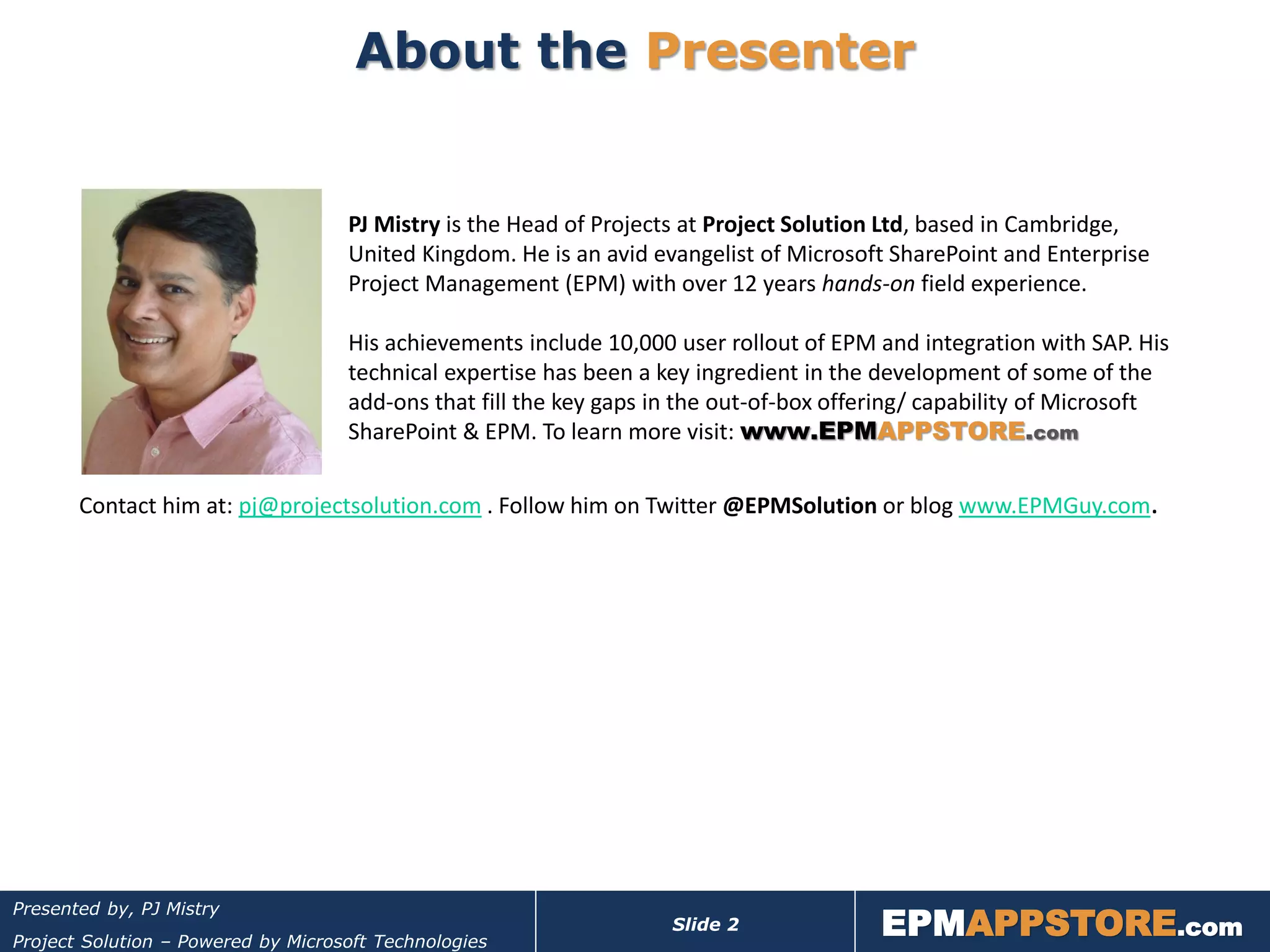
                                    PJ Mistry is the Head of Projects at Project Solution Ltd, based in Cambridge,
                                    United Kingdom. He is an avid evangelist of Microsoft SharePoint and Enterprise
                                    Project Management (EPM) with over 12 years hands-on field experience.

                                    His achievements include 10,000 user rollout of EPM and integration with SAP. His
                                    technical expertise has been a key ingredient in the development of some of the
                                    add-ons that fill the key gaps in the out-of-box offering/ capability of Microsoft
                                    SharePoint & EPM. To learn more visit: www.EPMAPPSTORE.com

       Contact him at: pj@projectsolution.com . Follow him on Twitter @EPMSolution or blog www.EPMGuy.com.


                                                                                         EPMAPPSTORE.com
Presented by, PJ Mistry
                                                                    Slide 2
Project Solution – Powered by Microsoft Technologies
About Project Solution Ltd

      Microsoft Certified EPM &
         SharePoint Partner
     Est in 2003, Cambridge, UK
      10+ years experience of
         delivering Microsoft Business
         Collaboration solutions
      Consulting, Training, Technical
         Support, Custom Development
      Projects: 50 users to 10,000
         user roll-out!
      Markets: Defence, Finance,
         Healthcare, Oil & Gas,
         Education, IT, Government,
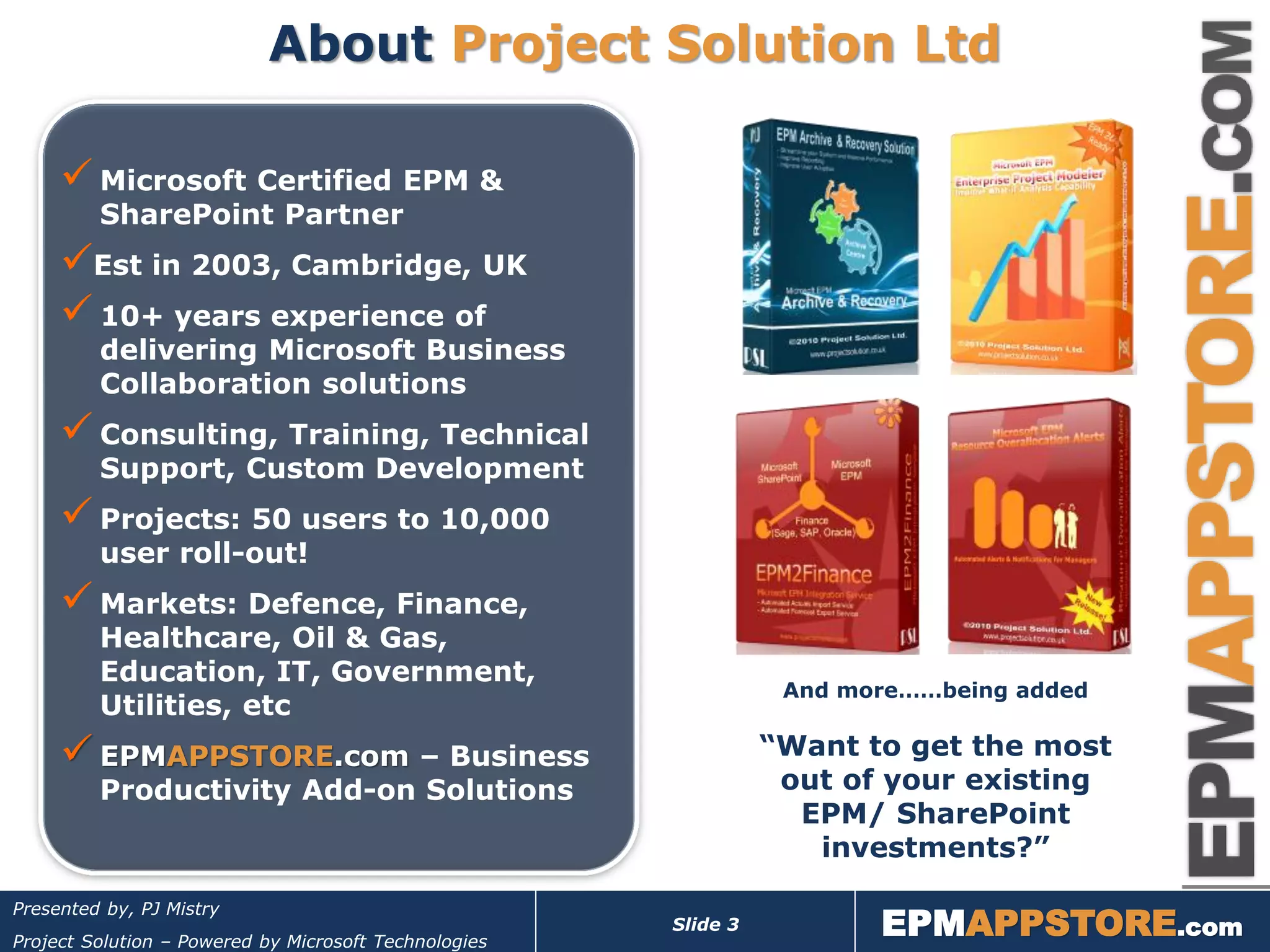
                                                                  And more……being added
         Utilities, etc
      EPMAPPSTORE.com – Business                                “Want to get the most
         Productivity Add-on Solutions                            out of your existing
                                                                   EPM/ SharePoint
                                                                    investments?”

                                                                        EPMAPPSTORE.com
Presented by, PJ Mistry
                                                       Slide 3
Project Solution – Powered by Microsoft Technologies
Presentation Agenda


                              In this webinar you will learn;
                               The key fixes and enhancements include in SP1.
                               Practical things you should consider and have in
                                place before taking the leap towards patching.
                               Approach and best practices for patching your
                                EPM/SharePoint environment.
                               FAQs


                              Questions will be taken after each section of the
                              presentation. If too many or running late we will take
                              Qs at the end and follow-up after. You can email me or
                              use Discussion Forum @ MPUG. NOT Break-Fix Support!


                                                                  EPMAPPSTORE.com
Presented by, PJ Mistry
                                                       Slide 4
Project Solution – Powered by Microsoft Technologies
Key Changes


                                                                 EPMAPPSTORE.com
Presented by, PJ Mistry
                                                       Slide 5
Project Solution – Powered by Microsoft Technologies
EPM2010 – Key Changes, Highlights

          1. Multi-browser Support
          2. Time-phased Support for Manually Scheduled Tasks
             (PWA & Project Pro)
          3. Auto Scheduled Microsoft Project Task Synch to
             SharePoint
          4. Improved PWA Project Scheduling
          5. Auto Publish Approved Task Updates
          6. Site Recycle Bin
          7. Site Storage Metrics
          8. Others….Remote storage support for shadow copies; New Powershell cmdlet
                 (Move-spsite); Improved backup / restore functionality for SharePoint Server etc

          Full list of SP1 changes can be found here


                                                                              EPMAPPSTORE.com
Presented by, PJ Mistry
                                                            Slide 6
Project Solution – Powered by Microsoft Technologies
EPM2010 – Key Changes
                               Multi-browser Support
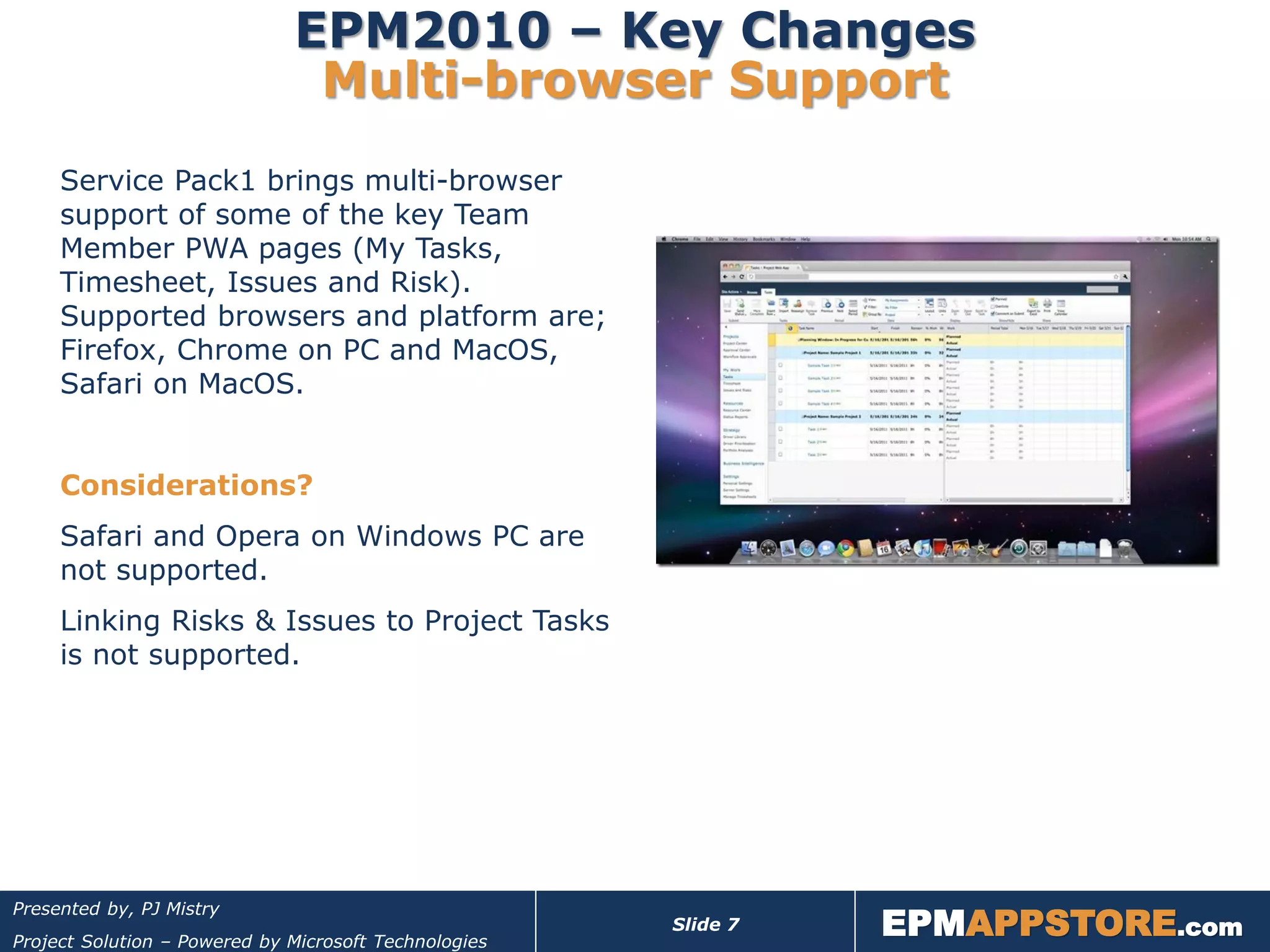
     Service Pack1 brings multi-browser
     support of some of the key Team
     Member PWA pages (My Tasks,
     Timesheet, Issues and Risk).
     Supported browsers and platform are;
     Firefox, Chrome on PC and MacOS,
     Safari on MacOS.


     Considerations?
     Safari and Opera on Windows PC are
     not supported.
     Linking Risks & Issues to Project Tasks
     is not supported.


                                                                 EPMAPPSTORE.com
Presented by, PJ Mistry
                                                       Slide 7
Project Solution – Powered by Microsoft Technologies
EPM2010 – Key Changes
        Time-phased Support for Manual Tasks
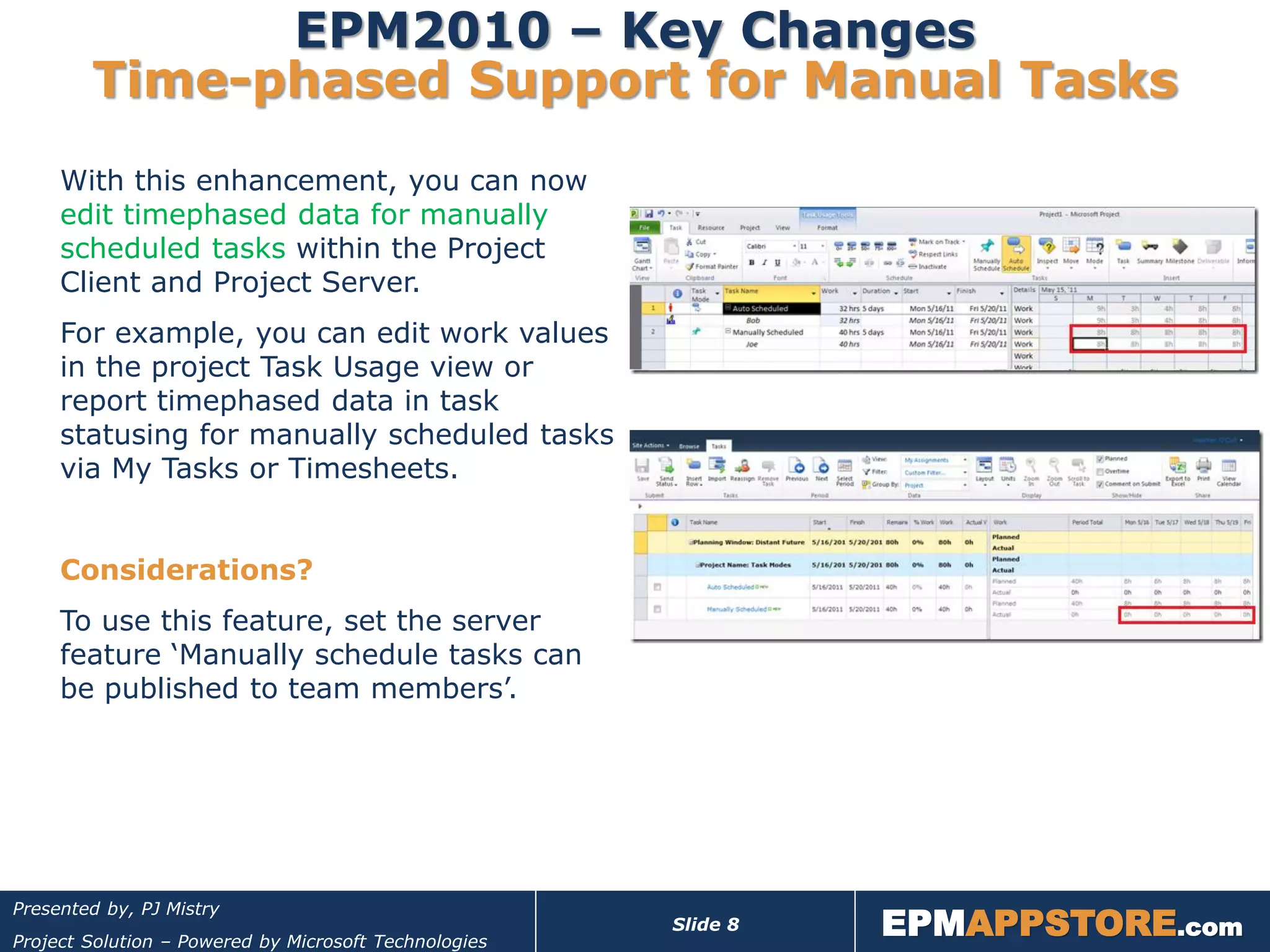
     With this enhancement, you can now
     edit timephased data for manually
     scheduled tasks within the Project
     Client and Project Server.
     For example, you can edit work values
     in the project Task Usage view or
     report timephased data in task
     statusing for manually scheduled tasks
     via My Tasks or Timesheets.


     Considerations?
     To use this feature, set the server
     feature ‘Manually schedule tasks can
     be published to team members’.


                                                                 EPMAPPSTORE.com
Presented by, PJ Mistry
                                                       Slide 8
Project Solution – Powered by Microsoft Technologies
EPM2010 – Key Changes
    Auto Scheduled Task Synch to SharePoint
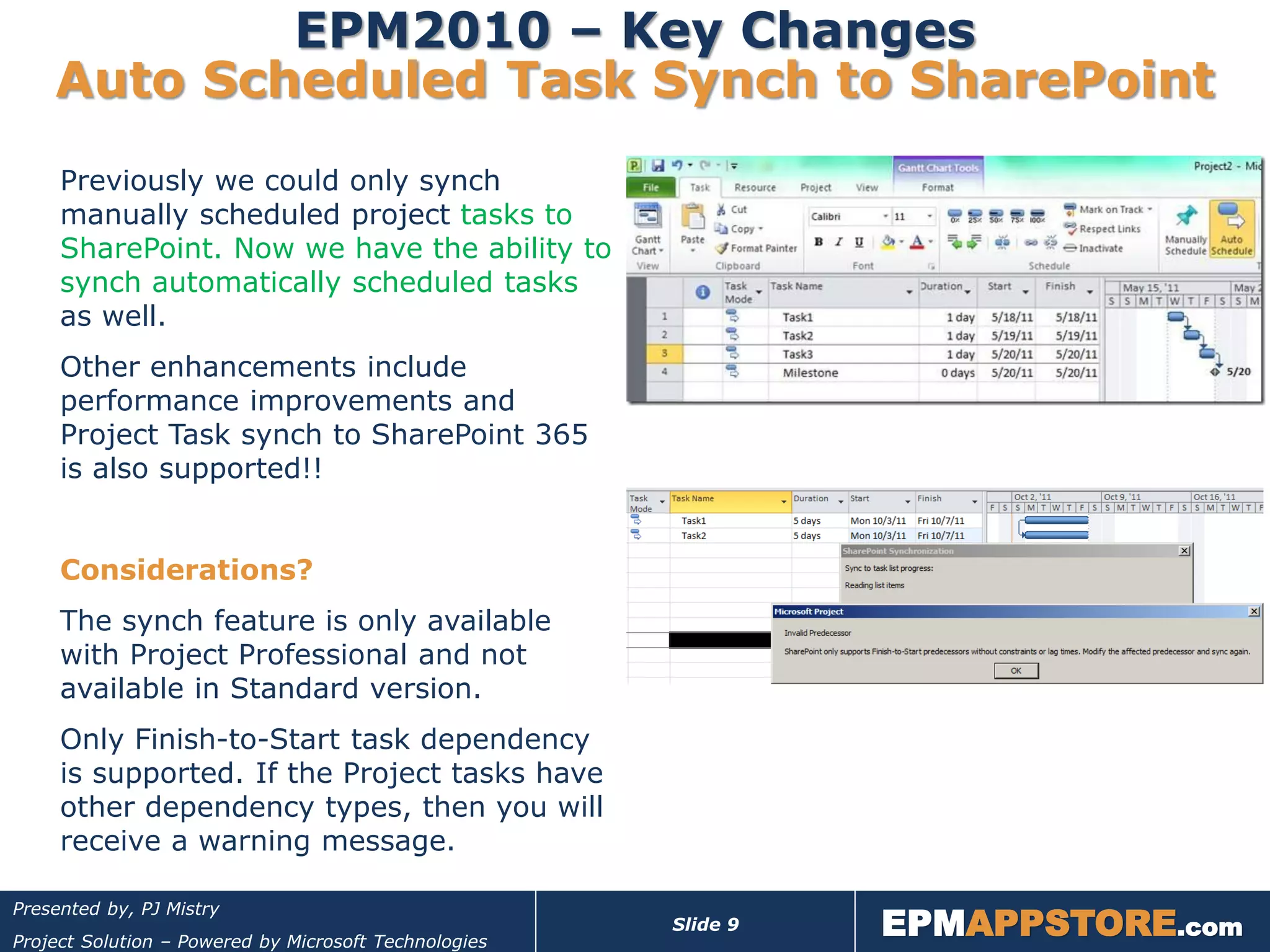
     Previously we could only synch
     manually scheduled project tasks to
     SharePoint. Now we have the ability to
     synch automatically scheduled tasks
     as well.
     Other enhancements include
     performance improvements and
     Project Task synch to SharePoint 365
     is also supported!!


     Considerations?
     The synch feature is only available
     with Project Professional and not
     available in Standard version.
     Only Finish-to-Start task dependency
     is supported. If the Project tasks have
     other dependency types, then you will
     receive a warning message.


                                                                 EPMAPPSTORE.com
Presented by, PJ Mistry
                                                       Slide 9
Project Solution – Powered by Microsoft Technologies
EPM2010 – Key Changes
               Improved PWA Project Scheduling
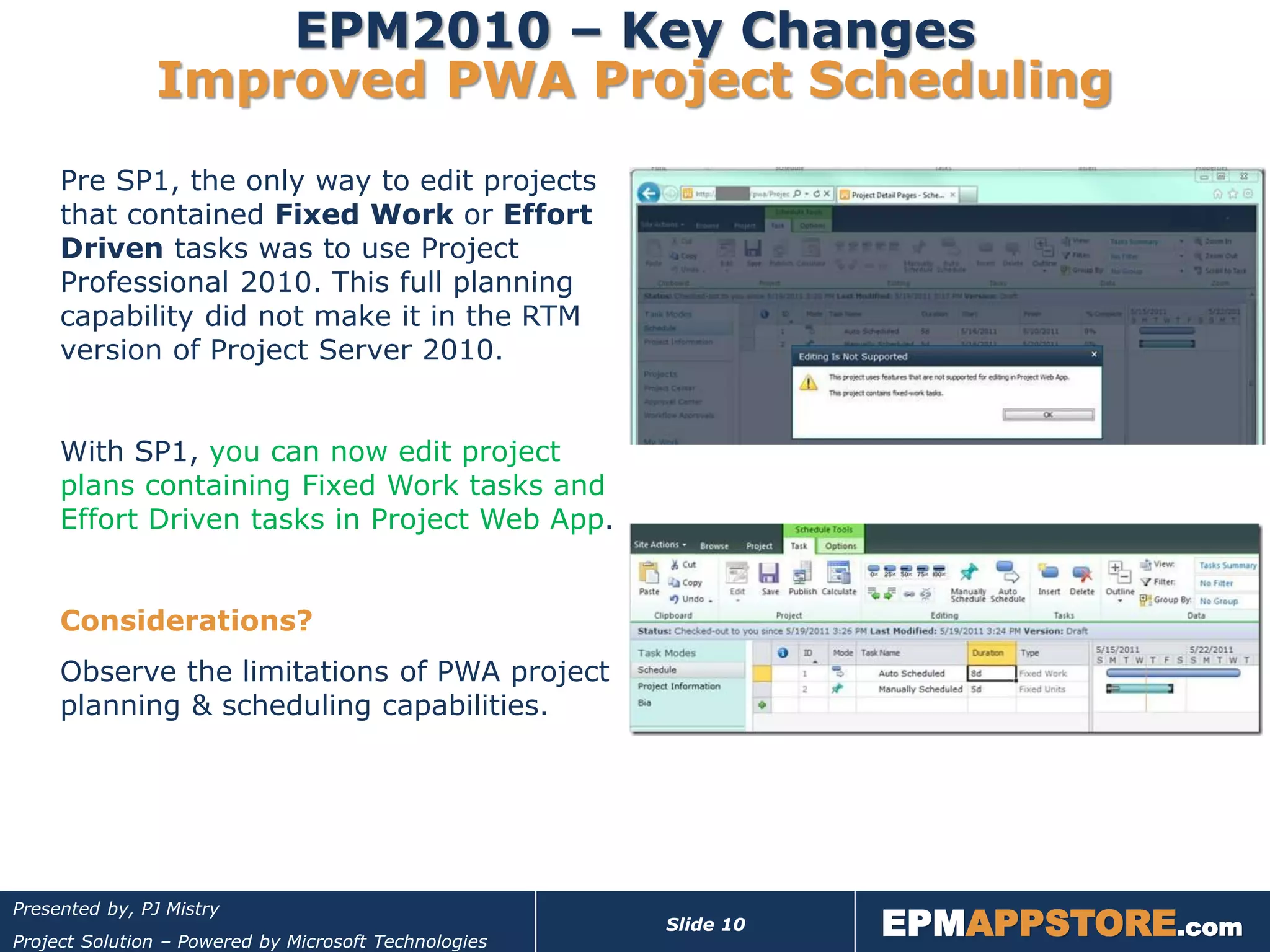
     Pre SP1, the only way to edit projects
     that contained Fixed Work or Effort
     Driven tasks was to use Project
     Professional 2010. This full planning
     capability did not make it in the RTM
     version of Project Server 2010.


     With SP1, you can now edit project
     plans containing Fixed Work tasks and
     Effort Driven tasks in Project Web App.


     Considerations?
     Observe the limitations of PWA project
     planning & scheduling capabilities.


                                                                  EPMAPPSTORE.com
Presented by, PJ Mistry
                                                       Slide 10
Project Solution – Powered by Microsoft Technologies
EPM2010 – Key Changes
            Auto Publish Approved Task Updates
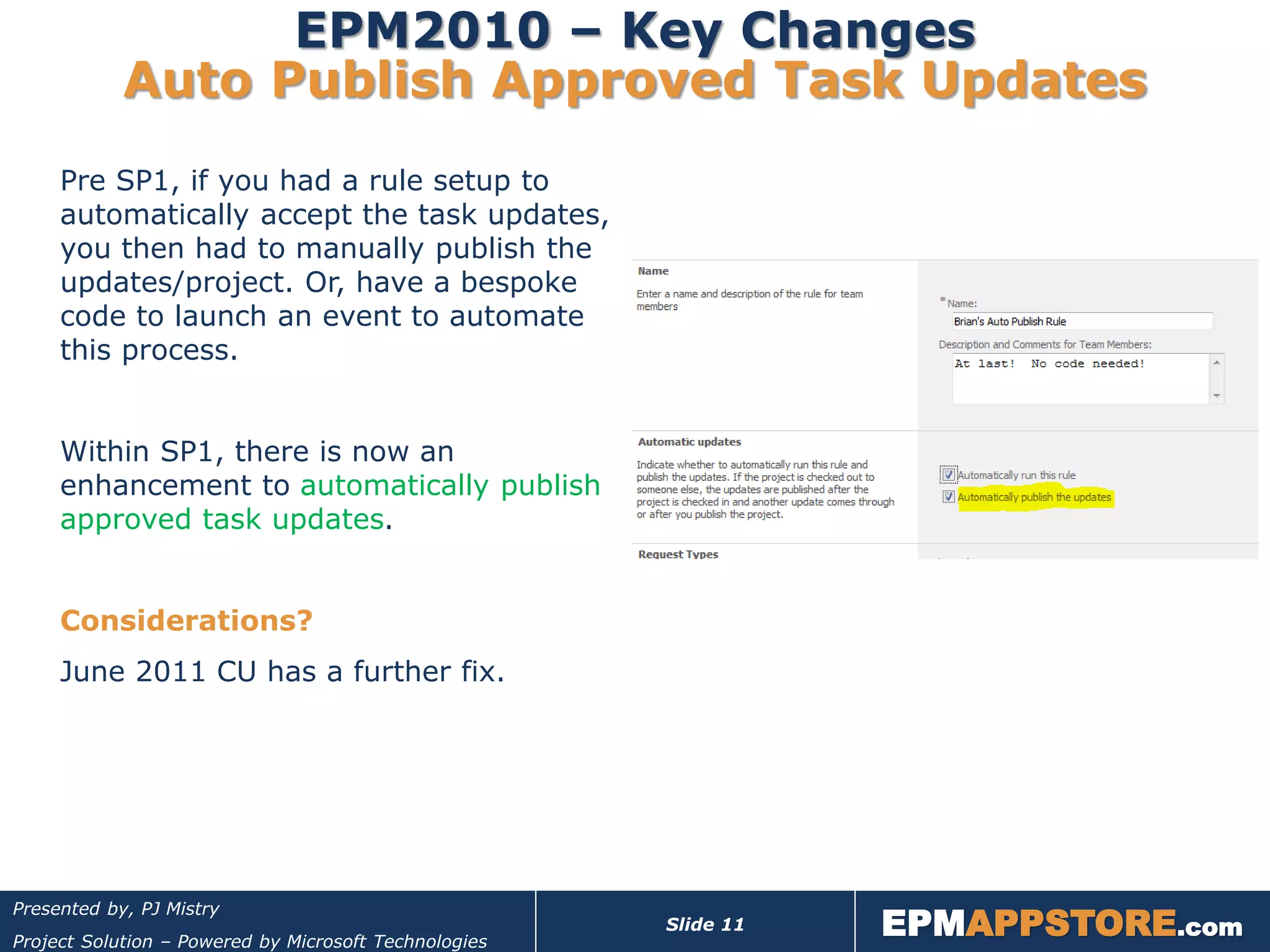
     Pre SP1, if you had a rule setup to
     automatically accept the task updates,
     you then had to manually publish the
     updates/project. Or, have a bespoke
     code to launch an event to automate
     this process.


     Within SP1, there is now an
     enhancement to automatically publish
     approved task updates.


     Considerations?
     June 2011 CU has a further fix.


                                                                  EPMAPPSTORE.com
Presented by, PJ Mistry
                                                       Slide 11
Project Solution – Powered by Microsoft Technologies
EPM2010 – Key Changes
                                 Site Recycle Bin
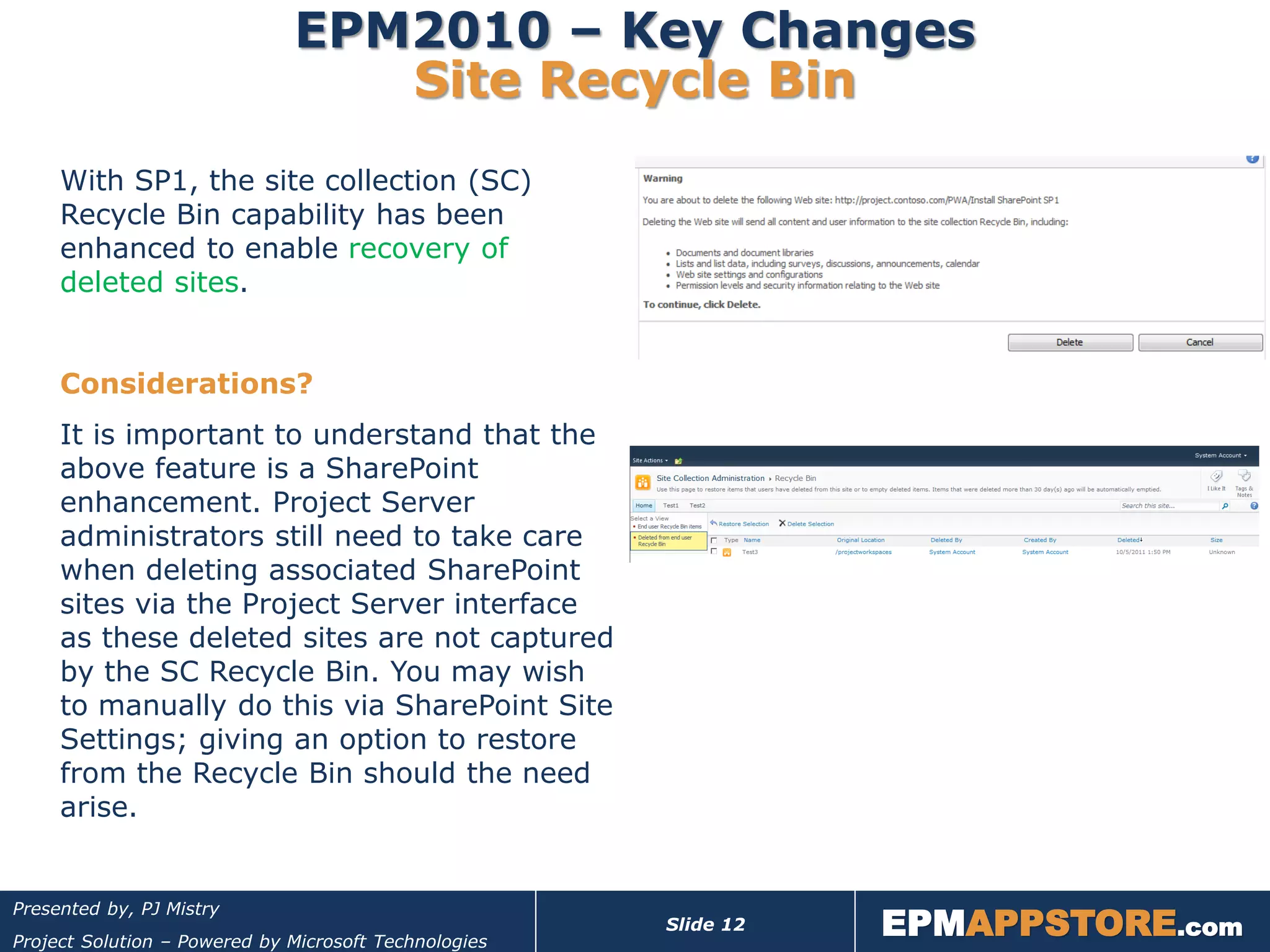
     With SP1, the site collection (SC)
     Recycle Bin capability has been
     enhanced to enable recovery of
     deleted sites.


     Considerations?
     It is important to understand that the
     above feature is a SharePoint
     enhancement. Project Server
     administrators still need to take care
     when deleting associated SharePoint
     sites via the Project Server interface
     as these deleted sites are not captured
     by the SC Recycle Bin. You may wish
     to manually do this via SharePoint Site
     Settings; giving an option to restore
     from the Recycle Bin should the need
     arise.


                                                                  EPMAPPSTORE.com
Presented by, PJ Mistry
                                                       Slide 12
Project Solution – Powered by Microsoft Technologies
EPM2010 – Key Changes
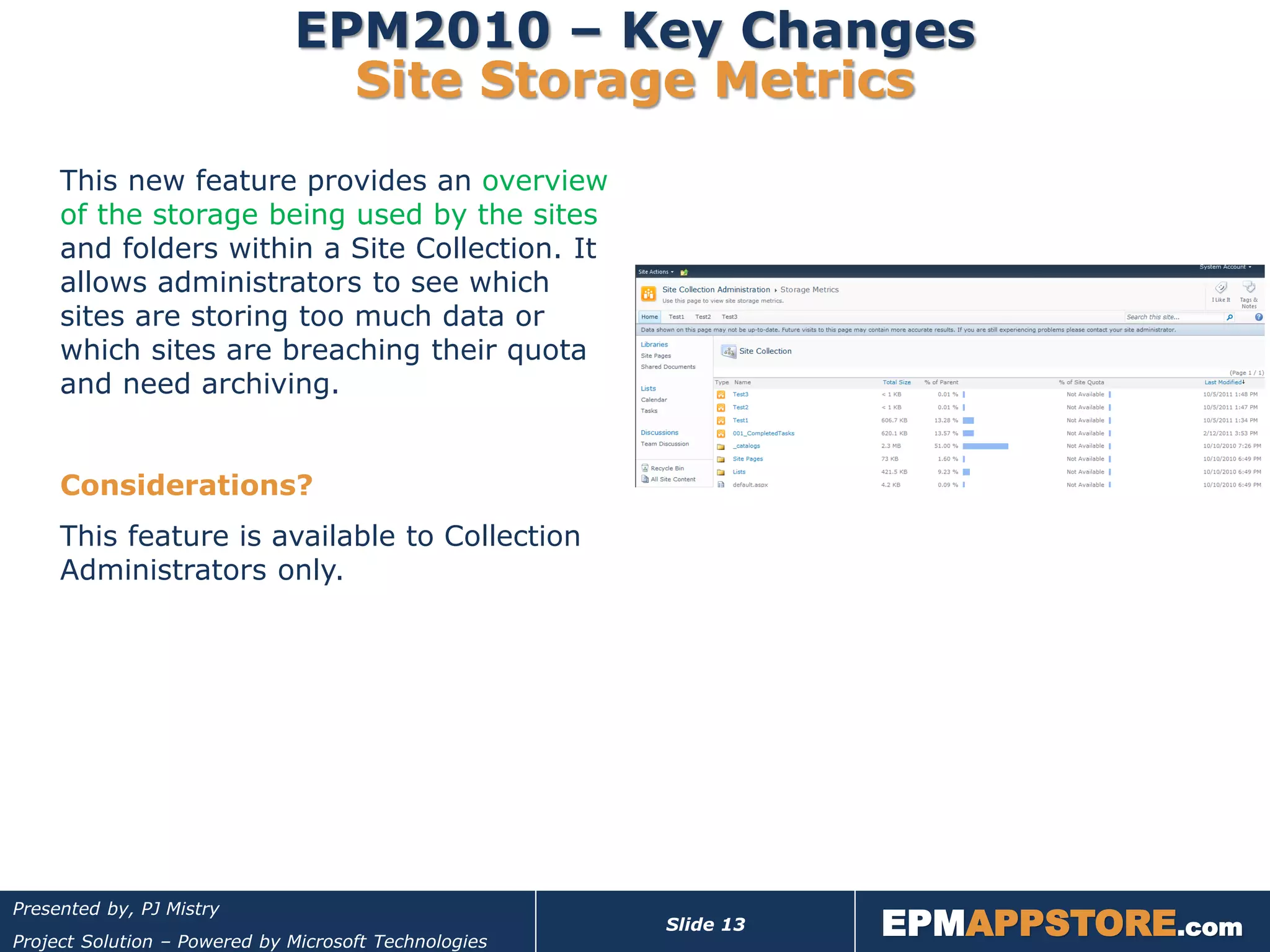
                                Site Storage Metrics
     This new feature provides an overview
     of the storage being used by the sites
     and folders within a Site Collection. It
     allows administrators to see which
     sites are storing too much data or
     which sites are breaching their quota
     and need archiving.


     Considerations?
     This feature is available to Collection
     Administrators only.


                                                                  EPMAPPSTORE.com
Presented by, PJ Mistry
                                                       Slide 13
Project Solution – Powered by Microsoft Technologies
Considerations
  prior to Patching


                                                                  EPMAPPSTORE.com
Presented by, PJ Mistry
                                                       Slide 14
Project Solution – Powered by Microsoft Technologies
EPM2010 – Service Pack Vs CU

     Service Pack 1
      Regression tested all fixes released through April 2011.
      New baseline for your environment. Prepares you for future updates.
     FAQ: Should I apply? And When?


     Cumulative Updates
      June 2011 CU is the first Post-SP1 build released to customers.
      contains new fixes to issues raised through various support channels
     “Should you install the June 2011 CU?” Typically, my answer would be, “only if it
     solves a problem you actually have.” Updates are not regression tested, so they
     do have the potential of breaking things.


     Microsoft’s recommended approach is to apply Service Pack 1 and the
     June 2011 CU into an environment together.


                                                                  EPMAPPSTORE.com
Presented by, PJ Mistry
                                                       Slide 15
Project Solution – Powered by Microsoft Technologies
EPM2010 – Approach to Patching

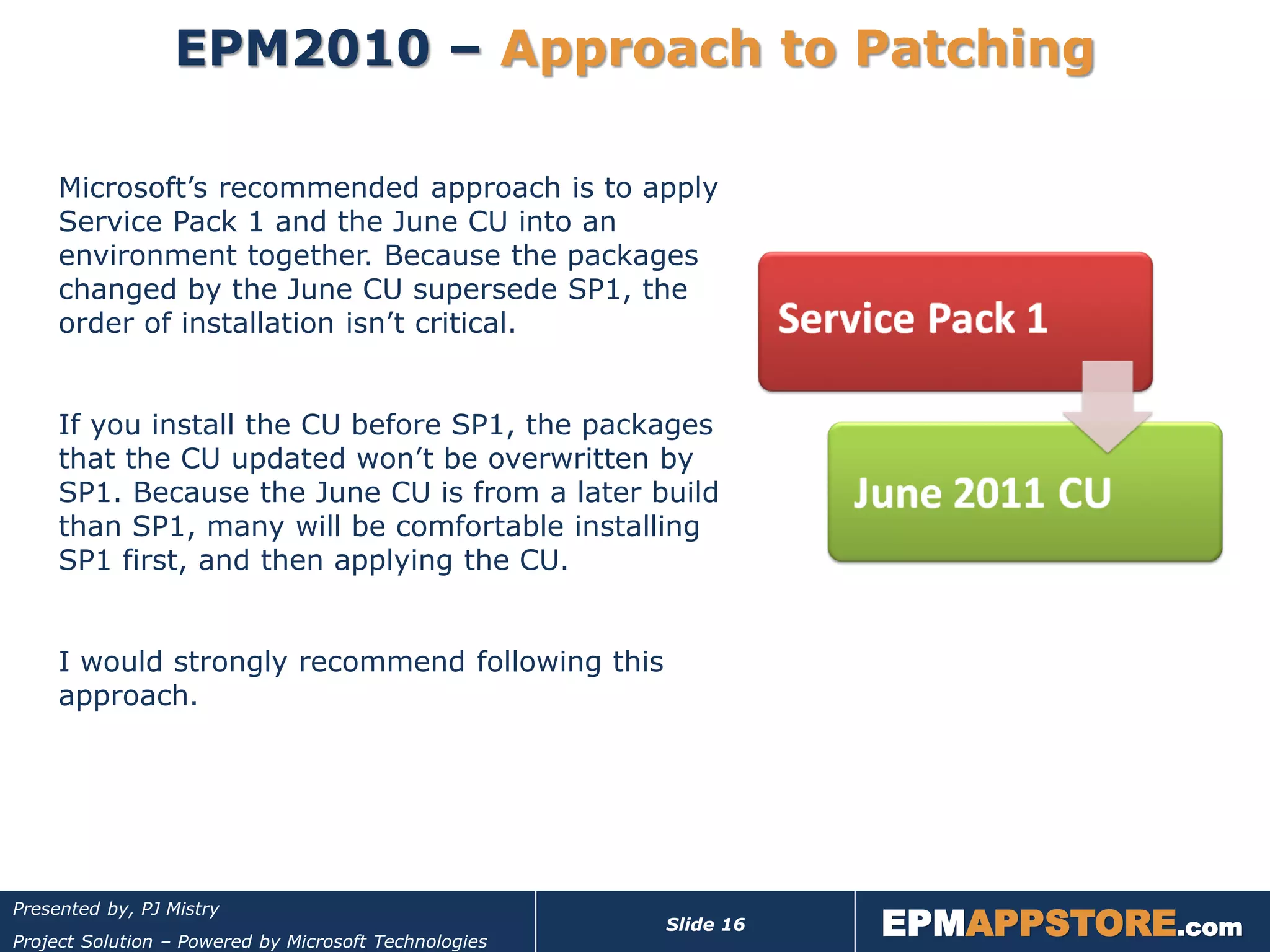
     Microsoft’s recommended approach is to apply
     Service Pack 1 and the June CU into an
     environment together. Because the packages
     changed by the June CU supersede SP1, the
     order of installation isn’t critical.


     If you install the CU before SP1, the packages
     that the CU updated won’t be overwritten by
     SP1. Because the June CU is from a later build
     than SP1, many will be comfortable installing
     SP1 first, and then applying the CU.


     I would strongly recommend following this
     approach.


                                                                  EPMAPPSTORE.com
Presented by, PJ Mistry
                                                       Slide 16
Project Solution – Powered by Microsoft Technologies
EPM2010 – Before you Start Patching!!
          1. Confirm you have a valid test environment
                         No test Farm = No Production Farm
                         Test patch deployment as well business process/project life cycle.

          2. Ensure all Servers are running as expected!!
          3. Backup & Recovery Plan – system and data
                         Note: Service Pack and CU updates cannot be uninstalled!! You
                          MUST have a thoroughly tested Back-out/Recovery Plan.
                         A backup is useless unless you know it can be restored. This is
                          the time to test your farm-level disaster recovery process! Don’t
                          simply cross-fingers and hope for the best!!

          4. Pre-update check – validate farm health with SCW
                         If there is any hidden issue on any of the servers in the farm,
                          this process will fail and you will have to resolve this. Be
                          prepared to deal with this scenario.


        Read the update NOTES!!
                                                                        EPMAPPSTORE.com
Presented by, PJ Mistry
                                                         Slide 17
Project Solution – Powered by Microsoft Technologies
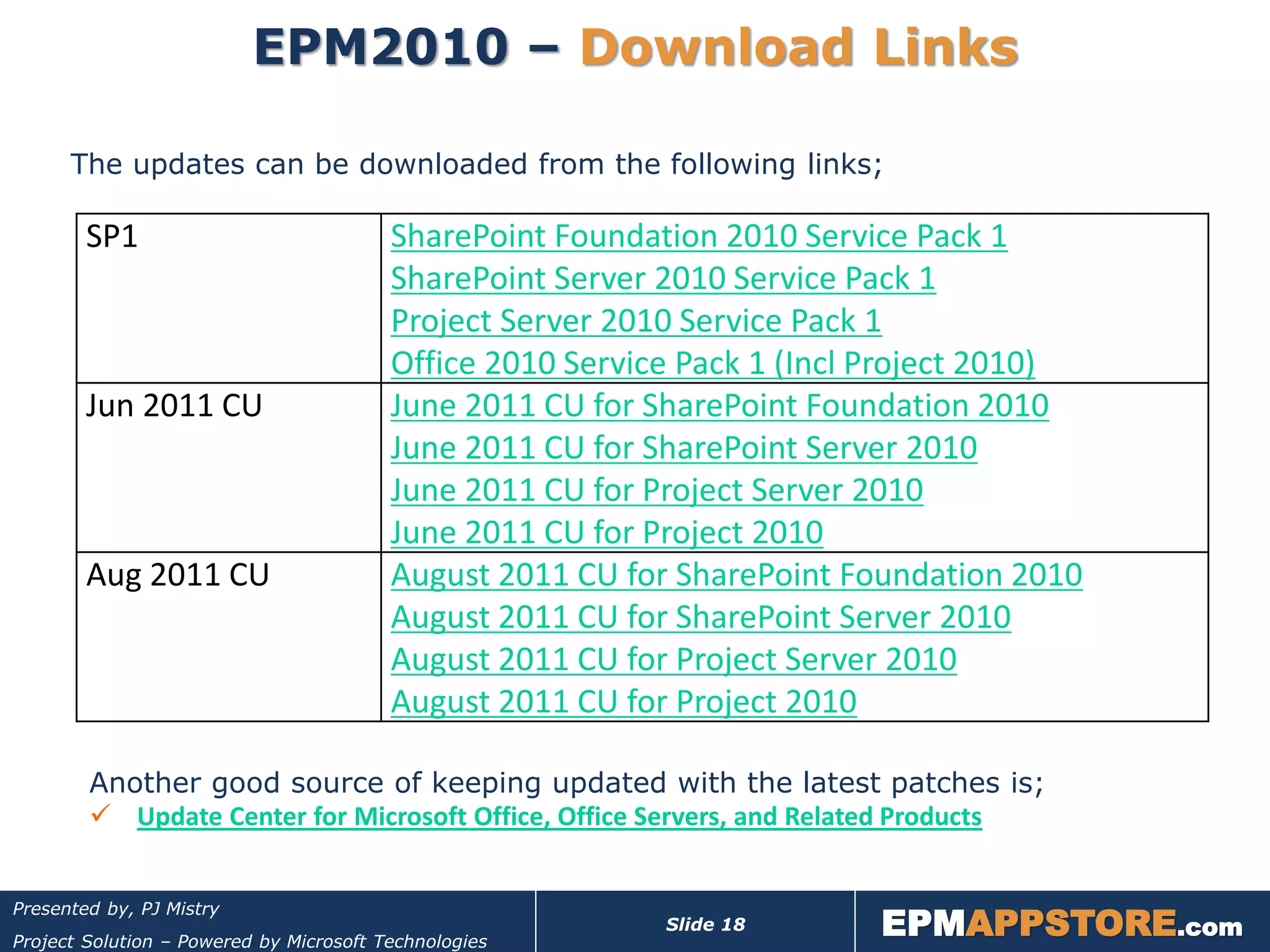
EPM2010 – Download Links

      The updates can be downloaded from the following links;

        SP1                              SharePoint Foundation 2010 Service Pack 1
                                         SharePoint Server 2010 Service Pack 1
                                         Project Server 2010 Service Pack 1
                                         Office 2010 Service Pack 1 (Incl Project 2010)
        Jun 2011 CU                      June 2011 CU for SharePoint Foundation 2010
                                         June 2011 CU for SharePoint Server 2010
                                         June 2011 CU for Project Server 2010
                                         June 2011 CU for Project 2010
        Aug 2011 CU                      August 2011 CU for SharePoint Foundation 2010
                                         August 2011 CU for SharePoint Server 2010
                                         August 2011 CU for Project Server 2010
                                         August 2011 CU for Project 2010

        Another good source of keeping updated with the latest patches is;
         Update Center for Microsoft Office, Office Servers, and Related Products


                                                                         EPMAPPSTORE.com
Presented by, PJ Mistry
                                                           Slide 18
Project Solution – Powered by Microsoft Technologies
Approach to
                      Patching


                                                                  EPMAPPSTORE.com
Presented by, PJ Mistry
                                                       Slide 19
Project Solution – Powered by Microsoft Technologies
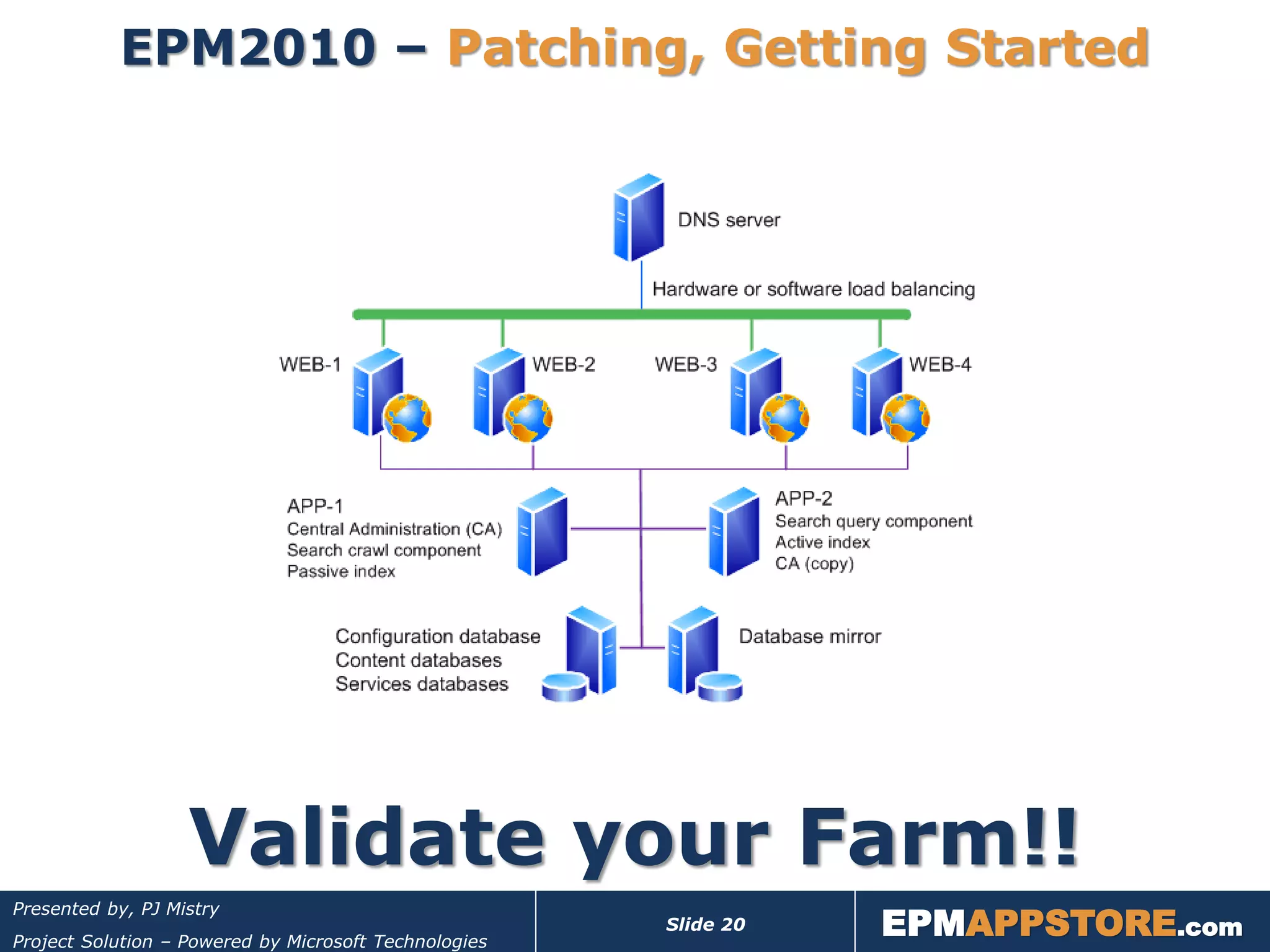
EPM2010 – Patching, Getting Started


                   Validate your Farm!!
                                                                  EPMAPPSTORE.com
Presented by, PJ Mistry
                                                       Slide 20
Project Solution – Powered by Microsoft Technologies
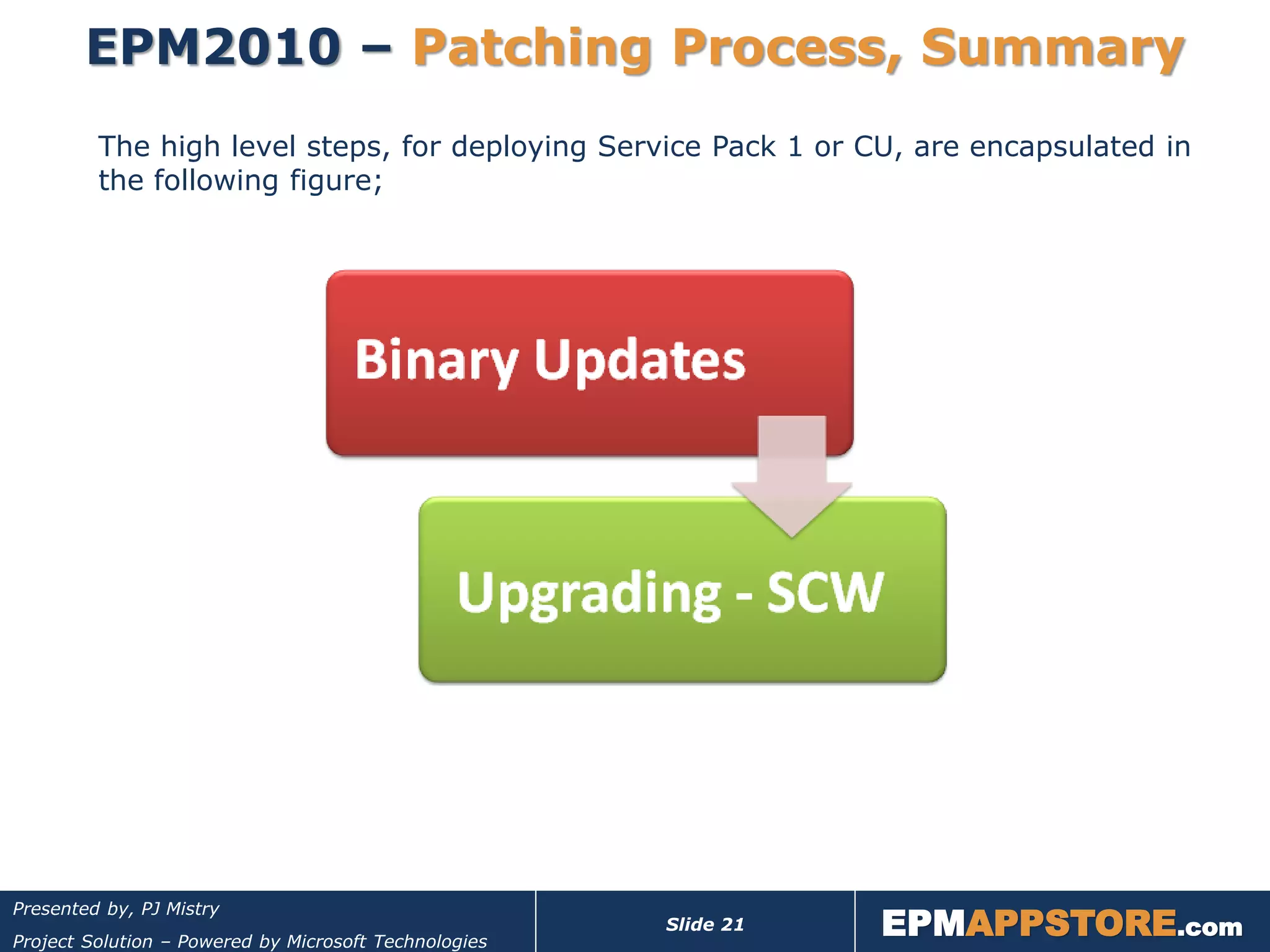
EPM2010 – Patching Process, Summary
         The high level steps, for deploying Service Pack 1 or CU, are encapsulated in
         the following figure;


                                                                  EPMAPPSTORE.com
Presented by, PJ Mistry
                                                       Slide 21
Project Solution – Powered by Microsoft Technologies
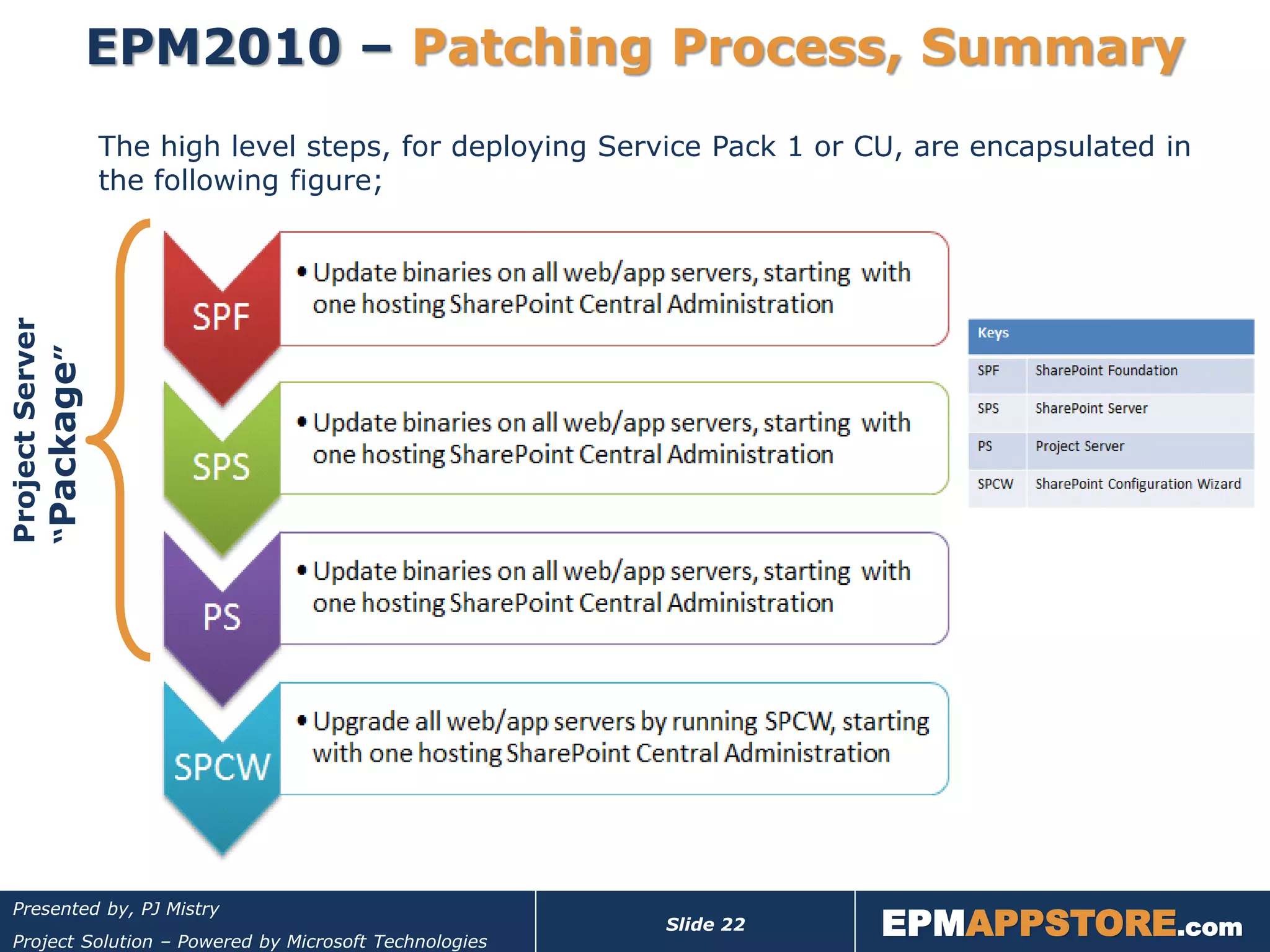
EPM2010 – Patching Process, Summary
                 The high level steps, for deploying Service Pack 1 or CU, are encapsulated in
                 the following figure;
Project Server
“Package”


                                                                        EPMAPPSTORE.com
 Presented by, PJ Mistry
                                                        Slide 22
 Project Solution – Powered by Microsoft Technologies
EPM2010 – Patching, Important Note

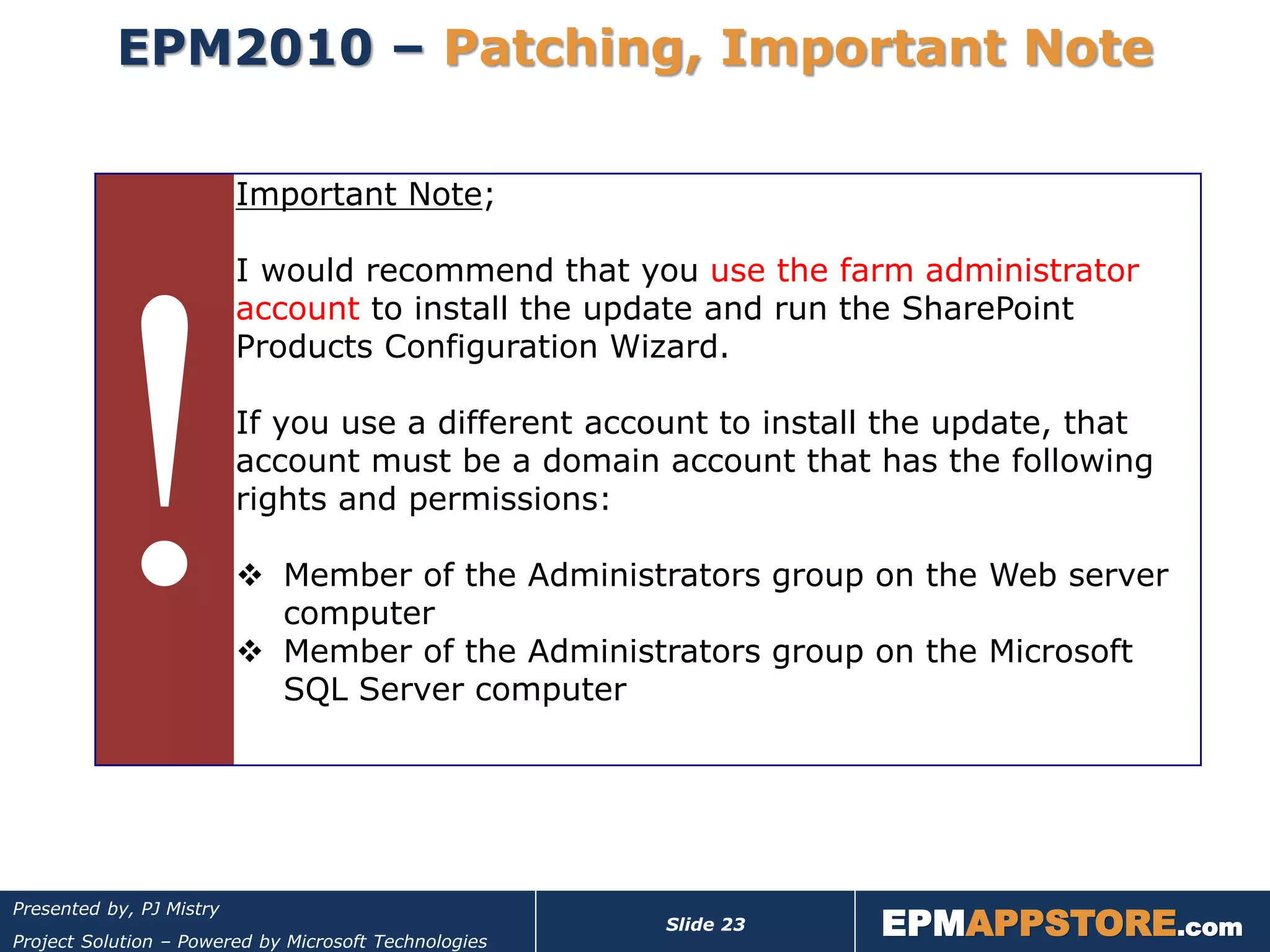
                          Important Note;

                          I would recommend that you use the farm administrator
                          account to install the update and run the SharePoint
                          Products Configuration Wizard.

                          If you use a different account to install the update, that
                          account must be a domain account that has the following
                          rights and permissions:

                           Member of the Administrators group on the Web server
                            computer
                           Member of the Administrators group on the Microsoft
                            SQL Server computer


                                                                  EPMAPPSTORE.com
Presented by, PJ Mistry
                                                       Slide 23
Project Solution – Powered by Microsoft Technologies
EPM2010 – Patching Process
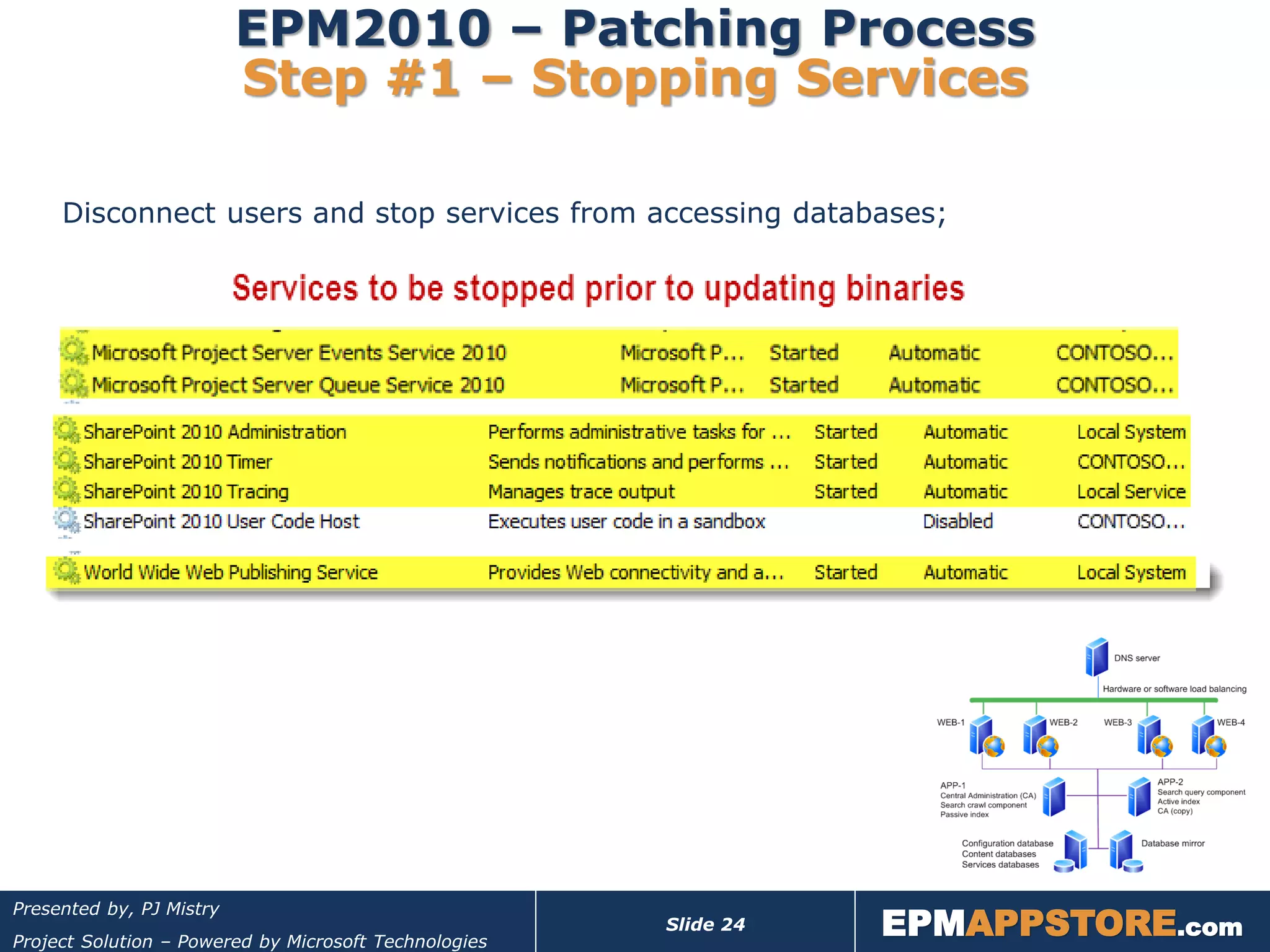
                          Step #1 – Stopping Services

     Disconnect users and stop services from accessing databases;


                                                                  EPMAPPSTORE.com
Presented by, PJ Mistry
                                                       Slide 24
Project Solution – Powered by Microsoft Technologies
EPM2010 – Patching Process
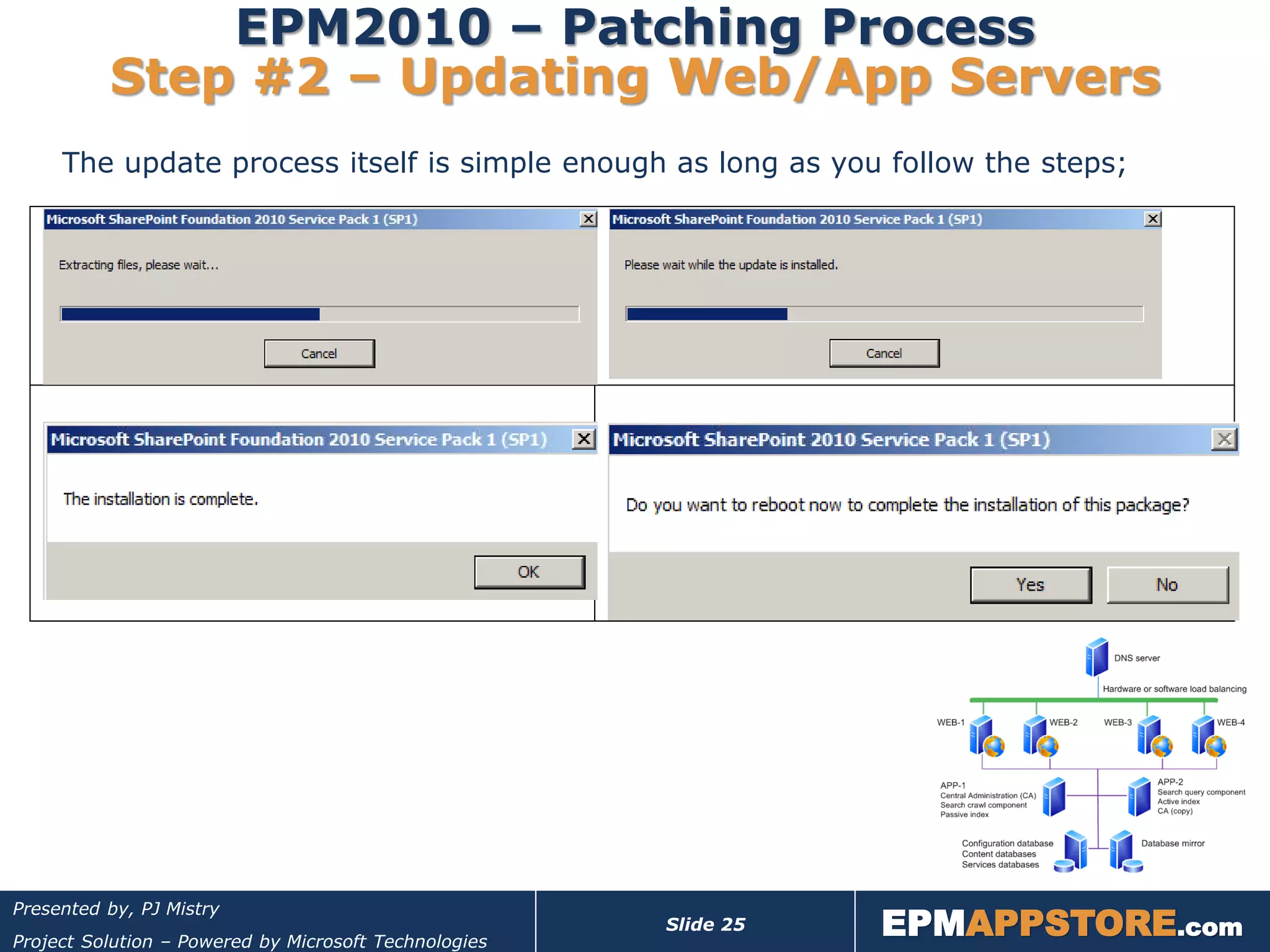
          Step #2 – Updating Web/App Servers
     The update process itself is simple enough as long as you follow the steps;


                                                                  EPMAPPSTORE.com
Presented by, PJ Mistry
                                                       Slide 25
Project Solution – Powered by Microsoft Technologies
EPM2010 – Patching Process
        Step #3 – Upgrading Web/App Servers

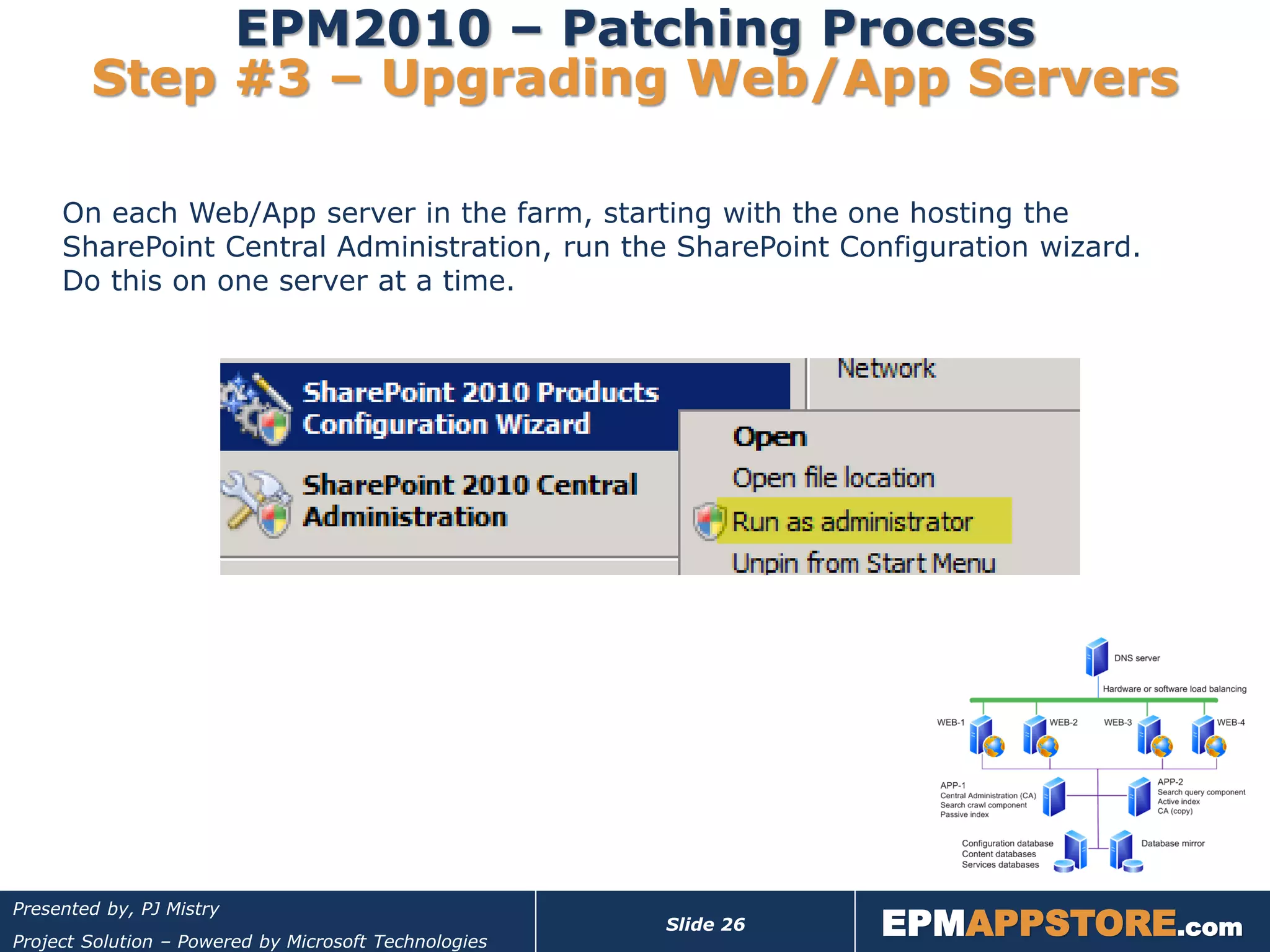
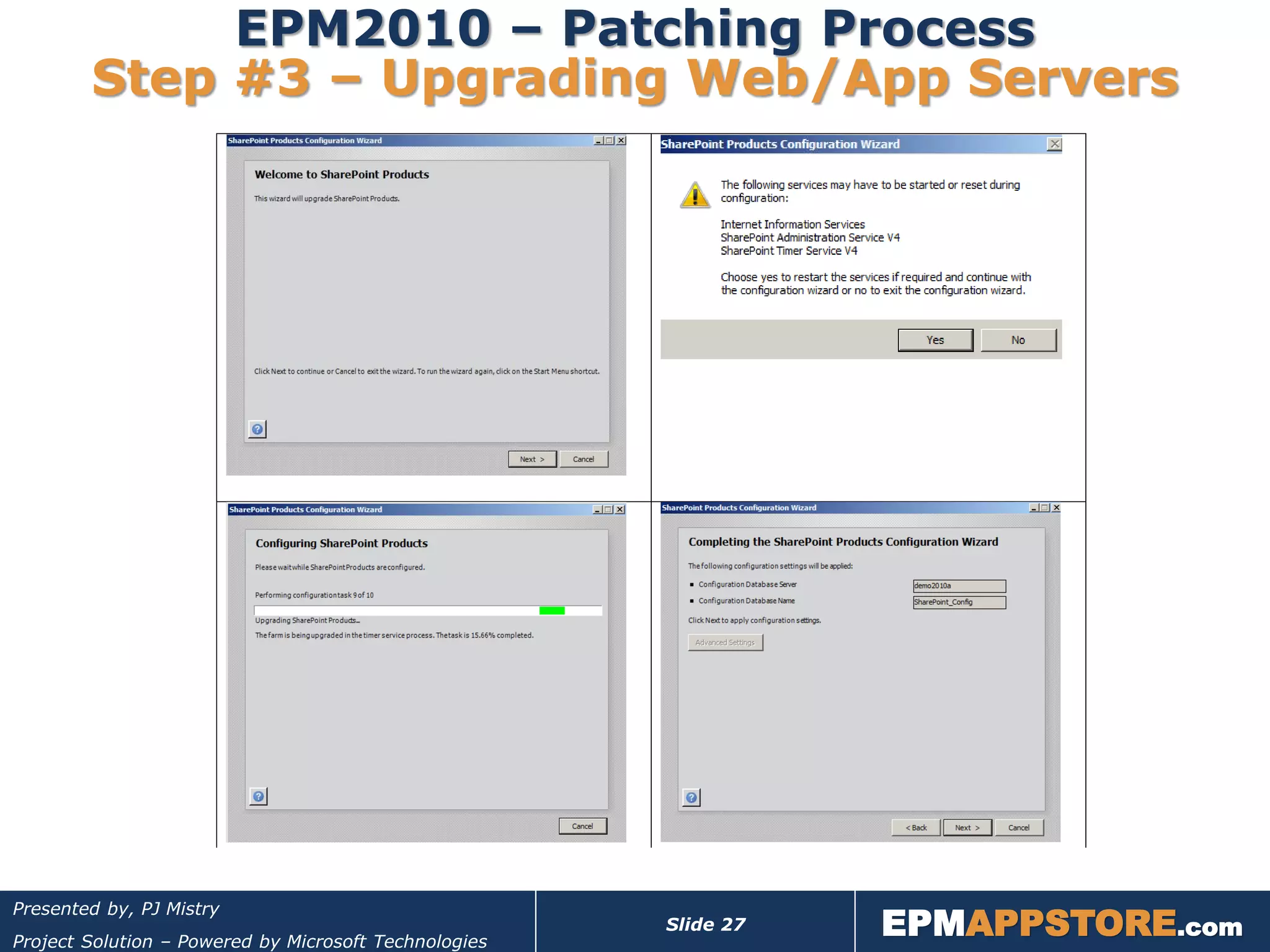
     On each Web/App server in the farm, starting with the one hosting the
     SharePoint Central Administration, run the SharePoint Configuration wizard.
     Do this on one server at a time.


                                                                  EPMAPPSTORE.com
Presented by, PJ Mistry
                                                       Slide 26
Project Solution – Powered by Microsoft Technologies
EPM2010 – Patching Process
        Step #3 – Upgrading Web/App Servers


                                                                  EPMAPPSTORE.com
Presented by, PJ Mistry
                                                       Slide 27
Project Solution – Powered by Microsoft Technologies
EPM2010 – Patching Process
        Step #3 – Upgrading Web/App Servers


                                                                  EPMAPPSTORE.com
Presented by, PJ Mistry
                                                       Slide 28
Project Solution – Powered by Microsoft Technologies
EPM2010 – Post Upgrade Actions


     For SharePoint Server 2010, you must restart the User Profile
     Synchronization service after installing the June 2011 cumulative update
     refresh. For more information see the Start the User Profile
     Synchronization service section in the Configure profile synchronization
     article in the library.


                                                                  EPMAPPSTORE.com
Presented by, PJ Mistry
                                                       Slide 29
Project Solution – Powered by Microsoft Technologies
EPM2010 – Upgrade Verification

     Option (1) – Review SQL Database Table
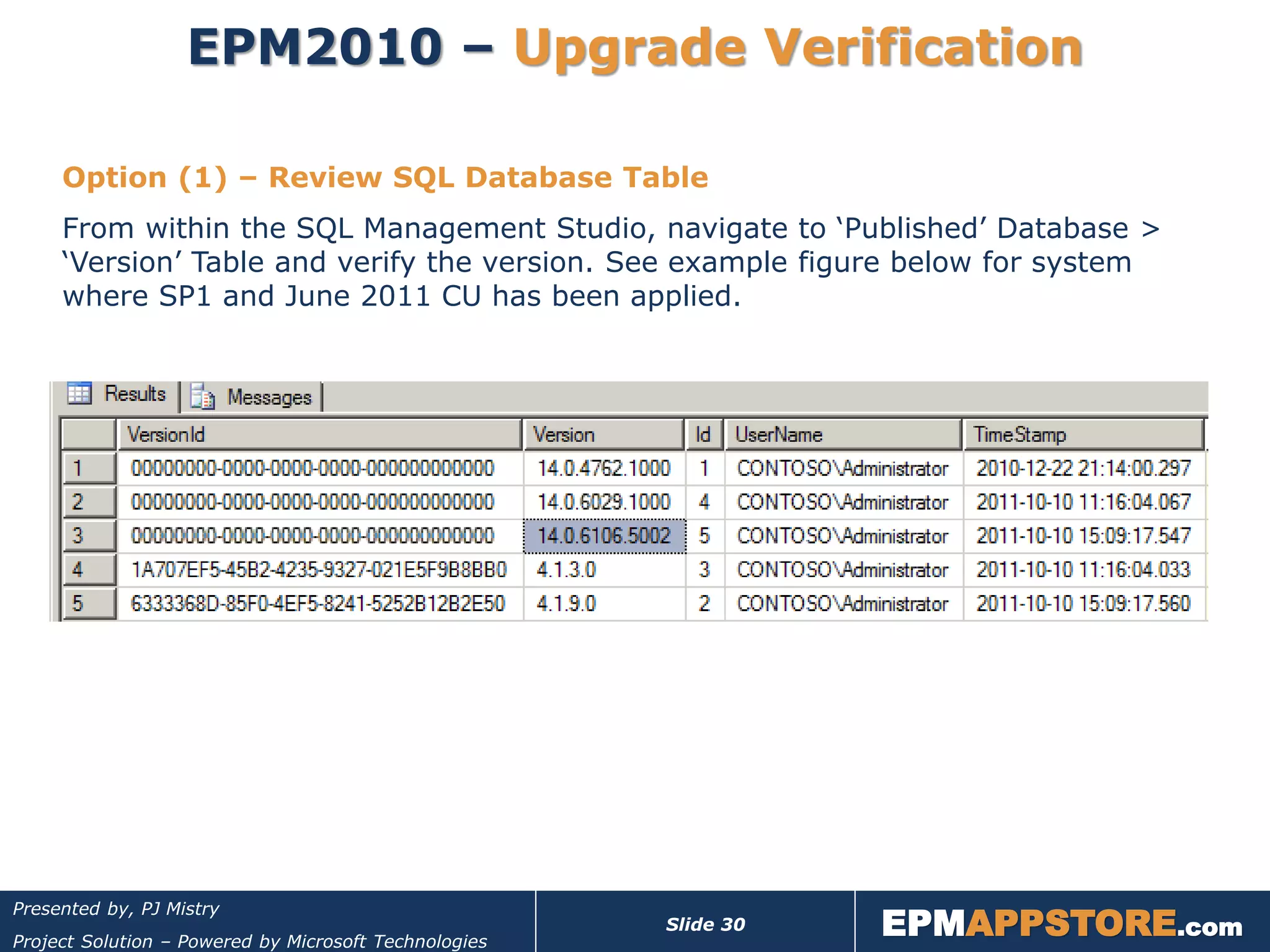
     From within the SQL Management Studio, navigate to ‘Published’ Database >
     ‘Version’ Table and verify the version. See example figure below for system
     where SP1 and June 2011 CU has been applied.


                                                                  EPMAPPSTORE.com
Presented by, PJ Mistry
                                                       Slide 30
Project Solution – Powered by Microsoft Technologies
EPM2010 – Upgrade Verification

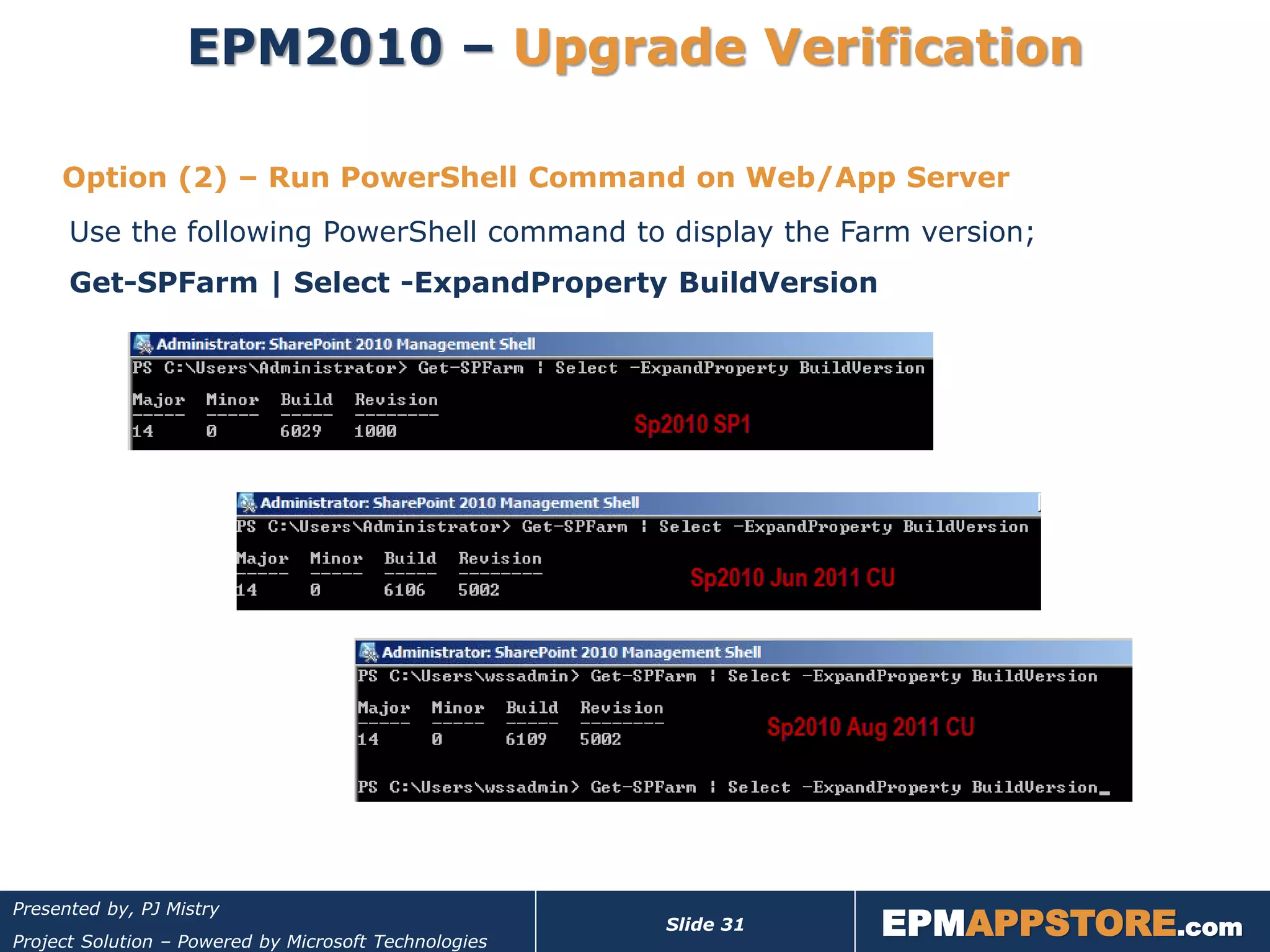
     Option (2) – Run PowerShell Command on Web/App Server
      Use the following PowerShell command to display the Farm version;
      Get-SPFarm | Select -ExpandProperty BuildVersion


                                                                  EPMAPPSTORE.com
Presented by, PJ Mistry
                                                       Slide 31
Project Solution – Powered by Microsoft Technologies
FAQ


                                                                   EPMAPPSTORE.com
Presented by, PJ Mistry
                                                        Slide 32
Project Solution – Powered by Microsoft Technologies
EPM2010 – FAQ

     #1– When to roll-out project pro updates Vs server updates?
     These updates are independent! Can be rolled out anytime but, recommended
     as soon as conveniently possible.

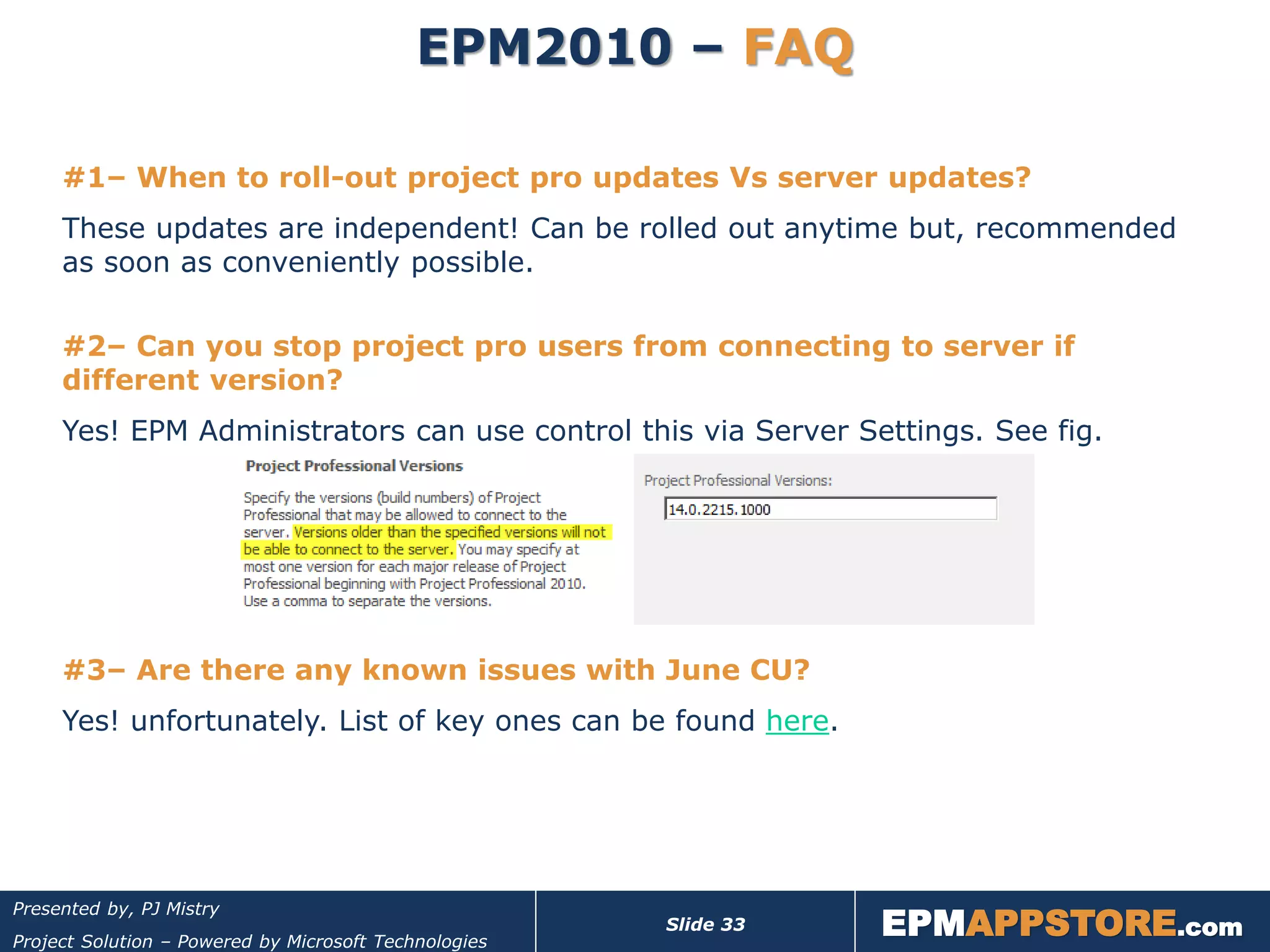
     #2– Can you stop project pro users from connecting to server if
     different version?
     Yes! EPM Administrators can use control this via Server Settings. See fig.


     #3– Are there any known issues with June CU?
     Yes! unfortunately. List of key ones can be found here.


                                                                  EPMAPPSTORE.com
Presented by, PJ Mistry
                                                       Slide 33
Project Solution – Powered by Microsoft Technologies
EPM2010 – FAQ

     #4– Issue with EPM2010 Demo following updates?
     Two issues that I found;
     a) Failure of upgrade: This was resolved by re-running the SCW.
     b) Excel Services dashboard reports were hanging: This issue is because the
        original demo server with ‘Project’ site collection did not have a root site.
        Simply create a root site for this application and you will be up and
        running! You may have to re-boot your server following this change.


     #5– I have a Disaster Recovery Site. What should I do?
     It is very important that your DR site system is kept to the same patch level as
     your production system!!


         Any other queries??
                                                                  EPMAPPSTORE.com
Presented by, PJ Mistry
                                                       Slide 34
Project Solution – Powered by Microsoft Technologies
Thank You!
                                                                                           Promo Code: MPUGSP1
                                                                                           Valid until: 31 Dec 2011
                                                                                           One claim per organisation


                                                                                           Offer Includes;
                                                                                           FREE Tech Support &
                                                                                           Software Maintenance
                                                                                           FREE online evaluation!!


EPM2010 SP1 - How does it impact me?

                                                               Presented by,   PJ Mistry
                               (Projects Director, Microsoft EPM & SharePoint Consultancy)
                                                                Email: pj@projectsolution.com
                                                                Web: www.projectsolution.com
                      Connecting People to Business Processes
                                                                                      EPMAPPSTORE.com
Presented by, PJ Mistry
                                                                    Slide 35
                        - Connecting People to Business Processes
Project Solution – Powered by Microsoft Technologies

EPM2010 SP1 - How does it impact you? And, the Mystery behind Patching Process

  • 1.
    EPM2010 SP1 -How does it impact you? Presented by, PJ Mistry (Projects Director, Microsoft EPM & SharePoint Consultancy) Email: pj@projectsolution.com Web: www.projectsolution.com EPMAPPSTORE.com Presented by, PJ Mistry Slide 1 - Connecting People to Business Processes Project Solution – Powered by Microsoft Technologies
  • 2.
    About the Presenter PJ Mistry is the Head of Projects at Project Solution Ltd, based in Cambridge, United Kingdom. He is an avid evangelist of Microsoft SharePoint and Enterprise Project Management (EPM) with over 12 years hands-on field experience. His achievements include 10,000 user rollout of EPM and integration with SAP. His technical expertise has been a key ingredient in the development of some of the add-ons that fill the key gaps in the out-of-box offering/ capability of Microsoft SharePoint & EPM. To learn more visit: www.EPMAPPSTORE.com Contact him at: pj@projectsolution.com . Follow him on Twitter @EPMSolution or blog www.EPMGuy.com. EPMAPPSTORE.com Presented by, PJ Mistry Slide 2 Project Solution – Powered by Microsoft Technologies
  • 3.
    About Project SolutionLtd  Microsoft Certified EPM & SharePoint Partner Est in 2003, Cambridge, UK  10+ years experience of delivering Microsoft Business Collaboration solutions  Consulting, Training, Technical Support, Custom Development  Projects: 50 users to 10,000 user roll-out!  Markets: Defence, Finance, Healthcare, Oil & Gas, Education, IT, Government, And more……being added Utilities, etc  EPMAPPSTORE.com – Business “Want to get the most Productivity Add-on Solutions out of your existing EPM/ SharePoint investments?” EPMAPPSTORE.com Presented by, PJ Mistry Slide 3 Project Solution – Powered by Microsoft Technologies
  • 4.
    Presentation Agenda In this webinar you will learn;  The key fixes and enhancements include in SP1.  Practical things you should consider and have in place before taking the leap towards patching.  Approach and best practices for patching your EPM/SharePoint environment.  FAQs Questions will be taken after each section of the presentation. If too many or running late we will take Qs at the end and follow-up after. You can email me or use Discussion Forum @ MPUG. NOT Break-Fix Support! EPMAPPSTORE.com Presented by, PJ Mistry Slide 4 Project Solution – Powered by Microsoft Technologies
  • 5.
    Key Changes EPMAPPSTORE.com Presented by, PJ Mistry Slide 5 Project Solution – Powered by Microsoft Technologies
  • 6.
    EPM2010 – KeyChanges, Highlights 1. Multi-browser Support 2. Time-phased Support for Manually Scheduled Tasks (PWA & Project Pro) 3. Auto Scheduled Microsoft Project Task Synch to SharePoint 4. Improved PWA Project Scheduling 5. Auto Publish Approved Task Updates 6. Site Recycle Bin 7. Site Storage Metrics 8. Others….Remote storage support for shadow copies; New Powershell cmdlet (Move-spsite); Improved backup / restore functionality for SharePoint Server etc Full list of SP1 changes can be found here EPMAPPSTORE.com Presented by, PJ Mistry Slide 6 Project Solution – Powered by Microsoft Technologies
  • 7.
    EPM2010 – KeyChanges Multi-browser Support Service Pack1 brings multi-browser support of some of the key Team Member PWA pages (My Tasks, Timesheet, Issues and Risk). Supported browsers and platform are; Firefox, Chrome on PC and MacOS, Safari on MacOS. Considerations? Safari and Opera on Windows PC are not supported. Linking Risks & Issues to Project Tasks is not supported. EPMAPPSTORE.com Presented by, PJ Mistry Slide 7 Project Solution – Powered by Microsoft Technologies
  • 8.
    EPM2010 – KeyChanges Time-phased Support for Manual Tasks With this enhancement, you can now edit timephased data for manually scheduled tasks within the Project Client and Project Server. For example, you can edit work values in the project Task Usage view or report timephased data in task statusing for manually scheduled tasks via My Tasks or Timesheets. Considerations? To use this feature, set the server feature ‘Manually schedule tasks can be published to team members’. EPMAPPSTORE.com Presented by, PJ Mistry Slide 8 Project Solution – Powered by Microsoft Technologies
  • 9.
    EPM2010 – KeyChanges Auto Scheduled Task Synch to SharePoint Previously we could only synch manually scheduled project tasks to SharePoint. Now we have the ability to synch automatically scheduled tasks as well. Other enhancements include performance improvements and Project Task synch to SharePoint 365 is also supported!! Considerations? The synch feature is only available with Project Professional and not available in Standard version. Only Finish-to-Start task dependency is supported. If the Project tasks have other dependency types, then you will receive a warning message. EPMAPPSTORE.com Presented by, PJ Mistry Slide 9 Project Solution – Powered by Microsoft Technologies
  • 10.
    EPM2010 – KeyChanges Improved PWA Project Scheduling Pre SP1, the only way to edit projects that contained Fixed Work or Effort Driven tasks was to use Project Professional 2010. This full planning capability did not make it in the RTM version of Project Server 2010. With SP1, you can now edit project plans containing Fixed Work tasks and Effort Driven tasks in Project Web App. Considerations? Observe the limitations of PWA project planning & scheduling capabilities. EPMAPPSTORE.com Presented by, PJ Mistry Slide 10 Project Solution – Powered by Microsoft Technologies
  • 11.
    EPM2010 – KeyChanges Auto Publish Approved Task Updates Pre SP1, if you had a rule setup to automatically accept the task updates, you then had to manually publish the updates/project. Or, have a bespoke code to launch an event to automate this process. Within SP1, there is now an enhancement to automatically publish approved task updates. Considerations? June 2011 CU has a further fix. EPMAPPSTORE.com Presented by, PJ Mistry Slide 11 Project Solution – Powered by Microsoft Technologies
  • 12.
    EPM2010 – KeyChanges Site Recycle Bin With SP1, the site collection (SC) Recycle Bin capability has been enhanced to enable recovery of deleted sites. Considerations? It is important to understand that the above feature is a SharePoint enhancement. Project Server administrators still need to take care when deleting associated SharePoint sites via the Project Server interface as these deleted sites are not captured by the SC Recycle Bin. You may wish to manually do this via SharePoint Site Settings; giving an option to restore from the Recycle Bin should the need arise. EPMAPPSTORE.com Presented by, PJ Mistry Slide 12 Project Solution – Powered by Microsoft Technologies
  • 13.
    EPM2010 – KeyChanges Site Storage Metrics This new feature provides an overview of the storage being used by the sites and folders within a Site Collection. It allows administrators to see which sites are storing too much data or which sites are breaching their quota and need archiving. Considerations? This feature is available to Collection Administrators only. EPMAPPSTORE.com Presented by, PJ Mistry Slide 13 Project Solution – Powered by Microsoft Technologies
  • 14.
    Considerations priorto Patching EPMAPPSTORE.com Presented by, PJ Mistry Slide 14 Project Solution – Powered by Microsoft Technologies
  • 15.
    EPM2010 – ServicePack Vs CU Service Pack 1  Regression tested all fixes released through April 2011.  New baseline for your environment. Prepares you for future updates. FAQ: Should I apply? And When? Cumulative Updates  June 2011 CU is the first Post-SP1 build released to customers.  contains new fixes to issues raised through various support channels “Should you install the June 2011 CU?” Typically, my answer would be, “only if it solves a problem you actually have.” Updates are not regression tested, so they do have the potential of breaking things. Microsoft’s recommended approach is to apply Service Pack 1 and the June 2011 CU into an environment together. EPMAPPSTORE.com Presented by, PJ Mistry Slide 15 Project Solution – Powered by Microsoft Technologies
  • 16.
    EPM2010 – Approachto Patching Microsoft’s recommended approach is to apply Service Pack 1 and the June CU into an environment together. Because the packages changed by the June CU supersede SP1, the order of installation isn’t critical. If you install the CU before SP1, the packages that the CU updated won’t be overwritten by SP1. Because the June CU is from a later build than SP1, many will be comfortable installing SP1 first, and then applying the CU. I would strongly recommend following this approach. EPMAPPSTORE.com Presented by, PJ Mistry Slide 16 Project Solution – Powered by Microsoft Technologies
  • 17.
    EPM2010 – Beforeyou Start Patching!! 1. Confirm you have a valid test environment  No test Farm = No Production Farm  Test patch deployment as well business process/project life cycle. 2. Ensure all Servers are running as expected!! 3. Backup & Recovery Plan – system and data  Note: Service Pack and CU updates cannot be uninstalled!! You MUST have a thoroughly tested Back-out/Recovery Plan.  A backup is useless unless you know it can be restored. This is the time to test your farm-level disaster recovery process! Don’t simply cross-fingers and hope for the best!! 4. Pre-update check – validate farm health with SCW  If there is any hidden issue on any of the servers in the farm, this process will fail and you will have to resolve this. Be prepared to deal with this scenario. Read the update NOTES!! EPMAPPSTORE.com Presented by, PJ Mistry Slide 17 Project Solution – Powered by Microsoft Technologies
  • 18.
    EPM2010 – DownloadLinks The updates can be downloaded from the following links; SP1 SharePoint Foundation 2010 Service Pack 1 SharePoint Server 2010 Service Pack 1 Project Server 2010 Service Pack 1 Office 2010 Service Pack 1 (Incl Project 2010) Jun 2011 CU June 2011 CU for SharePoint Foundation 2010 June 2011 CU for SharePoint Server 2010 June 2011 CU for Project Server 2010 June 2011 CU for Project 2010 Aug 2011 CU August 2011 CU for SharePoint Foundation 2010 August 2011 CU for SharePoint Server 2010 August 2011 CU for Project Server 2010 August 2011 CU for Project 2010 Another good source of keeping updated with the latest patches is;  Update Center for Microsoft Office, Office Servers, and Related Products EPMAPPSTORE.com Presented by, PJ Mistry Slide 18 Project Solution – Powered by Microsoft Technologies
  • 19.
    Approach to Patching EPMAPPSTORE.com Presented by, PJ Mistry Slide 19 Project Solution – Powered by Microsoft Technologies
  • 20.
    EPM2010 – Patching,Getting Started Validate your Farm!! EPMAPPSTORE.com Presented by, PJ Mistry Slide 20 Project Solution – Powered by Microsoft Technologies
  • 21.
    EPM2010 – PatchingProcess, Summary The high level steps, for deploying Service Pack 1 or CU, are encapsulated in the following figure; EPMAPPSTORE.com Presented by, PJ Mistry Slide 21 Project Solution – Powered by Microsoft Technologies
  • 22.
    EPM2010 – PatchingProcess, Summary The high level steps, for deploying Service Pack 1 or CU, are encapsulated in the following figure; Project Server “Package” EPMAPPSTORE.com Presented by, PJ Mistry Slide 22 Project Solution – Powered by Microsoft Technologies
  • 23.
    EPM2010 – Patching,Important Note Important Note; I would recommend that you use the farm administrator account to install the update and run the SharePoint Products Configuration Wizard. If you use a different account to install the update, that account must be a domain account that has the following rights and permissions:  Member of the Administrators group on the Web server computer  Member of the Administrators group on the Microsoft SQL Server computer EPMAPPSTORE.com Presented by, PJ Mistry Slide 23 Project Solution – Powered by Microsoft Technologies
  • 24.
    EPM2010 – PatchingProcess Step #1 – Stopping Services Disconnect users and stop services from accessing databases; EPMAPPSTORE.com Presented by, PJ Mistry Slide 24 Project Solution – Powered by Microsoft Technologies
  • 25.
    EPM2010 – PatchingProcess Step #2 – Updating Web/App Servers The update process itself is simple enough as long as you follow the steps; EPMAPPSTORE.com Presented by, PJ Mistry Slide 25 Project Solution – Powered by Microsoft Technologies
  • 26.
    EPM2010 – PatchingProcess Step #3 – Upgrading Web/App Servers On each Web/App server in the farm, starting with the one hosting the SharePoint Central Administration, run the SharePoint Configuration wizard. Do this on one server at a time. EPMAPPSTORE.com Presented by, PJ Mistry Slide 26 Project Solution – Powered by Microsoft Technologies
  • 27.
    EPM2010 – PatchingProcess Step #3 – Upgrading Web/App Servers EPMAPPSTORE.com Presented by, PJ Mistry Slide 27 Project Solution – Powered by Microsoft Technologies
  • 28.
    EPM2010 – PatchingProcess Step #3 – Upgrading Web/App Servers EPMAPPSTORE.com Presented by, PJ Mistry Slide 28 Project Solution – Powered by Microsoft Technologies
  • 29.
    EPM2010 – PostUpgrade Actions For SharePoint Server 2010, you must restart the User Profile Synchronization service after installing the June 2011 cumulative update refresh. For more information see the Start the User Profile Synchronization service section in the Configure profile synchronization article in the library. EPMAPPSTORE.com Presented by, PJ Mistry Slide 29 Project Solution – Powered by Microsoft Technologies
  • 30.
    EPM2010 – UpgradeVerification Option (1) – Review SQL Database Table From within the SQL Management Studio, navigate to ‘Published’ Database > ‘Version’ Table and verify the version. See example figure below for system where SP1 and June 2011 CU has been applied. EPMAPPSTORE.com Presented by, PJ Mistry Slide 30 Project Solution – Powered by Microsoft Technologies
  • 31.
    EPM2010 – UpgradeVerification Option (2) – Run PowerShell Command on Web/App Server Use the following PowerShell command to display the Farm version; Get-SPFarm | Select -ExpandProperty BuildVersion EPMAPPSTORE.com Presented by, PJ Mistry Slide 31 Project Solution – Powered by Microsoft Technologies
  • 32.
    FAQ EPMAPPSTORE.com Presented by, PJ Mistry Slide 32 Project Solution – Powered by Microsoft Technologies
  • 33.
    EPM2010 – FAQ #1– When to roll-out project pro updates Vs server updates? These updates are independent! Can be rolled out anytime but, recommended as soon as conveniently possible. #2– Can you stop project pro users from connecting to server if different version? Yes! EPM Administrators can use control this via Server Settings. See fig. #3– Are there any known issues with June CU? Yes! unfortunately. List of key ones can be found here. EPMAPPSTORE.com Presented by, PJ Mistry Slide 33 Project Solution – Powered by Microsoft Technologies
  • 34.
    EPM2010 – FAQ #4– Issue with EPM2010 Demo following updates? Two issues that I found; a) Failure of upgrade: This was resolved by re-running the SCW. b) Excel Services dashboard reports were hanging: This issue is because the original demo server with ‘Project’ site collection did not have a root site. Simply create a root site for this application and you will be up and running! You may have to re-boot your server following this change. #5– I have a Disaster Recovery Site. What should I do? It is very important that your DR site system is kept to the same patch level as your production system!! Any other queries?? EPMAPPSTORE.com Presented by, PJ Mistry Slide 34 Project Solution – Powered by Microsoft Technologies
  • 35.
    Thank You! Promo Code: MPUGSP1 Valid until: 31 Dec 2011 One claim per organisation Offer Includes; FREE Tech Support & Software Maintenance FREE online evaluation!! EPM2010 SP1 - How does it impact me? Presented by, PJ Mistry (Projects Director, Microsoft EPM & SharePoint Consultancy) Email: pj@projectsolution.com Web: www.projectsolution.com Connecting People to Business Processes EPMAPPSTORE.com Presented by, PJ Mistry Slide 35 - Connecting People to Business Processes Project Solution – Powered by Microsoft Technologies