http://www.amarnathgupta.com
Project
Agenda
Project
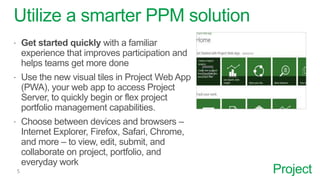
Utilize a smarter PPM solution
 Get started quickly with a familiar
experience that improves participation and
helps teams get more done
 Use the new visual tiles in Project Web App
(PWA), your web app to access Project
Server, to quickly begin or flex project
portfolio management capabilities.
 Choose between devices and browsers –
Internet Explorer, Firefox, Safari, Chrome,
and more – to view, edit, submit, and
collaborate on project, portfolio, and
everyday work
Project
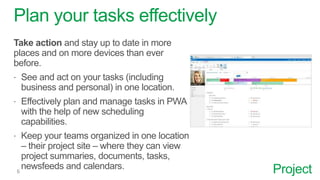
Plan your tasks effectively
Take action and stay up to date in more
places and on more devices than ever
before.
 See and act on your tasks (including
business and personal) in one location.
 Effectively plan and manage tasks in PWA
with the help of new scheduling
capabilities.
 Keep your teams organized in one location
– their project site – where they can view
project summaries, documents, tasks,
newsfeeds and calendars.
Project
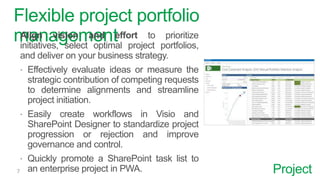
Flexible project portfolio
managementAlign vision and effort to prioritize
initiatives, select optimal project portfolios,
and deliver on your business strategy.
 Effectively evaluate ideas or measure the
strategic contribution of competing requests
to determine alignments and streamline
project initiation.
 Easily create workflows in Visio and
SharePoint Designer to standardize project
progression or rejection and improve
governance and control.
 Quickly promote a SharePoint task list to
an enterprise project in PWA.
Project
Resource Management
 Effectively manage resources to see what your teams are doing –
even when they’re managing everyday work or ad hoc projects in
SharePoint.
 Better manage you’re your project pipeline and what your people are
working on by capturing your team’s ideas in SharePoint task lists and
measuring them in PWA.
 Accurately measure resource utilization and better manage resource
allocation that aligns with your strategy.
 Seamlessly flow information from team member calendars in Exchange
to Project Server 2013, simplifying project scheduling and task status
updates while enhancing task-sharing capabilities.
Project
Take advantage of new ways to
collaborate and act quickly
Strengthen everyday collaboration with the social experiences of
SharePoint, which facilitate discussions, information sharing, and your
team’s ability to get work done.
 Easily share and curate what teams are talking about and working on
by following people, sites, tags, and documents with newsfeeds.
 Utilize the search capabilities of SharePoint to execute everyday work
and projects more effectively and find the right information.
 Take advantage of powerful security features to share information and
collaborate with trusted business partners on projects and everyday
work.
 Promote visibility with collaborative tools to seamlessly flow calendar,
presence, and capacity information across your organization.
Project
Seamless Communication
Seamlessly communicate with new ways to
share conversations across time and space to
improve overall teamwork.
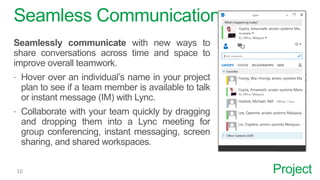
 Hover over an individual’s name in your project
plan to see if a team member is available to talk
or instant message (IM) with Lync.
 Collaborate with your team quickly by dragging
and dropping them into a Lync meeting for
group conferencing, instant messaging, screen
sharing, and shared workspaces.
Project
Increase agility and control
Make data driven decisions by equipping team
members and stakeholders with the information
they need to stay informed and effective.
 Optimize utilization and plan allocation for your
organizations resource requirements through
the resource center in PWA.
 Use summary dashboards to help gain insights
and make better decisions.
 Quickly mine and aggregate data on many
dimensions via self-service access with Excel
Services.
Project
Integrate with your Active Directory
Simplify IT with an integrated admin experience with SharePoint.
 Utilize Active Directory (AD) synchronization in PWA to choose which
AD group contains the teams that you want to assign to projects.
 Easily give your teams and trusted business partners the right level of
access through a new SharePoint integrated security model in PWA.
 Utilize industry standards such as ODATA (open data protocol) for data
mining and business intelligence.
Project
Innovation and Development
Quickly innovate with a flexible PPM platform.
 Utilize apps from the new SharePoint Store to meet unique business
needs.
 Quickly develop and deliver apps that help you shave time off discrete
processes or connect to proprietary software systems.
 Take advantage of integrated experiences across Project Server,
SharePoint, Exchange, Lync and Office to help you quickly act and
respond to opportunities.
 Bring together different disciplines such as ALM, NPD, and IPM through
a connected and scalable PPM platform.
• Planning Implementation
• Integration Plan
• Requirements:
• Infrastructure
• Resource
• Timeline
More you should learn, ask me…
About Author:
Dr. Amarnath Gupta, PgMP, PMP, ITIL, Six Sigma, CMMi 3, MCP
Email: info@amarnathgupta.com
Web: www.amarnathgupta.com
Tel (USA): +1 (772) 618-7302
Tel (MY): +60 11 2720 6785
Tel (IN): +91 8444-078787

Enterprise Project Management using Microsoft Project

  • 1.
  • 2.
  • 5.
    Project Utilize a smarterPPM solution  Get started quickly with a familiar experience that improves participation and helps teams get more done  Use the new visual tiles in Project Web App (PWA), your web app to access Project Server, to quickly begin or flex project portfolio management capabilities.  Choose between devices and browsers – Internet Explorer, Firefox, Safari, Chrome, and more – to view, edit, submit, and collaborate on project, portfolio, and everyday work
  • 6.
    Project Plan your taskseffectively Take action and stay up to date in more places and on more devices than ever before.  See and act on your tasks (including business and personal) in one location.  Effectively plan and manage tasks in PWA with the help of new scheduling capabilities.  Keep your teams organized in one location – their project site – where they can view project summaries, documents, tasks, newsfeeds and calendars.
  • 7.
    Project Flexible project portfolio managementAlignvision and effort to prioritize initiatives, select optimal project portfolios, and deliver on your business strategy.  Effectively evaluate ideas or measure the strategic contribution of competing requests to determine alignments and streamline project initiation.  Easily create workflows in Visio and SharePoint Designer to standardize project progression or rejection and improve governance and control.  Quickly promote a SharePoint task list to an enterprise project in PWA.
  • 8.
    Project Resource Management  Effectivelymanage resources to see what your teams are doing – even when they’re managing everyday work or ad hoc projects in SharePoint.  Better manage you’re your project pipeline and what your people are working on by capturing your team’s ideas in SharePoint task lists and measuring them in PWA.  Accurately measure resource utilization and better manage resource allocation that aligns with your strategy.  Seamlessly flow information from team member calendars in Exchange to Project Server 2013, simplifying project scheduling and task status updates while enhancing task-sharing capabilities.
  • 9.
    Project Take advantage ofnew ways to collaborate and act quickly Strengthen everyday collaboration with the social experiences of SharePoint, which facilitate discussions, information sharing, and your team’s ability to get work done.  Easily share and curate what teams are talking about and working on by following people, sites, tags, and documents with newsfeeds.  Utilize the search capabilities of SharePoint to execute everyday work and projects more effectively and find the right information.  Take advantage of powerful security features to share information and collaborate with trusted business partners on projects and everyday work.  Promote visibility with collaborative tools to seamlessly flow calendar, presence, and capacity information across your organization.
  • 10.
    Project Seamless Communication Seamlessly communicatewith new ways to share conversations across time and space to improve overall teamwork.  Hover over an individual’s name in your project plan to see if a team member is available to talk or instant message (IM) with Lync.  Collaborate with your team quickly by dragging and dropping them into a Lync meeting for group conferencing, instant messaging, screen sharing, and shared workspaces.
  • 11.
    Project Increase agility andcontrol Make data driven decisions by equipping team members and stakeholders with the information they need to stay informed and effective.  Optimize utilization and plan allocation for your organizations resource requirements through the resource center in PWA.  Use summary dashboards to help gain insights and make better decisions.  Quickly mine and aggregate data on many dimensions via self-service access with Excel Services.
  • 12.
    Project Integrate with yourActive Directory Simplify IT with an integrated admin experience with SharePoint.  Utilize Active Directory (AD) synchronization in PWA to choose which AD group contains the teams that you want to assign to projects.  Easily give your teams and trusted business partners the right level of access through a new SharePoint integrated security model in PWA.  Utilize industry standards such as ODATA (open data protocol) for data mining and business intelligence.
  • 13.
    Project Innovation and Development Quicklyinnovate with a flexible PPM platform.  Utilize apps from the new SharePoint Store to meet unique business needs.  Quickly develop and deliver apps that help you shave time off discrete processes or connect to proprietary software systems.  Take advantage of integrated experiences across Project Server, SharePoint, Exchange, Lync and Office to help you quickly act and respond to opportunities.  Bring together different disciplines such as ALM, NPD, and IPM through a connected and scalable PPM platform.
  • 14.
    • Planning Implementation •Integration Plan • Requirements: • Infrastructure • Resource • Timeline More you should learn, ask me…
  • 17.
    About Author: Dr. AmarnathGupta, PgMP, PMP, ITIL, Six Sigma, CMMi 3, MCP Email: info@amarnathgupta.com Web: www.amarnathgupta.com Tel (USA): +1 (772) 618-7302 Tel (MY): +60 11 2720 6785 Tel (IN): +91 8444-078787