Web-Based Schedule Management Comparison


                                           April 2010
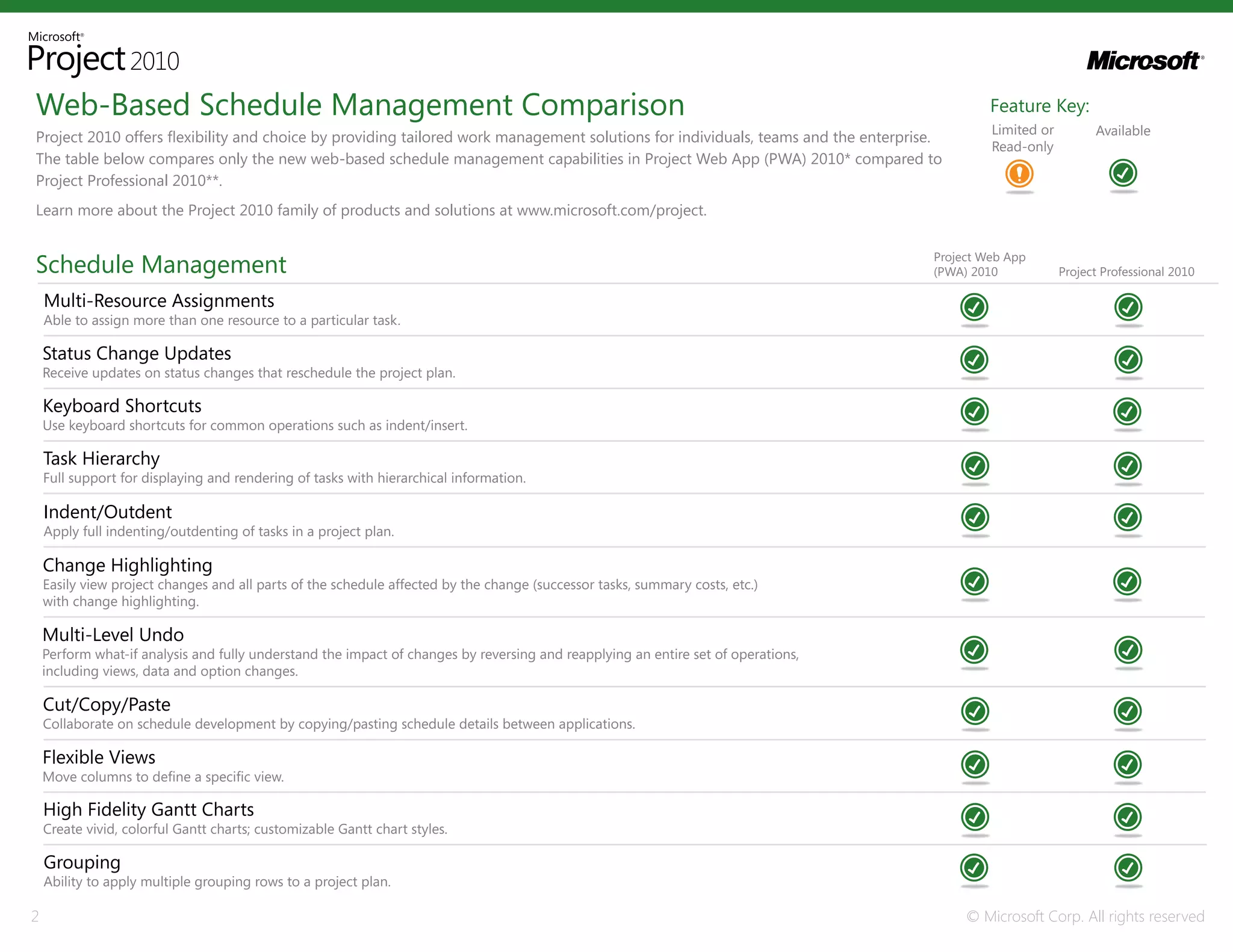
Web-Based Schedule Management Comparison                                                                                                    Feature Key:
                                                                                                                                            Limited or         Available
Project 2010 offers flexibility and choice by providing tailored work management solutions for individuals, teams and the enterprise.
                                                                                                                                            Read-only
The table below compares only the new web-based schedule management capabilities in Project Web App (PWA) 2010* compared to
Project Professional 2010**.
Learn more about the Project 2010 family of products and solutions at www.microsoft.com/project.


Schedule Management                                                                                                                Project Web App
                                                                                                                                   (PWA) 2010            Project Professional 2010

    Multi-Resource Assignments
    Able to assign more than one resource to a particular task.

    Status Change Updates
    Receive updates on status changes that reschedule the project plan.

    Keyboard Shortcuts
    Use keyboard shortcuts for common operations such as indent/insert.

    Task Hierarchy
    Full support for displaying and rendering of tasks with hierarchical information.

    Indent/Outdent
    Apply full indenting/outdenting of tasks in a project plan.

    Change Highlighting
    Easily view project changes and all parts of the schedule affected by the change (successor tasks, summary costs, etc.)
    with change highlighting.

    Multi-Level Undo
    Perform what-if analysis and fully understand the impact of changes by reversing and reapplying an entire set of operations,
    including views, data and option changes.

    Cut/Copy/Paste
    Collaborate on schedule development by copying/pasting schedule details between applications.

    Flexible Views
    Move columns to define a specific view.

    High Fidelity Gantt Charts
    Create vivid, colorful Gantt charts; customizable Gantt chart styles.

    Grouping
    Ability to apply multiple grouping rows to a project plan.

2                                                                                                                                       © Microsoft Corp. All rights reserved
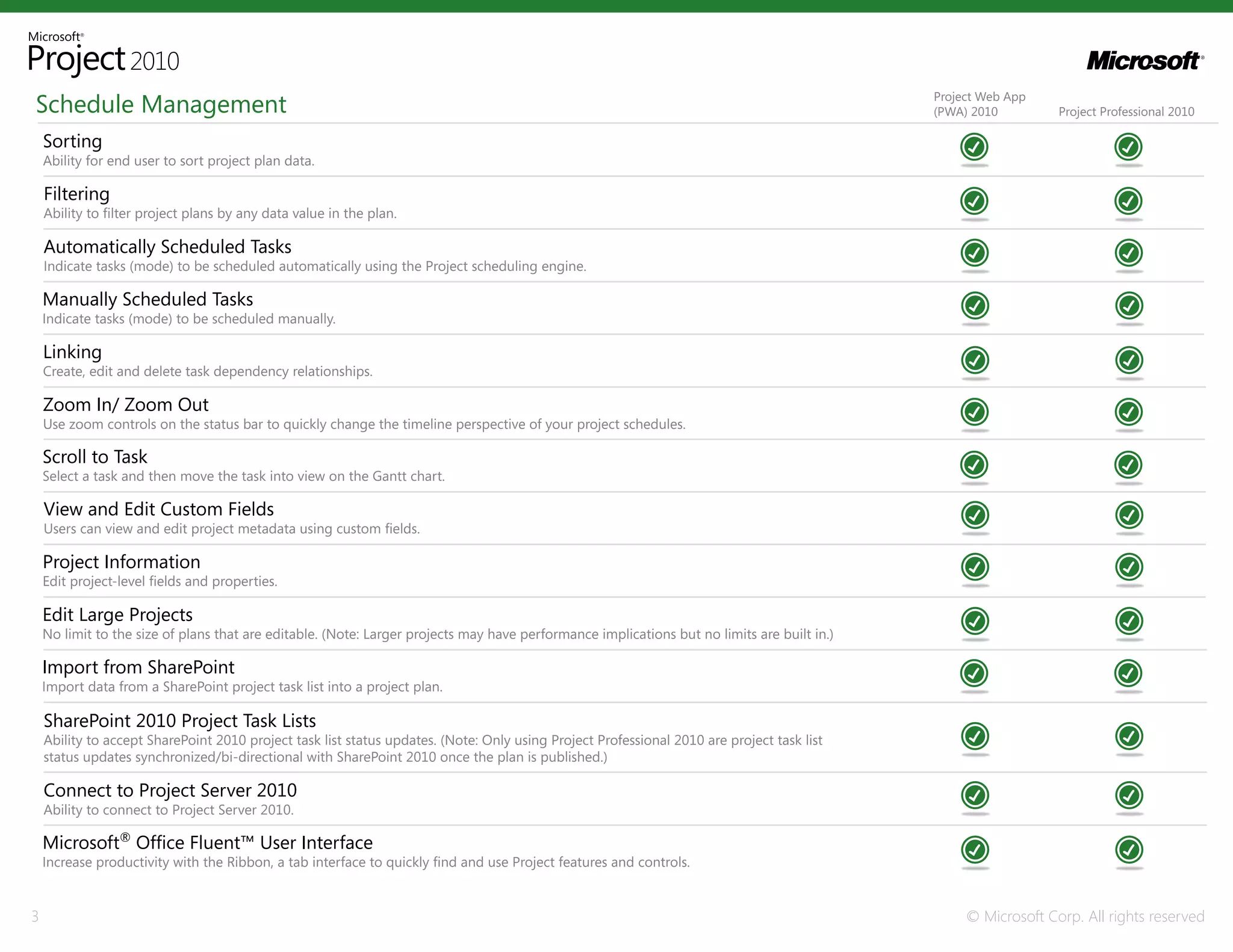
Schedule Management                                                                                                                          Project Web App
                                                                                                                                             (PWA) 2010         Project Professional 2010

    Sorting
    Ability for end user to sort project plan data.

    Filtering
    Ability to filter project plans by any data value in the plan.

    Automatically Scheduled Tasks
    Indicate tasks (mode) to be scheduled automatically using the Project scheduling engine.

    Manually Scheduled Tasks
    Indicate tasks (mode) to be scheduled manually.

    Linking
    Create, edit and delete task dependency relationships.

    Zoom In/ Zoom Out
    Use zoom controls on the status bar to quickly change the timeline perspective of your project schedules.

    Scroll to Task
    Select a task and then move the task into view on the Gantt chart.

    View and Edit Custom Fields
    Users can view and edit project metadata using custom fields.

    Project Information
    Edit project-level fields and properties.

    Edit Large Projects
    No limit to the size of plans that are editable. (Note: Larger projects may have performance implications but no limits are built in.)

    Import from SharePoint
    Import data from a SharePoint project task list into a project plan.

    SharePoint 2010 Project Task Lists
    Ability to accept SharePoint 2010 project task list status updates. (Note: Only using Project Professional 2010 are project task list
    status updates synchronized/bi-directional with SharePoint 2010 once the plan is published.)

    Connect to Project Server 2010
    Ability to connect to Project Server 2010.

    Microsoft® Office Fluent™ User Interface
    Increase productivity with the Ribbon, a tab interface to quickly find and use Project features and controls.


3                                                                                                                                                 © Microsoft Corp. All rights reserved
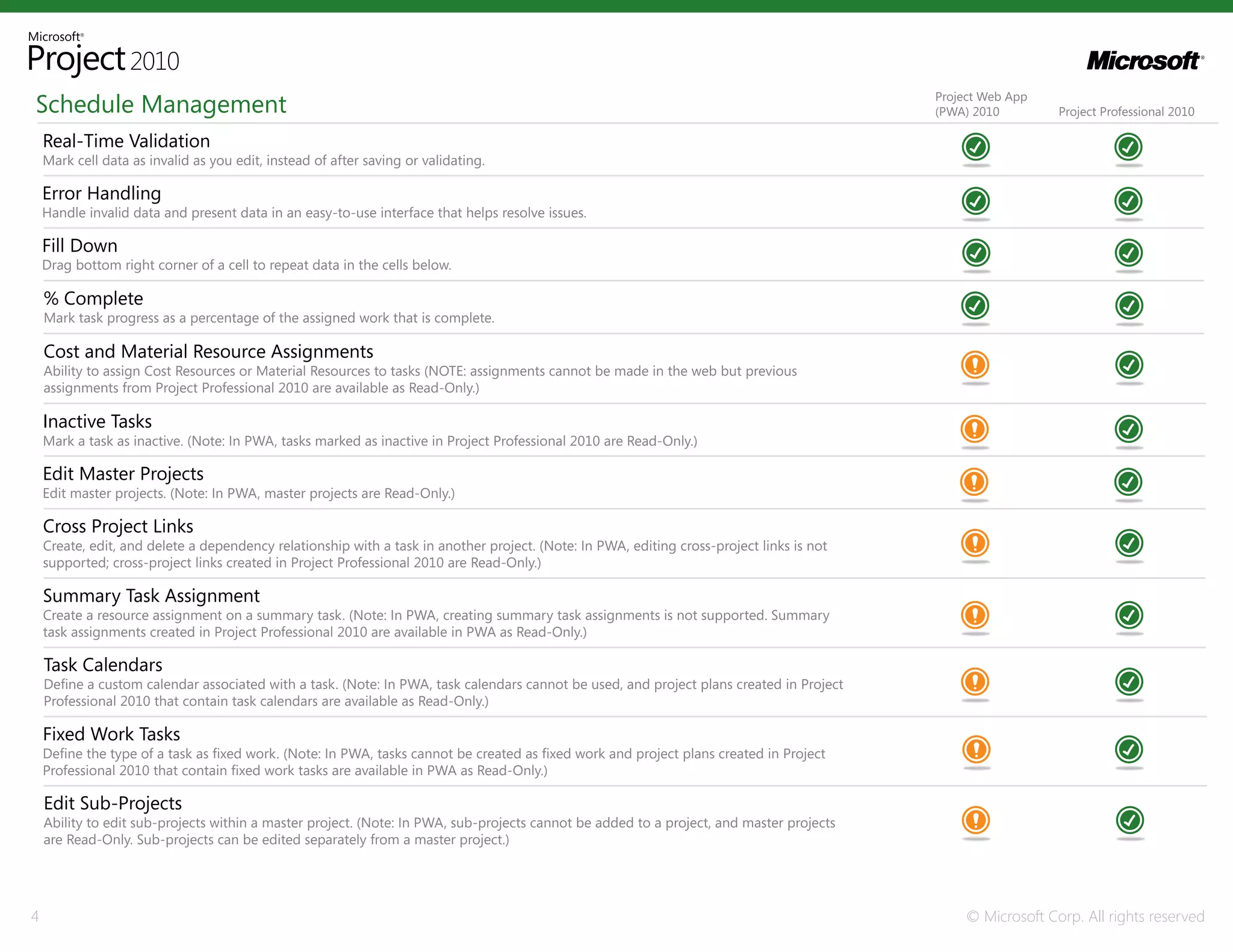
Schedule Management                                                                                                                        Project Web App
                                                                                                                                           (PWA) 2010         Project Professional 2010

    Real-Time Validation
    Mark cell data as invalid as you edit, instead of after saving or validating.

    Error Handling
    Handle invalid data and present data in an easy-to-use interface that helps resolve issues.

    Fill Down
    Drag bottom right corner of a cell to repeat data in the cells below.

    % Complete
    Mark task progress as a percentage of the assigned work that is complete.

    Cost and Material Resource Assignments
    Ability to assign Cost Resources or Material Resources to tasks (NOTE: assignments cannot be made in the web but previous
    assignments from Project Professional 2010 are available as Read-Only.)

    Inactive Tasks
    Mark a task as inactive. (Note: In PWA, tasks marked as inactive in Project Professional 2010 are Read-Only.)

    Edit Master Projects
    Edit master projects. (Note: In PWA, master projects are Read-Only.)

    Cross Project Links
    Create, edit, and delete a dependency relationship with a task in another project. (Note: In PWA, editing cross-project links is not
    supported; cross-project links created in Project Professional 2010 are Read-Only.)

    Summary Task Assignment
    Create a resource assignment on a summary task. (Note: In PWA, creating summary task assignments is not supported. Summary
    task assignments created in Project Professional 2010 are available in PWA as Read-Only.)

    Task Calendars
    Define a custom calendar associated with a task. (Note: In PWA, task calendars cannot be used, and project plans created in Project
    Professional 2010 that contain task calendars are available as Read-Only.)

    Fixed Work Tasks
    Define the type of a task as fixed work. (Note: In PWA, tasks cannot be created as fixed work and project plans created in Project
    Professional 2010 that contain fixed work tasks are available in PWA as Read-Only.)

    Edit Sub-Projects
    Ability to edit sub-projects within a master project. (Note: In PWA, sub-projects cannot be added to a project, and master projects
    are Read-Only. Sub-projects can be edited separately from a master project.)


4                                                                                                                                               © Microsoft Corp. All rights reserved
Schedule Management                                                                                                                  Project Web App
                                                                                                                                     (PWA) 2010         Project Professional 2010

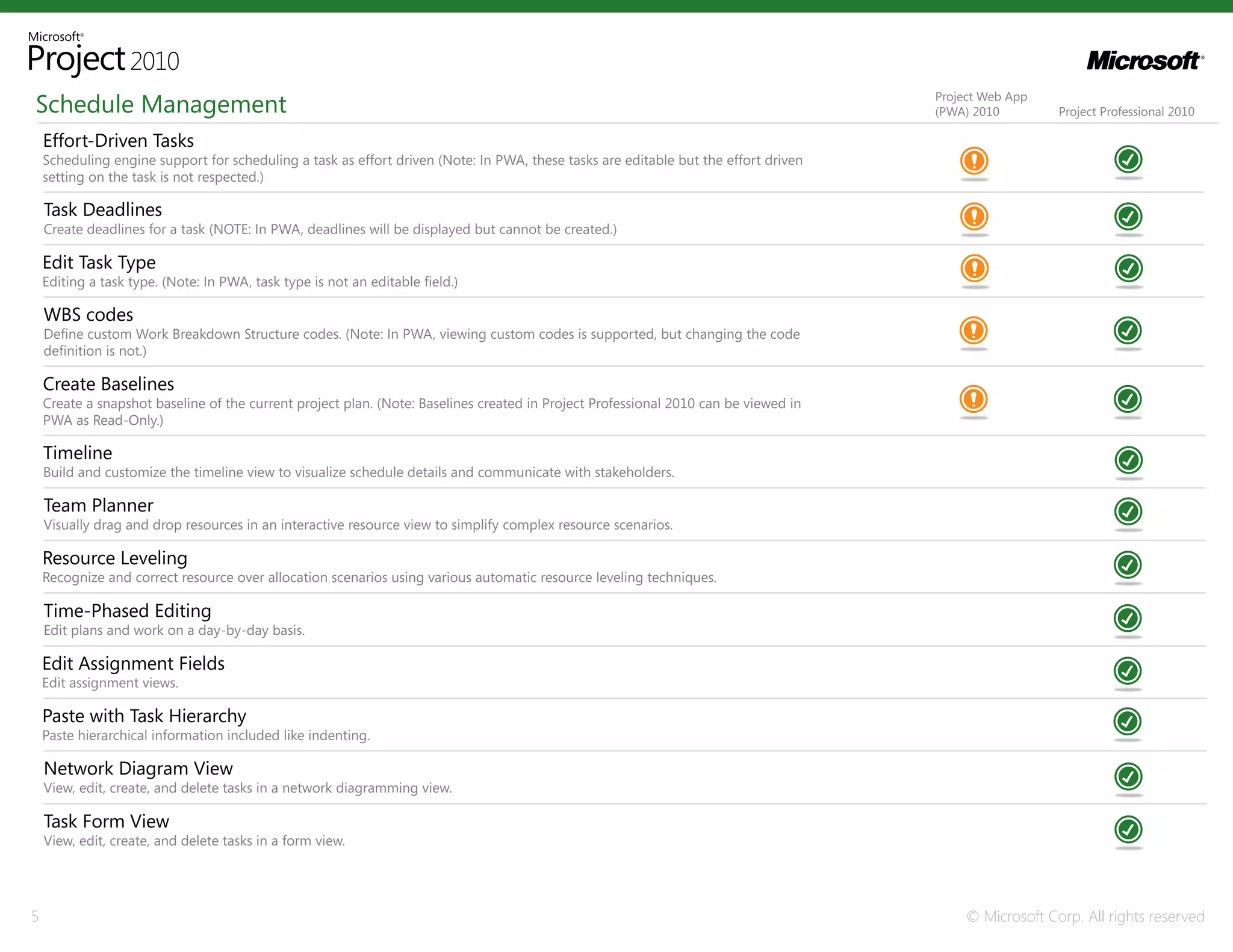
    Effort-Driven Tasks
    Scheduling engine support for scheduling a task as effort driven (Note: In PWA, these tasks are editable but the effort driven
    setting on the task is not respected.)

    Task Deadlines
    Create deadlines for a task (NOTE: In PWA, deadlines will be displayed but cannot be created.)

    Edit Task Type
    Editing a task type. (Note: In PWA, task type is not an editable field.)

    WBS codes
    Define custom Work Breakdown Structure codes. (Note: In PWA, viewing custom codes is supported, but changing the code
    definition is not.)

    Create Baselines
    Create a snapshot baseline of the current project plan. (Note: Baselines created in Project Professional 2010 can be viewed in
    PWA as Read-Only.)

    Timeline
    Build and customize the timeline view to visualize schedule details and communicate with stakeholders.

    Team Planner
    Visually drag and drop resources in an interactive resource view to simplify complex resource scenarios.

    Resource Leveling
    Recognize and correct resource over allocation scenarios using various automatic resource leveling techniques.

    Time-Phased Editing
    Edit plans and work on a day-by-day basis.

    Edit Assignment Fields
    Edit assignment views.

    Paste with Task Hierarchy
    Paste hierarchical information included like indenting.

    Network Diagram View
    View, edit, create, and delete tasks in a network diagramming view.

    Task Form View
    View, edit, create, and delete tasks in a form view.


5                                                                                                                                         © Microsoft Corp. All rights reserved
Schedule Management                                                                                                               Project Web App
                                                                                                                                  (PWA) 2010         Project Professional 2010

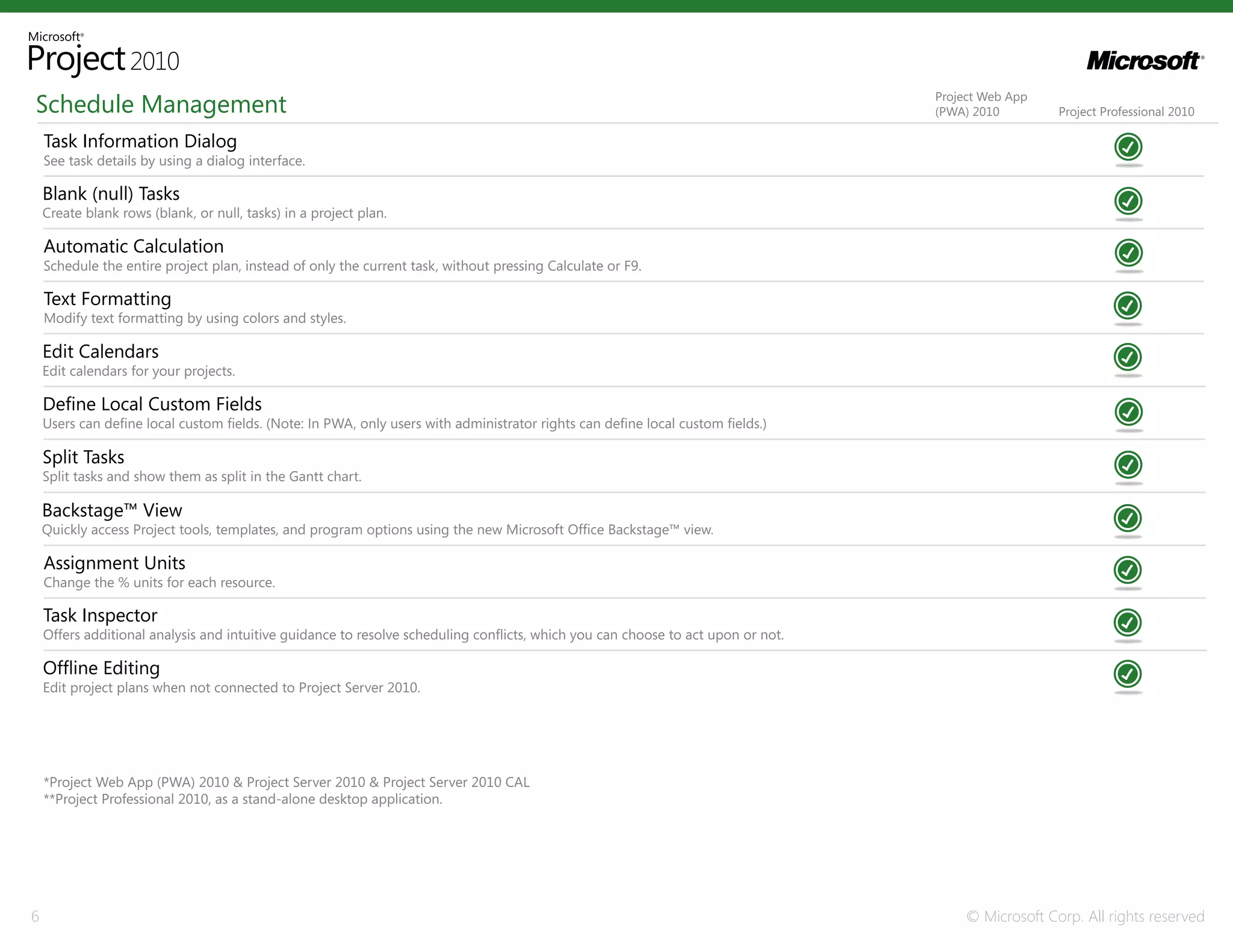
    Task Information Dialog
    See task details by using a dialog interface.

    Blank (null) Tasks
    Create blank rows (blank, or null, tasks) in a project plan.

    Automatic Calculation
    Schedule the entire project plan, instead of only the current task, without pressing Calculate or F9.

    Text Formatting
    Modify text formatting by using colors and styles.

    Edit Calendars
    Edit calendars for your projects.

    Define Local Custom Fields
    Users can define local custom fields. (Note: In PWA, only users with administrator rights can define local custom fields.)

    Split Tasks
    Split tasks and show them as split in the Gantt chart.

    Backstage™ View
    Quickly access Project tools, templates, and program options using the new Microsoft Office Backstage™ view.

    Assignment Units
    Change the % units for each resource.

    Task Inspector
    Offers additional analysis and intuitive guidance to resolve scheduling conflicts, which you can choose to act upon or not.

    Offline Editing
    Edit project plans when not connected to Project Server 2010.


    *Project Web App (PWA) 2010 & Project Server 2010 & Project Server 2010 CAL
    **Project Professional 2010, as a stand-alone desktop application.


6                                                                                                                                      © Microsoft Corp. All rights reserved

Comparação Project Professional x Project Web App (PWA)

  • 1.
    Web-Based Schedule ManagementComparison April 2010
  • 2.
    Web-Based Schedule ManagementComparison Feature Key: Limited or Available Project 2010 offers flexibility and choice by providing tailored work management solutions for individuals, teams and the enterprise. Read-only The table below compares only the new web-based schedule management capabilities in Project Web App (PWA) 2010* compared to Project Professional 2010**. Learn more about the Project 2010 family of products and solutions at www.microsoft.com/project. Schedule Management Project Web App (PWA) 2010 Project Professional 2010 Multi-Resource Assignments Able to assign more than one resource to a particular task. Status Change Updates Receive updates on status changes that reschedule the project plan. Keyboard Shortcuts Use keyboard shortcuts for common operations such as indent/insert. Task Hierarchy Full support for displaying and rendering of tasks with hierarchical information. Indent/Outdent Apply full indenting/outdenting of tasks in a project plan. Change Highlighting Easily view project changes and all parts of the schedule affected by the change (successor tasks, summary costs, etc.) with change highlighting. Multi-Level Undo Perform what-if analysis and fully understand the impact of changes by reversing and reapplying an entire set of operations, including views, data and option changes. Cut/Copy/Paste Collaborate on schedule development by copying/pasting schedule details between applications. Flexible Views Move columns to define a specific view. High Fidelity Gantt Charts Create vivid, colorful Gantt charts; customizable Gantt chart styles. Grouping Ability to apply multiple grouping rows to a project plan. 2 © Microsoft Corp. All rights reserved
  • 3.
    Schedule Management Project Web App (PWA) 2010 Project Professional 2010 Sorting Ability for end user to sort project plan data. Filtering Ability to filter project plans by any data value in the plan. Automatically Scheduled Tasks Indicate tasks (mode) to be scheduled automatically using the Project scheduling engine. Manually Scheduled Tasks Indicate tasks (mode) to be scheduled manually. Linking Create, edit and delete task dependency relationships. Zoom In/ Zoom Out Use zoom controls on the status bar to quickly change the timeline perspective of your project schedules. Scroll to Task Select a task and then move the task into view on the Gantt chart. View and Edit Custom Fields Users can view and edit project metadata using custom fields. Project Information Edit project-level fields and properties. Edit Large Projects No limit to the size of plans that are editable. (Note: Larger projects may have performance implications but no limits are built in.) Import from SharePoint Import data from a SharePoint project task list into a project plan. SharePoint 2010 Project Task Lists Ability to accept SharePoint 2010 project task list status updates. (Note: Only using Project Professional 2010 are project task list status updates synchronized/bi-directional with SharePoint 2010 once the plan is published.) Connect to Project Server 2010 Ability to connect to Project Server 2010. Microsoft® Office Fluent™ User Interface Increase productivity with the Ribbon, a tab interface to quickly find and use Project features and controls. 3 © Microsoft Corp. All rights reserved
  • 4.
    Schedule Management Project Web App (PWA) 2010 Project Professional 2010 Real-Time Validation Mark cell data as invalid as you edit, instead of after saving or validating. Error Handling Handle invalid data and present data in an easy-to-use interface that helps resolve issues. Fill Down Drag bottom right corner of a cell to repeat data in the cells below. % Complete Mark task progress as a percentage of the assigned work that is complete. Cost and Material Resource Assignments Ability to assign Cost Resources or Material Resources to tasks (NOTE: assignments cannot be made in the web but previous assignments from Project Professional 2010 are available as Read-Only.) Inactive Tasks Mark a task as inactive. (Note: In PWA, tasks marked as inactive in Project Professional 2010 are Read-Only.) Edit Master Projects Edit master projects. (Note: In PWA, master projects are Read-Only.) Cross Project Links Create, edit, and delete a dependency relationship with a task in another project. (Note: In PWA, editing cross-project links is not supported; cross-project links created in Project Professional 2010 are Read-Only.) Summary Task Assignment Create a resource assignment on a summary task. (Note: In PWA, creating summary task assignments is not supported. Summary task assignments created in Project Professional 2010 are available in PWA as Read-Only.) Task Calendars Define a custom calendar associated with a task. (Note: In PWA, task calendars cannot be used, and project plans created in Project Professional 2010 that contain task calendars are available as Read-Only.) Fixed Work Tasks Define the type of a task as fixed work. (Note: In PWA, tasks cannot be created as fixed work and project plans created in Project Professional 2010 that contain fixed work tasks are available in PWA as Read-Only.) Edit Sub-Projects Ability to edit sub-projects within a master project. (Note: In PWA, sub-projects cannot be added to a project, and master projects are Read-Only. Sub-projects can be edited separately from a master project.) 4 © Microsoft Corp. All rights reserved
  • 5.
    Schedule Management Project Web App (PWA) 2010 Project Professional 2010 Effort-Driven Tasks Scheduling engine support for scheduling a task as effort driven (Note: In PWA, these tasks are editable but the effort driven setting on the task is not respected.) Task Deadlines Create deadlines for a task (NOTE: In PWA, deadlines will be displayed but cannot be created.) Edit Task Type Editing a task type. (Note: In PWA, task type is not an editable field.) WBS codes Define custom Work Breakdown Structure codes. (Note: In PWA, viewing custom codes is supported, but changing the code definition is not.) Create Baselines Create a snapshot baseline of the current project plan. (Note: Baselines created in Project Professional 2010 can be viewed in PWA as Read-Only.) Timeline Build and customize the timeline view to visualize schedule details and communicate with stakeholders. Team Planner Visually drag and drop resources in an interactive resource view to simplify complex resource scenarios. Resource Leveling Recognize and correct resource over allocation scenarios using various automatic resource leveling techniques. Time-Phased Editing Edit plans and work on a day-by-day basis. Edit Assignment Fields Edit assignment views. Paste with Task Hierarchy Paste hierarchical information included like indenting. Network Diagram View View, edit, create, and delete tasks in a network diagramming view. Task Form View View, edit, create, and delete tasks in a form view. 5 © Microsoft Corp. All rights reserved
  • 6.
    Schedule Management Project Web App (PWA) 2010 Project Professional 2010 Task Information Dialog See task details by using a dialog interface. Blank (null) Tasks Create blank rows (blank, or null, tasks) in a project plan. Automatic Calculation Schedule the entire project plan, instead of only the current task, without pressing Calculate or F9. Text Formatting Modify text formatting by using colors and styles. Edit Calendars Edit calendars for your projects. Define Local Custom Fields Users can define local custom fields. (Note: In PWA, only users with administrator rights can define local custom fields.) Split Tasks Split tasks and show them as split in the Gantt chart. Backstage™ View Quickly access Project tools, templates, and program options using the new Microsoft Office Backstage™ view. Assignment Units Change the % units for each resource. Task Inspector Offers additional analysis and intuitive guidance to resolve scheduling conflicts, which you can choose to act upon or not. Offline Editing Edit project plans when not connected to Project Server 2010. *Project Web App (PWA) 2010 & Project Server 2010 & Project Server 2010 CAL **Project Professional 2010, as a stand-alone desktop application. 6 © Microsoft Corp. All rights reserved