Building a PMIS “On Your Terms”


             Welcome!
Today you’ll learn how to:
  1. Identify critical information and organize as a project

  2. Utilize technology for improved collaboration and
     communications

  3. Enable your stakeholders with actionable information

  4. Be an influencer to productive change and measurable results
Presenting Today
 Tim Cermak, PMP, MBA, Managing Partner PPM

 For more information, connect with me
   E-Mail: tim.cermak@innovative-e.com
   Twitter: @timcermak


                                       Microsoft Virtual Technical Solution Professional (VTSP)

                                       Gantthead/Projectmanagement.com SME

                                       Formerly Microsoft PPM PAC Member

                                       Formerly PMI College of Scheduling Board
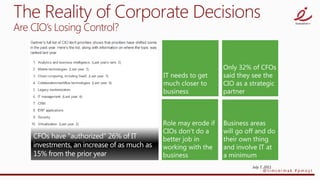
The Reality of Corporate Decisions
Are CIO’s Losing Control?


                                July 7, 2011
                                      @timcermak #pmoyt
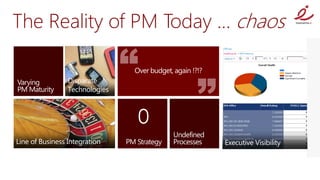
The Reality of PM Today … chaos
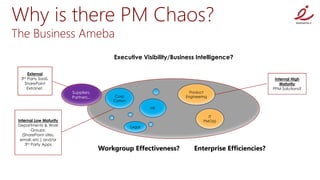
Why is there PM Chaos?
The Business Ameba
                                           Executive Visibility/Business Intelligence?

     External
  3rdParty SaaS,                                                                                    Internal High
    SharePoint                                                                                         Maturity
     Extranet,                                                                                     PPM Solutions?
                         Suppliers,                                   Product
                         Partners...        Corp                    Engineering
                                           Comm

                                                           HR

                                                                               IT
 Internal Low Maturity                                                       PMO(s)
 Departments & Work                                Legal
         Groups:
   (SharePoint sites,
  email, etc.) and/or
     3rd Party Apps
                                       Workgroup Effectiveness?         Enterprise Efficiencies?
Where are the Answers?
Core Challenge: Alignment
                  Level 1: Initial       Level 2: Repeatable         Level 3: Defined


                   No PM                Basic [PM]
    PEOPLE                                                        [PM] Certification     Competencies, Specializations
                    background            knowledge

                                                                  Automated
                                                                                              Business Process
                                         Processes [PM]           workflows ,              Modeling/Automation
    PROCESS        Ad-hoc
                                          Standardized             portfolio            (Demand Mgmt, Agile, Six Sigma)
                                                                   reporting
                                         Templates,
                                                                                                Implementation
                                          Scheduling and                                            Support
                   Paper, Word,
    TOOLS                                 Collaboration           Enterprise Tools              Enhancements
                    Excel, Email                                                                   Upgrades
                                          Tool
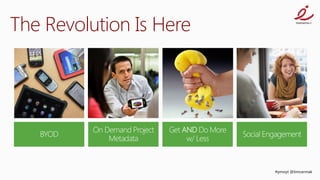
The Revolution Is Here


                         #pmoyt @timcermak
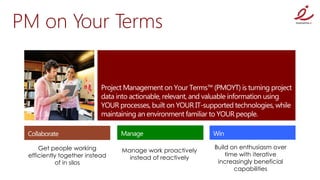
PM on Your Terms


     Get people working                                   Build on enthusiasm over
                                Manage work proactively
 efficiently together instead                                 time with iterative
                                  instead of reactively
            of in silos                                    increasingly beneficial
                                                                 capabilities
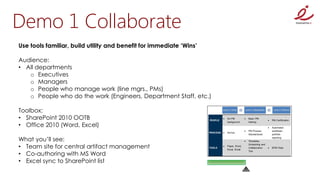
Demo 1 Collaborate
Use tools familiar, build utility and benefit for immediate ‘Wins’

Audience:
• All departments
   o Executives
   o Managers
   o People who manage work (line mgrs., PMs)
   o People who do the work (Engineers, Department Staff, etc.)

Toolbox:
• SharePoint 2010 OOTB
• Office 2010 (Word, Excel)

What you’ll see:
• Team site for central artifact management
• Co-authoring with MS Word
• Excel sync to SharePoint list
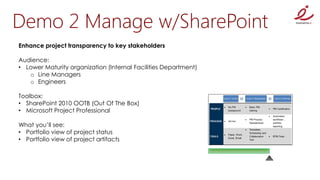
Demo 2 Manage w/SharePoint
Enhance project transparency to key stakeholders

Audience:
• Lower Maturity organization (Internal Facilities Department)
   o Line Managers
   o Engineers

Toolbox:
• SharePoint 2010 OOTB (Out Of The Box)
• Microsoft Project Professional

What you’ll see:
• Portfolio view of project status
• Portfolio view of project artifacts
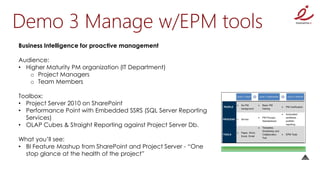
Demo 3 Manage w/EPM tools
Business Intelligence for proactive management

Audience:
• Higher Maturity PM organization (IT Department)
   o Project Managers
   o Team Members

Toolbox:
• Project Server 2010 on SharePoint
• Performance Point with Embedded SSRS (SQL Server Reporting
  Services)
• OLAP Cubes & Straight Reporting against Project Server Db.

What you’ll see:
• BI Feature Mashup from SharePoint and Project Server - “One
  stop glance at the health of the project”
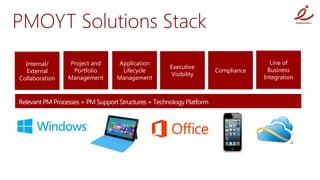
PMOYT Solutions Stack
  Internal/     Project and   Application                                Line of
                                            Executive
  External       Portfolio     Lifecycle                 Compliance     Business
                                            Visibility
Collaboration   Management    Management                              Integration
http://howtobuildapmis.eventbrite.com/
Question & Answers…
2012 pmoyt execution_webinar

2012 pmoyt execution_webinar

  • 1.
    Building a PMIS“On Your Terms” Welcome!
  • 2.
    Today you’ll learnhow to: 1. Identify critical information and organize as a project 2. Utilize technology for improved collaboration and communications 3. Enable your stakeholders with actionable information 4. Be an influencer to productive change and measurable results
  • 3.
    Presenting Today  TimCermak, PMP, MBA, Managing Partner PPM  For more information, connect with me  E-Mail: tim.cermak@innovative-e.com  Twitter: @timcermak  Microsoft Virtual Technical Solution Professional (VTSP)  Gantthead/Projectmanagement.com SME  Formerly Microsoft PPM PAC Member  Formerly PMI College of Scheduling Board
  • 7.
    The Reality ofCorporate Decisions Are CIO’s Losing Control? July 7, 2011 @timcermak #pmoyt
  • 8.
    The Reality ofPM Today … chaos
  • 9.
    Why is therePM Chaos? The Business Ameba Executive Visibility/Business Intelligence? External 3rdParty SaaS, Internal High SharePoint Maturity Extranet, PPM Solutions? Suppliers, Product Partners... Corp Engineering Comm HR IT Internal Low Maturity PMO(s) Departments & Work Legal Groups: (SharePoint sites, email, etc.) and/or 3rd Party Apps Workgroup Effectiveness? Enterprise Efficiencies?
  • 10.
    Where are theAnswers? Core Challenge: Alignment Level 1: Initial Level 2: Repeatable Level 3: Defined  No PM  Basic [PM] PEOPLE  [PM] Certification Competencies, Specializations background knowledge  Automated Business Process  Processes [PM] workflows , Modeling/Automation PROCESS  Ad-hoc Standardized portfolio (Demand Mgmt, Agile, Six Sigma) reporting  Templates, Implementation Scheduling and Support  Paper, Word, TOOLS Collaboration  Enterprise Tools Enhancements Excel, Email Upgrades Tool
  • 11.
    The Revolution IsHere #pmoyt @timcermak
  • 12.
    PM on YourTerms Get people working Build on enthusiasm over Manage work proactively efficiently together instead time with iterative instead of reactively of in silos increasingly beneficial capabilities
  • 13.
    Demo 1 Collaborate Usetools familiar, build utility and benefit for immediate ‘Wins’ Audience: • All departments o Executives o Managers o People who manage work (line mgrs., PMs) o People who do the work (Engineers, Department Staff, etc.) Toolbox: • SharePoint 2010 OOTB • Office 2010 (Word, Excel) What you’ll see: • Team site for central artifact management • Co-authoring with MS Word • Excel sync to SharePoint list
  • 14.
    Demo 2 Managew/SharePoint Enhance project transparency to key stakeholders Audience: • Lower Maturity organization (Internal Facilities Department) o Line Managers o Engineers Toolbox: • SharePoint 2010 OOTB (Out Of The Box) • Microsoft Project Professional What you’ll see: • Portfolio view of project status • Portfolio view of project artifacts
  • 15.
    Demo 3 Managew/EPM tools Business Intelligence for proactive management Audience: • Higher Maturity PM organization (IT Department) o Project Managers o Team Members Toolbox: • Project Server 2010 on SharePoint • Performance Point with Embedded SSRS (SQL Server Reporting Services) • OLAP Cubes & Straight Reporting against Project Server Db. What you’ll see: • BI Feature Mashup from SharePoint and Project Server - “One stop glance at the health of the project”
  • 16.
    PMOYT Solutions Stack Internal/ Project and Application Line of Executive External Portfolio Lifecycle Compliance Business Visibility Collaboration Management Management Integration
  • 17.
  • 19.