Unleashing FAST Search in SharePoint 2010Ameet Phadnis MCTSPartner/Principal Consultant e Tek Global Inc.
Quick SurveyExperience with SharePoint?200320072010Experience with SharePoint SearchSharePoint Foundation 2010Search Server ExpressSearch ServerSharePoint 2010Experience with Search Engine?GoogleYahooBing
Why Search?Find Information.Find People.Research.Find Prospects.Leaked Information.
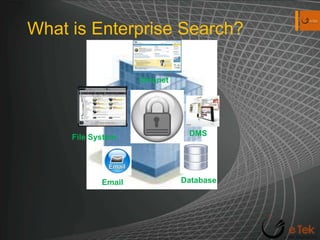
What is Enterprise Search?IntranetDMSFile SystemDatabaseEmail
Components of Enterprise SearchContent IngestionContent Processing and analysis.Indexing.Query Parsing.Matching.
Enterprise Search ProductsSharePoint Foundation 2010Search Server 2010 ExpressSearch Server 2010SharePoint Server 2010FAST Search Server 2010 for SharePoint
Typical Search ScenariosIntranet SearchPeople SearchSite SearchResearch external sitesCRMIntelligence and InvestigationIntellectual Property ProtectionCompliance
Search in SharePoint 2010Core OfferingsSearch Server 2010SharePoint Search 2010FAST Search  for SharePoint 2010Key ComponentsAdministrationCrawlingQuery & IndexingDeployment ConsiderationsCapacity PlanningDistribution ConsiderationsInformation Architecture
Search Server 2010Boolean QueriesWildcard prefixesQuery completionSuggestionsDid you  mean?Connectors for Enterprise Search in Windows 7.Refinement PanelsEnhancements for relevance of search results.Ranking based on search results history.Relevance based on inferred metadata.Relevancy tuning by document promotion or site promotion.Best BetsShallow Results RefinementPowerShell Support
SharePoint Search 2010People SearchBest BetsQuery FederationQuery completion on previously executed queries.Phonetic SearchClick-through relevance.Taxonomy IntegrationUsage Reporting
FAST Search for SharePoint 2010Visual cues through presentation of visual best bets, document preview and document thumbnails for rapid recognition of information.Contextual search to meet the needs of diverse groups.Customizable relevance-ranking models.Advanced content processing that allows complex entity extraction and content enhancements.Easy-to-configure end user experiences.Advanced query capabilities, which enable creation of powerful applications.
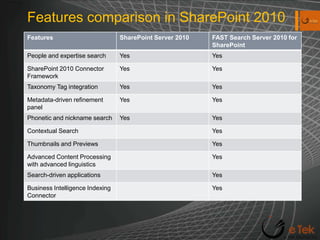
Features comparison in SharePoint 2010
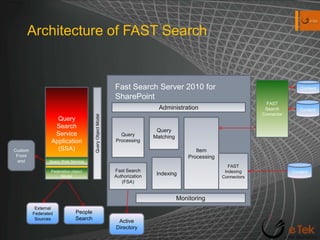
Architecture of FAST SearchFast Search Server 2010 for SharePointFAST Search ConnectorContentQuery Search Service Application (SSA)Query Object ModelContentAdministrationQuery ProcessingQuery MatchingItem ProcessingCustom Front endFAST Indexing ConnectorsIndexingQuery Web ServiceFast Search Authorization (FSA)ContentFederation object ModelMonitoringExternalFederatedSourcesPeopleSearchActive Directory
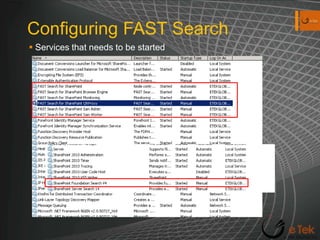
Configuring FAST SearchServices that needs to be started
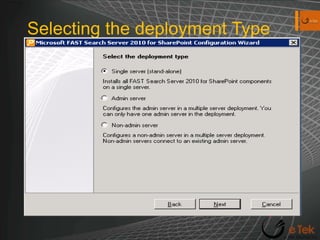
Selecting the deployment Type
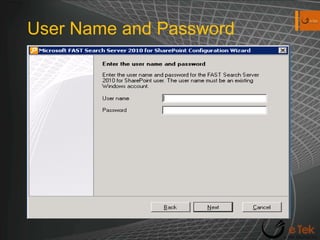
User Name and Password
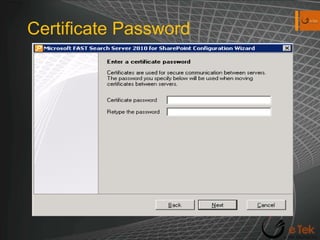
Certificate Password
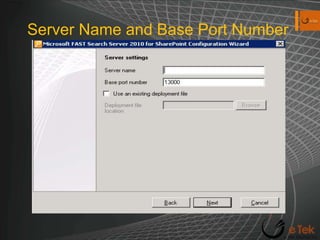
Server Name and Base Port Number
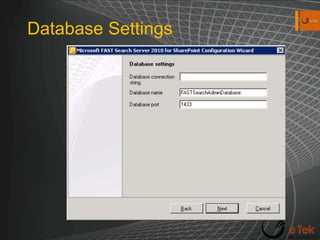
Database Settings
FAST Search Important Directory ComponentsInstall_Info.txt: Details about the Installation. FAST Search Query Search Service Application ConfigurationFAST Search Content Search Service Application Configuration.\installer\scripts: Stores PowerShell scriptssecurefastsearchconnector.ps1InstallSTSCertificateForClaims.ps1\data\data_security\cert: Self signed Certificate to enable content feeding.
Setting up Fast SearchSetup FAST Search Query Service.Setup Connector Search Service Application.Configure SSL-enabled Communication.Configure FAST Search Authorization.Configure Claims-Based Authentication.
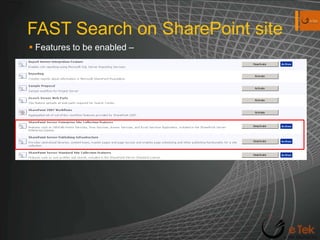
FAST Search on SharePoint siteFeatures to be enabled –
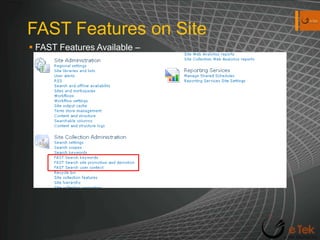
FAST Features on SiteFAST Features Available–
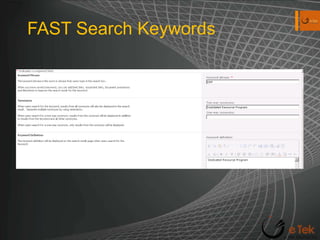
FAST Search Keywords
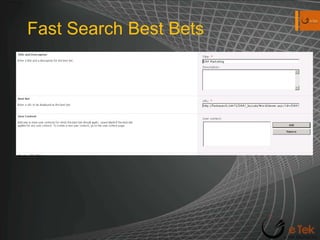
Fast Search Best Bets
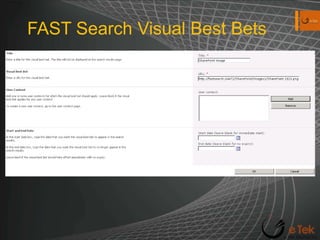
FAST Search Visual Best Bets
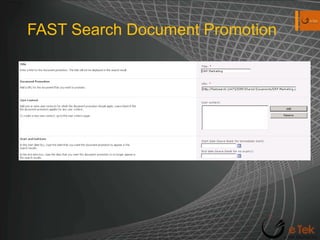
FAST Search Document Promotion
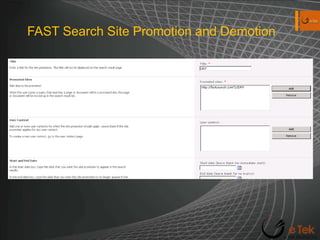
FAST Search Site Promotion and Demotion
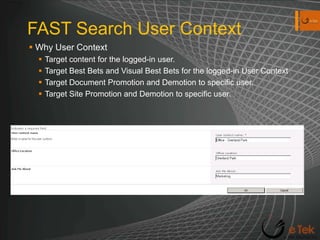
FAST Search User ContextWhy User ContextTarget content for the logged-in user.Target Best Bets and Visual Best Bets for the logged-in User ContextTarget Document Promotion and Demotion to specific user.Target Site Promotion and Demotion to specific user.
Search Web PartsAdvanced Search BoxFederated ResultsPeople Refinement PanelPeople Search boxPeople Search core resultsRefinement PanelRelated QueriesSearch Action LinksSearch Best BetsSearch BoxSearch Core ResultsSearch PagingSearch StatisticsSearch SummarySearch Visual Best BetTop Federated Results
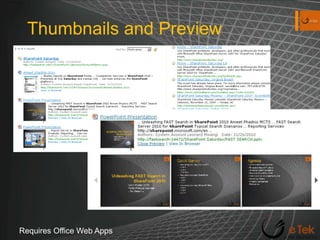
Thumbnails and PreviewRequires Office Web Apps
Demo
Resourceshttp://technet.microsoft.com/en-us/library/ee781286.aspx - All about Fast Search.http://www.microsoft.com/downloads/en/details.aspx?FamilyID=96663b95-e9f5-48c8-beb9-a15ad119c499&displaylang=en – Enterprise Search Guide.http://www.microsoft.com/downloads/en/details.aspx?FamilyID=c422d3c7-1443-41e4-b0fe-fc402ee4d8c1&displaylang=en – FAST Search Evaluation GuideFor anything else – Search with your favorite Engine.
Thank you for coming Email:- aaphadnis@etekglobalinc.comSite:- www.etekglobalinc.comBlog:- aaphadnis.spaces.live.com LinkedIn:- http://www.linkedin.com/in/aaphadnisTwitter:- @aaphadnis

Unleashing FAST Search

  • 1.
    Unleashing FAST Searchin SharePoint 2010Ameet Phadnis MCTSPartner/Principal Consultant e Tek Global Inc.
  • 2.
    Quick SurveyExperience withSharePoint?200320072010Experience with SharePoint SearchSharePoint Foundation 2010Search Server ExpressSearch ServerSharePoint 2010Experience with Search Engine?GoogleYahooBing
  • 3.
    Why Search?Find Information.FindPeople.Research.Find Prospects.Leaked Information.
  • 4.
    What is EnterpriseSearch?IntranetDMSFile SystemDatabaseEmail
  • 5.
    Components of EnterpriseSearchContent IngestionContent Processing and analysis.Indexing.Query Parsing.Matching.
  • 6.
    Enterprise Search ProductsSharePointFoundation 2010Search Server 2010 ExpressSearch Server 2010SharePoint Server 2010FAST Search Server 2010 for SharePoint
  • 7.
    Typical Search ScenariosIntranetSearchPeople SearchSite SearchResearch external sitesCRMIntelligence and InvestigationIntellectual Property ProtectionCompliance
  • 8.
    Search in SharePoint2010Core OfferingsSearch Server 2010SharePoint Search 2010FAST Search for SharePoint 2010Key ComponentsAdministrationCrawlingQuery & IndexingDeployment ConsiderationsCapacity PlanningDistribution ConsiderationsInformation Architecture
  • 9.
    Search Server 2010BooleanQueriesWildcard prefixesQuery completionSuggestionsDid you mean?Connectors for Enterprise Search in Windows 7.Refinement PanelsEnhancements for relevance of search results.Ranking based on search results history.Relevance based on inferred metadata.Relevancy tuning by document promotion or site promotion.Best BetsShallow Results RefinementPowerShell Support
  • 10.
    SharePoint Search 2010PeopleSearchBest BetsQuery FederationQuery completion on previously executed queries.Phonetic SearchClick-through relevance.Taxonomy IntegrationUsage Reporting
  • 11.
    FAST Search forSharePoint 2010Visual cues through presentation of visual best bets, document preview and document thumbnails for rapid recognition of information.Contextual search to meet the needs of diverse groups.Customizable relevance-ranking models.Advanced content processing that allows complex entity extraction and content enhancements.Easy-to-configure end user experiences.Advanced query capabilities, which enable creation of powerful applications.
  • 12.
    Features comparison inSharePoint 2010
  • 13.
    Architecture of FASTSearchFast Search Server 2010 for SharePointFAST Search ConnectorContentQuery Search Service Application (SSA)Query Object ModelContentAdministrationQuery ProcessingQuery MatchingItem ProcessingCustom Front endFAST Indexing ConnectorsIndexingQuery Web ServiceFast Search Authorization (FSA)ContentFederation object ModelMonitoringExternalFederatedSourcesPeopleSearchActive Directory
  • 14.
    Configuring FAST SearchServicesthat needs to be started
  • 15.
  • 16.
  • 17.
  • 18.
    Server Name andBase Port Number
  • 19.
  • 20.
    FAST Search ImportantDirectory ComponentsInstall_Info.txt: Details about the Installation. FAST Search Query Search Service Application ConfigurationFAST Search Content Search Service Application Configuration.\installer\scripts: Stores PowerShell scriptssecurefastsearchconnector.ps1InstallSTSCertificateForClaims.ps1\data\data_security\cert: Self signed Certificate to enable content feeding.
  • 21.
    Setting up FastSearchSetup FAST Search Query Service.Setup Connector Search Service Application.Configure SSL-enabled Communication.Configure FAST Search Authorization.Configure Claims-Based Authentication.
  • 22.
    FAST Search onSharePoint siteFeatures to be enabled –
  • 23.
    FAST Features onSiteFAST Features Available–
  • 24.
  • 25.
  • 26.
  • 27.
  • 28.
    FAST Search SitePromotion and Demotion
  • 29.
    FAST Search UserContextWhy User ContextTarget content for the logged-in user.Target Best Bets and Visual Best Bets for the logged-in User ContextTarget Document Promotion and Demotion to specific user.Target Site Promotion and Demotion to specific user.
  • 30.
    Search Web PartsAdvancedSearch BoxFederated ResultsPeople Refinement PanelPeople Search boxPeople Search core resultsRefinement PanelRelated QueriesSearch Action LinksSearch Best BetsSearch BoxSearch Core ResultsSearch PagingSearch StatisticsSearch SummarySearch Visual Best BetTop Federated Results
  • 31.
  • 32.
  • 33.
    Resourceshttp://technet.microsoft.com/en-us/library/ee781286.aspx - Allabout Fast Search.http://www.microsoft.com/downloads/en/details.aspx?FamilyID=96663b95-e9f5-48c8-beb9-a15ad119c499&displaylang=en – Enterprise Search Guide.http://www.microsoft.com/downloads/en/details.aspx?FamilyID=c422d3c7-1443-41e4-b0fe-fc402ee4d8c1&displaylang=en – FAST Search Evaluation GuideFor anything else – Search with your favorite Engine.
  • 34.
    Thank you forcoming Email:- aaphadnis@etekglobalinc.comSite:- www.etekglobalinc.comBlog:- aaphadnis.spaces.live.com LinkedIn:- http://www.linkedin.com/in/aaphadnisTwitter:- @aaphadnis