Web Cache
What is Cache?
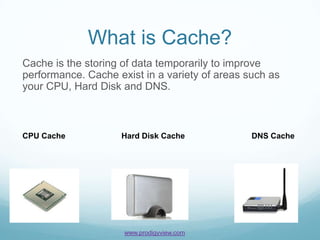
Cache is the storing of data temporarily to improve
performance. Cache exist in a variety of areas such as
your CPU, Hard Disk and DNS.


CPU Cache           Hard Disk Cache             DNS Cache


                     www.prodigyview.com
Our Focus
Our focus on this tutorial will be web cache. Web cache is
temporary storing of data that is used with delivering a
webpage (html, php, javascript, etc).
Why and How
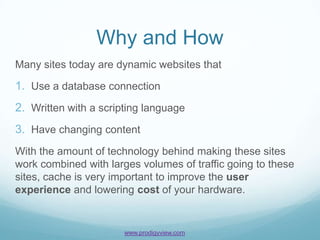
Many sites today are dynamic websites that

1. Use a database connection
2. Written with a scripting language
3. Have changing content
With the amount of technology behind making these sites
work combined with larges volumes of traffic going to these
sites, cache is very important to improve the user
experience and lowering cost of your hardware.


                       www.prodigyview.com
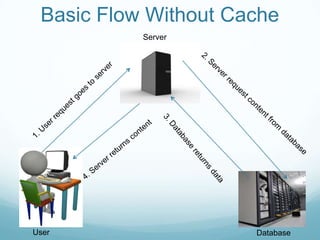
Basic Flow Without Cache
           Server


User                  Database
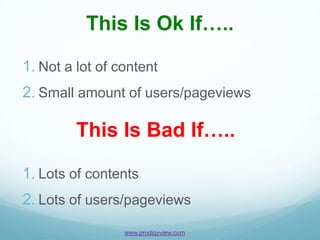
This Is Ok If…..

1. Not a lot of content
2. Small amount of users/pageviews

         This Is Bad If…..

1. Lots of contents
2. Lots of users/pageviews
                 www.prodigyview.com
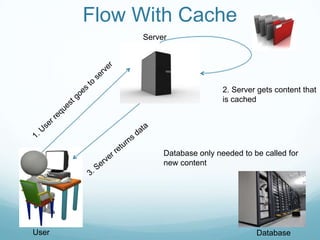
Flow With Cache
            Server


                                 2. Server gets content that
                                 is cached


                 Database only needed to be called for
                 new content


User                                      Database
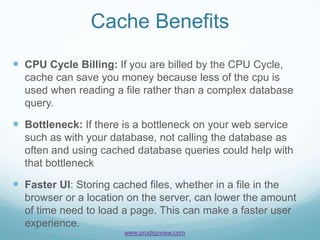
Cache Benefits
 CPU Cycle Billing: If you are billed by the CPU Cycle,
  cache can save you money because less of the cpu is
  used when reading a file rather than a complex database
  query.

 Bottleneck: If there is a bottleneck on your web service
  such as with your database, not calling the database as
  often and using cached database queries could help with
  that bottleneck

 Faster UI: Storing cached files, whether in a file in the
  browser or a location on the server, can lower the amount
  of time need to load a page. This can make a faster user
  experience.
                        www.prodigyview.com
Basic Caching Methods
 Headers: PHP has a cache option set in the headers. This
  can be useful for caching external files such as JavaScript
  and CSS files.
 Basic File Cache: Basic file cache is an easy to implement
  solution for writing and reading cache on a server.
 Memcache: A PHP extension for caching files on multiple
  servers.
 Cache Lite: A PHP extension installed through PEAR that
  caches whole pages or sections of pages.
 APC : APC, short for Alternative PHP Cache, is another php
  extension that cache’s PHP code. It is installed through
  PECL.


                       www.prodigyview.com
Higher Level Caching
 Varnish: A HTTP accelerator(reverse proxy) that
  caches data in virtual memory.
 Squid: A caching server that can cache DNS, FTP,
  HTTPS, HTTP, TSL, and SSL protocols.
 Apache Traffic Server: A reverse proxy and forward
  proxy caching server that despite its name, works with
  Nginx.
 XtraDB: If you are using a Mysql database, this
  caching solution can help optimize performance of your
  database better than the standard InnoDB.


                     www.prodigyview.com
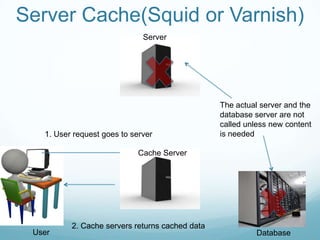
Server Cache(Squid or Varnish)
                              Server


                                                 The actual server and the
                                                 database server are not
                                                 called unless new content
   1. User request goes to server                is needed

                             Cache Server


          2. Cache servers returns cached data
 User                                                      Database
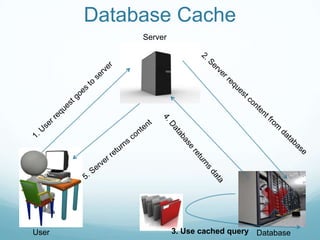
Database Cache
            Server


User                 3. Use cached query Database
Review
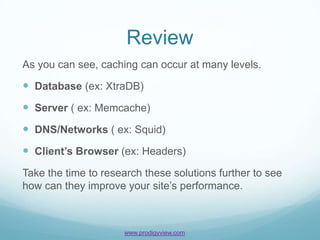
As you can see, caching can occur at many levels.

 Database (ex: XtraDB)
 Server ( ex: Memcache)
 DNS/Networks ( ex: Squid)
 Client’s Browser (ex: Headers)
Take the time to research these solutions further to see
how can they improve your site’s performance.


                     www.prodigyview.com
ProdigyView and Caching
 Natively, ProdigyView offers two type of caching: file
  cache and memcache. Bot are easy to setup and use.

 Caching solutions can be extended by using a third
  party caching solution or writing an adapter that will
  change how the cache works.


                      www.prodigyview.com
API Reference
For a better understanding of cache in ProdigyView, visit
the api by clicking on the link below.

PVCache


                 More Tutorials
For more tutorials, please visit:

http://www.prodigyview.com/tutorials


                       www.prodigyview.com

Understanding Web Cache

  • 1.
  • 2.
    What is Cache? Cacheis the storing of data temporarily to improve performance. Cache exist in a variety of areas such as your CPU, Hard Disk and DNS. CPU Cache Hard Disk Cache DNS Cache www.prodigyview.com
  • 3.
    Our Focus Our focuson this tutorial will be web cache. Web cache is temporary storing of data that is used with delivering a webpage (html, php, javascript, etc).
  • 4.
    Why and How Manysites today are dynamic websites that 1. Use a database connection 2. Written with a scripting language 3. Have changing content With the amount of technology behind making these sites work combined with larges volumes of traffic going to these sites, cache is very important to improve the user experience and lowering cost of your hardware. www.prodigyview.com
  • 5.
    Basic Flow WithoutCache Server User Database
  • 6.
    This Is OkIf….. 1. Not a lot of content 2. Small amount of users/pageviews This Is Bad If….. 1. Lots of contents 2. Lots of users/pageviews www.prodigyview.com
  • 7.
    Flow With Cache Server 2. Server gets content that is cached Database only needed to be called for new content User Database
  • 8.
    Cache Benefits  CPUCycle Billing: If you are billed by the CPU Cycle, cache can save you money because less of the cpu is used when reading a file rather than a complex database query.  Bottleneck: If there is a bottleneck on your web service such as with your database, not calling the database as often and using cached database queries could help with that bottleneck  Faster UI: Storing cached files, whether in a file in the browser or a location on the server, can lower the amount of time need to load a page. This can make a faster user experience. www.prodigyview.com
  • 9.
    Basic Caching Methods Headers: PHP has a cache option set in the headers. This can be useful for caching external files such as JavaScript and CSS files.  Basic File Cache: Basic file cache is an easy to implement solution for writing and reading cache on a server.  Memcache: A PHP extension for caching files on multiple servers.  Cache Lite: A PHP extension installed through PEAR that caches whole pages or sections of pages.  APC : APC, short for Alternative PHP Cache, is another php extension that cache’s PHP code. It is installed through PECL. www.prodigyview.com
  • 10.
    Higher Level Caching Varnish: A HTTP accelerator(reverse proxy) that caches data in virtual memory.  Squid: A caching server that can cache DNS, FTP, HTTPS, HTTP, TSL, and SSL protocols.  Apache Traffic Server: A reverse proxy and forward proxy caching server that despite its name, works with Nginx.  XtraDB: If you are using a Mysql database, this caching solution can help optimize performance of your database better than the standard InnoDB. www.prodigyview.com
  • 11.
    Server Cache(Squid orVarnish) Server The actual server and the database server are not called unless new content 1. User request goes to server is needed Cache Server 2. Cache servers returns cached data User Database
  • 12.
    Database Cache Server User 3. Use cached query Database
  • 13.
    Review As you cansee, caching can occur at many levels.  Database (ex: XtraDB)  Server ( ex: Memcache)  DNS/Networks ( ex: Squid)  Client’s Browser (ex: Headers) Take the time to research these solutions further to see how can they improve your site’s performance. www.prodigyview.com
  • 14.
    ProdigyView and Caching Natively, ProdigyView offers two type of caching: file cache and memcache. Bot are easy to setup and use.  Caching solutions can be extended by using a third party caching solution or writing an adapter that will change how the cache works. www.prodigyview.com
  • 15.
    API Reference For abetter understanding of cache in ProdigyView, visit the api by clicking on the link below. PVCache More Tutorials For more tutorials, please visit: http://www.prodigyview.com/tutorials www.prodigyview.com