Amity School of Engineering &
Technology
B. Tech (CSE), Semester 6
Subject: Advanced Java Programming
Course Code: IT404
Amity School of Engineering and Technology
2
What is Java Server Pages (JSP)?
 Java Server Pages (JSP) is a technology for developing web
pages that support dynamic content.
 It helps to insert java code in HTML pages by making use
of special JSP tags.
Example
<% …JSP Tag… %>
 JSP is a server-side program that is similar in design and
functionality to java servlet.
 A JSP page consists of HTML tags and JSP tags.
 JSP pages are saved with .jsp extension
2
3
JSP vs Servlet
3
4
Comparing JSP with Servlet
4
JSP Servlet
JSP is a webpage scripting language that
generates dynamic content.
Servlets are Java programs that are already
compiled which also creates dynamic web
content.
A JSP technically gets converted to a servlet
It embed the java code into HTML.
E.g. <html> <% java code %> </html>
A servlet is a java class.
It put HTML into print statements.
E.g. out.println(“<html code>”);
JSPs are extension of servlets which
minimizes the effort of developers to write
User Interfaces using Java programming.
A servlet is a server-side program and written
purely in Java.
JSP runs slower than servlet.
As, it has the transition phase for converting
from JSP to a Servlet. Once it is converted to
a Servlet then it will start the compilation
Servlets run faster than JSP
In MVC architecture JSP acts as view. In MVC architecture Servlet acts as
controller.
We can build custom tags using JSP API We cannot build any custom tags in servlet.
5
Advantages of JSP over
Servlets
1. In a JSP page visual content and logic are separated,
which is not possible in a servlet.
i.e. JSP separates business logic from the presentation
logic.
§ Servlets use println statements for printing an HTML
document which is usually very difficult to use. JSP has
no such tedious task to maintain.
5
6
question
6
1. List advantages of JSP over Servlet.[3] Win’17
Win’18
7
Life Cycle of JSP
7
8
Life Cycle of JSP
 A JSP life cycle can be defined as the entire process from
its creation till the destruction.
 It is similar to a servlet life cycle with an additional step
which is required to compile a JSP into servlet.
 A JSP page is converted into Servlet in order to service
requests.
 The translation of a JSP page to a Servlet is called
Lifecycle of JSP.
8
9
Life Cycle of JSP
9
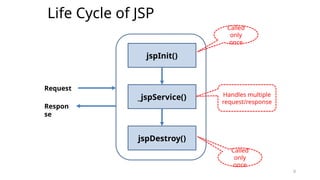
jspInit()
_jspService()
jspDestroy()
Request
Respon
se
Called
only
once
Called
only
once
Handles multiple
request/response
10
Life Cycle of JSP
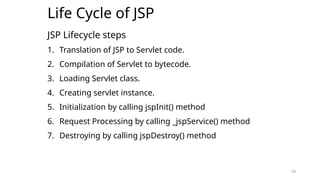
JSP Lifecycle steps
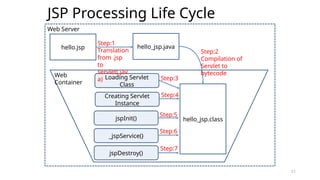
1. Translation of JSP to Servlet code.
2. Compilation of Servlet to bytecode.
3. Loading Servlet class.
4. Creating servlet instance.
5. Initialization by calling jspInit() method
6. Request Processing by calling _jspService() method
7. Destroying by calling jspDestroy() method
10
11
JSP Processing Life Cycle
11
hello.jsp hello_jsp.java
Web Server
Web
Container
hello_jsp.class
Loading Servlet
Class
jspInit()
_jspService()
jspDestroy()
Step:1
Translation
from .jsp
to
servlet(.jav
a)
Step:2
Compilation of
Servlet to
bytecode
Step:3
Step:4
Step:5
Step:6
Creating Servlet
Instance
Step:7
12
Life Cycle of JSP
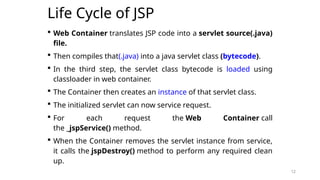
 Web Container translates JSP code into a servlet source(.java)
file.
 Then compiles that(.java) into a java servlet class (bytecode).
 In the third step, the servlet class bytecode is loaded using
classloader in web container.
 The Container then creates an instance of that servlet class.
 The initialized servlet can now service request.
 For each request the Web Container call
the _jspService() method.
 When the Container removes the servlet instance from service,
it calls the jspDestroy() method to perform any required clean
up.
12
13
JSP Processing
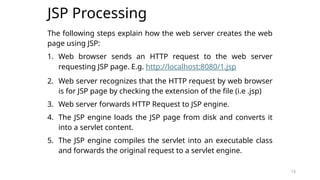
The following steps explain how the web server creates the web
page using JSP:
1. Web browser sends an HTTP request to the web server
requesting JSP page. E.g. http://localhost:8080/1.jsp
2. Web server recognizes that the HTTP request by web browser
is for JSP page by checking the extension of the file (i.e .jsp)
3. Web server forwards HTTP Request to JSP engine.
4. The JSP engine loads the JSP page from disk and converts it
into a servlet content.
5. The JSP engine compiles the servlet into an executable class
and forwards the original request to a servlet engine.
13
14
JSP Processing
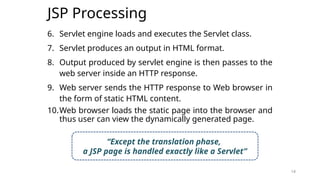
6. Servlet engine loads and executes the Servlet class.
7. Servlet produces an output in HTML format.
8. Output produced by servlet engine is then passes to the
web server inside an HTTP response.
9. Web server sends the HTTP response to Web browser in
the form of static HTML content.
10.Web browser loads the static page into the browser and
thus user can view the dynamically generated page.
14
“Except the translation phase,
a JSP page is handled exactly like a Servlet”
15
JSP Processing
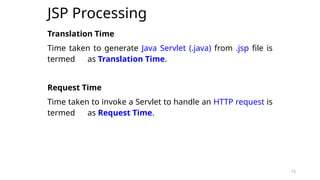
Translation Time
Time taken to generate Java Servlet (.java) from .jsp file is
termed as Translation Time.
Request Time
Time taken to invoke a Servlet to handle an HTTP request is
termed as Request Time.
15
16
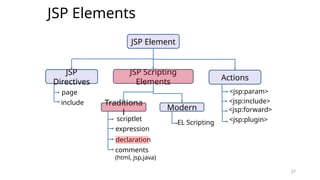
JSP Elements
16
17
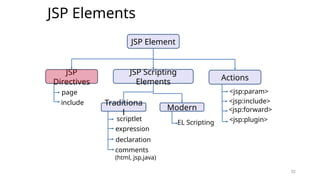
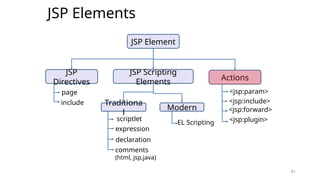
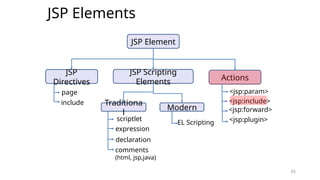
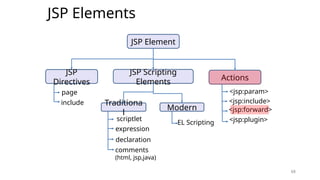
JSP Elements
17
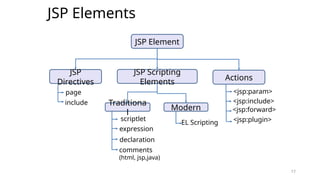
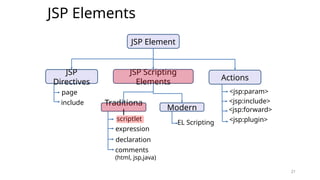
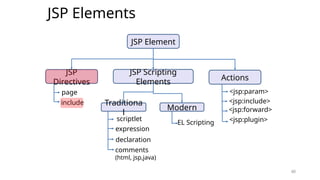
JSP Element
JSP
Directives
JSP Scripting
Elements
Actions
page
include Traditiona
l
Modern
scriptlet
expression
declaration
comments
(html, jsp,java)
EL Scripting
<jsp:param>
<jsp:include>
<jsp:forward>
<jsp:plugin>
18
JSP Elements
18
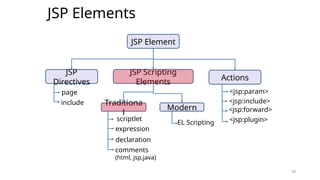
JSP Element
JSP
Directives
JSP Scripting
Elements
Actions
page
include Traditiona
l
Modern
scriptlet
expression
declaration
comments
(html, jsp,java)
EL Scripting
<jsp:param>
<jsp:include>
<jsp:forward>
<jsp:plugin>
19
JSP Scripting Elements
19
20
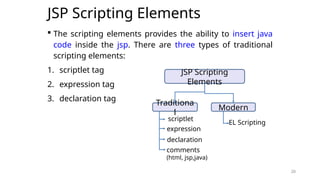
JSP Scripting Elements
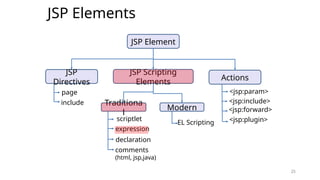
 The scripting elements provides the ability to insert java
code inside the jsp. There are three types of traditional
scripting elements:
1. scriptlet tag
2. expression tag
3. declaration tag
20
JSP Scripting
Elements
Traditiona
l
Modern
scriptlet
expression
declaration
comments
(html, jsp,java)
EL Scripting
21
JSP Elements
21
JSP Element
JSP
Directives
JSP Scripting
Elements
Actions
page
include Traditiona
l
Modern
scriptlet
expression
declaration
comments
(html, jsp,java)
EL Scripting
<jsp:param>
<jsp:include>
<jsp:forward>
<jsp:plugin>
22
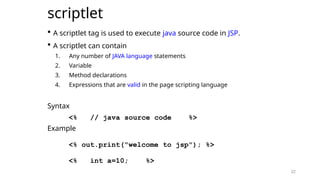
scriptlet
 A scriptlet tag is used to execute java source code in JSP.
 A scriptlet can contain
1. Any number of JAVA language statements
2. Variable
3. Method declarations
4. Expressions that are valid in the page scripting language
Syntax
<% // java source code %>
Example
<% out.print("welcome to jsp"); %>
<% int a=10; %>
22
23
scriptlet
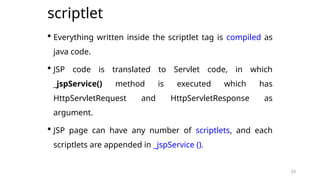
 Everything written inside the scriptlet tag is compiled as
java code.
 JSP code is translated to Servlet code, in which
_jspService() method is executed which has
HttpServletRequest and HttpServletResponse as
argument.
 JSP page can have any number of scriptlets, and each
scriptlets are appended in _jspService ().
23
24
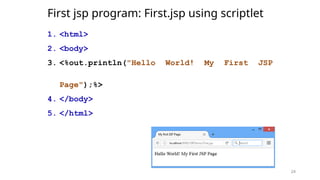
First jsp program: First.jsp using scriptlet
1. <html>
2. <body>
3. <%out.println("Hello World! My First JSP
Page");%>
4. </body>
5. </html>
24
25
JSP Elements
25
JSP Element
JSP
Directives
JSP Scripting
Elements
Actions
page
include Traditiona
l
Modern
scriptlet
expression
declaration
comments
(html, jsp,java)
EL Scripting
<jsp:param>
<jsp:include>
<jsp:forward>
<jsp:plugin>
26
expression
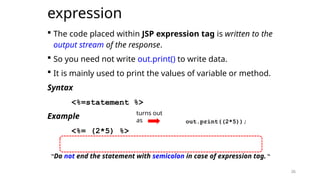
 The code placed within JSP expression tag is written to the
output stream of the response.
 So you need not write out.print() to write data.
 It is mainly used to print the values of variable or method.
Syntax
<%=statement %>
Example
<%= (2*5) %>
“Do not end the statement with semicolon in case of expression tag.“
26
turns out
as out.print((2*5));
27
JSP Elements
27
JSP Element
JSP
Directives
JSP Scripting
Elements
Actions
page
include Traditiona
l
Modern
scriptlet
expression
declaration
comments
(html, jsp,java)
EL Scripting
<jsp:param>
<jsp:include>
<jsp:forward>
<jsp:plugin>
28
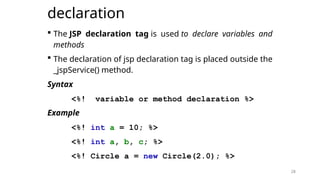
declaration
 The JSP declaration tag is used to declare variables and
methods
 The declaration of jsp declaration tag is placed outside the
_jspService() method.
Syntax
<%! variable or method declaration %>
Example
<%! int a = 10; %>
<%! int a, b, c; %>
<%! Circle a = new Circle(2.0); %>
28
29
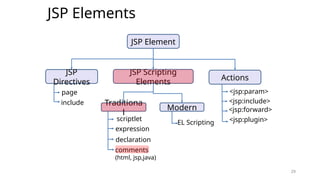
JSP Elements
29
JSP Element
JSP
Directives
JSP Scripting
Elements
Actions
page
include Traditiona
l
Modern
scriptlet
expression
declaration
comments
(html, jsp,java)
EL Scripting
<jsp:param>
<jsp:include>
<jsp:forward>
<jsp:plugin>
30
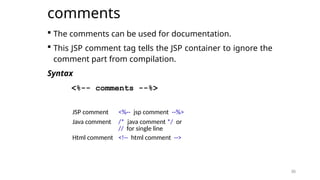
comments
 The comments can be used for documentation.
 This JSP comment tag tells the JSP container to ignore the
comment part from compilation.
Syntax
<%-- comments --%>
30
JSP comment <%-- jsp comment --%>
Java comment /* java comment */ or
// for single line
Html comment <!-- html comment -->
31
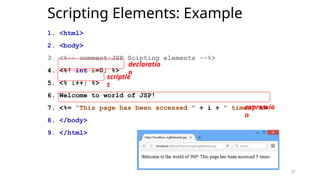
Scripting Elements: Example
1. <html>
2. <body>
3. <%-- comment:JSP Scipting elements --%>
4. <%! int i=0; %>
5. <% i++; %>
6. Welcome to world of JSP!
7. <%= "This page has been accessed " + i + " times" %>
8. </body>
9. </html>
31
declaratio
n
scriptle
t
expressio
n
32
JSP Elements
32
JSP Element
JSP
Directives
JSP Scripting
Elements
Actions
page
include Traditiona
l
Modern
scriptlet
expression
declaration
comments
(html, jsp,java)
EL Scripting
<jsp:param>
<jsp:include>
<jsp:forward>
<jsp:plugin>
33
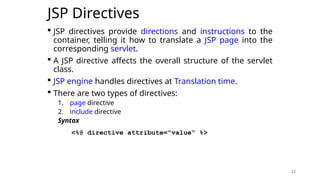
JSP Directives
 JSP directives provide directions and instructions to the
container, telling it how to translate a JSP page into the
corresponding servlet.
 A JSP directive affects the overall structure of the servlet
class.
 JSP engine handles directives at Translation time.
 There are two types of directives:
1. page directive
2. include directive
Syntax
<%@ directive attribute="value" %>
33
34
JSP Elements
34
JSP Element
JSP
Directives
JSP Scripting
Elements
Actions
page
include Traditiona
l
Modern
scriptlet
expression
declaration
comments
(html, jsp,java)
EL Scripting
<jsp:param>
<jsp:include>
<jsp:forward>
<jsp:plugin>
35
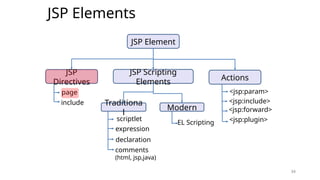
JSP Directives
page directive
35
36
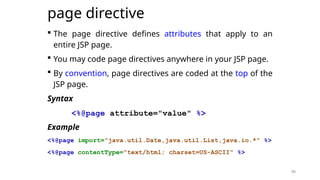
page directive
 The page directive defines attributes that apply to an
entire JSP page.
 You may code page directives anywhere in your JSP page.
 By convention, page directives are coded at the top of the
JSP page.
Syntax
<%@page attribute="value" %>
Example
<%@page import="java.util.Date,java.util.List,java.io.*" %>
<%@page contentType="text/html; charset=US-ASCII" %>
36
37
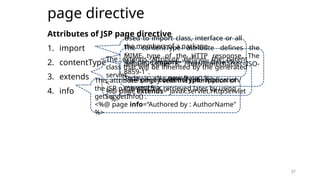
page directive
Attributes of JSP page directive
1. import
2. contentType
3. extends
4. info
37
Used to import class, interface or all
the members of a package
<
%@ page import="java.util.Date" %>
Today is: <%= new Date() %>
The contentType attribute defines the
MIME type of the HTTP response. The
default value is "text/html;charset=ISO-
8859-1".
<%@ page contentType=application/
msword %>
The extends attribute defines the parent
class that will be inherited by the generated
servlet
<
%@ page extends="javax.servlet.HttpServlet
" %>
This attribute simply sets the information of
the JSP page which is retrieved later by using
getServletInfo() .
<%@ page info=“Authored by : AuthorName"
%>
38
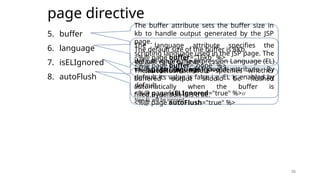
page directive
5. buffer
6. language
7. isELIgnored
8. autoFlush
38
The buffer attribute sets the buffer size in
kb to handle output generated by the JSP
page.
The default size of the buffer is 8Kb.
<%@ page buffer="16kb" %>
<%@ page buffer="none" %>
The language attribute specifies the
scripting language used in the JSP page. The
default value is "java".
<%@ page language="java" %>
We can ignore the Expression Language (EL)
in jsp by the isELIgnored attribute. By
default its value is false i.e. EL is enabled by
default.
<%@ page isELIgnored="true" %>//
Now EL will be ignored
The autoFlush attribute specifies whether
buffered output should be flushed
automatically when the buffer is
filled.Bydefault it is true.
<%@ page autoFlush="true" %>
39
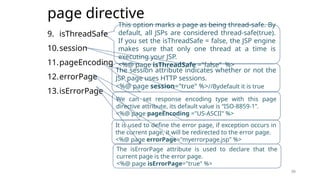
page directive
9. isThreadSafe
10.session
11.pageEncoding
12.errorPage
13.isErrorPage
39
This option marks a page as being thread-safe. By
default, all JSPs are considered thread-safe(true).
If you set the isThreadSafe = false, the JSP engine
makes sure that only one thread at a time is
executing your JSP.
<%@ page isThreadSafe ="false" %>
The session attribute indicates whether or not the
JSP page uses HTTP sessions.
<%@ page session="true" %>//Bydefault it is true
We can set response encoding type with this page
directive attribute, its default value is “ISO-8859-1”.
<%@ page pageEncoding ="US-ASCII" %>
It is used to define the error page, if exception occurs in
the current page, it will be redirected to the error page.
<%@ page errorPage="myerrorpage.jsp" %>
The isErrorPage attribute is used to declare that the
current page is the error page.
<%@ page isErrorPage="true" %>
40
JSP Elements
40
JSP Element
JSP
Directives
JSP Scripting
Elements
Actions
page
include Traditiona
l
Modern
scriptlet
expression
declaration
comments
(html, jsp,java)
EL Scripting
<jsp:param>
<jsp:include>
<jsp:forward>
<jsp:plugin>
41
JSP Directives
include directive
41
42
include directive
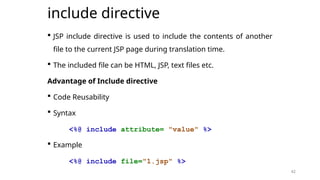
 JSP include directive is used to include the contents of another
file to the current JSP page during translation time.
 The included file can be HTML, JSP, text files etc.
Advantage of Include directive
 Code Reusability
 Syntax
<%@ include attribute= "value" %>
 Example
<%@ include file="1.jsp" %>
42
43
JSP Implicit Object
43
44
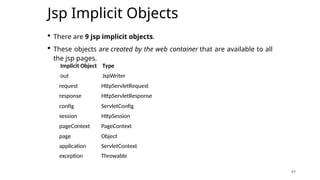
Jsp Implicit Objects
 There are 9 jsp implicit objects.
 These objects are created by the web container that are available to all
the jsp pages.
44
Implicit Object Type
out JspWriter
exception Throwable
request HttpServletRequest
response HttpServletResponse
config ServletConfig
session HttpSession
pageContext PageContext
page Object
application ServletContext
45
Jsp Implicit Objects: out
45
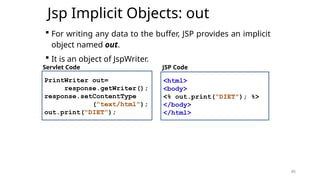
 For writing any data to the buffer, JSP provides an implicit
object named out.
 It is an object of JspWriter.
PrintWriter out=
response.getWriter();
response.setContentType
(“text/html”);
out.print(“DIET”);
<html>
<body>
<% out.print(“DIET”); %>
</body>
</html>
Servlet Code JSP Code
46
Jsp Implicit Objects: request
 Instance of javax.servlet.http.HttpServletRequest object
associated with the request.
 Each time a client requests a page the JSP engine creates
a new object to represent that request.
 The request object provides methods to get HTTP header
information including from data, cookies, HTTP methods
etc.
46
47
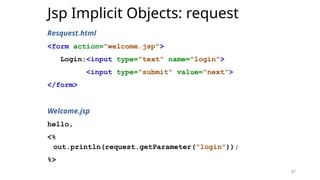
Jsp Implicit Objects: request
Resquest.html
<form action="welcome.jsp">
Login:<input type="text" name="login">
<input type="submit" value="next">
</form>
Welcome.jsp
hello,
<%
out.println(request.getParameter("login"));
%>
47
48
Jsp Implicit Objects: response
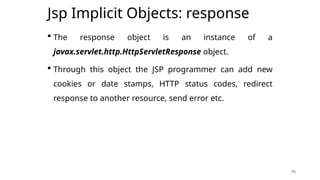
 The response object is an instance of a
javax.servlet.http.HttpServletResponse object.
 Through this object the JSP programmer can add new
cookies or date stamps, HTTP status codes, redirect
response to another resource, send error etc.
48
49
Jsp Implicit Objects: response
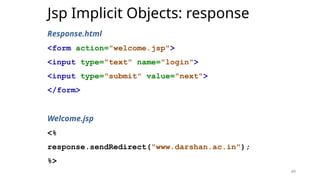
Response.html
<form action="welcome.jsp">
<input type="text" name="login">
<input type="submit" value="next">
</form>
Welcome.jsp
<%
response.sendRedirect("www.darshan.ac.in");
%>
49
50
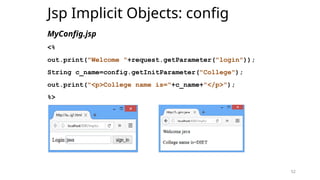
Jsp Implicit Objects: config
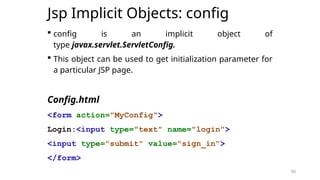
 config is an implicit object of
type javax.servlet.ServletConfig.
 This object can be used to get initialization parameter for
a particular JSP page.
Config.html
<form action="MyConfig">
Login:<input type="text" name="login">
<input type="submit" value="sign_in">
</form>
50
51
Jsp Implicit Objects: config
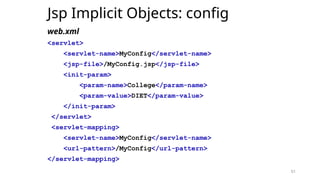
web.xml
<servlet>
<servlet-name>MyConfig</servlet-name>
<jsp-file>/MyConfig.jsp</jsp-file>
<init-param>
<param-name>College</param-name>
<param-value>DIET</param-value>
</init-param>
</servlet>
<servlet-mapping>
<servlet-name>MyConfig</servlet-name>
<url-pattern>/MyConfig</url-pattern>
</servlet-mapping>
51
52
Jsp Implicit Objects: config
MyConfig.jsp
<%
out.print("Welcome "+request.getParameter("login"));
String c_name=config.getInitParameter("College");
out.print("<p>College name is="+c_name+"</p>");
%>
52
53
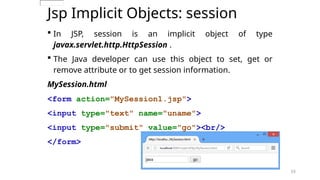
Jsp Implicit Objects: session
 In JSP, session is an implicit object of type
javax.servlet.http.HttpSession .
 The Java developer can use this object to set, get or
remove attribute or to get session information.
MySession.html
<form action="MySession1.jsp">
<input type="text" name="uname">
<input type="submit" value="go"><br/>
</form>
53
54
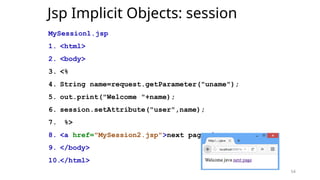
Jsp Implicit Objects: session
MySession1.jsp
1. <html>
2. <body>
3. <%
4. String name=request.getParameter("uname");
5. out.print("Welcome "+name);
6. session.setAttribute("user",name);
7. %>
8. <a href="MySession2.jsp">next page</a>
9. </body>
10.</html>
54
55
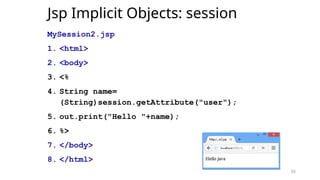
Jsp Implicit Objects: session
MySession2.jsp
1. <html>
2. <body>
3. <%
4. String name=
(String)session.getAttribute("user");
5. out.print("Hello "+name);
6. %>
7. </body>
8. </html>
55
56
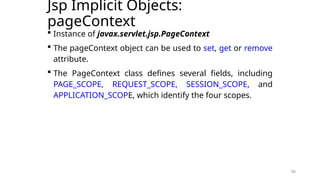
Jsp Implicit Objects:
pageContext
 Instance of javax.servlet.jsp.PageContext
 The pageContext object can be used to set, get or remove
attribute.
 The PageContext class defines several fields, including
PAGE_SCOPE, REQUEST_SCOPE, SESSION_SCOPE, and
APPLICATION_SCOPE, which identify the four scopes.
56
57
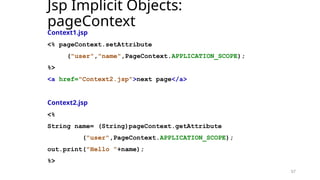
Jsp Implicit Objects:
pageContext
Context1.jsp
<% pageContext.setAttribute
("user","name",PageContext.APPLICATION_SCOPE);
%>
<a href="Context2.jsp">next page</a>
Context2.jsp
<%
String name= (String)pageContext.getAttribute
("user",PageContext.APPLICATION_SCOPE);
out.print("Hello "+name);
%>
57
58
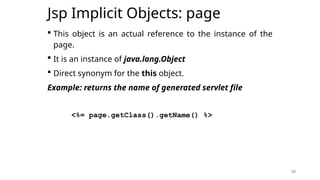
Jsp Implicit Objects: page
 This object is an actual reference to the instance of the
page.
 It is an instance of java.lang.Object
 Direct synonym for the this object.
Example: returns the name of generated servlet file
<%= page.getClass().getName() %>
58
59
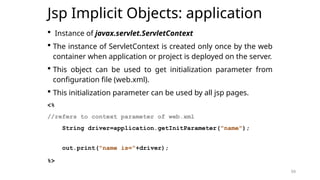
Jsp Implicit Objects: application
 Instance of javax.servlet.ServletContext
 The instance of ServletContext is created only once by the web
container when application or project is deployed on the server.
 This object can be used to get initialization parameter from
configuration file (web.xml).
 This initialization parameter can be used by all jsp pages.
<%
//refers to context parameter of web.xml
String driver=application.getInitParameter("name");
out.print("name is="+driver);
%>
59
60
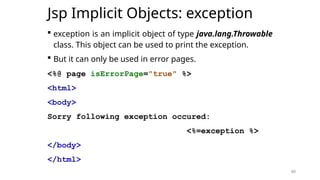
Jsp Implicit Objects: exception
 exception is an implicit object of type java.lang.Throwable
class. This object can be used to print the exception.
 But it can only be used in error pages.
<%@ page isErrorPage="true" %>
<html>
<body>
Sorry following exception occured:
<%=exception %>
</body>
</html>
60
61
JSP Elements
61
JSP Element
JSP
Directives
JSP Scripting
Elements
Actions
page
include Traditiona
l
Modern
scriptlet
expression
declaration
comments
(html, jsp,java)
EL Scripting
<jsp:param>
<jsp:include>
<jsp:forward>
<jsp:plugin>
62
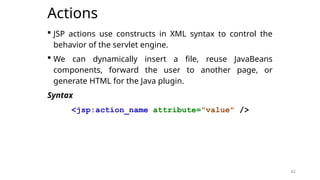
Actions
 JSP actions use constructs in XML syntax to control the
behavior of the servlet engine.
 We can dynamically insert a file, reuse JavaBeans
components, forward the user to another page, or
generate HTML for the Java plugin.
Syntax
<jsp:action_name attribute="value" />
62
63
JSP Elements
63
JSP Element
JSP
Directives
JSP Scripting
Elements
Actions
page
include Traditiona
l
Modern
scriptlet
expression
declaration
comments
(html, jsp,java)
EL Scripting
<jsp:param>
<jsp:include>
<jsp:forward>
<jsp:plugin>
64
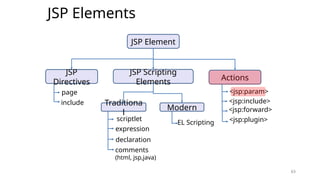
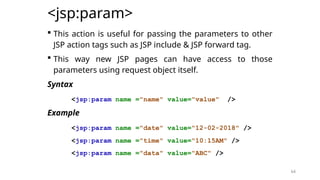
<jsp:param>
 This action is useful for passing the parameters to other
JSP action tags such as JSP include & JSP forward tag.
 This way new JSP pages can have access to those
parameters using request object itself.
Syntax
<jsp:param name ="name" value="value" />
Example
<jsp:param name ="date" value="12-02-2018" />
<jsp:param name ="time" value="10:15AM" />
<jsp:param name ="data" value="ABC" />
64
65
JSP Elements
65
JSP Element
JSP
Directives
JSP Scripting
Elements
Actions
page
include Traditiona
l
Modern
scriptlet
expression
declaration
comments
(html, jsp,java)
EL Scripting
<jsp:param>
<jsp:include>
<jsp:forward>
<jsp:plugin>
66
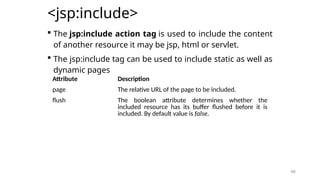
<jsp:include>
 The jsp:include action tag is used to include the content
of another resource it may be jsp, html or servlet.
 The jsp:include tag can be used to include static as well as
dynamic pages
66
Attribute Description
page The relative URL of the page to be included.
flush The boolean attribute determines whether the
included resource has its buffer flushed before it is
included. By default value is false.
67
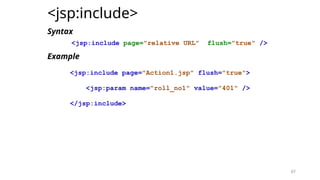
<jsp:include>
Syntax
<jsp:include page="relative URL" flush="true" />
Example
<jsp:include page="Action1.jsp" flush="true">
<jsp:param name="roll_no1" value="401" />
</jsp:include>
67
68
JSP Elements
68
JSP Element
JSP
Directives
JSP Scripting
Elements
Actions
page
include Traditiona
l
Modern
scriptlet
expression
declaration
comments
(html, jsp,java)
EL Scripting
<jsp:param>
<jsp:include>
<jsp:forward>
<jsp:plugin>
69
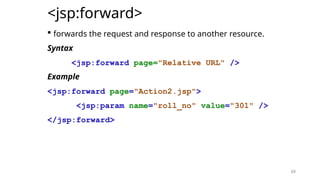
<jsp:forward>
 forwards the request and response to another resource.
Syntax
<jsp:forward page="Relative URL" />
Example
<jsp:forward page="Action2.jsp">
<jsp:param name="roll_no" value="301" />
</jsp:forward>
69
73
JSP Elements
73
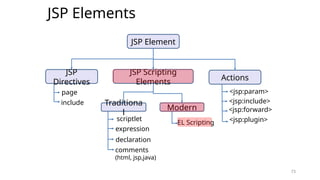
JSP Element
JSP
Directives
JSP Scripting
Elements
Actions
page
include Traditiona
l
Modern
scriptlet
expression
declaration
comments
(html, jsp,java)
EL Scripting
<jsp:param>
<jsp:include>
<jsp:forward>
<jsp:plugin>
74
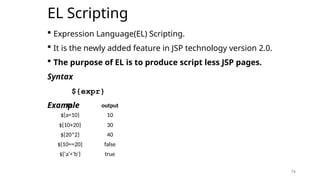
EL Scripting
 Expression Language(EL) Scripting.
 It is the newly added feature in JSP technology version 2.0.
 The purpose of EL is to produce script less JSP pages.
Syntax
${expr}
Example
74
${a=10} 10
${10+20} 30
${20*2} 40
${10==20} false
${'a'<'b'} true
EL output
75
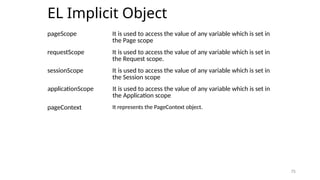
EL Implicit Object
75
pageScope It is used to access the value of any variable which is set in
the Page scope
requestScope It is used to access the value of any variable which is set in
the Request scope.
sessionScope It is used to access the value of any variable which is set in
the Session scope
applicationScope It is used to access the value of any variable which is set in
the Application scope
pageContext It represents the PageContext object.
76
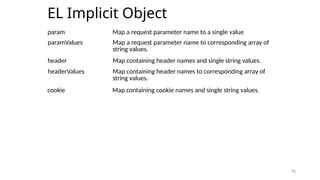
EL Implicit Object
76
param Map a request parameter name to a single value
header Map containing header names and single string values.
paramValues Map a request parameter name to corresponding array of
string values.
headerValues Map containing header names to corresponding array of
string values.
cookie Map containing cookie names and single string values.
77
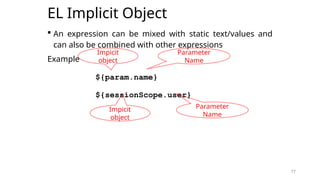
EL Implicit Object
 An expression can be mixed with static text/values and
can also be combined with other expressions
Example
${param.name}
${sessionScope.user}
77
Impicit
object
Parameter
Name
Impicit
object
Parameter
Name
78
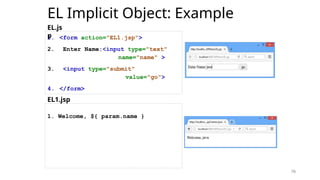
EL Implicit Object: Example
1. <form action="EL1.jsp">
2. Enter Name:<input type="text"
name="name" >
3. <input type="submit"
value="go">
4. </form>
78
1. Welcome, ${ param.name }
EL.js
p
EL1.jsp
79
EL Implicit Object: Example
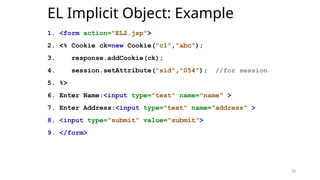
1. <form action="EL2.jsp">
2. <% Cookie ck=new Cookie("c1","abc");
3. response.addCookie(ck);
4. session.setAttribute("sid","054"); //for session
5. %>
6. Enter Name:<input type="text" name="name" >
7. Enter Address:<input type="text" name="address" >
8. <input type="submit" value="submit">
9. </form>
79
80
EL Implicit Object: Example
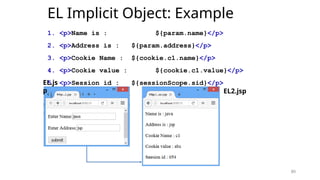
1. <p>Name is : ${param.name}</p>
2. <p>Address is : ${param.address}</p>
3. <p>Cookie Name : ${cookie.c1.name}</p>
4. <p>Cookie value : ${cookie.c1.value}</p>
5. <p>Session id : ${sessionScope.sid}</p>
80
EL.js
p EL2.jsp
81
JSP EL Operator
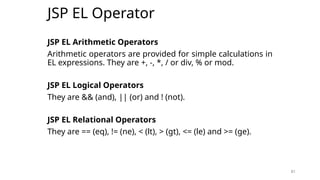
JSP EL Arithmetic Operators
Arithmetic operators are provided for simple calculations in
EL expressions. They are +, -, *, / or div, % or mod.
JSP EL Logical Operators
They are && (and), || (or) and ! (not).
JSP EL Relational Operators
They are == (eq), != (ne), < (lt), > (gt), <= (le) and >= (ge).
81
82
JSP EL Important Points
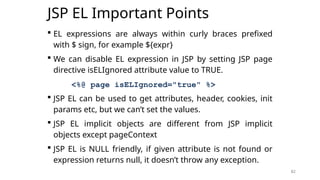
 EL expressions are always within curly braces prefixed
with $ sign, for example ${expr}
 We can disable EL expression in JSP by setting JSP page
directive isELIgnored attribute value to TRUE.
<%@ page isELIgnored="true" %>
 JSP EL can be used to get attributes, header, cookies, init
params etc, but we can’t set the values.
 JSP EL implicit objects are different from JSP implicit
objects except pageContext
 JSP EL is NULL friendly, if given attribute is not found or
expression returns null, it doesn’t throw any exception.
82
83
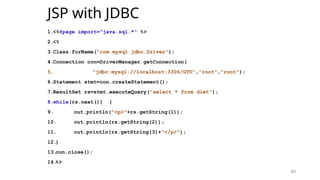
JSP with JDBC
1.<%@page import="java.sql.*" %>
2.<%
3.Class.forName("com.mysql.jdbc.Driver");
4.Connection con=DriverManager.getConnection(
5. "jdbc:mysql://localhost:3306/GTU","root","root");
6.Statement stmt=con.createStatement();
7.ResultSet rs=stmt.executeQuery("select * from diet");
8.while(rs.next()) {
9. out.println("<p>"+rs.getString(1));
10. out.println(rs.getString(2));
11. out.println(rs.getString(3)+"</p>");
12.
}
13.
con.close();
14.
%>
83
84
JSP Session and Cookies
Handling
84
85
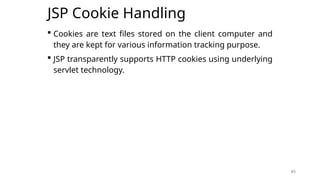
JSP Cookie Handling
 Cookies are text files stored on the client computer and
they are kept for various information tracking purpose.
 JSP transparently supports HTTP cookies using underlying
servlet technology.
85
86
JSP Cookie Handling
<% Cookie cookie = new Cookie("c1","MyCookie1");
cookie.setMaxAge(60 * 60);
response.addCookie(cookie);
%>
<html><body>
<a href="Cookie2.jsp">Click here</a>
</body></html>
<% Cookie[] c2 = request.getCookies();
for(int i = 0; i < c2.length; i++) {
out.print("<p>"+c2[i].getName()+" "+
c2[i].getValue()+"</p>");
}
%>
86
Cookie1.jsp
Cookie2.jsp
87
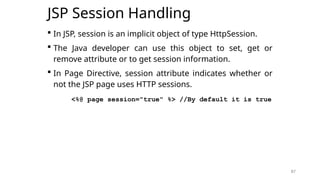
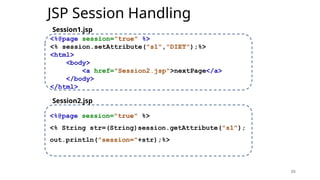
JSP Session Handling
 In JSP, session is an implicit object of type HttpSession.
 The Java developer can use this object to set, get or
remove attribute or to get session information.
 In Page Directive, session attribute indicates whether or
not the JSP page uses HTTP sessions.
<%@ page session="true" %> //By default it is true
87
88
JSP Session Handling
88
<%@page session="true" %>
<% session.setAttribute("s1","DIET");%>
<html>
<body>
<a href="Session2.jsp">nextPage</a>
</body>
</html>
<%@page session="true" %>
<% String str=(String)session.getAttribute("s1");
out.println("session="+str);%>
Session1.jsp
Session2.jsp

Module 3.pptx.............................

  • 1.
    Amity School ofEngineering & Technology B. Tech (CSE), Semester 6 Subject: Advanced Java Programming Course Code: IT404 Amity School of Engineering and Technology
  • 2.
    2 What is JavaServer Pages (JSP)?  Java Server Pages (JSP) is a technology for developing web pages that support dynamic content.  It helps to insert java code in HTML pages by making use of special JSP tags. Example <% …JSP Tag… %>  JSP is a server-side program that is similar in design and functionality to java servlet.  A JSP page consists of HTML tags and JSP tags.  JSP pages are saved with .jsp extension 2
  • 3.
  • 4.
    4 Comparing JSP withServlet 4 JSP Servlet JSP is a webpage scripting language that generates dynamic content. Servlets are Java programs that are already compiled which also creates dynamic web content. A JSP technically gets converted to a servlet It embed the java code into HTML. E.g. <html> <% java code %> </html> A servlet is a java class. It put HTML into print statements. E.g. out.println(“<html code>”); JSPs are extension of servlets which minimizes the effort of developers to write User Interfaces using Java programming. A servlet is a server-side program and written purely in Java. JSP runs slower than servlet. As, it has the transition phase for converting from JSP to a Servlet. Once it is converted to a Servlet then it will start the compilation Servlets run faster than JSP In MVC architecture JSP acts as view. In MVC architecture Servlet acts as controller. We can build custom tags using JSP API We cannot build any custom tags in servlet.
  • 5.
    5 Advantages of JSPover Servlets 1. In a JSP page visual content and logic are separated, which is not possible in a servlet. i.e. JSP separates business logic from the presentation logic. § Servlets use println statements for printing an HTML document which is usually very difficult to use. JSP has no such tedious task to maintain. 5
  • 6.
    6 question 6 1. List advantagesof JSP over Servlet.[3] Win’17 Win’18
  • 7.
  • 8.
    8 Life Cycle ofJSP  A JSP life cycle can be defined as the entire process from its creation till the destruction.  It is similar to a servlet life cycle with an additional step which is required to compile a JSP into servlet.  A JSP page is converted into Servlet in order to service requests.  The translation of a JSP page to a Servlet is called Lifecycle of JSP. 8
  • 9.
    9 Life Cycle ofJSP 9 jspInit() _jspService() jspDestroy() Request Respon se Called only once Called only once Handles multiple request/response
  • 10.
    10 Life Cycle ofJSP JSP Lifecycle steps 1. Translation of JSP to Servlet code. 2. Compilation of Servlet to bytecode. 3. Loading Servlet class. 4. Creating servlet instance. 5. Initialization by calling jspInit() method 6. Request Processing by calling _jspService() method 7. Destroying by calling jspDestroy() method 10
  • 11.
    11 JSP Processing LifeCycle 11 hello.jsp hello_jsp.java Web Server Web Container hello_jsp.class Loading Servlet Class jspInit() _jspService() jspDestroy() Step:1 Translation from .jsp to servlet(.jav a) Step:2 Compilation of Servlet to bytecode Step:3 Step:4 Step:5 Step:6 Creating Servlet Instance Step:7
  • 12.
    12 Life Cycle ofJSP  Web Container translates JSP code into a servlet source(.java) file.  Then compiles that(.java) into a java servlet class (bytecode).  In the third step, the servlet class bytecode is loaded using classloader in web container.  The Container then creates an instance of that servlet class.  The initialized servlet can now service request.  For each request the Web Container call the _jspService() method.  When the Container removes the servlet instance from service, it calls the jspDestroy() method to perform any required clean up. 12
  • 13.
    13 JSP Processing The followingsteps explain how the web server creates the web page using JSP: 1. Web browser sends an HTTP request to the web server requesting JSP page. E.g. http://localhost:8080/1.jsp 2. Web server recognizes that the HTTP request by web browser is for JSP page by checking the extension of the file (i.e .jsp) 3. Web server forwards HTTP Request to JSP engine. 4. The JSP engine loads the JSP page from disk and converts it into a servlet content. 5. The JSP engine compiles the servlet into an executable class and forwards the original request to a servlet engine. 13
  • 14.
    14 JSP Processing 6. Servletengine loads and executes the Servlet class. 7. Servlet produces an output in HTML format. 8. Output produced by servlet engine is then passes to the web server inside an HTTP response. 9. Web server sends the HTTP response to Web browser in the form of static HTML content. 10.Web browser loads the static page into the browser and thus user can view the dynamically generated page. 14 “Except the translation phase, a JSP page is handled exactly like a Servlet”
  • 15.
    15 JSP Processing Translation Time Timetaken to generate Java Servlet (.java) from .jsp file is termed as Translation Time. Request Time Time taken to invoke a Servlet to handle an HTTP request is termed as Request Time. 15
  • 16.
  • 17.
    17 JSP Elements 17 JSP Element JSP Directives JSPScripting Elements Actions page include Traditiona l Modern scriptlet expression declaration comments (html, jsp,java) EL Scripting <jsp:param> <jsp:include> <jsp:forward> <jsp:plugin>
  • 18.
    18 JSP Elements 18 JSP Element JSP Directives JSPScripting Elements Actions page include Traditiona l Modern scriptlet expression declaration comments (html, jsp,java) EL Scripting <jsp:param> <jsp:include> <jsp:forward> <jsp:plugin>
  • 19.
  • 20.
    20 JSP Scripting Elements The scripting elements provides the ability to insert java code inside the jsp. There are three types of traditional scripting elements: 1. scriptlet tag 2. expression tag 3. declaration tag 20 JSP Scripting Elements Traditiona l Modern scriptlet expression declaration comments (html, jsp,java) EL Scripting
  • 21.
    21 JSP Elements 21 JSP Element JSP Directives JSPScripting Elements Actions page include Traditiona l Modern scriptlet expression declaration comments (html, jsp,java) EL Scripting <jsp:param> <jsp:include> <jsp:forward> <jsp:plugin>
  • 22.
    22 scriptlet  A scriptlettag is used to execute java source code in JSP.  A scriptlet can contain 1. Any number of JAVA language statements 2. Variable 3. Method declarations 4. Expressions that are valid in the page scripting language Syntax <% // java source code %> Example <% out.print("welcome to jsp"); %> <% int a=10; %> 22
  • 23.
    23 scriptlet  Everything writteninside the scriptlet tag is compiled as java code.  JSP code is translated to Servlet code, in which _jspService() method is executed which has HttpServletRequest and HttpServletResponse as argument.  JSP page can have any number of scriptlets, and each scriptlets are appended in _jspService (). 23
  • 24.
    24 First jsp program:First.jsp using scriptlet 1. <html> 2. <body> 3. <%out.println("Hello World! My First JSP Page");%> 4. </body> 5. </html> 24
  • 25.
    25 JSP Elements 25 JSP Element JSP Directives JSPScripting Elements Actions page include Traditiona l Modern scriptlet expression declaration comments (html, jsp,java) EL Scripting <jsp:param> <jsp:include> <jsp:forward> <jsp:plugin>
  • 26.
    26 expression  The codeplaced within JSP expression tag is written to the output stream of the response.  So you need not write out.print() to write data.  It is mainly used to print the values of variable or method. Syntax <%=statement %> Example <%= (2*5) %> “Do not end the statement with semicolon in case of expression tag.“ 26 turns out as out.print((2*5));
  • 27.
    27 JSP Elements 27 JSP Element JSP Directives JSPScripting Elements Actions page include Traditiona l Modern scriptlet expression declaration comments (html, jsp,java) EL Scripting <jsp:param> <jsp:include> <jsp:forward> <jsp:plugin>
  • 28.
    28 declaration  The JSPdeclaration tag is used to declare variables and methods  The declaration of jsp declaration tag is placed outside the _jspService() method. Syntax <%! variable or method declaration %> Example <%! int a = 10; %> <%! int a, b, c; %> <%! Circle a = new Circle(2.0); %> 28
  • 29.
    29 JSP Elements 29 JSP Element JSP Directives JSPScripting Elements Actions page include Traditiona l Modern scriptlet expression declaration comments (html, jsp,java) EL Scripting <jsp:param> <jsp:include> <jsp:forward> <jsp:plugin>
  • 30.
    30 comments  The commentscan be used for documentation.  This JSP comment tag tells the JSP container to ignore the comment part from compilation. Syntax <%-- comments --%> 30 JSP comment <%-- jsp comment --%> Java comment /* java comment */ or // for single line Html comment <!-- html comment -->
  • 31.
    31 Scripting Elements: Example 1.<html> 2. <body> 3. <%-- comment:JSP Scipting elements --%> 4. <%! int i=0; %> 5. <% i++; %> 6. Welcome to world of JSP! 7. <%= "This page has been accessed " + i + " times" %> 8. </body> 9. </html> 31 declaratio n scriptle t expressio n
  • 32.
    32 JSP Elements 32 JSP Element JSP Directives JSPScripting Elements Actions page include Traditiona l Modern scriptlet expression declaration comments (html, jsp,java) EL Scripting <jsp:param> <jsp:include> <jsp:forward> <jsp:plugin>
  • 33.
    33 JSP Directives  JSPdirectives provide directions and instructions to the container, telling it how to translate a JSP page into the corresponding servlet.  A JSP directive affects the overall structure of the servlet class.  JSP engine handles directives at Translation time.  There are two types of directives: 1. page directive 2. include directive Syntax <%@ directive attribute="value" %> 33
  • 34.
    34 JSP Elements 34 JSP Element JSP Directives JSPScripting Elements Actions page include Traditiona l Modern scriptlet expression declaration comments (html, jsp,java) EL Scripting <jsp:param> <jsp:include> <jsp:forward> <jsp:plugin>
  • 35.
  • 36.
    36 page directive  Thepage directive defines attributes that apply to an entire JSP page.  You may code page directives anywhere in your JSP page.  By convention, page directives are coded at the top of the JSP page. Syntax <%@page attribute="value" %> Example <%@page import="java.util.Date,java.util.List,java.io.*" %> <%@page contentType="text/html; charset=US-ASCII" %> 36
  • 37.
    37 page directive Attributes ofJSP page directive 1. import 2. contentType 3. extends 4. info 37 Used to import class, interface or all the members of a package < %@ page import="java.util.Date" %> Today is: <%= new Date() %> The contentType attribute defines the MIME type of the HTTP response. The default value is "text/html;charset=ISO- 8859-1". <%@ page contentType=application/ msword %> The extends attribute defines the parent class that will be inherited by the generated servlet < %@ page extends="javax.servlet.HttpServlet " %> This attribute simply sets the information of the JSP page which is retrieved later by using getServletInfo() . <%@ page info=“Authored by : AuthorName" %>
  • 38.
    38 page directive 5. buffer 6.language 7. isELIgnored 8. autoFlush 38 The buffer attribute sets the buffer size in kb to handle output generated by the JSP page. The default size of the buffer is 8Kb. <%@ page buffer="16kb" %> <%@ page buffer="none" %> The language attribute specifies the scripting language used in the JSP page. The default value is "java". <%@ page language="java" %> We can ignore the Expression Language (EL) in jsp by the isELIgnored attribute. By default its value is false i.e. EL is enabled by default. <%@ page isELIgnored="true" %>// Now EL will be ignored The autoFlush attribute specifies whether buffered output should be flushed automatically when the buffer is filled.Bydefault it is true. <%@ page autoFlush="true" %>
  • 39.
    39 page directive 9. isThreadSafe 10.session 11.pageEncoding 12.errorPage 13.isErrorPage 39 Thisoption marks a page as being thread-safe. By default, all JSPs are considered thread-safe(true). If you set the isThreadSafe = false, the JSP engine makes sure that only one thread at a time is executing your JSP. <%@ page isThreadSafe ="false" %> The session attribute indicates whether or not the JSP page uses HTTP sessions. <%@ page session="true" %>//Bydefault it is true We can set response encoding type with this page directive attribute, its default value is “ISO-8859-1”. <%@ page pageEncoding ="US-ASCII" %> It is used to define the error page, if exception occurs in the current page, it will be redirected to the error page. <%@ page errorPage="myerrorpage.jsp" %> The isErrorPage attribute is used to declare that the current page is the error page. <%@ page isErrorPage="true" %>
  • 40.
    40 JSP Elements 40 JSP Element JSP Directives JSPScripting Elements Actions page include Traditiona l Modern scriptlet expression declaration comments (html, jsp,java) EL Scripting <jsp:param> <jsp:include> <jsp:forward> <jsp:plugin>
  • 41.
  • 42.
    42 include directive  JSPinclude directive is used to include the contents of another file to the current JSP page during translation time.  The included file can be HTML, JSP, text files etc. Advantage of Include directive  Code Reusability  Syntax <%@ include attribute= "value" %>  Example <%@ include file="1.jsp" %> 42
  • 43.
  • 44.
    44 Jsp Implicit Objects There are 9 jsp implicit objects.  These objects are created by the web container that are available to all the jsp pages. 44 Implicit Object Type out JspWriter exception Throwable request HttpServletRequest response HttpServletResponse config ServletConfig session HttpSession pageContext PageContext page Object application ServletContext
  • 45.
    45 Jsp Implicit Objects:out 45  For writing any data to the buffer, JSP provides an implicit object named out.  It is an object of JspWriter. PrintWriter out= response.getWriter(); response.setContentType (“text/html”); out.print(“DIET”); <html> <body> <% out.print(“DIET”); %> </body> </html> Servlet Code JSP Code
  • 46.
    46 Jsp Implicit Objects:request  Instance of javax.servlet.http.HttpServletRequest object associated with the request.  Each time a client requests a page the JSP engine creates a new object to represent that request.  The request object provides methods to get HTTP header information including from data, cookies, HTTP methods etc. 46
  • 47.
    47 Jsp Implicit Objects:request Resquest.html <form action="welcome.jsp"> Login:<input type="text" name="login"> <input type="submit" value="next"> </form> Welcome.jsp hello, <% out.println(request.getParameter("login")); %> 47
  • 48.
    48 Jsp Implicit Objects:response  The response object is an instance of a javax.servlet.http.HttpServletResponse object.  Through this object the JSP programmer can add new cookies or date stamps, HTTP status codes, redirect response to another resource, send error etc. 48
  • 49.
    49 Jsp Implicit Objects:response Response.html <form action="welcome.jsp"> <input type="text" name="login"> <input type="submit" value="next"> </form> Welcome.jsp <% response.sendRedirect("www.darshan.ac.in"); %> 49
  • 50.
    50 Jsp Implicit Objects:config  config is an implicit object of type javax.servlet.ServletConfig.  This object can be used to get initialization parameter for a particular JSP page. Config.html <form action="MyConfig"> Login:<input type="text" name="login"> <input type="submit" value="sign_in"> </form> 50
  • 51.
    51 Jsp Implicit Objects:config web.xml <servlet> <servlet-name>MyConfig</servlet-name> <jsp-file>/MyConfig.jsp</jsp-file> <init-param> <param-name>College</param-name> <param-value>DIET</param-value> </init-param> </servlet> <servlet-mapping> <servlet-name>MyConfig</servlet-name> <url-pattern>/MyConfig</url-pattern> </servlet-mapping> 51
  • 52.
    52 Jsp Implicit Objects:config MyConfig.jsp <% out.print("Welcome "+request.getParameter("login")); String c_name=config.getInitParameter("College"); out.print("<p>College name is="+c_name+"</p>"); %> 52
  • 53.
    53 Jsp Implicit Objects:session  In JSP, session is an implicit object of type javax.servlet.http.HttpSession .  The Java developer can use this object to set, get or remove attribute or to get session information. MySession.html <form action="MySession1.jsp"> <input type="text" name="uname"> <input type="submit" value="go"><br/> </form> 53
  • 54.
    54 Jsp Implicit Objects:session MySession1.jsp 1. <html> 2. <body> 3. <% 4. String name=request.getParameter("uname"); 5. out.print("Welcome "+name); 6. session.setAttribute("user",name); 7. %> 8. <a href="MySession2.jsp">next page</a> 9. </body> 10.</html> 54
  • 55.
    55 Jsp Implicit Objects:session MySession2.jsp 1. <html> 2. <body> 3. <% 4. String name= (String)session.getAttribute("user"); 5. out.print("Hello "+name); 6. %> 7. </body> 8. </html> 55
  • 56.
    56 Jsp Implicit Objects: pageContext Instance of javax.servlet.jsp.PageContext  The pageContext object can be used to set, get or remove attribute.  The PageContext class defines several fields, including PAGE_SCOPE, REQUEST_SCOPE, SESSION_SCOPE, and APPLICATION_SCOPE, which identify the four scopes. 56
  • 57.
    57 Jsp Implicit Objects: pageContext Context1.jsp <%pageContext.setAttribute ("user","name",PageContext.APPLICATION_SCOPE); %> <a href="Context2.jsp">next page</a> Context2.jsp <% String name= (String)pageContext.getAttribute ("user",PageContext.APPLICATION_SCOPE); out.print("Hello "+name); %> 57
  • 58.
    58 Jsp Implicit Objects:page  This object is an actual reference to the instance of the page.  It is an instance of java.lang.Object  Direct synonym for the this object. Example: returns the name of generated servlet file <%= page.getClass().getName() %> 58
  • 59.
    59 Jsp Implicit Objects:application  Instance of javax.servlet.ServletContext  The instance of ServletContext is created only once by the web container when application or project is deployed on the server.  This object can be used to get initialization parameter from configuration file (web.xml).  This initialization parameter can be used by all jsp pages. <% //refers to context parameter of web.xml String driver=application.getInitParameter("name"); out.print("name is="+driver); %> 59
  • 60.
    60 Jsp Implicit Objects:exception  exception is an implicit object of type java.lang.Throwable class. This object can be used to print the exception.  But it can only be used in error pages. <%@ page isErrorPage="true" %> <html> <body> Sorry following exception occured: <%=exception %> </body> </html> 60
  • 61.
    61 JSP Elements 61 JSP Element JSP Directives JSPScripting Elements Actions page include Traditiona l Modern scriptlet expression declaration comments (html, jsp,java) EL Scripting <jsp:param> <jsp:include> <jsp:forward> <jsp:plugin>
  • 62.
    62 Actions  JSP actionsuse constructs in XML syntax to control the behavior of the servlet engine.  We can dynamically insert a file, reuse JavaBeans components, forward the user to another page, or generate HTML for the Java plugin. Syntax <jsp:action_name attribute="value" /> 62
  • 63.
    63 JSP Elements 63 JSP Element JSP Directives JSPScripting Elements Actions page include Traditiona l Modern scriptlet expression declaration comments (html, jsp,java) EL Scripting <jsp:param> <jsp:include> <jsp:forward> <jsp:plugin>
  • 64.
    64 <jsp:param>  This actionis useful for passing the parameters to other JSP action tags such as JSP include & JSP forward tag.  This way new JSP pages can have access to those parameters using request object itself. Syntax <jsp:param name ="name" value="value" /> Example <jsp:param name ="date" value="12-02-2018" /> <jsp:param name ="time" value="10:15AM" /> <jsp:param name ="data" value="ABC" /> 64
  • 65.
    65 JSP Elements 65 JSP Element JSP Directives JSPScripting Elements Actions page include Traditiona l Modern scriptlet expression declaration comments (html, jsp,java) EL Scripting <jsp:param> <jsp:include> <jsp:forward> <jsp:plugin>
  • 66.
    66 <jsp:include>  The jsp:includeaction tag is used to include the content of another resource it may be jsp, html or servlet.  The jsp:include tag can be used to include static as well as dynamic pages 66 Attribute Description page The relative URL of the page to be included. flush The boolean attribute determines whether the included resource has its buffer flushed before it is included. By default value is false.
  • 67.
    67 <jsp:include> Syntax <jsp:include page="relative URL"flush="true" /> Example <jsp:include page="Action1.jsp" flush="true"> <jsp:param name="roll_no1" value="401" /> </jsp:include> 67
  • 68.
    68 JSP Elements 68 JSP Element JSP Directives JSPScripting Elements Actions page include Traditiona l Modern scriptlet expression declaration comments (html, jsp,java) EL Scripting <jsp:param> <jsp:include> <jsp:forward> <jsp:plugin>
  • 69.
    69 <jsp:forward>  forwards therequest and response to another resource. Syntax <jsp:forward page="Relative URL" /> Example <jsp:forward page="Action2.jsp"> <jsp:param name="roll_no" value="301" /> </jsp:forward> 69
  • 70.
    73 JSP Elements 73 JSP Element JSP Directives JSPScripting Elements Actions page include Traditiona l Modern scriptlet expression declaration comments (html, jsp,java) EL Scripting <jsp:param> <jsp:include> <jsp:forward> <jsp:plugin>
  • 71.
    74 EL Scripting  ExpressionLanguage(EL) Scripting.  It is the newly added feature in JSP technology version 2.0.  The purpose of EL is to produce script less JSP pages. Syntax ${expr} Example 74 ${a=10} 10 ${10+20} 30 ${20*2} 40 ${10==20} false ${'a'<'b'} true EL output
  • 72.
    75 EL Implicit Object 75 pageScopeIt is used to access the value of any variable which is set in the Page scope requestScope It is used to access the value of any variable which is set in the Request scope. sessionScope It is used to access the value of any variable which is set in the Session scope applicationScope It is used to access the value of any variable which is set in the Application scope pageContext It represents the PageContext object.
  • 73.
    76 EL Implicit Object 76 paramMap a request parameter name to a single value header Map containing header names and single string values. paramValues Map a request parameter name to corresponding array of string values. headerValues Map containing header names to corresponding array of string values. cookie Map containing cookie names and single string values.
  • 74.
    77 EL Implicit Object An expression can be mixed with static text/values and can also be combined with other expressions Example ${param.name} ${sessionScope.user} 77 Impicit object Parameter Name Impicit object Parameter Name
  • 75.
    78 EL Implicit Object:Example 1. <form action="EL1.jsp"> 2. Enter Name:<input type="text" name="name" > 3. <input type="submit" value="go"> 4. </form> 78 1. Welcome, ${ param.name } EL.js p EL1.jsp
  • 76.
    79 EL Implicit Object:Example 1. <form action="EL2.jsp"> 2. <% Cookie ck=new Cookie("c1","abc"); 3. response.addCookie(ck); 4. session.setAttribute("sid","054"); //for session 5. %> 6. Enter Name:<input type="text" name="name" > 7. Enter Address:<input type="text" name="address" > 8. <input type="submit" value="submit"> 9. </form> 79
  • 77.
    80 EL Implicit Object:Example 1. <p>Name is : ${param.name}</p> 2. <p>Address is : ${param.address}</p> 3. <p>Cookie Name : ${cookie.c1.name}</p> 4. <p>Cookie value : ${cookie.c1.value}</p> 5. <p>Session id : ${sessionScope.sid}</p> 80 EL.js p EL2.jsp
  • 78.
    81 JSP EL Operator JSPEL Arithmetic Operators Arithmetic operators are provided for simple calculations in EL expressions. They are +, -, *, / or div, % or mod. JSP EL Logical Operators They are && (and), || (or) and ! (not). JSP EL Relational Operators They are == (eq), != (ne), < (lt), > (gt), <= (le) and >= (ge). 81
  • 79.
    82 JSP EL ImportantPoints  EL expressions are always within curly braces prefixed with $ sign, for example ${expr}  We can disable EL expression in JSP by setting JSP page directive isELIgnored attribute value to TRUE. <%@ page isELIgnored="true" %>  JSP EL can be used to get attributes, header, cookies, init params etc, but we can’t set the values.  JSP EL implicit objects are different from JSP implicit objects except pageContext  JSP EL is NULL friendly, if given attribute is not found or expression returns null, it doesn’t throw any exception. 82
  • 80.
    83 JSP with JDBC 1.<%@pageimport="java.sql.*" %> 2.<% 3.Class.forName("com.mysql.jdbc.Driver"); 4.Connection con=DriverManager.getConnection( 5. "jdbc:mysql://localhost:3306/GTU","root","root"); 6.Statement stmt=con.createStatement(); 7.ResultSet rs=stmt.executeQuery("select * from diet"); 8.while(rs.next()) { 9. out.println("<p>"+rs.getString(1)); 10. out.println(rs.getString(2)); 11. out.println(rs.getString(3)+"</p>"); 12. } 13. con.close(); 14. %> 83
  • 81.
    84 JSP Session andCookies Handling 84
  • 82.
    85 JSP Cookie Handling Cookies are text files stored on the client computer and they are kept for various information tracking purpose.  JSP transparently supports HTTP cookies using underlying servlet technology. 85
  • 83.
    86 JSP Cookie Handling <%Cookie cookie = new Cookie("c1","MyCookie1"); cookie.setMaxAge(60 * 60); response.addCookie(cookie); %> <html><body> <a href="Cookie2.jsp">Click here</a> </body></html> <% Cookie[] c2 = request.getCookies(); for(int i = 0; i < c2.length; i++) { out.print("<p>"+c2[i].getName()+" "+ c2[i].getValue()+"</p>"); } %> 86 Cookie1.jsp Cookie2.jsp
  • 84.
    87 JSP Session Handling In JSP, session is an implicit object of type HttpSession.  The Java developer can use this object to set, get or remove attribute or to get session information.  In Page Directive, session attribute indicates whether or not the JSP page uses HTTP sessions. <%@ page session="true" %> //By default it is true 87
  • 85.
    88 JSP Session Handling 88 <%@pagesession="true" %> <% session.setAttribute("s1","DIET");%> <html> <body> <a href="Session2.jsp">nextPage</a> </body> </html> <%@page session="true" %> <% String str=(String)session.getAttribute("s1"); out.println("session="+str);%> Session1.jsp Session2.jsp

Editor's Notes

  • #17 Template Text It contains HTML and XML tags and raw data .For the template text no processing is required and it will be passed directly as argument to out.write() in _jspService() method.
  • #18 Template Text It contains HTML and XML tags and raw data .For the template text no processing is required and it will be passed directly as argument to out.write() in _jspService() method.

  • #21 Template Text It contains HTML and XML tags and raw data .For the template text no processing is required and it will be passed directly as argument to out.write() in _jspService() method.
  • #25 Template Text It contains HTML and XML tags and raw data .For the template text no processing is required and it will be passed directly as argument to out.write() in _jspService() method.
  • #27 Template Text It contains HTML and XML tags and raw data .For the template text no processing is required and it will be passed directly as argument to out.write() in _jspService() method.
  • #29 Template Text It contains HTML and XML tags and raw data .For the template text no processing is required and it will be passed directly as argument to out.write() in _jspService() method.
  • #32 Template Text It contains HTML and XML tags and raw data .For the template text no processing is required and it will be passed directly as argument to out.write() in _jspService() method.
  • #34 Template Text It contains HTML and XML tags and raw data .For the template text no processing is required and it will be passed directly as argument to out.write() in _jspService() method.
  • #37 MIME:Multipurpose Internet Mail Extension
  • #40 Template Text It contains HTML and XML tags and raw data .For the template text no processing is required and it will be passed directly as argument to out.write() in _jspService() method.
  • #61 Template Text It contains HTML and XML tags and raw data .For the template text no processing is required and it will be passed directly as argument to out.write() in _jspService() method.
  • #63 Template Text It contains HTML and XML tags and raw data .For the template text no processing is required and it will be passed directly as argument to out.write() in _jspService() method.
  • #65 Template Text It contains HTML and XML tags and raw data .For the template text no processing is required and it will be passed directly as argument to out.write() in _jspService() method.
  • #68 Template Text It contains HTML and XML tags and raw data .For the template text no processing is required and it will be passed directly as argument to out.write() in _jspService() method.
  • #70 Template Text It contains HTML and XML tags and raw data .For the template text no processing is required and it will be passed directly as argument to out.write() in _jspService() method.
  • #73 Template Text It contains HTML and XML tags and raw data .For the template text no processing is required and it will be passed directly as argument to out.write() in _jspService() method.