
Enterprise Campus Networks
Presented by
Central Computing Center
NIT Silchar
Outline
• Traditional Campus Networks
• Complex Networks & Challenges
• Bandwidth Utilization
• Prioritized Traffic
• Supporting Techniques
• Security Requirements
• Simplification of Network
• Policies
• Conclusion
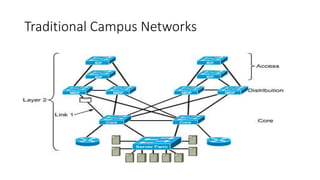
Traditional Campus Networks
Campus Network
• A building or group of buildings connected into one enterprise
network that consists of or more LANs.
• The company usually owns the physical wires deployed in the
campus.
• Generally uses LAN technologies.
• Generally deploy a campus design that is optimized for the fastest
functional architecture over existing wire.
Complex Networks & Challenges
• Complex in terms of number of end users, networking components,
topology, administrative policies.
• Challenges
• Availability
• Supporting Atmosphere as per requirement
• Security
• Performance
• cost
Complex Networks & Challenges
Network Administrator Challenges
• LAN run effectively and efficiently
• Availability and performance impacted by the amount of bandwidth in the
network
• Understand, implement and manage traffic flow
Current Issues
• Broadcasts: IP ARP requests
Emerging Issues
• Multicast traffic (traffic propagated to a specific group of users on a
subnet), video conferencing, multimedia traffic
• Security and traffic flow
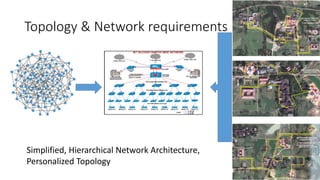
Topology & Network requirements
Simplified, Hierarchical Network Architecture,
Personalized Topology
Bandwidth Utilization
• Network traffic has became highly unpredictable. in terms of
Speed: at what speed we require additional bandwidth
Direction: where my traffic is going
• Video enabled application
• Mobile devices
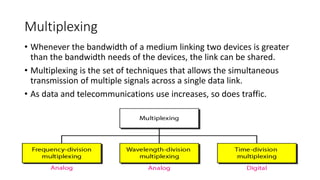
Multiplexing
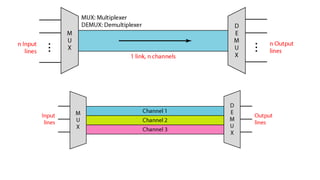
• Whenever the bandwidth of a medium linking two devices is greater
than the bandwidth needs of the devices, the link can be shared.
• Multiplexing is the set of techniques that allows the simultaneous
transmission of multiple signals across a single data link.
• As data and telecommunications use increases, so does traffic.
Prioritized Traffic
• Direction in terms of high traffic utilization path
• Address based priority
• More Ideas on Traffic Management
• Improve TCP
• Stay with end-point only architecture
• Enhance routers to help TCP
• Random Early Discard
• Enhance routers to control traffic
• Rate limiting
• Fair Queuing
• Provide QoS by limiting congestion
Supporting Techniques
• Availability
• Physical link
• LACP
• Logical connectivity
• Dynamic protocols based on situation
• Unnecessary broadcast, multicast traffic
• Security
• Traffic
• VLAN, VTP
• STP
• Availability
• VPN
• DOS & DDOS
• Sniffing, Spam, Large amount of junk data
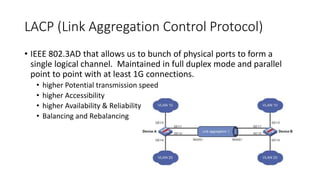
LACP (Link Aggregation Control Protocol)
• IEEE 802.3AD that allows us to bunch of physical ports to form a
single logical channel. Maintained in full duplex mode and parallel
point to point with at least 1G connections.
• higher Potential transmission speed
• higher Accessibility
• higher Availability & Reliability
• Balancing and Rebalancing
VLAN (Virtual LAN)
• Sub divided LAN into Virtual LAN, which creates own broadcast
domain that is partitioned and isolated in our network from Layer-2.
• Broadcast Traffic Control
• Security: from Port level
• VTP: VLAN Trucking protocol (802.1Q) configured in Layer-2 devices
to communicate VLAN information over Trunk Port.
STP (Spanning Tree Protocol)
• STP: Network Protocol that ensures a loop free connection and
avoiding Broadcast Traffic.
• Security: Avoiding end users to share their own network.
• STP Port security: ensure to dedicate specific Systems with their
Media Access Control.
Fundamental Pillars of Alternative Approach
of Enterprise Network
• Architecture: simplified network model
• Control: intelligence, handling context dynamically or administratively
• Operations: visibility on what happening in network and able to
manage
Security Requirements (From End-User Port to Boundaries
of Private Network)
• Firewall
• Anti Virus
• Anti Spam
• Anti Malware
• Port Scanners
• Email Scanners
• URL Filters
• IPsec
• IDS, IPS
• TLS,SSL
• Wireless Controller
• VPN
• Packet Inspectors
• Application Controller
Proxies and Tools
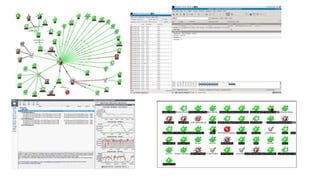
• PRTG, Whatsup Gold, Nessus, Angry IP Scanner, Wireshark, Ethereal,
Snort, Netcat, BURP, TCPdump, Hping, DNSiff, GFI LANguard, Ettercap,
Nikto, John the Ripper, OpenSSH, TripWire, Kismet, NetFilter, IP Filter,
pf, fport, SAINT, OpenPGP …
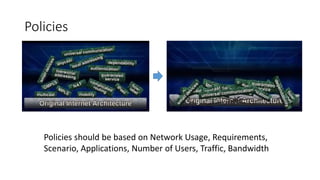
Policies
Policies should be based on Network Usage, Requirements,
Scenario, Applications, Number of Users, Traffic, Bandwidth
Conclusion
• Campus network functional service have to fulfil with out sacrificing
security, performance, reliability based on predefined administrative
policies. Traditional approaches may not efficient now, alternative
personalized approaches are required
Thanking You

Enterprise campus networks

  • 1.
    Enterprise Campus Networks Presentedby Central Computing Center NIT Silchar
  • 2.
    Outline • Traditional CampusNetworks • Complex Networks & Challenges • Bandwidth Utilization • Prioritized Traffic • Supporting Techniques • Security Requirements • Simplification of Network • Policies • Conclusion
  • 3.
  • 4.
    Traditional Campus Networks CampusNetwork • A building or group of buildings connected into one enterprise network that consists of or more LANs. • The company usually owns the physical wires deployed in the campus. • Generally uses LAN technologies. • Generally deploy a campus design that is optimized for the fastest functional architecture over existing wire.
  • 5.
    Complex Networks &Challenges • Complex in terms of number of end users, networking components, topology, administrative policies. • Challenges • Availability • Supporting Atmosphere as per requirement • Security • Performance • cost
  • 6.
    Complex Networks &Challenges Network Administrator Challenges • LAN run effectively and efficiently • Availability and performance impacted by the amount of bandwidth in the network • Understand, implement and manage traffic flow Current Issues • Broadcasts: IP ARP requests Emerging Issues • Multicast traffic (traffic propagated to a specific group of users on a subnet), video conferencing, multimedia traffic • Security and traffic flow
  • 7.
    Topology & Networkrequirements Simplified, Hierarchical Network Architecture, Personalized Topology
  • 8.
    Bandwidth Utilization • Networktraffic has became highly unpredictable. in terms of Speed: at what speed we require additional bandwidth Direction: where my traffic is going • Video enabled application • Mobile devices
  • 9.
    Multiplexing • Whenever thebandwidth of a medium linking two devices is greater than the bandwidth needs of the devices, the link can be shared. • Multiplexing is the set of techniques that allows the simultaneous transmission of multiple signals across a single data link. • As data and telecommunications use increases, so does traffic.
  • 11.
    Prioritized Traffic • Directionin terms of high traffic utilization path • Address based priority • More Ideas on Traffic Management • Improve TCP • Stay with end-point only architecture • Enhance routers to help TCP • Random Early Discard • Enhance routers to control traffic • Rate limiting • Fair Queuing • Provide QoS by limiting congestion
  • 12.
    Supporting Techniques • Availability •Physical link • LACP • Logical connectivity • Dynamic protocols based on situation • Unnecessary broadcast, multicast traffic • Security • Traffic • VLAN, VTP • STP • Availability • VPN • DOS & DDOS • Sniffing, Spam, Large amount of junk data
  • 13.
    LACP (Link AggregationControl Protocol) • IEEE 802.3AD that allows us to bunch of physical ports to form a single logical channel. Maintained in full duplex mode and parallel point to point with at least 1G connections. • higher Potential transmission speed • higher Accessibility • higher Availability & Reliability • Balancing and Rebalancing
  • 14.
    VLAN (Virtual LAN) •Sub divided LAN into Virtual LAN, which creates own broadcast domain that is partitioned and isolated in our network from Layer-2. • Broadcast Traffic Control • Security: from Port level • VTP: VLAN Trucking protocol (802.1Q) configured in Layer-2 devices to communicate VLAN information over Trunk Port.
  • 15.
    STP (Spanning TreeProtocol) • STP: Network Protocol that ensures a loop free connection and avoiding Broadcast Traffic. • Security: Avoiding end users to share their own network. • STP Port security: ensure to dedicate specific Systems with their Media Access Control.
  • 16.
    Fundamental Pillars ofAlternative Approach of Enterprise Network • Architecture: simplified network model • Control: intelligence, handling context dynamically or administratively • Operations: visibility on what happening in network and able to manage
  • 17.
    Security Requirements (FromEnd-User Port to Boundaries of Private Network) • Firewall • Anti Virus • Anti Spam • Anti Malware • Port Scanners • Email Scanners • URL Filters • IPsec • IDS, IPS • TLS,SSL • Wireless Controller • VPN • Packet Inspectors • Application Controller
  • 18.
    Proxies and Tools •PRTG, Whatsup Gold, Nessus, Angry IP Scanner, Wireshark, Ethereal, Snort, Netcat, BURP, TCPdump, Hping, DNSiff, GFI LANguard, Ettercap, Nikto, John the Ripper, OpenSSH, TripWire, Kismet, NetFilter, IP Filter, pf, fport, SAINT, OpenPGP …
  • 20.
    Policies Policies should bebased on Network Usage, Requirements, Scenario, Applications, Number of Users, Traffic, Bandwidth
  • 21.
    Conclusion • Campus networkfunctional service have to fulfil with out sacrificing security, performance, reliability based on predefined administrative policies. Traditional approaches may not efficient now, alternative personalized approaches are required
  • 22.