Sage ERP Accpac
Intelligence
Better Reporting with
Business Intelligence
    Presenter: Debbie Hill
Agenda
         Current Options

         Basic Elements

         Product Demonstration


              2
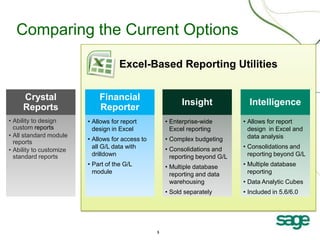
Comparing the Current Options

                                     Excel-Based Reporting Utilities


     Crystal                 Financial
                                                            Insight              Intelligence
     Reports                 Reporter
• Ability to design      • Allows for report          • Enterprise-wide        • Allows for report
  custom reports           design in Excel              Excel reporting          design in Excel and
• All standard module                                                            data analysis
  reports                • Allows for access to       • Complex budgeting
                           all G/L data with          • Consolidations and     • Consolidations and
• Ability to customize
  standard reports         drilldown                    reporting beyond G/L     reporting beyond G/L
                         • Part of the G/L            • Multiple database      • Multiple database
                           module                       reporting and data       reporting
                                                        warehousing            • Data Analytic Cubes
                                                      • Sold separately        • Included in 5.6/6.0


                                                  3
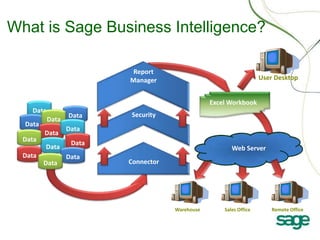
What is Sage Business Intelligence?

                           Report
                          Manager                                       User Desktop


                                                     Excel Workbook
    Data
                  Data    Security
           Data
  Data
                  Data
         Data
  Data
                   Data
         Data                                               Web Server
  Data            Data
         Data             Connector


                                         Warehouse       Sales Office      Remote Office


                                     4
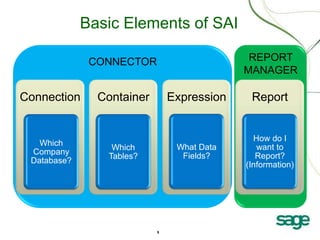
Basic Elements of SAI

              CONNECTOR                      REPORT
                                            MANAGER

Connection     Container       Expression    Report


                                              How do I
   Which                        What Data      want to
                 Which
 Company                         Fields?       Report?
                Tables?
 Database?                                  (Information)


                           5
Demonstration

Financial Trend Analysis

Financial Reports

Non-Financial Reports
 – Operations


Report Designer
 – What/If Analysis


                           6
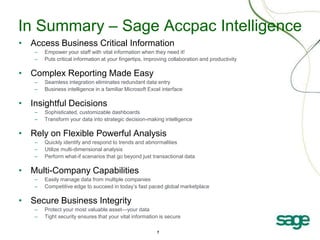
In Summary – Sage Accpac Intelligence
• Access Business Critical Information
   –   Empower your staff with vital information when they need it!
   –   Puts critical information at your fingertips, improving collaboration and productivity

• Complex Reporting Made Easy
   –   Seamless integration eliminates redundant data entry
   –   Business intelligence in a familiar Microsoft Excel interface

• Insightful Decisions
   –   Sophisticated, customizable dashboards
   –   Transform your data into strategic decision-making intelligence

• Rely on Flexible Powerful Analysis
   –   Quickly identify and respond to trends and abnormalities
   –   Utilize multi-dimensional analysis
   –   Perform what-if scenarios that go beyond just transactional data

• Multi-Company Capabilities
   –   Easily manage data from multiple companies
   –   Competitive edge to succeed in today’s fast paced global marketplace

• Secure Business Integrity
   –   Protect your most valuable asset—your data
   –   Tight security ensures that your vital information is secure

                                                         7
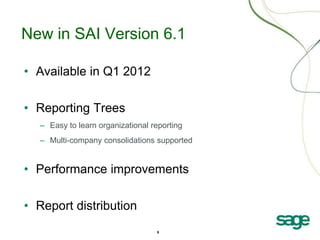
New in SAI Version 6.1

• Available in Q1 2012

• Reporting Trees
  – Easy to learn organizational reporting
  – Multi-company consolidations supported


• Performance improvements

• Report distribution
                                  8
New in Version 6.1                                   Available
                                                     Q1 2012
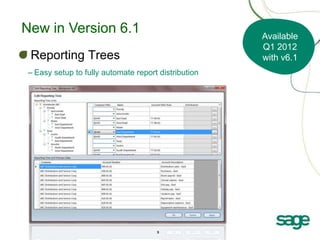
 Reporting Trees                                     with v6.1
– Easy setup to fully automate report distribution


                                     9
New in Version 6.1                         Available
                                           Q1 2012
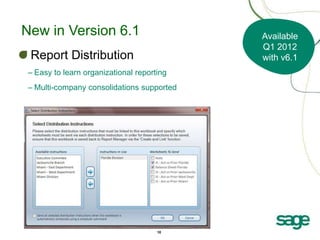
 Report Distribution                       with v6.1
– Easy to learn organizational reporting
– Multi-company consolidations supported


                                     10
Questions?

                    www.sageaccpac.com/intelligence
                •   Product brochure
                •   FAQ
                •   White paper
                •   Sage University: http://sageu.com


  Debbie Hill


                          11

Enhancing your Budget & Reporting Process with SAI

  • 1.
    Sage ERP Accpac Intelligence BetterReporting with Business Intelligence Presenter: Debbie Hill
  • 2.
    Agenda Current Options Basic Elements Product Demonstration 2
  • 3.
    Comparing the CurrentOptions Excel-Based Reporting Utilities Crystal Financial Insight Intelligence Reports Reporter • Ability to design • Allows for report • Enterprise-wide • Allows for report custom reports design in Excel Excel reporting design in Excel and • All standard module data analysis reports • Allows for access to • Complex budgeting all G/L data with • Consolidations and • Consolidations and • Ability to customize standard reports drilldown reporting beyond G/L reporting beyond G/L • Part of the G/L • Multiple database • Multiple database module reporting and data reporting warehousing • Data Analytic Cubes • Sold separately • Included in 5.6/6.0 3
  • 4.
    What is SageBusiness Intelligence? Report Manager User Desktop Excel Workbook Data Data Security Data Data Data Data Data Data Data Web Server Data Data Data Connector Warehouse Sales Office Remote Office 4
  • 5.
    Basic Elements ofSAI CONNECTOR REPORT MANAGER Connection Container Expression Report How do I Which What Data want to Which Company Fields? Report? Tables? Database? (Information) 5
  • 6.
    Demonstration Financial Trend Analysis FinancialReports Non-Financial Reports – Operations Report Designer – What/If Analysis 6
  • 7.
    In Summary –Sage Accpac Intelligence • Access Business Critical Information – Empower your staff with vital information when they need it! – Puts critical information at your fingertips, improving collaboration and productivity • Complex Reporting Made Easy – Seamless integration eliminates redundant data entry – Business intelligence in a familiar Microsoft Excel interface • Insightful Decisions – Sophisticated, customizable dashboards – Transform your data into strategic decision-making intelligence • Rely on Flexible Powerful Analysis – Quickly identify and respond to trends and abnormalities – Utilize multi-dimensional analysis – Perform what-if scenarios that go beyond just transactional data • Multi-Company Capabilities – Easily manage data from multiple companies – Competitive edge to succeed in today’s fast paced global marketplace • Secure Business Integrity – Protect your most valuable asset—your data – Tight security ensures that your vital information is secure 7
  • 8.
    New in SAIVersion 6.1 • Available in Q1 2012 • Reporting Trees – Easy to learn organizational reporting – Multi-company consolidations supported • Performance improvements • Report distribution 8
  • 9.
    New in Version6.1 Available Q1 2012 Reporting Trees with v6.1 – Easy setup to fully automate report distribution 9
  • 10.
    New in Version6.1 Available Q1 2012 Report Distribution with v6.1 – Easy to learn organizational reporting – Multi-company consolidations supported 10
  • 11.
    Questions? www.sageaccpac.com/intelligence • Product brochure • FAQ • White paper • Sage University: http://sageu.com Debbie Hill 11

Editor's Notes

  • #4 We know that Accpac ships with Crystal Reports. Crystal is a good reporting tool, but you are limited to seeing static information and you really have to be a Crystal expert to edit and create your own reports.The next set of report tools for Accpac are based in ExcelAccpac’s General Ledger ships with Financial Reporter, which is a great tool for financial reports. Again, great tool but only if want to create financial reports for 1 company at a time. Insight is another Business Intelligence reporting tool that all of you may not be familiar with. It is a sophisticated BI tool with advanced budgeting capabilities. This is designed for companies that need to tackle demanding requirements. It is an excellent tool, but it is not included with the purchase of Accpac and it requires a lot more for implementation.So what we wanted to do at Sage is bring Business Intelligence to all our Accpac customers. We bundled a BI tool that will meet most all of your needs. It also operates in Excel and it comes with pre-configured reports so you can quickly get it installed and up and running.
  • #5 So now, how does that translate into the Sage Accpac Intelligence?From now on I’ll use another acronym, SAI. The SAI module is an automated set of tools that allows you to extract information from one or more data sources and bring that information into Excel workbooks or Excel templates. The information transferred can be further manipulated manually (if required) or, through the use of macros. It can be changed and adjusted without the user having to do any further work.The data sources selected can be different types of databases, for example one database could store payroll information on Pervasive platform, while the second extracts financial information stored in a MS SQL database. This is one of the most powerful features of the SAI module.In addition to exporting information into Excel, the web module allows remote sites to run the same reports over the internet, allowing real time reporting to all areas of the business, no matter where they are situated.That is the idea behind the SAI product using the available modules. We will get into those details in just a moment, but first, I want to explain the benefits and what this means to your existing customers and what you should be pitching to your prospects.
  • #9 Report Designer Enhancement: Reporting TreesAllow users to attach Reporting Trees to their Report Designer layouts, expanding the possibilities for different reporting structures.Financials Performance EnhancementThis is an enhancement to a component that physically bulk pastes data into excel and can improve report load times by up to 700% (e.g. 50 to 8 minutes) on very large databases with lots of accounts (35000+). The following reports will benefit from this enhancement: Demonstration Folder:> Management Pack DFinancials Folder:> Consol Financial Reports> Financial ReportsReport Distribution FunctionalityAllow users to distribute their reports or any excel workbook to a predefined list of recipients. Distribution options include Email, File Publishing and FTP Publishing.
  • #10 Report Designer Enhancement: Reporting TreesAllow users to attach Reporting Trees to their Report Designer layouts, expanding the possibilities for different reporting structures.Financials Performance EnhancementThis is an enhancement to a component that physically bulk pastes data into excel and can improve report load times by up to 700% (e.g. 50 to 8 minutes) on very large databases with lots of accounts (35000+). The following reports will benefit from this enhancement: Demonstration Folder:> Management Pack DFinancials Folder:> Consol Financial Reports> Financial ReportsReport Distribution FunctionalityAllow users to distribute their reports or any excel workbook to a predefined list of recipients. Distribution options include Email, File Publishing and FTP Publishing.
  • #11 Report Designer Enhancement: Reporting TreesAllow users to attach Reporting Trees to their Report Designer layouts, expanding the possibilities for different reporting structures.Financials Performance EnhancementThis is an enhancement to a component that physically bulk pastes data into excel and can improve report load times by up to 700% (e.g. 50 to 8 minutes) on very large databases with lots of accounts (35000+). The following reports will benefit from this enhancement: Demonstration Folder:> Management Pack DFinancials Folder:> Consol Financial Reports> Financial ReportsReport Distribution FunctionalityAllow users to distribute their reports or any excel workbook to a predefined list of recipients. Distribution options include Email, File Publishing and FTP Publishing.